RSS
 

Posts Tagged ‘REVIEW’

Canon EOS 7D Mark II – Hands-On Review

03 Nov

Canon EOS 7D Mark II – Hands-On Review

Larry Becker discusses the new Canon EOS 7D Mark II DSLR. He explores the camera’s many high-performance features, including its dual DIGIC 6 processors, 20.2MP APS-C sensor, full HD video capture, and fast, accurate autofocus. He also demonstrates many of the “hidden” features that make this camera a welcomed update to the groundbreaking EOS 7D.

7d-mark2

Are you ordering one? Or maybe you already have one on pre-order?

I know a few photographers that do weddings and shoot sports and action that are really excited about the focus and drive on this new Canon body. What are your thoughts?

The post Canon EOS 7D Mark II – Hands-On Review by Darlene Hildebrandt appeared first on Digital Photography School.


Digital Photography School

 
Comments Off on Canon EOS 7D Mark II – Hands-On Review

Posted in Photography


Nikon D800 Review- The King Of Full Frame?

31 Oct

The Nikon D800 is a professional full frame camera from Nikon that features a whopping 36,3 megapixels, the autofocus system from the D4, and dual card slots. But is Nikon’s lightest full-frame DSLR capable of delivering the image quality and dynamic range that Nikon promises? Let’s find out… Here’s a quick rundown of the important specs and features: 36,3 MP Continue Reading

The post Nikon D800 Review- The King Of Full Frame? appeared first on Photodoto.


Photodoto

 
Comments Off on Nikon D800 Review- The King Of Full Frame?

Posted in Photography


App Review: Bluristic für iPhone

31 Oct

Die iPhone-App „Bluristic“ verspricht echte Langzeitbelichtungen für experimentelle Fotografie mit dem iPhone. Doch wie gut funktioniert das Konzept wirklich? Ich habe die App auf Herz und Nieren getestet.

Konzept

Der grundsätzliche Ansatz von Bluristic ist nicht nur sehr gut, sondern tatsächlich einmalig unter den vielen Foto-Apps im Store: Die App macht Langzeitbelichtungen und trackt dabei die fokussierten Subjekte, sodass durch Bewegung des Smartphones oder des Subjekts Wisch- und Mitziehereffekte auf dem Hintergrund erzeugt werden.

Bluristic setzt dabei nicht auf einen Filter, det nachträglich einen Effekt auf das Bild setzt, sondern nutzt einen Umweg, um echte Langzeitbelichtung zu ermöglichen: Über die Video-Funktion des iPhones werden je nach Belichtungszeit sehr viele Bilder hintereinander aufgenommen, sodass man am Ende ein kombiniertes Bild aus sehr vielen Einzelbildern erhält.

Endlich kann man, so zumindest die Theorie, auch mit dem iPhone ein bisschen experimentellere Fotografie betreiben, die nicht nur durch Nachbearbeitung glänzt.

Foto eines statischen Objekts mit Bluristic, nachbearbeitet in Photoshop

Foto eines statischen Objekts mit Bluristic, farblich nachbearbeitet in Photoshop

Design

Die designtechnische Ausarbeitung von Bluristic muss im negativen Sinne als „rudimentär“ beschrieben werden: Abgesehen davon, dass es in der App lediglich einen Landscape-Modus mit einigen wenigen und sehr einfachen Icons gibt, nutzt Bluristic auch generell nur wenige Gestaltungselemente, die zum einen Teil mit Apple-eigenen Standard-Tables und -Tabellen abgebildet werden, zum anderen Teil mit recht amateurhaften Grafiken daherkommen.

Eigene Akzente in Sachen Design setzt Bluristic kaum, wenn überhaupt, dann fällt nur das sehr markante App-Icon und der dazu passenden Start-Screen positiv auf. Auch der Sound ist nicht gerade sonderlich vertrauenserweckend: Ein ansteigendes Surren verkündet den Verlauf einer Aufnahme, der umgekehrte Ton beendet sie. Mit bekannteren Foto-Apps hat das alles nur sehr wenig zu tun.
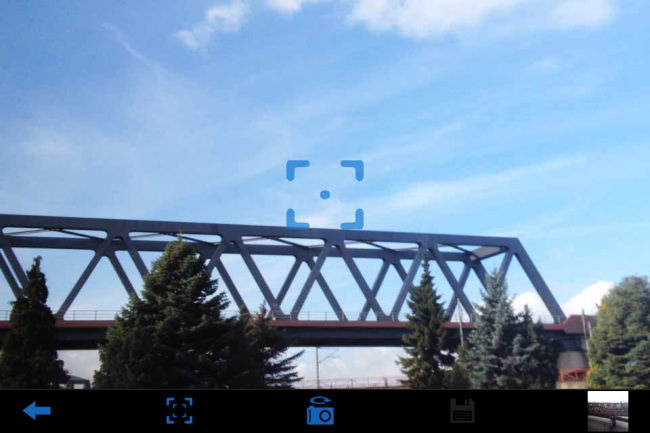
Das sehr minimalistische User-Interface bei der Aufnahme

In Sachen Design ist auf allen Ebenen dringend Nachbesserung gefragt: Momentan hat Bluristic nur wenig Wiedererkennungswert und wirkt stellenweise wie eine unprofessionell zusammengeschusterte Bastler-App.

Usability/UX

Die gute Nachricht ist: Bluristic ist nicht so schwer zu bedienen, wie man es zu Beginn vermuten mag. Die schlechte Nachricht ist: So leicht allerdings auch nicht. Die Bilder werden gemacht, indem man im Aufnahmemodus den Bildschirm berührt, gedrückt hält und die Kamera dabei bewegt.

Die Schwierigkeit dabei ist es, einen roten Punkt auf dem Screen innerhalb eines Quadrats zu behalten, der wie eine Wasserwaage das getrackte Subjekt fixiert. Anders ausgedrückt: Wenn man das iPhone während der Aufnahme zu stark bewegt und rotiert, dann verliert die App auch das Subjekt, das man eigentlich fotografieren will und man bekommt ein vollständig verwaschenes Bild.

Foto eines sich bewegenden Objekts, nachbearbeitet in Photoshop.

Foto eines sich bewegenden Objekts, farblich nachbearbeitet in Photoshop

Für Einsteiger gibt es dazu ein kleines Tutorial beim ersten Einstieg in die App, sonst hat Bluristic lediglich ein paar Einstellungsmöglichkeite und eine sehr abgespeckte interne Galerie für die Aufnahmen. Insgesamt kann man sagen, dass Bluristic nach einiger Einarbeitungszeit durchaus schnell zu bedienen ist. Richtig Freude mag bei der Nutzung aber nicht aufkommen, dafür wirkt die App insgesamt zu unfertig.

So muss etwa irritierenderweise vor jeder Aufnahme ein Play-Button gedrückt werden, selbst wenn man sich bereits auf dem „Capture“-Tab befindet und die Bilder können nur in einer recht kleinen Auflösung exportiert werden, beides höchstwahrscheinlich ein Resultat dessen, dass man technisch betrachtet bei der Aufnahme ein Video dreht.
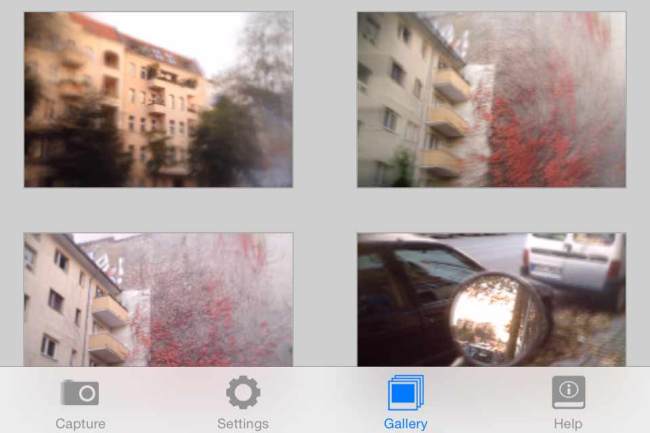
Die Galerie-Ansicht. Viel mehr gibt es in der App auch nicht zu sehen.

Die Galerie-Ansicht. Viel mehr gibt es in der App auch nicht zu sehen.

Fazit

Kommen wir zur entscheidenden Frage: Wie sind die Ergebnisse mit Bluristic denn jetzt eigentlich? Wie brauchbar sind die Bilder, die man mit der App macht und wie sehr entsprechen sie den gezeigten Promo-Bildern im App-Store?

Sofern man nicht die Qualität von Mitziehern einer DSLR erwartet, erfüllt Bluristic sein Versprechen wirklich gut: Bei statischen Objekten sind die Ergebnisse und der Effekt entfernt vergleichbar mit dem Lensbaby – in der Mitte scharfe Bilder, die zu den Rändern hin verwischen und verschwimmen.

Mit etwas Übung kann man mit Bluristic durchaus spannende Experimente und Fotos aufnehmen, die sich sehen lassen können. Durch die echte Langzeitbelichtung lassen sich außerdem erstmals bewegte Objekte verschwimmen, Passanten verschwinden lassen und auch echte Mitziehereffekte kreieren.

Freilich müsste man für die exakte Anwendung der App und einige Aufnahmearten wieder ein Stativ verwenden, was den Sinn einer Smartphone-App zum Mitnehmen und aus der Hand schnell Fotos machen konterkariert, aber auch so sind die Bluristic-Ergebnisse durchaus sehenswert.

Portrait in Bewegung, nachbearbeitet in Photoshop.

Portrait meiner Herzdame in Bewegung, farblich nachbearbeitet in Photoshop.

Trotz all der Schwächen und Schwierigkeiten der App kann man Bluristic vor allem für den niedrigen Preis von unter einem Euro durchaus weiterempfehlen, denn das Programm ist sehr originell und tut, was es verspricht.

Wenn am ganzen Drumherum (und vielleicht auch am Aufnahmeprozess selbst) noch ein paar Verbesserungen geschehen, dann wird Bluristic vielleicht irgendwann ein richtig gutes Tool fürs iPhone. Bis dahin ist es zumindest für alle, die gern mal herumexperimentieren, im Sinne einer Lomo-App durchaus zu empfehlen.


kwerfeldein – Fotografie Magazin | Fotocommunity

 
Comments Off on App Review: Bluristic für iPhone

Posted in Equipment


Accessory Review: LaCie Rugged Thunderbolt

28 Oct

Earlier this year, storage manufacturer LaCie launched an upgraded version of its Rugged hard drive that features improved damage resistance and a built-in Thunderbolt cable. The new Rugged Thunderbolt drive is available with either a hard disk or an SSD, and also has a USB 3.0 port for universal connectivity. Is it a good storage option for photographers who need something that can handle the bumps in the road? Read more

Articles: Digital Photography Review (dpreview.com)

 
Comments Off on Accessory Review: LaCie Rugged Thunderbolt

Posted in Uncategorized


Apple iPhone 6 Plus camera review

27 Oct

The iPhone 6 Plus, introduced alongside the iPhone 6, offers one distinct feature that its sibling doesn’t – optical image stabilization. In all other respects, their 8MP cameras, F2.2 aperture lenses and updated AF systems are the same. On paper the 6 Plus doesn’t represent a great leap forward in terms of camera tech, but how does it perform in the real world? Read more

Articles: Digital Photography Review (dpreview.com)

 
Comments Off on Apple iPhone 6 Plus camera review

Posted in Uncategorized


Quick Review: Using Iconosquare to manage and grow your Instagram following

15 Oct

Instagram’s straightforward user interface is geared for posting and viewing photos, but if you’ve got an eye on growing or managing a large following, you’ll soon run into the app’s limitations. Iconosquare aims to give Instagram users basic metrics about their content and help manage large groups of followers. We tried the service out to see how it works and how useful it is. Read more

Articles: Digital Photography Review (dpreview.com)

 
Comments Off on Quick Review: Using Iconosquare to manage and grow your Instagram following

Posted in Uncategorized


Review of the Tamron 16-300mm F/3.5-6.3 Macro Lens

14 Oct

Tamron1All test images are presented with no alteration in color, sharpness, contrast, or clarity except where indicated. Only small adjustments in exposure were made to test images. Gear used for this review and tests – Canon 7D and a Manfrotto 190 tripod.
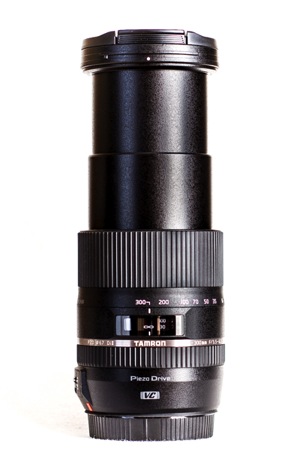
There is no denying that any lens capable of shooting in a wide range of conditions will always be in high demand and very popular. So called “all-in-one lenses” are most definitely a great way to be flexible in more situations without lugging around a lot of gear.

Tamron2

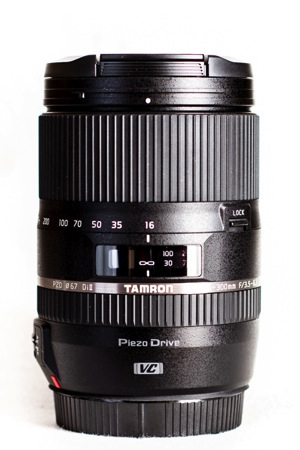
One of Tamron’s latest additions to this category is the 16-300mm F/3.5-6.3 Di II VC PZD Macro. Don’t worry, all of those letters will meet with explanations shortly. It is a lens that is marketed as a go-to option for shooting wide angle scenes, as well as zooming in very tight for those dramatic close-ups. It is intended for those who want to pack as little gear as possible, but still keep consistent quality through a huge range of focal lengths.

Lens Specifications

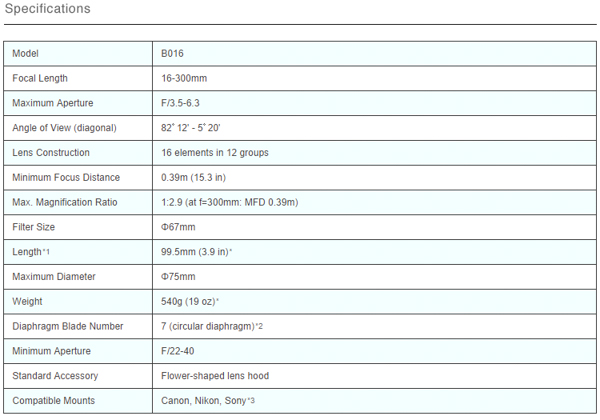
Here is the nitty gritty for this lens. The specifications are taken directly from the Tamron USA website. Please note that the lens I worked with was a Canon mount and these specifications are for Nikon mounts, but the numbers should be very similar.

Specs

Let’s talk about all those letters on the side of the lens that were mentioned earlier and go over their meanings. The “Di-II” designation simply means that the lens is intended for use with digital SLR cameras. The “VC” means that the lens is equipped with a vibration compensation (image stabilizer) feature and the “PZD” indicates the lens has Tamron’s proprietary Piezo Drive autofocus mechanism.

Fit and Finish

The lens shipped from Tamron USA, included a nice hood, and of course front and end caps. Taking the lens in hand, you really get a feel for the weight. My first impression was that it felt somewhat heavy but after further handling I prefer to call the weight of the lens substantial rather than heavy. Tamron lists the lens as weighing 19 ounces (540g) which is actually lighter than some other lenses of similar zoom range and aperture.

Tamron4

Tamron8

Tamron9

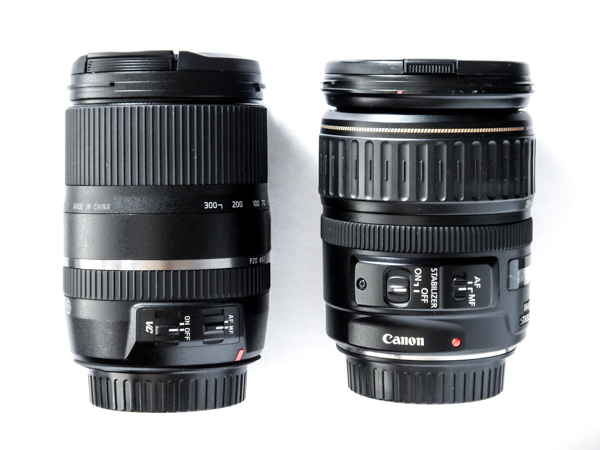
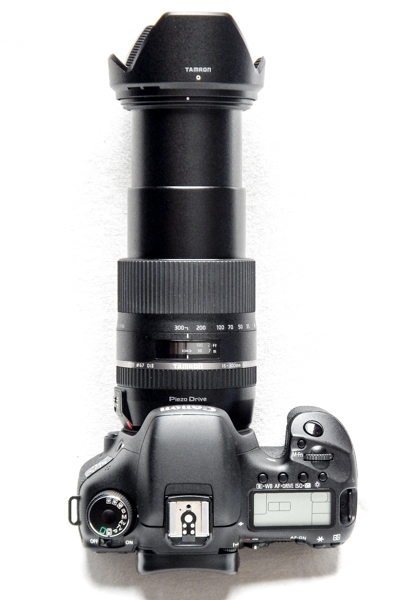
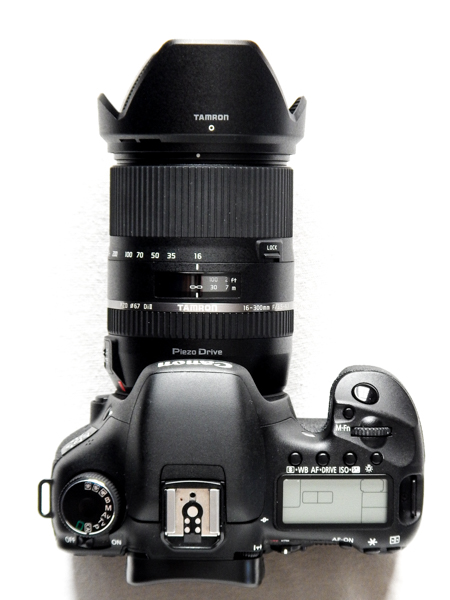
For the amount of zoom power that has been packed inside, I was very surprised at the shear compactness of this lens. Tamron’s 16-300mm is just under four inches in length at 3.9 inches (9.9cm). Here is a side-by-side comparison with my trusty Canon 28-135mm.

Sidebyside

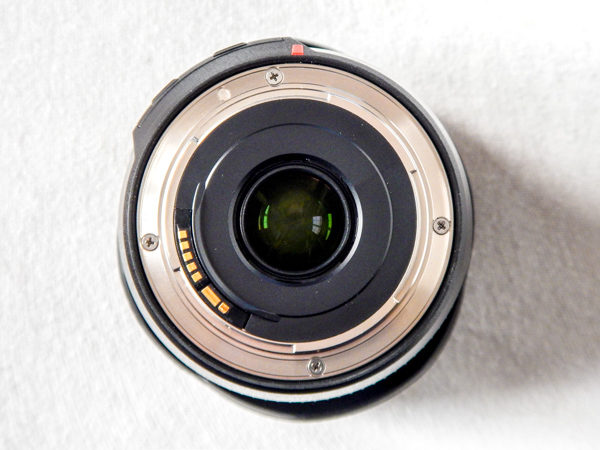
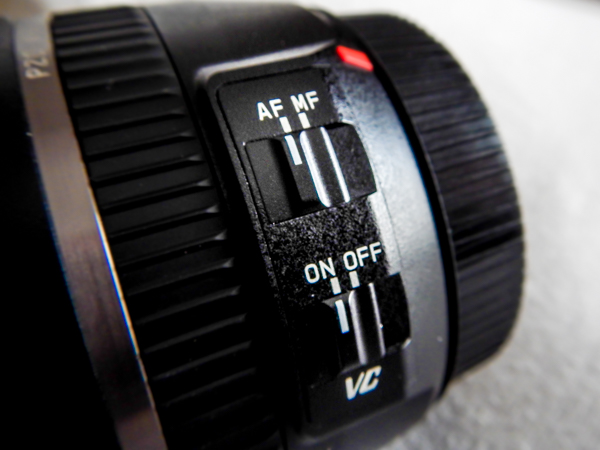
The lens feels very solid in hand and fits securely to the camera with no rattles or gaps. All of the on-lens controls are very crisp in their function and are well placed for easy no-look operation.

Lensswitches

The rubber used for the zoom and focusing ring has just enough bite to securely adjust the lens, without the overly rubberized and sticky feel of some manufacturer’s lenses. Straight out of the box I did notice the the zoom was very tight – and I do mean tight. However, over the course of using the lens for a few weeks the tightness quickly lessened, and the zoom remained very responsive and firm for the duration of use.

Balance and Weight

The balance on the lens is acceptable even when fully extended to 300mm. I attribute this to the relatively slender profile that keeps most of the weight close to the camera and makes this lens very nimble. That being said, you will still definitely know it is attached to your camera. Always practice good camera holding mechanics when using this and other larger lenses in the field for long periods of time.

Tamron6

Performance and Image Quality

Now, on to the good stuff. I was quite impressed with the overall image performance of the Tamron 16-300mm lens. The sharpness was much better than I had expected for such a wide range variable zoom lens, even when shooting at the maximum f/3.5. Color reproduction was very good bordering on superb, and the bokeh was surprisingly creamy.

Grass

Pond

This roll of tape was shot wide at 16mm and then again at 300mm.

Tapewide

Tapezoom

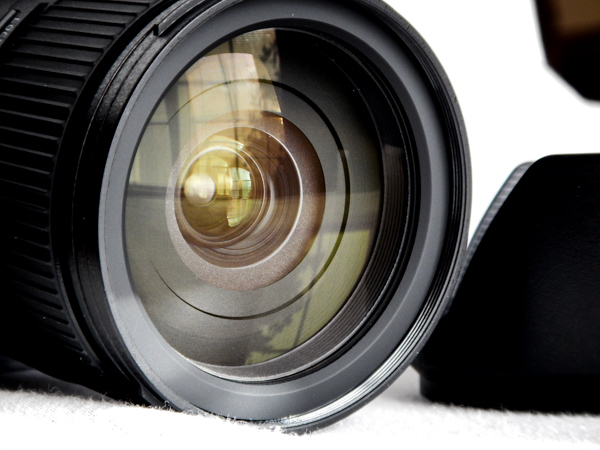
There was very little vignetting around the edges of photos and little discernible chromatic aberration. The lack of this aberration is possibly due to the choice by Tamron to include three aspherical lens elements within the internal glass array. Though debated, aspherical lenses are known to produce less optical distortion and aberrations than conventional round lens elements. Still, at the widest angle of 16mm, there is some small but noticeable barrel distortion and edge darkening of images taken at or near the minimum focusing distance of 15.3 inches (38.9cm).

Bricks

Also, at wider apertures, again there is a small but still discernible edge softening of images. Here are five images shot over varying apertures. Notice the increasing edge softness as the size of the aperture increases.

Printf44

f/44

Printf22

f/22

Printf16

f/16

Printf10

f/10

Printf6 3

f/6.3

The proprietary Piezo Drive autofocus seems to live up to the manufacturer’s acclaim. Autofocus is very fast and accurate. The focusing mechanism itself is very quiet but there is a somewhat audible clicking sound that is present when operating in AF-Servo (continuous AF) mode but it is not loud enough to cause panic for wildlife and nature photographers.

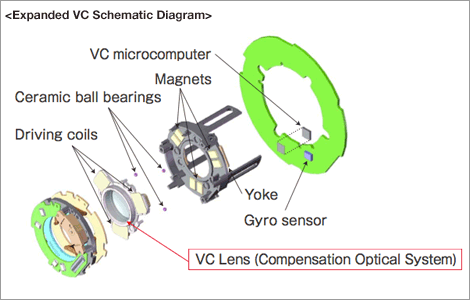
Tamron has possibly hit a home run with the image stabilization system on this lens. Referred to as Vibration Control by Tamron, the image stabilization on this lens is outstanding.

VC Diagram

When looking through the viewfinder while engaging and disengaging the VC, you can truly see an immediate and substantial smoothing out of camera shake. Though definitely not a replacement for a good tripod and steady hands, the VC made a noticeable difference in the sharpness of images taken at slower shutter speeds in low light.

Small Details

As with most gear, people place varying degrees of importance on minute details. Here are a few small points that impressed me about the Tamron 16-300mm.

  • Tips for better shooting included – Tamron has chosen to include tips for better shooting with the paperwork that ships with the lens. Although these tips are very basic I found it be a positive gesture from the company to educate the people who purchase their product. Shootingtips
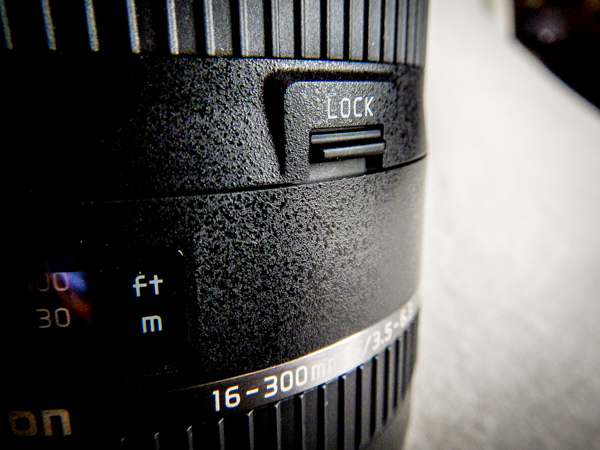
  • Zoom-lock function – A lockable zoom is very useful when you find yourself hiking or walking with a larger lens fixed to your camera. Gravity and vibration will slowly extend a downward pointing lens. The lock eliminates the constant pulling in of the lens barrel. I do, however, wish the lock could be used throughout the entire zoom range and not only at 16mm. Lenslock
  • Deeper finger grips on the lens cap – I know, this is an extremely small and neurotic detail. In any case, it seems that Tamron has improved their lens caps with more pinchable clips making them easier to attach and remove from the lens. This feature also reduces the chance of fumbling a cap removal.
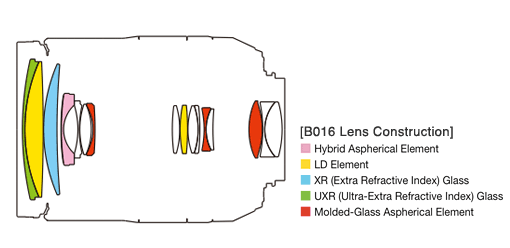
  • Aspherical lens elements – The pros and cons of aspherical lenses is delightfully arguable among photographers. Still, the aspherical lens elements in the Tamron 16-300mm do seem to reduce some distortions. Lensstack
  • Manual override autofocus – This is a handy feature. It allows you to micro adjust focus manually while still in autofocus mode. This saves you a little time and also makes it easier to maintain your mental focus while composing.

Tamron7

Bottom Line

All in one lenses are loved, hated, and everything in between. Regardless of your inclination, the Tamron 16-300mm F/3.5-6.3 Di II VC PZD Macro seems to be a strong candidate for those looking to have one lens to cover most everything they will be shooting. It is a well constructed, reasonably compact, zoom lens that can shoot landscapes and high zoom with good image sharpness and color. Wildlife and street photographers will find this lens to be outstanding for long range subjects where camera shake can make or break a photograph. Overall, this is a lens that I would be happy to have in my bag.

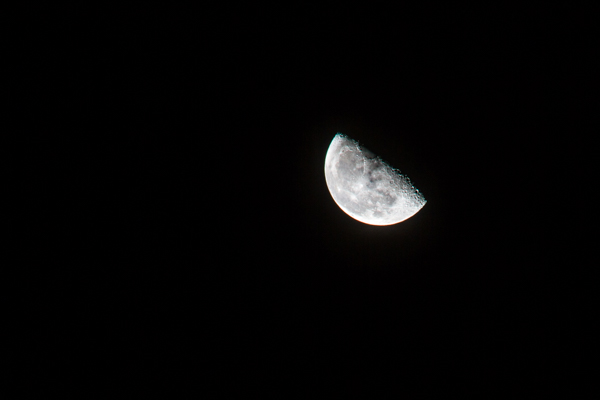
These are some sample images taken with the Tamron 16-300mm F/3.5-6.3 Di II VC PZD Macro and processed in Adobe Lightroom 5.

Leaves

Moon

Jamie

Colordrops

The post Review of the Tamron 16-300mm F/3.5-6.3 Macro Lens by Adam Welch appeared first on Digital Photography School.


Digital Photography School

 
Comments Off on Review of the Tamron 16-300mm F/3.5-6.3 Macro Lens

Posted in Photography


High Flyer? DJI Phantom 2 Vision+ Drone Review

14 Oct

The DJI Phantom 2 Vision+ is the company’s newest flagship consumer drone, outfitted with a 3-axis gimbal, Adobe DNG RAW capture in addition to HD video recording, and operated by the DJI Vision smartphone application. It’s capable of producing 14MP JPEGs and Raw images, and could be an ideal tool for a real estate photographer or independent filmmaker looking for b-roll. Does it rise to the occasion? Read our review

Articles: Digital Photography Review (dpreview.com)

 
Comments Off on High Flyer? DJI Phantom 2 Vision+ Drone Review

Posted in Uncategorized


Amazon Fire Phone camera review

28 Sep

The Fire Phone is Amazon’s first foray into the smartphone hardware business. It offers unique features like a Dynamic Perspective 3D-user interface, using four front-facing cameras to track the user’s face and adjust how content is displayed accordingly. It’s outfitted with plenty of cameras, but is it suitable for a mobile photographer Our sister site, connect.dpreview.com aims to find out in a full review. Read more

Articles: Digital Photography Review (dpreview.com)

 
Comments Off on Amazon Fire Phone camera review

Posted in Uncategorized


Bring on the competition: Canon PowerShot G7 X First Impressions Review

16 Sep

For the last two years, the only enthusiast compact with a large sensor you could buy says ‘Sony’ on the front. Finally, at Photokina 2014, we get some competition from Canon. The PowerShot G7 X uses what is likely the same 20MP sensor as the Sony RX100 III but offers a longer lens, flip-up touchscreen LCD, and arguably better controls. For all the details on this exciting new camera, head on over to our First Impressions Review.

Articles: Digital Photography Review (dpreview.com)

 
Comments Off on Bring on the competition: Canon PowerShot G7 X First Impressions Review

Posted in Uncategorized