RSS
 

Posts Tagged ‘REVIEW’

Fujifilm X-T30 review

17 Apr

$ (document).ready(function() { SampleGalleryStripV2({“galleryId”:”2839422674″,”isMobile”:false}) })

Sample photoSample photoSample photoSample photoSample photo
Gold Award

84%
Overall score

Fujifilm’s X-T30 brings the same 26MP sensor, processor and much of the feature set of the high-end X-T3 at a more reasonable price. If that sounds familiar, it’s because the relationship between the X-T20 and X-T2 was the same.

With the X-T30 you get Fujifilm’s latest AF system, along with plenty of direct controls and a tilting touchscreen, all in a smaller body. The X-T30 also comes at a significantly lower price than the X-T3, with the body priced at $ 899, versus $ 1499 for the X-T3. We’ll discuss what features were cut in order to make the X-T30 the less expensive of the two options a bit later in the review.

Key specifications

  • 26.1MP APS-C X-Trans BSI-CMOS 4 sensor
  • X-Processor 4
  • Hybrid AF system has 425 phase-detect points spread across the entire frame
  • Burst shooting at 30 fps with no blackout (but 1.25X) crop using electronic shutter; 20 fps without crop
  • 2.36M-dot OLED viewfinder w/0.62x equiv. magnification and 100 fps refresh rate in boost mode
  • 3″ tilting touchscreen display
  • Dedicated drive, shutter speed and exposure compensation dials
  • Joystick for AF point selection
  • Eterna Film Simulation mode
  • DCI and UHD 4K/30p capture using full width of sensor
  • 4:2:0 8-bit internal recording or 4:2:2 10-bit HDMI output
  • USB-C socket with headphone support
  • Single SD card slot (UHS-I only)

That’s a lot of camera for under $ 900, body-only. If you’d like to add a lens, you can get the camera and the 15-45mm F3.5-5.6 OIS Power Zoom lens for $ 999, or with the excellent 18-55 F2.8-4 lens for $ 1299. The camera is available in silver, black and the graphite silver version shown in this review.


What’s new and how it compares

The X-T30 borrows the sensor and processor from the more expensive X-T3, and that’s great news.

Read more

Body and handling

For a $ 900 camera, the X-T30 is surprisingly well-built. It has a tilting touchscreen LCD, nice EVF and direct controls that make it a pleasure to use (most of the time).

Operation and controls

In addition to four customizable buttons you can also ‘swipe’ the X-T30’s LCD in one of four directions to adjust settings. The camera offers two different customizable menus so you can set it up the way you’d like.

Read more

First impressions

Shooting with the X-T30 is a mixed bag. The results are great, but the ergonomics need work.

Read more

Image quality

The X-T30’s 26MP sensor offers great out-of-camera JPEGs and flexible Raw files.

Read more

Autofocus

While not class-leading, the X-T30’s AF system is speedy and reliable in most (but not all) situations.

Read more

Video

Put simply, you won’t find a better video camera in this price range than the X-T30.

Read more

Is the Fujifilm X-T30 right for you?

Whether you’re a hardcore videographer, landscape photographer or a soccer mom, we’ve spelled out what the X-T30 is best suited for.

Read more

Conclusion

Find out if the X-T30 is the midrange stills/video hybrid to beat.

Read more

Sample gallery

View real-world photos taken with the Fujifilm X-T30.

Read more

Articles: Digital Photography Review (dpreview.com)

 
Comments Off on Fujifilm X-T30 review

Posted in Uncategorized


Review: DJI Mavic 2 Zoom

14 Apr

The post Review: DJI Mavic 2 Zoom appeared first on Digital Photography School. It was authored by Adam Welch.

Photography is an ever evolving medium. New gear, new technology and new ways of seeing the world make it an extremely exciting time to be a photographer right now.

Over the last year or so I’ve become more and more interested in aerial photography and getting new perspectives for my work. And wouldn’t you know it, DJI just released another brand new tool for aerial photography in August of 2018. So when I had the opportunity to test it out, I didn’t hesitate. I give you…

…wait for it…

…the DJI Mavic 2 Zoom.

dji-mavic-2-zoom-digital-photography-school-adam-welch

Out of the box

Sleek, compact and understated; that’s how I would describe the appearance of the Mavic 2 Zoom. DJI has chosen a color scheme that should be familiar to those who have experienced the previous model upon which they have based the Mavic 2 Zoom upon – the Mavic Pro. The drone itself is dark gray with a silver belly and matching silver accents. You’ll notice that while the overall lines have been maintained, the Mavic 2 Zoom is a completely different animal when compared to its predecessor.

dji-mavic-2-zoom-digital-photography-school-adam-welch

dji-mavic-2-zoom-digital-photography-school-adam-welch

dji-mavic-2-zoom-digital-photography-school-adam-welch

The gimbal cover of the Mavic 2 has also been updated to protect the camera during transport. While easy to remove, I have to admit reattaching the gimbal cover was slightly confusing the first time I attempted it. Luckily, DJI has included a quick diagram to help with this.

dji-mavic-2-zoom-gimbal-digital-photography-school-adam-welch

Who knows, maybe it was just me being clumsy? In any case, once you get the hang of the new gimbal cover, reattaching it becomes essentially like riding a bike.

The Mavic 2 Zoom has incorporated a set of legitimate landing and take-off lights to aid in low-light situations when the bottom-facing obstacle sensors may have difficulty discerning where the ground may be. Speaking of sensors, DJI has enhanced the Mavic 2 Zoom with Omnidirectional Obstacle Sensing technology (more on that later) for side, front and rear obstacle avoidance. These sensors are readily visible throughout the breadth of the aircraft yet somehow the body of the drone doesn’t appear overly cluttered.

dji-mavic-2-zoom-digital-photography-school-adam-welch

The controller for the Mavic 2 Zoom has received a light makeover as well. I was happy to see the addition of the fantastic “stow and go” joysticks present on the Mavic AIR controller to this new iteration of Mavic controllers. When not in use, the joysticks can be packed away beneath the folding wings of the controller.

This makes stashing your controller in your bag much easier and less likely to snag or less ideally, break.

dji-mavic-2-zoom-controller-digital-photography-school-adam-welch

Shown with joysticks attached

Most of the contact surfaces are rubberized, and the controller feels great even when using a larger smartphone like my Samsung S8 Active.

Speaking of phones, an incredibly cool feature of the Mavic 2 Zoom controller is that it charges your phone should your phone’s battery level drop to below 40% during flight. How cool is that?

Thanks for having our backs, DJI.

With that said, you will almost certainly need to remove your phone case (should you have one) to make everything fit within the controller. Of course, you might not have to, but keep that in mind before you fly.

Another feature, albeit possibly not as overtly impressive for some as it was to me, is the addition of an integrated charging cable built right into the included battery charger.

This controller is also identical and interchangeable with the controller for the Mavic 2 Zoom

This enables the user to always have a way to charge their controllers should they misplace or not have another cable to charge the controller.

With the introductions complete, let’s get down to business and see how well the Mavic 2 Zoom performs in the air.

Flight performance

In comparison to the Mavic Pro, it’s safe to say that DJI has improved virtually every area of flight performance in the Mavic 2 Zoom. They have increased the maximum speed and the overall flight time and distance capability. Even though descent/ascent speeds have remained the same as the Mavic Pro (impressive in its own right), it’s easy to see that the Mavic 2 Zoom is very much an upgrade in terms of its ability to fly further faster and with more confidence.

  • Dimensions Folded: 214×91×84 mm (length×width×height)
  • Dimensions Unfolded: 322×242×84 mm (length×width×height) with 354mm at diagonal
  • Weight: 1.99 lbs(905g) with battery and propellers attached
  • Maximum flight time: 31 minutes at constant 15.5 mph(25 kph)
  • Maximum hover time: 29 minutes(no wind)
  • Operating temperatures: 14° F to 104° F(-10°C to 40°C)
  • Maximum speed: 44.7 mph(72 kph) (S-mode)
  • Maximum ascent speed: 5 m/s (S-mode), 4 m/s (P-mode)
  • Maximum descent speed: 3 m/s (S-mode), 3 m/s (P-mode)
  • Maximum altitude: 19,685ft above sea level (6000m)

The Mavic 2 Zoom is about 2g lighter in total weight but all other performance statistics regarding speed, dimensions and flight are precisely the same as the new DJI Mavic 2 Pro drone. In fact, it’s safe to say that the Mavic 2 Zoom and Mavic 2 Pro use the same drone body. The only difference being their respective camera systems.

Don’t believe me?

Here is the Mavic 2 and Mavic 2 Zoom side by side. If you can’t tell, why should I?

dji-mavic-2-zoom-digital-photography-school-adam-welch

In flight, the Mavic 2 Zoom is nimble with great response time. The propellers have been redesigned to make them quieter when compared to the Mavic Pro. Unfortunately, this also means that the propellers are not interchangeable between the two aircraft. So, you won’t be able to buy a set of Mavic 2 props to quiet down your older Mavic. Sorry folks.

Acceleration is quite impressive, with stops being not overly abrupt. Of course, many of these observations depend on how you have the responsiveness of your controller configured. Speaking of that, DJI has placed the three main flight modes for the Mavic 2 Zoom on the right side of the controller. These modes are Tripod (T), Positioning (P) and Sport (S).

dji-mavic-2-zoom-controller-digital-photography-school-adam-welch

When in T-mode, the speed of the drone becomes greatly reduced as well as the acceleration and deceleration making it great for slow and controlled pans. Also, all of the Mavic 2 Zoom’s Omnidirectional Obstacle sensors are enabled.

P-mode could be called the “standard” flight mode. In P-mode, all of the Intelligent Flight modes are available.

Lastly, we have blazing-fast S-mode. In sport mode, all obstacle avoidance is disabled which means you’re entirely on your own. The fun part? The Mavic 2 Zoom can then hit a top speed of nearly 45mph (72.4kph). The Mavic 2 Zoom can also allow the pilot to select from pre-programmed intelligent flight modes which are great for obtaining footage that would otherwise be difficult for the average user.

Intelligent Flight Modes

  • ActiveTrack 2.0(with improved 3D subject tracking) Capable of identifying up to 16 subjects and track 1
  • Cinematic Mode (dampens the drone’s movements for increased stability) Softens the breaking period for increased video smoothness
  • Hyperlapse Moves the drone through out the acquisition of time lapses
  • QuickShots (outlined below)
  • Points Of Interest (POI 2.0) Allows the user to choose a subject and instruct the drone to keep it in frame based on a predetermined altitude and speed while circling
  • Waypoint Navigation The Mavic 2 Zoom will fly to a series of locations chosen on the map
  • Tap-to-Fly Select a map area and the drone will automatically fly to that spot

QuickShot Intelligent Flight Modes

  • Dolly Zoom An interesting cinematic zoom effect…Hitchcock style
  • Asteroid Essentially contorts your scene into spherical illusion
  • Boomerang The drone will fly in an ellipse around the subject and automatically start and stop filming in the same place
  • Rocket The Mavic 2 Zoom will take off vertically with the camera flowing your subject
  • Circle Enables the drone to fly in a circle around the subject at a predetermined altitude and distance
  • Dronie Pre-programmed upward flight with the drone moving backward all the while tracking the subject
  • Helix The drone will upward and away while maintaining view of your subject

Zoom Zoom

If you’re like me, then I figure you’re extremely interested in the camera of the Mavic 2 Zoom. After all, unless you just like flying a drone around the sky (which is fun too), the real reason you’re doing it all is to get awesome aerial photos and videos.

The elephant in the room is, of course, the zoom feature which is the Mavic 2 Zoom’s namesake. It has a 2x optical zoom plus an additional digital zoom capability (which DJI reports being lossless) when shooting video in FHD 1080p. DJI also reports the Mavic 2 Zoom to be capable of producing images with 13-stops of dynamic range. That’s impressive.

Here’s a rundown of the major camera features from the DJI website:

  • Sensor: 12MP 1/2.3″ CMOS
  • Focal Length: 35 mm equivalent of 24-48 mm
  • Maximum Aperture: f/2.8 (24 mm) – f/3.8 (48 mm)
  • Shutter Speed Range: 8–1/8000s
  • ISO Range: 100-3200 for video, 100-1600 (auto) 100-3200 (manual) for photo
  • Internal Memory Storage: 8GB
  • Image Formats: JPEG / DNG (RAW)
  • Video Formats: MP4 / MOV (MPEG-4 AVC/H.264, HEVC/H.265)
  • Video Resolution: 4K: 3840×2160 24/25/30p
    2.7K: 2688×1512 24/25/30/48/50/60p
    FHD: 1920×1080 24/25/30/48/50/60/120p

The camera of the Mavic 2 Zoom also incorporates some flashy new in-camera functionalities. It’s “Super Resolution” feature is incredibly interesting. It is essentially an onboard image stitching tool which can create images with a total resolution of approximately 48MP.

Not only that, but the Mavic 2 Zoom also sports DJI’s new “Hyperlight” mode for increasing image quality during extremely lowlight flights.

Here are a few test images made with the Mavic 2 Zoom.

dji-mavic-2-zoom-digital-photography-school-adam-welch

dji-mavic-2-zoom-digital-photography-school-adam-welch

dji-mavic-2-zoom-digital-photography-school-adam-welch

To give a better understanding of what that 24-48mm focal length actually brings you in terms of zoom capability, here are two frames for comparison. The first shot at 24mm….

dji-mavic-2-zoom-digital-photography-school-adam-welch

24mm at f/2.8

…and the second at 48mm

dji-mavic-2-zoom-digital-photography-school-adam-welch

48mm at f/3.8

Why not two more? Each one is a 1-second exposure which speaks to the stabilization of that 3-axis gimbal.

dji-mavic-2-zoom-digital-photography-school-adam-welch

24mm at f/2.8

Then zooming in to 48mm on that tower the distance.

dji-mavic-2-zoom-digital-photography-school-adam-welch

48mm at f/3.8

I feel it’s worth mentioning that those last two nighttime images were made in a well-known and open area with the drone constantly in site. Be extremely cautious should you operate any aircraft in dark conditions.

Lastly, here is a quick bit of video footage shot using the Mavic 2 Zoom and a few of its features.

Final thoughts on the DJI Mavic 2 Zoom

The ability to zoom with the camera of the Mavic 2 Zoom adds in a new flavor of excitement to an already exciting drone. The aerobatics of the DJI’s latest entry to the Mavic lineup is impressive for any drone. Especially one marketed as a “consumer grade” aircraft.

With a camera capable of all sorts of high-end feats of imagery, it’s hard to draw the line between consumer and professional performance. From the Intelligent Flight features to the increased flight time and speed, refined obstacle avoidance system and compact form factor, the Mavic 2 Zoom is very much a welcome breath of fresh air to the aerial photography and videography community. Not only does it produce excellent still images and video, but the overall experience of operating this little aircraft is an absolutely enjoyable experience.

Have you used the Mavic 2 Zoom yet? Let us know in the comments how you like it and how it compares to any other drones you might have piloted.


review of the DJI Mavic 2 Zoom Drone

The post Review: DJI Mavic 2 Zoom appeared first on Digital Photography School. It was authored by Adam Welch.


Digital Photography School

 
Comments Off on Review: DJI Mavic 2 Zoom

Posted in Photography


DPReview TV: Ricoh GR III review

13 Apr

The Ricoh GR series is a perennial staff favorite, and in this week’s episode, Chris takes the new GR III to an industrial area, does some street photography in the sunny city, and drinks a tasty beer at a new brewery. Oh, and he’ll also tell you what he thinks about the camera.

Get new episodes of DPReview TV every week by subscribing to our YouTube channel.

  • Introduction
  • Ricoh GR history
  • Battery
  • Tracking AF
  • Internal memory
  • LCD quality
  • USB-C
  • Lens character
  • Macro
  • Low-light AF
  • Manual and Snap focus
  • Bokeh
  • Street photography
  • AA filter simulation
  • Image stabilization and dust removal
  • Video
  • Image quality
  • No pop-up flash
  • Conclusion

Sample gallery from this week’s episode

$ (document).ready(function() { SampleGalleryV2({“containerId”:”embeddedSampleGallery_0229122456″,”galleryId”:”0229122456″,”isEmbeddedWidget”:true,”selectedImageIndex”:0,”isMobile”:false}) });
Articles: Digital Photography Review (dpreview.com)

 
Comments Off on DPReview TV: Ricoh GR III review

Posted in Uncategorized


Review: The Aputure Amaran AL-MW LED light

11 Apr

Aputure Amaran AL-MW
$ 209 | aputure.com

The Aputure Amaran AL-MW is a small, single-color, continuous LED light that runs on battery power and can be set to 10 selectable output levels. It has high TLCI and CRI ratings for color accuracy, as well as a couple other features not usually found on a light at this price, such as special effects modes, while its small size of 117.5 x 43.5 x 32mm (4.6 x 1.7 x 1.25 in.) makes it ultra-portable.

When I learned about this light I was intrigued to see if it could solve a couple of issues for me. I was in need of a small light for product shots, video and stills. I didn’t need a huge output as it was going to be a fill or back light. I wanted something small, easy to control and battery powered. I also wanted a light that didn’t exhibit a loss of illumination level as the battery life faded, as some lights do. This can be really annoying, so I needed a light that just dies (with a warning beforehand) when the battery reaches a certain level. The Aputure Amaran AL-MW seemed to fit the bill.

Key features

  • Built in battery with USB-C charging
  • Up to 24 hours continuous operation (according to manufacturer)
  • 10 selectable output levels
  • Five ‘special effects’ lighting modes
  • Included filters and diffusers
  • IP68 rated to 10m (30 ft.)
  • >95 CRI and TLCI ratings

One thing that’s unusual about this light is that it offers five lighting effects: lightning, fireworks, TV, a (faulty) light bulb and paparazzi. Usually if you need these effects on a shoot you have to employ some additional equipment, or someone waving a flag or reflector in front of the light. On top of that, the light is submersible to 10m (30 ft.), opening the door to some creative uses.

The light’s 110-element C.O.B (chip on board) structure is semi-random, avoiding the multiple shadows seen with some LED lights.

Uses

I’ve been using the AL-MW for shoots in a table top environment, mainly for product shots. It’s ideal for this as I can easily tuck it behind props or just place it on a table and use it as a back light. It doesn’t suffer from the multiple shadows that you can get on some LED lights due to its semi-random pattern and phosphor sheet, and this applies without any diffusion. It’s also equally at home lighting up a small backdrop. The stated CRI and TLCI figures (>95) mean that it’s also a suitable light to use in interviews as skin tones are correctly illuminated.

The Amaran AL-MW is small and versatile enough to be placed easily. I’ve been using it to help light tabletop product photos. Below, you can see the actual product shot from this simple lighting setup.

It’s also quite handy in some some light painting situations, thanks to its size and maneuverability, and I’ve also used it to fill in shadows when shooting stills. It’s a light that I gravitate towards using rather than one that I use only when required to do so.

The resulting image has a subtle tungsten back light effect shot together with an on-camera diffused flash.
ISO 1600 | 1/20 sec | F22 | Sony FE 24-105mm F4

Design

What strikes you on first opening the box is just how small the included carrying case is. When you open it you’re greeted with the light itself, which of course is even smaller.
Also included are a filter holder, three CTB filers, three CTO filters, two diffusers, a piece of 3M hook and loop tape and a USB-A to USB-C charging cable. Phew, that’s quite a few accessories packed in a small space.

The light has a very solid build with a single 1/4″ mount on the bottom and a membrane control panel on the top. The front face contains the 110-element C.O.B. (chip on board) emitters arranged in a semi random pattern. One thing the AL-MW is not is a variable color temperature light; any color adjustments have to be achieved with the included CTB and CTO gels together with the gel holder.

The top panel with membrane controls and status LEDs.

Variable output

Located on the top panel are 5 LED indicators showing battery level (green LEDs) and light level (blue). While the charge level indication only offers 20% increments, the light level goes up in 10% steps, with a blinking LED showing the in between percentages of 10, 30, 50, 70 and 90%.

I’m always slightly skeptical of manufacturers’ stated battery specifications, so I conducted various tests of charging and run times at different output levels and incorporated the results into the table below. Charging is done via the included USB-C cable (no charger is included) and I have found that it charges from flat to full in around 120 minutes.

Output Level (%)

Run Time (hours)
10 22:00*
20 11:48
30 8:36
40 6:45
50 5:09
60 3:51
70 2:57
80 2:15
90 1:46
100 1:25

*The manufacturer’s stated run time at 10% is 24+ hours, though I was never able to achieve this through multiple tests. I contacted Aputure and I was advised that the maximum run time can be dependent on ambient temperature.

I’ve been using it in a table top environment for product shots. It’s ideal for this as I can easily tuck it behind props or just place it on a table and use it as a back light.

What I discovered is that the relationship between battery readout and run time is not linear, and the indicators don’t accurately represent the remaining run time at the bottom end of the scale. The last 40% of indicated battery life runs out much more quickly than you might expect. If you see the 20% light illuminated then be prepared for the light to go out within about two minutes. If you get a flashing red light then you have less than one minute remaining, although these timings are dependent on the output level selected.

A boost button increases the maximum light output by 50%, however this is limited to a run time of 60 seconds, and it can only be used again after 40 seconds has elapsed. Though limited, this can be handy for planned slow motion shots. It’s also possible to use the light at up to 80% brightness while plugged in, although it’s limited to 40% when charging from flat. The ability to operate from internal battery or while charging from an external battery pack is useful as well.

The rear heat sink.

At full output this light gets quite hot. The case acts as a heat sink, with the back being full of fins, and it does its job very well. I measured the temperature to be in the region of around 47-52°C (116-125°F) at full output. Part of the reason for the limited run time of the boost function is to protect the battery from overheating.

This brings up another question: the manual states that the provided 3M hook and loop tape is supposed to be attached to the back of the light, but I saw a potential issue as a result of the heat. How long is it going to remain attached when using it at full output? Will the heat melt the adhesive? With this concern I decided to test things out. I need not have worried, with the light at full output and hung vertically on a smooth surface it remained stuck securely for the entire run time. However, it did peel away from the back of the light as I was removing it.

Additional features

The effectiveness of the light’s special effects settings are variable. In my opinion, the ‘faulty bulb’ mode is probably the best while the ‘TV’ mode is least effective. This mostly comes down to an inability to produce RGB colors and the rather digital nature of the effect. There’s only a little subtlety to the fade-in and fade-out of the light when it simulates illumination from a TV screen.

Placing the light under running cold water is a helpful way to cool it down after it’s been used at full output.

On the other hand, the cadence of the paparazzi effect is very good. However, due to the duration of the flashes you’ll still see rolling shutter artifacts on your videos. Maybe this is deliberate, but I’d rather have seen a slightly longer activation time to mimic flashes on film or CCD cameras.

Another string to its bow comes in the form of environmental sealing, waterproof to a claimed depth of 10m, which unfortunately I was unable to test. (Although submersing it in a plastic container to a depth of about 25cm did it no harm.) Placing it under running cold water is also a helpful way of cooling the light down after it’s been used at full output; just make sure you have the USB cover attached.

Included accessories

In addition to the light, you get 6 color correction gels in 1/4, 1/2 and full CTO and CTB. These are held in place with the supplied gel holder and can be stacked 2 deep. These aren’t quite true gels as they are in fact hard plastic, but that’s what Aputure call them.

The included gel set includes three CTOs, a diffuser and three CTBs.

Along with the color correction gels you also get a diffuser gel, as well as hard diffuser made from silicone rubber. The latter can be slipped over the gel holder or onto the light itself to provide an additional level of diffusion with a loss of 2.5 stops. It’s possible to use both diffusers and one of the color correction gels at the same time, although then there’s an even greater penalty in terms of light output.

The gel holder, which accommodates up to two gels at a time, employs clips at either end, though magnets might have been better.

Effectiveness

So, after all the figures and the impressions how does the AL-MW perform? Actually, really quite well. I’m a bit of a sucker for small things that punch above their weight and this product certainly belongs in that category.

It’s very convenient thanks to its size, and I find that I’m actually using it in my work quite a lot. It’s also very solidly built and feels able to take more than just the odd knock. However, its size also means that with the supplied accessories you can’t get a very diffuse light. Softness is directly related to the size of the diffuser (and distance from the subject). As a result its use as a soft key light is going to be limited.

Room for improvement?

I do have a concern that the gel holder attachment is more fragile than I would have liked, and it doesn’t instill confidence when attaching or removing it. I wish that Aputure had employed a magnetic attachment system rather that the clip-on one provided as failure of the clip is my key concern. Although, I should add that in 6 weeks of using and testing this light it hasn’t proven to be a weakness yet, so maybe I’m worrying unnecessarily.

I would also like to have some sort of barn door attachment to shape the light as the horizontal angle of the beam is around 160 degrees. Although it’s nice and even without the diffuser, I would like to have seen some way to sculpt the light without having to rely on 3rd party solutions or jury-rigging some black wrap.

The included silicon diffuser is effective, though its small size means it won’t produce diffuse enough light for some applications, such as using it as a soft key light.

As part of my wish list I’d love to see a version of this light that could be controlled remotely, which would allow for a couple set to different levels that could be ganged together.

Is it for you?

Due to its size this isn’t going to be your key light for full length interviews, although there are lots of situations where you will find yourself using it if it’s in your bag. It doesn’t take up a lot of room, the powering options free you from the wall and it can give you decent run time, especially if you combine it with an external USB battery.

While not a truly disruptive product, the Aputure AL-MW offers enough advantages in one package to be kept close at hand. It’s powerful for its size, small, rugged and great quality. It has found a place in my camera bag.

What we like

  • Small size
  • Output level and quality of light
  • USB-C charging
  • Range of included accessories
  • Environmental sealing
  • Case

What we don’t like

  • Gel Holder doesn’t inspire confidence
  • Effectiveness of special effects modes varies
  • Battery meter could reflect run time more accurately

Articles: Digital Photography Review (dpreview.com)

 
Comments Off on Review: The Aputure Amaran AL-MW LED light

Posted in Uncategorized


Sony a6400 review in progress

10 Apr

Introduction

Sony’s a6400 is a compact 24MP mirrorless interchangeable lens camera with an APS-C sensor that will serve plenty of photographers from family documentarians to pro shooters looking for a lightweight second body. The big news is that it has a new processor based on that used in Sony’s sports-shooting flagship a9 which enables ‘Real-Time Tracking’ autofocus, which is one of the most effective autofocus implementations we’ve yet seen. It’s also among the easiest to use, once you’ve gotten it set up.

Key specifications:

  • 24MP APS-C sensor
  • 425-pt phase detection AF system with Real-Time Tracking
  • Tilting screen, 180° up, 90° down
  • 2.36M-dot electronic viewfinder
  • New Bionz X processor
  • ISO range from 100-32000
  • 11fps burst shooting (8fps with silent shutter)
  • Interval shooting option added
  • 4K/30p video capture
  • Mic input, no headphone output
  • 410 shots per battery charge (per CIPA)
  • Wi-Fi with NFC and Bluetooth

The Sony a6400 officially replaces the older a6300: it uses the same sensor but comes with some subtle enhancements aside from the impressive autofocus capabilities. It arrives in an increasingly crowded field, though, with cameras like the X-T30 from Fujifilm and the EOS M50 from Canon being similarly priced and with similar sized sensors. Do the enhancements make the a6400 the standout in this crowd? Find out its strengths – and weaknesses – in the pages to follow.

The a6400 is available now for $ 899 (€1049) body-only, $ 999 (€1149) with a 16-50mm F3.5-5.6 Power Zoom kit lens and $ 1299 (€1449) with an 18-135mm F3.5-5.6 zoom.


What’s new and how it compares

Sony’s a6400 has an awful lot of refinements on the inside – take a look.

Read more

Body, handling and controls

For better or for worse, the a6400 handles just like the a6300 before it. And the a6000 before that.

Read more

Image quality

The a6400 takes some fantastic photographs, and in particular, has some welcome tweaks to its JPEG engine.

Read more

Impressions and sample gallery

Sony’s new Real-Time Tracking is really impressive, but my goodness, can’t we get a front control dial?

Read more

Specifications

Want the full list of specifications for the a6400? We have you covered.

Read more

Articles: Digital Photography Review (dpreview.com)

 
Comments Off on Sony a6400 review in progress

Posted in Uncategorized


Sigma 70-200mm F2.8 DG OS HSM Sport Review

07 Apr

The post Sigma 70-200mm F2.8 DG OS HSM Sport Review appeared first on Digital Photography School. It was authored by Anabel DFlux.

Sigma has made a significant name for itself via its famous ART line of lenses. But did you know Sigma also has a Sport line? Lesser known than the ART lenses, the Sport lenses are the incredible workhorses of the photography world (and deserve recognition). The Sigma 70-200mm F2.8 DG OS HSM Sport (Canon and Nikon Mount) is the newest addition to the Sport line, featuring a loved focal length. A big contender in the telephoto field, this lens may just be the top dog you didn’t see coming.

This lens focal length is so splendid, that the Digital Photography School even has an article on why you need a 70-200mm lens!

Lens build

Weight

I have tried many different 70-200mm F/2.8 lenses in the past, and currently own the newest one from Canon’s L line. This version of a favorite millimeter stands out. Before we even get into the construction, I can tell you that this lens is not the heaviest by far as compared to other brands like Tamron, and Rokinon, and older versions of the Canon and Nikon. As someone who tends to shoot sporting events for a good 12 hours at a time, my back is bowing in thanks at the decreased weight. Weighing in at a teeny bit less than 4 pounds, this is by far a more useable weight. The lens size is customary for this focal range at 3.7 inches in diameter by 8.0 inches in length.

Construction

The body is constructed out of a clever mixture of a very durable form of plastic, metal, and a new compound known as TSC (short for Thermally Stable Composite). The lens feels durable, and I found it to be more shock resistant than many of my other lenses. The glass itself is a high-grade glass mixture – 24 Elements in 22 Groups. I like the tactile feel of the focus and zoom rings, and it is very comfortable to use.

Weather sealing

This lens is built to work, and as such, its weather sealing is incredible. I feel very confident taking this lens out for a spin in whatever situation I find myself in. With the recent rains and odd weather in Southern California, I was still able to take this lens out in ease at a local outdoor sporting event. The weather sealing is a testament to a highly effective dust and splash proof structure with special sealing at the mount connection, manual focus ring, zoom ring, and cover connection.

That said, do use your best judgment to determine whether the weather is good enough to go out and shoot or not… weather sealing is not equivalent to weatherproof! As for the glass, the forefront and rear lenses incorporate water and oil-repellent coating that allows water to be wiped away easily. It prevents oil and fat from sticking to the surface, even in challenging shooting conditions, making lens maintenance easy.

The only downside I find with the lens construction is that you cannot remove the customary tripod foot (that many 70-200mm lenses have). This lens is also still technically heavier than the latest Canon or Nikon versions, but I’d argue this is a fair trade for how shock resistant and durable it is.

Lens features

As is customary for the Sigma lenses, the Sigma 70-200mm F2.8 DG OS HSM Sport features a slew of unique and useful features. Before we even get into them, it is worth mentioning that at this time, this lens is available only in Sigma, Canon, and Nikon mount. Sigma does offer a mount conversion service in case you want your lens to fit onto a different camera brand.

Sigma has gone the extra step to make sure that the mechanics of their lenses work as well as Canon and Nikon native lenses. The Canon mount version is compatible with Canon’s internal chromatic aberration control, and the Nikon version works with Nikon’s electromagnetic diaphragm.

Focus range limiter switch

A nice added feature for any telephoto lens is the focus range limiter switch, which restricts the range of distance your lens can focus. I use this feature myself when I photograph dog agility shows to make sure that the lens doesn’t focus on any obstacles near me but remains locked on a running dog that is far away.

Hyper Sonic AF Motor (HSM)

As the name suggests, this lens uses HSM (Hyper Sonic AF Motor) for its focusing. HSM uses ultrasonic vibrations to drive the focusing group. This motor benefits an internal focusing system.

You can easily override the HSM for manual control via a finger switch on the lens. A feature that goes along with this aspect is the Manual Override (MO). With MO, a photographer can continue using autofocus as usual, before making any final manual adjustments using the focusing ring around the lens. The lens can focus as close as 1.2m away from the subject unless restricted by the focus limiter.

The lens comes with a locking lens hood, which is superb considering the number of times the hood on my other lenses go flying off because they get bumped! The lock is sturdy, but still very easy to use when you need to get the hood off in a flash.

Focus

With a sport and action lens like this one, strong autofocus is the key to success. I photograph a slew of canine athletes, and you’d be surprised how incredibly fast those small champion papillons are! Additionally, to ensure the dogs are not distracted by the sound of my camera or lens, quiet autofocus is pretty high up on my list of needs too.

Lucky for me – and anyone else interested in this telephoto model – the Sigma 70-200mm F2.8 checks all of these boxes. The HSM motor keeps the autofocus noise to a minimum or nonexistent, which allows me to get a wee bit closer to the dogs as they make their impressive jumps and leaps.

The autofocus is rather accurate – even on small moving subjects like an Italian greyhound dog, through to bigger canines such as the border collie. The lens allowed me to capture the agility competition with ease. The focus was very smooth too, with little focus hunting, even when the clouds took over and the location became quite dim. No manic focusing movements either, like I’ve experienced with Tamron’s equivalent of this lens last year at a tradeshow.

In comparison to my Canon 70-200mm F/2.8 L IS USM III lens, this one performed just as good, and I would certainly consider it as an additional.

Sharpness

Although zoom lenses may never be quite the same level of sharpness as fixed focal lengths, this one still performs brilliantly despite this fact. Sharpness and contrast are excellent, even when shooting wide-open, throughout the entire zoom range. Centre sharpness at 70mm is excellent and just fine at all other focal lengths. Corner sharpness is high at 70mm, but at 100mm and beyond, corner sharpness takes a significant downturn at larger apertures. If you want to get the entire frame sharp, you’ll probably have to switch over to F/11 or so. That said, this isn’t unusual for zoom lenses. The contrast it produces is also excellent.

Depth of field

The F/2.8 wide aperture gives a nice subject separation and bokeh (the out of focus areas in an image). The depth of field is creamy and smooth, and very pleasing to the eye. The 11 diaphragm blades help to keep bokeh looking natural.

There is some vignetting on the edges. Some people like this, others don’t. I enjoy the natural vignetting that is contrary to popular opinion, but for those that find it a nuisance, keep this in mind.

Image Stabilization

The image stabilization system in this particular 70-200mm is superb. This lens incorporates Intelligent OS, which is the latest algorithm to deliver image stabilization. The intelligent OS works horizontally, vertically, or diagonally – whatever direction your lens is being held or used. The mode can be adjusted by a switch on the side of the lens and has two modes from which to choose.

The optical stabilizer was effective up to four stops – fantastic for a telephoto lens. The panning stabilizer was equally impressive, allowing me to track my subjects with ease while handheld. I took this lens out for a swing at a local concert as well. The F/2.8 aperture paired with stabilization, allowed me to expose my shots quite well.

Flare resistance & chromatic aberration

The glass coating on this lens does a fine job decreasing flaring and ghosting – an annoying issue that plagues photographers when the light hits the lens at a bad angle. The chromatic aberration control is quite good as well, with the optical array comprising of 24 elements spread across 22 groups. This includes nine FLD pieces of glass and a single SLD lens, all of which are used to help control chromatic aberration.

The Canon mount versions of this lens also benefit from compatibility with a full set of in-camera corrections for lens aberrations (a big yippee for me as a Canon user).

Pros and Cons of the Sigma 70-200mm f/2.8 DG Sport

Pros:

  • Durable, comfortable, solid lens build.
  • Superb weather sealing, as well as dust and moisture resistance.
  • Water and oil repellent coating on the glass.
  • The Canon mount version is compatible with Canon’s internal chromatic aberration control and the Nikon version is able to work with Nikon’s electromagnetic diaphragm.
  • Various switches built into the lens for professional use such as the focus limiter, modes, and image stabilization.
  • On the topic of image stabilization, the IS is superb.
  • HSM for quite and reliable autofocus.
  • The addition of an Manual Override mode for focus.
  • Locking lens hood.
  • Good flare and ghosting resistance.
  • Excellent chromatic aberration control.
  • Good center sharpness.
  • Very nice, creamy, natural bokeh.

Cons:

  • Tripod foot cannot be removed.
  • Vignetting on the edges.
  • Sharpness suffers in the corners at 100mm and more.
  • Weight

Conclusion

At a price tag of US$ 1,500, while this may seem hefty to some, it’s actually much more affordable than equivalent lenses of this caliber. There is a lot of bang for your buck. Moreover, it’s a very worthwhile investment for those shooting outdoors or in questionable conditions, as this lens is built to be the perfect workhorse.

I genuinely loved this model. It was very easy to use for my athletic needs!

Have you used this lens? What are your thoughts? Please share in the comments below.

The post Sigma 70-200mm F2.8 DG OS HSM Sport Review appeared first on Digital Photography School. It was authored by Anabel DFlux.


Digital Photography School

 
Comments Off on Sigma 70-200mm F2.8 DG OS HSM Sport Review

Posted in Photography


Review: Photolemur 3 Photo Enhancer Software

06 Apr

The post Review: Photolemur 3 Photo Enhancer Software appeared first on Digital Photography School. It was authored by Sandra Roussy.

There are many options out there when it comes to photo editing apps and software. From the simple one-click filter apps for smartphones to the elaborate software programs like Photoshop and Lightroom.

Technology is making it easier to do photo editing quicker and expertly without learning the complete nuts and bolts of complex and expensive software. Depending on your particular needs, some software on the market today can do a very professional job in a few easy clicks.

Let’s take a look at one of these programs that have emerged on the market that boasts advanced technology using algorithms and artificial intelligence to enhance photos automatically and effortlessly.

Photolemur 3 Photo Enhancer

Photolemur is relatively new on the market and prides itself on being a completely automatic photo enhancer. It uses algorithms and artificial intelligence to analyze photos and applies corrections and enhancements as necessary. The software is only available for computer use at the moment and is Mac and PC compatible. You can purchase a single license for US$ 35.00 or a family licenses of up to five users for US$ 55.00.

How it works – instant and quick results

It really is as easy as they say! You drop your photos or import them into the app, and the software gets to work immediately. It analyzes skies, colors, exposure, and faces to enhance your images and fix any problems it encounters.

You can batch import and apply the editing to all your photos at once, or edit them one by one. The software supports a variety of file formats – even RAW files.

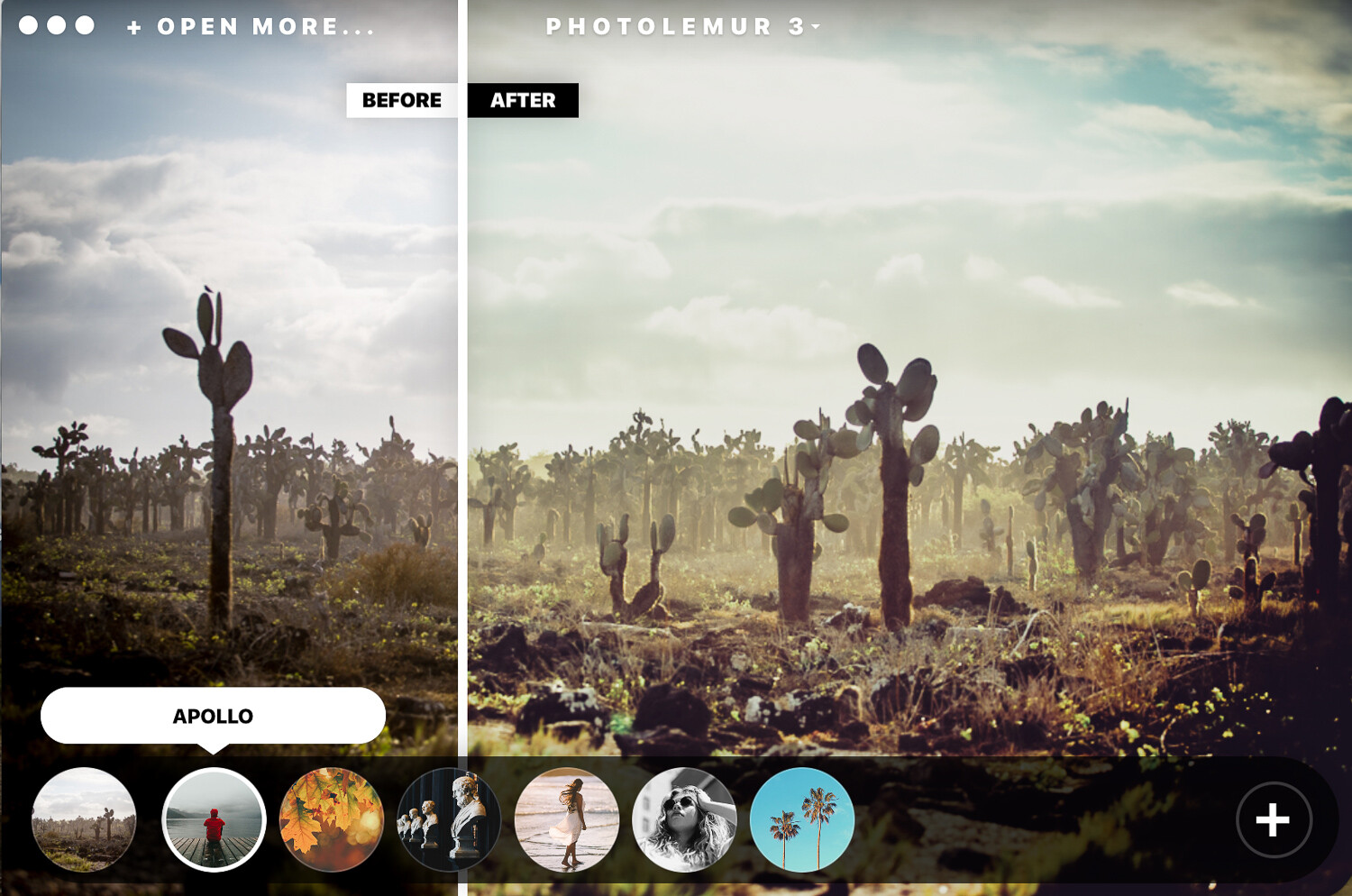
After Photlemur finishes analyzing your images, it gives you a before and after view with a fun slider. You can see and compare the enhancements applied to your photos.

At the bottom, you can click on the paintbrush and gain access to a slider that lets you adjust the amount of enhancement that you want to apply. The software won’t let you adjust the changes individually. For example, you can’t edit the exposure only. It does a pretty decent job at making the skies pop and fixing any exposure issues automatically.

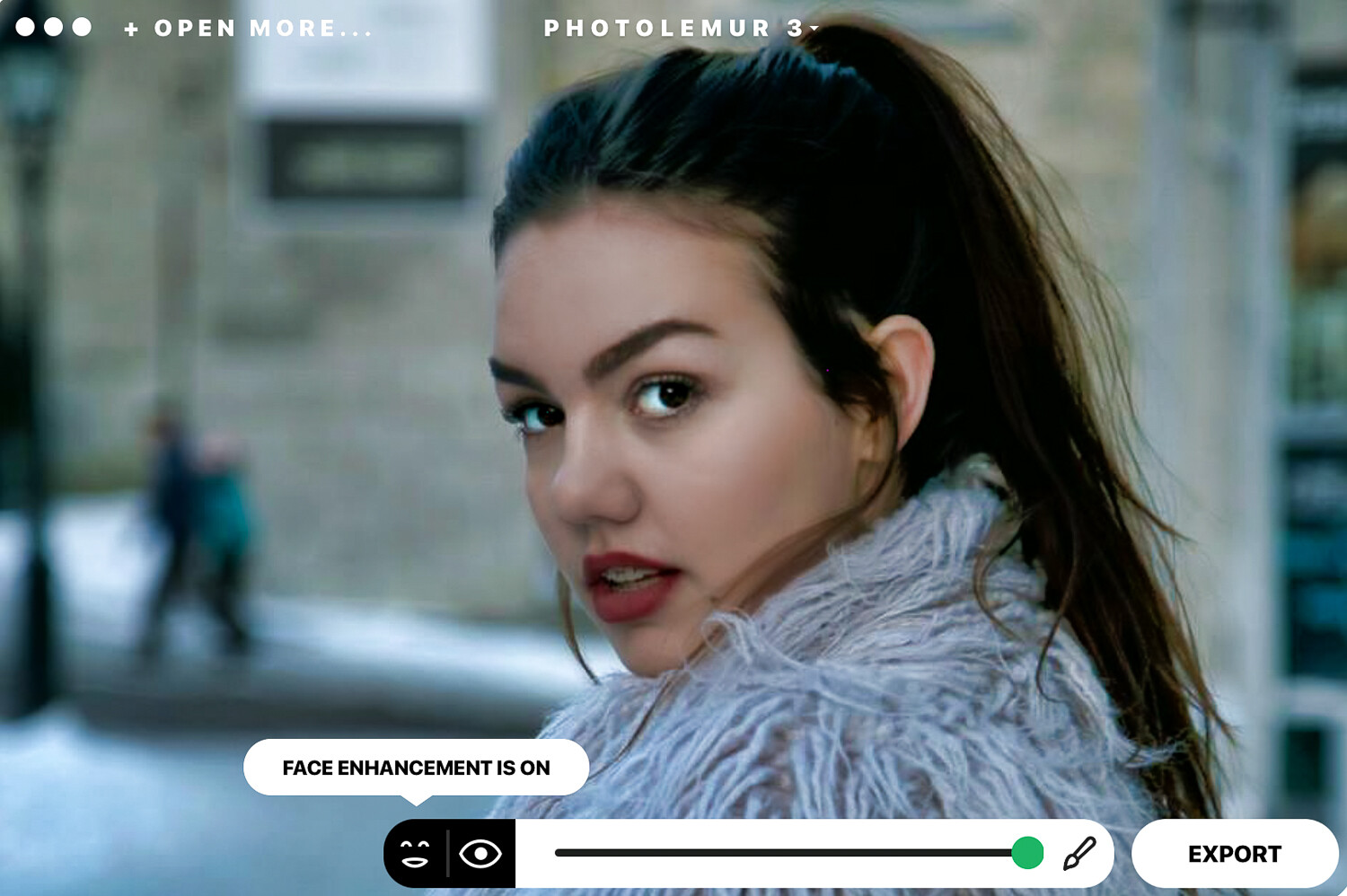
Photolemur 3 also features a face and skin enhancer that fix your portrait photos instantly by smoothing skin and imperfections, enhancing eyes, and whitening teeth.

On the left-hand side of the bottom slider, you will notice icons that let you turn on or off the “EYES ENLARGEMENT” and the “FACE ENHANCEMENT”.

I didn’t particularly like what happened to the hair of my model in this image. I would probably glide the slider a little to the left for portrait photos.

Applying filters

The software has integrated filters you can apply to your images. The filters are very similar to the ones you find on apps like Instagram. Click on the circle at the bottom and get access to all the filter options. If you’re a fan of filters, these do the trick pretty well. The mono filter transforms your photos to black and white with commendable results.

Exporting options

Once you’ve finished editing your photos, you can export them to your computer, upload them on various social media sites, or attach them directly to an email.

Standalone and Plug-in

You can use Photolemur 3 as a standalone app on your computer, and you can also add it as a plugin for Photoshop and Lightroom. Upon initial installation, you are prompted to add the plugin if you wish to do so.

Who it’s for

Photolemur 3 is a great tool for beginner or amateur photographers who want to easily and quickly enhance their photos. It does what it claims and has made photo enhancing stress-free. However, I don’t think that professional photographers will use this software on a regular basis because of its limitations.

It’s ideal for landscape photographers because of the sky enhancer and also for portrait photography. It’s super easy to set-up and get going. You can get your photos edited in a few minutes with a few simple clicks.

What it doesn’t do

If you have Photoshop or Lightroom knowledge and are accustomed to editing your photos manually, you will find Photolemur 3 restrictive. If you don’t like the way the software adjusted your exposure and colors, there is no way to go in deeper to adjust these results individually.

That said, it does a pretty good job automatically.

The program makes some sounds when it does certain actions that I’m not a fan of. Thankfully you can go to the settings drop-down menu and disable this feature.

Conclusion

I particularly like the way Photolemur 3 processes the skies to look better and how it corrects any exposure issues. However, I would go a little easy on the face enhancement features so that portraits don’t look over-edited.

You can give Photolemur 3 an unlimited free trial before you purchase it. Download the free limited version from their website and test it out for yourself. The free version adds a watermark and has other restrictions like no batch processing and limited export size.

This type of technology is the future of photo editing, and we will be seeing more algorithms and artificial intelligence applied to photography software and apps. I’m all for professional results done in a less time-consuming way. More time to have fun shooting!

Have you used Photolemur 3? What are your thoughts?

The post Review: Photolemur 3 Photo Enhancer Software appeared first on Digital Photography School. It was authored by Sandra Roussy.


Digital Photography School

 
Comments Off on Review: Photolemur 3 Photo Enhancer Software

Posted in Photography


Review: The Elgato Stream Deck is a customizable hardware control for post-processing

06 Apr

Elgato Stream Deck
$ 149 | elgato.com

The Elgato Stream Deck is a small, customizable keypad primarily targeted at gamers who stream live content. I’m not a prolific gamer, but it occurred to me that the Stream Deck might also be a useful tool in my daily post processing work, cutting down on mouse clicks and keyboard shortcuts, and speeding up my workflow.

In my case that means a non-linear editor, or NLE, for video editing. However, the Stream Deck isn’t limited to NLEs; it can be used with just about any editing software such as Photoshop, Lightroom, or Premiere Pro.

Key features:

  • 15 customizable keys, each with its own LCD screen
  • 210 actions* available by using folders
  • Macros** can be assigned to each key
  • Different profiles and key sets can be created for different applications

The power of the Stream Deck is that each of the keys contains an individual LCD screen behind a concave plastic window. You may remember the Optimus Maximus OLED keyboard which, when launched in 2007, had a full qwerty keyboard with an OLED display on each key. The Stream Deck takes this idea and makes it more accessible at a price of $ 149.

Design

The Stream Deck’s fascia is aluminum while the body is plastic, with dimensions of 118 x 84 x 21mm (4.6 x 3.3 x 0.80 in) and it connects via a captive USB cable approximately 1.5m long. Included in the box is a lightweight plastic stand which allows the Stream Deck to sit at multiple angles, and it includes rubber feet on the bottom to stop it from sliding across your desk when you push a button.

The Stream Deck’s stand. It does the job, but as I discuss below there’s room for improvement.

Setup

Out of the box, the Stream Deck does nothing, so the first step is to download the Stream Deck software from Elgato’s website, which allows you to completely tailor each key. It’s already loaded with several shortcuts for popular streaming software like Twitch, OBS, YouTube, etc. and these can just be mapped to the keys on the device.

However, my reason for buying the Stream Deck was to use it with Davinci Resolve, my NLE of choice, though it can be used just as easily with tools like Premiere Pro, Final Cut Pro X, or Lightroom. However, doing so requires a more involved setup process as there are no pre-configured shortcuts available for these applications.

To do this, I set up a new Davinci Resolve profile in the Elgato software that auto-loads when I run Resolve. This can be done for any software that’s being used, and therefore you can have multiple sets of shortcuts (210) for each program. It’s completely feasible to have different set ups for Resolve, Premiere Pro and Lightroom for example.

Configuring keys with the Elgato software.

I created keys for common tasks, some of which were duplicates of already available keyboard shortcuts, but with larger dedicated icons I didn’t have to remember the shortcuts for some of the lesser used key commands. It also meant that some actions that used a three-key combination for something like ‘freeze frame’ could now be achieved with a single button.

There’s also a certain satisfaction in quickly navigating pages of shortcuts with a single button press. Trust me – you have to try it to appreciate it.

Customizing Keys

For the functionality that I wanted I needed to register the required Resolve keyboard shortcuts in the Elgato software. I also created icons for the buttons. Some of this was achieved with the Elgato Key Creator, which is web based, but quite a few of my keys were also constructed with Photoshop. Any image editing software will work as you only need to create a 288 x 288 pixel PNG file for each button.

There’s a certain satisfaction in quickly navigating pages of shortcuts with a single button press.

Like anything worthwhile, setup and customization took some time. At first it seemed a little involved, but effort spent configuring at the start saved more time later. I spent a lot of time making the icons for the buttons and assigning functions, but also some thought into where to place them and how far down into the sub pages to go.

But, I hear you cry, fifteen buttons is not enough! Well, in that case you can actually use one of the buttons to access up to fourteen more sub pages of buttons, each with another fourteen buttons on them (one is reserved for going back a page). In this case you can see the appeal of the screens providing labels and icons representing their function. I certainly couldn’t remember what each one did without them.

One example of a bespoke key set on the Stream Deck.

However, the ability to customize the Stream Deck doesn’t stop there. With the help of software like Auto Hot Key for Windows or similar scripting software for Mac, scripts can be written and assigned to any button. This means if there isn’t an exact shortcut available in the software you want to use it with then you can record something like a simple mouse click on an on-screen button and assign it to a stream deck key. Although I haven’t used this yet, It might be something I look at doing in the future as my workflow evolves.

Workflow improvements

After working with the Stream Deck for a couple of weeks I’ve found it very useful, though not without making some adjustments. First, getting used to having the device placed to the left of my usual keyboard was a bit unusual (of course it can be placed anywhere). This, combined with the fact that I had to think and stop myself using the regular on screen buttons, also slowed me down initially.

After about half a day I found that my usual edit process had sped up, probably on the order of 20-30%.

After about half a day, however, I found that my usual edit process had sped up, probably on the order of 20-30%. Persistence pays off, and sometimes it’s all too easy to forget and go back to the old ways of working, but when I did I found that I slowed down again. After about a week or so of using it I needed to reorganize the button layout a bit, something I think will be an ongoing process.

Opportunities for improvement

Overall the Stream Deck works well and I’m impressed with the feel of the keys, however there are some improvements I’d like to see. First, I’d like the option for a detachable cable rather than a captive one. What happens if the cable get’s damaged? There have also been reports from some users of screen burn in on early units, but this seems to have been addressed in later ones and Elgato have been swapping out units with this issue.

The Stream Deck attaches to your computer using a captive cable. I’d prefer a detachable cable in case it gets damaged.

The Stream Deck’s stand is just OK, and I’d like to see a way of making the unit fit more securely into it. The way it adjusts for different inclinations could be improved as well, such as having a much more positive lock into position. I would also like to see a more ergonomic version of the Stream Deck; three rows of five keys works, but it’s a bit cramped and the spacing could be better. The way my hand lies it would be better if it was wider, and I’d like to see they keys placed more naturally.

Elgato also makes the Stream Deck Mini with six keys. Perhaps there could be an option for a Stream Deck Max with 30 keys? I know this would probably take it out of the realm of being a pure streaming tool, but it opens up possibilities for other markets. If Elgato really wanted to they could compete with other control devices by adding knobs and sliders, but I guess this might be a little outside their key user base.

It is for you?

Considering it’s a product aimed at online gamers, the Stream Deck is a tool that can be easily adapted for use by photo and video editors to streamline and speed up everyday workflows. It can take time to set it up properly and develop the muscle memory required to use it, and will probably require some ongoing tweaks to get the most out of it, but the time invested up front will be saved in use.

Its usefulness will very much come down to the individual and their workflow. The more time you invest in getting things working correctly for you the more benefits you’ll see. I’ve yet to really use it to it’s full potential and I’ve already seen the benefit.

What we like

  • Ease of use
  • Customization options
  • Cost
  • Tactile feel

What we don’t like

  • Stand design; positioning and adjustment could feel more positive
  • Captive cable

*An action may be any function assigned to a key on the Stream Deck, such as a keyboard shortcut or combination of keys pressed simultaneously.
**If you use macros to create automated scripts on your computer it’s possible to map an entire macro to a single button.

Articles: Digital Photography Review (dpreview.com)

 
Comments Off on Review: The Elgato Stream Deck is a customizable hardware control for post-processing

Posted in Uncategorized


DPReview TV: Panasonic G95 first impressions review

06 Apr

The Panasonic G95 was just announced, and Chris and Jordan are here with their first impressions. Join the boys on a photo scavenger hunt, and find out why Jordan can eat Lucky Charms better than all of you.

Get new episodes of DPReview TV every week by subscribing to our YouTube channel!

  • Introduction
  • Body
  • Compared to the G85
  • USB charging
  • Displays
  • Moiré
  • Compared to the G9 and GH5
  • Video intro
  • Vlogging
  • Slow motion
  • Audio
  • VlLog-L and record limit
  • Wrap-up

Articles: Digital Photography Review (dpreview.com)

 
Comments Off on DPReview TV: Panasonic G95 first impressions review

Posted in Uncategorized


Panasonic Lumix DC-G95/G90 Review in Progress

05 Apr

$ (document).ready(function() { SampleGalleryStripV2({“galleryId”:”3337209369″,”isMobile”:false}) })

Sample photoSample photoSample photoSample photoSample photo

The Panasonic Lumix DC-G95 (also known as the G90 and G91 outside North America) is a mid-range 20MP Micro Four Thirds mirrorless camera. Panasonic says it’s designed to be equally adept at both stills and video, though we don’t wholly agree.

It offers an extensive degree of direct control, a flip-out touchscreen and in-body stabilization: a combination that’s unusual at this point in the market. This is enough to make it an attractive enthusiast stills camera but a significant video crop undermines its video-making credentials.

Key Specifications:

  • 20MP Four Thirds CMOS sensor
  • 9 fps shooting with AF-S, 6 fps with AF-C
  • UHD 4K at 30 and 24p (25p for the G90)
  • Unlimited video capture (up to capacity of card)
  • Headphone and Mic sockets
  • V-LogL gamma profile (8-bit only)
  • L. Monochrome D (high-contrast mono mode)
  • 4K Photo mode with auto marking and sequence composition
  • Live View Composite mode for multi-shot long exposure images

The G95 is only being offered in North America as a kit with the 12-60mm F3.5-5.6 ASPH Power OIS zoom. This combination will set you back around $ 1199, which is a $ 200 premium over the comparable G85 kit.


What’s new and how it compares

The DC-G95 is a mid-level camera for both stills and video.

Read more

Body, handling & controls

The G95 has an extensive array of direct controls and a good degree of customization.

Read more

Initial impressions

The G95 builds on one of our favorite cameras but faces much more serious competition.

Read more

Sample gallery

We’ve shot a gallery with a near-final G95.

Read more

Specifications

See the camera’s full specifications.

Read more

Articles: Digital Photography Review (dpreview.com)

 
Comments Off on Panasonic Lumix DC-G95/G90 Review in Progress

Posted in Uncategorized