RSS
 

Posts Tagged ‘REVIEW’

Olympus OM-D E-M1X review

08 May

$ (document).ready(function() { SampleGalleryStripV2({“galleryId”:”5346361820″,”isMobile”:false}) })

Sample photoSample photoSample photoSample photoSample photo
Silver Award

85%
Overall score

The Olympus OM-D E-M1X is a dual-grip Micro Four Thirds mirrorless camera aimed at pro sports and action photographers. It’s designed to be rugged, durable, fast and capable, and has a price tag to match that ambition.

The EM1X uses fast readout and fast processing both to provide high-level AF performance and fast burst shooting as well as a range of novel modes and features. It also promises new levels of performance in terms of weather resistance.

Key Specifications

  • 20MP Four Thirds sensor
  • 121-point autofocus system with deep learning-based subject recognition
  • Hand-held high-res shot mode
  • Up to 60 fps Raw + JPEG capture (up to 18 fps with autofocus)
  • Pro Capture mode records frames before you hit the shutter
  • Up 7.5EV of image stabilization (CIPA-rating) with supported lenses
  • ‘Live ND’ multi-shot mode simulates ND filters
  • Large 2.36M-dot LCD viewfinder able to work at up to 120 fps
  • Dual BLH-1 batteries giving 870 shots per charge (CIPA)
  • Dual UHS-II SD memory card slots
  • Extensive direct control, dual AF joysticks, articulating touchscreen
  • UHD 4K/30p video and DCI 24p at up to 237Mbps
  • Extensive, IPX1-rated weather sealing
  • USB charging

To a degree the E-M1X resembles a twin-grip E-M1 II with more powerful processors and two batteries. What makes the camera interesting is what it does with that extra power.

The E-M1X is sold body only at an MSRP of $ 2999, CAN $ 3899, €2999 and £2799.


What’s new and how it compares

The E-M1X brings improved AF, a hand-held high res mode and Live ND as the headline updates.

Click for more

Body and Handling

The E-M1X is the first Olympus digital camera to offer the dual-grip design favored by pro sports cameras. It’s also one of the few to receive a formal rating of its environmental sealing.

Click for more

Controls and Operation

There are plenty of direct control points on the E-M1X but also a lot that can be customized.

Click for more

Is the E-M1X right for you?

The E-M1X’s primary use cases are sports, action and wildlife photography. But that doesn’t mean the camera isn’t fit for other disciplines.

Click for more

Shooting Experience 1

Carey Rose was impressed by the performance of the E-M1X at a pre-launch shooting event, but there are some things he’d like to see improved.

Click for more

Shooting experience 2

When it comes to tennis, the E-M1X is faster than a Nikon D5, but its autofocus is less reliable.

Click for more

Image quality

The E-M1X likely uses the same sensor as the E-M1 II and image quality is top notch for a Four Thirds chip.

Click for more

Autofocus

The E-M1X offers impressively sticky AF tracking. However, AF-C performance falls behind the competition.

Click for more

Performance

Two processors give the E-M1X a decent amount of buffer depth. They also play a part in the camera’s stabilization, which is on par with the E-M1 II, but behind the Panasonic G9.

Click for more

Video

Video quality doesn’t blow us away, but the E-M1X just might have the smoothest in-camera video image stabilization around, but it comes with a slight crop.

Click for more

Conclusion

After all our testing and real world shooting, here’s the final takeaway.

Click for more

Sample gallery

We’ve spent a ton of time shooting with the E-M1X, here’s all our samples, including Raw conversions.

Click for more

Articles: Digital Photography Review (dpreview.com)

 
Comments Off on Olympus OM-D E-M1X review

Posted in Uncategorized


Gear Review: The Lastolite Halo Compact Reflector

08 May

The post Gear Review: The Lastolite Halo Compact Reflector appeared first on Digital Photography School. It was authored by Sean McCormack.

The Halo Compact is a new reflector/diffuser design from Lastolite (a Manfrotto company). In January, at The Societies Convention in London, I got a glimpse of the first batch on the Manfrotto stand. It looked great on display, and in the demo, it packed down really small. It was also attached to standard light stand fitting on display. As the owner of a few Lastolite products, I’m quite aware of how innovative they are, and that they do make quality products. Some of these are used day in and day out in the studio (e.g. the Hilite and the Triflector).

The Halo Compact on the Lastolite/Manfrotto stand at The Societies Convention.

Now I own a lot of reflectors. From large 5-in-1 disc reflectors to the already mentioned triflectors, to 6’X3’ frame reflectors; I even have a California Sunbounce. I’m not exactly in need of a new one, least of all something that’s well on the way to being €100 with shipping.

However, I was still interested in one major selling point – how compact it is when it is packed down. Seeing as I’d flown to the convention, I knew it would be a perfect travel reflector. I went to buy one. No luck. The small amount of stock that was in the shop at the convention was gone, so I left empty handed.

My next look at the Halo Compact in person was at The Photography Show in March. I happened to chat with one of the folks at the stand, and it turned out to be Matt Bailey. Matt had taken over from Gary Astil as a product designer, so we got chatting about the Halo, and how it solved quite a few problems.

Needless to say, I bought the diffuser version with the frame and a silver/white reflector cloth as well, to give me the best variety for shooting situations. I could have gotten the reflector with frame and the diffuser cloth if I preferred.

The Lastolite Halo Compact Reflector setup

The blue containing pouch

The Lastolite Halo Compact Reflector comes in a small, dark blue, zipped pouch. It has a carabiner to attach to a clips, belts or even belt loops. The material and finish are far better than the old royal blue material Lastolite formerly used, which tended to fray behind the zip, rendering the zip useless.

When you open the zip, it reveals what looks like a tent pole rods (but pre curled), and a fabric. You’ll also a find ¼” 20 screw back to back in the pouch so it can screw to a magic arm.

The rods are similar to tent pole, but curved.

You’ll find assembly is straightforward. Attach all the rods together. Finish the frame by pushing the two sides of the handle together in a kind of dove tail joint fashion.

The handle pushes together to make the frame rigid. It also houses a tripod fitting.

A quick glance at the handle and you’ll see the inbuilt ¼” 20 hole for a light stand in the handle. This is one of the great features of the Halo.

That’s it. It’s sturdy and firm.

To get either fabric on, you click a clip in place on either side of the handle and then clip them all on at even spacing around the frame.

The grip on the handle is great and I found it reasonably easy to hold outdoors, despite holding it in my left hand on my right side in the wind.

I’m not saying it’s not a kite, but it was far better than the floppy eBay reflector I’d used earlier that day.

Why do you need this?

So why would you bother with having this at all?

The answer is simple.

You want to have control of the light.

Here’s what undiffused evening sun looks like.

While it’s not as harsh as midday sun, it still has hard shadows and causing squinting.

By using the diffuser, the light is spread, making is softer.

Obviously it’s also lower in intensity, so you have to open your shutter to compensate.

Another typical way of shooting with evening sun is to use backlighting.

Here you can lose the direction of the light, but adding a silver reflector can bring back contrast and shape.


You could also opt for a more subtle white reflector.

Pros and Cons

Pros

  • Sturdy
  • Good modifier options with reflection and diffusion
  • Compact, perfect for travel
  • Reliable brand with known quality
  • Built in stand adaptor

Cons

  • Longer setup time than a popup
  • More expensive, but still not the most expensive

Conclusion

While a little on the expensive side compared to the eBay popups, the Lastolite Halo Compact Reflector is still an affordable product. Despite the longer setup time, I feel the compact pack means this product will live in or on my camera (via the carabiner) permanently, vs the pops that are left behind when I’m travelling more compactly.

I’ve included the downside of the price and longer setup time in my rating, but in truth, I’m delighted with this product.

Now to sell some of my other reflectors!

Have you used the Lastolite Halo Compact Reflector? What are your thoughts? Share with us and our readers in the comments below.


The post Gear Review: The Lastolite Halo Compact Reflector appeared first on Digital Photography School. It was authored by Sean McCormack.


Digital Photography School

 
Comments Off on Gear Review: The Lastolite Halo Compact Reflector

Posted in Photography


HD Pentax-D FA* 50mm F1.4 SDM AW review

03 May

$ (document).ready(function() { SampleGalleryStripV2({“galleryId”:”6642990603″,”isMobile”:false}) })

Sample photoSample photoSample photoSample photoSample photo
Silver Award

89%
Overall score

Ricoh Imaging now offers two full-frame Pentax DSLRs, the K-1 and largely similar K-1 II, so the need for modern, technologically up-to-date lenses that can do these cameras justice is clear.

K-1 and K-1 II users have the choice of decades’ worth of full-frame-friendly glass, of course, but the HD PENTAX-D FA* 50mm F1.4 SDM AW is the newest member of the company’s premium Star (*) range. This particular lens is promised as the first in a new generation of Star optics, which claim to combine centre-to-corner sharpness at even wide apertures, high light transmission and general all-round optical excellence, all with a rugged design and high dependability.

While intended for users of full-frame cameras, the D FA* 50mm F1.4 SDM AW will also happily partner with APS-C models like the KP and K-70. This results in an effective focal length closer to 76.5mm, which brings it a little closer to classic mild-telephoto focal lengths associated with portraiture. Incidentally, the line will shortly welcome another portrait-friendly Star lens, the D FA* 85mm F1.4, the development of which was announced earlier this year.

All pictures by Matt Golowczynski unless otherwise noted.

Key specifications

  • Focal length: 50mm (76.5mm on APS-C bodies)
  • Aperture range: F1.4-16 (In 1/3EV stops)
  • Filter thread: 72mm
  • Close focus: 0.4m (1.3ft)
  • Maximum magnification: 0.18x
  • Diaphragm blades: 9
  • Hood: PH-RBB72 (provided)
  • Length / Diameter: approx. 80 x 106mm (3.1 x 4.2in)
  • Weight: approx. 910g (32.1oz)
  • Optical construction: 15 elements in 9 groups

The optical makeup of the HD PENTAX-D FA* 50mm F1.4 SDM AW comprises fifteen elements in total, with three anomalous dispersion elements spread throughout the array and a single aspherical element at the rear. As is somewhat standard practice among premium lenses of this sort, the lens combines two coatings: a nanotechnology-based Aero Bright Coating II and a more standard multi-layer HD coating, and the pair work to boost light transmission and minimize reflections that could introduce aberrations and/or affect contrast. Also helping with flare control is the PH-RBB72 lens hood that’s supplied as standard.

The lens’s KAF4 mount adds an extra contact to the KAF3 mount to support electromagnetic diaphragm control from the body. Users of every DSLR released since (and including) the K-50 will benefit from this, although unless you shoot with a K-1 Mark II, K-P or K-70 you’ll need to upgrade your camera’s firmware first. With no physical aperture ring, you’re limited to using the lens at its widest aperture should you mount it on an older body.

Protection against dirt and moisture incursion is provided by eight separate seals, with a red gasket around the metal lens mount to keep nasties out of the camera.

The current standard KAF4 mount drops the aperture lever from the KAF3 mount and adds an extra contact for electromagnetic diaphragm control.

Pentax lenses that claim some sort of dust and moisture protection are sorted into two categories: Weather-Resistant (WR) and the more stringent All-Weather Resistant (AW). This lens sits in the latter camp. The lens is further protected by a flourine-based Super Protect coating on the front element that not only dissuades water, grease and dust from adhering to it, but makes it easier to clean off when it does.

Nine blades form the diaphragm inside the lens, and these are said to keep defocused points of light round from the maximum aperture until F2.8. Elsewhere, the minimum focusing distance of 0.4m is better than average for a lens of this sort, and when used this close to the subject magnification ends up at 0.18x. The lens also has a 72mm thread at its front for conventional screw-mounted filters.

The hood for the 50mm F1.4 can be reverse-mounted on the lens, and doesn’t get too much in the way unless you’re using the manual focusing ring.

A small window in the lens hood can be removed in order to rotate an ND or polarizing filter.

There’s no image stabilization inside the lens as Pentax users can take advantage of this through the sensor-based Shake Reduction system inside their cameras. Combined with that wide aperture, this obviously makes the lens a good candidate for demanding low-light environments.

Is this the same lens as the Tokina Opera 50mm F1.4? Well, the optical construction appears identical, and the two lenses are pretty much the same size and weight, so at the very least it’s obvious that they’re clearly closely-related. However, the bare specs don’t account for the possibility of some mysterious ‘special sauce’ that Ricoh might have reserved for the Pentax-branded version. Was this lens developed with the involvement of Tokina? Yes, almost certainly. Does it matter? Probably not – and anyway, the slightly cheaper Tokina-branded version isn’t available in PK mount, so if you’re shopping for a prime for your K-1 II, the question is academic.

Design and handling

At least in terms of its functionality, this is a fairly straightforward prime lens, so its external design is simple. The barrel is essentially furnished with only two controls: a switch that alternates between autofocus and manual focus, and a manual focusing ring. A focus distance window gives its readings in feet and meters.

The AF/MF switch moves very easily and without any stiffness, although this also means it’s somewhat prone to be accidentally knocked out of position. I experienced this frequently when carrying the camera around using a BlackRapid strap, although this is hardly a fault of the lens, rather something to bear in mind if you prefer to carry your camera around in the same way. If you prefer to have the camera strapped around your neck or you’re using it on a tripod, this probably won’t be an issue.

The lens has just a single switch, which is used to toggle between automatic and manual focus.

The focusing ring at the front of the lens is about an inch deep, and it’s finished with a coarse, square dimpled pattern, which makes it very tactile, if not quite as comfortable as the ribbed design common to many other lenses. It’s well damped and works through its focusing range in roughly a third of a rotation. This might not sound like much, but its 80mm diameter means it still travels a fair distance between its extremes.

Fifteen elements is quite a lot for a 50mm F1.4 lens, and that goes some way to explaining its 910g weight. To put it into perspective, that’s slightly heavier than Canon’s EF 50mm F1.4 USM and EF 50mm F1.2L USM lenses combined. As the K-1 and K-1 II bodies each weigh just 100g more, either will do well to support this, but a combination with either body still ends up weighing just under 2kg (a little over four pounds), which is significant. Partly because of the lens’s 106mm length, however, you can support the whole package quite easily, even if you have larger hands.

The plastic lens hood has a deep petal-shaped design and a small removable tab that slides out for easy filter rotation. It can also be reverse-mounted when not required, and, despite its depth, it doesn’t get in the way until or unless you need to use the manual focusing ring.

Autofocus

The lens employs a newly developed ring-type SDM (Supersonic Direct-drive Motor) to handle autofocus actuation. Ricoh states that this generates up to 7.5x more torque than the SDM systems inside previous lenses, and it’s responsible for driving the rear lens group when focusing.

The focusing system is internal, which means that the overall barrel length doesn’t change in length at any time during operation. The focus ring supports a ‘Quick Shift’ focus system that allows you to adjust focus manually once autofocus has been achieved, without you needing to constantly switch between autofocus and manual focus. You can also call upon focus peaking when using live view, regardless of whether you’re using automatic or manual focus.

This is a fairly weighty lens, with a lot of glass inside it. As such, autofocus performance isn’t blazingly fast but it’s certainly fast enough that photographers using it to shoot static subjects shouldn’t find much to complain about. In good light, on a K1 II focus is swift and smooth throughout its range. It’s relatively quiet, too, although not quite as discreet as some other modern optics.

The wide, nicely-damped focus ring offers a very positive experience for manual focus and can also be used for focus fine-tuning in AF-S mode.

When the lens does have to hunt – whether that’s in darker conditions, against low-contrast-subjects or somewhere else – it typically works back and forth through its focusing range in around a second or so, so if it can’t find focus it doesn’t hang around for long before letting you know. The only time I found this to be an issue was when capturing portraits close to the minimum focusing distance of the lens, where you might miss a crucial moment.

It’s also possible to focus during video recording using contrast-detect AF. This happens very smoothly and discreetly, with a slight clicking as the lens initially attempts to focus, but with no sound as the focusing groups actually moves. Aperture stop-down behavior changes in video mode, drifting smoothly between positions for smoother exposure changes when the lens is stopped down or opened up.

Articles: Digital Photography Review (dpreview.com)

 
Comments Off on HD Pentax-D FA* 50mm F1.4 SDM AW review

Posted in Uncategorized


Sony a6400 review

01 May

Introduction

$ (document).ready(function() { SampleGalleryStripV2({“galleryId”:”7539777292″,”isMobile”:false}) })

Sample photoSample photoSample photoSample photoSample photo
Gold Award

85%
Overall score

Sony’s a6400 is a compact 24MP mirrorless interchangeable lens camera with an APS-C sensor that will serve plenty of photographers from family documentarians to pro shooters looking for a lightweight second body. The big news is that it has a new processor based on that used in Sony’s sports-shooting flagship a9 which enables ‘Real-Time Tracking’ autofocus, which is one of the most effective autofocus implementations we’ve yet seen. It’s also among the easiest to use, once you’ve gotten it set up.

Key specifications:

  • 24MP APS-C sensor
  • 425-pt phase detection AF system with Real-Time Tracking
  • Tilting screen, 180° up, 90° down
  • 2.36M-dot electronic viewfinder
  • New Bionz X processor
  • ISO range from 100-32000
  • 11fps burst shooting (8fps with silent shutter)
  • Interval shooting option added
  • 4K/30p video capture
  • Mic input, no headphone output
  • 410 shots per battery charge (per CIPA)
  • Wi-Fi with NFC and Bluetooth

The Sony a6400 officially replaces the older a6300: it uses the same sensor but comes with some subtle enhancements aside from the impressive autofocus capabilities. It arrives in an increasingly crowded field, though, with cameras like the X-T30 from Fujifilm and the EOS M50 from Canon being similarly priced and with similar sized sensors. Do the enhancements make the a6400 the standout in this crowd? Find out its strengths – and weaknesses – in the pages to follow.

The a6400 is available now for $ 899 (€1049) body-only, $ 999 (€1149) with a 16-50mm F3.5-5.6 Power Zoom kit lens and $ 1299 (€1449) with an 18-135mm F3.5-5.6 zoom.


What’s new and how it compares

Sony’s a6400 has an awful lot of refinements on the inside – take a look.

Read more

Body, handling and controls

For better or for worse, the a6400 handles just like the a6300 before it. And the a6000 before that.

Read more

Image quality

The a6400 takes some fantastic photographs, and in particular, has some welcome tweaks to its JPEG engine.

Read more

First impressions

Sony’s new Real-Time Tracking is really impressive, but my goodness, can’t we get a front control dial?

Read more

Autofocus and performance

Let’s dive deep into the a6400’s revamped autofocus system, plus we’ll show you exactly how to set it up.

Read more

Video

The a6400 is pitched as a vlogging camera, but it has some video capture shortcomings.

Read more

Is the a6400 right for you?

We look at common photographic use-cases and see how the a6400 measures up.

Read more

Conclusion

The a6400 is easily one of the most capable cameras at its price point.

Read more

Sample gallery

Check out our extensive samples gallery from the Sony a6400.

Read more

Specifications

Want the full list of specifications for the a6400? We have you covered.

Read more

Articles: Digital Photography Review (dpreview.com)

 
Comments Off on Sony a6400 review

Posted in Uncategorized


Review: Pixapro 105cm 16-Sided Easy-Open Rice-Bowl Softbox

01 May

The post Review: Pixapro 105cm 16-Sided Easy-Open Rice-Bowl Softbox appeared first on Digital Photography School. It was authored by John McIntire.

Studio photographers, and other users of off-camera flash, are living through a bit of a renaissance. New, innovative and (maybe most importantly) affordable lights and modifiers are popping up all the time – and a lot of them are fantastic. One of the companies that is at the forefront of this movement is Godox.

The Rice Bowl is a large softbox with an unusual shape.

It seems that every time you turn around, there’s something new being released. Enter the Pixapro 105cm (41.34″) 16-Sided Easy-Open Rice-Bowl Softbox (Say that five times fast). Pixapro is Godox rebranded for the UK market. As soon as I saw this thing, I was entranced. Not only is it massive, but its shape means that it’s almost perfectly round (for all intents and purposes) and, as such, will shape light quite differently to your bog standard rectangular softboxes and octaboxes. I bought it and as this review will show you, it was not a mistake.

What is it?

To simplify it, the Rice Bowl is a large umbrella softbox. It’s called an umbrella softbox because it opens like an umbrella, but functions as a softbox thanks to two layers of diffusion material that cover the front. The reason this is a big deal, is that it takes away the massive pain that is putting together and pulling apart standard softboxes. I have more than a few that I’ve put together and then vowed that they would stay that way until the end of time. With the Rice Bowl, all you have to do is pull on the metal rod and open it up like an umbrella and screw the reflector plate into place. It takes seconds.

While the shape of an umbrella, the two layers of diffusion make the Rice Bowl an effective and portable softbox.

As mentioned, the shape of the Rice Bowl also sets it apart from it’s cousins. Because it’s 16 sided (That’s called a hexadecagon by the way. If you want to call it a hexadecabox, I won’t judge you if you don’t judge me), it almost appears completely round. This means that the way it shapes the light and wraps it around your subject is quite different to other softboxes, which can provide you with another tool in your lighting kit.

Pros

The Rice-Bowl softbox does do a few things well.

Size

The Rice Bowl is massive which makes the quality of light it produces wonderful for portraiture.

Here, the Rice Bowl is compared to 22″ beauty dish.

At over 41″ (that’s just under four feet), the rice-bowl is a massive modifier that still packs away in a portable package. Sure, there’s always giant octaboxes and parabolic umbrellas for when you need really soft light, but they don’t pack away anywhere near this easy. For fans of large modifiers, this means two things:

  • Once your done with it, you can pack it away and store it neatly with ease.
  • It travels well and is quite light, so it shouldn’t weigh you down in normal circumstances. I probably wouldn’t hike several miles to a location with it, but short distances should be just fine.

Shape

The 16 sides of the Rice Bowl make it almost perfectly round, which will shape the light differently to rectangular and square softboxes.

The Rice Bowl’s unique hexadecagon shape gives you a rounder source of light than your traditional softbox. The light it produces is gorgeous and soft and ideal for all kinds of portrait lighting. If you have a thing against square and rectangular catchlights, then this might be the modifier for you.

Easy to setup

Setting up the Rice Bowl is dead easy. Just pop it open, secure the reflector into place and attach the two layers of diffusion to the velcro.

As mentioned, setting up the rice bowl is as easy as opening an umbrella. Beyond that, you have to screw on a bit at the end of the rod to keep it secure and attach the diffusion panels. It doesn’t take very long. Add to that that there’s no awkward loose rods to bend and manhandle into place and nothing to pop out with great force and hit you in the eye. The Rice Bowl is a real treat.

Carry bag included

Not only does the Rice Bowl come with a convenient carry bag, but it also fits back into it with ease.

Since it’s well suited to location, it should be no surprise that the Rice Bowl comes in it’s own carry bag. An extra bonus here, is that unlike other modifiers that collapse, once it’s out of the bag, it’s easy enough to get back in and it still fits.

Price

At a price of $ 110, this thing is fairly cheap. Massive modifiers (especially ones this well made) usually come at a massive price. Just compare the Rice Bowl to any offering from Elinchrome and Broncolor if you’re in any doubt.

Adaptability

Because I am invested in the Bowens system (RIP), I opted for the S-mount. Pixapro offer mounts for just about any system that you could want.

Pixapro sell the Rice Bowl with just about any mount you want, so no matter your preferred lighting system, you should have no problem using this modifier.

Cons

Perhaps nothing can be too perfect, and that is the case with the Rice Bowl. Fortunately, the list of cons is a short one.

Depth

Because of its shape, when it’s mounted on a normal light stand, you cannot get much of a downward angle with the Rice Bowl.

In terms of the light it produces, the depth and shape of the Rice Bowl is fine. Where it lets it down is when it’s on a light stand. Because it’s so deep and large, when it’s on a normal light stand you can’t point it in a downward angle very easily. This is quite limiting when it comes to designing your lighting with it. Certain lighting patterns like butterfly lighting will become a challenge.

To get around this, you’ll need to buy (or already own) a light stand with a boom arm. This isn’t that big of a deal, but if you want to get the very most out of the Rice Bowl, you may have to be prepared to make other purchases.

To get the absolute most out of the Rice Bowl, you will want to have a boom arm to ensure that you can place it at any angle that you want.

That one screwy bit

The screw that secures the reflector into place is small and easy to lose.

Remember I mentioned that you had to screw a bit of metal on to secure the Rice Bowl once it’s setup? That one piece is very small and very easy to lose. I’m keeping a very close eye on mine.

Examples

At the end of the day, I can talk about the Pixapro 105cm Rice Bowl Softbox all I want, but what really matters is the proof. Here’s a few examples of what the Rice Bowl can produce in the studio.

That’s it

At the end of the day, I love this thing. Not only does it produce gorgeous light that is flattering to a whole host of subjects, it is light, easy to set up and just a pleasure to use. I would definitely recommend the Rice Bowl to any photographer who wants to add something else to their lighting kit. If you think the 105cm version might be a bit big for you, Pixapro do make a smaller version that comes in at 65cm for $ 90.


The post Review: Pixapro 105cm 16-Sided Easy-Open Rice-Bowl Softbox appeared first on Digital Photography School. It was authored by John McIntire.


Digital Photography School

 
Comments Off on Review: Pixapro 105cm 16-Sided Easy-Open Rice-Bowl Softbox

Posted in Photography


DPReview TV: Panasonic S1 review

27 Apr

How does the new Panasonic S1 stand up to its full frame mirrorless competition, like the Sony a7III or Nikon Z6? Does ‘animal-AF’ work on dinosaurs? Will Jordan curl up on the ground in the name of art? We answer the tough questions and more. This episode was shot entirely on the Panasonic S1 in the Canadian Badlands.

Get new episodes of DPReview TV every week by subscribing to our YouTube channel!

  • Introduction
  • Body and ergonomics
  • LCD design
  • IBIS performance
  • Touch screen
  • Image quality
  • Autofocus
  • Burst and buffer
  • Video features and performance
  • Battery life
  • Compared to the Nikon Z6
  • Compared to the Sony a7 III
  • Wrap-up

Sample gallery from this week’s episode

$ (document).ready(function() { SampleGalleryV2({“containerId”:”embeddedSampleGallery_4165881560″,”galleryId”:”4165881560″,”isEmbeddedWidget”:true,”selectedImageIndex”:0,”isMobile”:false}) });
Articles: Digital Photography Review (dpreview.com)

 
Comments Off on DPReview TV: Panasonic S1 review

Posted in Uncategorized


Review: DJI Osmo Pocket

26 Apr

DJI Osmo Pocket
$ 350 | dji.com

The Osmo Pocket is an all-in-one camera with a built-in stabilizer that is, as the name suggests, pocket sized and incredibly easy to use. The camera is similar to what is found on DJI’s drones and can shoot 4K video and still images in a variety of shooting modes. The Osmo Pocket is aimed primarily at vloggers, and the product’s specs seem to reflect that. The camera is housed inside a three-axis gimbal which keeps footage steady even as you’re doing the walk and talk.

Although the tech inside the camera and the gimbal aren’t particularly revolutionary, the Osmo Pocket is unique because it combines these two products into one, creating a single pocket-sized product that produces quality footage quickly.

$ (document).ready(function() { SampleGalleryV2({“containerId”:”embeddedSampleGallery_8635050733″,”galleryId”:”8635050733″,”isEmbeddedWidget”:true,”selectedImageIndex”:0,”isMobile”:false}) });

Click the main image to visit the complete sample gallery.

Key specifications

  • 12MP resolution
  • 1/2.3″ CMOS sensor
  • Max image size of 4000 x 3000 pixels
  • 4K Ultra HD video: 3840 x 2160 24/25/30/48/50/60p,
  • FHD: 1920×1080 24/25/30/48/50/60/120p
  • ISO 100-3200
  • Built-in gimbal
  • Weight: 116g / 4oz
  • Dimensions: 121.9 x 36.9 x 28.6 mm
  • MicroSD slot up to 256GB
  • LiPo 875 mAH 6.738 Wh battery, 140 mins operating time when shooting 1080p/30 fps video
  • 48 KHz AAC audio output

Operation

The Osmo Pocket only has two buttons making stand alone operation very straightforward. The button on the right turns the Osmo Pocket on, touchscreen controls allow you to select different shooting modes (photo, video, slow-mo, timelapse, pano), recording resolution (4K or 1080p), access settings like fast follow, slow follow, FPV, or to recenter the camera, and review files. The button on the left with the red dot is how you start recording footage or shooting photos.

ISO 100 | 1/50 sec | F2

There is an option to connect a smartphone to the Osmo Pocket via a small adapter and shoot through the DJI Mimo app. In theory, shooting with the app gives users more control over the Osmo Pocket’s features; you get a larger view of what you are filming, can see a histogram, and get alerts if your footage is overexposed. Although the idea is a nice one, in practice attaching a phone to the Osmo Pocket defeats its best feature: its simplicity.

For starters, the smartphone attachment is tiny – during my time shooting with the Osmo Pocket I misplaced this accessory and the plastic cover that slides off a number of times. To ensure that the connection between the Osmo Pocket and my phone was tight I had to remove my iPhone X from its protective case, which is a setup that I didn’t find ideal. Although attaching a phone and using the app gives you a better idea of what you might be shooting, once the phone is attached the setup feels really unbalanced. I found it difficult to shoot, walk, use my phone as a touchscreen to control the camera, and also make sure I wasn’t about to drop my phone and end up with a dreaded spider web screen.

With an optional attachement it’s possible to operate the Osmo Pocket from your smartphone using the DJI Mimo app.

There is an additional Bluetooth accessory that you can attach to the bottom of the Osmo Pocket, which in theory would let you monitor the footage you are shooting without having the phone attached to the Osmo Pocket, but I didn’t test this and can’t speak to its usability. It would have been amazing if the Osmo Pocket just had built in WiFi or Bluetooth connectivity. More often than not I chose to use the Osmo Pocket without the DJI Mimo app. For me, shooting with the tiny screen as my monitor and trusting that the camera would do its job ended up being the ideal way to use the Osmo Pocket.

Video

The biggest draw of the Osmo Pocket is its ability to shoot stabilized 4K video footage at 30 or 60 fps. It can also shoot slow-motion 1080p at 120 fps. It’s similar to the quality of footage that you will get from one of DJI’s drones and the most recent smartphones.

The camera has an ISO range of 100-3200 and a lens with an aperture of F2, and for best results you are going to want to use the Osmo Pocket in sunny conditions.

Where the Osmo Pocket really excels is in-camera stabilization as a result of the integrated gimbal. It managed to keep this video fairly smooth despite running after a dog through New York City.

The camera stabilization of the Osmo Pocket is really its most impressive feature. It’s easier to use than larger stabilizers and seems to be just as reliable, likely because the stabilization tech inside was initially created for keeping the cameras attached to drones stable. The moment you turn the Osmo Pocket on the camera rotates into place to begin tracking whatever might be in front of it. As you move the gimbal moves with you to create impressively smooth footage.

Although the pre-amps inside the Osmo Pocket aren’t the best, the camera did do a decent job picking up sound. You will notice that the clips from a very loud live show have an audio quality similar to what you might get when recording with a smartphone.

The Osmo Pocket delivers sound quality similar to what you would get with a smartphone. Likewise, due to its small sensor, low light video is on par with a smartphone as well.

Still images

If you are looking to shoot stills with the Osmo Pocket you should expect files that look similar to what you will get from your smartphone. Files top out at 12MP and the camera performs best when shooting in bright conditions. The 1/2.3″ CMOS sensor and the F2 lens are very similar to those found on standard smartphones and you can expect the images to look about the same.

Unfortunately, the Osmo Pocket seems to have trouble keeping up with fast moving subjects when shooting stills. I noticed a lot of unintentional image blur while using it. One thing worth noting is the ease with which you can swap between photo and video modes on that touchscreen – which isn’t always a good thing. On more than one occasion I found that I’d unintentionally switched the Osmo Pocket into photo mode when I meant to be in video mode.

ISO 100 | 1/2000 sec | F2

Conclusion

The DJI Osmo Pocket isn’t exactly a must-have gadget in most shooters’ professional kits, but it does a surprisingly good job of capturing quality, stabilized video footage for its tiny size.

The Osmo Pocket feels like a good option for capturing supplementary BTS footage on a big shoot or POV video stories for vloggers and influencers. Its simple operation won’t intimidate people just getting into content creation. It also seems like it could be a great starter camera for kids who have shown an interest in video production.

The built-in stabilization in the Osmo Pocket is ultimately what makes this gadget so appealing. Although the quality of footage is similar to what you will get from a standard smartphone, the Osmo Pocket provides something that a smartphone simply can’t do on its own: seamlessly smooth footage.

What we like:

  • Lightweight and easy to use as a standalone device
  • 4K video capabilities
  • In-camera stabilization
  • Decent audio quality
  • Touch screen controls

What we’d like to see improved:

  • Feels unbalanced when shooting with smartphone attached, which makes the Mimo app of limited use
  • Lack of built-in WiFi or Bluetooth to connect to app
  • Removable cover for smartphone adapter is so small that it’s easy to misplace

Articles: Digital Photography Review (dpreview.com)

 
Comments Off on Review: DJI Osmo Pocket

Posted in Uncategorized


ThinkTank Vision 15 Camera Bag Review

24 Apr

The post ThinkTank Vision 15 Camera Bag Review appeared first on Digital Photography School. It was authored by Peter West Carey.

ThinkTank’s Vision 15 camera bag is one in a line of stylish camera and computer shoulder bags built for photographers who want a functional bag that looks good walking down the street. It’s designed for someone who wants easy access to their gear and isn’t looking for a backpack.

Key features

The Vision 15 has a host of features that I enjoyed while testing. These include:

Fits a DSLR mounted on a long lens

I love my 28-300mm L lens (the same size as a 70-200mm f/2.8 or 100-400mm L lens) and this bag does a grand job of storing it while attached. ThinkTank, in their literature, mentions leaving the camera unattached, but I found the combination just barely fits, with easy, quick access.

Canon 6D mounted with 28-300mm L lens alongside Canon 10-22mm lens

Side view with padding removed

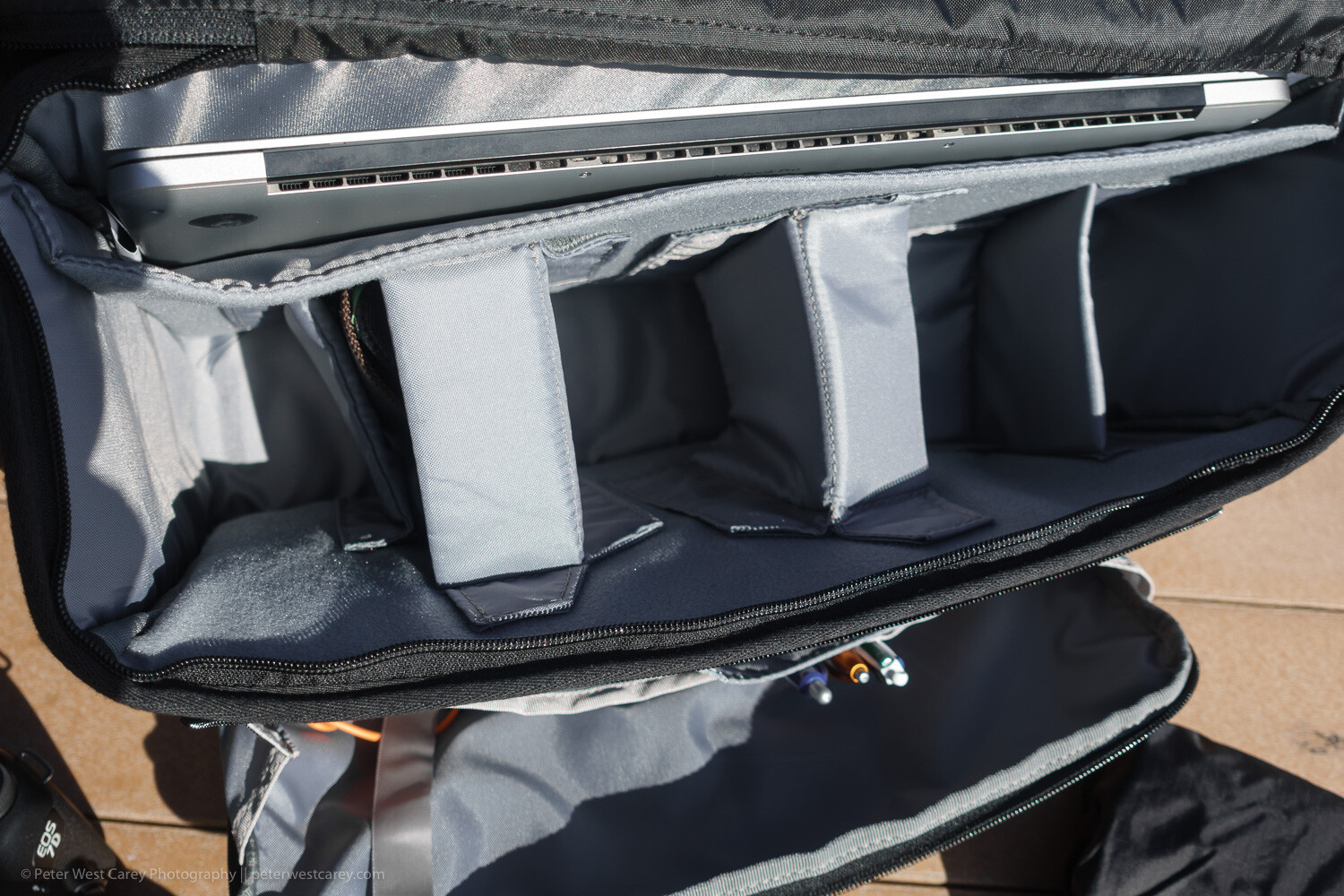
Great organization for extras

Inside the spacious main compartment is space enough for a few lenses and speedlights. There are both vertical and horizontal padded dividers to protect your shorter lens stacked one on the other.

All the dividers have velcro on each side, so they can be attached to either long side of the bag or to other dividers. I usually travel with a long lens attached and a wide angle lens stored. This means I have room for: smaller Sony RX-100 V, waterproof cover (included with bag), battery pack for phone and tablet, glasses case, power brick for laptop and DJI Osmo Pocket. And there is still more room in there.

It can handle a portable office

If your bag is not just for your camera, but for all the other items you want with you on a shoot or day out of the office, this bag can carry most of it.

The Vision 15 can manage a 15″ laptop and a 10″ tablet. The laptop sleeve is padded on the back and bottom while the tablet slot is found on the zippered front pocket.

That front pocket has a host of other slots to hold pens, business cards, large phones, cables, and keys (with a tether and clip so that don’t get lost). And it still has ample pocket space for books, batteries, chargers and all the other little things that join you on the road.

An added bit of security to the main compartment

While the generous top flap of the bag keeps the elements at bay, a secondary zippered flap will help keep prying hands away. The flap has velcro to help hold it in place, meaning it will open when the main flap opens and close when it closes. Or zip up the inner flap for an added sense of security. It can also be tucked under the main flap to keep it out of the way for quicker access.

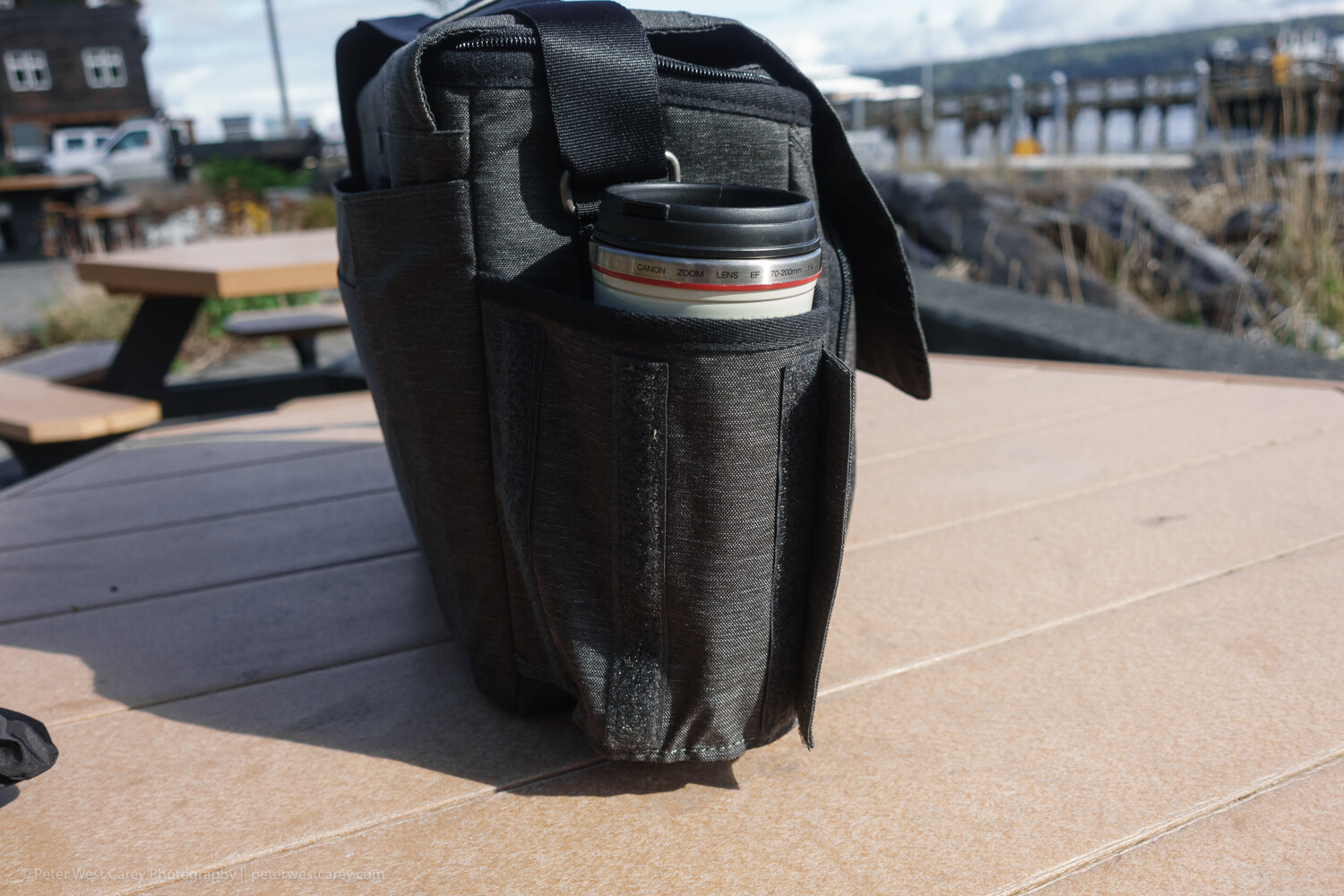
Expandable bottle holder

This little design aesthetic impressed me when I wasn’t expecting it to. Velcro keeps the bottle holder closed when not in use, reducing the chance that it will get caught on something. Plus it looks more stylish this way.

But when you need to hold your coffee or water bottle, just expand the pocket to one of two sizes for a (nearly) custom fit.

Tough, coated bottom

While the bag’s fabric is stylish and does a good job of resisting stains and water, the bottom is made of beefed-up waterproof tarpaulin. This tough option makes for easy clean up when the bag is placed in anything but the most pristine locations. A quick wipe with a damp cloth keeps it clean and your contents dry.

Front and back book/papers pockets

On the back of the bag is a large pocket for books or notebooks. This is a great spot to place quick-at-hand items, and I use it for my calendar and main notebook.

On the front of the bag is a smaller pocket. While you could fit a book in there, it presses against the organizer pocket behind it. While is looks good in photos, it’s not useful for thick items.

Generously padded shoulder strap and carry handle

The bag comes with two main modes of transport: a padded shoulder strap and a carry handle on top. The padding on the shoulder strap is generous and the strap itself has a wide range of adjustment for a variety of torsos. However, the top carry handle only works when you remember to clip the top flap shut. Still, it is a secure way to get the bag in and out of your car for a quick grab.

It fits easily under a seat on a plane

I’ve tested the bag under economy coach seats on 737s and smaller planes with ease. There is ample room and the bag doesn’t scratch along the underside of the seat.

Not so artful tripod holder

On a bag like this, the tripod attachment goes in the only location it can; on the bottom. ThinkTank uses their attachment straps (which can be removed when not in use, as shown above) to allow for a variety of tripod sizes. There’s really no other place for a tripod to go and the clips do an adequate job.

Roller Bag Passthrough

For those who love their roller bags for airports, the back of the Vision 15 has a slot for your roller bag handle to pass through.

Limits

While this bag has a lot going for it, I find the pockets get full fast. Even just throwing a Mindshift card wallet into the front pocket will expand it enough to press on the other pockets. Toss in a charger and Miops cable release as pictured above and you quickly start puffing the bag up, unlike a backpack-style bag.

Vision 15 with rain cover attached

Don’t expect to comfortably carry a full-size tripod on the bottom of this bag. The length would make things unwieldy. Also, with the tripod attached, you suddenly don’t have an easy way to set down the bag.

In use

I tested the bag in use on my job for a month, which included travel on four different flights up an down the West Coast. Its smaller form factor (compared to my normal backpack) is welcome as it packs into my car trunk easily and was effortless to remove, thanks to its clean lines and lack of straps like a backpack.

Opening and accessing contents is straightforward and I left the velcro attachment connected on the inside lid most of the time. Yet, when I had to set the bag down a couple of times in less than ideal situations, that inner zipper was nice to employ. I never did use the rain cover but I am glad they shipped the bag with a black cover to keep it stylish.

Conclusion

The ThinkTank Vision 15 is a very useful shoulder bag. While it can’t quite hold all I like to carry (no space for a drone), it holds all you need on a day-to-day basis when away from the office all day. It easily holds a long lens as well as battery packs, chargers, cards, tablet and laptop. It can easily handle four lenses and a flash, while the padded shoulder strap makes carrying that load bearable.

While the Vision 15 is sized for a 15″ laptop, they have two other, smaller sizes (which cut out the space for a tablet) that might fit your particular setup better.


The post ThinkTank Vision 15 Camera Bag Review appeared first on Digital Photography School. It was authored by Peter West Carey.


Digital Photography School

 
Comments Off on ThinkTank Vision 15 Camera Bag Review

Posted in Photography


Review: Sigma 40mm f/1.4 DG HSM Art Lens

22 Apr

The post Review: Sigma 40mm f/1.4 DG HSM Art Lens appeared first on Digital Photography School. It was authored by Simon Ringsmuth.

Sigma occupies an interesting and somewhat unique space in the photography industry. They are most widely known for their lineup of third-party lenses for Nikon, Canon, and Sony cameras. Sigma also manufactures other gear such as flashes, filters, and even their own digital camera bodies using their home-grown Foveon image sensor.

While Sigma lenses have always been quite well regarded by amateur and professional photographers, their recent series of Art lenses have really given first-party manufacturers a run for their money. With optical performance that meets, and in many cases, exceeds lenses made by most mainstream camera companies, Sigma has really started to make significant inroads in professional imaging products.

The latest example of this is their outstanding 40mm f/1.4 Art lens.

Sigma 40mm f/1.4: 1/180th second, f/1.4, ISO 720.

The story of this particular lens actually begins a few years ago with Sigma’s 18-35mm f/1.8 Art lens for APS-C cameras. That was the first iteration of what what has become a very successful strategy for Sigma: producing lenses with superior optical performance, even if it means selling them at a higher price than consumers are used to for a third-party company.

Sigma have since fleshed out their Art series of lenses with a variety of focal lengths, in both primes and zooms. Many photographers and videographers have started to take notice, and Sigma has since branched off into a line of Cine lenses specifically designed to meet the demands and challenges of video.

This lens is so big several people thought I was using a zoom.

Enter the Sigma 40mm f/1.4 DG HSM Art Lens (Nikon, Canon, Sony) – designed with features photographers want and videographers demand.

Its optical path and lens elements fit the mold of what their other Art lenses offer, while its all-metal construction and gear-based focusing make it well suited for video. While I’m no videographer and can’t speak to how this lens functions in that regard, I can say for sure that it is one of the most astonishing photography lenses I have ever used.

The price tag is a bit high, but the tradeoff is a lens with supreme sharpness – even at its widest aperture – and virtually none of the problems that plague so many other lenses.

Nikon D750, 40mm, 1/500th second, f/1.4, ISO 100.

As I was using this lens I thought back to my first lens, the humble Nikon 50mm f/1.8. When I got that diminutive piece of glass I remember shooting almost everything at f/1.8 because it looked so cool to have my subject in focus with the rest of the shot was filled with beautiful blurry bokeh. However, I soon realized that these types of shots were a bit problematic, mostly due to all sorts of optical issues like lack of overall sharpness, vignetting, and really bad chromatic aberration.

I soon got used to shooting my 50mm lens stopped down a bit. It’s the same with other lenses that I’ve acquired over the years. While they most definitely work while wide open, there’s usually some tradeoff.

The Sigma 40mm f/1.4 is a whole different beast entirely. Using it is an absolute joy because you can basically shoot whatever you want, any way you want, with total impunity.

100% crop of the image above. The sharpness of this lens at f/1.4 is incredible.

I should point out, before getting too far into this review, that the performance of this lens does not come cheap. At nearly $ 1400 this lens is almost ten times as expensive as an entry-level 50mm f/1.8.

However, this lens isn’t exactly aimed at entry-level photographers. It’s designed for people who want (as near as I can tell from using it extensively) no compromises in terms of optical performance. As a result, the lens is big, heavy, expensive, and not exactly the sort that you would take out as a casual go-anywhere addition to your camera kit. Although, if you prioritize outstanding image quality above all else, then this may be the lens you are looking for.

Sharpness

I don’t want the substance of this review to get lost in hyperbole or vain platitudes, but in some way, this Sigma 40mm f/1.4 lens really does operate at a whole other level in terms of sharpness. I’ve used sharp lenses before, but nothing quite like this – especially when shooting wide open.

I took this to an equestrian show with my family and just for fun. Then I shot almost exclusively at f/1.4 just to see what this lens could do.

I was consistently impressed by the results.

Nikon D750, 40mm, f/1.4, 1/2000th second, ISO 100.

In the image above, I focused on the horse’s eye, which was a little tricky since it was constantly moving its head up and down. The resulting images were much sharper than I imagined they would be. The f/1.4 aperture also gives a pleasing foreground and background blur, especially on the man’s plaid shirt. The 40mm focal length offers a field of view that’s wide enough to get plenty of elements in the frame.

To further illustrate the sharpness, the following is a 100% crop from the original. You can clearly distinguish individual hairs and eyelashes.

100% crop of original image.

Of course, this type of result really isn’t all that special. Plenty of lenses are quite sharp in the center, but what about the rest of the frame? I was curious to see how the Sigma 40mm f/1.4 performed in a variety of conditions, so I shot scenes like the one below to see how this lens would handle trickier situations.

Normally in a shot like this, the trees in the center would be sharp while the outer edges would be significantly less so. They would also have significant chromatic aberration issues on the branches around the perimeter.

Nikon D750, 40mm, f/1.4, 1/250th second, ISO 100.

Investigating a 100% crop shows that image quality is tightly controlled even around the edges. Individual branches are tack-sharp and clearly distinguishable, with no green or purple fringing whatsoever.

Granted this wasn’t shot in broad daylight, but I found results like this to be consistent in a variety of shooting conditions.

100% crop of above image.

Overall, I was highly impressed with the sharpness of this lens, especially at f/1.4. But then again, this is a $ 1400 lens. When you spend this much on a lens like this, you might naturally expect these results. If you want to save over a thousand dollars on a wide-aperture 40mm lens you could always opt for the Canon 40mm f/2.8 Pancake, which is a great lens and certainly worth looking at. However, in terms of sheer optical performance, the Sigma 40mm f/1.4 is a whole other ballgame entirely. It is well worth considering if you prioritize features like sharpness and overall performance above all else.

Foreground/background blur

Some qualities of camera gear can be measured objectively, while others are difficult to fully explain or describe without delving into a more qualitative realm.

You could put the Sigma 40mm f/1.4 lens up against similar lenses in a lab and come away with charts and diagrams that illustrate various optical properties of each one.

However, at the end of the day, there’s something about some particular lenses that either grabs me or pushes me away. I don’t know exactly what it is about this particular lens, but the out-of-focus foreground and backgrounds just look, as the saying goes, smooth as butter.

Nikon D750, 40mm, f/1.4, 1/180th second, ISO 1000

The way the bricks in the background slowly fade away while the clean mortar lines remain visible, and the smooth transition across the frame from in-focus to blurry, is far beyond what I’m used to on my usual gear. I don’t know if I quite know how to describe this and I don’t want to sound like a shill for Sigma (they did not pay me for doing this review, and I have no relationship with them whatsoever) but I really, really like the photos I was getting out of this lens.

Throw in some lights in the background, and you start to see even more to like with the Sigma 40mm f/1.4 DG HSM.

Nikon D750, 40mm, f/1.4, 1/400th second, ISO 1250

The clean, clear spots of light behind this bronze statue are nice and blurry without any of the onion-ring artifacts that are so common on a lot of other lenses. It’s part of what makes this lens so fun to use – especially knowing that when you take shots wide open, you aren’t losing anything (at least, nothing that I could notice) in the way of sharpness or overall handling of chromatic aberration.

Of course, there is some vignetting at f/1.4 but nothing that I would consider out of the ordinary, and well worth the tradeoff compared with shooting at smaller apertures. For example, here’s another picture of a purple magnolia flower that I shot at f/2.8.

Nikon D750, 40mm, f/2.8, 1/180th second, ISO 1800

This isn’t a bad photo, and the flower in the center is bright and sharp, which I always like to see on any lens. The 40mm focal length let me fill the frame with branches, buds, and other elements that add a sense of context. However, the scene is transformed into something almost otherworldly when shot at f/1.4.

Nikon D750, 40mm, f/1.4, 1/180th second, ISO 400

The corners are darker due to vignetting at such a wide aperture, but the rest of the image is almost entirely obscured in beautiful bokeh. The out-of-focus areas are blurry without being muddy. While the flower in the center is now a beacon of color amidst brown and yellow. I don’t quite know how to describe just what it is about the rendition of foreground and background elements that I find so pleasing on this lens. But it’s certainly something to behold and a lot of fun to have available at your fingertips.

Autofocus

If there is one area where this lens didn’t impress me all that much it was autofocus. It’s not that it’s bad, but it’s not exactly superlative either. I suppose I could best describe it by saying it simply gets the job done most of the time. I found that it couldn’t quite keep up with my own two kids when they were running around outside, but for most normal shooting conditions it works pretty well. Autofocus is quick and silent – so quiet that I had to hold my ear up to the lens to hear the gears turning – but if you’re used to the speed of a sports-oriented lens like the 70-200 f/2.8, you might find this is lacking too much for your taste.

Nikon D750, 40mm, f/1.4, 1/180th second, ISO 360.

I shot several dozen images similar to the one above, and the Sigma 40mm f/1.4 lens performed just fine. Most shots were nice and sharp, however, the movements of the horse were a trot – not a gallop – and in a mostly predictable straight line. My go-to gear for most daily shooting is a Fuji X100F and this Sigma lens is certainly faster and more reliable than that camera.

Nikon D750, 40mm, f/1.4, 1/180th second, ISO 800. Autofocus kept up fairly well with this remote-control helicopter.

Perhaps the best thing I can say about the autofocus on this lens is that it works about how you would expect. It’s not going to break any records for speed, but it’s reliable, predictable, and effective.

Handling

Similar to autofocus, the overall handling of this lens is something that I can describe in terms of how it feels, but I don’t know if I can accurately quantify it with numbers and hard data. Simply put, this lens is a beast. It’s big, thick, heavy, and feels like it could withstand a beating. Sigma claims it is dust and splash-proof. While I didn’t test this personally, given the overall build quality, I would certainly expect this lens to be able to withstand being out in the elements.

Manual focusing happens with gears, not electronics, so you always have a smooth tactile experience when turning the focus ring. There are no hard stops as you turn the focus ring, but after about 160° of travel, there is a soft click indicating you have reached the nearest or farthest focusing limit. There’s a single switch on the side that alternates between Autofocus and Manual focus, which I found to be simple and effective in regular use.

Image stabilization is nonexistent. However, I didn’t miss it much. With such good image quality at f/1.4, I could use fast shutter speeds without the need for stabilization. Video shooters may have this lens mounted firmly on a tripod, so the lack of image stabilization may not be a mark against it.

Nikon D750, 40mm, f/1.4, 1/2000 second, ISO 100.

Despite being such a heavy lens, I didn’t find it difficult to carry around for general shooting. At 1300 grams, it’s almost as heavy as my 70-200 f/2.8 which clocks in at 1540 grams. The Sigma 40mm f/1.4 packs all that heft in a much smaller package. Because of this, I didn’t feel the weight as much as I thought I would, but it’s the type of lens that will certainly strain your arm over time. I really liked shooting with a battery grip on my camera to help balance things out a bit.

Conclusion

My thoughts on this lens can perhaps be best summed up with this photo:

Nikon D750, 40mm, f/1.4, 1/1500 second, ISO 100.

I don’t think I could have gotten this shot with any other lens, and it’s a testament to the quality and engineering that went into this Sigma 40mm f/1.4.

I focused on the flower just to the left of the sun as it peeked over the horizon and it’s sharp as a tack. Zooming in to 100% reveals a level of sharpness and detail, as well as an almost complete absence of chromatic aberration.

That was highly impressive.

100% crop of above image.

This is one of the best lenses I have ever used, and well worth the price if you value image quality above all else. It’s big, heavy, and not exactly easy on the wallet. But what you get for the price is a lens that is sturdy, reliable, and exquisitely sharp at all apertures – especially wide open.

If you’re looking for a lens that offers outstanding optical performance first and foremost and is designed to meet the needs of demanding photographers and videographers, then I don’t think I can recommend the Sigma 40mm f/1.4 Art highly enough.

The post Review: Sigma 40mm f/1.4 DG HSM Art Lens appeared first on Digital Photography School. It was authored by Simon Ringsmuth.


Digital Photography School

 
Comments Off on Review: Sigma 40mm f/1.4 DG HSM Art Lens

Posted in Photography


Review of the Nikon Z6 Mirrorless Camera [video]

19 Apr

The post Review of the Nikon Z6 Mirrorless Camera appeared first on Digital Photography School. It was authored by Caz Nowaczyk.

In this review of the Nikon Z6 mirrorless camera, Tony and Chelsea Northrup test out this camera in different scenarios to see how it performs.

It has a few issues that you may want to know about, but are they serious enough to steer away from this camera?

Photography

  • Ergonomically, it feels good to hold.
  • Autofocus is an issue. While shooting wildlife, the camera hunted for focus and caused many missed shots. Even during a portrait shoot, the Z6 sometimes narrowly missed focus. As a result, they had to over-shoot to ensure they got at least one shot in focus.
  • Autofocus also failed in backlit scenarios, so manual focus was used.
  • The camera advertises shooting at 11 frames per second, but when shooting moving objects such as birds, you will need to drop that down to around 5 frames per second.
  • Because the sensor doesn’t close when changing lenses, there is more possibility of getting dust on the sensor (an issue with mirroless cameras in general).
  • There are no native lenses for the Z mount so you need an adapter.
  • White balance is the worst they have seen in any camera, and it had to be set manually.
  • Exposure compensation had to be constantly adjusted to get the right exposure. The camera would often underexposure backlit portraits – often by a number of stops.

If you are a photographer, you may be better off buying a used Nikon D750 with the same lenses, with no need for an adapter. You’ll get the same image quality, without the focusing issues, plus two card slots.

Video

  • When using video, rolling shutter is prevalent.
  • The image stabilization isn’t good when shooting video, so often needed to be switched off. It was jarring when walking, which is problematic due to the native lenses not having image stabilization either.
  • Focusing points go all the way to the edge of the frame.
  • While the Z6 doesn’t have eye detection focus, Nikon has promised it in a future Firmware upgrade.
  • While the Z6 has the best video autofocusing of any Nikon camera, they are still way behind other competitors.
  • The video looks great when shooting in low-light scenarios. So much so that it outperforms it’s competitors in this area, including the Canon EOS R, Nikon Z7, Nikon D850, and Sony A7R III. This makes it one of the best low-light video performance cameras ever made.
  • Auto White balance can be very problematic and often required setting it manually.
  • No flip screen for filming yourself.

If you already own the Nikon D750 or D850, you already have the best Nikon cameras, so save your money and stick to those.

If you must go mirrorless, perhaps try competitor brands such as Sony and Fuji.


You may also find the following articles helpful:

  • The New Panasonic Lumix S1 and S1R – Could these Full-frame Mirrorless Cameras be Cameras of the Year?
  • Why We Have Such a Love-Hate Relationship with Mirrorless Cameras
  • Gear Review: The Lumix G9 Mirrorless Camera
  • The 19 Most Popular Compact System and Mirrorless Cameras with Our Readers
  • Which Crop Sensor Sony a6000 Series Camera Should You Buy?


The post Review of the Nikon Z6 Mirrorless Camera appeared first on Digital Photography School. It was authored by Caz Nowaczyk.


Digital Photography School

 
Comments Off on Review of the Nikon Z6 Mirrorless Camera [video]

Posted in Photography