RSS
 

Posts Tagged ‘REVIEW’

Olympus Stylus XZ-2 Review

14 Nov

Stylus is back! Where did it go? Dunno!

For a while there, Olympus branded its cameras solely by model number but since the launch of the PEN line it seems the company needed a more visible delineation, so it has engraved ‘STYLUS’ very faintly on the flash housing of this new camera.
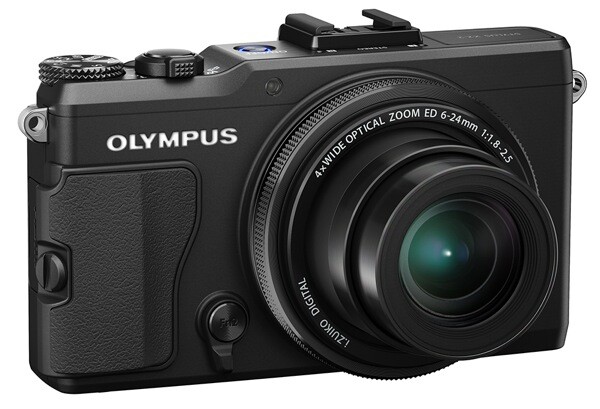
Olympus Stylus XZ 2

Olympus Stylus XZ 2 back

At first sight, the Olympus Stylus XZ-2 looks impressive, very compact, solid, with a rapid lens extension when powered up.

Scene modes

Art Filter

External controls are minimal: the mode dial has positions for auto, PASM, two custom settings, scene modes and the Art Filter selection (11 in all for stills and video shooting); the power button is surrounded by the zoom lever.

At rear is the four way rocker to access flash, AF, self timer, single or continuous shooting and exposure compensation; close by there is a menu button, display control and a Function control.

Then the big surprise, at last for me: at front, just beneath and to one side of the lens is a lever which takes you into manual control, the setting displayed on screen. It is possibly the best manual focus arrangement I’ve seen on a compact digicam. This front of camera control is fully programmable and can be used as focus ring, aperture control, shutter speed control and shooting mode selector, amongst other custom functions.

Menu

Some may find the menu system endless, with multiple sub menus; to be honest, the setting out of camera menus has never been an Olympus strong point.

Added to all of this is the easy to use tilting LCD screen which can be tilted 80 upwards and 50 degrees downwards … but it does not unfortunately swing sideways.

Overall, the XZ-2 is a delight to use, compact and easily controlled. From power up to first shot took only a second, with follow on shots coming in as fast as I could tap the shutter.

A nice touch is the switchable speed grip which can be moved to either side of the camera: southpaws please apply!

Yachts 14.jpg

Olympus Stylus XZ-2 Features

The good news is that the lens is a Zuiko with a maximum aperture of f1.8 … that’s fast! And, when fully zoomed in to its 4x tele end the aperture is still a rapid f2.5. All of which sets the XZ-2 above much of the pack in compact digicams.

Canoes.jpg

In the distortion department the wide and tele ends of the zoom show little or no aberrations. A good performance.

The 12.0 million pixel CMOS can account for a maximum image size of 3986×2976 pixels, so expect to make a 34x25cm print.

Movies can be shot in Full HD at 1920×1080 pixels resolution, saved in the MPEG4 format and accompanied by stereo sound. Whilst the auto focus appears to monitor the shot throughout recording, you cannot take stills mid-video.

Olympus Stylus XZ-2 ISO Tests

Olympus XZ-2 ISO 100.JPG

Olympus XZ-2 ISO 400.JPG

Olympus XZ-2 ISO 800.JPG

Olympus XZ-2 ISO 1600.JPG

Olympus XZ-2 ISO 3200.JPG

Olympus XZ-2 ISO 6400.JPG

Olympus XZ-2 ISO 12800.JPG

At ISO 1600 there are signs of noise in the image. By ISO 3200 the noise is even more apparent in even grey areas. At ISO 6400 the noise is still there (obviously) but definition is starting to fall. At ISO 12800 noise is up and definition is down but IMHO the setting is still suitable for some subjects.

Yachts 5.jpg Yachts 9.jpg

Olympus Stylus XZ-2 Review Verdict

Quality: well above average.

Why you’d buy the Olympus Stylus XZ-2: compact body, fast lens, minimal external controls.

Why you wouldn’t buy the Olympus Stylus XZ-2: complex, cascading viewfinder menu array.

In this market the camera is a little pricey, when compared to models with maxi zooms … but I guess you have to pay for upper level lens quality.

Extra note: external accessories, developed for PEN cameras, such as the digital eye-level viewfinder (VF-2 or VF-3) can be attached to the XZ-2 for ADDED functionality. The built-in pop-up flash can also wirelessly control Olympus flash units such as the FL-600R and 300R strobes. Plus: the new Stylus XZ-2 fully supports wireless connectivity via the new FlashAir mobile connectivity SD card.

A camera for the beginner and ambitious as well!

Olympus Stylus XZ-2 Specifications

Image Sensor: 12.0 million effective pixels.
Sensor: 15mm CMOS.
Metering: Multi segment, centre-weighted, spot.
Lens: f1.8-2.5/28-112mm as 35 SLR equivalent.
Exposure Modes: Auto, Program AE, shutter and aperture priority, manual.
Shutter Speed: 60 to 1/2000 second.
Memory: SD/SDHC/SDXC.
Continuous Shooting: 5 fps at full resolution and 60 fps at 3 megapixel resolution.
Image Sizes (pixels): Stills: 3986×2976 to 640×480.
Movies: 1920×1080, 1280×720 at 30 fps.
Viewfinder: 7.6cm LCD screen (921,000).
File Formats: JPEG, RAW, MPEG4.
Colour Space: sRGB, Adobe RGB.
ISO Sensitivity: Auto, 100 to 12,800.
Interface: USB 2.0, HDMI mini, Eye-Fi, DC input.
Power: Rechargeable lithium ion battery.
Dimensions: 113x65x48 WHDmm.
Weight: 346 g (inc battery).
Price: Get a price on the Olympus Stylus XZ-2 at Amazon.

Post originally from: Digital Photography Tips.

Check out our more Photography Tips at Photography Tips for Beginners, Portrait Photography Tips and Wedding Photography Tips.

Olympus Stylus XZ-2 Review


Digital Photography School

 
Comments Off on Olympus Stylus XZ-2 Review

Posted in Photography


Just Posted: Nikon D600 In-depth Review

14 Nov

nikon_d600.png

We’ve just published our 23-page, in-depth review of the Nikon D600. Aimed at enthusiasts, the Nikon D600 offers a 24MP full-frame CMOS sensor and a 39-point AF system adapted from the D7000. In many other respects, it owes a lot to its considerably more expensive cousin, the 36MP D800. When we previewed the D600 we were impressed by its image quality and how many features it offers for the money. So how does it fare when put through our rigorous studio and real-world testing? Click through to find out.

News: Digital Photography Review (dpreview.com)

 
Comments Off on Just Posted: Nikon D600 In-depth Review

Posted in Uncategorized


Nikon D3 Review and information PART 1 by agnorbertheussen.com

13 Nov

Review of Nikon D3 Information about the camera, systems, performance and menues
Video Rating: 5 / 5

 
Comments Off on Nikon D3 Review and information PART 1 by agnorbertheussen.com

Posted in Nikon Videos


Accessory Review: Kata Revolver-8 Photo Backpack

13 Nov

kata.png

The Kata Revolver-8 photo backpack’s unique selling point is its roulette-style revolving lens compartment, which is designed to let you get access to your glassware in seconds, during a busy shoot. This backpack sits at the more expensive end of the camera backpack spectrum, so does its unique revolving design justify the price premium? Read our review to find out.  

News: Digital Photography Review (dpreview.com)

 
Comments Off on Accessory Review: Kata Revolver-8 Photo Backpack

Posted in Uncategorized


Oddworld: Stranger’s Wrath (2005) Gamespot Jeff Gerstmann Review – 2011 PS3 & 2012 PSVITA Release

12 Nov

The 2005 Xbox cult-classic returns on the PlayStation Network Store, December 2011 for PlayStation 3, Q4 2012 for PlayStation Vita. [PATCHED IMPROVEMENTS: June 27 2012] www.oddworld.com – Stereoscopic 3D TV support – PlayStation Move support – Video recording and YouTube uploading – Brightness and Gamma controls – Audio fixes – Increased crosshair visibility – Fixed Quicksaves and Autosaves – Extra subtitles – Performance improvements [PS3 VERSION] 3.2GB Download SCEE: December 21st 2011 (£9.99 / €12.99 / AUS.25 / NZ.90) SCEA: December 27th 2011 (US.99) www.oddworld.com CHARACTERS All 84 character models have been updated with increased polygon counts and higher resolution textures. This includes all three variations of Live Ammo: Those in the environment, those on the Crossbow and those in the General Store. Stranger: 3k up to 20k polys. NPC’s: 1k up to 3-4k polys. Live Ammo: 500 up to 3k polys. Wolvark Sloghandlers now release Slogs instead of Slegs. Professor Dimble now has glasses and an academic tome. Jo’ Mamma has a deeper voice. ENVIRONMENTS All environments have been given higher resolution textures. Most vegetation has been updated with increased polygon counts and/or higher resolution textures. A lot of the environment is now reflected in water where it didn’t before. Many, many pipes and barrels rounded. Added Blisterz Booty’s broken crud gun to the floor by his bola’d body, as it is in the opening CG Cinematic. Sekto’s Office has been changed to more

 
Comments Off on Oddworld: Stranger’s Wrath (2005) Gamespot Jeff Gerstmann Review – 2011 PS3 & 2012 PSVITA Release

Posted in 3D Videos


Triple Tripod Review Dolica Proline AX620B100 Benro C-058M8 Slik 700DX

12 Nov

Triple Tripod Review: Dolica Proline AX620B100 Benro C-058M8 Slik 700DX Disclaimer: This is a consumer review and I own these tripods myself. I do not represent any of the of the manufacturers. My reviews are for personal preference only. Please view with caution. If you like the review please SUBSCRIBE Here www.youtube.com My Channel: www.youtube.com/digigeekreviews
Video Rating: 5 / 5

 
Comments Off on Triple Tripod Review Dolica Proline AX620B100 Benro C-058M8 Slik 700DX

Posted in Nikon Videos


Review Sigma 18-200mm f3.5-6.3 DC lens

12 Nov

Hey guys bear with me as this is my first review, I will try to review all of my photographic equipment to help you guys in choosing what’s best for you. More of these to come soon. This review was recorded using my Kodak Zi6

Here I go again, spotlighting the detail captured in old fashioned film photography. This time it’s a frame of 35mm positive film (Fuji Provia-100). Scanned with a Nikon Coolscan 9000ED, this frame of film becomes a 30 megapixel file. While the Canon 5D MkII and Nikon’s D3x offer resolution very close to 30 megapixels, neither is a match for the detail and tonal quality captured by film.

 
Comments Off on Review Sigma 18-200mm f3.5-6.3 DC lens

Posted in Nikon Videos


Awesome Samyang 35mm F1.4 unboxing, review and footage!!

10 Nov

Very impressed with this Korean made lens. I certainly do recommend it! www.foto-tip.pl MESSAGE TO ANY TROLLS – YOU WILL BE BLOCKED AND REPORTED!!!

 
Comments Off on Awesome Samyang 35mm F1.4 unboxing, review and footage!!

Posted in Nikon Videos


onOne Perfect Photo Suite 7 Review and Giveaway

10 Nov

Well, it’s here! Version 7 of onOne’s Perfect Photo Suite has got to be the most anticipated release from onOne in this review we’ll see if it lives up to the hype. One rule I have for reviews is that I won’t review stuff that I don’t use on a regular basis. Well, I’ve been using onOne Software since I got my first copy of Photoshop (CS3 I believe) so I’d say I use it pretty regularly! I should note that I don’t get paid for doing these reviews, I do them purely because I want to review things that I use and and want to pass that on to you the reader if you’re trying to make a choice to buy something to advance your photography. So with all that said, let’s get to the review. And at the end we will do a giveaway. Yeehoo!
Where onOne Software Has Been And Where It’s Going

onOne used to cater exclusively to Photoshop users. They made Photoshop plugins and they were even great back then. If you didn’t have Photoshop, you were out of luck for the most part. That wasn’t uncommon, pretty much all software companies for photographers existed as plugins to Photoshop. Over the past couple of years however, onOne has started to slowly pull away from exclusivity with Photoshop and has now blown the doors wide open for Lightroom and Aperture users and even people who have none of the above. Not all of us can buy every new camera that comes out, have a bag full of L series lenses or own every new and groundbreaking piece of software that comes out. A lot of photographers do this stuff part time. Some photographers have full time jobs that have nothing to do with photography so buying every piece of software out there really isn’t a big priority. Some photographers simply are short on cash and can’t afford everything that’s available.

When onOne announced Perfect Layers, they quite literally turned the photography industry upside down. Not only is Perfect Layers included in their Perfect Photo Suite, it’s also free for anybody to use! It’s a free program that give us access to things like layers, masking, brushes, filters and more without having to buy an expensive program like Photoshop. When you combine Perfect Layers with the other programs that onOne offers, the pot really starts to get sweeter. Perfect Layers ties all of onOne’s products together in one nice program and it really becomes a one stop shop for just about all your editing needs. In a lot of cases, it can completely replace programs like Photoshop and Lightroom. If you don’t have $ 700 for Photoshop, if you don’t shoot thousands of images a week and need Lightroom for cataloging everything, then onOne’s Perfect Photo Suite 7 might just be the best option for you. If you have $ 700 and are ready to spend it, then I’d still suggest buying Lightroom and onOne’s PPS7 every time. You’ll even have some money left over (about $ 250 as a matter of fact) to pay bills. On top of all that, they just added a new and long awaited program into the mix with the release of Perfect Black & White. It’s easy to see that onOne is becoming a serious competitor in the photography industry as not just a supplement to other programs but as a stand alone software program that is much more powerful than some people realize.

What’s New In Perfect Photo Suite 7?

Well first of all, if you haven’t taken a look at onOne in a while, the price for the entire suite dropped significantly about a year ago. Their pricing actually used to closely resemble Photoshop but they decided to drastically drop their pricing to make their products available to more people, realizing that not everyone has $ 700 to drop on software. If you buy each product included in the Perfect Photo Suite a la carte, that’s about what you’ll spend. But if you buy the suite you’ll only pay $ 299.95. That’s pretty cheap considering all the different programs included. There are a lot of new features in PPS7 and if you want a whole list you can visit onOne’s website, but here are the ones that stuck out to me the most.

New Interface and Options

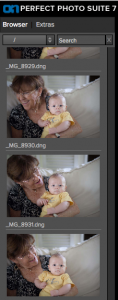
I wasn’t a huge fan of the interface in PPS6. It wasn’t terrible by any means, it just wasn’t as sleek as it could have been. I think they really improved things in PPS7 both in looks and functionality. Where PPS6 was clunky and bulky, PPS7 is smooth and versatile. Instead of having to import every single photo into the suite, you now have access to all your computers files on the left side. You can scroll through any folder or use the search bar to type in a specific file. This feature alone should save a LOT of time and makes the program that much more of a standalone solution.
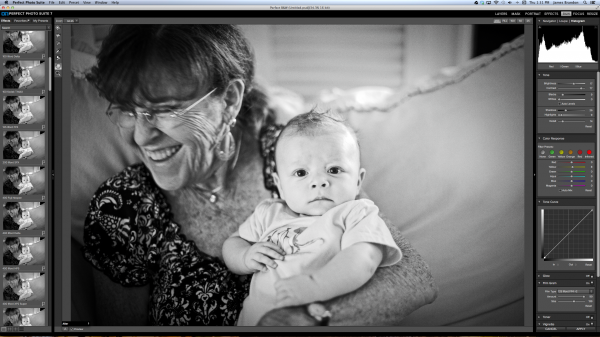

Moving between modules is quick and painless. In past versions there was a lot more waiting around so things have definitely improved in the speed department. Preset image previews used to run along the bottom and seemed to be a bit of a distraction. They used stock images from various photographers to show what a preset did and if you wanted to see a preview with your image, you’d have to hover over the preset and wait for it to pop up. Now the presets run along the left side in the same place as the the files and there’s no more stock images. In PPS7, your image is used for each preset automatically so no more need to hover and wait.

Perfect Black and White

I’ve been waiting for onOne to come out with a Black & White program for quite a while now. So I was pretty happy to see it included in PPS7. I wouldn’t necessarily say that Perfect B&W is drastically different or more powerful than any other Black & White program. After all, converting an image to monochrome can only be so complicated, right? But there are things you can do in Perfect B&W that you can’t do in Lightroom or Photoshop alone. For example, in Perfect B&W you can add borders to your images (a remnant of the late Photo Frame software) without having to switch modules or export the photo anywhere (not available in LR or PS). You can add a blend mode on top of the image and then reduce its brightness (not available in LR). You can split tone the image like in LR but Perfect B&W also has presets readily available right in the toner drop down. And if you’re feeling really creative, you can simply take the photo into another onOne program like Focal Point with just one click. See how many clicks that takes in LR or PS! Here’s a quick video of Perfect B&W in action..

Improved and Expanded Presets Library

Using and creating presets in Perfect B&W (or Perfect Effects) couldn’t be easier. For the record, I love presets. To create a new preset once you have an image where you want it, just hit “shift > command > s” or go to the menu bar and choose “Presets > Save Preset” and a dialogue will pop up to walk you through the rest. Unlike Lightroom, in PPS7 you can add a creator and description to each preset which really comes in handy if you want to sell your presets online or give them out. Having presets readily available is great. You can always go back to ones you love to maintain a consistent look to your images, or you can use one preset and apply it to an entire photo shoot or series to really tie it all together. It’s good to see that onOne loves presets as much as I do. The litany of presets included in the PPS7 is exhaustive to say the least. That’s a good thing though. There are more presets, textures, brushes, borders and frames than I think I’ll ever fully know what to do with and that’s a lot better than having too few.

Say Goodbye To PhotoFrame

Yep, it’s true. PhotoFrame had a good run. It was the first onOne program that I ever purchased and now it’s been absorbed into the suite. You’ll find its remnants in Perfect Effects, Perfect Layers and Perfect B&W. It’s sad to see it go but that’s the way technology goes…

Start To Finish Video of Perfect Photo Suite 7 In Action

Here’s an in-depth video (about 45 minutes) of me editing an image from Italy using Lightroom, Perfect Photo Suite 7 and Photoshop. This is a long one, from start to finish, but if you want to see how I work through an image (unscripted) and see how seamless it is to work between these programs this should be an interesting watch for you. To watch even more videos on PPS7, be sure to visit onOne’s website and check out the Perfect Inspiration series from by good bud Brian Matiash or the countless videos available at any time at the onOne University.

Finished Image

Conclusion And Giveaway

I seriously am in love with this software. It’s incredibly versatile and it helps me out in so many ways from day to day. Whether it’s using Perfect Resize to prepare all of my gallery and fine art prints, dropping a photo into Focal Point to add some sweet blur or jumping into Perfect Mask when precision is needed; onOne’s Perfect Photo Suite has taken up permanent residence in my post processing workflow.

For a chance at winning a free copy onOne’s Perfect Photo Suite 7, here’s what you need to do: Leave a comment below telling us why/how you’d benefit from having PPS7. That’s it! And bonus point for following us all on Twitter!

We’ll choose the winner in one week from this post going live – midnight on 17 November US Eastern time.

@jamesdbrandon
@digitalps
@ononesoftware 

Post originally from: Digital Photography Tips.

Check out our more Photography Tips at Photography Tips for Beginners, Portrait Photography Tips and Wedding Photography Tips.

onOne Perfect Photo Suite 7 Review and Giveaway


Digital Photography School

 
Comments Off on onOne Perfect Photo Suite 7 Review and Giveaway

Posted in Photography


$60 Yongnuo YN560 Review – Speed Light Flash Review for Nikon Canon DSLR

10 Nov

razzi.me www.facebook.com www.PhotographersOnUTube.com https Here is a quick review of Yongnuo YN560 flash. It’s a great flash for people on a tight budget. It’s a manual flash without TTL feature. It doesn’t have the LCD screen unlike YN560II flash which I’ll be reviewing in a few weeks.
Video Rating: 4 / 5

 
Comments Off on $60 Yongnuo YN560 Review – Speed Light Flash Review for Nikon Canon DSLR

Posted in Nikon Videos