RSS
 

Posts Tagged ‘Read’

4 Steps on How to Read Images and Learn to Replicate the Results

18 Apr

Earlier, I wrote an article called: why asking what camera settings were used may not be as helpful as you think, and in it, I touched on the concept of reading an image.

Learning to read images – from a technical perspective and not a conceptual one – is something that I believe all photographers must be able to do, as it allows you to get a rough guide on what settings may have been used to create an image. They won’t be the exact settings; but you’re most likely not going to have the exact same lighting environment as what a particular photo was taken in.

Shallow Apeture 1

A wide aperture was used her to achieve a shallow depth of field.

Dive in to read an image

To begin reading images you must have, at the very least, a good understanding of aperture, shutter speed and to a lesser extent, ISO. You’ll want to understand how these things affect the image in different ways. For example, if you saw an image with a lot of motion blur, you would know from your understanding of shutter speed that a slower shutter speed was used.

As you become more proficient with lighting and off-camera flash, you can even read how the subject was lit with artificial lighting, and begin to replicate how it was done. But don’t worry! This article will be focussing on the three major aspects of photography exposure (aperture, shutter speed and ISO) to help you begin your journey to reading images.
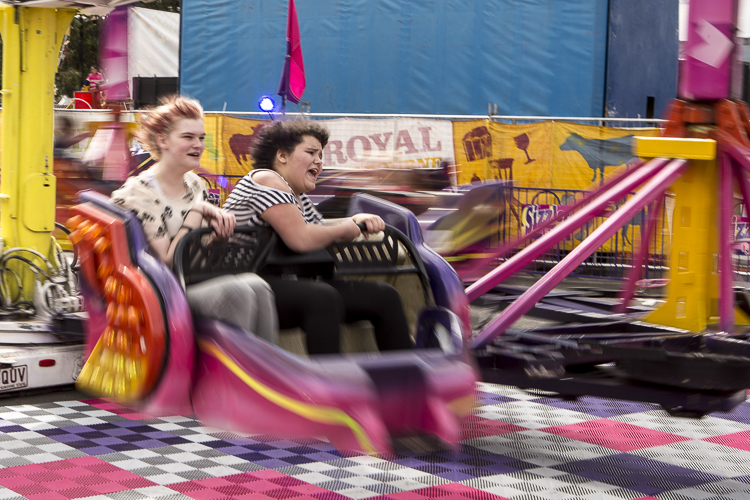
Slow Shutter 2

What shutter speed was used here – a fast or slow one?

Step 1: Shutter Speed – Fast or Slow?

I find that determining whether a fast or slow shutter speed was used first, can help greatly when it comes to determining aperture and ISO later. The first thing you will want to ask yourself when assessing shutter speed is; was it fast or slow? This can be decided by how much, or how little, motion blur is present in the image, as that is what shutter speed controls.

If everything in the image is pin sharp, and there is absolutely no motion blur at all, then a fast shutter speed would have been used. However, if there is a lot of motion blur, then a slow shutter speed was used.
Here are some points that you can take out of knowing if the shutter speed is fast or slow:
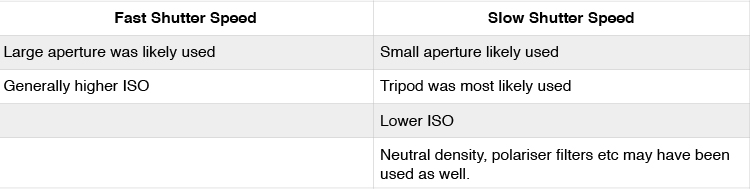
Shutter Speed Table

But how fast is a fast shutter speed, and at what point does the shutter speed become slow? To answer this, think of your shutter speed in relation to your subject’s speed. For example, when photographing sports or other fast action, you may find using a shutter speed of 1/1000th is required to freeze your subjects. This is because your subjects are moving quite fast. However, if you were to photograph people walking down the street, you would not need the same shutter speed, as your subjects are not moving as fast.

Below are examples of slow and fast shutter speeds. Notice the presence of motion blur in the images where a slower shutter speed was used, but action is frozen with a fast shutter speed. In images that will use a slow shutter speed, it is often recommended you use a tripod to stabilize your camera, and prevent camera shake.

What isn’t important is knowing the exact shutter speed; that is something that you will be able to experiment with to get the results you want. All you are doing here is identifying if a slow or fast shutter speed was used, to give you a starting point.
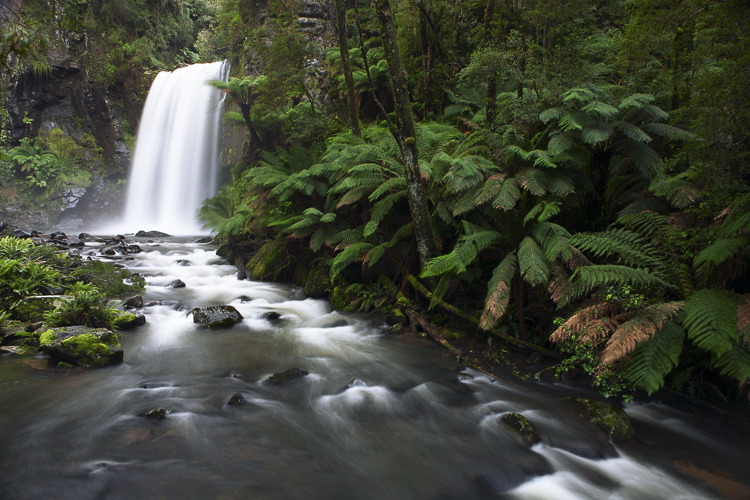
Slow Shutter 3

A tripod was used when taking this photograph to prevent blur that can be caused by camera shake. The shutter speed was 3.2 seconds.
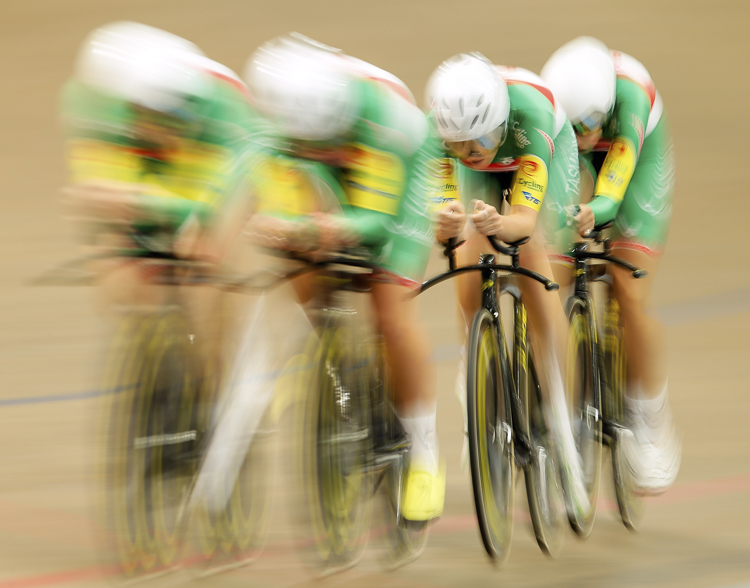
Slow Shutter 4

The reason there is one rider sharper than the others in this frame, is because even though all riders are moving at the same speed, the rider who is sharpest is moving slower, relative to where I was positioned taking this photograph. The shutter speed used here was 1/6th.

Fast Shutter 2

Notice how everything is sharp in this image, and there is no blur? This means that a fast shutter speed was used (in this case 1/2000th), and because the subject is quite fast, a faster than normal shutter speed was needed.

Fast Shutter 1

Again, notice how everything is sharp and there is no blur? This means that a fast shutter speed (1/1250th) was once again used.

Step 2: Aperture – Large or Small?

In step one I mentioned that determining whether a fast or slow shutter speed was used first, can greatly help you in determining the aperture. Here’s why. If you are familiar with the exposure triangle you will know that in nearly all cases when a fast shutter speed is used, it is associated with a large aperture (small f-number). Conversely, the slower the shutter speed, the smaller the aperture becomes. So if you see a photo that has motion blur present, it is highly likely that the photographer used a smaller aperture; or if you see a photo where moving objects are frozen, the photographer has most likely used a larger aperture to enable a faster shutter speed.

Another way you can determine the aperture is by looking for bokeh, or subject isolation. The more bokeh that is present in the image, the more the subject is isolated. To achieve this, the photographer would use a larger aperture. On the other hand, if everything in the image is in focus, then the photographer employed a smaller aperture to increase their depth of field.
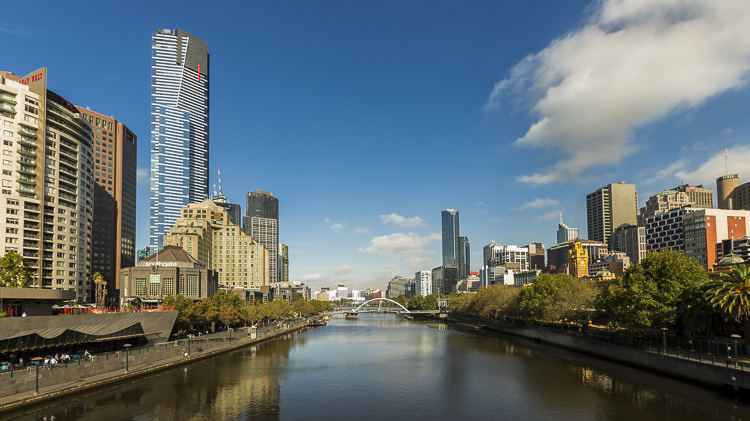
Small Aperture 1

Everything in this photograph is in focus, which would mean that a small aperture (larger f-number; like f/11 in this image) was used to increase the depth of field.

Shallow Aperture 2

Notice how the background in this image is blurred out a lot, and the subject is very isolated? This is a sign that a larger aperture (small f-number; in this example f/3.5) was used to decrease the depth of field.

Step 3: ISO

ISO is one of the parameters that isn’t so important in determining what settings may have been used when reading an image. Use ISO to get the settings that you need to use, to create the shot you want. For example, if you want to use the slowest shutter speed you can, set your camera’s ISO to its lowest setting. Conversely, if you want to use a very fast shutter speed, you may find that you have to increase your ISO.

Step 4: Focal Length

Focal length is something that is often overlooked in images, but it is a very important element indeed. It does more than simply allow a photograph to add more in the frame, or zoom in closer. Different focal lengths evoke different emotions in the viewer when looking at an image. For instance, if a wide angle lens was used, it places the viewer in the scene and can make them feel like they were there; whereas a longer focal length places the viewer further away from the subject, and evokes a more voyeur emotion.

The great thing about focal length is that it is quite easy to distinguish approximately which one was used. To make it simpler, breaking down focal lengths in to three groups can help greatly.

  • Wide: <50mm (i.e. 14-50mm on full frame, 10-35mm on cropped or APS-C sensor)
  • Normal: ~50mm-85mm (35-56mm cropped sensor)
  • Telephoto: 85mm+ (130mm+ on cropped sensor)

You can use the presence of compression to distinguish the different types of focal length. A wide angle lens accentuates the foreground and increases distances in the frame, as well as having a very wide field of view. This effect increases as the focal length decreases – or gets wider. On the other end, a telephoto lens will give you much more compression, and make distances in the frame look shorter. Their field of view will decrease, and the affects of aperture, particularly larger apertures, will be more pronounced. That’s why f/2.8 at 16mm looks different than f/2.8 at 200mm, if your subject is kept the same size in the frame.

Here is a small table with examples of the same scene photographed from the same point, but with different focal lengths.
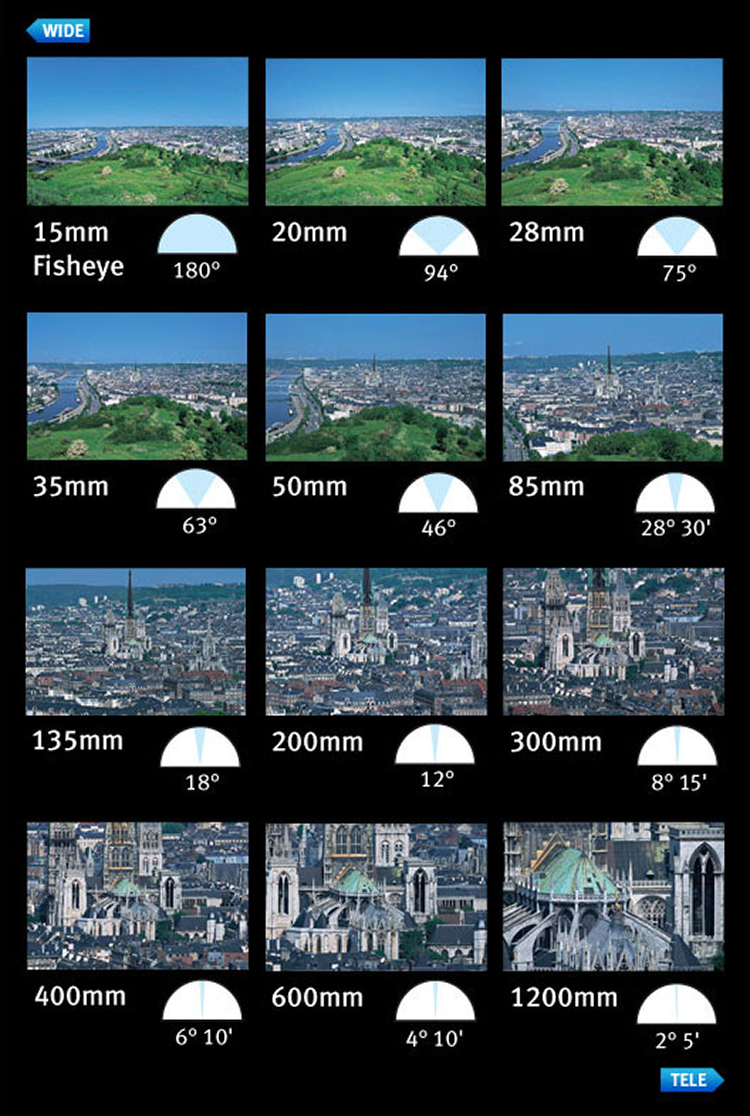
Image courtesy of Canon

Image courtesy of Canon

Now you have had a quick introduction on how to read images. Remember, knowing the exact settings is not important, but knowing how to get an approximate guess is better than not knowing anything at all! With experience, you will become more proficient at reading images, and will be able to guess with more precision. The more you understand aperture, shutter speed, and ISO, the better you will be at reading images.

Along the way, you will also learn that different genres within photography use a different set of settings. For example, most landscape photographers will use smaller apertures, lower ISOs, and slower shutter speeds; whereas sports shooters for instance, will generally use higher ISOs, larger apertures, and faster shutter speeds.

googletag.cmd.push(function() {
tablet_slots.push( googletag.defineSlot( “/1005424/_dPSv4_tab-all-article-bottom_(300×250)”, [300, 250], “pb-ad-78623” ).addService( googletag.pubads() ) ); } );

googletag.cmd.push(function() {
mobile_slots.push( googletag.defineSlot( “/1005424/_dPSv4_mob-all-article-bottom_(300×250)”, [300, 250], “pb-ad-78158” ).addService( googletag.pubads() ) ); } );

The post 4 Steps on How to Read Images and Learn to Replicate the Results by Daniel Smith appeared first on Digital Photography School.

Digital Photography School

 
Comments Off on 4 Steps on How to Read Images and Learn to Replicate the Results

Posted in Photography


Beach Read: Monumental Concrete Library on the Edge of a Bay

31 Oct

[ By Steph in Architecture & Public & Institutional. ]

beach library 1

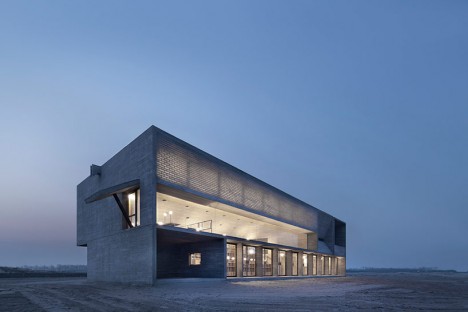
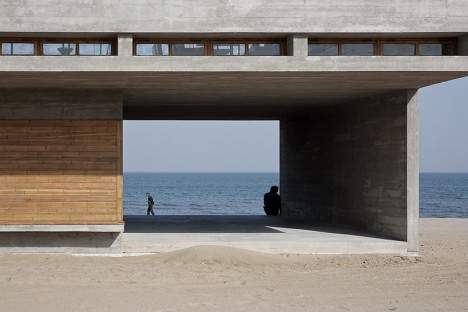
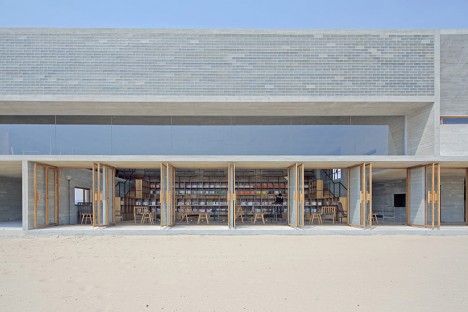
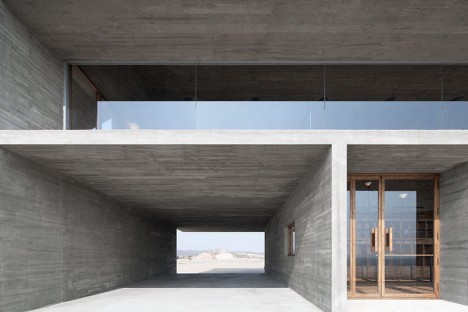
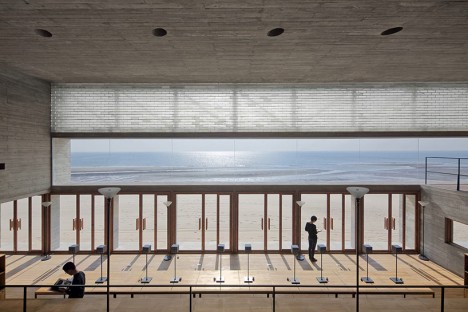
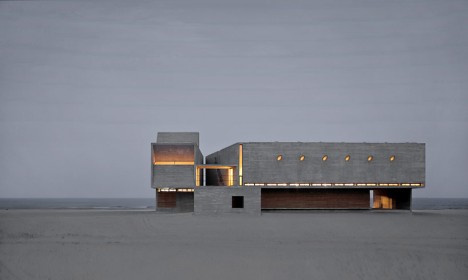
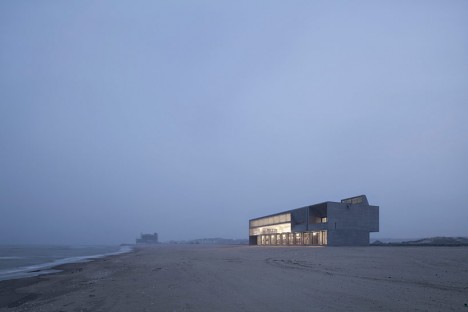
If you’ve ever gotten bored with the book you’re reading on the beach and wished you could just run into a seaside library for a new one, here’s the building of your dreams: a stunning modern repository of books so close to the sea, it’s practically on the water. Vector Architects positioned this monumental concrete structure right on the edge of China’s Bohai Bay, about three hours from Beijing, with massive glass doors opening the reading space right onto the sand.

beach library 2

beach library 3

beach library 4

Oriented to direct nearly all of its views to the water, the library feels strong and solid, anchored to the sand. Of course, it’s hard not to worry about all of those books being ruined in the event of a severe storm. It’s not clear whether the architects have taken any particular precautions against potential disasters, but it certainly looks like a beautiful place to sit and read, especially when the lower doors are all open to the breezes coming off the water.

beach library 5

beach libray 6

beach library 7

beach library 8

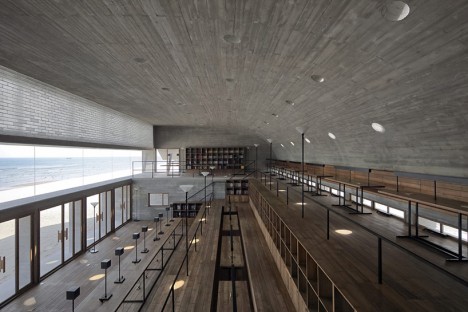
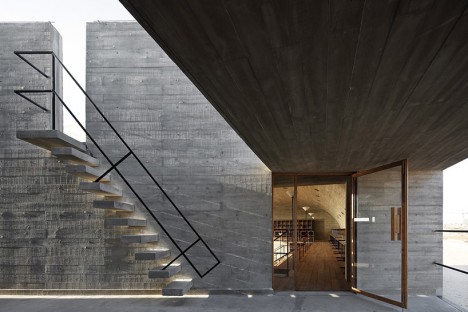
Steel roof trusses support the massive canopy roof, which curves down into the wall at the rear of the building. Upper-level benches and tables look out a strip of fixed windows, and a stairway leads to a small rooftop patio. In contrast, a meditation room is  insulated from the rest of the space, the only windows a handful of skylights carefully directing natural light.

beach library 10

beach library 11

beach library 12

beach library 13

The building feels like a real-life version of a series of storm-proof fantasy beach structures by Dionisio Gonzalez – architecture with the heft and wherewithal to stand up to the elements when other buildings would be swept away.

Share on Facebook


[ By Steph in Architecture & Public & Institutional. ]

[ WebUrbanist | Archives | Galleries | Privacy | TOS ]


WebUrbanist

 
Comments Off on Beach Read: Monumental Concrete Library on the Edge of a Bay

Posted in Creativity


Room to Read in a Digital World: 14 Modern Library Designs

03 Sep

[ By Steph in Architecture & Public & Institutional. ]

modern libraries monterrey 1

Shifting from paper to digital media hasn’t diminished the role of libraries in our communities, with many modern designs expanding to serve as cultural hubs with cafes, soundproof video rooms and even lookout points with panoramic views of the surrounding city. These 14 designs combine older traditions with new materials, programs and functions, juxtaposing thousands of years of collected knowledge with dazzling structures made of steel, timber and glass.

Revamped Medieval Tower Library

modern libraries medieval tower

modern libraries medieval tower 2

modern libraries medieval tower 3

The crumbling medieval Torre del Borgo in northern Italy gets a new life thanks to a stabilizing renovation that added a stacked timber volume for addition space and outfitted the inside with a ribbon-like black staircase. Architect Gianluca Gemini strengthened the existing walls, added more windows  and created a means of getting to each of the four levels that also functions as a sculptural centerpiece.

Historic Chapel Turned Modern Library  in Italy

modern libraries chapel 1

modern libraries chapel 2

modern libraries chapel 3

modern libraries chapel 4

A sleek perforated aluminum tower contrasts with the traditional architecture of a former chapel in Lonate Ceppino, Italy, transforming it into the ‘Elsa Morante’ public library. DAP studio contrasts old and new, airy and solid, connecting the modern volume to the pre-existing structure with glazed passageways.

Monterrey Library by Anagrama

modern libraries monterrey 1

modern libraries monterrey 2

modern libraries monterrey 3

Built-in wooden bookshelves curve up and connect to form a cocoon-like architectural feature at the Monterrey library by Mexico City-based studio Anagrama. Set within a staircase, this unusual space doubles as a reading room, with padded bench seats  on either side of the steps.

Barn-Like Timber Dainville Library

modern libraries dainville

modern libraries dainville 2

modern libraries dainville 3

Formerly a farm building, the squat brick section of the original Danville Library gets a beautiful and functional barn-like addition to bring it into the modern era, with timber slats adding architectural interest and screening the interior from direct sunlight. The new gabled areas by BplusB architects give the interior a cathedral-like feel.

New Library for Baghdad by AMBS Architects

modern libraries baghdad

modern libraries baghdad 2

modern libraries baghdad 3

The first new library for Baghdad since the 1970s, this unusual structure by AMBS architects takes its shape from the arabic Kufic word for ‘read.’ Stretching out into a lake, the building will feature the world’s largest reading room as well as a massive double-curved glass roof to flood the interiors with natural light.

Next Page – Click Below to Read More:
Room To Read In A Digital World 14 Modern Library Designs

Share on Facebook


[ By Steph in Architecture & Public & Institutional. ]

[ WebUrbanist | Archives | Galleries | Privacy | TOS ]


WebUrbanist

 
Comments Off on Room to Read in a Digital World: 14 Modern Library Designs

Posted in Creativity


The Ultimate Photography Guide to Pricing That You Have to Read

18 Jun

Setting the proper price for your photography business is one of the most important, thus challenging, things you may face in your photography career. Photography pricing determines your priorities, profit potential, competition niche and business style. Bad pricing lists could not only cost you money, but also destroy your business before you can say Jack Robinson, if you know what Continue Reading

The post The Ultimate Photography Guide to Pricing That You Have to Read appeared first on Photodoto.


Photodoto

 
Comments Off on The Ultimate Photography Guide to Pricing That You Have to Read

Posted in Photography


The Most Important Do’s and Don’ts of Portrait Posing You’ll Ever Read

03 Feb

Have you ever seen those photographers whose portfolios have so so many amazing portraits? You look at all of their pictures, wondering how they do their magic. They must have “great subjects” or work with people that aren’t camera-shy like your friend. The truth is that great portraits aren’t about the models or how photogenic or “picture-perfect” they are, but Continue Reading

The post The Most Important Do’s and Don’ts of Portrait Posing You’ll Ever Read appeared first on Photodoto.


Photodoto

 
Comments Off on The Most Important Do’s and Don’ts of Portrait Posing You’ll Ever Read

Posted in Photography


Read My Bullets (Season 2 Finale)

09 Apr

www.youtube.com Click here to watch Sanity Not Included – Cool New Friends (Halo, LittleBigPlanet, Scott Pilgrim, Assassin’s Creed Brotherhood, Black Ops) S02E01 Sanity Not Included: Read My Bullets (Season 2 Finale) Season 2 Episode 13 of the Awesome-est-est-est show ever by Dexterboy124 and GuitarMasterX7! Download the Sanity Not Included Season 2 Soundtrack!: itunes.apple.com Subscribe to Director’s channel’s! Dexterboy124: www.youtube.com GuitarMasterX7: www.youtube.com Animations by Spazkidin3d: www.youtube.com – – – – – – – – – – – – – – – – – – – – – – – – – – – – – – – – – – – – – – This video will show you: How to tell stories How to animate how to make Machinima – – – – – – – – – – – – – – – – – – – – – – – – – – – – – – – – – – – – – – Like Machinima on Facebook! facebook.com Prove your gaming skills on the Respawn Army app therespawnarmy.com FOR MORE MACHINIMA, GO TO www.youtube.com FOR MORE GAMEPLAY, GO TO: www.youtube.com FOR MORE SPORTS GAMEPLAY, GO TO: www.youtube.com FOR MORE TRAILERS, GO TO: www.youtube.com FOR MORE MMO & RPG GAMEPLAY, GO TO: www.youtube.com Tags: yt:quality=high “sanity not included” SNI dexterboy124 guitarmasterx7 spazkidin3d animation machinima “dexter manning” “lyle burruss” season trailer finale Christmas holidays “how to” “episode 14” ep “Uncharted 3” “Gears of War 3” GOW3 choad “assassin’s Creed” “Metal Gear” snake smash bros “Scott Pilgrim” UMVC marvel vs capcom garrys mod final fantasy MW3 call of duty novels tits bobs violence


Windows Live Mail 2011 – Stop Asking to Send Read Receipts

29 Jan

Configure Windows Live Mail 2011 to ignore read receipt requests instead of prompting you each time.

You may occasionally receive an e-mail via Windows Live Mail 2011 that comes with a Read Receipt request. This is done by the sender to help ensure their messages actually make it to their destinations.

While there are many valid reasons for people to ask for read receipts, you may be concerned about privacy and never want to answer these requests. Thus, instead of always responding no to read receipt requests, you can quickly configure the software to ignore these silently:…

Read more at MalekTips.
New Computer and Technology Help and Tips – MalekTips.Com

 
Comments Off on Windows Live Mail 2011 – Stop Asking to Send Read Receipts

Posted in Technology