I have met a lot of people who, upon getting their first DSLR, immediately want to start taking pics of their kids, their friends, some high school seniors, or maybe even a wedding. They want to dive headfirst into the deep end of the photography pool, even if they aren’t entirely sure what they are doing. For the record, I fully support this! Experience can be the best teacher of all, and even if the stakes are high like a wedding or graduation, I admire those who can throw caution to the wind and jump right in, even if they may be a bit unprepared.

That sense of excitement and wonder, as well as a willingness to try new things and experiment with your equipment, is something that tends to wane as the years go by and so many cameras start gathering dust on closet shelves. It’s this sense of newness and enthusiasm that, in my opinion, is missing from some of the more seasoned photographic veterans that I visit with from time to time.
However, if you are one of those individuals with a new camera who just can’t wait to start snapping photos of friends and family, and maybe even create a Facebook page for your new photography side project – I would advise you to pause and consider a few questions first. This will help ensure that you are getting your photography business started on the right foot and setting yourself up for long-term success, not just a few bucks on the side and some clicks to your website.
1. What does my client expect?
“Wait a second,” you might be saying to yourself right now. “These people are my friends and family…not my clients!” While this might be true, if you don’t start seeing the people you photograph as clients, you might find it hard to separate your personal relationships from your professional side as you get more established in your craft.

The first thing you need to square up are their expectations of what you will provide. Everyone you photograph, whether it’s people you have known your whole life or new clients who found your website or social media account, will have a unique set of expectations for what their photography session will involve. Aunt Ginny might think you will take some tasteful outdoor pics like the ones her sister posted on her Instagram. Your buddy George might want some indoor studio photos of his kids like the ones he saw at an art fair downtown last weekend. Someone named Rachel, who emailed you from your website, would like you take bridal photos like the ones she saw in a wedding magazine. Meanwhile, your own personal style is more suited to newborns and infants since you are not very comfortable directing people and telling them what to do during a photo session.
That’s just the beginning! If you don’t know what these people are expecting, they will likely walk away less than satisfied, even if you think your photos of them are beautiful.
Setting expectations for success
One of the best ways you can manage your clients’ expectations is to provide them with some existing images that showcase your overall style and approach. Plan on giving your clients some examples of the types of photographs you take so they know whether or not you will be a good fit for what they want. You can also visit with them over email, social media, phone, or in person to make sure you can provide the types of photos they are looking for.

If you do not already have a portfolio to show potential clients, you can enlist the help of some friends and family specifically for this purpose–but again, remember to manage expectations. If you take this approach, the goal is to get pictures that you want, not necessarily what your models want. Make sure the people you are photographing in these situations know that they are doing this to serve you and your needs, and if they do happen to like the pictures you take then you could reciprocate by doing a session for them in the future.
The flip side of knowing what your clients expect is making sure that you understand your expectations, which is just as important. Do you want to take photos that are posed or candid? Will you travel outside of your community, and if so, will you charge a fee? Do you plan to do extensive edits after the shoot, or are you the type of person who prefers to shoot in JPG and not alter things afterwards? Will you photograph major life milestones like weddings, if given the chance, or do you prefer more subdued scenarios like casual family photos?
Of course one of the best ways to mitigate any potential problems is to have a contract in place so you can make sure you and your clients are both on the same page. At this point you might be thinking “Why does it have to be so complicated? I just want to go out and shoot photos.” This might all seem like it’s a big hassle, but if you don’t spend some time considering your expectations as well as those of your clients, you are likely going to end up with far worse problems sooner than you think.

Being clear on exactly what this young man wanted, as well as what I would do, helped make this high school senior photo session go smoothly.
One of the most painful experiences you can have as a photographer is when your clients are unhappy with their photos. Usually, but not always, this is a result of mismanaged expectations. They were wanting one thing, and you delivered something else. By making sure you understand what your clients want, whether they are family, friends, or perfect strangers, you will make great strides in not only providing the best photos possible, but building long-term relationships that will keep them returning for pictures in years to come.
2. Can I make my camera do what I want it to do?
There is a strong temptation when you first upgrade to a DSLR to put it in Auto and expect your photos to be amazing. To some degree, that can certainly happen–the Auto mode on modern cameras does a good job of getting things like exposure and white balance right, but this is only a small part of the total photographic equation. As a photographer you need to spend time learning not only about the basics of exposure, but how to control your camera in such a way so as to make it do what you want.
Knowing how various f-stops affect the image is one thing, but knowing how to quickly change the aperture while in the middle of a photo shoot is another thing entirely. Less expensive cameras like the Nikon D3300, Canon Rebel T3i, and Sony a6000 are, in many aspects, just as capable as their more expensive counterparts. But many of them require you to use various menus and multi-purpose buttons to change settings instead of having dedicated buttons for things like ISO, White Balance, etc.
I know it sounds elementary, but reading the manual for your camera is a great way to familiarize yourself with its capabilities. Make sure to have your camera in your hands while doing this so you can start to learn not only what your camera can do, but how to make it happen. As the saying goes; practice, practice, practice. If you’re in the middle of a shoot and you need to quickly change from matrix to spot metering, or do some bracketing in order to get the proper exposure, you don’t want to waste time fiddling with buttons and menus while the moment passes before your eyes.

Popular entry-level cameras like the Nikon D3200 have many advanced functions, but their lack of dedicated buttons and dials requires you to use menus to access them. Make sure you know how to do this before doing a photo session.
As an example, I recently spent some time with my father who is an avid photographer, and throughout the course of our conversation we got to talking about off-camera flash techniques. He shoots with a Rebel T4i, and through some experimentation we discovered that it is capable of triggering an off-camera flash with the built-in pop-up flash. We both thought this feature was reserved for Canon’s more expensive cameras, and he was delighted to find out that he would not need to purchase wireless triggers for photo sessions that require off-camera lighting. The moral of the story is that your camera can probably do more than you think, but it requires some research, experimentation, and the courage to move away from the convenient Auto mode.
With a little practice, you will start to figure out the many capabilities your camera has, and how to use them on photo shoots. If you are trying to achieve a particular look or style when shooting photos for clients, you might not need to buy any new gear at all–you just need to make sure you know all the details of operating what you already own.
Of course it’s also entirely possible that your camera, lenses, or other gear can’t do what you want them to do. Your creative vision and goals for a photo session might be far beyond the reach of what your setup is capable of achieving, and you might discover that in order to fulfill your, or your client’s, wishes you will need to spend hundreds or even thousands of dollars on equipment. But remember the old adage; knowing is half the battle.
You might not need to get any new camera gear in order to pull off a particular photo shoot–you might, instead, have to simply adjust your expectations and make sure to communicate with your client about it as well. Even a DSLR with a basic kit lens can do many things, but there are some limits. Knowing them before you are on location or in a studio with a client will help ensure you can get the most out of what you do have.

Canon’s popular 70-200mm f/2.8 lens is an outstanding workhorse, but costs as much as several less-capable lenses. You might discover that you need to spend money on equipment like this, but it’s also possible that you can get by with what you already own.
3. Am I prepared for the long haul?
It’s such a thrill to start taking photos for other people, and in a way I envy all you new photographers who are reading this while pondering the incredible opportunities in front of you. But if this is you, I would advise you to take a step back and spend some time thinking about your long-term goals so you have a better understanding not only of what you want, but what you will be able to do for your clients.
As you take on more jobs and word begins to spread, you might find yourself becoming far too wrapped up in what was once just a fun hobby. Planning for sessions, re-shooting when things don’t work out, investing in new gear, and spending hours editing and fine-tuning in Lightroom or Photoshop are not the sorts of activities people usually have in mind when they start to get into photography as more than just a simple pastime. But all these elements (and many more) will ultimately become factors in how you approach your photography, so it’s important to think about them upfront.
Before you start spreading the word to your friends about your newfound photography venture, spend some time considering all the other elements besides just taking photos that will come into play as the months and years go by. It’s entirely possible that a month or two down the road you might find yourself dreading the editing process, but so many people like your photos that you are getting dozens of requests for photo sessions. This would put you in a bit of a bind, enough so that you might be tempted to toss your camera aside and wish you had never even started taking photos in the first place!
Considering right upfront whether you are prepared to do this over the long run will help you deal with these situations if and when they arise.

Photography can be a lot of work, but it can also be a ton of fun. And it’s such a good feeling knowing you can capture moments that people will have with them for the rest of their lives.
Of course the flip side of all this is that you might be positively giddy at the prospect of meeting with clients, taking photos, editing them, and all the other activities that are involved with photography. But, no one notices. Months go by without getting any clients or photo opportunities and you could find yourself wondering why you bothered to even do this in the first place. Again, you need to have a plan for how you will deal with these types of situations, and figure out if you really are in this for the long haul. The truth of the matter is everyone has their ups and downs, with periods of frantic activity followed by long stretches of finger-tapping. If you spend time thinking about how you will deal with both of these extremes and everything in between, it will help you set yourself up on the road to success from the very beginning.
Of course these are just three questions to consider, and I feel as though we have barely touched the surface. What about you? Are you a seasoned pro with some advice to people just starting out, or are you just beginning to think about doing more with your camera, but wondering what to do? Leave your thoughts in the comments below.
googletag.cmd.push(function() {
tablet_slots.push( googletag.defineSlot( “/1005424/_dPSv4_tab-all-article-bottom_(300×250)”, [300, 250], “pb-ad-78623” ).addService( googletag.pubads() ) ); } );
googletag.cmd.push(function() {
mobile_slots.push( googletag.defineSlot( “/1005424/_dPSv4_mob-all-article-bottom_(300×250)”, [300, 250], “pb-ad-78158” ).addService( googletag.pubads() ) ); } );
The post 3 Questions to Ask Yourself When Starting a Photography Business by Simon Ringsmuth appeared first on Digital Photography School.
 I vividly remember the first time I was asked to take photos for someone that I didn’t know. We had friends in common, and she had seen some of the photos that I had taken of friends and family, but we had never met. We talked over the phone, and arranged a time for me to come to her home and take some photos of her daughter. The big day arrived a week or so later, and I was SO nervous. I wasn’t sure what her home looked like, or what the lighting situation would be, or whether her daughter was sitting up by herself yet or not. I didn’t know how long I should stay, whether I could ask to rearrange furniture, or how the photos that I took would be used. Going into the session, I didn’t feel like I was in control, and I didn’t like it one bit.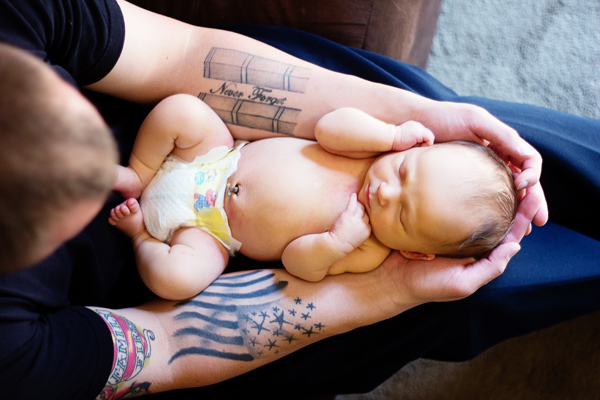


 A: I start off by thinking about what I want to happen. How the gif should start and end, and what will happen in between? Do I need an extra set of hands or any other tools?
  A: The key here is consistency. I’ve learned my lesson trying to put together a crazy hodge podge of images (that just doesn’t work).


 A: Tumblr is one of the best places for gifs but they have to be a certain size to upload and play correctly. They need to be under 1mb and no more than 500px wide.