RSS
 

Posts Tagged ‘PostProcessing’

Results of the post-processing poll

27 Jan

A few weeks ago I started a new poll on what post-production software you use most often. If you want to add your vote you still can here. We have run this poll twice in the past, every two years, so it will be interesting to see if the results have changed at all from 2009, to 2011 to 2013. Let’s look at the current results first.

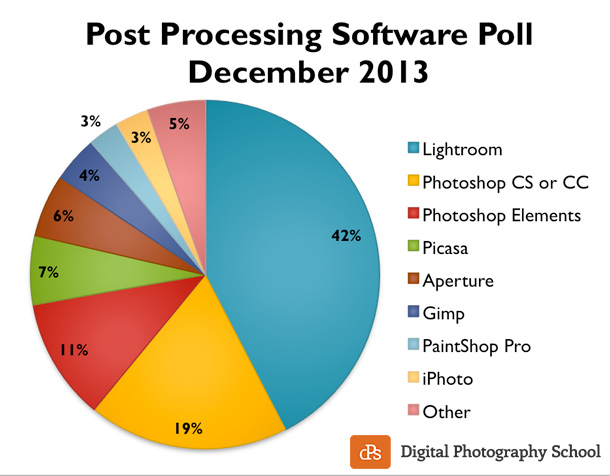
Results – what post-processing software is used most often in December 2013

With over 27,000 votes at the time of this summary the overwhelming winner was Lightroom with a whopping 42% share. Now let’s see how these numbers compare to 2011 and 2009.
post-processing-poll-2013-dPS

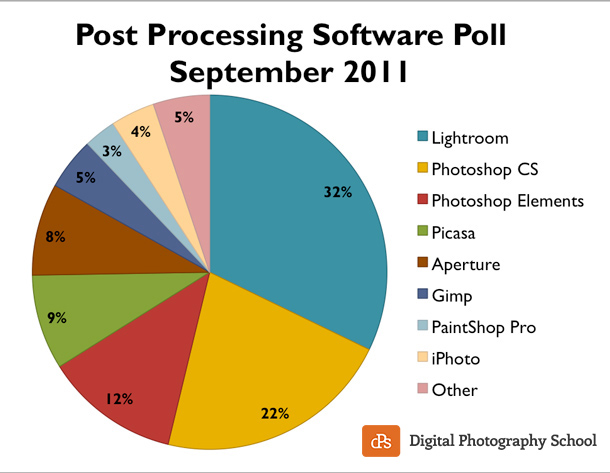
Survey results from 2011

Interesting! Lightroom has certainly catapulted to the top in a big way:

  • Lightroom is up 10% from two years ago to 42% currently, that’s a huge chunk of users
  • Photoshop and Photoshop Elements combined are down from 34 to 30% (-4%)
  • Picasa is down 2%
  • Aperture is down 2%
  • Gimp down 1%
  • PaintShop Pro held steady at 3% share
  • iPhoto was down from 4% to 3% share
  • Other was constant at 5%

These results are from 23414 votes in the 2011 poll.
post-processing-poll-2011-dPS

 Way different results from 2009!

According to Wikipedia Lightroom Version 1 was released in January 2007. Within two years (as seen below) it had taken almost 20% of the post-processing market share. Not bad! But compare those stats to the current one and Lightroom has become the clear front runner for photographers in the processing arena.

Quick comparison of the big two by Adobe

  • 2009 Lightroom had 19%
  • 2009 Photoshop (all versions of CS) had 36%
  • 2009 Photoshop including Element had 49%
  • 2013 Lightroom at 42%
  • 2013 Photoshop down to 19% (pretty much reversed)
  • 2013 Photoshop inc. Elements 30%

Most of the “also rans” stayed pretty steady in terms of their percentage, within a point or two. I’d say it’s fair to say that Lightroom has taken over in four short years and has become the “go to” software of choice for most photographers (amateur and professional).

post-processing-poll-2009-dPS

Want to learn how to use Lightroom and get on board?

First, grab a copy of Lightroom 5 if you haven’t got it already, or upgrade if you’re still using version 4.

Next check out some of these tutorials:

Lightroom tips and tutorials

The post Results of the post-processing poll by Darlene Hildebrandt appeared first on Digital Photography School.


Digital Photography School

 
Comments Off on Results of the post-processing poll

Posted in Photography


Blending modes: Tools for post-processing

26 Jul

thomas-park--ari--originalhands.jpg

In this article, Seattle-based photographer Thomas Park shows how you can use Photoshop’s layer ‘blending modes’ to remove stains and blemishes from scanned images, sharpen up your photographs and even warm up cold hands! (sort of). Click through for a link to the full article, ‘Blending modes: Tools for post-processing’.

News: Digital Photography Review (dpreview.com)

 
Comments Off on Blending modes: Tools for post-processing

Posted in Uncategorized


How to Steal without Stealing: Hack Your Post-Processing With Lightroom Presets

07 Feb

There are only 7 basic notes in music. There are only three colors on a computer screen. So, digital photography should not be that difficult. But ok, forget it, we all know it is too good to be true. When all you have is a set of bricks, building a castle does not become easier. Enough metaphors for now – Continue Reading

The post How to Steal without Stealing: Hack Your Post-Processing With Lightroom Presets appeared first on Photodoto.


Photodoto

 
Comments Off on How to Steal without Stealing: Hack Your Post-Processing With Lightroom Presets

Posted in Photography


5 Pillars of Post-Processing

18 Dec

Year 2013 is already at the door, and I still meet people who critique photos as “photoshopped” or “post-processed”, putting the very negative sense in this word. Like, “it’s not art, it’s not real, it’s not your merit”. I don’t know if you have ever thought about it, but every single photo is post-processed. By you in Photoshop, or by Continue Reading

The post 5 Pillars of Post-Processing appeared first on Photodoto.


Photodoto

 
Comments Off on 5 Pillars of Post-Processing

Posted in Photography


4 Devices to Make Post-Processing Even More Enjoyable

20 Nov

All photographers dream of new lenses and camera bodies, professional studio lighting, carbon tripods, and so on and so forth. But what is strange, too many of them oversee some not too expensive stuff which will infinitely enhance their workflow – making it more comfortable, safe and productive. Here are a couple of things I personally can’t live without: 1. Continue Reading

The post 4 Devices to Make Post-Processing Even More Enjoyable appeared first on Photodoto.


Photodoto

 
Comments Off on 4 Devices to Make Post-Processing Even More Enjoyable

Posted in Photography


Putting the Post in Post-Processing

01 Aug

When I switched over to digital photography from film there was a lot of discussion on new approaches and changing mindsets required to get good photographs (ex. Shooting or Exposing to the Right). While most photographers focused on techniques that could only go as far as the software or hardware of the time I always looked to the future. Never being satisfied with the current state of software or hardware I always knew that the technology powering the digital photography movement would catch up to what I had in mind. Much of what I was striving to accomplish revolved around improved image processing and higher resolution images. In a nutshell I knew that if I was using an 8 megapixel camera I’d be able to stitch multiple images together to make a 100 or 1000 megapixel image and so I started gathering images during my travels for giant digital panoramic photos. The same was true of images that might have been difficult or impossible to process to expectation with early raw converters. I took and sought after those challenging photos knowing I’d make them into something I had envisioned when the time was right. In both of these cases I knew that over time the software would improve and computers would get more powerful. While I held great optimism the technology would catch up over time I had to live with the fact that many of my images would have to sit idle for sometime. The gap between taking my photos and processing them would range from few months and to several years.

When I upgrade to new software, as was the case with my move to Lightroom 4, I like to revisit older photos to see what impact the new software can have on them.  I’m almost always wowed by the improvements I see across each upgrade for Lightroom and Photoshop, but the changes to Lightroom 4’s RAW converter (and Adobe Raw 7) has especially impressed me.  It’s truly astonishing to see how much more latitude there is in working with images that are not ideally exposed or contain a great deal of digital noise. Below are a couple of recent examples of images taken with my Canon 1D Mark II back in 2006. While these images aren’t particularly extreme to highlight how much Lightroom 4 or Adobe Raw 7 can do, they do work to highlight the general philosophy: take photos to satisfy what you envision, versus what you feel you can work with given existing post-processing limitations. The “post” in post-production has no time limit so always look back to your older work to see how newer technology can breath new life into your photographs. You might just rediscover a lost gem.

Example 1:
Canon 1D Mark II, Canon 70-200mm f/2.8, ISO 400, f/3.5, 1/2000 sec
Processed with Adobe Lightroom 4

Before Edits: Na Pali Coast and Surf

After Edits: Na Pali Coast and Surf

Example 2:
Canon 1D Mark II, Canon 70-200mm f/2.8, ISO 400, f/3.2, 1/2000 sec
Processed with Adobe Lightroom 4

Before Edits: Na Pali Coast Spire Detail

After Edits: Na Pali Coast Spire Detail

Note: Both images were taken from a boat in choppy surf hence the super fast shutter speeds

Copyright Jim M. Goldstein, All Rights Reserved

Putting the Post in Post-Processing

flattr this!


JMG-Galleries – Jim M. Goldstein Photography

 
Comments Off on Putting the Post in Post-Processing

Posted in Equipment


Light Painting Photography and Post-Processing in Photoshop!

08 Apr

Join Simon Plant as he walks you through creating a light painted night-time digital photograph. From the initial shooting of the image to the methods and techniques he uses in Photoshop to create a great finished product! If you enjoyed this tutorial you can find out more about Simon, his work, and his training material over at: prophotoinsights.net Also be sure to check out www.tutvid.com Check out the blog @ http
Video Rating: 4 / 5