RSS
 

Posts Tagged ‘portraits’

How to Professionally Retouch Portraits in Lightroom

22 Sep

The Following is an excerpt from the SLR Lounge Lightroom Preset System v5 and accompanying workshop from the Lightroom Workshop Collection v5.  The Lightroom Preset System is designed to take you from Ordinary to Extraordinary photos in just a few seconds and clicks.

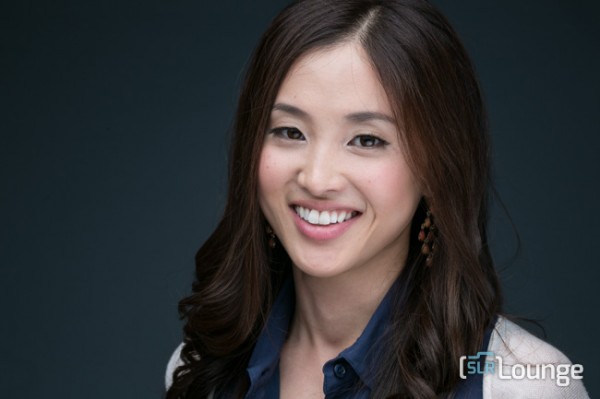
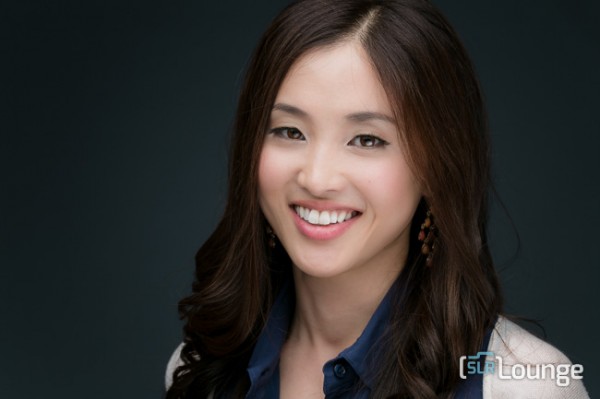
In this article we’re going to do a headshot retouch to show how capable Lightroom is. Of course for a professional headshot retouch Photoshop is necessary, but Lightroom is also surprisingly capable. We’re going to utilize one of our “Soft Portrait” presets, similar to the one we used in our Color Portraiture with Retouch and Enhancement Tutorial, and then we’re going to utilize our brush presets to make our retouches. The complete written tutorial is below, and you can also watched the video tutorial at the end of this article.

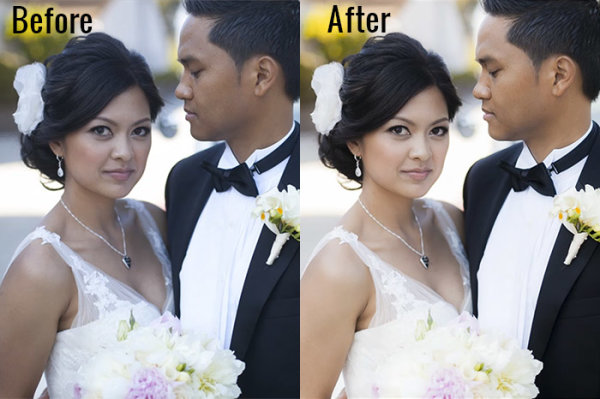
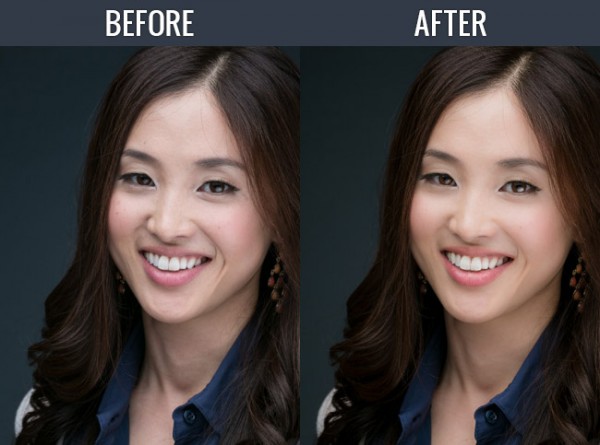
Here’s a sneak peak at what our image will look like before and after the retouch.

beforeafter


Read the Written Tutorial

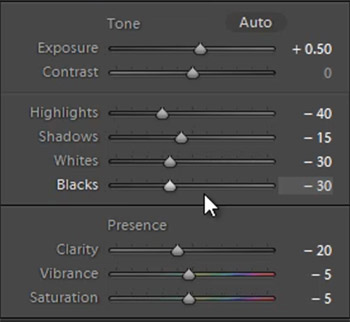
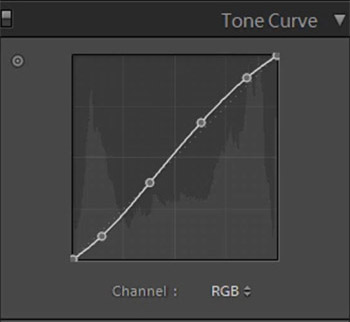
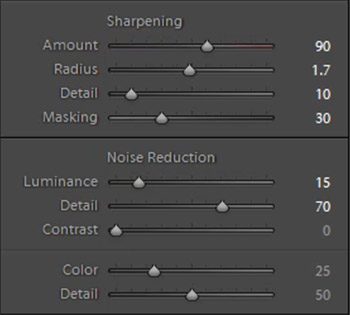
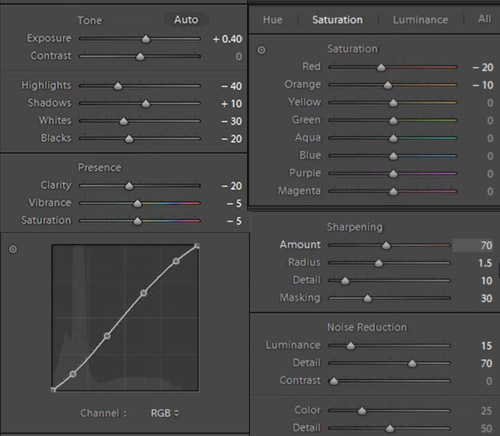
The first thing we’re going to do is select our “01-10 BASE – SOFT: 11a. Extra Soft – Skin Desat” which will soften the skin by decreasing the Clarity and adjusting the Noise Reduction settings. The preset also adjusted the Red and Orange in our HSL, lowering them slightly so we get desaturated skin tones. We also added a little bit of contrast using the  “03-40 ADJUST – SHADOW BLACKS: 43 Darken – Light (+10,-20)” preset. The Tone Curve is set in s subtle “S” shape, giving us a slight contrast boost, and we have our standard amount of Sharpening applied to this photo. We’re going to set our Color Temperature to 4900 and add +0.40 to the Exposure to give the skin a nice bright look. For those that don’t have the Preset System, here are what our Develop Settings look like after our presets and adjustments are applied.

alldevelopsettings

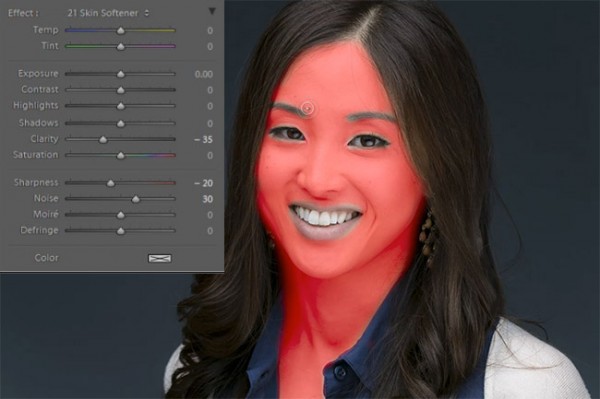
The first brush adjustment we’re going to be making is for her skin. We’re using our “21 Skin Softener” preset, and you can see settings of our brush in the photo below. These settings will smooth skin without destroying skin texture. We want to make sure we’re only applying this brush to the skin, and you can press “O” to bring up the overlay so you can see exactly where the brush is being applied as shown below. You can also delete  areas of brush application by holding down “alt on a PC or “opt” on a MAC to erase the adjustments.

skinbrush

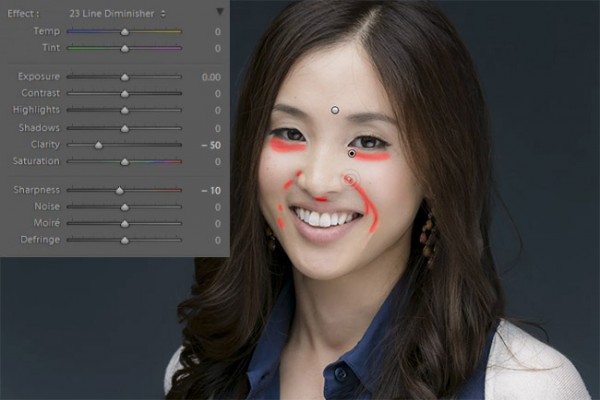
Moving on, we’re going to hit “New” to  make new brush adjustments, and we’re going to select our “23 Line Diminisher” preset. We want to diminish some of the smile lines and lines under the eyes. This part of the retouch should be subtle, diminishing the lines and not removing them completely. Once again, you can see the brush preset settings and the area of affect in the image below.

linediminisher

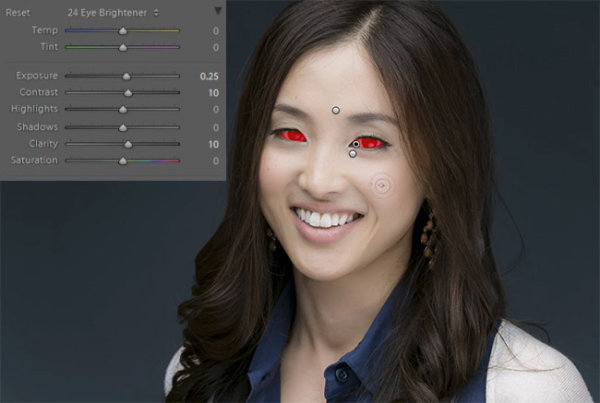
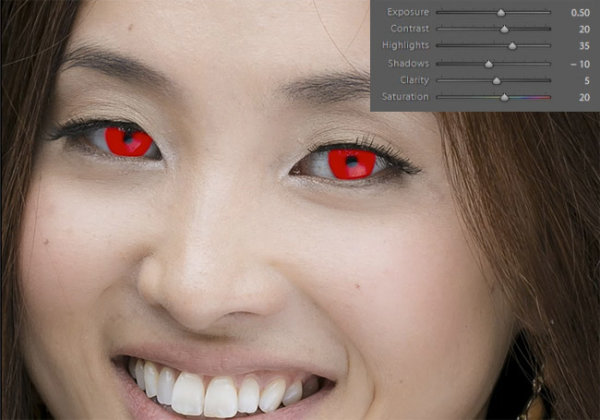
Now we’re going to hit “New” and select the  ”24 Eye Brightener” preset. We’re going to brighten up the eyes and we want it to be subtle because if the eyes are too bright it will have an abnormal look. The best way to check if eyes are too bright is to simply zoom out to a thumbnail view and check to see if the eyes look like they are glowing or unusually bright based on the surrounding tones.

eyebrightener

Furthering our edit on the eyes, we want to brighten up the iris’ to add nice colors to them and to exaggerate some of the nice catch light. We’re using our “25 Iris Enhancer” and we want to make sure we’re only making adjustments on the iris’ and nothing else.

irisenhance

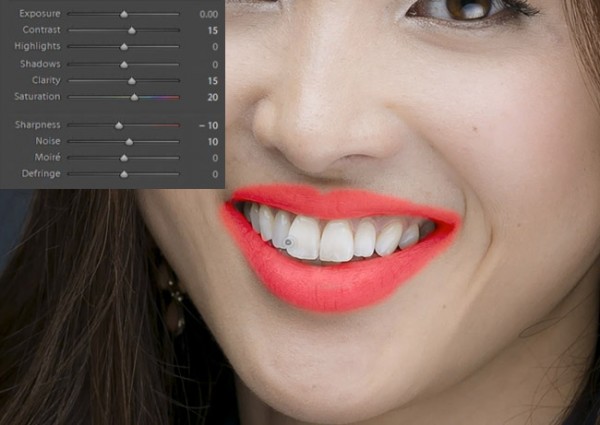
Now we’re going to move onto our lips. Our “26 Lip Enhancer” preset adds nice color and contrast to the lips.

lipenhance

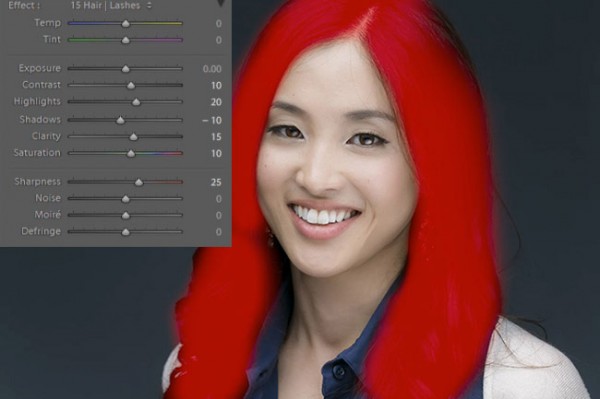
The last brush we’re going to use is for the hair. With our “15 Hair | Lashes” preset, we’re going to pull out some nice color and texture from her hair.

wendyhair

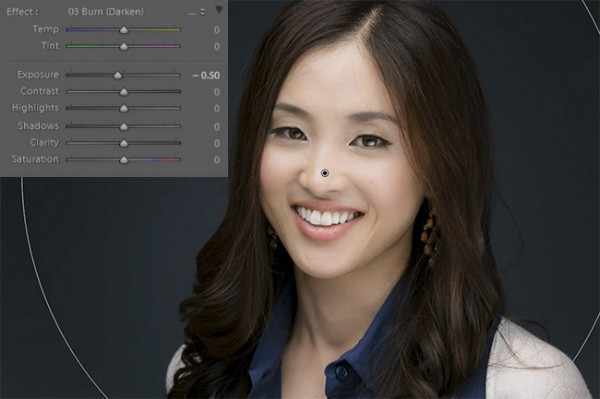
At this point we’re done with our retouches. If you like you can do some additional blemish removal. When doing blemish removal we recommend keeping blemishes that are apart of their look. The last thing we’re going to do is add a Radial Filter with the Exposure set to -0.50.

radialfilter

And now we are left with our final image. Here’s a before and after of our portrait.

Before

lightroom-5-tutorial-professional-headshot-retouch-0001

After

lightroom-5-tutorial-professional-headshot-retouch-0002

Watch the Video Tutorial

[EMBED VIDEO HERE]

If you would like to see exactly how all of the settings and adjustments were applied, please watch the video below from the SLR Lounge YouTube Channel.

Conclusion and Learn More

We hope you all enjoyed this tutorial. If you are interested in learning more or purchasing the SLR Lounge Lightroom Preset System v5 or the newly released Lightroom Workshop Collection v5, please click any of the links in this article.

Post originally from: Digital Photography Tips.

Check out our more Photography Tips at Photography Tips for Beginners, Portrait Photography Tips and Wedding Photography Tips.

How to Professionally Retouch Portraits in Lightroom


Digital Photography School

 
Comments Off on How to Professionally Retouch Portraits in Lightroom

Posted in Photography


Speedlight Lit Portraits: Weekly Photography Challenge

14 Sep

This week we’re continuing our themed challenges in the Portraits Direction to celebrate the launch of our Portraits: Lighting the Shot eBook by pursuing the theme ‘Speedlight Lit Portraits’.

Answer Me

So your challenge is to shoot and share a portrait image that is lit using a speed light flash (or more than one if you want to go that direction). While this might limit participation by some Speedlights are the most common type of lighting among our readers so hopefully it’s accessible to a lot of you.

Gina covers a lot of techniques that will be useful for you on this front in her eBook but whether you’ve got it or not we’d love to see your attempts shared in comments below!

Once you’ve taken your ‘Available Light’ photos, upload your best ones to your favourite photo sharing site either share a link to them even better – embed them in the comments using the our comments tool to do so.

If you tag your photos on Flickr, Instagram, Twitter or other sites with Tagging tag them as #DPSSPEEDLIGHT to help others find them. Linking back to this page might also help others know what you’re doing so that they can share in the fun.

Also – don’t forget to check out some of the great shots posted in last weeks Available Light Portraits challenge – there were some great shots submitted.

Post originally from: Digital Photography Tips.

Check out our more Photography Tips at Photography Tips for Beginners, Portrait Photography Tips and Wedding Photography Tips.

Speedlight Lit Portraits: Weekly Photography Challenge


Digital Photography School

 
Comments Off on Speedlight Lit Portraits: Weekly Photography Challenge

Posted in Photography


Getting Great Portraits At Sunset

14 Sep
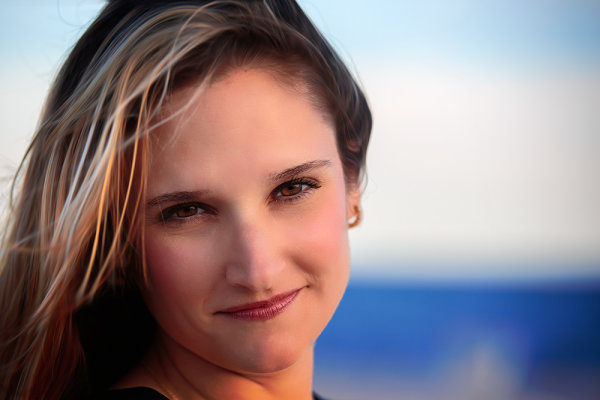
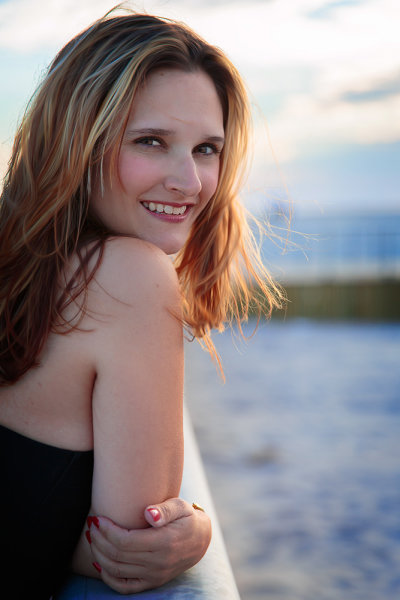
As the sun dipped down I was able to completely remove the flash and use the sun as my main light source, with no fill. I simply moved around my subject, asking her to turn her head a little so I could see the changes in the light on her face, and position her so that the light was the most pleasing.  EOS 5D Mark III, EF 70-200 f/2.8L IS II. ISO 100, f/2.8, 1/250.

As the sun dipped down I was able to completely remove the flash and use the sun as my main light source, with no fill. I simply moved around my subject, asking her to turn her head a little so I could see the changes in the light on her face, and position her so that the light was the most pleasing. EOS 5D Mark III, EF 70-200 f/2.8L IS II. ISO 100, f/2.8, 1/250.

I try to take advantage of natural light for shooting portraits whenever I can.  It’s important to recognize the ways different types of natural light affect your images.  A few months ago I wrote about shooting portraits in midday sun.  This past week I was approached by a close friend who wanted a portrait taken.  After discussing ideas, we decided the beach at sunset would be our setting. Sunset can be as problematic as midday sun for a variety of reasons.   As sun dips lower in the sky, the light gets softer as atmospheric haze diffuses it. In addition, the color temperature warms up, giving a nice warm glow to your scene. However, even an hour before sunset, the light can still be harsher than preferred, casting odd shadows, or creating a harsh backlight. Using flash as fill can help, but as the sunlight takes on a warmer tone, the flash will appear to be too blue. So how do we solve these issues?

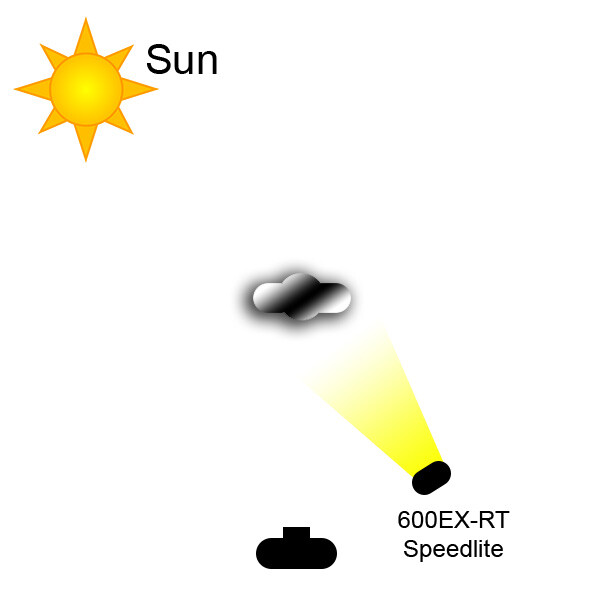
This was one of the first shots taken, on the boardwalk at the beach.  The sun was harsher than I wanted so opted to use wireless flash.  I positioned my friend with the sun at her back and over her right shoulder, and the flash to her front left.  I also had the flash set to high speed sync. I then set the flash to E-TTL, with flash exposure compensation set to even.  I set the camera's exposure compensation to -1, in Aperture Priority.  Doing this lessens the sun's impact on the image, helps darken the sky, and the background overall. Exposure was ISO 100, f/4, 1/4000.

This was one of the first shots taken, on the boardwalk at the beach. The sun was harsher than I wanted so opted to use wireless flash. I positioned my friend with the sun at her back and over her right shoulder, and the flash to her front left. I also had the flash set to high speed sync. I then set the flash to E-TTL, with flash exposure compensation set to even. I set the camera’s exposure compensation to -1, in Aperture Priority. Doing this lessens the sun’s impact on the image, helps darken the sky, and the background overall. Exposure was ISO 100, f/4, 1/4000.

Let’s deal with the harsh light, an hour or so before sunset first.  First, as I mentioned in my earlier post, you can use a scrim or reflector and modify the sunlight that way.  However, this time it was just me and my friend, so I had no one to hold the scrim or reflector and the wind on the beach was too gusty to risk putting the reflector on a stand. I had to use flash.  I was able to use off-camera flash, wirelessly.  I was shooting a Canon EOS 5D Mark III with an ST-E3 wireless flash transmitter mounted to the camera’s hot shoe. I used a 600EX-RT speedlite off camera, mounted on a lightstand.  Again, due to the wind, a softbox or umbrella was out of the question, so I left the flash bare.  There are several ways to compensate for the cooler color temperature of the flash.  You can use what’s known as a warming gel, or CTO (color to orange) gel, on the flash to match the temperature of the sunset.  This is fairly simple solution.  The other solution is simply to set your white balance for the flash, which will have two effects.  One, it will warm the illumination from the flash.  Second, it will warm the sunset light even more, which can be quite pleasing if not overdone.

As the sun dipped down I wanted to turn the flash off and go for a more natural look. The light was still a bit harsher than I wanted so I started shooting backlit. I tried some fill flash, but the light was casting unflattering shadows and not meshing well with the available lighting. Turning the flash off, I positioned my subject so she was facing away from the sun, but had some sand in front of her that reflected enough light back into her face to create some soft catchlights in the eyes.

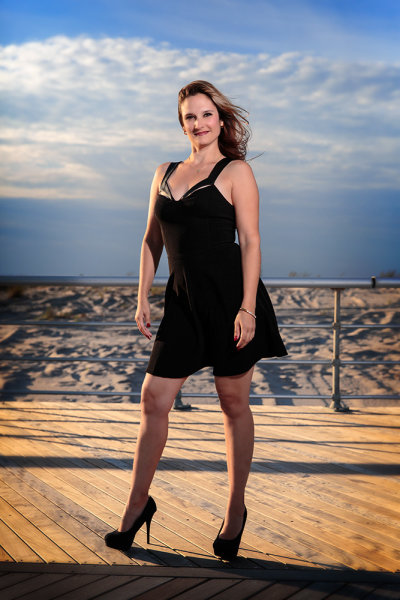
Finally, the sun dipped down and softened enough that I could ask my subject to look directly into it. This creates a soft, warm look on the face with nice shadows.  Pay attention to how the light falls on your subject when doing this. Ask your subject to slowly turn her head so you can see how the light on her face changes as she does so.  This will give you an idea of how you want her to pose, using the sun as a point of reference for her positioning. The shot in question is the first image in the article.  I also used this technique in the last image, for a wider shot.

Another way to deal with the harsh sun is to shoot backlit. I had tried some fill flash on this shot but it just didn't look the way I wanted it to. The flash caused the noise to cast an unnatural shadow that I found unflattering. I turned the flash off and positioned her so the sand created some fill in her face.  EOS 5D Mark III with EF 24-70 f/2.8L II. ISO 100, f/2.8, 1/400.

Another way to deal with the harsh sun is to shoot backlit. I had tried some fill flash on this shot but it just didn’t look the way I wanted it to. The flash caused the noise to cast an unnatural shadow that I found unflattering. I turned the flash off and positioned her so the sand created some fill in her face. EOS 5D Mark III with EF 24-70 f/2.8L II. ISO 100, f/2.8, 1/400.

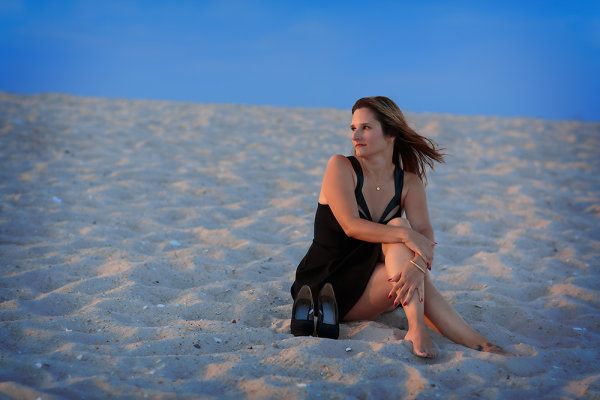
This was one of the last shots of the day.  The beach was nearly empty and I wanted to use the texture of the sand, the deep blue of the sky, and the red glow of the sun to create a graphically strong image. I positioned her so that if she turned her head her face would be lit by the sun and the sun would create a rim of light on her side. EOS 5D Mark III with EF 85mm f/1.2L II. 1/320, f/2.8, ISO 100.

This was one of the last shots of the day. The beach was nearly empty and I wanted to use the texture of the sand, the deep blue of the sky, and the red glow of the sun to create a graphically strong image. I positioned her so that if she turned her head her face would be lit by the sun and the sun would create a rim of light on her side. EOS 5D Mark III with EF 85mm f/1.2L II. 1/320, f/2.8, ISO 100.


Quick lighting diagram for the shot using off camera flash.

Quick lighting diagram for the shot using off camera flash.

Post originally from: Digital Photography Tips.

Check out our more Photography Tips at Photography Tips for Beginners, Portrait Photography Tips and Wedding Photography Tips.

Getting Great Portraits At Sunset


Digital Photography School

 
Comments Off on Getting Great Portraits At Sunset

Posted in Photography


Available Light Portraits: Weekly Photography Challenge

07 Sep

This week we are celebrating the launch of our brand new Portrait Lighting eBook so I thought it might be fun to have a portraiture themed weekly challenge.

Bus People

Your challenge is to take and share a portrait image that only uses the available light in the setting where you’re shooting.

Giada

So if you’re outside during the day – shoot only using natural light. If you’re inside, only use the light in the room (window light, the normal artificial lights in the room etc).

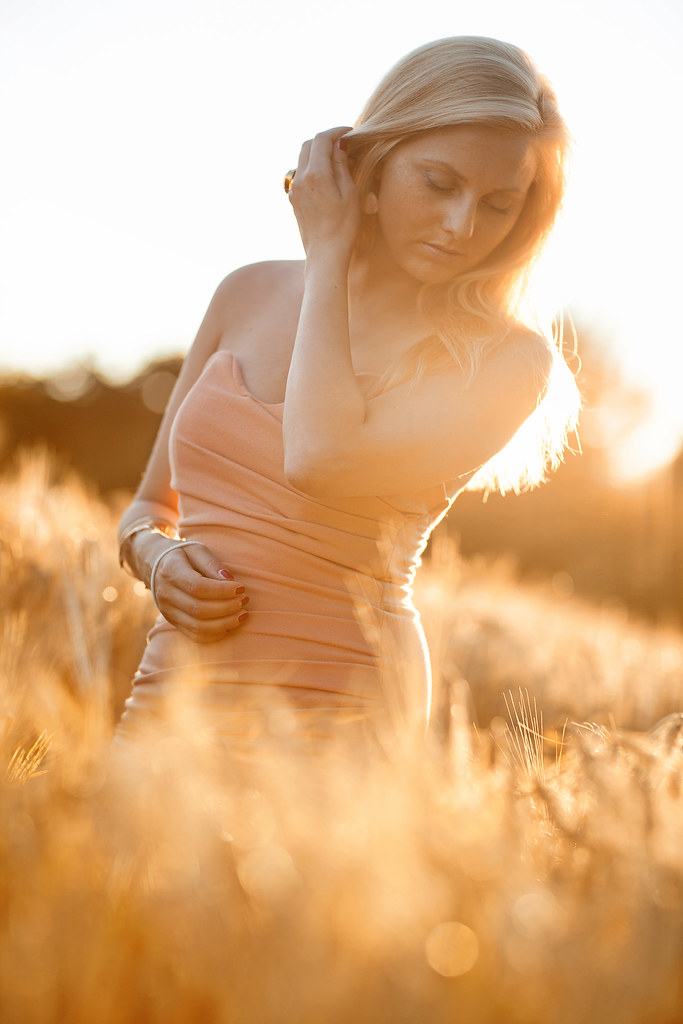
golden light

So – you can use artificial light but no your speed light or any studio lights – just what is there in the setting you’re shooting in. I hope that makes sense!

Once you’ve taken your ‘Available Light’ photos, upload your best ones to your favourite photo sharing site either share a link to them even better – embed them in the comments using the our comments tool to do so.

who am i?

If you tag your photos on Flickr, Instagram, Twitter or other sites with Tagging tag them as #DPSAVAILABLELIGHT to help others find them. Linking back to this page might also help others know what you’re doing so that they can share in the fun.

Also – don’t forget to check out some of the great shots posted in last weeks Soft challenge – there were some great shots submitted.

Post originally from: Digital Photography Tips.

Check out our more Photography Tips at Photography Tips for Beginners, Portrait Photography Tips and Wedding Photography Tips.

Available Light Portraits: Weekly Photography Challenge


Digital Photography School

 
Comments Off on Available Light Portraits: Weekly Photography Challenge

Posted in Photography


Natural Light Portraits: Made In The Shade

30 Aug

One of the easiest ways to start shooting portraits is to use natural light.  There’s no added expense of buying speedlites or strobes, or even continuous lighting. You don’t have to decide where to put the lights, because let’s face it, nature has decided for you.  There are still challenges however, and those challenges must be overcome to successfully pull off a natural light portrait.  One of the biggest challenges is what to do when the natural light just is not pleasing.  Maybe it’s midday sun and the light is too harsh, or maybe it’s later in the day and direct sun is shining right in your subject’s eyes. In my post “Sun Too Harsh? Modify it!”, I discussed ways to use reflectors and scrims to modify natural light to get a more pleasing look.

This image was taken on a bright sunny winter day, with snow on the ground. I didn't have a reflector- the snow helped with that thankfully.  But the sun was too harsh to put her directly in it.  The solution was to go behind one of the nearby buildings and use that softer light to illuminate her face. EOS 5D Mark II, Ef 85mm f/1.2L II. 1/2000 at f/2.2, ISO 160.

This image was taken on a bright sunny winter day, with snow on the ground. I didn’t have a reflector- the snow helped with that thankfully. But the sun was too harsh to put her directly in it. The solution was to go behind one of the nearby buildings and use that softer light to illuminate her face. EOS 5D Mark II, Ef 85mm f/1.2L II. 1/2000 at f/2.2, ISO 160.

But what happens if you don’t have a reflector or a scrim? Well then you have it made in the shade! Find some shade, and you’ll find some soft, indirect lighting that can help you create beautiful portraits.   Look for a large tree with overhanging branches. Or a doorway. Or an overpass of some kind.  Anything that gets you out of direct sun, and into indirect light. It does you no good if there’s no light getting to your subject, but once you find a place with indirect lighting, you’re all set.

Here, the subject was positioned under the overhang of a train station.  Because it was an open overhang, the background is lit brightly, creating more depth. EOS-1D X, EF 85mm f/1.2L II. 1/1000, f/2.8 at ISO 640.

Here, the subject was positioned under the overhang of a train station. Because it was an open overhang, the background is lit brightly, creating more depth. EOS-1D X, EF 85mm f/1.2L II. 1/1000, f/2.8 at ISO 640.

The light will be soft and even- and very pleasing.  The background will likely go a little darker depending on where you found your shade, be it under a tree, where it might be brighter, or in a doorway or behind a building. Look around, see what you can make happen. And just because your subject is facing out towards the light, doesn’t mean you need to be.  Walk around your subject- get that soft light hitting from the side, as well as the front. Just keep your subject positioned so the light is hitting the mask of the face, including the eyes. Just because the light is not pleasing doesn’t mean all is lost. Sometimes, all you need to do is find some shade.

This shot was taken in Central Park in New York City, near Strawberry Fields.  There is a walking path that goes under a large footbridge, creating a tunnel. The day was a typical summer day, bright and hot. The sun was far too harsh. We moved to the opening of the tunnel and I let the light wash in on her face.  I turned her slightly so the light came from the side a bit, creating some shadow on the left side of her face. EOS 5D Mark II, EF 70-200 f/2.8L IS II. ISO 800, 1/250, f/2.8.

This shot was taken in Central Park in New York City, near Strawberry Fields. There is a walking path that goes under a large footbridge, creating a tunnel. The day was a typical summer day, bright and hot. The sun was far too harsh. We moved to the opening of the tunnel and I let the light wash in on her face. I turned her slightly so the light came from the side a bit, creating some shadow on the left side of her face. EOS 5D Mark II, EF 70-200 f/2.8L IS II. ISO 800, 1/250, f/2.8.

Post originally from: Digital Photography Tips.

Check out our more Photography Tips at Photography Tips for Beginners, Portrait Photography Tips and Wedding Photography Tips.

Natural Light Portraits: Made In The Shade


Digital Photography School

 
Comments Off on Natural Light Portraits: Made In The Shade

Posted in Photography


10 Tips for Creating Great Family Portraits

19 Aug

Hood-August2013-0212-Google

With my background being in classic style studio portraiture (aka “boring”), and 25 years experience photographing portraits and weddings, I have a few tips up my sleeve for you. If you’ve never done a family or group portrait before don’t be intimidated. Be honest with the family and tell they you’re just learning, I bet they’ll be willing participants to help you out and they get some nice photos in exchange.

With a little planning, doing a family portrait should be fun for both you, and the family you’re photographing. Here are 10 quick tips to help you have a successful and fun photo session.

SUMMARY – 10 TIPS FOR BETTER FAMILY PORTRAITS

  1. Use a tripod when possible
  2. Shoot in Manual exposure mode
  3. Lock the focus or use manual focus
  4. Arrange people with heads staggered
  5. Allow kids to be kids and get goofy with them
  6. If it bends, bend it – how to help people pose
  7. Pose people to flatter them
  8. Lighting is key – get some in their eyes
  9. Expression is everything!
  10. Have a little fun with it and let go

Let’s take a look at each in more detail.

Heise-0005fsm

#1 USE A TRIPOD WHENEVER POSSIBLE

“Ugh”, I already know what you’re thinking. A tripod cramps your style. It’s too heavy and cumbersome. Your style is more free flowing. That all may be true and in some cases (like photographing kids running or doing more documentary style photography) it may be better to shoot hand held.  However, just consider another side of the coin.

When being photographed  most, if not all, people are nervous. Yes nervous! Some are down right scared, and some would even go as far to say that they “hate it”. So it is part of your job to help your subjects feel more comfortable and relaxed. That can be hard to do when you’re also nervous, especially if you’re new to portraits. But there’s a big advantage of putting that camera on the tripod.  Two actually.

#1 – it automatically forces you to slow down. That’s a good thing. You can check your settings, review the composition, and exposure to make sure you’ve got everything right. All to often it’s easy to get carried away once you put the camera up to your eye and forget to check something only to see later you had the wrong White Balance, or ISO was 6400, or you accidentally shot Small JPG. Slow down, avoid an “oops”.

#2 – it allows you to get your eye away from the camera so you can actually make eye contact with your subjects. They are very real people and they feel even more uncomfortable staring straight into your lens than they do looking at you. You can make gestures to get kids attention, or make faces. But you’ll get way better expressions by interacting with them than you will looking through the viewfinder. Try it!

Hood07-034f

#2 SHOOT IN MANUAL EXPOSURE MODE

Assuming that you are setting something up, choosing the time of day and the location carefully, you have control of all the elements. Meaning, once you get set up the exposure should not need to change. But if you put it in Aperture or Shutter priority, depending in the metering mode selected, the camera could choose a slightly different exposure for each frame. You do NOT want that! Consistency is very important.This post is sponsored by our partners Wigs

Inconsistent exposures create more work in post processing, as you have to even them all out. It also can cause a slight color shift, increase noise (if underexposed) and other undesirable things. To keep your exposures consistent through the whole shoot, use Manual Mode. Just remember that each time you change the pose, location, etc, you need to check exposure again. I just fire off a quick test shot, review the histogram, adjust if necessary and continue.

#3 LOCK THE FOCUS

Just as you do not want the exposure to change from frame to frame, neither do you want the focus to be adjusted. Assuming you’ve taken #1 to heart and are using a tripod, you will not be moving. Likely if you’ve posed your group in a relatively static position, they will not be moving. Not much anyway. We are only concerned with moving closer to, or further away from the camera. So . . .

Set your camera up to do one of the following: use focus lock, back button focus, or use manual focus. With any of those options the focus will not change from shot to shot. If you use the shutter button to focus and someone moves a little bit so that the focus dot hits the background, you got another “oops”. If you aren’t sure how to do this, consult your camera manual.

Bonus tip: If your camera has video capabilities you have a neat way of doing manual focus. Turn on the Live View so you can see the image on your screen. Hit your “zoom” button (it may have a magnifying glass or a “+” sign on it) once or twice. The image on the screen will zoom in (your lens doesn’t) so you can see what is in focus which allows for much most precise manual focusing. Press zoom again to return to normal view and turn off Live View.
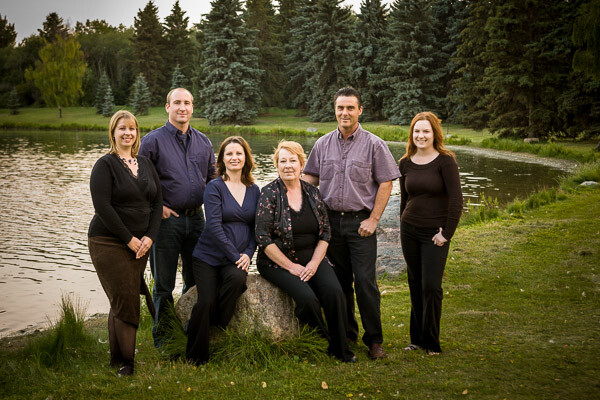
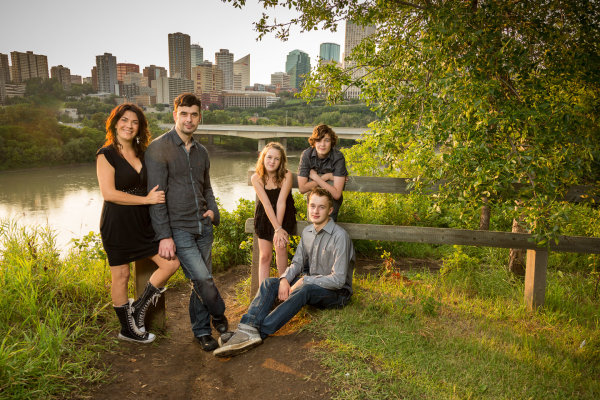
Liebel-002-600px

#4 STAGGER THE HEADS

You may or may not have heard this one before, or perhaps you weren’t 100% what it meant. What you want to avoid is a boring straight line, row, or column of heads. Diagonal lines are more dynamic and add interest to an image, so try to do that with the people in your grouping.

Imagine there is a line drawn from each face to the next. Try and position them so that no head is directly on top of, or beside (same level) another. Make diagonal lines not totem poles. Use props to seat some people or bring some small folding stools. Have some people sit down, or stand up on something. Use what is naturally in the environment to pose them, or if you have nothing available just arrange them so the heights are staggered.

Stevens-017

#5 IF IT BENDS, BEND IT

This is a general rule when photographing any people and it’s a good one. People tend to stand stiff and rigged when you position them, so you need to get them to bend a few body parts to look more natural. Nobody naturally stands stiff as a board. Here are a few starters

  • get them to shift their weight to one foot and stick out one hip, away from the camera
  • get them to put a hand in a pocket, I usually recommend thumb out otherwise they have a tendancy to shove their hand to the bottom of the pocket also not looking natural
  • OR hook a finger on their belt or a belt loop
  • if they are sitting lean forward a bit and put weight on one hip
  • if standing against something have them cross one foot over the other, toe down
  • if sitting (males) put one knee up, foot flat on the ground (make sure they rotate so you aren’t looking straight into their crotch

You get the idea. The best way to get someone to do any of this is to do it yourself and have them mirror you. Face them, do the pose you want them to do, and have them mimic it exactly.
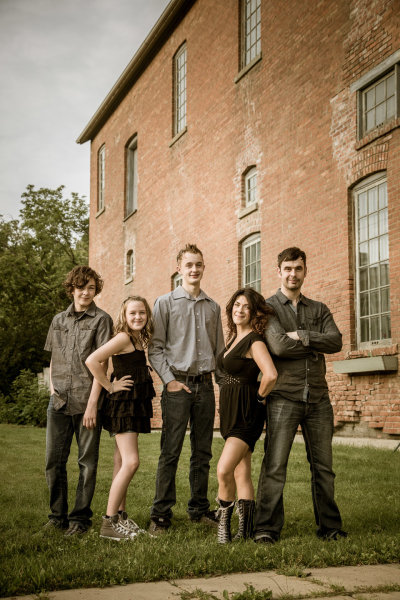
Hood-August2013-0129-Google

Example of bending body parts. The girls did a much better job here than the guys but even the arms bent at the elbow helps. Some people are stiff and you may have  a challenge with them. Just do your best.

#6 LET KIDS BE KIDS

I’ve found that often parents will tell their kids “you need to be good and smile” before a photo session. For many kids that puts too much pressure on them to “perform”. I usually prepare my parents by getting them to tell their kids this instead:

We’re doing to the park to take some photos. It will be a lot of fun.

That’s it! No expectations other than fun. Then prepare yourself. Bring along props, get mom to bring one of their favourite toys or books. I usually have a hand puppet and bubbles in my camera bag along with my gear. If the kids don’t want to sit and smile don’t force them. Then them run around and be kids for a while and shoot that. Play with them, make it fun. Then they may cooperate and sit for a bit a few minutes later.

When I’m photographing kids I make a total idiot of myself. I make funny noises, I sing songs (I’m really bad but they don’t care), I make fish faces, I play peek-a-boo behind the camera.  I run back and forth to the camera with the puppet. I lie on the ground, I stick my butt out. Kids are the ones that have life the right way around, it’s us adults that ruin it. Let them be kids, let them have fun. Then be ready to capture it when it happens.
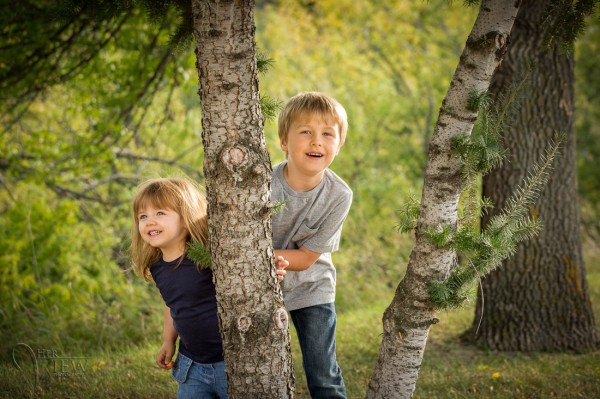
This was a game of peek-a-boo around the tree.

This was a game of peek-a-boo around the tree. Look at those genuine smiles! You can’t force those.

#7 POSE PEOPLE TO FLATTER THEM

Here’s the bottom line – if mom thinks she looks fat she isn’t going to like them no matter how great the lighting and expressions (see #8 and #9 below). So get this one right.

Be aware of people’s perceived “flaws” and work with them. A list of some quick tips.

  • If someone has a bigger bottom half, don’t pose them walking away from the camera using a wide angle lens.
  • For double chins take a slightly higher camera angle, above their eye level. Making them look up stretches it out and minimizes the chin/neck area
  • A bump on a nose will show up when they face one way and not the other (usually) study their face to find out which way to shoot them
  • When you have a couple that has a huge height difference get the man (usually the taller one) to stand with his feet further apart. That will make him slightly shorter, closing the gap a bit.
  • For really heavy people (or those overly self-conscious of their weight) use the lying down in the grass pose and pile the kids on top. Works great every time. Hides tummies, stretches out chins and makes the kids closer in size because it’s just faces.
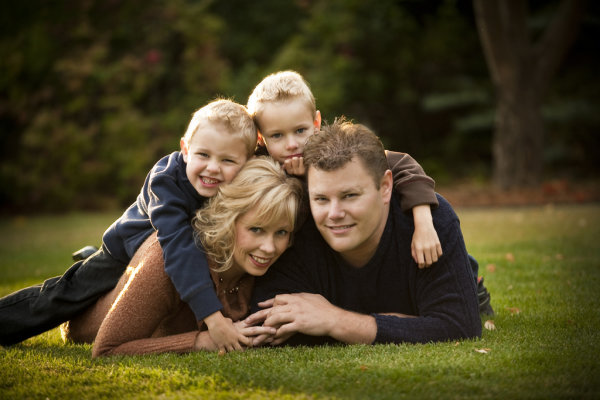
The lying in the grass, pile on top pose. Great for families with small children.

The lying in the grass, pile on top pose. Great for families with small children. This family didn’t need the pose to correct anything, it’s also just fun having the kids jump on top and squish mom and dad.

#8 LIGHTING IS KING – GET SOME IN THEIR EYES

Light can make or break any photograph, portraits are no different. The very derivative of the word photography is “drawing with light”. The biggest thing you want to make sure you do for portraits is get light into your subjects’ eyes. There are many ways to do that and that’s a whole huge topic but there are a few things you can do to set yourself up to start off with good light.

  • Choose the time of day to do the portrait! Ideally late evening about an hour before dusk is the best time for portraits. Why because the sun is lower on the horizon and you don’t get the harsh overhead light you do at midday. It’s more directional and usually a bit diffused if there’s haze on the horizon.
  • If you can’t shoot at dusk, find some shade. Get your family out of the sun, BUT make sure you don’t get the background lit up. Bright areas in the background will draw attention away from the subjects. Look for areas in the shade of large buildings, or under large trees.
  • Avoid using an overcast day simply because the lighting is even and less harsh than bright sunlight. While it is true the light is softer and less harsh, the direction isn’t great. Overcast days give you direct overhead lighting and dark eyes, especially anyone with deep eye sockets.
  • Add some light using a reflector or a flash if need be. Again this is a whole other class on lighting but learn to know when you need more light on their faces. If you cannot see a catchlight (the lightsource reflected in their eyes) then there isn’t enough light in their faces.

Just as important as getting some light in the eyes is having it come from a good direction. We’ve established overhead isn’t good direction, neither is straight from camera. So turning on your built-in pop flash isn’t going to give you good light. Neither is sticking a speedlight on top. Light direct from the camera angle flattens the subject, that is not what you want. You want the light to come from the side more, 30-45 degrees from camera is a good starting point. To learn more about this read my article on the 6 Lighting Patterns Every Photographer Should Know.
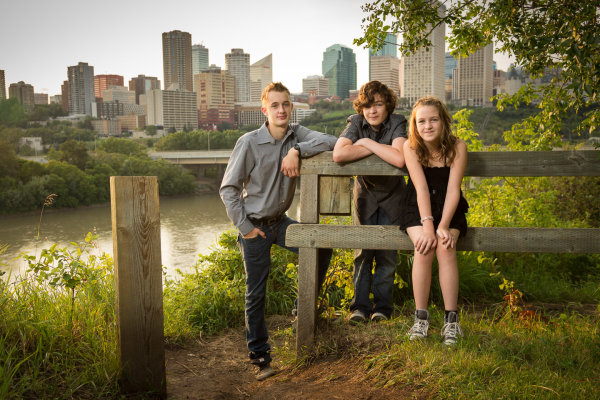
This was done just before sunset. The sun is coming just over their shoulders on the left. I used a flash in an umbrella also to the left to add light to their faces, without it they'd be in shadow.

This was done just before sunset. The sun is coming just over their shoulders on the left, behind them. I used a flash, bounced into an umbrella also to the left to add light to their faces, without it they’d be in shadow.

#9 EXPRESSION IS EVERYTHING

So if lighting is king, getting the right expressions is everything! You can totally screw up the lighting, and the pose, but if you get them laughing or making “that” face – it’ll be a big hit!  So how do you do that?

See #1 first of all. Then look at #6. Being a photographer means that sometimes you have to also become a comedian, or a clown. Knowing the right thing to say or do to make people smile is mostly experience. Sometimes you’ll get tough adults too. The dad in the photo above by the brick wall pretty much has the same expression all the time. I’ve known this family and photographed them for 13 years, they’re friends too. So I know I can bug him a little bit or get out the ducky to have some fun at his expense.

If there are small children or babies involved make sure to get their attention. It even helps to have an assistant, tell them to bring Grandma along or a friend to help out. But what always happens is you get the kids all looking and smiling, and what are the parents doing? Looking at the kids!  Oops again! I always tell the parents, “no matter what keep looking at me as I make a total fool of myself, do NOT look at your child”.
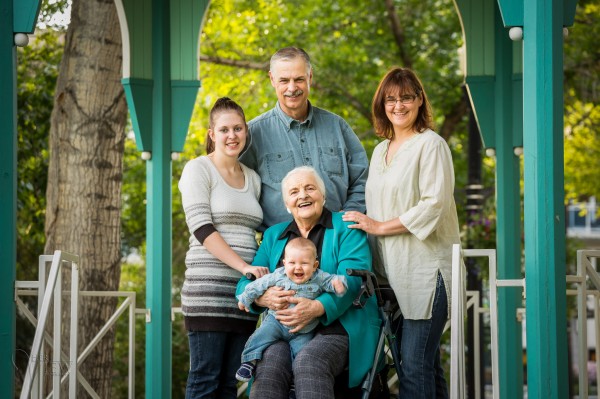
Stamhuis-0038-Google

Baby laughing, everyone else followed instructions and looked at me, success!

#10 HAVE A LITLE FUN WITH IT

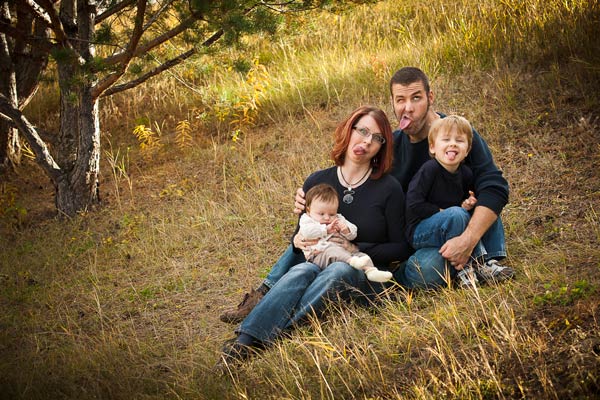
Last tip is to no take yourself so seriously. Create a few really whacky shots at the end of the session (or even in the middle if the energy seems to be fading). Tell them to do a group squish and really get them to squish. Often they will start laughing and as they pull apart you grab the shot. Do a pile on down in the grass. Ask them to jump in the air or make goofy faces (you make one too). It breaks the tension and lightens up the mood.

I volunteered my time at an event called Help Portrait last year that has photographers, make up artists and organizers giving their time to create portraits for people that otherwise couldn’t afford a professional one. They ended up sending most of the families to me, initially because I had the biggest area to do the group photo and later because the other photographers said I was the best with the kids.  To see some of my photos from that event go to Help Portrait, Edmonton  2012. 
Dino-Park-0131-600

I was making a similar face!

Hood-August2013-0263-Google

My off camera flash stopped working so this is direct from camera, not my first choice. But we were all tired and I thought this would be fun so we just went for it. Notice dad has a new expression!

BONUS TIP

Get the family to think about what they are going to wear. Some people disagree with my point of view on that, which is totally fine. But if you want to read more about it go to Clothing for Portraits.

Get out there and photograph some families and have fun!


Post originally from: Digital Photography Tips.

Check out our more Photography Tips at Photography Tips for Beginners, Portrait Photography Tips and Wedding Photography Tips.

10 Tips for Creating Great Family Portraits


Digital Photography School
 
Comments Off on 10 Tips for Creating Great Family Portraits

Posted in Photography


7 Ways To Create Authentic & Powerful Portraits

11 Aug

Create authentic powerful portraits 1

by Steven McConnell

Do you remember the time you were learning to drive a car?

If you’re like most people, it began as a purely technical, logical activity. You had to think about your every move. You were reacting to your environment, rather than anticipating it.

Over time, that settled into a form of unconscious competence. You began to drive by feeling the car, rather than thinking about it.

Learning to shoot portraiture is similar. Beyond the mechanical, logical world of preoccupation with gear, ISO, f-stops and focal lengths is a realm of feeling your way around your environment, connecting with your subjects, witnessing their stories and sharing them with the world through your photographs.

It’s easy to say, I hear you say. But how do I start moving in that direction?

For me personally this has been a focus of my attention for the past few years and I feel like I’m just starting to scratch the surface. Every time I discover something new I see how much more there is left to uncover.

It’s my aim here to share some of my main discoveries with you. I hope that lessons I’ve learned on my journey to becoming a portrait photographer help you along in yours.

Create authentic powerful portraits 2

1. Forget The LCD

I see so many photographers take a few photos and then bend over to check what they got on the back of their camera.

Meanwhile, their subject is just standing there. Their mood is collapsing. All kinds of weird thoughts are starting to run through their head.

Checking the histograms every now and then is important, but your main job as a portraits photographer is to be aware of, and manage, your subject’s headspace.

You can’t do it effectively if you’re spending more time with your camera than you are with your subject. You need to be completely present with the person you’re photographing.

It means you need to photograph a lot and often, until know with a reasonable degree of confidence when you’ve nailed the shot – without having to check it on the LCD.

Create authentic powerful portraits 3

2. Explore Av & Tv [Aperture and Shutter Priority Modes]

There’s a sentiment in the photographer community that you must always shoot in your camera’s manual mode because “that’s what serious photographers do”.

Manual gives you great creative options in certain situations – for example, when you’re combining ambient light with strobes.

But be aware that you don’t always need it – and sometimes it will shoot you in the foot.

If you’re using only natural light, for example, and it’s likely to be changing while your subject is moving, the last thing you want is to miss moments while you’re chasing exposure.

Try shooting in aperture-priority mode (Av), using aperture to control depth of field as a creative element while dialling the exposure compensation in or out to fine-tune exposure.

3. Lose The Fat Lens

I shoot with prime lens because I like to have as few physical barriers between me and my subjects as I can.

If I can’t look them directly in the eye as I’m photographing them, then I want to look at them through as little metal, plastic and glass as possible.

Also, I think there’s a lot to be said about removing everything you can which will intimidate your subjects.

As photographers we tend to view gear as something to get excited about. But in doing so we forget that something like a 70-200 f/2.8 (even a 24-70 f/2.8!) on front of a DSLR can be unnerving to most people.

Create authentic powerful portraits 6

4. Research Your Subjects

When I started photography, I did enough research about cameras to be able to quote the pros and cons of just about any DSLR body out there.

But if you asked me what the person I was photographing wanted to be when they grow up, I’d have no idea.

How can a photographer tell a story about a subject through the photos if they don’t know anything about them?

What are your subject’s dreams? Obsessions? Fears? Ice-cream preferences? Why do they get out of bed in the morning? What kind of personality they have – quirky, calm, strong, bubbly or intellectual?

Answers to those questions are a great departure point for your creative choices as a photographer.

Create authentic powerful portraits 4

5. Put The Camera Down

I picked this idea up when I was watching this video of Annie Leibovitz photographing Keith Richards:

Notice how at 1:55 she puts the camera down to give him direction. It’s not accidental – by doing so, she injects a healthy dose of warmth and intimacy into their interaction. She reminds Keith that there’s a real human taking his photo.

6. Control Your Purpose

How you come across to your subjects is heavily influenced by your purpose in any moment. And that will determine how they act around you.

My default purpose is “Here I am, the photographer, about to photograph you – the subject”. Needless to say, it’s not very conducive to creating a connection of facilitating a particularly warm dynamic.

Before a shoot I literally have to shift the context through which I view the session to one which helps me set a warmer tone.

If I’m photographing kids, I’m likely to change to a space of “Let’s play – and I’m bringing my camera along”. If I’m with adults, I’ll probably take things in the direction of “Hey, let’s get to know each other – and I’ll take some shots along the way”.

Connection takes first place, photography second.

Create authentic powerful portraits 5

7. Meditate

This looks odd as a piece of advice on a photography blog. But here’s why I think it’s useful.

As photographers, we tend to be quite analytical – we go through the world thinking about it, rather than feeling our way around it. We spend a lot of time preoccupied with our thoughts, which can give our emotional tone a somewhat distant edge.

Meditating 10-15 minutes a day will helps you settle down and feel more centred. You will come across as a warmer, more approachable and confident photographer. You will also be more present with your subjects’ needs and be able to respond to them (rather than react to them).

It’s important because your subjects will largely mirror your emotional tone. The easiest way to help them settle down and connect with you is for you to be calm yourself.

Steven McConnell is a family photographer at Family Photography Sydney. You can connect with him on Google+. and Twitter.

Post originally from: Digital Photography Tips.

Check out our more Photography Tips at Photography Tips for Beginners, Portrait Photography Tips and Wedding Photography Tips.

7 Ways To Create Authentic & Powerful Portraits


Digital Photography School
 
Comments Off on 7 Ways To Create Authentic & Powerful Portraits

Posted in Photography


Heart of the Home Laid Open: Intimate Kitchen Portraits

10 Aug

[ By Delana in Art & Photography & Video. ]

1 kitchen portraits amsterdam

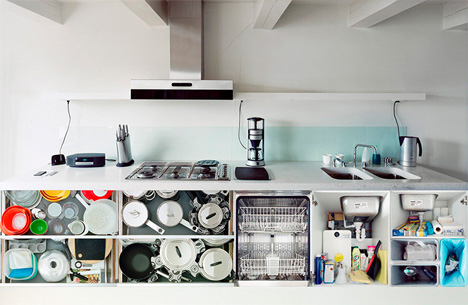
Would you ever allow a stranger to come into your home, open every cabinet and cupboard in your kitchen, and photograph whatever he finds? Artist Erik Klein Wolterink does just that, photographing the room that is often thought of as the heart of the home. He doesn’t romanticize the space, however – he wants to catch the everyday chaos that exists in most kitchens.

2 amsterdam kitchen portraits

3 portraits of kitchens

As he steps foot into each kitchen, he opens everything up – fridges, cupboards, drawers, pantries, ovens and dishwashers – and meticulously photographs everything. The camera misses nothing – not the full dishwashers or the foreign food items or the many jars of Nutella.

4 portraits inside kitchens amsterdam

5 kitchen portraits

After photographing every possible angle of the kitchens, Klein Wolterink assembles the photos into pieced-together portraits. They are patchwork quilts made up of different angles of different parts of the same kitchen. They aren’t simply straight-on pictures of rooms; they are surreal portraits, real-life tableaux in which we can see every single part of the room all at once.

6 portraits of kitchen contents

7 kitchen interior portraits

The photographs all come from kitchens in and around Amsterdam, a city rich with multicultural life. This multiculturalism is displayed in the objects residents keep in their kitchens: foreign foods, exotic ingredients, alien-looking tools. But there is something here that unites all of us, a type of universal humanism that pervades the way we buy, store, prepare, and eat our food.

8 pictures of kitchen interiors

Interestingly, Klein Wolterink doesn’t consider himself a photographer as such. He thinks of himself as a modern cartographer. Maps, he says, are not realistic representations but they make you understand reality. His photos are, in a way, maps to the human condition and our varying but connected lives.

Share on Facebook


[ By Delana in Art & Photography & Video. ]

[ WebUrbanist | Archives | Galleries | Privacy | TOS ]


WebUrbanist

 
Comments Off on Heart of the Home Laid Open: Intimate Kitchen Portraits

Posted in Creativity


Soft Flattering Color Portraits in Lightroom 4 and Lightroom 5

05 Aug

Introduction

The Following is an excerpt from the SLR Lounge Lightroom Preset System v5, a preset system designed to take you from Ordinary to Extraordinary photos in just a few seconds and clicks.

We have just launched the new Lightroom Preset System v5, and in this first tutorial we want to create a soft and flattering look for color portraits. We want to maintain good overall contrast, while flattening out highlights and smoothing out the details a bit for a more flattering look. Each one of you will probably have different preferences in regards to overall contrast and color temperature, but this Base preset and modification are pretty much our foundation for all of our color portraits within the Lin and Jirsa Photography studio. Here is what the photo looked like before and after the effect is applied.

beforeafter

Lightroom Preset System v5 Mixology Recipe

For those that own the SLR Lounge Lightroom Preset System v5, you can follow this two click recipe. If you like, you can save it as a new custom Mixology, however, since it is only a 1-click modification on our existing Base Preset, we will not be adding this to a new custom Mixology Preset.

Develop Mixology
1) 01-10 Base-Soft 11a. Extra Soft-Skin Desat
2) 03-40 Adjust Shadows Blacks 42. Darken-Medium -15, -30

Adjust Exposure, Temperature and Tint to taste.

Local Adjustments
We used the Graduated Filter and used the “04 Dodge (Brighten) +.5 stop” to brighten up the bottom left of the photo. To see exactly how it was applied, watch the video tutorial below.

Watch the Video Tutorial

If you would like to follow along with the Video Tutorial, watch the video blow.

Complete Written Tutorial

This written tutorial is meant for those who don’t have the SLR Lounge Lightroom Preset System v5. If you follow along you’ll be able to edit your photos with the same settings we used to edit this one. For any photo we edit we like to check the EXIF data by pressing “i”. This will show us exactly what camera the photo was taken one, what lens, and the settings. You can customize what EXIF data you want to see by pressing “CMD + J” or “CTRL + J”. This photo was taken on a 5D Mark II at 1/800 sec at f/2.0 ISO 100 with a 50mm lens.

The first thing we did was go into our “01-10 Base – Soft” preset folder and applied the “11a. Extra Soft – Skin Desat preset”. This preset does most of our work for us, adjusting our exposure, highlights, shadows, whites, and blacks the way we would want them for a portrait like this. The clarity, vibrance, and saturation have all been dropped, giving us a nice soft portrait look. Here’s what our settings look like on the right side panel.

developsettings

Our “1) 01-10 Base-Soft 11a. Extra Soft-Skin Desat” preset lowered our Red and Orange levels, desaturating the skin and taking out the red and orange highlighting that can appear in shadows and highlight areas of our subjects skin.

  • Red: -20
  • Orange: -10

In the Tone Curve we have a standard “S” curve, giving us a subtle contrast boost by raising the highlights and dropping the shadows.

tonecurve

We add a bit of Noise Reduction Luminance in our portraits because it does a great job smoothing out the pores and making skin look great. We had to raise the sharpening a bit on this photo because it was shot at such a wide aperture, making the depth of field very shallow. Here are what our “Sharpening” and “Noise Reduction” settings look like.

sharpening

The vignetting in this photo underexposed her skin slightly in the corners of the photo. This is a great opportunity to use a graduated filer. You can simply go to the Graduated Filter and raise your exposure to “0.50″. Then raise the graduated filter from the bottom left of the photo and come up to the strap of her dress. Watch the video tutorial to see exactly where we put it. After the graduated filter we’re left with our final image, here’s a before and after.

Before

before

After

after

Conclusion and Learn More

We hope you all enjoyed this tutorial. If you are interested in learning more or purchasing the SLR Lounge Lightroom Preset System v5

Post originally from: Digital Photography Tips.

Check out our more Photography Tips at Photography Tips for Beginners, Portrait Photography Tips and Wedding Photography Tips.

Soft Flattering Color Portraits in Lightroom 4 and Lightroom 5


Digital Photography School

 
Comments Off on Soft Flattering Color Portraits in Lightroom 4 and Lightroom 5

Posted in Photography


Father’s imaginative portraits of daughter guaranteed to make you smile

04 Aug

6797267234_c75c95ae73_c_alt.jpg

There’s nothing traditional about photographer Nagano Toyokazu’s portraits of his daughter. His unorthodox shots put the girl at the center of a series of whimsical scenes, in turn commanding the attention of a line of yellow rubber ducks, conducting a chorus of frogs and tackling an impossible tower of ice cream scoops on a cone. They’re funny, sweet, and probably the most adorable thing you’ll see on the internet today. Click through and get ready for the cute.

News: Digital Photography Review (dpreview.com)

 
Comments Off on Father’s imaginative portraits of daughter guaranteed to make you smile

Posted in Uncategorized