RSS
 

Posts Tagged ‘Portrait’

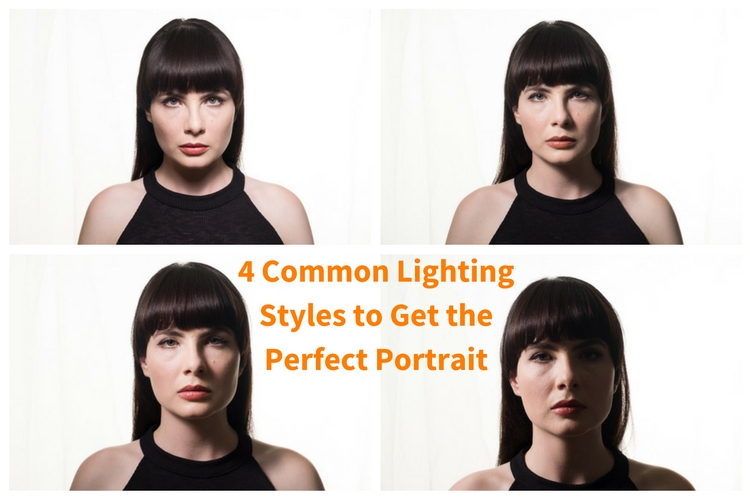
4 Common Lighting Styles to Get the Perfect Portrait

01 Sep

When you begin doing portrait lighting for the first time, the general advice you get is to put your light at 45º to your subject, and aim it down at 45º. It’s a quick way to get something reasonably good, without a lot of understanding. With a little more knowledge, you can make better lighting decisions, and get more dramatic images.
4 Common Lighting Styles to Get the Perfect Portrait

Light has four main properties:

  1. Quantity
  2. Quality
  3. Color
  4. Direction

In this article, we’re looking at direction of light only. If you look at the work of the Masters in painting, you’ll notice that they go to great pains to create light and shadow through their brush strokes. You can of course translate these to your own lighting. So let’s look at the different portrait lighting styles or patterns you can use.

To be able to see these patterns, your subject should be facing the camera. The key to seeing what’s happening is to pay attention to what the shadow is doing, especially the nose shadow.
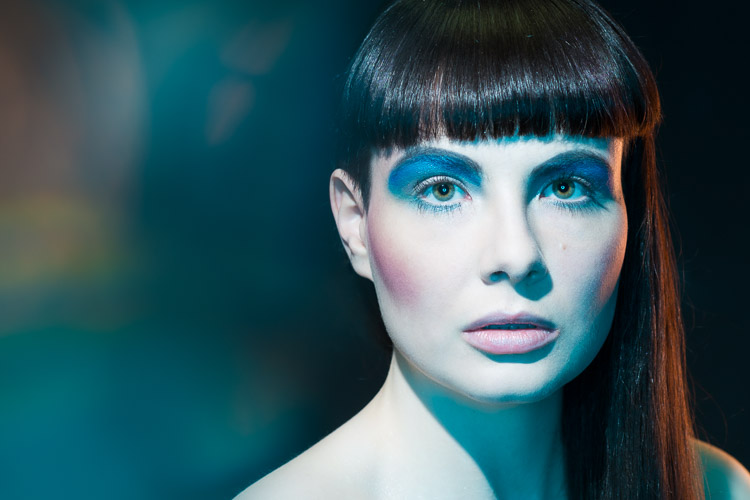
Short Lighting with a Butterfly pattern.

Short lighting style

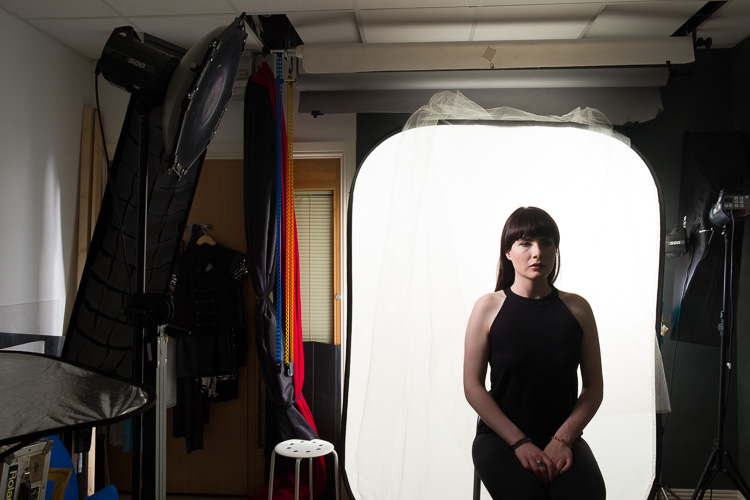
For this setup, I’ve used an Elinchrom BXR500 with a 44cm white beauty dish. The deflector is translucent, and I’ve added a grid to control the spill of the light. The Camera was a Fujifilm X-T10 with a Fujinon 18-55 lens.

The Portrait Lighting Styles

1. Butterfly Lighting

Butterfly lighting refers to the shape of the shadow under the nose that this pattern creates. It’s meant to look like a butterfly in flight, viewed from straight on. It’s also called Paramount lighting when used with guys to sound more masculine. If you look at the work of 30s and 40s Hollywood photographers like George Hurrell, you’ll see this lighting style in operation.
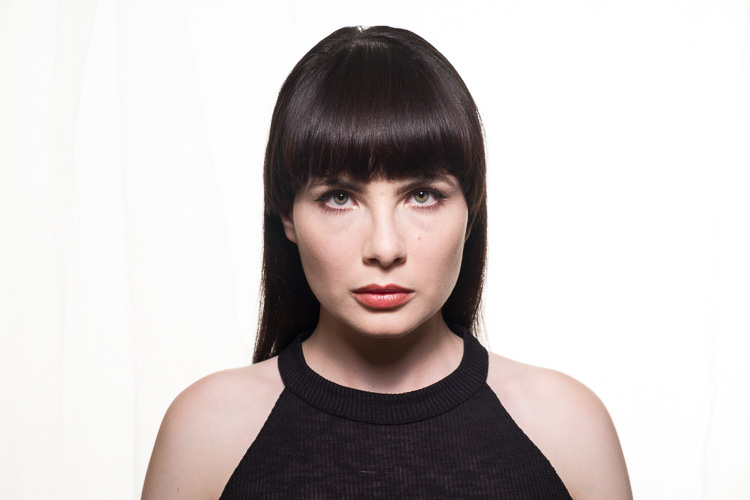
Classical Lighting Patterns 01

The basic butterfly portrait lighting, with no reflector.

First you should place your light on a boom stand, and position it so it creates a line between you, the light, and your subject. Your light should be high enough to create the butterfly shadow. If it’s too low, you won’t get a shadow and the light will be too flat. If it’s too high, you’ll have the nose shadow will cut into the lip.

As you look into the eyes of your subject, make sure you can see a reflection of your light. This reflection is called a catchlight, and helps give life to the eyes. If you cannot see the catchlight, lower your light a bit.
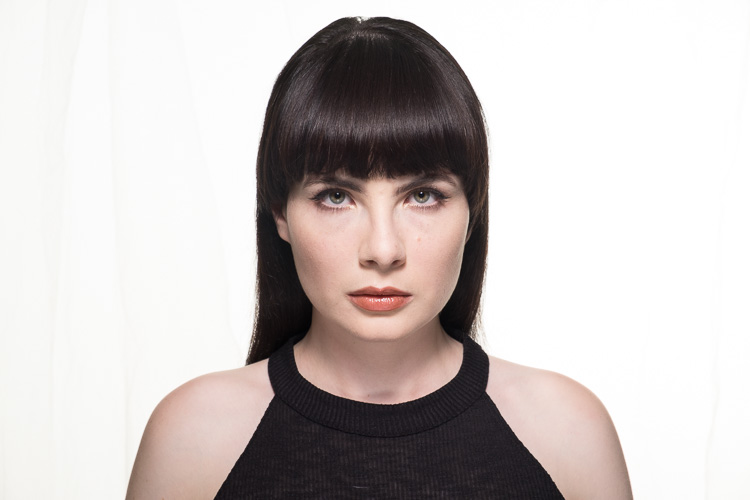
Classical Lighting Patterns 02

The basic butterfly portrait lighting, with silver reflector.

With Butterfly Lighting, it’s common practice to put a reflector (or even another light at lower power) underneath the chin to bounce light back up. This helps soften the look, and reduces the shadows caused by your light position. You’re not trying to overpower the light from above, as doing this will cast shadow upwards on the face, which isn’t particularly flattering.
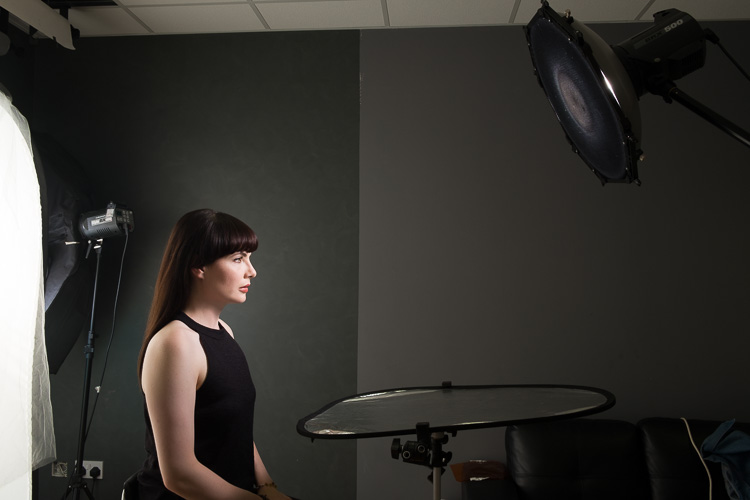
Classical Lighting Patterns 03

Behind the scenes shot of the basic butterfly lighting, with a reflector.

2. Loop Lighting

For Loop Lighting, you’re looking for a loop shaped nose shadow. Move your light to the left, or light from the centre. You’ll see the shadow change shape. With Loop Lighting, the nose shadow shouldn’t touch the shadow side of the cheek.
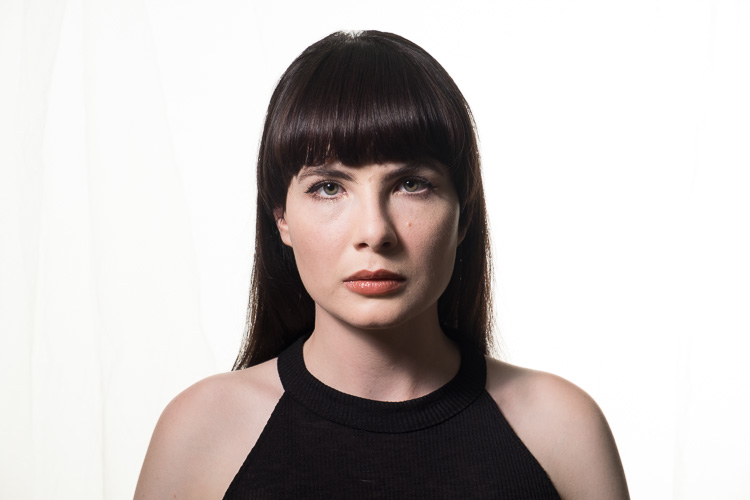
Classical Lighting Patterns 04

Loop Lighting

You should aim to have the bottom of the nose shadow about halfway between the lip and the nose in position. With Loop lighting, you’ve got two main options for filling in shadows. You can use a reflector, or a second light from the opposite side of the face as the key light, or you can use an on axis (behind the camera) fill light (like a ring light or an Octabox).

3. Rembrandt Lighting

If you move the key light around a farther, the nose shadow will meet the cheek. Some refer to this as closed loop lighting, with the normal Loop Lighting being referred to as open loop lighting. From a technical standpoint, Rembrandt Lighting usually has a higher light position than closed loop lighting, but for most the term Rembrandt refers to any light that creates a triangle of light below the eye opposite the light source.
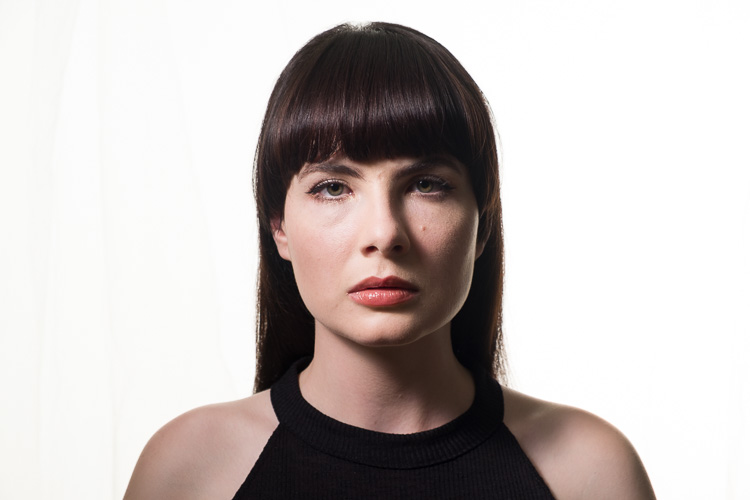
Classical Lighting Patterns 05

Rembrandt Lighting

You can probably guess that the name is based on the work of the painter Rembrandt. A lot of his portraits were painted while the subject was lit from a skylight or high window, giving that famous look.
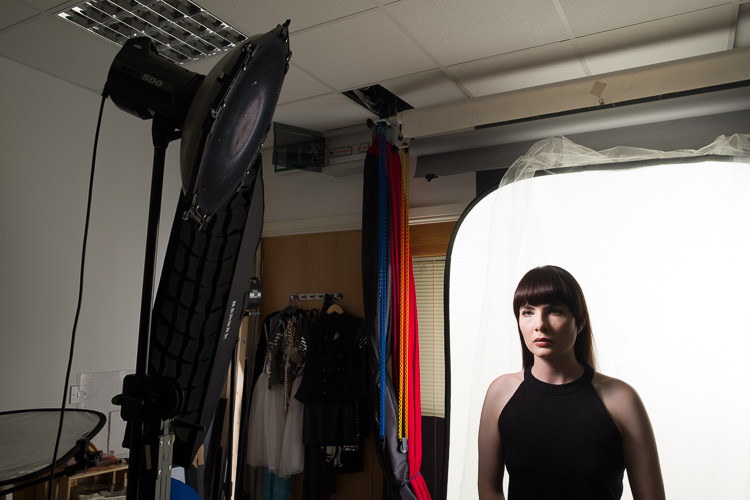
Classical Lighting Patterns 06

Behind the scenes making a Rembrandt Lighting.

4. Split Lighting

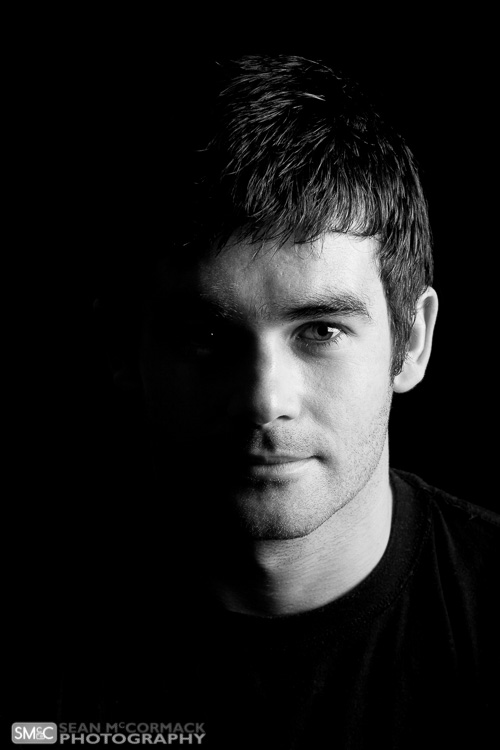
You’ve moved the light slowly from straight on, and your final light style is when the light is perpendicular to the camera. You’re lighting only one half of the face. One of the most famous uses of this is The Beatles album ‘With The Beatles’, where all four members are split lit. You should only be able to see one eye in the shot for this pattern (the other will be in shadow).
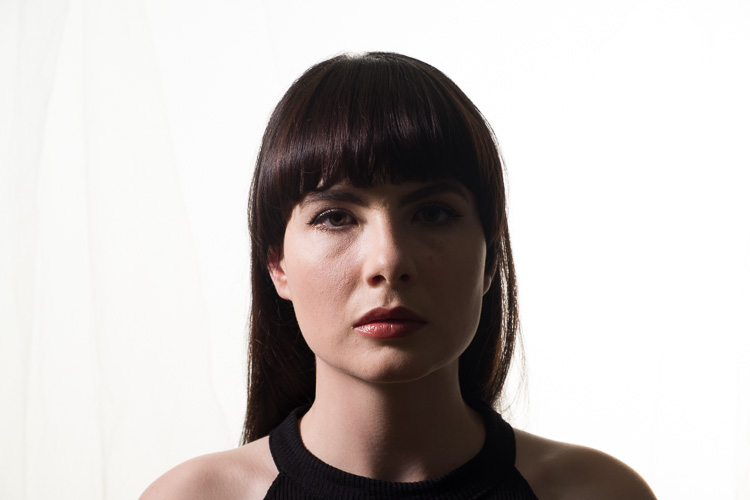
Classical Lighting Patterns 07

Split Lighting.

Classical Lighting Patterns 08

Behind the scenes for Split Lighting.

Broad and Short Lighting

To show how the patterns work, you’ve shot straight on to your subject. In real life this is only one view that you’d capture. By turning the face to the side you get even more options. When the face is at an angle, there are two parts of the face visible, the broad side, and the short side. The broad side is the one nearest you, from the ear to the nose. The short side is the small bit of the side facing away from you, that you can actually see.

By aiming the light at the broad side of the face, you see the face in detail, with very little shadow. On the other hand, if you light the short side of the face, you get more shadow. These lighting positions are referred to as Broad and Short Lighting respectively.

You can use Short Light to flatter heavier subjects, as the shadow tends to hide weight in the face. Broad lighting is better for thinner people, and is often used in fashion. For the Short Light example, the light was in the same position as our Split Lighting, the model has just been turned towards the light. For Broad Lighting, you can have it any where in front, though for this example, it was off to camera right.
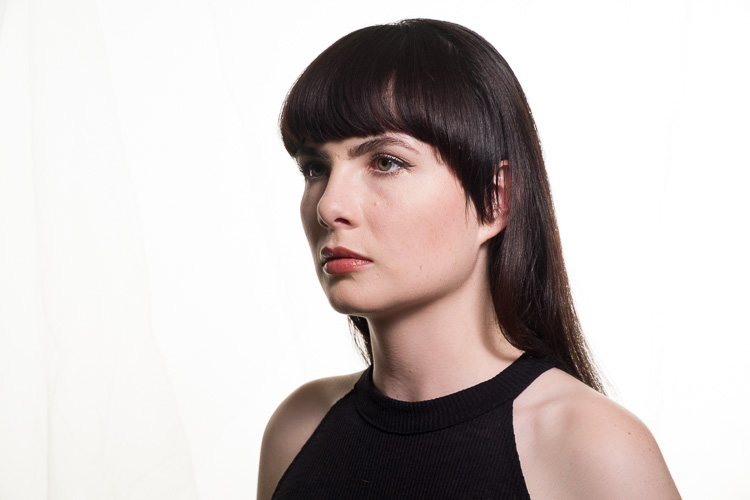
Classical Lighting Patterns 09

Broad Lighting (main light is to camera right).
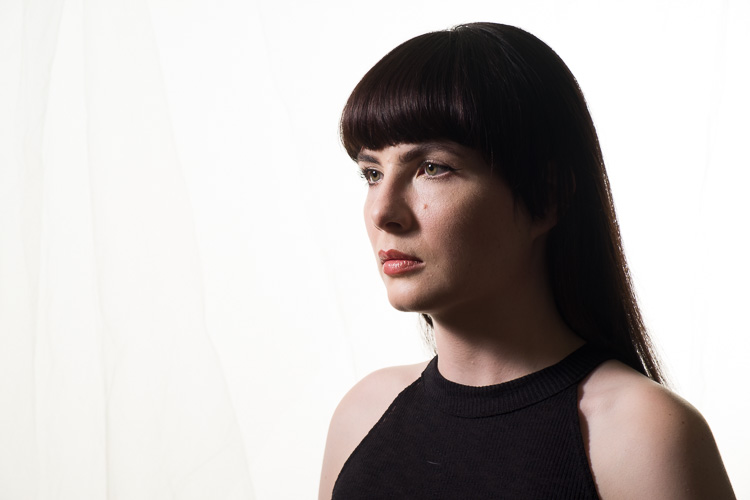
Classical Lighting Patterns 10

Short Lighting (main light is to camera left, closer to the background than the subject).

Creating Drama

The trick to creating drama is to use shadow effectively. For this reason Short Lighting is the best option. You can use each pattern in a short light fashion.

Remember at the start, you were told to pay attention to the nose shadow? For Butterfly, you’re still looking for the butterfly shadow. The light will be directly in front of your subject’s nose to get this. As you move the light away, towards Loop position, it’ll start to become more dramatic. You can even do a Rembrandt portrait for really dramatic effect.
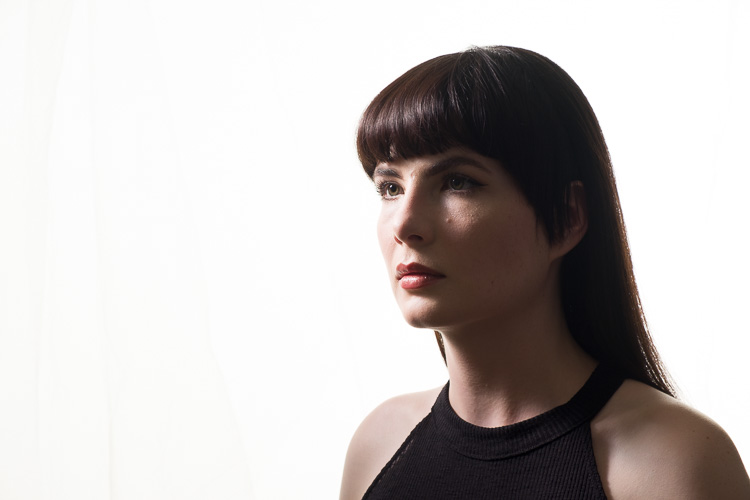
Classical Lighting Patterns 11

Rembrandt Lighting, Short lit with no fill.
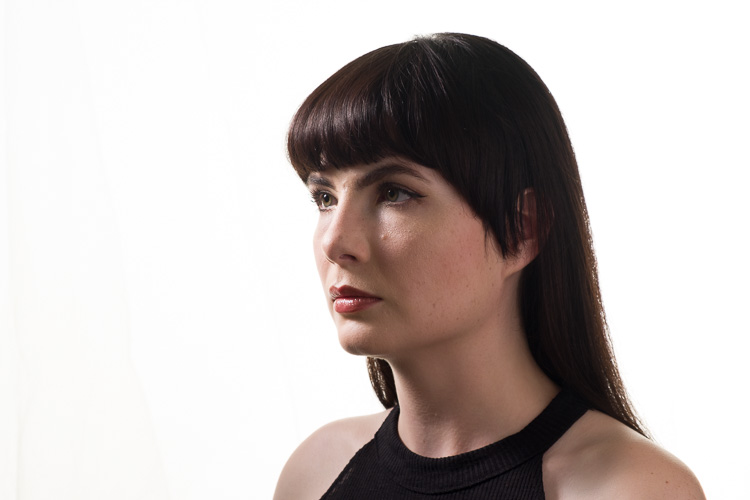
Classical Lighting Patterns 12

Rembrandt Lighting, Short lit with silver reflector fill.

So that’s how to use common portrait lighting styles or patterns. You should get familiar with them, and as you look at magazines and online, you’ll start to see them in use.

Examples of Portait Lighting in photos
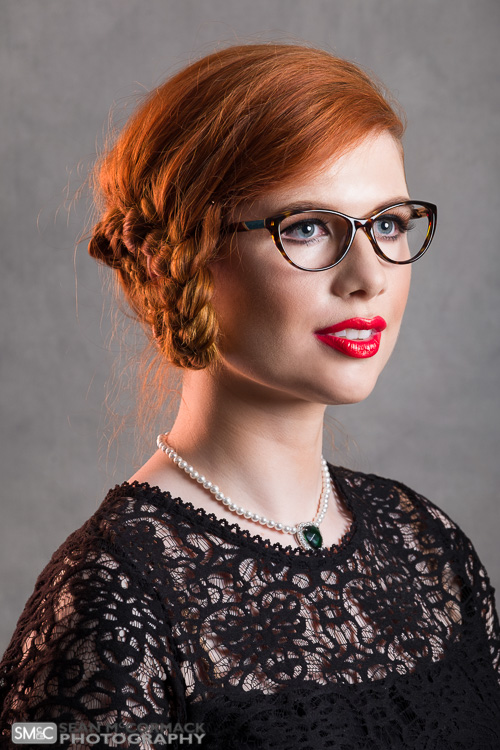
Classical Lighting Patterns 16

Short Lit Loop Light

Classical Lighting Patterns 14

Split Lighting

Classical-Lighting-Patterns-13.jpg

Butterfly Lighting

Short Lighting with a Butterfly pattern.

Short Lighting with a Butterfly pattern.

googletag.cmd.push(function() {
tablet_slots.push( googletag.defineSlot( “/1005424/_dPSv4_tab-all-article-bottom_(300×250)”, [300, 250], “pb-ad-78623” ).addService( googletag.pubads() ) ); } );

googletag.cmd.push(function() {
mobile_slots.push( googletag.defineSlot( “/1005424/_dPSv4_mob-all-article-bottom_(300×250)”, [300, 250], “pb-ad-78158” ).addService( googletag.pubads() ) ); } );

The post 4 Common Lighting Styles to Get the Perfect Portrait by Sean McCormack appeared first on Digital Photography School.
Digital Photography School

 
Comments Off on 4 Common Lighting Styles to Get the Perfect Portrait

Posted in Photography


6 Ways to Take a Candid Portrait of Somebody You Know

04 Aug

Get Andrew’s The Candid Portrait eBook at 43% off now over at Snapndeals, only until August 9th (AUS time).

The phrase candid portrait is often used to refer to the type of portrait taken when the subject is unaware of the photographer. This is usually seen in street photography, but also applies in other areas such as documentary style wedding photography.

A candid portrait

If you think of a candid portrait as being one that captures someone acting authentically or with a natural expression, as opposed to one where the model has been directed to pose or act in a certain way, then it follows that you can also take candid portraits of people you know. Or even somebody that you don’t know, but have seen in the street and asked for permission to make a portrait.

Here are some tips for taking candid portraits of people with permission.

1. Look for expressions that capture character

If you are taking photos of somebody in a formal situation and you want to capture natural expressions rather than a more forced one (or the sullen expressions preferred by many fashion models) then you need to become a keen observer.A candid portrait

Watch for the moments in-between, the ones where your model is relaxed while you pause before taking another photo. How do they behave while the camera isn’t pointing at them? How do they respond when you talk to them? What expressions do you see when they talk about something that interests or excites them? What unconscious gestures do they make?

I was taking photos of a friend when I noticed that she had a particular gesture that she sometimes made, when the camera wasn’t pointing at her. I waited until it happened again, then asked her to hold the pose while I took the photo (right). The resulting portrait is one of her (and my) favorites from the shoot.

2. Make the most of random encounters

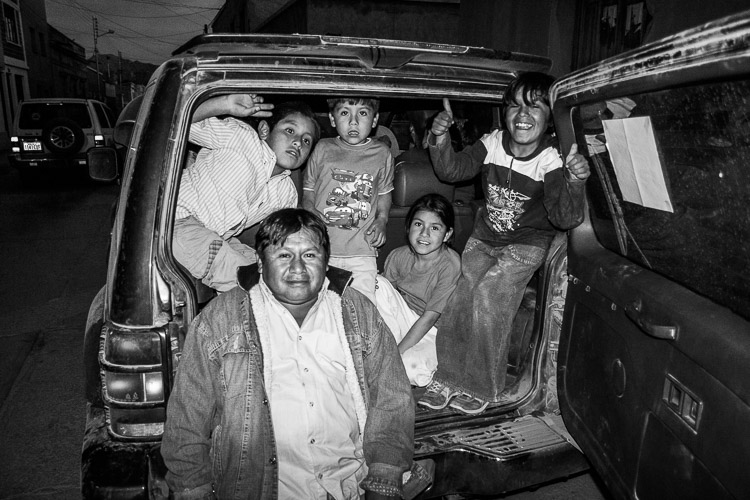
I remember my first evening taking photos in Bolivia. It was late afternoon, quickly fading to dusk, and the streets were lit by a soft red glow, cast by the setting sun.

I raised my camera to take a photo of a mud brick building. From the corner of my eye I saw a small boy running down the street. He passed in front of the camera, stopped, turned towards me, and started waving his hands in the air. He obviously wanted to be in the photo, and a few seconds later he was joined by an older boy, presumably his brother, who also posed for a photo. Then they continued on down the street, and beckoned me to follow them.

Curious, I followed, and they led me to a car parked around the corner, where their father was waiting for them. They explained what had happened, and then the father asked me to take a photo of all of them together. He was a little drunk, and invited me to their house for dinner. I politely declined, although I would have liked to see the look on his wife’s face when I arrived.

A candid portrait

When you are traveling and people are being open and friendly like this, take advantage. Be open to random encounters, and the possibilities that can arise from them. At the very least you will have some interesting experiences and new stories to tell.

3. Use a small camera and lens

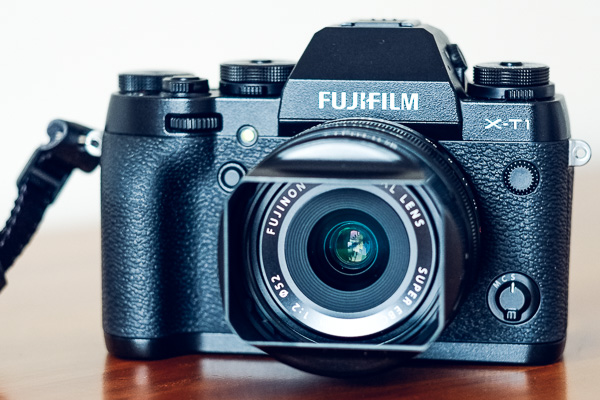
A friend of mine is an experienced model. I have photographed her with an EOS 5D Mark II and an 85mm lens, which is a fairly large combination. I have also used a Fujifilm X-T1 and 56mm lens, which is much smaller. She commented afterwards that the experience was different, and that she felt under much less pressure to be a good model with the smaller camera.

Fujifilm X-T1 firmware upgrade

If an experienced model feels this way, then imagine the effect on somebody who is not used to having their photo taken. I’m sure this is one of the reasons that people like to take photos on smartphones, and why the results can be surprisingly good – because the people being photographed feel no pressure to do anything, other than act natural.

The lesson is that camera and lens size matter. Cameras and lenses are tools, and it is up to the photographer to choose the most appropriate one for the job at hand. A smaller set up will help you capture candid portraits, even of people you know.

4. Find a good reason to ask someone if you can make a portrait

If you are not used to asking strangers if you can make a portrait of them, it becomes a lot easier if you can give them a good reason. You don’t always have to search very hard to find one.

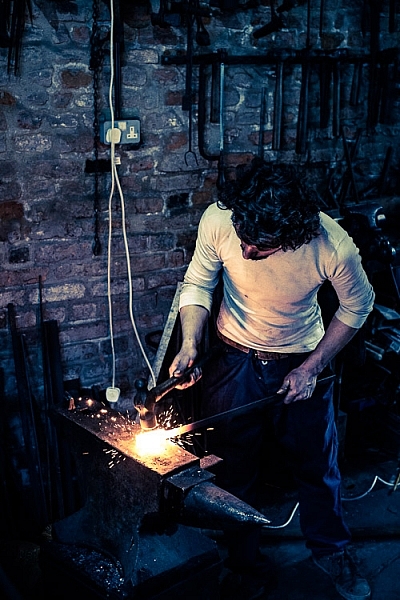
For example, a few weeks ago I visited a blacksmith’s forge that uses forging techniques from 100 years ago. The smiths there do demonstrations for the visiting public, and I simply asked if I could take some photos while the smith was doing his demonstration. The result is a very natural portrait of somebody at work.

A candid portrait

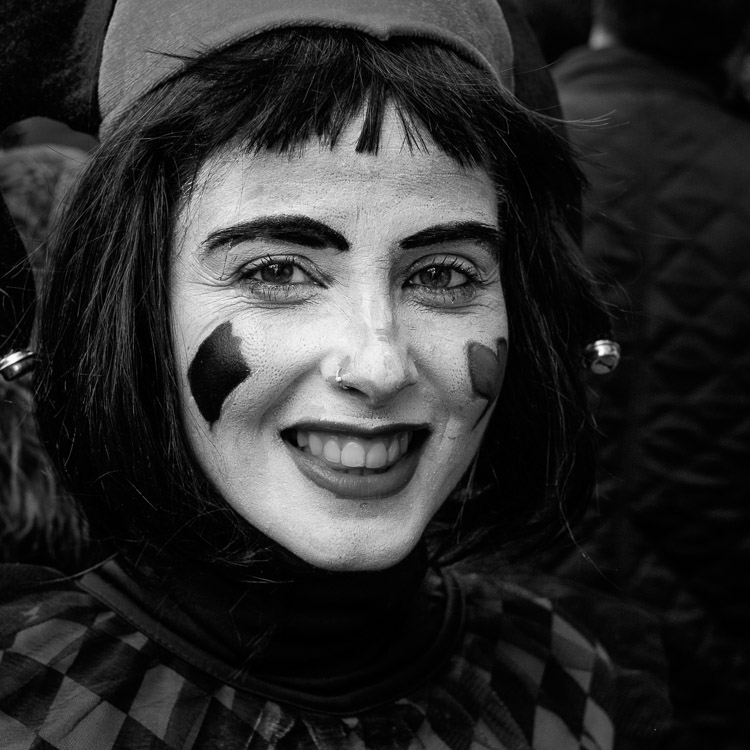
At carnival in Cadiz earlier this year there were lots of people dressed in costume, but only a few with face paint. When I saw somebody with interesting face paint I asked if I could take a photo (it helps that I speak reasonable Spanish). Each time I explained that I really liked their make-up, the person said yes, and I took a couple of photos.

This is one of the natural expressions I was rewarded with.

A candid portrait

5. Undertake a project

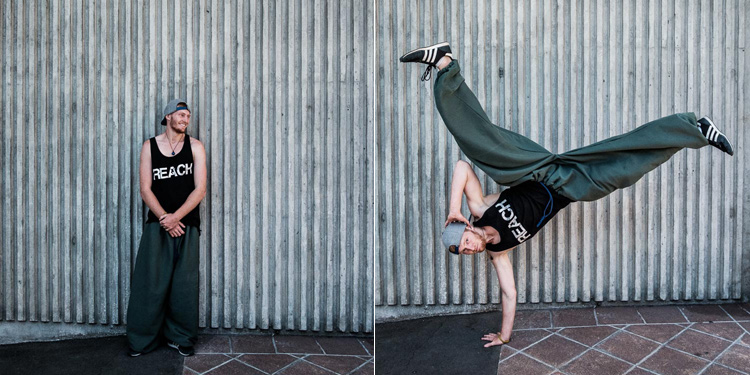
Early last year I thought it would be interesting to take some photos of people practicing parkour, and got in touch with some local traceurs through a Facebook group. Two of them in particular were interested in a shoot, so we went out into the streets of Wellington and they showed me some of the things that they do. I took photos and portraits as we went along. It was easy to create candid portraits as well as some action photos, because they were enjoying what they were doing and having fun.

I didn’t think about it until afterwards but now it occurs to me that what we were doing was a form of street photography, just one where I was working in a collaboration, rather than trying to take photos of people without them noticing me. That led to a entirely different set of photos than I could have made if I had seen them doing their thing in the street, and just taken some photos without any form of interaction.

A candid portrait

6. Take photos of friends doing interesting things

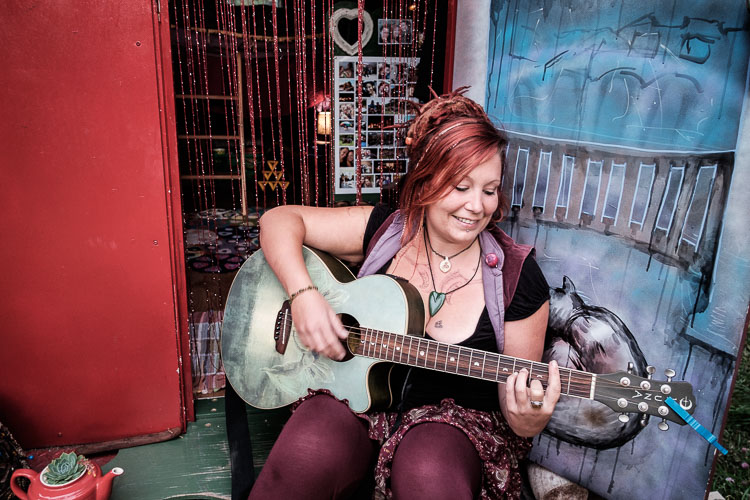
A friend of mine made her own gypsy caravan to live in. I think this is a fantastic tiny space project, and once it was finished I asked her if I could take some photos of her there. Her natural enthusiasm came across as we talked about it. I asked her to sit outside and play her guitar. While she was absorbed in what she was doing, I made some candid portraits that captured expressions like this.

A candid portrait

Do you have any techniques of your own for taking candid or natural portraits of people that you know? I’d love to hear them – please let me know in the comments.

Get Andrew’s The Candid Portrait eBook at 43% off now over at Snapndeals, only until August 9th (AUS time).

googletag.cmd.push(function() {
tablet_slots.push( googletag.defineSlot( “/1005424/_dPSv4_tab-all-article-bottom_(300×250)”, [300, 250], “pb-ad-78623” ).addService( googletag.pubads() ) ); } );

googletag.cmd.push(function() {
mobile_slots.push( googletag.defineSlot( “/1005424/_dPSv4_mob-all-article-bottom_(300×250)”, [300, 250], “pb-ad-78158” ).addService( googletag.pubads() ) ); } );

The post 6 Ways to Take a Candid Portrait of Somebody You Know by Andrew S. Gibson appeared first on Digital Photography School.

Digital Photography School

 
Comments Off on 6 Ways to Take a Candid Portrait of Somebody You Know

Posted in Photography


How to Use Portrait Angles More Creatively: A Visual Guide

11 Jul

When it comes to creating a successful portrait, there are a lot of moving parts! We talk often about finding the light, composition, and camera gear when it comes to portraits. While all three of those things are important in creating your final image, they aren’t the only variables at play.

Another important aspect in capturing portraits is angles. Understanding and making good use of angles in portrait photography, allows you to capture images of your subjects in the most flattering way, unique to each person you’re photographing.

portrait-angles1

Under the umbrella of “angles” are two different aspects – facial view, and camera angle. Facial view simply refers to how much of a person’s face is visible in the photograph. Whether or not you recognize the term facial view, you probably understand that there’s a visual difference between a photograph of someone looking directly into the camera, and a photograph of them in profile. These are examples of both ends of the facial view spectrum. In addition to facial view, you’ll also want to learn to utilize camera angle in portraiture. Camera angle refers to whether you’re holding the camera at eye level, or above or below the eye level of your subject.

The concepts themselves are pretty simple, right? However, the difficult part is learning how each of these variables interact with each other, and your subject. Let’s walk through some visual examples of different facial views and camera angles using the same gear, subject, location, and same time of day, while observing how different angles change the look and the feel of each image.

Camera Angles

portrait-angles2

Eye Level

One of the most common camera angles for portraits is to place the camera at the subject’s eye level. This camera angle results in a final image that is balanced, and proportionate between head and body. It also allows for the subject to look directly into the lens, which tends to create the feeling of connection in a portrait. This is a flattering camera angle for most people.

portrait-angles3

High Camera Angle – Above Eye Level

Shooting from a high camera angle (with the camera above the subject’s eye level) is another great option to try in your portrait photography. With this angle, the focus is on the face rather than the body and can be a very slimming angle for adults. I’m not at all concerned with making children seem slimmer than they really are, but find that I use this angle a lot when photographing children because I like the way that it emphasizes the childlike qualities of kiddos. I find that parents tend to really enjoy photographs of their children taken from a high camera angle, and I believe that’s because parents see their children from this angle quite often in their day-to-day life, so it feels very natural and candid.

As a bonus, shooting from a high angle makes it really easy to achieve good catch lights in their eyes, and can also help to camouflage a less than desirable background. On the other hand, this camera angle may not be to your advantage in some situations; if your subject is very thin, shooting from above can sometimes make your subject look like a bobble-head, which is very rarely flattering.

portrait-angles4

Low Camera Angle – Below Eye Level

Shooting from a low camera angle (with the camera placed below the subject’s eyes and tilted up) can make people seem tall and authoritative, but can also tend to make people (their body in particular) look larger than they really are, which is not very flattering for most people.

This is particularly important to keep in mind if you’re photographing someone who is taller than you. If you’re 5’2″, and the person you’re photographing is 6’4″, you may need to be creative to make sure that you’re not photographing the whole session from a low camera angle. Have your subject sit, crouch, or find something that you can climb on to create a more even plane, for at least some of the photos – it really will make a difference.

I’ve used this camera angle a handful of times with newly walking babies, and could envision using it with a wider angle lens (to capture more of the body) if I were photographing a politician, a football player, or someone who wished to appear particularly powerful. Overall though, this is usually not the most flattering angle for portraits.

portrait-angles7

Don’t be afraid to experiment. Try capturing the same image from two different camera angles. The image above demonstrates how the same subject and pose appears from eye level, as well as from a high camera angle. If you did a poll, I bet you’d find that some people prefer the eye level shot, and some prefer the high camera angle. This is largely a matter of taste and preferred aesthetic, so I frequently make a point to include both sorts of angles in my portrait sessions.

Facial Views

portrait-angles6

Photographing a subject full-face means that their face is pointing directly towards the camera lens – you can see both ears, and both sides of the face in equal amounts. Full-face portraits often convey a sense of confidence and assertiveness, especially when the person being photographed is looking directly into the camera with their eyes also.

portrait-angles8

Other facial views include 3/4 view, 2/3 view, and profile view. With 3/4 view, the subject has turned just enough so that one of their ears is no longer visible to the camera. With 2/3 view, the subject has continued to turn so that their nose is just about to break the plane of their back cheek. For a true profile portrait, the subject’s face is turned 90 degrees, and is perpendicular to the camera.

Shooting with the subject’s face turned to 2/3 view or 3/4 view tends to convey a more casual, and less assertive portrait. Images shot with a 3/4 facial view, and the subject looking just off camera, are often the most successful candid images, because the facial expressions are still easily visible to the viewer. Similarly, shooting in profile allows for portraits that feel unposed, while also being graceful and demure (particularly when shot in silhouette).

portrait-angles5

The best way to begin to learn, and really understand angles, is to grab a friend and go experiment. Take photos from every camera angle you can think of, including non-traditional angles like a bird’s eye or worm’s eye view. Then, take a photo with every facial view – full face, 3/4 view, 2/3 and profile. If you’re really feeling ambitious, try combining facial views and camera angles – does the feel of the portrait change if you shoot full-face from eye-level versus from a high camera angle?

Chime in below, do you find that you gravitate towards images with a particular facial view and/or camera angle? What tends to be your preference and why?

googletag.cmd.push(function() {
tablet_slots.push( googletag.defineSlot( “/1005424/_dPSv4_tab-all-article-bottom_(300×250)”, [300, 250], “pb-ad-78623” ).addService( googletag.pubads() ) ); } );

googletag.cmd.push(function() {
mobile_slots.push( googletag.defineSlot( “/1005424/_dPSv4_mob-all-article-bottom_(300×250)”, [300, 250], “pb-ad-78158” ).addService( googletag.pubads() ) ); } );

The post How to Use Portrait Angles More Creatively: A Visual Guide by Meredith Clark appeared first on Digital Photography School.

Digital Photography School

 
Comments Off on How to Use Portrait Angles More Creatively: A Visual Guide

Posted in Photography


How to Create a Dramatic Cinematic Style Portrait Using Photoshop Color Grading

30 Jun

Cinematic style portraits are personally one of my favourites. What I like the most about them are the desaturated colours and the dramatic ambience.

Before we start the tutorial on colour grading, I will give you some of my best tips to achieve this cinematic look:

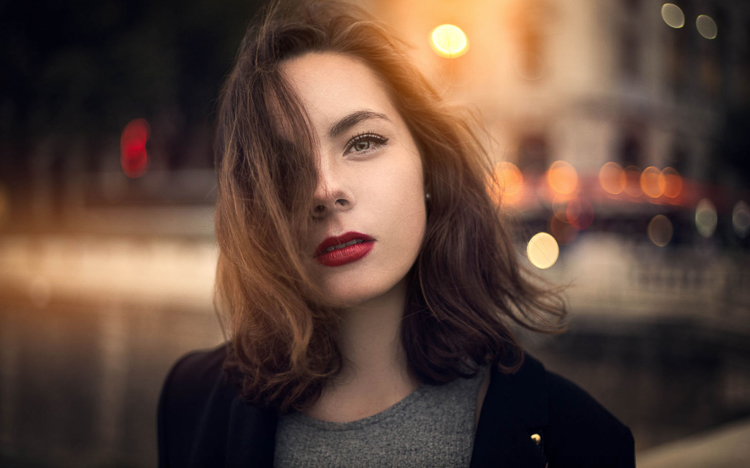
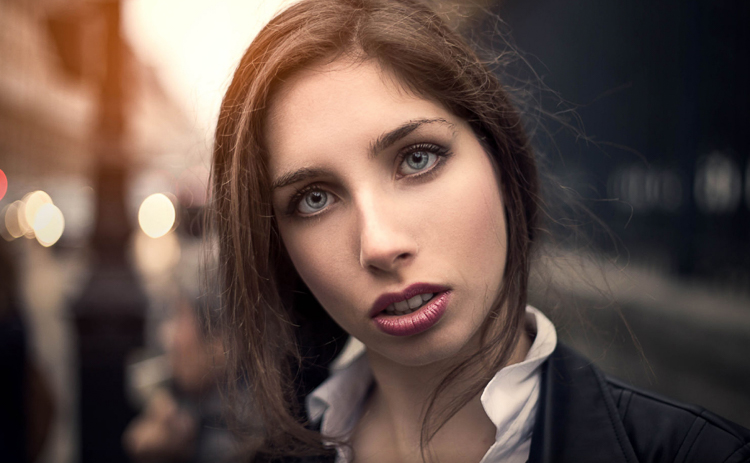
  • Use a large aperture, something between f/1.4 and f/2.0. If you have a long lens then you can also use that. The idea is to have a nice background bokeh (when things in the background are blurred). You also want to have nice separation between the model and the background.

IMAGE 1

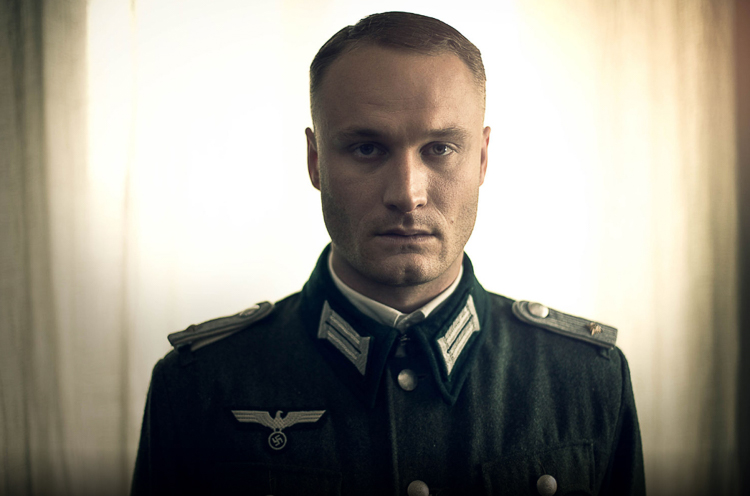
  • If you’re shooting indoors with strobes, then try to add ambience by adding shadows to the model’s face. You do not want flat lighting, it is boring.
  • If somehow you can’t get the dramatic lighting, don’t hesitate to enhance the contrast with some dodging and burning in Photoshop.

IMAGE 2

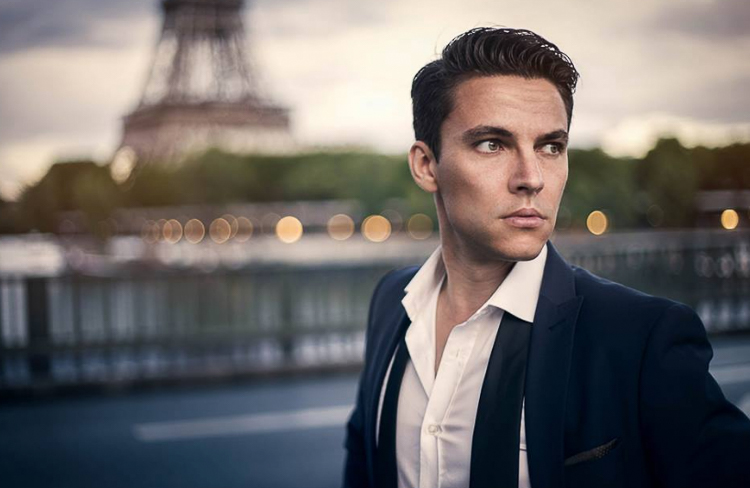
  • If you’re shooting outside, the I recommend shooting right after sunset. You will get nice soft light on the model’s face, and you will also have city lights behind them, to really get a cinematic feel. This only works with a large aperture, and it adds another point of interest.

IMAGE 3

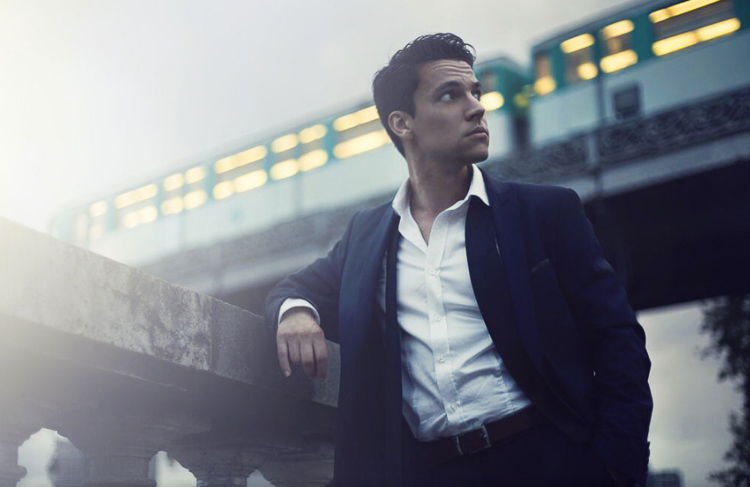
  • Your model should have a strong expression on their face, especially if it’s a male. Cute smiling images do not really work that well with this style.
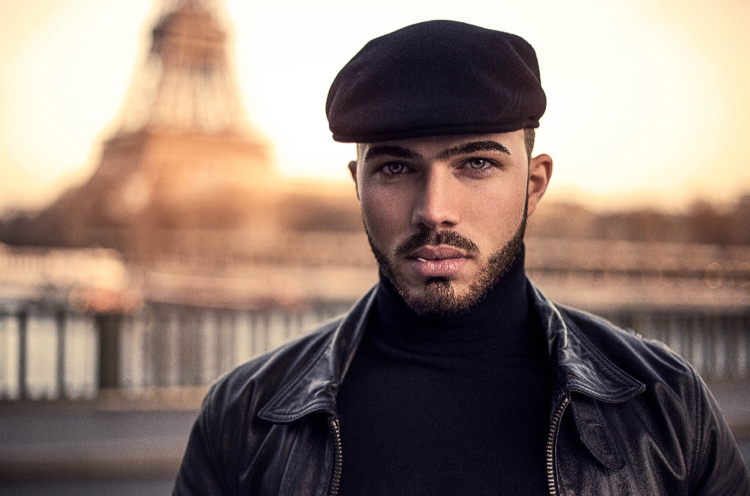
  • Leave some space in the frame. You do not want your model to take up the whole frame, so leave some space around them, to add context to your image. You can get better results if the viewer is able to locate the spatiotemporal context of your image.

IMAGE 4

  • Your model should not wear something too flashy (something like pink or yellow), limit their clothes to sombre, subdued colours.
  • Try to use complementary colours as much as possible, it creates nice depth to your images. Usually in movies, the actor is either in blue and the background in yellow/orange, or vice versa. Try to keep your actor in a range of cold colours and your background in warm colours, it works the best. The opposite also gives you good results.

IMAGE 5

  • The most important thing is that your model should look like a character. Try to add accessories, clothes, or poses that make the character look credible. You can discuss with the model or stylist before the session, the look you want to give to your images, and have a look together at the wardrobe.
    IMAGE 6

Color Grading in Photoshop

For the colour grading tutorial I am going to work on this image:

IMAGE 7

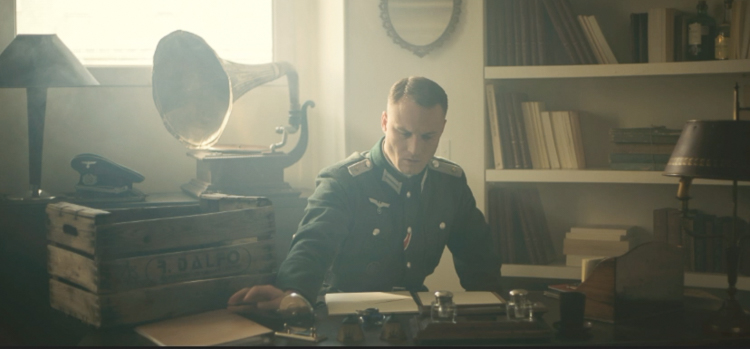
This image was taken on a Canon 6D, with an aperture of f/1.8, on a 50mm lens. This was taken during a short film where I was the photographer. There was a lighting behind the window aiming at the model, we added some fog to create this 1945 look.

What we’re going to do with this image is bring it back to life, by enhancing the contrast between the yellows in the highlights, and the greens in the shadows. We’re going to have a colour scheme based on analogous colours, going from green to yellow.

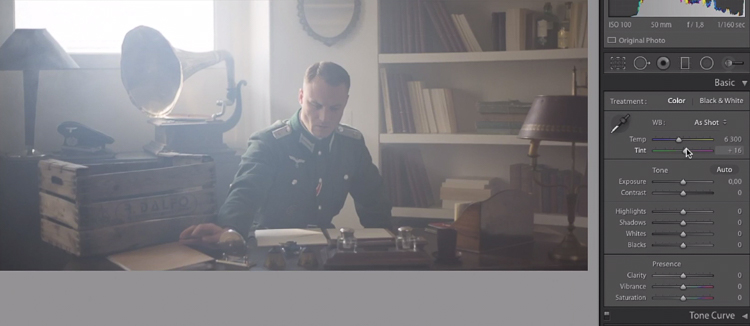
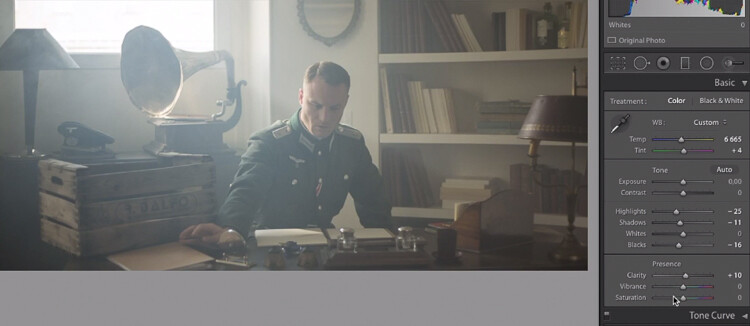
Let’s start with some basic exposure correction on Lightroom, this will depend on your image, so adjust accordingly.

IMAGE 8

Do basic adjustments in Lightroom, or your program of choice, first.

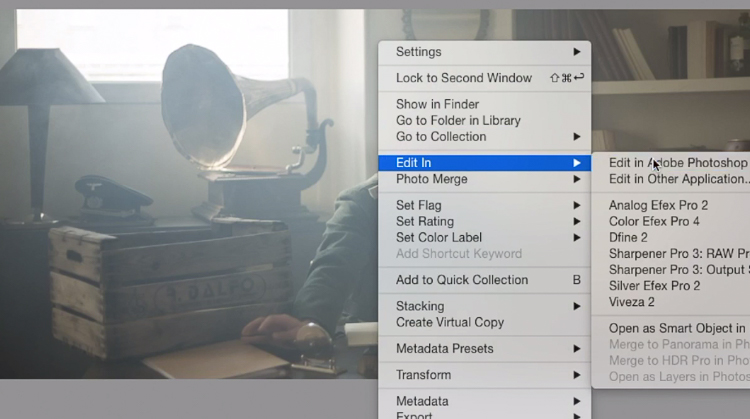
After the basics are done let’s move the image over to Photoshop to start our colour grading. If you are using Lightroom just right click and choose Edit in Photoshop.

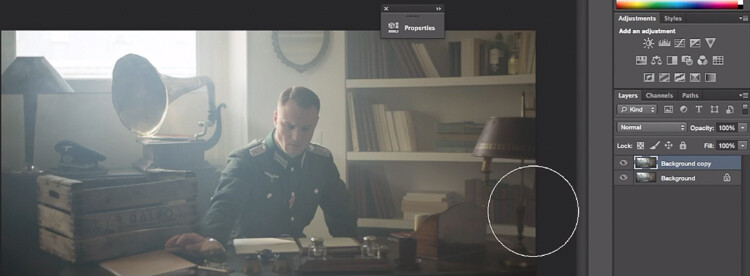
First, duplicate the layer in Photoshop so that you won’t do any destructive editing. You can always go back to the original layer if you don’t like the results.

IMAGE 9

IMAGE 10

Make a duplicate layer.

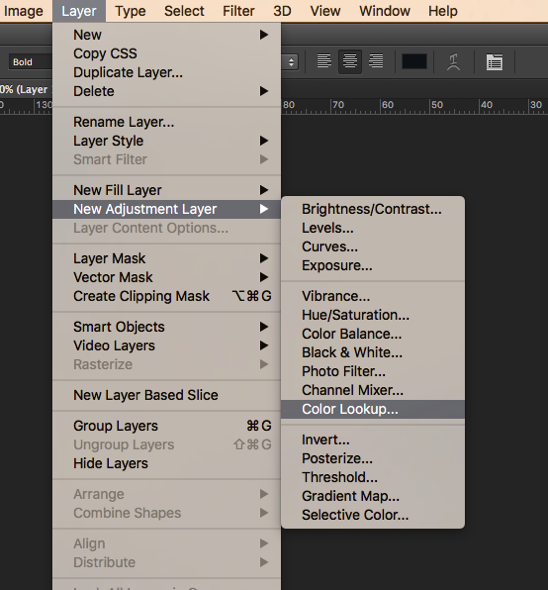
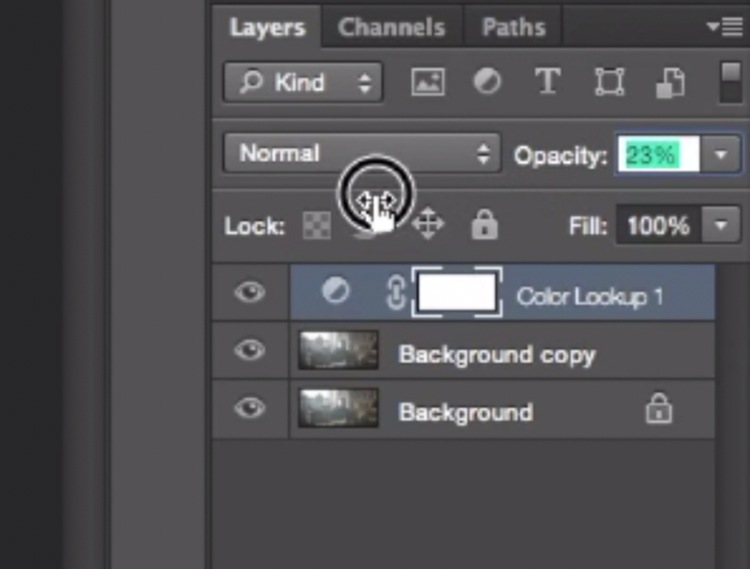
The first thing we’re going to do is to create a new layer adjustment, go to: Layer > New Adjustment Layer > Color Lookup…

Screen Shot 2016 06 23 at 2 08 13 PM

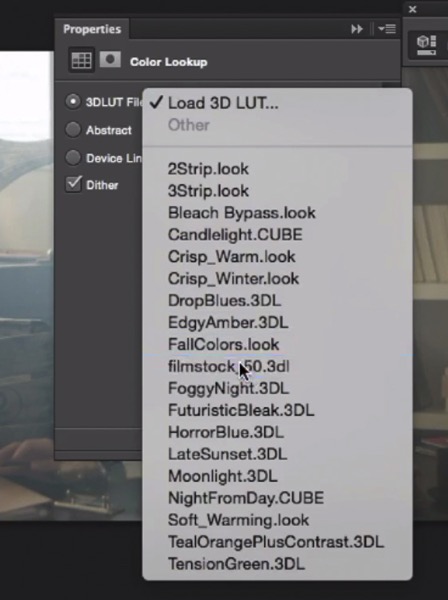
Pick filmstock_50.3dl and reduce the opacity of the layer to around 20%. You need to reduce the opacity otherwise the effect is going to be too strong.

IMAGE 12

IMAGE 13

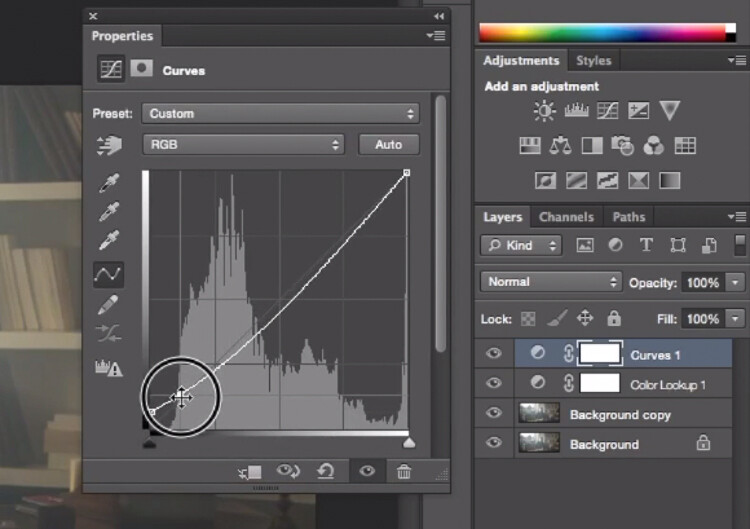
Next thing we’re going to do is create a curves layer and redo the contrast. This will really depend on your image, so adjust according to your taste.

IMAGE 14

Adjustment layer Curves to add contrast.

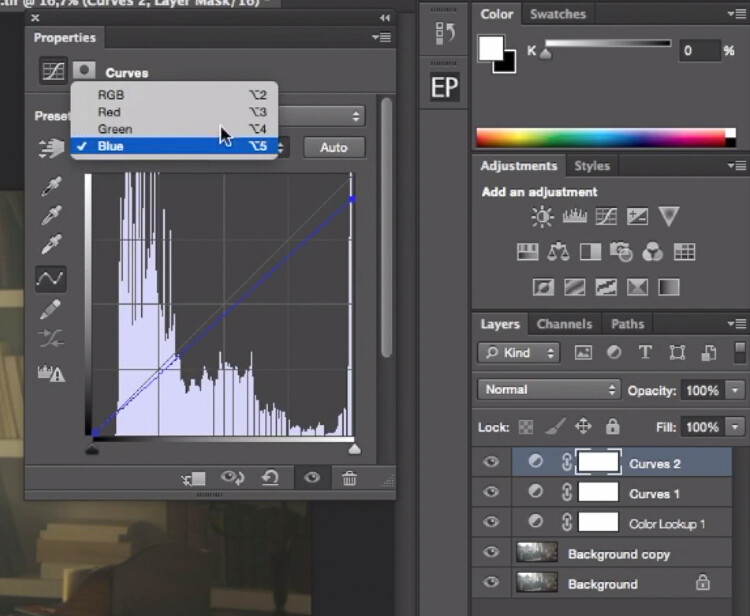
Then create another curves layer, go to the blue curve and lower the top right extreme of the layer. This will add yellow to your shadows.

IMAGE 15

Add yellow to the shadow areas using this curve adjustment

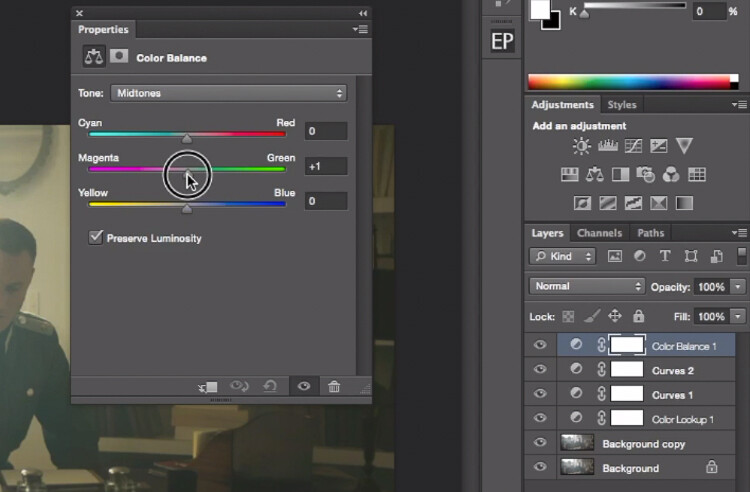
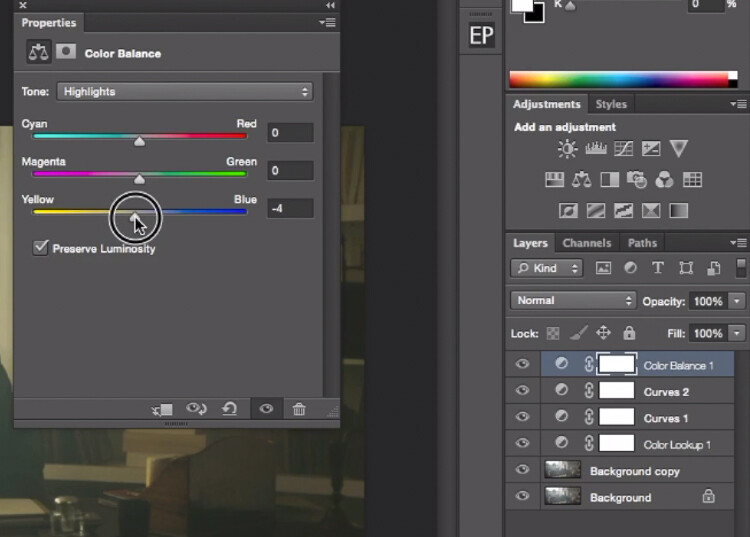
Next step is to play around with the colour balance (make another new adjustment layer) to enhance to greens in the midtones and the yellows in the highlights. Once again just the sliders to add green and yellow to both the highlights and the midtowns.

IMAGE 16

Select Midtones from the pull-down menu and add green and yellow.

IMAGE 17

Select Highlights from the pull-down menu and add green and yellow.

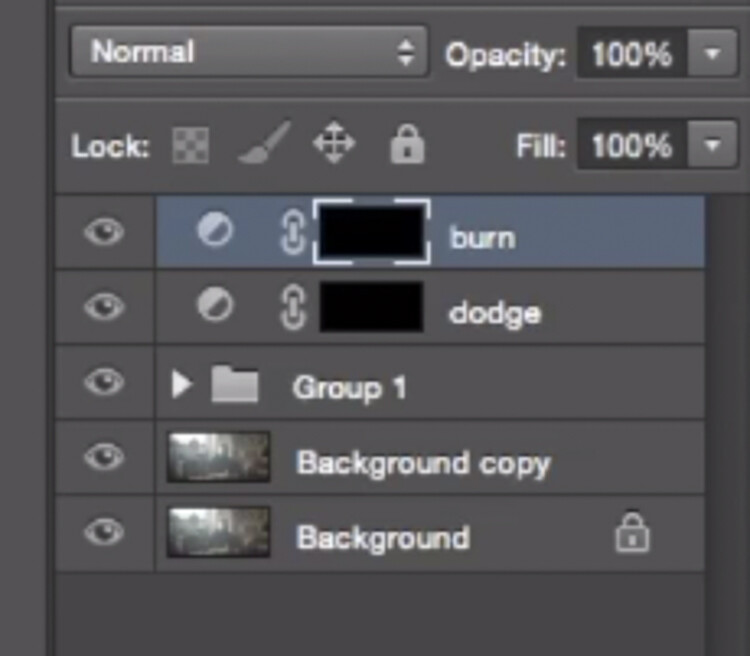
Right now, we are basically done with colour grading. Lastly is to quickly dodge and burn, to enhance the light coming from the window, and to darken the image and the background. We are basically doing a manual vignette.

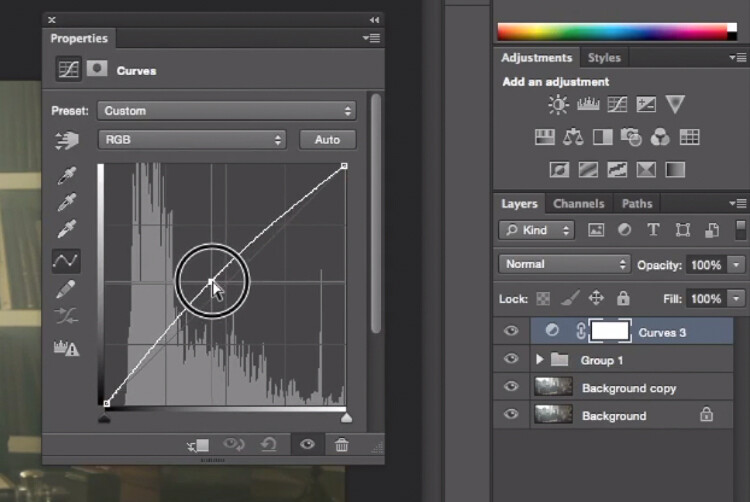
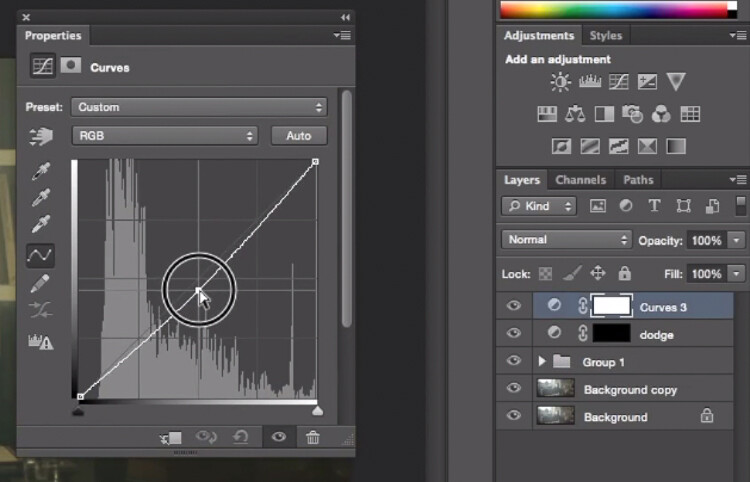
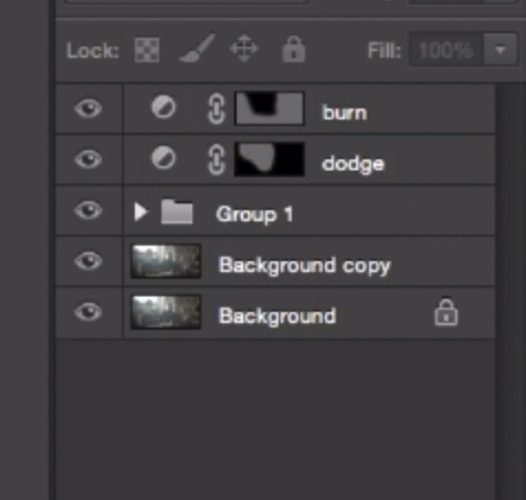
To lighten up the image, create a curves layer, make it brighter, and add a black layer mask (CMD/CNTRL+I to invert the layer mask). Call the layer Dodge, and paint with a white brush (because the mask is black) in the spots where you want to brighten up the image. Pick a brush with an opacity around 40% with and edge hardest of 0%

To create a dark layer, we will basically do the same thing but darken up the curves layer and paint over the spots in the image we want darker.

IMAGE 18

This Curves adjustment layer is for dodging or lightening areas of the image.

IMAGE 19

This Curves adjustment layer is for burning or darkening areas of the image.

IMAGE 20

Rename your layers to identify them easier.

IMAGE 22

This is the final result:

IMAGE 23

Conclusion

Cinematic portraits rely heavily on great colour grading – but the lighting, model, camera settings and ambience should not be neglected. It all starts with a great image and ends with Photoshop to enhance your vision.

Enjoy the art !

googletag.cmd.push(function() {
tablet_slots.push( googletag.defineSlot( “/1005424/_dPSv4_tab-all-article-bottom_(300×250)”, [300, 250], “pb-ad-78623” ).addService( googletag.pubads() ) ); } );

googletag.cmd.push(function() {
mobile_slots.push( googletag.defineSlot( “/1005424/_dPSv4_mob-all-article-bottom_(300×250)”, [300, 250], “pb-ad-78158” ).addService( googletag.pubads() ) ); } );

The post How to Create a Dramatic Cinematic Style Portrait Using Photoshop Color Grading by Yacine Bessekhouad appeared first on Digital Photography School.

Digital Photography School

 
Comments Off on How to Create a Dramatic Cinematic Style Portrait Using Photoshop Color Grading

Posted in Photography


How to Make a Unique Portrait in the City at Night

12 Jun

What makes a portrait into a portrait ?

Making a portrait is like baking a cake in a way, you need to mix the right ingredients, evenly set it in a tray and add some personal touches. Once the cake is in the oven there is no way back, a bit like pressing the shutter release, then the portrait is done.

ouria_tadmor_city_portrait003

Any portrait, will always include a person, a background, and a key light that will allow the subject’s face and soul to come through in the picture. The subject, background and light are the ingredients, and your frame is the baking tray. Let’s hit the streets and bake the perfect portrait cake!

The city, especially after sundown, has a vast variety of portrait ingredients to be found. Take your portrait subject with you, and go for a walk in the urban studio to look for frames, backgrounds, and light.

The key to success, as always, lies in your eyes, so start looking at the city through a portrait lens, and look for balanced compositions that will frame a good portrait. Try to use what can be found on the streets, but if that’s not possible, a simple off-camera flash with white umbrella can complete the setup for the urban studio.
We took a walk in the city and looked for portraits to be made. Here is what I and my model found.

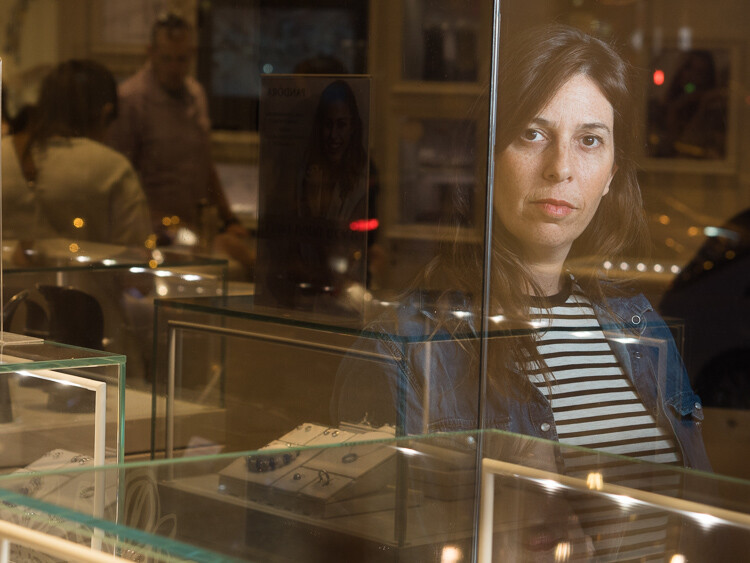
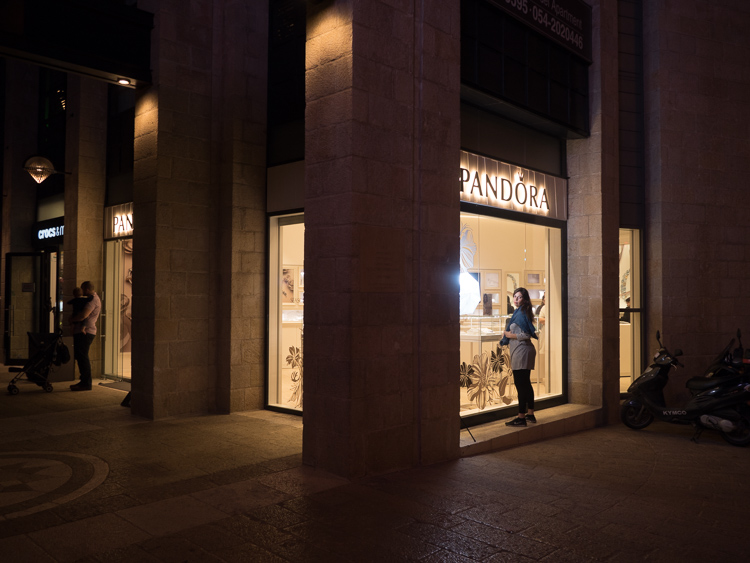
Bright store in a dark corner

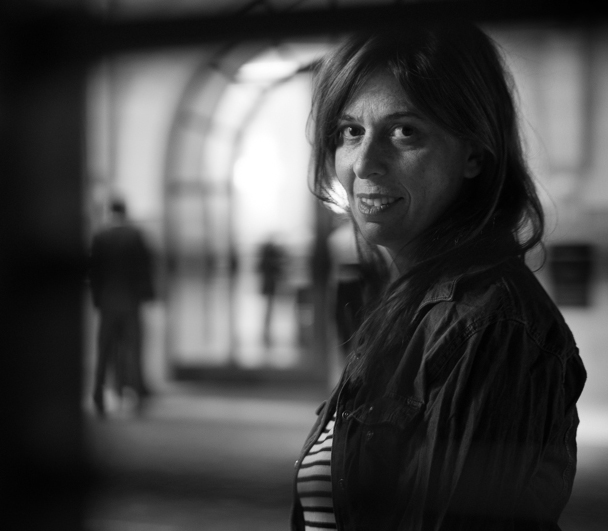
The dynamic composition shown here creates the needed interest that focuses viewer’s attention on the model’s facial features and eyes, therefore communicating the personality of the model. This is done by having soft gentle light coming from the left and adding a red bokeh circle in the background. An invisible triangle between the model’s lips, eyes, and the red circle is directing the energy back to her eyes.

ouria_tadmor_city_portrait011
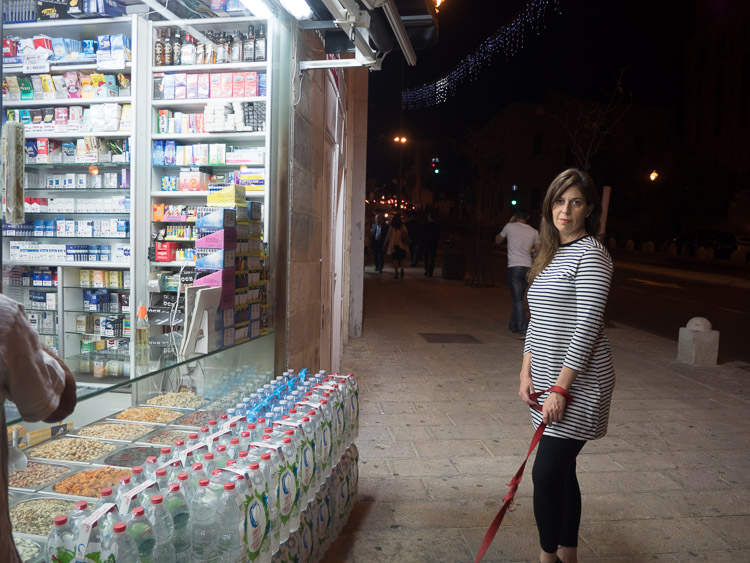
As you can see here, the setup for this portrait wasn’t a big soft-box in the studio, but instead was a messy drug store at night, in a busy street corner in Jerusalem. The store’s fluorescent lights provided an even and soft light source, while the much needed red circle in the background came from the traffic light behind the model (shown in green in the photo below).

ouria_tadmor_city_portrait012

Hotel enigma

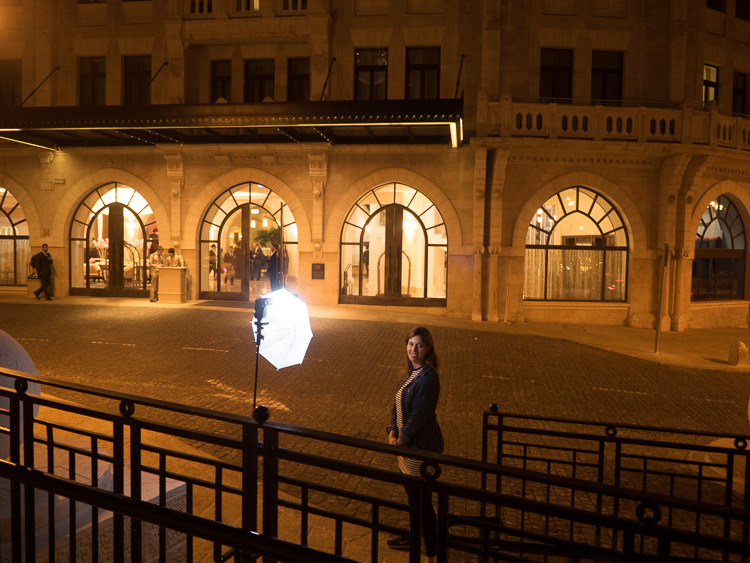
A classic hotel building, with some human presence, helped create an enigmatic atmosphere for this portrait, the background here being part of the story. The key light on the subject came from an off-camera flash positioned at 90 degrees. The dark frame for this composition was made by photographing through a metal railing between the camera and the subject, as you can see in the next photo. This setup helped create depth, that continues with the blurry figures on the street and inside the building.

ouria_tadmor_city_portrait013

The whole setup can be seen below. The flash was positioned about four feet from the model, with the output set to manual at 1/32 power, in order to match the amount of light coming from the background.

ouria_tadmor_city_portrait014

Layer store

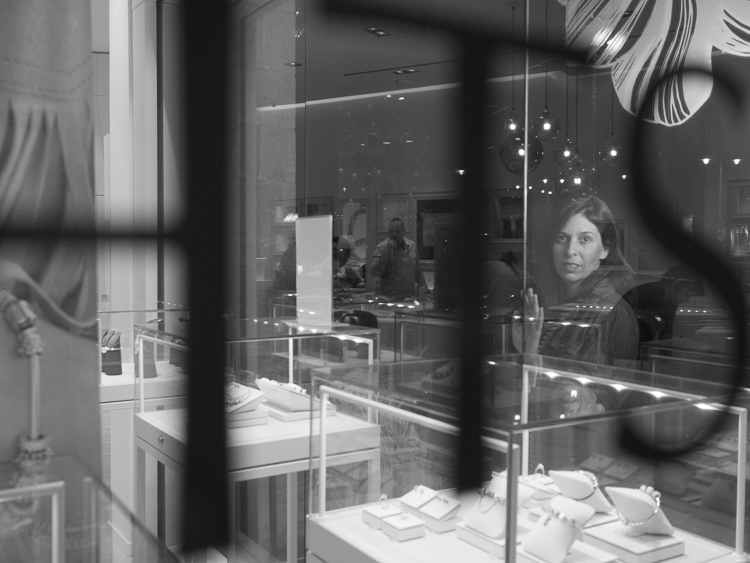
Layers are not only to be found in photo editing programs, they are everywhere, all over the city. A corner store with windows on both sides made it possible to compose a complicated composition, that gives the eye something to explore. When doing so, you need to make sure that the viewer’s eye ends up looking at the subject, so it can still be a portrait. Dividing the frame into three, using the vertical lines on the store’s window, and positioning the subject in the right third of the frame, kept the focus on the subject in this case.

ouria_tadmor_city_portrait002

The main light here also came from the off-camera flash setup, as you can see in the next image. The photo was taken through the window on the left side of the store.

ouria_tadmor_city_portrait004

Equipment

Any camera with a decent portrait lens and manual exposure control can do the work, most of it is hidden in the lens.

A classic portrait lens is between the 85 mm and 105 mm focal lengths on a full frame camera, or their equivalents on any other sensor size. Those focal lengths will give you the perfect camera to subject distance of about six feet, and will produce a moderate compressed perspective, that is distortion free. Typical portrait lenses have a large aperture of f/2 or wider, which allows more light to go through, and therefore are perfect for working with what the city has to offer at night, and will deliver a shallow depth of field when needed.

Off-camera flash can be any speedlight with manual control and radio slave system. Here is the list of equipment I used for this session:

  • Panasonic GH4 camera
  • Olympus M.Zuiko 45mm f/1.8 lens
  • Metz 52 AF-1 flash
  • Two Cactus V5 radio slaves
  • ProVision 20″ White umbrella
  • ProVision M11 shoe mount umbrella adapter
  • Meking L-2000A Light Stand

So if you want to try something a little different get a willing subject (model), grab a flash, and head out into the city at night to make some unique portraits.

Please share your questions and results in the comments below.

googletag.cmd.push(function() {
tablet_slots.push( googletag.defineSlot( “/1005424/_dPSv4_tab-all-article-bottom_(300×250)”, [300, 250], “pb-ad-78623” ).addService( googletag.pubads() ) ); } );

googletag.cmd.push(function() {
mobile_slots.push( googletag.defineSlot( “/1005424/_dPSv4_mob-all-article-bottom_(300×250)”, [300, 250], “pb-ad-78158” ).addService( googletag.pubads() ) ); } );

The post How to Make a Unique Portrait in the City at Night by Ouria Tadmor appeared first on Digital Photography School.

Digital Photography School

 
Comments Off on How to Make a Unique Portrait in the City at Night

Posted in Photography


A Landscape Photography Tutorial (from a Portrait Photographer Trying Something New)

06 May

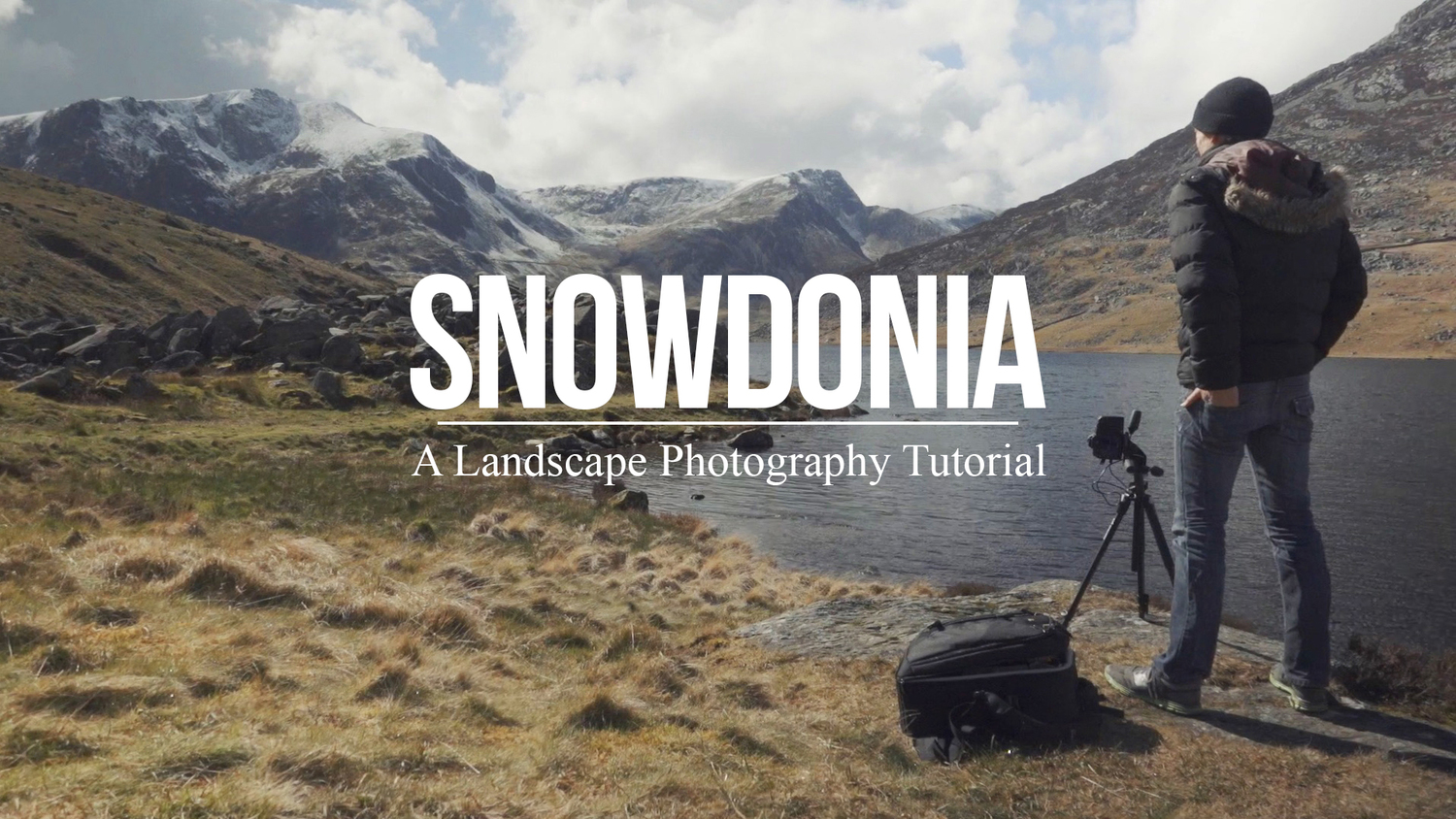
landscape-photography-tutorial

Sometimes when you’re in a rut the best way to get out of it is to do something completely out of the box and try something new – something a little risky.

Portrait photographer Sean Tucker changed things up recently but setting out on a landscape photography road trip.

He videos the experience and I think the result is fascinating – both to see how he approached his landscape photography but also to hear his insights on stepping outside his comfort zone to approach a new type of photography for him.

I like what he wrote in his blog about the experiment:

“There was no guarantee the trip wouldn’t be a waste as I’m not a professional landscape photographer by any means, but I think the best creativity will always come out when you are taking risks.”

Grab a cup of your favourite beverage and settle down to journey with Sean. The end results are at the end of the video.

Have you ever stepped out of your normal type of photography to try something new like Sean did?

Further Reading for helping you to break out of a photography rut:

  • 10 Tips to Motivate You out of a Photography Rut
  • 5 Ways To Break Out of a Creative Photography Rut
  • Are You in a Photography Rut? 11 Tips to Get Out of It!

googletag.cmd.push(function() {
tablet_slots.push( googletag.defineSlot( “/1005424/_dPSv4_tab-all-article-bottom_(300×250)”, [300, 250], “pb-ad-78623” ).addService( googletag.pubads() ) ); } );

googletag.cmd.push(function() {
mobile_slots.push( googletag.defineSlot( “/1005424/_dPSv4_mob-all-article-bottom_(300×250)”, [300, 250], “pb-ad-78158” ).addService( googletag.pubads() ) ); } );

The post A Landscape Photography Tutorial (from a Portrait Photographer Trying Something New) by Darren Rowse appeared first on Digital Photography School.

Digital Photography School

 
Comments Off on A Landscape Photography Tutorial (from a Portrait Photographer Trying Something New)

Posted in Photography


Tips for Getting Yourself to Relax as a Photographer and Have More Successful Portrait Sessions

24 Apr

When I first got started in photography I thought I had things all figured out regarding cameras, lenses, exposure, and even some post-processing. However, the first time I greeted a client on location for an actual photo shoot, I realized just how clueless and ill-prepared I really was, and found myself nervous to the point of almost being nonfunctional. I was so uptight and anxious about the whole photo session, that I’m still not sure how I managed to get any good pictures, but thankfully things have gotten much better in the subsequent years.

Even though I have greatly expanded my knowledge and experience, I still get a little nervous when meeting with clients. I have found several tips that work well to calm the butterflies in my stomach and help make for much more enjoyable and productive portrait sessions, both for me and my clients. I’m going to share them with you.

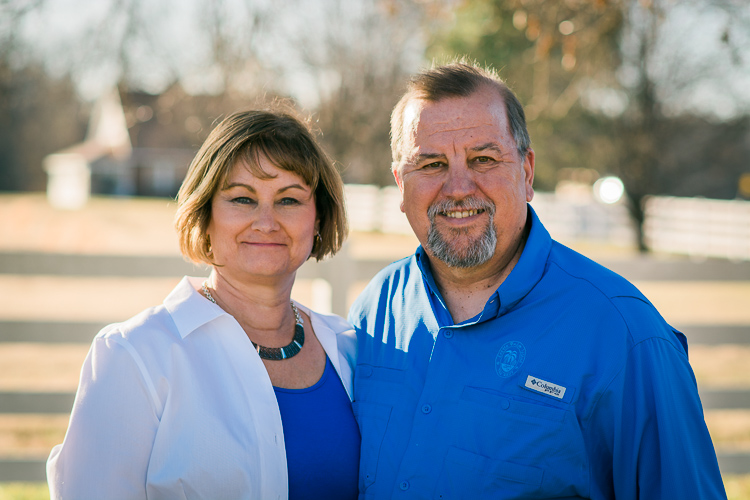
relaxing-for-portrait-session-couple-farm

Even after doing this type of work for years, I can still get nervous going into a photo session.

The Three Phases of Portrait Anxiety

While this triad of temporal distinctions is entirely nonscientific in nature, I have found that my stress and anxiety regarding a given portrait session generally can be divided into three discrete phases:

  • Phase 1 – The days or weeks leading up to a photo session. This lasts the longest, but thankfully doesn’t require impromptu decisions and instead gives you time to be thoughtful, analytical, and reflective. The downside is it lasts the longest! This unfortunately means you have way too much time to over-think and over-analyze everything.
  • Phase 2 – The short time before you start the session. This is usually five or ten minutes, interacting with the client at the session but before you start taking pictures. This period is brief but critical, as it can set the tone for the entire photo session and if you’re not properly relaxed things can go downhill quickly.
  • Phase 3 – The photo photo session itself, which usually lasts about an hour, unless you are doing a wedding or other type of protracted engagement. Things can get very tricky here, but if you have taken the time to properly relax during Phases 1 and 2 you will probably find Phase 3 to be smooth sailing.

Here are my tips for helping yourself relax, take things easy, and get mentally prepared for the photo session. While not all of these may apply to you, I do hope they are general enough to be useful to you in similar situations.

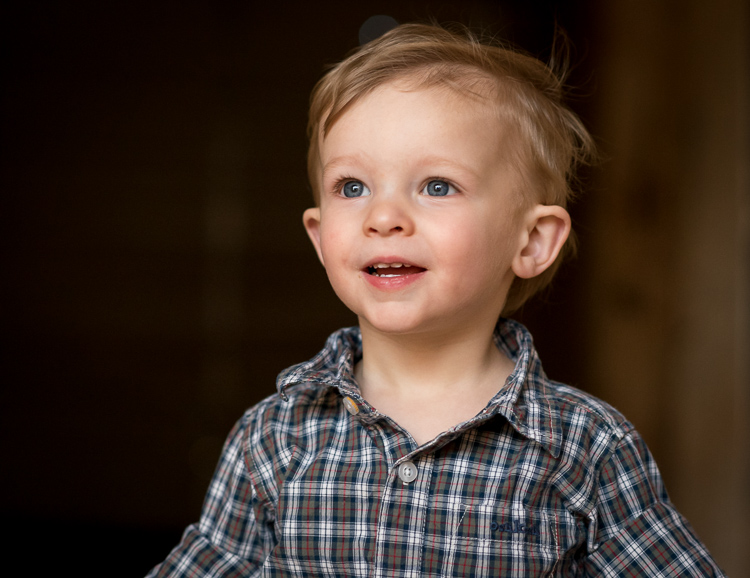
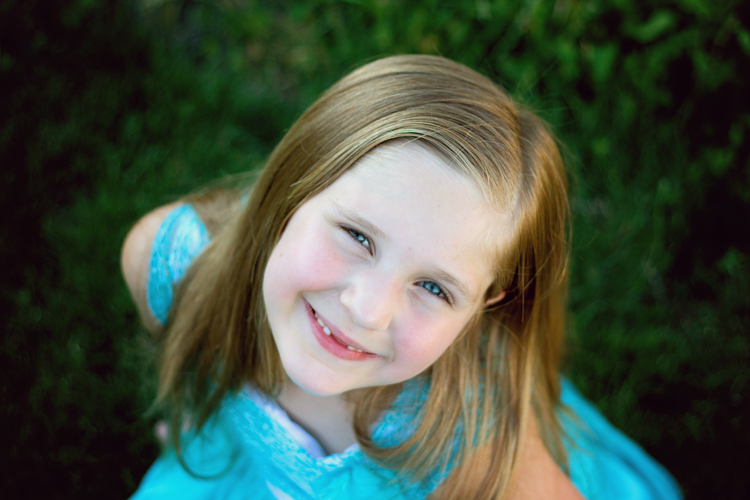
relaxing-for-portrait-session-child-looking-up

If you aren’t relaxed the kids won’t chill out either, and neither will their parents.

Phase 1: Preparing for the Session

Adele, one of the most popular singers in the world, recently told Rolling Stone that she gets stage fright. “I’m scared of audiences,” she said. “I don’t like touring. I have anxiety attacks a lot.” As a photographer this gives me some degree of comfort knowing that my nervousness leading up to a photo session is not all that different than world-famous singers and actor,s who perform in front of thousands of people every day. Even though I have done many portrait sessions, I still get nervous beforehand, but have found a few tips and tricks to help calm myself down and relax in order to clear my head and do the best job I can.

Talk to someone supportive

Whether it’s a friend, a coworker, a family member, or even a former client, spending time talking about the upcoming session is one of the best ways to clear my head and get some reassurance. For me it’s my wife, who is a solid rock and a constant reminder that I can do the job. She and I discuss my goals for the session, look at examples from other photographers, and talk about what has worked and not worked in past sessions. These conversations always help me calm down, while also giving me a big boost of confidence that goes a long way towards a successful photo session.

relaxing-for-portrait-session-baby-sister

In the days leading up to this session, my wife and I spent a long time discussing the shoot and planning things out. This did wonders to calm my nerves and helped me do a better job at the session.

Look at your own successful images

Look at your own past images as a reminder that you are fully capable of doing the job. Sometimes in the days leading up to a photo session I start to wonder if I really have what it takes to get the shots I want, but looking through my own portfolio always offers enough reassurance to bring me out of that funk and back to reality. Yes, each session has its own unique challenges, but reminding myself of what I have done before, is a great way to relax and prepare for what is about to come.

Have a plan

Have a plan for the session and make a list of poses and shots you want to get. It can be a mental list, but a physical list will help you be sure to get everything you want, and will allow your clients see that you are prepared if you cross items off it during the shoot. One of the last things you want is to get back to your computer and realize you forgot to get a shot of grandma holding her new grandbaby, the happy couple underneath their special tree, or little Timmy in his special new cowboy boots that his mother emailed you about the day before. Making a list will help you avoid this scenario while also helping you to de-stress before the session.

relaxing-for-portrait-session-couple-downtown

This couple sent me a few ideas for different shots, and since the location was 60 miles away I used Google Maps Street View to investigate things beforehand.

Scout the location ahead of time

Visit the location to make sure you know what it’s like, and how you can use it to frame your shots. Ideally this would be at the same time of day as your photo session, so you can make sure you know what the lighting will look like on the day of the shoot. This will help you see all sorts of things you might miss if you just show up the day of the session, and it will make you look like a confident professional as you direct your clients.

Know your gear

Know your gear inside and out. It sounds silly but you don’t want to freeze up in the middle of a session because you can’t find the menu that lets you change white balance, or you forgot which dial changes the shutter speed. If you find that you need a quick refresher re-read the manual, watch online tutorials, or just spend 15 minutes poring through the menus and buttons. When it comes time to do the photo session, you can rest assured that these planning efforts will have been put to good use.

You don't want to scramble trying to locate menu options and camera buttons. Make sure you know your gear beforehand so you can focus on your clients when you're on the job.

You don’t want to scramble trying to locate menu options and camera buttons. Make sure you know your gear beforehand, so you can focus on your clients when you’re on the job.

Practice with test subjects

If you’re going to do a newborn session, practice with stuffed animals. If you’re on location, get a friend or family member to go out with you a week beforehand and do some test shots, so there are as few surprises as possible when you go out there with the client.

Make a gear packing list

Make a list of all the gear you need and check it off one-by-one as you pack up for the session. You don’t want to get to the location and realize you forgot something at home, or left a battery on the charger. I once did an outdoor shoot and realized all too late that I forgot my lens hoods, and almost immediately started hyperventilating into my camera bag when the clients asked for some shots with the sun behind them, just out of the frame. Things ended up working out, but a simple list would have prevented a great deal of stress during the shoot.

Phase 2: On your mark, get set…

relaxing-for-portrait-session-couple-barn

Chatting with this couple as I set up my gear helped put everyone at ease, including myself.

One of the weirdest parts about a portrait session can be the few minutes when you are visiting with the client before you start actually taking pictures. What do you do? What do you talk about? How do you strike a balance between friendly and professional? It’s enough to send even the most seasoned photographer’s blood pressure to the top of the charts, and messing up this brief pre-session period can send the rest of the gig into a tail spin.

In my experience one of the best ways to help you and the client relax is to go on the offence instead of playing defence. Don’t stand around waiting for people to talk to you, as they are probably feeling just as awkward, and are likely waiting for you, the person in charge, to take the lead. Even if smalltalk is not your forté, you need to be willing to strike up a conversation and have a few things ready to talk about as you are getting set up. In a nutshell, make this time all about the client, and helping them feel comfortable.

As you are getting ready to start taking pictures talk to your clients about their life outside of the photo session, and find out what hobbies they have, what they like doing in their spare time, or even what they are doing over the coming weekend. Ask questions to show you are interested, and use this time to also run some ideas past the client in terms of what you will be doing. This helps build a sense of rapport and respect, and can go a long way towards putting everyone at ease. Your clients might be just as nervous as you, but getting the chance to get to know each other will help put everyone at ease and also help them feel comfortable if you have lots of lighting, lenses, or other gear. If there are kids involved, bring some toys or snacks (nothing crumbly as it will get on their clothes) to win them over. At my most recent family session I gave the two-year-old a fake toy camera and asked if he could help me get some photos. This not only won him over but his parents too, and a week later, before they had even seen their photos, they were telling some friends about how much they enjoyed the picture session.

relaxing-for-portrait-session-family

A few minutes chatting sports with the grandparents and playing with the kids went a long way towards a more successful photo session.

Phase 3: Here we go!

Even though you have done everything in your power to chill out, relax, and put your mind at ease leading up to the photo session, things can still be a little nerve-wracking as you go about the process of actually taking pictures. At any moment there are a thousand decisions to be made, and trying to balance everything can be enough to make your palms sweat. My favorite trick for relaxing during a photo session is to simply make things fun. Don’t bark out orders, but instead have your clients do silly things like make faces or try just-for-fun poses. This will help you loosen up, and also give you a chance to build on the rapport you have already established at the beginning. Clients can tell if their photographer is wound up tight and needs to chill out, and if you make things more fun and lighthearted as opposed to all business, you will find yourself loosening up, relaxing, and getting much better results.

These are just a few of my favorite tips and tricks to help me calm my nerves before and during a photo session, but what about you? How do you approach your portrait sessions and what do you do to help yourself relax? Share your thoughts in the comments section below!

People photography week

This week on dPS we’re featuring articles all about different kinds of people photography including portrait, event and travel photography. See all the previous ones below, and watch for more people photography articles over the next few days.

  • How to Take Low Key Head-shots
  • How to Do a One Light Portrait Setup and Use it as Your Back-up Plan
  • Travel People Photography – Tips and Pitfalls
  • 8 Tips for Photographing Men
  • 24 Diverse Images That Showcase People Photography
  • Weekly Photography Challenge – People Photography

googletag.cmd.push(function() {
tablet_slots.push( googletag.defineSlot( “/1005424/_dPSv4_tab-all-article-bottom_(300×250)”, [300, 250], “pb-ad-78623” ).addService( googletag.pubads() ) ); } );

googletag.cmd.push(function() {
mobile_slots.push( googletag.defineSlot( “/1005424/_dPSv4_mob-all-article-bottom_(300×250)”, [300, 250], “pb-ad-78158” ).addService( googletag.pubads() ) ); } );

The post Tips for Getting Yourself to Relax as a Photographer and Have More Successful Portrait Sessions by Simon Ringsmuth appeared first on Digital Photography School.

Digital Photography School

 
Comments Off on Tips for Getting Yourself to Relax as a Photographer and Have More Successful Portrait Sessions

Posted in Photography


How to Do a One Light Portrait Setup and Use it as Your Back-up Plan

21 Apr

one-light-beauty-setup-3320

When photographing people, every session is different and every subject is different. This leads to a lot of scope when it comes to lighting choices and experimentation. This variety is fantastic, and it’s a large part of why portraiture is such a rewarding pursuit.

Unfortunately, with too much experimentation, it is all too possible to end a session with a collection of sub-standard images. Yes, this exactly how to grow and develop as a photographer, but where does that leave your subject? Often enough, this situation means that you’ve gotten what you need from the session, chiefly experience, but the subject is left with less than stellar photos for their time. This isn’t much of a problem if you’ve wrangled your kids to sit for you, or if you have paid someone else to pose for you. If you’ve been paid for this portrait session, however, this becomes problematic and can be devastating to your future efforts.

A good way to alleviate this is to always include a technique that you’ve practiced thoroughly. Doing this may not ignite your creative spark, but once it’s done, you can experiment until your heart’s content, while safe in the knowledge that you will still have something usable at the end of the day.

one-light-beauty-setup-3251

This article will give you a simple, yet solid, one light technique that works with strobes, flashguns (speedlights) and even window light. It will work with just about any modifier and suits men, women, children, and other subjects just fine.

Equipment

Here’s a list of what you need:

  • A light source: Either flash or window light will work. In terms of modifiers, beauty dishes and softboxes are a great starting point.
  • A white reflector: Don’t have a dedicated reflector? A sheet of white poster board or foam core is a perfect and cheap substitute.

Set up

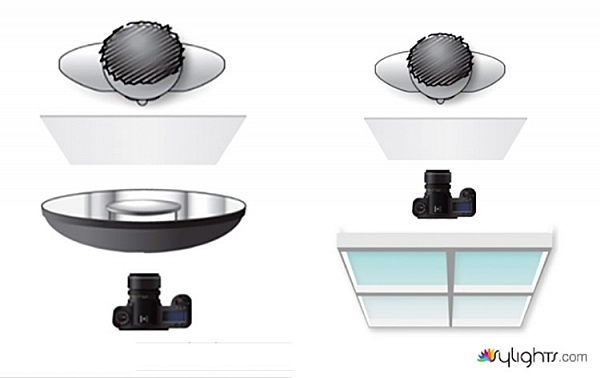
First, have your subject stand or sit where you need them. If possible, keep them at least five feet from the background. Place your light source directly in front of them, between two and four feet away (60-120cm). Angle the light source (if using flash) so it’s pointing directly at your subject. Watch the shadows falling under their nose and mouth. For this technique, you’re looking to minimize the contrast on your subject’s skin. If the shadows are too long, lower your light source until they are minimized (also make sure you can see the light in their eyes as a catch-light).

Place your reflector directly against your subject, and parallel to the ground at waist level. For ease, you can place it on a stool or a card table. If your subject is sitting, just have them hold it across their knees.

one-light-beauty-setup-diagram

Because the light source will be so close to your subject, you will need to shoot from directly underneath it. Calculate or meter your exposure and take a test shot. If all is well, you should have a good, clean portrait with soft light.

one-light-beauty-setup-3205

Backgrounds

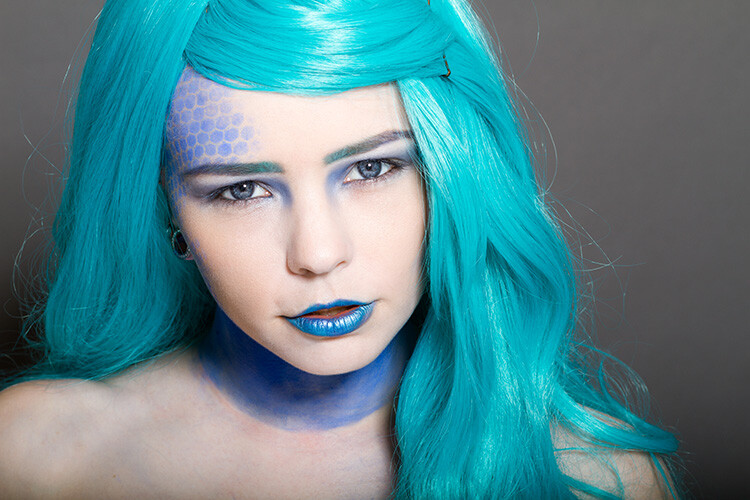
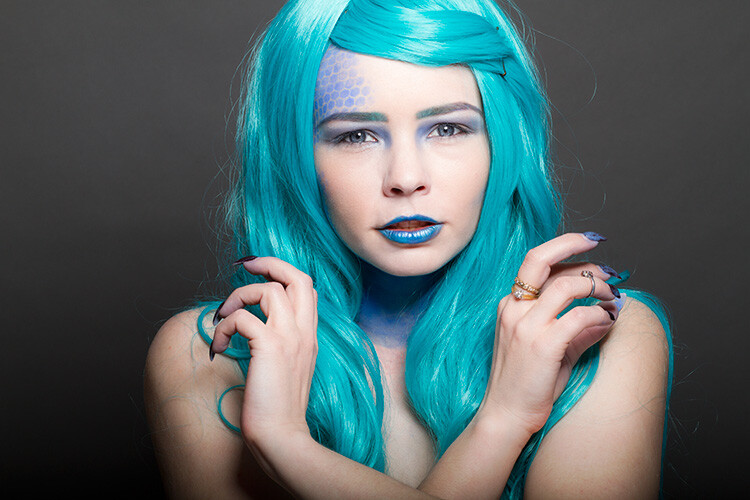
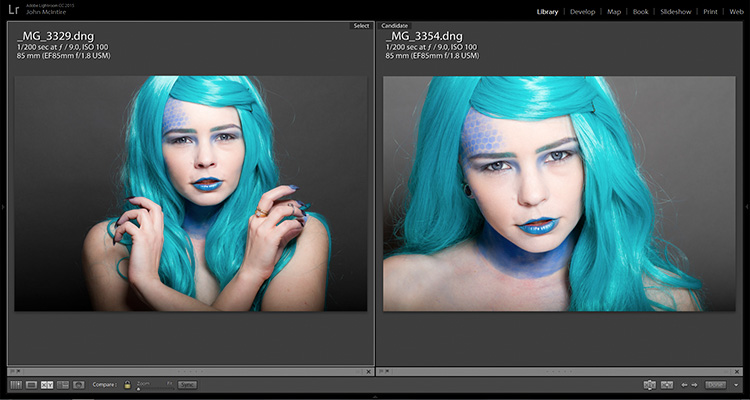
You can change the way your background appears in the image by moving your light source if you’re using flash, or by moving your subject if you’re using window light.

With flash, to get a darker background, you simply move your light source closer to your subject. To get a lighter background, move your light source away from your subject. Moving your light source will require you to change your exposure. You can do this with your aperture settings or on the flashes themselves (turn the power up or down accordingly); it’s your choice.

With window light, you’re forced to move your subject instead. For a darker background move your subject closer to the window. For a lighter background, move them farther away. As with flash, this will also result in changes to your exposure. This time you can choose between shutter speed and aperture.

one-light-beauty-setup-3354-2

Farther from the window

one-light-beauty-setup-3329

Closer to the window

one-light-beauty-setup-comp

You should also be aware that the softness of the light is changed when you adjust the distance between your subject and the light source. If the distance between your light source and your subject decreases, the light will be softer. If that distance increases, the light will be harder.

Tip: If there are shadows falling on the background in your frame, your subject is too close to the background. Try moving your whole setup away from the background a few feet.

Angle of light

You can place your light as high as you want and still get good results; however, for really soft, bright skin you will want to minimize the contrast in blemishes and skin texture. To do this, make sure your light is only slightly higher than your subject, and pointing directly at them. As above, watch for the shadows under the mouth and nose. If they’re long and pronounced, try lowering your light until they disappear.

Window light

If you’re using window light for this technique, the biggest thing to watch out for is you. Because you are lighting your subject from the front, it is all too easy to find yourself blocking your light source. With extremely large windows, this isn’t much of a problem, but with a window in an average home, it can be a pain. One way to sort this is to have your subject sit. That way you can sit, squat or kneel and avoid blocking any light.

In the end

one-light-beauty-setup-3318

This technique may seem simplistic in writing, but it is effective and it yields good results. It also takes only a few attempts to nail down. By adding this technique to your toolkit, you’ll be giving yourself something solid to fall back on, should things not go to plan in other ways.

If you decide to give it a go, please feel free to share your results or ask any questions you may have.

People photography week

This week on dPS we’re featuring articles all about different kinds of people photography including portrait, event and travel photography. See all the previous ones below, and watch for more people photography articles over the next few days.

  • How to Take Low Key Head-shots

googletag.cmd.push(function() {
tablet_slots.push( googletag.defineSlot( “/1005424/_dPSv4_tab-all-article-bottom_(300×250)”, [300, 250], “pb-ad-78623” ).addService( googletag.pubads() ) ); } );

googletag.cmd.push(function() {
mobile_slots.push( googletag.defineSlot( “/1005424/_dPSv4_mob-all-article-bottom_(300×250)”, [300, 250], “pb-ad-78158” ).addService( googletag.pubads() ) ); } );

The post How to Do a One Light Portrait Setup and Use it as Your Back-up Plan by John McIntire appeared first on Digital Photography School.

Digital Photography School

 
Comments Off on How to Do a One Light Portrait Setup and Use it as Your Back-up Plan

Posted in Photography


5 Secrets for Finding Great Indoor Portrait Locations

04 Apr

156

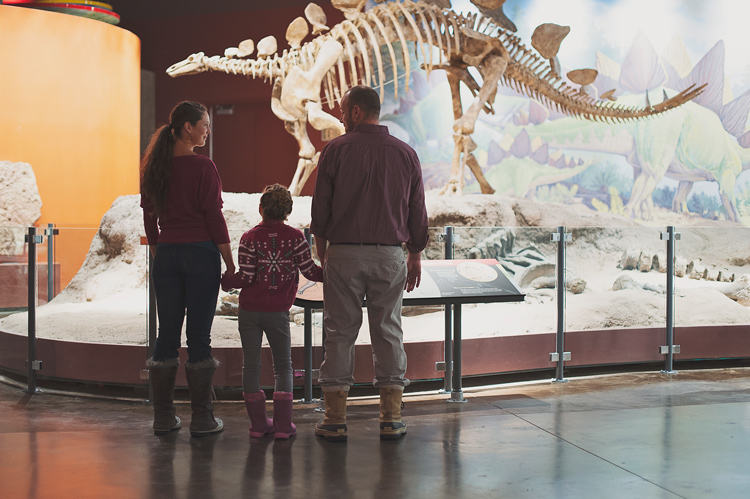
Not all photographers choose to have a dedicated indoor studio, but sometimes you need to shoot a session indoors. Maybe it’s freezing outside, and you don’t want to be out in that weather. Maybe you have a bride who wants bridals, but is worried about her dress getting dirty. Maybe you just want something fresh and a little quirky. Maybe the building has special meaning to you or the person you are photographing.

Whatever your reasons, in this article you are going to learn all my secrets to finding indoor locations, and getting permission to use them. Hopefully they’ll help you find the perfect spot for your next session!

174

Secret #1: Always be on the lookout

Wherever you go, keep your photographer eyes open. You may be surprised at how many places transform into a great location once you really start looking. Some unique and exciting photography locations could be: family photos in the library, model portfolio shots in the city building, engagement session in the laundromat, dance group session in a hotel lobby, mom and toddler portraits in a grocery store, bridal session in a grand old house, a museum, a quaint bed and breakfast, a roller-skating rink, a university building, a furniture store, a toy store, or candy store – the list is endless.

Look for great lighting, open spaces, interesting backgrounds, and fun things to interact with. Notice if there are lots of people that you might be disturbing, or if it’s a relatively calm place that you could photograph in peace. Use your imagination and creativity to turn the ordinary into something extraordinary.

192

Secret #2: Always ask permission

Once you’ve found a place you’d like to try, make sure you ask permission before you bring a client there. I find, if possible, that asking in person is usually the best, because they can see who they are talking to, and are often less resistant if they can see your smiling friendly face. If you need to call, be professional and friendly on the phone, so they feel comfortable letting you come with your camera.

If you aren’t sure who owns the building, check with city or county records, or ask a neighboring building or house if they know who owns it. Do the legwork to find out who owns the property before you barge in uninvited. It gives all photographers a bad name if you trespass. I’ve had many times where I call to ask permission, and the owner thanks me profusely for asking permission. They express their frustration that other photographers just start shooting without asking. They allowed me to photograph on their property, so obviously they don’t mind people being there, but they always appreciate being asked first.

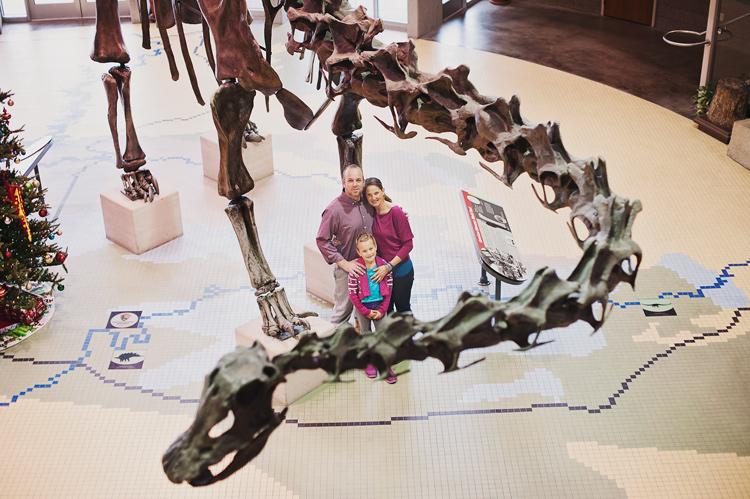
Some locations, like museums, or theme parks, are fine with you taking photographs inside, but you have to pay the entrance fee.

148

Some places charge a fee for photography, and some don’t allow photographers at all. If you whip your camera out in either of those types of places without asking permission first, you could be fined huge amounts. It’s not worth it. If you ask permission and get a no, just move on and find another place. However, it never hurts to ask. Most of the time you get a yes, and often they are pleased that you think their building is worthy of being a photography location.

112

Secret #3: Find an owner who will also benefit

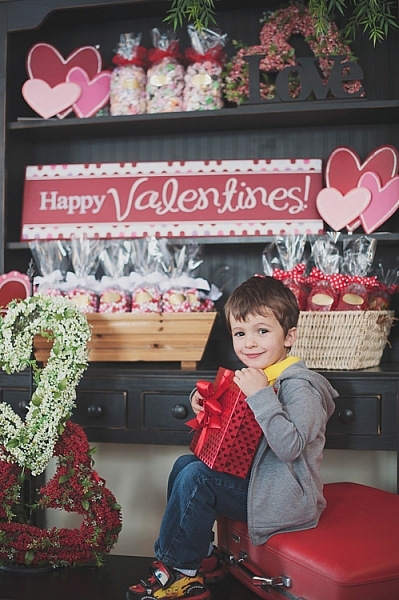
I needed a place to have adorable kids come for Valentine’s Day photos, but I didn’t know who would want multiple kids and families traipsing in and out of their establishment. Then I came across an adorable little candy shoppe that was decorated perfectly, and full of delicious sweets and treats. My photography clients came in and out all day for their sessions, and ended up buying lots of candy in the process. Many who came had never noticed the little hometown shop, with homemade caramel apples and every kind of candy you can think of, and they were happy to have discovered it. I ended up having a great place for my Valentine’s Day photos, and the owner got a lot of new business.

177

Look for places that might have a similar situation, and chances are the owner will be more than happy to let you use their location, free of charge. Many small locally owned places need a couple of photos of their establishment for websites and advertising purposes, or maybe even a quick headshot, and would be thrilled to let you photograph there in exchange for a photo or two.

146

Secret #4: Explore any connections

Sometimes a friend may own a quaint little bed and breakfast, or maybe she works at a museum. If you are photographing that friend, that may be an especially smooth way to get your foot in the door. If things go really well, they may be okay with you bringing other people to their property again. Even if they aren’t the one that you are photographing, you could ask what they think about letting you use the property that they have a connection to.

Be careful not to ask for too much, and be careful not to put anyone in an uncomfortable position. If you sense that they are hesitant about having a camera there, don’t push it. A little respect goes a long way, and you don’t want to be the photographer that people avoid at all costs. Relationships are more important than having a cool place to photograph, so be extra sensitive when using this secret.

171

Secret #5: Be the best guest

When you’ve gotten permission to use a place, never, never, never ever let anything get destroyed, damaged, or left in any way other than how you found it. If you need to move something out of the way, ask if it’s okay first, and then put it back where you found it. Be mindful of what is going on around you, especially if you are photographing kids. You are responsible for what happens with your session, and you never want to pay a big repair bill, or lose a friendship because you were careless.

You are not only representing yourself, but all photographers everywhere, when you use a public or private property for photographs. If you make it a horrible experience for the owners, you have more than likely ruined it for future sessions for yourself, and for all other photographers who might think to ask permission. Please don’t be that careless photographer who ruins it for everyone. Instead, leave such a great impression that all photographers will be welcomed with open arms into almost every establishment, to create beautiful and unique photographs.

111

Do you have any other tips for finding great indoor portrait locations? Have you found any gems? Please share your comments and images of your favorite spots below.

googletag.cmd.push(function() {
tablet_slots.push( googletag.defineSlot( “/1005424/_dPSv4_tab-all-article-bottom_(300×250)”, [300, 250], “pb-ad-78623” ).addService( googletag.pubads() ) ); } );

googletag.cmd.push(function() {
mobile_slots.push( googletag.defineSlot( “/1005424/_dPSv4_mob-all-article-bottom_(300×250)”, [300, 250], “pb-ad-78158” ).addService( googletag.pubads() ) ); } );

The post 5 Secrets for Finding Great Indoor Portrait Locations by Melinda Smith appeared first on Digital Photography School.

Digital Photography School

 
Comments Off on 5 Secrets for Finding Great Indoor Portrait Locations

Posted in Photography


11 Steps for Basic Portrait Editing in Lightroom – A Beginner’s Guide

16 Mar

I love Lightroom, and use it for the vast majority of my portrait editing. You can achieve a wide variety of portrait effects in Lightroom, from harsh and grungy, to soft and dreamy. My technique varies depending on the kind of portrait I’m editing, although the workflow remains consistent.

The photo I’ve selected for this exercise, is one you can easily replicate at home. It was shot indoors, with a large window as the only light source, and is one of a series shot in the same location.

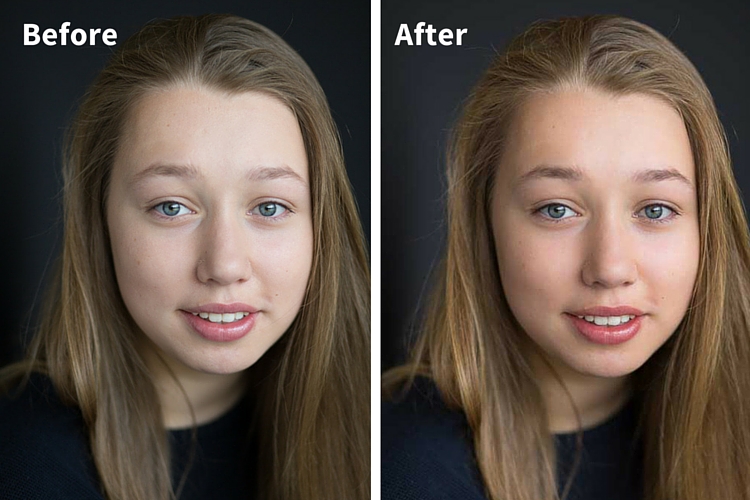
Before and after

One of the great features of Lightroom is the ability to sync settings. It’s a huge time-saver when you have a series of images, all shot in similar conditions. Once you are happy with the general settings (white balance, shadow-highlight ratio, etc.) of one image, you can sync the rest of the images in the series, with the same settings. After that, you’ll only need to fine-tune the others.

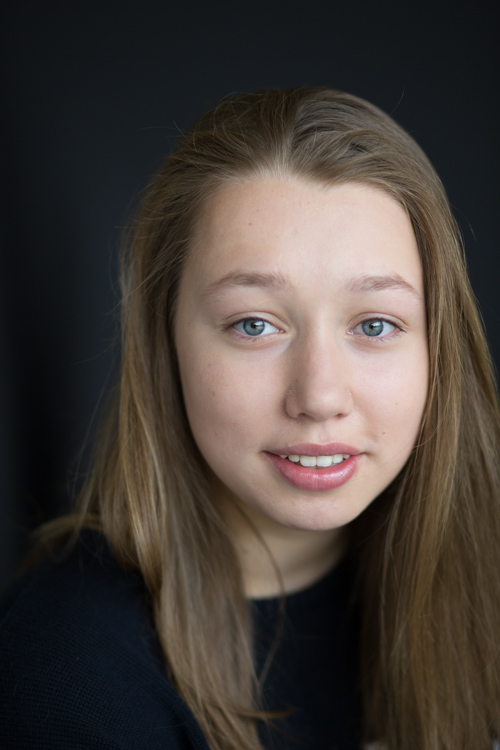
This before image is too cool for my liking, and there is not enough separation between the model’s hair and the background. I am also going to smooth out her skin tone, and bring a bit more sparkle to her eyes.

As you work through each step on your own image, play around with the sliders to see what effect each one of them has.

Step #1: Import your file

Image showing basic portrait editing in Lightroom

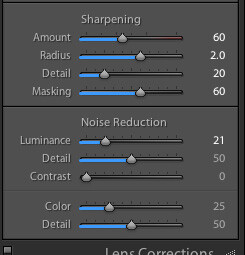
Sharpening preset

In the LIBRARY module, import your image into Lightroom. I have created a custom sharpening preset (shown here), which I find works with the majority of my portraits. I apply this preset upon import – a handy shortcut, especially when you’re importing a large number of images at once. It’s easy to create your own presets in Lightroom, read this tutorial How to Create Your Own Lightroom Presets on dPS, that shows you how.

To apply a preset on import, go to the righthand panel in LR, to the tab labelled “Apply during import”. Go to Develop settings > user presets, then click on the preset you wish to apply.

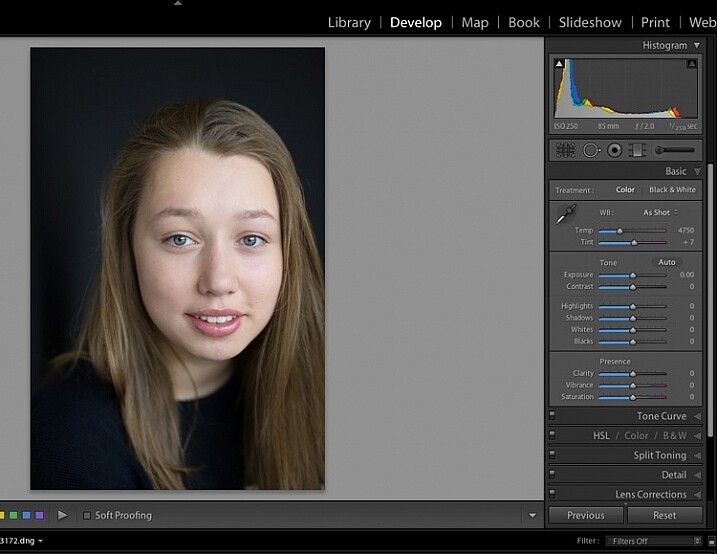
Once you have imported your file, go to the DEVELOP module.

Image for basic portrait editing in Lightroom

Import your file.

Step #2: Adjust  the white balance

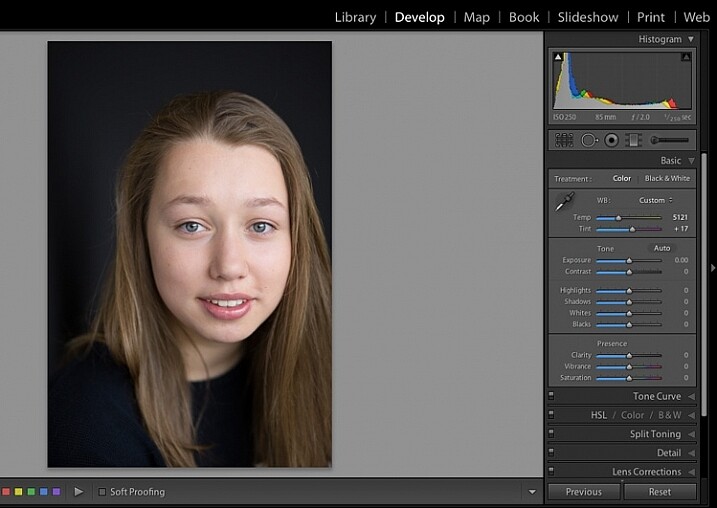
The colour tint in this photo is a bit cold. There are a number of ways to adjust the white balance. If there was a neutral wall or surface in this photo, you could use the eyedropper tool. In this case, there isn’t a neutral reference, so I have moved the sliders under the white balance section to give the image more warmth.

Image for basic portrait editing in Lightroom

Correct the white balance.

Step #3: Adjust highlights and shadows

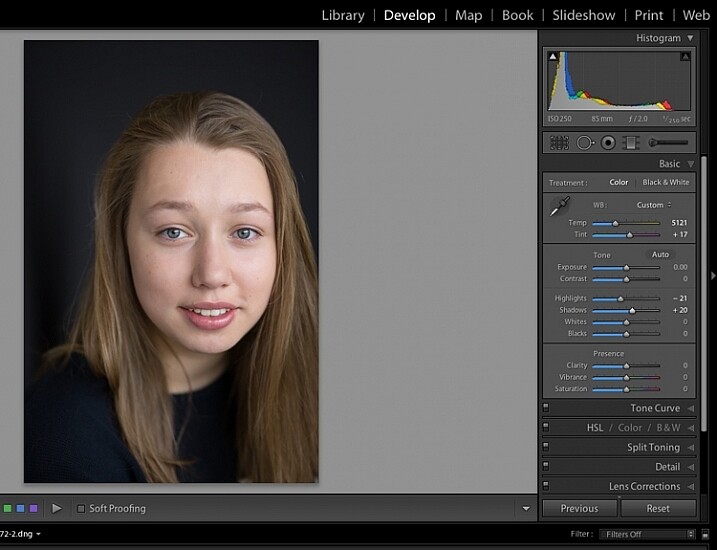
The model’s skin tone is a little too light, and her hair and the background are too dark. To redress the imbalance, pull back the highlights and lighten the shadows. You can fine-tune this later if necessary.

Image showing basic portrait editing in Lightroom

Adjust highlights and shadows.

Step #4: Increase vibrance and saturation

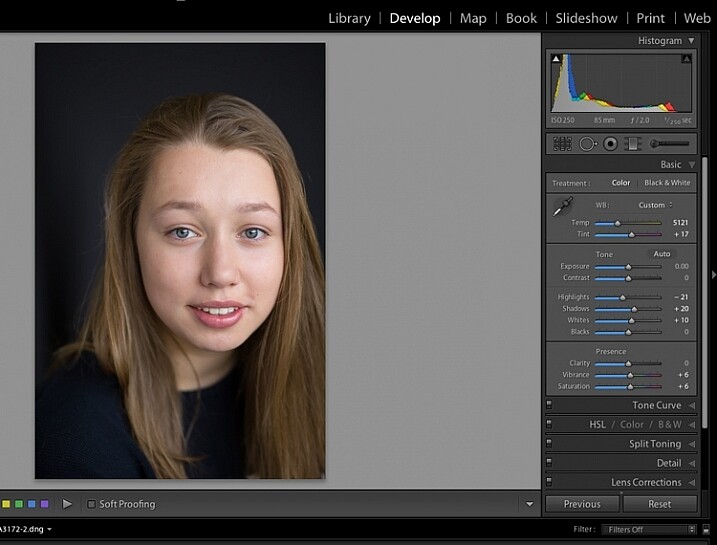
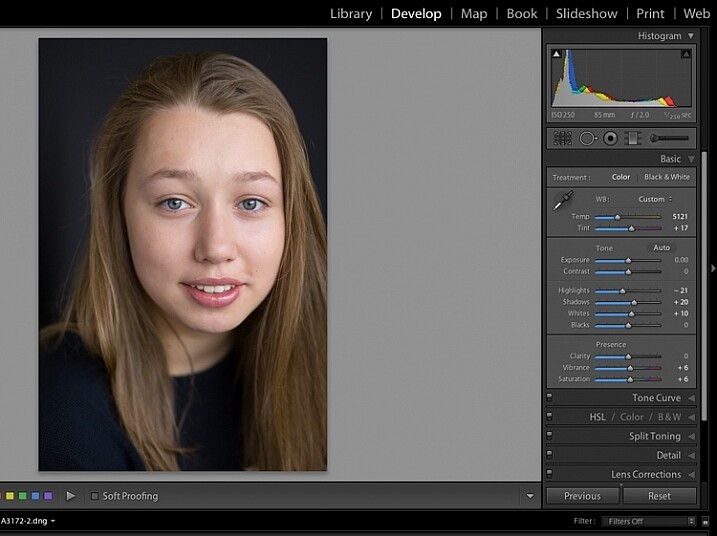
The image still looks a little dull. Use the sliders under the presence tab to increase the vibrance and saturation, and move the whites slider up to give your portrait a nice clean look. Now it’s starting to look like my model’s real-life skin tone.

Image showing basic portrait editing in Lightroom

Increase vibrance and saturation.

tep #5: Crop your image

You can crop at any stage. I’ve cropped this image for a tighter, better-balanced headshot.

Image showing basic portrait editing in Lightroom

Crop your image.

Step #6: Soften the skin

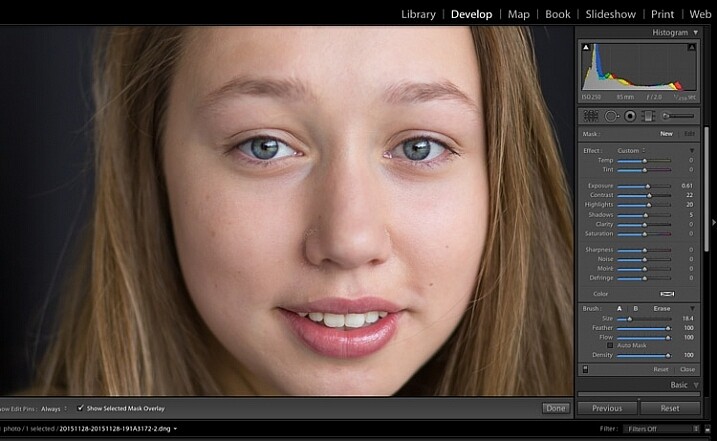
Zoom in to take a closer look at the skin. This model is very young with almost flawless skin. Usually I wouldn’t do much, if any, softening with such great skin. However, for the purpose of this exercise, I will.

Select the brush tool. You can load your brush with any adjustments you want to apply. Although there are brush presets you can use for skin softening, teeth whitening, etc., I find them too heavy-handed.

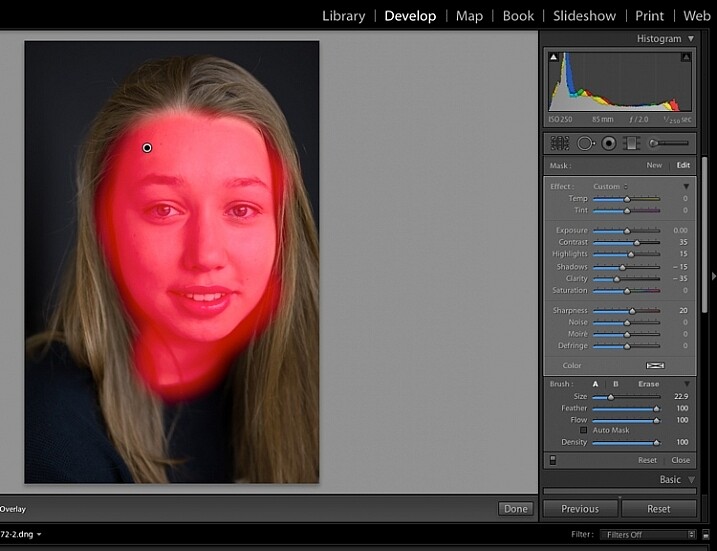
Set the clarity slider down to around -35 to -40, and the (contrast to +35, and the Highlights to +15 or so – this will help maintain contrast and keep the face from looking flat) sharpness up to +20. This will vary according to your subject’s skin, and the kind of effect you want to achieve. In this example it will just even out the skin tone and give it a soft, glowing appearance. A mature person photographed in stronger light, will require a different treatment. The lower the clarity slider, the softer the skin will appear. For a grungy look, increase the clarity slider.

Reducing the clarity tends to flatten out the image, so you can increase the contrast, deepen the shadows and increase the highlights to balance this out. Keep the feather and flow at 100%, and brush all over the face with a large brush.

Image showing basic portrait editing in Lightroom

Zoom in close to look at the skin.

Image showing basic portrait editing in Lightroom

Brush all over the area with your adjustment brush.

Step #7: Fine-tune your adjustments

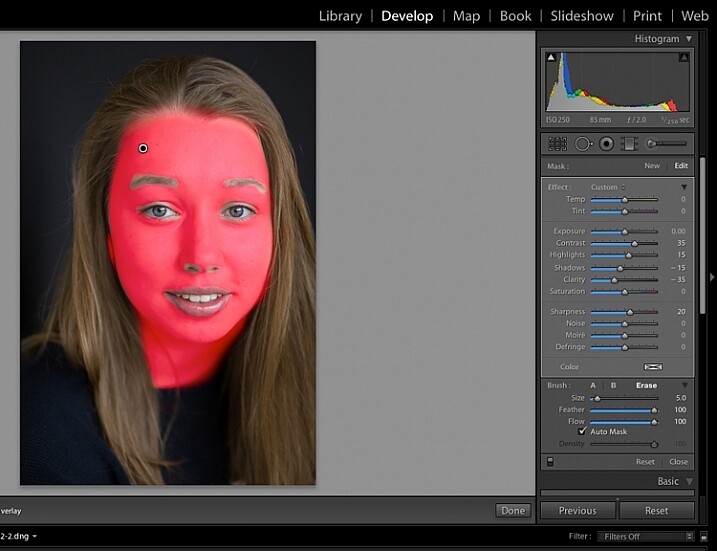
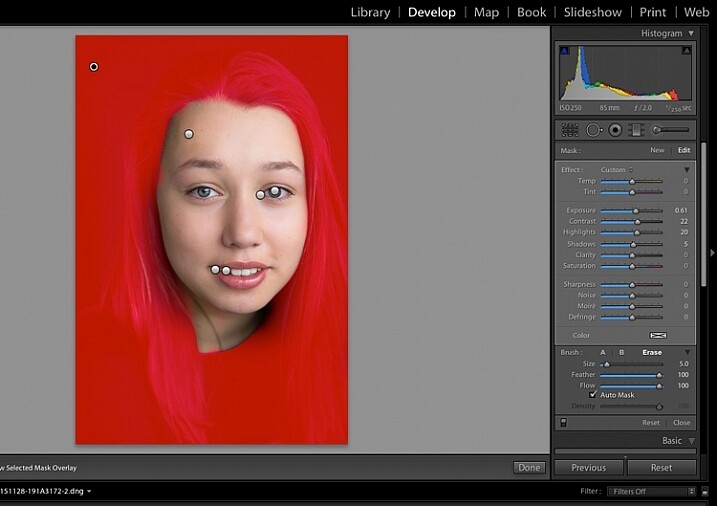
Underneath the image, check the box “Show selected mask overlay”  (or use the keyboard shortcut, O) to see exactly what parts of the image your brush adjustments have touched. Often you’ll find it has covered the eyes and mouth, which is not desirable. Still using the adjustment brush, click on the erase brush tool, and remove the brushed-on effect from around the eyes, mouth, and hair.

Image showing basic portrait editing in Lightroom

Brush off the adjustments from unwanted areas.

Image showing basic portrait editing in Lightroom

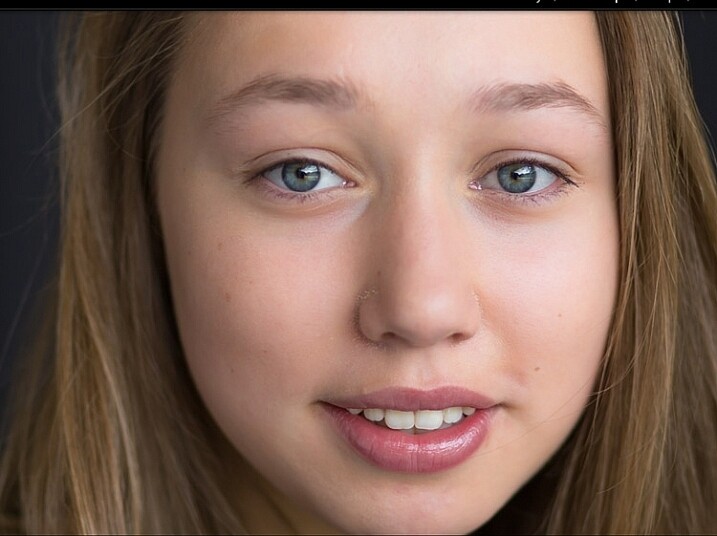
Here are the adjustments so far. Looking good.

Step #8: Brighten the eyes

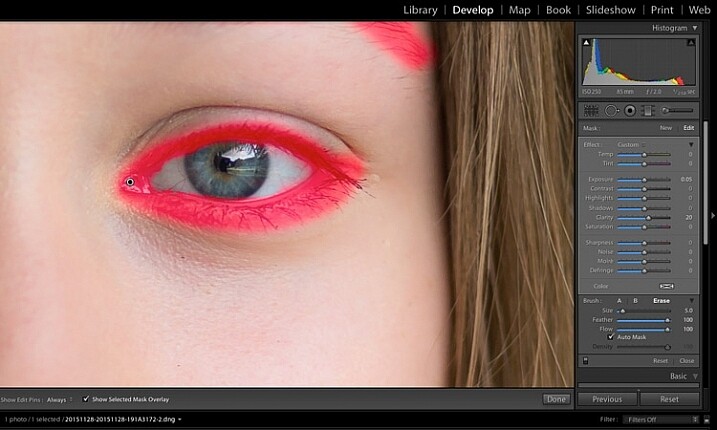
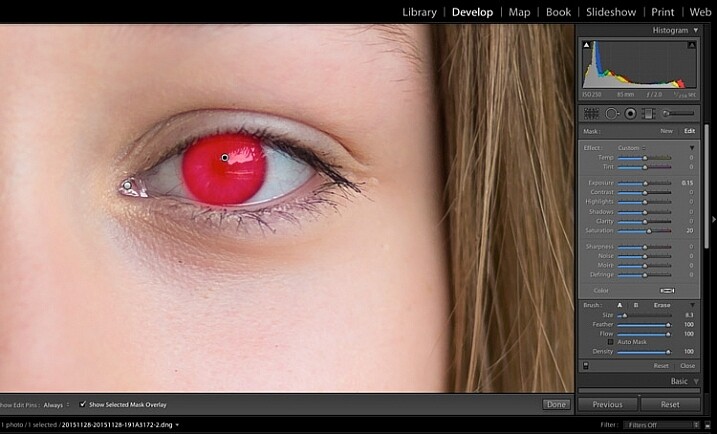
Zooming in even closer, then use the Adjustment Brush to add clarity and sparkle to the eyes. Note that by increasing the clarity, you also make the affected part of the image darker. Compensate with your exposure slider.

In this photo, I also increased the saturation of the iris a little to enhance the blue of the model’s eyes. Be sparing with this technique to avoid an unnatural look.

Image showing basic portrait editing in Lightroom

Use the brush tool to sharpen the outline of the eyes.

Image showing basic portrait editing in Lightroom

Treat the iris separately.

Step #9: Add colour to the mouth

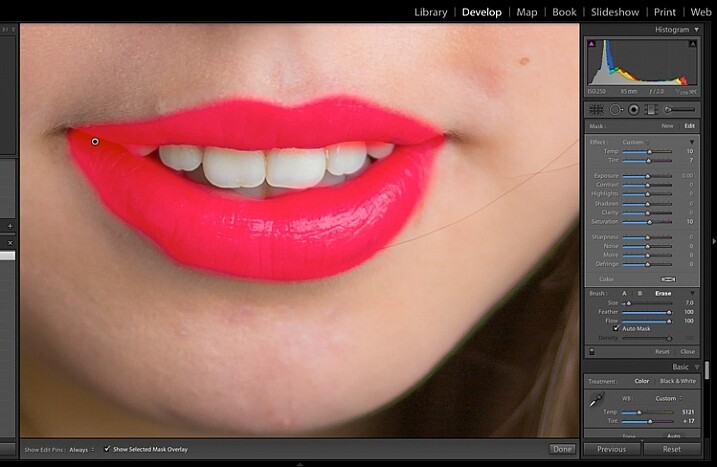
Moving on to the mouth area now. Again, this model doesn’t need any work on her lips or teeth; this is for the purpose of demonstration. Using the same technique as with the eyes, brush on clarity and increase saturation. I have also moved the temp and tint sliders up to alter the hue of her lips.

Image showing basic portrait editing in Lightroom

Brush over the lips to add colour and clarity.

Step #10: Whiten the teeth

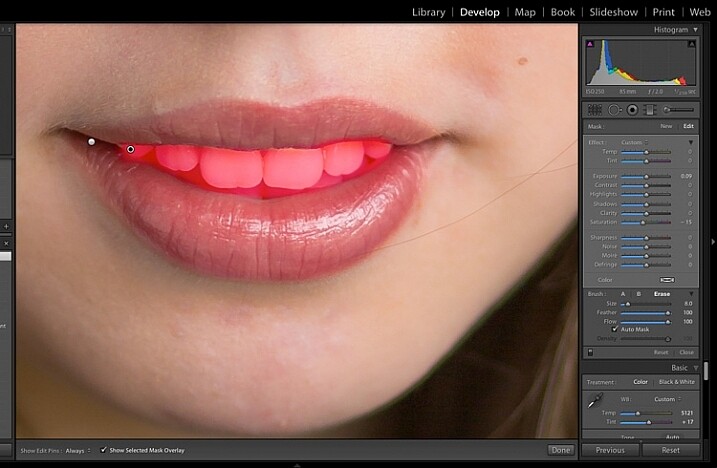
To lighten teeth, use the brush tool with the saturation slider decreased, and the exposure slider increased just a little. As with the eyes, be sparing with this step.

Image showing basic portrait editing in Lightroom

Lighten or whiten the teeth.

Step #11: Lighten the hair and background

Finally for this image I have lightened the hair and background to reduce contrast between her face and the background, and to give separation between hair and background.

Image showing basic portrait editing in Lightroom

Finally, lighten the hair and background to give separation.

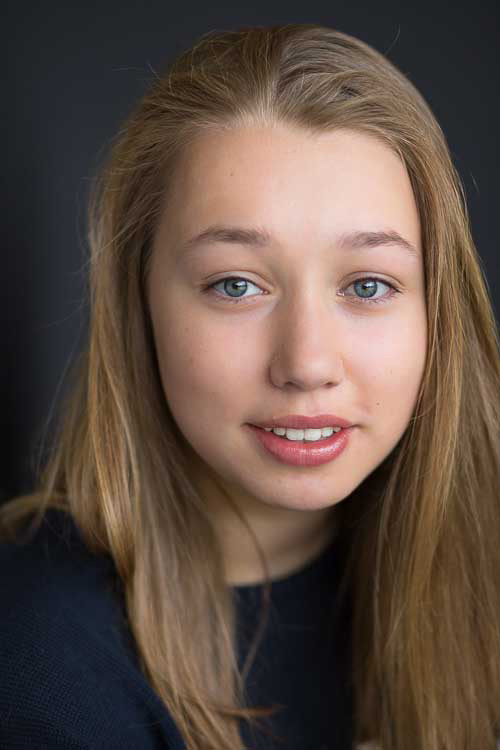
The final image is a vast improvement on the SOOC (straight out of camera) image.

Image showing basic portrait editing in Lightroom

Before Lightroom adjustments.

Image showing basic portrait editing in Lightroom

After all Lightroom adjustments.

Over to you!

Lightroom editing is as much about personal preference as your shooting style, and my workflow and style represents just one approach of many. Share your tips and tricks (and, of course, questions) in the comments section below.

googletag.cmd.push(function() {
tablet_slots.push( googletag.defineSlot( “/1005424/_dPSv4_tab-all-article-bottom_(300×250)”, [300, 250], “pb-ad-78623” ).addService( googletag.pubads() ) ); } );

googletag.cmd.push(function() {
mobile_slots.push( googletag.defineSlot( “/1005424/_dPSv4_mob-all-article-bottom_(300×250)”, [300, 250], “pb-ad-78158” ).addService( googletag.pubads() ) ); } );

The post 11 Steps for Basic Portrait Editing in Lightroom – A Beginner’s Guide by Karen Quist appeared first on Digital Photography School.

Digital Photography School

 
Comments Off on 11 Steps for Basic Portrait Editing in Lightroom – A Beginner’s Guide

Posted in Photography