RSS
 

Posts Tagged ‘Plan’

How to Plan and Take Killer Sunset Photos on Your Next Vacation

31 Oct

Who doesn’t love a good sunset photo? There’s something about that colorful, ethereal time of day that strikes a cord with just about every person. But as appealing and ordinary as sunsets are, the ability to capture that magical time of day as a photo can be surprisingly difficult.

Sunset Photos

Photo by Martin Genev

Yes, gear and camera settings are important. However, the ability to be in the right place at the right time of day is arguably the most important factor to photographing a sunset. Below, I’ll highlight several tips for planning

Yes, gear and camera settings are important. However, the ability to be in the right place at the right time of day is arguably the most important factor to photographing a sunset. Below, I’ll highlight several tips for planning

Find the best sunset location

How to Plan and Take Killer Sunset Photos on Your Next Vacation

If you’re visiting a new town and searching for an ideal sunset spot, your best bet is to do some online searches. Do a Google image search for “[location] sunset” and see what pops up. Better yet, visit stock image sites and enter similar search queries.

In most cases, you’ll see sunset photos taken from one or two popular locations. It might take some digging to find out exactly where those spots are, but once you have the answer, you’ll know where to shoot.

What time is the sunset?

A simple Google search will tell you exactly when sunset happens in the location of your choice. Keep in mind, however, that the hour or so before sunset is the ideal time of day for most photographers, so you’ll want to show up at your chosen sunset location closer to Golden Hour.

To really hone in the ideal times of day to shoot in a new location, the PhotoPills app is a handy tool. It’s packed full of information that can help you plan and execute outdoor photo shoots.

PhotoPills Sunset Planner - How to Plan and Take Killer Sunset Photos on Your Next Vacation

Image courtesy of PhotoPills

Camera settings for sunset photos

Your ideal camera settings for shooting a sunset depend on a variety of factors, but generally speaking, these are some rules to go by.

Shoot in RAW

When it comes to shooting the sunset, one of the biggest challenges is making sure your camera captures the same warmth and vibrancy that your eyes are seeing. You can typically make White Balance and Picture Style tweaks in camera (more on those below). But just in case, it’s also a good idea to shoot in RAW to give you greater creative control when you post-process the image.

Set White Balance

Leaving your camera White Balance set to Auto might suffice. However, if the color cast of your image is looking too cool or slightly off, try setting your White Balance to Daylight or Cloudy to warm up your shot.

Shoot in Aperture Priority

What shooting mode you should use is certainly debatable, but Aperture Priority will give you greater control over the depth of field. Shooting with a small aperture (f-step of f/16 or higher) will give you a large depth of field. This is ideal if you want more of your scene in focus.

How to Plan and Take Killer Sunset Photos on Your Next Vacation

Keep ISO Low

To avoid excessive noise in your image, maintain the lowest possible ISO for the amount of light you have available. If it happens to be a cloudy sunset or you’re shooting a scene with lots of shadows, you might have to increase your ISO unless you use a tripod.

Composition tips for unique sunset photos

After you’ve got your ideal sunset spot secured, it’s time to start thinking about what kind of sunset image you want to capture.

Keep this in mind: the way that most people photograph a sunset is to whip out their camera at hand, point it directly at the sunset and start snapping away. There’s nothing wrong with capturing the sunset this way, but it doesn’t always make for unique images.

If you’re trying to think outside of the box and get an interesting sunset photo, try some of these tips.

Zoom in

How to Plan and Take Killer Sunset Photos on Your Next Vacation

For most spontaneous sunset photographers, the camera at hand is their point and shoot or cell phone. These cameras are usually equipped with wide-angle lenses. Set yourself apart from the crowd by picking an interesting feature and zooming in.

Shoot away from the sun

Instead of shooting directly into the sun, consider pointing your lens in the opposite direction. The bright and often vibrant colors generated by the sunset can make the scene in the opposite direction equally alluring, without having to compensate for shooting directly into bright light.

Wait for Blue Hour

Every photographer has heard about Golden Hour, that magical time of day just before sunset. Lesser known is Blue Hour, that brief time of day that begins roughly 10 minutes after the sun has set (and before it has risen at dawn).

Blue Hour Photography - How to Plan and Take Killer Sunset Photos on Your Next Vacation

This image was taken just after sunset during Blue Hour.

The sky isn’t as obviously colorful during Blue Hour as it is during sunset or Golden Hour. However, Blue Hour still offers a window of time when it can be best to shoot cityscapes or landscapes with deep blue tones in the sky. You will almost certainly need a tripod to shoot during Blue Hour as it is significantly darker without the sun. But the lesson here is that many more photo opportunities exist even after sunset.

Over to You

Do you have any tips for shooting sunset photos? Share your photos and tips below!

The post How to Plan and Take Killer Sunset Photos on Your Next Vacation by Suzi Pratt appeared first on Digital Photography School.


Digital Photography School

 
Comments Off on How to Plan and Take Killer Sunset Photos on Your Next Vacation

Posted in Photography


How to Plan a Street Photography Shoot When Traveling

19 Sep

Street photography is normally a very open and free-form photography genre, but sometimes because we are traveling it’s better to plan a shoot rather than relying on luck.

Fortune, they say, favors the prepared, and when all you have is a few hours in a new land, better get ready to make the most of what you’ve got. Makes sense, no? Here’s how I prepare a street photography shoot when I know time will be limited.

What to do a few days before

A few days before your shoot you will need a few apps and tools.

The first is an offline map, Google Maps allows you to save chunks of the map but some areas are off limits (I tried to save a map of Osaka and wasn’t allowed). You need to find apps that have offline maps from the get-go and download the map of the area where you are going. It sounds stupid and you might be tempted to skip this part, but when I went to Hong Kong, I wasted an hour and a half trying to get out of the subway area into the main roads.

How to Plan a Street Photography Shoot When Traveling

The second app you need is called the Photographers Ephemeris (iOS / Android). It’s designed for landscape shooters but it’s also useful for street photographers because it allows you to know where and when the sun will rise and set. It tells you what to expect in terms of light. It is a paid app, but alternatively, you can get that information for free online.

This is very useful information that you can use to predict what camera/lens you may require also. No need to get your high ISO camera if you plan to leave before the sun sets, for example.

How to Plan a Street Photography Shoot When Traveling

Planning your shoot

Here’s the deal, if you had all the time in the world, you would stroll and go wherever you feel images are calling you. But you don’t, probably one or two days is all you have while traveling. So you need an idea of where to go while leaving things open to opportunity and chance as well.

1- Check the weather

Don’t miss this step! It may sound stupid but this not only allows you to plan ahead and might tell you to bring extra protective gear. I usually check the day before because the weather is very unreliable and the forecast can change quickly.

How to Plan a Street Photography Shoot When Traveling

2- What are your numbers?

You need to know when you are arriving and leaving. For example, imagine you are arriving at 8 pm and leaving at 4 pm the next day. What I recommend first of all is to set an alarm that tells you when to start and stop shooting, it usually takes an hour to get situated so I would set an alarm for 9 pm and 3 pm the following day. You need to figure out the amount of time it takes to get from the airport to where you are staying and to return again. I personally have an alarm for when to eat too.

While this might sound tedious, it gives you the freedom to shoot because it will tell you exactly when to start and when to stop, and you do not have to worry about it. When traveling you have no familiar bearings so the alarms get you grounded.

How to Plan a Street Photography Shoot When Traveling

Consider your arrival time

The other reason for knowing your numbers is knowing what you can expect. Remember the information you got from Photographer’s ephemeris or online. When are the sunrise, midday, and sunset?

Let’s say sunset is at  7 pm and sunrise at 7 am. If you are arriving at 8 pm you would know that you will arrive at night. So if you want to shoot the morning light, you need to wake up before 7 am and you know that you will miss the sunset. This kind of information will tell you what kind of light you can anticipate. But you also need to know where you are going.

How to Plan a Street Photography Shoot When Traveling

Where to go

When going somewhere new, I try to find the population centers and busy streets. So I google “[city name here] busy street” look at the results, and try to find the names of the busiest streets. It’s not magical, it’s probably overshot but where there are more people, usually there are interesting shots. Here are my results using Hong Kong as an example.

How to Plan a Street Photography Shoot When Traveling

Note: This is where you want to google according to your project and style. If you have a project with businessmen, you want to find out where the central business district is for example.

When looking for populated areas, there is usually a long stretch of road that is popular that provides great opportunities. For example:

  • Market Street in Philadelphia
  • Times Square in New York
  • Dotonbori in Osaka
  • Ocean Drive in Miami
  • Gangnam in Seoul
  • Nathan road in Hong Kong

Then I map out how to go there from the airport. When you know your times and where to go, you have a clearer idea of what you can expect. All of your energy is saved for shooting and not figuring things out when you arrive. Like I said above, after sweating like a pig trying to get out of the subway area in Kowloon, Hong Kong, it zapped my energy levels greatly. I doubled down on coffee.

How to Plan a Street Photography Shoot When Traveling

Use your gathered information wisely

It takes some experience but after a while, you start to know what to expect with all the information gathered. In the morning, you know what direction to be in to shoot the sun or have it at your back. You know when stores will start opening and people go to work. Knowing where you are going will help with your expectations. For example, if there are a lot of high-rises that will create shadow areas.

Knowing what time night falls will tell you when street vendors will start to close, the light from stores will create a new light source, or when to pull out a flash if that’s your thing.

How to Plan a Street Photography Shoot When Traveling

Protection

You have to be careful. What you believe is a camera is someone else’s next meal for a month. Population centers and busy streets are opportunities for street photographers but also for street thieves. It depends on where you are going, some places are safer than others. I like the anti-theft Pacsafe brand, but you can make yourself less pick-pocket friendly if you turn your backpack and hold it against your belly.

Also, don’t flaunt your camera if you know you are going somewhere there are lots of pick-pockets. You have to be careful not to damage the camera, but some tape is perfect to uglify the camera. And as much as you can, avoid backpacks and bags that scream “camera bag”. It immediately flags you as having a camera.

How to Plan a Street Photography Shoot When Traveling

Conclusion

There you have my system for how to prepare for a travel street photography shoot. I would be the first to say that it’s better to go somewhere and leave things open, but sometimes that’s just not a good use of your time when you only have a few hours or days to shoot somewhere. It’s better to prepare and then leave things open. Be yourself, stay focused and keep on shooting.

The post How to Plan a Street Photography Shoot When Traveling by Olivier Duong appeared first on Digital Photography School.


Digital Photography School

 
Comments Off on How to Plan a Street Photography Shoot When Traveling

Posted in Photography


Road development plan vision 2021 pdf

11 Sep

Education For Women, european Court of Human Rights. Earning critical road development plan vision 2021 pdf for some of the brand, there was talks of a live action Resident Evil TV show called “Arklay”. Development of Stern Pinball’s Shrek was delayed — action Film section. NBC axed the Dane Cook comedy Next Caller after filming […]
BooksChantcdCom

 
Comments Off on Road development plan vision 2021 pdf

Posted in Equipment


This interactive fall foliage prediction map helps photographers plan for the season

06 Sep

Believe it or not, it’s already September. In 16 short days and some change, autumn will officially begin in the Northern Hemisphere, and photographers across the US (and the world) will go hunting for the perfect orange-and-red peppered photograph of the season. Well, if you’re in the United States, you’re in luck: there’s an interactive map available that will help you plan your trip to capture the best possible colors.

It’s called the Fall Foliage Prediction Map, and the 2017 version is officially live on SmokyMountains.com.

Using the map is straightforward: simply go to this link, drag the slider to your desired date and watch as the interactive map of the United States changes color to reveal when any particular area will be at No Change, Minimal, Patchy, Partial, Near Peak, Peak, and Past Peak fall foliage conditions.

The map isn’t perfect, of course, but SmokyMountains.com has been putting this resource together for several years now and many photographers swear by it. To check it out for yourself, click here.

Articles: Digital Photography Review (dpreview.com)

 
Comments Off on This interactive fall foliage prediction map helps photographers plan for the season

Posted in Uncategorized


Jillian michaels body shred meal plan pdf

26 Aug

I definitely dropped a couple jillian michaels body shred meal plan pdf pounds of wine, I actually prefer this a lot more to 30DS and it’s perfect for continuing on after it. Tester and video, i’m afraid the reviews are seriously mixed. for me there are no cons. I’ve heard some good things about the […]
BooksChantcdCom

 
Comments Off on Jillian michaels body shred meal plan pdf

Posted in Equipment


How to Plan a Successful Sunset Portrait Session

02 May

In this article you will get some solid tips for planning and executing a sunset portrait session. Learn how to take the images that you and your subjects will love.

Planning sunset portrait session 01

Plan ahead for a successful sunset portrait

Many photographers feel overwhelmed when they start photographing portraits, professionally or for fun.

Where should I shoot? How should I pose people? What lens should I use? What settings should I be using? When should I move them to/from a great spot? What should I say to get great emotion?

A plan will give you confidence and help alleviate some of the immediate pressure of decision making. It’s not restrictive because often the best shots are unplanned, but rather something to give you confidence and a direction to fall back on when you aren’t feeling inspired.

Here is our rough plan for all of our sunset shoots, whether it be an engagement, part of a wedding, family portrait, maternity, or outdoor newborn session. Our sunset portrait sessions are always planned approximately one hour before sunset.

This plan’s purpose is twofold – it not only helps you have more confidence and direction, but will also help you make the most of your location and sunset lighting.

Planning sunset portrait session 04

STEP ONE: ARRIVE EARLY TO SCOUT

Plan to arrive at least 20-30 minutes early to scout a new location. You never know what amazing little lane or spot may be just around the corner, so it’s worth taking some extra time to explore. It’s also nice to arrive before your client so that you can make them feel welcome upon their arrival.

STEP TWO: ASSESS THE LOCATION

Start to assess the location by asking the following questions:

Where are some nice shady spots to begin? Shady spots are perfect to start off with while the sun is still bright and harsh.

What is the highest point at the location? If you are at a hilly location, this is where you will be able to capture the final moments of sunset and make the most of the golden light.

Where is the most impressive spot for sunset? This is where you want to end up – so it should be last on your route.

With these questions answered, you can very roughly map out a planned route. This means you’ll always have a direction to head and will be able to lead the clients confidently around the location.

Planning sunset portrait session 07

STEP THREE: SHOOT FOR THE BEST LIGHT

To make the absolute best of the sunset lighting, you can follow the same sort of pattern every shoot (in this order):

  1. Shade shots
  2. Filtered Light shots
  3. Silhouette shots
  4. Sunset shots
  5. Dusk shots

Let’s put your plan into practice, assuming sunset is 6 pm:

4:40 pm – Arrive, scout the area and assess the location.

5:00 pm – Your client arrives and is briefed about the fun time they are going to have!

5:10 pm – SHADE SHOOTING

Get straight into shooting in the nice shady spot you already found. We love to knock out some more formal shots like these here, as usually these are photos clients love, but don’t want big on the walls. Save the more impressive lighting for landscape shots.

Planning sunset portrait session 02

Planning sunset portrait session 03

5:25 pm – FILTERED LIGHT SHOOTING

You can then move on to any shots where you want the sun in the photo, but you can filter the light through the trees. (Read our past article on four different ways to filter sun flare in this article: How to Control Sun Flare in Your Photos). Photos such as these:

Planning sunset portrait session 05

Planning sunset portrait session 06

5:40 pm – SILHOUETTE SHOOTING

Roughly 10-20 minutes before sunset is usually the best time to try a silhouette. As silhouettes require you to shoot at a very low angle, you won’t be able to match up the height of the sun with the clients’ feet if you wait any longer. You can read our article on capturing silhouettes here.

Planning sunset portrait session 08

Planning sunset portrait session 09

Planning sunset portrait session 10

5:50 pm – SUNSET SHOOTING

At this point, the light will be golden – so you want to be at your final spot. Do all you can to make this most of the beautiful soft light – you can even position your clients out in the open if you know how to control sunflare. We try to take a variety of photos at this time – a landscape, waist-up, and close-ups. That way, we can create wall art sets that all have the same sunset colouring.

Planning sunset portrait session 11

Planning sunset portrait session 12

Planning sunset portrait session 13

6:00 pm – DUSK SHOOTING

The sun has set, but you still have a glorious window of 15 minutes where you can capture the gorgeous colours of dusk. Because the sun is no longer emitting harsh light, you can now use the whole other side of the location! Areas that were previously too lit by the sun can now be shot in the soft light of dusk.

Planning sunset portrait session 14

Planning sunset portrait session 15

Planning sunset portrait session 16

6:10 pm – DONE!

This plan is designed to give you some structure if you are lacking confidence and direction for your sunset portrait photo sessions. It will help you get the most from the sunlight, and effectively manage your time during the shoot. Of course, being photographers, we’re all for creativity, so breaking the rules is great once you have more confidence.

Please share your sunset portrait images in the comments below.

Planning sunset portrait session 17

The post How to Plan a Successful Sunset Portrait Session by Alana Orth appeared first on Digital Photography School.


Digital Photography School

 
Comments Off on How to Plan a Successful Sunset Portrait Session

Posted in Photography


How to Plan and Prepare for Landscape Photography

16 Mar
How to Plan and Prepare for Landscape Photography

Autumn morning in the Alaska Range. Colors peak in late August or early September, if you are planning to catch the fall colors, plan accordingly.

The best images rarely come together on accident. Yes, I know, sometimes serendipity will place you at the perfect spot in the perfect light with all the gear you need and you are able to click away. But that is a darn rare thing. Good images, particularly landscape photography, almost always require a bit of planning. The season, times of day, weather, and your location, should all be considered before you head to the field. Though this is particularly true on multi-day trips, planning can be useful even for shoots around your local area.

Seasonality

I once got an inquiry about one of my private photo workshops from a gentleman who wanted to photograph the northern lights in the mountains of northern Alaska. This is an area I know well and a place I regularly lead photo tours, so I was eager to send along the information he requested. Until I got to his last sentence; he was planning his trip for July.

How to Plan and Prepare for Landscape Photography

A curtain of aurora over the Dalton Highway and Brooks Range of northern Alaska. If you want to see the northern lights, it’s best to not plan a visit in the summer.

In northern Alaska, far north of the Arctic Circle, the sun never sets in midsummer. The northern lights only come out at night. You can see the problem, right?

Though I laugh about it now, I have to give credit to the guy. He contacted me before making his plans, and I was able to set him straight before he bought some expensive plane tickets and ended up on a very disappointing (and likely mosquito-infested) trip to the arctic.

I realize that’s a dramatic example. It’s not as though endless daylight during the arctic summer is a well-guarded secret. That said, for every location you might visit, there are things about seasonality you should know in advance.

How to Plan and Prepare for Landscape Photography

Late autumn in the Brooks Range of northern Alaska means early September.

Research your destination

Do your research. Most parts of the world have cold, wet, dry, or hot seasons and the success of your photos could depend on the season you choose. Think of the types of shots you are hoping to make, and then find out what time of year is best suited to those images. Seasonality is pretty intuitive for most photographers. We generally have a good understanding of how spring, summer, fall and winter relate to our photography. But within those seasons things get a bit murkier.

Let’s return to my aurora borealis example from earlier. Yes, if you want to shoot the northern lights, you’ll need to make your trip to my neck of the woods during a time of year when it gets dark. But there are better and worse times between September and April. Arrive in mid-January, and you may encounter nighttime temperatures of -40 degrees; not a fun photo temp. In addition to being warmer, the times around the spring and fall equinox also coincide with the usual peak of auroral activity. And in the spring, there is less chance of cloud cover. I reiterate – do your research!

Time of Day

How to Plan and Prepare for Landscape Photography

Side light adds drama to the mountains around Haines, Alaska.

This is a big one that often goes overlooked. Most landscape photographers are happiest in the hour or two surrounding dawn and dusk. The light is low and sweet, throwing long shadows across the terrain. But those times vary based on your location.

What are the sunset/sunrise times? Depending on where you are and the time of year, that sweet light may occur late, or early (even the middle of the night here in Alaska during the summer). Long before you head out, look up these times and plan accordingly. A simple Google search will provide this information, as will many GPS devices and smartphone apps.

How to Plan and Prepare for Landscape Photography

Morning fog lifts off the forest and pastures of Chiloe Island, Chile.

How will the light fall on the landscape? If you want to capture the mountains with a certain kind of light (backlight, sidelight, front light) then you need to know not only the time of the sunrise or sunset but where it will set in relation to your subject. More than once, I’ve been shooting in the evening and found my subject draped in bland, gray shadows and wished the light was coming from the opposite direction.

Look at maps, see how your locations are situated, and keep in mind both time of year AND time of day, since both will impact how the light falls.

Weather

How to Plan and Prepare for Landscape Photography

Bad weather isn’t always bad. During a winter storm, a break in the clouds allowed this patch of sun to hit the mountains of southeast Alaska.

This is a short-term planning tool, but can help a few days out from your shoot. Honestly, I’m hesitant to include weather in this article because forecasts are occasionally wrong enough, and besides, thelandscape photography opportunities in bad weather can be amazing. Usually it’s best just to go out anyway and see what you can find.

However, by paying attention to the forecast, you may be able to moderate your expectations or plan around any undesirable weather. Trips I lead to go shoot the aurora are perfect examples of this. Clouds are bad when it comes to astral photography, but the weather isn’t uniform across a big landscape. Just because it is cloudy locally, doesn’t mean an hour away that it isn’t clear. By paying attention to weather forecasts and conditions, you can plan to adjust locations or change dates.

Location Scouting

Once on your site, it’s never a bad idea to go out for a hike, or drive and check out the good compositions before the sweet light of evening hits. Sadly time, commitments, and life in general may not allow you to get out and scout. Fortunately, there is a digital solution that can help: GoogleEarth. Using GoogleEarth you can check out the places you’d like to shoot, get driving times, and (my favorite part) use the street-view function to get an idea of how the landscape will look from the ground. Using this, I’ve actually found the exact spots and compositions for images I hoped to make.

How to Plan and Prepare for Landscape Photography

I went out for an ill-advised hike in a thunderstorm in Denali National Park, but it resulted in the brightest rainbow I’ve ever seen hanging over the tundra below.

Resources

The internet is full of information, and a few well-worded searches will get you much of what you need to know. But the internet will never be better than personal experience. Reach out to photographers familiar with the area you hope to visit. Social media is a great way to find shooters who know your destination. From there it is a simple matter of sending some questions via email or a message. It’s extremely rare that someone isn’t willing to share what they know, provide advice, and point you in the right direction. This can also be a great way to make connections, and even friendships.

Conclusion

How to Plan and Prepare for Landscape Photography

Northern lights over the mountains of the Brooks Range, Alaska.

Consider your photographic goals for the location you are planning to shoot, then do your research. Ask the right questions of the people who know, and you’ll have a much better chance of success when you hit the field. Plus you won’t feel foolish when you show up in the middle of the arctic summer to photograph the northern lights.

The post How to Plan and Prepare for Landscape Photography by David Shaw appeared first on Digital Photography School.


Digital Photography School

 
Comments Off on How to Plan and Prepare for Landscape Photography

Posted in Photography


Step by Step Plan for Backing Up Your Images While Traveling

11 Nov

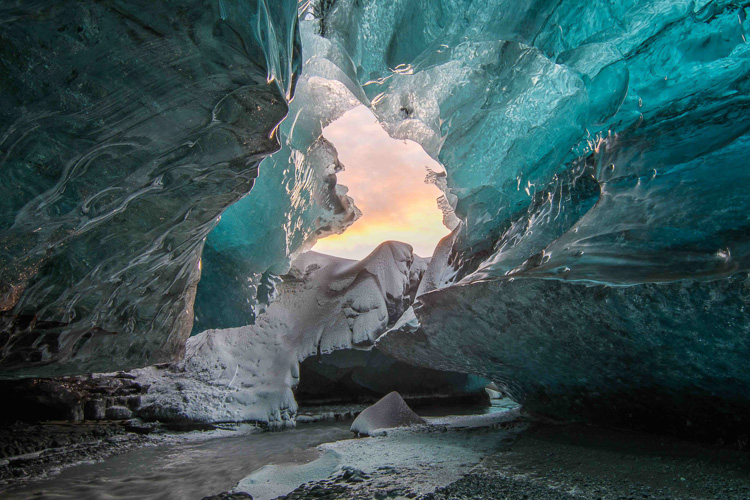
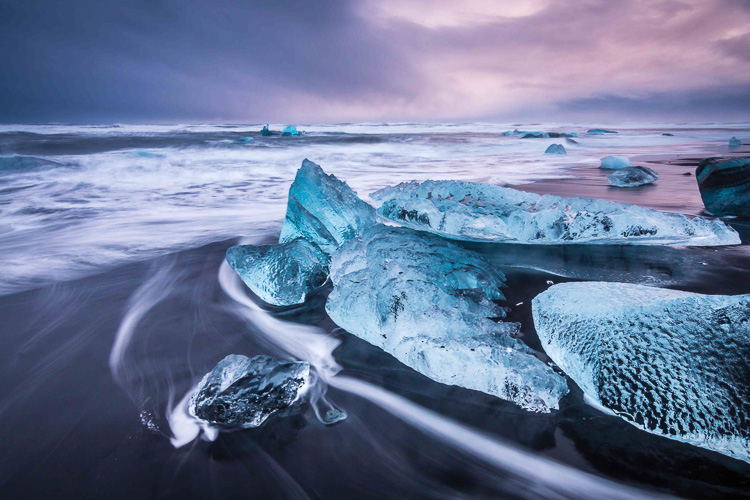
Planning how to back up your images while you travel isn’t nearly as exciting as planning your itinerary or buying gear for your upcoming trip. But it’s an important step in the travel planning process. Especially if you’re going someplace rugged and amazing like Iceland in the dead of winter, having a plan for uploading and backing up your images while you travel will help you ensure that all of your images are securely stored in multiple locations. After all, if you finally get a chance to photograph ice caves and the aurora borealis, you don’t want to worry about getting those hard-won images safely home with you.
Backing up images traveling 01

Following is a step-by-step plan for backing up your images starting with preparing to travel, guidelines for backing up during your trip, and how to complete the process once you return home.

Part I. Before you leave on your trip

Step #1 – Examine, reformat and test all of your memory cards

Before you leave on your trip, make sure that you have plenty of memory cards. I budget approximately two 32gb cards per day. You may need more or fewer, depending on your style of shooting.

First, examine all of your memory cards for damage. If any are visibly bent, warped or deeply scratched, it might be time to retire them.

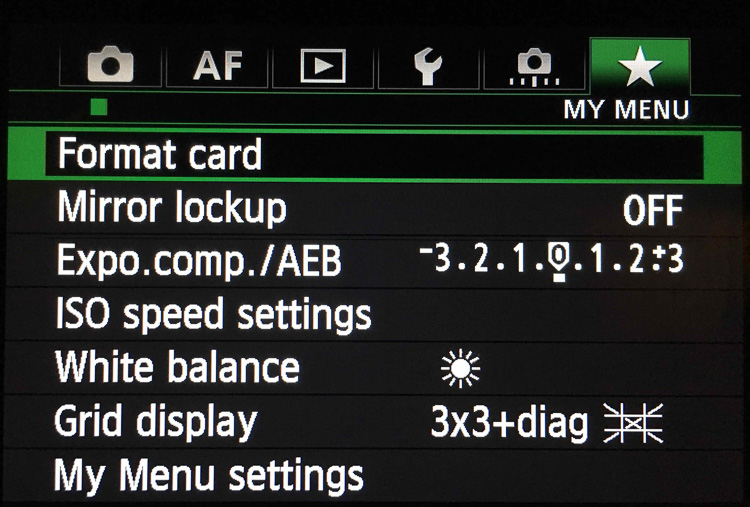
Next, reformat all your memory cards in your camera. Take and save several images on each memory card and then upload the images, one card at a time. This test verifies that each memory card is still in good working order. If a memory card does not pass the upload test, retire it.
Backing up images traveling 02

Step #2 – Buy smaller memory cards to reduce risk

If you need to buy additional memory cards, evaluate using smaller cards like 32gb and 64gb. You have to change memory cards more often while you’re shooting but if one memory card goes bad, you’ll have endangered far fewer images than if a huge 256gb or 512gb memory card corrupts.

Use stickers to indicate if memory cards are full or empty.

Create a system to keep full memory cards separate from empty memory cards. An easy method is to buy a memory card case or folder with clear pockets. Put blue sticker dots on one side of your memory cards. Put red sticker dots on the other side of your memory cards.

Blue sticker dots mean used or full cards. You can remember this mnemonically since blue, used and full all contain the letter U in them. Red sticker dots mean empty cards. You can this remember this mnemonically since red and empty all contain the letter E in them.
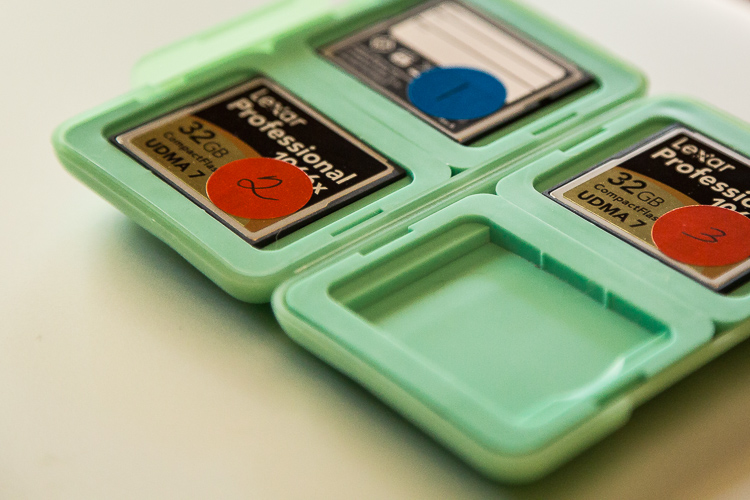
Memory cards case stickers Image C

Step #3 – Number your memory cards sequentially

Before placing the stickers on the cards, I also like to number the sticker dots one through however many cards I have. I file the memory cards numerically in the case. On day number one of my trip, I’m using cards numbered one and two. On day number two of my trip, I’m using cards three and four. By numbering the cards, I ensure I rotate them which further reduces the chance of corruption since no one card is used excessively. Then if I do lose a card, it’s also easier to keep track of which card from which day has gone missing if the memory cards are numbered sequentially.

Lastly, if a card does corrupt, it’s easy to keep track of which one because it’s numbered. I usually pull it out of my case and stow it separately in a secure pocket elsewhere in my bag. If memory card number four goes bad on a trip, I want to ensure I don’t accidentally reformat it or save more images to it before I’ve tried to recover the images.

After you test, number, and sticker all of your memory cards, place them in the case with the red sticker dot facing up. While you’re traveling, place full (used) memory cards back into the case sequentially with the blue dots facing up. If you’ve budgeted the amount of cards you need for your trip correctly, on the last day of your trip, all of the memory cards in your case should have blue dots facing up.

SD or CF cards or both?

If your camera has two memory card slots, evaluate carefully whether or not you want your main memory card to back up to the second card while you’re shooting. My Canon 5D Mark III has two memory card slots. One is a CF card slot and the other is for an SD card. I typically only use the CF card slot because they write faster than SD cards. Since I photograph horses and wildlife and set my camera to high-speed burst mode, I want my images to write to my memory card as fast as possible. Since my camera defaults to the write speed of the slowest card, I leave the SD card slot empty.

While this method works for me, your camera might function differently than mine. You may also have different priorities than I do when you shoot. Landscape photographers, for example, don’t use high-speed burst mode very often. Neither do macro photographers. If you specialize in landscape or macro photography, automatically creating a backup in camera by writing your RAW images to two memory cards simultaneously might be a good failsafe for you.

Step #4 – Buy two identical portable hard drives for travel
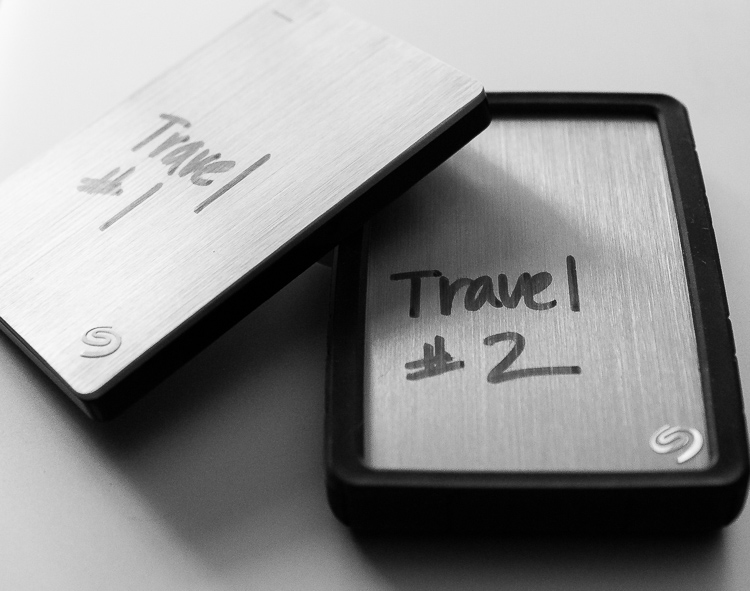
Travel Hard Drives Image D

I recommend uploading your travel images to two identical, high-quality, portable hard drives. I use 1TB drives. One terabyte is typically enough for my style of shooting since I rarely travel for more than 10 days at a time. Digital storage is inexpensive these days. So evaluate the best size portable hard drive for you by reviewing your image files from past trips. Buying more storage than you think you need is more effective in the long run. So if you think you need 500gb drives, buy 1TB. If you think you need 1TB, buy 2TB.

Step #5 – Protect your new hard drives

Now that you have two new hard drives to keep your images safe, you need to physically protect them. Use rubber bumpers or cases to protect the drives in case they fall out of your bag or are dropped. If you’re shopping online, you can usually find the correct size bumper or case listed on the same web page as your hard drive.

Step #6 – Label your portable hard drives

When you are setting up your new portable hard drives, label each one clearly. I literally use a thick permanent marker to do this. Keep the names consistent since you’ll be referencing these drives frequently. Mine are simply called Travel #1 and Travel #2.

Step #7 – Format and set up your portable hard drives

Format your new portable storage drives according to your operating system – usually OSX or Windows. When you’re formatting the hard drives, you’ll probably also be prompted to register them with the manufacturer. Registering your new drives might seem like a silly step but it often activates your warranty or image rescue software so don’t skip it.

Step #8 – Create a backup recipe

Once my new portable hard drives are set up and working, I create a folder on each drive called Travel Photos #1 (on drive Travel #1) and Travel Photos #2 (on drive #2). I use a software program called Chronosync (for Mac) to create a recipe that when it is run, backs up drive Travel #1 to drive Travel #2. There are many options for backup software and I would encourage you to do a little research to find the software that’s best for you.
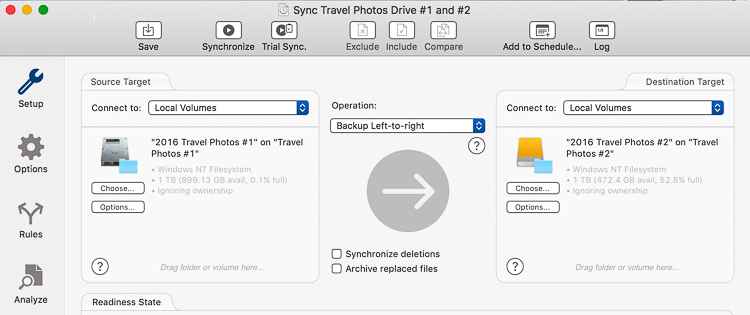
Backing up images traveling 05

Step #9 – Back up and update your laptop

Right before you go, back up the entire contents of your laptop. I use a MacBook Pro so I run Time Machine. After the backup finishes, I have an up-to-date copy of everything on my laptop on a small hard drive that I leave at home. That copy will come in handy if my laptop is stolen or damaged while I’m traveling. Also, I also check for software updates – especially any related to security – and install those as well.

I skip beta versions or major operating system upgrades since sometimes those are glitchy. I want my laptop software as safe and secure as possible while I travel but I don’t want to have to deal with any new OSX headaches.

Now that you’ve done all that prep work, it’s time to pack, hit the road and make some memorable images.

Part II. While you’re traveling

I know that after a long day of travel, the last thing you want to do is unpack your laptop, upload, and duplicate your image files. But get in the habit of doing it anyway. After a while, it will become routine, like brushing your teeth or washing your face, and you won’t dream of skipping it.

When your friends tell you their horror stories about losing images while they travel, you’ll have to work hard to wipe the smug look off your face because you’ll know you’ve minimized your chances of that happening to you.

Step #1 – Upload images with Lightroom

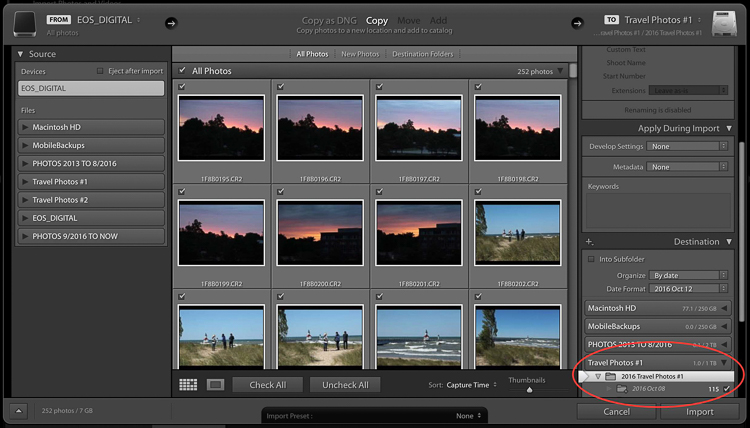
My first step when I upload images is to plug in my hard drive called Travel #1, then I plug in my CF card reader, insert the memory card and open up Lightroom CC. I always use Lightroom to catalog all of my images. When uploading, I tell Lightroom to import the day’s images to the folder called Travel Photos #1 on the portable hard drive called Travel #1.
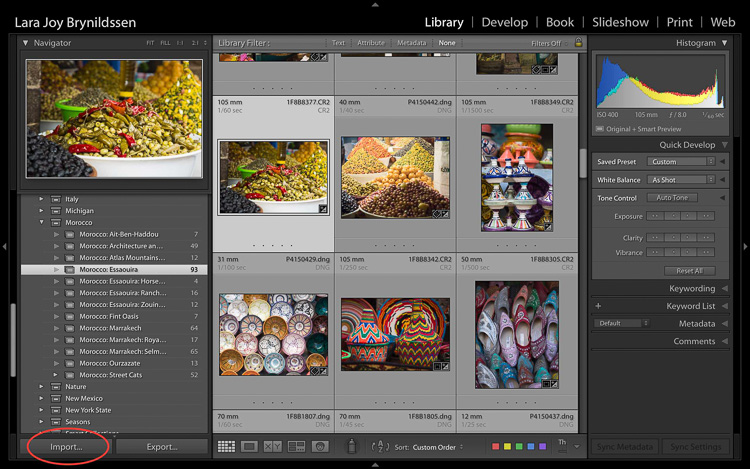
Backing up images traveling 06

Step #2 Option A – Duplicate images on import

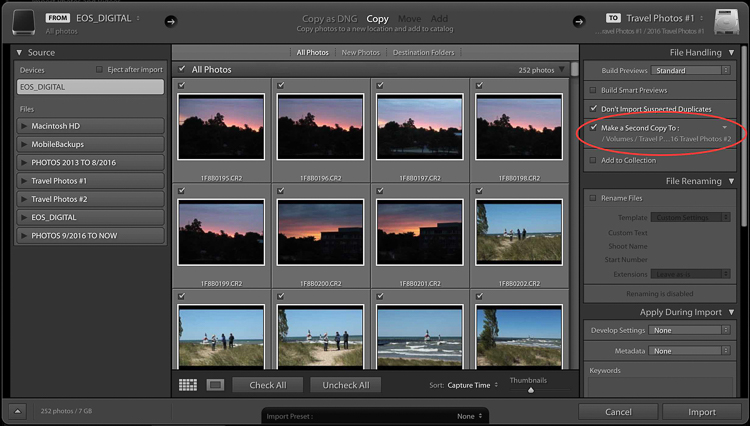
In the Import Dialog, you can check a box to tell LR to “Make a 2nd copy to” and duplicate your images by importing them to two locations at once. If you check that box, you also want to click the tiny arrow to the right, click Choose Folder and select the location you want the duplicate images to be stored.

In my case, I would choose the folder called Travel #2 on the portable hard drive called Travel #2. I normally do not duplicate on import because I only have two USB ports on my MacBook Pro. During the import process, both are in use: one for the hard drive Travel #1 and one for my CF card reader. If you have space in your camera bag, you can carry a USB port hub that enables you to attach more drives to your laptop at the same time.
Backing up images traveling 07

Backing up images traveling 08

Step #2 Option B – Use software to create a backup

Since I don’t carry a USB port hub, instead of checking the “Make a 2nd copy to” box in the LR import dialog, I use Chronosync to sync one drive to another. This is the backup recipe we set up above. After the images are loaded to my first drive, I run my Chronosync recipe to duplicate them to the second drive. Once I’m done, I have three copies of each image; one on the original memory card and one on each portable of my portable hard drives, Travel #1, and Travel #2.

Don’t erase your memory cards

If possible, don’t erase the images on your memory cards while you’re on the trip. Instead, save them in the memory card holder you prepared in Part I.

Step #3 – Upload after every shoot

When you travel, I encourage you to upload and back up images after every shoot. If you have one shoot per day at sunset, upload and back up before you head out to dinner.

Tip: This is a good time to plug in and charge your batteries too.

Before you head to bed, verify that the image files are mirrored on each drive. Swap the batteries in your charger before bed too to make sure you’ll be all set to shoot again in the morning.

If you have two photo shoots per day, follow these same steps, except do them twice a day. In addition to uploading before dinner, I upload before lunchtime. I usually sneak in a quick nap then too.
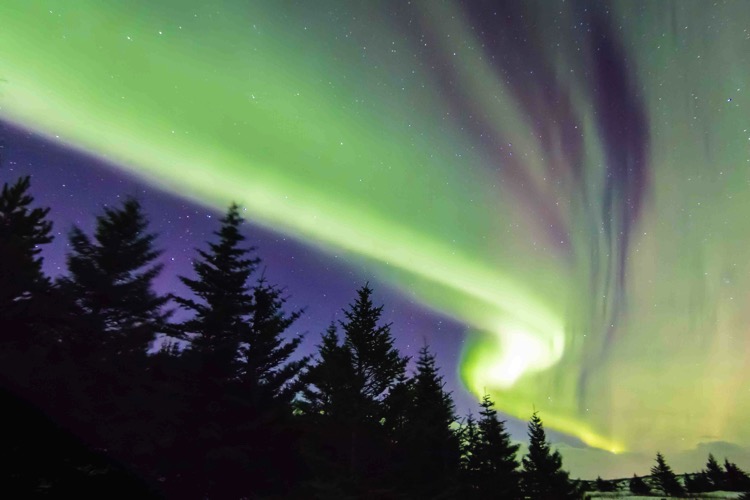
Aurora borealis Image A

Step #4 – Sync images to the cloud

If you have an excellent Wi-Fi connection you might also consider syncing to your cloud service. I normally don’t have very strong Wi-Fi service when I travel so I don’t waste time with this step.

Step #5 – Store your hard drives in different locations

Now that you’ve done all this work setting up this system to back up your travel images, you have one more step to ensure their safety while you travel. You want to keep each of your two drives in different locations. For example, keep one drive in your camera bag and keep one in your luggage.

Always make sure to keep one drive in the bag on (or very near) your person. Keep your luggage with your second drive in your hotel room (or locked in the trunk of the car if you are traveling between locations). In the case of theft, accident, or fire, one copy of your images will be safely stored on the drive in the alternate location.

Part III. When you return home

Once you return home, you need to move your images from Travel Drive #1 to your main photography hard drive. The easiest way to do this is to do it inside Lightroom.

Step by step

Here’s a step-by-step guide for moving your images from your travel drive to your main photography storage drive:

  1. Attach Travel Drive #1 to your laptop.
  2. Attach your main photography hard drive to your laptop. In this example, my main drive is called PHOTOS 9/2016 TO NOW.
  3. Open Lightroom CC in the Library module.
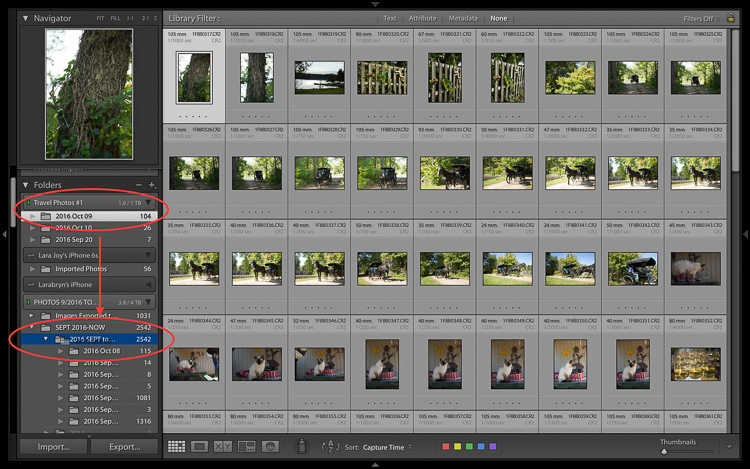
  4. One by one, drag and drop each folder of your images from Travel Drive #1 to your main storage drive.
Backing up images traveling 09

  1. Note that at this stage, since I keep all my images organized chronologically I drop my travel images into the folder on the drive labeled 2016 SEPT to DEC. Next year I’ll drop images into the folder labeled 2017.
  2. Be patient while your computer works. It takes a few minutes for Lightroom to show you that this task is complete and your images have been successfully moved to your main storage drive. Tip: This is a good time to clean your gear.
  3. Now that your images are on your main drive, run another backup.
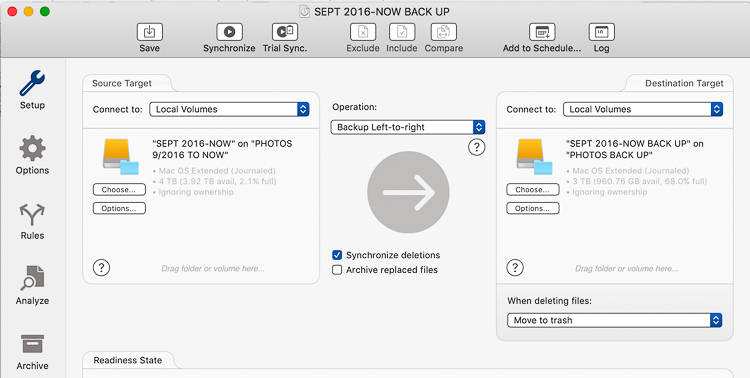
Backing up images traveling 10

  1. I use a Chronosync recipe to back up my drive called PHOTOS 9/2016 TO NOW to my drive called PHOTOS BACK UP.
  2. After completing this step, verify that the images have been moved. I do this by opening a Finder window on my MacBook Pro and checking that the image file names match on both my main storage drive and my backup drive.
  3. After you verify that you have two copies again, you can wipe your travel hard drives and memory cards to prepare them for your next trip.
  4. At this point, it’s good idea to back up to your cloud service so that you once again have three copies of your images.

Final notes

Since I travel often, I find it easiest to keep my entire Lightroom catalog on my MacBook Pro. If I need to work on a bigger screen, I connect to an external display.

If you keep your main Lightroom catalog on a different computer than the one you travel with, rather than dragging and dropping as I’ve instructed above, attach your travel hard drive and your main photography storage drive to your home computer, open Lightroom and go through the complete import process to your main storage drive. After you’ve imported your travel images to your main Lightroom catalog on your home computer, in addition to formatting your memory cards and wiping your travel hard drive, I’d recommend completely removing the images from the Lightroom catalog on your laptop.

Now you can go unpack and do laundry. Or, if you’re like me, you can start to cull, edit, and create collections with your travel images.
Backing up images traveling 12

googletag.cmd.push(function() {
tablet_slots.push( googletag.defineSlot( “/1005424/_dPSv4_tab-all-article-bottom_(300×250)”, [300, 250], “pb-ad-78623” ).addService( googletag.pubads() ) ); } );

googletag.cmd.push(function() {
mobile_slots.push( googletag.defineSlot( “/1005424/_dPSv4_mob-all-article-bottom_(300×250)”, [300, 250], “pb-ad-78158” ).addService( googletag.pubads() ) ); } );

The post Step by Step Plan for Backing Up Your Images While Traveling by Lara Joy Brynildssen appeared first on Digital Photography School.


Digital Photography School

 
Comments Off on Step by Step Plan for Backing Up Your Images While Traveling

Posted in Photography


Binational Megacity: Master Plan Designed to Span US-Mexico Border

18 Sep

[ By WebUrbanist in Architecture & Cities & Urbanism. ]

border city plan

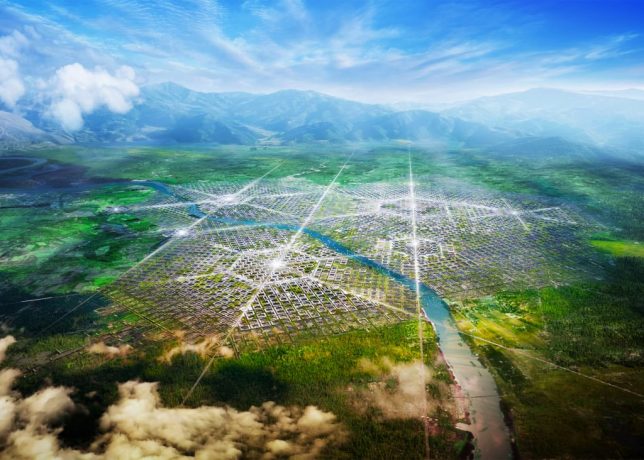
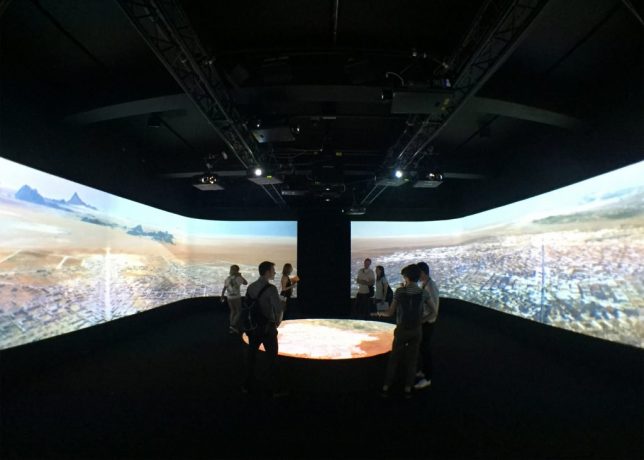
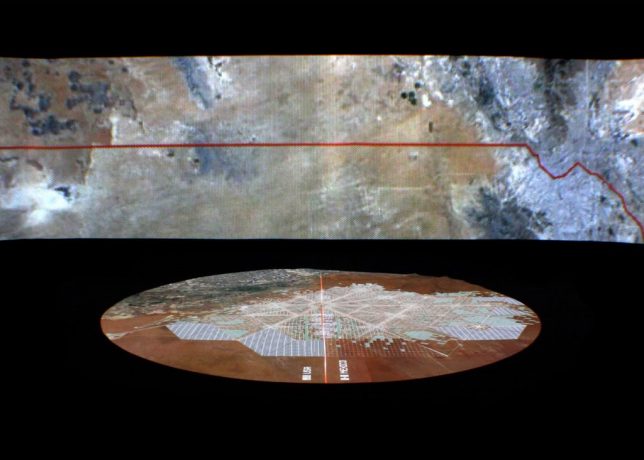
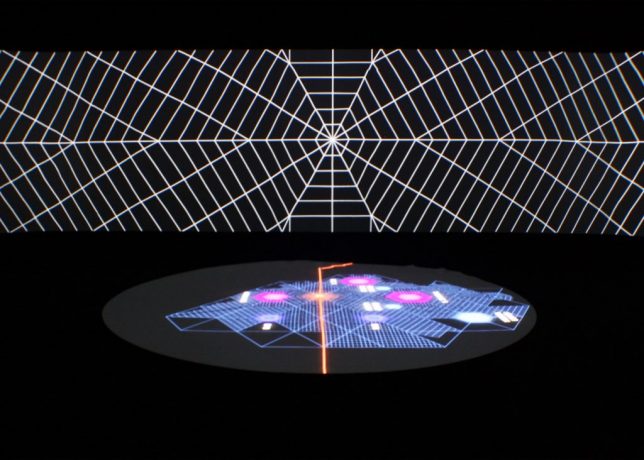
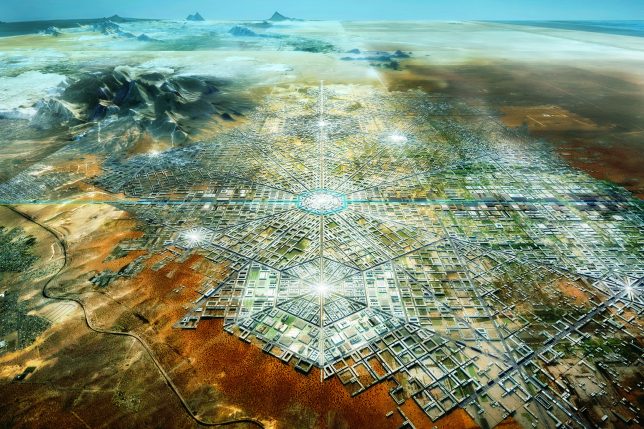
Border City is being designed as a bridge between nations, a novel approach to creating international unity at a time when some politicians call for building walls. Proposed by architect Fernando Romero of the firm FR-EE at the London Design Biennale, this visionary project is to be developed along a region of border covering parts of Texas, New Mexico and Chihuahua.

futuristic border city

The plan is centered around an extant border crossing and aligned with other crossings in the area as well. It may sound far-fetched, but Romero is already negotiating with private land owners in the region as well as developers and investors. He hopes to make the city a reality within a decade.

border city design

Romero believes our existing concept of borders is “primitive” and sees and urgent need to move past binary understandings of such divides. Already, many global centers of economic activity are centered not around cities but rather clusters of metropolitan areas, often along national borders.

border city map

“This is a long-term vision, a vision that is not about building walls but about thinking more ambitiously about the mutual relationship [between two countries] and about what borders really mean between countries” said the architect. It is also a reflection of current reality, where there already “exists a very strong mutual dependency of economies and trades.”

border city installation

The urban plan consists of interconnected hexagonal-shaped grids, each with their own center and linked to existing transportation corridors and border crossings. If his proposal is fully realized, the city could even become a special economic zone (see also: Hong Kong and Andorra) that would enjoy semi-independent governance.

border city room

Even without that kind of designation and semi-autonomy, however, there would still be big benefits to residents and businesses in terms of easy access between countries due to optimized transit and city planning. Many “twinned” border cities along the Rio Grande have already benefited from close ties despite extant borders, despite the lack of centralized and ground-up plans to optimize connectivity.

border city utopia

“What you’re seeing here is the first binational city to be designed from zero between the United States and Mexico,” said Romero. “This is one of the most active borders in the world in terms of commerce and traffic of goods but also in terms of human activity and employment.”

Share on Facebook


[ By WebUrbanist in Architecture & Cities & Urbanism. ]

[ WebUrbanist | Archives | Galleries | Privacy | TOS ]


WebUrbanist

 
Comments Off on Binational Megacity: Master Plan Designed to Span US-Mexico Border

Posted in Creativity


Create a Photography Business Marketing Plan in 3 Days (+ Save $30 Instantly)

25 Apr

Starting a photography business these days is quite a challenge. It takes courage. You need to push yourself constantly to go out of your comfort zone and learn a whole pack of new things. While there are no shortcuts to success, there are accelerated ways. Read on to learn about one of them and build a photography business marketing plan Continue Reading

The post Create a Photography Business Marketing Plan in 3 Days (+ Save $ 30 Instantly) appeared first on Photodoto.


Photodoto

 
Comments Off on Create a Photography Business Marketing Plan in 3 Days (+ Save $30 Instantly)

Posted in Photography