RSS
 

Posts Tagged ‘Photos’

Re.photos: This website lets anyone create and share then-and-now photos

04 Jan

If you’re both a photography fan and history buff, then you might want to check out a platform called re.photos. The website/social network, which launched a couple of months ago, allows anyone to share interactive then-and-now images—so-called “rephotography”—that compare a modern version of a location or subject with an older image of the same spot.

Re.photos is the brainchild of retired computer science professor Oliver Vornberger, and it’s extremely easy to use. Users simply upload both a before and an after photo, then place markers on a few points on the images so that the system knows how to align them.

Speaking to PetaPixel in November, Vornberger said that a student of his is working on improving the platform’s algorithm so that manually placing markers isn’t necessary. Eventually, the whole system should be as easy as uploading a before and after picture, and letting the website do the rest of the work.

In addition to automatically aligning images—taking the hard work out of creating these comparisons manually—re.photos serves as an exploration platform for finding rephotography from other users. Rephotography created by users can be searched using descriptions, username, titles, tags such as date or location, and category such as interior, nature, and people.

To check out the platform for yourself, or upload a few before and afters of your own, click here.

Articles: Digital Photography Review (dpreview.com)

 
Comments Off on Re.photos: This website lets anyone create and share then-and-now photos

Posted in Uncategorized


Best Photos of 2017 by Jim M. Goldstein

31 Dec

I’m happy to report 2017 was a much better year than 2016 on many fronts. Family was healthy, we avoided experiencing the passing of family members, there was a fair amount of travel, a few great photos were taken and most importantly to me my boys continue to experience nature and ask for repeat camping trips.

In past years yearly recaps I’ve emphasized how much of my focus has shifted from taking nature photos to instilling a sense of wonder about and deep respect for nature in my two young sons. That continues to be the case.   I’ve never delved into it too deeply in past yearly recaps why my prioritization has shifted. In part it’s likely very obvious for some. That said I do want to call it out. I became a photographer because of my love for nature. If I hadn’t been so intrigued by nature I’d never have had a reason to pick up a camera. With the onset of social media and mobile phones with cameras I’m not sure that can be said of many young photographers today. More and more as I view photography online I wonder whether people are truly interested in their subjects (all styles of photography not just nature) or just trying to increase their follower stats because that’s the thing to do in this day and age. Perhaps my cynicism is getting the better of me after working at Borrowlenses where I dealt with photography talking heads & professional and aspiring professional photographers on a daily basis. An element of my becoming a jaded photographer I’m sure (kudos to my friend Richard Wong for writing that post). I’ll avoid going down the path of airing dirt for now as that’s a series of posts unto itself. Anyhow once my boys got old enough it was quite natural for me to want to go back to my roots enjoying nature over photography. I’d like my children to deeply respect and value our natural world. What would I be teaching them, about nature and in general, if I was always taking photos on our trips versus living the moment?

For that reason my yearly recap photos have and will continue to be split between family photos and everything else. While my boys are in their most formative years I’ll continue to put my emphasis behind experiencing nature versus artistically capturing it. The fact that my boys regularly tell me, often out of the blue, they want to go camping again means the world to me. I’m incredibly grateful one aspect of my professional outdoor photographer mind has not lost a beat and that is timing our trips for optimal conditions. This used to torment me as I’d leave my DSLR behind, but the more my boys reminisce and ask for more nature experiences the more I know I’ve made the right call.

Now that that’s out of the way… my favorite photos, in no particular order are below. Enjoy and thanks for taking the time to view this post and my blog in general.  If you happen to have a recap of your best photos of 2017 I invite you to submit it to my blog project, where I list the best photos of photographers who read my blog. It’s a lot of fun and a great way to get inspired at the beginning of the new year.

Best of  Landscape & Nature

_MG_9035-_MG_9089-3

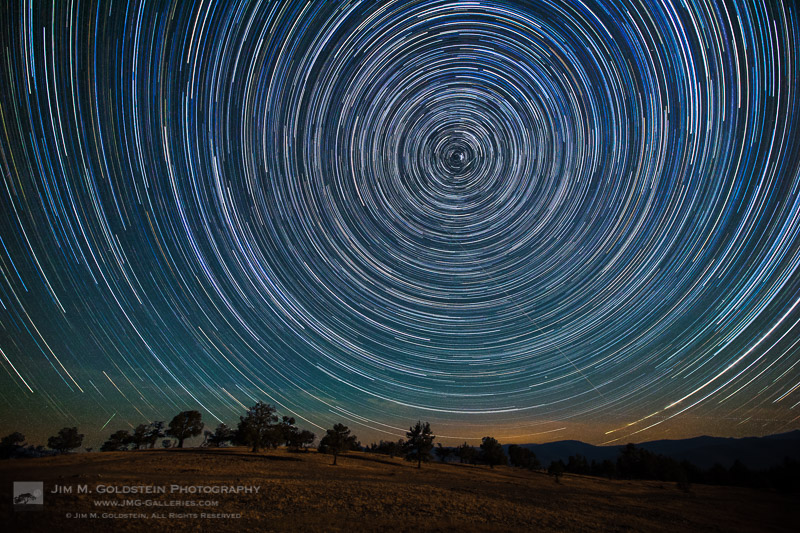
I took my boys to witness the total solar eclipse in August of 2017. We went off road to an isolated mountaintop with 360 degree views in eastern Oregon. My focus for the eclipse itself was on the experience with my boys, but we did star gaze a lot at night before the big day. In trying to explain how the earth moves I set up a quick star trail sequence to show the boys. This was the result.

_A2A1077M-2

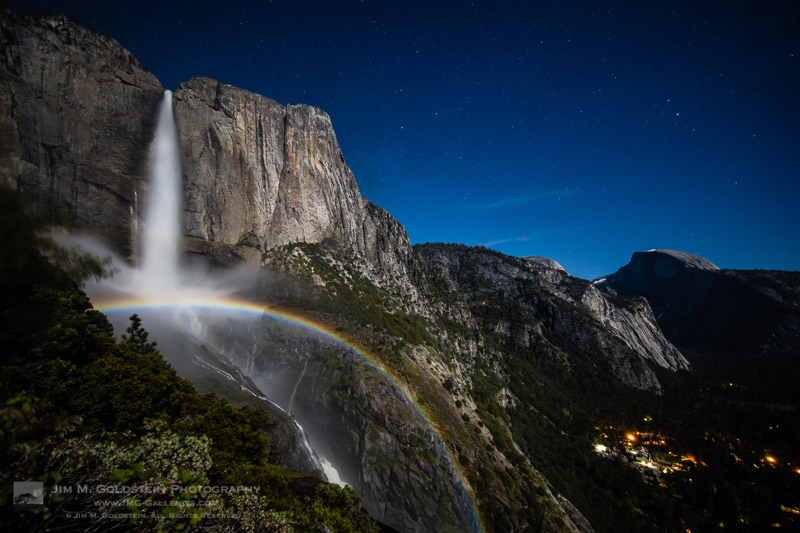
Water levels were near record levels this spring in Yosemite Valley. I made what has become a regular hike to Upper Yosemite Falls to take time-lapses of moonbows with my friend, Brian Hawkins. Like me, he seems to have enough screws loose to think this night hike is a good idea along with huddling in ice cold mist to capture this view.

_MG_7933-edit-3

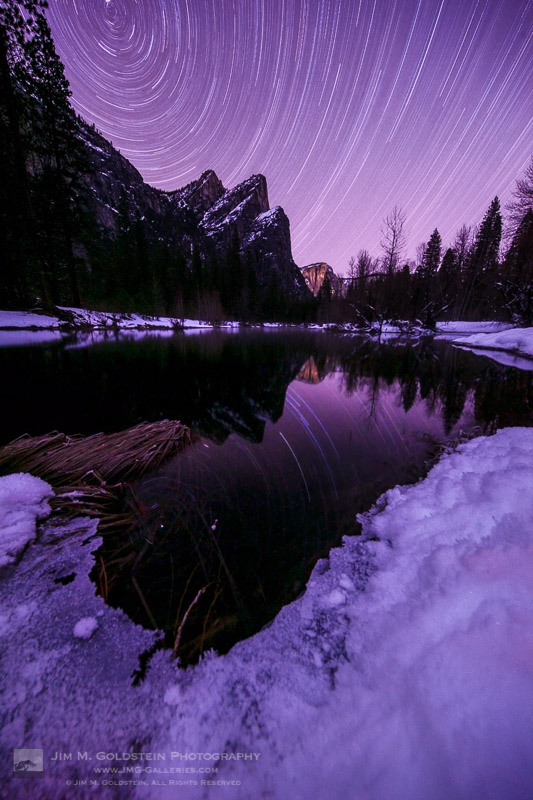
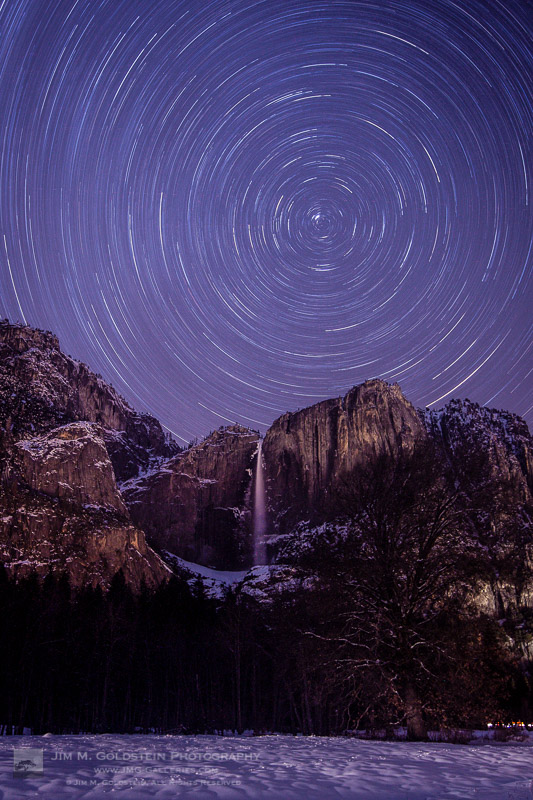
At the beginning of the year I timed a trip to Yosemite Valley to capture some long overdue winter star trail photos. This was a single 2+ hour exposure taken with my Canon 5D Mark II. Pictured is Three Brothers with star trails reflected in the Merced River.

_MG_7906M-4

Another single 2+ hour exposure taken with my Canon 5D Mark II. Pictured is Upper Yosemite Falls as seen from the valley floor.

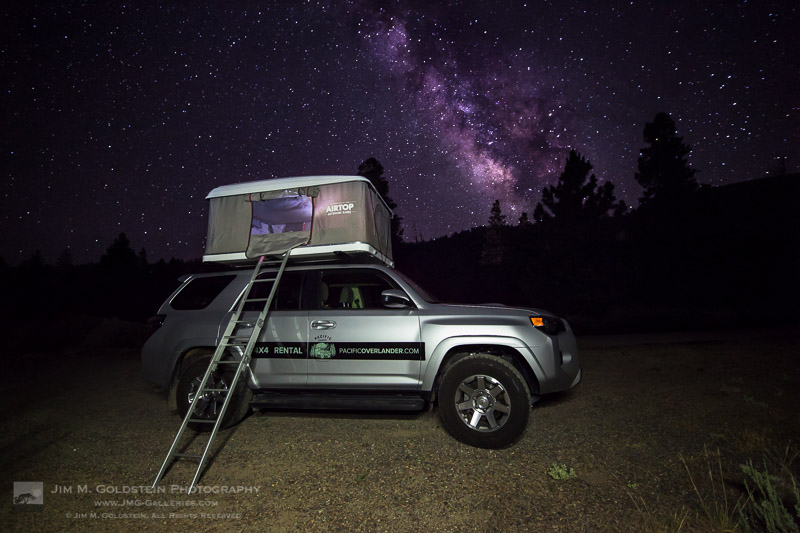
PacificOverlander.com Truck Under the Milkyway

For most of my family trips this year I’ve rented an SUV outfitted with a rooftop tent via PacificOverlander. I took this photo on the first night of one of my trips with the boys as we explored the Owens Valley. While they slept I snuck in this photo of our truck/tent under the Milky Way. If you’re unfamiliar with PacificOverlander it’s well worth investigating. I’ve had several amazing experiences and my boys keep asking me why I keep giving the truck back. They regularly have so much fun on these trips it would seem they’re sold on having a truck/rig like this of their very own.


Best of Family

IMG_4675-2

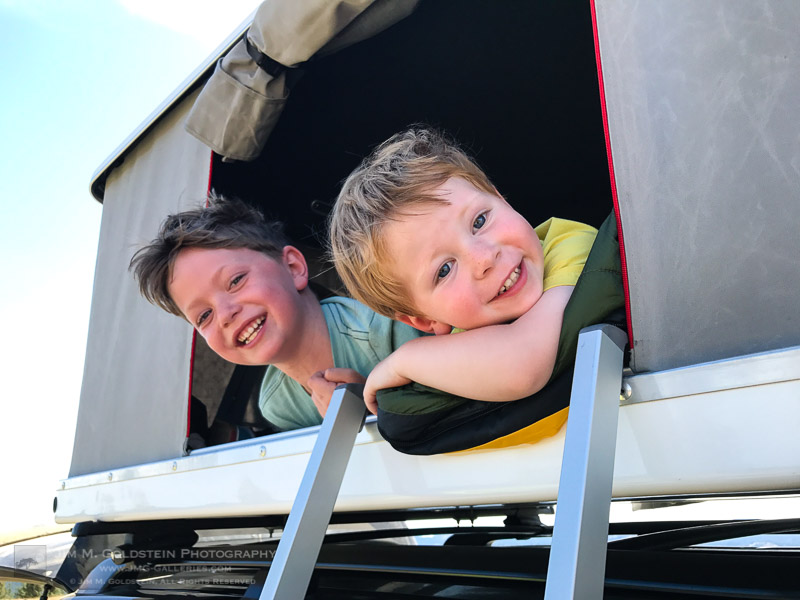
Taken on our trip to see the total solar eclipse, the boys enjoy hanging out in the tent atop our PacificOverlander SUV. This photo sits atop both my home and work desk. It’s probably my favorite photo of the year as it captures the raw joy my boys have on our camping excursions.

_MG_9412-2

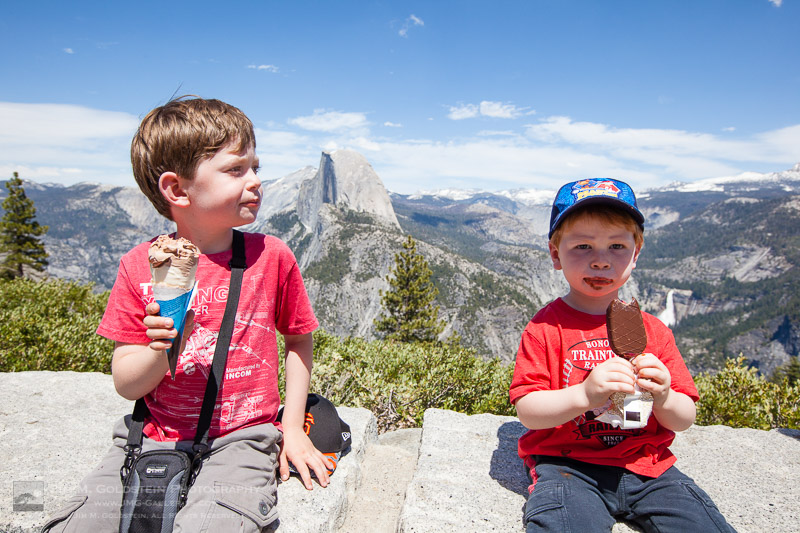
I spoiled my kids with ice cream atop the Glacier Point lookout in Yosemite National Park. A moment I enjoy remembering through this quick snapshot.

_MG_9241-2

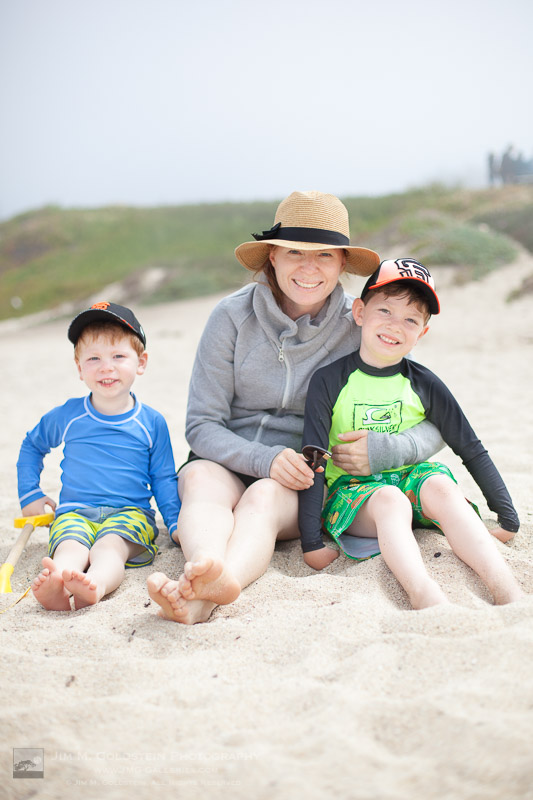
Wrangling family for a group photos is… a challenge. This is especially true when the boys enjoy making faces and test the patience of my wife. Every so often though a photo comes out just right. This was one that I took while we enjoyed a sunny day at a beach near Half Moon Bay.

_MG_9801-4

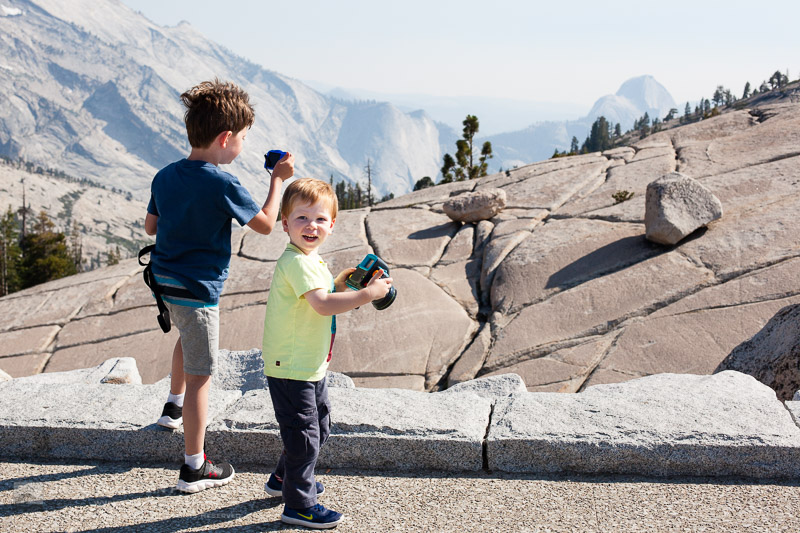
Not a technically great photo, but the fact it captures the raw excitement of my youngest son exploring new places makes it one of my favorite of the year. The had a fun time rock hopping at Olmsted Point in Yosemite National Park.

_MG_8189-3

Trains… my boys love trains. Given the opportunity they’ll always jump on a train and lucky for them the commuter train, Caltrain, is very close to where we live. Bright eyed and excited I couldn’t help but take this photo of my son as we started to roll.


Bonus Images / Honorable Mentions

I didn’t take this first image, but it’s impossible to exclude as it’s a great keepsake from a very fun trip. Below that you’ll see a short slideshow of images that might show a glimpse of the future. While I’m not actively taking serious photos in front of the boys they’ve none the less taken to photography on their own. If you’ve seen my past years “Best of” photos you’ll also see that my oldest son continues to enjoy being part of trick photos (forced perspective, rotated images, etc.). His best this year was “rock climbing” at Devils Postpile National Monument. Lastly my oldest also enjoyed getting drenched under a rainbow at Bridal Veil Fall in Yosemite this spring.
_MG_7944-Edit-2

Click to view slideshow.

If you’re curious to see how these compare to my “best of” images selections from years past I invite you to check them out: Best Photos of the Year by Jim M. Goldstein.

Wow! You made it this far. Thanks for taking the time to view all my photos. Keep tabs on my latest posts by subscribe to my blog or (ironically) follow me on social media. I’m not posting as frequently as I used to, but when I do it’s likely something you won’t want to miss. Also I do have a mail list if you’d like to subscribe (at my current rate I send out 1-2 email per year due to a hectic schedule).


The post Best Photos of 2017 by Jim M. Goldstein appeared first on JMG-Galleries – Landscape, Nature & Travel Photography.


JMG-Galleries – Landscape, Nature & Travel Photography

 
Comments Off on Best Photos of 2017 by Jim M. Goldstein

Posted in Equipment


Interview with an astronaut: What it’s like shooting photos from space

28 Dec

Jared Polin (aka. Fro Knows Photo) recently scored an interview that has us all extremely jealous here at DPReview. A phone call to NASA to find out if astronauts shoot Raw in space led to an interview with Marine fighter pilot and NASA astronaut Randy Bresnik, who had arrived back to Earth from the International Space Station just three days before Jared spoke with him!

The entire interview is fascinating from first question to last, but first things first: yes, astronauts do shoot Raw in space. Bresnik himself says he shot RAW+JPEG so he could download the JPEGs onto his laptop and see the shots ASAP, but the Raw files are beamed down to Earth where the folks at NASA process them to their full potential.

This is far from the only only topic Polin and Bresnik cover, though. They hit everything from radiation damage, to stabilizing your shots in space, to the glass available, to what it was like switching from Nikon D4 cameras to the brand new D5s that arrived on the ISS in mid-November, and much more.

And all the while, gorgeous photos Bresnik captured while up there scroll across your screen. Photos like the ones below—some of our favorites from Bresnik’s last 2 months on the ISS:

$ (document).ready(function() { SampleGalleryV2({“containerId”:”embeddedSampleGallery_3868241639″,”galleryId”:”3868241639″,”isEmbeddedWidget”:true,”selectedImageIndex”:0,”isMobile”:false}) });

Editor’s Note: Bresnik also contributed the #oneworldmanyviews hashtag, which paired shots of beautiful locations captured in space with photos of the same spot taken from Earth.

For Polin, the conversation seemed surreal. He tells DPReview that:

For me I was in awe for a lot of the interview. It’s not easy to wrap your head around SPACE and the sheer fact you can transfer the data back to earth. Sure that’s been going on for decades but think about it. 250 miles up in space there’s a station with six astronauts on it, with an entire Nikon setup of D5’s and glass up to an 800 5.6 for god sake. The direct downlinks to NASA transfer data all night long.

Check out the full interview up top, scroll through the gallery above for a bit of awe, and if you want even more, head over to Bresnik’s Twitter account where you can find enough photos, videos, and timelapses to keep you busy until New Years and beyond.

And, since Polin says he may actually get to interview an astronaut who is on the space station when he talks to them, we’re curious: what would you ask an astronaut about photography in space? Drop your suggestions in the comments.

Articles: Digital Photography Review (dpreview.com)

 
Comments Off on Interview with an astronaut: What it’s like shooting photos from space

Posted in Uncategorized


Google’s new AI ranks photos on their technical and aesthetic quality

27 Dec
Image: Google

We have seen several attempts at automated image assessment from both technical and aesthetic points of view in the past. For example, Google researchers have previously used convolutional neural networks (CNNs) to assess image quality of specific image categories, such as landscapes.

However, these previous approaches could typically only differentiate between low and high image quality in a binary way. Now, a Google research team has developed a methodology that can provide a more granular assessment of the quality of a photograph that is applicable to all types of images.

The NIMA: Neural Image Assessment model uses a deep CNN that was trained to predict which images a typical user would rate as looking technically good or aesthetically pleasing, using that information to rate an image on a scale of 1 to 10.

To achieve this, it relies on state-of-the-art deep object recognition networks and uses them to develop an understanding of general categories of objects. As a result, NIMA can be used to score images in a reliable manner and with high correlation to human perception, which makes it a potentially very useful tool for labor intensive and subjective tasks, such as automated image editing or image optimization for user engagement.

The NIMA team says that, in testing, the model’s aesthetic ranking of images closely matches the mean scores that were assigned by human judges. What’s more, the technology is still in its infancy; further retraining and testing should improve the model even further. Once systems get better, future applications could include image capture with real-time feedback to the photographer, auto-culling, or providing guidance to image editors to achieve optimized post-processing results.

More detail on this fascinating new system are available on the Google Research Blog.

Articles: Digital Photography Review (dpreview.com)

 
Comments Off on Google’s new AI ranks photos on their technical and aesthetic quality

Posted in Uncategorized


Blog Project: Your Best Photos From 2017

22 Dec

It’s that time of year again and if you’re a regular JMG-Galleries reader that means one thing…
it is time to kick off the 11th annual best photos of the year blog project. This is by far my most popular blog project with hundreds of photographers taking part last year (see Best Photos of 2016,  2015, 2014, 2013,  2012, 2011, 2010, 2009, 2008 and 2007).  It’s great to see the community of photographers that have developed around this blog project. As always I hope the exercise of picking your best photos helps improve your photography (10 Ways to Top Your Best 20xx Photographs).

So without any further delay here is how you take part to submit your best photos of 2016.

How to Participate (Read Carefully)

  1. Review & select your best photos from 2017.
    Note: Photo edit carefully narrowing down your results to your best 10 or 5 photos. Reference Pro Tips: Photo Editing with Gary Crabbe for pointers.
  2. Create a blog post on your website or a Flickr/500px set containing your best photos from 2017.
  3. Complete the form below by Tuesday JANUARY 2rd at 11:59PM PST to take part. The following Tuesday, or thereabout, I’ll post a link to all submitted sites and photos on my blog. Throughout the week I’ll also share the results across all my social media accounts.

Spread the Word!
Feel free to spread the word of this project on Twitter, Facebook, Instagram, Google+, photo forums you frequent and/or your blogs. All who are interested in taking part are invited.


Loading…

The post Blog Project: Your Best Photos From 2017 appeared first on JMG-Galleries – Landscape, Nature & Travel Photography.


JMG-Galleries – Landscape, Nature & Travel Photography

 
Comments Off on Blog Project: Your Best Photos From 2017

Posted in Equipment


How to Create Powerful Travel Photos that Will WOW Your Friends [2 Days Only]

19 Dec

Have you ever said ‘This is nothing like what I saw!’ when looking at the images you took of a trip?

Travel Photographer of the Year (and dPS Book Author) Mitchell Kanashkevich has created an amazing “Behind the Scenes” photography course that’s a blueprint for creating power photographs. 

It’s all about helping you to capture the magic of the experiences you have when travelling and come home with images that will wow your family and friends.

For the next 48 hours, as an exclusive offer to dPS readers, he’s offering his course at 70% off the normal price. 

That means for the next 2 days you can get his beautifully crafted travel photography course for $ 39.95 instead of $ 129.97.

In this online Course you’ll Learn: 

  • How to search for that amazing photo (includes the first obvious question that’s rarely asked)
  • The truth about compositional rules and more organic and fluid ways of looking at composition 
  • Why being a photo sniper makes no sense in the digital age
  • The crucial factors that make the difference between a great photo and one that falls short
  • Can a great image be the result of an accident? (Confession time, but it’s not what you might think)
  • The practical approach to capturing the moment
  • … and much more

Mitchell provides an over the shoulder editing experience as well as providing RAW files, so you can practice the same techniques on them in post-processing.

Check out the full course outline here.

… you only have 48 hours (and counting) though, so be quick.

Bonus Offer from our Partners

Anyone who picks up any of the great deals this week also unlocks some great bonus deals from our partners.

For example if you pick up Mitchell’s course today you’ll get access to KelbyOne annual membership at 20% off the normal price. Access our exclusive Partner Bonus Offers here.

Christmas Deals:
Bonus Offers

Bonus Offers

Brought to you by

ON1
Athentec Perfectly Clear
KelbyOne
New York Institute of Photography

The post How to Create Powerful Travel Photos that Will WOW Your Friends [2 Days Only] by Darren Rowse appeared first on Digital Photography School.


Digital Photography School

 
Comments Off on How to Create Powerful Travel Photos that Will WOW Your Friends [2 Days Only]

Posted in Photography


DPReview Instagram takeover: Barney’s photos from Mexico

18 Dec

Have you followed us on Instagram yet? Now’s a great time to, since over the next three days we’ll be turning our account over to Barney, where he’ll be sharing photos from a recent trip to central Mexico. It’s the trip that cemented the Leica M10 as his Gear of the Year, and provided plenty of opportunities to photograph the beauty of the region – from the captivating architecture of Queretaro to the jungle of San Luis Potosi and points in between.

Give us a follow and stay tuned!

Articles: Digital Photography Review (dpreview.com)

 
Comments Off on DPReview Instagram takeover: Barney’s photos from Mexico

Posted in Uncategorized


5 Ways to Take More Meaningful Photos This Christmas

13 Dec

Christmas goes by in the blink of an eye. But taking photos helps us to savour the moments long after the tree is gone and the kids are grown up. When you follow these 5 tips, you’ll have better and more meaningful photos this year.

First - 5 Ways to Take More Meaningful Photos This Christmas

1. Don’t Get Caught Off Guard

The first step to photographing an upcoming event like Christmas is to do a little planning. Start by considering the traditions and moments that you want to look back on in photos. Write an actual list so that you don’t forget what’s on it.

When you’re finished writing out your list, do this exercise to help you figure out what is truly meaningful about those moments. When you do this exercise, you’ll be able to capture deeper themes in your photos.

Take each moment and ask yourself, “What about this moment is important to me?”

For example, you might put “opening presents on Christmas morning” on your list. That’s an obvious one. But ask yourself, “What about the kids opening presents is important to me?” Perhaps the answer is something like, “seeing the look of delight on their faces.”

But don’t stop there; you’ve only gone a little bit below the surface. Now ask yourself, “What about seeing the look of delight on their face is important to me?” Maybe the answer is, “I remember what it was like as a kid and I want to pass that magic and excitement on to my kids.”
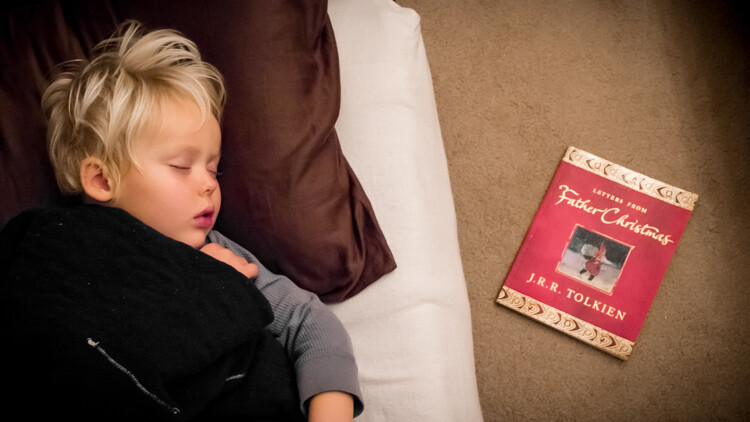
Sleep - 5 Ways to Take More Meaningful Photos This Christmas

Do you remember when you were a kid how hard it was to fall asleep on Christmas Eve? After putting the presents under the tree, I snuck in to take this photo of my son as he lay sleeping. This is the book we were reading for his bedtime story.

Now you’re getting somewhere! But you can still keep asking that question until you get right to the bottom. What about “passing on magic and excitement” to your kids is important to you? “Well, this is such a short time in their life. Soon they’ll be grown up and stressed out like me. I just want to slow that down and make their childhood good.”

You’re finally getting deep, so ask the question one more time. “What about slowing down and making their childhood a good one is important to me?” Maybe the answer is that “these are the most formative years of their life. If their childhood goes well, they’ll likely grow up and become good and strong adults themselves.”

By asking the question, “what about this moment is important to me,” you will discover the deeper themes in your photos. Now you can look for those themes in other moments too. Where else do you find the magic and excitement of growing up?
Get in touch with the things that will shape your children as they grow and the things you care most about.

Instead of a few random snapshots of Christmas morning chaos, you can photograph all sorts of meaningful moments to look back on.

Better Christmas photos 01

This is one of the most meaningful photos I have of Christmas time. Not only do I love the quiet moment and beautiful candlelight, but the photo was taken at my grandma’s church on Christmas Eve. It was my son’s first Christmas Eve church service and it was our first Christmas without my Grandma. The photo reminds me of the traditions and hope that is passed down the generations in our family.

Sick - 5 Ways to Take More Meaningful Photos This Christmas

A tender moment between mom and daughter. Our daughter came down with a fever this Christmas. Giving our kids gifts is an exciting part of parenting, but so is comforting them when they are sick. I knew this was a moment worth capturing.

2. Prepare for the Light

You’ve got your list of moments to photograph and you’ve checked it twice! Now you need to consider the type of light in which you will be photographing. When you’re able to handle the light, your photos will look better.

Go ahead and use the flash on your camera (or phone) if you have to. It’s better to have a photo lit with flash than a dark and blurry photo that isn’t worth looking at.

Better Christmas photos 02

This was our first Christmas together as a family. I had read that you shouldn’t use the flash on your camera, so I didn’t. Unfortunately, the photo is so dark you can’t see us. I wish I had used the flash!

Better Christmas photos 03

I used the popup flash on my camera for this photo. It doesn’t always work out this nice though. If you’re going to use the little built-in flash on your camera, then get as close as you can to your subject. The flash will light them up, but not affect things in the background so much.

If you have a DSLR camera and you’re going to use flash, consider using an external flash called a speedlight. When you use an external flash you can bounce the light and your photos will look far better than the little pop-up flash on your camera.

Better Christmas photos 04

An on-camera speedlight was used to light this photo. It was pointed up toward the ceiling so that the light would become softer as it bounced back down toward my son. The Christmas lights in the background are far enough away that they weren’t affected by the flash.

But whenever possible, use natural light. When you’re taking indoor photos, one of the best sources of natural light during the day is a large window. Many of your holiday events will happen in the living room, and most living rooms have a large window which lets in lots of light.

Place your Christmas tree beside the window instead of in front of it and allow the window to become a large, soft light source, making your photos look beautiful.

Better Christmas photos 05

Here the kids are at Grandma’s house. There is a large window to the right which is lighting them up. The Christmas tree is tucked into a corner away from the window.

Better Christmas photos 06

Again, there is a large window providing light for this photo. The tree is tucked away from the window allowing the lights to keep their glow.

When the sun goes down, and you don’t want to use flash, try using lots of lamplight in your photos. The lower placement of lamps simulates the position that the sun is in during golden hour or sunset. The lampshade diffuses the light making soft sidelight for your photos.

Better Christmas photos 07

This photo was lit with two lamps. The warm, soft light provides ambiance for the moment.

3. How to Make Your Photos Look More Exciting

There is a secret that will instantly make your photos look more exciting. Use a low angle! It sounds simple and it is. Just crouch down a little bit and look up at the person you’re photographing. If it’s an exciting moment then use a low angle to make it look exciting in the photo.

You should take note that low angles are not generally good for formal portraits. A low angle exaggerates a person’s size and adults don’t usually like that. But, if it’s a portrait of an athlete or rock star then a low camera angle is a must.

Better Christmas photos 08

We all remember how fun it was to play with the empty wrapping paper rolls as kids. I wanted to make this moment look epic so I crouched down for a low angle.

Better Christmas photos 09

When my son unwrapped his emergency set he wanted to play with it immediately. I went for a low angle because in real life we always look up to see a helicopter flying. It’s just a photo of a boy with his toy helicopter, but I wanted a more dramatic effect. Notice the burst of backlight coming from the big window in the background.

Better Christmas photos 10

This low angle gives us the fun perspective of the toys looking up at everyone.

4. Tell a Story With Your Photos

As you’re photographing your most important moments, in beautiful light, from interesting angles, be mindful of the fact that you’re photographing a story. Your story is filled with characters (your friends and family), with an emotional plot that takes place in many settings (around the dinner table, the Christmas tree, at church, in front of the fireplace).

Photograph the unique personality of each character. Take more than one photo of each moment and link them together to show the plot-line. Make sure to include the background as part of the setting for your character’s story.

The photos below illustrate a story being told over time.

Better Christmas photos 11

This was the year that my son first learned to print letters and read simple words. Here, he’s writing the tags for Grandma’s presents.

Better Christmas photos 12

The following Christmas he had begun to spell out words on his own.

Better Christmas photos 13

After our family Christmas trip to Grandma’s house was over, both of the kids were really sad. So as they went to bed that night, they drew pictures to mail to Grandma. But my son wrote her a whole letter. He had never done anything like that before.

It’s exciting when we bring our kids into our traditions. Something as simple as filling out a gift tag is a huge step in their growth and part of a bigger story.

5. Practice Before Christmas Day

Christmas isn’t just about what happens on December 25th. For most families, Christmas has a month-long lead up. So work on your list of things to photograph, but remember to start photographing Christmas before it even gets here.

Practice looking for deeper moments in beautiful natural light (or using your external flash). You’ll be far more confident when the big day arrives and you don’t have time to over think the photos you’re taking.

Better Christmas photos 14

This was my first Christmas using a speedlight with my camera. As soon as our tree was up I began experimenting so that when Christmas arrived I would know how to use it. This shows a pretty good balance of ambient light from the tree mixed with the light from my flash.

Listen to Your Heart

When your heart tells you to pick up your camera and snap a photo, do it. Don’t hesitate, just take the photo. It may not turn out to be the perfect moment or the best angle. But at least you’ve got a photo.

Better Christmas photos 15

This is one of the most precious photos I have.

The photo above is my daughter and my grandma. It was just a fun little moment that they were having together. My camera is never out of arm’s reach at Christmas time. I saw this moment and clicked a few photos. I didn’t know then that these would be the last photos I would take of my grandma. My little girl won’t remember this moment, but she will always be able to look back and see the love that her great-grandma had for her.

Your Checklist for Deeper Christmas Photos Than You’ve Ever Taken Before

  1. Make your list of important moments
  2. Look for beautiful light and have your external flash ready
  3. Use low angles to make exciting events actually look exciting in your photos
  4. Tell a story with your photos
  5. Practice before Christmas day

The post 5 Ways to Take More Meaningful Photos This Christmas by Mat Coker appeared first on Digital Photography School.


Digital Photography School

 
Comments Off on 5 Ways to Take More Meaningful Photos This Christmas

Posted in Photography


How to Quickly Process Your Holiday Photos with Luminar’s Accent AI Filter

12 Dec

The holiday season is upon us, and suddenly everyone seems to be in a rush. We all have a million things to accomplish in just a few short weeks. At this time of year, I’m always scrambling to get my Christmas photos processed and ready for viewing. Feeling overwhelmed once again this year I decided to turn to Luminar by Macphun, soon to be Skylum, and try out their unique Accent AI Filter. It’s supposed to be a super simple and quick way to get beautiful images.

What is the Accent AI Filter?

AI stands for Artificial Intelligence and this filter is designed to do all the hard work for you. It uses artificial intelligence to assess the image and then applies the required adjustments to the image. This means that each image is processed according to the individual shadows, highlights, and colors present within the photo. The Accent AI Filter allows you to make quick, impactful adjustments with just one slider.

Locate the Accent AI filter in Luminar by clicking on the “add filter” button or by selecting the workspace called “Quick and Awesome”. This workspace combines the Accent AI filter plus the Clarity and Saturation filters to create a dynamic combo of super quick adjustments.

How to Process Your Holiday Photos with the Accent AI Filter in Luminar

Find the Accent AI filter quickly using the “add filter” button.

How to Process Your Holiday Photos with the Accent AI Filter in Luminar

The Quick and Awesome Workspace is easy to use for super simple adjustments.

Time to edit some photos

Each holiday season I have to process a large number of images. The first set of images usually belongs to the commercial realm. I’m often shooting photographs that are used to promote various Christmas art sales. When I’m staring at a collection of 300 images and a rushed timeline, a quick post-processing workflow is so important. I need to download, tweak, and upload and deliver digital images to clients for their social media campaigns. It’s fun, but it can be overwhelming when it needs to be completed in such a short frame of time.

Using Accent AI with commercial images

It’s time to test the Accent AI filter on these commercial images and see how it handles the varied lighting conditions at these venues. These images of a Christmas craft sale located here in Canada were shot in a heritage building.

The lighting was pretty terrible, and on this particular day, it was cloudy, so I was challenged by these factors along with the fact that many of the pieces were quite shiny. It was a challenging situation, especially when I had to photograph the items during gallery hours and I couldn’t set up any lights. I had to use what was available.

Image #1 –Only one adjustment

For the following images, I had to use fairly high ISO settings and a wide aperture of f/2.8 to f/4. In the case of the image below, I moved the slider on the Accent AI Filter over to the right and was able to quickly and easily adjust the image without making any other tweaks. The item in the image is clear and easy for customers to view. It only took me a few seconds to prepare this image for upload.

How to Process Your Holiday Photos with the Accent AI Filter in Luminar

I quickly applied the filter to this image. The result is certainly good given the lighting and conditions in the art gallery.

How to Process Your Holiday Photos with the Accent AI Filter in Luminar

Here’s the full image after processing.

Image #2 – Applied as a mask

In this second image, I found that the Accent AI filter created too much of a yellow tone that took away from the beauty of the color of the red hat. The wall looked yellow, and I didn’t like this effect. However, I really liked the way the filter treated the hat itself, and I think it brought out its details and rich color.

So I applied the Accent AI Filter as a mask. I added a second layer (just click the + sign next to the word “Layers”) and painted in the filter over the hat. The resulting image took just a few minutes to create.

How to Process Your Holiday Photos with the Accent AI Filter in Luminar

When I applied the Accent AI filter to this entire image it made the wall quite yellow.

How to Process Your Holiday Photos with the Accent AI Filter in Luminar

Here I used a mask to apply to filter to just the hat so that the wall remained white.

The Accent AI Filter helped me to edit my photos for clients quickly. It handled the editing of images taken under some fairly challenging lighting circumstances with high ISO settings. I think this speaks to the capabilities of the filter to assess each image and adjust it accordingly.

It should also be noted that you can have too much of a good thing. In some instances, the filter created too much of an unnatural HDR look. It’s important to adjust the slider accordingly and subtly. In this case, I didn’t want a heavy HDR look, and I had to be careful just how much of a boost I applied to each image.

How to Process Your Holiday Photos with the Accent AI Filter in Luminar

Here I purposely applied the filter to illustrate the point that the Accent AI filter can become too “heavy-handed” if you take it too far.

Using the Accent AI Filter for art images

I also tested out the Accent AI Filter on some images I created for use on Art Cards. The following image was shot with the purpose of being used as a Christmas card. I usually make a collection of 10 images that are all winter or Christmas themed. In years past I’ve slaved for hours, carefully editing the work. This year I decided to see if the Accent AI Filter could handle my art photos as well.

In the image below of an ice-crusted coniferous tree, I was struggling with a very hazy atmosphere. I wanted the yellowish tree to stand out from the green of the trees behind. I also wanted to define the ice and create an image that showed the unique nature of that moment in time. Remember I said to be careful in applying the filter too heavily, but in this case, I cranked it all the way to the right.

The brown of the tree branches stood out from the yellow of the tree needles, which is good. I also like how defined the ice became on the strands of dried grass below. There was no banding present, and the image still had a fairly natural look. In this case, the heavily applied filter worked perfectly.

How to Process Your Holiday Photos with the Accent AI Filter in Luminar

Here’s the unprocessed image.

How to Process Your Holiday Photos with the Accent AI Filter in Luminar

Here you can see the Accent AI Filter at 100 percent.

How to Process Your Holiday Photos with the Accent AI Filter in Luminar

The changes made to this image are considerable with the filter at full strength.

How to Process Your Holiday Photos with the Accent AI Filter in Luminar

Here’s the completed image.

Using the Accent AI Filter to adjust family snaps

Annually, I take a quick photo of the family to document the year. These images are not spectacular. They are family photos that are cherished on a personal level and document the changes each year brings. But they have to be shot quickly as my family isn’t overly patient when it comes to photography. I decided to see how the Accent AI filter would handle the editing of these photos.

Again the lighting is often challenging as they are usually shot on Christmas Eve. I wanted to see if the filter could enhance these memories and also help to fulfill my obsessive photographer tendency to want to take professional quality images all the time. In this case, I messed around a little and wanted to see how the filter affected the portrait.  This time I used Luminar as a plugin for Lightroom.

So I made a few adjustments in Lightroom first. I straightened the image and cloned out the cat’s tail. Then I moved over to Luminar and applied the Accent AI Filter. I like the resulting image. The filter helped to put a little bit of definition into the boys faces and balanced out the light. All in all, it worked pretty well.

How to Process Your Holiday Photos with the Accent AI Filter in Luminar

With the filter to almost 50% strength, the image is still pleasing.

How to Process Your Holiday Photos with the Accent AI Filter in Luminar

Here you can see the subtle difference the filter made in this image. Look closely at the detail in the blue t-shirt (after image the right of the line)

How to Process Your Holiday Photos with the Accent AI Filter in Luminar

Here you can see the changes in a side by side back in Lightroom. The image on the left shows the Luminar adjustments.

Conclusion

In conclusion, the Accent AI Filter in Luminar is an effective tool that can help you to adjust a large range of images. The filter is highly “intelligent”. It saves several steps in post-processing. If I were to edit these images without using the Accent AI Filter, I would have had to apply several different filters and spend time carefully adjusting their effect on the image. The Accent AI filter streamlined the process for me.

Also read: Speed up Your Workflow with the Accent AI Filter in Luminar and Batch Processing for more on how to apply this handy filter as a batch to a whole set of images at once. 

Here’s another image finished with slight adjustments using the Accent AI Filter.

Disclaimer: Macphun, soon to be Skylum, is a dPS advertising partner.

The post How to Quickly Process Your Holiday Photos with Luminar’s Accent AI Filter by Erin Fitzgibbon appeared first on Digital Photography School.


Digital Photography School
 
Comments Off on How to Quickly Process Your Holiday Photos with Luminar’s Accent AI Filter

Posted in Photography


These are the 15 most popular Flickr photos of 2017

09 Dec

$ (document).ready(function() { SampleGalleryV2({“containerId”:”embeddedSampleGallery_0569935631″,”galleryId”:”0569935631″,”isEmbeddedWidget”:true,”standalone”:false,”selectedImageIndex”:0,”isMobile”:false}) });

Yesterday, Flickr revealed the Top 25 Photos on Flickr in 2017, simultaneously wowing photography fans and reminding people that Flickr is still an active community of millions of photographers from across the globe. That’s right Instagram… you haven’t stolen everybody yet.

The top 25 includes dreamy childhood portraits by Iwona Podlasinska and Elena Shumilova, a spectacular eruption photo by Albert Dros, a perfectly-timed wildlife photo by Salah Baazizi, and much much more.

Flickr was kind enough to share the top 15 with DPReview, so you can scroll through those in the gallery above. And if you want to see numbers 16-25, or check out Flickr’s Top Genre Galleries, Top Country Galleries, and more, head over to the Flickr Top 25 blog post.


All photos used courtesy of Flickr.

Articles: Digital Photography Review (dpreview.com)

 
Comments Off on These are the 15 most popular Flickr photos of 2017

Posted in Uncategorized