RSS
 

Posts Tagged ‘Photos’

A Guide to Shooting Long Exposure Landscape Photos

11 Aug

Here’s a 21-minute photography guide from Gordon Laing that looks at the long exposure technique. This is where you increase the shutter speed of your camera, letting in light to the sensor over a longer duration to create unique effects.

Long exposure photography

Long exposures are often used for smoothing out moving water, or smudging clouds as they drift past in the wind. Whatever the reason, long exposures can produce dreamy and magical results, and they are a key weapon in any landscape photographer’s arsenal.

“It’s also very forgiving in bad weather,” says Laing. “It allows you to grab moody-looking images on overcast days, or even in the pouring rain.”

Laing also points out that all of the normal compositional rules of landscape photography apply to your long exposure images. A long exposure is most-often used to enhance a particular scene, rather than create something that varies so drastically that the composition is different.

There is no set duration, either. You could shoot anything from a couple of seconds to multiple minutes (such as by using the LEE Filters 15-stop Super Stopper).

A longer duration will bring out more movement in the image, but you may find that the effect is too strong or that camera shake is introduced by something as simple as the wind buffeting your tripod.

Check out the full video above for a great guide to long exposure landscape photography from Laing. If you want more check out these dPS articles on the topic:

  • How to Avoid Blurry Long Exposure Images with Proper Tripod Setup
  • Long Exposure Photography 101 – How to Create the Shot
  • Long Exposure Photography 201 – How to Edit a Long Exposure Seascape
  • How to Choose the Correct ND Filter for Your Desired Long Exposure Photography Effects
  • Recommended Gear for Doing Long Exposure Photography at Twilight and Dusk
  • How to Select a Subject for Long Exposure Photography

The post A Guide to Shooting Long Exposure Landscape Photos appeared first on Digital Photography School.


Digital Photography School

 
Comments Off on A Guide to Shooting Long Exposure Landscape Photos

Posted in Photography


How to Organize Your Photos by Location in Lightroom

09 Aug

You likely know Adobe Lightroom as a powerful piece of photo-editing software. It’s known as the industry standard for photography post-production, especially when paired with Photoshop. You may also know that its photo management features are pretty impressive. If you so choose, you can use this one piece of software to upload, rename, keyword, review, edit, export and organize your photos.

camper van on the grass - How to Organize Your Photos by Location in Lightroom

How you use Lightroom is entirely up to you, and it’s unlikely that two photographers will use it the same. The way you organize your catalog will depend on many factors, including which genre of photography you choose, who you’re shooting for, and how you have your computer hardware arranged. There is no right or wrong way to organize things, and it will likely change over time.

If you’re a portrait or wedding photographer, you might choose to organize your catalog around sessions or dates. As a landscape and travel photographer, it makes sense for me to organize my photos based on locations. Whether a location is a city, country, or even a continent, it helps me to keep things organized so I can always find what I’m looking for without wasting time searching through thousands of photos.

There are a few different ways to find photos based on location in Lightroom, but they only work if you take a few simple steps when you import them.

Import

Whenever you import photos into Lightroom, try to follow the same steps.

It’s a good idea to create some templates for the Develop and Metadata settings. This makes it easy to apply some standard settings and metadata to every one of your photos. You should at least apply your copyright information to your photos with a metadata preset.
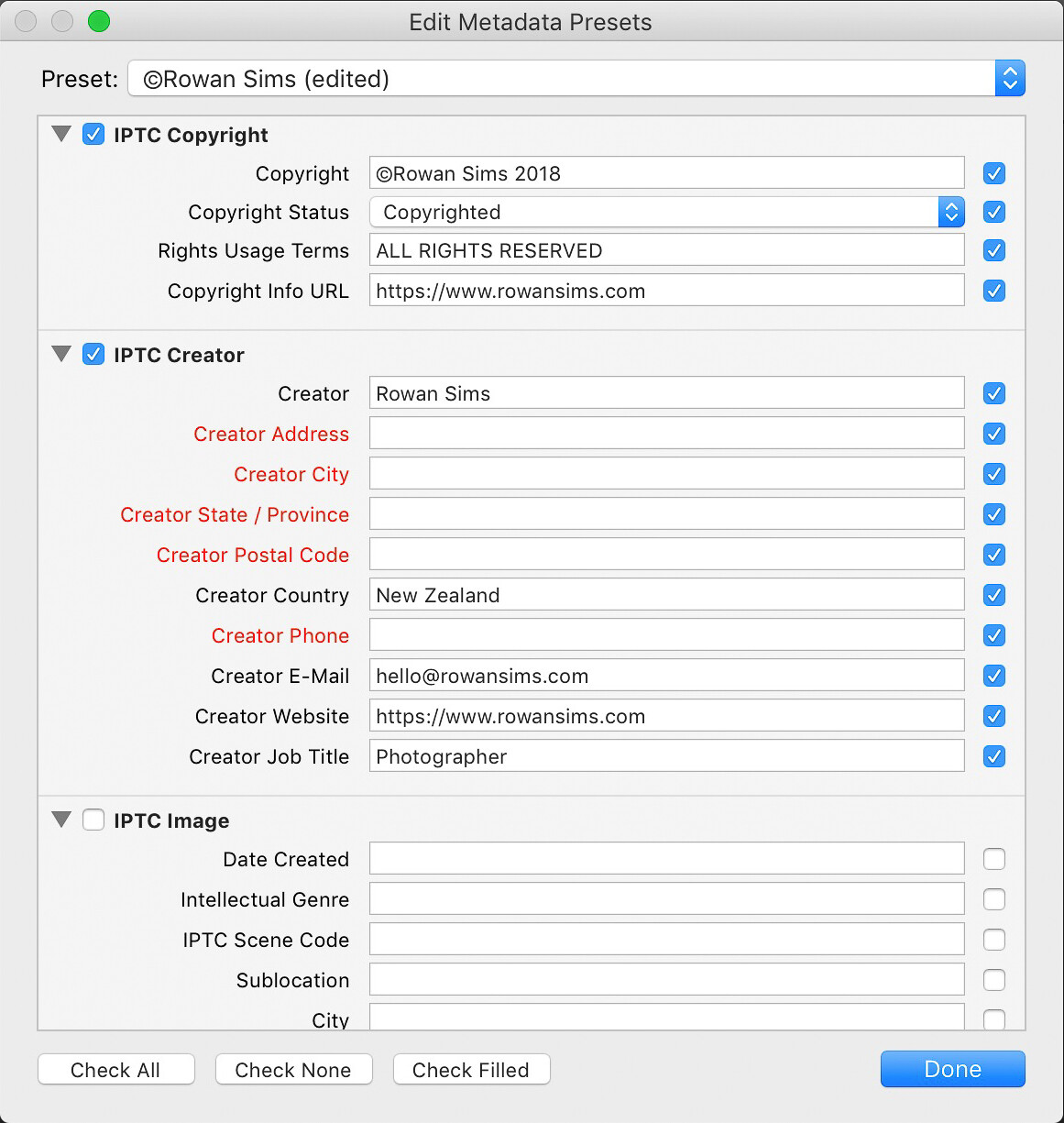
metadata organizing lightroom photos by location

Keywords

The single most important thing you can do to simplify the process of finding photos is keywording. You don’t need to add a long list of keywords, just a few relevant ones that will help you later on when you search.

When organizing by location, I always add the name of the country, region, and specific place name. I’ll also add any other relevant keywords that I may want to search for, such as aerial or long-exposure.

When renaming my images during import I always include the location in the name. Something like “noosa-beach-qld-australia” works well. The words in your filenames become searchable keywords themselves (make sure to use a dash between words). I don’t use dates in my file names, but it’s up to you whether you want to or not.

How to Organize Your Photos by Location in Lightroom

Folders

Using a good folder structure will make your life far easier, especially when you have tens of thousands of images.

To organize your folders by location, you can create a new folder for each specific location or one for each city or country. I have one folder for each country I visit and just keep adding to it. Even if I visit that country again years later, I’ll still keep using that same folder. It makes it far simpler and I know where I can find a photo from anywhere on earth.

It also makes it simpler to find image files on my computer as the folder structure I set up is identical both inside and outside Lightroom. Organizing folders by date or some other number-based system would never work for me.

Collections

Collections are another one of Lightroom’s great features that can help you keep everything organized by location. Where Folders contain every photo from a given location, Collections contain only the photos you choose. Again, I’ll create a new Collection for each country, but I only put the keepers in there.

How to Organize Your Photos by Location in Lightroom

In the past, I’ve done this manually, but I now create a Smart Collection for each location. I only need to add two rules to each Smart Collection: Flag and Keyword. Based on these settings, any photo that I flag that has that keyword is automatically added to the collection.

smart collections - How to Organize Your Photos by Location in Lightroom

Map

As a travel photographer, my favorite Lightroom tool for finding photos based on location is the Map module. One of the first things I’ll do after I’ve finished importing new photos into Lightroom is to add GPS coordinates. There are a couple of ways you can do this.

If you know the coordinates you can add them manually in the Metadata panel. The easiest way is to select all your images (Cmd/Ctrl+A) then go into the Map module, search for the location in the search bar above the map, then drag all your photos onto the right location on the map.

Depending on your camera, your photos may already have GPS coordinates embedded in the file. This is often the case with drone photos or any other GPS-connected camera or device. If not, you can record the GPS coordinates by taking a photo with your phone then grabbing them from that photo’s metadata.

map module - How to Organize Your Photos by Location in Lightroom

Searching for Photos

Now that you’ve imported your photos with location-based keywords and filenames, organized them into location-based Folders and Collections, and geotagged them with GPS coordinates, finding them later is simple.

I use a different approach depending on whether I’m looking for a specific image or a group of images from a specific location.

If it’s a specific image you want, and you know you flagged it, select the Collection associated with that location. If you’re not sure if it’s flagged, select the folder. Then search inside the collection or folder using the Library Filter.

Click on Text, select Any Searchable Field in the first drop-down menu, then Contains All in the next menu, then type your keywords in the search field. The more keywords you add, the more specific the search becomes.

library filter - How to Organize Your Photos by Location in Lightroom

If I’m looking for an image or group of images from a specific location, I like to use the Map module. Select All Photographs in the Catalog panel on the left then go to the Map module and type the location name into the search bar. Any geotagged images in that area will show up on the map.

You can zoom in or out on the map to make your search location more or less specific. Images in the specified location will appear along the filmstrip below the map.

Summary

A little forethought and organization when importing your images are worth the effort. It doesn’t take much time to apply these settings but can save you a lot down the road.

If you’re anything like me and have tens of thousands of photos in your catalog, you’ll be doing yourself a favor, and future you will thank you for your efforts.

The post How to Organize Your Photos by Location in Lightroom appeared first on Digital Photography School.


Digital Photography School

 
Comments Off on How to Organize Your Photos by Location in Lightroom

Posted in Photography


6 Tips To Help You Improve Your Documentary Photos

06 Aug

Documentary photos can have a powerful impact on viewers. They can notify people of an issue that they wouldn’t otherwise know about. Documentary images can help focus attention on different cultures that are rarely seen by other people. They can inspire, tell stories, and above all they can take the viewer on a journey that they may not go on themselves.

It’s important to remember that documentary photos differ to the conventional travel photographs. Yes they can overlap sometimes but documentary photos need to tell a story first and foremost. Here are 6 tips to help you improve your documentary photos.

woman burning leaves - Documentary Photos

1. Tell a Story

Before even a single photo has been taken, you need to decide on the story that you want to tell.

Are you trying to capture a specific event or ritual? Do you want to shed light on an environmental issue? Or do you want to document a different aspect of an already well-photographed location by focusing on say the grittier side of it away from the glitz and glamour?

Whatever the story is, your first action should be to write it down in a sentence. That will become your brief and with every photo you take, you should be looking to ensure it meets that requirement.

Not only will this help you to begin to build a shot list of potential things to photograph, but it will also ensure that you are always focused on the subjects you are photographing.

man cooking over a fire - Documentary Photos

2. Brainstorm Shots

Once you have an idea of what your story is about, you can begin to create a shot list based on that headline. So for example, if you want to photograph a traditional festival, some of the things that might be on your shot list could be things like:

  • The performers getting ready
  • Close up of the costumes
  • Head and shoulder portraits of the performers and audience
  • Action shots of the festival in action (for example dancing, singing, etc.)
  • Wide-angle shots capturing the entire event (for example to show the scale)
  • The venue (if it is in a place of special interest)
  • Any traditional foods or drinks served

This will help you plan your shoot and make sure that you cover different aspects of the story you are trying to tell.

Clearly, while you are there you may find that this list changes and other things get added or crossed off. The key is to make sure you capture a variety of shots based on your initial brief.

two men in red costumes - Documentary Photos

3. Planning and Setting Up

It’s not by accident that documentary photographers seem to be in the right place at the right time to capture stunning shots. This is not by accident or luck. There has likely been a lot of planning and research that’s gone into the shoot to ensure that they can maximize their time and capture the best photos. So, do your research before you start shooting.

For example, if you are photographing a parade get to that location a day before and work out the best place to be. Ask the locals if they know anything that might help you. Or if you are planning to photograph a remote tribe, contact local guides that can help you get there and also translate if needed.

Preparation is a huge part of documentary photography and you should spend time making sure you are fully prepared before you start.

parade with a religious float - Documentary Photos

4. Be Ready to Shoot

Once your research is done and you have planned everything, it’s time to execute and capture the photos. There is no magic formula for choosing your camera settings when taking documentary photos, as every scenario is different.

But you can prepare for it in advance by understanding your camera and predicting the scenario that you might face. For example, if you are photographing locals in their home where you are likely to encounter low light conditions, you can safely assume that you will need to raise your ISO level to be able to capture the shot. So, practice at home so that not only can work quickly but also you know your camera’s capabilities at high ISO settings.

Or if you are going to be photographing a dance festival where there will be fast movement practice being able to focus accurately and capture sharp photos. Trying to predict the scenario you are working in will often help ensure that you don’t panic when you are actually there and taking photos for real.

demonstration by doctors and nurses - Documentary Photos

5. Story Over Aesthetics

Arguably this is where documentary photography and travel photography differ.

While often in travel photography you want to try and tell a story, you also need to convey that in a beautiful and aspiring way that will make people want to travel to that destination. But documentary photography is about telling the story first and foremost and if the aesthetics have to suffer to capture it, then so be it.

So, don’t be afraid to break away from convention if it means you will capture the shot that will help tell that story.

protestors in the park - Documentary Photos

6. Edit Ruthlessly

Once you have captured all of the images that you wanted to get, then arguably the really hard work starts.

You need to edit and select the best of those images with which to showcase and tell the entire story. Flick through magazines and you will see that generally, a photo essay is anywhere between  6-10 photos maximum. You need to be ruthless in your culling and only feature photos that contribute to the overall story.

Try to detach yourself and think like a photo editor, not a photographer. The end result should be a collection of photos that are strong enough individually but also work as a collective.

Lightroom browser of images - Documentary Photos

Conclusion

Well done documentary photos can be mesmerizing to view and they tell an incredibly powerful story. It could be argued that they are often more powerful than the words that go along with them. Even the simplest stories can be phenomenal in a series of photos.

But capturing a set of photos that are different and yet can work together as a series and also tell a story is incredibly difficult. Follow these six simple tips and you will be on your way to capturing amazing documentary photos.

Now it’s your turn. Share your amazing documentary photos below.

The post 6 Tips To Help You Improve Your Documentary Photos appeared first on Digital Photography School.


Digital Photography School

 
Comments Off on 6 Tips To Help You Improve Your Documentary Photos

Posted in Photography


5 Tips to Improve Your Portrait Photos

03 Aug

In this 7-minute video, photographer Craig Beckta has 5 tips that will help improve your portrait photos drastically.

?

#1 Use Off-Camera Flash

“The larger the light source and the closer it is to your subject, the softer the light,” says Beckta. He also prefers to use round softboxes, as it creates a round catchlight similar to that which you can expect from the sun.

For more on this topic read:

  • Why Off-Camera Flash Isn’t as Scary as You Think
  • A Beginners Guide to Light Modifiers

#2 Use Different Lighting Patterns

Moving your light source around and adjusting the angles and modifiers allows you to change the pattern of light. Some lighting patterns are more flattering for particular situations, but changing the lighting pattern throughout a shoot means that you have more options available to you back in the editing room.

Read 6 Portrait Lighting Patterns Every Photographer Should Know

#3 Direct Your Subjects

Even with experienced models, it is “important that you give them subtle directions.” After all, the model can’t see what you can see as the photographer. Keeping good direction over the shoot keeps you in control creatively, and dialogue between yourself and the model can only be a good thing to keep everyone comfortable.

Check out our dPS printable posing guides for more ideas.

#4 Think About the Background

A wide aperture will allow you to blur the background, but be careful that there aren’t distracting objects intersecting your subject.

#5 Watch Your Exposure

Be careful with your exposure. There’s nothing worse than coming home from a shoot and finding the highlights are blown out or the shadows lost. Beckta runs through his entire process with regards to monitoring his exposure during a shoot.

Over to you

What do you think? Do you have any other tips for portrait photography?

The post 5 Tips to Improve Your Portrait Photos appeared first on Digital Photography School.


Digital Photography School

 
Comments Off on 5 Tips to Improve Your Portrait Photos

Posted in Photography


9 Quick Tips for Better Black and White Photos

28 Jul

Here’s an 11-minute video from Jamie Windsor that is filled with 9 quick tips that you can use to improve your black and white photos in an instant.

?

“For most of us these days, black and white is an after-thought,” says Windsor. “It’s a creative filter that we have on Instagram.”

But Windsor points out that black and white photography is “much more than an editing technique” – and he would be right!

To make strong, powerful monochromatic images, it is important to approach the shot knowing that it will be the final result. It allows you to think differently, adapt your creative techniques, and see the scene in front of you in a different light.

Once you’ve finished watching the video, make sure to check out dPS’s own black and white photography eBook for further tips and tricks!

Summary of the 9 tips for better black and white photos:

  1. Plan to shoot in black and white
  2. Look for the abstract shots
  3. Shoot in RAW or use Color Filters
  4. Use long exposures
  5. Utilize the Dodge and Burn Tool
  6. Understand how light is affected
  7. Try Using HDR (High Dynamic Range)
  8. Emphasize the mood
  9. Shoot black and white photos that should be in color

Have you shot any black and white images lately? Show us in the comments below!

The post 9 Quick Tips for Better Black and White Photos appeared first on Digital Photography School.


Digital Photography School

 
Comments Off on 9 Quick Tips for Better Black and White Photos

Posted in Photography


Blog Project: Your Best Photos From 2016

27 Jul

It’s that time of year again and if you’re a regular JMG-Galleries reader that means one thing…
it is time to kick off the 10th annual best photos of the year blog project. This is by far my most popular blog project with hundreds of photographers taking part last year (see Best Photos of 2015, 2014, 2013,  2012, 2011, 2010, 2009, 2008 and 2007). Around this time of year people start to ask if I’d be running this project again. The answer clearly is always YES!
1. I love this project and I love that so many people get excited about it.
2. It’s a great way exercise to improve your photography (10 Ways to Top Your Best 20xx Photographs).
So with out any further delay here is how you take part to submit your best photos of 2016.

How to Participate (Read Carefully)

  1. Review & select your best photos from 2016.
    Note: Photo edit carefully narrowing down your results to your best 10 or 5 photos. Reference Pro Tips: Photo Editing with Gary Crabbe for pointers.
  2. Create a blog post on your web site or a Flickr/500px set containing your best photos from 2016.
  3. Complete the form below by Tuesday JANUARY 3rd at 11:59PM PST to take part. The following Tuesday, or there about, I’ll post a link to all submitted sites and photos on my blog. Through out the week I’ll also share the results across all my social media accounts.

Spread the Word!
Feel free to spread the word of this project on Twitter, Facebook, Google+, photo forums you frequent and/or your blogs. All who are interested in taking part are invited.


Loading…

The post Blog Project: Your Best Photos From 2016 appeared first on JMG-Galleries – Landscape, Nature & Travel Photography.


JMG-Galleries – Landscape, Nature & Travel Photography

 
Comments Off on Blog Project: Your Best Photos From 2016

Posted in Equipment


Best Photos of 2016 by Jim M. Goldstein

27 Jul

As is customary I spend the end/beginning of the year reviewing my best photos of the year. This year I had less time to focus on personal projects than in years past, but one thing that I’ve continued to focus on is making the outdoor experience as fun as possible for my boys who are now 6 and 2. Considering both ask regularly to go camping and explore new areas I’d say that project is a great success. My photo projects as of late have been seasonally focused with most of my “best of photos” taken in the first half of 2016. Unfortunately 2016 wasn’t the best year for our family with much of our travel plans devoted to being with a terminally ill family member who passed in the Fall. 2016 was a bittersweet year to say the least with our outdoor and family travels. With some luck 2017 will be more sweet than bitter.

This year I’ve split my best photos of the year into two categories: Landscape & Nature and Family. On the Landscape & Nature front I’ve continued to use ultra-wide lenses and long exposure techniques. Family photos have been taken with ultra-wide lenses for fun distortion effects and fast 50mm lenses to freeze my blazingly fast kids in action.

With out further delay here are my best of the year…

Landscape & Nature

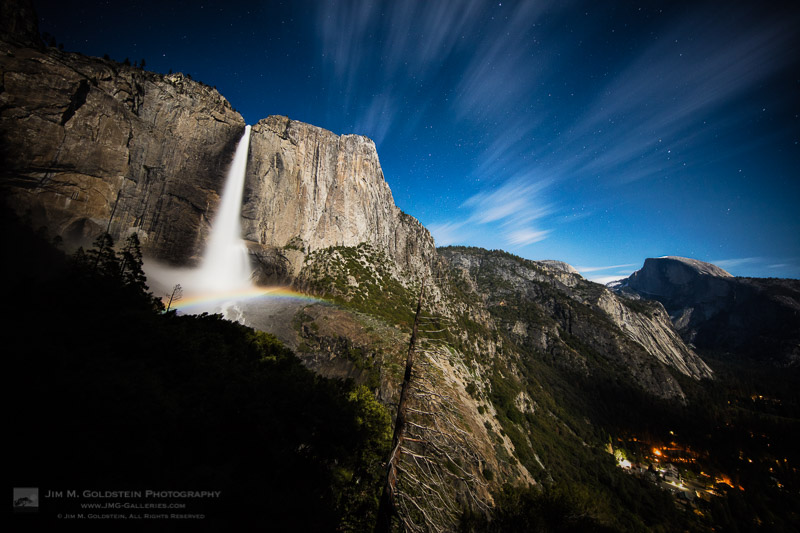
A moonbow spans across upper Yosemite Falls with passing clouds and Half Dome in view.

A moonbow spans across upper Yosemite Falls with passing clouds and Half Dome in view.

This particular photo was taken on a late night shoot focused on timelapse footage of moonbows at Upper Yosemite Falls. After capturing a few sequences I hiked further up the trail to capture this view before calling it a night at 2 or 3 AM in the morning.

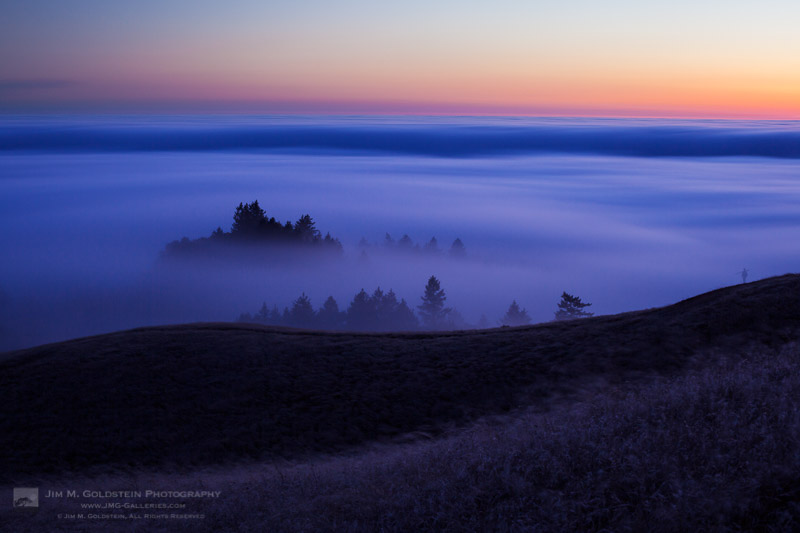
Fog flows through the trees below Mount Tamalpais and over the Pacific Ocean

Fog flows through the trees below Mount Tamalpais and over the Pacific Ocean

Taken as part of a Canon 5D Mark IV camera review on my All Things Photo YouTube channel. This photo was taken with my old Canon 5D Mark II. With a lot of photographers swarming about the hillside I was pleasantly surprised to capture the ghost of one in this long exposure shot.

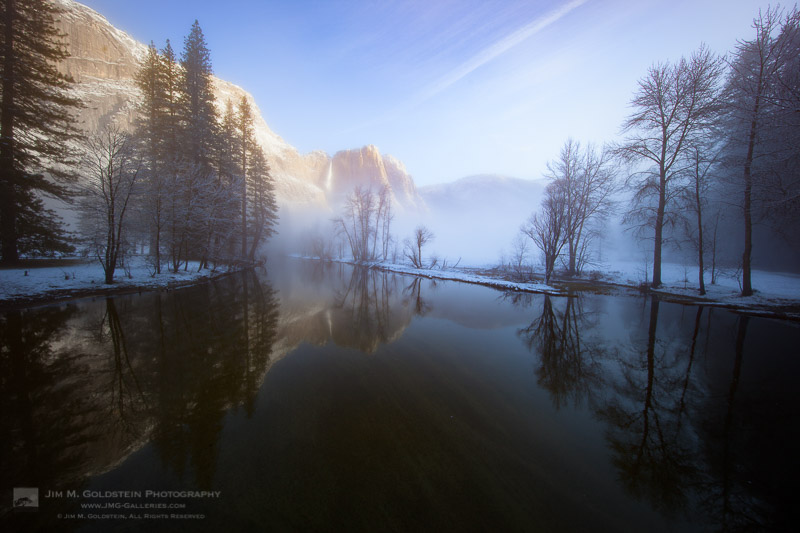
Morning light on Yosemite Falls amidst rising winter fog - Yosemite National Park

Morning light on Yosemite Falls amidst rising winter fog – Yosemite National Park

Several of my trips to Yosemite in 2016 were family focused. On this trip to see snow in Yosemite valley, photography took a backseat to enjoying the conditions with my oldest son. That said I did sneak in a few DSLR photos and this was one. Later on this very morning I cross paths with several photographer friends taking in a similar view.

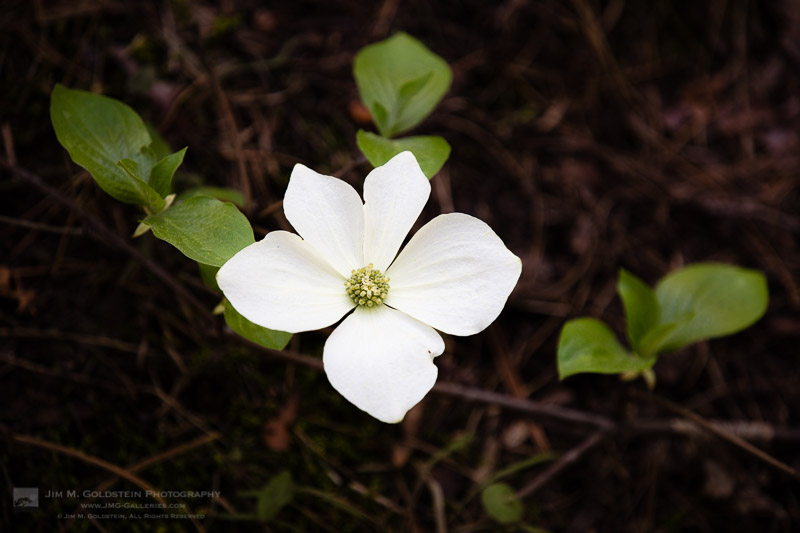
Dogwood Blossom, Yosemite National Park

Dogwood Blossom, Yosemite National Park

While I love snow in Yosemite Valley I’m quickly starting to think that April Dogwood blooms are perhaps the most beautiful event in the valley. It’s debatable. This image was taken with a Canon 5DS R during a beautiful Yosemite Dogwood bloom. While not visible in this web sized version of the photo the level of detail the Canon 5DS R provides is amazing.

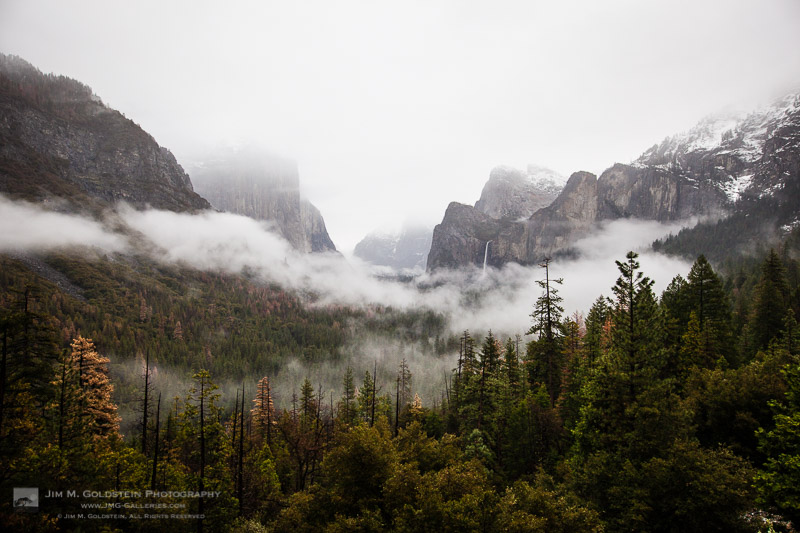
Fog Rises Above Yosemite Valley

Fog Rises Above Yosemite Valley

I seldom head to Tunnel View with the idea of taking any serious images, but deep in the back of my mind I know that you can never discount what unique weather conditions might yield. For fun I headed to this location with my son so he could take in the view. It didn’t take long to realize the melting snow was creating quiet a show with fog wafting about. I set up a quick timelapse and this is one image from the sequence. I was not disappointed with the resulting footage.

Family

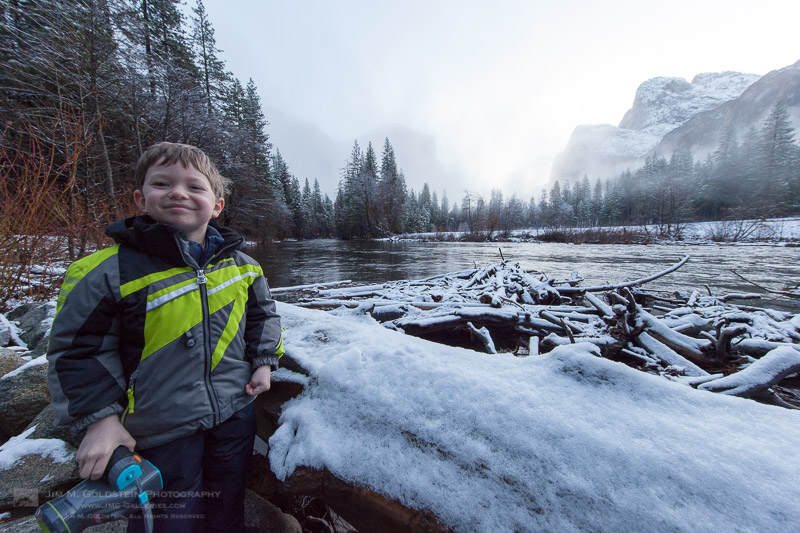
family_mg_9480

This makes it to the top of my family best photos as it captures the enthusiasm of my oldest son has for being out and about in the snow with me. It’s always fun to view the world through his unfiltered natural curiosity.

family_mg_0584-3

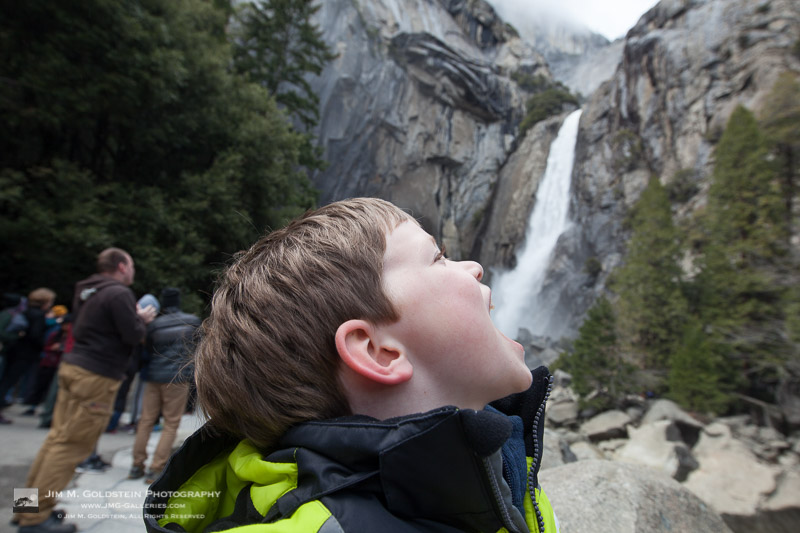
I was blown away by the great reaction my youngest son had on his first trip to Yosemite. With in the first 2 hours of our Spring trip he saw deer, waterfalls and giant trees. He could hardly contain himself after seeing deer and the rest of the trip he was reminding me to be quite by saying, “Shhhh! Quiet. Deer.” He also was quick to wake me up at 5am the next day throwing his shoe at my forehead saying, “More outside!”

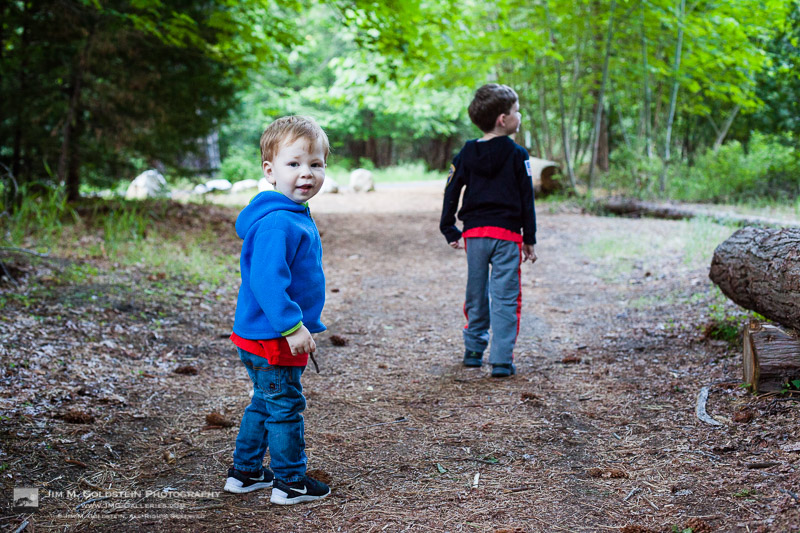
B age 5 5/6 and G 1 11/12 old

B age 5 5/6 and G 1 11/12 old

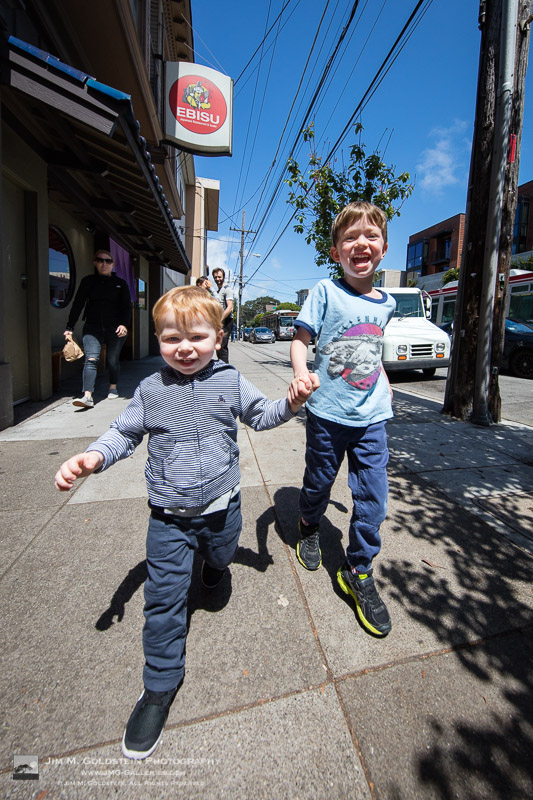
Just a fun photo of both my boys running, laughing and being in the moment in San Francisco.

family_mg_0085-2

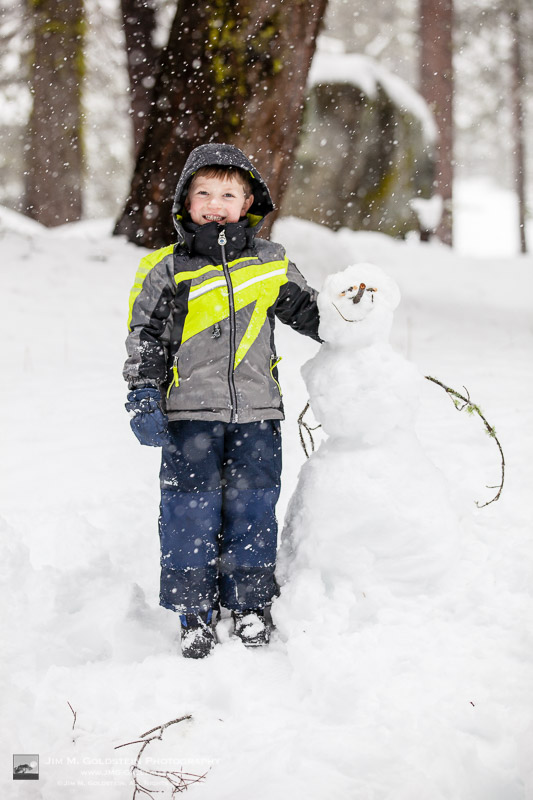
No trip is complete to the snow with out building a snowman.

family_mg_9571-2

Introducing my oldest to the concept of forced perspective. Surprisingly he picked up on this quite fast and was pitching ideas for photos at other iconic locations including holding Half Dome in his hand at Glacier Point.

family_r8a3957-2

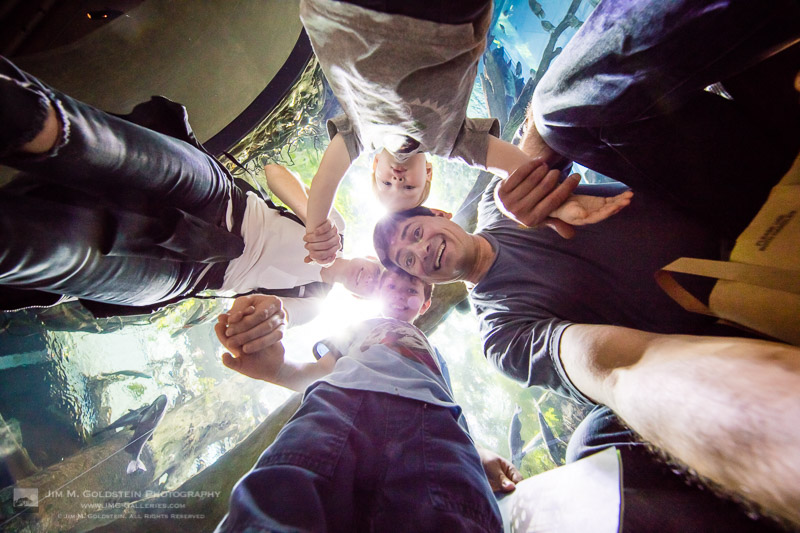
Fun at California Academy of Science with the whole family in their aquarium tunnel.

The post Best Photos of 2016 by Jim M. Goldstein appeared first on JMG-Galleries – Landscape, Nature & Travel Photography.


JMG-Galleries – Landscape, Nature & Travel Photography

 
Comments Off on Best Photos of 2016 by Jim M. Goldstein

Posted in Equipment


Best Photos of 2016 by JMG-Galleries Blog Readers

27 Jul
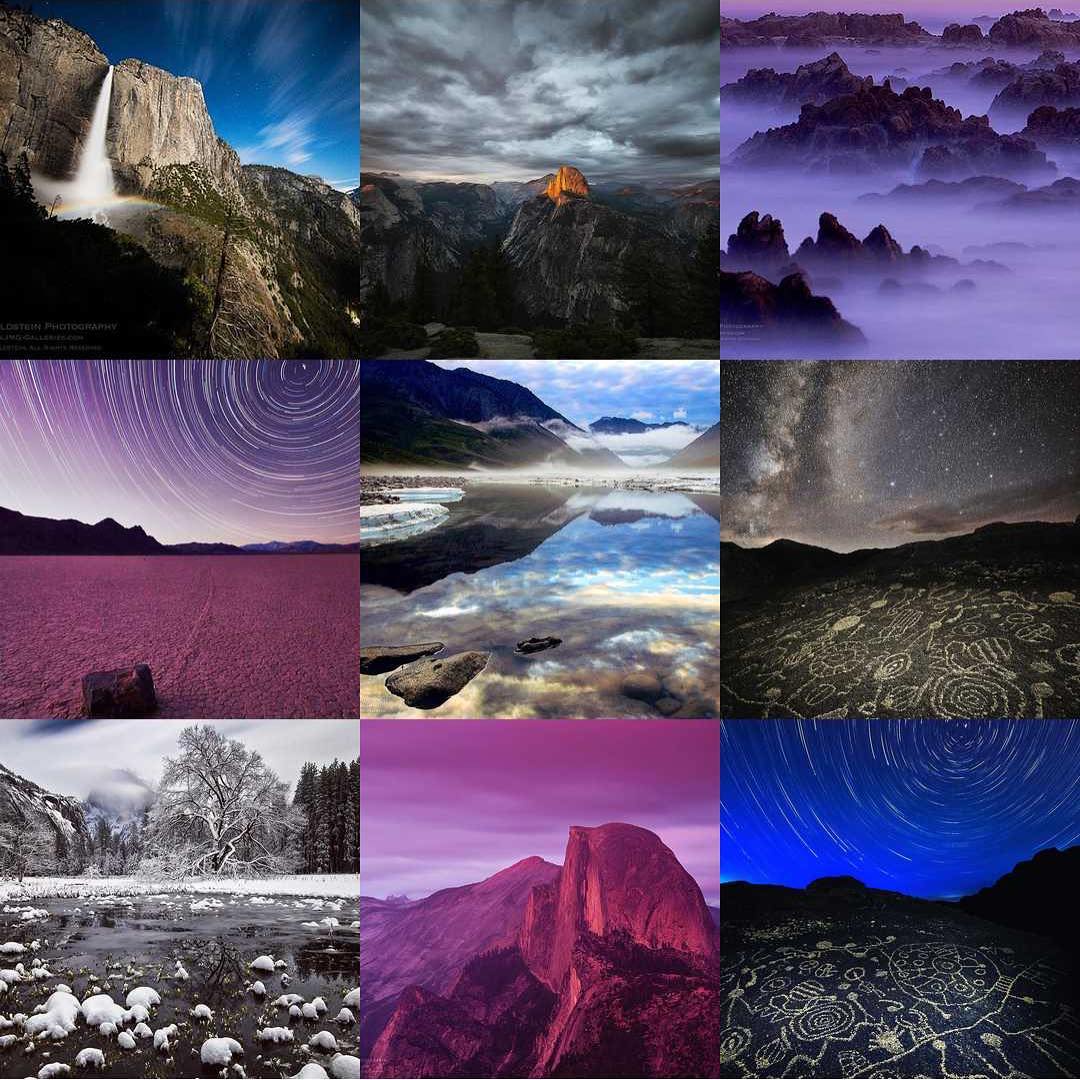
Best Instagram Photos 2016

Best Instagram Photos 2016

What better way to start 2017 than to be creatively inspired. The results of my 10th annual Best of Photos project hopefully will do just that by introducing you to photographers and their work from all over the world. Many of my blog readers are photo enthusiasts and many are seasoned professionals, but the great thing about photography is that no matter what your experience level we all can relate equally in our love for the art of photography and visually exploring. With that in mind I encourage you to reach out to photographers whose work you enjoy to keep sharing & growing as an artist.  I am incredibly thankful that this tradition has been embraced and enjoy seeing how familiar faces have evolved their work & grown over the years.  I hope reviewing your best photos of the year and comparing them to years pasts keeps you inspired and aware of your progress as a photographer.

If you’d like to take part next year and be informed when submissions open for the “Best Photos of 2017? blog project add your name to my mail list. You won’t be spammed. I send out newsletters quite infrequently.

Thank to everyone who took part!  I invite you to visit each link below as I have and introduce yourself to many of the participating photographers.

Best Photos of 2016

  1. Jim M. Goldstein – Best Photos of 2016 by Jim M. Goldstein
  2. Randy Langstraat – My Ten Favorite Photos of 2016
  3. Chris Moore – Exploring Light – 2016: A Year in Review
  4. Denis Balibouse – Denis Balibouse Reuters 2016 Photos
  5. Craig L. Howe – A Thousand Words
  6. Michael Russell – My Top 10 Photos of 2016
  7. J. J. Raia – 2016 Jim Goldstein Project
  8. Harold Davis – Harold Davis Best of 2016
  9. Wendy M. Seagren – Wendy Seagren Best 2016 Blog
  10. Stefan Bäurle – Top 10 Favorites of 2016
  11. Phil Slade – Another Bird Blog
  12. Scott Wyden Kivowitz – Best & Favorite Photographs of 2016
  13. Rick Holliday – Best of 2016
  14. Russ Bishop – Russ Bishop | 2016 – The Year in Pictures
  15. Bill Bean – 2016 Favorites
  16. tim fiddimore – Photos 2016
  17. Rachel Cohen – My Best of 2016
  18. Brian Knott – FMKPhoto – 2016 Year in review
  19. Alexander S. Kunz – 12 Favorite Photos from 2016
  20. Monika Chace – 500px Monika Chace 2016 favs
  21. Martin Quinn – Quinn Images – Best of 2016
  22. Jenni Brehm – Changing Perspectives
  23. QT Luong – Year 2016 in Review: Treasured Lands
  24. Greg A. Lato – latoga photography
  25. Fred Mertz – Fred Mertz Photography
  26. Martijn van der Nat – Best of 2016
  27. Bryan Bzdula – Top 25 of 2016
  28. Joseph Smith – 2016 Year in Review
  29. Khürt Williams – Ten Best Images of 2016
  30. Free Roaming Photography – Twelve Favorite Photos from 2016
  31. Peter Carroll – 2016
  32. Chuq Von Rospach – My Best Photos of the Year for 2016
  33. Gary Crabbe / Enlightened Images – My Favorite Landscape Photos of 2016
  34. Johann A. Briffa – 2016: A Photographic Retrospective
  35. Jao van de Lagemaat – Jao’s photo blog: Most memorable images from 2016
  36. Greg Russell | Alpenglow Images Photography – 2016 year in photos
  37. Richard Murphy – Best of 2016!
  38. Jim Stamates – My favorite images of 2016
  39. Brent Huntley – Photography and Travel
  40. Olivier Du Tre – Best of 2016
  41. Scott Thompson – Scott Shots Photography – My Top 10 Tahoe Area Photos of 2016
  42. Martin Nunez – My 12 best photographs of 2016
  43. Kyle Jones – 2016 Favorites
  44. Rob Tilley – Best of 2016 – My Favorite Images of the Year
  45. Pete Miller – Favorites of 2016
  46. Denise Goldberg – top photos : 2016
  47. Mike Chowla – My Ten Best of Images of 2016
  48. Deb Snelson – Favorite Photos of 2016
  49. Glenn Tunaley – Best of 2016
  50. Clint Losee – Top 10 of 2016 – My 10 Best Landscape and Scenic Photos
  51. Neil Bennett – Best of 2016
  52. Alan Majchrowicz – Photo Highlights 2016
  53. Dotty Molt – Best of 2016 – Every Image has a Story
  54. Björn Göhringer – My Top 14 Photos From 2016
  55. Richard Wong – Favorite Photos of 2016 – Richard Wong
  56. Brian Snyder – 10 Best Photos of 2016
  57. Deborah – My 2016 Favorite Images
  58. Phillip Colla – Natural History Photography – Best Photos Of 2016
  59. Richard Cummings – Fine Art America
  60. Todd Henson – Best Photos of 2016 – Todd Henson Photography
  61. Wendi Kennedy Photography – The 10 Best Moments/Photos of 2016
  62. Naomi Creek – 2016 Top 10
  63. MICHAEL KATZ – Michael Katz Photography
  64. Neil Creek – Neil Creek’s Top 10 Photos 2016
  65. Adrian Klein – Best Photos of 2016
  66. T.M. Schultze – T.M. Schultze Website
  67. Ilias Katsouras – Okrivadas
  68. Kevin Ebi – Living Wilderness: Best of 2016
  69. Kurt Lawson – 10 Favorites of 2016
  70. Caleb Weston – Dubland – Caleb Weston Photography
  71. Thomas Yackley – Yackley Photo
  72. Tim Manske – Beyond The Blue Ridge Favorites of 2016
  73. Patricia Davidson – My Top 10 Favorite Photos of 2016
  74. Jon McCormack – 2016: From Istanbul to California’s Sierra Nevada
  75. Tim Aston – Best of 2016
  76. Werner Priller – Favorites/Best of 2016
  77. Rich Greene – My Faves of 2016
  78. Roland Tuley – My 6 Best of 2016
  79. Derrald Farnsworth-Livingston – Top 10 Favorite Images from 2016 – Journey of Light Photography
  80. Melissa Leady – 45journal-2016 Top 10
  81. William Neill – My Favorite Photographs of 2016
  82. David Hunter – Favorites of 2016
  83. Dennis Wister – 2016 Top Picks @ 500px
  84. Gabor Ruff – Natural History Photography – Highlights from 2016
  85. Zolt Levay – Zolt Levay’s Best of 2016
  86. Steve Levi – LEViiMAGES – blog – 2016 Year in Review
  87. SkyVista Photography by Steve Luther – SkyVista Photography Best of 2016
  88. Doug Wiggers – Top 5 Images of 2016
  89. Franka M Gabler – Franka M. Gabler – Favorite Images from 2016
  90. Tom Whelan – Twelve from 2016
  91. David J Grenier – 2016 Top Twelve Photographs of the Year
  92. Drake Dyck – Wild Drake Photography
  93. Morkel Erasmus – Sixteen Scenes from 2016
  94. Mike Christoferson – 2016 – One Month at a Time
  95. Annika Ruohonen – Annika Ruohonen Photography
  96. Derek Fogg – Year in Review – 2016 – Scotland Bottom to Top
  97. Bryan William Jones – Jonesblog
  98. Alan Dahl – 2016 Favorite Photos
  99. Robin Mayoff – RHM Images
  100. Peter Knott – 2016 Favourites
  101. Jackson Frishman – Favorites of 2016
  102. Earl Robicheaux – Naturesetude Top 10 Images of 2016
  103. Mark Hespenheide – 2016-Favorites
  104. Andrew Thomas – USA National Parks 2016
  105. Vladimir Vozdvizhenskiy – 2016 Top 10
  106. Nick Fitzhardinge – 2016 – a review
  107. John Fujimagari – The Stentorian Image
  108. Larry Millican – The Annual Ten
  109. Mike “Mish” Shedlock – Top 15 Iceland
  110. Carl Donohue – Expeditions Alaska
  111. Carol Schiraldi – Best of 2016 – My Top Images
  112. Catalin – My favourite shots of 2016
  113. Frank Klug – Favorite Photos of 2016
  114. Tony Wu – Favorite Photos of 2016
  115. Josh Meier – Best of 2016
  116. Mark Graf – 2016 – A Year of Leaves
  117. Richard Valenti – Best of 2016
  118. Tori Bateman – Tori:B’s Best of 2016
  119. Milan Hutera – 2016 In Pictures
  120. Malcolm Andrews – The Aerial Horizon
  121. Helly Sellers – What a year!
  122. Dean Foster – My Best Photos of 2016
  123. Ron Niebrugge – My Photo Blog – Niebrugge Images
  124. Navin Sarma – Navin Sarma Photography
  125. Daniel Leu – Favorites 2016
  126. Scott Thomas – Views Infinitum
  127. Scott McGee – Under Pressure Photography
  128. Suzy Walker-Toye – My Best Underwater Photos of 2016
  129. Anne McKinnell – Top 10 Landscape Photos of 2016
  130. David Leland Hyde/Landscape Photography Blogger – Favorite Photographs of 2016
  131. Mike Cleron – 2016 Favorites
  132. Lon Overacker – Lon’s Favorites of 2016
  133. Bill Evans – My Favorite Images of 2016
  134. Rob Weir – Rob Weir Photography
  135. Jim Campbell – Best of 2016
  136. Neil Corman – Ten Images from 2016 by Neil Corman
  137. Duffy Knox – Top 10 of 2016
  138. Dayne Reast – 2016 Highlights
  139. Phyllis Whitman Hunter – Phyllis Whitman Hunter Photography
  140. Sara M. Skinner Photography – My Top 10 Favorites of 2016
  141. Steve Cole – The Last Stands – 9 Saved Places
  142. Sue Shuey – Overall Best of 2016
  143. Bob Blesse – Best Images of 2016
  144. Andrew S. Gibson – Creative Exercise: Your Best Ten Images From 2016
  145. James Bruce Schwabach – “Portfolio of Images From White Sands
  146. David Maurer – 2016 Best Photos
  147. Holly Davison – Holly Davison’s Best of 2016
  148. Maxim Nekrasov – Creationings
  149. Sarah Marino – Nature Photo Guides
  150. Ron Coscorrosa – Nature Photo Guides
  151. Paul Rosenblum – 2016 Best 10 Underwater
  152. Dave Wilson – Best of 2016
  153. Colleen Miniuk-Sperry – CMS Photography – Colleen Miniuk-Sperry Photography: Favorite Photos From 2016
  154. Brenda Ahearn – 2016 Favorites
  155. Bryn Tassell – Bryn Tassell Favourites of 2016
  156. Harold Klein – Best of 2016
  157. Robin Black – My 10 Best of 2016
  158. Adam Elliott – My “Best” Photos of 2016
  159. Tommy Lim Kang Wen – Milky Way and Aurora Australis in Lake Tekapo
  160. Photography by Vidya – Best of 2016 by Vidya Narasimhan
  161. Greg Clure – Best of 2016
  162. Michael Frye – My Top Photographs of 2016
  163. Pat Ulrich – Favorite Photographs of 2016
  164. Stephen L. Kapp – Top 10 Images of 2016
  165. G Dan Mitchell – 2016 Favorite Photographs
  166. Pablo Sánchez – Pablo Sánchez Landscape photography
  167. El Paisaje Perfecto – El Paisaje Perfecto
  168. Deirdre Ryan – My Personal Favorite Images Of 2016

Have a great 2017!

The post Best Photos of 2016 by JMG-Galleries Blog Readers appeared first on JMG-Galleries – Landscape, Nature & Travel Photography.


JMG-Galleries – Landscape, Nature & Travel Photography

 
Comments Off on Best Photos of 2016 by JMG-Galleries Blog Readers

Posted in Equipment


Look. Think. Click. Don’t Rush Into Taking Those Action Photos

27 Jul

How can you improve your action photography? Everything moves so fast that it is a real challenge to make decent action photos.

The best way to improve your high-speed action photography is to slow down. Don’t be mistaken that because your subject is moving rapidly that you must do the same.

Expert action photographers achieve their outstanding results by carefully anticipating and planning. Then they pick up their cameras to begin making photographs.

Hmong New Year kart racing - Action Photos

My best action photo. Sometimes it’s more than just good planning. My timing was lucky!

Here are three basic steps to improving not only your action photos but all of your photography. You can apply these principles each time you shoot, no matter your chosen subject.

Look First

Before you bring your camera to your eye, even before you turn it on, look carefully at what you have chosen to photograph. Look at:

  • Your subject
  • The background behind your subject
  • Foreground in front of the subject
  • Lighting
  • Weather
  • Obstacles – people, traffic, cows, etc. (Anything that might hinder you from taking pictures.)

Being observant is one of the key things photographers need to be experts at. You need to know what is around you and how it will help or hinder your photograph making process.

Hmong New Year top spinning - Action Photos

Then Think

Once you have chosen your subject and had a sufficient look at your surroundings, it’s time to piece together the picture you want to make.

Think about your shooting spot

One of the most important things to consider is where you will take your photos from. You need to think about how your subject will look from different angles and which one you will choose. You may need to take photos at a few different locations before finding one you are happy with.

For any action photography your subject will be moving, so your background may not remain the same. Ask yourself if you will get better photos if you are moving with your subject or if you are stationery.

Moving with your subject will be more difficult. There will be a greater risk of not getting any usable photos. It might pay to stay in one spot until you are confident you have some good pictures and then move with your subject.

Hmong New Year kart racing - Action Photos

Be conscious of others

If you are at a sports event you will need to be conscious of other people. Photographing your kid’s football game, there will be other parents on the sidelines that you will need to consider. They may not consider you and step in front of your camera ruining that shot where your kid scores.

So choose a location where you will not be hindered. Sometimes this will mean getting in front of others or getting further back.

Think about the light

Is it bright enough to achieve a fast enough shutter speed? If not you will need to raise your ISO to a higher setting.

Where is the light coming from? Will your subject be lit from the front or back? Maybe from the side? Maybe from multiple angles as they move around.

Looking at how the light is falling on your subject will help you choose a location at which to position yourself. Look and see at what angle the light is best for the type of photo you want.

Hmong New Year kart racing - Action Photos

Think about the weather

Photographing outdoors you may also have to give some thought to the weather. On clear sunny days or cloudy dull days when weather conditions are unlikely to change there’s not much to think about. When there’s a good wind blowing that might cause dust or sand to hinder you photo session you will need to be careful.

Clouds are the thing that you need to think about the most. On a day when clouds are moving across the sky and the sun is being obscured some of the time, you will need to pay attention. As the light changes your exposure will need to be altered and this may affect your shutter speed, depending on the settings you are using.

Think about your composition

Composition requires careful thought. So often people will try and take a quick snap of the action. They may be successful at capturing the decisive moment, but the composition is often terrible.

That is because it was unplanned. Choosing a good location and anticipating the action will also help you plan your composition.

Hmong New Year kart racing - Action Photos

Lastly, Click

Now that you have thought everything through you can start taking photos. The thinking stage does not always have to take long. It can happen very quickly at times. This depends on how familiar you are with your subject and the location you are shooting.

The more familiar you are with both, the easier and quicker it will be for you.

Camera settings

Setting your camera well for action photos is important. Your shutter speed and focusing mode are especially critical.

To stop the action you will need to chose a fast enough shutter speed. The faster the action the faster shutter speed you will need to freeze your subject.

Hmong New Year kart racing - Action Photos

To blur your subject the opposite applies. Choose a shutter speed sufficiently slow enough to let your subject appear blurred by their motion, but not so slow that you cannot recognize it anymore.

With really fast action I typically set my camera and lens to manual focus. I will pick a spot to focus on and only make photographs when my subject is within my focus zone. I do not practice a lot of action photography these days so I find this method suits me well. Of course, this technique will depend on the type of action you are photographing.

Most importantly with action photography, make sure to squeeze your shutter button and take your photos at the decisive moment when the action is at its peak.

Hmong New Year - Action Photos

Conclusion

If you just grab a few frames without first looking and then planning before you shoot, your results will often be lacking. Being ready when the action happens will more often lead to better action photos.

The more familiar you are with your subject and surroundings the easier is will be. So, if you are just starting out and trying some action photography, picking a subject you know well might mean you have early success.

The photographs I have used in this article are all from a Hmong New Year celebration I photographed a few years back. The day features various sports activities that individuals and village teams compete in. There’s always loads of action and tons of fun.

Please check out this video for some more tips on looking, thinking, and clicking your way to improved photography.

?

The post Look. Think. Click. Don’t Rush Into Taking Those Action Photos appeared first on Digital Photography School.


Digital Photography School

 
Comments Off on Look. Think. Click. Don’t Rush Into Taking Those Action Photos

Posted in Photography


Blog Project: Your Best Photos From 2017

26 Jul

It’s that time of year again and if you’re a regular JMG-Galleries reader that means one thing…
it is time to kick off the 11th annual best photos of the year blog project. This is by far my most popular blog project with hundreds of photographers taking part last year (see Best Photos of 2016,  2015, 2014, 2013,  2012, 2011, 2010, 2009, 2008 and 2007).  It’s great to see the community of photographers that have developed around this blog project. As always I hope the exercise of picking your best photos helps improve your photography (10 Ways to Top Your Best 20xx Photographs).

So without any further delay here is how you take part to submit your best photos of 2016.

How to Participate (Read Carefully)

  1. Review & select your best photos from 2017.
    Note: Photo edit carefully narrowing down your results to your best 10 or 5 photos. Reference Pro Tips: Photo Editing with Gary Crabbe for pointers.
  2. Create a blog post on your website or a Flickr/500px set containing your best photos from 2017.
  3. Complete the form below by Tuesday JANUARY 2rd at 11:59PM PST to take part. The following Tuesday, or thereabout, I’ll post a link to all submitted sites and photos on my blog. Throughout the week I’ll also share the results across all my social media accounts.

Spread the Word!
Feel free to spread the word of this project on Twitter, Facebook, Instagram, Google+, photo forums you frequent and/or your blogs. All who are interested in taking part are invited.


Loading…

The post Blog Project: Your Best Photos From 2017 appeared first on JMG-Galleries – Landscape, Nature & Travel Photography.


JMG-Galleries – Landscape, Nature & Travel Photography

 
Comments Off on Blog Project: Your Best Photos From 2017

Posted in Equipment