RSS
 

Posts Tagged ‘Photography’

Using Focus Creatively with Food Photography

30 May

There are ways to use selective focus, or shallow depth of field, to completely control how you look at an image. Selective focus is using a large aperture, like f/4.5 or wider, to show only a small part of your image in focus. You can control where you want your viewer to look in your image by using this technique.

Eliminate Distracting Elements

If you have a potentially busy scene or environment, you can use selective focus to calm things down a bit and get your viewer to look where you want.
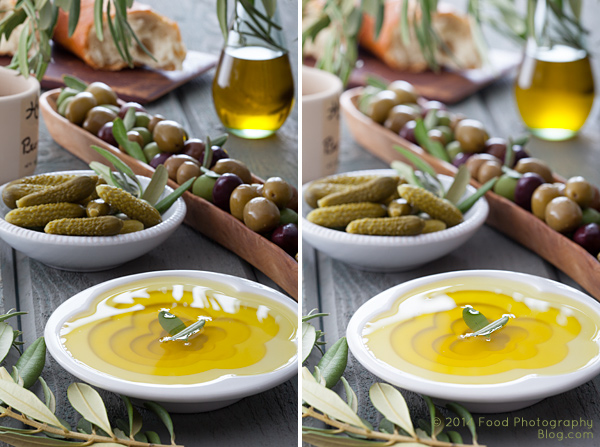
Selected Focus Olives

The left image was shot at f/16 while the right image was shot at f/5.6

When you compare the two images above pay attention to what you are looking at first, and how your eye moves around the images. There’s a lot going on in the image on the left. You really don’t know where to look at first. In the image on the right your eye goes right to the olive oil in the front, which is exactly where I wanted you to look. I wanted to make sure you didn’t get distracted by the text on the jar on the left side, so I focused on the garnish in the olive oil and blurred everything else out. I wanted the first read to be the olive oil, then all other items become secondary. Your eyes naturally look at what is in focus in an image.

Which Element is the Hero?

You can use focus in some shots to clearly show which element the image is about – this element is your hero element. In food photography we call this the hero food.

Who Is Your Hero

In each shot the focus is shifted to change which jar of pickles is the hero jar, the one I want you to look at.

Here are some pickles that I made. You can use selective focus to tell the viewer where they should be looking. If this image was for a recipe of dill pickles, then you would use the image on the left. If this image was for a recipe on golden pickled beets, then you’d use the image on the right.

Pick Your Focus Point

Pick Your Focus

The image on the left was shot at f/8 while the image on the right was shot at f/4.5

I focused on the dill pickle laying on top of the cut pickles. In the left image you really can’t tell where my focus point is so your eye goes all over the place. In the image on the right, it’s a little more obvious. My hero food is the cut dill pickles.

All the images including pickles were styled by my good friend and prop stylist, Amy Paliwoda. We work on a lot of jobs together. Amy is always talking about using props to tell your story. It’s my job as the photographer to make sure I use the proper aperture to have the props help with the story, not cause distractions. With everything in focus, a simple prop can take away from your story. Once you pick your focus, take several shots at different apertures to see which one works the best to tell your story.

When One Aperture Isn’t Enough

Now I’m going to show you a technique I use a lot. I take two images at different apertures, with different depth of fields and then I composite them together in Photoshop by using layer masks. I use this technique when I want the background to be more out of focus, yet keep the food or product in focus.

I have to mention that I ALWAYS shoot with my camera on a tripod. This type of compositing would be very difficult with files that were handheld.
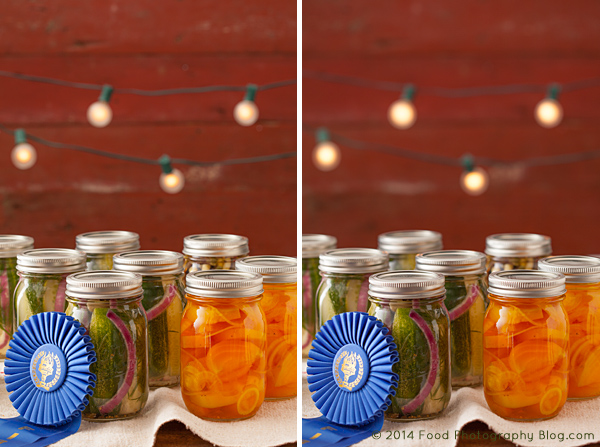
Two Images for Composite

The image on the left was shot at f/8 and the image on the right was shot at f/4.5

For this image I really like how the jars look at f/8, but I prefer the background shot at f/4.5, so I’m going to put the two together in Photoshop by creating a layer mask and put the best background, on top of the preferred foreground.

Making a Layer Mask

There are many ways to do the same thing in Photoshop. My favorite way to do a composite of multiple images is to use layer masks.

In the final composite I will be putting the background of one image onto another image, and also making a duplicate of one light bulb and pasting it onto the background.

I first open both files that are to be put together in Photoshop.

Next, I copy the image with the desired background and then paste the entire image into the file with the jars that I like. Now I have one file with two layers.
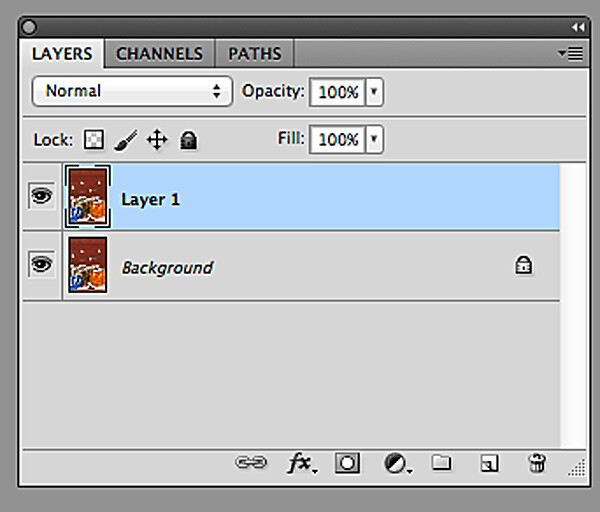
Two Layers

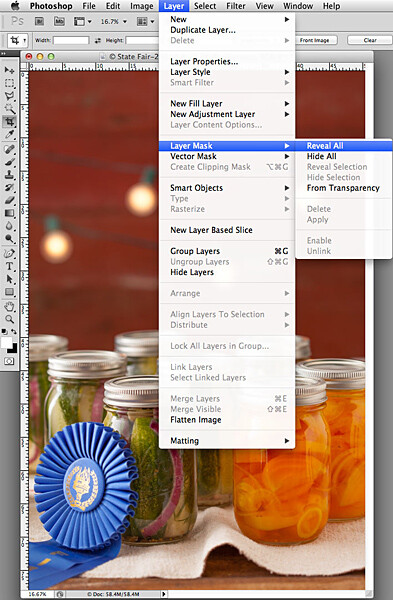
Now I need to make the top layer into a layer mask:

  1. Go to the top menu
  2. Click on “Layer”
  3. Scroll down to “Layer Mask”
  4. Scroll over to “Reveal All”

Converting Layer Mask2

Now, look in your layers palette. Your image should look similar to what you see below – the two files, with the top one having a white box next to the image. That is the layer mask.
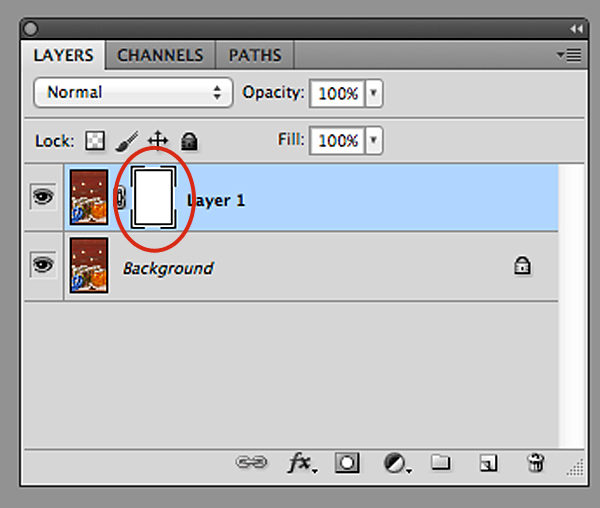
New Layer Mask

You can see the new layer masked circled in red.

To start working inside the layer mask, you have to use the brush tool. Then make sure your color palette is set to black on top of white for masking through the image. If you mask too far in one area, you can correct it by reversing the color palette to white on top of black and then go back over the area.

In this image I am using a soft edge brush (brush set to a hardness of “0″) for masking through the foreground of the top layer so that only the red background with the lights are left. The image below is how my layer looks mask work completed.
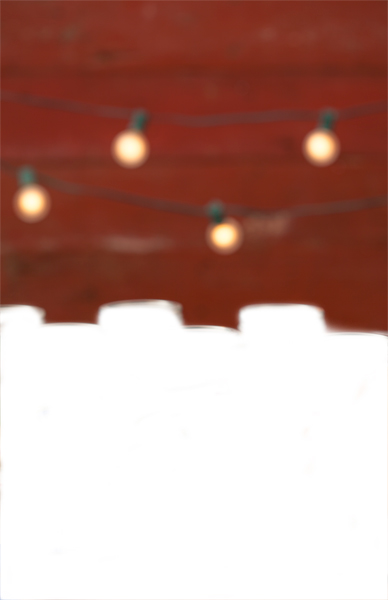
Background Layer Mask

This only took me a few minutes to create in Photoshop.

Now for the final composite below. I also added some text, then copied and pasted an additional light bulb in Photoshop to balance things out in the background.

The additional light bulb was also turned into a layer mask so that I could blend the edges of the image I pasted on top of the file.

Final Composite

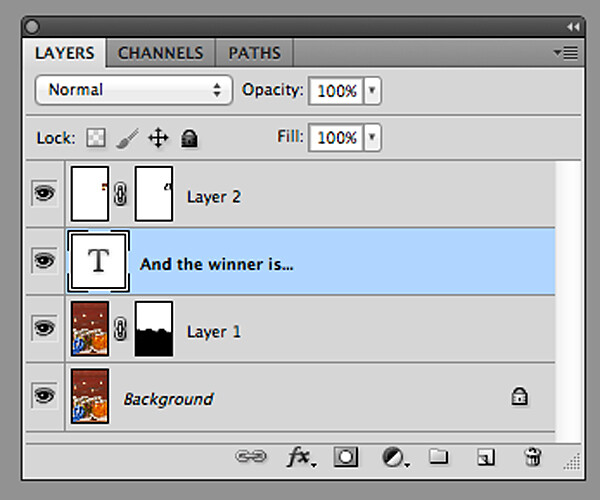
Final Layers

Here is what all the layers look like. Layer “2″ is the extra light bulb. If this was a file with a lot of layers, I would name each layer so that I knew what they were. In this case it’s easy to figure out, so I didn’t do that. You can see in the mask of layer “1″ that the bottom half of the frame is black. This is the part of the image that I masked.

So, next time when shooting on a tripod, experiment a little and take your shot with multiple apertures to bracket your depth of field, and maybe you’d like to composite a couple of files together.

The post Using Focus Creatively with Food Photography by Christina Peters appeared first on Digital Photography School.
Digital Photography School

 
Comments Off on Using Focus Creatively with Food Photography

Posted in Photography


How To Finish the Photography Project You Started

28 May

It’s inevitable that, at some point, your motivation will lag on that photography project you started. Whether you’re working on a popular photography project, such as taking a photo every day for a year (the 365-day project), walking the streets shooting strangers (the 100-strangers project), or working on a custom project you dreamt up…no matter what, one day you can Continue Reading

The post How To Finish the Photography Project You Started appeared first on Photodoto.


Photodoto

 
Comments Off on How To Finish the Photography Project You Started

Posted in Photography


5 Advanced Tips for Light Trail Photography

27 May

If you’ve never shot light trails before, start with Darren Rowse’s excellent article How to Shoot Light Trails. Once you’re comfortable with the basics, here are five advanced tips for creating your own unique light trail photography.

1. Go big or go home

Smith 1

You don’t want an image with tiny light trails. You want big, Texas-sized, light trails streaking across the photo. As with any subject, if you want the subject to appear large, get close to it. Exaggerate the effect by using a wide-angle lens. Another way to add a sense of size to a subject is to shoot it from below. Shooting a person from a low point of view makes the person appear larger and more powerful. The same is true with light trails.

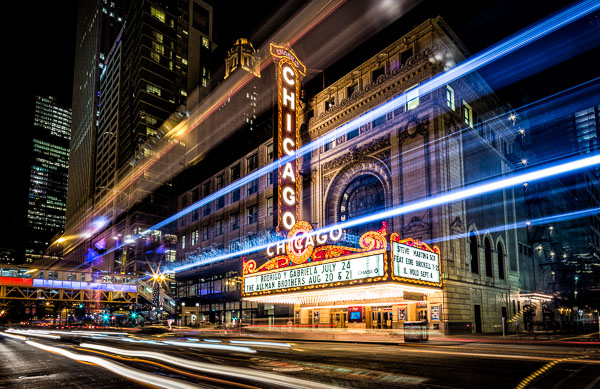
Get as low as you can, and as close as you can safely, to the traffic. If you’re shooting along a busy street, place two of your tripod legs barely into the street so that they are resting against the curb. Lower your tripod as far as you can and point it up. By getting as low and close as I could in the Chicago Theatre image (above), the top trails of the bus appear taller than the theatre marquee.

2. Visualize and compose for the light trails

Look at any of the images in this article and picture them without the light trails. You’re left with a boring composition that doesn’t work. When photographing light trails, you need to visualize how the trails will look in the image and compose your image with them in mind.

Treat light trails as if they were a river meandering through your image. You wouldn’t compose the shot so that the river moved straight across your frame, so don’t do it with light trails either. Pay attention to where the trails enter and leave the frame. Your eye will be drawn to the spot in the frame where the cars are beginning as it will have some of the densest and brightest trails. Place this location as you would place a main subject using the rule of thirds. The trails should move across your image and end at either the corners of the frame, or a vanishing point. Place this vanishing point in the opposite third of the frame. If the light trails enter in the lower left, have them end in the upper right. This lends a sense of movement to your composition.

Smith 2

If you can get to the middle of the road with traffic on either side of you, consider going for a perfectly symmetrical shot. You’ll need an interesting subject to go along with the trails, so look for a bridge or interesting buildings on the side of the road. Wait to hit the shutter until you have traffic on both sides of you to create a balanced composition. More importantly, make sure that you’re in a safe position. Stand in the median, or off the street. Never set up in the middle of a busy street.

Smith 3

3. Isolate the light trails from the scene

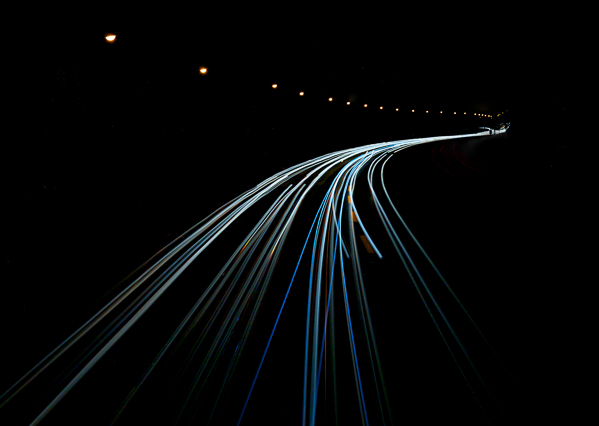
To create an interesting abstract image of light trails, put yourself in a position where the lights from the cars are the only light source. An expressway overpass is an ideal location. You don’t want any buildings or other light sources in the frame. Find a location where the road takes an interesting path and underexpose the scene so that the only things that appear are the light trails and streetlights.

When you open the photo on your computer, increase the exposure of the light trails while keeping the black areas black. You can increase the exposure of just the trails by increasing the whites slider in Lightroom, lowering the white point, or making an adjustment to the tone curve in Lightroom or Photoshop. You’ll be left with an image that shows only the path of the trails that makes for a unique abstract image.

Smith 4

4

. You don’t need cars for light trails

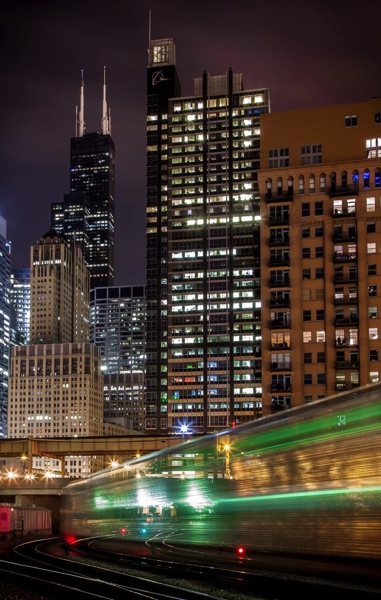
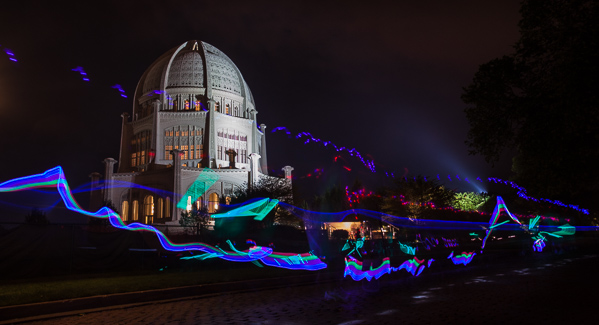
You can create light trail images at night by shooting anything that is moving and emitting light. If you’re photographing a city like Chicago, you’ll mostly shoot cars and buses, but don’t forget about trains, bikes, horse-drawn carriages, or even a bunch of kids walking by swinging glow sticks. The rules for photographing any of these is the same as with cars, but you’ll be able to shoot them in locations that cars don’t drive, and the trails that they leave are different than your standard cars.

Smith 5

Smith 6

5. Make your own light trails

Who says that you need to stand around and wait for something to drive by? If you’re in a more remote location, set up your tripod, set up a long exposure, use the 10-second delay feature in your camera, jump in the car, and drive around in front of your camera. You can drive in any path that you think might be interesting. Experiment until you find something you like. You’re essentially light painting with your car lights. This technique works even better with a friend. One person drives while the other shoots! Find an empty parking lot or a winding road and make your own light trails.

Smith 7

What do you do to spice up your light trail shots? Have you tried any of these techniques? Tell us in the comments below.

The post 5 Advanced Tips for Light Trail Photography by Chris Smith appeared first on Digital Photography School.

Digital Photography School

 
Comments Off on 5 Advanced Tips for Light Trail Photography

Posted in Photography


Portfolio: Photography student Luke Evans

26 May

PHOTOBOOTH_NEW-1.jpg

Luke Evans is a student, just coming to the end of a three-year course in graphic design and photography at London’s University of Westminster. Since starting the course Luke has received attention from media across the globe for his unusually fresh approach to the challenges of the course. Luke’s work is imaginative, technically innovative and thought-provoking, and we spoke to him as he was preparing his final year show. Click through to read our interview and see some of his work.

News: Digital Photography Review (dpreview.com)

 
Comments Off on Portfolio: Photography student Luke Evans

Posted in Uncategorized


2 Night Photography Video Tutorials

26 May
David Kingham

David Kingham

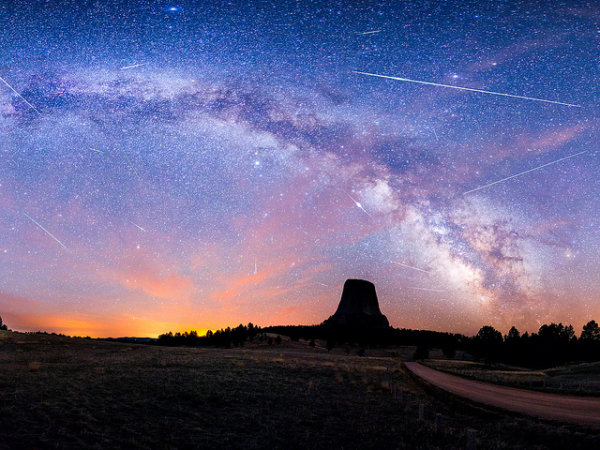
This week’s collection of amazing images I shared a bunch of night photography, specifically those of the night starry sky, and hopefully you’re already thinking about how to shoot for this week’s photography challenge starry night photography.

So I went and found a couple of video tutorials to help you out on this mission.

First, this one by Adorama TV hosted by Mark Wallace. He walks through all the equipment he’s using, camera settings and it even includes a background serenade by some local coyotes.

In this second video host Jim Harmer shows you how to photograph the starry night sky and the Milky Way including a little tip about how to get foreground objects sharp in your final image.

I hope you enjoyed those. Please remember to hop over to the weekly challenge and show us your night photos there!

The post 2 Night Photography Video Tutorials by Darlene Hildebrandt appeared first on Digital Photography School.

Digital Photography School

 
Comments Off on 2 Night Photography Video Tutorials

Posted in Photography


Find the Perfect Photography Location Using Google Maps

25 May

No matter if you’re planning your next photo road trip or you’re scouring the city streets looking for the perfect viewpoint, Google Maps and Google Earth are the most valuable tools to add to your arsenal for finding the perfect photography location.

Planning to Shoot

I usually travel for work, or with family, so I don’t have the luxury of as much time as I might want to search for the perfect vantage point in person. Nor to scout an area to compare locations that I want to dedicate to the one sunset that I’ll have time to shoot. Google Maps to the rescue!

While planning a trip from home, you have much more time to explore the area in a virtual capacity instead of being out there with boots on the ground. Nothing can compare with actually being there, but the tools available to you are getting better every day and the ability to nearly frame your shot is a realistic time saver. Time to turn the volume on your pre-visualization up to 11.

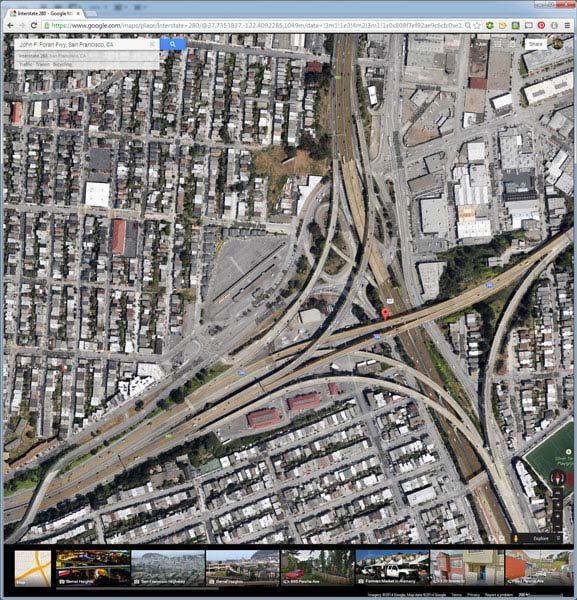
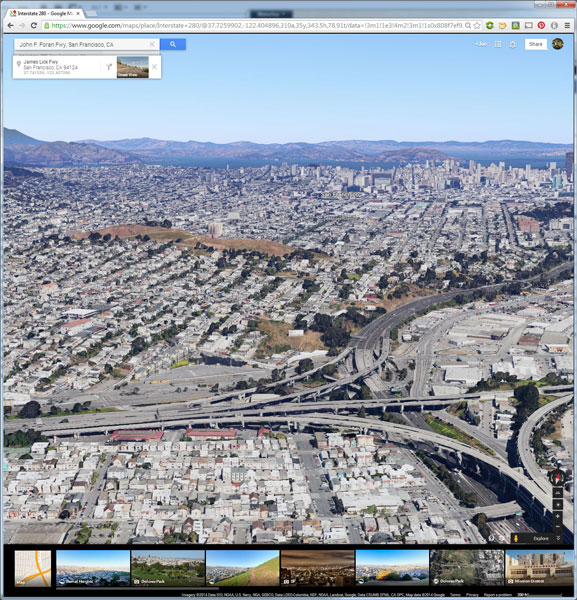
If I’m planning a trip or have an idea for a shot, I’ll start with Google Maps and zero in on the area that I want to shoot. You probably already do this, too, but let’s just take it a step further. Click the icon in the lower left corner labeled “Earth” to start the Google Earth browser plugin. This has replaced the satellite or aerial view for much of the world’s map, but instead of only offering a flat, two dimensional view of the map directly overhead, you can now tilt the map and see an approximation of topography, texture, and elevation.

Default Earth View

Normal mouse controls on the map let you pan in all directions, and zoom in or out with the mouse wheel. In order to adjust to a view that will help you get a better idea of the terrain, hold down the shift key, click and drag upward. That will rotate your point of view (POV) so that you now have an aerial view looking toward the horizon instead of straight down. Dragging left or right while holding shift will rotate your point of view instead of panning.

Rotated Earth View

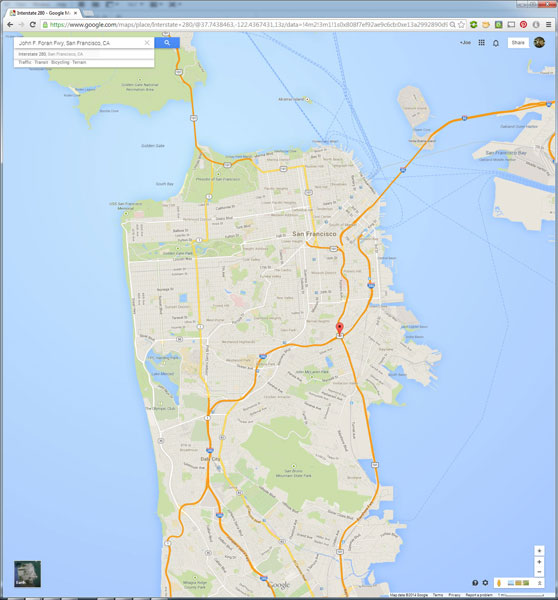
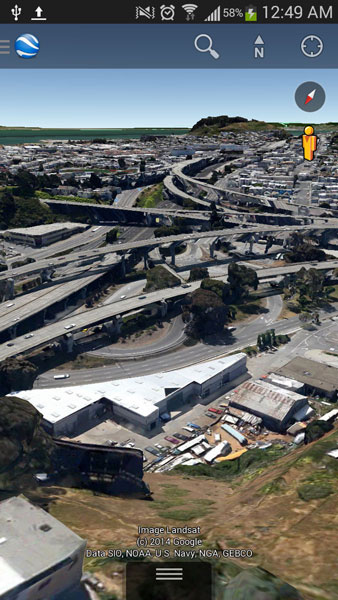
But, you don’t have to be tied down to your desk to do this. Just two weeks ago, I was out with a friend exploring San Francisco and searching for a specific vantage point of the 101/280 freeway interchange. We knew the general area that we wanted to shoot from, but with so many streets winding around, using Google Earth on my mobile phone helped to eliminate some of the trial and error of driving around without a clue how to find what we wanted.

101 280 Framing the Shot Mobile

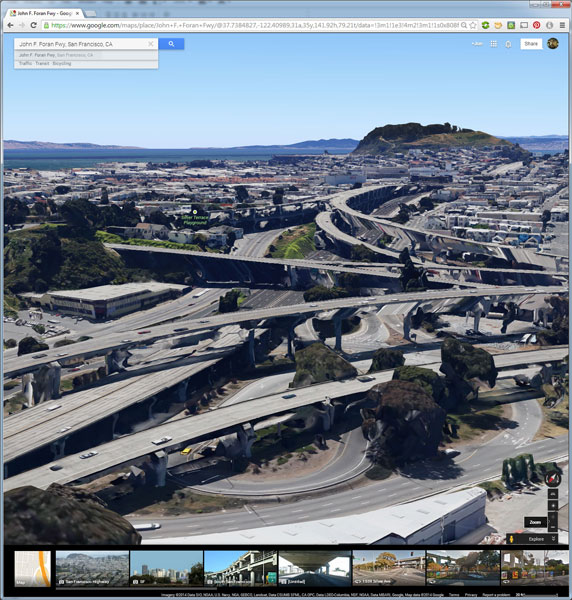
101 280 Framing the Shot

Desktop interface Google Earth view looking south

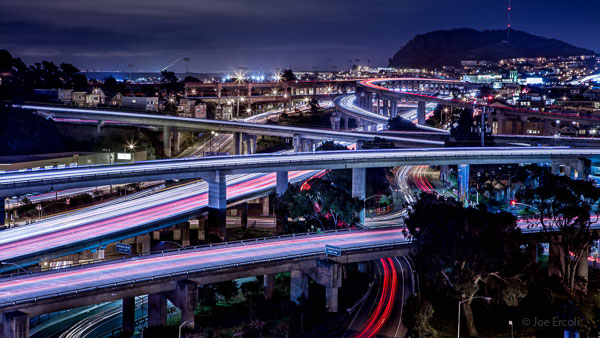
Joe Ercoli Land of Confusion 600

Finished image from location scouted using Google Maps/Earth

The example images from this article show the area that we shot in, including a screenshot taken from the mobile interface, and the completed image. Of course the view that you can get from the map interface is never as good as what you’ll see in person, but it’s an excellent way to help you hit the ground running when you get on-site with your camera in hand.

NOTE: The camera is facing South in the final composition, not North as in the initial Google Earth Point of View.

Have you used Google Maps to find any cool locations? What other tips or tricks have you tried? Please share in the comments below.

The post Find the Perfect Photography Location Using Google Maps by Joe Ercoli appeared first on Digital Photography School.

Digital Photography School

 
Comments Off on Find the Perfect Photography Location Using Google Maps

Posted in Photography


Street photography tips with Zack Arias

24 May

Screen_Shot_2014-05-22_at_2.03.28_PM.png

Photographer Zack Arias is particularly known for is his street work, and in a new video he shares some street photography tips while shooting with a Fuji X-T1 in Marrakech, Morocco. Even though the video is clearly sponsored by Fujifilm, it’s more than just a video tour of a new camera system. Arias talks about subjects and framing, composition and timing, and shows the resulting images after each technique. Learn more

News: Digital Photography Review (dpreview.com)

 
Comments Off on Street photography tips with Zack Arias

Posted in Uncategorized


A Collection of Dreamy Star Photography

24 May

Doing night photography is one of my favorite things to do. Photographing the stars is one of the toughest parts of night photography. We’ve had a few articles on night photography and specifically the stars here on dPS. Here are some tips on star photography for you:

  • Do you pack up and leave after sunset and miss the fun of night photography?
  • Nightscapes: Photographing the City at Night
  • How to Photograph the Stars

To give you some ideas of what’s possible with night photography and shooting the stars, here is a collection of star photographs.

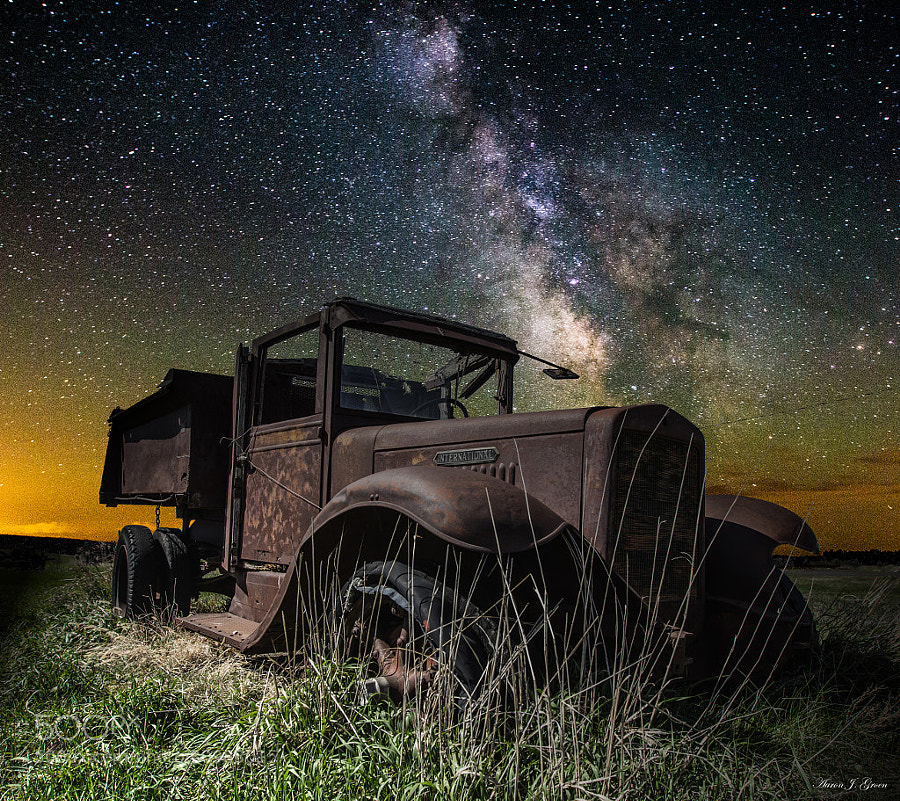
Photograph International Milky Way by Aaron J. Groen on 500px

International Milky Way by Aaron J. Groen on 500px

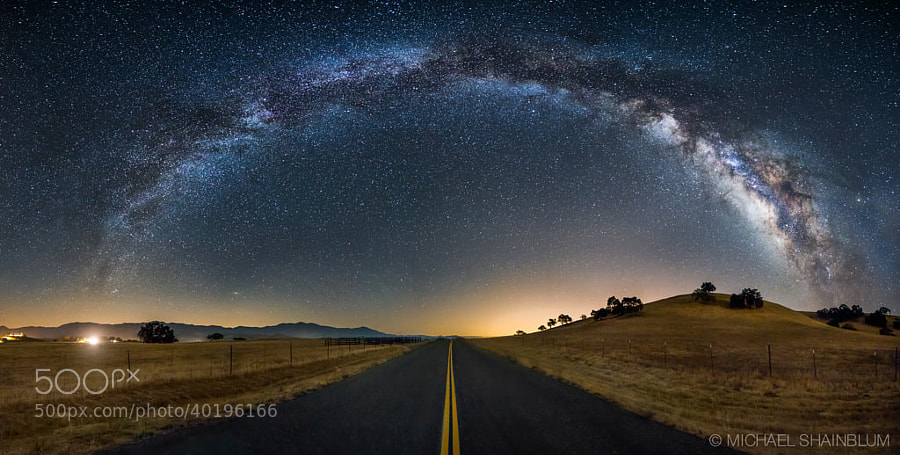
Photograph The Galaxy Guides Us Home by Michael Shainblum on 500px

The Galaxy Guides Us Home by Michael Shainblum on 500px

Photograph What Once Was by Aaron J. Groen on 500px

What Once Was by Aaron J. Groen on 500px

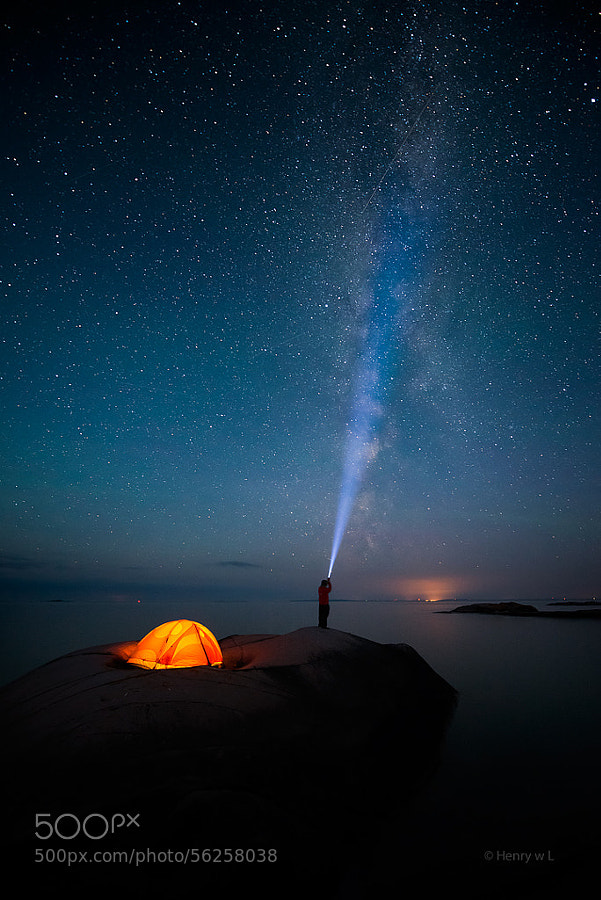
Photograph Shooting the Stars by Henry Liu on 500px

Shooting the Stars by Henry Liu on 500px

Photograph Noctis by Lincoln Harrison on 500px

Noctis by Lincoln Harrison on 500px

Photograph Moraine Lake at night by Andrey Popov on 500px

Moraine Lake at night by Andrey Popov on 500px

Photograph Dolomites by Max Rive on 500px

Dolomites by Max Rive on 500px

Photograph Amid Myriads of Stars by AtomicZen : ) on 500px

Amid Myriads of Stars by AtomicZen : ) on 500px

Photograph *** by Lincoln Harrison on 500px

*** by Lincoln Harrison on 500px

Photograph Tree Of Life by Michael Shainblum on 500px

Tree Of Life by Michael Shainblum on 500px

Photograph Fossilized UFO by Sakhr Abdullah on 500px

Fossilized UFO by Sakhr Abdullah on 500px

Photograph Volcanoes of Kamchatka by ???????? ?????? on 500px

Volcanoes of Kamchatka by ???????? ?????? on 500px

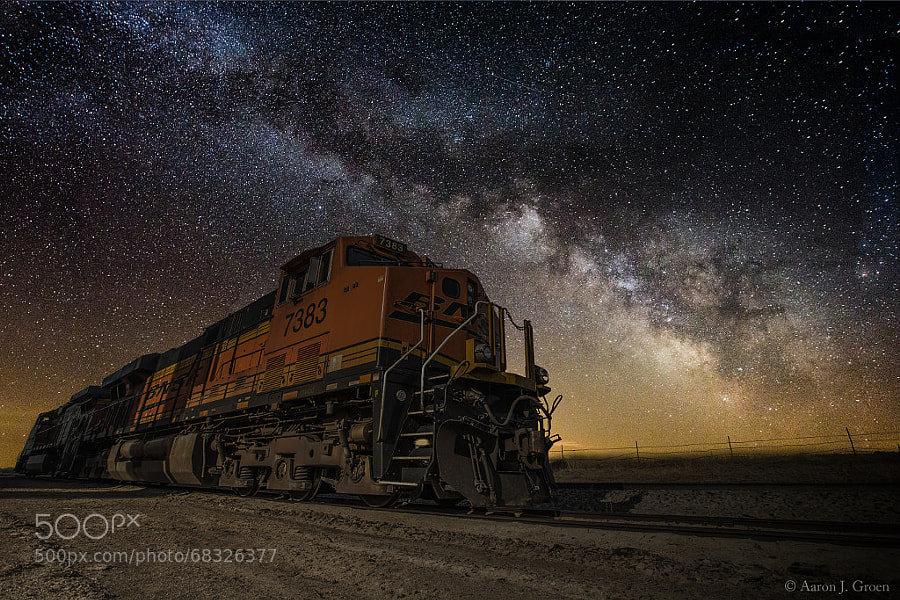
Photograph Night Train by Aaron J. Groen on 500px

Night Train by Aaron J. Groen on 500px

Photograph Rainbow by Lincoln Harrison on 500px

Rainbow by Lincoln Harrison on 500px

Photograph Stars in Dead Vlei by Patrick Galibert on 500px

Stars in Dead Vlei by Patrick Galibert on 500px

Photograph Milky River From Pyramid to other ! by jamil ghanayem on 500px

Milky River From Pyramid to other ! by jamil ghanayem on 500px

Photograph Lonely Tree by Ajay George on 500px

Lonely Tree by Ajay George on 500px

Photograph Wagon Decay by Aaron J. Groen on 500px

Wagon Decay by Aaron J. Groen on 500px

Photograph Cottonwoods and Milky Way by Randy Halverson on 500px

Cottonwoods and Milky Way by Randy Halverson on 500px

Photograph In the Dream by Brad Goldpaint on 500px

In the Dream by Brad Goldpaint on 500px

Photograph Light painting Epupa Falls. by Patrick Galibert on 500px

Light painting Epupa Falls. by Patrick Galibert on 500px

Photograph Just a Dream by XeeShan Ch on 500px

Just a Dream by XeeShan Ch on 500px

Photograph Ancient Ruins V2 by Michael Shainblum on 500px

Ancient Ruins V2 by Michael Shainblum on 500px

Photograph Rendez-vous by David Keochkerian on 500px

Rendez-vous by David Keochkerian on 500px

Photograph Milky Way at Marshall Point Lighthouse by Mike Taylor on 500px

Milky Way at Marshall Point Lighthouse by Mike Taylor on 500px

Photograph Galileo's Muse by Brad Goldpaint on 500px

Galileo's Muse by Brad Goldpaint on 500px

The post A Collection of Dreamy Star Photography by Darlene Hildebrandt appeared first on Digital Photography School.


Digital Photography School

 
Comments Off on A Collection of Dreamy Star Photography

Posted in Photography


Weekly Challenge – Starry Night Photography

24 May

This week we had some Beginners Tips for Night Sky and Star Photography by one of our newest dPS writers, Phillip VanNostrand. Earlier today I shared a collection of Dreamy Star Photography.

By Dennis Behm

So, now it ‘s your turn. Get out into the night and photograph some stars for this week’s challenge:

Starry Night Photography

Here are a few more starry night photos to get you motivated, inspired and ready to go shoot.

By Bill Shupp

By Kris Williams

By slworking2

By Tom Bricker

By David Kingham

By Brian Hawkins

Need more help with some tips and tutorials? Try these:

  • Lake Tekapo Under the Stars
  • The Night Sky In Landscape Photography
  • Tips for Photographing Star Trails
  • Photography Under the Stars

Share your starry night photography

Simply upload your shot into the comment field (look for the little camera icon in the Disqus comments section as pictured below) and they’ll get embedded for us all to see or if you’d prefer upload them to your favourite photo sharing site and leave the link to them. Okay, ready to impress us?


The post Weekly Challenge – Starry Night Photography by Darlene Hildebrandt appeared first on Digital Photography School.


Digital Photography School

 
Comments Off on Weekly Challenge – Starry Night Photography

Posted in Photography


Stop Collecting Tips and Start Practicing Photography

23 May

Young photographers are often better at digital photography than older photographers. This article will explain why this might be, and how you can improve your skills faster. You may be surprised to hear that IQ (Intelligence Quotient) apparently peaks at age fourteen.

Now, IQ is a deeply flawed measure of intelligence, and fourteen year olds certainly shouldn’t take over the world; but the young brain has incredible processing power.

young-photographers_8915-600

As we age, we lose this raw speed and (hopefully) replace it with shortcuts, experience and ‘wisdom’. This allows us to make better choices and retain the illusion of intelligence, but it also limits our creativity. Incensed? Read on…

Knowledge versus understanding

A quick mathematics question; what’s 8 squared? Ask a child and they’ll have to work it out. You probably know it’s 64 without thinking. This is knowledge; remembered facts.

Remember Pythagoras’ Theorem? Maybe you even know the same explanation, ‘the square of the hypotenuse is equal to the sum of the squares of the other two sides’. This is knowledge; a tool. Ask a mathematician and they’ll be able to prove it and explain why it’s true. This is understanding.

art-photography_1712Ask a layperson about the white balance setting on your camera. They’ll probably have no clue what you mean. Ask an average photographer and they’ll be able to tell you it controls the colour cast. Ask a physicist and they’ll understand far more deeply what’s going on and why.

Knowledge is very useful. It’s quick to learn by rote. How else can a young child pick up concepts that took the greatest geniuses years to develop? Most education equips us to slot into a role in a business. Understanding isn’t normally necessary. It’s enough to know that e=mc2 – only a few people need to understand the implications of this equation. Some of them for work; and others to satisfy a yearning to understand.

Precisely because our society values superficial understanding, it doesn’t occur to us to make knowledge our own, to transform it into understanding. We think that by knowing the name of something that we understand it. A brown-throated thrush. Satori. Light.

Make the leap from words to visuals

Words are useful; they allow us to communicate. But they’re really quite limited, and the language you speak tends to limit what you can think. Philosophers are acutely aware of this. So are mystics, and as artists, we’re always seeking to move beyond the cage that words present. Try defining love – or even the smell of fresh roses.

To communicate understandings, ideas and feelings, we have to package them up into sentences (parcels of knowledge) and share them with others, who then unpack them in the light of their own unique experience to create their personal understandings. I normally teach one-to-one, but when I teach bigger classes there’s a tendency for students to just collect the parcels and never unwrap them.

We are particularly prone to this, because Holistic Photography is both a craft and an art. We can certainly learn the first bit; apertures, shutter speeds, the inverse square law; but we often falter with the latter. The Golden Mean? That’s just another technique.

barcelona-sagrada-familia_1902

Sagrada Familia in Barcelona, from a different point of view

What ends up happening is that our head becomes so filled up with knowledge that it blinds us to the world around us. We’ll visit the famous cathedral that we read about in the guidebooks and have such a strong preconception about what it must be like that we fail to notice how it looks at the specific time that we’re there. When I’m teaching photography courses in Barcelona, the Sagrada Familia is a major attraction; but there are a myriad ways of photographing it that are overlooked. If we’re photographing people, we may get so stuck in our heads thinking about lighting ratios or the half-remembered tips of a ‘how to pose your model‘ article that we’re not available to make the human connection which leads to the poses that look best. We get stuck in our heads and cease feeling or seeing.

Stand in front of Rothko’s multiforms in a gallery if you get the chance. You can’t quite explain why, but they move you, if you let them. Van Gogh isn’t treasured (now) because of his technique, but because of the way he expressed his internal world, which happened to match our own at moments. Because while we’re all different, we’re also all the same.

There is a visual language. You can learn it in art school. Complementary colour schemes for emphasis, how different shapes can give different meanings, and where to put things in your frame and why. But to understand how to create, you’ll have to feel in your own body what works for you, and let your own mind tell you what’s right or wrong.

image-1

Theory versus action

Young photographers look for knowledge online. They have access to more information than they can ever read. Most are open to learning, so they progress rapidly. Like the zen master said, your cup can’t be full if you want to put more in it.

But they also have the benefit of few responsibilities, short attention spans and huge amounts of time. They underestimate the importance of learning from others. So they read a bit, get bored, and just play with the camera. Digital is free to experiment with, so they make thousands of mistakes and try things we never would. Then, when they reach a barrier, Google instantly provides the answer. It’s no wonder that they learn far faster.

imageCompare the contrary method. To get a big stack of books and methodically work your way through them, supplemented by overpriced photography magazines. Let’s not forget the millions of photography articles online as well. It’s addictive. Our brain rewards us for learning. We feel like we’re improving. But content is a trap, and too much information atrophies or paralyzes us.

Information with application is different. If we can immediately use what we’re learning, we’ll assimilate it faster and retain more. I studied French for almost a decade and can hardly hold a conversation, but speaking Spanish with my Peruvian girlfriend makes it much easier to learn.

There needs to be a balance. I see some photographers who learned a few techniques back when film was still popular, and have just stuck with them. If it’s not broken, don’t fix it, they reason. But no, you need to be constantly evolving, learning form others and letting your photography keep pace with your own evolution.

But chances are if you’re reading this, you’re taking in too much information without applying it. Get a little bit of relevant theory and then practice, practice, practice until you understand it well enough to integrate it with your vision. Then seek out another bit of knowledge to turn into understanding.

The takeaway from this is that we’re really not as capable as we might imagine. Nor do we understand how to best work with our psychology to make the most of our energies. We try to learn the ‘right’ settings by looking at the aperture, shutter speed and ISO used in photos we admire. But our brain hasn’t evolved to memorize numbers.

photographers_9490

It can however tell you if a drinks can is full or not just by picking it up. Far better it is then to develop the muscle memory associated with changing the settings on your camera. Work on specific areas until they’re second-nature and you’ll find your photography will improve far faster.

Go forth and practice!

So that’s enough theory for now. Here’s a test; set an alarm to ring in a couple of hours then carry on with whatever you were doing. Try and remember what this article was about. If you can’t remember what you read, then there was no point in spending your time to read it. There’s a wealth of knowledge available that can push your photography to the highest levels; but only you can unpack it into understandings. Make it applicable. Make it stick. Use it. Make it your own.

The post Stop Collecting Tips and Start Practicing Photography by Ben Evans appeared first on Digital Photography School.

Digital Photography School

 
Comments Off on Stop Collecting Tips and Start Practicing Photography

Posted in Photography