RSS
 

Posts Tagged ‘Photography’

Time-Lapse Photography – a Quick Guide to Building Your Movie

11 Aug

Time-lapse photography shows you events that occur over an extended period that are captured on camera and shown in a relatively short time.

Time-lapse imagery is the capture of individual images of a subject at preset intervals over a preset duration. These individual images are then combined using software, thereby compressing the event into a much shorter time span.  If you were to witness an ice cube melting it would take an hour or more. With time-lapse the process from solid to liquid could be seen in seconds.

What do you need to do time-lapse photography?

Cameras

Though point-and-shoot cameras will do the job, digital single lens reflex cameras (DSLR’s) and mirror-less cameras allow for the most flexibility. They not only capture images that are of a higher quality but have features most suitable for time-lapse. In particular, they are capable of manual exposure and focus control. They also have an array of lenses to choose from and all the accessories required for capturing time-lapse sequences.

Lenses

All focal lengths are suitable based on the subject you select. A lens that has a manual aperture ring is best as the aperture blades do not open and close for each shot captured.

Intervalometer

The key to achieving a great lime-lapse sequence is a good intervalometer. This is a device capable of triggering your camera with accurate intervals and precise shutter actuations. It can be an external or internal device.

Tripod

Image Stabilization and Vibration Reduction are good but they are no substitutes for a good tripod for time-lapse photography. Use a solid tripod.

Batteries and/or AC Couplers

Because of the long duration of time-lapse sequences, the batteries in your camera may drain out before the sequence is completed. Here are a few tips to help you increase your battery life:

  • The single battery in your camera powers a number of functions. Many of these can be switched off for time-lapse capture or you can decrease their “on-time”.
  • A major drain on the battery is the LCD display and Live View. Use these screens only if it is imperative and then make certain that you lower the brightness using one of the custom functions. Also, limit the preview duration, keeping it to a minimum.
  • Don’t use your camera’s LCD screen for viewing and deleting images. Leave that activity to be performed on your computer after you have downloaded your images.
  • If you are shooting a sequence indoors you can use an AC coupler to power your camera.  An AC coupler is used in lieu of the camera battery.

Formula for Time-Lapse Capture

The typical frame rate for movies is between 24 and 30 frames per second. As a guideline, the greater the frames per second the smoother the playback.

When using a DSLR, you have all the control to create good time-lapse sequences. Selection of shutter speed, depth of field and the interval between shots can be set as desired. Just remember, the faster the movement of the subject or subjects within your project, the shorter the interval between images captured. However, you may be limited in low light situations.

Here is a guide for intervals:

1 Second

1 – 5 Seconds

15 to 30 Seconds

3 – 15 minutes

Air and Road Travel

Sunrise Sunset

Moon going across the sky

Growing Plants

City Scenes with Traffic

Crowd Scenes

Stars and Milky Way

Home Building Projects

Bicycle Rides

Slow Moving Clouds

A good starting point for any subject matter is to create your time-lapse with a shorter interval than you may think is appropriate. You can always discard alternate or irrelevant images from your final sequence if you want to speed up the action.  For example, if you decide to use a 30 second interval for a moon sequence, but want to be sure that the final sequence will be smooth, shoot at 15 second intervals. You can get back to your original plan by removing every alternate image for the final sequence.

Prepare your images

Using any software editing program, crop or size your captured images to a width of 1920 pixels and a height of 1080 pixels for a 1080p HD video (use 1280 pixels by 720 pixels for 720p video). Make sure your crop registration is identical for all the images.  If you are not comfortable doing this, use the automatic resizing provided by most time-lapse assembly software.

Now that the images of the sequence are ready, you can use one of the many free applications for Windows and Mac operating systems to create your video. Some of these are VideoVelocity from CandyLabs, Photolapse from Stephan van der Palen and Time-Lapse Assembler created by Dan Bridges. For under $ 30 Apple Quicktime Pro 7 can be used to create some excellent time-lapse video.

How to use Time Lapse Assembler for Mac
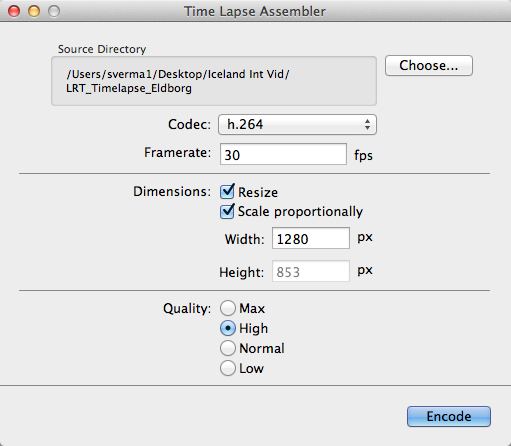
tla-1

  1. Open Time Lapse Assembler
  2. Select the directory that contains the image sequence
  3. Select the codec. Use h.264 or mp4v for making .mov files or mp4v for making .mp4 movies
  4. Leave the frame rate at 30fps
  5. Set the dimension to resize
  6. Scale proportionately
  7. For HD video you can adjust the width to 1920 or 1280 (1920 for 1080P video and 1280 for 720p video)
  8. Select Quality High (you can always use Max but the rendering will take longer
  9. Click on Encode
  10. You will be presented with a Save window. Name your sequence and click Save.
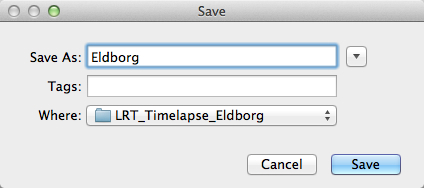
tla-2

The software will produce a Quicktime compatible movie file that can be viewed as is, or used for further editing in iMovie or any other video editing software.

See below an example of the video in very low resolution:

Here are the steps for Quicktime Pro 7

  1. Open Quicktime
  2. Go to the menu and under File – click on Open Image Sequence. Go to the directory where you downloaded your images (make sure you have only the images that belong in the sequence in this folder)
  3. Click on the first image of the sequence and click Open
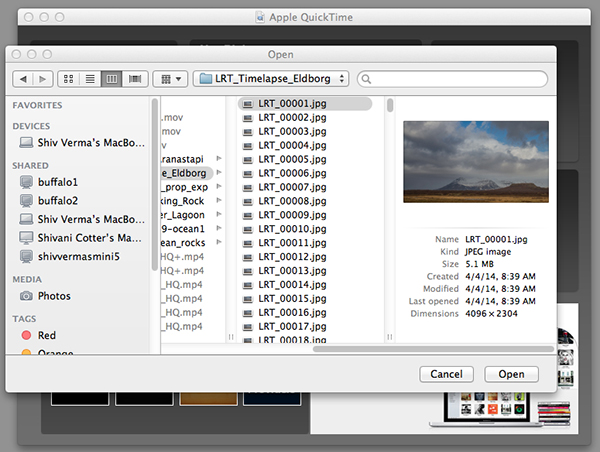
    Select the Sequence

    Select the Sequence

  4. You will be presented with a choice for picking your frame rate – use 30 frames per second for a smooth sequence. Now click OK
  5. Quicktime will import all the images in that folder and assemble them in their original sequence and at their original resolution. You probably will not be able to see the entire image as it is larger than the resolution of your screen but you can go to the Menu>View>Fit to Screen. You now have the first frame visible in its entirety.
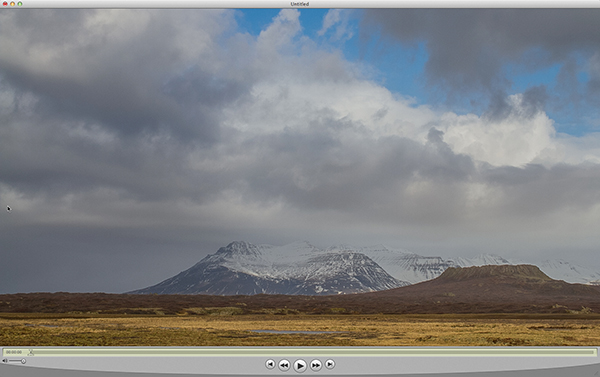
    Assembled Sequence

    Assembled Sequence

    If you attempt to play this sequence you will not see the movie as you might like it to be. It will not be smooth and may pause for long periods. This is because the individual frames are very large and the video has not been rendered for playback.

  6. Save this sequence File>Save
  7. You will be presented with options as to where you would like to save the Quicktime file.
  8. Save the file in the same directory as the original images and name the file

The next steps will render a viewable video

  1. You will export this sequence File>Export
  2. You will get the typical “Save As” option and the “Where” option. Save the export in the same folder as the original files giving it a pertinent name.
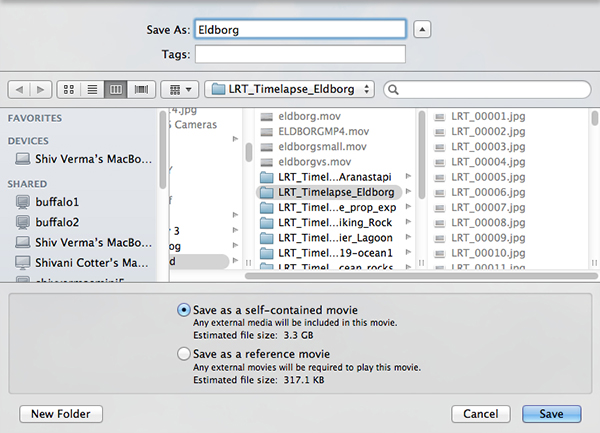
    QT-3
  3. There are two other sets of export criteria and an options button. For now, export the sequence as a QuickTime Movie and in the Options Section use H264.
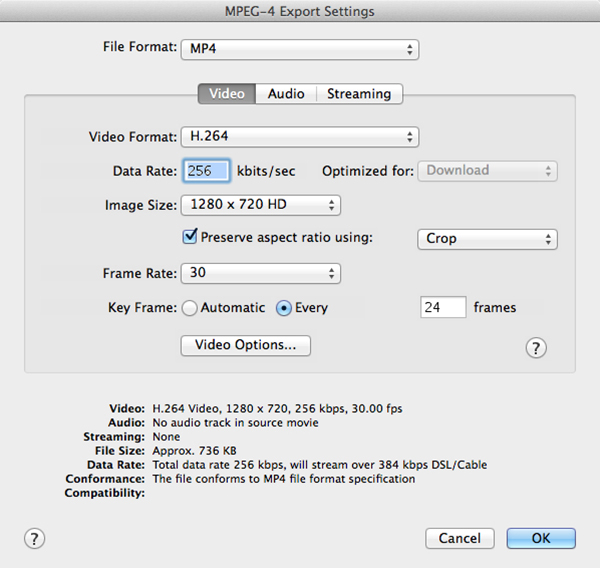
    QT-4
  4. The export will take some time so be patient. Once the rendering and export is complete you will be able to watch the video. 

Have fun making your time-lapse – enjoy!

The post Time-Lapse Photography – a Quick Guide to Building Your Movie by Shiv Verma appeared first on Digital Photography School.


Digital Photography School

 
Comments Off on Time-Lapse Photography – a Quick Guide to Building Your Movie

Posted in Photography


Weekly Photography Challenge – All Things Green

09 Aug

Earlier I posted a set of photos with a green theme.

It’s summer in the northern hemisphere and with summer comes lots of green. Green grass, trees, all over nature we see green. It happens to be my favorite color so it makes me happy.

This week I want to see your Green photos. Look around in your world, what do you see that’s green? How many shades can you find? Natural things and man-made. Big and little things. Show us your green!

Weekly photography challenge this week is – all things green!

Here are a few more images of green to get you started:

By John Clare

By Nomadic Lass

By Dandelion Salad

By paige_eliz

By Barb Dunn

By Miikka H

By Parée

By premier-photo.com

Can you tell I picked those before eating dinner?

Now it’s your turn!

Share your Green photos

Simply upload your shot into the comment field (look for the little camera icon in the Disqus comments section as pictured below) and they’ll get embedded for us all to see or if you’d prefer upload them to your favourite photo sharing site and leave the link to them. Show me your leading lines using pathways and roads in this week’s challenge.

The post Weekly Photography Challenge – All Things Green by Darlene Hildebrandt appeared first on Digital Photography School.


Digital Photography School

 
Comments Off on Weekly Photography Challenge – All Things Green

Posted in Photography


7 Pet Photography Tips to Capture Your Furry Friends’ Personality

08 Aug

For millions of people worldwide, no family is truly complete without a furry friend. Cats, dogs and all the critters in between are quick to crawl their way into your heart, and it’s no wonder why people want to capture their personality – forever. One of the best ways to do this is through snapshots. Like children, though, pets can Continue Reading

The post 7 Pet Photography Tips to Capture Your Furry Friends’ Personality appeared first on Photodoto.


Photodoto

 
Comments Off on 7 Pet Photography Tips to Capture Your Furry Friends’ Personality

Posted in Photography


10 Lessons From Steve Jobs for Your Photography Brand

06 Aug

Steve Jobs forever will be remembered as a digital visionary – he was the one who brought poetry to the microchip. He is a legend these days. All of us can’t be Steve Jobs, but we can learn some lessons from his extraordinary life and career to parlay them into the photography business. Steve Jobs took a near-bankrupt Apple and Continue Reading

The post 10 Lessons From Steve Jobs for Your Photography Brand appeared first on Photodoto.


Photodoto

 
Comments Off on 10 Lessons From Steve Jobs for Your Photography Brand

Posted in Photography


Bird Photography Tips – How to Make Your Bird Photographs Stand Out

02 Aug

Have you ever been disappointed when browsing through the bird photographs in your own portfolio? I was, in fact many times! Even today I get disappointed to see several of my own bird photographs and keep thinking why did I take that photograph in the first place?

In most cases, the reason for failure of not appealing bird photographs is the boring or distracting background.

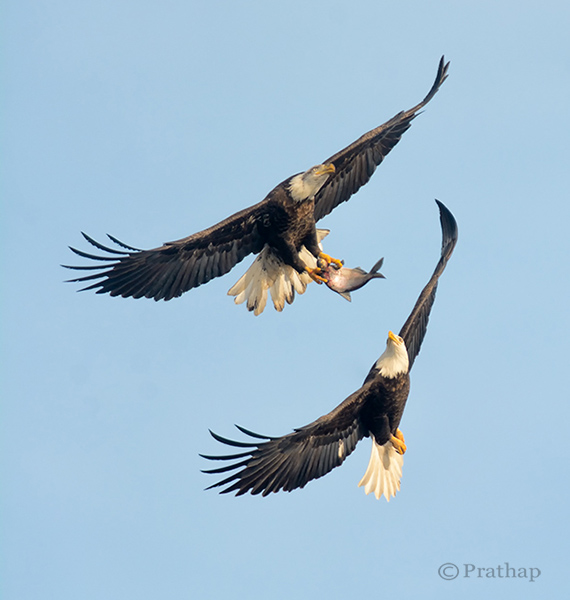
Nature Photography Simplified Bird Photography Bald Eagle Fight In Flight

Take a look at your portfolio again and see if the culprit is the background. You will be surprised, shocked, and probably start thinking why did I take this photograph? What was in my mind?

The reason is very simple. It’s our natural behaviour. We are accustomed seeing only what we want to see. Imagine a situation like this. You have your camera and a decent telephoto lens, when you see a magnificent bird like a Bald Eagle perching on a lone tree.
What do you do? You will most likely start capturing photographs in burst mode. Don’t you? We all do! The urge to capture the beauty, and the fear of losing that opportunity doesn’t allow us to think. Unless. . .

By following these very simple bird photography tips, and making a few changes before you press the shutter, you will be able to create bird photographs that stand out.

Your Background Makes the Picture

Remember that we see our world different than the Camera. We tend to see only what we want to see. Meaning, we are so tuned to looking at the world using filters. Our brain passes only the information which is very important to us filtering out all the unimportant things. So, we see only the bird and its beauty, but don’t see the background, or the distracting elements in the background.

But the camera doesn’t filter, it records everything that it sees.

No matter how beautiful the bird is, you have to make sure that the background is either clean, or interesting enough that it will complement the bird, which is your main subject of interest.

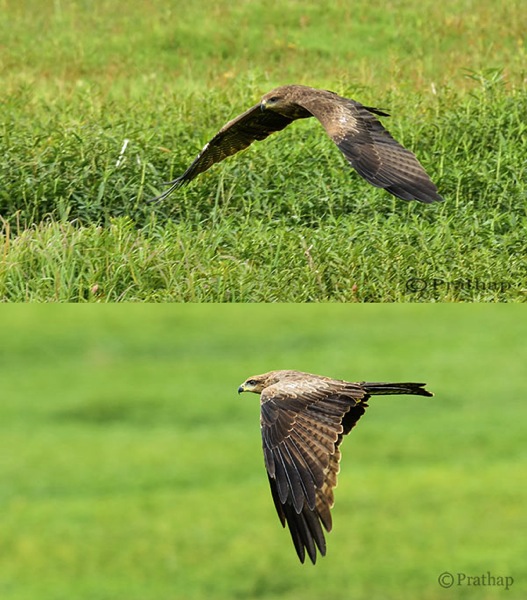
Nature Photography Simplified Bird Photography Eagle Flight Distracting vs Clean Background

Use Your Legs

Do you use your legs when you are photographing? Does this question sound crazy? Think again. Once you get to see the bird, it is a common tendency to capture it immediately. In that urge to capture, you generally forget to move around.

In order to get a clean and appealing background you have to move around sometimes, or rather most of the time. But remember to move very slowly. Most of the time moving just few feet to the left, right, forward or backward will give wonderful results.

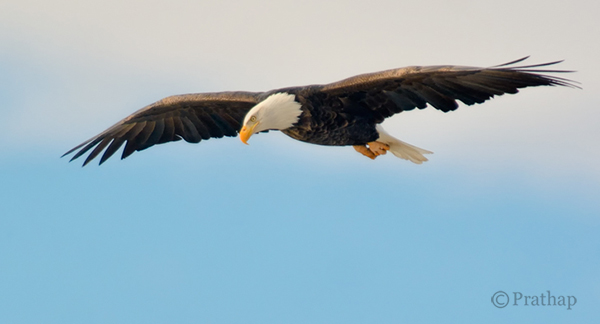
Nature Photography Simplified Bird Photography Bald Eagle Flight

After all you are not a tripod!

Patience Always Pays Off

There is no substitute for patience when it comes to achieving anything worthwhile in your life. It is no different in the case of bird photography.

Why do we want to always move? Why can’t we sit in one place for several minutes to hours?

If you think deeper about it, you will understand that we are almost always restless. Also, we believe in the future or something that is non-existent. Learn to live in the present. Learn to embrace what is there in front of you. Rather than moving on in search of the next bird, spend time with the bird in front of you.

I would recommend you to spend hours to days in succession. You will fall in love with the bird and ultimately with nature. Patience is the key to making great photographs of any bird.

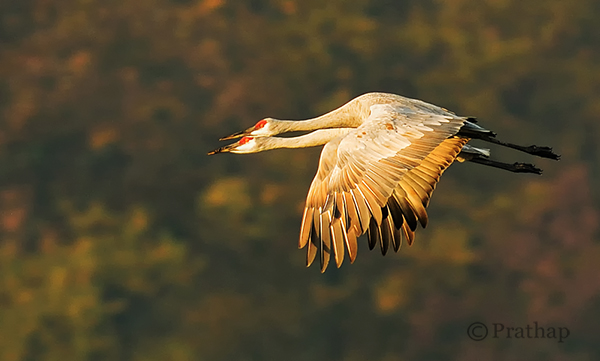
Nature Photography Simplified Sandhill Cranes Pair In Flight Jasper Pulaski Fish And Wildlife Refuge Indiana

Use Depth of Field (DOF) to Your Advantage

Depth of Field plays a major role in making your bird photographs look beautiful. By using DOF you can either isolate the subject from its background by using shallow DOF, or give importance to both the bird and its background by using deep DOF.

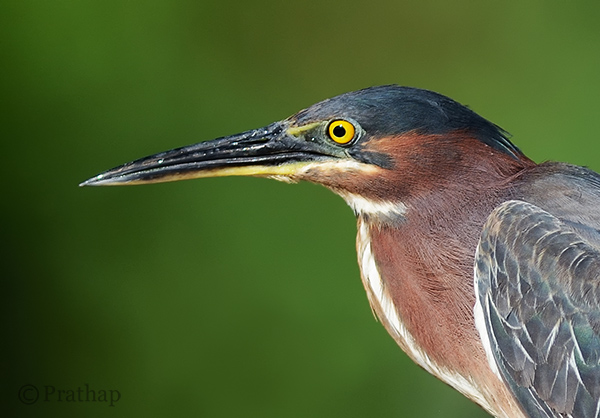
If the background does not convey anything about bird’s habitat, then using larger apertures like f/2.8, f/4, f/5.6 yields a pleasing bokeh in the background helping the bird to stand out in the frame.

Nature Photography Simplified Bird Photography Green Heron Portrait Bokeh Effect

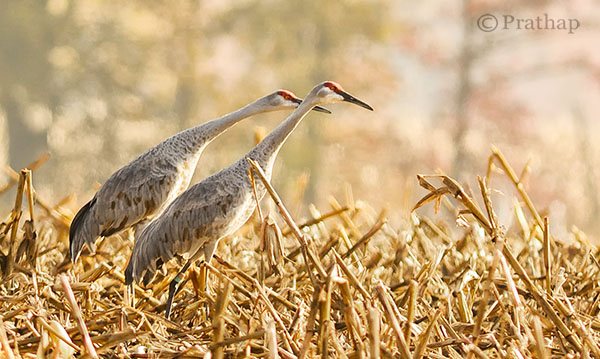
Otherwise, including the habitat by using smaller apertures like f/8, f/11, etc., helps to narrate a story to the viewer.

Nature Photography Simplified Sandhill Cranes In Jasper Pulaski Fish And Wildlife Refuge Medaryville Indiana

Fill the Frame

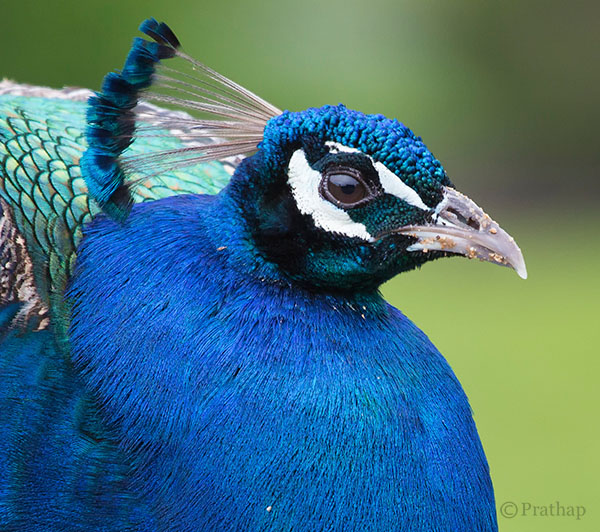
If you go through the bird photographs across the net, you will find that the majority of bird photographs will have the bird filling the frame.

Nature Photography Simplified Bird Photography Peacock Portrait

There are three main reasons for filling the frame with the bird:

  1. Most of the times, it’s all about the bird and its beauty. So, there is no reason why something else should be occupying the frame.
  2. The bird will be lost in the frame if it occupies only a part of the frame. Unless it is in its habitat, or there is a directional light illuminating it more than anything else in the frame.
  3. Filling the frame with the bird avoids any distractions in the background which is usually the case.

Remove Distractions in Post-Processing

This is a debatable topic for sure. Is it ethical or unethical? It depends really.

Are you sharing it only on social media sites? It shouldn’t bother you much. If you feel that removing distraction makes it a more pleasing image, it should be fine. However, it should not be overdone. Also, you should never do that if you are submitting your images to competitions or bird ID sites or any other place where it is not allowed.

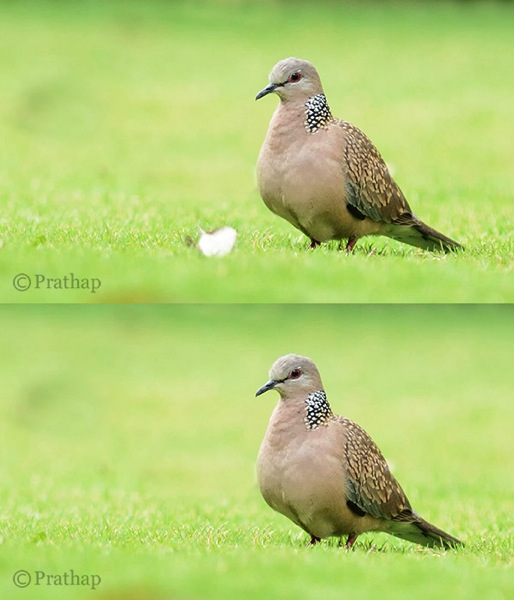
You should always try to achieve a distraction free image in the field. But, that is not always possible. My suggestion is to remove only the distractions that are by no means possible to remove in the field. Things like a tiny branch running across the bird, bright elements like aluminum foils, papers, etc., could be removed as they don’t contribute to the final result.

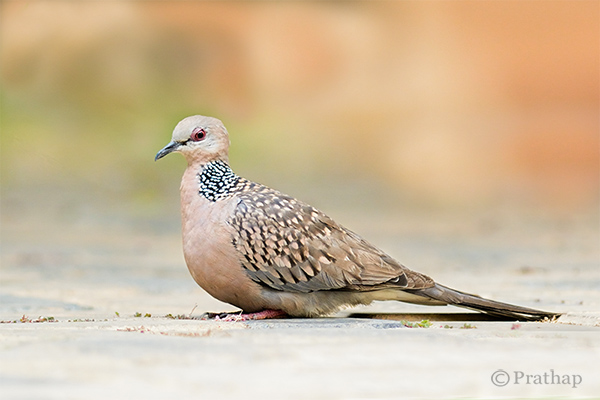
Nature Photography Simplified Bird Photography Beautiful Dove Background After Removing Distraction In Background

Cropping is another way to remove distractions and recompose the scene. It is an essential tool for the bird photographer since it is not always possible to have the longest telephoto lens.

Conclusion

Keep the background clean and make the bird stand out in the frame

Nature Photography Simplified Bird Photography Dove Clean Background

You will make excellent photographs by following the above simple tips on bird photography. Now go out and shoot. That’s the best tip I can give if you want to seriously improve you bird photography, enjoy!

The post Bird Photography Tips – How to Make Your Bird Photographs Stand Out by Prathap DK appeared first on Digital Photography School.


Digital Photography School

 
Comments Off on Bird Photography Tips – How to Make Your Bird Photographs Stand Out

Posted in Photography


Weekly Photography Challenge – Golden

02 Aug

The collection of images this week that I rounded up were on the theme “golden”.

That is a bit open for interpretation. So let’s do just that, shall we, and make it this week’s photography challenge as well.

Weekly Photography Challenge – Golden

So what does that mean to you? What do you imagine in your head at the mention of the word? Do you take it literally and think of the color gold? How about an award or trophy? There’s so many ways to go with this – let’s see where you take it.

Here’s a few more ideas to get you started:

By Hartwig HKD

By Justin Brown

By Daniel Stark

By dorena-wm

By Ansel Edwards

By luz rovira

By Justin Hee

By Mark Freeth

By Nick Kenrick

By Clint McMahon

Show use your Golden photos

Simply upload your shot into the comment field (look for the little camera icon in the Disqus comments section as pictured below) and they’ll get embedded for us all to see or if you’d prefer upload them to your favourite photo sharing site and leave the link to them. Show me your leading lines using pathways and roads in this week’s challenge.

The post Weekly Photography Challenge – Golden by Darlene Hildebrandt appeared first on Digital Photography School.


Digital Photography School

 
Comments Off on Weekly Photography Challenge – Golden

Posted in Photography


Canon’s ‘something BIG’ is… a photography competition. Oh well.

01 Aug

Just when Canon India had us all excited… it looks like the company’s ‘something BIG is coming’ teaser was referring to a competition. ‘Photomarathon India’ is open for registration from August 5th, and prizes include a trip to Japan, worth $ 5000. This is great news for Indian photographers, but likely to disappoint those of us hoping that ‘something BIG’ might refer to new hardware. Oh well. 

Articles: Digital Photography Review (dpreview.com)

 
Comments Off on Canon’s ‘something BIG’ is… a photography competition. Oh well.

Posted in Uncategorized


20 Superb Infographics & Cheat Sheets to Help You Grow Your Photography Business Fast

01 Aug

You probably know that a picture is worth a thousand words. If a reader has a choice between 1000-word articles and the infographic that needs just a few scroll downs…he’ll obviously go with the infographic! Visual information is more likely read and understood than other types of data presentation. That’s why I collected helpful infographics and cheat sheets on photography for Continue Reading

The post 20 Superb Infographics & Cheat Sheets to Help You Grow Your Photography Business Fast appeared first on Photodoto.


Photodoto

 
Comments Off on 20 Superb Infographics & Cheat Sheets to Help You Grow Your Photography Business Fast

Posted in Photography


Top 5 Tips for Wildlife Photography

01 Aug

Wildlife photography is continually growing in popularity, thanks to the accessibility of digital cameras nowadays. I’ve been a wildlife photographer for almost seven years now, and a professional for the last few of them. Over time I have picked up some really valuable techniques and tips, specific to wildlife photography, gained from either experience or learning from others in my field.

Here are some the top tips for wildlife photography.

Black Headed Gull Splash

#1 Get to Know Your Subject

I cannot stress this enough – wildlife photography is all about time and patience, much of which should be spent studying and paying attention to your subject. Instead of just showing up at a location once, return time and time again to photograph it. Watch an animal’s behavioural traits and try to pick up on clues it gives as to its next movement. With practise, you’ll often be able to predict where an animal will move to next, or what it will do.

Don’t believe me? I’ve photographed red squirrels for many years now, and I can now almost continually predict its pattern of movement, purely by watching for behavioural “ticks” it provides. For example, by watching where the squirrel is looking and the way it sniffs the air, I can often tell which direction it will head to next.

Jumping with nut

#2 Use Your Lens Hood

That bit of plastic that comes with your lens isn’t just for decoration. It prevent stray light from hitting the lens, helping you produce clearer pictures, but it also provides physical protection for your lens. Too many times I see photographers with it on, but the wrong way round. Make sure you take a few seconds to attach it properly before shooting.

Once, I was on an island photographing Atlantic seals. The rocks were slippery, and it wasn’t long before I fell over and landed with my whole body weight on the nose of my Nikon telephoto lens. Thankfully I had the lens hood on, and what was potentially an extremely expensive slip, was no more than two small screws broken in the hood.

#3 Don’t Shy Away From Aperture Priority Mode

Recently, I’ve found a lot of photographers are shooting in manual mode because they believe that anything else is “cheating” and makes a shot unworthy. I don’t know any professional wildlife photographers that don’t shoot in aperture priority mode – although don’t get me wrong, manual does have its uses in some situations. However, in general, aperture priority is great for wildlife photography.

Light is often never evenly distributed in a woodland or similar environment. A moving animal will cross different areas of different light intensities. If you take a burst of photos of it moving through the area, aperture priority mode will adjust the settings and ensure your images are correctly exposed. In manual mode, there is simply no time to continually adjust the settings when shooting a constantly changing scene.

By all means, you should understand how to use your camera in manual mode, but aperture priority is not the enemy. Adjust the ISO to increase or decrease your shutter speed, and use exposure compensation to fine-tune the exposure.

Wavingseal

#4 Be Prepared for a Wait

I mentioned earlier that wildlife photography is all about patience. When starting out in this field, you need to remember that rarely do wildlife photographers get a great shot in just a few hours of waiting. You may need to return to a spot time and time again, waiting for hours on end, before you will capture a unique image.

This may sound daunting, but it makes any images you capture that extra bit more rewarding. If you’re waiting in a hide, take a book with you, or a film on your smartphone to pass the time. Just remember to keep looking up and checking the scene in front of you.

WTE Fight

#5 Think Outside of the Box

Finally, with so many people taking excellent wildlife images nowadays, it is important to think outside of the box. Look at images others have taken and think “how can I do it better”. If you want your images to be noticed and stand out, give them the wow-factor by taking a photograph that no one has ever seen before. I don’t mean a rare animal, but instead a rare style of shot.

Don’t give up at the first hurdle, and keep clicking your way closer to the elusive perfect shot!

The post Top 5 Tips for Wildlife Photography by Will Nicholls appeared first on Digital Photography School.


Digital Photography School

 
Comments Off on Top 5 Tips for Wildlife Photography

Posted in Photography


How to Improve Your Portrait Photography in Five Minutes

31 Jul

People often ask me for tips on taking better photos of their friends and family.

After much thought on photography tips that can apply to various experience levels and equipment — from DSLRs to smart phones — I present to you a short article with tips you can learn in five minutes to help you improve your portrait photography. If you have more time and would like more specifics, I’ve noted additional articles on each tip that may interest you.

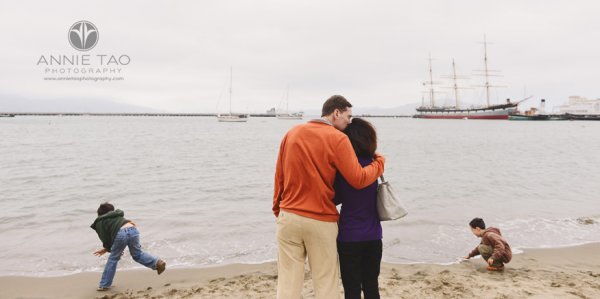
Annie-Tao-Photography-DPS-article-Improve-Portrait-Photography-perspective

Tips that will instantly improve your portraits:

1. Don’t put everyone in the center

That person may be the center of your life, but they don’t always need to be in the center of all the photos.

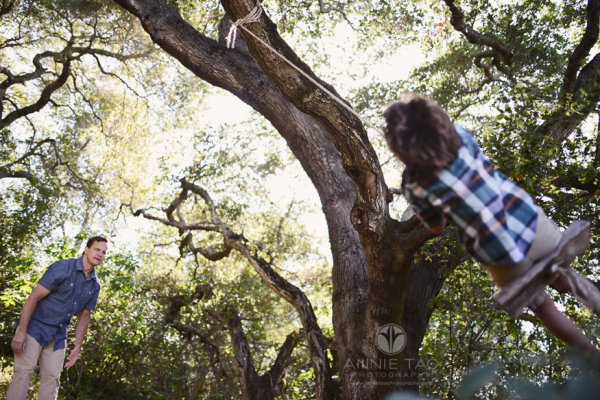
Aside from corporate headshots, positioning your subjects directly in the center of your frame for every image can be… yawn. And don’t just substitute it with the “rule of thirds” either. Think how boring everything would be if they were always in the same place, whether that is the center of every frame or at a third mark.

Be adventurous once in awhile – mix it up!

Annie-Tao-Photography-DPS-article-Improve-Portrait-Photography-dont-center

Annie-Tao-Photography-DPS-article-Improve-Portrait-Photography-dont-center-2

If you can’t break the rules because you have never heard of the Rule of Thirds, you can read this article.

2. Keep one eye on the background

If your subject is right in front of a lamppost or a tree, reposition yourself or your subject, so it doesn’t look like he is growing a lamppost out of his head.

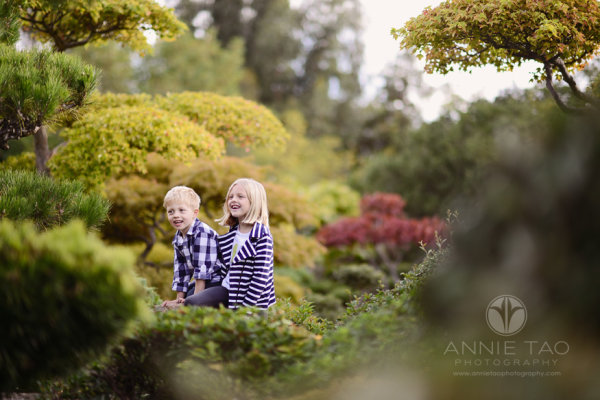
Another example:  if your subject is wearing a green dress and sitting on the grass, have her move where the background is a different color, so she doesn’t look like a floating face in a sea of green.

Also, be mindful of distracting elements behind your subjects, like a garbage can. The background can turn a good photo into a bad one, so keep one eye on the background.

Annie-Tao-Photography-DPS-article-Improve-Portrait-Photography-background-2

If you want to read more about the impact of backgrounds, check out Improve Your Background, Improve Your Photography.

3. Capture the story, not just a smiling face

Of course we all prefer a photo of someone smiling, but we aren’t always in a constant state of joy. Consider taking shots when someone looks pensive or serious, for example, or engrossed in an activity.

Try to resist the “look at me and smile” routine. I guarantee that photo will tell more of a story than one where people stop what they are doing to flash a fake smile.

Annie-Tao-Photography-DPS-article-Improve-Portrait-Photography-not-smiling

Annie-Tao-Photography-DPS-article-Improve-Portrait-Photography-capture-story-2

Annie-Tao-Photography-DPS-article-Improve-Portrait-Photography-capture-story

For more tips on this, read: Don’t Wait For A Smile.

4. Change your perspective

Did you know you can create the tone or mood of an image by the angle of your camera and your closeness to your subject?

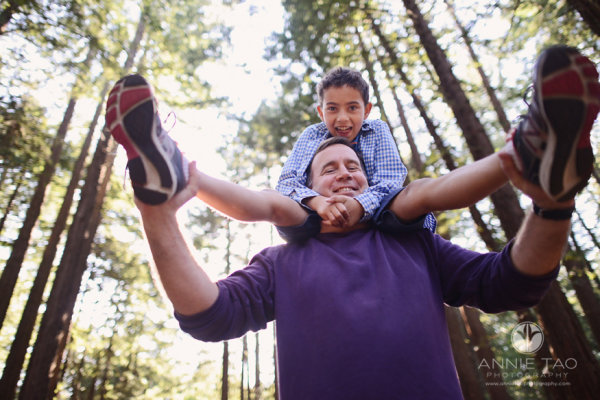
Your perspective when you take the photo influences the viewer’s perception of the image. Taking a shot from the top, looking down can paint a picture that someone is small. A tight shot of a teardrop can provide a sadder tone than a shot that was taken from a distance.

So next time, before you click the shutter button, think about what tone you want to give and what story you want to tell.

Annie-Tao-Photography-DPS-article-Improve-Portrait-Photography-perspective-4

Annie-Tao-Photography-DPS-article-Improve-Portrait-Photography-perspective-3

To see examples of different perspectives and when you would use them, you must read The Power of Perspective.

There are many things you can do to improve your portrait photography. I narrowed my list to four because these were the ones that came to mind first.

Do you have a good tip to share? Please comment below. We’d love to hear it.

The post How to Improve Your Portrait Photography in Five Minutes by Annie Tao appeared first on Digital Photography School.


Digital Photography School

 
Comments Off on How to Improve Your Portrait Photography in Five Minutes

Posted in Photography