RSS
 

Posts Tagged ‘Photography’

Best Travel Photography Tips of 2014

31 Dec

traveltips_Georgia_2.jpg

Travel photography is one of the most popular topics here on dPS. Things often seem more interesting to photograph when we are away from home, travelling somewhere exciting or just new. Here are some of the highest rated travel photography articles on dPS in 2014. In no particular order:

  • The Only Three Lenses You Need for Travel Photography
  • The Worst Mistake a Travel Photographer Can Make
  • Off Camera Flash for Your Travel Photography
  • 20 More Photography Tips Every Travel Photographer Must Know
  • 6 Tips for Photographing People When Travelling
  • 7 Proven Ways to Come Home with Better Travel Photos
  • 10 Ways to Improve Your Travel Photography Portraits
  • 5 Simple Tips to Improve Your Travel Photos
  • Versatility – Your Guide to Shooting Great Travel Photography
  • 6 Tips for More Unique Travel Photos in Busy Tourist Locations
  • Travel Photography without the Travel – Going Local
  • Overcoming the Fear – Creating Better Travel Photography Portraits
  • How to Get the Most Out of a Travel Photography Location

googletag.cmd.push(function() {
tablet_slots.push( googletag.defineSlot( “/1005424/_dPSv4_tab-all-article-bottom_(300×250)”, [300, 250], “pb-ad-78623” ).addService( googletag.pubads() ) ); } );

googletag.cmd.push(function() {
mobile_slots.push( googletag.defineSlot( “/1005424/_dPSv4_mob-all-article-bottom_(300×250)”, [300, 250], “pb-ad-78158” ).addService( googletag.pubads() ) ); } );

The post Best Travel Photography Tips of 2014 by Darlene Hildebrandt appeared first on Digital Photography School.


Digital Photography School

 
Comments Off on Best Travel Photography Tips of 2014

Posted in Photography


Happy Paddling and Photography in 2015

31 Dec

winter canoe paddling

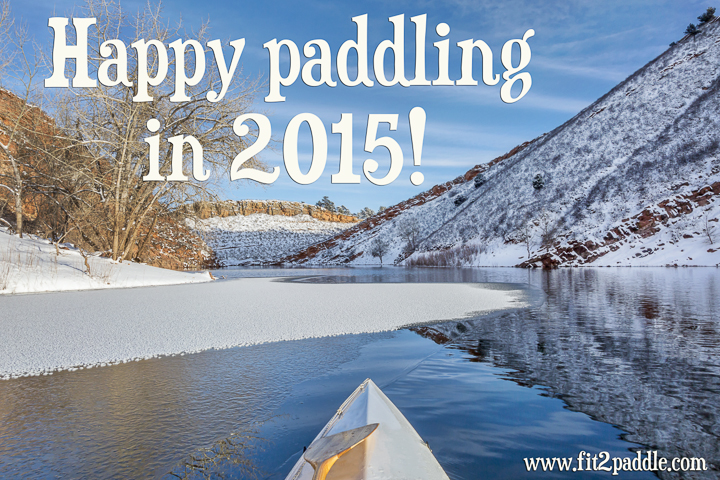
Happy paddling and photography in the New Year 2015. Don’t forget to take a camera with you!

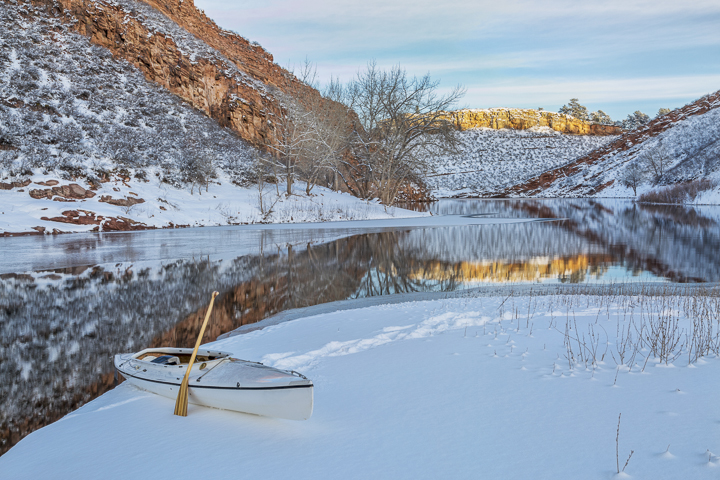
These are pictures from my last paddling in 2014. I paddled my Sea Wind canoe on December 27 on Horsetooth Reservoir 3 miles from the South Bay to Quarry Cove. The Quarry Cove just before sunset is my favorite photography spot on the Horsetooth. When I was paddling back after sunset ice started to form in the entry to the Inlet Bay.

winter canoe paddling

Related posts:
– Winter Paddling with Sea Wind Canoe on Horsetooth Reservoir
– Icy Horsetooth Reservoir – Opening Lake Paddling Season


paddling with a camera

 
Comments Off on Happy Paddling and Photography in 2015

Posted in Photography


Don’t Miss Out: Soon These 12 Photography Training Deals Will Be Gone Forever

31 Dec

As 2014 races to an end – so too are our amazing 12 photography deals of Christmas.

Screen Shot 2014 12 30 at 8 26 05 pm

In just on 48 hours (as the calendar ticks over into 2015 US Eastern Time) these fantastic deals will close forever.

Among them are some great savings to be had – up to 88% off resources that will help you make 2015 the year of great photos!

The Most Popular Deals of 2014

Each year we get readers ask for our recommendation on the best deals to pick up so as this all comes to an end we like to reveal the best selling deals so you can see what is hot!

Of course the best deal is what is right for you. All these deals come with 60 day money back guarantees so if you’re not quite sure if a deal is for you you can pick it up and then get your money back if you find it doesn’t meet your expectations.

It’s also worth saying that while the first 4 in the list stood out from the rest of the pack considerably – there wasn’t a great deal between the other 8 in the list!

  1. 70% off the Photoshop Artistry Course – this was our biggest deal over on SnapnDeals when we ran it earlier in the year and again was clearly the hottest deal of the 12 days. Pick it up while you can at this never before seen price.
  2. 88% off Hacking Photography’s Lightroom Presets Bundle – our biggest discount of the year and a no brainer if you’re a Lightroom user as it gets you 100 professionally designed Lightroom presets for just $ 10.
  3. Landscape Photography eBooks for $ 10 – our best selling Landscape Photography eBooks normally retail for $ 30… in this deal they are yours for $ 10 or both for $ 19 with a bonus.
  4. Portrait eBooks for $ 7! – this deal gets you any of our 4 Portraits eBooks for $ 7 or you can pick them all up with a bonus for $ 21
  5. $ 10 eBook Day – no surprises here, we put 10 great dPS eBooks up for just $ 10 each. Also hot in this day was our Photo Nuts bundle (4 great eBooks for $ 25).
  6. Ed Verosky’s Macro eBook for $ 7 (or his library at 78% off) – Ed’s eBooks are always very popular – this year was no different to previous times we’ve featured them.
  7. Natural Light for $ 7 – this best selling eBook is gorgeous and sold like crazy when we set it live on day 5!
  8. Essential Guide to Black and White Photography – one of our newest eBooks at a price never before seen.
  9. 60% off our Going Pro eBook – if you’ve ever dreamt of making money from your photography this one is for you.
  10. Save $ 40 on Gavin Gough’s Post Lightroom Tutorials – perfect if you want to brush up on your Lightroom post processing skills.
  11. Save $ 60 on KelbyOne 12 month Membership – get 365 days of amazing photography training for just 55 cents per day.
  12. Save 50% on Lighting on Location Course – while it is at the bottom of the list this course is one of our favorites. Written by our own editor and PACKED with some of the most practical and actionable information on Lighting Portraits – a bargain at this price.

These deals all end at midnight US Eastern time 31 December (as we see in 2015) so act now to pick up yours!

googletag.cmd.push(function() {
tablet_slots.push( googletag.defineSlot( “/1005424/_dPSv4_tab-all-article-bottom_(300×250)”, [300, 250], “pb-ad-78623” ).addService( googletag.pubads() ) ); } );

googletag.cmd.push(function() {
mobile_slots.push( googletag.defineSlot( “/1005424/_dPSv4_mob-all-article-bottom_(300×250)”, [300, 250], “pb-ad-78158” ).addService( googletag.pubads() ) ); } );

The post Don’t Miss Out: Soon These 12 Photography Training Deals Will Be Gone Forever by Darren Rowse appeared first on Digital Photography School.


Digital Photography School

 
Comments Off on Don’t Miss Out: Soon These 12 Photography Training Deals Will Be Gone Forever

Posted in Photography


Best Photography Tutorials for Beginners in 2014

30 Dec

Just getting started in photography? Or maybe you get a brand new camera or some photography toys for Christmas and want to get up to speed on how to use them?

JakeandLindsay Sherbert

By JakeandLindsay Sherbert

Over the past 12 months we’ve had some great articles geared towards the beginner or novice photographer. Here’s a little holiday reading for you to give you a good kick start:

  • Understanding Depth of Field for Beginners
  • 5 Beginner Tips for More Autofocus Success
  • How to Master Your DLSR in One Afternoon a Beginner’s Guide
  • Beginners Tips for Night Sky and Star Photography
  • Bird Photography Tips for Beginners
  • Nature and Wildlife Photography Tips for Beginners
  • A Beginners Guide to Seascape Photography
  • 5 Beginner Tips for Photographing Animals in the Wild
  • 5 Tips for Newbie Landscape Photographers
  • 10 Incredible Bird Photography Tips for Beginners
  • A Year of Photographic Lessons – Journey of a Novice Photographer
  • Step-by-step Guide to Long Exposure Photography
  • Understand Exposure in Under 10 Minutes
  • Camera Basics 101: The Exposure Triangle

googletag.cmd.push(function() {
tablet_slots.push( googletag.defineSlot( “/1005424/_dPSv4_tab-all-article-bottom_(300×250)”, [300, 250], “pb-ad-78623” ).addService( googletag.pubads() ) ); } );

googletag.cmd.push(function() {
mobile_slots.push( googletag.defineSlot( “/1005424/_dPSv4_mob-all-article-bottom_(300×250)”, [300, 250], “pb-ad-78158” ).addService( googletag.pubads() ) ); } );

The post Best Photography Tutorials for Beginners in 2014 by Darlene Hildebrandt appeared first on Digital Photography School.


Digital Photography School

 
Comments Off on Best Photography Tutorials for Beginners in 2014

Posted in Photography


The Hottest Landscape Photography Articles on dPS in 2014

27 Dec

Landscape photography is always a popular topic here on dPS and we had some really great articles on that topic over the last year. Now is your time to read up, bookmark them, refresh your knowledge, or get inspired to get out shooting some landscapes.

A final image after being processed in Photoshop

A final image after being processed in Photoshop

In no particular order, here are some of the most popular landscape photography articles from 2014:

  • How to Get Super Sharp Landscape Photography Images
  • 10 Most Common Mistakes in Landscape Photography – and How to Overcome Them
  • 3 Tips to Take Better Landscape Photos Regardless of the Weather
  • 5 Steps to Help you Take Better Landscape Photos
  • Some Punchy Black and White Landscape Photos to Oooo and Aaah Over
  • Landscape Photography and Hyperfocal Distance
  • 5 Tips for Better Long Exposure Landscape Photography
  • Better Landscape Photography Tips and Video Tutorials
  • How to Create Amazing Urban Landscape and Street Photography Images
  • How to do Dreamy Landscape Photography with a Neutral Density Filter
  • 5 Tips for Newbie Landscape Photographers
  • The Power of Post-processing for Landscape Photography
  • and a dPS ebook for good measure: A Guide to Landscape Photography Workflow and Post-Processing

googletag.cmd.push(function() {
tablet_slots.push( googletag.defineSlot( “/1005424/_dPSv4_tab-all-article-bottom_(300×250)”, [300, 250], “pb-ad-78623” ).addService( googletag.pubads() ) ); } );

googletag.cmd.push(function() {
mobile_slots.push( googletag.defineSlot( “/1005424/_dPSv4_mob-all-article-bottom_(300×250)”, [300, 250], “pb-ad-78158” ).addService( googletag.pubads() ) ); } );

The post The Hottest Landscape Photography Articles on dPS in 2014 by Darlene Hildebrandt appeared first on Digital Photography School.


Digital Photography School

 
Comments Off on The Hottest Landscape Photography Articles on dPS in 2014

Posted in Photography


How to Design A Photography Business Card In Photoshop (Tutorial)

26 Dec

Designing a business card doesn’t have to be difficult or time-consuming. Most business cards are simple enough: they contain, in readable type, a list of information about you, what you do, and how to get in touch. They stay in tune with your branding — the colors, fonts and general message you want to convey to people about your business Continue Reading

The post How to Design A Photography Business Card In Photoshop (Tutorial) appeared first on Photodoto.


Photodoto

 
Comments Off on How to Design A Photography Business Card In Photoshop (Tutorial)

Posted in Photography


Don’t Miss Out: These 12 Photography Deals Will Disappear With 2014

25 Dec

Over the last 12 days we’ve presented you with some amazing daily deals on photography training resources in our 5th annual 12 days of Christmas.

Screen Shot 2014-12-25 at 8.32.04 pm

The savings this year were our biggest yet and we had a lot of really positive feedback from readers who picked up some fantastic deals.

As in previous years we did get a few sad messages from readers who missed deals along the way asking if there was any way to get them.

As a result – today we’re opening all 12 deals back up again for one last chance.

So if there’s a deal you regret missing or you might have missed one of our emails – you’re in luck. Here they are!

  • Deal 1: Over 50% off Ed Verosky’s Introduction to Close Up & Macro Photography (or bundle all Ed’s books and save 78%)
  • Deal 2: 65% off David J. Nightingale’s Essential Guide to Black & White Photography (newly published in 2014)
  • Deal 3: $ 40 off post-production Lightroom video tutorials with Gavin Gough (or bundle it for more savings)
  • Deal 4: dPS Portraits titles $ 7 each… (or all 4 for an amazing $ 21!)
  • Deal 5: Save 65% on Natural Light by Mitchell Kanashkevich (one of our most popular eBooks ever)
  • Deal 6: $ 60 off KelbyOne online photography training (a year’s training for a few cents per day)
  • Deal 7: Going Pro dPS eBook kit – 60% off (always a top seller)
  • Deal 8: 70% off Photoshop Artistry: Fine Art Grunge Composition course (the was the most popular deal of the 12 days)
  • Deal 9: 100 professional Lightroom presets – over 88% off! (our biggest discount of the lot and a big seller this year)
  • Deal 10: 50% off Portrait Lighting on Location course (created by our own Managing Editor)
  • Deal 11: $ 10 Landscape photography ebooks – Save 66% (newly published in 2014)
  • Deal 12: All dPS eBooks $ 10! (these sold like hotcakes yesterday)

All these will be available until midnight US Eastern time on 31st of December, after that they will be gone for ever – so get to it and grab yours today!

googletag.cmd.push(function() {
tablet_slots.push( googletag.defineSlot( “/1005424/_dPSv4_tab-all-article-bottom_(300×250)”, [300, 250], “pb-ad-78623” ).addService( googletag.pubads() ) ); } );

googletag.cmd.push(function() {
mobile_slots.push( googletag.defineSlot( “/1005424/_dPSv4_mob-all-article-bottom_(300×250)”, [300, 250], “pb-ad-78158” ).addService( googletag.pubads() ) ); } );

The post Don’t Miss Out: These 12 Photography Deals Will Disappear With 2014 by Darren Rowse appeared first on Digital Photography School.


Digital Photography School

 
Comments Off on Don’t Miss Out: These 12 Photography Deals Will Disappear With 2014

Posted in Photography


Home for the Holidays: Christmas Photography Tips

25 Dec

Ahhh, the Holidays. Millions of normally civilized people overextending their budgets and sometimes their left hooks in the pursuit of the perfect gift, stretching their culinary skills (and their smoke alarms) to their furthest heights, and begging and cajoling their extended families into family pictures, lots of them, so that they can forget the stressful, over-emotional, exhausting, sleep deprived knock Continue Reading

The post Home for the Holidays: Christmas Photography Tips appeared first on Photodoto.


Photodoto

 
Comments Off on Home for the Holidays: Christmas Photography Tips

Posted in Photography


Deal 11: $10 Landscape Photography eBooks (Save 66%)

24 Dec

Today is day 11 in our 12 days of Christmas and we’ve saved one of our best deals til 2nd last!

Today you can pick up either of our Landscape Photography eBooks for just $ 10 (they are normally $ 29.99 each).

These two landscape photography eBooks were written in the last 18 months by the talented New Zealand photographers Todd and Sarah Sisson.

Together they make one of the most comprehensive and practical guides to creating beautiful landscape images we’ve come across.

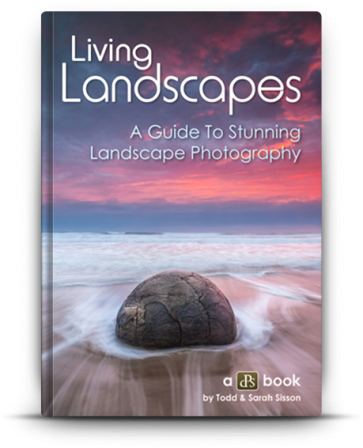
Living Landscapes: A Guide to Stunning Landscape Photography

living_landscapes3-363x448

The first of the two eBooks is all about taking landscape images that help you to capture and share the beauty of the world around you.

It received many great reviews from around the web and is one of the most beautifully written and illustrated eBooks we’ve ever published.

Normally $ 29.99, today it’s yours for $ 10.

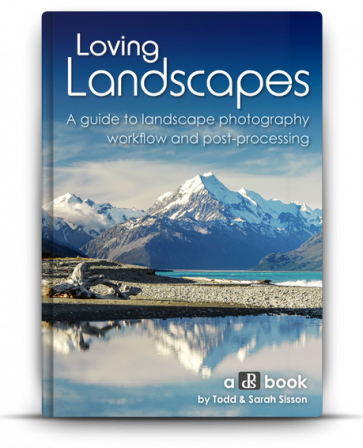
Loving Landscapes: A Guide to Landscape Photography Workflow and Post-Processing

LovingLandscapesCover-363x448

If you’ve ever been frustrated that the landscape photos from your camera don’t portray the magical scenes you witnessed, then this is eBook will open up a new world of creative possibilities and teach you how to transform your dull RAW files into breaking images.

In this eBook Todd and Sarah demystify the landscape photography workflow and share how they create the beautiful images that they do.

It’s 200+ pages of practical information that has helped many of our readers improve what they do. You also get a set of 10 Lightroom presets with this eBook to help you on your way (these require you to have Lightroom software to use them).

Normally $ 29.99, today it’s yours for $ 10.

Want them Both? Get This Bonus!

For those of you who want to pick up both of Todd and Sarah’s eBooks – there’s a bonus for you.

These eBooks are normally $ 69.98 but today they’re yours for $ 19 – plus we’ll throw in a specially developed set of 51 Lightroom Presets that have never been released before (worth $ 19.99).

Note: these bonus 51 presets require you to have Lightroom software to use them.

This bundle is worth $ 79.97 but today is yours for $ 19 (a saving of 76%).

googletag.cmd.push(function() {
tablet_slots.push( googletag.defineSlot( “/1005424/_dPSv4_tab-all-article-bottom_(300×250)”, [300, 250], “pb-ad-78623” ).addService( googletag.pubads() ) ); } );

googletag.cmd.push(function() {
mobile_slots.push( googletag.defineSlot( “/1005424/_dPSv4_mob-all-article-bottom_(300×250)”, [300, 250], “pb-ad-78158” ).addService( googletag.pubads() ) ); } );

The post Deal 11: $ 10 Landscape Photography eBooks (Save 66%) by Darren Rowse appeared first on Digital Photography School.


Digital Photography School

 
Comments Off on Deal 11: $10 Landscape Photography eBooks (Save 66%)

Posted in Photography


Using Graduated Neutral Density filters for Landscape Photography

23 Dec
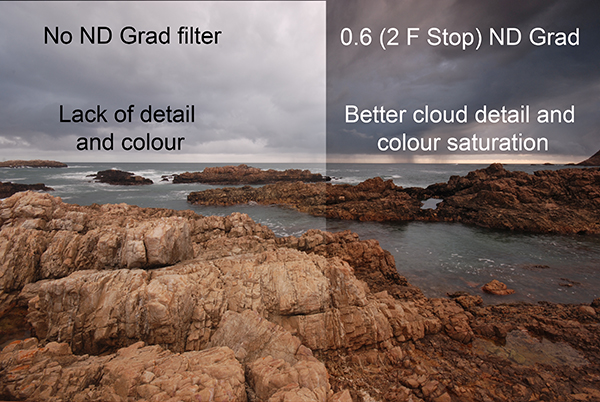
You can see the effect an ND Grad has on the scene

You can see the effect a graduated neutral density filter has on the scene

One of the biggest challenges in photography is managing the light in your scene. It is for this reason that many landscape photographers love to be out shooting during the golden hours or blue hour when the light is beautiful and the contrast is manageable. Contrast is tough to manage on bright days and in certain scenes, but there are a few ways to work around this. In this article we are going to look at the usefulness of using neutral density gradient filters (aka ND grads). These filters have been around for a long time, most landscape photographers will have a set of them in their camera bag.

Filters or Photoshop?

In recent years, there has been an ongoing debate around whether it is better to use filters or to bracket the images and blend them in Photoshop afterwards or even use HDR to capture all the different tonality and light in a scene. In many cases this is a personal preference, and I switch between the two depending on the scene or the vision I have of the image I want to make.

If I am shooting during golden hour I will most often use an ND grad filter. If I am doing a starscape, I will take two images and blend them, one for the sky and one for the foreground. The reason is this. At golden hour, I can expose for the ambient light and use a filter to keep the detail in the sky. If I want a starscape (not a star trail) I need to push my ISO up really high and if there is something in the foreground of the scene that is a little too bright, it will overexpose. My first shot will be an image that will expose the the scene properly. For my second shot, I will expose the sky to capture a starscape shot. Afterwards, I will blend them in Photoshop, which really works well.

In some cases, there is no substitute for an ND grad. If you want the waves in a seascape scene to become silky smooth or a river to look soft and white, then you will need to use ND grads. This effect cannot be made in Photoshop (not yet anyway). The best part about using ND grads is the surprise you get when you see the image on the screen. You will be amazed at the effect of capturing the blurred movement of different elements in your image.

What is a graduated neutral density filter (ND Grad)?

Essentially it is a rectangular, optically correct piece of resin or glass with a gradient from dark to light. It is called “neutral” because the dark part of the filter should not make any colour differences, or add a colour cast to the scene. This is not always true of cheaper filters, but the well established filter brands (Lee, Singh-Ray) leave very little colour cast on the final image. The reason behind using an ND filter is to hold light back so that the part of the scene that is brightest (usually the sky) does not overexpose. This effect creates a pleasing image. The sky is well exposed and the foreground is correctly exposed as well.

If you were to expose the scene without using an ND grad filter, very often, the foreground would be well exposed while the sky may simply be overexposed or, if you were to expose for the sky, the foreground would be very dark. As I said earlier, you can do blending in Photoshop, but sometimes, you may not capture all the detail in the sky and using a filter to capture the scene may be useful. Also, you will be able to spend more time shooting and less time editing afterwards!
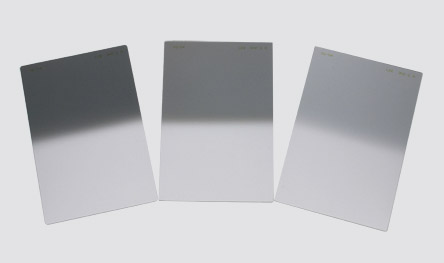
A set of ND grads in varius strengths

A set of ND grads in varius strengths

When should you use an ND grad filter?

Most landscape photographers will use them at sunrise or sunset, during the golden hour. You can also use them during the day to slow the shutter speed to make water smooth and silky. Blurring moving objects such as people, cars, buses or even trees blowing in the wind is also an option. What you will get is a well exposed, daylight scene with some blurred movement. This can look really interesting and dynamic in your image.

The reason you will want to use an ND grad filter is that there can be a substantial difference, light wise, between the sky and your foreground. If you have more than a two stop difference, you will probably need an ND grad filter to correct that and get a good, well balanced exposure. This not a rule, but if you try and average the exposure and you are finding that your foreground looks too dark and your sky is too bright, maybe it is time to use the filter.
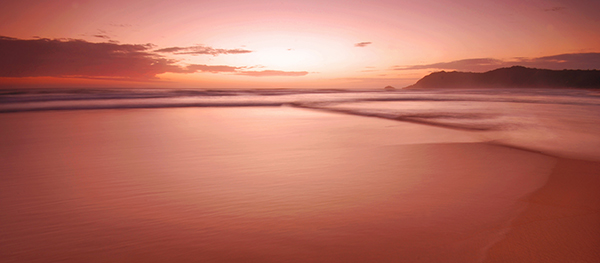
An ND Grad was used in this image to expose the sky and clouds correctly

An ND grad was used in this image to expose the sky and clouds correctly

Types of ND grad filters

ND grad filters have a few variables. The first is whether the filter has a hard or soft edge. There is a reason for this and both types are useful. The hard edge filter has a very definite transition between the dark gradient part of the filter and the part that is clear. The soft edge filter gently blends the gradient across the filter, so the line is less obvious. Each one of these filters are used on different scenes. For example, the hard edge filter is really useful if you have a very definite horizon line (i.e. a seascape or a landscape scene where the horizon is pretty flat and straight). The soft edge filter is used for scenes where there is no clear horizon (i.e. a forest or street scene). Learning when to use which type of filter takes some practice, but once you can visualise what the result will look like, it is pretty easy.
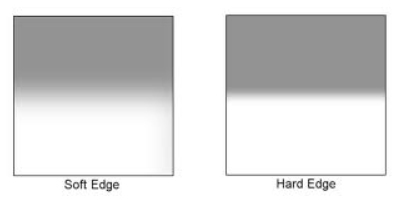
Hard Edge and Soft Edge ND Grads

Hard Edge and Soft Edge ND Grads

ND grads come in different strengths

The filters are made in different strengths to compensate for different lighting conditions. Depending on the dynamic range (the difference between highlights and shadows) in your scene you can choose an ND grad filter that will be darker or lighter. Darker filters hold back more light and lighter filters, hold back less light. ND Grads are made in the following strengths 0.3 or one f-stop of light, 0.45 or 1.5 f-stops, 0.6 or two f-stops, 0.75 or 2.5 f-stops, 0.9 or three f-stops. The important calculation to remember is to try and keep your sky and your foreground within one stop of one another. Also, ND grads can be stacked if the light is really bright, so you can make the sky even darker, depending on the effect you want.

How do I use an ND grad filter?

It is easier than you might think. There are some technical details to think of, but once you have used grads a few times, it is really quite simple. Here is a process that works pretty well in most lighting conditions:

  1. Set up your camera on a tripod and take a light meter reading of the foreground. Making sure that your camera is on Manual, point it down and fill the viewfinder with the foreground to take the reading.
  2. Take a light meter reading in the same way as above, of the sky.
  3. Work out the difference between the two exposures and use an ND Grad to get your scene to within one stop of light difference. As an example, if the sky is three stops brighter than the foreground, you can use an ND Grad that blocks two f-stops of light or a 0.6 ND Grad.
  4. Slide the ND grad filter into place in front of the lens and determine the best position for the gradient to be in your image. If it is a hard horizon (i.e. a seascape scene) use a hard edge grad, if it is a forest scene, use a soft edge grad.
  5. Expose for your foreground and make the shot.
  6. Check the result on your LCD screen, zoom in on the image to make sure everything is properly exposed. Make any adjustments and shoot another image if necessary.

That’s it, simple really. Of course, as I said earlier, it takes a fair amount of practice to become adept at using these filters, but the results are worth it.
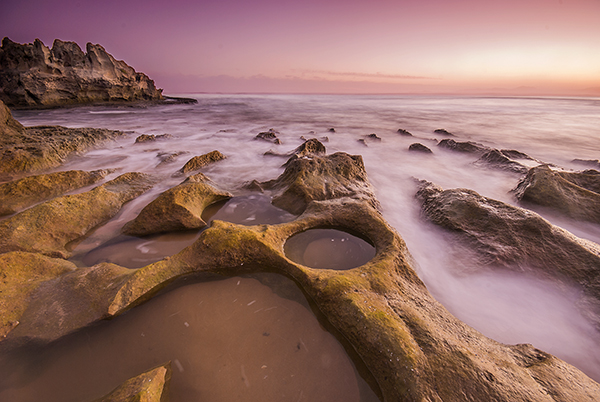
In this scene, the ND grad allowed the sky to be exposed properly and slowed the shutter speed won enough to blur the water

In this scene, the ND grad allowed the sky to be exposed properly and slowed the shutter speed down enough to blur the water.

Image editing

Once you have captured your well exposed scene, you will want to take it into Lightroom or Photoshop to put the finishing touches to the image. There are many different ways to enhance the image and make it really pop. I am not going to go into all the different adjustments you could make to the image except for one piece of advice. I will generally select the sky and the foreground separately and make a layer for each of them, then make separate adjustments to each. You may want to make the sky even more foreboding if it was a cloudy day, or perhaps brighten up the foreground a little more to show the detail. By doing this you will get the most out of the the light in the scene. Many photographers will convert their ND grad images into black and white because the movement and softness of the water in the scene can look very compelling in monochrome. The choice is yours.

What’s next?

To do this kind of photography, you will need to buy an ND grad or two. Some of the cheaper ND grads are a good place to start, brands like Cokin are good, and they are not especially pricey. The more expensive brands offer top quality, and in some cases the filters are hand made. If you find that you really love the effect these filters give, then you may want to invest in some Lee filters or Singh-Ray. These are top filter brands and the results from these products are amazing.

The most important thing to remember is to invest the time in getting the technique right and knowing how to use the equipment. Photography is all about practice and getting the technique right. Yes, good equipment helps, but the most important thing is practice. Once you have mastered the technique with a cheaper filter, then consider making the investment in the more expensive ones.

A final image after being processed in Photoshop

A final image after being processed in Photoshop

googletag.cmd.push(function() {
tablet_slots.push( googletag.defineSlot( “/1005424/_dPSv4_tab-all-article-bottom_(300×250)”, [300, 250], “pb-ad-78623” ).addService( googletag.pubads() ) ); } );

googletag.cmd.push(function() {
mobile_slots.push( googletag.defineSlot( “/1005424/_dPSv4_mob-all-article-bottom_(300×250)”, [300, 250], “pb-ad-78158” ).addService( googletag.pubads() ) ); } );

The post Using Graduated Neutral Density filters for Landscape Photography by Barry J Brady appeared first on Digital Photography School.


Digital Photography School
 
Comments Off on Using Graduated Neutral Density filters for Landscape Photography

Posted in Photography