RSS
 

Posts Tagged ‘Photography’

The Future of Photography Websites – Understanding and Adapting to Trends

03 May

Right off the bat, this is not an article about what background colors to use, what plugins to install, or other shallow web design fashion trends. Focusing blindly on bells and whistles (flat design, parallax scrolling, full-width page layouts) won’t actually make your photo website better. Sure, it might make it pretty, but it won’t necessarily be effective.

Getting the bigger picture and understanding the WHY behind web design trends will make you better equipped to build a successful photography business.

Having worked on over two hundred photography websites in the past few years, I’ve developed an eye for all the details that make up a great photo website and have recognized some important mindset shifts. My aim with this article is to give you a good overview of where the web design industry is heading (as it relates to photography websites), and how you can stay ahead of the curve.

Focusing on trends that truly matter allows you to then provide real value to your audience.

Change is inevitable

Web design trends are just a result of an ever-changing landscape. That’s why building your photography website should not be considered a one-time effort. It’s your responsibility to keep an eye on the industry and adapt as you go along.

So, what is driving all the web design changes in the photography industry, and what can you do about it?

#1 – The sheer number of online users

The web design world is rapidly evolving in order to manage the Internet boom:

There were more than 3 billion (with a “b”) Internet users in 2014, representing 43% of the world’s population.

So if you think the Internet has grown in recent years, we have yet to reach the tipping point. Not to mention how fast and easy it is to create a new basic photo website these days, instead of just being a content consumer. Everybody is getting online, which is the obvious cause of many web design changes.

Let’s explore some strategies to differentiate your photo website and rise above the surface:

a) Choose a niche

When the market becomes over-saturated, you’re somewhat forced to specialize in a smaller niche and become an expert in it. Your target audience will be smaller, but you’ll also be a better fit for their needs.
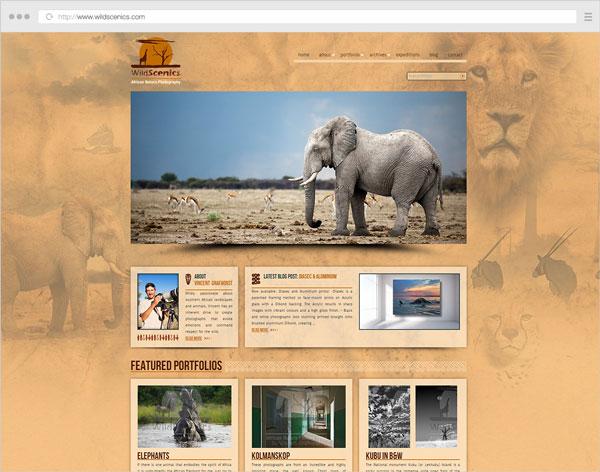
Example 1 wildscenics

Niching down can usually be done through:

  • The type of photography you specialize in (instead of being a jack-of-all-trades).
  • The physical area you cover (only accepting clients from a certain city).
  • How you promote yourself online (blogging, publications, events etc.)

This also has a great impact on how you structure your website. Having a clear target audience in mind, allows you to craft your message and tailor your site’s landing pages better.

If a first-time visitor comes to your site and is greeted with 10+ galleries from completely separate photography domains, (s)he might start exploring some of them, but will surely be a little confused and ask “What is this photographer actually good at?”.

b) Differentiate yourself and show your personality

Besides having great images (which should be a constant focus in your career), your website is an important way to showcase your personality. Just like you’re trying to craft a unique style in your photos, you should also infuse your style into the way you build your website.

How do you do that?

Your words have a lot of power. What you write (and the tone you write in) can make a lot of difference:

  • Using your sense of humor in blog posts and your About page (within reason).
  • Having a good self-portrait (did you nail the right facial expression?).
  • Describe your work/services in a friendly manner.
  • Write about your experiences in your own words, as if you’re talking to a friend using natural language. Forget about SEO for now.
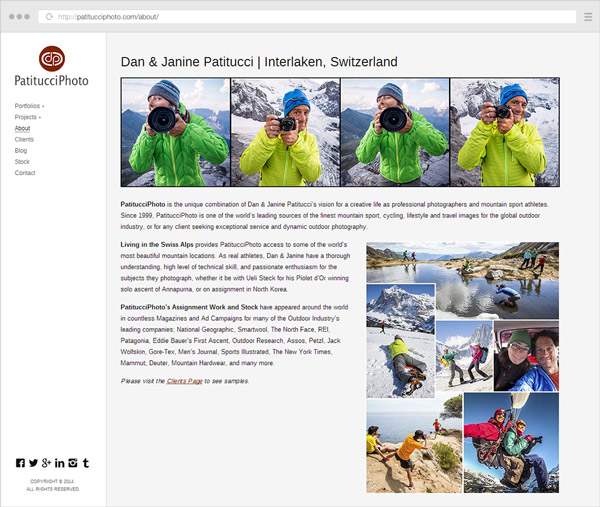
Example 2 patitucciphoto

Furthermore, it’s obviously not enough to use a great website template, thousands of other photographers might use the same one. The branding and design of your website are also important differentiators:

  • Defining who/what your audience is (to inform what site structure, colors and fonts to use).
  • Choosing whether to brand the site under your personal name or a business name.
  • The general mood created by the site (minimalist, strict and professional, very joyful, retro, dark and intriguing etc.)

To dive deeper into how you can infuse personality into your website, look no further than this excellent article from Smashing Magazine: The Personality Layer.

c) Use quality platforms and themes/templates

Using free blogging platforms like blogger.com or wordpress.com (not to be confused with the self-hosted software from wordpress.org), you get what you pay for. I don’t want to sound harsh, because they’re useful to many people, but they’re targeted at beginners, so you also let out that impression when using them.

Using the right platform (like wordpress.org for your blog and/or PhotoShelter, Smugmug, or Zenfolio for your portfolio or archive, to give a few examples) allows you to build your site under your own terms, with SEO advantages and more design flexibility. But then you also have to pay attention to the theme or template you’re using on these platforms. Choosing a weak one (and not even customizing it in any way) makes your site very similar to many other ones out there.

Even if you’re not in the position to hire a professional web designer or developer, or you’re just starting out, it’s important to do a little research first and choose a strong theme as the foundation for your site.
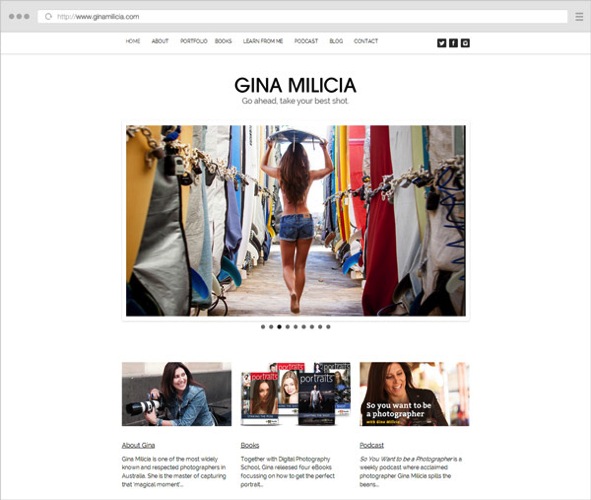
Example 3 ginamilicia

Website of our own Gina Milica – dPS writer and ebook author

If using WordPress, one of the best places to look for quality themes is ThemeForest (this link automatically filters for the term “photography” in the WordPress category, sorted by bestsellers and does not use any referral code).

Once you have a theme, it’s worth browsing the theme demo, reading its documentation, and getting acquainted with all the various layouts and options it has – they’re building blocks from which you can build your own WordPress-based website.

d) Learn to prioritize and simplify your website

You can tell a lot about a photographer’s personality from his website layout. Cluttered headers and overwhelming navigation can leave users confused and make them abandon the site (or at least browse to less important pages).
By letting go of clutter and focusing on quality over quantity, you can provide a better browsing experience for your users:

  • Provide simpler (and fewer) navigation options. Try to keep menu items around five to seven choice at most.
  • Any new piece of content should replace an older one, instead of just being crammed in there with all the existing content.
  • Leave the header area distraction free (that means: no big blocks of text, client logos or obtrusive subscribe boxes). Just your logo (linking to the homepage), main navigation items and maybe a couple of social media links.
  • Forget about only placing content above the fold (in the first few hundred pixels from the top). People scroll a lot these days (if the content is worth it). So leave some breathing room (whitespace) between elements – it adds legibility and creates a more modern and elegant look.
  • Choose one or two accent colors for the site and go with them, consistently, throughout the site.
  • Question the purpose of every element on your site: Is it distracting people from the main content? Would it be better placed somewhere else? Do you enjoy seeing/using similar elements on other websites?

Notice I did not mention minimalism in particular, or using the now-popular flat design elements. Prioritizing your content and focusing on a clean design are key ingredients to being more successful with your site.

e) Focus on your audience

Your photo website should obviously showcase your work and let your personality shine, but it shouldn’t be built around what YOU like (as the website owner). Instead, you should embark on the long process of defining your target audience and figuring out their likes and needs:

  • Read industry blogs (What shifts are there in the industry? What tools are popular these days?).
  • Get inspiration from other successful sites in your niche (How are other photographers writing to their audience?)
  • Continually get feedback from your readers/clients (Can you see some patterns in the contact messages you get from readers? Can you ask a few clients why they chose you?)
  • Understand the process a client goes through to find a photographer like you, and draw conclusions to inform your website copy and marketing efforts (Where do my target clients go looking for photographers? What are their most common questions and concerns?).
  • Think about what visitors on a page are most likely looking for, and make sure that’s front and center (Does a reader come to your About page to vaguely see if you’re passionate about photography, or in fact to quickly view your experience and location?)

Answering questions like this should, in time, create a strong new mindset for building a site that’s useful and appealing to your audience. What a great place to mention this quote from marketing expert Seth Godin:

“The only reason to build a website is to change someone. If you can’t tell me the change and you can’t tell me the someone, then you’re wasting your time.” – Seth Godin
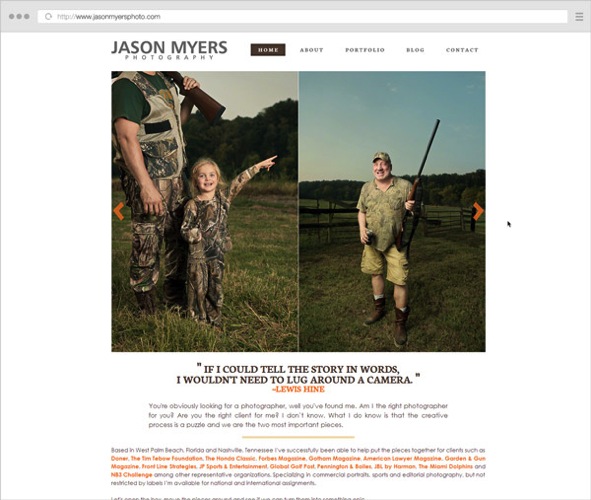
Example 4 jasonmyers

2. High-speed internet is becoming the norm

The spread of broadband connections and mobile networks are changing the way we browse websites. No longer are people expecting to wait too long for a page to load, or to sit and read very long texts (except maybe for long-form articles like this one).

High-speed connections bring many benefits, but also impatience and superficiality (users not staying long enough on a site to dive deeper into a topic). This has a few important affects on the way you should build your online presence:

a) Make your website fast, people expect that

Google expects that too. Photography websites usually have a problem with site speed, due to the nature of the image-heavy pages which require more bandwidth and are slower to load. While using a quality hosting provider is obviously important, the three main performance factors are:

  • The quality of your theme or template (see notes above on this topic).
  • The content you add to the site – unless you’re selling prints or licenses, you should only upload lower-resolution images (at the size displayed by the template, usually no more than 800-1000 pixels on the longest side, maybe larger for home pages or slideshows). With some exceptions, JPG files at a 60-70% quality level is a good compromise (in order to keep file sizes low while maintaining acceptable image quality).
  • Page caching – using performance plugins like W3 Total Cache (and integrating with a CDN (Content Delivery Network) or enabling similar caching features on your platform) can greatly improve your site’s load speed.

Quality content comes first, but a big chunk of users leave your site if it takes too long to load. As technologies advance, this performance expectation will only get stronger.
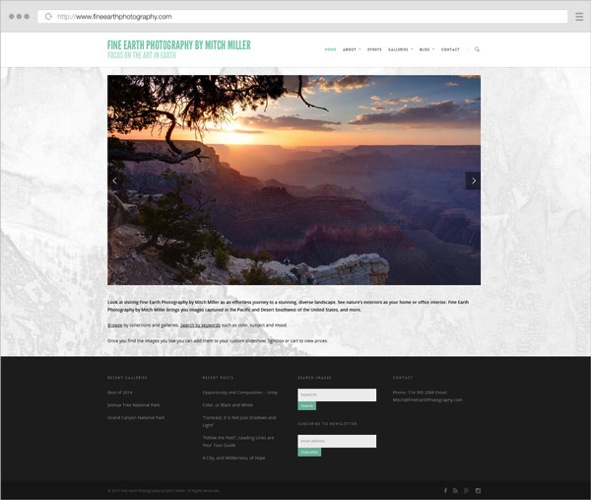
Example 5 fineearthphotography

b) Make your pages easy to skim through

Make no mistake – with faster websites, users’ patience is also stretched thin. In this era of distractions and (false) multi-tasking, rarely do people sit for long periods of time on a single page. Even if they’re fond of your work, the social media feed in the other browser tab pulls them away from your site and back to their notifications. It is, therefore, important to create a smooth browsing experience:

  • Be brief – when writing blog posts or your biography text, try to stick to what matters and get to the point. Quality over quantity, again.
  • Showcase only your best images – having tens or hundreds of images in a slideshow will only dilute the visual impact, and you can’t really expect people to sit through all of it. Especially annoying are very similar variations of certain images. Unless it’s for a client project, show visitors a different thing, not the same subject shot from three different angles.
  • If you have many galleries, try grouping them into collections/categories. A user is more likely to choose from five categories and dive deeper into sub-galleries, instead of choosing from 30 galleries right from the start. It’s the jam experiment all over again.
  • Properly format your text – you can increase legibility by breaking texts into paragraphs with spacing, highlighting important sentences/words and using headlines and sub-headlines. Notice how this article is quite long, yet (hopefully) easy to skim through with all the sub-headlines and bullet points.

c) Have a clear site navigation, people want to quickly jump from one thing to another

Since people are so distracted these days, you might be thinking of grabbing their attention and making them stay on your site longer. But this can be done in both good and bad ways. You can either use annoying pop-ups and write bombastic words to trick them into staying, or you can instead create a clean and simple website that’s a joy to use.

When you visit a website and can quickly find what you’re looking for, you’re a happy reader and more likely to go there again. Don’t you also feel the same way when shopping in a neatly organized store? Whereas on websites where you’re wasting time searching or navigating, your frustration level might prevent you from ever going there again.

What are the main ways to create a great website experience, you ask?

  • Once again, simplify your navigation – I’m not saying to just have three or four menu items, because that might actually create even more work for the reader to dig out your other pages. Just try to place your important site areas in the navigation, and remove the rest. You can always link to your other less-important pages in other places.
  • Position the navigation consistently – people expect to find the menu in the same spot throughout the site. This is especially important for people with multiple/separate websites. When a visitor reaches your blog, can (s)he see the same menu items and in the same position? Or do they have to learn a new layout again? It’s not difficult, but it’s a hindrance.
  • Provide clear calls-to-action – when users reach the end of the page, where should they go next? Depending on the page, you can let them explore the main menu on their own, or you can guide their actions by having buttons linking to where you want them to browse next (or subscribe to something, or leave you a contact message).
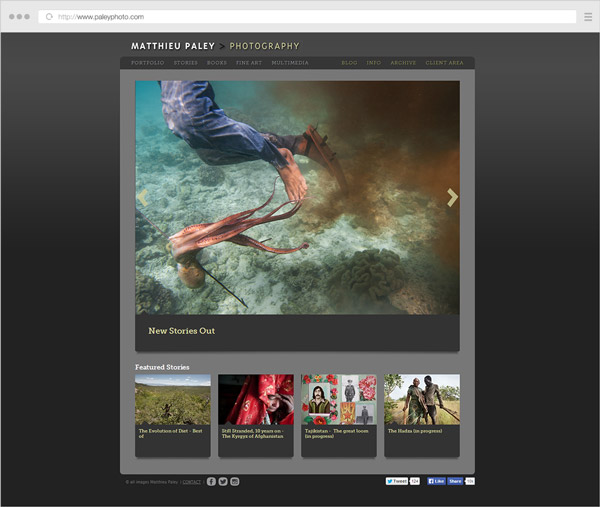
Example 6 paleyphoto

Conclusion

The web design industry is evolving. It’s heading towards clarity and simplification, forced by the expanding number of websites out there.

There are many other aspects to take into consideration (the rise of mobile devices, higher content consumption rates, new browsing habits, SEO and social media implications, and many more), but they’re the topic of a future article here on dPS.

If you closely read all the points above, you’ll spot the common thread; helping your readers and always asking yourself how to make things better for them.

Focusing more on the quality of your work and on providing an honest and friendly browsing experience to your readers can go a long way.

googletag.cmd.push(function() {
tablet_slots.push( googletag.defineSlot( “/1005424/_dPSv4_tab-all-article-bottom_(300×250)”, [300, 250], “pb-ad-78623” ).addService( googletag.pubads() ) ); } );

googletag.cmd.push(function() {
mobile_slots.push( googletag.defineSlot( “/1005424/_dPSv4_mob-all-article-bottom_(300×250)”, [300, 250], “pb-ad-78158” ).addService( googletag.pubads() ) ); } );

The post The Future of Photography Websites – Understanding and Adapting to Trends by Alex Vita appeared first on Digital Photography School.


Digital Photography School

 
Comments Off on The Future of Photography Websites – Understanding and Adapting to Trends

Posted in Photography


Weekly Photography Challenge – Ocean Waves

02 May

There is something about the ocean that is mesmerizing. Check out these images to see some of the power of the sea.

William Warby

By William Warby

Weekly Photography Challenge – Ocean Waves

This week it is your turn to go photograph the ocean. If you do not live near the sea find a body of water you can use as substitute and get creative. A large lake or reservoir could do the trick.

Use some different techniques such as varied exposure times. See this for more tips on photographing the waves. Play with your composition to create a unique result.

Neville Nel

By Neville Nel

Bill Devlin

By Bill Devlin

Aristocrats-hat

By Aristocrats-hat

Susanne Nilsson

By Susanne Nilsson

Share your ocean images here:

Simply upload your shot into the comment field (look for the little camera icon in the Disqus comments section) and they’ll get embedded for us all to see or if you’d prefer upload them to your favourite photo sharing site and leave the link to them. Show me your best images in this week’s challenge. Sometimes it takes a while for an image to appear so be patient and try not to post the same image twice.

Kris Williams

By Kris Williams

Steve Corey

By Steve Corey

googletag.cmd.push(function() {
tablet_slots.push( googletag.defineSlot( “/1005424/_dPSv4_tab-all-article-bottom_(300×250)”, [300, 250], “pb-ad-78623” ).addService( googletag.pubads() ) ); } );

googletag.cmd.push(function() {
mobile_slots.push( googletag.defineSlot( “/1005424/_dPSv4_mob-all-article-bottom_(300×250)”, [300, 250], “pb-ad-78158” ).addService( googletag.pubads() ) ); } );

The post Weekly Photography Challenge – Ocean Waves by Darlene Hildebrandt appeared first on Digital Photography School.


Digital Photography School

 
Comments Off on Weekly Photography Challenge – Ocean Waves

Posted in Photography


Long Exposure Photography Without a Tripod

01 May

For me, as a travel photographer, the size and the weight of the photography equipment that I carry around is very important. Over the years, I learned how to carry only the items absolutely necessary for shooting in order to eliminate anything unessential.

Long_Exposure_Photography_Without_Tripod_Photo-2

Long exposure photo shot without a tripod, using the Align+Blend technique.

I was able to replace some of the pieces of equipment with software. For example, I stopped using ND Graduated filters a few years ago. For me, it was easier to take bracketed shots and blend two images in Photoshop or simply use the graduated filter in Lightroom. Next, I left behind the remote trigger because I learned that using the two second delay function on the camera allowed me to achieve the same result without an extra piece of equipment.

A couple of months ago, I pulled the trigger on the biggest change in my photography universe when I switched from a Canon DSLR to a Sony Mirrorless (read my article here 5 Lessons Learned Switching from DSLR to Mirrorless for Travel Photography). That drastic switch resulted in cutting the weight and the size of the equipment I carry around by more than half.

During my latest photography trip to Hawaii and Northern California, I did quite a bit of hiking and realized that, after the switch to mirrorless, the biggest and by far the bulkiest, piece of equipment I carried was my tripod. I love my Feisol tripod because it is light, tall, and steady like a rock. But, sometimes it is just impossible to bring with me.

Even though I learned how to take bracketed shots handheld and merge them effectively to HDR in Photomatix and Photoshop HDR Pro (read Natural Looking HDR in Photoshop and Lightroom in 5 Easy Steps), without a tripod I still could not accomplish one of the most important types of photography, which is long exposure photography.

Long_Exposure_Photography_Without_Tripod_Photo-1

Long exposure photo – shot with a tripod.

I use long exposure photography quite a bit, especially when shooting seascapes, and of course, I have plenty of seascapes in my portfolio. Longer shutter speed allows me to achieve beautiful, smooth and silky looking water plus, it works just as well for the sky.

Lately, I’ve been experimenting with a few techniques in an attempt to achieve the same long exposure effect in the water and the sky by shooting handheld without a tripod. After I started to produce predictable results on a consistent basis, I am now ready to share the technique with you.

Shooting

Below is the effect I achieved using my new technique that I call Align+Blend.

Normally, I shoot in bracketing mode, taking at least three exposures. In order to use the Align+Blend technique, I had to switch from bracketing mode (AEB) to the Single Shot Mode. I shot 10 consecutive shots of the scene, trying to be as steady as possible, without too many movements. I was shooting at an approximate speed of one shot per second and, it took me nine seconds to complete the series. In order to get the sharp images, I used a shutter speed of 1/200th of a second.

Long_Exposure_Photography_Without_Tripod_Photo-22

Single RAW image, unprocessed (1/200 sec).

That was it. The shooting part was done. The rest was accomplished in post-processing.

Processing

Step 1 Import

I imported the 10 RAW files into Lightroom.

Step 2 Process in LR

I applied one of my landscape presets to the entire set making sure that each image had an identical look (If you are interested you can download my free preset collection on my blog).

Step 3 Open as layers in Photoshop

I selected 10 images in Lightroom and opened them in Photoshop as layers in the same document (right/option click).

Long Exposure Photography Without Tripod Photo 3

Step 4 Align Layers

I used the Auto Align Layers feature in Photoshop to align all 10 layers with Projection set to AUTO. The Auto Align is a fairly sophisticated tool, and Photoshop had no issue aligning all of the 10 individual layers.

Long Exposure Photography Without Tripod Photo 4

Step 5 Convert to one Smart Object

I converted the 10 layers to one single Smart Object (right/option click).

Long Exposure Photography Without Tripod Photo 5

Step 6 Set Stack Mode

I used the following command to blend the 10 original layers inside of the Smart Object. Layer > Smart Object > Stack Mode > Mean. This resulted in a long exposure effect by moving elements of the scene (water, sky).

Long Exposure Photography Without Tripod Photo 6

Step 7 Fix any areas with issues using a layer mask

At the same time, the windy weather created some unwanted effects by moving tree branches and the grass in the foreground. To fix the blurry effects I placed one of the 10 original RAW images on top of the Smart Object layer and blended together two layers with the help of transparency (layer) masks. I used the area of the water and the sky from the smart object layer and, the rest of the scene from the single RAW layer.

Long Exposure Photography Without Tripod Photo 7

I managed to achieve the long exposure effect without a tripod and without sacrificing the quality of the final image.

This technique also works as the replacement for Neutral Density filters. In broad daylight, even when you have a tripod but the smallest aperture (f/22) is still not small enough to slow down the shutter speed, take multiple shots and blend them together later in Photoshop in a similar manner.

Here’s the final image again:

Long Exposure Photography Without Tripod Photo 2

googletag.cmd.push(function() {
tablet_slots.push( googletag.defineSlot( “/1005424/_dPSv4_tab-all-article-bottom_(300×250)”, [300, 250], “pb-ad-78623” ).addService( googletag.pubads() ) ); } );

googletag.cmd.push(function() {
mobile_slots.push( googletag.defineSlot( “/1005424/_dPSv4_mob-all-article-bottom_(300×250)”, [300, 250], “pb-ad-78158” ).addService( googletag.pubads() ) ); } );

The post Long Exposure Photography Without a Tripod by Viktor Elizarov appeared first on Digital Photography School.


Digital Photography School

 
Comments Off on Long Exposure Photography Without a Tripod

Posted in Photography


Maternity Photography: Hot Pregnancy Trends

30 Apr

Isn’t it a wonder to see a new life being created inside you? It’s a miraculous tiny little being living in your belly for nine months, must be a terrific feeling to be living with! Many women say, pregnancy is a wonderful time that every woman must go through, and these days capturing this priceless time in good photos has Continue Reading

The post Maternity Photography: Hot Pregnancy Trends appeared first on Photodoto.


Photodoto

 
Comments Off on Maternity Photography: Hot Pregnancy Trends

Posted in Photography


US photographer takes top prize in World Photography Awards

28 Apr

American photographer John Moore has won the L’Iris d’Or Photographer of the Year prize in the World Photography Organization’s annual competition. The Getty Images photographer submitted a dramatic and emotional series of pictures telling the story of the Ebola crisis in Liberia’s capital Monrovia – a series that was credited with being the first to expose the scale of the problem that country faced and the severity of the epidemic. Read more

Articles: Digital Photography Review (dpreview.com)

 
Comments Off on US photographer takes top prize in World Photography Awards

Posted in Uncategorized


Putting You Into Your Landscape Photography

28 Apr

Photographing the landscape is one of the oldest forms of photography, along with others like portrait and street photography. Since the advent of digital photography the possibilities of what can be done seem almost endless. It also means that photography has become more accessible, so with more people taking it up it is becoming harder to be original, and make your images your own. There are ways of creating landscapes that have your style, but it usually means throwing away a lot of what you first learn about photography.

Perhaps the only time a photographer is really free to do whatever they please is when they first begin, before they are told what they should or shouldn’t be doing.

Learning About Photography

However, that might be true, but it isn’t long before the beginner starts to learn what we all learn. We start wanting to know how to use the camera properly, and how to get the best out of it. So they might begin by doing a course to learn about aperture, shutter speed and ISO. No one is denying how important it is to learn about those things, and learning how to correctly expose an image is not something that anyone ever regrets.

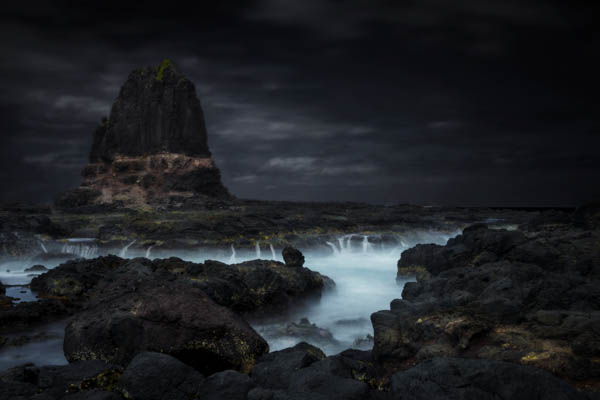
image1-cape-schanck-leannecole

Then there is composition and what is meant to make a good or perfect image. There is the rule of thirds – placing everything in that third, or on the third lines. You learn that when you are composing the image that the horizon should be on one of those thirds, or that the lone tree in the paddock or field should also be on one. Never put things in the middle of an image.

If you really get into it then you might learn about the golden ratio or the Fibonacci Spiral. This principle is about using a curve that determines where the subject should be placed for the perfect image; the spiral placement is very similar to the intersection of the third lines.

Then there is post-processing and again, there are rules about what is appropriate for landscape photography and what isn’t. Landscape photography is steeped in history and your photos should be true to what you see.

There are theories or rules that suggest you shouldn’t do any more processing to your images other than the very basic; that your images should represent the reality of what you saw. It is okay to fix exposure, horizon line, but you shouldn’t move pixels, like removing things from the image, or replace a sky.

No one is going to deny that learning all of that is wrong, and we should all learn it all. The next stop is working out if you are happy to follow the rules and do the same images that everyone else is doing.

The first thing you will find is that other people will start to criticize you. The tree is in the middle of the photo, or you shouldn’t have the horizon line in the middle. The one I get all the time is that I over process or my images are too dark.

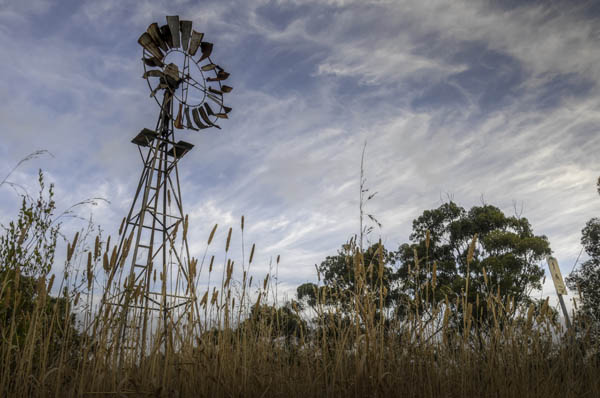
image2-inverleight-windmill-leannecole

My answer to that is: don’t listen.

Creating Your Own Style

There is a growing movement of photographers doing work that is not traditional and pushes the concept of landscape photography a whole lot more. It is where rules are broken, and new things are done that change what is considered traditional landscape photography.

Things like the rule of thirds are often forgotten, and you might see the subject placed firmly in the middle of the image. The horizon line may be in the middle of the image, cutting the image in half, as we’ve constantly been told is wrong and we shouldn’t do it.

How often do you get told that an image needs to be in focus, that if the subject isn’t sharp then you should delete the image? There are art photographers who take out of focus images and use them for art. Perhaps you shouldn’t go around taking a heap of photos that are out of focus, but sometimes the feeling or something else is just as important.

If we consider those things, then what does it mean for landscape photography, and how does it affect us? Perhaps it means that the world is your oyster and fine art is more about your interpretation of the world around you than the reality of it, then the possibilities of what you can do are endless. You can do whatever you like.

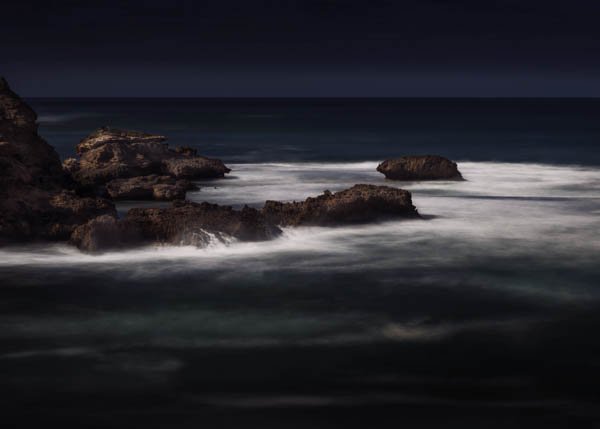
image3-flinders-blowhole-leannecole

Let’s look at what you can do, first out in the field and then back at home with post-processing.

Out in the Field

When you are out taking photos, look for odd angles. Think about how everyone else would take the image and see if you can come up with other ways to do it that are different. It isn’t always going to be possible, but it is a good practice to get into.

You could try using props in your images. I’ve heard of a couple of photographers that will place a person in their landscapes to help give it scale. You could do something like that, or start adding a prop of some sort that gives you a signature.

Photographing the same area time and time again can give you an edge too. You learn the area and discover things that people who rarely go there would find. Of course you have to also open your mind to the idea of finding new things. Try photographing the same thing over and over; see if you can find different ways of interpreting it.

It can help looking at what other photographers are doing to find styles you like. Study what they do. Work out what it is that you like about their work. I wouldn’t recommend copying them, but take some of it and use bits to help make your work your own.

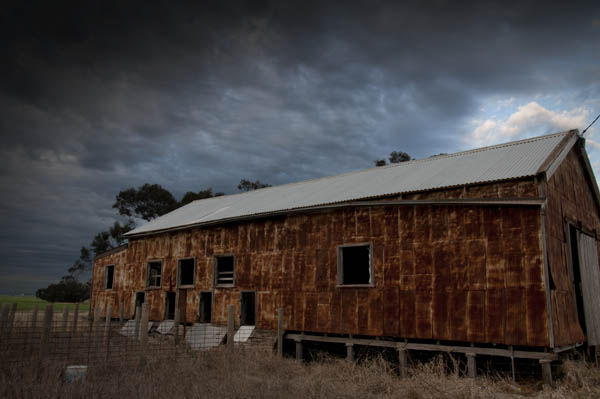
An important thing to remember is that you don’t have to use photo editing to create images that are uniquely yours.

image4-woomelang-shearingshed-leannecole

Back in the Digital Darkroom

Once you get your images onto the computer, anything goes really. How far you take your images is completely up to you, but you also have to be prepared for heavy criticism from others. You are always free to ignore that – I do – but be polite about it.

You can do so many things in post-processing, such as selective focusing. Really make the viewer look where you want them to look. You can do this in many ways, with added blur or with lighting. It can be a strong technique; one that is used by painters all the time.

Selective saturation is a style that a few landscape photographers have started employing as well. You select areas of focus and give them a little more saturation, or you can desaturate the area around it. Make that area brighter or give it more vibrancy so it will stand out and attract attention, which is what you want.

image5-mordialloc-marina-leannecole

Controlling the lighting is another technique that many use, myself included, meaning you take an image then try to find a way of completely changing the lighting so that the viewer can’t work out when it was taken.

Having an idea of what you want to achieve is also good, describing what you want people to see, or how you want your audience to view your work. Telling stories with your images is a great thing to do.

Again finding other photographers whose style you like is good too. Learn from them and see what you can do; it is encouraged in art schools all the time. Do what they do, but don’t pass it off as yours, find your own style, your own voice.

Through fine art landscapes you are showing an interpretation of the landscape around you, or wherever you take photos. The rules don’t always apply, but if you want to break them then do so in a way that will help you develop your own unique style.

Good luck.

image6-capes-schanck-leannecole

If you have any other comments or tips please share in the comments section below.

googletag.cmd.push(function() {
tablet_slots.push( googletag.defineSlot( “/1005424/_dPSv4_tab-all-article-bottom_(300×250)”, [300, 250], “pb-ad-78623” ).addService( googletag.pubads() ) ); } );

googletag.cmd.push(function() {
mobile_slots.push( googletag.defineSlot( “/1005424/_dPSv4_mob-all-article-bottom_(300×250)”, [300, 250], “pb-ad-78158” ).addService( googletag.pubads() ) ); } );

The post Putting You Into Your Landscape Photography by Leanne Cole appeared first on Digital Photography School.


Digital Photography School

 
Comments Off on Putting You Into Your Landscape Photography

Posted in Photography


Weekly Photography Challenge – Architecture

25 Apr

Cities are full of great photography subjects, architecture is among the most popular. Doorways, windows, cityscapes, details or full wide sweeping vistas.

If you live in an urban area you have lots of built-in subjects just waiting for you to photograph them:

Thomas Hawk

By Thomas Hawk

Perceptions I Sichtweisen

By perceptions I sichtweisen

Weekly Photography Challenge – Architecture

Your job this week is to get out and photograph buildings, man-made structures. Use whichever manner you choose either proper corrected lines, or twisted, curved, tilted and converging lines. Go for wide shots, or put on a long lens and shoot details – it’s totally your call.

Thomas Hawk

By Thomas Hawk

Perceptions I Sichtweisen

By perceptions I sichtweisen

Thomas Hawk

By Thomas Hawk

Thomas Hawk

By Thomas Hawk

Thomas Hawk

By Thomas Hawk

Perceptions I Sichtweisen

By perceptions I sichtweisen

Jovan J

By Jovan J

Share your architecture images here:

Simply upload your shot into the comment field (look for the little camera icon in the Disqus comments section) and they’ll get embedded for us all to see or if you’d prefer upload them to your favourite photo sharing site and leave the link to them. Show me your best images in this week’s challenge. Sometimes it takes a while for an image to appear so be patient and try not to post the same image twice.

googletag.cmd.push(function() {
tablet_slots.push( googletag.defineSlot( “/1005424/_dPSv4_tab-all-article-bottom_(300×250)”, [300, 250], “pb-ad-78623” ).addService( googletag.pubads() ) ); } );

googletag.cmd.push(function() {
mobile_slots.push( googletag.defineSlot( “/1005424/_dPSv4_mob-all-article-bottom_(300×250)”, [300, 250], “pb-ad-78158” ).addService( googletag.pubads() ) ); } );

The post Weekly Photography Challenge – Architecture by Darlene Hildebrandt appeared first on Digital Photography School.


Digital Photography School

 
Comments Off on Weekly Photography Challenge – Architecture

Posted in Photography


Lighting for Macro Photography

23 Apr

Macro photography is great for exploring new worlds that are otherwise invisible to the naked eye. You can turn ordinary, boring subjects into fascinating ones. A closeup photograph’s composition is 80% determined by the lighting, therefore it is the single most important element a macro photographer should have complete control over. With good lighting your macro photographs will pop out of the frame and will be sharp, vibrant, and visually stunning. If you get the lighting wrong however, your macro photograph will just look dull and boring.

Image 1

In this article I hope to show you some of the ways you can illuminate your macro subjects in order to capture fantastic photographs. Macro photography can be achieved using three forms of light; continuous, flash, and natural. All of these have separate advantages over one another, but it is completely down to personal preference as to which one you should use.

Continuous Lighting

Continuous macro lighting is great for controlling a number of lighting characteristics. Furthermore, with continuous light you can see how the light is affecting the subject at all times. I believe continuous light is the best option for beginning macro photography. It allows you to build your understanding of how lighting effects macro photography considerably, which will result in you becoming a better macro photographer. Continuous lighting also offers a much more convenient way to direct light on to specific areas of a subject. This gives you full control of the lighting environment, which can result in some stunning photographs.

Continuous lighting also adds another weapon to a macro photographer with a video capable camera. Macro videography is incredible and with continuous lighting, you don’t even need to change anything to switch between capturing photos and videos.

Image 2

The images above were both captured using continuous lighting techniques. The first image subject is a wasp and the second is moss.

Flash (strobe)

Flash photography is great if used properly. Its main advantage is the ability to freeze subjects due to the short duration of the light. This makes it excellent for out in the field as a fill light and for capturing moving insects.

Flash is more complex to learn to use properly, with strange flash settings such as manual mode, TTL and rear curtain sync. However, once learned well the results are amazing. Using flash is very much a trial and error process and it takes a lot of time to get right.

Natural Light

Image 3

Natural sunlight usually provides more than enough light for macro photography. You can combine it with reflectors and other photography accessories to gain an element of control. Natural light can also be used alongside either continuous or flash light accessories.

Image 4

The two images above were captured using natural light.

Adding additional elements of lighting control:

Controlling your lighting environment is essential to producing that perfect macro photograph. Here are a couple of methods that you can use to help achieve complete control.

Diffusion

Lighting that doesn’t look natural is not a good look for a macro photograph, if it is unintended. The way to avoid this is to use diffusers, which spread out the light across a bigger surface area. This results in a softer light that looks natural and makes your macro photographs aesthetically more pleasing. Diffusers can be made out of materials found in the home; tissue paper is great for example.

Image 5

This image was taken with no diffuser, notice how the light is quite harsh and reflects off the subject.

Image 6

This is the same subject, but captured using a diffuser. Notice how the light looks much more natural and makes the image look more appealing.

Colour

Adding coloured lighting to macro photos can make them unique, and stand out in the crowd. You can do this by applying gels or colour filters to your lighting equipment.

Image 7

This image of shaving foam has been captured using coloured continuous lighting.

Image 8

This image of a flower has been captured using coloured continuous lighting.

Lighting Position

Understanding how the direction of light alters the appearance of your subject is significant. This is much easier to do with continuous light, although it can be done with flash as well. A macro subject will look completely different with a light behind it for example.

Image 9

This image of liquid soap has been captured using a light positioned from behind the subject.

I hope this article has given you a great insight to how lighting affects macro subjects and how you can control it. If you have any questions or additional tips, please leave a comment below.

googletag.cmd.push(function() {
tablet_slots.push( googletag.defineSlot( “/1005424/_dPSv4_tab-all-article-bottom_(300×250)”, [300, 250], “pb-ad-78623” ).addService( googletag.pubads() ) ); } );

googletag.cmd.push(function() {
mobile_slots.push( googletag.defineSlot( “/1005424/_dPSv4_mob-all-article-bottom_(300×250)”, [300, 250], “pb-ad-78158” ).addService( googletag.pubads() ) ); } );

The post Lighting for Macro Photography by Samuel Granger appeared first on Digital Photography School.

Digital Photography School

 
Comments Off on Lighting for Macro Photography

Posted in Photography


3 Simple Tips for Subtle Landscape Photography Post-Processing

23 Apr

Landscapes are one of the most popular photography subjects, and for good reason. Nature is enchanting to the human eye, and it’s only natural for people to want to capture that stunning natural scene with cameras. Some landscape pros and über-enthusiasts will plan ahead with tripods, shutter release cables, filters, and extra gear to make sure they really nail the shot they have in mind.

Then there are more casual photographers like myself who tend to shoot landscapes on a spur of the moment basis, usually during vacation. If you fall into the latter group, this article is more geared toward you. Maybe you have a single landscape shot that looks pretty good, but you’re looking for some light post-processing tips to top it off. If that’s you, read on!

In this article, I will present a few methods for enhancing natural scenes to keep them looking close to how you originally viewed them. All of these techniques have to do with enhancing a single shot, and the effects are not too dynamic or exaggerated, keeping you safe from overdoing it with say, HDR.

Tip #1: Enhance details

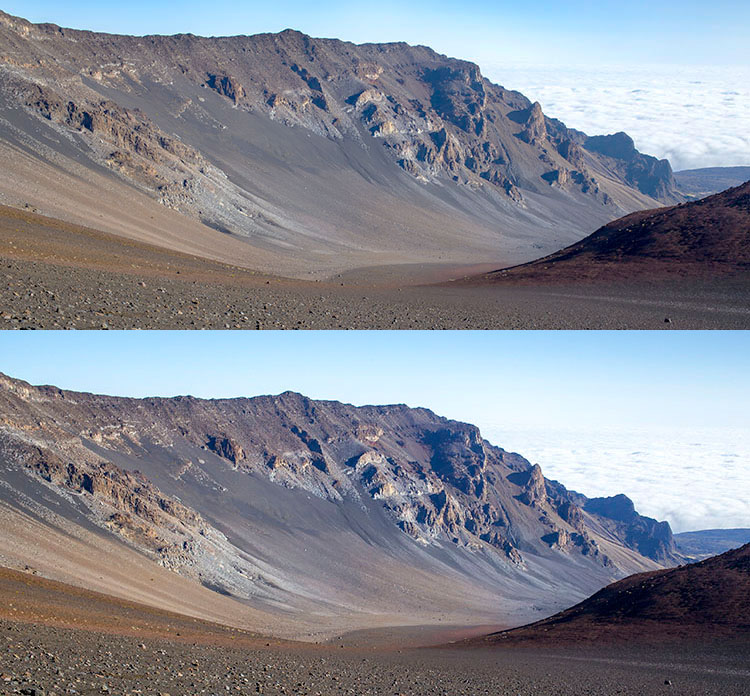
One of the quickest and easiest ways to polish any photo is to apply image sharpening. There are several ways to do this in Photoshop. For this article we’ll focus on applying the High Pass filter’s image sharpening effects to the landscape image below of Haleakala, a hiker-friendly dormant volcano in Maui, Hawaii. The before image is above and the after one is on the bottom. The effects may seem subtle from a zoomed-out perspective, but compare distinct areas such as the rock formations to see the sharpening in effect.

High pass sharpening filter landscape photography

Steps for sharpening using the High Pass filter

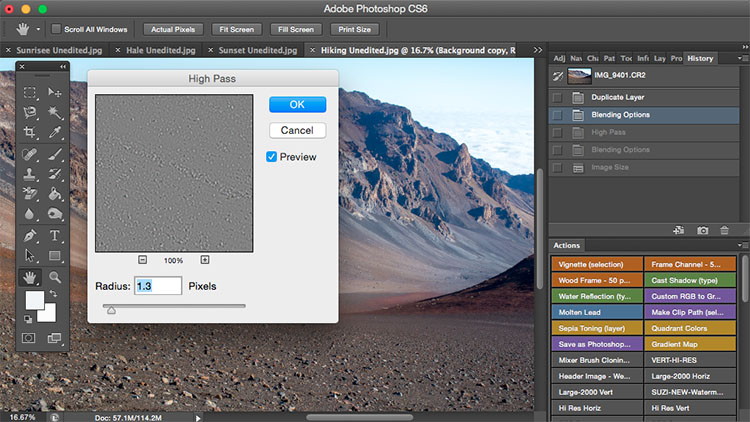
  1. Start by duplicating the Background layer, and changing the blend mode of the new layer to Overlay. The image will appear heavily contrasted, and with the Overlay blend mode applied, you’ll be able to get a preview of the High Pass filter effects.
  2. Next, apply the High Pass filter to the duplicate layer. It is located in the Filter menu at the top screen in the Other section.
  3. Adjust the filter settings: You’ll then see the High Pass filter dialogue box, which will allow you to use a simple slider to increase or decrease the intensity of the radius value (aka strength of the filter’s effect). The higher the value, the more intense the High Pass filter effect. Generally speaking, it’s best to keep the value on the lower side, between 1-5 pixels. In the case of this image, the radius was set to 1.2 to provide just enough sharpening around the edges of the image without exaggerating the effect.
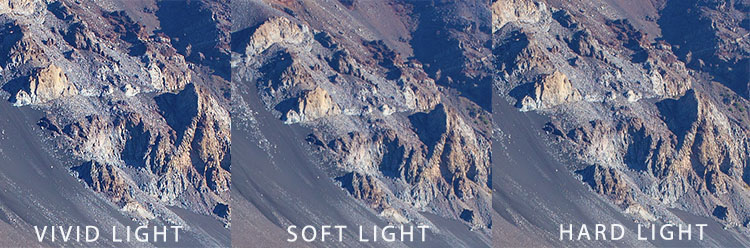
  4. Tweak the layer settings: After the High Pass filter is applied, it can be fine-tuned by adjusting the blend mode of the duplicate background layer and/or lowering the layer’s opacity. The blend mode you choose can either intensify or reduce the amount of sharpening. For some examples, take a look at the image comparisons below. Hard Light and Vivid Light increase sharpening, whereas Soft Light keeps it subtle.

Landscape photography high pass sharpening filter

High Pass filter landscape photography

Tip #2: Remove image haze

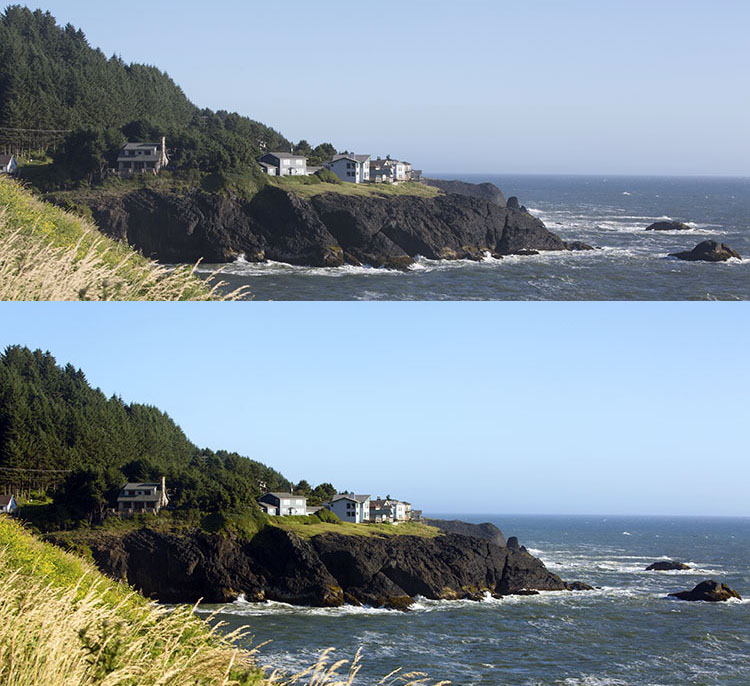
It’s not uncommon for landscape images to appear hazy or foggy when the natural weather conditions are such. The image above was shot on the Oregon Coast a few summers ago using a Canon 70-200mm at f/11 with just a basic clear UV haze filter on the lens. The mist in the air give the photo a dull look in the unedited, straight-out-of-camera version (top image below) but luckily this can be easily fixed in Photoshop (bottom image below).

Landscape Haze before and after

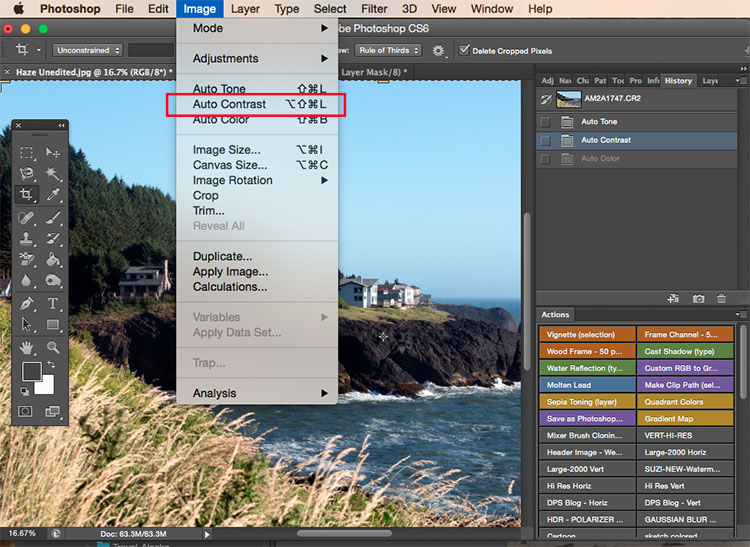
Since the biggest problem with hazy images is soft contrast, the quickest fix is to simply select the Auto Contrast function, located in the top menu dropdown under Image. Poor image contrast is then instantly fixed based on pixel luminosity, resulting in overall finer image contrast. After Auto Contrast was applied, I also adjusted Levels, Saturation, and Vibrance, and the resulting image looks much more balanced and vibrant despite the hazy conditions of the scene. 

Landscape photography auto contrast

Tip #3: Enhance the colors in the sky

Most sunset photos are already quite spectacular when they’re captured with a camera, but sometimes it doesn’t hurt to enhance them a bit more, to fully convey an exceptionally surreal or beautiful scene you witnessed. The photo below is an unedited sunset shot taken at the Grand Wailea in Maui, Hawaii. It looks pretty fine on its own, but I wanted to paint a little more orange and pink into the sky. 

Landscape photography Sunset before after

To do so, we’ll follow these simple steps:

  1. Create a new layer by clicking on the layer icon to the left of the trash can in the layers panel.
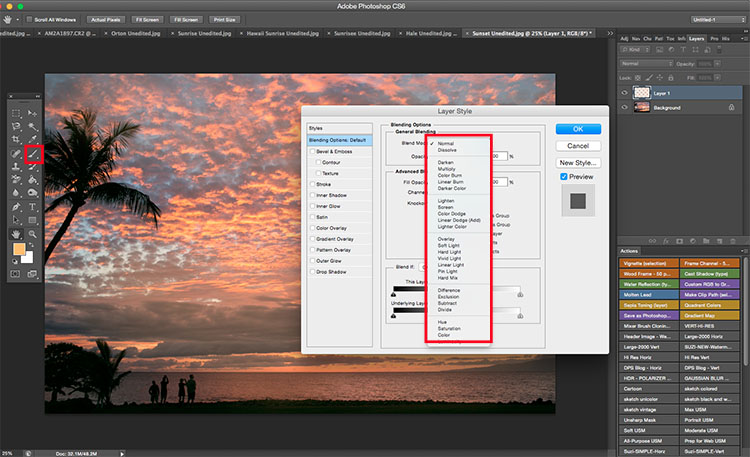
  2. Then go to the toolbox and select the Paintbrush icon. To ensure a smooth transition, make sure the opacity is set to 100% and the brush hardness is set at zero.
  3. Set your color: With the Paintbrush still selected, click on the Foreground Color, which is at the bottom of the toolbar. A dialogue box will appear and your cursor will transform into an eyedropper tool. Left click on the desired color in your image that you wish to paint with, in my case a light pink-orange.
  4. Next, start painting over the areas of the sky that you wish to enhance. Be sure to limit the brush strokes to just your sky area; in my case, I wouldn’t want to paint over the darkened shadows on the left side of the photo since I want to keep them as dark as possible.
  5. Change the Layer Blend Mode: After you’re done painting, right-click on the layer you painted on and change the blend mode to something like Soft Light or Overlay to achieve the desired effect. If the effect is too strong, adjust the opacity of the layer to a lower percentage.
  6. Violá! You should now see much stronger, vibrant colors radiating from your sunset image.

Landscape photography sunset sky painting

How do you process your landscape images? Do you have any other tips or tricks? Please share in the comments below.

googletag.cmd.push(function() {
tablet_slots.push( googletag.defineSlot( “/1005424/_dPSv4_tab-all-article-bottom_(300×250)”, [300, 250], “pb-ad-78623” ).addService( googletag.pubads() ) ); } );

googletag.cmd.push(function() {
mobile_slots.push( googletag.defineSlot( “/1005424/_dPSv4_mob-all-article-bottom_(300×250)”, [300, 250], “pb-ad-78158” ).addService( googletag.pubads() ) ); } );

The post 3 Simple Tips for Subtle Landscape Photography Post-Processing by Suzi Pratt appeared first on Digital Photography School.

Digital Photography School

 
Comments Off on 3 Simple Tips for Subtle Landscape Photography Post-Processing

Posted in Photography


The Ultimate Guide to Natural Light Photography

22 Apr

Dps covers template 363x448

As a photographer, the most powerful tool you have is natural light

It may be free for the taking – but are you making the most of it to create beautiful images?

Today I’m pleased to announce the launch of our latest dPS eBook – Life in Natural Light by Rachel Devine.

Rachel is someone I have had come to photograph my family – largely because I love the way that she uses natural light to capture special moments of life – so when our team began talking about who we wanted to write this eBook Rachel was the first person to come to mind.

In this beautifully illustrated eBook Rachel reveals her secrets for finding and using natural light to tell unique visual stories, enhance mood and create quality images.

Knowledge, Advice and Inspiration

I love what Rachel and our team have done in producing this eBook. You’re going to come away from reading it with a few really important things:

  • a comprehensive understanding of the different types of natural light (because it’s something that is always changing)
  • practical advice on how to spot, control and harness the power of natural light
  • inspiration to get out and shoot having seen Rachel (and other photographers) beautiful images

What more could you want – theory, advice and inspiration that will transform your approach to this important topic!

NewImage

Our Early Bird Offer to dPS Readers

To celebrate the launch of Life in Natural Light we’ve put together a fantastic little bundle together for you. You’ll not only get this great eBook but bundled with it comes:

  • 16 Lightroom presets for you to use, optimized for natural light and custom-created by Rachel herself
  • A natural light printable worksheet, to use as a quick reference in the field

Normally this bundle would retail for $ 29.99 USD but for a limited time you can pick it up for just $ 19.99 USD.

Learn more about Life in Natural Light and grab your copy today here.

googletag.cmd.push(function() {
tablet_slots.push( googletag.defineSlot( “/1005424/_dPSv4_tab-all-article-bottom_(300×250)”, [300, 250], “pb-ad-78623” ).addService( googletag.pubads() ) ); } );

googletag.cmd.push(function() {
mobile_slots.push( googletag.defineSlot( “/1005424/_dPSv4_mob-all-article-bottom_(300×250)”, [300, 250], “pb-ad-78158” ).addService( googletag.pubads() ) ); } );

The post The Ultimate Guide to Natural Light Photography by Darren Rowse appeared first on Digital Photography School.

Digital Photography School

 
Comments Off on The Ultimate Guide to Natural Light Photography

Posted in Photography