RSS
 

Posts Tagged ‘Photography’

3 Ways to Try Macro Photography on a Budget

21 May

Editor’s Note: This is one of a series of article on macro photography this week. Look for a new one each day. The next newsletter will have them all if you miss any!

Ranunculus1

Has Macro Week here at DPS sparked your interest, but you’re still not sure whether you’re quite ready to invest in a macro lens of your own? If so, then this article is for you! I’ll outline three different ways that you can try out macro on a budget, and possibly even with gear that you already own.

Now, before any macro-purists fall off their chairs in disgust, let me say that the techniques outlined in this post will produce pseudo-macro images. In a true macro image, the subject is projected onto the camera’s sensor at a 1:1 magnification, which means that the subject is exactly the same size in real life as it is on your camera’s sensor. That’s not the case, or the intent here. The intent here is to allow those of you who haven’t tried macro photography, the opportunity to test the waters and see if it is even something that interests you before making a big investment in a macro lens.

1.  Use a Telephoto Lens
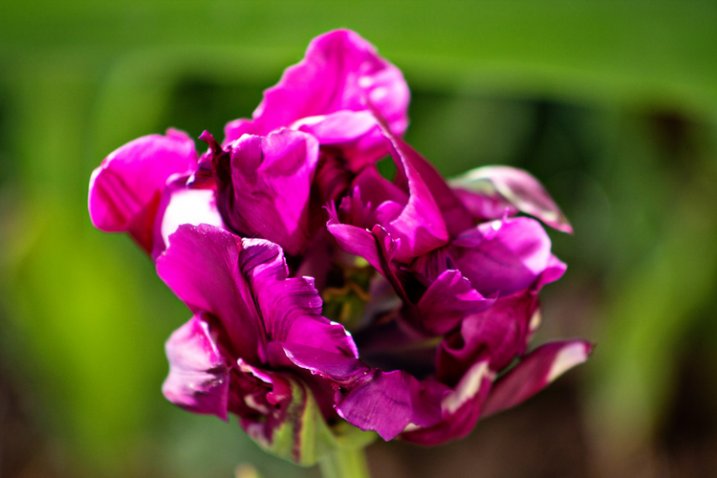
DoubleTulip

This image was shot about two feet away from this flower, using a telephoto lens at 220mm.

My very first dslr camera came in a package with both an 18-55mm lens and a 75-300mm lens. I don’t tend to use the 75-300mm lens very often, but when I do, it’s usually in a pseudo-macro capacity. If you have a telephoto lens already in your bag, give this a try–stand about two feet away from your subject, with your zoom lens at about 250-300mm. If you have trouble getting your subject to come into focus, continue to move backwards with your feet until you find the sweet spot. It’s important to zoom with your legs rather than your lens, in this instance, so that you can keep the background nice and blurry, and the focus on your subject. Once you find that sweet spot, you may want to set your camera on a tripod at that spot to avoid camera-shake as you’re taking the photo. I’ve also tried it hand-held a few times with good results, so don’t be afraid to give that a try as well.
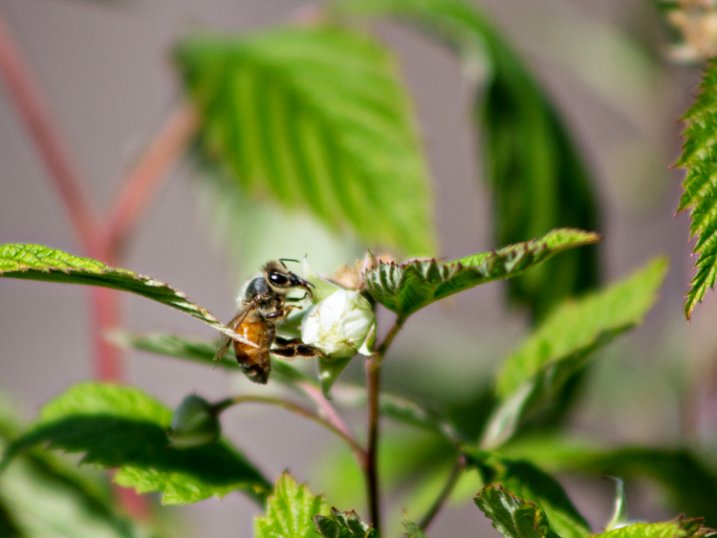
Pollinator

This image was shot using a telephoto lens at 300mm. This is about as sharp as I’m personally able to get when photographing living creatures with this method, and it isn’t sharp enough in my book.

One of the benefits of this method is that it doesn’t require you to get particularly close to your subject, which is ideal if you’re interested in taking macro photos of living creatures. Personally, I find that it is still difficult for me to achieve sharp focus when it comes to photographing living creatures with this method (even with a tripod),  so I usually stick to more stationary objects like flowers. Still, if you already have a telephoto lens in your bag it may be worth your time to try this method first, before buying a macro lens. I say this only because I have more than one friend who thought they’d be really interested in macro photography of insects, only to discover that they actually couldn’t stomach seeing the insects up close in all their glory.

2. Try Extension Tubes
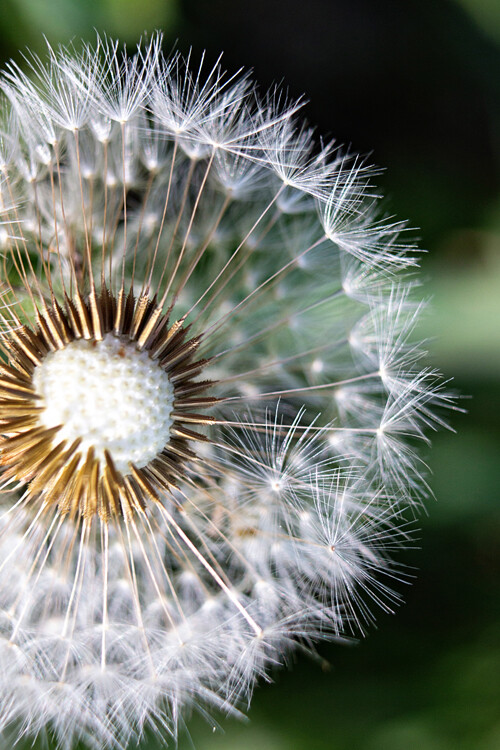
This image was taken with an 18-55mm kit lens + manual extension tubes.

This image was taken with an 18-55mm kit lens + manual extension tubes.

An extension tube is a nifty little invention that screws on in between your camera body and your lens. They come in different widths, and can often be stacked so that you are able to use more than one at a time. They do not contain any glass, but simply allow you to get closer to your subject than you would be able to normally, while still maintaining focus. When it comes to extension tubes, you can find something for nearly any budget. More expensive versions maintain the electrical connections that allow you to use the autofocus feature on your camera, while less expensive versions will not. Additionally, some extension tubes will limit your ability to control aperture in-camera. If you have a lens that has a manual aperture ring, you can control it that way, but otherwise you’ll be shooting wide open. Personally, I have one of the least expensive sets of tubes $ 15, and even though I don’t have the capacity to use autofocus or control my aperture, I have always really enjoyed my set of tubes for creating macro images.
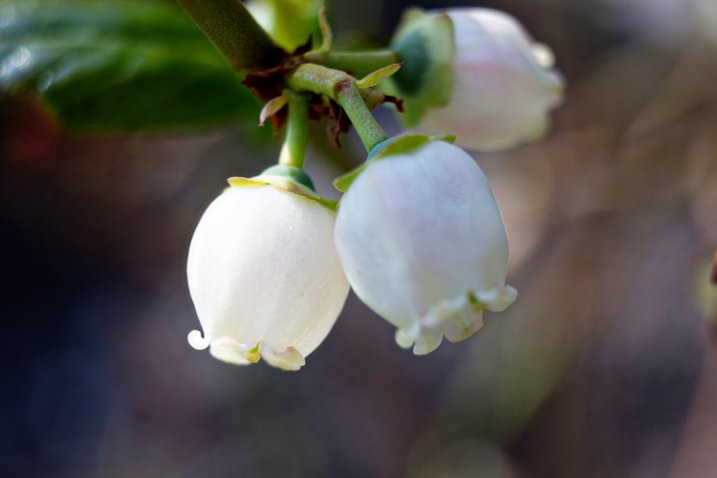
This image was taken with an 18-55mm kit lens + manual extension tubes.

This image of a blueberry bush was taken with an 18-55mm kit lens + manual extension tubes.

That said, before you buy, you should know three things.

First, some reviewers have reported that the less expensive tubes have gotten stuck on their camera body and/or lens. Others have reported that the tubes did not hook securely to their camera body and caused their lens to fall off during use. I have not experienced either issue, but generally use the tubes on my second body, with my kit lens, neither of which I would be devastated to lose. It is a trade-off though—using my kit lens means that I’m not able to control my aperture as I would be with other lenses, which is a bummer (but also not a major issue for me).

Editors note: buyer beware, just be sure to shop around and read reviews (the good and the bad) before you buy any extension tubes. It may seem like a great deal but if they wreck your camera or your lens it won’t be.

Second, be prepared to get close. Like, REALLY close. It will feel really strange to have the lens almost touching your subject, but that’s typically about as close as you will need to go in order to achieve focus. If you’re too close try using a longer focal length lens, that will help with this issue.

Third, there is absolutely a learning curve with extension tubes, particularly those that don’t maintain the electrical connection with the camera. It’s not insurmountable, but you probably won’t be able to use them perfectly right out of the box. Just be prepared for some trial and error.

3. Reverse Your Lens
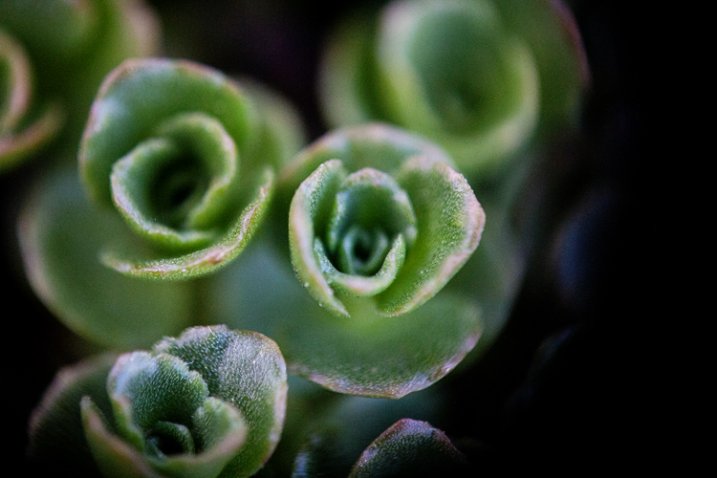
50mm lens hand-held in reverse up to an 18-55mm kit lens.

50mm lens hand-held in reverse up to an 18-55mm kit lens.

Did you know that you can turn any lens around and use it backwards? Well, you can! There are two different ways that you can reverse a lens to use it for macro photography.

The first way to use your lens in reverse is to buy a macro reverse ring. These rings are usually around $ 15, and you would need to know which lens you plan to use in reverse (different lenses require different sized reversal rings), AND whether you’d like to reverse the lens directly to the camera, or on to another lens.
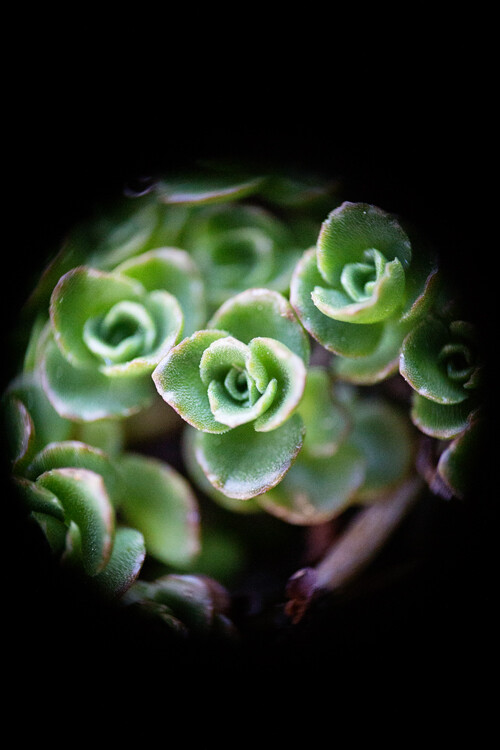
Another instance of a 50mm lens being hand-held in reverse up to an 18-55mm kit lens. Note the major vignetting in this image--that was straight out of camera.

Another instance of a 50mm lens being hand-held in reverse up to an 18-55mm kit lens. Note the major vignetting in this image, along with an almost tilt-shift effect. Both were straight out of the camera

The second way that you can reverse a lens is to simply hand-hold it in backwards. If you have both a kit lens and a 50mm lens, attach your kit lens to your camera as usual, and then hold your 50mm lens backwards, up to the end of the other one. If you can, wrap your fingers around the place where the kit lens and the 50mm lens join together to minimize any accidental light leaks. Again, you’ll have to zoom with your feet, and you’ll probably have to get pretty close in order for things to come into focus. This method works best for creative macro—you’ll find that the focus is much softer than the other methods, and often includes unpredictable vignetting. That said, if I’m trying to create a macro image that feels ethereal, this is my go-to method.

Are there any other techniques you’ve used to create macro or pseudo-macro images without a macro lens? If so, please share!

macro-coverWant to learn more about macro photography? Check out Ed Versosky’s Introduction to Close-Up & Macro Photography ebook – just $ 10 (over 30% off) this week with coupon code: DPS. You will need to enter the code to apply the discount.

googletag.cmd.push(function() {
tablet_slots.push( googletag.defineSlot( “/1005424/_dPSv4_tab-all-article-bottom_(300×250)”, [300, 250], “pb-ad-78623” ).addService( googletag.pubads() ) ); } );

googletag.cmd.push(function() {
mobile_slots.push( googletag.defineSlot( “/1005424/_dPSv4_mob-all-article-bottom_(300×250)”, [300, 250], “pb-ad-78158” ).addService( googletag.pubads() ) ); } );

The post 3 Ways to Try Macro Photography on a Budget by Meredith Clark appeared first on Digital Photography School.
Digital Photography School

 
Comments Off on 3 Ways to Try Macro Photography on a Budget

Posted in Photography


How to Give Your Macro Photography a Fine Art Touch in Post-Processing

21 May

Editor’s Note: This is part a series on macro photography this week. Look for a new one each day. The next newsletter will have them all if you miss any!

Macro photography is very popular and you will find lots of images, of all sorts of subjects on the internet. People spend a lot of time taking the photos, planning them, setting them up, and getting all the gear they need to get all the shots they want. Then the photos are loaded onto the computer and minimal processing is done to them.

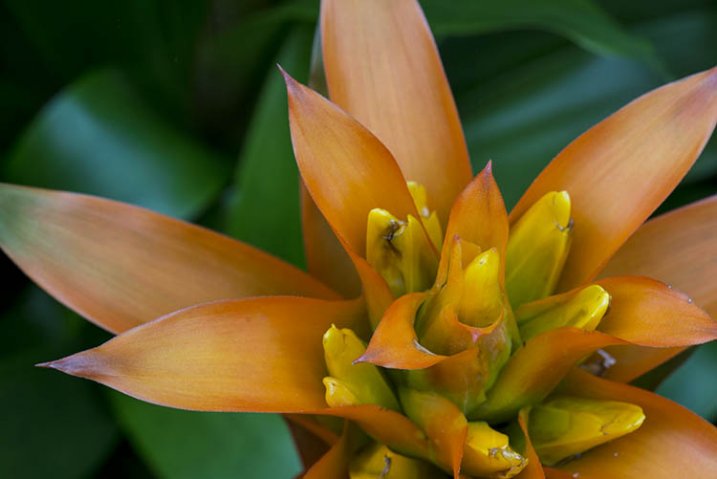
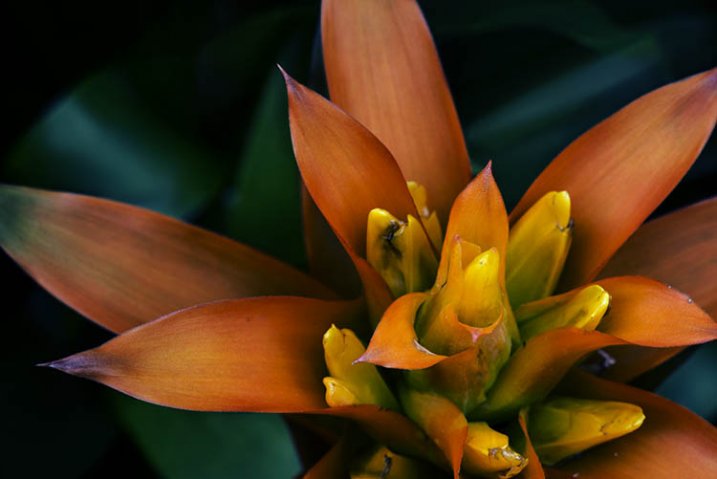
With this tutorial we are going to look at how you can get your macro images from this:

1-fitzroy-gardens-succulent-marco-original

To this:

2-fitzroy-gardens-succulent-marco-fineart

There are many things you can do to your images; what I’m going to show you is only one way. You can try anything really as it’s up to you, it’s your image.

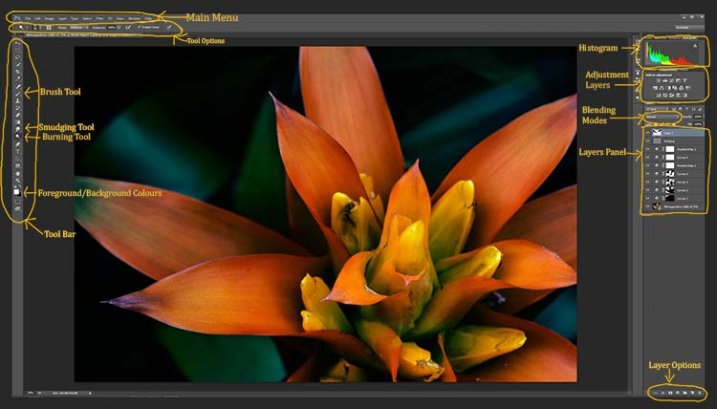
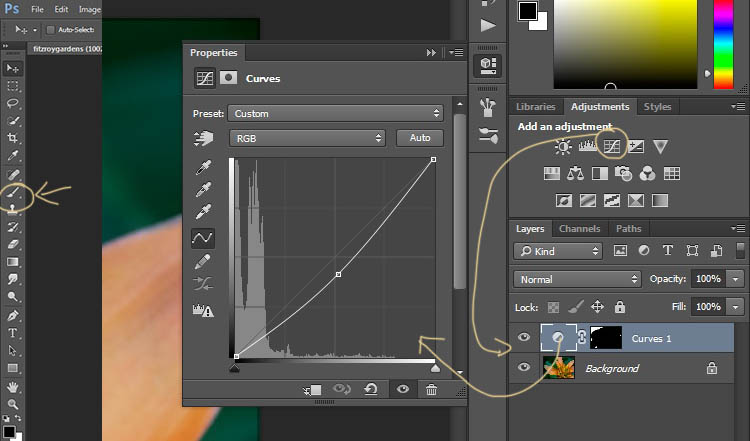
This image was first opened in Adobe Camera Raw and some processing was done to it, just to get the exposure right. From there the macro was opened in Photoshop CC (2014). To explain what some of the instructions are for Photoshop I am including an image below that has the various areas of the interface pointed out, especially the sections that we will be using for this tutorial.

Here is the screenshot of Photoshop with all the various places to find the tools, options, layers and adjustments that were used.

photoshop-setup-2

Step #1 – Curves

At this stage we are going to do several adjustment layers using Curves to change the lighting and bring the centre of the flower out more.

Work in adjustment layers so if you decide further down the track that you should have changed something you did earlier, then you still can go back and fix it, change it or delete the layer. The best way to do this is to use adjustment layers. The adjustment layers are often found above the layers panel on the right of your screen or in the layers menu at the top of the Photoshop window (if you don’t see them go to Window > Adjustments and place it above your layers panel). You will also need the brush tool for this, which is in the tool panel, usually found on the left of the window.

3-adjustment-layer-brush-tool

Once you know where each one of those are, you can start doing your layers for the image.

Click on the adjustment curves layer, as in the photo above. Then in the window that pops up, move the curve down to the dark area just a little, like the image above (just click on the straight line and hold the mouse button down while you drag to move it).

Grab your brush tool from the tool panel. Make it the size that you will need for your image. You can change the size by using the square bracket keys on your keyboard – [ or ] , or right click and in the pop-up window moving the slider for the size. The same changes can be made in the options bar for the tool at the top. Click on the second option from the left, the one that has the size of the brush, and you will get the same panel to change the size and hardness of the brush. For this tutorial a brush towards the soft end was chosen so the edges wouldn’t be too hard (Hardness set to 30% or lower).

You will need to click on the layer mask within the layer, it is the white rectangle in the curve layer. When the mask is white it means the adjustment is being applied to the image below, and when it is black it the change has been hidden. If you paint black onto the mask with the brush you are hiding the adjustment. Black on a mask conceals – white reveals. If you make a mistake and hide a bit you want, you can just paint it back in with the opposite color, white.

Start brushing the image, if nothing changes, then the foreground color (which the brush uses) is likely set to white. You will need to change that colour to black. You can also press X on your keyboard too, it will swap the foreground and background colours around.

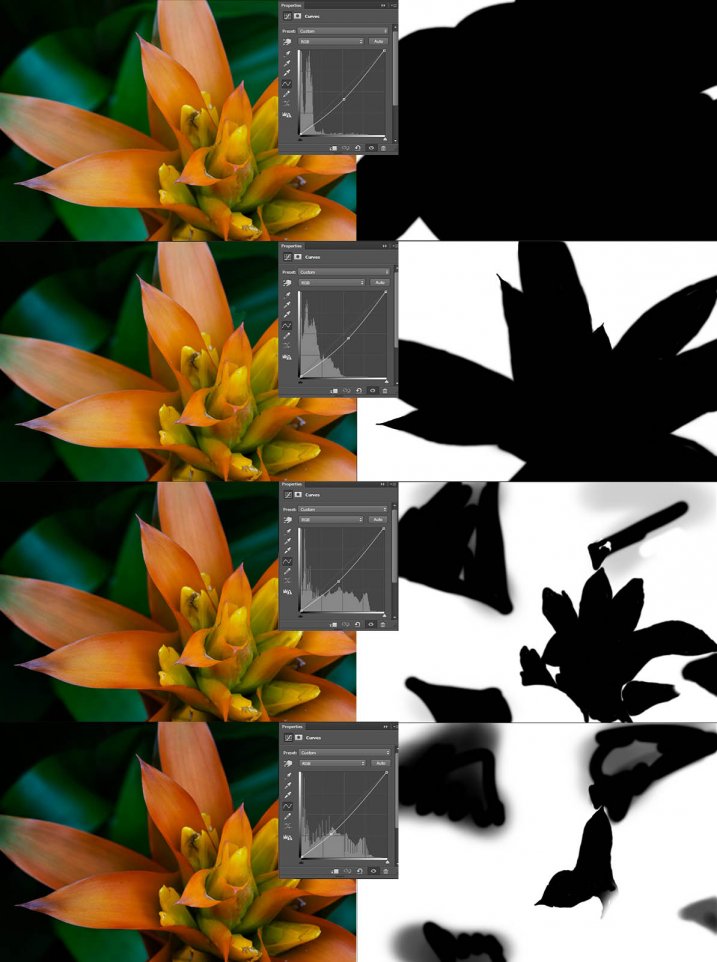
For each different curves layer I took less and less of the adjustment from the image. The following image will show you what I did to each layer. The white areas are where the curves layer still applies, and the black shows where it was hidden.

4-macro-curves-layer

This image was done with curves layers. You don’t have to use the same number of layers, it is up to the image. Some of the background leaves were brought back in the last couple of layers as they were getting too dark. It is something you should be aware of, take notice of what is happening in the background as well.

The centre of the flower is now the same as the original but everything else is darker. The changes should be subtle.

Step #2 – Gradient Map Adjustment Layer

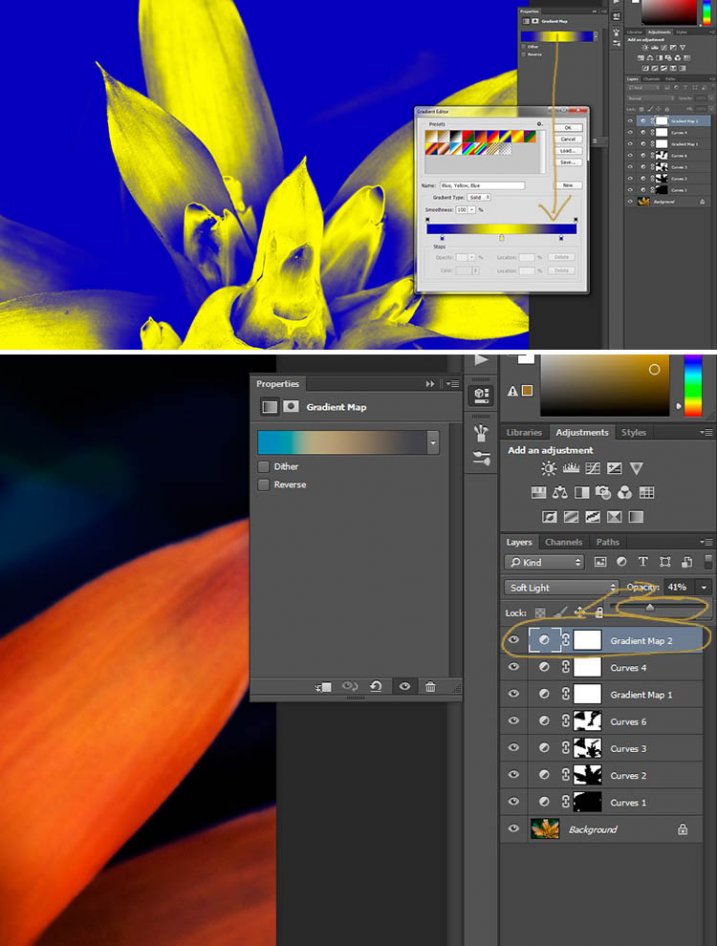
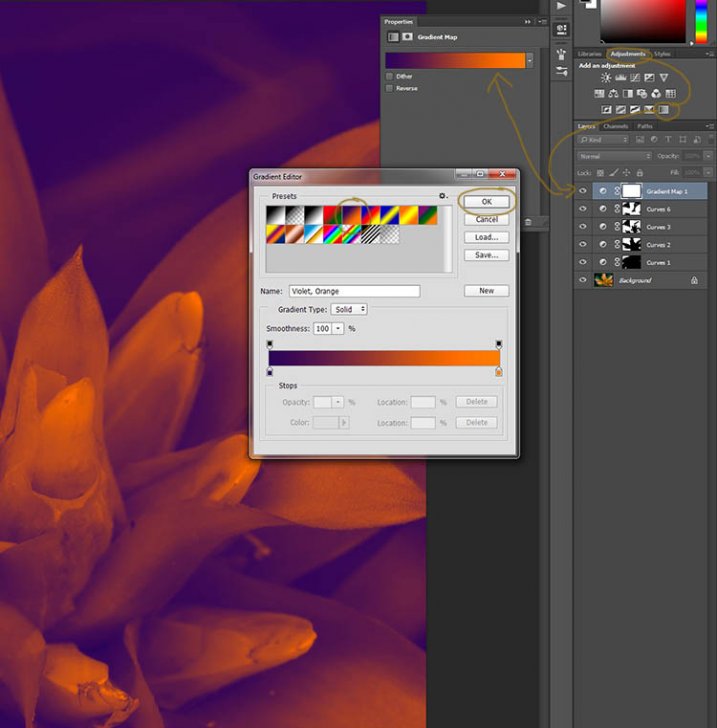
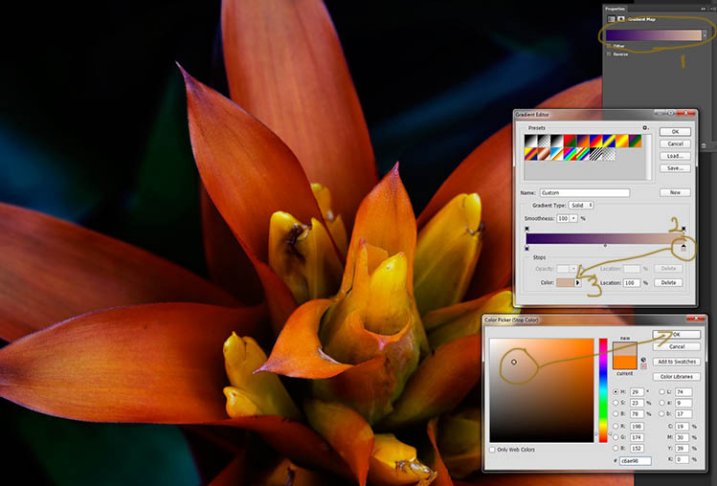
Once the curves were done a gradient adjustment layer was added. The gradient adjustment will change the highlights and shadows; you can decide what colours you want to use.

When you click on the gradient adjustment layer often the black and white gradient comes up and you will notice your image turns to monochrome. If you click on that bar in the window that comes up, you will get a lot more options for the gradient. For this tutorial I used the orange and purple gradient.

5-gradient-adjustment-layer-01

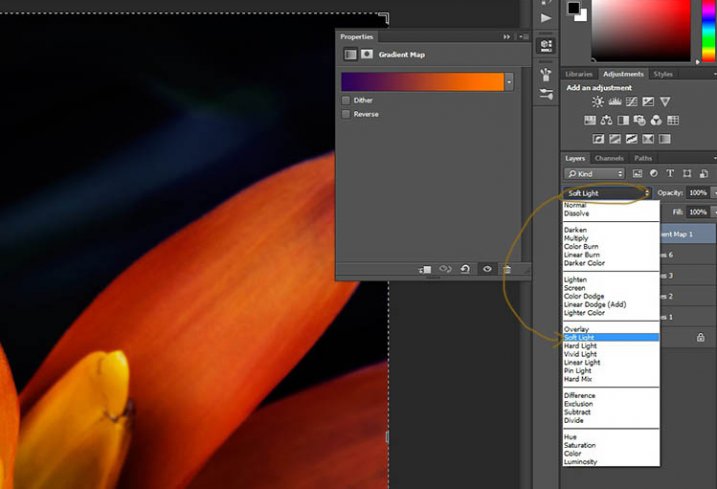
You will see all your highlights turn orange and the dark areas will go purple. You don’t want your image to remain like this, so now you need to blend it. In the image above you can see the blending modes that are above the layers, normal is the default. Click on that and go down to select Soft Light. You will notice the gradient layer is now blended and doesn’t look so horrible.

5-gradient-adjustment-layer-02

Just because that gradient has those colours, doesn’t mean you have to stick with them. They are easy to change them to give your highlights and shadows the tones you want.

In the bottom part of the gradient editor you can see the colour slider which is how the change goes from one colour to another, and directly underneath you can see little colours. If you click on one of those, the colour comes up at the bottom.

6-gradient-adjustment-layer-2b

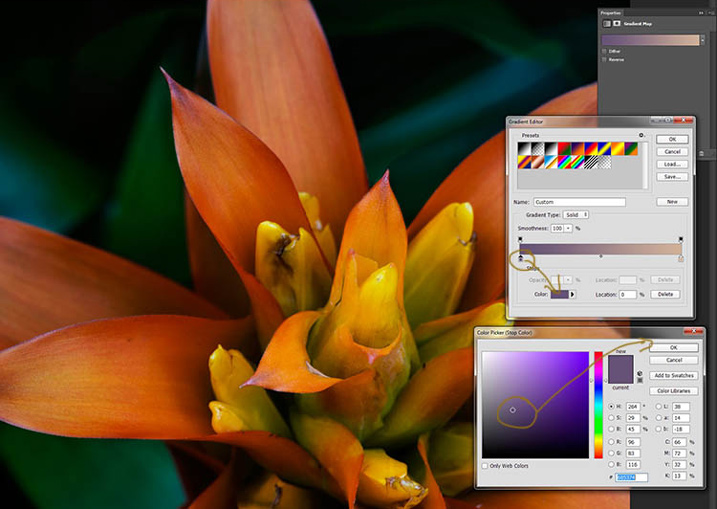
Click on that, you will see the Colour Picker window open up. You can change the colour to whatever you want, and as you do so you should be able to see the effect on your image straight away. If you can’t, then it is likely because you forgot to blend the layer. See the following image.

6-gradient-adjustment-layer-2c

You can see from the images what I changed the colours to; you don’t have to use the same ones. I would recommend trying a few colours to see which ones you like. Purple is my favourite colour, so I use it a lot.

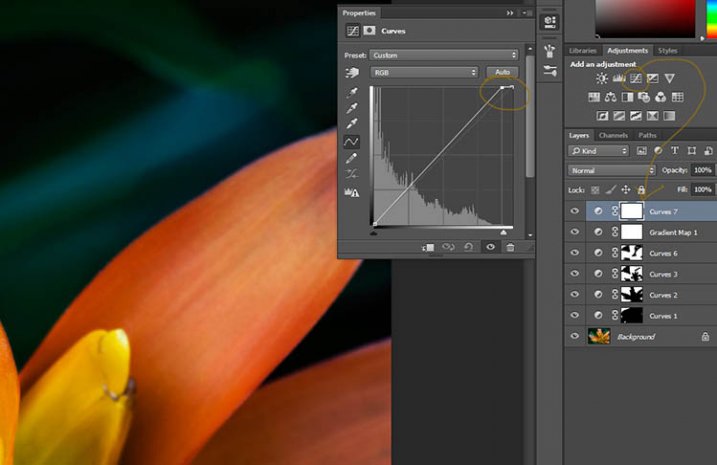
The next step is not always necessary, but often nice to do. All the work that has been done can mean losing the highlights, so to help bring them back you can use a Curves Adjustment Layer.

Step #3 – Adjusting the Highlights

Open a new Curves Adjustment Layer. In the Curves window go to the top right corner and move the line across the top. Watch as you do it and notice if you can see the highlights changing. Sometimes it is good to go too far and then bring it back, just to see what it does. Just be careful not to blow the the highlights out, making them solid white with no detail. Check out the image before to see what to change.

7-curves-highlights

Step #4 – Adding Another Gradient Map Adjustment

Next another gradient map adjustment layer was added, time time using a different one.

From the above image you should be able to see what colours I choose and follow along the same steps as previously. This time I chose a gradient that changed three areas.

8-gradient-adjustment-layer-3

Step #5 – Dodging the Highlights

One thing that I like to do on many of my images is to bring out the highlights, in small ways, with the dodging tool. The dodging tool is a touchy one, to be used carefully.

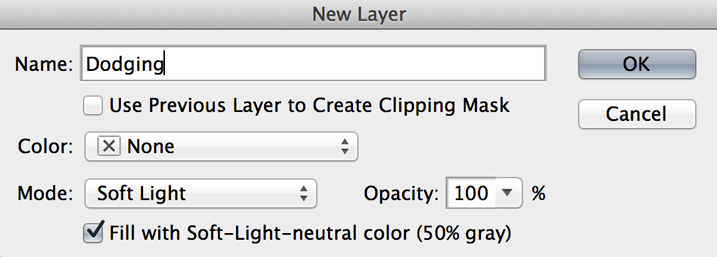
It is always best never to do anything straight onto your original image layer, so like with everything we have done so far it’s going to be on a separate layer. Go to the top menu and click layer, then new layer. When the window appears you can name the layer, if you want to, I called it “Dodging”.

Dodging

There are a couple of things you need to do so you can use this layer with the Dodge tool. First change the layer blend mode to Soft Light, then under the mode drop down menu you will see a box you can check to “Fill with Soft-Light Neutral Colour 50% Grey”, so check that, then press okay (see above)

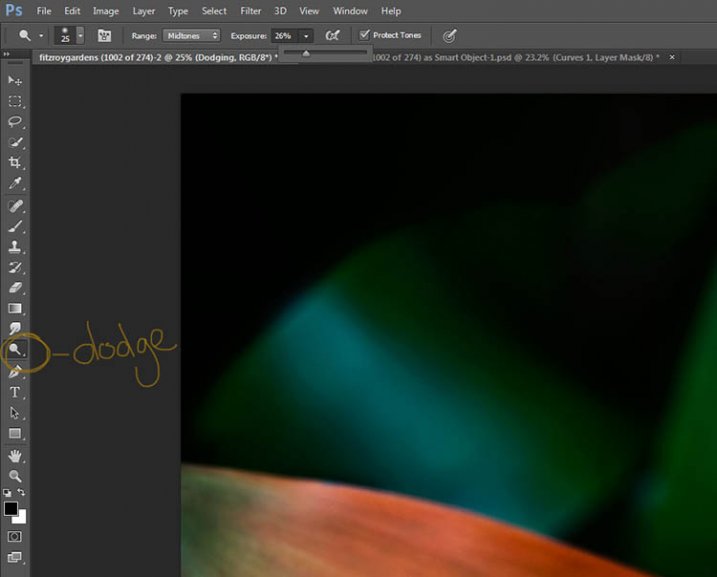
Over in the layers panel you will see what looks like a grey box, this is what you will do the dodging on. Go over to the tool bar on the left and select the dodge tool.

At the top under the main window you will see Exposure, I have set mine at 26% for this image, but you can set it to anything, it depends on how patient you are. In the options bar there is also a setting for the highlights, midtones and shadows, I tend to use midtones. The more you move over an area the more it will go white. In the days of the darkroom they would using dodging to stop the light from getting to certain parts of the area. In Photoshop you can use it to put a little of the highlights back into the image, or to make the highlight pop. It should not be obvious, again subtle is the way to go.

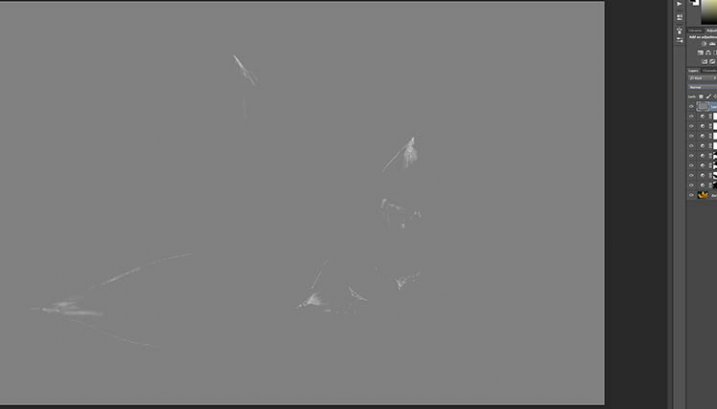
I have changed the layer back to normal mode so you can see what I worked on. Dodging shows up as white on the layer.

10-dodge-layer-2

You can see that I haven’t done a lot, except bring up some of the highlights a little more.11-dodge-layer-3

Step #6 – Smudging

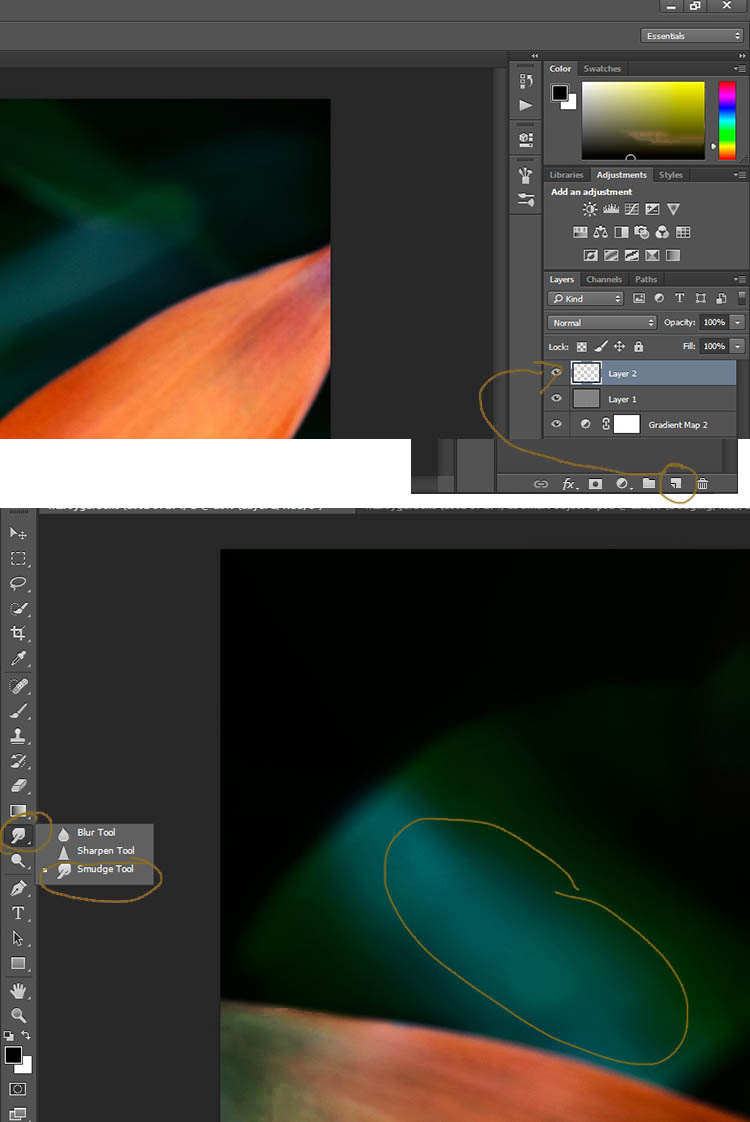
Finally I did a little smudging. Sometimes when you do a lot of work to images it can start to look pixelated, or you get some colour separation. I’ve found that the smudge tool can help get rid of that. You will find it in the tools panel.

I did this on a new transparent layer, again not working on the original image.

12-smudge-layer

Make sure you check the Sample all Layers in the options bar for the tool at the top, and for this tutorial I left the Strength at 50%. I went over the areas where I thought I had some colour separation to smudge them together. If it were a painting I would get my finger into it and smudge the colours together.

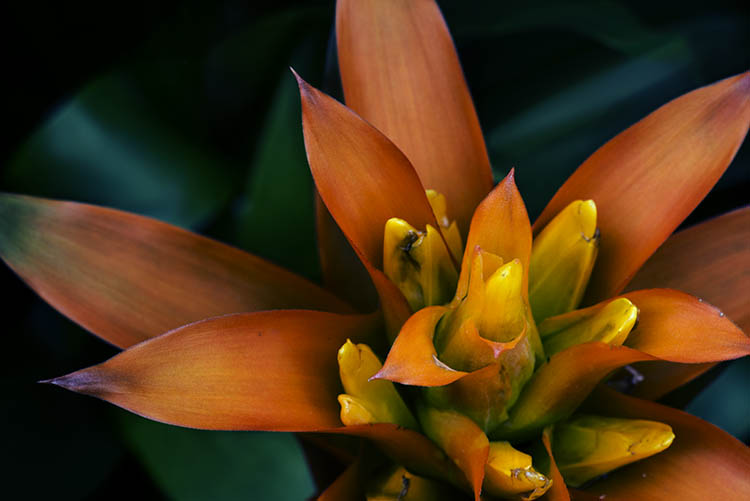
Here is the final image.

2-fitzroy-gardens-succulent-marco-fineart

It is all about personal taste, so you should do it to your own style. I like it like this, but other people might find it too much, and others may think it isn’t enough. I like the way the flower seems to be coming out of the darkness.

If you have any questions, please ask. I will do my best to answer them.


macro-coverWant to learn more about macro photography? Check out Ed Versosky’s Introduction to Close-Up & Macro Photography ebook – just $ 10 (over 30% off) this week with coupon code: DPS. You will need to enter the code to apply the discount.

googletag.cmd.push(function() {
tablet_slots.push( googletag.defineSlot( “/1005424/_dPSv4_tab-all-article-bottom_(300×250)”, [300, 250], “pb-ad-78623” ).addService( googletag.pubads() ) ); } );

googletag.cmd.push(function() {
mobile_slots.push( googletag.defineSlot( “/1005424/_dPSv4_mob-all-article-bottom_(300×250)”, [300, 250], “pb-ad-78158” ).addService( googletag.pubads() ) ); } );

The post How to Give Your Macro Photography a Fine Art Touch in Post-Processing by Leanne Cole appeared first on Digital Photography School.

Digital Photography School

 
Comments Off on How to Give Your Macro Photography a Fine Art Touch in Post-Processing

Posted in Photography


Stock Photos That Don’t “Suck”: the Basics of Stock Photography

20 May

As a freelance stock photographer, I have to admit I am insulted when I see articles written about how horrible the market is for stock photography. Has the bar been lowered so far that we are forcing consumers to seek out photographs that simply “don’t suck”? I don’t think so. Some people feel that the proliferation of digital cameras and Continue Reading

The post Stock Photos That Don’t “Suck”: the Basics of Stock Photography appeared first on Photodoto.


Photodoto

 
Comments Off on Stock Photos That Don’t “Suck”: the Basics of Stock Photography

Posted in Photography


12 Steps to Successly Promote your Photography on Instagram

19 May

If you’re reading this and are interested in digital photography, chances are you’re a user of Instagram, the current goliath of social media in photography. Instagram has become home to over 300 million users in the four years it’s been around, and it seems ready to only get bigger.

post 1 image

300 million is a big, big number. It can seem overwhelming, but it’s a great tool to not only create community, but also to become a better photographer. So how do you create a presence for yourself in all that noise? There are a lot of websites claiming to offer you the fastest way to Instagram success, but most of them offer terrible advice that will get you nowhere. Here are a number of strategies to get better exposure for your photography, build a community, and grow as a photographer through Instagram.

1) Great artists only show great work

The difference between a good artist and a great artist is that great artists only show great work. While nobody is expecting you to rival National Geographic photographers right off the bat, you should pay close attention to what you’re sharing. It only takes one uninteresting photo to for people to lose interest in your work. If a photo doesn’t make you say “OH yeah!” when you see it, don’t post it.

Also, don’t post too often. Unless you have a really good reason for spamming my feed, don’t. I recommend sharing one or two images a week, which is a safe number to keep people interested without getting annoying.

2) Find your niche.

This is as important to your growth as a photographer, as it is in defining your brand: what makes you different from everyone else? The amazing thing with Instagram is that it is composed of people from across the world who each have something in which they’re interested. I’ve seen fantastic accounts focused just on street food in Vietnam, rock climbing in Utah, or architecture in Turkey. What the best accounts have in common is a focus around a central theme that captures their audience’s attention and keeps it.

point 2 image

Exploring the ancient #forests of Vancouver island, @kaitross and I found that even these giants succumb to time and the winds. Afterlife for these trees means giving life to a new world of creatures, from insects and animals to moss and a new generation of trees. When time calls, what will you leave behind? What will I? Will it be enough?

Don’t forget: the only person who should define your niche is you. Do you love paper maché and dinosaurs? Then become the best photographer in the world working on seaside portraits of paper maché Velociraptors. For me, I love to travel and explore nature, so my account reflects that, and only that. You will not find photos of my food, my dog, or my nieces. If you want to share snapshots from your daily life, get a private account for your friends and your mother to follow, because they’re the only ones who (might) want to see that stuff.

3) Use a real camera.

Yes, your shiny new smartphone may take gorgeous snapshots, but relying on it is like trying to perform a piano recital on a kid’s electronic keyboard. Not only does using a dSRL (or a serious mirrorless) give you far more choices of focal length to play with, your opportunities for manipulating depth of field will result in way better photographs than anything coming out of your smartphone. As if that’s not enough, using a dSLR will let you shoot in RAW, allowing you to make those photos really pop in the editing process.

Point 3 image

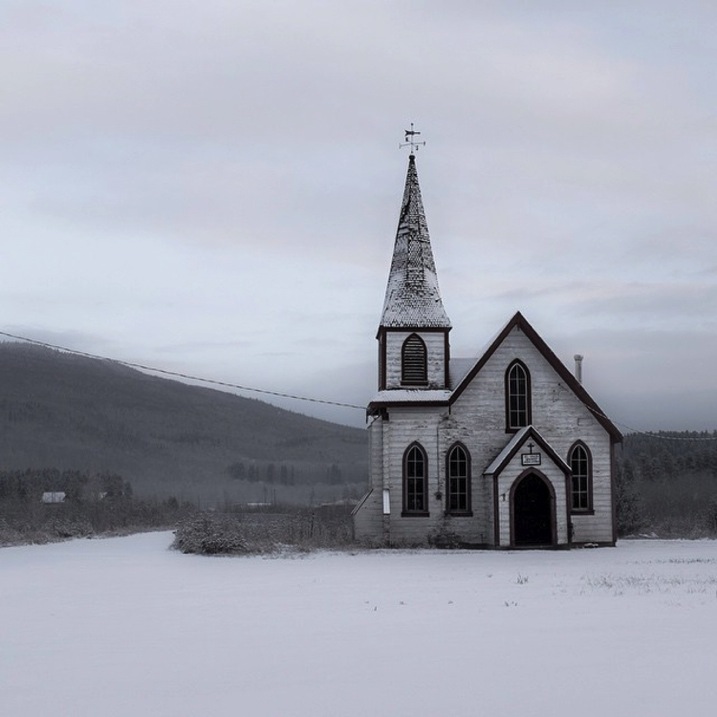
Turning off the Yellowhead Highway and heading north to Alaska, you’ll quickly find yourself in Kitwanga, traditional lands of the Gitksan and Wetsuwet’en peoples. The massive Skeena River nearby has nurtured civilization and trade routes for over 7,000 years and today is a beloved fishing ground for all people. I stopped in this small reserve community early one morning when there was more dark than light, and a fresh snowfall cast a tranquility over the village.

4) Take the editing process seriously.

Instagram may lend itself to a snap-and-post style of photography, but producing excellent photographs doesn’t. Great photographs aren’t taken – they’re created. This means working in your favourite image editing program (I recommend Adobe Lightroom) to learn how to manipulate light, shadows, and clarity until your final product is something to be proud of. The Instagram app just isn’t built for this level of sophistication, so ditch all those cheesy filters and effects and do your work on the computer.

Point 4 image

Think your Monday is challenging? These porters in Huangshan, China haul 150-200lbs of materials up 2500m vertically each day, supplying the tourism infrastructure of this popular destination with daily necessities like food, toiletries, and building materials. While there is a gondola for tourists to ascend and descend the mountain, this is the raw manpower that runs Huangshan.

5) Share a story with your photo.

Great photography leaves an impression. So do well-written stories. But when you combine strong images with powerful words, you’ll evoke an emotional response in your viewer, and lead them to make a personal connection to your work. It wasn’t until I realized this and started sharing the story behind my photos that my account started getting real interaction – people speaking about how the image or words affected them, their own experiences, and their appreciation for it. Nobody expects the next Hemingway to come out of Instagram, but some carefully-chosen words in a thought-provoking caption will do wonders for connecting you to your fans.

Point 5 image

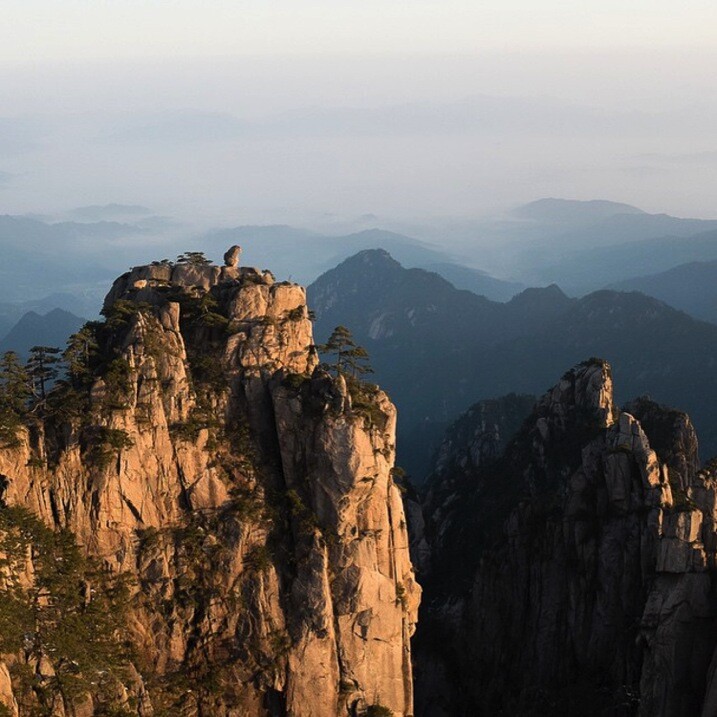
After the frenzied atmosphere of Shanghai’s urban jungle, the fresh air of Huangshan’s Yellow Mountains was exhilarating. Still in the low-season, March snow clung to the boughs of trees while distant clouds made it feel like the horizon could go forever. One of China’s better-developed tourist attractions, Huangshan has a long history: first recognized in 747 AD, it was said to be the place from which the Yellow Emperor ascended to heaven. This year, over 1.5 million visitors (mostly Chinese) will wander its paths. I caught it on a quiet day, and these peaceful memories linger with me still.

6) Ask questions in your captions!

The difference between a story and a caption is that a story builds an emotional connection between the viewer and the image; a question builds a personal connection between your viewer and you. Your questions should be open-ended and create a space for your fans to contribute some of their own story to the community. Never forget, many Instagram users are new to digital photography and are looking for people to connect with, and this gives them the opportunity.

Point 6 image

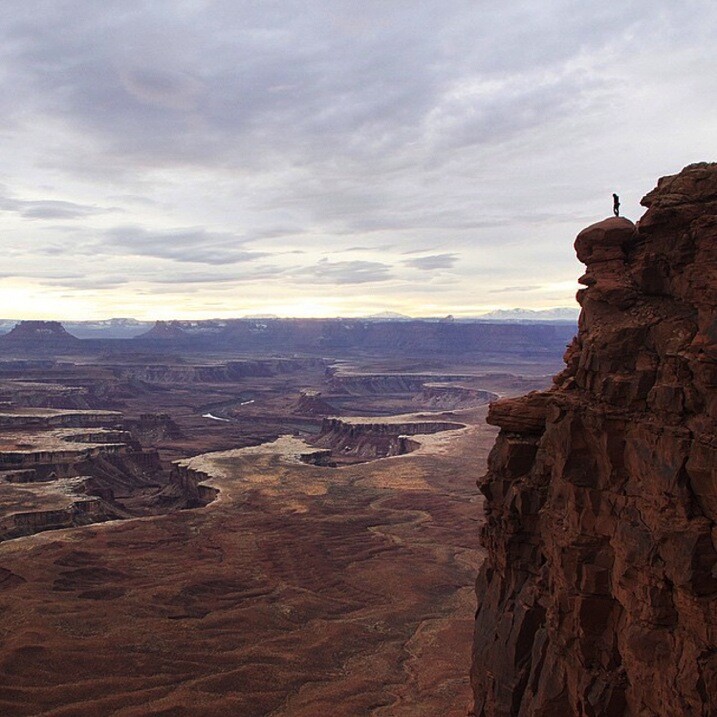
“I mean… All I really need is a pair of wings. Anyone else get the insatiable urge to jump when they get to the edge of something really high? I tried it once when I was little after watching Mary Poppins off the second story of a building with an umbrella.” – Image and caption by @minayounglee

7) Use hashtags effectively.

I never understood the value of effective hashtagging until I started using them interwoven in my posts. You should be hashtagging important nouns and verbs – stuff people will be searching for. The effectiveness of using #fishing compared to #instagood is huge for obvious reasons: people who might be interested in your photo are much more likely to be searching for their favourite hobby or location than some meaningless term.

point 7 image

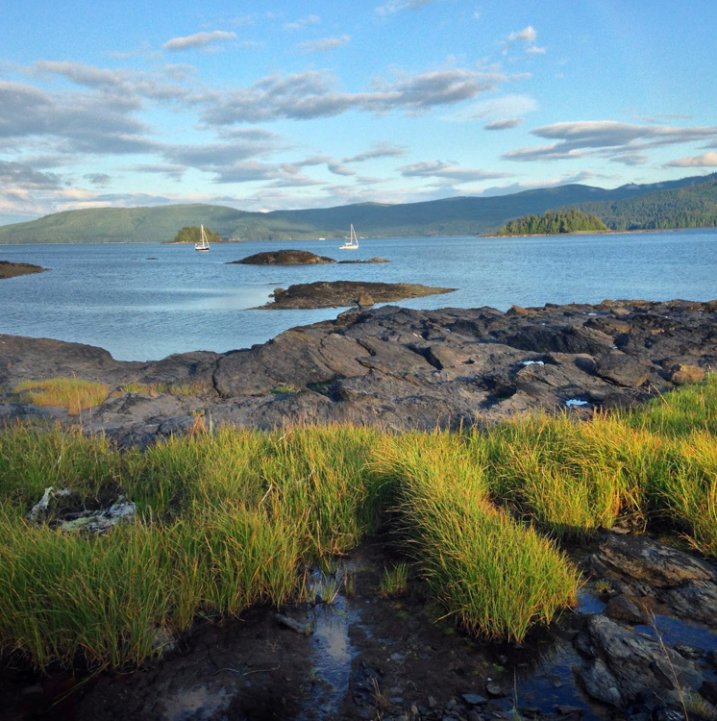
The seed from which the Haida Nation sprang, Haida Gwaii now works to redefine itself from a timber economy into an eco-tourism powerhouse. For an outstanding introduction to the history of these islands known as Canada’s Galapagos, pick up Vaillant’s “The Golden Spruce”. I’ll be exploring the rugged coasts and remote, old growth forests of these islands for the next ten days.

Speaking of hashtagging, do a bit of digging around to see what effective hashtags you might be missing. It wasn’t until I came across the hashtag #explorebc that I began connecting with a ton of great local photographers who eventually featured my work on their account, resulting in a huge boost of exposure for my work.

8) Wake up and post.

Mornings are when most Instagram users login and check their feed, so cater to this. I live on the west coast, so I know I’m already posting late for my east coast followers when I share a photo at 8 a.m. Aim to get your posts out early in the day for whatever time zone you’re targeting (if your followers are worldwide, this is less useful).

Is there a best day of the week to post? Studies are showing that Sundays have the greatest number of interactions, which makes sense given that many of you are trying to crawl out of your hangovers through long hours of cuddling with your phones. Otherwise, stick to weekday mornings.

9) Build a community

Build a community by actively finding photographers you respect and developing relationships with them. I won’t lie – this is a long process, but it’s necessary and worthwhile. Find a hashtag that speaks to you and your work, then check in with it whenever you can to see who’s posting what. When you find work you like, leave a thoughtful compliment and follow them. Chances are, they’ll check out your account and will reciprocate if they like what you’re posting. Whatever you do, don’t ask people to check out your account or follow you back. It’s tacky and makes you look desperate.

point 9 image

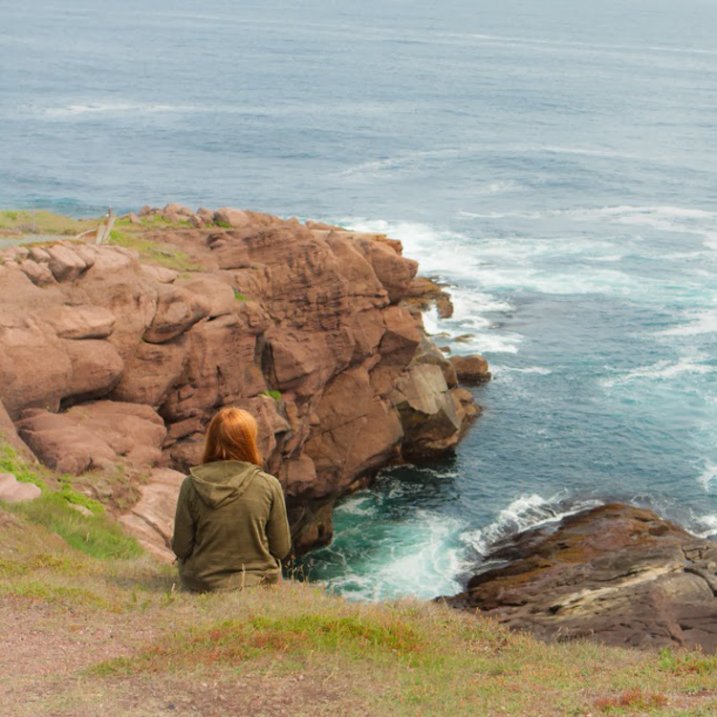
We all know where the roads we walk take us, but do we pause to realize how with the journey we are changed? This is why I love travelling by land… it gives me time to sit and meditate on how the things I’ve done, the people I’ve loved and who have loved me, the hurts I’ve caused and have been caused to me, all of which paint a complex life. At the end of each journey remains one lesson that can always be learned better: to #love with an open and humble heart and to let go of whatever pain has tied one to memories that belong in the past. After days of planes, ferries, hikes, and hitchhiking with the finest people of Newfoundland, @maggiewhoa and I sat at the edge of the Atlantic Ocean and breathed in the salty breeze that was so hard-won.

10) Cultivate champions

Cultivate champions by fostering relationships with other users. Easier said than done, right? If users are leaving you thoughtful comments (as opposed to the ubiquitous thumbs-up nonsense), return the favour and respond with something more meaningful than “thanks!” If someone cares enough about your work to awkwardly type out praise on their smartphone, they’re worth their weight in followers. These are the people who are going to follow along through your adventures and refer their friends and followers, which really is one of the goals of this social network. Do enough of this, and these delightful unicorns will be out there promoting your work for you.

11) Bring other into the conversation

Bring others into the conversation by shooting with them or referencing them in your posts. Two amazing girls from Vancouver kicked off @localwanderer a year ago, in which they travel around North America visiting the hidden gems in communities. Where they really excel (besides their photography and writing skills) is in their ability to constantly bring local shops, restaurants, and people into the discussion. By doing this, they introduce their community to someone new, who in turn will introduce their community to @localwanderer.

Point 11 image

“Hellloooo, San Diego! We are soooo happy to be back in the sunshine state as we make our way around the California coast. Our first stop was the @moderntimesbeer tasting room (a.k.a. the “flavordome”) which combines two of our favourite things: coffee + beer! Also, be sure to check out their wall mural made out of floppy disks!” – Image and quote by @localwanderer

Hellloooo, San Diego! We are soooo happy to be back in the sunshine state as we make our way around the California coast. Our first stop was the @moderntimesbeer tasting room (a.k.a. the “flavordome”) which combines two of our favourite things: coffee + beer! Also, be sure to check out their wall mural made out of floppy disks!

12) Don’t confuse followers with community

I’d rather have 100 fans who interact with my work than 1,000 followers who couldn’t be bothered. Your goal should never be the quantity of followers, but the quality of your community. Speaking of numbers, you’ll find a random assortment of Russian princesses begging for you to come cuddle with them – report them and block them if they add you. The last thing you need is a bunch of zombie accounts clogging up your Instagram. Also, one danger of having lots of inactive followers is that your account is less likely to be recommended to other users of Instagram.

There you have it – the 12 steps to success with Instagram. What are yours? Let’s hear them in the comments section.

See Robin’s Instagram account for more of his images and examples of putting these tips into practice.


googletag.cmd.push(function() {
tablet_slots.push( googletag.defineSlot( “/1005424/_dPSv4_tab-all-article-bottom_(300×250)”, [300, 250], “pb-ad-78623” ).addService( googletag.pubads() ) ); } );

googletag.cmd.push(function() {
mobile_slots.push( googletag.defineSlot( “/1005424/_dPSv4_mob-all-article-bottom_(300×250)”, [300, 250], “pb-ad-78158” ).addService( googletag.pubads() ) ); } );

The post 12 Steps to Successly Promote your Photography on Instagram by Robin Ryan appeared first on Digital Photography School.

Digital Photography School

 
Comments Off on 12 Steps to Successly Promote your Photography on Instagram

Posted in Photography


The Sun Is Your Friend: Tips for Summer Photography

18 May

Summer is just around the corner, folks. As the sun decides to become a more active member of our daily lives, we — especially those of us with nice cameras and itchy shutter-release fingers — feel an increasing compulsion to awaken from our lazy autumn habits and venture outside. And if you’re going to be outside, you might as well Continue Reading

The post The Sun Is Your Friend: Tips for Summer Photography appeared first on Photodoto.


Photodoto

 
Comments Off on The Sun Is Your Friend: Tips for Summer Photography

Posted in Photography


Fashion Photography – Tips for Making Something out of Nothing

18 May

Recently, I found myself in a conversation with a mentoring client who was feeling creatively stunted. I asked her where she wanted her portfolio to go and she said, “I want images like yours! But you live in California, and everything is pretty there!” I literally laughed out loud when she said that because California, while pretty, is filled with more urban yuck, specifically Los Angeles, than one can even imagine. I only wish I had infinity pools available to me, palm trees for as far as the eye can see, and no traffic to have to clone out! Even a green lawn, would be nice. But, alas, I’m not a Kardashian.

fashion-01

Beauty or fashion photography – not all glamorous

The honest truth is like anywhere else, locations are always troublesome to find. In Los Angeles County, to shoot on the street, beach or outside a structure, you need a permit. It’s a serious business. Applying for a permit can take a substantial financial cost, and if for some reason the weather is bad on the day of the permit, you’re out of luck. Because of this, I’ve learned to be more open-minded, and have found ways to “make it work”. You can too! Stop preventing yourself from making amazing images because you don’t have the right spot.

First, Don’t laugh at me. Nobody knows the magic behind the scenes, so keep that in mind. At the end of the day, the final image is all that matters! Trust me when I lead you down this liberating path of cheap backdrops, dirty backyards, and grocery store finds.

Reference #1: Create a backdrop from leaves

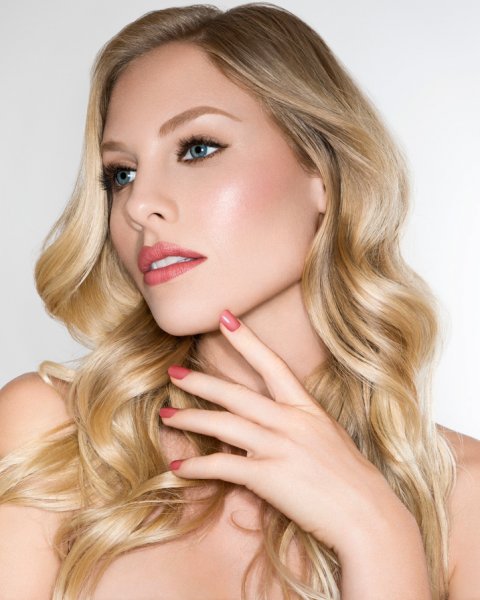
I shot a beauty story for Cosmopolitan magazine. I knew I wanted a lush tropical backdrop, and pops of color throughout. I called everyone I knew to see if anyone had bird of paradise, or other tropical looking greenery, in their back yards. Nobody had pretty backyards that were a good fit. So I decided to order some leaves from my local florist and make the backdrop I wanted. I decided my TINY backyard was the best place for me to shoot this story. So I will show you the final product first.

This is the image that went to Cosmopolitan.

Image 1b

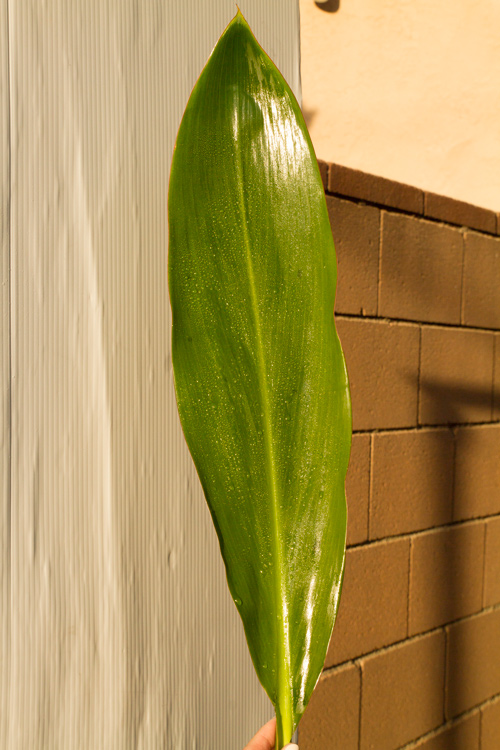
Before we got started I set up a big piece of white plastic board I had in my garage. Why plastic board you ask? Because, I was out of white paper and it was there. I just needed a white background.

Using natural sunlight, I took photos of the leaves, cleaned and misted against the white backdrop for samples.

Image 2b

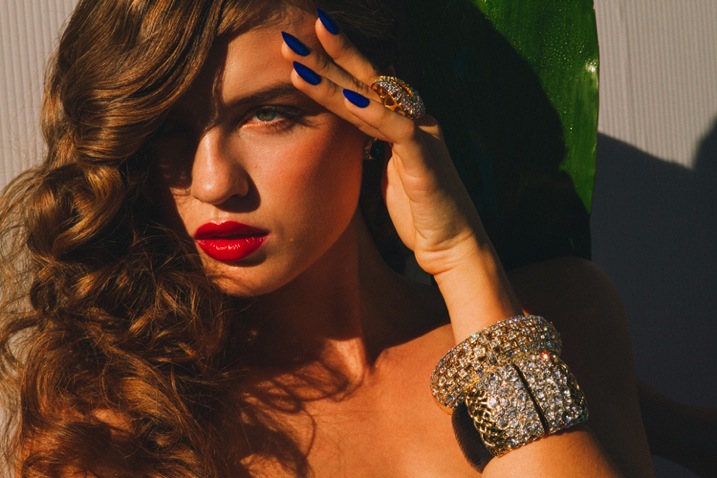
Then I took the photo against the white backdrop. Using midday sun. YES, 2 o’clock burn our your retinas, sunlight. Don’t be afraid of sunlight. Once you conquer it, you can shoot anything!

Image 3b

My assistant is simply holding the leaf up behind the model. Pretty, but missing something right? By adding the leaf samples (duplicating them) in post-production, it gives it such an exotic feel. You CAN do this. You have poster board, correct? You have nature around you, right? Use it!

Reference #2: Improvise

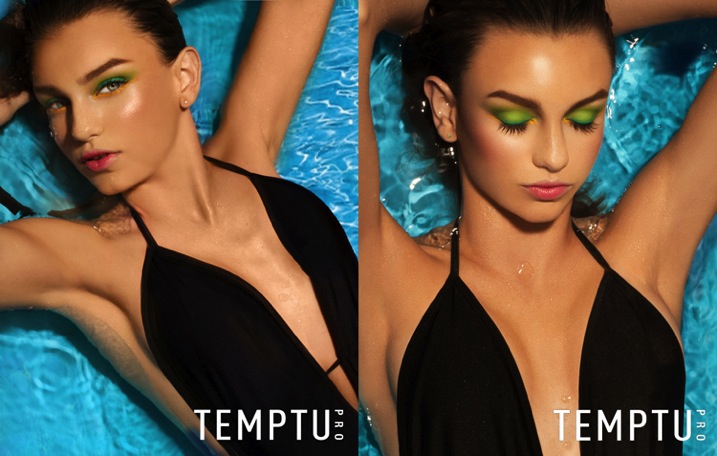
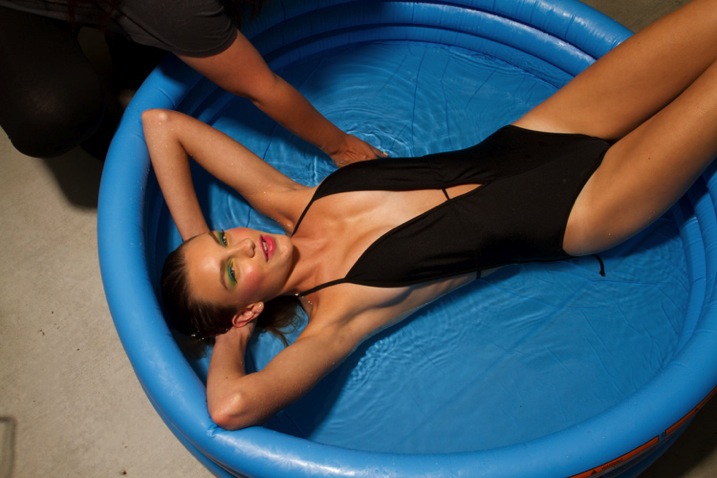
A cosmetic commercial client wanted a summer themed campaign, with the tagline, Summer in High Def. I pitched the idea of a pool shoot with bold aquas and colorful pops of color. She told me she had no location budget, I told her, “No problem.”

I took a quick stroll to my local grocery store chain. Luckily, it was May so they had lots of summer goodies in stock. I found an inflatable pool for $ 5. SCORE! Once again, at the end of the day, nobody knows what your set looks like.

Image 4b

The model barely fit in the five inch deep, kiddy pool. It was quite funny. The client LOVED the shots and couldn’t believe I pulled it off. I never had any doubts. This setup is my most requested one. Clients ask for it all the time. I simply say, “Oh yeah, it’s in my trunk”. They look at me oddly, and confused.

Image 5b

You can shoot at a mansion or in your own front yard, NOBODY KNOWS. Stop getting in your head that you need more. That’s what makes our business so beautiful. It’s really not about how big your studio is or how you have amazing locations. At the end of the day, all that matters is your final image.

Do you have any other make-shift background or location tricks? Please share in the comments below.

fashion-02

googletag.cmd.push(function() {
tablet_slots.push( googletag.defineSlot( “/1005424/_dPSv4_tab-all-article-bottom_(300×250)”, [300, 250], “pb-ad-78623” ).addService( googletag.pubads() ) ); } );

googletag.cmd.push(function() {
mobile_slots.push( googletag.defineSlot( “/1005424/_dPSv4_mob-all-article-bottom_(300×250)”, [300, 250], “pb-ad-78158” ).addService( googletag.pubads() ) ); } );

The post Fashion Photography – Tips for Making Something out of Nothing by Courtney Dailey appeared first on Digital Photography School.

Digital Photography School

 
Comments Off on Fashion Photography – Tips for Making Something out of Nothing

Posted in Photography


10 competitions to keep your photography inspired

17 May

Entering photography competitions is a great way to maintain a level of drive and inspiration in your photography, as well as winning cash and photo-related equipment. We can all collect cameras and lenses, but when it comes to using them we sometimes run out of things to take pictures of. Using the themes and category titles from photo competitions can provide a little bit of the oomph we often need to get shooting. Read more

Articles: Digital Photography Review (dpreview.com)

 
Comments Off on 10 competitions to keep your photography inspired

Posted in Uncategorized


10 Tips for Better Cityscape Photography

17 May

This article is based on the new eBook: Landscapes, Cityscapes & Photography Tricks – 50% off for a limited time only.

Photography is escapism. We want to see what we can’t with our own eyes; towering skyscrapers, endless skylines, the people of faraway cultures. We long for the distant, so it makes sense that cityscape photos are so popular and marketable. I hope these 10 tips will help you take better cityscape photography, and inspire you to explore faraway cultures.

Cityscapes1

1. Right After Sunset is a Fantastic Time for Cityscape Shots

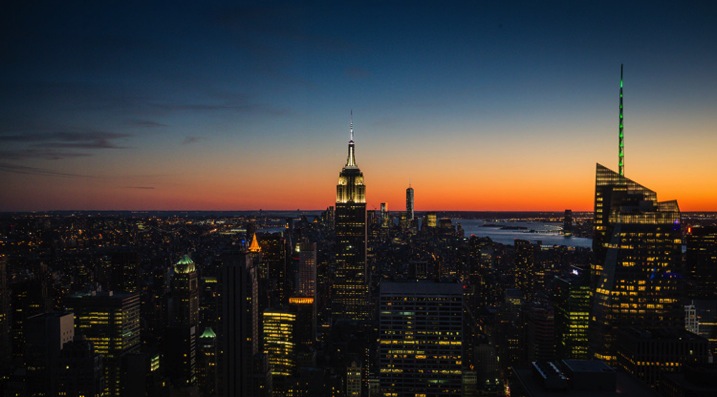
After the golden hour settles, the sky grows darker, while city lights illuminate below. This immediately post-sunset or pre-sunrise moment (known as twilight or the Blue Hour), I would argue, is the best time for shooting cityscapes. Building lights turn on before the sky turns off, and the balance of light can look almost equal. It’s a great combination of tones, and worth getting up in the morning to catch.

Cityscapes2

2. Capture the Whole Skyline with a Wide Angle Lens

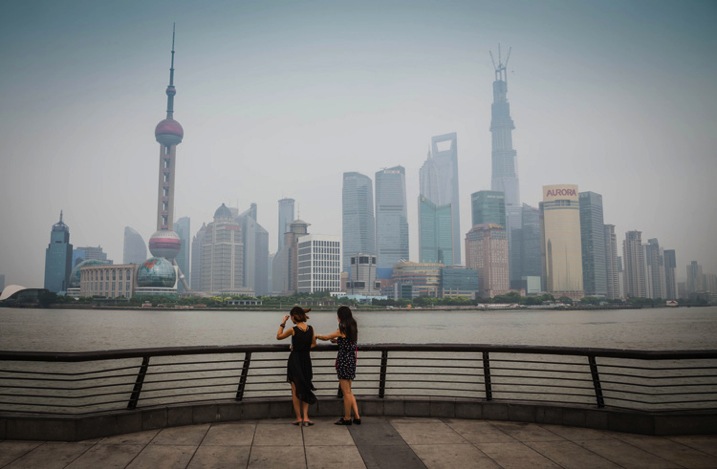
For cityscapes, focal lengths between 12-35mm are a good bet. Not a necessity, but you will appreciate the wide angle, more often than not. This will allow you to capture a nice skyline without having to be miles outside the city, and allow you to include an entire skyscraper in vertical format, while standing near its base.

Cityscapes3

3. Use Your Camera’s Self-timer and a Tripod for Crisp Results

For shooting during the golden hours, and after dark, a tripod is practically essential if you want sharp crisp results. Better yet, set your camera up on the tripod, and set your camera’s two or 10-second self-timer so you don’t have to touch or jostle the camera during the actual shot. This will help your camera stay more stable, avoid blur, and capture stunningly sharp results.

4. Look for Those Leading Lines

Just like for landscape photography, leading lines are an integral part of three-dimensional cityscape composition. They add perspective, depth, and intrigue to any image, while taking the viewer on a journey from one point of the frame to another.

Cityscapes4

In cityscapes especially, leading lines can create a strong sense of coherence in an otherwise chaotic scene. Think of train tracks for example. Rows of tracks, surrounded by eager commuters and tall buildings, could easily appear cluttered and frenetic (which could be a good thing, or could seem unfocused). But, slicing the image up with the right composition and a clean line, or series of lines, can cut through the chaos.

5. In the Evening, Look for Good Vantage Points Over Busy Intersections

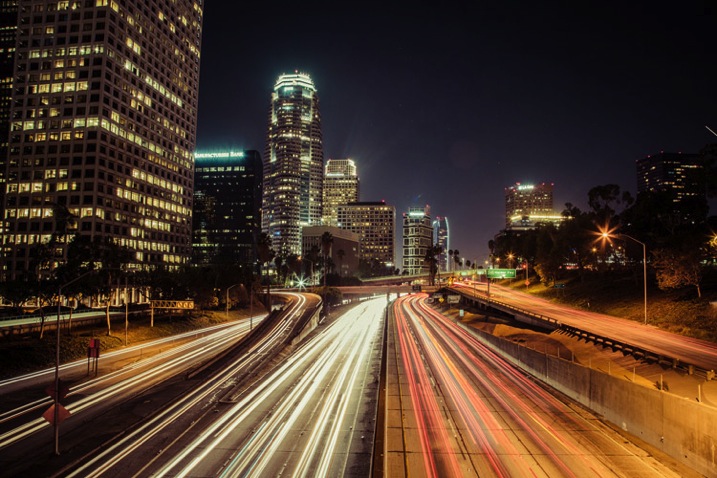
Practice your long exposures, then look for busy intersections of a city. Finding the right location for heavy traffic can be tricky. You’ve got to know a city pretty well, or at least have an idea of where the congested thoroughfares are located. The idea here is blurred movement; traffic in a straight line may be interesting if you’ve got some variety in the shot (maybe skyscrapers or a city icon nearby), but failing that, you’re going to want to see some movement, leading lines and curves. That’s why bendy roads and intersections work so well; you can create light lines out of conflict, movement and chaos.

Cityscapes5

6. Just like Rivers are Great in Landscapes, Fountains are Great in Cityscapes

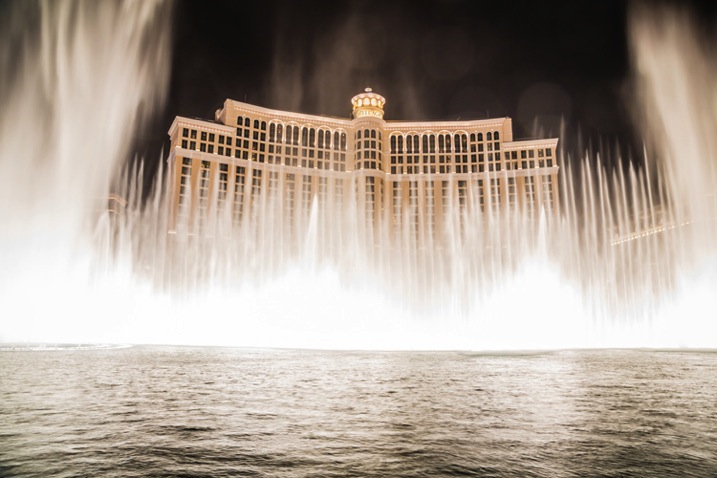
Photographing fountains within your cityscape can add another element of beauty and serenity to your image. Most cities are full of them. From small, historic, fountains that can add interest to a composition to huge water fountain light shows that blast water up in the air and make for exciting and spectacular photos.

Cityscapes6

7. Look for Patterns

Patterns have the ability to bring a sense of visual rhythm and harmony to an image. While at first sight, a common city scene may appear dull or bland. Focusing on repeating strong graphic elements, like shapes, lines, colors or forms, will draw the viewer’s attention, and make the whole thing a lot more interesting.

Cityscapes7

8. Don’t Be Afraid to Include Pedestrians in the Shot

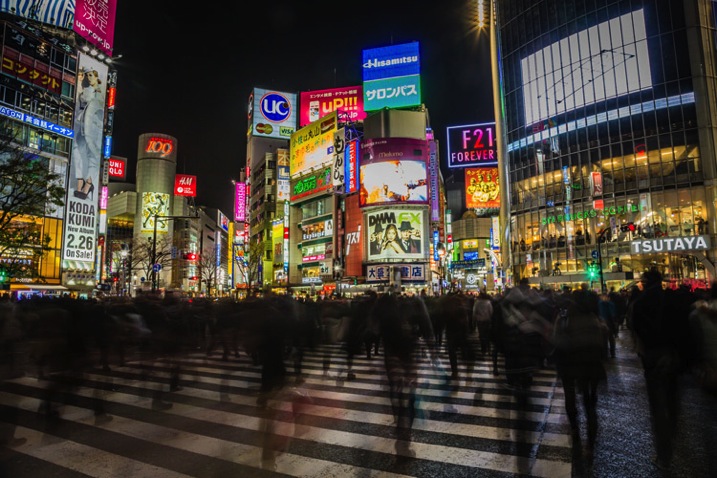
When it comes to intersections, some bigger cities; New York, Tokyo, Toronto; will have four-way crosswalks, where pedestrians stream across in all directions, stopping cars on all four sides of the intersection. These make especially great hectic shots, with cloudy masses, surrounded by headlights and condo lights.

Cityscapes8

9. When Tripods Aren’t Allowed – Improvise

Many businesses with great city views that attract photographers, have gotten the impression that tripods mean professional work and therefore, money. These establishments won’t let photographers in with a tripod, likely because they might be able to make money by charging a permit fee or production fee. I’ve run into this problem mostly in the U.S., but have also come across it in a few international cities I’ve visited. It is upsetting indeed, but instead of letting it defeat you, try to do your best with what you have.

Cityscapes9

Look to see if there is a place where you can set your camera down for the shot so you don’t have to hold it risking blur from hand movement. You can use tables, pillars, walls, edges, benches, anything that is flat and safe. If you can’t find a flat surface, you can make one. Prop your camera up with your jacket or other item of clothing.

10. See Bad Weather as an Opportunity (Carefully)

Not only does bad weather add an edge to your photo, but stormy weather creates skies that are full of color and texture, providing a feeling of gloominess, fury, eeriness and even peace. In short, the stormy sky portrays emotion.

Cityscapes10

With moisture everywhere, it just seems like the city glows more right after a rainfall. Most surfaces and structures will appear more colorful when wet, as water tends to bring out the saturation.

I hope these have been some helpful tips to get you started!

For Further Training:

This relentlessly in-depth new eBook is designed to help you master challenging lighting conditions no matter your experience level, take more compelling photos, post-process them to perfection, and delve even further into long exposure tricks so you know all the possibilities. By knowing all the techniques possible, it is my hope that you will learn a lot faster than I did and start seeing hidden photo opportunities that others might miss.

Found here: Landscapes, Cityscapes & Photography Tricks

googletag.cmd.push(function() {
tablet_slots.push( googletag.defineSlot( “/1005424/_dPSv4_tab-all-article-bottom_(300×250)”, [300, 250], “pb-ad-78623” ).addService( googletag.pubads() ) ); } );

googletag.cmd.push(function() {
mobile_slots.push( googletag.defineSlot( “/1005424/_dPSv4_mob-all-article-bottom_(300×250)”, [300, 250], “pb-ad-78158” ).addService( googletag.pubads() ) ); } );

The post 10 Tips for Better Cityscape Photography by Richard Schneider appeared first on Digital Photography School.

Digital Photography School

 
Comments Off on 10 Tips for Better Cityscape Photography

Posted in Photography


Weekly Photography Challenge – Roads and Pathways

16 May

In this earlier post from this morning I share:  28 Wondrous Images of Long and Winding Roads

Trey Ratcliff

By Trey Ratcliff

Roads and paths are easy to find – whether you live in the city in an urban area, or in the country – there are roads. A dirt track, a walkway, a sidewalk, or a highway – find a road or path and start shooting.

Use the lines of the road to create an interesting and powerful composition. Lead the viewer into the image and tell a story. Like this images:

Nate2b

By nate2b

Paojus Alquiza

By paojus alquiza

Oleg Zaytsev

By Oleg Zaytsev

Tommy Clark

By Tommy Clark

Andi Campbell-Jones

By Andi Campbell-Jones

Share your images here:

Simply upload your shot into the comment field (look for the little camera icon in the Disqus comments section) and they’ll get embedded for us all to see or if you’d prefer upload them to your favourite photo sharing site and leave the link to them. Show me your best images in this week’s challenge. Sometimes it takes a while for an image to appear so be patient and try not to post the same image twice.

Miwok

By Miwok

Alberto Carrasco Casado

By Alberto Carrasco Casado

Sherifx

By sherifx

Steve Schnabel

By Steve Schnabel

Flamouroux

By flamouroux


googletag.cmd.push(function() {
tablet_slots.push( googletag.defineSlot( “/1005424/_dPSv4_tab-all-article-bottom_(300×250)”, [300, 250], “pb-ad-78623” ).addService( googletag.pubads() ) ); } );

googletag.cmd.push(function() {
mobile_slots.push( googletag.defineSlot( “/1005424/_dPSv4_mob-all-article-bottom_(300×250)”, [300, 250], “pb-ad-78158” ).addService( googletag.pubads() ) ); } );

The post Weekly Photography Challenge – Roads and Pathways by Darlene Hildebrandt appeared first on Digital Photography School.

Digital Photography School

 
Comments Off on Weekly Photography Challenge – Roads and Pathways

Posted in Photography


The 4 Ps – Tips for Improving Your Wildlife Photography

15 May

Taking photographs of wildlife can be one of the most exhilarating photographic experiences you can try. Spotting an animal in the wild can be thrilling, and being able to record that moment can be highly rewarding. However, wild animals can be a particularly challenging subject matter, so wildlife photography can often prove frustrating.

To help you get the most out of this compelling type of images, here are some tips to improve your wildlife photography.

Facetofacewithafox750

#1 PREPARATION

No matter what type of wildlife you have chosen to photograph you will need to spend time getting to know its behaviour, routine and movements. Read up about your subject in advance, or search online for video or audio files, that can help you learn more about spotting your chosen subject. If possible, talk to experts in the field who know where, and when, to spot wildlife. If you are heading to a nature reserve or national park to take photographs, staff and volunteers are normally very willing to let you know of recent sightings, or give you some handy local advice.

Because you may only get a limited time in which to take wildlife photographs, getting to know your camera settings is extremely important. Familiarize yourself with how your camera and lens work before you get to the location so that you don’t miss an important shot by having the incorrect settings.

Before setting out, make sure you have packed all of the required gear, and you have spare memory cards and charged batteries. For wildlife photography, a telephoto lens is probably going to be essential, but do not overlook packing a wider angle lens to capture your animals as part of the landscape. Some of the best wildlife photographs show an animal in its environment and are not necessarily frame-filling portrait shots. If you are using a telephoto lens, a tripod or monopod can also form a useful part of your kit to minimize camera shake. A monopod offers greater flexibility of movement than a tripod when you are tracking wildlife on the move, but can still provide adequate stability for your camera to get sharp images.

Autumnpony750

Check weather reports for the day you are going to shoot wildlife, but do not necessarily be put off by bad weather. Animals do remain active during rainy or stormy days, and it is possible to get some dramatic shots in such conditions. You can buy special covers to protect your camera and lens in wet weather but, often, a durable plastic bag fixed in place with elastic bands can work just as effectively.

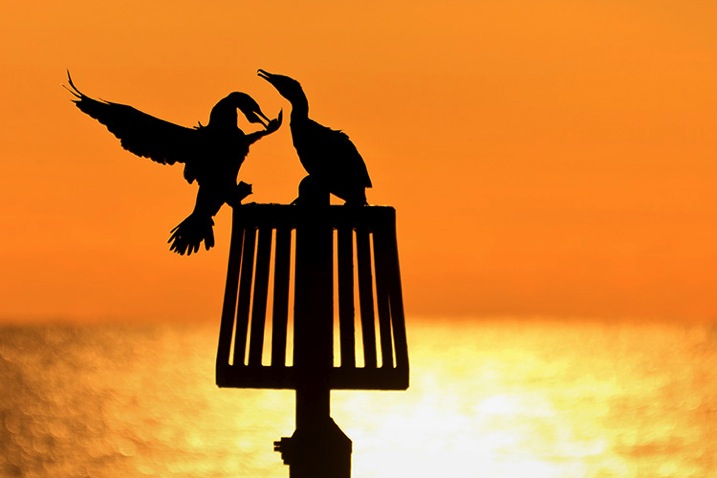
As with all genres of photography, lighting is key, and the best light for wildlife photography tends to be around sunrise and sunset. Animals also tend to be more active at these times of day, often searching for food. Therefore, make sure you get up early to be ready to take photographs in the golden light as the sun rises. Shooting into the sunset can transform a mundane subject into something special, so look for opportunities to capture dramatic wildlife silhouettes as the sun goes down (see image below).

Cormorants750

#2 PRACTICE

As with all types of photography, composition can make the difference between a good image, and a great image. When composing wildlife photographs, remember basic compositional guidelines such as the highly effective Rule of Thirds. If your subject is looking to the left or right, leave an appropriate amount of space in the frame into which they can look. The same guideline applies if a moving animal is being captured – always leave room in the frame for them to move into.

Getting down to eye-level (or lower) with an animal can produce dramatic images. Taking a shot of an animal from a standing height looking down on it will usually lack any Wow Factor as this is the angle from which we are most used to seeing wildlife. Laying down on the ground so that you are at eye-level with, or looking up at, the animal will make your chosen subject seem large and powerful, and can add an element of drama to your final image.

A fundamental rule of wildlife photography is that the subject’s eyes must always be in perfect focus. However, the autofocus system on your camera can easily be tricked into locking onto another part of the animal. A helpful way around this is to set the camera to One Shot mode (AF-S for Nikon users), select the centre focus point in the viewfinder, lock the focus on the eyes by pressing the shutter release button halfway down and then, without releasing, recompose your shot. In addition to being perfectly focused on the eyes, the most compelling wildlife images have a catch-light in the eye. A flash, or speedlight, in your kit can be extremely useful for adding light to dark eyes when taking close-up animal portraits.

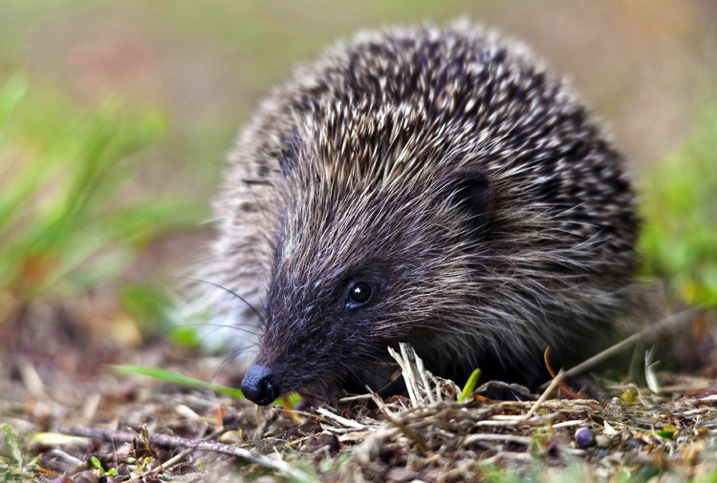
Hedgehog750

Getting the right focus becomes even harder when shooting an animal in motion. For moving wildlife, select a continuous autofocus mode such as AI Servo (AF-C) and select a single focus point in the viewfinder. Track the action by keeping the single focus point on the subject to ensure that remains in focus at all times, rather than the background or foreground.

Shooting in Aperture Priority mode can be extremely useful for wildlife photography. By using the widest aperture available (such as f/2.8) you will be able to use the fast shutter speeds necessary to produce sharp images. The narrow depth of field from using a wide aperture will also help to blur the background and, therefore, will isolate your subject and really make it stand out in the final image.

Do not be afraid to increase your ISO settings a little in order to keep the shutter speed fast, particularly if shooting in environments where lighting can be difficult, such as in a thick forest. A little bit of noise in your image is more acceptable (and easier to correct if you so wish) than an out-of-focus, or blurry image.

#3 PERSEVERANCE

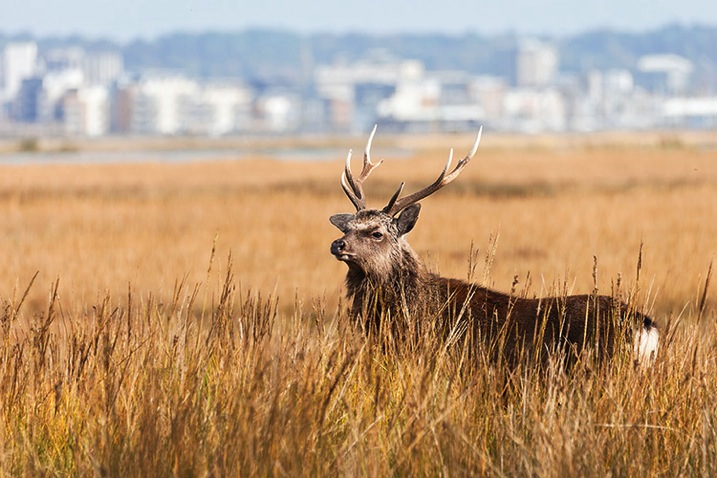
Saltmarshstag750

While there is no denying that a certain amount of luck definitely comes in handy, the real key to taking better wildlife photographs is patience. Not necessarily the patience required for your chosen subject to appear, but the patience to capture the perfect shot that you have envisioned.

When you do find an animal out in the wild, watch it for as long as possible and not just from behind the viewfinder. Spend time with it and learn its ways. While observing the animal, try to capture some form of behaviour that is unique to that species. Documenting such behaviour can produce compelling wildlife shots. Most importantly, enjoy the experience of wildlife watching as much as taking photographs.

One quick tip is to keep all noise (as in be quiet, not camera noise) to a minimum when you are shooting in the wild. Dress appropriately, tread carefully, and possibly most importantly, switch your phone to silent mode. There is nothing worse than framing a shot and having your subject scared off by a ringing phone.

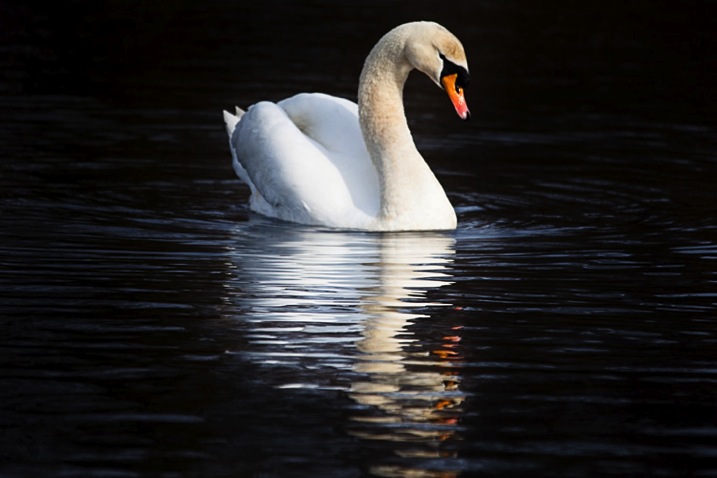
Swanreflection750

There may very well be some periods of waiting and watching. Try not to get too focused on one particular subject, take a look around while waiting for your subject to return. You never know, there may very well be something more interesting waiting just around the corner.

If you want to put in more practice with your wildlife photography but don’t have much time to spare, a public park can be a great place to visit on a lunch hour or after work. Parks attract a range of wildlife such as geese, swans or deer and often you can get a little bit nearer to the action. A duck pond can produce many opportunities for action shots and is a great place to practice your skills at close range.

#4 PASSION

To take your wildlife shots from good to great, you need to be passionate about the natural world you are photographing. Take the time to appreciate nature and wildlife in all of its forms, wherever you find it. You do not have to go to an exotic location to do great wildlife photography. For example, macro photography offers a range of wildlife opportunities including spiders, beetles and flies. As someone who was once highly arachnophobic, I can now appreciate the beauty of spiders and, since photographing them, I do find them more fascinating than scary.

Pollencoveredbee750

You could even make a few simple changes to your own garden to encourage more wildlife to come to you. Making your garden wildlife friendly can be relatively inexpensive and highly beneficial to local wildlife. Adding a pond or wildflower patch is both good for the environment, and may provide you with photographic opportunities.

Most importantly, take great care when photographing wildlife. Do not put yourself, or the wildlife, at risk and do not disturb their natural habitats in the process of getting your shot. Respect all wildlife, get to know your subject well and you will be rewarded with some great images to share with others, to inspire them to care as much about the natural world as you do.

Sikainthelight750


googletag.cmd.push(function() {
tablet_slots.push( googletag.defineSlot( “/1005424/_dPSv4_tab-all-article-bottom_(300×250)”, [300, 250], “pb-ad-78623” ).addService( googletag.pubads() ) ); } );

googletag.cmd.push(function() {
mobile_slots.push( googletag.defineSlot( “/1005424/_dPSv4_mob-all-article-bottom_(300×250)”, [300, 250], “pb-ad-78158” ).addService( googletag.pubads() ) ); } );

The post The 4 Ps – Tips for Improving Your Wildlife Photography by Richard Beech appeared first on Digital Photography School.

Digital Photography School

 
Comments Off on The 4 Ps – Tips for Improving Your Wildlife Photography

Posted in Photography