RSS
 

Posts Tagged ‘Photography’

MIT Museum exhibition ‘Images of Discovery’ highlights science photography

25 Jun

$ (document).ready(function() { SampleGalleryV2({“containerId”:”embeddedSampleGallery_3889188396″,”galleryId”:”3889188396″,”isEmbeddedWidget”:true,”standalone”:false,”selectedImageIndex”:0,”startInCommentsView”:false,”isMobile”:false}) });

MIT Museum has opened a photography exhibition called ‘Images of Discovery: Communicating Science through Photography,’ running through January 2017. The exhibition showcases photographs from Berenice Abbott, Felice Frankel and Harold ‘Doc’ Edgerton, all three of whom ‘explored a range of scientific questions’ through their photography while working at the university.

All three aforementioned photographers spent time working at MIT; Frankel is a research scientist and science photographer in the MIT Center for Materials Science and Engineering; Edgerton was an MIT Professor of Electrical Engineering and is known, among other things, for his Milk Drop photograph; and Abbot worked for MIT in the late 1950s, contributing images for a physics curriculum.

Speaking about the exhibition, MIT Museum Director John Durant said:

“Wherever you look in science, you see the historical importance of finding new ways of visualizing things, leading to greater understanding of the world. From Galileo’s use of his own hand-built telescope to explain the movements of the earth and other planets, to the latest imaging technologies in everything from nanotechnology to neuroscience, the making of images remains central to our ability to make new discoveries.”

The exhibition includes half a dozen ‘Image Making Stations’ that give visitors the opportunity to better understand and make their own similar science photographs. Image Making Stations including ‘Water Drop,’ ‘Capture Movement,’ ‘A Bouncing Ball,’ ‘Water Waves in a Ripple Tank,’ ‘Photographing Ferrofluid,’ and ‘Zoom Scanner.’

The MIT Museum is located at 265 Massachusetts Ave, Building N51, Cambridge, MA 02139.

Via: wbur

Articles: Digital Photography Review (dpreview.com)

 
Comments Off on MIT Museum exhibition ‘Images of Discovery’ highlights science photography

Posted in Uncategorized


Weekly Photography Challenge – Bridges

25 Jun

Bridge the gap – see how these photographers photographed some pretty unique bridges.

Peter McConnochie

By Peter McConnochie

Weekly Photography Challenge – Bridges

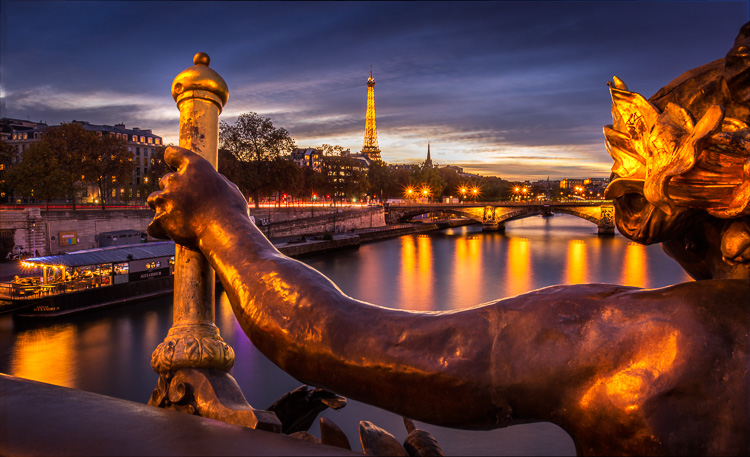
There are two most obvious ways to photograph a bridge – from the side, or on it – as you can see by the two different angles of the Tower Bridge in London below. That’s a couple ideas for you. They both also use some long exposure photography, and have photographed the bridge at night or blue hour.

Cat Burton

By Cat Burton

Neil Howard

By Neil Howard

How about getting under the bridge like this examples – never know what you’ll find under there, maybe a troll?!

Barnyz

By barnyz

Thomas Hawk

By Thomas Hawk

Baiazid

By Baiazid

Michael Matti

By Michael Matti

Share your images below:

Simply upload your shot into the comment field (look for the little camera icon in the Disqus comments section) and they’ll get embedded for us all to see or if you’d prefer upload them to your favourite photo sharing site and leave the link to them. Show me your best images in this week’s challenge. Sometimes it takes a while for an image to appear so be patient and try not to post the same image twice.

Photograph a local bridge, or an iconic one if you have one in your area. Just go find a bridge and shoot something in your style.

Martin Stitchener

By Martin Stitchener

Bastian Hoppe

By Bastian Hoppe

googletag.cmd.push(function() {
tablet_slots.push( googletag.defineSlot( “/1005424/_dPSv4_tab-all-article-bottom_(300×250)”, [300, 250], “pb-ad-78623” ).addService( googletag.pubads() ) ); } );

googletag.cmd.push(function() {
mobile_slots.push( googletag.defineSlot( “/1005424/_dPSv4_mob-all-article-bottom_(300×250)”, [300, 250], “pb-ad-78158” ).addService( googletag.pubads() ) ); } );

The post Weekly Photography Challenge – Bridges by Darlene Hildebrandt appeared first on Digital Photography School.


Digital Photography School

 
Comments Off on Weekly Photography Challenge – Bridges

Posted in Photography


The FAA finalizes commerical drone use rules, is fine with your drone photography business

23 Jun

The FAA has finalized a rule regarding commercial use of drones, and the organization is a-okay with individuals profiting from aerial photography – provided that operators follow some guidelines.

The update to Federal Regulations has been available for public comment since February 2015, and has now been finalized to provide guidance for commercial UAS (unmanned aircraft system) use. The guidelines are much the same as when they were first proposed, stating that your drone and everything attached to it must weigh less than 55lb/25kg, and the pilot must remain within line of sight of the aircraft.

Flying over crowds is a no-no, unless everyone in the crowd is participating in the shoot or under a reasonable amount of cover. As initially proposed, drone operators must be at least 16 and have a ‘remote pilot certificate’ or be under direct supervision of someone who has one.

The rule goes into effect in August 2016, so you’ve got plenty of time to study up and get your certificate.

Articles: Digital Photography Review (dpreview.com)

 
Comments Off on The FAA finalizes commerical drone use rules, is fine with your drone photography business

Posted in Uncategorized


After 176 years, Indian photography studio closes its doors

22 Jun
Bourne & Shepherd Studio, Kolkata, India. Photo by Biswarup Ganguly. Used under CC 3.0

A studio in India, founded by British photographers Charles Shepherd, Samuel Bourne and William Howard in 1840 will close its doors after 176 years in operation. Considered the oldest continuously operating photographic studio, Kolkata-based Bourne & Shepherd’s current owner cites the recent major changes in photographic technology as a reason for the closure.

The studio was known for its portraiture, producing images of religious figures and government officials, from the British Raj era onward. Speaking to Indian publication The Hindu, a former employee explains that the shift to digital made it difficult for the studio to survive, saying ‘How can you expect that a studio can operate in this generation where everyone is clicking photos from their mobiles and digital cameras?’

Though the studio will no longer be in operation, the current owner says that he’ll continue to maintain the shop’s collection of historic photos and equipment.

Articles: Digital Photography Review (dpreview.com)

 
Comments Off on After 176 years, Indian photography studio closes its doors

Posted in Uncategorized


Learn Ansel Adams’ Biggest Secret for Stunning Photography – Visualization

22 Jun

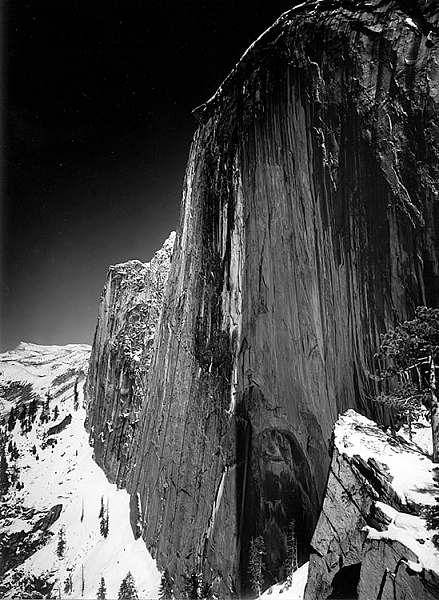
Ansel Adams is the most widely known photographer in history, you don’t need to look very far to see one of his images. Would you like to know the whole key to Ansel Adams’ stunning photographs?

This is a photograph of half dome in Yosemite taken in 1927 by Ansel Adams

Monolith, The Face of Half Dome, by Ansel Adams (Image courtesy Ansel Adams Illumes and The Ansel Adams Gallery)

In this this video interview with his son, Michael Adams, you will hear about his breakthrough as a photographer, when he went from merely recording an image, to being an artist who interpreted the image to tell the story he wanted.

As you’ll hear, Ansel had his breakthrough when he climbed up to take a photograph of Half Dome, the iconic monolith in Yosemite, California. The moment he realized that the yellow filter just wasn’t going to convey what he saw and felt, he changed to a red filter which expanded the tones of the image and brought out the darkness of the sky, thereby creating the mood he had visualized.

Ansel said, the whole key lies in first visualizing the image you want, rather than just snapping away.

By first forming the image or idea in your mind’s eye, you can then set about to capture it. His son Michael summed it up with, “He knew what he wanted and he got what he wanted.”

These are Ansel’s’ key points that you can practice to continually improve your photography:

  • Look at the external event, and then visualize what you want it to look like, clearly and decisively.
  • Try to make the photograph of what you saw and felt.
  • Train yourself to see what the camera sees by comparing what you see, with what it looks like in the camera.
  • Practice your craft and do your homework so you can make the photograph you desire by going through these steps to capture what you visualized.
  • Placing the camera: Find the best point of view of the lens.
  • Make a proper lens selection.
  • Decide on your depth of field and set your aperture.
  • Control your exposure and later, the development.

As he said, with practice this becomes automatic and instinctive. Put Ansel’s advice into action and let me know your results in the comments below.

googletag.cmd.push(function() {
tablet_slots.push( googletag.defineSlot( “/1005424/_dPSv4_tab-all-article-bottom_(300×250)”, [300, 250], “pb-ad-78623” ).addService( googletag.pubads() ) ); } );

googletag.cmd.push(function() {
mobile_slots.push( googletag.defineSlot( “/1005424/_dPSv4_mob-all-article-bottom_(300×250)”, [300, 250], “pb-ad-78158” ).addService( googletag.pubads() ) ); } );

The post Learn Ansel Adams’ Biggest Secret for Stunning Photography – Visualization by Marc Silber appeared first on Digital Photography School.


Digital Photography School

 
Comments Off on Learn Ansel Adams’ Biggest Secret for Stunning Photography – Visualization

Posted in Photography


Macro Photography on a Budget: An introduction to Close-up Filters

21 Jun

close-up-filters-flower

Have you ever seen some stunning pictures of insects, where you can clearly see each individual element of their compound eyes, or looked through your Instagram feed marveling at photos of flowers where you can see the tiniest detail on each individual petal? If so, welcome to the wonderful world of macro photography, one in which the little things in life are not only celebrated, but magnified to glorious proportions, and even the most mundane objects around us can take on beautiful otherworldly qualities when examined under near-microscopic detail.

This particular type of photography is not only stunningly beautiful but often prohibitively expensive, at least for the casual hobbyist. A good macro lens can easily set you back several hundred dollars, and that’s not counting the accessories like a good tripod, a ring flash, and other gear that is liable to turn this past-time into a debt-inducing money pit. Thankfully there are several good alternatives like extension tubes and lens-reversing rings to aid you in your quest for beautiful macro photography, but my personal favorite is one of the cheapest options available: close-up filters.
close-up-filters-anthers

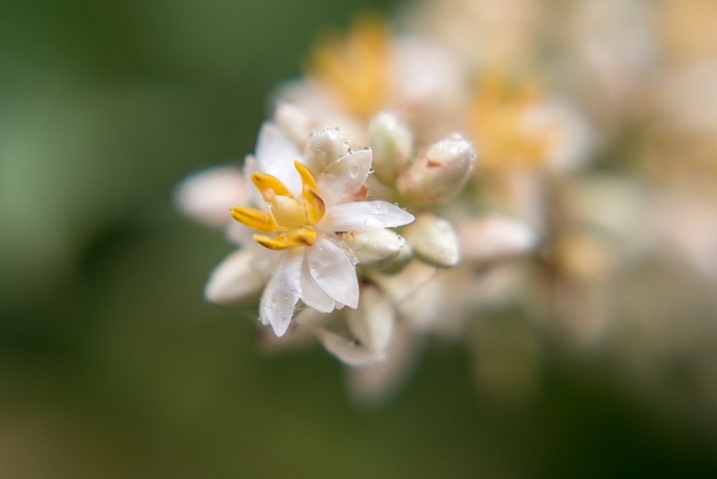
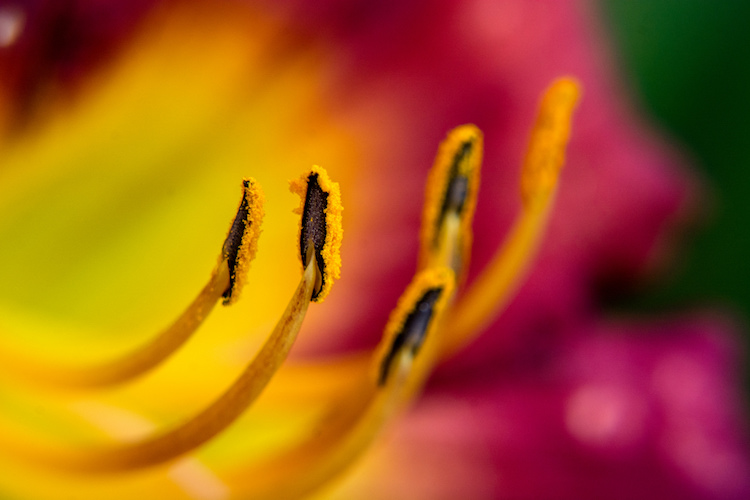
This image, and all the other macro-style shots in this article, were not taken with an expensive macro lens but with a $ 35 set of close-up filters I screwed on to my 50mm lens.

A true macro lens is designed to create true 1:1 (life-size) replications of very small things on the image sensor of your camera. If you have a coin that is 2cm diameter, a high quality macro lens will be able to take a photograph of that coin wherein it is literally the same size on your camera’s image sensor. Taking these types of photographs requires a host of light-bending optical gymnastics on the part of your lens. In the process there are almost always tradeoffs in image sharpness and overall light-gathering ability, which is why macro lenses cost so much money, because they contain special glass elements to minimize any optical imperfections.

Close-up filters rely on a very simple, very old, idea to make it possible for any normal camera lens to focus on objects that are, as their name implies, very close to your lens. All lenses have a minimum focusing distance, which is as close as you can get to an object and still have it be in focus. A +2 filter will make it possible for a lens with a minimum focusing distance of 1 meter to now focus on something .3 meters away. A +10 filter would decrease the minimum focusing distance to .09 meters. The math is slightly complicated, but suffice it to say the higher the number on your filter, the closer your lens will be able to focus.
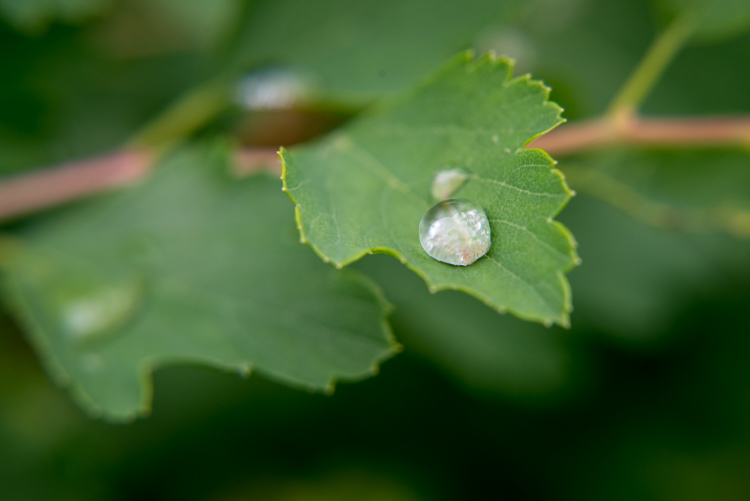
close-up-filters-leaf-droplet

Close-up filters are also very inexpensive and you can often find a set with three or four filters for under $ 40 that will work with your lens.

A close-up view of close-up filters

So what is a close-up filter? Simply put, it’s basically a magnifying glass that you screw onto the front of your camera lens. Just like their investigative counterparts wielded by famous fictional detectives through the ages, close-up filters rely on a single curved piece of glass that bends light in such a way as to enlarge whatever you are viewing. Don’t let the nomenclature confuse you; nothing is being filtered, but light is being altered before it enters your camera lens, in the same way that a magnifying glass alters light to make objects appear bigger.
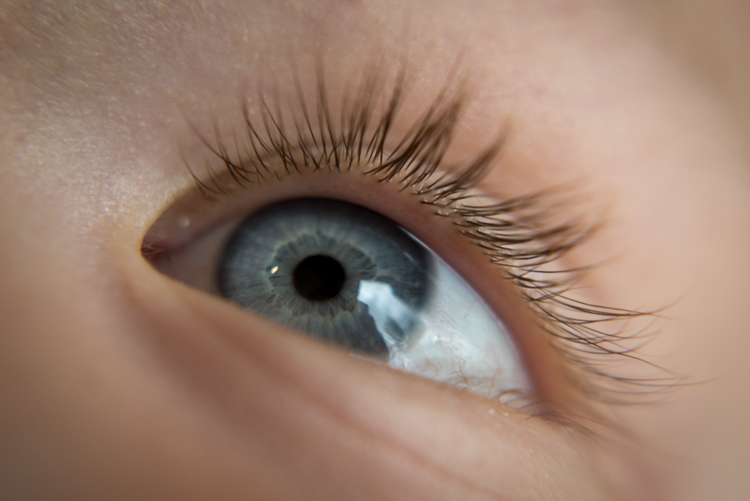
close-up-filters-eye

The set of filters required to take a photo like this costs about the same as a movie and a large popcorn.

Limitations

Using close-up filters is a great way to get started with macro-style photography, but they have some very important limitations that you need to be aware of to start. First of all, they only do one thing, which is shorten the minimum focusing distance of your lens. You can’t use them for normal photography, since all you will see when you attach one to your lens is either a big blob of blur, unless you focus on something very close to your camera. It’s the same phenomenon that happens when you hold a magnifying glass at arm’s length instead of right next to your face, and it severely limits the usefulness of close-up filters.

True macro lenses work for a variety of photographic situations, and due to their high-quality construction are generally much sharper than non-macro lenses, which make options like the Canon 100m f/2.8 or Nikon 105mm f/2.8 so highly praised. Screwing an inexpensive close-up filter on the front of your camera might let you get fun shots of flowers, but it will in no way equal the astounding optical properties of a true macro lens.
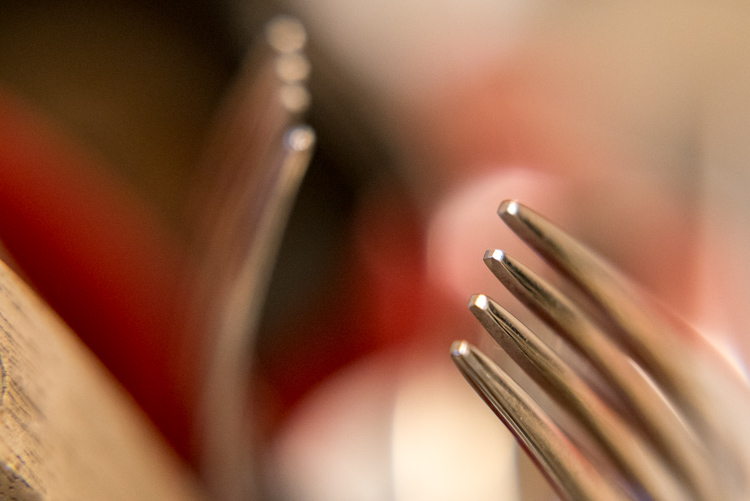
Even something as mundane as forks sitting in a dish rack can turn into a work of art when viewed up close.

Even something as mundane as forks sitting in a dish rack, can turn into a work of art when viewed up close.

Another downside of close-up filters is that the images you create with them are not at all the same as what you can get from dedicated macro gear. Photos are generally much softer, will usually exhibit unpleasing artifacts like chromatic aberration, and don’t allow you to have the same pleasing background blur that you would get without the filters attached. Finally, while macro lenses will let you focus on objects that are very close as well as far far away, close-up filters will only let you focus on subjects that are right next to your lens. All these limitations might sound important, but they’re really not that big of a deal. Once you learn to work around them you can get some stunning images from your camera using close-up filters.
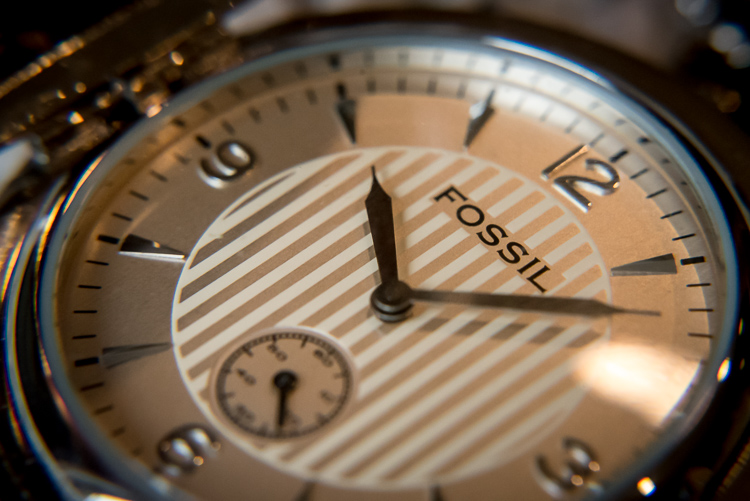
Close-up filters are nowhere near as sharp and optically brilliant as a true macro lens, but they can still produce some pretty good results.

Close-up filters are nowhere near as sharp and optically brilliant as a true macro lens, but they can still produce some pretty decent results.

Advantages of close-up filters for macro photography

After spending so much time pointing out the flaws with close-up filters you may wondering why you would want to even bother with them in the first place. As I mentioned earlier they are an incredibly inexpensive way to dip your toe into the waters of macro photography, and the results you can get from such a simple piece of glass will likely be far beyond what you ever thought possible shooting with your normal gear. The photo below of a yellow lily was taken with a standard 50mm lens and a +10 close-up filter, which is a fairly standard, inexpensive option. It’s not at all uncommon to find sets that include +1, +2, +4, and +10 filters all in one package that costs $ 40 or less.
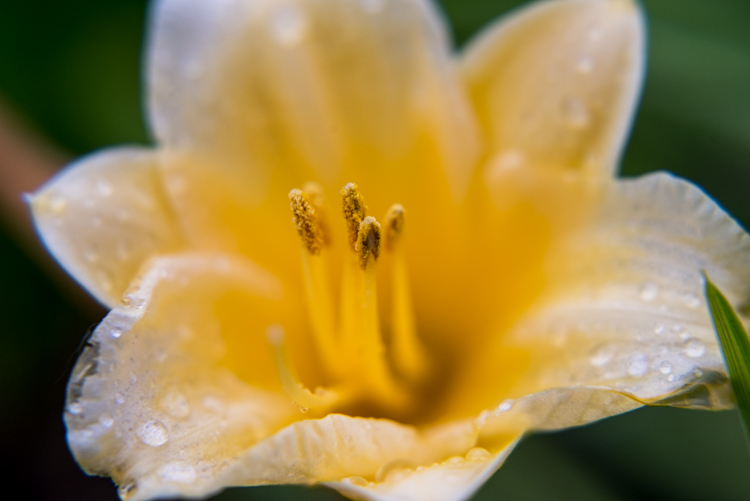
An un-cropped image taken with +10 and +2 filters attached to a 50mm lens. Note the severe blue fringing on the edge of the petals, which is the result of using filters instead of a true macro lens.

An un-cropped image taken with +10 and +2 filters attached to a 50mm lens. Note the severe blue fringing on the edge of the petals, which is the result of using filters instead of a true macro lens.

After I shot that picture I took the filters off my lens and took another photo of the same flower as close as my lens would allow. As you can see there is a dramatic difference between the two images and even though the top picture is not as sharp as an image taken with a dedicated macro lens, the results are perfectly fine for someone just looking to dabble in this type of photography, without spending much money.
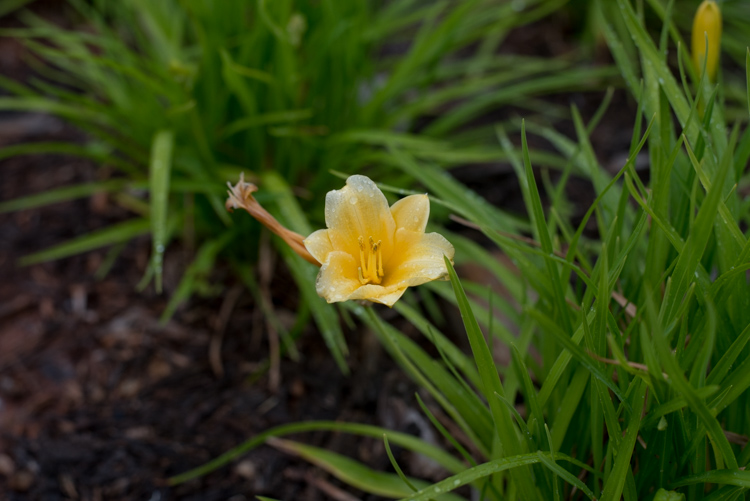
The exact same flower. Without the filters, this was as close as my lens would focus.

The exact same flower. Without the filters, this was as close as my 50mm  lens would focus.

Another fun feature of filters is that most of them can be stacked on top of each other, to get even greater magnification. To make the jewelry images below I used three filters on my 50mm lens: a +10, +4, and +2 all screwed into each other, and attached to the lens itself. I set the ring down on an iPad that was turned off to get a little bit of reflection, and while the result is not something I would use in a catalog or on a billboard, it’s more than enough to suffice for my needs.
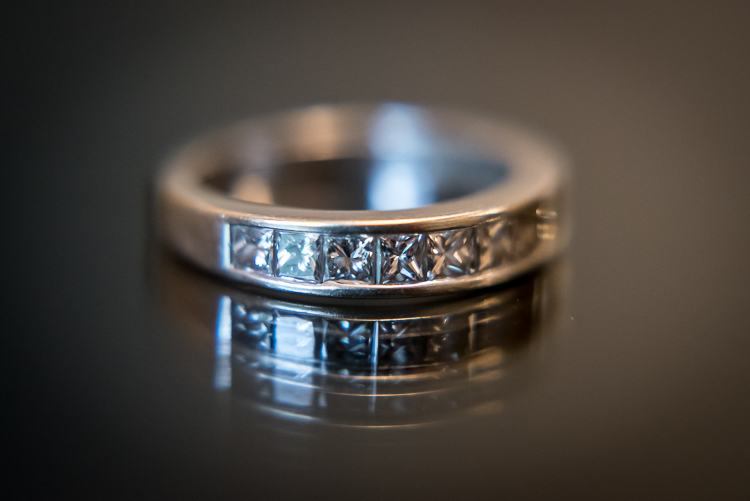
close-up-filters-ring

It might look fancy, but the gear required to take this photo was pretty basic and inexpensive.

Unlike other faux-macro solutions, like reversing rings or some of the cheaper extension tubes, close-up filters still allow you to use autofocus. Even so, you might get best results if you focus manually or use focus bracketing to make sure you get just the right shot. Finally, one of my favorite aspects of close-up filters is how small and portable they are. I like to keep a +10 and +4 in my camera bag and if I find myself in a situation that would be good for some macro shots it’s fast and easy to screw one on, take a few shots, and put it back in my bag.

Are pictures taken with close-up filters as sharp and detailed as one would require for them to be printed in a magazine? No, not by a long shot. For truly brilliant close-up photos you need the right gear like a macro lens, but hopefully you can see why close-up filters, despite their limitations, do a decent job of getting you halfway there.
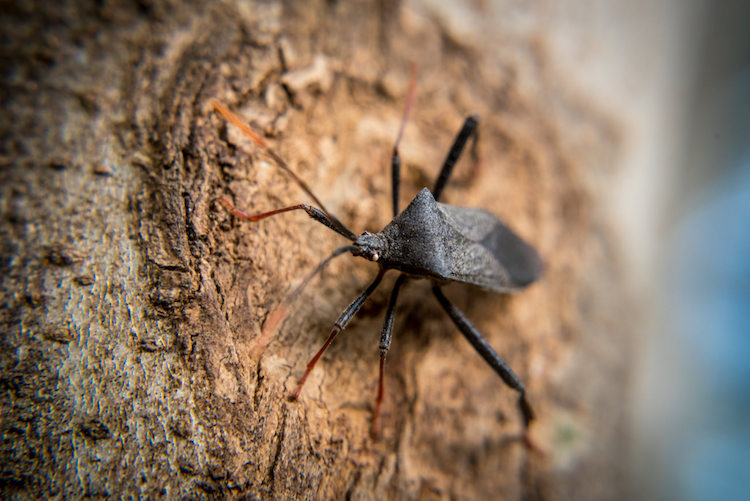
This insect is about the size of a quarter but it appears exquisitely detailed and larger than life when photographed with a close-up filter.

This insect is about the size of a quarter, but it appears exquisitely detailed and larger than life when photographed with a close-up filter.

Choosing the right close-up filters

Since close-up filters do not involve a lot of complicated technology and contain no moving parts, it’s hard to go wrong when looking for a set to buy. However there are a few considerations that you need to keep in mind.

First, look for a set of filters that fit your lens. Check the thread size of your lens by looking for the  symbol for the Greek letter phi  and the numbers immediately before or after it will be the size you need (look inside the back of your lens cap). Common sizes are 52, 55, or 58mm, but depending on your individual lens it could be quite different so make sure to find the size that fits your lens before you buy any filters.

Next it’s a good idea to get filters that are made from metal and glass, not plastic. Filters with a higher build quality are easier to screw on and off, less likely to get scratched, and may even include special anti-reflective coatings. You can sometimes find brand name options made by the big manufacturers like Canon and Nikon, but I get plenty of good results with third-party filters from companies like Hoya or Polaroid, and the results are just fine and they cost a fraction of the price as their officially-branded counterparts.
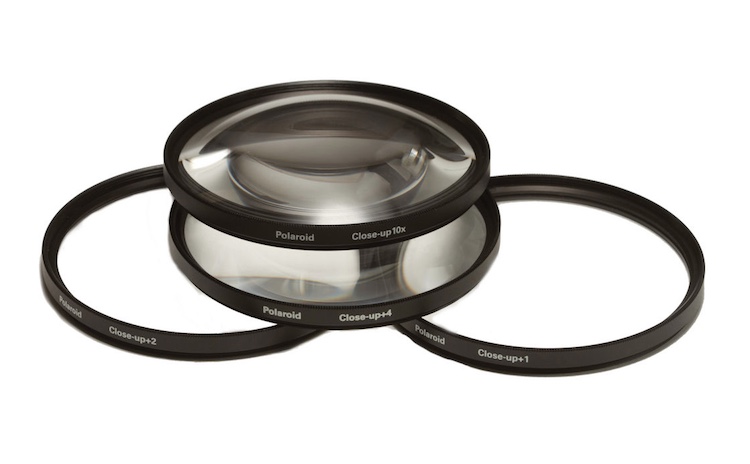
A set of close-up filters filters like this will help you get macro-style images without breaking the bank.

A set of close-up filters filters like this will help you get macro-style images without breaking the bank.

I hope this article has helped you learn a bit more about this inexpensive but quite practical solution for taking macro-style shots. Do you have any experience shooting with close-up filters? Are you the kind of photographer who prefers to shoot with actual macro lenses? I’d be interested in hearing your thoughts in the comments below, and please feel free to share your favorite macro photos.

googletag.cmd.push(function() {
tablet_slots.push( googletag.defineSlot( “/1005424/_dPSv4_tab-all-article-bottom_(300×250)”, [300, 250], “pb-ad-78623” ).addService( googletag.pubads() ) ); } );

googletag.cmd.push(function() {
mobile_slots.push( googletag.defineSlot( “/1005424/_dPSv4_mob-all-article-bottom_(300×250)”, [300, 250], “pb-ad-78158” ).addService( googletag.pubads() ) ); } );

The post Macro Photography on a Budget: An introduction to Close-up Filters by Simon Ringsmuth appeared first on Digital Photography School.


Digital Photography School

 
Comments Off on Macro Photography on a Budget: An introduction to Close-up Filters

Posted in Photography


2 Long Exposure Photography Hacks to Try if You Don’t Have an ND Filter

20 Jun

We all love long exposures, well I personally do. They are a great way to create dynamism, movement, and add depth to your images.

In this tutorial, I’ll show you two long exposure hacks that can be useful if your Neutral Density filters are not dark enough, if it’s too bright outside and you cannot get a long exposure, or if you simply don’t have any ND filters. Dark ND filters can be really expensive, so this is a good alternative.

IMG 8076

Long exposures create this surreal, and yet very pleasing effect to give a WOW factor to your images. Whenever you take a photo at night you will automatically get a long exposure, unless you use a very high ISO. For this tutorial I am talking about long exposures during the daytime, which are a bit more complicated to achieve.

The two hacks involves taking nine different images, and stacking them together. Now before I actually explain them, I will briefly give you the best camera settings and shooting conditions:

Shooting and camera settings

  • You will ultimately get the best results if you shoot on a cloudy day with a lot of wind. Why? Because on a cloudy day you will get clouds, and the wind is going to give them movement, and that’s what you want – movement. On a cloudy day, you will also get the minimal amount of light to be able to extend your shutter time.
  • You absolutely need a tripod, first all of all because your images need to be aligned, and you want your images as sharp as possible. With a shutter speed slower than 1/60th, you will start to get blurry results without a tripod.
  • Use a cable release or a 2-second timer every time you take an image. This again is a great way to avoid camera shake and get sharp results.
  • Focus on your subject and put the lens to manual focus, before you start taking your images. DO NOT refocus between the nine shots you are going to take.
  • Use an ISO of 100. You are on a tripod, so you don’t really need a higher ISO.
  • Use a very small aperture, like f/22. This will cut down the light entering your camera as much as possible and with an ISO of 100, will help slow down the shutter speed.
  • Shoot one or two hours before sunset, then you will also have a minimal amount of light to extend your shutter speed even slower.
  • Use your ND filters if you have some. If your ND filters are very dark (10 stop for example) you won’t need these hacks because you will directly get long exposures. If your filters are not dark enough, I would still recommend using them even if you have a one second exposure.
  • I recommend exposing, and focusing before putting your ND filters on, because after that – well you won’t be able to see clearly.

Hack #1 – multiple exposure mode

The first hack consists of using the multi-exposure mode on your DSLR. If you do not have this mode, don’t worry the second hack works for all cameras. I personally use a Canon 6D, but this multi-exposure mode is mostly available for all sorts of advanced DSLRs.

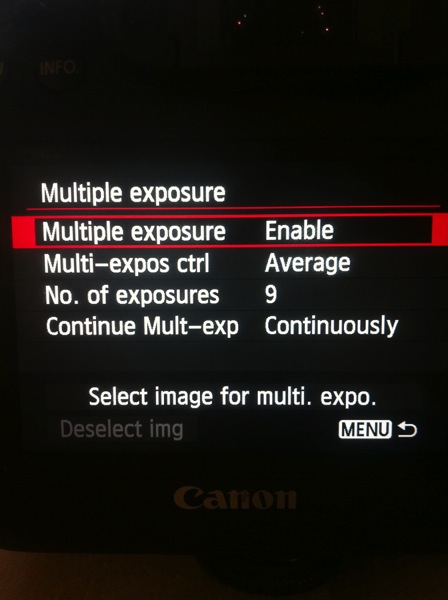
You will find this mode on your menu, you just need to enable it.

IMAGE1

For the settings:

  • Average for the Multi-expos ctrl option
  • Continuously for Continue Mult-exp setting

You have the choice to pick how many exposures you want to shoot, the maximum will depend on your DSLR. I usually pick nine exposures to get as much movement on the clouds as I want.

This mode will allow you to multiply your shutter speed by the number of exposures you shoot. For example, If you shoot a single image with an exposure of one second, you will get a total exposure of nine seconds if you shoot nine exposures. It works the same if you have an exposure of 15 seconds.

With this mode, the camera will automatically stack the images together and give you one single image with all the cloud movement. This trick also works if you want some nice silky water.

If the clouds are moving really fast, then I recommend waiting around two seconds before you take another shot. The main trick is to not have the clouds at the same position one shot after the other. If the clouds are moving very slowly then I recommend waiting around 10-15 seconds between shots.

This mode will also tell you on your screen, how many images you have left to complete your multi-exposure.

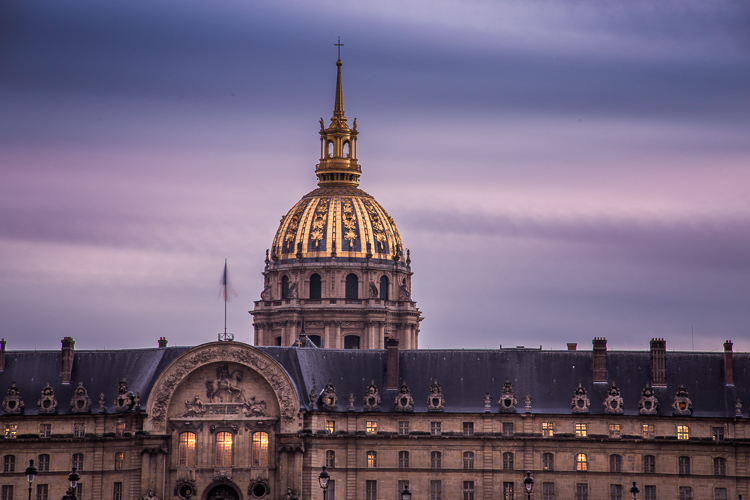
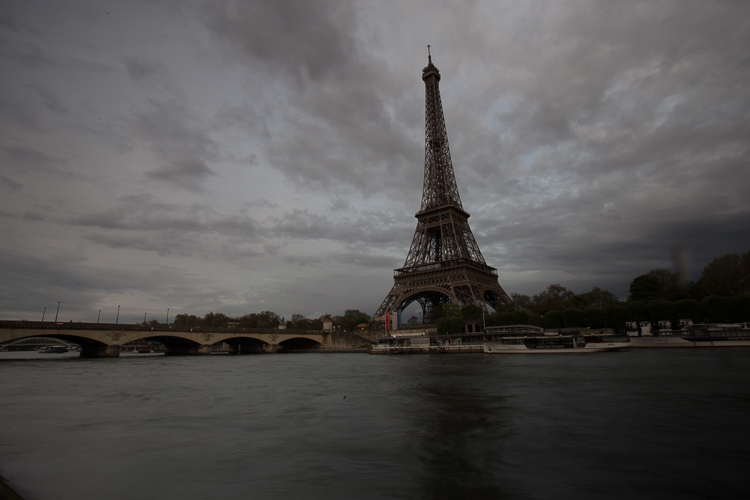
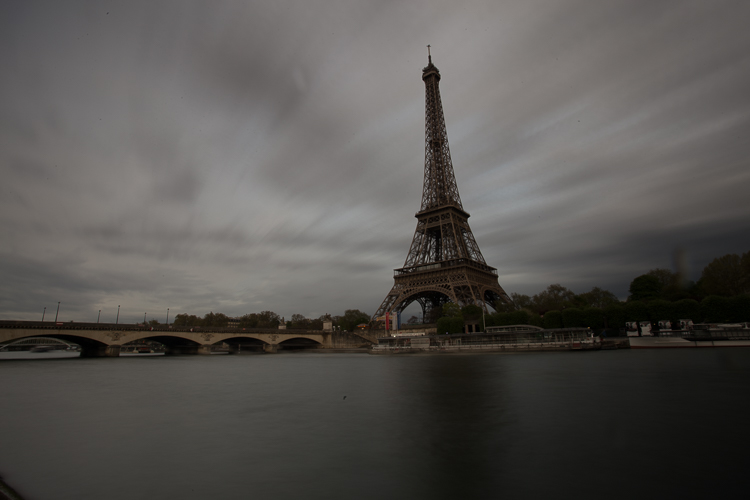
This is an example of a long exposure I got using this method. My aperture was f/22, ISO 100, and I had a shutter speed of one second after using my ND filters. That wasn’t enough to get a long exposure with stretchy clouds, so I decided to use the multi-exposure mode. I took a total of nine shots, and you can see below the before and after using this mode. You can see that it does not only affect the clouds, my water looks nice and silky as well.

IMAGE2

Single image

IMAGE3

Nine shots using multi-exposure in-camera.

IMAGE4

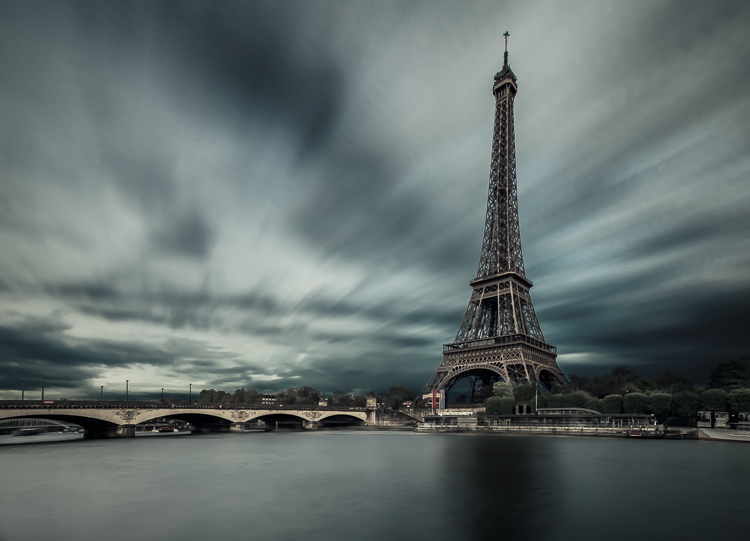
After some retouching, I got this result!

Hack #1 – multiple exposures merged in Photoshop

The second hack consists of doing exactly the same thing but manually. If you are used to shooting time lapses, then this shouldn’t be too complicated to understand.

The multi-exposure mode in-camera gives you automatically, and directly, the long exposure result in one image. For this hack, will shoot nine separate images, one after the other.

You need to use the same camera settings I mentioned above (manual mode, manual focus, tripod, small aperture, ISO 100, release cable or 2-second timer). For the shooting conditions I would also recommend the same thing, and use ND filters if you have some.

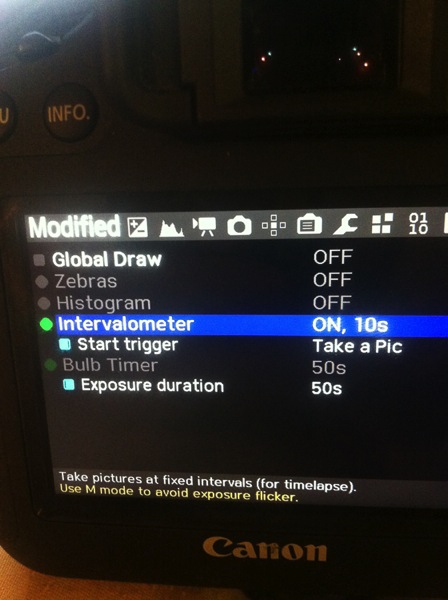
You will basically shoot a time lapse of nine images only. Do not forget to have an interval of 10 seconds minimum between each shots. This process can be quite boring. I personally use the magic lantern camera hack that has an intervalometer built inside the camera. I can then pick how long I want my interval to be between each shot, and the camera will automatically take an image every 10 seconds, for example, until I decide to stop.

IMAGE5

You can buy an intervalometer or use the timer on your phone to count your intervals. It’s really up to you.

Here’s an example of nine images I shot one after the other with an interval of 15 seconds between each. You can clearly see that the clouds are moving. For demonstration purposes, I have intentionally underexposed these shots.

IMAGE6

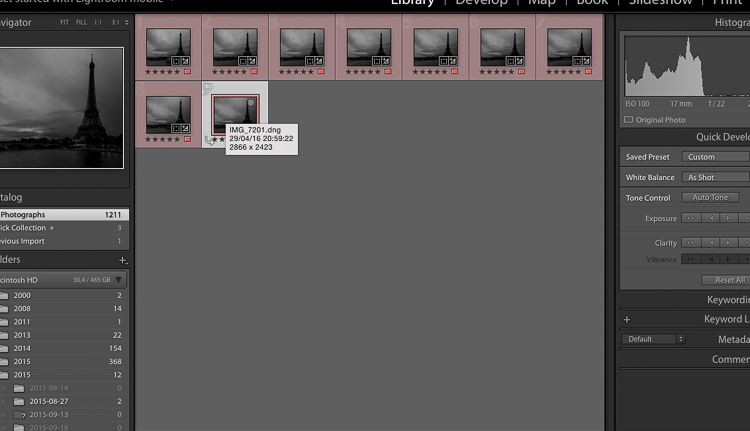
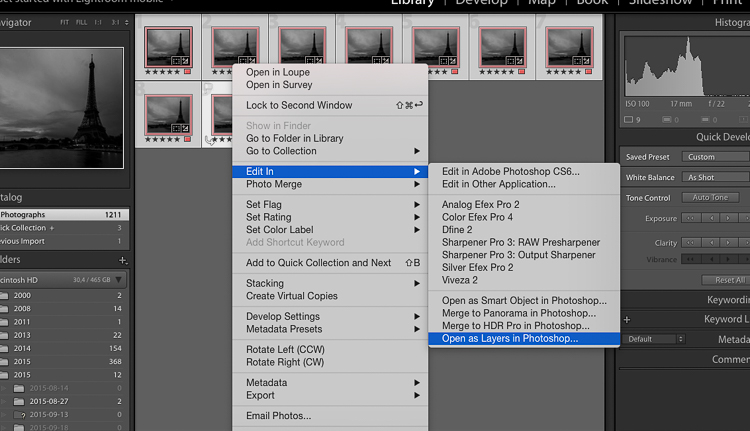
So after you get all your images, import them into Photoshop as layers (from Bridge or Lightroom whatever fits with your workflow).

IMAGE7

Open as Layers in Photoshop after selecting the images in Lightroom.

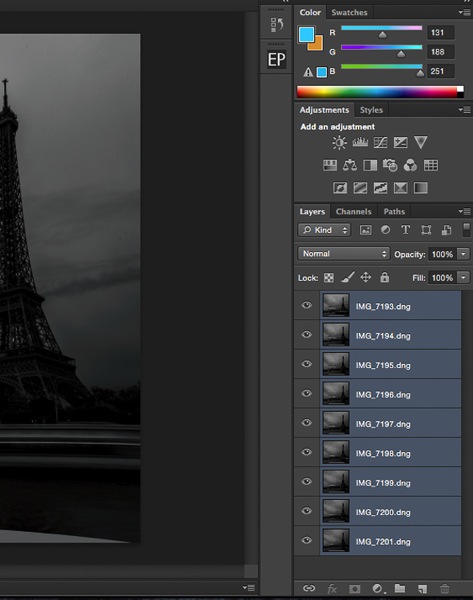
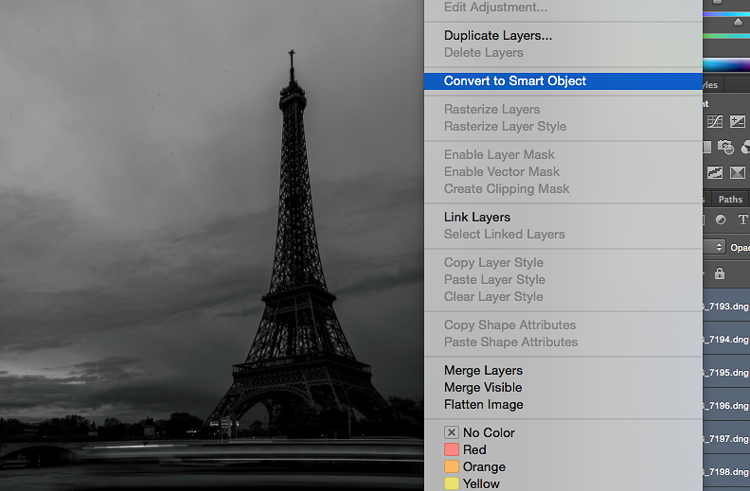
Then next thing you want to do is to select all the layers, and create a smart object.

IMAGE8

IMAGE9

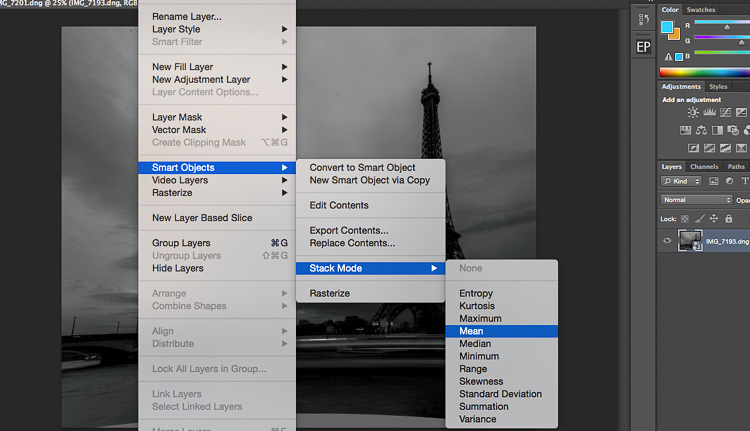
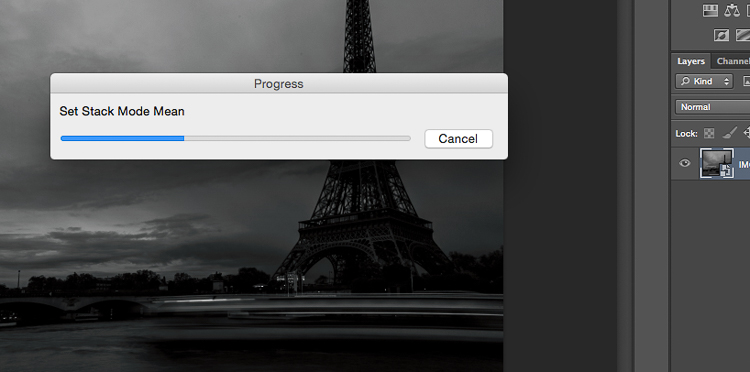
After that go to Layers -> Smart Objects -> Stacking -> Mean.

IMAGE10

IMAGE11

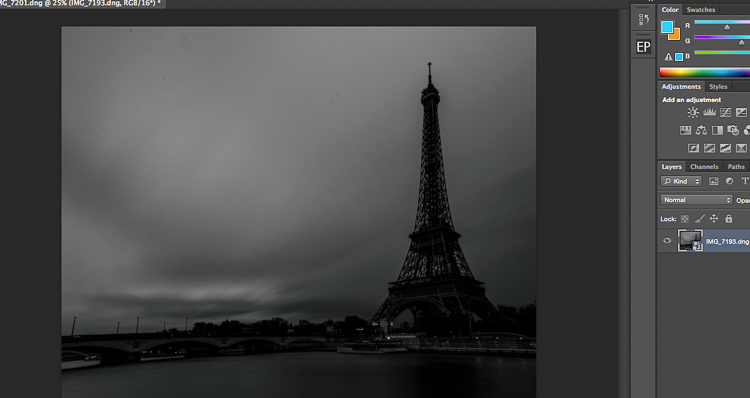
Photoshop will create a nice long exposure now, combining all the layers.

IMAGE12

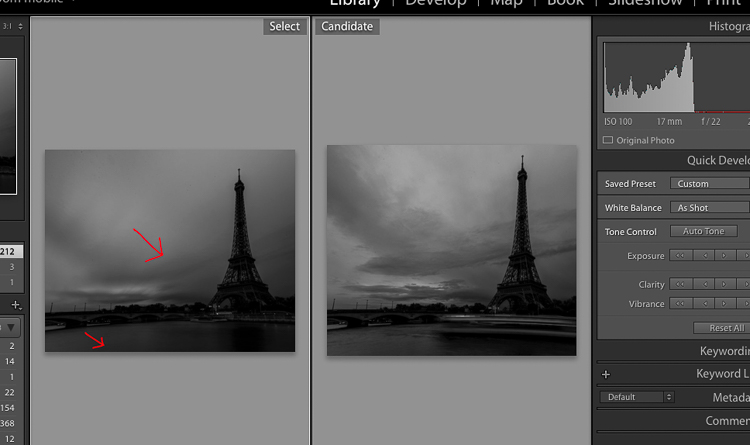
Here’s the before and after:

IMAGE13

Before is on the right of a single image – after is on the left.

Conclusion

You don’t need super dark expensive filters to create long exposures. Of course, you will get the best results with them, but this is a pretty cool alternative. Now personally as a 19 year old student, I cannot spend a lot of money on gear, and so far these two hacks have worked perfectly for me.

IMG_7663-Edit

Enjoy the art, and share your hacked long exposure images in the comments below. I’d love to see your results.

googletag.cmd.push(function() {
tablet_slots.push( googletag.defineSlot( “/1005424/_dPSv4_tab-all-article-bottom_(300×250)”, [300, 250], “pb-ad-78623” ).addService( googletag.pubads() ) ); } );

googletag.cmd.push(function() {
mobile_slots.push( googletag.defineSlot( “/1005424/_dPSv4_mob-all-article-bottom_(300×250)”, [300, 250], “pb-ad-78158” ).addService( googletag.pubads() ) ); } );

The post 2 Long Exposure Photography Hacks to Try if You Don’t Have an ND Filter by Yacine Bessekhouad appeared first on Digital Photography School.


Digital Photography School

 
Comments Off on 2 Long Exposure Photography Hacks to Try if You Don’t Have an ND Filter

Posted in Photography


The good, the bad and the ugly of aerial photography – Part 1: Why shoot aerials?

18 Jun

Man has always had the dream of flight – but so has the photographer. It’s a unique experience to shoot from the air, and it has some incredible benefits in many senses. But as one might discover, it often carries a number of problems and a hefty price tag. I personally started my romance with serious aerial photography about three years ago, and I’ve been hooked ever since. My experiences have mostly been amazing but admittedly not always so, and I’ve come to wonder what makes photography flights in different settings so… well, different.

In this series of articles I’ll try to survey my own experience with aerial shooting, including the different aircrafts to shoot from, what equipment to use, what technicalities to put an emphasis on and of course, the prices. I’ll talk about some of my aerial shoots, and explain what distinguished them and what I learned. Aerial photography can be wonderful and exhilarating, but it can also be disappointing if you don’t know what you’re getting yourself into. I hope the following articles help with this.

An aerial panorama of one of the most epic light shows I’ve ever seen. Wonderfully clear sun rays were peeking from between the thick cloud layer and the jagged mount Molhøgtinden and its surrounding peaks in the Lofoten Islands during my workshop there. I was stunned with excitement and couldn’t believe my eyes. After a few seconds I shook my head, picked my jaw up and went back to shooting. This image is the result.

So what makes aerial photography so darn good? A great many things. First of all, it allows for a new – and extremely different – angle of shooting. There’s a huge difference in the angle of view when shooting from the ground, or even from a mountaintop, and when shooting from hundreds of meters above the landscape. The same scenery gains another dimension, and the viewer gets a much better understanding of the surroundings. Perspective deformations are also less pronounced since there’s less of a difference in distance to the subject’s different parts.

An aerial shot of Deadvlei, Namibia. It’s incredible to realize that most of the clay pan is actually devoid of trees – which is hard to perceive when you’re down there.

It can be claimed that only from the air, one can see the landscape for what it really is. Unseen parts of the setting can be exposed, for example ones that are obscured by mountains, and with good visibility, one can see and shoot much farther than from the ground. In the image below, shot from a helicopter in Holuhraun, Iceland, several of these advantages are demonstrated: first of all, when shooting from the ground, it was impossible to get a shot of the lava which includes the caldera itself. Secondly, this angle allows for inclusion of the lava river in the background, which contributes a great deal to the composition.

In addition, some landscapes are hard to get to – not to mention shoot – from the ground, especially close enough to make them interesting. A good example of this is an erupting volcano. If the lava flow is strong, it can be impossible to go near the eruption point itself, but from the air, it can often be seen quite clearly.

But it’s really not limited to volcanoes. Instead of traversing miles and miles on foot, camping, climbing and struggling, one might take a short flight, shoot a location and fly back in time for dinner. Sounds enticing, and it truly is. Moreover, it’s quite addictive, so much so that when visiting a new location, I often feel like I have to shoot it from the air, even if there isn’t much sense in it. One mustn’t forget that aerial photography is an experience to cherish, not to be taken for granted. Do it when you must, when it offers real benefits, and not just as a means to shoot without making an effort.

The terminal of Ilulissat glacier, Greenland.

In the next article in the series I’ll talk about the two most popular aircrafts for aerial photography.


Erez Marom is a professional nature photographer, photography guide and traveler based in Israel. You can follow Erez’s work on Instagram, Facebook and 500px, and subscribe to his mailing list for updates.

If you’d like to experience and shoot some of the most fascinating landscapes on earth with Erez as your guide, you’re welcome to take a look at his unique photography workshops around the world:

White Wonderland – Lapland
Land of Ice – Southern Iceland
Winter Paradise – Northern Iceland
Northern Spirits – The Lofoten Islands
Giants of the Andes and Fitz Roy Hiking Annex – Patagonia
Tales of Arctic Nights – Greenland
Earth, Wind and Fire – Ethiopia

Selected articles by Erez Marom:

  • Behind the Shot: Dark Matter
  • Mountain Magic: Shooting in the Lofoten Islands
  • Behind the Shot: Nautilus
  • Behind the Shot: Lost in Space
  • Behind the Shot: Spot the Shark
  • Quick Look: The Art of the Unforeground
  • Behind the Shot: Watery Grave
  • Whatever it Doesn’t Take
  • Winds of Change: Shooting changing landscapes
  • On the Importance of Naming Images
  • Hell on Earth: Shooting in the Danakil Depression
  • Parallelism in Landscape Photography

Articles: Digital Photography Review (dpreview.com)

 
Comments Off on The good, the bad and the ugly of aerial photography – Part 1: Why shoot aerials?

Posted in Uncategorized


Weekly Photography Challenge – Butterflies and Bugs

18 Jun

Photographing bugs and the tiny critters takes patience, and a macro lens may come in handy as well.

William Warby

By William Warby

Weekly Photography Challenge – Butterflies and Bugs

For this week’s challenge if you need some tips, try reading these dPS articles:

  • 4 Tips for Photographing Bugs and Insects
  • 10 Tips for Photographing Dragonflies
  • Backyard Macro Photography Safari
  • Lighting for Macro Photography
  • Tips for Photographing Butterflies
  • 8 Tips for Photographing Butterflies
Naathas

By naathas

Abdullah Girach

By abdullah girach

Lida

By Lida

Share your images below:

Simply upload your shot into the comment field (look for the little camera icon in the Disqus comments section) and they’ll get embedded for us all to see or if you’d prefer upload them to your favourite photo sharing site and leave the link to them. Show me your best images in this week’s challenge. Sometimes it takes a while for an image to appear so be patient and try not to post the same image twice.

Markus Trienke

By Markus Trienke

Delyth Angharad

By Delyth Angharad

Mike Keeling

By Mike Keeling

Pontla

By pontla

googletag.cmd.push(function() {
tablet_slots.push( googletag.defineSlot( “/1005424/_dPSv4_tab-all-article-bottom_(300×250)”, [300, 250], “pb-ad-78623” ).addService( googletag.pubads() ) ); } );

googletag.cmd.push(function() {
mobile_slots.push( googletag.defineSlot( “/1005424/_dPSv4_mob-all-article-bottom_(300×250)”, [300, 250], “pb-ad-78158” ).addService( googletag.pubads() ) ); } );

The post Weekly Photography Challenge – Butterflies and Bugs by Darlene Hildebrandt appeared first on Digital Photography School.


Digital Photography School

 
Comments Off on Weekly Photography Challenge – Butterflies and Bugs

Posted in Photography


5 Tricks from Professionals to Help You Do Better Wildlife Photography

17 Jun

Whether professional or an amateur, most photographers who enjoy wildlife photography do it because we love being outside in nature, and we love to share our experiences of the world’s wild creatures. Carrying our cameras, and making images along the way, helps us to truly see and appreciate what nature has to offer.

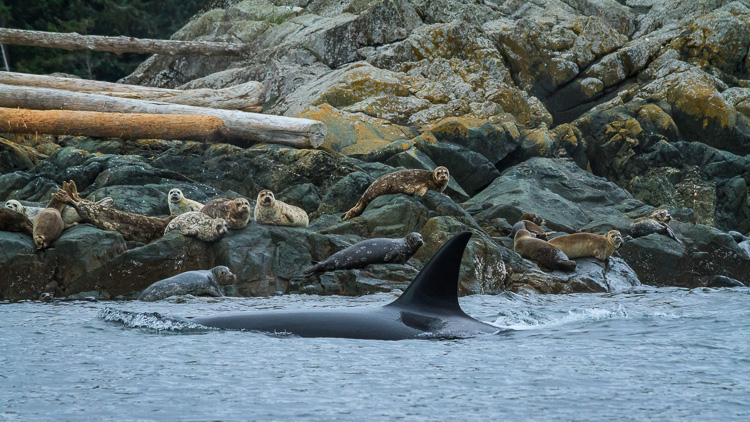
Orca, also known as killer whales, hunting seals by Anne McKinnell

But there’s more to making a captivating wildlife photograph than simply having an animal in the frame. If you just snap a shot when an animal is in front of you, you may find that your photograph lacks the impact you were after.

Next time you are out in the wild, try out these five tricks that professional wildlife photographers use to capture the world’s wild creatures at their best.

1. Watch and Learn

Every one of the world’s many species of animals are different. You cannot photograph them all the same way. But, if you spend some time observing your creature’s behaviour, you’ll be better equipped to click the shutter at exactly the right moment.

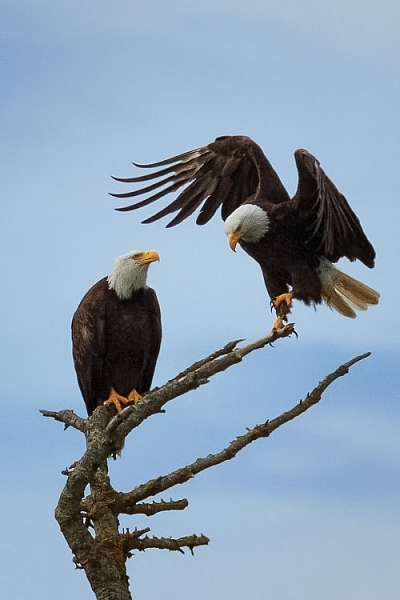
Two bald eagles by Anne McKinnell

It’s all about that special moment when the animal is doing something – whether it’s flying, walking, making eye contact, or interacting with another animal. Like spending time with friends, you come to know when they are going to do a particular thing and what triggers a reaction. Once you observe and understand their behaviour, be patient, be quiet, and wait for the right moment.

We often think of wildlife photography as being exciting, but more often than not, better images are made when it is a quiet, contemplative experience.

2. Use Faster Shutter Speeds

Many a great wildlife photograph has been ruined when an animal moves faster than the photographer anticipated, resulting in a slightly blurry image. It has happened to us all. Try not to let that happen by increasing your camera’s ISO, which will allow you faster shutter speeds.

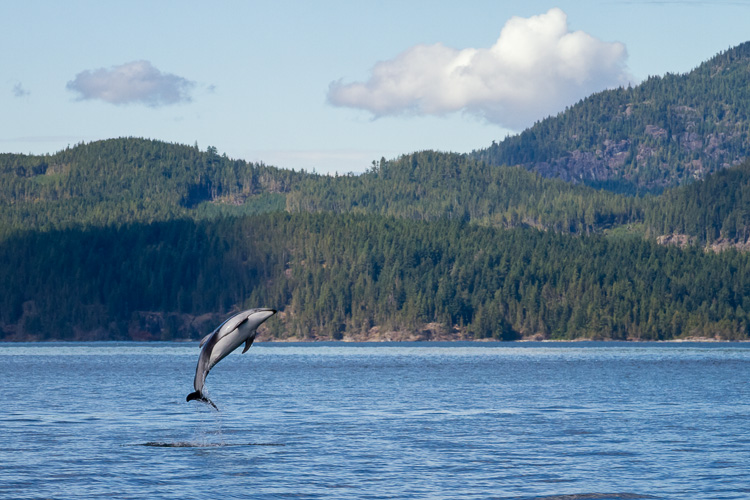
Pacific White Sided Dolphins by Anne McKinnell

Even when your subject is absolutely still, you never know when they’ll decide to move, and that could be the magic moment you’ve been waiting for. Be ready by using a shutter speed of at least 1/500th of a second.

3. Carry Two Camera Bodies

The most important thing is to capture that special moment, so don’t miss it by changing lenses. It’s better to pick two lenses to work with, and have each mounted on its own camera body. Then, when you need to switch, you simply put down one camera, pick up the other, and you’ll be ready to shoot in less than one second. I usually use one camera with a 70-300mm lens, and the other with a 400mm lens.

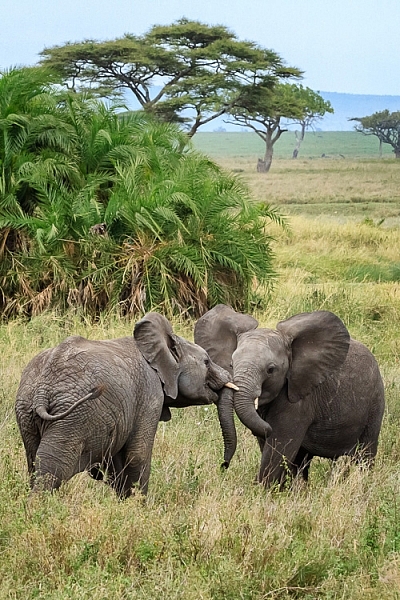
Two elephants playing in Serengeti National Park, Tanzania by Anne McKinnell

4. Don’t Get Rusty

You don’t have to wait until you have an exotic animal to work with! Keep your skills sharp by practicing with whatever animals are nearby. You might surprise yourself and come up with some of your favourite shots. Practicing with seagulls and geese, will ultimately improve your photos of cranes and spoonbills when you have the opportunity to shoot them.

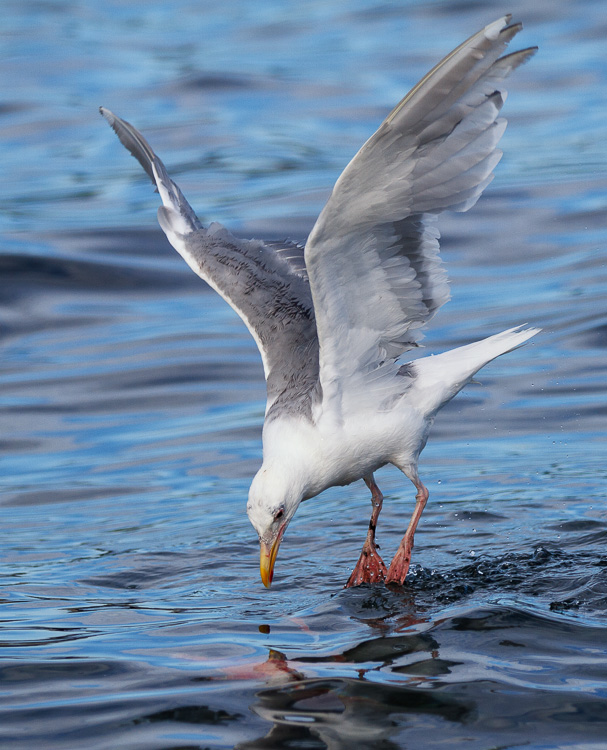
Seagull looking at underwater sockeye salmon by Anne McKinnell

Try setting up a bird feeder outside your window and you can practice on the birds that come right to you.

5. Vary Your Compositions

Usually when we photograph wildlife, we want the animal to fill as much of the frame as possible. But once you get that shot, don’t keep making the same shot over and over. Try some different compositions, such as getting super close to just part of the animal. You can shoot just the eye, or zoom in on an interesting detail.

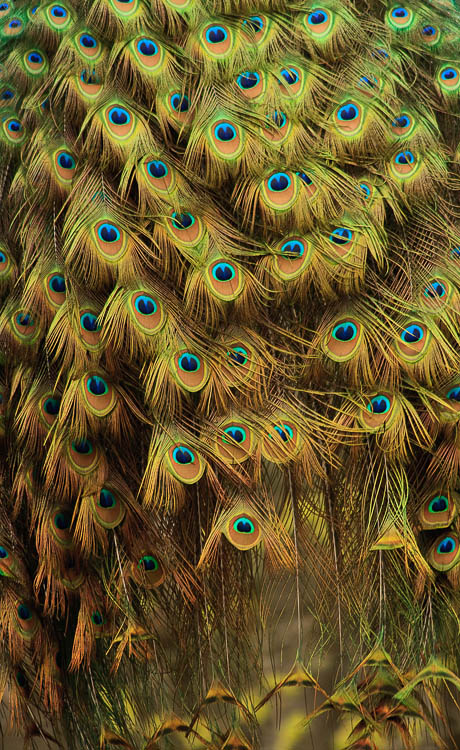
The tail feathers of a peacock by Anne McKinnell

Then try zooming out and photographing the animal and its environment. Also try to change your perspective. Get on eye level with your subject or try making an image from a lower angle.

By understanding your subject, having good techniques under your belt, and lots of practice, you’ll be well on your way to making more captivating wildlife photographs. If you have any other tips of tricks for wildlife photography please share them, and your images in the comments below.

googletag.cmd.push(function() {
tablet_slots.push( googletag.defineSlot( “/1005424/_dPSv4_tab-all-article-bottom_(300×250)”, [300, 250], “pb-ad-78623” ).addService( googletag.pubads() ) ); } );

googletag.cmd.push(function() {
mobile_slots.push( googletag.defineSlot( “/1005424/_dPSv4_mob-all-article-bottom_(300×250)”, [300, 250], “pb-ad-78158” ).addService( googletag.pubads() ) ); } );

The post 5 Tricks from Professionals to Help You Do Better Wildlife Photography by Anne McKinnell appeared first on Digital Photography School.


Digital Photography School

 
Comments Off on 5 Tricks from Professionals to Help You Do Better Wildlife Photography

Posted in Photography