RSS
 

Posts Tagged ‘Photographer’

Matthew Christopher: Photographer of Abandoned Places

24 Dec

[ By WebUrbanist in Abandoned Places & Architecture. ]

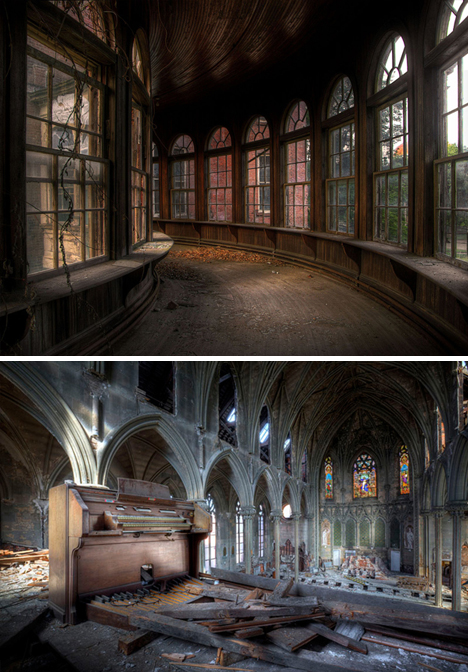
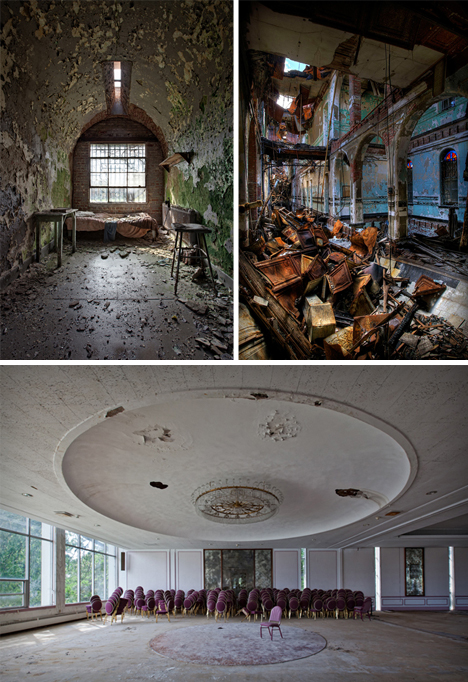
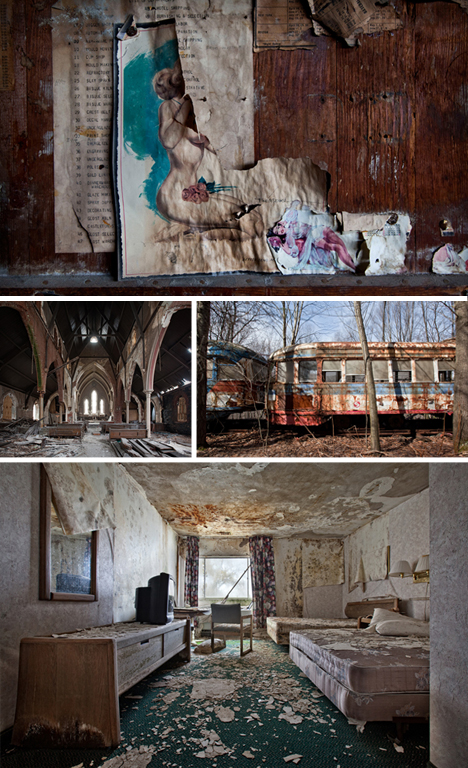
Some of the locations have storied histories, and others remain a mystery – photo shoots of spaces that must remain off the map to avoid disturbing delicate or dangerous ruins, or trespassing on private property.

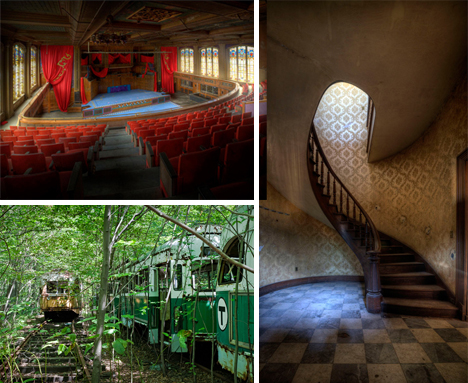
Matthew Christopher has taken pictures of it all, from prisons and hospitals to churches with basement meth labs to deserted transportation infrastructure and now-demolished architecture. When he got in touch with WebUrbanist, a balance had to be struck between secrecy and revelation.

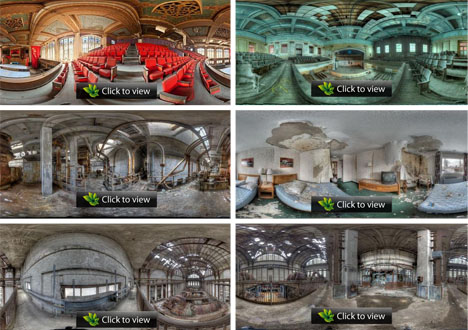
But beyond simple still images, he has escalated his photography to fully-interactive, (click here to see them embedded on his website:) three-dimensional online panoramas – these compelling variants are part film, part photo, and provide an really impressive sense of spatial immersion (hint: be sure to go full-screen for the full effect – these are high-resolution!).

Some of these places are in the middle of preservation battles as well, their futures as uncertain as their histories. A few are publicly known, leaving Matthew able to discuss them, like this prison and this state hospital. He also has both prints and books available at this store on his website.

Share on Facebook


[ By WebUrbanist in Abandoned Places & Architecture. ]

[ WebUrbanist | Archives | Galleries | Privacy | TOS ]


WebUrbanist

 
Comments Off on Matthew Christopher: Photographer of Abandoned Places

Posted in Creativity


I’m a ‘Typical Photographer’ and This Is How Much I Post Process

23 Dec

OK, I’m going to come right out and say it … there are a lot of lies in photography! It’s out there now and I suggest we all take some time to let it sink in before we do anything rash.

Of course we all know this but it’s not a subject that a lot of people openly talk about.  Before I say any more let me be completely straight.  I’m not saying that there are a whole load of photographers out there actively seeking to deceive you, more that most of us (me included) tell ‘little white lies’ about our images. Of all the subjects open for favorable interpretation is the amount photographers post process their pictures.

No Biggie?

I’m not saying for one minute that anyone is looking to be intentionally deceptive, most of the time all we are really talking about is the omission of a few minor finishing touches.  So what’s the big deal? Well there isn’t really any big problem as such, however I remember as a beginner how frustrating it was trying to work out how much of a great image was due to gear, processing or falling that the skill of the photographer.   Becoming a great photographer takes time, patience and practice and its understandable why more experienced photographers might want to protect their trade secrets.

Post Processing in Modern Photography

A common view is that post processing is a phenomenon that has only come about with the age of digital photography.  To a certain extent this is true however we need to be careful not to lump all forms of image manipulation into the same category.  In the age of film it was still possible to alter not only the basics such as aperture, shutter speed but also things like ISO, white balance and the overall aesthetic of the final image.   It’s true to say that these adjustments were less convenient than they are today (you had to physically swap out your film etc) but we shouldn’t confuse the convenience of modern technology with any form of deception.  It has always been necessary to ‘adjust’ the final image to achieve something more like reality and despite the capability of todays cameras and equipment this remains the case.  The reality is that even the best photographers make at least minor adjustments to their images.

So How Much?

So as a beginner what you really want to know is how much processing do most people and how do you know if you are doing too much?  When I started to get serious about photography this was a question that took up far too much of my time. To give you a sense of a typical photographers workflow here is a quick summary of my typical post processing routine and a few examples of how my images typically look before and after.

My Basic Workflow

My basic advice is this; only do as much post processing as necessary to achieve the look you want.  If your goal is to achieve an image that is realistic to real life then assuming you have a decent initial image you should be able to do this fairly quickly.  If however you want to achieve a more artistic result then you may need to take a bit longer.

The majority of my images are either travel or portraiture and therefore my basic post processing workflow is relatively simple.  Pretty much every image I take goes through the following five-step process, although for specific effects I will often do more.  Just so you know, I shoot all of my images in RAW with Lightroom being my editing software of choice.

  • Crop & Straighten – To clean up and correct any issues with composition.
  • White Balance – To correct any colour casts and ensure the image colour is as accurate as possible.
  • Exposure – To improve the overall tonality and dynamic range of the image.
  • Contrast & Clarity – To bring back any missing punch and bring out emphasis and detail.
  • Sharpening – Where necessary the last step is to apply selective sharpening to bring out any key details.

To give you an idea as to what this really looks like in the real world, here are a few examples of images I have taken and how they looked like before and after processing.

Example 1 – Travel Landscapes

Typical post processing for landscapes will include straightening and cropping to improve composition, followed by basic exposure and contrast adjustments. Finally I add some saturation and vibrance for impact.

Example 2 – Street Portrait
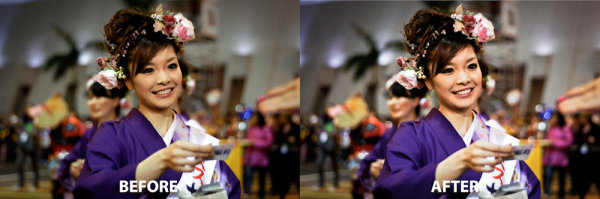
For travel portraits, its all about the white balance to ensure that the subject skin tones are spot on. After that I add contrast and boost detail with sharpening.

Example 3 – Studio Work

For studio portraits, white balance is again key followed by basic exposure and composition adjustments. In this case I may also spend more time working on more artistic effects and specialised image touch ups.

The Two Minute Rule

Obviously when you are starting out its important to spend time developing your processing skills, however as you start to get a handle on this its also very important to get efficient.  Not only will doing so stop you from wasting hours in front of your computer screen, but its also the best way limit the potential for over processing.  The ‘Two Minute Rule’ is the probably the best ‘pro tip’ I have ever heard and is something which has fundamentally changed my approach to photography.  The basic idea is to limit the time you spend processing any image to no more than two minutes.  Imagine that, just two minutes to do everything you need to get an image to look exactly as you want it to?  Basically you should be asking yourself if an images needs more than two minutes of work in post, is it worth the effort?  I’m not going to try and convince you that I follow this rule religiously but it is a really powerful way to focus your post processing efforts and I would certainly encourage you to consider building this into your own routine.  Limiting the time you spend in post will stop you from trying to rescue dud images and also give you a rough guide as to when you may have gone too far.

The ‘So What?’ for Beginners

If you are a beginner or someone getting started in post processing, what am I really telling you?  Simply it is this, most of this images you see will be post processed.  Whether this is to overcome the limitations of our equipment, correct mistakes or achieve a specific ‘look’ most photographers will process their photos. The important thing is not to worry about what others are doing, rather on if you are doing the right things to create the images you are looking for.  Focus on learning the techniques which will help deliver the photograph you want and use this as a way to hone your individual style and workflow to become an even better photographer.  If you get this right, then it won’t be long before you can start fibbing about your photographs too!

Post originally from: Digital Photography Tips.

Check out our more Photography Tips at Photography Tips for Beginners, Portrait Photography Tips and Wedding Photography Tips.

I’m a ‘Typical Photographer’ and This Is How Much I Post Process


Digital Photography School
 
Comments Off on I’m a ‘Typical Photographer’ and This Is How Much I Post Process

Posted in Photography


Photographer Estevan Oriol on Workplace Distractions

22 Dec

Workplace distractions cause problems for all of us. Estevan uses his powers of observation developed through photography to elucidate a problem we all face while trying to work and be creative.
Video Rating: 4 / 5


High-speed macro photographer shares his setup

21 Dec

opener.jpg

German photographer Markus Reugels has gained quite a bit of attention over the years for his stunning and colorful high-speed photographs of the shapes and forms created when liquid is dropped into water. If you’ve ever been curious as to what it takes to get images like these, Reugels talks briefly about the equipment and technique he’s currently using and shares an image of his actual setup.

News: Digital Photography Review (dpreview.com)

 
Comments Off on High-speed macro photographer shares his setup

Posted in Uncategorized


Microstock Photographer, Ed Hidden: How’d They Do That?

11 Dec

Adorama Photography TV presents “How’d They Do That” featuring Ed Hidden. In this episode, Mark talks with Ed who shoots stock photography for iStockphoto. Ed will give some tips on shooting stock photos. He even talks about studiolighting.net and his podcast LightSource. For related articles and videos, go here: www.adorama.com Visit www.adorama.com for more videos!
Video Rating: 4 / 5

 
Comments Off on Microstock Photographer, Ed Hidden: How’d They Do That?

Posted in Photography Videos


Weddng photographer Michelle Turner reviews camera straps…

07 Dec

www.WeeklyPhotoTips.com Wedding photographer (and friend) Michelle Turner took the time to sit down to review and demonstrate several different camera straps and explains what she likes about each of them. Some of the straps she reviews are those designed specifically to fit a woman’s…
Video Rating: 4 / 5

A man who took high-quality space photographs on a cheap digital camera has been called by NASA to find out how. . Follow us on twitter at twitter.com .

 
Comments Off on Weddng photographer Michelle Turner reviews camera straps…

Posted in Photography Videos


Tips to become a successful pro photographer

07 Dec

6 things to consider to be successful as a professional photographer. Just sharing my 2 cents, what do you think? If you enjoyed this – please FB share, tweet or email to friends! goo.gl Video shot on D5100: goo.gl (Amazon: goo.gl ) 50mm 1.4g: goo.gl (Amazon: goo.gl ) Gitzo GT2540: goo.gl (Amazon: goo.gl ) Join the Flickr forum: www.flickr.com twitter.com www.facebook.com www.thatnikonguy.com
Video Rating: 4 / 5

 
Comments Off on Tips to become a successful pro photographer

Posted in Nikon Videos


Become a Better Photographer By Asking One Simple Question

06 Dec

A Guest Post By: John Davenport

Let’s be honest whether it is coming up with portrait posing ideas, photographing the stars, or avoiding danger in the field we all have a common goal here – gain more knowledge and put it to use in our photography – but there comes a time when we must be our own teachers.
We must venture out away from the tutorials, the guidebooks and those YouTube videos to simply do something for ourselves, without fear, and without guidance. Just with the knowledge that we already have in our heads. My friend, that is what this question is all about. 

What Happens When I Do This?

Image One.jpg

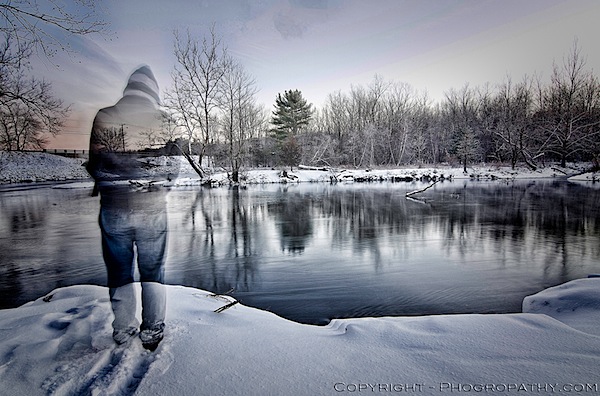
If I had not tried something different, something out of my comfort zone, I wouldn’t have been able to capture this photograph. I was attempting to create an HDR composite, but I wanted to see if I could create one with me in the frame. I’d never done this, I hadn’t even attempted it, so I just set my camera up to capture the brackets, put it on a timer, and walked into where I thought would be a good place to stand. However, while the camera was still taking the shots, I left the scene before the shutter had closed for the final time, and thus – a ghostly figure.

Image Two.jpg

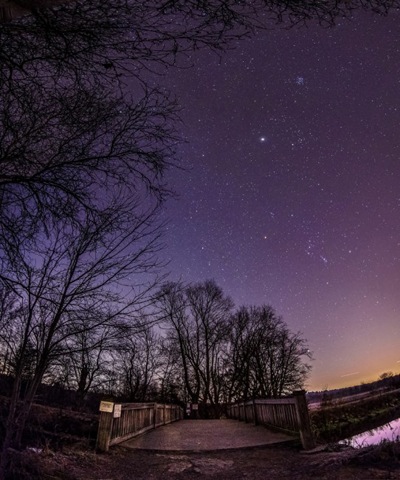
Another example is this photograph of the night sky. It actually consists of four separate landscape orientated images stitched together to create a vertical panorama with a fisheye like effect to boot. I talk in a bit more detail about how I created this vertical panoramic image on my own site, but if you’re listening to the message of this post, you probably shouldn’t have clicked on that link ;) .

It Takes Courage

Tutorials and guides make life easy. Follow the steps and you’ve got a great photograph, but is it original?
It takes courage to be able to do this style of learning and even more so to share your photographs with the world. You have to accept the fact that you’re going to make mistakes, you’re going to feel like you’ve wasted some time, and you’re going to have people tell you that you’ve done it all wrong, but to that I say all this is part of a good learning process.

Don’t Stop With Taking the Photo

Apply this no-holds-bars-experimentation-attitude to all aspects of photography and yes, maybe even to life as well.

Whether you’re using Instagram or Photoshop to edit your photographs asking, what happens if I do this?, is key to creating something different. Sure there’s a lot more to experiment with in the latter, but if you’re always using the same filter and the same blur effect in Instagram are you really learning anything?

What Do You Think?

Is it more important to get out in the field and forget the books once you’ve got the basic knowledge or should you stay up-to-date with all the knowledge that’s being shared on the web every-single-day and miss the possible shot of a lifetime?

John Davenport is an enthusiastic amateur photographer and blogger who shares daily photos on his site Phogropathy. You can also find him on Facebook and Twitter.

Post originally from: Digital Photography Tips.

Check out our more Photography Tips at Photography Tips for Beginners, Portrait Photography Tips and Wedding Photography Tips.

Become a Better Photographer By Asking One Simple Question


Digital Photography School

 
Comments Off on Become a Better Photographer By Asking One Simple Question

Posted in Photography


20 Digital Cameras for a Kid or How to Become a Photographer from an Early Age

06 Dec

In this article I talk about why you should stay away from “made for kids” cameras and get a “real” camera instead. It’s easy to find a great camera that your kids and your wallet can be happy with. And by getting an actual camera instead of a toy, you’ll be buying a product that will last longer than a week and that has capabilities that your child can grow into over time.

The post 20 Digital Cameras for a Kid or How to Become a Photographer from an Early Age appeared first on Photodoto.


Photodoto

 
Comments Off on 20 Digital Cameras for a Kid or How to Become a Photographer from an Early Age

Posted in Photography


Facebook Fan Page Custom URL,Tips,Tricks,Tutorial – Mark Kumar Photographer

05 Dec

Mark Kumar: www.MarkKumar.com http www.facebook.com Facebook Fan Page Custom URL,Tips,Tricks,Tutorial –
Video Rating: 5 / 5

 
Comments Off on Facebook Fan Page Custom URL,Tips,Tricks,Tutorial – Mark Kumar Photographer

Posted in Photography Videos