RSS
 

Posts Tagged ‘Photographer’

The Q Button – What Every Canon DSLR Photographer Needs to Know

09 Dec

Cameras can be super complex these days. Buttons, knobs and switches are everywhere. How can you remember what all of them do and where to begin? Well, Canon has given you a secret button to use that allows you to access all of those most important functions within your complex machine. Perfect, where is this secret button you ask? It’s right on the back of your camera marked with the letter Q. It’s not really a secret, it’s just under utilized.

COVER IMAGE

The Q Button

What does Q stand for? Quick. The button makes navigating just that. Using the button gives you quick access to all of the major functions that you need. Let’s go through some of those functions so you can see how easy it is use your camera. Grab your Canon and let’s try it out.

How to use it

Go ahead, give the Q button a press while watching the LCD screen on the back of your camera. As you see it highlights one of your current settings. Depending on your Canon model this may light up the current selection in a blue/green color or it may outline it with an orange box. Next you can cycle through your settings by using the directional pad located around your SET button. Simply highlight the setting you want to change and then you have a couple of options.

First, and easiest, is to roll your settings dial while it is highlighted. This will cycle through your options for that particular setting. Your second choice is to push the SET button while a setting is highlighted. This will lead you to a more detailed screen showing all of your options for that setting.
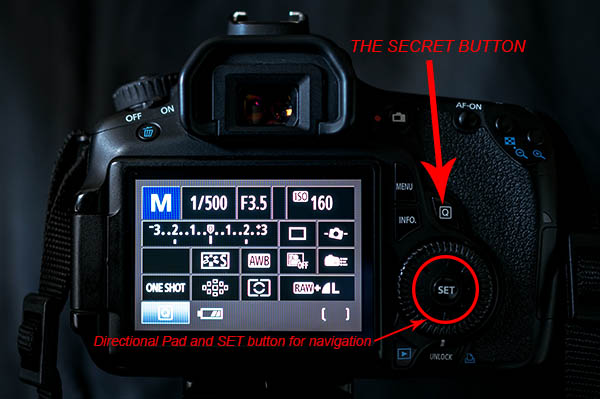
The Secret Button

Canon also made things easy by providing a description of each option at the bottom of the LCD as you scroll through. At first it will be more beneficial to use the second option so you become familiar with what settings are available, and what the symbols mean. Once you get that down, using option one to zip through the settings is a breeze.

As a beginner it can be really helpful using the LCD screen and the Q button so you can see everything about the exposure and settings right in front of you. When you depress the shutter button half way the current exposure reading will be displayed on the meter on your LCD. This makes it really easy to adjust your settings while seeing how each element of exposure (aperture, shutter speed and ISO) is affecting the meter.

Some of the settings you will adjust most are ISO, exposure bracketing, white balance, focus type, focus point and drive mode. When you use these techniques they each can be adjusted in seconds!
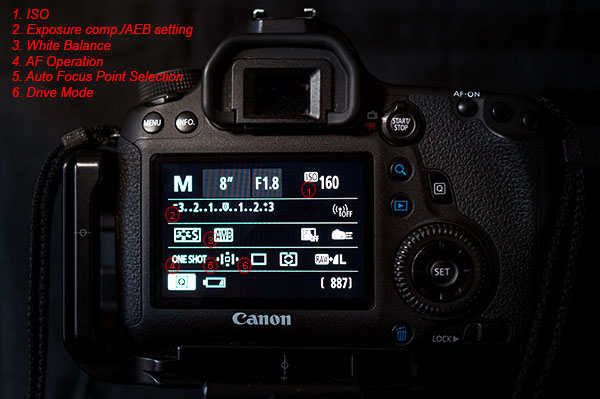
Visual Guide

The Q button is particularly useful when you are bracketing exposures for HDR. Press it and highlight the Exposure Compensation/AEB setting. Now spin your settings dial to the right and watch as the light meter changes to three lines in lieu of the typical single line. Set the lines as far apart as you want your bracket to be (i.e. -1, 0, +1 or -2, 0, +2). Last, use the directional pad to highlight the Drive Mode setting. Again scroll to the right until you reach the Self-timer (2 seconds/remote setting). Now, once you fully press the shutter button your camera will wait two seconds and then take all three exposures that you set. It’s as simple as that.
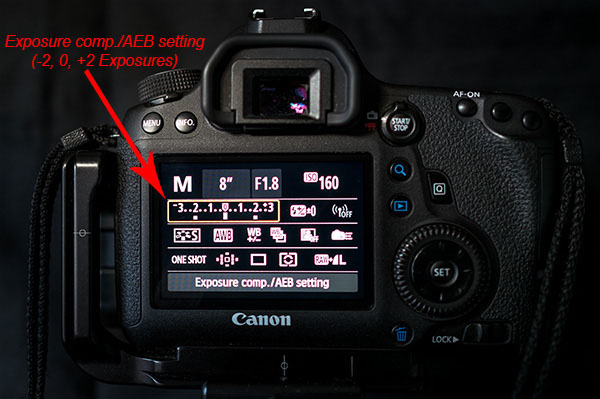
Exposure comp

As the light, and your shooting situation, changes your white balance settings need to be adjusted. You typically don’t find a special button for this important setting. Once again the Q button makes your life easy. As you scroll through the options you will see some simple pictures for each WB setting. A sun for sunny, a cloud for cloudy, a lighting bolt for flash, etc. Sometimes it is easier to see what your options are by looking at a picture. If not, Canon still gives you the description of the WB setting.
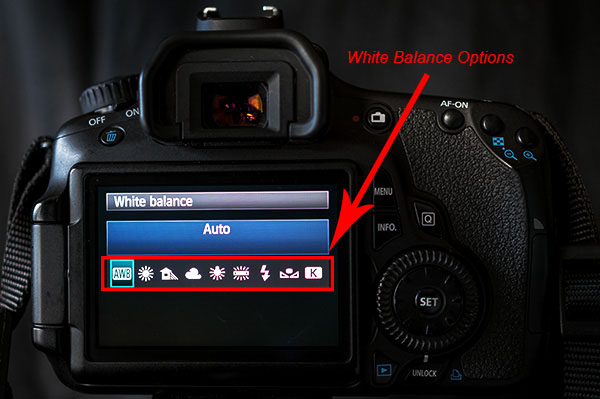
White Balance

Next up is the Auto Focus Point Selection. This is seriously one of the hardest functions to find on most cameras. Again, made easy by Canon. Press the Q and then use the directional pad to navigate to the AF Point Selection. Spin that dial and watch as the points spiral around to each individual focus point at your will.

Do you switch between shooting action and still subjects often? If so you may find yourself digging through the menu to find your Single and AI Focus options and the Drive Modes. Simply press the Q button and move over to the AF Operation. Roll your dial and you can choose ONE SHOT, AI FOCUS or AI SERVO. Then you can navigate over a couple of settings to the Drive Mode and choose between Single, Continuous Shooting or Timer Mode.
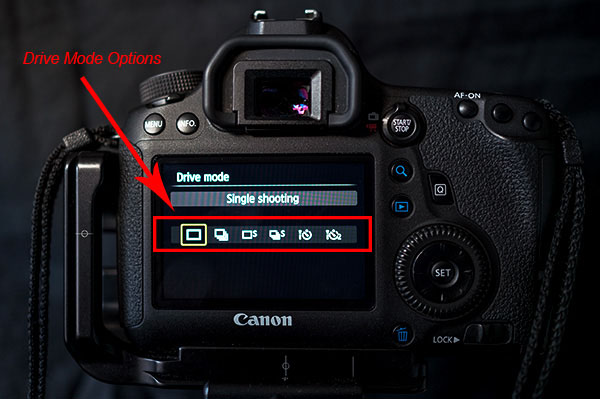
Drive Mode

Some Canon models are equipped with an internal level that is accessible from the Q menu. This is really helpful when you are shooting landscapes on a tripod. When in the menu highlight the Electronic level. Press the set button and a level looking like it belongs in the cockpit of an airplane shows up on the LCD. Tilt your camera from side to side and watch how the level changes. When your camera is horizontally level the line will turn green. This can definitely save you some time and heartache in post-processing when trying to make your horizon lines straight. It takes the guess work out of it for you.

As you can see the Q button is the most powerful and useful button on your camera. Navigating through those complex menus are over. Once you use the secret button you will begin to wonder why any of the other buttons even exist, with the exception of the shutter of course. Go ahead and feel free to start spreading the secret. Have fun!!!

googletag.cmd.push(function() {
all_slots.push( googletag.defineSlot( “/1005424/_dPSv4_mob-all-article-bottom_(300×250)”, [300, 250], “pb-ad-78623” ).addService( googletag.pubads() ) );
} );

googletag.cmd.push(function() {
mobile_slots.push( googletag.defineSlot( “/1005424/_dPSv4_mob-all-article-bottom_(300×250)”, [300, 250], “pb-ad-78158” ).addService( googletag.pubads() ) );
} );

The post The Q Button – What Every Canon DSLR Photographer Needs to Know by Jack Thatcher appeared first on Digital Photography School.
Digital Photography School

 
Comments Off on The Q Button – What Every Canon DSLR Photographer Needs to Know

Posted in Photography


Documentary photographer turns to video for ‘The Long Night’

03 Dec

A multimedia journalist by trade, Tim Matsui’s still photography projects have taken him from native Alaskan villages to Brazilian Air Force training facilities. Matsui shares with us his journey in creating his latest documentary work, from its beginnings in still photography to the adaptations he made to turn it into a video production. Learn more about his work on ‘The Long Night,’ a documentary debuting this week that looks into human trafficking in Seattle. Read our Q&A

Articles: Digital Photography Review (dpreview.com)

 
Comments Off on Documentary photographer turns to video for ‘The Long Night’

Posted in Uncategorized


Is Being a Photographer Synonymous With Being an Artist?

26 Nov

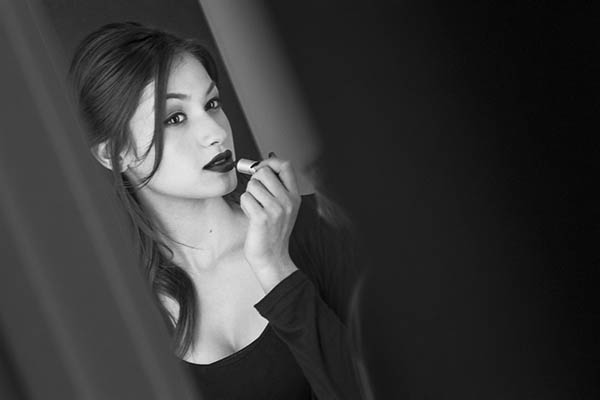
Photo 1 Guy

Sure, the concept of photography falls under the realm of one the arts, but can you strictly label someone an artist based on their job or hobby?

Photographers are everywhere nowadays. Beyond the thousands upon thousands of photographers who have businesses and make a living taking pictures, there are also all the families with cameras and anyone who halfway knows how to use a camera phone. Every single one of you who calls yourself a photographer has the opportunity, in my opinion, to call yourself an artist.

The term artist has a powerful meaning that is non-discriminatory. You, as an artist, have the distinct ability to take something and make it your own. But for me, I don’t consider myself an artist. It’s not a label I give myself because I feel that it is too strong for how I look at my own photos.

What do I do? I am in one world, a staff photographer taking pictures of exotic cars, in another world, editorial portrait photographer, and in another a sports photographer. But where I find myself in true harmony is taking landscape and cityscape photos. Do any of these types of photography REQUIRE me to be an artist? Or is that just a term we can only identify ourselves with?

Is the Word Artist too Demanding?

Sometimes there’s a connotation that you have to be an artist to be considered a respectable photographer; whatever either of those terms mean.

In our generation you don’t need much to pick up and learn how to take great photos. It’s not like you need a darkroom, chemicals, and to constantly be purchasing film. With just a good smart phone you can yield some amazing photos in spectacular quality. This has opened the world of photography and the arts to lot more people.

Image 2  Girl

With that said, do you need to be an artist, think like an artist, and go to art school to be a great photographer? I personally have a science mind. I graduated from college with a degree in Health Sciences. I picked up a camera sometime in college, and now that’s what I do.

What about this: do you need to think like an artist and go to art school to BE an artist?

Being a photographer can be just as much about having technical skill and experience, as it is about having a vision.

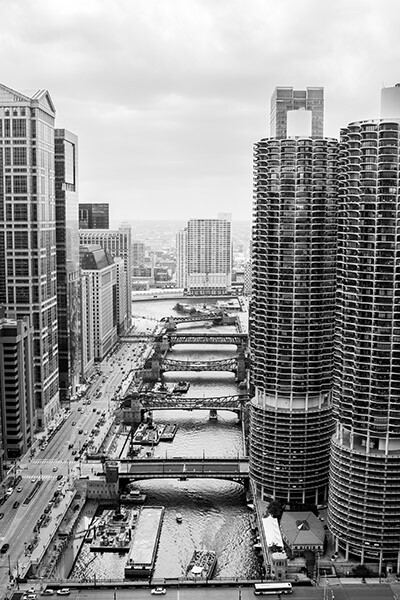
Image 3  City

The Balance Between Technical Skill and Vision

In order to make great photographs you need to have both technical skills and a vision. The combination of these two is what converts real life into a photograph.

Technical skill is required for just about everything you do. Maybe you started on automatic settings for your camera and slowly moved your way to manual as you got more comfortable with it. Maybe all of your photos are printed yourself?

Whatever type of photo you’re trying to capture, chances are you won’t have all the time in the world to check every setting on your camera to see which photo comes out the best. You’ve already learned, and have experience with which settings work best. That’s how you continue to get good-looking photos out of the camera on fewer attempts.

In the world today where just about every photo is being retouched to some degree, editing is also a technical skill that allows you to cement your style into your photos. Editing is an ever-evolving skill as you continue to learn new features in Photoshop (or other editing software) and as technology advances.

In photography you progress, every day you get out there and take a new photo; you’ve gotten better. But that improvement needs to carry on by continuing to learn your craft. Every artist, every photographer, works to improve upon what they’ve already done. You can strive the same way, at your own pace.

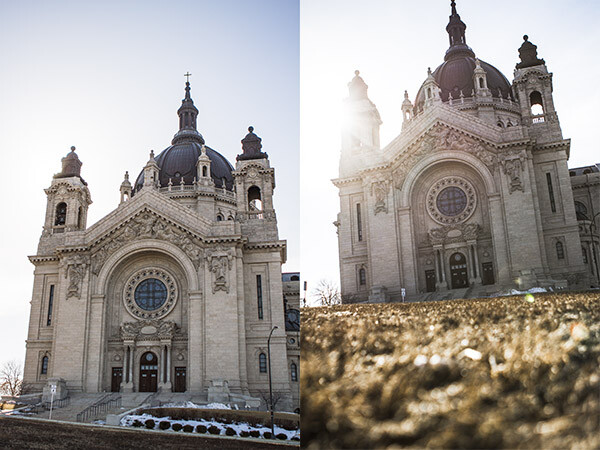
Image 4  Churches

When it comes to the other world of photography, some people tend to replace the term vision with other words, like artistic eye. You can call it whatever you want. Your vision can be a result of thorough internal planning of what’s going to make that a great photo. Or your vision can be more instinctual based on a knowledge of photography rules and personal experience.

You see the world, you pull your camera to your eye and you take the photo. That’s what makes every photographer the same as well as different. From the same spot, 20 photographers will yield 20 different photos. Your vision is a result of how you see the world; and you see the world differently than the person next to you based on your upbringing and beliefs.

You can continue to learn your own vision by understanding why you see the world the way that you do. Do your photos reflect the way that you see the world? I found my style because of how often I produced poor results. I eventually found my missing key: foreground and negative space.

In your own personal photos, do you weigh skill and vision equally? Are you working to improve both of them and not just one?

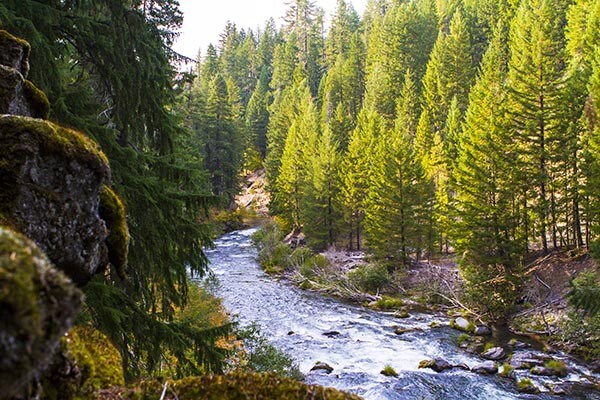
Image 5  River

The Reason Why This Distinction Between Photographer and Artist Matters…

There’s no mold in photography. We don’t all have to fit any particular style. Find your own style and explore it. The stigma that one must act like an artist in order to feel comfortable with a camera is erroneous.

You have the things you want to capture (vision) and over time you develop your own styles through skill and experience.

Do you label yourself an artist?

Will G. MacNeil (wgmphotography.com) takes photos for a living and is currently residing in Chicago, IL. Beyond everything, landscapes, editorials, and sports make up his style in the industry. You can follow Will G. MacNeil on Instagram for more concepts and photos.

The post Is Being a Photographer Synonymous With Being an Artist? by Will G. MacNeil appeared first on Digital Photography School.

Digital Photography School

 
Comments Off on Is Being a Photographer Synonymous With Being an Artist?

Posted in Photography


UK Landscape Photographer of the Year winners announced

15 Nov

The winners of the UK’s Take a View 2014 competition have been announced. Taking the title Landscape Photographer of the Year and a £10,000 prize, photographer Mark Littlejohn beat around 20,000 entries with his picture of a temporary stream created by heavy rain tumbling down the side of a Glencoe mountain, in Scotland. See gallery

Articles: Digital Photography Review (dpreview.com)

 
Comments Off on UK Landscape Photographer of the Year winners announced

Posted in Uncategorized


5 Unforgiving Post-Processing Mistakes Every Bird Photographer Must Avoid

03 Nov

Post-processing is one of the most important steps in the image making process. It is in fact one of the most powerful tools to make your vision come true. The camera does not see the way you see your world and it is your responsibility to translate your vision into reality in post-processing.

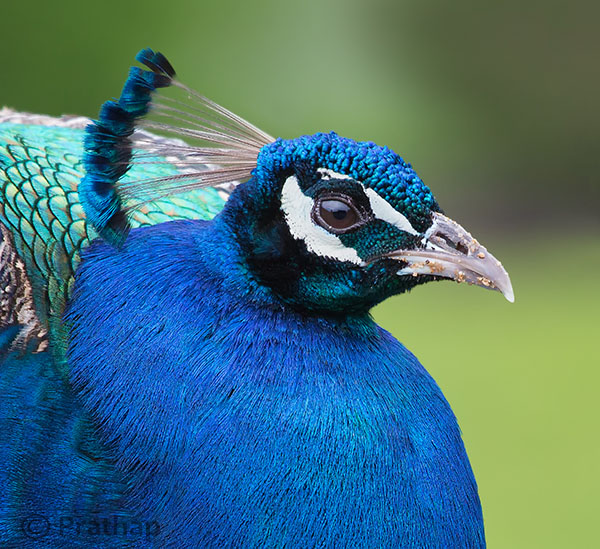
0 Nature Photography Simplified Bird Photography Post Processing Tips Peacock Portrait Featured Image

You can achieve most artistic results in post-processing that are simply not possible in reality. But, being a bird photographer you do not often get a chance to post-process your bird photographs artistically. Why?

Since the viewer would have seen the bird in reality, it is easier to compare to what is presented in a photograph. Bird photography is generally about showing the bird and its natural beauty not enhancing it artistically to achieve something else!
It is very similar to taking photograph of a person. Do you want to show the person as they are, or do you want to make them look someone else?

Does this mean, you have to just keep it real?

Not necessarily. But any enhancement in post-processing to make a bird or its features look beautiful has to be done with lot more care than if it was a landscape photograph for instance.

Remember that the mistakes will be caught easily!

Below I am listing the five post-processing mistakes that you, as a bird photographer, should avoid because they are unforgiving.
Committing any of these mistakes may ruin your bird photograph, and you definitely do not want to ruin your hours and days of effort in getting that one photograph you love. Do you?

Mistake #1: It’s cropped too tight

There is an ongoing debate about whether to crop or to get everything perfect in field. Though it is desirable to compose in the field, cropping in the post becomes necessary many a times in bird photography because of several factors like:

  • Not enough time to compose the fast action that unfolds in split seconds
  • Not enough focal length to fill the frame
  • Not enough time to compose an image especially in case of birds in flight

If you can improve the composition, then go ahead and crop the image. But too often, I see lot of bird photographers crop it too tight which makes the bird suffocate in the frame and the image look cramped.

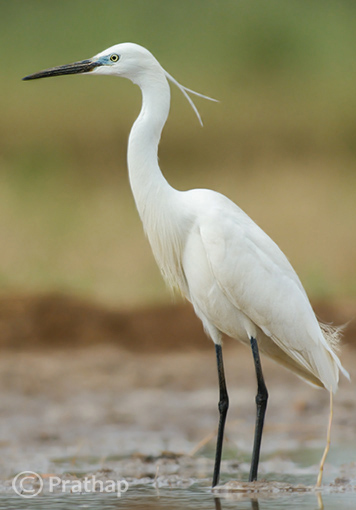
1-Nature-Photography-Simplified-Bird-Photography-Post-Processing-Tips-Too-Tight-Crop

The little Egret in this photograph looks suffocated because there is no breathing space in front to look into, and no space to move which makes it look cramped.

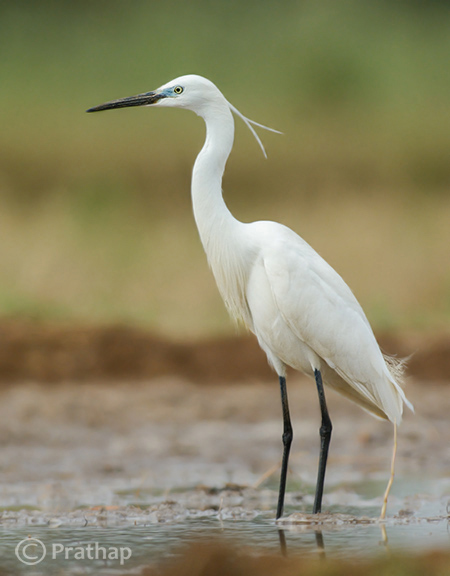
2-Nature-Photography-Simplified-Bird-Photography-Post-Processing-Tips-Little-Egret

Notice how a little bit more space around the bird gives him room to look into and move. It is more pleasing to our eyes also.

Quick Tip: Use the Rule of Thirds as a guideline.

Mistake #2: It’s unrealistic

The clarity slider in Adobe Lightroom is such a lethal weapon that is hard to replicate even with Adobe Photoshop. It enhances the local contrast in an image, which is one of the most important aspects of processing. Too much local contrast makes an image looks unrealistic as it tends to sharpen.

The soft and smooth feeling of the smallest details in feathers of the bird starts to look very unrealistic.

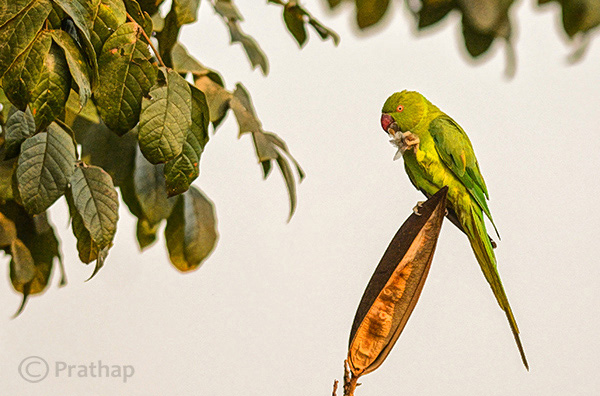
3 Nature Photography Simplified Bird Photography Post Processing Tips High Local Contrast

Notice how unrealistic the Parakeet looks in the above image. Even the leaves look like plastic.

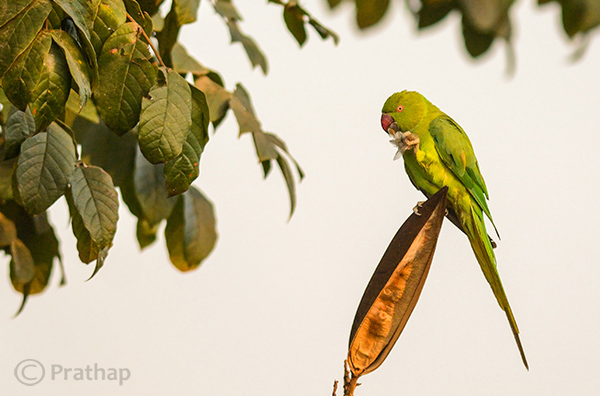
4 Nature Photography Simplified Bird Photography Post Processing Tips Rose Ringed Parakeet Female

Just enough local contrast (usually Clarity of +20 to +30) will bring out all the details in the bird.

Quick Tip: Instead of using your mouse to pull the Clarity slider, use keyboard arrows and watch the changes as you bump up the clarity. Restrict to the smaller numbers like +10 to +30.

Mistake #3: Everything is overly colorful

Over-saturated images are everywhere!

Birds are definitely colorful subjects and that is the reason we are all attracted to them. But are they so colorful?
Too much saturation looks overcooked. If you try to increase the contrast as a last step in your post-processing workflow (which is usually recommended), then it will also increase the saturation.

Note that Saturation slider increases the overall saturation of the image making everything in the image colorful. Do you really want everything in the image looking colorful? Do you want to emphasize the bird or the background?

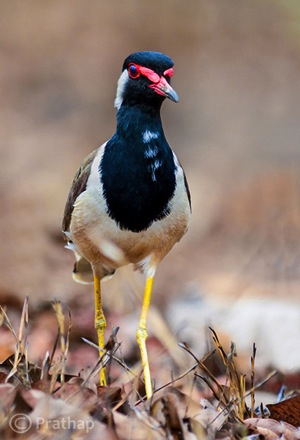
5 Nature Photography Simplified Bird Photography Post Processing Tips Over Saturated

Everything in the above photograph of a Red-Wattled Lapwing is colorful. It is way too colorful.

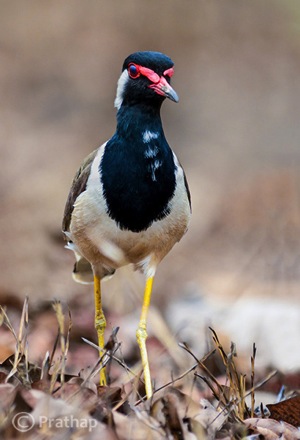
6 Nature Photography Simplified Bird Photography Post Processing Tips Red Wattled Lapwing

In the above photograph I have selectively increased the Saturation only for the bird in Adobe Photoshop.

Quick Tip: Use selective coloring. Saturate only the colors or object that are very important. Use the HSL panel or the adjustment brush to apply the color.

Mistake #4: The bird looks like a wax statue

Have you seen a wax statue of a bird in a shop? You can also see them on the web. Excessive noise reduction will give a plastic or wax statue look to your bird photographs.

While it is important to reduce the noise because most often we have to bump up the ISO to 400 or 800 to freeze the action, it is also important to understand what the Noise Reduction filter does. It The smoothes out the edges, by smoothening out the minute and important details of the image and the bird.

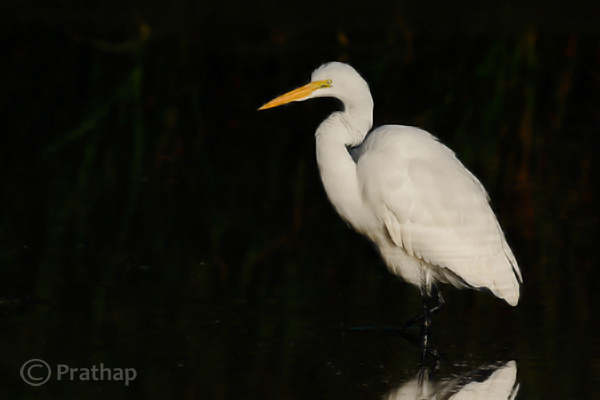
7 Nature Photography Simplified Bird Photography Post Processing Tips Waxing

The above image of a Great Egret has a waxy look because of the excessive noise reduction applied to the entire image. Remember that the water looses texture due to excessive noise reduction giving it an artificial look.

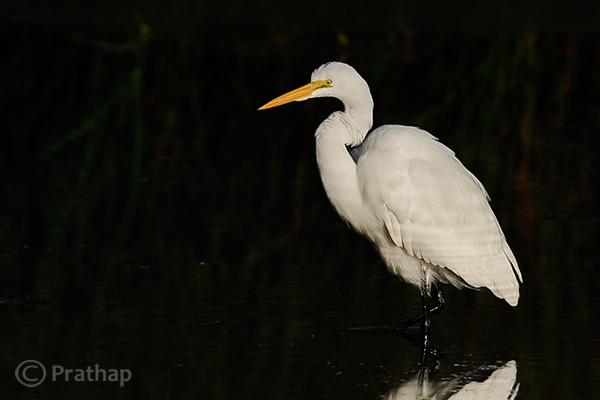
8 Nature Photography Simplified Bird Photography Post Processing Tips Great Egret

By reducing the noise only in the out-of-focus or low detailed or shadow regions of the image, it will help to keep the details intact.

Quick Tip: Reduce the noise only in the smooth areas (like the background) since noise is generally not visible in the high detailed areas (like the bird’s body).

Mistake #5: Too much is bad

Too much is bad in anything that we do. Pushing any post-processing slider too far will yield a bad image. But the most important one that is noticeable with many bird photographs, is that it is over-sharpened. No matter how good your post processing skills are, if you make this one mistake, there is no way out.

Over-sharpening kills a photograph. Period.

It is better to keep it little less sharp than to go too far and be overly sharp.

9 Nature Photography Simplified Bird Photography Post Processing Tips Over Sharpened

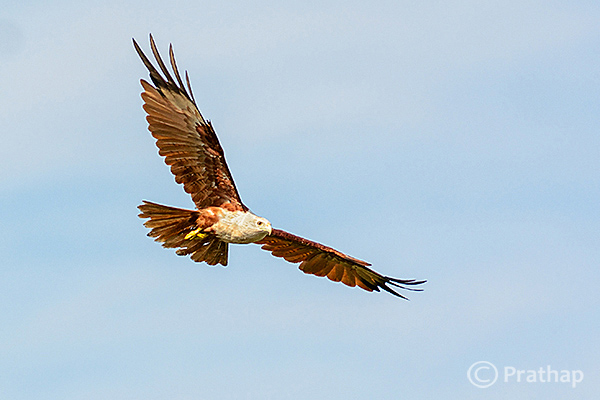
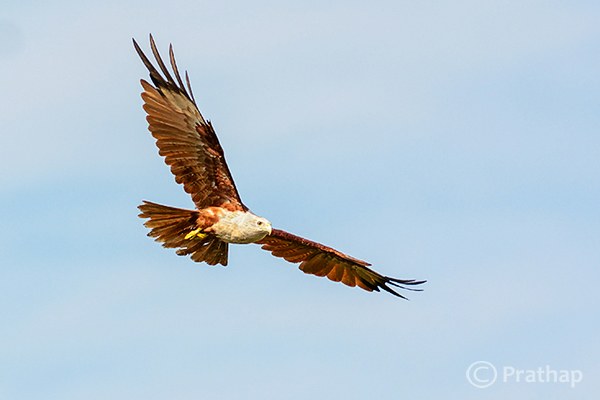
The features of the Brahminy Kite are way sharper than what they should be. Also check out the halo around the bird formed due to sharpening on the overall image.

10 Nature Photography Simplified Bird Photography Post Processing Tips Brahminy Kite In Flight

Quick Tip: Apply sharpening only to the bird but not to the background.

Final words

These are some of the major mistakes that should be avoided. Because they are unforgiving and can potentially ruin your best photographs. The best way to avoid these mistakes is to keep a small checklist to see if you have committed any and correct them immediately. With practice, you will easily avoid all of them.

Now, it’s your time to tell me the mistakes that you think should be avoided. What mistakes have you made in post-processing? Feel free to add your opinion on this subject but please make sure it is productive and helpful to all our readers.

The post 5 Unforgiving Post-Processing Mistakes Every Bird Photographer Must Avoid by Prathap DK appeared first on Digital Photography School.

Digital Photography School

 
Comments Off on 5 Unforgiving Post-Processing Mistakes Every Bird Photographer Must Avoid

Posted in Photography


Who Are You as a Photographer?

27 Oct

Unpaid

This is a shot I did on my own for my portfolio. In other words, it was unpaid.

Who am I? This is a question that I ask myself all the time. What kind of photography do I do? Since I am inspired by so many different photographers, across multiple genres (fashion, portrait, photojournalist, product, commercial), it can get hard for me to remember that I can’t be all things to all people, or clients.

For the sake of time, I’ve had to learn to narrow down the types of photography that I will pursue. It takes a considerable amount of time and energy to pursue new clients, to test the waters of a different area of photography.

For example, if you’ve shot primarily weddings and families for the past few years, it will take a lot of time and hard work for you to transition over to the commercial photography world. There’s a whole other language to the commercial world. Words like Prepro Doc, Hero Shot or Call Sheet may be foreign to you. The shooting process is also different, since you are likely working with a creative director before you ever even talk to the client. You also won’t get paid in advance, like you do with a wedding. In fact, I typically have to wait 30-60 days after I shoot the job to receive payment. You’ll likely need to know how to shoot with your camera tethered to a computer. You’ll need to know how to put together a quote, including usage fees. You’ll need to be able to assemble a team, including a hair stylist, makeup artist and stylist. You’ll need to have a separate website for your non-wedding photography and decent SEO for it (which can take years to build) so that new clients can find your work. You’ll need to have a decent commercial portfolio on that non-wedding site to entice creative directors, once they find their way to your site. It’s a lot to think about.

Beyond choosing what areas of photography you are going to pursue, you need to consider what image you are putting out in to the world. If a new visiter were to come to your website or blog, what would they see? Would they see a random smattering of subjects, styles and executions or would they see a focused style, or signature, to the way you compose, light and edit your images? Take photographer Nadav Kander, for example. He’s a portrait and commerce photographer based in London, England. He is not only one of my favorite photographers, but his portraits are also some of the most easily recognizable because of his unique lighting and processing. The same applies to Neil Krug, Martin Schoeller and Dan Winters, some of my other favorite photographers.

While you are in the process of determining which market(s) you want to focus on and you start to bring in to focus a signature style to your work, you need to factor these elements in to the types of clients you take, the kind of unpaid work you shoot for leisure or for your book and which images you show to the world, via social media and your website. For example, you may have the opportunity to shoot for a shoe company, a hair salon, or your kid’s soccer team, and the money is right (as in you’re hard up for cash and it pays the same day). Just because you took the gig and executed it well doesn’t mean that the images need to go on your website or blog. It may not fit in with your other images or be an area of photography you want to delve into, and that’s okay. That doesn’t make you a sell out.

Didntblog

This is from a shoot I did for a well-paying, super kind client. However, since it’s not the type of work that I want to pursue, I didn’t post any of the images on my blog.

Let’s say, for example, that you are trying to transition to the world of fashion photography. You aren’t going to start landing gigs with agencies and magazines just because you updated your bio, listing yourself as a fashion photograher. You need images – great images at that – in your portfolio to show magazine editors or modelling agencies. This means that you will need to shoot these on your own time, for likely little or no money. And once you get those first few shoots under your belt, pick a select FEW images from those shoots (read less than ten) to put on your blog and social media and ONE image from the each shoot to put on your website. Otherwise, if a client goes to your site and sees multiple images that are obviously from the same shoot, they can only assume that you aren’t very experienced in the area of fashion photography and that you’ve only done a couple shoots. You also want to make sure to shoot in a variety of settings, using a variety of different models while utilizing a variety of techniques.

Blog

These are the three images (above) that I chose to put on my blog from a recent book-building (unpaid) photo shoot that I did for my portfolio.

Port

Note the highlighted image (above) is the only image from this shoot that made it onto my website.

This process is of focusing your photography path and carving out your signature look is not a quick one. It’s been almost ten years since I graduated from college with a fine art photography degree and only within the last three or four years have I been able to start to narrow down what makes up my signature look and figure out what type of work I want to pursue. I mentioned earlier that I can’t be all things to all clients, nor do I want to be. The thought of conforming each photoshoot I do to the whims of a client’s mood board is an exhausting thought. Instead, now that I know who I am and what my style is, I can be confident that people are approaching me to shoot a job because they want me specifically. This also gives my voice more weight with a client when deciding which direction the shoot should take. Another way to ensure that you are being chosen for your style is that your prices are competitive with other photographers in the market, and the client isn’t simply choosing you because you’re the most affordable.

Myinput

This is a shot (above) I did for the cover of a local food magazine. The cover story was about edgy, high-end burgers. The editor initially asked for a photo-illustration without any people in the photo. By the end of the discussion, he went with my idea, which you can see is completely different than the editor’s original idea.

Now that I have a tightly edited portfolio, full of images that show a range of the work that I am willing and able to do, I can more easily say no to a job if it doesn’t fit in with my brand. Let’s say that a client approaches me to shoot a sexy swimsuit or lingerie editorial. I would politely decline because that’s not a part of my vision for my brand. Besides, there are plenty of talented photographers who do this exact area of work and would be happy to take the gig. Not to mention, me being a 30-something married man with a young daughter is not the image that comes to mind when I picture a swimwear or boudoir photographer. I imagine a young woman (or man) that lives and breathes sexiness. Meanwhile, I stick to what I’m passionate about.

Paid

This last image is a shot I did Charles Penzone salon, who hired me over another photographer after they saw the top image from my unpaid photo shoot.

Do you know who you are as photographer? Can you share any tips for newbies still finding their way?

The post Who Are You as a Photographer? by Nick Fancher appeared first on Digital Photography School.

Digital Photography School

 
Comments Off on Who Are You as a Photographer?

Posted in Photography


Natural History Museum announces Wildlife Photographer of the Year 2014 winners

25 Oct

The Natural History Museum has announced winners of its 2014 Wildlife Photographer of the Year competition. This year’s winning photos document all manner of creatures, from a pride of lions in the Serengeti, to a yellow scorpion in the northeast of Spain. The competition recognizes both adult and youth winners and awards the top photo with £10,000 and a trophy. See gallery

Articles: Digital Photography Review (dpreview.com)

 
Comments Off on Natural History Museum announces Wildlife Photographer of the Year 2014 winners

Posted in Uncategorized


Around the world by bicycle with photographer Nicolas Marino

12 Oct

Nicolas Marino has been to 56 countries in his lifetime and has his sights set on the other 140. He’s traveling around the world with his camera and he’s not taking the easy way, crossing deserts, jungles and everything in between by bicycle. Why? In his words, ‘With a bicycle and a humble attitude you can travel to the heart of a culture.’ See gallery

Articles: Digital Photography Review (dpreview.com)

 
Comments Off on Around the world by bicycle with photographer Nicolas Marino

Posted in Uncategorized


Wildlife Photographer of the Year releases images from winners shortlist

11 Oct

Britain’s Natural History Museum has disclosed four of the winning images from the shortlist of the Wildlife Photographer of the Year competition. With a judging panel chaired by Jim Brandenburg, the competition attracted almost 42000 entries from 96 countries this year, and 100 of the best images will form a touring exhibition that the museum says will visit six continents. See gallery

Articles: Digital Photography Review (dpreview.com)

 
Comments Off on Wildlife Photographer of the Year releases images from winners shortlist

Posted in Uncategorized


Astronomy Photographer of the Year 2014 winners announced

26 Sep

The Royal Observatory Greenwich has announced the winners of 2014’s Astronomy Photographer of the Year award, after a record number of entries from around the globe. UK astronomer James Woodend won the Overall prize, as well as the Earth and Space category, with his image ‘Aurora Over a Glacier Lagoon’. See gallery

Articles: Digital Photography Review (dpreview.com)

 
Comments Off on Astronomy Photographer of the Year 2014 winners announced

Posted in Uncategorized