RSS
 

Posts Tagged ‘Photo’

My Most Unique Photo of Yosemite Yet

01 Apr

Yosemite Tunnel View

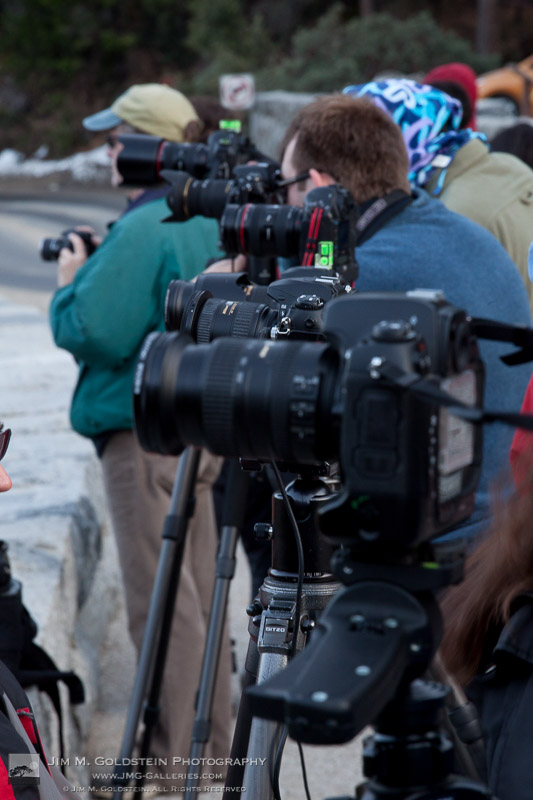
After spending days researching one of my favorite photo locations on Flickr, Instagram and 500px and then tracking down the almost exact location through shared camera GPS data I drove 5 1/2 hours to capture this amazing Yosemite view that is destined to be a centerpiece of my landscape portfolio. Just when I thought I was the only person who might have thought of capturing this unique vantage point I ran into my friend Colleen Miniuk-Sperry as I was leaving. Apart from some brief small talk as I left, my friend Colleen took my spot in the photographer lineup (after all it was standing room only) to capture her own unique take of this iconic view. I highly recommend seeing her photo on her blog You Can Sleep When You’re Dead.

Yosemite Tunnel View Photographer Line Up

Happy April 1st – Creative Debt

Copyright Jim M. Goldstein, All Rights Reserved

My Most Unique Photo of Yosemite Yet

The post My Most Unique Photo of Yosemite Yet appeared first on JMG-Galleries – Landscape, Nature & Travel Photography.


Related Stories

  • My Most Unique Photo of Yosemite Yet – Enclosure
  • Before the Tempest, Yosemite
  • Before the Tempest, Yosemite – Enclosure
Feed Ads by FeedBlitz
powered by ad choices


JMG-Galleries

 
Comments Off on My Most Unique Photo of Yosemite Yet

Posted in Equipment


Photo History and How to Repeat It

31 Mar

Know your history, or you’re doomed to repeat it?

Nah, we’ve learned our photo history and we’re happy to repeat it.

Check out our timeline of photo trends, pick up some tips on how to recreate historic looks on your phone. Try your hand at 1930s colorization or go back to that 70s film grainy goodness.

Learn your history, and repeat away!

Learn From the Last 100 Years of Photography
(…)
Read the rest of Photo History and How to Repeat It (1,172 words)


© laurel for Photojojo, 2015. |
Permalink |
No comment |
Add to
del.icio.us

Post tags:


Photojojo

 
Comments Off on Photo History and How to Repeat It

Posted in Equipment


Overview of the New Affinity Photo Editing Software

29 Mar

In early February, software company Serif announced the free beta version of Affinity Photo, a Mac-only photo editing program said to rival the likes of other editing tools, including the standards for creative professionals, Adobe Photoshop and Lightroom. In this article, I’ll walk through the public beta version of Affinity Photo and describe some pros and cons to using this new software.

Affinity Photo Basics
Affinity Photo editing software for MacAt the moment, Affinity Photo beta is available as a free online download and is compatible with Apple OSX Lion 10.7.5, and up. Some key features that move Affinity up in the ranks include support for CMYK color, RAW file processing, 16-bit editing, 64-bit Photoshop plug-in compatibility, ICC color management, and LAB color. A few other noteworthy tools include Affinity Photo’s Inpainting feature, which is essentially the equivalent of Adobe content-aware fill, and real-time editing that will apply edits instantly without the need to render a preview.

It’s uncertain when Affinity Photo’s full version will launch, but when it does it will be available for purchase in the Mac App Store for about $ 49.99. A Windows/PC version of the app is said to be in works, but again no solid timeline is available.

Pro: Speed and reliability

The first feature of the tool that really stood out was its speed and reliability. Affinity Photo is extremely fast and it never once crashed during the seven times I used it, which is impressive for a beta version. The tool’s speed is accredited to it being built on an entirely new and modern codebase, unlike Adobe Photoshop, which recently celebrated its 25 year anniversary and thus has been built on architecture that is also a couple decades old.

Con: Default RAW file conversion

One of the most striking differences that I immediately noticed was the default adjustment that Affinity Photo made to my RAW image when I first imported it. While these defaults could likely be adjusted to taste, I was surprised at how drastically Affinity altered my image when all I did was import it.
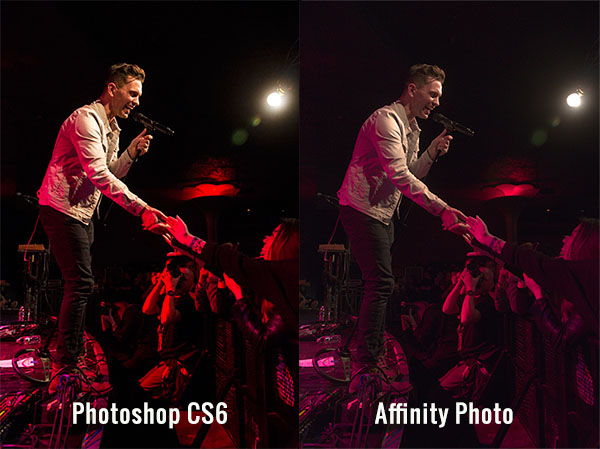
Affinity Photo editing software for Mac

Pro: Easy access to basic photo editing tools

The interface, and ease of use, is where Affinity Photo really shines. Despite being a longtime Photoshop user, I’ll admit that its layout can be overly complicated, presenting too many tools that are beyond the scope of basic photo edits. While Affinity’s interface definitely borrows some features from Photoshop, its basic layout is relatively straightforward and easy to understand without requiring a ton of customization. The top bar below the menu shows all of the basic details of your photo (file format, ISO, shutter speed, aperture, etc.), which is something that seemed rather hidden and hard to find in Photoshop.

Basic editing tools are presented in the right hand panel under the histogram, the tools are nicely labeled, and easy to adjust with sliders. There is also a History tab that, in the same way that Photoshop does, keeps track of every edit, making it easy to track and reverse any changes. Hardcore photo retouchers might find these editing tools to be lacking, but for beginners or photographers in need of basic edits, these tools will get the job done in a straightforward manner.
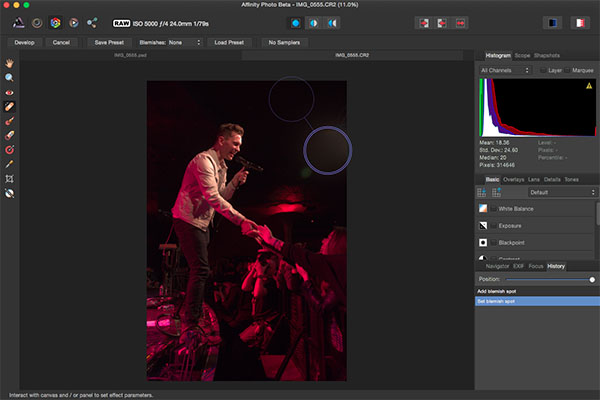
Affinity Photo editing software for Mac

As a photographer who shoots almost exclusively in RAW, I’ve grown accustomed to the seamless integration of Camera RAW with Photoshop and Lightroom’s smooth handling of RAW image conversion. The way that Affinity handles RAW editing took a bit of troubleshooting, but was straightforward when all was understood.

Initial RAW Editing Tools

When you first open a RAW file into Affinity, there are distinctly fewer editing options and adjustments to choose from. The Basic tab offers easy access to make basic adjustments to white balance, exposure, contrast, shadows and highlights, clarity, vibrance, and black points. What was curiously missing from this panel were saturation and tint control. The Lens tab offers adjustments for lens correction, chromatic aberration reduction, vignettes, and defringing. The Details tab allows for detail refinement, noise reduction, and noise addition. The Tones tab is where you can adjust curves, split toning, and black and white image conversion. In this mode, the left hand panel also has a vertical tool bar reminiscent of Photoshop’s, but when editing RAW files, it is noticeably much sparser containing just 10 tools versus the 20+ tools in Photoshop.

Unlocking the Full Editing Menu

In order to unleash Affinity Photo’s full set of editing tools, it’s essential to click the small Develop button in the upper left hand corner of the RAW image editing window. This will transform Affinity’s interface dramatically to more closely resemble that of Photoshop. If you work exclusively with JPGs, this step will automatically be done for you upon the uploading of the JPG image, but this is an extra step when working with RAW files that to me was not so intuitive.
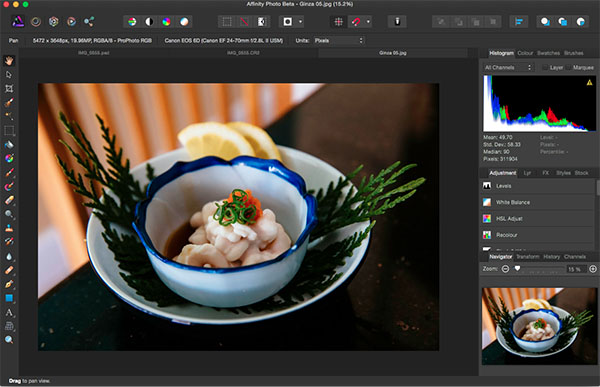
Affinity Photo editing software for Mac

Within the full Affinity Photo interface, you no longer get the image EXIF data in the menu bar, but instead a full row of icons that offer shortcuts to quick edit features such as auto white balance, contrast, and color. There are also several icons on the right that describe different personas such as Liquify, Develop and Macro Persona. A couple of these were not yet available in thw beta version, but clicking on the Liquify Persona offered just about the same editing tools and capabilities that Photoshop’s liquify feature does. For the sake of demonstration, the below image shows off the use of Affinity’s Liquify Twirl Tool, which was intuitive and easy to use.
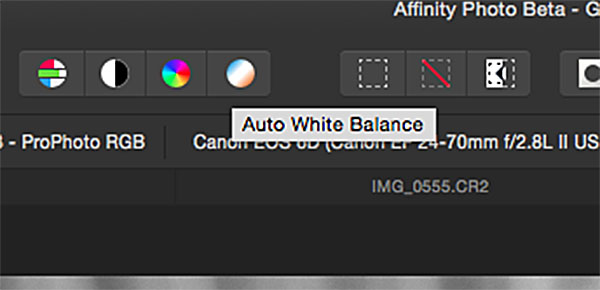
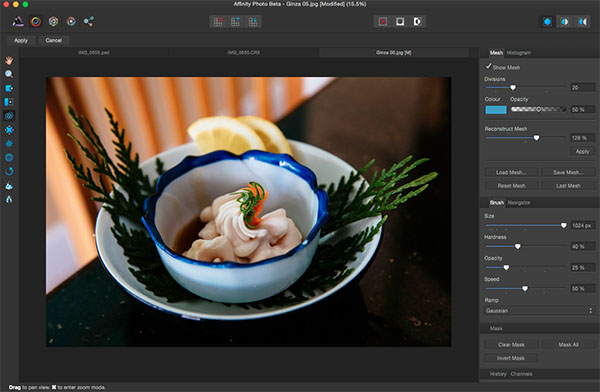
Affinity Photo editing software for Mac

Affinity Photo editing software for Mac

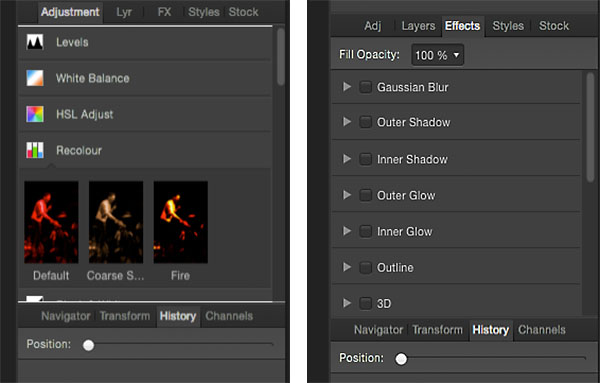
Note that the left hand tool bar is significantly longer offering; paint brushes, clone tools, dodging and burning, text overlays, and much more. The right hand editing tool panel is also laid out differently with tabs including Adjustment, Layers, Effects, and Styles. Want to add a Gaussian blur or 3D effect to your image? Just head over to the Effects tab and check the box next to the desired effect, and it is instantly applied as opposed to hunting around menus or creating an action as you would do in Photoshop.
Affinity Photo editing software for Mac

Closing Thoughts

It’s not often that a platform emerges to go head-on with Adobe, but so far Affinity Photo is setting itself up as a professional-grade app. While there are many high level features for advanced photo editing, there are also lots of basic photo editing tools that are intuitively positioned, making Affinity much more approachable for beginning or amateur photographers.

Whatever the fate of Affinity Photo, the fact that companies like Serif are working on platforms to advance the process of photo editing adds healthy competition to an industry that has long been dominated by big players like Adobe and will hopefully give photographers more options in the future.

Have you tested out Affinity beta yet? If so, what are your thoughts about what works well, and what could be improved?

googletag.cmd.push(function() {
tablet_slots.push( googletag.defineSlot( “/1005424/_dPSv4_tab-all-article-bottom_(300×250)”, [300, 250], “pb-ad-78623” ).addService( googletag.pubads() ) ); } );

googletag.cmd.push(function() {
mobile_slots.push( googletag.defineSlot( “/1005424/_dPSv4_mob-all-article-bottom_(300×250)”, [300, 250], “pb-ad-78158” ).addService( googletag.pubads() ) ); } );

The post Overview of the New Affinity Photo Editing Software by Suzi Pratt appeared first on Digital Photography School.


Digital Photography School

 
Comments Off on Overview of the New Affinity Photo Editing Software

Posted in Photography


Amazon launches unlimited cloud photo storage for $11.99 per year

27 Mar

Amazon has announced two new ‘unlimited’ storage plans as part of its Cloud Drive service. The Unlimited Photos plan costs $ 11.99 per year and an ‘Unlimited Everything’ plan allows users to store an infinite number of photos, videos, documents and music for $ 59.99 per year. Both services can be tried out for free for three months, starting now. Click through for more information 

Articles: Digital Photography Review (dpreview.com)

 
Comments Off on Amazon launches unlimited cloud photo storage for $11.99 per year

Posted in Uncategorized


Priime, The Best iPhone Photo Editor I’ve Ever Used

20 Mar

Priime is Liive -- Get It While It's Hot

Disclosure, I am an advisor to Priime and have styles included in their style marketplace.

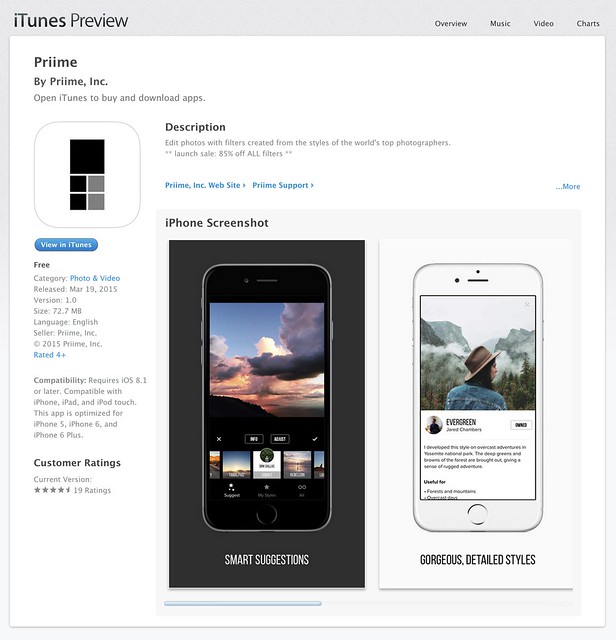
Boom. Just a few hours ago Priime went live in the Apple iTunes App Store and already on launch day Apple is featuring it in their best new apps section.

What is Priime?

Priime is the best mobile phone editor I’ve ever used. I’ve been using it behind the scenes for the past few months and am blown away by how much better it is than anything else out for mobile editing today. The free app features a powerful suite of editing tools allowing you to enhance a lot of the basics around your photos: brightness, structure, contrast, warmth, tint, saturation, sharpness, highlights/shadows, vignette and fade. The app can also save photos up to 50 megapixel in size! I don’t know of any other app that can let you output such high res photos.

In addition to these tools, Priime has currated some of the best mobile photo styles available. These are styles developed by photographers for photographers. I have two styles for sale in the Priime marketplace — Americana and Neon. Neon can be a particularly tricky thing to shoot sometimes. I’ve taken over 10,000 photos of neon signs and this is my best attempt at an overlay that works especially well for signs.

The app gives you some great free starter styles. It will also make suggestions for what styles may work best with your photo after analyzing it.

In addition to my styles, Priime features styles developed by 30 other insanely talented photographers, each with their own unique way of processing the world through their iPhone.

Daniel Krieger, who shoots for the NY Times, is probably the best working food photographer in the world right now. If you are going to take photos of food, you are definitely going to want to get his filter. Vivienne Gucwa just put out a fantastic book of New York City photographs and has some amazing styles as well.

There is no Android version yet (it is on the roadmap), but the app is compatible with iPhone, iPad, and iPod touch.

One of the things that I think makes Priime different from other photo editing apps is that it was actually developed by photographers. I have known Art Chang for several years. We went and shot Death Valley with a bunch of Google+ photographers 4 years ago. He’s an amazing photographer and has especially done cool things with mobile. His Instagram stream is here. Art has a love for photography that I think gives the app a unique photographer driven perspective and street cred. Art’s co-founders are also all photographers — Loren Baxter, Andrew Ng and Joe Pestro.

Priime is sharing the revenue for their styles with the photographers who have developed them. I think that is a really cool thing. I can’t wait to see what other photographers are added as time goes on.

Anyways, check out Priime in the iPhone App Store. Here is a direct link to the app here. I’d love to hear what you think of it. Remember it’s Priime with two ii’s. :)

My Styles in the New Release iPhone App Priime

Priime Featured in the Best New Apps Section of the iPhone App Store


Thomas Hawk Digital Connection

 
Comments Off on Priime, The Best iPhone Photo Editor I’ve Ever Used

Posted in Photography


Enlight for iOS launches with high-end photo editing tools

14 Mar

The developers behind Facetune have created a new app called Enlight, a general purpose image editor. It challenges apps like VSCO Cam and Adobe’s own mobile image editors, with adjustment tools, presets and various filters. Read more

Articles: Digital Photography Review (dpreview.com)

 
Comments Off on Enlight for iOS launches with high-end photo editing tools

Posted in Uncategorized


20 Fabulous Easter Decoration Ideas for Your Photo Session

13 Mar

Spring is here. It’s awesome time to make a few mini Easter photo sessions. So, today we put together 20 DIY Easter decoration tutorials which will help you to create a perfect deco stuff for your photo sessions. In this round-up you’ll find eggs garland, table runner with bunnies, flower wraps, decorations for mantelpiece, and many more items that will Continue Reading

The post 20 Fabulous Easter Decoration Ideas for Your Photo Session appeared first on Photodoto.


Photodoto

 
Comments Off on 20 Fabulous Easter Decoration Ideas for Your Photo Session

Posted in Photography


Stuck Inside?Indoor Photo Ideas Save the Day

12 Mar

Non-stop snow have you stranded indoors? Or maybe the flu has you quarantined?

Either way, keep hold of your camera ’cause there’s tons of cool stuff to photograph right there under your own roof!

If you’re not sure where to start, we’ve got ideas to help you get the ball rolling, from shadows on the wall to everything macro. Together we’ll prove that there’s no need to go far for a great shot. It’s right around the corner. Literally!

4 Ideas For Stuck-At-Home Photos 

(…)
Read the rest of Stuck Inside?
Indoor Photo Ideas
Save the Day (443 words)


© Taylor for Photojojo, 2015. |
Permalink |
No comment |
Add to
Indoor Photo Ideas
Save the Day”>del.icio.us

Post tags:


Photojojo

 
Comments Off on Stuck Inside?Indoor Photo Ideas Save the Day

Posted in Equipment


World Press Photo revokes prize from Giovanni Troilo

06 Mar

Following an investigation into Contemporary Issues winner Giovanni Troilo’s photo story ‘La Ville Noir – The Dark Heart of Europe,’ World Press Photo has stripped the photographer of his prize. The organization found Troilo to be in violation of contest rules – specifically, a photo he submitted that he alleged to have been taken in the Belgian city at the heart of the project turns out to have been taken in Sint-Jans-Molenbeek, Brussels. Read more

Articles: Digital Photography Review (dpreview.com)

 
Comments Off on World Press Photo revokes prize from Giovanni Troilo

Posted in Uncategorized


10 Inspiring Photo Documentaries Worth Your Time

04 Mar

As we try to find inspiration in our environment that fuels our desire and imagination as artists, we each develop our own style. Sometimes, you may find yourself feeling stuck creatively. Or you might be enthusiastic about taking photos but be unsure where to focus your energy and enthusiasm. If that’s the case, you might profit from a little history Continue Reading

The post 10 Inspiring Photo Documentaries Worth Your Time appeared first on Photodoto.


Photodoto

 
Comments Off on 10 Inspiring Photo Documentaries Worth Your Time

Posted in Photography