RSS
 

Posts Tagged ‘Photo’

Canon USA unveils RAISE, an online photo platform with AI-powered features

02 Mar

Canon USA has launched RAISE, its first online photo community. The platform offers photographers a destination for storing their images, which are organized using Canon’s artificial intelligence engine. Users have the option to create Collections for privately sharing images with others outside of the community, and they can browse other users’ images via a personalized feed.

RAISE’s most notable feature is its AI-powered organization, which includes auto-tagging images with the subject, category, color, style, composition, and emotion. Canon designed the platform for more than just uploading images, however, with Canon USA President Kazuto Ogawa explaining, ‘Creativity is born from community – from collaboration with like-minded individuals. With RAISE, we are building that community for photographers.’

Photographers have the option of publicly sharing their work with the RAISE community. Images can be uploaded in high-resolution JPEG format, and starting in March, Canon will release a RAISE plugin for Adobe Lightroom Classic CC. The company says its users retain ownership of images uploaded to the platform.

Canon is showcasing RAISE at the Wedding Portrait & Photography Show in Las Vegas through March 1, 2019.

Articles: Digital Photography Review (dpreview.com)

 
Comments Off on Canon USA unveils RAISE, an online photo platform with AI-powered features

Posted in Uncategorized


Kodak’s photo service KodakIt criticized for stripping photographers of copyrights

27 Feb

Renewed controversy surrounds Eastman Kodak subsidiary KodakIt, a service launched in 2017 as a way to provide businesses with on-demand access to photographers around the globe. The service was criticized in its early days for offering very low payments, but a new report from PDN highlights another problem: it requires photographers to completely surrender their copyrights.

A report from PDN digs into KodakIt’s ‘Photographer Terms and Conditions,’ noting that it requires its photographers to ‘perpetually and irrevocably’ hand over their copyright to the client who purchased the work — in fact, it specifies ‘the entire copyright’ and all rights associated with it.

Photographers are required to get permission from KodakIt and the client before using any images — including outtakes — for personal promotion. As well, the ‘Photographer Terms and Conditions’ requires KodakIt’s photographers to either destroy or surrender to the client any outtakes from the project.

KodakIt’s restrictions continue from there, also including a ‘Moral Rights Waiver’ as part of its terms and conditions. Under this, the service’s photographers are required to waive all ‘moral rights’ to the work, which includes claiming they shot the images and in any way interfering with ‘the modification or destruction of a work.’

A full copy of the Photographer Terms and Conditions, which was valid as of July 1, 2018, can be found here [PDF].

Articles: Digital Photography Review (dpreview.com)

 
Comments Off on Kodak’s photo service KodakIt criticized for stripping photographers of copyrights

Posted in Uncategorized


Slideshow: World Press Photo announces nominees for its 2019 Photo Competition

25 Feb

2019 World Press Photo of the Year Nominees

Editors note: There are images in the above gallery that are considered graphic and explicit in nature. Keep this in mind while looking through the gallery.

World Press Photo has announced the nominees for its 2019 Photo Contest. The contest, which is in its 62nd year, celebrates the work of photojournalists around the world who have captured profound images that depict defining moments throughout the year.

78,801 photographs from 4,738 photographers were considered and the 43 nominees hail from 25 countries around the world.

The nominated photos fall under two headline awards: ‘World Press Photo of the Year’ and ‘World Press Photo Story of the Year,’ the latter of which showcases a series of images from a particular assignment or project from photojournalists around the world. There are eight additional categories, each of which has its own set of nominees: Contemporary Issues, Environment, General News, Long Term Projects, Nature, Portraits, Sports and Spot News. Each of these categories have the sub-categories of single picture entries and story entires with the exception of Long Term Projects, which is a series.

We’ve rounded up the single picture nominees for each category in the gallery above. Along with the image will be a caption and accompanying backstory provided by the photographers and edited for clarity and brevity by World Press Photo.

The winning photos and stories will be announced at the World Press Photo Award Show on April 11th in Amsterdam. All winners are chosen from an independent jury from a wide range of photo backgrounds.

2019 World Press Photo of the Year Nominees

Victims of an Alleged Gas Attack Receive Treatment in Eastern Ghouta | © Mohammed Badra, European Pressphoto Agency

Victims of an Alleged Gas Attack Receive Treatment in Eastern Ghouta | © Mohammed Badra, European Pressphoto Agency

Caption: A man and a child receive treatment after the suspected gas attack on al-Shifunieh, 25 February 2018.

Story: By February 2018, the people of Eastern Ghouta, a suburban district outside Damascus and one of the last rebel enclaves in the ongoing Syrian conflict, had been under siege by government forces for five years. During the final offensive, Eastern Ghouta came under rocket fire and air bombardment, including at least one alleged gas attack—on the village of al-Shifunieh, on 25 February 2018. Figures are difficult to verify, but Médecins Sans Fronti?res (MSF) reported 4,829 wounded and 1,005 killed between 18 February and 3 March 2018, according to data from medical facilities they supported alone. MSF also reported 13 hospitals and clinics damaged or destroyed in just three days. Reports on the end of the siege in Eastern Ghouta are conflicting, though the Syrian army appear to have recaptured most of the south of the country by July. UNICEF reported the siege of Eastern Ghouta to have ended by late-March, with limited humanitarian access becoming available.

2019 World Press Photo of the Year Nominees

Almajiri Boy | © Marco Gualazzini, Contrasto

Almajiri Boy | © Marco Gualazzini, Contrasto

Caption: An orphaned boy walks past a wall with drawings depicting rocket-propelled grenade launchers, in Bol, Chad.

Story: A humanitarian crisis is underway in the Chad Basin, caused by a complex combination of political conflict and environmental factors. Lake Chad—once one of Africa’s largest lakes and a lifeline to 40 million people—is experiencing massive desertification. As a result of unplanned irrigation, extended drought, deforestation and resource mismanagement, the size of the lake has decreased by 90 percent over the past 60 years. Traditional livelihoods such as fishing have withered, and water shortages are causing conflict between farmers and cattle herders. Jihadist group Boko Haram, which is active in the area, both benefits from the hardship and widespread hunger and contributes to it. The group uses local villages as a recruiting ground, and the protracted conflict has uprooted 2.5 million people, exacerbating food insecurity.

The Lake Chad Crisis was funded by InsideOver.

2019 World Press Photo of the Year Nominees

Being Pregnant After FARC Child-Bearing Ban | © Catalina Martin-Chico, Panos

Being Pregnant After FARC Child-Bearing Ban | © Catalina Martin-Chico, Panos

Caption: Yorladis is pregnant for the sixth time, after five other pregnancies were terminated during her FARC years. She says she managed to hide the fifth pregnancy from her commander until the sixth month by wearing loose clothes.

Story: Since the signing of a peace agreement between the Colombian government and the FARC rebel movement in 2016, there has been a baby boom among former female guerillas. Pregnancy was thought incompatible with guerrilla life. Women were obliged to put war before children, leaving babies with relatives or, some say, undergoing forced abortions—a charge FARC denies.

2019 World Press Photo of the Year Nominees

The Disappearance of Jamal Kashoggi | © Chris McGrath, Getty Images

The Disappearance of Jamal Kashoggi | © Chris McGrath, Getty Images

Caption: An unidentified man tries to hold back the press on 15 October, as Saudi investigators arrive at the Saudi Arabian Consulate in Istanbul, Turkey, amid a growing international backlash to the disappearance of journalist Jamal Khashoggi.

Story: A critic of the Saudi regime, Khashoggi had been missing since entering the consulate on 2 October to obtain documents. After weeks of rumor and false information, Riyadh announced that Khashoggi had been killed accidentally during an altercation. Turkish authorities and the CIA claimed he had been murdered by Saudi intelligence operatives, working under high Saudi authority.

2019 World Press Photo of the Year Nominees

Crying Girl on the Border | © John Moore, Getty Images

Crying Girl on the Border | © John Moore, Getty Images

Caption: Honduran toddler Yanela Sanchez cries as she and her mother, Sandra Sanchez, are taken into custody by US border officials in McAllen, Texas, USA, on 12 June.

Story: Immigrant families had rafted across the Rio Grande from Mexico and were then detained by US authorities. Sandra Sanchez said that she and her daughter had been traveling for a month through Central America and Mexico before reaching the US to seek asylum. The Trump Administration had announced a ‘zero tolerance’ policy at the border under which immigrants caught entering the US could be criminally prosecuted. As a result, many apprehended parents were separated from their children, often sent to different detention facilities. After this picture was published worldwide, US Customs and Border Protection confirmed that Yanela and her mother had not been among the thousands who had been separated by US officials. Nevertheless, public outcry over the controversial practice resulted in President Donald Trump reversing the policy on 20 June.

2019 World Press Photo of the Year Nominees

Akashinga – the Brave Ones | © Brent Stirton, Getty Images

Akashinga – the Brave Ones | © Brent Stirton, Getty Images

Caption: Petronella Chigumbura (30), a member of an all-female anti-poaching unit called Akashinga, participates in stealth and concealment training in the Phundundu Wildlife Park, Zimbabwe.

Story: Akashinga (‘The Brave Ones’) is a ranger force established as an alternative conservation model. It aims to work with, rather than against local populations, for the long-term benefits of their communities and the environment. Akashinga comprises women from disadvantaged backgrounds, empowering them, offering jobs, and helping local people to benefit directly from the preservation of wildlife. Other strategies—such as using fees from trophy hunting to fund conservation—have been criticized for imposing solutions from the outside and excluding the needs of local people.

2019 World Press Photo Contemporary Issues Single Nominees

Afghan Refugees Waiting to Cross the Iranian Border | © Enayat Asadi

Afghan Refugees Waiting to Cross the Iranian Border | © Enayat Asadi

Caption: An Afghan refugee comforts his companion while waiting for transport across the eastern border of Iran, on 27 July.

Story: UNHCR reports that Iran has almost one million registered refugees, the vast majority from Afghanistan. In addition, more than 1.5 million undocumented Afghans are estimated to be present in the country. Many people fleeing violence, insecurity and poverty in Afghanistan find no alternative but to use illegal traffickers, along routes where they are exposed to robbery, kidnapping and death. Their aim is to pass through Iran and Turkey or Greece to seek a better life elsewhere, but trafficked refugees are highly vulnerable to forced labor, debt bondage, forced marriage, or work in the sex trade.

2019 World Press Photo Contemporary Issues Single Nominees

Male Rape | © Mary F. Calvert

Male Rape | © Mary F. Calvert

Caption: Former US marine Ethan Hanson bathes at home in Austin, Minnesota, USA, after a sexual trauma experienced during his military service left him unable to take showers.

Story: During a boot camp, Ethan and fellow recruits were ordered to walk naked through a communal shower while pressed together. Ethan reported the incident, but was harassed by the other men for doing so. Nightmares and panic attacks later forced him to resign. Recent Defense Department figures show sexual assault in the military to be on the increase. Servicemen are less likely than women to report sexual trauma, fearing retaliation or stigma.

2019 World Press Photo Contemporary Issues Single Nominees

The Cubanitas | © Diana Markosian, Magnum Photos

The Cubanitas | © Diana Markosian, Magnum Photos

Caption: Pura rides around her neighborhood in a pink 1950s convertible, as the community gathers to celebrate her fifteenth birthday, in Havana, Cuba.

Story: A girl’s quinceañera (fifteenth birthday) is a Latino coming-of-age tradition marking transition into womanhood. It is a gender-specific rite of passage, traditionally showcasing a girl’s purity and readiness for marriage. Families go to great expense, often celebrating with a lavish party. The girl dresses as a princess, living out a fantasy and perceived idea of femininity. In Cuba, the tradition has transformed into a performance involving photo and video shoots, often documented in a photobook. Pura’s quinceañera had a special poignancy, as some years earlier, having been diagnosed with a brain tumor, she was told she would not live beyond the age of 13.

2019 World Press Photo Environment Single Nominees

Living Among What’s Left Behind | © Mário Cruz

Living Among What’s Left Behind | © Mário Cruz

Caption: A child who collects recyclable material lies on a mattress surrounded by garbage floating on the Pasig River, in Manila, Philippines.

Story: The Pasig River was declared biologically dead in the 1990s, due to a combination of industrial pollution and waste being dumped by nearby communities living without adequate sanitation infrastructure. A 2017 report by Nature Communications cites the Pasig as one of 20 most polluted rivers in the world, with up to 63,700 tons of plastic deposited into the ocean each year. Considerable efforts are being made to clean up the Pasig, which were recognized by an international prize in 2018, but in some parts of the river the waste is still so dense that it is possible to walk on top of the garbage.

2019 World Press Photo Environment Single Nominees

Evacuated | © Wally Skalij, Los Angeles Times

Evacuated | © Wally Skalij, Los Angeles Times

Caption: Evacuated horses stand tied to a pole, as smoke from a wildfire billows above them, on Zuma Beach, in Malibu, California, USA, on 10 November.

Story: The 2018 wildfire season in California was the deadliest and most destructive on record, burning an area of more than 676,000 hectares. While scientists pointed to the vegetation-drying effects of climate change as a cause, US President Donald Trump blamed forest management.

2019 World Press Photo Environment Single Nominees

Akashinga – the Brave Ones | © Brent Stirton, Getty Images

Akashinga – the Brave Ones | © Brent Stirton, Getty Images

Caption: Petronella Chigumbura (30), a member of an all-female anti-poaching unit called Akashinga, participates in stealth and concealment training in the Phundundu Wildlife Park, Zimbabwe.

Story: Akashinga (‘The Brave Ones’) is a ranger force established as an alternative conservation model. It aims to work with, rather than against local populations, for the long-term benefits of their communities and the environment. Akashinga comprises women from disadvantaged backgrounds, empowering them, offering jobs, and helping local people to benefit directly from the preservation of wildlife. Other strategies—such as using fees from trophy hunting to fund conservation—have been criticized for imposing solutions from the outside and excluding the needs of local people.

2019 World Press Photo General News Single Nominees

The Disappearance of Jamal Kashoggi | © Chris McGrath, Getty Images

The Disappearance of Jamal Kashoggi | © Chris McGrath, Getty Images

Caption: An unidentified man tries to hold back the press on 15 October, as Saudi investigators arrive at the Saudi Arabian Consulate in Istanbul, Turkey, amid a growing international backlash to the disappearance of journalist Jamal Khashoggi.

Story: A critic of the Saudi regime, Khashoggi had been missing since entering the consulate on 2 October to obtain documents. After weeks of rumor and false information, Riyadh announced that Khashoggi had been killed accidentally during an altercation. Turkish authorities and the CIA claimed he had been murdered by Saudi intelligence operatives, working under high Saudi authority.

2019 World Press Photo General News Single Nominees

Unilateral | © Brendan Smialowski, Agence France-Presse

Unilateral | © Brendan Smialowski, Agence France-Presse

Caption: US President Donald Trump leads France’s President Emmanuel Macron by the hand while walking to the Oval Office of the White House, in Washington DC, on 24 April 2018.

Story: President Macron’s three-day visit to the United States was the first official state visit of the Trump administration. Unexpectedly, the two presidents’ body language went beyond the norm for such visits, bordering on the intimate. The leaders also praised each other effusively. The 2015 international nuclear agreement with Iran was one of the main topics under discussion. Macron aimed to persuade Trump to adhere to the deal, which limited Iran’s nuclear program in return for a lifting of sanctions, but failed. On 8 May 2018, President Trump withdrew from the agreement, breaking with European allies. The relationship between the two leaders appears to have soured, with Trump later attacking Macron on Twitter.

2019 World Press Photo General News Single Nominees

Still Life Volcano | © Daniele Volpe

Still Life Volcano | © Daniele Volpe

Caption: The living-room of an abandoned home in San Miguel Los Lotes, Guatemala, lies covered in ash after the eruption of Volcán de Fuego on 3 June 2018.

Story: Fuego, around 40 km southwest of the capital Guatemala City, is one of Latin America’s most active volcanoes, and has been erupting periodically since 2002. It is monitored by volcanologists, but this eruption came without warning. People living around the volcano, many at Sunday lunch, were surprised by the suddenness of the event, as Fuego spewed red-hot lava, ash, poisonous gases and flaming debris onto villages below. The eruption was one of the deadliest in Guatemala for over a century. Guatemala’s National Institute of Forensic Sciences reported the recovery of 318 bodies, over a third of them unidentified.

2019 World Press Photo Nature Single Nominees

Flamingo Socks | © Jasper Doest

Flamingo Socks | © Jasper Doest

Caption: A Caribbean flamingo inspects the improvised socks created to help heal its severe foot lesions, at the Fundashon Dier en Onderwijs Cariben, Curaçao.

Story: The bird was brought by plane from neighboring island Bonaire, after spending a few weeks in a local rehabilitation facility. Such lesions are common among captive flamingos, as they have very sensitive feet and are used to walking on soft ground. After a few weeks of care the bird was transported back to Bonaire There are around 3,000 breeding pairs of Caribbean flamingos on Bonaire, and a further 200 to 300 birds on Curaçao.

2019 World Press Photo Nature Single Nominees

Glass Butterfly | © Angel Fitor

Glass Butterfly | © Angel Fitor

Caption: A winged comb jelly, Leucothea multicornis, its wings widely opened, propels itself through waters off Alicante, Spain.

Story: Leucothea multicornis, like other comb jellies, is a voracious predator, capturing its prey using sticky cells rather than by stinging. Little is currently known about the biology of comb jellies. Because the creatures are so fragile and fold their wings in reaction to the slightest vibration, they are extremely difficult to study and to photograph.

2019 World Press Photo Nature Single Nominees

Survival Instinct | © Bence Máté

Survival Instinct | © Bence Máté

Caption: Frogs with their legs severed and surrounded by frogspawn struggle to the surface, after being thrown back into the water in Covasna, Eastern Carpathians, Romania, in April 2018.

Story: Frogs legs are frequently harvested for food in the spring, when males and females gather to mate and spawn. Legs are sometimes severed while the animal is still living. Each year, about US$ 40 million worth are sold annually, with countries across the world participating in the trade.

2019 World Press Photo Portrait Single Nominees

Black Birds | © Heba Khamis

Black Birds | © Heba Khamis

Caption: Jochen (71) and Mohamed (21; not his real name) sit in the Tiergarten, Berlin. Jochen fell in love after meeting Mohamed, then a sex worker in the park. They have been dating for 19 months.

Story: Prostitution between consenting adults is legal in Germany, and German aid charities have reported a marked increase in the number of young migrants turning to sex work. While they wait for their documents, refugees are not allowed to work legally or attend school. The German government prioritizes assistance to refugees from countries with an ongoing war; those seeking asylum from countries without war are placed in a second category, where papers take longer to complete. This lack of employment opportunity creates a severe lack of choice for many, with some young men becoming sex workers, sometimes to fund a heroin addiction. The Tiergarten, a large park in central Berlin, is a popular meeting spot for male sex workers and older clients. Mohamed now works in a gay bar, and is quitting heroin.

2019 World Press Photo Portrait Single Nominees

When I Was Ill | © Alyona Kochetkova

When I Was Ill | © Alyona Kochetkova

Caption: Alyona Kochetkova sits at home, unable to face borscht (beet soup), her favorite food, during treatment for cancer.

Story: Alyona shot this self-portrait following surgery and chemotherapy, when, although she knew the vital importance of food, she struggled to eat. Taking photos was not only a way of sharing a difficult and personal story in the hope that it might support others with a cancer diagnosis, it was also a means of accepting her ordeal by doing what she loved.

2019 World Press Photo Portrait Single Nominees

Dakar Fashion | © Finbarr O’Reilly

Dakar Fashion | © Finbarr O’Reilly

Caption: Diarra Ndiaye, Ndeye Fatou Mbaye and Mariz Sakho model outfits by designer Adama Paris, in the Medina neighborhood of the Senegalese capital, Dakar, as curious residents look on.

Story: Dakar is a growing hub of Franco-African fashion, and is home to Fashion Africa TV, the first station entirely dedicated to fashion on the continent. The annual Dakar Fashion Week includes an extravagant street show that is open to all and attended by thousands from all corners of the capital. Adama Paris (who has a namesake brand) is a driving force behind the fashion week, and much else on the design scene.

2019 World Press Photo Sports Single Nominees

Sunlight Serve | © David Gray, Reuters

Sunlight Serve | © David Gray, Reuters

Caption: Naomi Osaka serves during her match against Simona Halep from Romania during the Australian Open tennis tournament, at Margaret Court Arena, Melbourne, Australia, on 22 January.

Story: Osaka, who was born to a Japanese mother and Haitian father is now based in Florida, USA, went on to win the tournament. In September, she won the US Open women’s singles, defeating Serena Williams. Over the course of 2018, Osaka rose from number 72 in world rankings to number one.

2019 World Press Photo Sports Single Nominees

Shields Strikes Back | © Terrell Groggins

Shields Strikes Back | © Terrell Groggins

Caption: Olympic champion Claressa Shields (right) meets Hanna Gabriels in a boxing match at the Masonic Temple in Detroit, Michigan, USA, on 22 June.

Story: Shields suffered a second-round knock down by Gabriels—the first in her career—but went on to win the match by unanimous decision. Shields is the first American woman to win an Olympic gold medal in boxing, and the first (male or female) to win a gold back-to-back in successive Olympic Games. She has had only one loss in her career, against British World Champion Savannah Marshal, in 2012.

2019 World Press Photo Sports Single Nominees

Boxing in Katanga | © John T. Pedersen

Boxing in Katanga | © John T. Pedersen

Caption: Boxer Morin Ajambo (30) trains in Katanga, a large slum settlement in Kampala, Uganda, on 24 March.

Story: More than 20,000 people live in Katanga, crowded together and often in extreme poverty. The boxing club receives no outside funding. From these disadvantaged beginnings, Ajambo, a mother of seven, went on to box in the Ugandan women’s team. Men’s boxing has a long history in Uganda, bur women boxers are often frustrated by the few opportunities to compete at an international level.

2019 World Press Photo Spot News Single Nominees

Warning: the above image is graphic in nature. Click here to see the original photo. The Death of Michael Nadayo | © Ezra Acayan

Warning: the above image is graphic in nature. Click here to see the original photo. The Death of Michael Nadayo | © Ezra Acayan

The Death of Michael Nadayo | © Ezra Acayan

Caption: The body of Michael Nadayao lies in the street after he was shot dead by unidentified men in front of mourners at a wake, in Quezon City, Philippines, on 31 August 2018.

Story: President Rodrigo Duterte began a concerted anti-drug offensive soon after taking office in June 2016, repeatedly ordering increased attacks against suspects. Amnesty International reports that this led to human rights violations, including extrajudicial killings by both civilians and police. A spokesman for the Philippine Drug Enforcement Agency said the campaign had led to 5,050 deaths by December 2018, with Human Rights Watch citing over 12,000. In June, 38 UN member states called on President Duterte to end the killings and probe the causes of the drug war.

2019 World Press Photo Spot News Single Nominees

Crying Girl on the Border | © John Moore, Getty Images

Crying Girl on the Border | © John Moore, Getty Images

Caption: Honduran toddler Yanela Sanchez cries as she and her mother, Sandra Sanchez, are taken into custody by US border officials in McAllen, Texas, USA, on 12 June.

Story: Immigrant families had rafted across the Rio Grande from Mexico and were then detained by US authorities. Sandra Sanchez said that she and her daughter had been traveling for a month through Central America and Mexico before reaching the US to seek asylum. The Trump Administration had announced a ‘zero tolerance’ policy at the border under which immigrants caught entering the US could be criminally prosecuted. As a result, many apprehended parents were separated from their children, often sent to different detention facilities. After this picture was published worldwide, US Customs and Border Protection confirmed that Yanela and her mother had not been among the thousands who had been separated by US officials. Nevertheless, public outcry over the controversial practice resulted in President Donald Trump reversing the policy on 20 June.

2019 World Press Photo Spot News Single Nominees

Climbing the Border Fence | © Pedro Pardo, Agence France-Presse

Climbing the Border Fence | © Pedro Pardo, Agence France-Presse

Caption: Central American migrants climb the border fence between Mexico and the United States, near El Chaparral border crossing, Tijuana, Baja California, Mexico, on 25 November 2018.

Story: Refugees who were part of a caravan that originated in Honduras in October 2018, began arriving at the border in November 2018 to find a backlog of some 3,000 people waiting to be processed into the United States, and a potential delay of months. This led to rising tensions, and to people breaking away from the caravan to attempt their own entry.

Articles: Digital Photography Review (dpreview.com)

 
Comments Off on Slideshow: World Press Photo announces nominees for its 2019 Photo Competition

Posted in Uncategorized


How to Make Great Photo Invitations in Photoshop

22 Feb

The post How to Make Great Photo Invitations in Photoshop appeared first on Digital Photography School. It was authored by Ana Mireles.

Do you have an event coming up? Let’s make it a success!

It doesn’t matter if you’re throwing a birthday party for your kid or organizing a fancy dinner for your clients and coworkers, every event needs an invitation. You want people to know about it, but you also want to get them excited so they want to come. Here are a couple of ideas to do photo invitations to start you off on the right foot.

1 - How to Make Great Photo Invitations in Photoshop

In this day and age, we are used to expressing ourselves with photos and a party is no exception to that. If you make a Facebook event it asks you to add a cover photo; if you want to do printed invitations, a photo works well too. The idea behind a photo invitation is to communicate more than just when and where. It also sets the tone for the party, so choose your image wisely and incorporate the text creatively.

2- How to Make Great Photo Invitations in Photoshop

Text box photo invitations

One idea for your photo invitations is to create a text box within your photo, like the example above. I suggest this idea if you’re going with postcard format, or folding card, where you can put all the practical information on the back or inside. This is because too much text on top of the photo can look messy. However, it can work if you’re using a minimalistic photo.

In any case, you can achieve this effect in just a few steps:

Step 1:

Once you’ve chosen your photo, open it in Photoshop. Then duplicate the layer by going to Menu -> Layer -> Duplicate Layer. You can also do this with the New Layer button at the bottom of the Layers panel if you prefer.

3- How to Make Great Photo Invitations in Photoshop

Step 2:

You want the two layers to have different brightness, so depending on the exposure of your image you can either darken the original layer or lighten the new top one. You can do this by adjusting the levels. Go to Menu -> Image -> Adjustments -> Levels, making sure the right layer is selected.

4- How to Make Great Photo Invitations in Photoshop

Step 3:

Now go to the top layer. Using the Rectangular Marquee Tool, select the area of the Text Box to the size you require. Once you have it, create a layer mask by clicking on the button at the bottom of the Layers panel. You can also delete the excess image by inverting the selection with Menu -> Select -> Invert and click the backspace key, however with this choice, you can’t adjust it later so I don’t recommend it.

5- How to Make Great Photo Invitations in Photoshop

Step 4:

Give the text box a special effect so that it’s clearly separated from the background image. Click on the fx button at the bottom of the Layers panel and choose the one you like, usually an Outer Glow or Drop Shadow should work well.

6- How to Make Great Photo Invitations in Photoshop

Step 5:

Finally, click on the Text tool and add your text. Remember that you can personalize the font, size, color, and much more on the top Options Bar. One trick I like to use is to type it twice in different colors, then move one of them a click or two to give it some depth.

7- How to Make Great Photo Invitations in Photoshop

There you go. Using the same technique, you can do the invitations to any event from a casual rooftop party with friends to a homey, intimate holiday party and much more. What sets the tone is the photo.

8- How to Make Great Photo Invitations in Photoshop

Faded background photo invitations

If you need all the information to be in one place together with the image, you can use a fade effect:

Step 1:

With your image open in Photoshop, create a new layer by clicking the new layer button at the bottom of the Layers panel. Then go to Menu -> Edit -> Fill. Choose the color you want keeping in mind that this becomes the background of the text. However, it also interacts with the image you chose.

9- How to Make Great Photo Invitations in Photoshop

Step 2:

Click on the Gradient Tool (if you don’t see it, check under the Fill Tool) and drag across your image to fade in the color layer into the image layer. This process is trial and error, so do it as many times as you need until you’re satisfied. If you need more information on how the Gradient Tool works I recommend you check out my tutorial “How to Customize and Use the Photoshop Gradient Tool.”

10- How to Make Great Photo Invitations in Photoshop

Step 3:

Now you just have to include all the information using the text tool as shown in the first example and you’re good to go.

Have fun and feel free to share your invitations with us in the comments section below.

11- How to Make Great Photo Invitations in Photoshop


The post How to Make Great Photo Invitations in Photoshop appeared first on Digital Photography School. It was authored by Ana Mireles.


Digital Photography School

 
Comments Off on How to Make Great Photo Invitations in Photoshop

Posted in Photography


Picktorial photo editor for macOS gets 4.0 update with new DAM and workflow features

21 Feb

Non-destructive macOS photo editor Picktorial has been updated to version 4.0, which is free for customers who purchased version 3.50. Picktorial 4 brings new workflow and digital asset management (DAM) features, including its own index — a move to shed its reliance on macOS Spotlight — as well as an updated search function with advanced search fields that aren’t supported by Spotlight.

With the new search capabilities, Picktorial 4 users can find content globally or within specific folders using filters like capture date, rating, IPTC metadata, tags, and more. The software’s DAM also received a number of other changes, including jpeg+raw image stack support, a new image browser with two layout options, batch exporting and editing, support for albums, smart albums, and quick albums, plus the option to sort images in the browser based on rating, name, capture date, and more.

Joining the DAM changes are new workflow features, including automatic adaption to Apple’s color scheme for a uniform appearance, a new viewer that displays an image’s focus point, support for dual-layer jpegs that save all editing info within the image file, automatic NAS and connected external drive syncing for seamless remote access to projects, and support for high-resolution images up to 100MP.

Picktorial 4 is free for existing version 3.5 customers, but some features, including unlimited adjustment layers and batch editing, are only available to Picktorial Premium customers. The plan is offered for $ 9.99/month or $ 4.99/month for an annual subscription. Customers also have a $ 69.99 perpetual license option that includes a year of free maintenance updates. Existing customers have the option to subscribe for $ 39.99/year until February 28.

Articles: Digital Photography Review (dpreview.com)

 
Comments Off on Picktorial photo editor for macOS gets 4.0 update with new DAM and workflow features

Posted in Uncategorized


Photo Finishing – Challenge Yourself to Reveal the Personality in Every Image You Capture

21 Feb

The post Photo Finishing – Challenge Yourself to Reveal the Personality in Every Image You Capture appeared first on Digital Photography School. It was authored by Herb Paynter.

Many folks think that photography takes place in the camera, but that’s not the whole truth. Photography is a two-part process that involves 1) capturing the light from a scene, and 2) shaping that captured light into a form that matches what your mind saw when you took the picture. The capture process does happen inside the camera, but the shaping part happens on your computer.

The Capture, or Photo Process

We give the camera credit for things that it doesn’t actually do. Don’t get me wrong, capturing all the light in a scene is a monumental undertaking. Keeping track of millions of points of light is a very critical and specialized responsibility. However, the camera is not so much an artistic tool as it is a capture device with a single purpose – to accurately record the light from the surfaces of objects in a scene. While that purpose can get complicated with lighting challenges, the camera is still just box with a round glass eye and a single function: to record light.

When the light of a scene enters the camera lens, it gets dispersed over the surface of the camera’s image sensor, a postage-size electrical circuit containing millions of individual light receptors. Each receptor measures the strength of the light striking it in a metric called “lumens.” Each receptor on this sensor records its light value as a color pixel.

The camera’s image processor reads the color and intensity of the light striking each photoreceptor and maps each image from those initial values, producing a reasonable facsimile of the original scene. When this bitmap of pixels gets viewed from a distance, the eye perceives the composite as a digital image.

The real magic happens after the storing of light on the memory card. The image that first appears when you open the file is the image processor’s initial attempt at interpreting the data recorded by the camera’s image processor. Most times, the initial (JPEG) image interpretation of this data is an acceptable record of the original scene, though not always.

Presets

Your camera provides several pre-set programs that adjust the three settings in the camera that affect exposure: aperture, shutter speed, and ISO.

Three main controls determine your exposure: the shutter speed, the aperture, and the ISO. The camera presets (A, S, and M) allow you to determine the depth of field and/or speed with which the camera captures the light.

The A (aperture priority) mode allows you to set the size of the lens opening (f-stop) while the camera automatically sets the shutter speed. The S (shutter priority) mode lets you set the duration of the lens opening (shutter speed) while the camera adjusts the size of the lens opening. The letter P (program mode) allows you to determine the best mix of aperture and shutter speed while your camera retains the correct balance of light for the exposure. The letter M (manual mode) gives you complete control over all settings but requires to balance the overall exposure.

Your camera’s variable ISO (International Standards Organization) setting adjusts the light sensitivity of the camera’s image sensor, allowing you to capture scenes in dim or bright light; the higher the number, the more sensitive the light receptors become, allowing you to capture images in lower levels of light.

The Histogram

Your camera provides a small graph that roughly indicates how well the camera is set to correctly capture the light in the current scene.

This graph displays the range of light coming through the lens and approximates the current light distribution that captured under the current settings. By adjusting the three settings mentioned above, you can shift and somewhat distribute this range of light to best record the full range of light.

Color balancing the light

Every scene’s color cast is influenced by the temperature of the light illuminating that scene. When the scene is captured outside, the Sun’s position in the sky and the influence of cloud cover alters the color of the light. Your camera offers at least two ways to compensate for the differences in color temperature (Auto White Balance and Pre-set Color Balance).

Auto White Balance

The Auto White Balance (AWB) sensor in your camera seeks any prominent white or neutral subject in the scene and shifts the entire color balance of the scene in an effort to neutralize that element. But there is an assumption with AWB that you desire the current lighting to be perfectly neutral in color.

Any clouds interfering with the sunlight will have a slight influence on the neutrality of 6500° (natural sunlight) lighting. AWB takes that slight shift out of the equation. Most of the time, this is a great idea. However, to record early morning or late afternoon (golden hour) lighting accurately, AWB will neutralize those warm colors and completely lose that “warm” mood.

Pre-Set White Balance Settings

Your camera offers several pre-sets to offset any known color casts caused by specific lighting situations. These settings appear in every digital camera “Settings” display and may appear in a slightly different order or wording. Daylight sets the camera to record scenes under typical mid-day outdoor lighting. Cloudy/Overcast shifts the colors toward orange to compensate for the bluish cast caused by light filtering through nominal cloud cover.

Shade offers a stronger orange shift to compensate for completely overcast (stormy) skies. Flash provides a very similar color temperature lighting as Daylight and is intended to prepare the image sensor for artificial daylight or “Speed light” type flash devices.

Tungsten/Incandescent shifts the colors toward the blue end of the color range to compensate for the warmer shift of incandescent lights. Fluorescent attempts to compensate for the greenish cast of gas-charged fluorescent lights.

Kelvin/Custom permits the user to set a custom color balance setting, essentially teaching the camera what “neutral” gray color looks like. All of these pre-sets attempt to correct non-neutral lighting conditions.

The Sculpting, or Finishing Process

While the camera does capture the full range of reflected light in a scene, it has no way of knowing the best tonal curve to apply to each image. Many times the five tonal ranges (highlight, quarter, middle, three-quarter, and shadow) need to be reshaped to best interpret the light captured at the scene. This tonal contouring process is the magic of sculpting the light into a meaningful visual image.

This little fella perched outside my front door and caught me off guard. I didn’t have time to fiddle with the controls to optimize the lighting situation. My first click got his attention and the second got this expression. Fortunately, I capture my images in both jpg and RAW formats simultaneously. Doing so allowed me to post-process the tones and display to you what I actually saw that morning.

I use the term “sculpting” when talking about image editing because it best describes the rearranging of tones in a digital image. Only ideal lighting balance looks great when rendered as a “stock” JPEG camera image.

This sculpting or finishing process amounts to the clarification of tones and colors in a digital image; making the image appear in final form the way the human mind perceived it in the original scene. While the color balancing aspect of this process is a bit more obvious, the tonal recovery is actually more critical to the final presentation.

The digital camera cannot capture all of the dynamics of the visible spectrum on a sunny day, nor can it determine the best balance of those tones. The camera’s image sensor simply captures all the light possible and presents the data to the camera’s image processor to sort out. Under perfectly balanced lighting, this works out just fine, but occasionally detail hides in the shadows and gets lost in the highlights, requiring help from the photographer/editor to balance out the tones.

This is where the individual tone-zones come into play, and the sliders available in RAW processing software (Camera Raw, Lightroom, On1 Camera Raw, Exposure X4) are invaluable. The internal contrast of every image (Whites, Highlights, Middle tones, Shadows, Blacks) can be pushed around and adjusted in a very non-linear manner (in no particular order) to reveal detail that otherwise remains hidden.

Conclusion

Photo finishing isn’t complete until both color and tones are correctly adjusted for maximum effect, matching the emotion of the original scene. Only then is your image ready for viewing. Challenge yourself to squeeze the detail and reveal the potential personality out of every image you capture. It’s well worth the extra effort.

The post Photo Finishing – Challenge Yourself to Reveal the Personality in Every Image You Capture appeared first on Digital Photography School. It was authored by Herb Paynter.


Digital Photography School

 
Comments Off on Photo Finishing – Challenge Yourself to Reveal the Personality in Every Image You Capture

Posted in Photography


‘Kissing sailor’ George Mendonsa featured in iconic 1945 photo dies at 95

20 Feb

The kissing sailor featured in the iconic ‘V-J Day in Times Square’ photo, George Mendonsa, has died at the age of 95, according to his daughter. Mendonsa suffered a seizure at the Rhode Island assisted living facility where he resided and passed away two days before his 96th birthday.

The photo, which was first published by Life Magazine in 1945, was captured by photographer Alfred Eisenstaedt at the end of World War II. Mendosa, a sailor in the U.S. Navy, had been on a date with Rita Petrie, his eventual wife of 70 years, when he heard news of Japan’s surrender in August 1945. Overcome with excitement, he grabbed a stranger and kissed her.

The identities of the two people featured in the photo remained a mystery for decades, spurring multiple false claims from individuals who alleged they were the pictured subjects. The issue was laid to rest in 2012 when the U.S. Naval Institute Press published a book title ‘The Kissing Sailor’ by George Galdorisi and Lawrence Verria.

A combination of expert analysis and facial recognition technology confirmed the image features Mendosa and Greta Friedman, the woman in the nurse’s uniform. According to Verria, Mendonsa had been struck by the sight of nurses treating injured sailors during the war. When news of the war’s end arrived, Mendonsa saw Friedman in her uniform and pulled her into a kiss.

In a 2005 interview, Friedman explained the experience from her side, saying that she had been working that morning in a dental office when rumors of the war’s end began circulating. Later that day, Friedman walked to Times Square and saw a billboard confirming the news.

And so suddenly I was grabbed by a sailor, and it wasn’t that much of a kiss, it was more of a jubilant act that he didn’t have to go back, I found out later, he was so happy that he did not have to go back to the Pacific where they already had been through the war. And the reason he grabbed someone dressed like a nurse was that he just felt very grateful to nurses who took care of the wounded.

Photographer Eisenstaedt detailed the moment he captured the iconic photo in his book ‘Eisenstaedt on Eisenstaedt.’

Articles: Digital Photography Review (dpreview.com)

 
Comments Off on ‘Kissing sailor’ George Mendonsa featured in iconic 1945 photo dies at 95

Posted in Uncategorized


EyeEm, Fotolog and other photo sites affected by security breach

19 Feb

Turns out the 500px data breach we reported on last week wasn’t an isolated incident. According to The Register the data breach affected not only 500px but a total of 16 websites, including mobile image sharing platform EyeEm, Animoto, Artsy and Fotolog.

Overall the details of 617 million online accounts were stolen and offered for sale on the dark web.

EyeEm sent an email out to its user base, saying 22 million of its accounts had been compromised but no payment or payout data had been affected. The breach exposed users’ names, email addresses, and encrypted versions of passwords, however.

The company also writes that it only recently become aware of the hack, despite the fact that it happened back on July 5th 2018. Upon discovery of the issue all passwords were disabled and emails went out to the EyeEm community.

EyeEm also asks its users to not reuse old passwords, not use the same password on multiple websites, use multi-factor authentication whenever possible and use as password management tool. This is sensible advice, no matter if you’re affected by any of the hacks or not.

Articles: Digital Photography Review (dpreview.com)

 
Comments Off on EyeEm, Fotolog and other photo sites affected by security breach

Posted in Uncategorized


Enhance Your Images with Creative Photo Editing

17 Feb

The post Enhance Your Images with Creative Photo Editing appeared first on Digital Photography School. It was authored by Stacey Hill.

Much effort goes into creating an image; you have to buy the camera gear, learn how to use it, and then get out there and take interesting photos. However, once they are taken and downloaded on our computers, many images never see daylight.  Perhaps we take too many shots and can’t choose the best ones? Maybe our editing skills are not where we would like them, and we are frustrated?  It could be that we find editing boring?

While there is a school of thought that minimal or no editing is a preferred choice, the other end of the scale is all about luminosity masks, HDR and Photoshop layers by the dozen.  In between, there is a middle ground where many of us fall.

Here, we’d like to edit our images better but don’t necessarily understand the capabilities within the software we have. We may be uncertain how much editing is too much (or conversely, not enough).  Perhaps we don’t know what all the tools and sliders do and get confused and frustrated as a result.

One of the most powerful things that had a positive impact on my editing was choosing to play and experiment freely – to go in completely different directions.  Many of the outcomes were unexpected and gave me results that I really liked.

Note for this article I work with Lightroom and Photoshop.

Beyond the basics

Let us assume you’ve completed the following steps with your image editing:

– you’ve uploaded your image to your computer
– its loaded into your software program of choice
– you’ve completed basic edits – exposure, contrast, highlights, shadows, etc
– you have applied any cropping, lens corrections, and other adjustments

So what is left?  You have a nice shot, that is well composed. The exposure etc is all right.  However, it may still feel lacking in some way?  Perhaps you feel you could do more to the image if only you knew how?

Let’s look at what else makes up your image and how you can work further with that to achieve a stronger picture.

Colour

Most likely your image is in color, and color has a significant impact on people’s brains.  A lot of the way we process and relate to color is instinctive and emotional. Our culture, society and personal experiences also contribute to how we relate to color.  Color psychology is a fascinating area to research.

As an example, in the Western world, white is the color of purity and innocence. However, in Eastern cultures, it is the color of mourning.

All colors have different emotional contexts associated with them, and people react differently as a result.  So the people viewing your images, (especially online around the world), may relate differently to the color in your work. How often do you consciously think about the color in your image from this point of view?

Contrast

Contrast can be several different things within your image. It can relate most directly to the tonal range, i.e. the contrast between the light and the dark areas.  However, it can also relate the different colors and how they interact together.  How your subject matter relates to the rest of the image can be part of the contrast too.  Does your subject stand out in a particular way?

Can you somehow use these different contrast ideas to process your image in an alternative way?

For example, using a spot of color in a black and white scene can provide a point of interest and color contrast and change the way the viewer sees the image.

Tonal Range

While the tonal range of the scene is part of the image as you shoot it, with some careful editing you can change it.  How can this be impactful?  Visualize very high-key fashion or wedding photography images where its all white and bright, and the tonal range can be quite restrained.  Professional images may be purposefully lit and shot that way, but we can still achieve a similar look via editing on the right image too.  This can completely change the mood of your image as well.

Texture

Adding textures to images has become relatively popular, especially in still life and flower photography.  Its also being used with portraits and landscapes. Imagine if you had a beautiful subject with a great pose and an awful background? What if you could remove the background and make it awesome instead?

Alternatively, add some extra depth and interest, elevating your image above the average approach?

Cropping

Sometimes a hard crop is called for to bring out the best in an image.  Alternatively, an abstract approach could make a big difference.

Some before and after examples

Color

For me, color is the most versatile and flexible option to work with.  By changing the color, you can instantly change the whole mood and feel of your image.

BEFORE – This image had basic edits done and a black and white process – this was originally shot to be a black and white image.  Nice depth of field, a bit of tweaking on the vignette to bring focus to the center, but it feels cold and unwelcoming.

AFTER – the addition of a sepia tone makes the skin tones more inviting and adds warmth to the image. Sepia invokes a feeling of nostalgia. Perhaps a reminder of careless childhood days where adventures were had?

Contrast

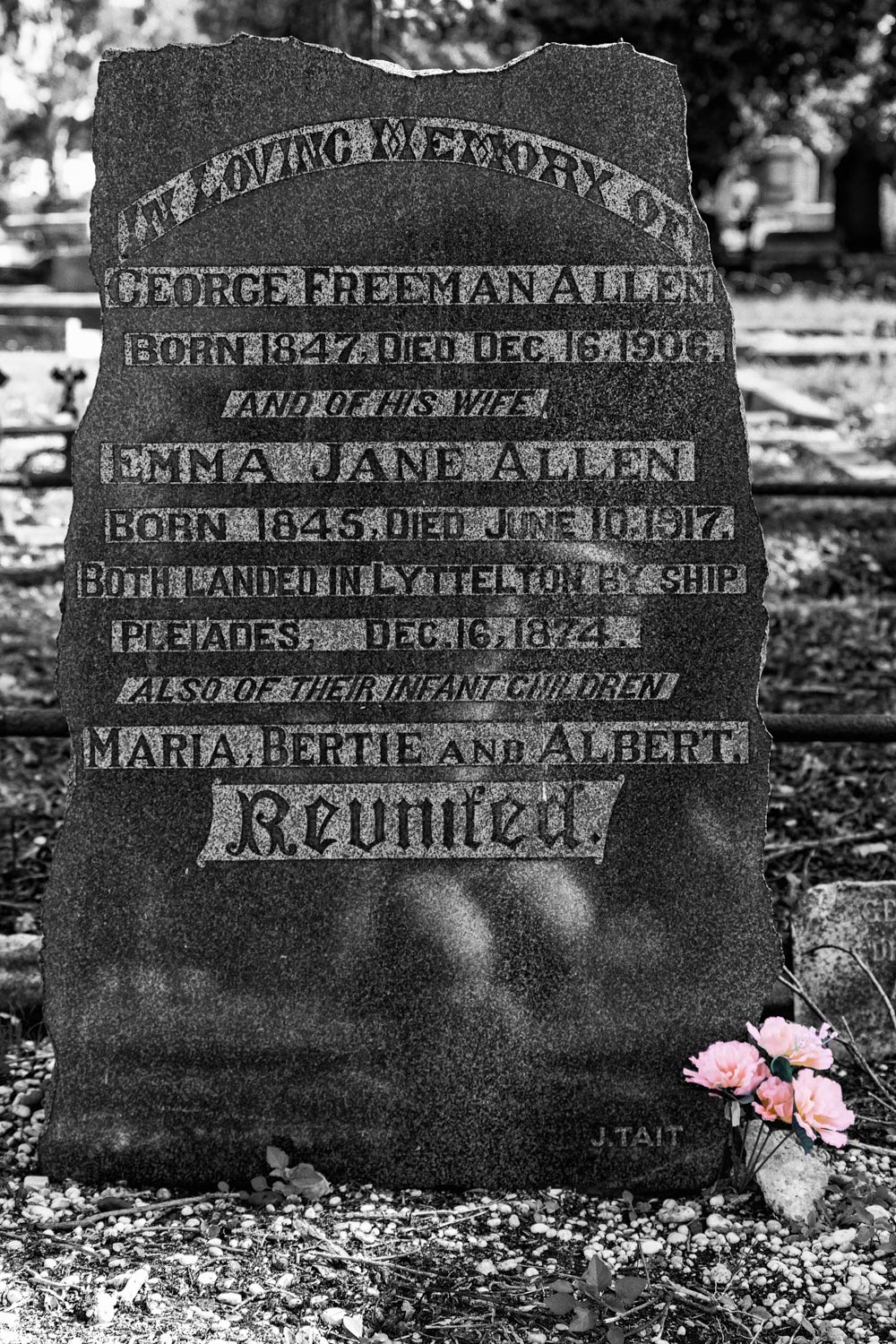
There are two types of contrast used in this image.  There is much contrast between the bright background and the heavy dark marble of the headstone.  Also, the pale stone behind the words offers tonal contrast as well.

This image was originally shot to be a black and white image, and as such, it looks quite good.  However, when I read the words on the headstone, I saw that a whole family was buried here over 200 years ago. Still, there was a bunch of flowers carefully poked into the corner of the headstone base. Who left the flowers and why?

BEFORE – unedited RAW


AFTER – I wanted to bring attention to the flowers, so I brought the color back into the final black and white image. The flowers were only a small part of the overall image, yet enough to catch the eye. My intention here was to ensure the flowers were part of the overall story.

Tonal range

Radically altering the tonal range is one of the tools that offer the most excitement in my editing process.  Being brave and going way up or down the histogram has resulted in some very creative and exciting results.

BEFORE – this is shot with my Lensbaby Velvet 56 which gives much softness when it is wide open.  This shows the unedited RAW file.

AFTER – This histogram has been pushed way to the right. Doing this overexposed the image. It removed most of the blacks and shadows, giving it more of a high-key tonality. The mood of this image now comes across as light, airy, floral, delicate and fragile. The original image was heavy and spiky and didn’t feel like a flower at all.

Texture

BEFORE  – I spent ages taking shots while this gorgeous steam train puffed up. The dark coal smoke against the white clouds of steam was very atmospheric.  The background is pretty awful and doesn’t do it any justice at all. So time to get creative!

AFTER – this one went through a range of edits. First, I played a bit with color.  I did a straight black and white treatment. Secondly, I added a sepia tone with an old vintage newspaper frame to add more of that vintage feel to the image. This is a side by side image for comparison.


AFTER continued – the background was annoying me, so I very carefully extracted the train and all the smoke from the background and then had some fun playing. This one had a Scribble Action along with a replacement background added.

AFTER continued – still wasn’t happy, so I put a new replacement background on the image. However, it was quite heavily textured and didn’t fit, so I ran a Topaz Impression over the whole lot to apply a painterly effect. I also added a subtle framing texture.  Doing so, finally provided the outcome I wanted.

Cropping

Sometimes a hard crop is what an image needs to bring the focus in or to tell the story that you want. People often seem afraid of a hard crop.  I let the image tell me its story and work from there. If it is only ever going to be a digital format, i.e. not printed, then a hard crop has little long term effect.

BEFORE – original unedited RAW file.  The flowers are pretty, and the focus is good, but the background ones are distracting.

AFTER a hard crop and a soft edit.  Now the focus is on the delicate veins in the petals, the water droplets and even the pollen grains on the anthers.

Conclusion

There are many things you can do in post-processing that can further enhance your images.  Any good RAW conversion program has reasonable editing capability included.  What you choose to do with it is really up to you.

Maybe one day you take a handful of images, forget the rules and play and see what you get?

I find presets are a great source of creative inspiration – where someone else has made up a recipe of settings. However, it can be a random lottery to what the outcome is.  Still, you can quickly click and get a very different result, cancel it and move on to the next one.  It might surprise you what you end up with.

What about the deliberate considerations you make when editing? Do you shoot with a specific outcome (like black and white) in mind?  Do you edit and then wonder what other possibilities there are and then dabble a bit until you find something you like?  Alternatively, maybe you have a definite outcome in mind and work hard to get there?

It is allowed and encouraged for you to color outside the lines!  Be brave!  Experiment!  No one ever needs to see it, but you might be surprised at what you can achieve, what you might learn and how much fun you can have.

Share your images with us in the comments below.

The post Enhance Your Images with Creative Photo Editing appeared first on Digital Photography School. It was authored by Stacey Hill.


Digital Photography School

 
Comments Off on Enhance Your Images with Creative Photo Editing

Posted in Photography


How to Choose the Right Location for Your Photo Session

15 Feb

The post How to Choose the Right Location for Your Photo Session appeared first on Digital Photography School. It was authored by Jackie Lamas.

It’s thought that clients are the ones who choose the location for their portraits, but more often than not, choosing the right location is left entirely up to the photographer. In this article, we’ll outline a simple formula to help you and your client settle on the perfect location for the session.

1. It’s not about location, it’s about the look and feel

When you talk to your client about possible locations, change the language you use. Instead of “have you thought of where you want your session to take place” with “what look and feel would you like your photos to have?”

That simple change in language will help your clients to visualize their final images. I’ve listed a few words that can help your client choose which look and feel they want for their final images. Thus, helping you to choose the best location for the session.

These two locations offer different “feelings”.

  • Ethereal: This can be an open field, nature park, or a bright location with little to no busyness in the background like buildings.
  • Nature/natural: Here you can offer a park with lots of green grass and tall trees. Giving them a more natural feel to the photos. You can also offer a field of wildflowers.
  • High fashion/urban: This is definitely in a busy neighborhood or downtown area with lots of big buildings, reflective windows, and metal accents. Giving lots of contrast to the photos and the look and feel of a busy city.
  • Vintage: This can mean either old architectural buildings with wooden doors and big arches or it can mean that they want a location where there are lots of vintage accents, like a neighborhood of restored or historical homes.
  • Warm/homey: These words are a little broad but they can mean that the session can happen at a nice warm location like a field or during sunset at the beach. Homey can mean that they want to feel comfortable and relaxed, which can mean a location they frequent or even their own home.
  • Beach: This one is pretty easy, you can offer the beach if you are near one as a location. The time of day will give you the look and feel. The morning will give you a more blue and pink hue whereas during sunset you’ll get the beautiful golden hour lighting. Make sure to explain both options to your client so you can choose the right time for the look and feel they are visualizing.
  • Meaningful location to the client: Yes, this is an option as well! Especially for engagement sessions because it can be really meaningful to have the photo session at a location where the couple met, or where they got engaged, or simply where they spend a lot of their time together. This is also important for clients celebrating anniversaries or a really important milestone, like graduating from high school or college.

Two different locations for the same maternity portrait session to offer variety.

2. Ask what their home decor looks like

Another way to set a location for the portrait session is to find out what kind of home decor, theme, or color scheme they already have. This way, when it comes time to hang beautiful photos in their home, you can be sure that it won’t clash with the rest of the home.

Your clients will appreciate that you took the time to find out what would look best in their home before even taking a single photo. This makes you look even more professional because you are going to choose the perfect location so that when they are ready to frame, they are reassured that the photos you took will match their home decor perfectly.

This can also help you to upsell items like albums because you’ll know the right album cover and color to choose for each one of your clients. It will make them see that you care more about how their photos will match their home rather than simply choosing an easy location for all of your photo sessions.

For example, choosing a black leather cover for an album can look great in a contemporary modern home whereas a fabric cover album would look better in a more country style home. Or another example would be if the home has brown, beige, and reds in the decor then a perfect location would be a field of flowers.

3. Time of the session

Time can be a huge factor in choosing the right location. Some families need to keep nap times and energy levels in mind when scheduling a session. For example, if your clients need to keep in mind a little one’s nap time at 2 pm, you can choose to have the session in the morning or in the evening when the child is at his best. Photographing in a park that is rich in trees and greenery can help shade you from afternoon light or keeping the sun off your clients.

Or, you could schedule the family during the golden hours at a nearby beach or lake so that the child can play and still have had his nap time earlier.

Sometimes the time is dictated by the location itself. For example, photographing in an urban setting where tall buildings can shade the sun during sunset means that you might have to photograph your client at an earlier time to have enough light.

Or, if you’re photographing in a field, sometimes the early morning hours are best when it’s cool and not so bright. Golden hour is also perfect for fields and beaches.

Midday sun at the beach may be a little harsh but it is still doable. Speak with your clients to choose the best time that works for their schedule.

Talk with your client to see if time will be the determining factor in choosing the right location.

4. Use your website to help choose the location

Chances are, your clients have already looked through your website and have fallen in love with your style! This is great because this can also help your clients to choose the perfect location for their portraits.

This photo is a common favorite on my website since most family sessions are on the beach and during sunset.

If your clients are having trouble visualizing what they want their photos to look like, have them go over to your website and point out a photo that they like the most.  The one that just jumps out at them and had them convinced they wanted you to photograph them.

If the location is nearby or accessible, offer that same location to your client! They loved the photo and it is what led them to contact and hire you, so why not photograph them there? It’s guaranteed that they’ll love the final photos.

5. When they leave it up to you

Even though you’ve gone through all the steps above, some clients don’t know what they want for their photos. They’ll look to you to offer up the best locations because what they want is to have the best photos possible so any location, look, and feel is okay with them.

When this happens, don’t be afraid to take charge. Choose a location that perhaps you’ve been wanting to photograph in for a while, or a location that you know has great golden hour lighting.

Sometimes, clients just need more of a visual to get an idea of what they are actually looking for. Send your clients links to two or three specific locations that you’ve chosen so that they can see with their own eyes what the images will look like. Blog posts and images from your website would be perfect examples.

This way, even though they don’t know what they’re going for, they can choose the one that seems more interesting to them. Giving them the final decision on where they would like the location for their session to take place.

6. More than one location

Depending on your portrait business model and what you have offered your client, and if you’re willing, you can do one session in multiple locations.

For example, if you are photographing an engagement session and they are going for a natural park look but got engaged in front of the downtown theater, then you could offer your clients to photograph in both locations for their session. Either on the same day or on different days.

Photographing in multiple locations offer your clients a variety in their photos so that they can showcase different photos in different rooms in their house as well!

Of course, sticking to one location where there is variety in looks can also be an option to add variety to the photos without having to go somewhere else.

In conclusion

Each session is different and each client is different, using the tips above will help you to determine the perfect location for all of your sessions. When you guide and help your client visualize the perfect location for their session, you will not only look more professional, you will be giving your clients a very personalized experience that they will appreciate. Resulting in more referrals and return clients!

The post How to Choose the Right Location for Your Photo Session appeared first on Digital Photography School. It was authored by Jackie Lamas.


Digital Photography School

 
Comments Off on How to Choose the Right Location for Your Photo Session

Posted in Photography