RSS
 

Posts Tagged ‘Nikon’

How to do Autofocus Fine Tuning on Your Nikon DSLR

22 Oct

Most of the time your equipment does a great job, but every once in a while you may find that under certain circumstances, your photos may seem a little soft. Although there are no less than a million reasons why this might be, it may simply be that your lens isn’t focusing where it’s supposed to.

You may be thinking that if this is the case, isn’t something seriously wrong? Not necessarily.

Some cameras are equipped with a feature to tweak the accuracy of its autofocus – Nikon calls this autofocus fine tuning.

Depth of field

Autofocus fine tuning allows you to dial in the autofocus accuracy of a camera/lens combination.

What is autofocus fine tuning?

Camera lenses are built, and tuned, to fairly exacting standards and do what they are supposed to pretty well, even lower-end lenses. However, there is a window, albeit fairly minute, that focus tuning parameters fit into. If the lens’ tuning falls right in the middle of that window, the focus will be spot on, but it’s not uncommon for the focus to be at either end of that window while still meeting quality control standards.

What this means is that in the majority of shooting situations you are going to end up with sharp results. In some situations when you are pushing the accuracy limits of the lens, such as macro photography or shooting at wide apertures, you may discover that the lens focuses a little in front or behind the focus point you’ve chosen. Maybe you’ve seen this shooting a close-up portrait at a wide aperture – although you are trying to get the subject’s eyes in the focus plane, you keep getting their eyebrows or ears sharp instead.

Why use it?

This is where lens fine tuning comes into play. What this feature does is allow you to dial in the accuracy of the lens/camera focus point even more precisely than it already is. If you haven’t noticed any problems with your setup, or mostly shoot at smaller apertures, going through this process may be unnecessary.

This feature can be found on Nikon bodies from the D7000 up and Canon bodies from the 50D and up, as well as several Sony, Olympus, and Pentax cameras.

Fine tuning settings are specific to the lens/camera combination and once you tune a lens, the camera saves the setting, which it reverts to anytime you mount that lens. Although you need to use a CPU lens to reap the full benefits of autofocus fine tuning, older analog or third party lenses can be fine tuned, and the settings saved manually on Nikon DSLRs.

What you need

  • A tripod
  • A newspaper or magazine printed with a small font
  • A table
  • A well lit room

How to do it

Step 1 – Mount your camera on the tripod and adjust it so the lens is about two feet above table level. The idea is to have the lens pointed at the newspaper at about a 30-degree angle.
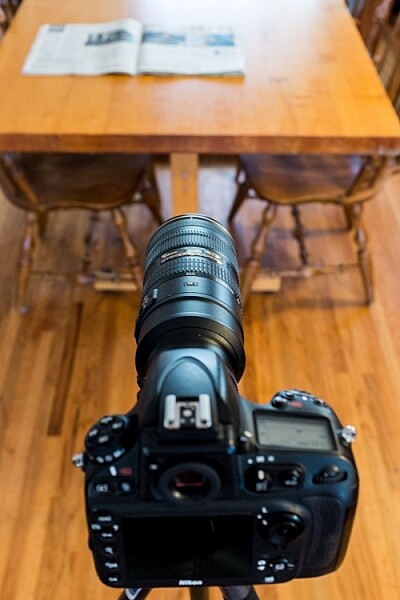
Set up for autofocus fine tuning.

The setup to adjust autofocus fine tuning is fairly simple.

Step 2 – It is recommended to set the zoom (if using a zoom lens) to the focal length and distance which you use most often.

Step 3 – Set the camera to single-point, single-servo autofocus (AF-S for Nikon, One-Shot for Canon)

Step 4 – Open the lens to one stop down from its widest aperture (e.g. set an f/2.8 lens to f/4) and the middle of its zoom range (if it’s a zoom lens).

Step 5 – Place the focus point in the middle of the frame (center dot). I prefer to align the focus point with something recognizable like a letter of bold text among normal text.
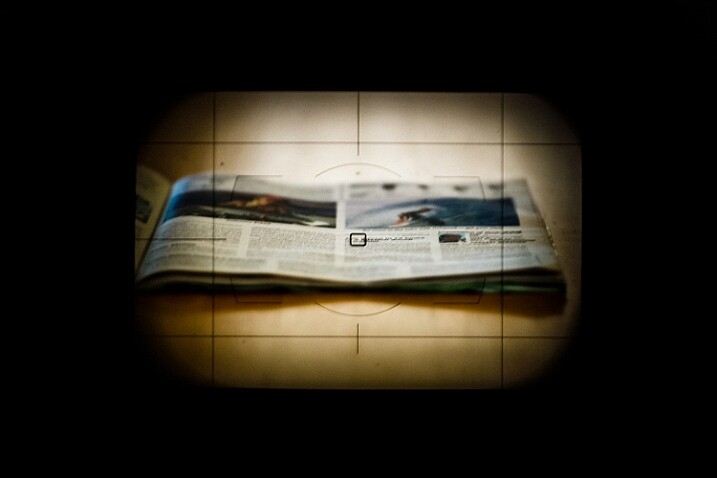
Focus point in the center of the frame

With autofocus set to AF-S (one-shot), single-point, place the focus point in the center of the frame.

TIP: A helpful method is to turn on Live View and place the small dot in the middle of the focus box on a letter of text. Zoom in the view (NOT the lens) which gives you a more precise center point than the small box seen through the view finder. Turn off Live View to continue.

Using live view to align focus point

Using Live View helps to line up your focus point more precisely.

Step 6 – Set the self-timer on the camera to at least five seconds to allow the camera to stabilize after pressing the shutter button.

Step 7 – Turn off any stabilization either in-lens or in-camera.

Step 8 – Make sure focus points are enabled on playback: Menu>Playback Menu>Playback display options>Focus point>Done>OK

Focus point on preview

Enabling focus point on image preview allows you to see where the focus was set when the picture was taken.

Step 9 – Defocus the lens manually and then engage autofocus until it locks onto the focus point and press the shutter button.

Step 10 – Review the image and zoom in to check the accuracy of the focus point. Do this a few times for verification.
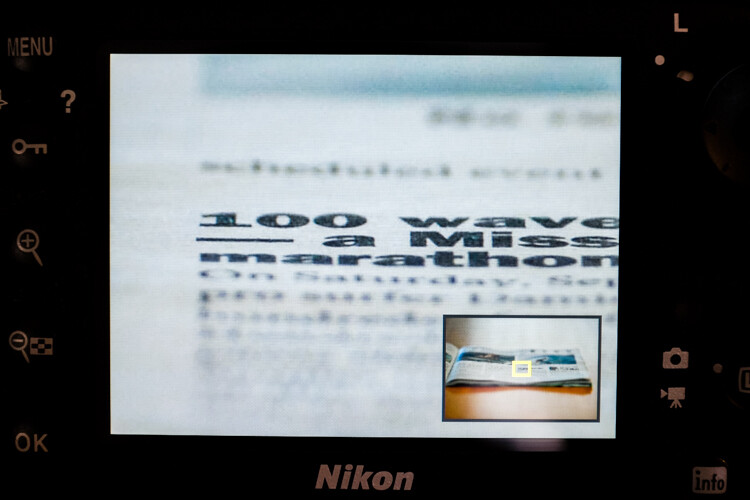
Checking focus point accuracy

Preview the image and zoom in to check the accuracy of the focus point.

If it appears that sharpness is centered on the focus point, great, your lens’ focus is accurate and you’re good to go. If not, continue reading.

Step 11 – To adjust the autofocus fine tune go to: Menu>Setup menu>AF fine-tune>AF fine-tune (On/Off) and turn it on. Go back and select Saved value.
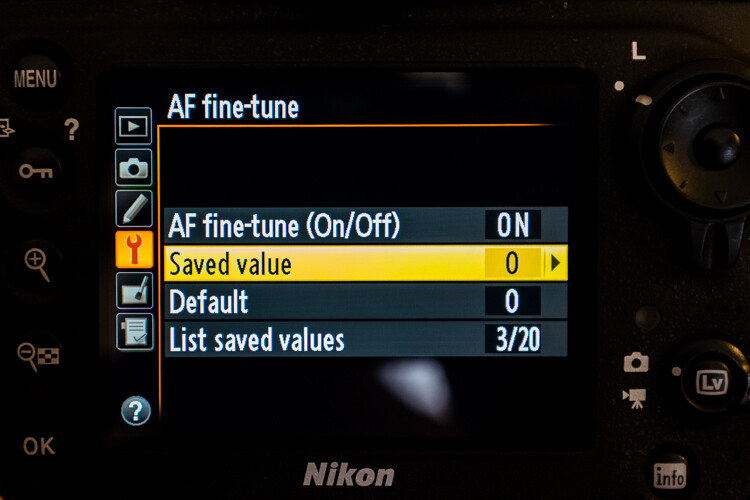
Fine tuning autofocus

The menu location of autofocus fine tuning.

Your lens’ information should be displayed in the upper left corner and the fine-tune adjust on the right.

Step 12 – Positive numbers correct for back-focusing (focusing behind the focus point) and negative numbers correct for front-focusing.
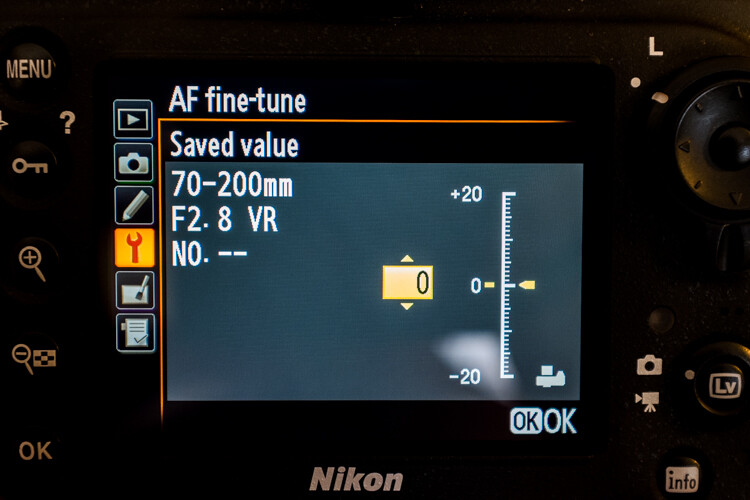
Adjusting autofocus fine tuning

Positive values adjust the focus point away from the camera while negative values move it closer.

Remember, this is called “fine-tuning” so the increments are pretty small – a +1 is hardly noticeable.

Step 13 – After each adjustment, defocus the lens manually and repeat the steps above until you hit the sweet spot.

The settings you have applied to a specific CPU lens are saved, and are loaded automatically anytime that lens is mounted to your camera. With non-CPU lenses, you can create a profile for that lens which you can then save and revert to manually when that lens is used.

If your lens’ focus still fails to hit the mark after attempting autofocus fine-tuning, either go old-school and use manual focus if it’s practical, or you will need to send your lens in to have it calibrated with a special machine.

If you use a brand other than Nikon check your camera manual to see if your model has this feature and how to use it.

Good luck and may your images be as sharp as my witticisms – hopefully much sharper.

googletag.cmd.push(function() {
tablet_slots.push( googletag.defineSlot( “/1005424/_dPSv4_tab-all-article-bottom_(300×250)”, [300, 250], “pb-ad-78623” ).addService( googletag.pubads() ) ); } );

googletag.cmd.push(function() {
mobile_slots.push( googletag.defineSlot( “/1005424/_dPSv4_mob-all-article-bottom_(300×250)”, [300, 250], “pb-ad-78158” ).addService( googletag.pubads() ) ); } );

The post How to do Autofocus Fine Tuning on Your Nikon DSLR by Jeremie Schatz appeared first on Digital Photography School.

Digital Photography School

 
Comments Off on How to do Autofocus Fine Tuning on Your Nikon DSLR

Posted in Photography


Wide lens, right price? Nikon 24mm F1.8G ED real-world samples

20 Oct

Earlier this year Nikon expanded a series of F1.8 primes with the 24mm F1.8G ED, sitting alongside 20mm and 35mm models. Compact and lightweight, it hits a $ 750 price point that’s relatively reasonable, considering the F1.4 version retails for over $ 2000. We’ve spent some time shooting with the new 24mm prime – take a look at its performance out and about. Read more

Articles: Digital Photography Review (dpreview.com)

 
Comments Off on Wide lens, right price? Nikon 24mm F1.8G ED real-world samples

Posted in Uncategorized


Writer’s Favorite Lens – Nikon 16-35mm f/4

17 Oct
favorite, lens, nikkor, 16-35mm, ultrawide, wide angle, landscape

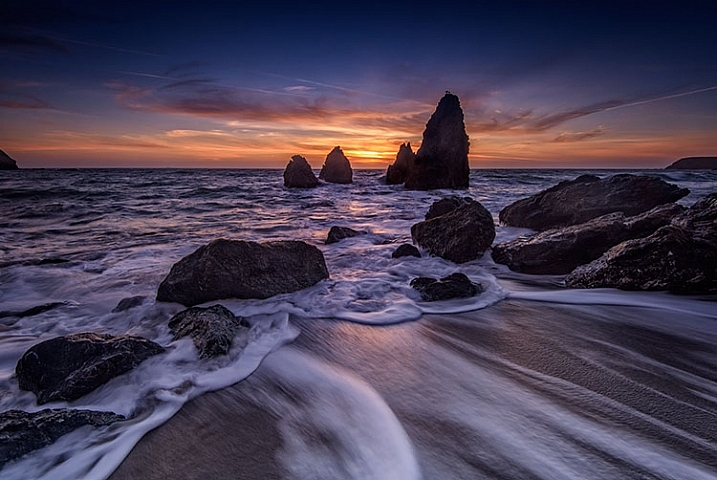
Rodeo Beach, Marin County, California

Asking me which lens is my favorite is somewhat akin to asking me which one of my two children I love the most. The simple answer is, “the one that will get me the shot I want!” I will also tell you, it depends on the subject I’m shooting. If I’m photographing a portrait, I’m more likely to choose my 85mm f/1.4. But primarily, I am a landscape photographer, so as I look back at some of my favorite images, I will say that most have been made using my AF Nikkor 16-35mm f/4G ED.

As I have grown as a photographer, I must admit I have become more and more enamored with the ultra-wide angle point of view. I enjoy seeing things in that perspective, and using the wide angle to emphasize foreground objects. I do also own the 14-24mm f/2.8 lens, but one thing sets the 16-35mm apart for me – that is the ease with which filters can be used. More on that in a bit.

First, some technical specs:

  • Focal Length:  16-35mm
  • Maximum Aperture: f/4
  • Minimum Aperture: f/22
  • Format: FX
  • Vibration Reduction: Yes
  • Dimensions: 3.2 in.(82.5 mm)
  • Weight: 24 oz. (680g)
  • Price: $ 1259 USD

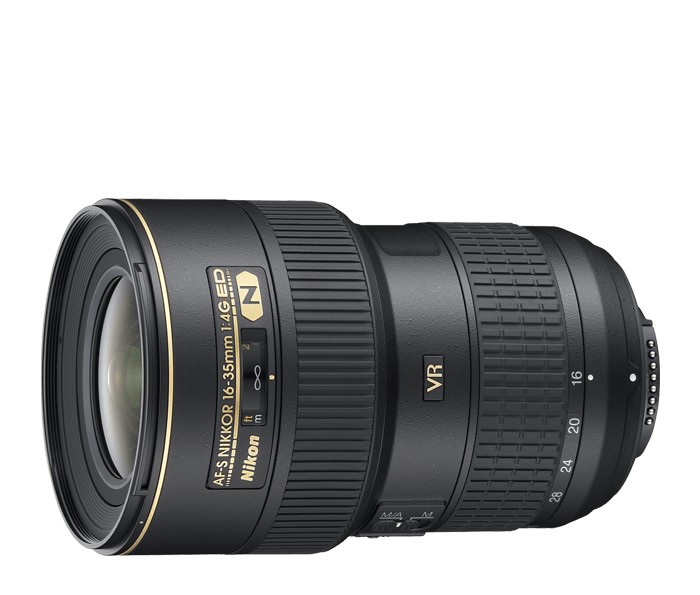
    AF Nikkor 16-35mm f/4G ED VR II, my favorite lens

    Courtesy of Nikon

Ultra-Wide Angle Coverage

As a landscape photographer, I love using the perspective of an ultra-wide angle lens to be able to distort perspective and emphasize foreground objects. I often find that 24mm just isn’t wide enough to do what I’d like. Also, the 2x zoom to 35mm adds some nice versatility on the wide angle end of things. I can go from ultra-wide at 16mm to moderately wide at 35mm, without needing to change lenses to my mid-range zoom.  This provides me with a little more flexibility than the 14-24mm.

While that lens can go just a bit wider, there are several trade-offs that make the 16-35mm more appealing. In addition, I find the lens to be tack sharp throughout the range, with very little if any chromatic aberration (color fringing that can happen in high contrast areas). While the maximum aperture of f/4 may give some photographers pause (believing that f/2.8 is a necessity) I find that more often than not, I am shooting this lens while mounted on a tripod, and stopped down for maximum depth of field.  Being able to shoot at f/2.8 just isn’t a requirement for me. Keep in mind, I am using this lens on a Nikon D810. If you are using a DX body, the lens’ coverage won’t be as wide.

my favorite lens, photography, landscape, wide angle, ultrawide angle, landscape,

Lower Fox Creek Schoolhouse

Using Filters

As a landscape photographer, the ability to use filters is no small consideration. While I have filters for my 14-24mm lens, they are quite large. If I’m trying to travel light, I can’t always fit them in the bag, and those filters only fit the 14-24mm. My 100mm filter kit fits all of my lenses except for the 14-24mm, so it’s more economical in terms of space if I only carry that one kit and use my 16-35mm as my ultra-wide option when a filter is needed. The 16-35mm takes a 77mm sized filter for screw ins, or 77mm mounting ring if I’m using my drop-in filters. That matches most of my other lenses, making it convenient in terms of compatibility with accessories.

my favorite lens, photography, landscape, wide angle, ultrawide angle, landscape,

Cape Kiwanda, Oregon

Image Stabilization

While it’s not typically deemed necessary in an ultra-wide angle lens, the inclusion of VR, or vibration reduction (sometimes also called image stabilization) is a nice plus for this lens. Other lens makers have also begun including it in their competitors in this range. As I said, I am generally on a tripod when shooting with this lens, but there are times when hand-holding is necessary. Having the option of turning on the VR to give me some extra help in steadying the camera, gives me a great sense of reassurance that my images will be sharp. This is of particular importance when standing on a bridge, which can vibrate due to cars on the roadway, or when photographing in a place where tripods aren’t allowed.

my favorite lens, photography, landscape, wide angle, ultrawide angle, landscape, cityscape, architecture

Cathedral of Learning, University of Pittsburgh

The Bottom Line

For me, it’s all about the image. Size and weight are a distant second. Is the lens sharp? Yes. Is the field of view what I want? Yes. Can I use it with my filters to achieve my final image? Yes. It is the positive answers to those three questions that make this lens my favorite for photographing landscapes. Come back and talk to me about my favorite portrait lens another time.

my favorite lens, photography, landscape, wide angle, ultrawide angle, landscape, sunset

Great South Bay, NY

googletag.cmd.push(function() {
tablet_slots.push( googletag.defineSlot( “/1005424/_dPSv4_tab-all-article-bottom_(300×250)”, [300, 250], “pb-ad-78623” ).addService( googletag.pubads() ) ); } );

googletag.cmd.push(function() {
mobile_slots.push( googletag.defineSlot( “/1005424/_dPSv4_mob-all-article-bottom_(300×250)”, [300, 250], “pb-ad-78158” ).addService( googletag.pubads() ) ); } );

The post Writer’s Favorite Lens – Nikon 16-35mm f/4 by Rick Berk appeared first on Digital Photography School.


Digital Photography School

 
Comments Off on Writer’s Favorite Lens – Nikon 16-35mm f/4

Posted in Photography


It’s the little things: Nikon Small World Photomicrography Competition winners

17 Oct

Thirty years after it first began, the Nikon International Small World Competition continues to highlight outstanding photography of the invisible world right in front of our eyes – the world captured by photomicrography. The competition is open to professionals and amateurs alike worldwide, and first prize nets the winner $ 3,000 toward the Nikon gear of their choosing. Read more

Articles: Digital Photography Review (dpreview.com)

 
Comments Off on It’s the little things: Nikon Small World Photomicrography Competition winners

Posted in Uncategorized


Airnef brings desktop Wi-Fi transfer to Nikon users

18 Sep

A DPReview community member and forum moderator has created a free desktop application designed to help Nikon users wirelessly transfer files from their cameras to their computers. Compatible with OS X, Windows and Linux, Airnef is an open-source utility that works with Nikon’s external Wi-Fi adapters as well as cameras with built-in Wi-Fi. Read more

Articles: Digital Photography Review (dpreview.com)

 
Comments Off on Airnef brings desktop Wi-Fi transfer to Nikon users

Posted in Uncategorized


Nikon D5200 and D7100 firmware updates removes noise during video capture, fixes bugs

17 Sep

Nikon has released firmware updates for both the D5200 and D7100 cameras,. Bth new versions of the firmware reduce horizontal line noise in videos recorded at 1280×720/60p and 1280×720/50p. In addition, firmware v. 1.03 fixes select bugs affecting both models. Read more

Articles: Digital Photography Review (dpreview.com)

 
Comments Off on Nikon D5200 and D7100 firmware updates removes noise during video capture, fixes bugs

Posted in Uncategorized


Can a Sony RX10 II keep up with a Nikon D5500 on the soccer field?

17 Sep

The RX10 II is an extremely versatile camera and so far, it has impressed us with its ability to perform well in most scenarios. But what about sports photography? We decided to bring it to the soccer field and pit it against a DSLR to see if it could keep up. The results? Find out here


Articles: Digital Photography Review (dpreview.com)

 
Comments Off on Can a Sony RX10 II keep up with a Nikon D5500 on the soccer field?

Posted in Uncategorized


Zeiss introduces high-resolution Milvus SLR lens family with six focal lengths for Canon and Nikon cameras

11 Sep

German optics manufacturer Zeiss has announced it has created a new range of lenses specifically for high-resolution DSLRs. The Zeiss Milvus family will comprise six lenses fitted for Canon EF and Nikon F cameras. Read more

Articles: Digital Photography Review (dpreview.com)

 
Comments Off on Zeiss introduces high-resolution Milvus SLR lens family with six focal lengths for Canon and Nikon cameras

Posted in Uncategorized


Nikon D7200 Field Test: Desert dance photo shoot

10 Sep

Nikon’s flagship APS-C DSLR is a real workhorse. Offering a 24.2MP CMOS sensor, the D7200 provides a 51-point AF system sensitive to -3EV, an increased buffer depth with 6 fps continuous shooting and 1080 HD video at 60p. We tagged along with pro photographer Gabe Bienczycki on a desert photo shoot to push the D7200 to its limits. Read more

Articles: Digital Photography Review (dpreview.com)

 
Comments Off on Nikon D7200 Field Test: Desert dance photo shoot

Posted in Uncategorized


Writer’s Favourite Lens – Nikon 24-70 mm F2.8

30 Aug

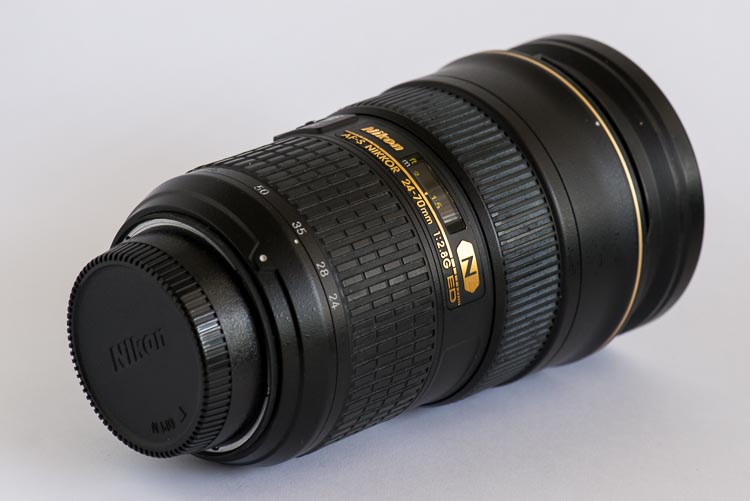
I’ve had the Nikon 24-70 mm f/2.8 lens for about three years now, and it is by far my most used lens, and really my go-to when I am heading out to take photos. It is mid-range when it comes to focal length, but for shooting most landscapes and architecture, it is nearly always enough. It is not a cheap lens ($ 1749 USD without VR, $ 2396 with VR), but it was a special treat, one I have to thank subsidies for. One year after getting a special payout I was able to afford this lens, just.

Nikon-24-70mm-favourite-lens-

Nikon-24-70mm lens

When I got the lens I was shooting cycling, both on the road and the track, and I was looking for a better lens to use rather than the cheap one I bought when I first started. This one seemed perfect. A good shorter, wide angle, and the focal length was almost a perfect match for my 80-200mm. I also thought I was going to start doing portraits and it seemed like the ideal lens.

favourite-lens-24-70mm-cole-0371

Portrait style photography

For personal reasons, I had to give up photographing cycling and never really got into portraits. It was something I never felt comfortable doing. I ended up concentrating more on architecture and landscape. This lens saw me through all that with its ability to be so versatile, I could really do anything with it.

Pros:

Lovely clear images

You notice it, you really do. If you’ve been shooting with a cheap lens, the moment you start taking photos with one of this quality, you will see the difference. There was something about how clear the images were; they seemed to shine. There is a clarity with the images, and if you get great conditions to take photos, such as a good day and good light, then it really shows in the images.

favourite-lens-24-70mm-cole-0366

Bay Crits racing

Fast lens

With the widest aperture being f/2.8, you know you have a fast lens, which means it gives you more choices. With the cycling, it meant I didn’t have to go to such a high ISO to be able to get photos inside the velodrome. I could still get great images that didn’t have a lot of grain/noise.

It is the same if you are doing astrophotography, as the f/2.8 means that you don’t need to have your ISO up as high, so you won’t get really grainy shots of the night sky.

Good size

The size works well for what I want, and what I am doing. I’m more of a wide angle person, but the extra length to 70mm is really fantastic, and gives me more options when I am out taking photos. It is, ultimately, the best of both worlds. I have the wide angle, but I can also zoom in a little bit.

favourite-lens-24-70mm-cole-0372

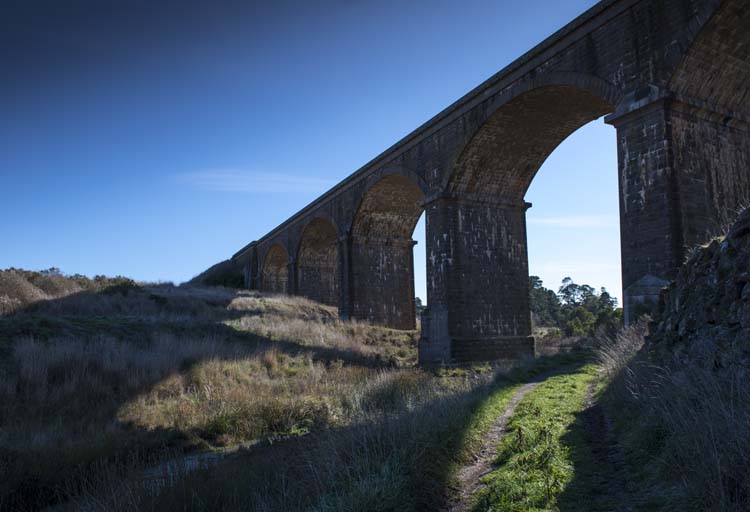
Rail Viaduct Malmsbury

Sometimes I wish it was a little longer, maybe to 100mm or 120mm, but it isn’t, so I have to compensate. I don’t often zoom right in on subjects, so it is rarely a problem.

Fits filters

Doing long exposures is something that I have spent a lot of time learning, and this lens is a great choice for this. The 77mm filter size means that I can use filters. I also have the 14-24mm lens, and not being able to put filters on that has been frustrating, but the 24-70mm still gives me the wide angle view, and the option of using filters.

favourite-lens-24-70mm-cole-0368

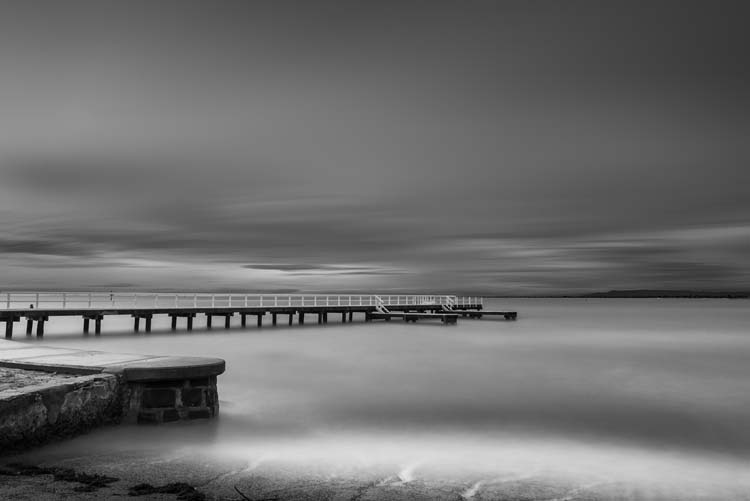
Long exposure of bay

Can photograph things close-up

One of the unexpected bonuses has been how close I can get to objects to take photos. Nowhere near as close as a macro, but very close nonetheless. It’s great when I’m out to be able to take close-up photos of objects that I see, like flowers, cakes, etc.

favourite-lens-24-70mm-cole-0370

Flowering gum

Versatility

This is one of those lenses that you know could photograph anything. I purchased the lens for portraits and cycling, but it soon became apparent that I could use it for almost anything I wanted to do. I now shoot landscapes and architecture primarily, and it has been great for doing both of those. The lens is very versatile, and I am confident that no matter what I need to shoot it will do a great job.

favourite-lens-24-70mm-cole-0369

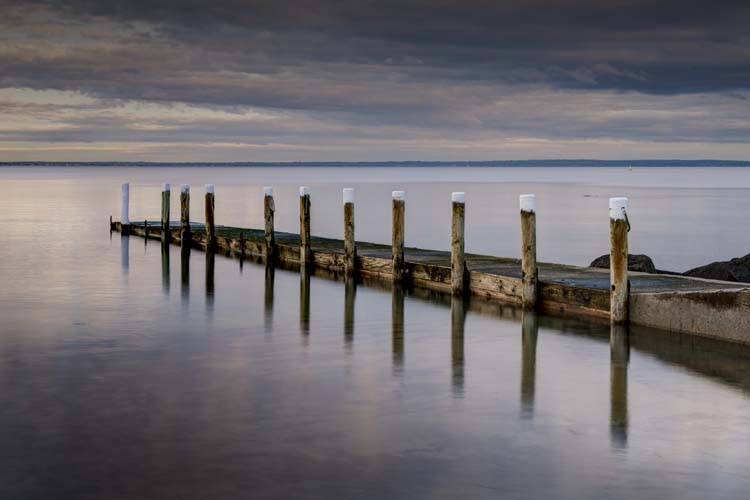
Pier at bay

Cons:

Weight

There is no doubt that it is a heavy lens, weighing in at 1.98 lbs. (900 g). Most people are shocked at how heavy it is when they pick it up alone, or with my camera attached. It isn’t something I notice anymore. I have been using heavy cameras for quite a few years and it is just normal now. When I was still photographing cycling events, I would use two cameras, one with the wide angle, and the other with a telephoto lens. People asked me how I carried it all, and I said the two cameras helped balance me. You just get used to it.

If you are someone who has issues with their hands or arms, and find it hard to carry or use heavy objects, this wouldn’t be a good lens for you. You may find it too heavy to hold up to take photos. Don’t forget, it isn’t just about holding it up when shooting, it is also about carrying it around as well. I have to admit that often, at the end of the day, I’m very happy to put the camera down.

Price

It isn’t a cheap lens in any way, but quality always comes with a price tag. The lens is approximately USD $ 1800, but, if you are serious about your photography, it is worth it. I definitely think it was.

Finally

I wouldn’t go anywhere without my Nikon 24-70 mm f/2.8 now. It has been rained on, had the hot sun beaming on it, been sprayed with salt spray, it’s dirty, it’s well-used. You can be sure that it will always be in my camera bag, whether it is attached to my camera or not. I love using it, and am never disappointed with the images that I get from it.

Do you have a favorite lens? Tell us. Read about some other dPS writer’s favorite lenses here:

  • Writer’s Favorite Lens: Olympus Zuiko 12-40mm f/2.8
  • Writer’s Favorite Wildlife Lens – Tamron 150-600mm
  • Writer’s Favorite Lens: 50mm f/1.8
  • Writer’s Favorite Lens – The Canon 24-105mm f/4
  • Writer’s Favorite Lens – the Canon 40mm Pancake Lens
  • Writer’s Favorite Lens – the Tamron 18-270mm

googletag.cmd.push(function() {
tablet_slots.push( googletag.defineSlot( “/1005424/_dPSv4_tab-all-article-bottom_(300×250)”, [300, 250], “pb-ad-78623” ).addService( googletag.pubads() ) ); } );

googletag.cmd.push(function() {
mobile_slots.push( googletag.defineSlot( “/1005424/_dPSv4_mob-all-article-bottom_(300×250)”, [300, 250], “pb-ad-78158” ).addService( googletag.pubads() ) ); } );

The post Writer’s Favourite Lens – Nikon 24-70 mm F2.8 by Leanne Cole appeared first on Digital Photography School.


Digital Photography School

 
Comments Off on Writer’s Favourite Lens – Nikon 24-70 mm F2.8

Posted in Photography