RSS
 

Posts Tagged ‘Night’

Tips and Tricks for Night Photography of the Starry Sky

04 Sep

During the last year, I’ve become a big fan of night photography and the night sky. I’ve always enjoyed it but my hometown in Norway doesn’t have the most interesting landscape. So I rarely bothered to go out during night – unless there was a rare show of Northern Lights or meteorite showers. After packing up my stuff and moving to the north of Spain, however, I’ve found myself spending more and more time photographing the stars. What appears pitch black to the naked eye can be beautiful scenery through the camera.

In this article, I’ll share some tips and tricks on how you can photograph the various states of the night sky including The Milky Way, new moon, or northern lights.

Camera Settings for Night Photography

Light is the most important part of photography; without light, there’s no picture to be taken. During the night it is dark and the light is sparse, making it challenging to photograph. In fact, in order to capture an image during the night, you’ll most likely have to sacrifice some image quality – forget about using a narrow aperture and low ISO.

Unlike regular landscape photography, night photography requires less than ideal settings in order to capture enough light to properly expose the scene. Since there’s not a lot of available light, that means opening the aperture, increasing the ISO and lengthening the exposure time (shutter speed).

Tips and Tricks for Night Photography the Starry Sky

There isn’t one correct setting for each and every scenario as it depends on many factors (such as the brightness of the moon). But as a rule of thumb, you want to use the widest aperture your lens allows in order to get the sky as detailed as possible. Lenses with an aperture of f/2.8 are widely popular amongst nighttime and astrophotographers and if your lens allows for such an open aperture, this is where you should begin.

ISO and shutter speed

The ISO also needs to be increased quite a lot for night photography. For regular landscape photography, I always stress the importance of shooting with the lowest possible ISO. Even though we still want to shoot with the lowest possible setting we’re now looking at an ISO of at least 1600 at night. It’s not uncommon to use an ISO of 3200 or 6400 during the night. Still, to maintain as much quality as possible, try to use the lowest possible option.

Tips and Tricks for Night Photography the Starry Sky

Choosing the shutter speed is slightly more challenging as it depends on the focal length of your lens, but I recommend not going longer than 30 seconds unless you want to photograph star trails (I’ll come back to this later in the article). The 500 Rule is a good guideline when choosing the shutter speed. Basically, divide 500 by the focal length of the lens you’re using and you’ll know the maximum shutter speed you can use (to avoid star trails). If you’re using a crop sensor camera you’ll need to calculate the equivalent focal length of a full-frame lens (for example 20mm on crop sensor = 30mm. 500/30 = 16.6 seconds).

Remember that a tripod is essential for night photography in order to get a sharp image. It’s simply not possible to hold your camera still for several seconds!

Planning to Photograph the Night Sky

Scouting can be hard during the night so it’s often beneficial to have familiarized yourself with the area before going there in the dark. I know this isn’t always possible but the very least use an app such as PhotoPills to learn the phase of the moon, its position, as well as the time of sunrise, sunset, moonrise, moonset and anything else related to your shoot. The more you’ve prepared, the higher the chance you’ll get a great image.

Tips and Tricks for Night Photography the Starry Sky

Let’s summarize what you should know before going out photographing:

  • Time of twilight
  • Time of Nautical and Astronomical dark
  • Phase of the moon
  • Moon’s position in the sky
  • Time of moonrise and moonset
  • When The Milky Way is visible (if applicable)
  • The Milky Way’s position (if applicable)

All this information is easy to find in an app such as PhotoPills or by doing a quick search online.

General Ideas for Night Photography

If your goal is photograph stars and the natural night sky, I think it’s fair to guess that you want to see as many stars as possible. In order to get the best possible view of the stars, you’ll need to position yourself at a location that’s away from larger cities and light pollution.

Tips and Tricks for Night Photography the Starry Sky

A subtle display of Northern Lights in Lofoten.

Website and maps such as DarkSiteFinder are great resources when searching for areas with less light pollution. If you live close to a major city you’ll probably have to travel a little further than if you live near a small town. There are filters, such as NiSi’s Natural Night Filter, that help reduce the light pollution but it won’t magically remove it all and give you a starry sky – it simply neutralizes the color of the light pollution.

For the most detailed night sky, it’s also ideal to avoid the weeks closest to a full moon. During that period, the sky is brighter and there are fewer stars visible to both the camera and the naked eye. However, that doesn’t mean that you should stay home; there are many interesting subjects during the full moon as well.

The Milky Way

Norway is known for Northern Lights, dark and starry nights, as well as the overall beautiful landscape but what we don’t have is The Milky Way. Let me be a little more specific; the Galactic Center (the brightest most visible part of The Milky Way that you see in most photos) is never visible in Norway – we only see the edges of it. So, you can imagine my excitement every time I get a chance to photograph the Galactic Center and The Milky Way in its most beautiful display.

Milky Way photography - Tips and Tricks for Night Photography the Starry Sky

The techniques for photographing The Milky Way are mostly similar to other types of night photography. You’ll want to use an open aperture, high ISO and a shutter speed of no more than 30 seconds. I find that a slightly higher ISO and a shutter speed of around 25 seconds (when shooting at 14mm @f/2.8) gives the highest amount of detail when photographing The Milky Way. By using a slower shutter speed, the camera starts picking up slight movement in the stars (due to earth’s rotation) and it begins to get blurry.

It’s also best to photograph The Milky Way during the new moon or before the moon has risen. The darker the sky, the more stars you see and the more detailed The Milky Way becomes.

Photographing a Meteor Shower

Whenever there’s a meteor shower, such as the recent Perseids Meteor Shower, I keep my fingers crossed for clear skies. There’s nothing more magical than being outside in the pitch black, looking up at dozens or even hundreds of shooting stars during a span of several hours.

Northern Light Meteorite - Tips and Tricks for Night Photography the Starry Sky

Since most the shooting stars last for only a second or two, it can be hard to capture them in an image. In order to capture as many of them as possible, I set my camera to interval shooting and I let it go continuously. To pick up even the smaller shooting stars I increase the shutter speed slightly to approximately 15 seconds (depends on the brightness of the night).

Photographing the Northern Lights

Northern Lights is a phenomenon that we’re lucky to have in the northern hemisphere. It’s unlike anything else and I can guarantee that once you see it, you’ll want to witness it again.

The challenges when photographing the Northern Lights is that it often moves quite quickly and it can be rather bright. In order to freeze the motion, you’ll need a quicker shutter speed such as 1-10 seconds. Exactly how quick depends on the intensity of the lights. Just keep in mind that if they’re moving quickly, you should use a quicker shutter speed.

Northern Lights Iceland - Tips and Tricks for Night Photography the Starry Sky

Also, pay attention to the histogram as it’s easy to blow out the highlights. Since it’s a bright phenomenon in the otherwise dark night, the contrast can be great. I recommend always exposing for the highlights and if needed take a second exposure for the landscape that you can blend in later during post-processing.

Slow it Down and Photograph Star Trails

Due to the rotation of the earth, your camera registers movement in the stars once the shutter speed becomes too long. This creates a blurry and soft sky and can be quite displeasing to watch.

That being said, every now and then this is something you want to use as an advantage rather than viewing it as a problem. By lengthening the shutter speed to several minutes or even an hour (this lets you use a low ISO and narrow aperture but may result in hot pixels) you’re able to capture what’s known as star trails. This effect can be really interesting but make sure that the shutter speed is long enough so that the stars don’t just look blurry.

Tips and Tricks for Night Photography the Starry Sky

Stars over the Sahara desert – image by dPS Editor Darlene Hildebrandt. Series of 30-second exposures over 45 minutes, stacked using StarStax, blended with a couple of light painted images of the tent.

Alternatively, you can capture a series of images using a shorter shutter speed and merge them together in Photoshop or a software such as StarStax.

Full Moon and Bright Moon Phases

As I’ve mentioned previously, nights, when the moon is small, are best for night photography as it’s during this period you’ll see most stars. However, when the moon is up there are still many interesting images to be captured.

moonrise in lofoten - Tips and Tricks for Night Photography the Starry Sky

First of all, since the moon is a bright source of light, you can get away with using a slightly lower ISO or narrower aperture. It can also be easier to find a composition as the landscape is brighter. Use this light to your advantage and pay attention to the shadows in the landscape. Perhaps the moon lights up a mountain? Perhaps it creates a nice reflection in a lake? During this period, it can be wise to compose your image to include more landscape than sky as that’s where the most interesting things are happening.

Personally, I prefer to photograph the moon when it has a low position in the sky as I find the shadows to be slightly more interesting during that time. Note: This is for the same reasons shooting at sunrise and sunset are best for daytime landscape photography.

Conclusion

Have you tried night photography before? If not, grab your camera and tripod (and maybe a buddy for some company) and get out and give it a go. Share any other night photo tips you have in the comments below as well as your night sky images. We’d love to see them.

The post Tips and Tricks for Night Photography of the Starry Sky by Christian Hoiberg appeared first on Digital Photography School.


Digital Photography School

 
Comments Off on Tips and Tricks for Night Photography of the Starry Sky

Posted in Photography


Photo of the week: Hyena at Night

02 Sep

I was in Liuwa Plain, a remote National Park in the west of Zambia. One of the aims of my trip was to photograph hyenas using a variety of techniques including remote-control cameras and some prototype Camtraptions camera traps.

To show hyenas in their element, I wanted to photograph them at night. The stars in the African night sky are spectacular and I wanted to try to include them in my image.

For this shot, I used my remote-control “BeetleCam” to position my camera on the ground, looking up at the hyena with the sky behind. This is a single exposure. I lit the hyena with two off-camera flashes at the start of the exposure and used a relatively long shutter speed to expose the stars. It didn’t matter if the hyena moved after the initial flash because there was no moonlight to cause ghosting.

You can see more images from my African wildlife at night series in my blog post: Photographing Wildlife at Night in Liuwa Plain.

The photo was captured with a Canon 5D Mark III and 15-35mm F2.8 II at 16mm, 16s, F4.5, and ISO 5000, using Nikon SB-28 flashes and Camtraptions wireless flash triggers.


Will Burrard-Lucas is a wildlife photographer from the UK and founder of Camtraptions. You can view more of his work on his website or by following him on Instagram, Facebook and Twitter.

Articles: Digital Photography Review (dpreview.com)

 
Comments Off on Photo of the week: Hyena at Night

Posted in Uncategorized


Photo of the week: Spires of the Arctic Night

16 Jul
A spiky iceberg reflecting in the waters of Disko Bay, under intense sunrise colors.

I took this shot while scouting for my Greenland workshop. It was the last morning of our trip on a Russian Yacht, and little did I know that it would be the best by far.

The trip was done in the Arctic summer, on the first few days when the sun first touched the horizon in Disko Bay, western Greenland. There is no darkness, and sunset is quickly followed by sunrise, with pastel pink/purple/blue in between.

When sunrise drew near, it was clear from the way the clouds looked that it was going to be a spectacular sunrise. We were sailing around in the bay when we reached an area with lots of ice. This served us in two ways. Firstly, it provided a barrier to waves, making the water extremely calm and reflective. And secondly, we had an almost infinite selection of icebergs to shoot.

I took many images that night. This is one of my favorites. The bright pink and red clouds, stretched across the sky, looked like they were taken out of a painting. The intricate iceberg was a perfect subject to contrast the calmness of the sky and water, both in its color and in its sharp, pointy texture.

The photo was captured using my Canon 5D Mark III and Canon 16-35mm F4L IS lens.


Erez Marom is a professional nature photographer, photography guide and traveler based in Israel. You can follow Erez’s work on Instagram, Facebook and 500px, and subscribe to his mailing list for updates. Erez offers photo workshops worldwide.

Articles: Digital Photography Review (dpreview.com)

 
Comments Off on Photo of the week: Spires of the Arctic Night

Posted in Uncategorized


How to do Night Photography With No Tripod – and a Little Photoshop Help

02 Jul

In this article I am going to show you how you can do amazing night photography with no tripod and not too much grain.

How to do Night Photography Without a Tripod

In this photo I was on the Academia Bridge in Venice, the place to be to catch the sunset. There were tons of photographers taking long exposure photos, so many that I couldn’t squeeze in to put my tripod down. So I put my camera at f/4, went to 1/10th of a second and shot at ISO 1250.

These settings froze the boat and the water is still nice and smooth. But the thing that I was really happy about was the light reflection in the water; it was not too strong. If I had done a long exposure the light reflection in the water would have made big blots of light which is very catchy to the eyes and creates a lot of contrast, which I don’t like.

Like on this photo below:

How to do Night Photography Without a Tripod

Extremes

Let me show you in this extreme case:

How to do Night Photography Without a Tripod

For the image above, I had a zoom lens on so the widest I could open up my aperture was f/5.6. My shutter speed was 1/25th of a second at 2500 ISO, and I set my camera on high speed burst mode, which allows the camera take several shots quickly. But unfortunately at 2500 ISO there is going to be a lot of noise. So to show how noisy this photo is, let me do my basic retouching.

How to do Night Photography Without a Tripod

How to do Night Photography Without a Tripod

As you can see it is very grainy/noisy.

How to do Night Photography Without a Tripod

Even if I try to use the noise reduction it doesn’t look that great:

How to do Night Photography Without a Tripod

The solution

So what you can do in this situation is to select all the photos you took in Continuous Shouting mode, I am selecting five here. Then click on sync, Check All, and select synchronize.

How to do Night Photography Without a Tripod

Once you have done that, right-click select Edit In > Open as Layers in Photoshop.

How to do Night Photography Without a Tripod

Now that we are in Photoshop, you can see that each photo has its own layer. Select them all, then go to Edit > Auto-Align Layers.

How to do Night Photography Without a Tripod

You can click on auto here. If you are shooting handheld it is important to have all the layers aligned. Here you can select all the layers again, right-click and select Convert to Smart Object.

How to do Night Photography Without a Tripod

Then you are going to select your layer and go to Layer > Smart Object > Stack Mode > Median.

How to do Night Photography Without a Tripod

What’s that is going to do is Photoshop will detect the common pixels from a photo to another and then remove the noise and any people that moved from frame to frame, which is pretty cool. You can see the before and after below.

How to do Night Photography Without a Tripod

After this technique has been applied, you can see that the water is nicer on the eyes and there is almost no noise in the image.

How to do Night Photography Without a Tripod

How to do Night Photography Without a Tripod

Before

How to do Night Photography Without a Tripod

After

Summary

So this is a good way to avoid noise in a low light situation where you don’t have a tripod. Let me review the important points for you:

  1. Set your camera on Continuous Shooting Mode (burst).
  2. Open your aperture as wide as you can to f/2.8 or f/4.
  3. Set your shutter speed to around 1/30th of a second and boost the ISO to between 2000 and 3000.
  4. Take at least five photos minimum.
  5. Take the first photo, retouch it and synch your edits to the others, using Lightroom.
  6. Open all the images as layers in Photoshop.
  7. Align the photos/layers.
  8. Select the layers and convert to Smart Objects.
  9. Got to Layer > Smart Object > Stack Mode > Median or see which setting works best.

And voila. See below for the video walk through of this technique as well.


photoshop for photographersIf you enjoyed this tutorial and want to learn more about how to use Photoshop, check out Serge’s course Photoshop for Photographers 2017. Use the special promotional code – DPS65 – to get 65% off as a dPS reader!

The post How to do Night Photography With No Tripod – and a Little Photoshop Help by Serge Ramelli appeared first on Digital Photography School.


Digital Photography School

 
Comments Off on How to do Night Photography With No Tripod – and a Little Photoshop Help

Posted in Photography


How to Create and Shoot Night Portraits

22 Jun

If you limit your portrait photography to daylight, you’re missing out on a chance to get some really cool people photos. Whether you just want something better from your camera automatically, or you want complete control of the light in the scene, there’s something in this article for you. Read on to get some tips to help you create and shoot night portraits.

Get off Automatic Mode

If you’re using your camera in Automatic mode, you’ll find one of two things will happen. With the flash off, you get a really blurry photo because the camera needs a longer exposure time at night. Or with the flash turned on, the camera restricts the shutter speed and while your subject is well lit by the flash (but is flatly lit), the background has gone black. It’s a lose-lose situation, especially if you want to mix a photo of your subject with a cool background.

How to Create and Shoot Night Portraits - automatic mode

With Auto Flash, the background gets rendered quite dark, and even fully black later in the night.

Night Scene Mode

Fortunately, most cameras have a set of helpful scene modes. On the command dial, there are modes like M for Manual and P for Program (or professional as some of my buddies like to joke). But you’ll also find a series of picture icons, like a mountain or a sprinter. The one you want here is the Night Scene mode (you may have to go into your menu to find it). It usually has the moon or a star with a person. This mode allows for a longer exposure, but your flash fires as well.

Night scene mode.

Set the mode and remember that because you’ll have a longer exposure, you need to hold the camera steady. Your flash will freeze the subject, but they need to stay still for the shot as well, to avoid going transparent. You’re not shooting ghosts here! Sometimes this mode will be called Slow Synchro instead of Night Scene Mode.

How to Create and Shoot Night Portraits - slow synchro or night scene mode

Slow Synchro/Night Scene mode exposes for both the flash and the background, although it can result in image blur from camera shake.

Moving to Manual

When I shoot nightclub portraits, I’m emulating this mode, but I have the camera set for Manual control. I use an aperture and shutter speed on the camera so the background scene looks good, maybe a little under exposed, then I use an automatic flash on-camera to capture my portrait.

How to Create and Shoot Night Portraits

A nightclub shot taken with the camera set to Manual mode, with exposure set to expose for the background. A mix of high ISO and a large aperture helped prevent camera shake. The flash was in TTL mode, setting flash exposure was set automatically.

Let’s look at how you can take even more control now. As you probably tell from how Night Scene mode works, you’re effectively taking two shots in one picture. The first is of your subject, the second is of the background.

Lighting the Subject

For complete control of light on your subject, you need to use a light that’s off-camera. This doesn’t have to be a flash. In fact, it can even be a street light, something we can touch on later in the article. It can also be a continuous light that you’ve brought with you, like an LED or video light. But before this, we’ll look at using flash.

To get your flash off-camera, you need a trigger to fire it. If you have a flash like the Godox V850II, it has a receiver built-in, so you just need a trigger like the XT-16 or the X1. The same applies to the Cactus RF60X flash paired with the V6II trigger. You’ll also need a light stand or someone to hold the flash and aim it for you. To get an idea of where you can point the flash to achieve great lighting, check out my article on lighting positions. If you want to control the look of the light, have a look at this article 4 Value Speedlight Modifiers that Won’t Break the Bank.

The Background

The background just needs a longer exposure to render on the sensor. If you want to avoid blurring your background, use a tripod. Even with a tripod, you can opt to use a higher ISO to make the shutter speed shorter.

How to Create and Shoot Night Portraits

This shot was in Manual mode, and the exposure was set for the background. The off-camera flash was set to manual and was dialed up or down as needed to suit the exposure for the background.

Getting the shot

The first step you need to make is how much of the shot you want in focus. A wide aperture like f2/.8 means the background will go out of focus, but you can use a shorter shutter speed to expose the background. When using flash, the shutter speed isn’t important for the subject, so you should get the subject flash exposure right first.

Set your aperture and your ISO first, 400-800 should be fine. If you’ve got a prime lens, you can even try wider aperture’s which will give a creamy out of focus background. The shutter speed can be anything below 1/200th (or your camera’s sync speed, which will be in your camera manual). Tip: If you can’t focus properly, use your phone flashlight to illuminate the face enough to focus, then switch the lens to manual focus.

Aim your flash at the subject at a low power like 1/32 or 1/16. Take a shot and check it. Firstly, if the subject is too bright, turn the flash power down. Alternatively, if they’re too dark, turn it up. Finally, if it’s still too bright at the lowest flash setting, move the flash further away from the subject.

This image was shot at 1/250th, which is the sync speed of the camera. Flash power is tied to the aperture below the sync speed of the camera, so you can safely open up the shutter speed to add more light in the background. 

With that working, you probably have a black background, like the image above. Have no fear, you’re only halfway there. Next, bring your shutter speed down. If you’ve got live view on your camera, use it. Make sure it’s set to Exposure Simulation or Preview Mode On. As you lower the shutter speed (make it slower), you’ll see more and more of the background. When you’re happy with how the background looks, you’re ready to shoot.

This lighter image was shot at 1/30th. Notice that the flash exposure on the subject is the same in both pictures. Both shots are at ISO 1600 and f/4.0. As a final note, the subject was completely dark, so to focus I had him use his phone to light his face. I used autofocus to lock focus, then switched to manual and indicated he should stay still.

If your shutter speed is really slow, like 1/15th of a second or below, encourage your subject to stay still so they aren’t blurred in the image.

Background Ideas

Your background can be an interesting building, a bridge or even just a street. For a really cool look, find somewhere with loads of lights. By using a really shallow aperture these look fantastic out of focus.

Bokeh background

Using Continuous Light

If you bring a something to light your subject other than a flash, there’s a different juggling act that needs to happen. First, you’ll probably need a higher ISO. For these shots, set your background exposure first and then introduce the light on the subject.

In the image below I brought in a $ 35 Godox LED video panel. The panel has both brightness and white balance controls from Tungsten to Daylight. It gives a nice soft quality of light and looks natural. Even better is that what you see in the viewfinder is what you’ll get when you shoot, not like flash, where you’re always guessing.

How to Create and Shoot Night Portraits - LED panel

Using an LED panel instead of a flash can be a great option. You can see the shot in the viewfinder and focus easily.

If your light doesn’t have a brightness control, you can move it closer or away from your subject to change the intensity on the subject instead. This applies to using a street light as well. If your subject is bright compared to the background, move them further away from the light to get a better balance.

How to Create and Shoot Night Portraits

Street lights can also be used for night portraits.

For this shot, I used a street light across the road as my key light. I moved my subject until I could see a triangle of light on the side of the face opposite the light. A slight tilt of the head helped as well. I chose this spot so I had the railway bridge and cars in the distance out of focus, but the background still retained interest.

Shooting with Style

To go the whole hog, you could get someone to do hair and makeup, as well as getting really stylish clothes to make the shot look even better. You can just use friends and clothes borrowed their wardrobe, but it makes it look properly professional.

How to Create and Shoot Night Portraits

Here’s a selection of night portraits that I’ve done and details about how they were made.

How to Create and Shoot Night Portraits

The band, Drown, photographed for The Thin Air Magazine. Here I used the Godox AD360 with a 120cm Octa box off to camera right. This post-sunset scene was exposed to capture a good exposure for the clouds, then the flash was set to expose the band correctly. Without flash, the band would have been silhouetted

How to Create and Shoot Night Portraits

This photo doesn’t contain a background, but I wanted to create the feel of a busy road. I used two bare-bulb speed lights to give the effect of passing cars lighting from the front and back. In reality, we were on an empty road with no traffic. The backlight was positioned as both a rim light and to add flare.

How to Create and Shoot Night Portraits

I’ve been doing a series of portraits with a red tulle skirt, so it’s appropriate that I include them here. This was shot using a speed light and a 120cm Octa box. The light was off to camera left to create a loop lighting pattern. I’ve balanced the flash and ambient light to get this exposure. There is a mistake in it though. I really should have used a CTO gel (Color Temperature Orange), or at least a half CTO gel to warm up the color of the flash a little. The flash can look quite blue when shot against tungsten lighting, especially the sodium vapor lights in the background here.

Get out there and try some night portraits

Nothing here will make any difference if you don’t get out there. If you’ve got no gear, you should start with a battery powered LED work light or even one of the Godox LEDP 120C panels (make sure you get a battery as well). Get your camera off automatic too, and give yourself more control!

The post How to Create and Shoot Night Portraits by Sean McCormack appeared first on Digital Photography School.


Digital Photography School

 
Comments Off on How to Create and Shoot Night Portraits

Posted in Photography


How to Use a Cell Phone for Dramatic Night Photography

15 Jun

Night has fallen. All of the beautiful golden light that flooded across the landscape during sunset has slowly slipped away over the horizon – replaced by inky darkness and twinkling stars. But that doesn’t mean that you need to put away your camera until tomorrow! In fact, you most likely have an excellent source of light in your pocket or purse right now – your cell phone flashlight!

A man photographed using a phone flashlight as the key light -How to Use a Cell Phone for Dramatic Night Photography

A man photographed using a cell phone flashlight as the key light.

Whether you’ve packed your camera bag light or are simply looking for a creative way to make a picture work in extremely dark conditions, your mobile phone flashlight is a surprisingly capable and adaptable lighting tool.

Creating dramatic off-camera lighting

You might be wondering; “Why bother with this at all? My camera has a pop-up flash. If it’s dark outside, my flash can provide all the light I need.”

It’s true that you can use your on-camera flash to light a picture even in near-complete darkness. However, the light that comes from a pop-up flash is direct. This isn’t how we experience light on a daily basis; we experience light coming down on us from the sun or light fixtures in the ceiling.

Directional light is that which comes from an angle, and creates pleasing shadows and depth, whereas on-camera flash erases shadows and textures, resulting in a flat look.

A photo of a man lit by one camera flashlight as the key light - How to Use a Cell Phone for Dramatic Night Photography

Even using light from one phone flashlight can create dramatic shadows and interesting directional light.

Another problem with on-camera flash is that it often kills the ambient or existing light of a scene. If you want to save the soft glow of city lights in the background of your shot, you’ll often find that your on-camera flash is too overpowering and unnatural looking.

A photo of a man taken using on-camera flash to illustrate the lack of depth and shadow that occurs with this technique - How to Use a Cell Phone for Dramatic Night Photography

This picture is taken in Automatic Mode, which used the on-camera flash. The light on the subject is flat, the background is dark and all drama or depth in the picture is lost.

Directional light is often what makes or breaks a photo. This isn’t just for photographers using flash. Natural light photographers can spend years learning how to properly position their models in relation to the sun and natural reflectors in order to create pleasing lighting on the subject.

Using a cell phone flashlight allows you to bring the light on your model in from an angle, which can be used to add dimension, enhance textures and create a sense of drama.

Taking the picture

The main advantage of using a cell phone flashlight is accessibility. Most people carry their phone wherever they go, so it shouldn’t be hard to quickly get two or even more light sources that you can use for your picture.

Behind the scenes of lighting a model with light from a cell phone flashlight

Using a cell phone flashlight gives you a mobile lighting kit that is ready for use within five seconds.

A portrait of a man lit by two cell phone flashlights he is holding in his hand

Looking to add more light into your scene? Simply add a second cell phone flashlight!

Things to watch out for

Of course, there are also some drawbacks that you need to be aware of when taking pictures with this technique. First off, most mobile phone flashlights aren’t very powerful. Fortunately, there are three ways to make the light more effective.

    1. Open your aperture wider. With a wider aperture, the camera will collect more light – including the light from your flashlight. Bear in mind that this will also make the whole scene brighter, background and all, so there needs to be a balance.
    2. Turn up your ISO. A higher ISO means your camera’s sensor picks up more light. Again, this effectively makes your cell phone flashlight stronger. Just like with the previous point, this will also make the background brighter.
    3. Move the flashlight closer. Saving the most practical method for last – if you aren’t getting enough light on your subject, try moving the light closer. Sure, you may not want to have a hand holding a cell phone in your image, but getting as close as you can, will add as much light as possible.

The second drawback with using mobile phone flashlights is that the color of the light may not be consistent or carefully balanced like you would find in a typical camera flash. This means that using more than one camera flashlight in a shot could result in slight differences of color.

The last drawback is that a phone flashlight is a small light source and, consequently, produces hard light. If you want an exceptionally soft light that leaves very faint shadows, you would need to use a large softbox or umbrella. But we’re aren’t expecting studio light when we pull out our phone – this is a quick and dirty solution to light.

Examples and comparison

But even with these drawbacks, using a phone flashlight allows you to create directional light that results in more interesting images. Consider the following two examples:

A man photographed in the city, lit by on-camera flash - How to Use a Cell Phone for Dramatic Night Photography

This picture is taken on Automatic Mode. In the darkness, Auto decided to use the on-camera flash. Once again, all shadows and textures are gone from the subject’s face and the pleasant night-time ambience of the city in the background is lost.

A man photographed in the city, lit by a flashlight on a cell phone as the key light

By using a cell phone flashlight just to camera left to light the side of the subject’s face, I was able to add depth and drama for a shadowy, film-noir style image.

Post-processing

A picture lit with a cell phone flashlight will always benefit from some work in the editing room. It’s a good idea to shoot in RAW rather than JPG in order to have as much flexibility as possible with your edits.

The good news is that if you took the time to properly position your lights during the picture, you should have a pretty decent image right out of the camera.

How to Use a Cell Phone for Dramatic Night Photography

This is the unedited, straight-out-of-camera image. It’s already pretty close to the final product.

The first step is to make some corrections to the color of the lighting. You may need to play with the White Balance, or even selectively reduce the saturation on a specific color in order to get natural skin tones.

For example, some cell phone flashlights might produce an overly green light. Pulling saturation back on the greens in your editing program will help to fix that.

You might also need to tackle some hot spots in the post-processing phase. A hot spot is when the center of the light is significantly brighter than the edges. This can be corrected with by using a brush to “paint” the hot spot a bit darker.

How to Use a Cell Phone for Dramatic Night Photography - processing

This is the final edit of the photo shown above. Converting to black and white was a way to add mood while also helping remove some color issues that came with using a cell phone as a key light. This image was shot at 1/100, f/1.4, ISO 1000.

Play, experiment and have fun!

Practice, practice, practice. Taking the time to experiment will help you to better understand the benefits and drawbacks of this style of lighting.

Of course, if you need high-quality lighting for a shot, don’t expect your cell phone flashlight to produce the same results as a softbox. But if you’re in a pinch and need to improvise some lighting in a hurry, remember that you’ve got a ready-made light source right in your pocket.

The post How to Use a Cell Phone for Dramatic Night Photography by Frank Myrland appeared first on Digital Photography School.


Digital Photography School

 
Comments Off on How to Use a Cell Phone for Dramatic Night Photography

Posted in Photography


Taco night in 4K with with Panasonic GX850

11 May

Note: Switch the Youtube quality setting to 4K.

No night of the week is more delicious than taco night. And to document the making of this week’s bounty of yum, we grabbed Panasonic’s new entry level ILC, the GX850, and got shooting.

The GX850 is capable of 4K/30/24p video, something that sets it apart from other cameras in its class (most only do HD). There is a catch, though: when in video mode users are unable to control exposure settings, with the exception of exposure compensation (which must be set prior to shooting).

Still, the exposure values selected by the camera on taco night mostly seem sensible. And despite the lack of in-body stablization, the camera’s stabilized 12-32mm kit lens did a decent job keeping things steady. Overall, we think the footage looks pretty good.

Stay tuned for our full GX850 review, to be published soon.

Articles: Digital Photography Review (dpreview.com)

 
Comments Off on Taco night in 4K with with Panasonic GX850

Posted in Uncategorized


Celebrate International Dark Sky Week with a night sky time-lapse

29 Apr

A few months ago we featured the work of astrophotographer Matt Dieterich, whose iconic photo of star trails over Mt. Rainier was selected for a special series of U.S. postage stamps commemorating the 100th anniversary of the U.S. National Park Service. If you haven’t seen those photos, you should definitely check them out.

In honor of International Dark Sky Week, Dieterich has just released a time-lapse video called Pacific Northwest Nights, using photos shot while working at Mt. Rainier National Park. Of course, we love it because it highlights places in our own backyard, but even if you’ve never been to our part of the world it’s a beautiful video, and a reminder of why dark skies matter.

If you pay close attention at 0:50 and 2:45 you can even see the glow of headlamps as climbers ascend Mt. Rainier. You can find more of Dieterich’s work at his website and on Instagram.

Articles: Digital Photography Review (dpreview.com)

 
Comments Off on Celebrate International Dark Sky Week with a night sky time-lapse

Posted in Uncategorized


6 Tips for Shooting Long Exposure Night Photographs

16 Feb

In this article I am going to share with you six tips that I have found to produce amazing long exposure night photographs. I have learned the hard way by making every mistake possible and through that finding what really does work.

So here are the 6 tips to make your long exposure photographs at night:

6 Tips for Shooting Long Exposures at Night

Tip #1: Try to avoid using a Neutral Density filter

On this photo (below) I did a 25 second exposure. That is quite a long exposure and to help prevent it from blowing out, I took the photo right at the end of sunset. There was less light, so that I didn’t have to put an ND Filter on.

6 Tips for Shooting Long Exposures at Night

If you put an ND filter on it is going to give you a color cast during long exposures. Yes you can use a polarizer, but avoid Neutral Density filters. Shoot when the sun is going down and keep your camera at a low ISO like 100 or 200. Don’t get me wrong, I love ND filters but not at night.

Tip #2: The best time for long exposures is 25 seconds

I know that’s a bold statement. Not as bold as stating that French food is the best in the world, but still a bold statement. Here is why I recommend this; I’ve found that when I shoot at 25 seconds it makes the water silky and the clouds stretchy and this has a beautiful look that sells well. Obviously it’s also an artistic choice, but as a photographer you likely want people to buy your photos. The best indicator that people like your photos is that they buy them.

Here is an example:

6 Tips for Shooting Long Exposures at Night

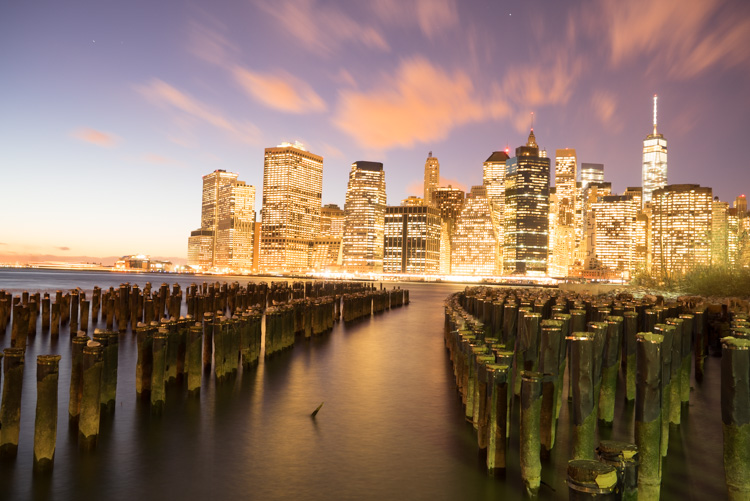
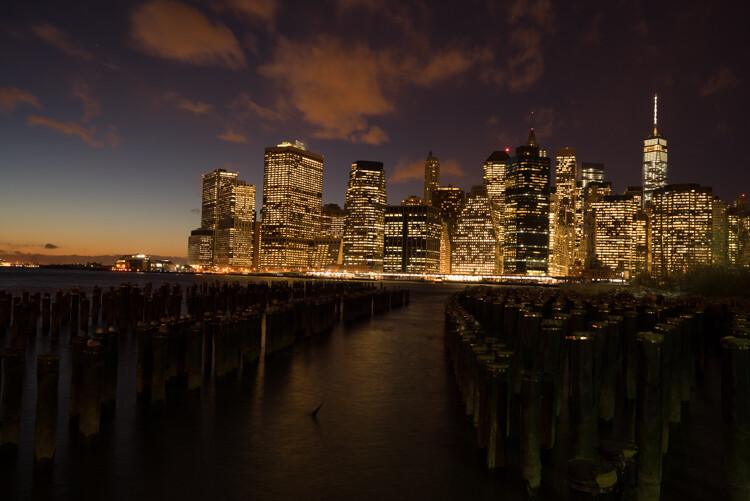
First I started with a 6 second exposure.

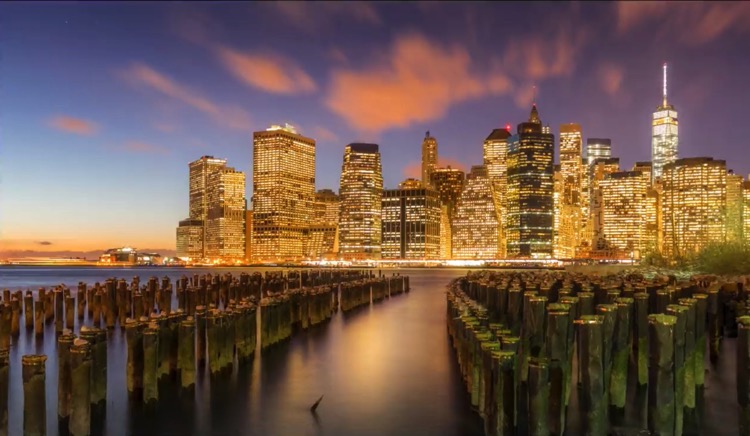
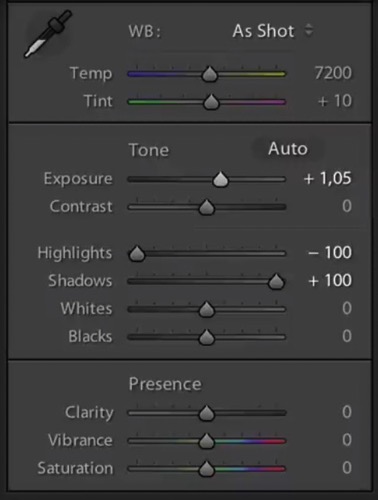
Now, in taking the photo I exposed the image for the highlights. So when you open up the shadows, bring down the highlights, and boost the exposure a little bit like so:

6 Tips for Shooting Long Exposure Night Photographs

I do have all the details of the photo, but the only problem is that the clouds were not moving and the water is not silky.

6 Tips for Shooting Long Exposure Night Photographs

So I went ahead and put the exposure time to 25 seconds. Now it does seem like the highlights in the photos are a little burnt, but I have found that on city lights it doesn’t really matter that much because it still works great on a print.

To conclude; 25 seconds is the best long exposure, you don’t even need a remote, you just need to put your camera on the 2-second timer and go into manual shooting mode, use a low ISO, and an aperture that is going to work like f/7 or f/8.

If your photo is too bright you can adjust the aperture to f/14 and if it is too dark you can even put your aperture to f/4. Just make sure you check your focus to ensure the background is sharp.

Tip #3: Try different exposures of the same scene

Even though I said that 25 seconds exposure is the best, it’s always good to shoot different exposures because this may be different for your situation. For example, I thought that this first image was my go-to photo.

6 Tips for Shooting Long Exposure Night Photographs

But in the end the one that I am going to retouch and going to send to the gallery is this one.

6 Tips for Shooting Long Exposure Night Photographs

So you already have your camera setup and on a tripod. Go ahead and try 8 seconds, 15 seconds, 25 seconds all without touching the tripod and then when you are evaluating your photos for retouching you will have several options.

Tip #4: Shoot towards the sun

When you are doing a long exposure without an ND filter (so as to avoid the color cast, tip #1), a good thing to do is to shoot toward the sun. When it is behind the horizon line it will always give you a nice sky with lots of color and gradations.

You can see on this photo that the sun is setting on the left.

6 Tips for Shooting Long Exposure Night Photographs

And as I turn the camera more away from the sun and back towards the city you get this view.

6 Tips for Shooting Long Exposure Night Photographs

You can see that we get less and less details in the sky. But if you shoot where the sun sets you will always have great details even after sunset, and it is the right time for these type of photos.

Tip #5: Make sure you have water and the sky in your photo

Those are two important things for a long exposure which help to really elevate your photos into what I like to call miracle photos.

Tip #6: Try to get the clouds coming towards you

You can study meteorological information to get a sense of which direction the clouds are moving and try to position your shot accordingly. There are even a few apps which great for this.

As I said, this is not always easy but I got lucky on this one. The clouds are going to be stretchy and create leading lines and that help make this photo really interesting.

6 Tips for Shooting Long Exposure Night Photographs

I hope this helped you and you will be able to capture beautiful places at the perfect time. Please share your long exposure night photos in the comments below.

** NOTE ** If you’d like to know more about this subject, learn more about my brand new course on night photography here, so you can take stunning night photos too!

googletag.cmd.push(function() {
tablet_slots.push( googletag.defineSlot( “/1005424/_dPSv4_tab-all-article-bottom_(300×250)”, [300, 250], “pb-ad-78623” ).addService( googletag.pubads() ) ); } );

googletag.cmd.push(function() {
mobile_slots.push( googletag.defineSlot( “/1005424/_dPSv4_mob-all-article-bottom_(300×250)”, [300, 250], “pb-ad-78158” ).addService( googletag.pubads() ) ); } );

The post 6 Tips for Shooting Long Exposure Night Photographs by Serge Ramelli appeared first on Digital Photography School.


Digital Photography School

 
Comments Off on 6 Tips for Shooting Long Exposure Night Photographs

Posted in Photography


5 Reasons Why You Should be Doing Night Photography

10 Feb

We photographers tend to avoid night photography. Sure, there are some who seem to specialize in it, but most of us stick to daylight hours.

night photography tips and course

Historically, there were good reasons for this. Night photography was hard. You couldn’t see what you were doing because there were no LCD screens on camera. Every mistake cost you money in the form of film and processing. Even when digital cameras came on the scene, the low light performance in most cameras was so atrocious that it made it difficult to shoot at night.

But now, times have changed. Obviously, with digital, you can see exactly what you are doing and take as many test shots as you like. Cameras – and the low light performance of cameras in particular – have improved drastically in the last three to five years. Post-processing tools have come a long way as well, so now you can enhance your night photos a great deal.

night photography tips and course

All that makes night photography much more feasible. But is it something you should do? Will it lead to great photos? Is it fun?

The answers are; yes, yes, and yes. In this article, I will show you some of my favorite things about night photography. Once you get started, you are sure to have some of your own reasons.

1.  Otherwise mundane places are dramatic at night

Most photographers struggle with one thing in particular. That is how to make their photos stand out from the crowd.

Photographing at night can help you make that happen. Let’s be clear, though, just taking any old photo at night won’t get you there. But you’ll be surprised at how many locations that appear rather mundane or drab during the day can be made to look incredibly dramatic at night.

night photography tips and course

In cities, for example, you will find well-lit facades, bridges, skylines, etc. The city lights add interest and give you lots to work with. During the day, these appear flat and uninteresting. At night, however, there is usually dramatic lighting added. In rural environments, you have the night sky. A clear sky in the daytime is nothing special, but at night you are treated to a sky full of stars. In either case, you can add your own light to the scene via a flash unit or light painting (bring your flashlight!).

In addition, the night is just different than what most people normally see. That’s not to suggest that night photography is somehow a novelty, but photography during the day is much more common. People are accustomed to seeing photos during the day. They are even used to seeing dramatic sunrise and sunset photos. Night photos are a little more unusual. Take advantage of it.

2.  You can achieve amazing effects that are impossible during the day

Light trails, starburst effect, motion blur . . . these are all easy at night. The long shutter speeds that are often required for proper exposure in night photography can lead to really cool effects. In addition, at night you can work with lights that just aren’t on during the day.

night photography tips and course

At night, not only are you taking pictures that many others don’t take because they are at home, but you are also taking pictures that many photographers can’t take. You need to have more than a rudimentary understanding of exposure to get a good night shot. Long exposures are very common, so a tripod and a remote shutter release are necessities. Beyond that here are some other considerations for night photography:

  • You need to control shutter speed to get motion blur where you want it and avoid camera shake when you don’t.
  • Aperture control is needed to balance competing goals of letting enough light in, achieving a proper depth of field, achieving a starburst effect to lights, and avoiding diffraction.
  • You need to control ISO to achieve a proper exposure without an intolerable amount of noise that often goes along with night photography.

Granted, some of these things are issues during the day as well. But they are much more of an issue at night. The lack of light is not that difficult to overcome, but you do need to know what you are doing.

3.  The light never changes

night photography tips and course

As someone who loves landscape photography, it can be really frustrating to spend all your time waiting for fleeting moments of light that may or may not ever arrive. Have you ever considered what percentage of a typical day is actually good light for landscape photography? It is a tiny window! Furthermore, how many times have you awaited a sunset and aftermath that didn’t even pan out?

With night photography, on the other hand, you aren’t waiting around for the light. Once the sun is fully set, the light never changes. It is just always dark. Streetlights, spotlights, and other artificial lights aren’t changing (so long as they are on), but rather are constant. So you have all night.

night photography tips and course

You can go out any night and things will be the same. Once you are out, you don’t have to hurry your exposures on account of the changing light. Of course, you may have to hurry if your subject is moving, but it won’t be on account of the changing light.

4.  It is Not So Weather Dependent

Night photography is also not as dependent on the weather. For example, at night, whether it is clear or cloudy, any sky in your picture will likely be black or very dark. You aren’t looking for particular cloud formations.

night photography tips and course

That said, certain weather is not conducive to photography whether it is day or night. Grey, misty days often don’t lead to great pictures (unless you are looking for a mysterious element). And you probably don’t want to go outside in a monsoon or storm. But for the most part the background of your shots just isn’t as weather dependent as shots taken during the day.

5.  It fits your life

You know how you want to get out and do more photography but life keeps getting in the way? You cannot get out during the week because you have to work. On weekends you seem to be tied up with family commitments and errands. It seems like there is never a good time to get out and do some photography.

Most people find, however, that it is easier to get out and do photography at night than during the day. During the day, you are working. At night, most people are off work. During the day, there are family activities. At night the family is winding down and/or going to sleep. During the day, there are errands to run. At night, most stores are closed. You get the idea. There is just less going on at night, such that it always seems easier to get away and do some photography.

night photography tips and course

Conclusion

Don’t forget – half of every day consists of night. In fact, in higher latitudes, the winter can feel like nothing but darkness. But by neglecting the night, you are overlooking the majority of every day. In some ways, you are missing the best part.

Anyway, these are some of my favorite things about night photography. Once you try it, you are sure to have some of your own reasons.

** NOTE ** If you’d like to know more about this subject, learn more about my brand new course on night photography here, so you can take stunning night photos too!

googletag.cmd.push(function() {
tablet_slots.push( googletag.defineSlot( “/1005424/_dPSv4_tab-all-article-bottom_(300×250)”, [300, 250], “pb-ad-78623” ).addService( googletag.pubads() ) ); } );

googletag.cmd.push(function() {
mobile_slots.push( googletag.defineSlot( “/1005424/_dPSv4_mob-all-article-bottom_(300×250)”, [300, 250], “pb-ad-78158” ).addService( googletag.pubads() ) ); } );

The post 5 Reasons Why You Should be Doing Night Photography by Jim Hamel appeared first on Digital Photography School.


Digital Photography School

 
Comments Off on 5 Reasons Why You Should be Doing Night Photography

Posted in Photography