RSS
 

Posts Tagged ‘Night’

Xiaomi Mi MIX 3 launches with tele-camera and night mode

26 Oct

Chinese manufacturer Xiaomi today announced its new flagship smartphone, the Mi MIX 3. The new device features a 6.4” AMOLED display with Full HD+ resolution and only minimal bezels. Unlike most current high-end phones, the Xiaomi doesn’t come with a display notch. Instead the rear of the phone slides upwards, revealing a front dual-cam setup with 24MP main module and a 2MP depth-sensing camera.

Rear camera hardware specs have not changed compared to the Mi 8 and Mi Mix 2S which were both released earlier this year. The rear dual-camera comes with a 12MP wide-angle primary camera that uses a 1/2.55 Sony IMX363 sensor with 1.4µm pixel size, F1.8 aperture and OIS.

The secondary 2x tele-camera comes with smaller 1.0µm pixels and an F/2.4 aperture lens. Software-wise the Mi MIX 3 offers a new Night Mode for hand-held long-exposure shots and AI-powered scene recognition.

Other specs are in line with the current crop of top-end Android phones. The device is powered by a Qualcomm Snapdragon 845 chipset and 6, 8 or 10GB of RAM. You can choose between 128GB or 256GB of internal storage but there are no expansion slot headphone jack.

Pricing starts at $ 475 (CNY3,299) for the 6/128GB version and goes up to $ 720 (CNY4,999) for the 10/256GB model. Preorder is starting today and the device will actually be available November 1.

Articles: Digital Photography Review (dpreview.com)

 
Comments Off on Xiaomi Mi MIX 3 launches with tele-camera and night mode

Posted in Uncategorized


The Six Killers of Night Sky Photography (and how to avoid them)

16 Sep

One of the best things about night photography, in general, is how forgiving it is. That is to say, you generally don’t need special weather conditions to create a really nice picture. The night and urban lights give you all you need to work with. Once it is dark the light isn’t changing so you aren’t chasing the light. Almost any night will do.


But if you are trying to photograph the night sky it is a completely different story. The reality is that night sky photography is very finicky. If you are going to pursue this sort of photography be ready for your opportunities to be very limited. You should also be ready for some failures.

Milky Way - Night Sky Photography

Failure is never any fun, but it is even less so in night sky photography. You have to go to remote areas, so you will often have to drive long distances to get the shot. You will be cutting into valuable sleep time as well.  So let’s try to avoid some of those failures. In that regard, here are the six biggest problems I expect you will run into and how you might deal with them.

Night Sky Photography Killer #1: The Moon

There is nothing that will destroy your opportunities for night sky photography more than the moon. This might surprise you, but it is true. Why is that the case? Because the light coming from even a quarter moon is over 100 times more powerful than starlight. So it simply washes out the scene.

Having the moon in the sky does have its advantages. It can light up your foreground, for example.  But when it comes to photographing the stars, it is a killer.

What’s more, the moon is in the night sky for most of the month. Frankly, I wouldn’t plan a night sky outing more than about 4-5 days on either side of a new moon. Anything near a full moon is out of the question. That takes about 70% of the year out of the picture for night sky photography. As such, it is a huge limitation.

Campsite panorama of the night sky.

So how do you avoid problems with the moon? There are two ways, and for both of them, you need nothing more than a website called TimeAndDate.com. That website will tell you the moon phase, first of all. That way you can plan your night sky outing on or close to the new moon.

If you are totally unfamiliar with the moon and its phases, the new moon is when there is no moon in the sky at night. From the new moon, the moon will transition into a crescent moon, to a quarter, and then a few weeks later to a full moon (and then the process starts reversing itself). The nights around the new moon are critical because not only does that limit the illumination coming from the moon, but during a new moon phase the moon won’t even be in the night sky.

The moon travels across the sky in the daytime during the new moon phase, and across the sky at night during a full moon. The closer you are to a new moon, the less time the moon will be in the sky at all during the night.

That leads to the second way to avoid the moon, which is to take note of the times of moonrise and moonset. Again, you can get these times through TimeAndDate.com. Make sure this lines up with the other conditions you need for success (ie. times of complete darkness, weather conditions, movement of stars, etc.) which we will talk about in a second.

night sky photography - Milky Way over a road

Killer #2: Light Pollution

You may have read that heading and said “duh.” You already know you need to be in a dark place to have any success in capturing the night sky. But you might be surprised by just how dark it needs to be. You cannot just drive outside of a city for half an hour and expect it to be dark enough to really capture a great night sky shot or the Milky Way.

What you need to do is consult the Dark Site Finder. This is the best resource I have found for avoiding light pollution. It is basically Google maps with an overlay of different colors that tell you how much light pollution a given place will have. The darker the color the better (ie the less the light pollution).

dark sky finder map - night sky photography

How dark do you need it to be? Really dark. Take a look at this picture:

church and Milky Way - night sky photography

This picture was taken in a blue area on the Dark Site finder, which is the fifth darkest area out of the 15 different levels. The light pollution you see on the bottom left of the picture was not from a big city, but rather from a small town shaded green on the map that was about 10-15 miles away.

The light pollution was not something you would see as you were shooting – everything looked totally dark to me as I was standing there. But it shows up very clearly in the shot, obviously. Make sure it is very dark where you are planning to shoot.

Killer #3: Star Movement

If you are not familiar with night sky photography, you might think you can just open up the shutter for a minute or two to allow enough light into the camera to achieve a proper exposure. But you can’t, because the stars are moving. And they are moving a lot faster than you might think. (Okay, I know this is actually due to the earth spinning – I’m not a flat-earther – but it appears as though the stars are moving!)

If you shoot the night sky with a long exposure, the stars will move while you have the shutter open. They will show up as small trails. It doesn’t look attractive and just makes the stars look blurry. Of course, you can go with it and create trails that go across the entire frame, but that is a different story entirely. What you are after here are crisp pictures of the stars in the night sky.

How long of a shutter speed can you use? On all but super-wide-angle lenses, you shouldn’t go longer than about 15 seconds. Even on super-wide-angle lenses, you shouldn’t go longer than 30 seconds. You can also use something called the Rule of 500 to determine your longest useable shutter speed. That rule says that the maximum shutter length should be 500 divided by your focal length (eg. with a 24mm lens it would be 500 / 24 or 20.8 seconds).

Because of this, you should use your widest angle, fastest lens for night sky photography. For more information on picking a lens, check out this article.

shooting star night desert photo - night sky photography

Killer #4: Lack of Foreground Element

A starry sky or Milky Way shot will provide a nice background for your picture. It is sort of like having a nice sunset. It is a great thing to have, but on its own, it won’t be enough. You also need a foreground element.

If you just head out to shoot the night sky with no real idea of where you are going, you will likely have problems. You will end up with an uninteresting foreground, and therefore uninteresting photography. The middle of the night is no time to explore and try to come up with something. Remember that where you are going will be very dark. It will be full darkness, with no moon, in a place with no light pollution. You won’t be able to see anything to come up with a foreground.

To fix this problem, you need to scout your area ahead of time. Sometimes that is possible by physically going there, but often it isn’t. When you cannot go ahead of time, you can still virtually scout the location.  Use the Street View feature in Google Maps to get you started.

Killer #5: Unforeseen Conditions Blocking Out the Stars

You probably already know that you cannot head out on a cloudy night and expect to have any chance of success at photographing the night sky. You need a clear sky, or at best partly cloudy conditions. There is no secret as to how you check this. There are a number of weather apps, so just use the one you are comfortable with.

But that isn’t the end of the issue. I have had many outings ruined when there was not a cloud in the sky. They have been ruined by things like dust clouds, smoke, and mist. These conditions aren’t as flukey as you might think. Remember you will usually be doing your night sky shots in remote places.

A desert environment is a pretty commonplace, and moderate winds kick enough dust up into the atmosphere to essentially block out the stars. If you are in a coastal environment, sea mist can do the same thing. Forest fires from hundreds of miles away can also impact your ability to get the shot.

So be sure you take a close look at conditions in your target area. It is no fun to drive for many hours and then not even pull the camera out of the bag.

trees and stars - night sky photography

Killer #6: A Boring Sky

Finally, not just any clear, moonless night will do. If you go out without understanding which stars will be in the sky when you will be shooting, you might be destined for a boring sky. If you have a strong enough foreground element, this might not matter so much. But if the night sky is the predominant subject matter, you need it to look really good.

For most people, this means including the Milky Way in your shot. That means capturing the band of stars that runs across the sky. It is best when you capture a cluster of stars at the heart of it. But the Milky Way isn’t visible all year. It isn’t visible at any time of night during about November through February. Starting in about March it will become visible just before sunrise. In June through about August, it will be visible most of the night. Starting in about September it will only be visible just after sunset. This is true no matter what hemisphere you live in.

To plan for including the most interesting stars and constellations (and, again, usually the Milky Way), just pick up one of the apps that are available for your phone. I use Star Walk 2 and I like it very much, but there are others available such as PhotoPills.

tree at night - night sky photography

Putting It Together

Again, night sky photography is finicky. Taking steps to prepare will pay huge dividends. Because you need to be in remote areas, that means a long drive to get there. Planning will keep you from wasting a whole lot of time and effort.

But don’t wait for perfection – that never happens. Plan for the best conditions you can get, and then give it a shot. It could lead to some stunning pictures.

The post The Six Killers of Night Sky Photography (and how to avoid them) appeared first on Digital Photography School.


Digital Photography School

 
Comments Off on The Six Killers of Night Sky Photography (and how to avoid them)

Posted in Photography


Tips for Processing Night Photography with ON1 Photo RAW 2018.5

07 Aug

For many students, as they start learning photography they want to know how to take photos at night. It is a mystery to them and they often think it is so complicated that they will never be able to do it. That is until they try it and discover just how easy it is. The next step is editing those images and ON1 Photo RAW 2018.5 has a lot of tools and adjustments that are perfect for processing night photography.

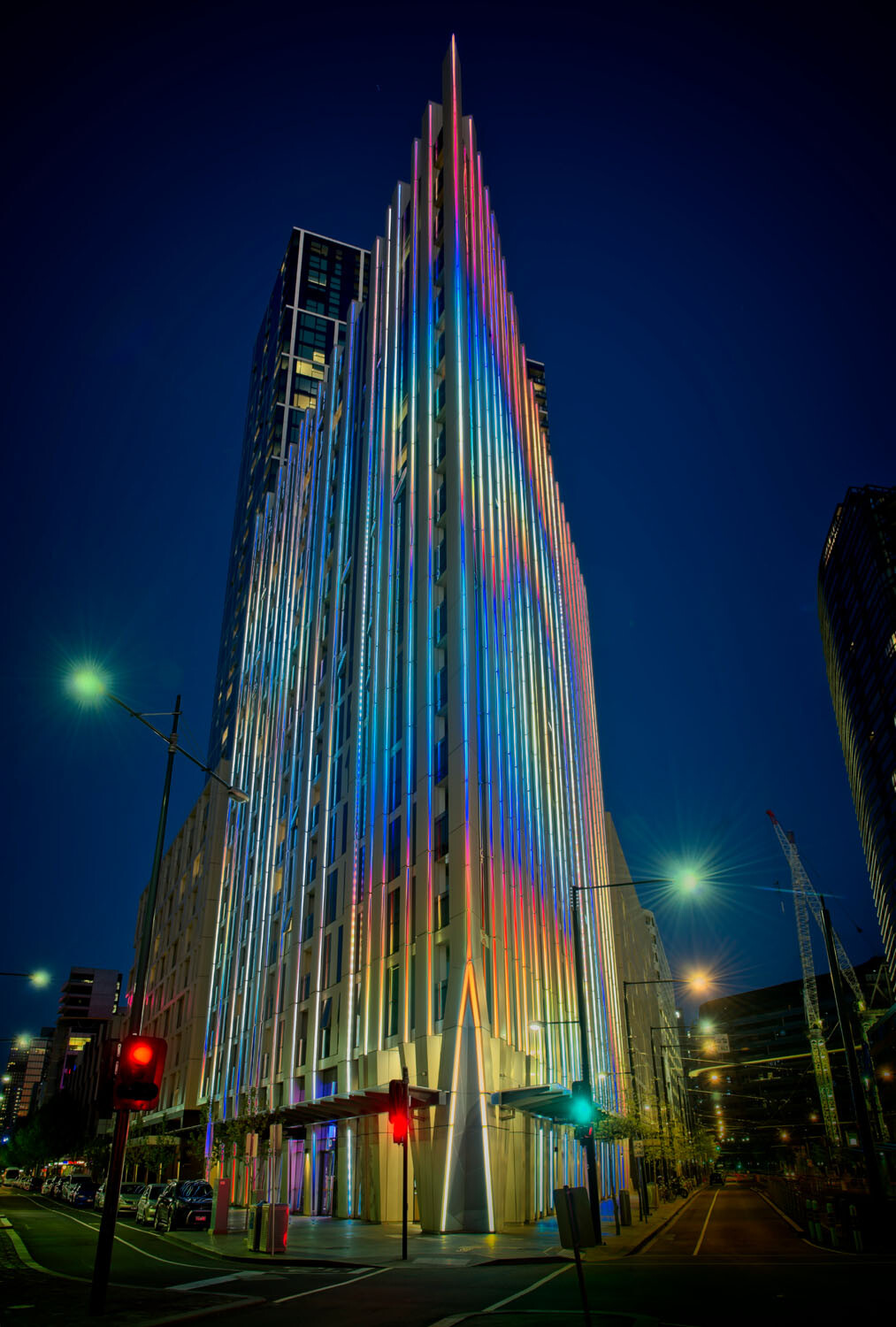
HDR architecture image - Tips for Processing Night Photography with ON1 Photo RAW 2018

An image created using the HDR option in On1 Photo RAW 2018.

Night photography options

First, we should take a look at the different types of night photography that you can do. There is the easiest option of setting your camera up on a tripod and photographing lights somewhere.

The city at night is very popular if you live in an urban area. Perhaps capturing town lights can also be good. You just need something that is making light. HDR has had a lot of bad press, but it really is good for some images, and night shots of cities are perfect for it. ON1 Photo RAW’s HDR processing is one of the best I’ve seen.

When the sun has gone down and there is a lot of traffic you can photograph light trails. Taking longer exposures with your camera on a tripod will make all those lights look like streaks. If you want to make it look like there were a lot, then you can stack the images together, so all the streaks will show in one final image.

One type of night shot that is hugely popular right now, especially in Australia, is astrophotography. Photographing the Milky Way. It is the season for it here and with the low population, you are spoilt for choice where to do them. If you have ever tried doing any astrophotography then you will also be aware that your images have to be processed or they can look at washed out. ON1 Photo RAW 2018.5 has you covered there as well.

Tips for Processing Night Photography with ON1 Photo RAW 2018 - astrophotography milky way image

An astrophotography image processed with ON1 Photo RAW 2018.5

Photographing the City

Night time in the city can be so magical and to be taking photos of it even more so. Processing your images taken at night is much the same as processing any of your images.

Open your image in ON1 Photo RAW and take it into the Develop module. Make the adjustments as you would for other images. Move the sliders around to see what you can get. Take them too far and then bring them back.

sliders in ON1 Photo RAW - Tips for Processing Night Photography with ON1 Photo RAW 2018

When learning it is good to take the sliders too far, see what happens.

If you want to make adjustments to particular areas, then look at local adjustments which is the best place to do that.

However, what if you want to do something to your image to really make it pop?

HDR photography, or High Dynamic Range, can be perfect for this. It is a process that has copped a lot of criticism over the years. People say it is too much, that the images can be ugly. But that really only happens when you don’t use it for the right images, or overdo it.

There are some scenes and images that are perfect for HDR and night photography is one of those times.

HDR Night Photography

When you are to decide which images would work best for HDR, look for ones that have a lot of dark areas, and a lot of bright parts as well. Usually, your camera will struggle with getting an even image of a high contrast scene. It will either make the image too bright or too dark. Night images have those problems. Once you get the lights exposed right, all the shadows become too dark or black.

The best way to do HDR is to take a series of images or bracketed shots. If your camera will allow you to bracket then it will sort out the exposures you need. The most common number of shots is 3 or 5. For this article, five images were taken.

Next, select all of your bracketed images inside the ON1 Photo RAW browse module. You can do that by clicking the first then pressing the shift key followed by clicking on the last image. If you have put the images into a subfolder you can then just use Ctrl/Cmd+A.

Tips for Processing Night Photography with ON1 Photo RAW 2018 - bracketed set of images

Work out which images you want to use.

Once they are selected you should be able to see the HDR button over on the right-hand side of your screen, underneath all the different modes.

select images and HDR button - Tips for Processing Night Photography with ON1 Photo RAW 2018

Select all your images.

ON1 Photo RAW will then merge all your images together. The first time you do it, a window will pop up asking you what look you would like. The options include Natural, Natural Auto, Surreal and Surreal Auto. You can make the changes once the image has been merged to HDR. There are lots of choices with ON1.

Let’s take a look around the HDR working window

Tips for Processing Night Photography with ON1 Photo RAW 2018 - HDR looks

Selecting your HDR look in ON1 Photo RAW.

There are several places where you can set the amount of de-ghosting (remove spots where something moved between brackets) you want the program to do. You can change the HDR look you wanted if you think you made a mistake. You can select which image you think should be the main one.

Go through and change the image to suit the look you are after. I know I say this a lot, but the best way to learn is to play around with the settings.

HDR options - Tips for Processing Night Photography with ON1 Photo RAW 2018

All the different things you can do to your image.

Like most images, you need to experiment to see what you like. Remember that ON1 is non-destructive so you won’t ruin anything. Try everything, it is the best way to learn. Take it all too far and then bring it back.

Lastly, choose where you want your image to go when you are done. You can have it open in Develop, Effects or go back to Browse. The last choice is Cancel. If you want to save it then click Save.

Tips for Processing Night Photography with ON1 Photo RAW 2018

Taking the image further.

Once the image is opened in the Develop module, you can then make more adjustments to as you would normally.

Develop module - Tips for Processing Night Photography with ON1 Photo RAW 2018

Where to go next.

ON1 Photo RAW is one of the best programs for doing HDR. You can make so many changes to it as it is happening and after it is done. Nothing is final.

final HDR - Tips for Processing Night Photography with ON1 Photo RAW 2018

The final HDR image.

Astrophotography

For anyone who has ever done astrophotography, you know that the images always need to be processed.

Here is an image that was taken a couple of years ago. This is the raw file and you can see that it needs a lot of work.

night image Milky Way and lighthouse - Tips for Processing Night Photography with ON1 Photo RAW 2018

Raw image from astrophotography shoot.

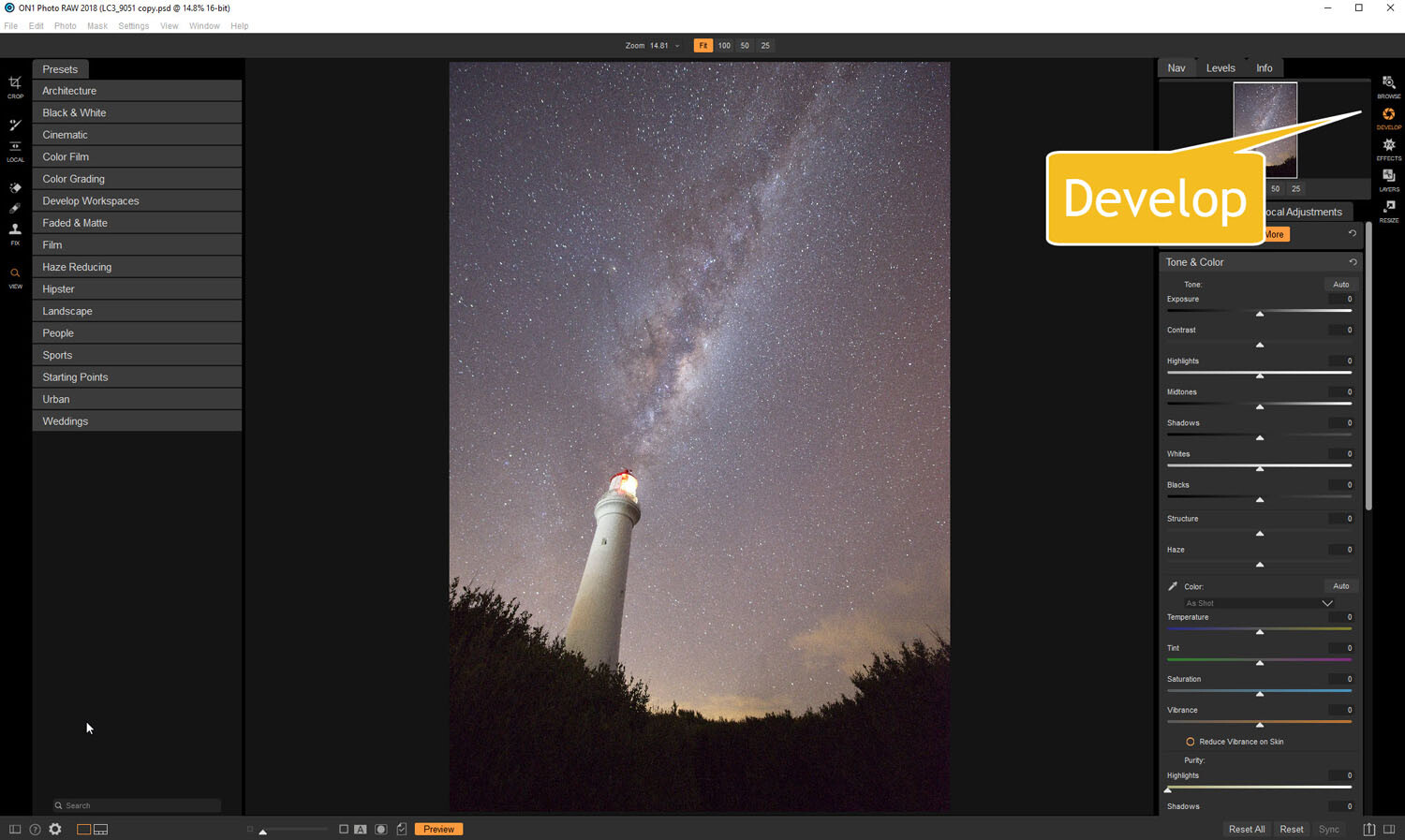
Open the image up in ON1 Photo RAW and go to the Develop module. Everything you need to make the best astrophotography images is all right there.

develop - Tips for Processing Night Photography with ON1 Photo RAW 2018

Open in the Develop module.

Noise reduction

The first thing you want to do is to work on the noise in the image. All astrophotography images have a great deal of noise. You have to increase your ISO quite high in order to get the Milky Way in your image. Usually, it is going to be somewhere between ISO 3200 up to 6400.

The image for this article was taken at f/2.8, for 30 seconds at ISO 6400. It was taken at 14mm using a 14-24mm lens.

In the Develop module go to Details. This is where you can help reduce the noise in your image. Click on the image to zoom in so you can see the noise better.

noise and details section of develop - Tips for Processing Night Photography with ON1 Photo RAW 2018

The first thing to do is to fix the noise in the image.

Under Noise Reduction, you will see a Luminance slider. Move that along until the noise almost disappears. Be careful not to go too far or you might lose all the stars (noise is just white specs so the stars can easily be misinterpreted as noise if you go too far).

This slider smooths out the image and you can lose a lot of detail if you go too far. Bring up the Detail slider to help maintain it. It is about experimenting and seeing what you like as well.

You can also bring up the Sharpening amount as well but be careful. Over sharpened images can look terrible. Go easy with this slider.

noise adjustments - Tips for Processing Night Photography with ON1 Photo RAW 2018

You can see how much was changed.

Tone & Color

It is time to go back to Tone & Color and make more adjustments.

tone and color - Tips for Processing Night Photography with ON1 Photo RAW 2018

Take the image back to Tone & Color to make basic changes.

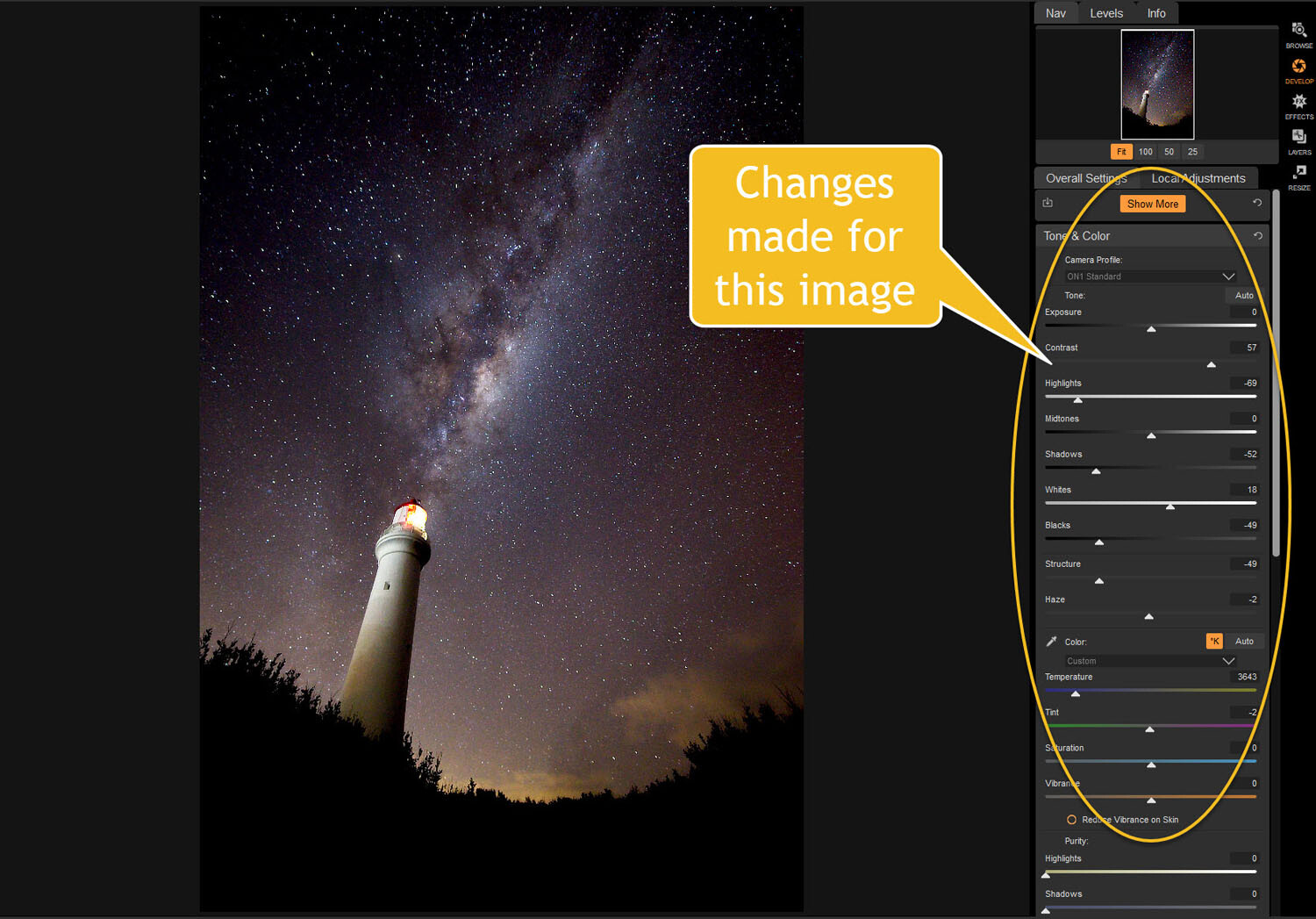
The main things you want to add back into your image are the blacks and lots of contrast. The added contrast will help the stars stand out more from the dark sky. The blacks will allow the darker parts of the sky to appear as you saw them when you shot the image.

The highlights can be brought down to stop the lighthouse from blowing out too much. If you take the shadows down it helps make the darker parts of the sky richer as well. However, be aware that it can also make other parts of the image go black, like the foliage at the bottom of this image.

The whites were brought up a fraction, as this helped to lighten up the Milky Way and make it jump out more.

slider adjustments - Tips for Processing Night Photography with ON1 Photo RAW 2018

Some of the changes that were made in Tone and Color.

Color Adjustments

Most of the changes are made to the image now, but if you look closely there is quite a bit of blue in it. It shouldn’t be there and to remove it you need to go to Show More and then Color Adjustments.

color cast - Tips for Processing Night Photography with ON1 Photo RAW 2018

Taking out the blue cast color in the stars.

A new window for this will open up down below the other adjustment windows.

As it is the blue you want to change, click on that color square. Once it is selected you can move the saturation slider until the blue in the image disappears or is to your liking.

reducing blue saturation - Tips for Processing Night Photography with ON1 Photo RAW 2018

Changing the saturation of the blue.

You can try adding presets to your image as well, though most people with astrophotography just do the basics and leave it there.

You will need to play around with your photos to see what you can do and what is to your tastes. These are just suggestions as to what other photographers do. Experiment, take the sliders too far and then bring them back.

This is the final image.

final image of lighthouse - Tips for Processing Night Photography with ON1 Photo RAW 2018

The final image of the Milky Way over the top of the lighthouse.

Light Trails

In cities, or anywhere there is a lot of traffic, you will see photographers trying to capture the trails of the lights as the cars go past. For most places, the best time to capture this is during peak hour when a lot of vehicles are moving. However, it also needs to be dark.

Unfortunately, there are times of the year where it is impossible to get both at the same time. For instance, in Australia during the summer daylight saving means it doesn’t get dark until after 8 pm. Getting good light trails is reduced because there isn’t enough traffic at that hour.

However, there is a way to make it look like there was more traffic, that is to stack your images. You can also do this for star trails too.

Stacking light trails

Work out which image will be the first one. Take it the Develop module in ON1 Photo RAW and do what you want to process it normally first.

But do not straighten it or do any lens correction on the image. If you do then the other images won’t align up properly, you can do all that after.

original image for light trails - Tips for Processing Night Photography with ON1 Photo RAW 2018

The first image used for the light trails.

Once you have your image ready, go to the Layers module.

layers - Tips for Processing Night Photography with ON1 Photo RAW 2018

Take the image to the Layers mode.

Next, add all the other photos that will make up the final image. The best way to do this is to put all the images into a subfolder. Select the images you want to use, then right-click and go to Add Subfolder.

add subfolder - Tips for Processing Night Photography with ON1 Photo RAW 2018

Putting your images into a subfolder.

A window will pop up once you click Add Subfolder. You can name it as you want, or ON1 will name the folder the same as the filename for the first image. Make sure the box is ticked for Move Selected Items into Subfolder.

add subfolder - Tips for Processing Night Photography with ON1 Photo RAW 2018

Creating the subfolder.

Now you are ready to add all those images as layers to the original photo.

Get your image to the Layers module which is where you will add the images for your light trails. Go up to File in the main menu at the top. Select Add Layer(s) from File.

add images from file - Tips for Processing Night Photography with ON1 Photo RAW 2018

Now it is time to add the layers.

A window will pop up where you can go to the subfolder that you put the images into. Select all the images, Ctrl/Cmd+A, then press Open.

select images - Tips for Processing Night Photography with ON1 Photo RAW 2018

Selecting all the images you want to use.

ON1 Photo RAW will ask you if you want to open them all, say yes. Depending on how many images you are trying to do it can take some time for this to happen. The images used for this demonstration are quite large and took a few minutes.

images added as layers - Tips for Processing Night Photography with ON1 Photo RAW 2018

All the images are added.

Next, you need to blend each layer. You want the lights to shine through from each but not everything else. For each layer, go up to the blending pull-down and select Lighten.

blending options - Tips for Processing Night Photography with ON1 Photo RAW 2018

Blending all the layers with Lighten.

You can now save the image and then you can do more processing if you wish. If the image needs straightening, lens corrections, etc., you can do it in the Develop module.

light trails image - Tips for Processing Night Photography with ON1 Photo RAW 2018

The final image.

Star Trails

If you enjoy doing star trails then you will be able to use this same method for processing and stacking those images using ON1 Photo RAW. Just add them all as layers and use the Blending option Lighten.

Conclusion

There are many things you can do with your night photos in ON1 Photo RAW 2018.5. With things developing constantly you will be able to do more and more with time. The HDR feature is one of the best I’ve seen and I’m sure most of you will enjoy that.

With all software, experimenting is the key. Take what you learn and see what else you can do with it.

Disclaimer: ON1 is a dPS paid partner.

The post Tips for Processing Night Photography with ON1 Photo RAW 2018.5 appeared first on Digital Photography School.


Digital Photography School

 
Comments Off on Tips for Processing Night Photography with ON1 Photo RAW 2018.5

Posted in Photography


dPS Ultimate Guide to Night Photography

27 Jun

In this, the next installment of our dPS ultimate guides, learn what you need to know to get started doing night photography.

Introduction

Tower Bridge - dPS Ultimate Guide to Night Photography

Tower Bridge, London. Exposure: shutter speed 2.6 seconds, aperture f/5.6, ISO 100.

Night photography immediately solves a huge problem that you confront constantly in photography. That problem is being faced with ordinary scenes that just aren’t very interesting. If you take a picture of a building or a standard street scene during the day, it can be sort of dull. We are all used to seeing shots taken in the middle of the day. That same scene – shot at night – can be a really interesting photograph though.

The actual taking of pictures at night might seem a little bit like magic if you are just getting started. Even those who have been shooting a while may wonder how to get a proper exposure and focus in the dark. Although photographing in the dark certainly has its challenges, in some ways, it is actually easier than photography during the day.

So let’s take a quick look at the essentials of night photography. In particular, we’ll cover the gear you need, how to expose your photos, how to focus at night, great subject matter, and some post-processing tips. Hopefully, this will help open up the world of night photography to you.

What to Bring for Night Photography

Alpine - dPS Ultimate Guide to Night Photography

Breckenridge, Colorado – Exposure: shutter speed 15 seconds, aperture f/2.8, ISO 3200.

First, let’s talk about what you will need in terms of equipment for doing night photography. The good news is that you will not need much in the way of extra gear. Besides your standard camera and lens, the only thing you will absolutely need is a tripod. The darkness means that your camera needs to use a long shutter speed to gather enough light for a proper exposure (more about that in a second). So you need to be able to hold your camera steady and a tripod is the best choice for that.

Another helpful item for keeping the camera steady is a remote shutter release. I highly recommend that you get one – and the corded ones are very cheap (under $ 10). You can spend a lot on an intervalometer if the extra features will benefit you, but you don’t need that for standard shooting at night.

If you don’t have a remote or find yourself without one on occasion, you can use your camera’s 2-second timer to take the picture so that you don’t touch the camera during the exposure.

Miami - dPS Ultimate Guide to Night Photography

Miami, Florida – Exposure: shutter speed 0.3 seconds, aperture f/2.8, ISO 200.

Although not necessary, here are some additional items to consider having on hand for your night photography:

  • A flashlight: This will come in handy in a myriad of ways. It will help you with finding your camera controls if you don’t know them cold. It will help you set up your tripod and deal with straps and other attachments. Finally, a flashlight will also help you find things in your camera bag. Just keep a small one (or a headlamp) handy.
  • Lens hood: At night you will have bright lights coming at you from different directions – such as street lights and neon lights. Using a lens hood will help keep flares to a minimum.
  • Extra batteries: The long exposures you take at night will drain your camera battery at an alarming rate. You may also be using Live View, which drains them even faster. So does cold weather. Therefore, night photography always calls for spare batteries. Don’t take any chances here – a dead battery means your night is over.

If you are going to capture the night sky, you’ll need to be on top of weather conditions. In addition to your standard weather apps, be sure to add an app to your phone that will help you see where the moon, constellations, and Milky Way (if visible) will be. If you don’t already have apps you are using (there are several), I recommend PhotoPills and Star Walk 2.

Exposures for Night Photography

Pigeon Point - dPS Ultimate Guide to Night Photography

Pigeon Point Lighthouse, California. Exposure: shutter speed of 6 seconds, aperture f/5.6, ISO 1600.

The biggest difference between daytime and night photography is the exposure values you will need to use. The darkness changes everything. Don’t worry though, once you have your camera on a tripod, it is actually not that difficult to get the proper exposure in most cases.

Let’s back up and cover things that you might already know. Your camera’s exposure is a result of three controls (the exposure triangle) – shutter speed, aperture, and ISO. Because of the darkness, you need to let more light into the camera, and you can only do so by affecting one of these three controls. We’ll cover how to do that for each of them now.

Toledo Overlook - dPS Ultimate Guide to Night Photography

Toledo, Spain – Exposure: shutter speed 8 seconds, aperture f/8, ISO 200.

Shutter Speed

During the day, you will typically use shutter speeds that are a small fraction of a second. At night, however, the camera will use shutter speeds that are longer than one second – sometimes significantly longer. Think of it this way: because it is dark, the camera needs a longer period of time to gather light for a proper exposure.

The shutter will now be open for a longer period of time, so the camera needs to be held steady or the picture will move during the exposure process, causing your image to be blurry. That is why a tripod is required equipment at night. You can leave the shutter open as long as you want, as long as the camera is steady and does not move at all.

Millenium and St Paul - dPS Ultimate Guide to Night Photography

Millennium Bridge and St. Paul’s Cathedral, London – Exposure: shutter speed 4 seconds, aperture f/5.6, ISO 400.

Aperture

The aperture is the opening in the lens that lets light into the camera. The size of the aperture determines the amount of light being let into the camera for a given shutter speed, and it also affects the depth of field.

For the most part, there is no difference between how you will use the aperture at night versus how you use it during the day. The only difference is that the camera will struggle to get enough light for a proper exposure, so a small aperture will often require ridiculously long shutter speeds. In addition, the background is usually black, so you don’t need to worry as much about achieving a wide depth of field.

Both of these factors (needing more light, and not needing a wide depth of field) tend to mitigate toward using larger apertures at night.

Top Of Rock - dPS Ultimate Guide to Night Photography

When you are shooting a scene like this where everything is far away, you don’t need a wide depth of field. Hence you can get away with a larger aperture. New York, New York – Exposure: shutter speed 0.3 seconds, aperture f/4.0, ISO 400.

ISO

The third exposure control, ISO, is a measurement of the sensitivity to light of your digital sensor. Higher ISO values make your digital sensor more sensitive to light and thereby allow you to use a shorter shutter speed or a smaller aperture.

But, there is no free lunch here, and using higher ISOs will result in more digital noise in your pictures. Since dark areas of your picture tend to show more digital noise than lighter areas, it is often a problem with night photos. Therefore, resist the temptation to crank up the ISO at night if you can help it.

Since you will be using a tripod, you can usually avoid the need to use a high ISO. In other words, the tripod allows you to use a longer shutter speed, and that long exposure allows more light into the camera such that you don’t need to use a high ISO. However, in those cases where you cannot use a tripod or you have a moving subject, you will need to increase the ISO.

Path - dPS Ultimate Guide to Night Photography

I needed the foreground sharp in this image, so these exposure settings are brighter than the typical night sky shot, which you will learn more about shortly. Shutter speed 30 seconds, aperture f/2.8, ISO 3200.

That is certainly bad news, but the silver lining is that cameras are getting better and better at handling higher ISOs without showing much digital noise. In addition, post-processing software continues to improve at noise reduction, so you should be able to remove the digital noise later.

A Starting Point for Proper Exposure

It might seem a little silly for me to even try to give you some night photography default exposure settings, but that is what I’m going to do anyway in an effort to get you started.

Let’s say you are in Aperture Priority mode, which is what I find a lot of people use. If you are still using an automatic mode, give Aperture Priority a try, as it is still semi-automatic (meaning the camera will set the shutter speed for you to create a correct exposure), but you get to set the Aperture and ISO.

Brooklyn Bridge -

So, let’s talk about the aperture setting first. Start by setting your aperture to f/5.6, which is a fairly moderate choice that lets in a healthy amount of light. It won’t give you as much depth of field as you might like, but remember that you typically don’t need an extremely deep depth of field since the background will be black.

Next, set your ISO. Start at about 400, which is high enough that you won’t have to use an extremely long shutter speed. At the same time, most cameras can shoot at ISO 400 without digital noise becoming a problem.

After that, just see where the shutter speed ends up when you line up your shot. I’m assuming you are using a tripod for this example, by the way. You know the shutter speed is going to be long – probably a few seconds. I have tried to keep the other settings such that you won’t be standing in one spot for a minute or more while the camera creates the exposure.

Chicago River - dPS Ultimate Guide to Night Photography

Chicago River – Exposure: shutter speed 30 seconds, aperture f/13, ISO 200.

That’s not to say you should never do that. Depending on the scene and subject, you might want your shutter speed to be measured in minutes – but it is not the norm.

If you don’t have a tripod, your options are limited. In fact, there is only one option, and that is to open up the aperture all the way, crank up the ISO to at least 1600 (probably 3200 or 6400), and then use whatever shutter speed the camera sets.

Even with a wide aperture and high ISO, the shutter speed is likely to be long enough that camera shake will still be an issue.

Exposing the Night Sky Photo

West Lakes

There is one specific exposure setting I can tell you right now because it is often the same. It is the exposure settings for photographing the night sky. Your exposure settings will be:

  • Shutter speed: 15 seconds.
  • Aperture: f/2.8
  • ISO: 6400

This is not set in stone, and you’ll notice that my night sky photos add a little exposure to these settings, but it is a good starting point. But what if your lens doesn’t open up to f/2.8? Then you have to just increase the ISO or the shutter speed by the corresponding amount.

For example, if your lens’s maximum aperture is f/3.5 – which is the case with many kit lenses – you’ll need to find another 2/3 of a stop of light. Either add that to the ISO, the shutter speed or just increase both by one click (remember one click of your dials is 1/3 of a stop).

Milky Way Big Bend Texas - dPS Ultimate Guide to Night Photography

Big Bend National Park, Texas. Okay, the exposure settings don’t have to be exactly the same. I wanted this brighter to accentuate the Milky Way. Shutter speed was 13 seconds, aperture f/2.8, ISO 6400.

You might be tempted to lengthen your shutter speed a lot on the premise that you are using a tripod. After all, that would seem like a good way to reduce your ISO to control digital noise and also to use a smaller aperture so you don’t have such a narrow depth of field. Don’t do it!

The stars in the sky are moving (okay, it is really the earth’s rotation, but they appear to be moving across the sky). If you lengthen your shutter speed too much, the stars will have little trails which appear as a blur in your shot. You may not see it until you get the pictures home and look at them on the computer screen, but it will be there and will ruin the shot.

Big Bend Night - dPS Ultimate Guide to Night Photography

Big Bend National Park, Texas. Look closely at this picture and you will see little star trails. This was the result of using a longer shutter speed than I mentioned above. Shutter speed 165 seconds, aperture: f/4.0, ISO 1600.

For more in night photography exposure, please read Tips for Getting Proper Exposure for Night Photography.

Circulo de Bellas Artes

Picking a Subject for Night Photography

Now that you have the right gear and know how to expose your photos at night, you have to pick a good subject for night photography. For the most part, that is no different than what you do during the day. A good subject is a good subject. Still, things will look different at night.

Let me introduce you to some of the things I like to photograph at night. Hopefully, these will give you some ideas, which you can take in your own directions.

The Night Sky

If you are out in the countryside, you need nothing more than a clear night to get a great photo. Moonless, clear nights are the best. If you can happen to catch the Milky Way (usually possible from March through October, and best from May to September), all the better.

Check out an app called Star Walk 2 to help you get a handle on the timing of these things. If you can add an interesting foreground to the shot, even better.

Museums and Public Buildings

Louvre - dPS Ultimate Guide to Night Photography

The Louvre, Paris. I was forced to hand-hold this shot (it was taken from inside the Louvre), so I really had to crank the ISO and open up the aperture. Shutter speed 1/8th of a second, aperture f/4.0, ISO 3200.

Well-lit buildings are an obvious choice for a nighttime subject. You almost can’t go wrong here. Although the concept is obvious, when executed well the result can still be great. You can also use this as a starting point for your night photography. You will have additional ideas as you stand there waiting for your pictures to expose.

Fountains

Buckingham Fountain - dPS Ultimate Guide to Night Photography

Buckingham Fountain, Chicago – Exposure: shutter speed 10 seconds, aperture f/18, ISO 100.

Perhaps my favorite nighttime subjects are fountains. Many times they are lit with different colors as well, adding additional interest. The long shutter speeds you use at night make the fountain appear to be flowing.

Bridges

Brooklyn Bridge Park - dPS Ultimate Guide to Night Photography

Brooklyn Bridge, New York – Exposure: shutter speed 15 seconds, aperture f/11, ISO 200.

It seems like every city or town has a bridge. It may not be the Golden Gate Bridge, but there will likely be a bridge and it will be well lit at night, which makes it an interesting subject. Plus the long exposure time you use for night photography will cause the water under the bridge to blur, and the traffic to appear as streaking lights.

Streetlights

Pay close attention to streetlights when you are doing night photography. They can be useful in a lot of different contexts. They can add a point of interest to it otherwise blank area of the picture. If there are multiple lights, they can create a nice leading line into your picture.

Washington Monument - dPS Ultimate Guide to Night Photography

Washington, D.C. For this shot, I wanted the twinkle or starburst effect from the streetlights, so I used a smaller aperture. Exposure: shutter speed 8 seconds, aperture f/16, ISO 800.

Car Light Trails

Dallas Streaking Lights - dPS Ultimate Guide to Night Photography

Dallas, Texas – Exposure: shutter speed 20 seconds, aperture f/16, ISO 100.

A really fun thing to include in your night photos is streaking light trails from moving cars. These are created when a car or other vehicle drives through the frame while you have the shutter open. The camera picks up the lights, but since the car has gone all the way through the frame while you had the shutter open, it shows up in your picture as streaks of lights.

Try to time your pictures so that vehicles move all the way across the frame while you have the shutter open. Read: How to Create Dynamic Photos of Car Light Trails for more tips on this technique.

Reflections

St Paul mirror - dPS Ultimate Guide to Night Photography

Reflections in London, U.K. – Exposure: shutter speed 1.3 seconds, aperture f/8, ISO 200.

A benefit of the longer shutter speeds you will be using at night is that reflections show up better on the surfaces of water. This is obviously true on ponds and lakes. But it is also true for puddles. After a rain can be a great time for night photography.

Overlooks and Vistas

Let’s end with overlooks and vistas. Some of the best night photography I have ever seen are nighttime views of cities. You can often get great skyline shots. Be careful though – a great view often does not translate into a great picture. Make sure you have an interesting foreground and/or a strong center of interest in the picture.

Downtown from Manhattan Bridge - dPS Ultimate Guide to Night Photography

New York City from the Manhattan Bridge – Exposure: shutter speed 10 seconds, aperture f/8, ISO 200.

When picking subjects for night photography, it is important to note that things will not look the same to the camera as they do to you. Take some test shots whenever possible. If the idea of a long exposure test shot seems tedious due to the wait time, crank up the ISO for purposes of your tests which will allow you to use a short shutter speed. When you go to take the final picture you can reduce the ISO and increase the shutter speed by a corresponding amount.

Nashville night - dPS Ultimate Guide to Night Photography

Nashville via drone – Exposure: shutter speed ½ a second, aperture f/5.6, ISO 310.

Focusing

One final difficulty you will face in night photography is that it is often tricky to focus your camera. That is because most cameras focus by detecting contrast. If the scene is too dark, there is no contrast for the camera to pick up. There are a few things you can do to get your camera to focus though.

The first is to focus on a bright light in the picture. A streetlight works well for this. Try focusing on the edge of the light (between the bright part and the black background), which will give you the necessary contrast. Be sure you are focusing the same distance away as where want your final picture to be focused. Once you have the focus set, recompose your picture and press the shutter button to take the picture.

Capital Clouds - dPS Ultimate Guide to Night Photography

U.S. Capitol, Washington D.C. – Exposure: shutter speed 30 seconds, aperture f/16, ISO 400.

Another trick to allow you to use your autofocus is to break out the flashlight and shine it on the thing that you want your camera to focus on. If it is close enough, the flashlight should provide sufficient light for your camera to focus.

Finally, if none of that works, you will need to manually focus your lens. Just put the camera in Live View and look at the LCD as you compose the picture (zooming in if possible) to see if your picture is in focus.

Henry Street nYC - dPS Ultimate Guide to Night Photography

Henry Street, New York – Exposure: shutter speed 1/13th second, aperture f/5.6, ISO 3200.

Processing Your Night Photos

You can make your night photos look a lot better with a minor amount of post-processing. Of course, given all the different types of night shots you may face, giving specific editing advice here is difficult. Still, there are a few general things you might want to consider.

Lincoln Memorial - dPS Ultimate Guide to Night Photography

Lincoln Memorial, Washington, D.C. Another benefit of night photography is that you get to take pictures of memorials without any people in your shot. Exposure: shutter speed 6 seconds, aperture f/11, ISO 200.

Highlights

The first thing to consider is how to handle the highlights. Given the nature of night photography, you are doing to be dealing with some really dark areas, and some really bright areas. Many times those highlights will be slightly blown out. Even if they aren’t completely blown out, they are still bright enough that they would look better toned down a bit.

It wasn’t too long ago that this might have required using HDR (high dynamic range) software, but not anymore. Most RAW editors can bring back the highlights a bit (assuming you’ve’ shot in RAW format).

If you use Lightroom or Photoshop (Adobe Camera Raw or ACR), all you need to do is find the Highlights slider and pull it to the left a bit. That will decrease those highlights. As an added benefit, it will often make those same highlights appear a bit more colorful.

Westminster Bridge - https://digital-photography-school.com/?s=HDR

Westminster Bridge, London. Here I used a 5-second exposure to capture the lights of the bus passing by. Shutter speed 5 seconds, aperture f/8, ISO 200.

Shadows and Blacks

Now you have to deal with the dark areas of your photo. There will be parts you want to brighten, but at the same time, you should allow the darkest parts of the photo to go pure black. There is no point in attempting to preserve detail in a black sky.

To accomplish both of these goals, I have another quick move for you. Pull up on the Shadows slider, and then pull down on the Blacks slider. Areas of detail you want brighter will benefit from the increase in the Shadows, but you will maintain contrast by pushing down the Blacks.

Tabernacle - https://digital-photography-school.com/?s=HDR

Salt Lake City, Utah. In this shot, I needed a wide depth of field to keep both the fountain in the foreground and the Tabernacle building in the background sharp. I used a long exposure, which also created a flowing effect to the water, but I still had to raise the ISO a bit. Shutter speed 6 seconds, aperture f/16, ISO 400.

Sharpening

Sharpen your night photos the same as you would any others, but you will likely need to deal with digital noise more than you are used to. If the whole picture is noisy, then give it a global noise reduction. In Lightroom and ACR, there is a Noise Reduction section in the Detail panel, and you just pull up on the Luminance slider to the right.

You might just need to reduce noise in specific sections of your photo though. Noise often manifests itself in the darkest areas of your image. In that case, apply a local adjustment. If you are using Lightroom or ACR, use the Adjustment Brush, paint where you want the noise decreased, and increase the Noise slider. That should take care of it.

You have to watch noise reduction though. Applying too much of it will reduce detail in your photo. That’s why you don’t want to apply a global adjustment if you don’t have to. If you have a serious noise problem and want to fix it without sacrificing detail, there are some plug-ins that are truly wonderful. I use Noiseware and I am often shocked at what a good job it does of reducing noise but preserving detail. Other good products are Noise Ninja and Dfine by Nik.

Golden Gate Bridge - dPS Ultimate Guide to Night Photography

The Golden Gate Bridge from the Sausalito side – Exposure: shutter speed 30 seconds, aperture f/6.3, ISO 200.

Read more on noise reduction in my article here: Good, Better, and Best Noise Reduction Techniques

Getting Started with Night Photography

Night photography is a great way to get really interesting and unusual pictures. It is also a great time to go shoot since it is not during business hours (you’ll be off work) and others will be asleep (notably spouses and children).

Rockefeller Center

Hopefully, this guide will help you get started with night photography. As you get ready for your next outing, just remember a few things:

  • The only additional items that are necessary for night photography are a tripod and remote shutter release. Some other helpful items are a flashlight, a lens hood, and an extra battery.
  • For exposure, start with moderate ISO (around 400) and aperture (around f/5.6-8) and see where that puts your shutter speed. Adjust from there with an eye toward getting the shutter speed (exposure time) you want.
  • Pick a subject that lends itself to night photography. Remember that things look very different at night, so take some test shots.
  • Focus your camera by finding or creating areas of contrast and setting the autofocus on those areas. When necessary, switch to manual focus.
  • When you get home, edit your images as you wish, but you might try decreasing the Highlights, increasing the Shadows, and pulling down the Blacks slightly.

Brooklyn Bridge Park

If you have these things straight, you should end up with some impressive night photos. Good luck!

The post dPS Ultimate Guide to Night Photography appeared first on Digital Photography School.


Digital Photography School

 
Comments Off on dPS Ultimate Guide to Night Photography

Posted in Photography


How to Choose a Lens for Night Sky Photography

20 Jun

There is a big distinction to be made when it comes to night sky photography, which is whether or not you plan on photographing the stars in the night sky. If you do not plan on including stars in your shots, things are a lot simpler for you. That is true in a lot of ways, in that you don’t need to worry as much about the clouds and weather, the impact of the moon, or light pollution.

When it comes to lens selection, it means that you can pretty much use whatever lens you want. Therefore, if that is the type of night photography you plan to do, continue using whatever is your favorite lens at present.

Photo of the Milky Way at night - How to Choose a Lens for Night Sky Photography

Issues doing Night Sky Photography

On the other hand, if you plan on shooting the night sky and capturing the stars, things get trickier. This stems from two facts. The first is that starlight is extremely dim. It is only a tiny, tiny fraction of what you have at sunset (let alone the middle of the day). Even moonlight is many times more powerful.

The second issue is that the stars are moving across the sky (or, rather, that the earth is spinning, but it appears as though the stars are moving to your camera). This is happening more quickly than you might realize.

As a result, you need to do everything possible to maximize exposure, and you need for that to happen quickly. In other words, the dim light means that you need a lot of exposure. Exposure stems from a combination of three things: shutter speed, aperture, and ISO.

In other types of photography, you might simply open up the shutter for a long time. In night sky photography, however, you don’t have that luxury since the stars are moving. That means your shutter speed is going to be capped somewhere between 15 and 30 seconds. If you expose any longer, the camera will pick up that movement and it will show up as tails or blur in your pictures. That won’t work.

How to Choose a Lens for Night Sky Photography - night shot with cliffs and stars

That means you’ll have to look at the other two exposure options – ISO and aperture. To deal with the dim light, you will have to crank up your ISO to at least 3200 and in many cases 6400. At present, that’s about as high as you should go. Even if your camera goes up to something like ISO 25,600, as many cameras do these days if you use an ISO that high you risk noise completely taking over your picture.

Use a Fast Lens

Because of these caps on shutter speed and ISO, the only remaining exposure control is aperture. To maximize exposure and still successfully capture the night sky, you will need a fast lens. How fast?

A lens that opens up to f/2.8 or wider is ideal. A lens with a maximum aperture of f/4.0 is acceptable. Anything less than that (meaning a higher f-number) probably won’t work. This is one situation where your kit lens might serve you well. Most kit lenses open up to f/3.5 at their widest focal length, which is actually 1/3 stop brighter than your typical f/4.0 lens.

As a side-note, you might be worried about depth of field when using these large apertures. You need not worry about that though. You will always set your focus at infinity and everything in your scene will be on that plane of focus. Even if there are objects in the foreground, at wide angles things quickly go to infinity on your lens. Unless something is very close to you (say, within 10 feet or so), it will be on the same plane of focus and depth of field will not be an issue. If you want to include anything closer than that, you’ll likely need to focus stack.

desert trees and Milky Way - How to Choose a Lens for Night Sky Photography

Shoot with a Wide-Angle Lens

You may be familiar with something called the Reciprocal Rule. It will help you make sense of why you need a wide angle lens for night sky photography. That rule states that the slowest shutter speed (exposure time) you can use when shooting handheld and still avoid blur in your pictures is the reciprocal of your focal length. So, for example, if you are using a 100mm lens, your minimum shutter speed should be 1/100th of a second.

This rule shows that there is always a direct correlation between focal length and the longest shutter speed you can use to avoid blur. That also holds true when it comes to photographing the stars. When you photograph the night sky, the wider the lens you use, the longer you can open up the shutter.

How wide of a lens do you need? There is no clear answer. If you are familiar with photographing the stars or the Milky Way, you may have heard of certain rules of thumb where you divide a number by the focal length of your lens to get a maximum exposure time (such as the Rule of 600, 500, or even 400) before the stars start to arch and blur.

For example, using the Rule of 500, a 24mm lens would allow you to use a shutter speed up to 20 seconds (500 divided by 24 mm is 20.8 seconds). But if you use a 16mm lens instead, you can expose up to 30 seconds (500 divided by 16 is 31.25). As you can see, wider is better. Here is how it works out for the widest focal lengths.

Rule of 500 chart - How to Choose a Lens for Night Sky Photography

Before moving on, let me point out two things about this standard. First of all, it is not absolute, and there are those who advocate for a stricter standard (meaning that you should use even shorter shutter speeds for these focal lengths). Be sure to test out different speeds and see what works best for you.

Second, if you use a crop factor camera, be sure to adjust these numbers to the Effective Focal Length, which is based on a full-frame or 35mm format (i.e. 20mm on a 1.5x crop factor camera is effectively a 30mm, so the maximum exposure then is only 16.7 seconds before the stars arch).

Measuring Sharpness

It goes without saying that you want a sharp lens. But how do you determine what is a sharp lens and what isn’t? The best way, of course, is to try them out for yourself. It may not be practical to test out a whole series of lenses though.

We all rely on lens reviews. I’m certainly no expert on optics, so I definitely do. These are usually extremely helpful, but sometimes it is difficult to get an apples to apples comparison of different lenses. To do that, there is an extremely helpful resource called DXO Mark.

The reason DXO Mark is so helpful is that they score all lenses in the exact same manner. For example, they give scores for sharpness, distortion, and vignetting (as well as other criteria, and an overall score) and grade each lens the same way. That lets you look at numbers very quickly, rather than comparing images from different lenses and attempting to quantify the differences. If nothing else, it gives you a good place to start.

DXO lens comparison chart - How to Choose a Lens for Night Sky Photography

Of course, sharpness isn’t the only thing you need to consider. Lenses all have different amounts of distortion as well. One type of distortion that is important in night photography is called coma distortion. It adds little wings to points of light, which in the case of photographing stars is not ideal. Unfortunately, this is not something that is often included in lens tests, so you’ll have to check for this with whatever lens you are considering.

Narrowing Your Choices Down

We have now established the three most important criteria for picking a lens for your night sky photography. Your lens needs to be wide, fast, and sharp. In terms of how wide, how fast, and how sharp, that is up to you. But you can use your own criteria to create a list of available lenses.

For example, you might decide to only consider lenses that are 20mm or wider, open up to f/2.8, and are at least moderately sharp.

lens comparison chart - How to Choose a Lens for Night Sky Photography

Once you narrow the list down to your particular brand of camera, you will probably find that the list is not very long. There may actually only be a few models from which to choose.

The Top Picks

Once you start looking at the widest, fastest lenses made, the list quickly gets pretty short. Once you add in the reviews and ratings, some pretty clear choices emerge. Of the Big Three manufacturers, I think you would have to strongly consider the following lenses (if you can afford them, as they are quite pricey):

three good lens choices - How to Choose a Lens for Night Sky Photography

  1. Canon EF 16-35mm f/2.8 III
  2. Nikon AF-S NIKKOR 14-24mm f/2.8G ED
  3. Sony 16-35mm f/2.8 GM

That’s not to say you necessarily need to rush out and purchase one of these lenses. The point of this article is really to help you establish the criteria for picking your own lenses. At the same time, I don’t want to be coy about these obviously great lenses, as they fit the criteria for night sky photography very well.

A Sleeper

When you start putting price limitations on lenses, the list gets short real quick! Most lenses in this range cost well over $ 1000, and many approach $ 2000. You may be looking for something more affordable, as I was. Once I looked at the list further, the Tokina 16-28 mm f/2.8 jumped out at me.

It is under $ 700 in most places and meets all three criteria of being wide (16 mm), fast (f/2.8), and sharp (scoring a 22 on my camera per DXO Mark). I picked one up and like the results. It works great, although there is definitely some coma distortion going on. Still, for the price, it is a great option. This lens is available for both Canon and Nikon cameras.

How to Choose a Lens for Night Sky Photography - Milky Way and spooky trees

A Wildcard

There is another affordable option if you don’t mind manual controls – Rokinon lenses. They have several wide angle options to choose from, ranging from 12-24mm. They are prime lenses and are very fast. All have maximum apertures of at least f/2.8. These are all manual lenses though, which means that you will need to focus manually. It also means that you will set the aperture with a ring on the lens, rather than with your camera.

Still, that should not be a problem with night sky photography. You just set the lens at its widest aperture and set the focus at infinity. You might never change it. Because of these manual controls, you can often pick up these lenses for well under $ 400 (check out the Rokinon 14mm). Again, this is just another good option if you don’t mind manual control lenses.

Note: Rokinon also has 12mm and 8mm fish-eye lenses available with mounts for Canon, Nikon, Sony, Fuji, and Micro 4/3 cameras if you want to go really wide. 

How to Choose a Lens for Night Sky Photography

The Lens for You

Just remember that if you are considering a lens for night sky photography, you’ll want to limit the lens selection to wide-angle lenses (generally 24mm or wider). You can get away with longer focal lengths, but you’ll need them to be extremely fast (probably f/2.0 or greater).

Once you have narrowed down your selection in this fashion, look at fast lenses. Try to get one that opens up to f/2.8 or better. That usually means you are looking at fairly expensive lenses, but as mentioned above there are some affordable options that will get the job done. After that, be sure to check the DXO Mark ratings. But don’t stop there – a simple Google search for the lens(es) you are considering will likely yield a lot of reviews. I am partial to The Digital Picture and DP Review as well.

Hopefully, this article has gotten you familiar with the criteria you need from a lens for night sky photography and has spurred a few ideas. It isn’t meant to limit your alternatives, so if there are other lens options I’ve missed, please let me know in the comment area below.

The post How to Choose a Lens for Night Sky Photography appeared first on Digital Photography School.


Digital Photography School

 
Comments Off on How to Choose a Lens for Night Sky Photography

Posted in Photography


SiOnyx Aurora action cam with color night vision blasts past Kickstarter funding goal

01 May

Kickstarter’s latest major funding success is a campaign for SiOnyx’s Aurora, an action cam said to be the first ever day/night camera of its kind offering “true night vision.” SiOnyx packed a 1-inch sensor into Aurora for low-light capabilities, using it to offer both night vision and color night vision recording options for twilight and night time settings.

Aurora records low-light scenes at 10x the brightness compared to standard CMOS sensors, according to SiOnyx, which claims there are no competing products with Aurora’s level of performance at a sub-$ 800 price point. SiOnyx provides multiple examples of Aurora in action on its YouTube channel, including the video below:

Aurora features a manual Day/Twilight/Night mode selector, as well as time lapse, still picture, and video recording options. The camera has an IP67 waterproof rating for submersion to depths down to 3ft / 1m for up to 30 minutes at a time.

Joining the large 1-inch sensor is an F1.4, 2.0, 5.6 selectable 16mm lens, 8 fps to 60 fps recording, 4x digital zoom, integrated compass/accelerometer/GPS, stereo audio, color/monochrome display, WiFi, a 32GB microSD card for storage and support for both iOS and Android.

SiOnyx has exceeded its $ 50,000 Kickstarter funding goal, so far raising about $ 200,000 with 24 days remaining in the campaign. The company is offering an Aurora Early Bird unit for backers who pledge at least $ 559 USD with shipping expected to start in July 2018, assuming everything goes according to plan. Aurora will have a $ 799 USD MSRP.

Via: PhotographyBLOG

Articles: Digital Photography Review (dpreview.com)

 
Comments Off on SiOnyx Aurora action cam with color night vision blasts past Kickstarter funding goal

Posted in Uncategorized


Composite timelapse combines Death Valley’s night sky with New York City’s streets

14 Apr

In honor of International Dark Sky Week 2018—which will run from April 15th to the 21st—timelapse filmmakers Gavin Heffernan and Harun Mehmedinovic decided to create an interesting composite. Using their ample post-processing skills and footage they’d captured across the country, they replaced the light-polluted skies over New York City with long-exposure footage captured in pristine locations like Death Valley and Grand Canyon National Parks.

The whole thing is part of the duo’s project Skyglow: an ongoing quest to raise awareness about and examine the dangers of light pollution. The project features a 192-page hardcover book and blu ray video series made up of footage and photos captured all over the United States, but it was also the impetus behind an inspiring series of Skyglow timelapses. The project began three years ago with another composite timelapse—in which they ‘darkened’ the skies over LA—so Heffernan and Mehmedinovic decided they would cross the country and do it again, this time in NYC, for Dark Sky Week 2018.

You can learn more about the Skyglow Project at this link, watch the new New York City composite timelapse above, and scroll through some stills from the project below.

$ (document).ready(function() { SampleGalleryV2({“containerId”:”embeddedSampleGallery_9724141581″,”galleryId”:”9724141581″,”isEmbeddedWidget”:true,”selectedImageIndex”:0,”isMobile”:false}) });
Articles: Digital Photography Review (dpreview.com)

 
Comments Off on Composite timelapse combines Death Valley’s night sky with New York City’s streets

Posted in Uncategorized


Ultra-creative NYC ‘layer-lapse’ plays with night and day… and your mind

18 Nov

Filmmaker Julian Tryba has created a time-lapse that is unlike anything we’ve ever seen before—and that’s saying something when you’re talking about one of the most popular (and creative) genres of photography out there. His so-called NYC Layer-Lapse ditches the traditional time-lapse model of watching the world go by, and instead uses post-processing to inject a little bit of night into his daytime shots and day into his nighttime shots.

An effect Tryba says is inspired by Einstein’s theory of relativity, it’s quite difficult to explain what’s going on in words. Here’s how Tryba himself puts it in the video’s description:

Traditional time-lapses are constrained by the idea that there is a single universal clock. In the spirit of Einstein’s relativity theory, layer-lapses assign distinct clocks to any number of objects or regions in a scene. Each of these clocks may start at any point in time, and tick at any rate. The result is a visual time dilation effect known as layer-lapse.

In perfect time with the music, parts of the frame—usually individual buildings or groups of buildings in the iconic NYC skyline—shift from night to day or visa versa. In this frame, for example, the One World Trade Center is shown at nighttime, while the rest of the skyline is lit up by the same daylight:

As impressive as the final product, however, is the way in which Tryba made it happen. This was not a 100% manual process. That, he admits, would have taken far too long; he needed to find a way to automate his workflow, and so he put his engineering background to work:

In early 2016 I started learning scripting in after effects, and began writing code to create different layer-lapse ‘looks’. To create a layer-lapse effect, I am assigning a unique equation to hundreds of buildings simultaneously. For each frame, every building is calculating and deciding which time of day to reveal

From there, the final step was syncing it all to music, which was also done algorithmically:

The final step is linking an action or a script to a piece of the music. One way I’ve found this can be done is creating a set of audio triggers for a song, so that every note or beat triggers a change. By linking a certain script to each of these triggers one can create computer generated layer-lapses that are animated in response to music.

The result is an impressive feat of both time-lapse filmmaking and creative coding that allows Tyrba to create something out-of-this-world that will mess with your head as you view it. To that end: full screen and 4K if you please. And if you want to learn even more about how this time-lapse was created, click here.

Articles: Digital Photography Review (dpreview.com)

 
Comments Off on Ultra-creative NYC ‘layer-lapse’ plays with night and day… and your mind

Posted in Uncategorized


My Top Recommended Equipment for Night Photography

24 Sep

Being a Norwegian it’s hard not to be somewhat fascinated with night photography. Our winters are long and dark and when the skies are clear that means great opportunities for night photography. However, it wasn’t until I moved to Spain that I got even more obsessed with photographing the stars and I’ll admit that it’s slightly more comfortable doing so wearing shorts than three layers of clothes.

My Preferred Equipment for Night Photography - milky way shot

A lot can be said about the essential camera equipment for night photography, but in this article, I’d rather look at the equipment that I rely on in order to capture the images that I prefer. Photographers who execute more niche techniques such as star trails and deep space photography would probably add an item or two to this list.

That being said, I strongly recommend using the equipment mentioned in this article. I believe it will be hard for you to capture great images of the night sky without (most) of them.

The Camera…

The camera is your most important tool as a photographer – there’s no way around that. While upgrading your camera is expensive there are certain elements that you should consider if you desire to do better night photography.

Since you’re dealing with low-light at night you depend on using a high ISO in order to capture both the beautiful stars and the details in the landscape/scenery surrounding you. Unfortunately, entry-level cameras have a tendency to not rate well at higher ISO values. Already at a lower value such as ISO 800, they begin introducing a How to Avoid and Reduce Noise in Your Imagessignificant amount of noise. There are a few workarounds for this such as the median technique, but I won’t be getting into that in this article.

Wide Angle Lens

Besides the camera itself, you’ll also need a lens in order to capture an image. There are many different types of lenses available on the market but to get the best possible images during the night, make sure that you choose a lens with a large maximum aperture. This means that you can use an open aperture such as f/2.8 (which lets in more light).

My Preferred Equipment for Night Photography

A subtle display of Northern Lights in Lofoten.

While it might be a personal preference, I find that wide-angle lenses give the best results for night photography. Somewhere between 14-24mm is typically the best.

A Tripod

The last of the three most expensive tools is a tripod. Since you’ll be working with shutter speeds of 15-30 seconds, or even several minutes if you’re making a star trail, you depend on keeping your camera still for that long. This is hard to do without a tripod.

Unless you’re planning on photographing in harsher conditions, you don’t need to buy the most sturdy and solid tripod. However, I still recommend that you choose one that is somewhat solid and will last for a while. Low-end tripods have a tendency to break more easily and in the long run, it will cost you more than one of a higher quality.

Remote Shutter

If you plan to photograph star trails or do exposures longer than 30 seconds (i.e. use Bulb Mode), a remote shutter release is required. You don’t need to spend a lot of money on this and a simple one will do the job. However, I prefer to use one that has a small LCD screen that shows the time of your exposure and allows you to lock up the remote button.

When working with exposures shorter than 30 seconds a remote shutter release isn’t essential. In those cases, you can simply use a 2-second timer or delayed shutter release.

Natural Night Filter

The last of the tools I keep in my bag when doing night photography is a filter that I’ve grown to become a fan of during the last few months – especially when photographing in areas with light pollution.

The Natural Night Filter (I use NiSi’s but other brands such as LEE also have similar products) is made to reduce the amount of light pollution and give you a crisp image. Yes, this is relatively easy to fix in post-production but I find that the more light pollution there is the better the filter works.

Other non-camera related tools

Besides the tools mentioned above, there are a few more items I won’t leave home without when doing night photography. While all of them aren’t used in combination with a camera and don’t have a direct impact on the image itself, they are essential to get the shot:

  1. Extra layers of clothes (at least when photographing in the Arctic!).
  2. Powerful headlamp.
  3. Extra batteries for your camera (if it’s cold keep one on the inner pocket of your jacket).
  4. PhotoPills app – a great tool for planning your night sessions

My Preferred Equipment for Night Photography

What are your preferred tools for night photography? Let me know in a comment!

The post My Top Recommended Equipment for Night Photography by Christian Hoiberg appeared first on Digital Photography School.


Digital Photography School

 
Comments Off on My Top Recommended Equipment for Night Photography

Posted in Photography


How to Photograph the Aurora Borealis – Nature’s Night Light

14 Sep

The Valkyrior, the “Dance of the Spirits,” polar lights, Goddess of the dawn, the mythical firefoxes of Lapland, the Northern Lights, Aurora Borealis. By any name, Aurora has intrigued, scared, excited, and fascinated humans since the dawn of time.

Named after the Roman goddess of dawn, Aurora, and the Greek name for the north wind, Boreas, in Northern latitudes, they are known as the Aurora Borealis (or the Northern Lights), in Southern latitudes (e.g., Antarctica, South America, New Zealand, and Australia), the Aurora Australis (or the Southern Lights).

How to Photograph the Aurora Borealis - Nature's Night Light

These phenomena are commonly visible between 60 and 72 degrees north and south latitudes, which place them in a ring just within the Arctic and Antarctic polar circles. Aurora sightings, while occasionally seen at lower latitudes are not as common. Thus, making the trek to extreme Northern or Southern latitudes is a necessity if you want greater viewing opportunities along with greater success in photographing the Aurora.

If you are interested in learning more about exactly what the Aurora are, where they come from, and what produces the various colors that often accompany an Auroral display, there are countless books you can read and websites that one may search for this information.

How to Photograph the Aurora Borealis - Nature's Night Light

This article will provide you with insider tips on how to successfully photograph the Aurora. Return home with lasting memories and images of one of life’s most amazing experiences.

Okay, I am ready to photograph my first Aurora – now what?

Observing and photographing the Aurora is subject to local weather conditions, patience, geographic location, dark sky venue, patience, minimal ambient light, patience, being in the right place at the right time, patience and some luck.

How to Photograph the Aurora Borealis - Nature's Night Light

You see a central theme developing here, patience. If you are not willing to spend time in the field, sometimes in extremely cold weather, your opportunity for both bragging rights and capturing that awesome image, will be severely limited.

When all is said and done, you are at the complete mercy of the Sun, Earth, solar winds, nature and space. The Aurora is not a man-made light show, the cosmos rule here.

So, beyond patience, what does it take to capture that jaw-dropping image of this wonderful phenomena?

Location, Location, Location

Your first challenge is getting yourself to the right location in either the Southern or Northern hemisphere that will maximize your potential and opportunity to see the Aurora.

The best Northern hemisphere latitude is within the Auroral zone – between latitude 65 to 72 degrees. In the Northern hemisphere, you will need to head to destination cities laying on or slightly above the Auroral zone (also referred to as an Auroral oval, is centered about the magnetic poles) and north of the Arctic Circle.

How to Photograph the Aurora Borealis - Nature's Night Light

You will stand a good chance of viewing the Aurora, if you head to Tromsø, Norway, Yellowknife, Northwest Territories, Canada or Bettles, Alaska. Other excellent choices are Svalbard, Norway, Jukkasjärvi, Sweden, Kakslauttanen, Finland, Kangerlussuaq, Greenland and Reykjavik, Iceland. This is only a representative list as there are many Northern latitude cities, which make good Aurora viewing destinations.

Under the right conditions, you can see the Aurora Australis from Ushuaia, Argentina, Tasmania, Australia, Stewart Island, New Zealand and the Southern tip of South Africa, all destinations more easily accessible in the Southern hemisphere.

Estote Parati (Be Prepared)

Photographing the Aurora by its very nature requires heading out at night. Here are some things to watch out for and prepare.

  • Be aware of your surroundings, especially if you are visiting unfamiliar territory, a foreign country, or even your own neighborhood park.
  • Take extreme caution when walking in deep snow, ice, and across frozen bodies of water. You may not be able to see or identify potential hazards.
  • Team up with someone as excited about viewing and photographing the Aurora as you are or who is just willing to sit in a nearby warm car, in case you need support. Always ensure you head out with a full tank of gas.
  • Conduct visual reconnaissance during the day, identify potential ground hazards, layout a destination path and test snow and ice conditions en route to your evening’s photographic destination.
  • Let someone know your planned photographic destination(s) and anticipated return time, especially if you are headed out on your own.
  • Don’t count on your mobile phone working if you are far from service towers or in a foreign country.
  • At all times consider your intended shooting location and ensure that you comply with all local laws regarding access to properties (private and public), lakes, bridges, etc.

How to Photograph the Aurora Borealis - Nature's Night Light

Dress for Success

Dressing for the location, season, and weather conditions are essential both for your safety and for the ability to remain outside for an extended period of time in potentially body-numbing temperatures.

  • Wear many wicking, warm, and insulating layers and consider clothing appropriate for the local geographic and weather conditions.
  • Protect your entire body from exposure to what will probably be the coldest temperatures you may ever experience.
  • Carry a fully charged torch/flashlight (although wearing a headlamp frees up your hands).
  • Outfit your torch or headlamp with a red light or filter. The red light allows you to easily see where you are walking yet, preserves your night vision so you can easily and quickly operate your camera.
  • Pack chemical hand and foot warmers. Take more than you think you will need because you will need more than you think.
  • Use extra hand warmers to keep your camera batteries warm. This helps to extend their useful life in extremely cold conditions.
  • Invest in a really good pair of boots, e.g., affordable military surplus Bunny boots are rated to -60F (-51.11C) in cold, dry climates.
  • Bring a warm (non-alcoholic) drink and a snack, it may be a long night.

How to Photograph the Aurora Borealis - Nature's Night Light

Camera Equipment

You really don’t need much technical equipment to photograph the Aurora but there are some essential kit items you simply cannot do without.

Camera

A camera with interchangeable lenses will be best, but in principle, any camera can be used, even your mobile phone. Handholding your mobile phone, attempting to capture a shimmering, undulating Aurora, will not produce the same quality image that you can get with a digital camera, supported by a sturdy tripod, using a remote shutter release. This, however, should not stop you from capturing that moment and preserving the memory.

Be sure to keep your camera dry and avoid contact with snow or moisture. When walking about, it is always a smart idea to place your camera in a large zip lock plastic bag. Should you trip, slip or accidentally drop your camera (numb fingers will do that to you) in the snow, your camera body will stay dry and protected from the elements and the lens free from moisture, grime, etc.

DPS Aurora Article Image 7

Lens

To take in as much of the sky as possible and a bit of interesting foreground, using a wide or super wide-angle lens (focal length between 10mm and 24mm, with an aperture of f/1.2-2.8) will give the best results overall. In reality, almost any lens will work, keep in mind, however, your images will look different than those you see posted on the web, taken with wide or super wide-angle lenses.

Prior to your first shot, focus your camera at a distant point, back off slightly from the infinity setting and then turn off the autofocus feature on your lens. Given the dark sky, you don’t want your camera and lens trying to automatically focus on an ever-changing, moving Aurora. Locking in on manual focus, set slightly south of infinity, will give you well-focused images.

If the temperature warrants a brief duck into your car for a “warmup,” leave your camera and tripod safely outside. Bringing your camera into a nice warm car and then back out again into frigid arctic temps, will cause lens fogging, condensation, and other nasties to potentially damage your camera.

Read more on shooting in tough conditions here: How to Take Care of Your Camera in Cold Weather.

DPS Aurora Article Image 8

If you notice lint, dust or any other foreign material on your lens, NEVER blow on it. Your warm breath will instantly fog the lens. Depending on the ambient temperature outside, even small traces of moisture vapor in your breath may crystallize and freeze your lens, rendering it useless until it defrosts. Use only a lens brush pen or dry microfiber lens cleaning cloth.

Sturdy Tripod

To avoid blurring your picture due to camera movement, shaky hands, or unsteady footing on snow or ice, a sturdy tripod is essential. If you will be photographing in arctic conditions, be certain that your tripod is up to the task. Plastic tripod legs will snap in extremely cold temperatures.

Here are a few tripod options to check out:

  • Product Review: Polaroid Carbon-Fiber Travel Tripod and Varipod
  • Benro FGP18C SystemGo Plus Travel Tripod with B2 Ball Head – Review
  • Induro PHQ-3 Head and CT-214 Tripod [REVIEW]
  • Review of the K&F Concept TC2534 Lightweight Carbon Fiber Tripod

Remote Shutter Release

A remote shutter release, designed to be used with your camera, provides important benefits in obtaining that memorable photo of the Aurora. First, it will be invaluable in its contribution to creating sharper images by reducing camera shake, which occurs naturally when you depress the shutter release. Secondly, for longer exposures, which may be necessary depending on changing atmospheric conditions and your ISO setting, you can hold the shutter open without physically touching the camera’s shutter release button.

Memory Cards

Pack extra memory cards, having formatted them prior to going outside. Backup and clear your memory cards prior to your next outing. Extra cards are essential if you do not have a means to download each evening’s images to a backup device. Plan to use a single card each evening you head out. If you shoot all of your Aurora images on a single card, and that card fails, for whatever reason, well – enough said.

DPS Aurora Article Image 10

Spare Batteries

Photographing in cold temperatures drains batteries very quickly, photographing in arctic temperatures drains batteries exponentially faster. Always pack extra camera batteries. Running out of fully charged batteries when the Aurora is on full display is heartbreaking, especially when proper preparation would have prevented this situation.

Keep all extra batteries in an interior pocket of your jacket, close to your body. Trapped body heat, created by your insulated jacket and multiple layers of clothing will help keep the batteries reasonably warm, holding the charge longer.

Airtight Waterproof Dry-bag

Tough, waterproof and airtight, a dry-bag is essential. It protects your camera’s sensitive internal optics and circuitry from moisture and condensation buildup that occurs due to the extreme fluctuation in temperature when you bring your camera inside after a long evening photographing outside in sub-zero temperatures. Lens fogging and damage to your camera itself may occur if you don’t let your camera acclimatize gradually to the warm inside temperatures.

DPS Aurora Article Image 11

Prior to going inside for the evening, slip your camera into the dry-bag, roll and seal it tightly and then bring the bag and your camera inside. While there is no official rule as to the length of time your camera should remain in the dry-bag, a good rule-of-thumb is to let the camera sit in the bag for two to four hours. That’s plenty of time to acclimatize to the much warmer indoor temperature and for you to remove multiple layers of clothing and secure a warm beverage of choice.

Include several small bags of silica, moisture absorbing dry-packs in the dry-bag prior to sealing it. The silica protects against mildew, corrosion, fogging and condensation, which might damage your camera’s sensitive electronics.

Taking that Memorable Aurora Picture

While the mechanics of taking a picture of the Aurora are not complex, there are a few guidelines that will enhance your success of taking that amazing and memorable picture.

DPS Aurora Article Image 12

1. Select and shoot in the RAW format – this will provide you with the maximum amount of digital information needed to create a final image.

2. Remove the protective clear, polarizing or UV filter on your lens prior to going out to photograph the Aurora. The UV filter will likely cause concentric rings to appear in your final image.

3. Set your camera to M (manual) and turn off the camera’s flash settings.

4. Dial the lens focus ring to infinity and back off slightly.

5. Turn OFF any autofocus capabilities associated with your lens. You don’t want the autofocus feature of your lens attempting to continually refocus on the quickly moving, shifting Aurora.

DPS Aurora Article Image 13

6. Open up the aperture as wide as possible. This is when the f-number is as low as possible, i.e. f/1.2 – f/2.8 or lower for many prime and pro lenses, or f/3.5 or f/4 for many consumer zoom lenses.

7. Set the shutter speed to Bulb. This allows you to use the remote shutter release necessary to keep the shutter open for longer exposures. Depending on the intensity and movement of the Aurora, you may need to hold the shutter open anywhere between three and 12 seconds. Check your image using your camera’s live view function (if so equipped). Too long of an exposure time will tend to blur both the Aurora and the stars as they move across the sky.

DPS Aurora Article Image 14

8. Determine the proper ISO setting. This is somewhat both a technical and a personal decision. Technical as it will depend on the type of camera you have and the camera’s inherent ISO range. Personal depends on how much noise you are willing to live with in your image, again as a factor of an increasingly higher ISO setting. Start off with an initial ISO setting of 800 and adjust as your personal preferences and the photographic conditions warrant.

9. Bring and use a sturdy tripod. You want sharp Aurora images and to keep your camera as still as possible. If you don’t have a tripod, you can use a beanbag, flat rock, or another solid surface. Do not touch the camera until it is done exposing, and shield it from the wind if you can.

DPS Aurora Article Image 15

10. When possible, include a contrasting foreground. The Aurora by its very nature looks best when photographed to include a foreground, which provides scale, context, and perspective. A suitable foreground can be a tree, a building, fellow photographer, a car, etc.

11. Consider joining a professional tour if (a) this may be your first trip to the Arctic or (b) you are headed to a new international destination. Most professional “Aurora hunting” tour operators have many years of seasonal experience are very familiar with the local area, best viewing venues, are eager for you to see and photograph the Aurora and know where you can tread both safely and legally.

DPS Aurora Article Image 16

Ah…The Amazing Aurora

Being present during Aurora’s magical dance fills the observer with wonder, awe, and excitement and the experience often leaves one speechless. Capturing the Aurora in a photograph preserves that experience for a lifetime.

I hope that you may be fortunate enough to be at the right place, during the right months, at the right time, to observe and photograph Aurora’s magical dance.

DPS Aurora Article Image 19

For most of us, getting to the dance is not easy. But once there, none of the logistics, long flights, cost, or cold, make a difference. You are witness to the most spectacular light show orchestrated by Mother Nature.

The next time you gaze into the night sky, be assured that the Aurora is there dancing the night away…just waiting for you.

The post How to Photograph the Aurora Borealis – Nature’s Night Light by Al Marcella appeared first on Digital Photography School.


Digital Photography School

 
Comments Off on How to Photograph the Aurora Borealis – Nature’s Night Light

Posted in Photography