RSS
 

Posts Tagged ‘Next’

5 Steps to Validating the Next Idea for Your Photography Business

09 Apr

You have ideas. Things that cross your mind that you should do as you build your career as a photographer. They all seem like good ideas but how do you actually know for sure? You’ll need to make decisions on these ideas as you grow as a professional. This can be how you set your prices, your packages or even the look and feel of your website. The problem is most of us try to validate these ideas in our own head.

By ed ouimette

Your audience and potential customers are real people, not imaginary. So it doesn’t make much sense to be validating ideas in your head? You need real, hands-on feedback. This feedback helps you make better decisions.

In this article, I’m going to share an easy-to-follow, 5-step process for idea validation. We’ll talk about how to keep it simple, how to get your idea out there, and how to get feedback. This straightforward approach will help you ensure you are putting out things that people like and that actually work for you instead of against you. I know because I personally tried what I’m about to share with you many times in my own business. On of those times was back in June 2013, when my partner, Nicole, and I needed to validate Business Republic’s new tagline. We used this exact process and it worked brilliantly. More about our experience later.

First, let’s get a broader idea of what idea validation actually is.

What is Idea Validation?

Idea validation is the process of testing and validating your idea prior to launching it in the real world. This is like the research and development process big companies use to test product ideas before they’re released to the general public.

Idea validation can involve anything from information-gathering interviews to electronic surveys. The entire purpose is to expose the idea to your target audience before you build and release it to them.

I personally think the best way to conduct the idea validation process is face-to-face, in person or over a Skype video call. The advantages will be highlighted below.

Why Should I Do this Idea Validation Thing?

In short, it will save you a ton of time and money, as well as generate interest in your idea and interest in you as a photographer offering professional services. Since you’re testing your idea, you will be exposing it to “the marketplace” or people that would be interested in your services.

Don’t make the rookie mistake of working on an idea that no one is really interested in. Idea validation can save you time by giving you a good feel as to whether your idea appeals to your audience. It can also save you a lot of money. For instance, you can spend thousands of dollars on a website design that may look amazing to you but be confusing to the typical client.

5 Steps to Validating the Next Idea for Your Photography Business

Dreamstime buttercream filter Title Text

Idea validation is fairly easy but it will require some hustle on your part. In order to best demonstrate how to do this, I’ll be using a running example. Say hello to our running example:

All new businesses need a good set of professional photos to display on their website and social media platforms like Facebook and Pinterest. You have a few ideas for what your photography packages for new businesses should include and what they should be priced at, but you are not sure what they actually need and what they will pay for.

Step 1: Brainstorm Internally

You need to have some starting ideas to present to your potential clients. You probably have thousands of ideas about what you want to do but you need to present only four or five at a time. In our example we will need to come up with 4-5 different photo packages at different price points.

Any more than five is too confusing. Trust me. Plus, you do not want to take too much of the potential customer’s time. Ten minutes max. You may want to contact them later for more info so you want to keep it light.

In this step, your goal is to offer your best solutions or versions of your idea, not all the versions that you may have.

Step 2: Don’t ask Family and Friends

Yes, in step 2 you are required to NOT do something. Why did I include this step? Because it’s so hard to skip. We all want to feel good about what we are doing so sometimes we ask our loved ones about our ideas knowing that it will feel good.

I’m not saying that your family and friends are liars. I’m saying that they are biased and in most cases not one of your potential customers. They also might feel forced to give feedback for feedback’s sake. They might even make up a point they don’t really believe in so you feel like they’re being unbiased. Do you see how tricky asking family and friends about this can get?

Unless your mom is a new business owner and needs photos for her new website, please save sharing with your friends and family until after you finish this process.

Step 3: Choose your Interviewees

Next, make a list of 15 potential clients you can reach out to and interview for ten minutes in person, or over a Skype video call. Think about your ideal customers. In our example, we would contact new small business owners. They can be local businesses or online businesses.

After reaching out to them you will likely end up with around ten who say “yes”, a few “I’m sorry, I can’t” and a couple that don’t reply.

Make sure you can secure ten minutes of their time in person, or over Skype. A natural back and forth conversation is essential. It’s hard to see or feel hesitation, excitement or a “wow” expression over the phone. This is essential when we cover the actual discourse you’ll be having.

Laptop CU filter buttercream title

Step 4: Conduct Your Informal Interview

The first thing you want to do when conducting your informal interview is thank them for their time and tell them how their time will help you offer something that your customers will actually want.

Second, explain plainly that you are not selling anything to them and what you are going to be talking about is actually not even available yet. Put them at ease and remind them of how much their feedback is valued and will influence your business. People like knowing that their opinion matters.

Third, take a minute to explain what you do and the nature of your business before explaining what you need their opinion on. Remember to explain things with their perspective in mind. Don’t use jargon that they wouldn’t understand.

Fourth, tell them you are going to present four to five versions of your idea. And that you will show all of them first, then go over each one asking for their thoughts on each one at a time. Let them know you might be jotting down some notes during the process to remember their advice later on.

Fifth, after going through all the options, ask them for their initial thoughts on each one individually. Ask them how the idea makes them feel as well as think. Look at their body language and how quickly they answer. Compare their reaction to the reactions of other ideas you present to gauge what is a brilliant offer to them and what is a dud. Not everyone wears their emotions on their sleeve.

Lastly, after you have received their feedback on each idea, thank them again. Ask them if they would mind if you contacted them again if you need to later on.

Step 5: Review and Decide

The last step is to review all your feedback and decide what worked best for your potential clients. Look at what the majority of your potential clients have said. What is worth noting? What is worth omitting immediately?

When you decide based on the feedback you received, remember that it’s about the customer, not you. Sometimes you will have to give up what you think is best for your business based on what you learned. After all, your customers are the reason why you exist.

Restaurant business chef buttercream filter text over it

Our Experience

As I mentioned before, I used this exact 5 step idea validation process when we were trying to validate our new tagline for our business. We came up with four versions of what we thought was the best tagline for our business. One of the taglines on the list was our existing headline at the time, “ Build a Brand That Matters. Share it Effectively.”  Before our idea validation process, we thought this was the best tagline of the four.

We spoke to 10 potential clients of ours, in person, at local businesses around town . We collected their honest feedback, noticed their body language and took plenty of notes. When it was all said and the feedback told us somethings we really needed to hear.

For starters, what we thought was the best tagline was the worst one of the four. We got feedback like:

  •  The word ‘brand’ doesn’t resonate with me. I’m about business. I care about doing business.”
  • “The words ‘share it effectively’ sounds too self-helpy.”
  • “I just want to be known so I can have more customers.”

We got an overwhelmingly positive response to one of our taglines. People immediately raised their eyebrows and said, “That’s what I’m talking about!” That tagline became our tagline as it is now: Build a Business That Can’t Be Ignored. We realized all new businesses share one common fear: being ignored. By tapping into a huge fear or pain our customers are having and telling them we will help elevate that pain or fear was a huge game changer for us. The change to that tagline has attracted more interested clients to us than anything else we’ve ever done on our website. This process works!

A month ago, we surveyed our members in The $ 100 MBA asking what are some areas of business they wanted/ needed to learn. The answers we got back greatly differed from the courses we had planned to plan, create and rollout for the next 6 months. We had to put our customers first and put the courses they wanted at the top of the to-do list and put most our planned courses off for the time being. At the end of the day, we created our community for them not for us. so when we got the feedback and we knew we had to shift gears.

One Last Thing

This doesn’t have to be painful. Don’t be afraid to have fun with it.

This is your passion, your livelihood, your baby. Show your love and care for it and for your customers. Your interviewees take cues from you, so if you are relaxed and casual about it they will loosen up and give you more than you ask for.

This isn’t a sales exercise. It’s a great conversation with someone you respect. It’s not win or lose. It’s a win-win! And it’s the best way to take your idea and career as a professional photographer to the next level.

Wow! You made it to the end of this post! You’re obviously serious about nailing your idea and creating something your customers want. I don’t want your learning to end here, so as a dPS reader you get access to our free course and workbook on idea validation here.

Have more tips or strategies to share about idea validation? Have you tried doing any real-world idea validation yourself? Share in the comments! We’d love to chat about your experience.

The post 5 Steps to Validating the Next Idea for Your Photography Business by Omar Zenhom appeared first on Digital Photography School.
Digital Photography School

 
Comments Off on 5 Steps to Validating the Next Idea for Your Photography Business

Posted in Photography


Tips for your Next Adventure Photography Trip

27 Feb

Many landscape photographers’ love for wilderness, drives them to venture far in search of wild and remote locations. The lure of solitude and unfamiliar scenery motivates many to photograph far off the beaten path. Adventure photography at it’s best.

Backpacking, rafting, canoeing, trekking, climbing, and other self-propelled modes of travel are a few of the ways these remote locations are accessed and used. Those adventures are often with other people and the rewards can be stunning scenery, wildlife, and of course: the wilderness experience.

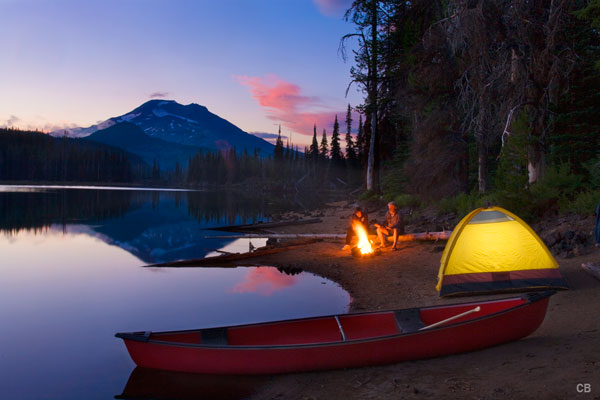
On a canoe trip with my son we discovered this campsite on the shore (see image below). Earlier in the day I photographed the mountain reflecting in the lake before realizing the setting would make for a stunning photograph of a camp scene.

Sparks lake oregon

ISO 100, f/16, ½ second – Sparks Lake, Oregon

That experience is one reason many of us photograph! We photograph because we want to tell a story about the place we visited, what we saw, and how it looked. We do this by capturing wide views,long views and intimate details to create stunning nature images.

PHOTOGRAPHY IS AN ADVENTURE – PHOTOGRAPH IT

Photographing the landscape may be the sole purpose for some photographers heading into the wilds, but there might be another story that is often overlooked: the adventure itself. There are many photo opportunities from the scenery to the human experience that tell the story of a successful wilderness photo trip.

PLAN AND PREPARE BEFORE THE TRIP

Getting into the adventure mindset starts with pre-trip planning and determining a story line.

  • What is the trip about?
  • Who is going?
  • Will there be any specific events to plan for in advance?

Whenever I am preparing for an adventure I try to think like a National Geographic photographer. Their job and goal is to tell the story in pictures, in unique ways, and so is mine.

I have rafted many rivers including the Grand Canyon three times and each trip had a different group, with unique dynamics. To capture great storytelling images of an outdoor adventure, start by simply observing the other participants’ behaviour at the beginning of the trip. What will they do on the trip? Kayak, hike, climb, read, play music, or anything that you can observe and then plan to later photograph.

Next, I develop a list of photo ideas to reference during the trip. Most trip participants are not committed photographers like me, so it’s not hard to capture great images of them pursuing their interest and enjoying the adventure.

While I will photograph the scenery, all the activities like hiking canyons, cooking meals, sitting around the campfire, swimming in the waterfalls, dealing with physical challenges, and whitewater rafting through some of the biggest rapids in the U.S., are all on my mental shoot list.

Kayak grd cyn lava falls rapid 0001

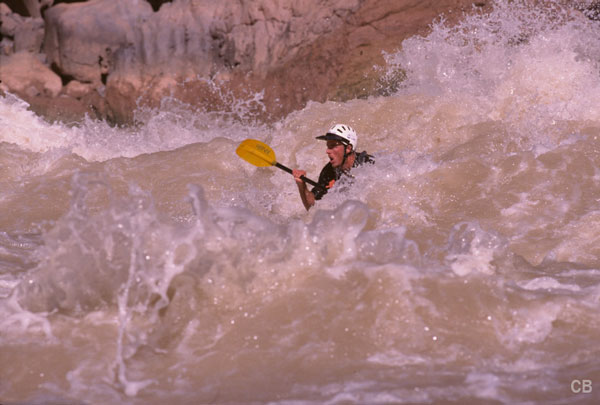
ISO 100, f/5.6, 1/1000 – Grand Canyon Lava Falls Rapid

PACK THE RIGHT GEAR

Besides pre-planning the photo ops, I also plan the equipment and other gear I will need. For rafting trips I will take mostly the same gear as any other trip (when it comes to basic camera gear) keeping in mind limited space. But because it is a trip based around water I also take waterproof devices for the camera gear including Pelican cases, an underwater camera housing, and military ammo cans for accessories.

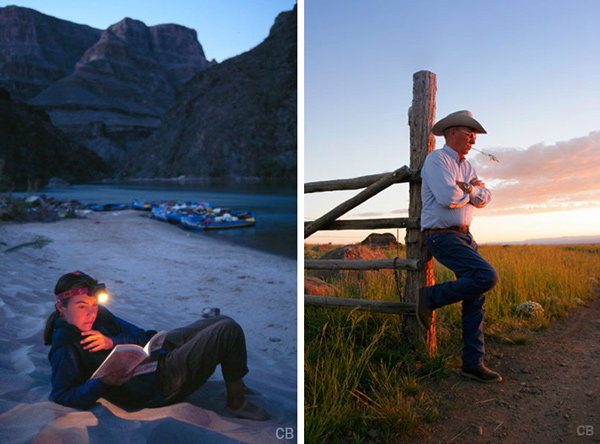
On a magazine assignment years ago, I took a horse pack trip into Hells Canyon in Oregon. The focus this time was on the outfitter himself, a cowboy (see image below, right) who ran backcountry horse trips and was also an elected official holding public office. The focus of the photography was the trip he was leading and included landscape imagery, the horses and horse packing, and the guests enjoying the wilderness adventure. I captured the adventure while the writer wrote about the politics. For my camera gear, I wore a hip pack for easy access to my camera while on horseback, while my camera backpack and tripod were tied down on a pack horse. Plan to take the right gear for the adventure.

During your pre-trip planning, start with some research on where you are going and observe how other photographers have photographed a similar trip. Make a list of the obvious: who, what, where, when, and how. This will remind you during the trip of images you had planned to capture when illustrating the story line.

Adventure photography people

Left: ISO 100, f/8, 1 second – reading by headlamp
Right: ISO 100, f/8, 1/30th – rancher Steens Mountain, Oregon

The woman above was always writing in her journal or reading in the evening, so I asked her to pose and read a book. (see image above, left)

SHOOT THE ORDINARY BUT SEEK THE EXTRAORDINARY

People are the key to telling adventure stories. It is images of their behaviour and how they interact with the wilderness adventure that communicates to the viewer just what the trip was about. Photos showing their highs and lows, their pain and their exuberance, how they overcome a physical challenge, all convey a sense of adventure.

As the adventure progresses you will develop a sense of how things are moving, what people do for activities, and where and when you can setup photo ideas from your to do list. I then suggest you ask people to pose in a storytelling scenario that ideally appears natural and un-posed. Posing can be a challenge to make look real, but by suggesting to the people to just ‘be themselves and read a book’ for example often results in a more natural pose. Other times, work like a photo journalist by keeping your camera in hand and ready to capture spontaneous moments which often lead to powerful storytelling images.

Alaska Raft Copper River 5

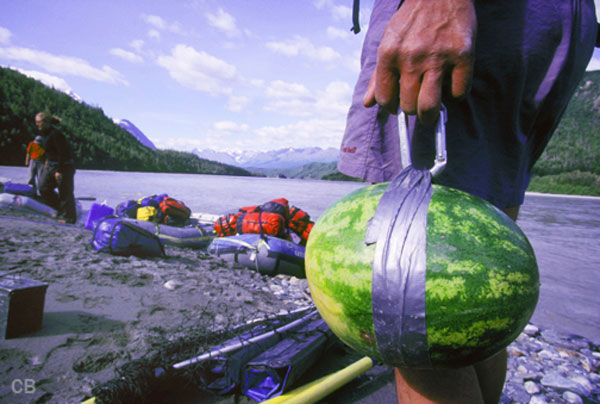
ISO 100, f/8, 1/200 – Alaska river guide

Photographing an Alaskan rafting trip, I was intrigued when I saw the river guide carrying this watermelon and in particular, his method of insuring we would not lose the fruit that went with tonight’s dinner. I asked him to stop and hold still.

VISUAL APPROACHES

Look up and down and all around when choosing your camera angles and storytelling compositions. I describe the two approaches I use as Observer and Participant. The photographer as Observer captures the activity as it happens, from the sidelines. The Participant photographs the action while being a part of it. The difference is the Observer captures views easily seen by anybody while the Participant captures views more difficult for everybody to see.

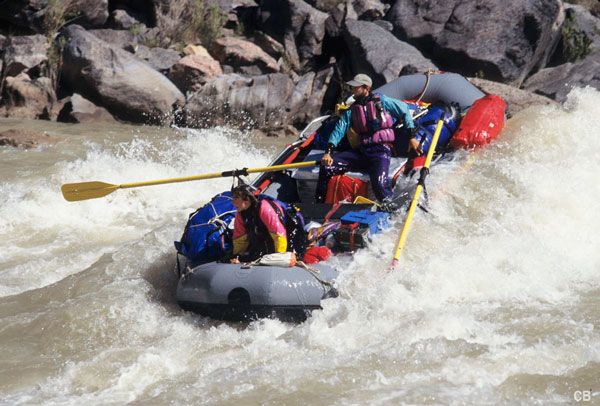
This is an angle photographed as an Observer from the river bank and while effective, was easy to capture the action and the setting.

Rafting grand canyon 002

ISO 100, f/5.6, 1/1000 – Rafting Grand Canyon, Observer viewpoint

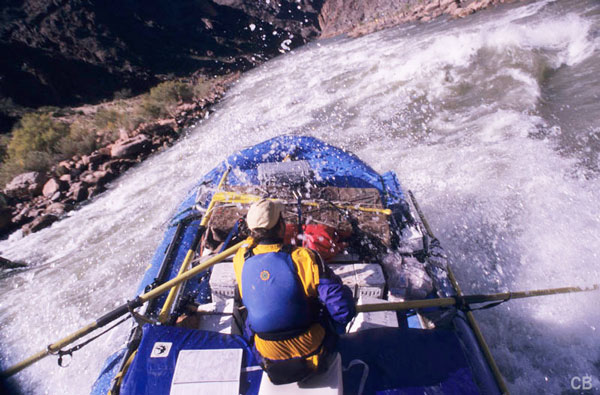
This point of view photographed as a Participant, from within the boat, is very powerful; allowing viewers to feel like they were along for the ride as the boat was tossed around in the waves.

Gr cyn hermit 4

ISO 100, f/8, 1/250 – Participant viewpoint

The advantage for the photographer as Participant is capturing angles of the activity as though the camera was their eyes. Images shot from this approach give the viewer a perspective that can make them feel as if they are immersed in the action. A rock climber taking a photograph of the climber below them offers a unique perspective of what it is like to be on the rock wall. A view that the casual observer would not see without climbing the wall.

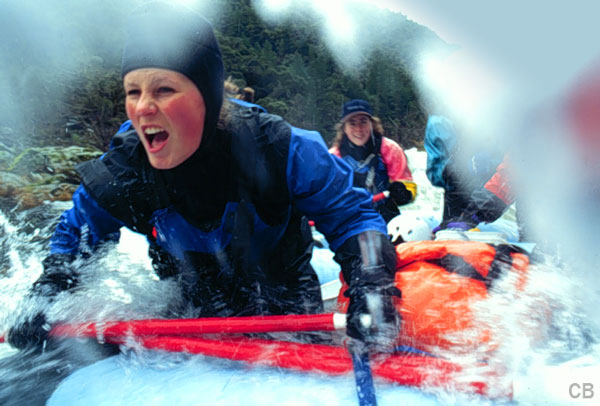
Rafting on a winter day with intermittent snow, I was positioned in the front of the raft when a wave came over the top of me and this paddler’s expression shows her bracing for impact.

Rogue erica yell

ISO 100, f/5.6, 1/60th – Participant viewpoint

ISOLATE AND ILLUSTRATE

Another effective visual approach in telling the story is to ‘isolate and illustrate’. Isolate refers to a subject isolated in the composition. They are the sole or dominant subject in the frame; the story is all about them and what they are doing. Nothing else visually is needed. These photos usually say ‘who and what’.

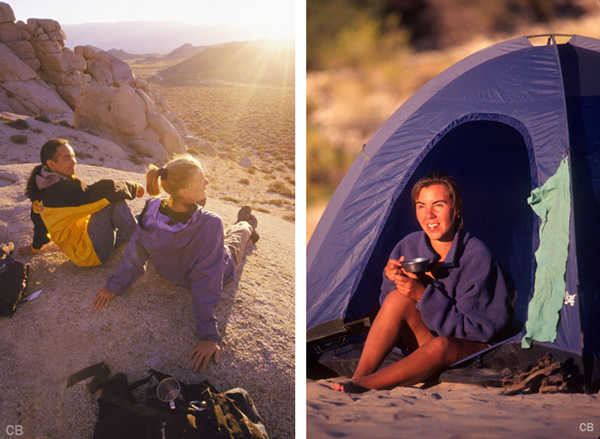
Here, a woman enjoying her coffee at sunrise was isolated in the composition using a telephoto lens, shot from the other side of the camp. The visual story is her and her camp. (see image below right)

Adventure photography sunrise tent

Left: ISO 100, f/8, 1/320th – sunrise
Right: ISO 100, f/5.6, 1/1000th – morning coffee

Captured on a 10 day climbing and photo adventure, the image above left, was shot during a hike up to watch the sunrise and it tells a story that the day is beginning. From the sun flare on the lens to the large view, this image clearly Illustrates the story of where they are and when.

The illustrated approach to a storytelling composition could be a subject much smaller in the scene in comparison to their surroundings. It’s a great approach for giving viewers the big picture and a sense of scale to the overall scene. An Illustrated image says ‘what and where’.

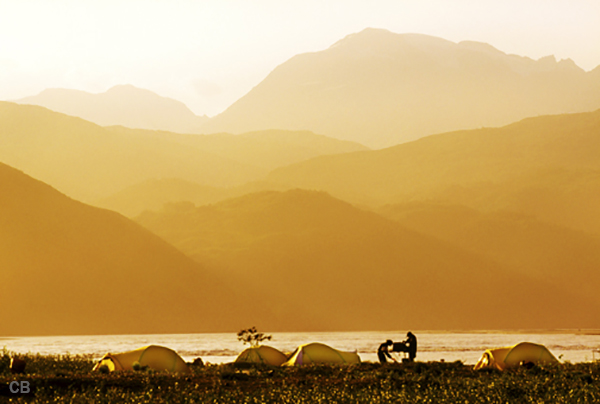
The example below of the illustrative approach shows a camp set among large mountains and the river. It tells the story differently by showing the size relationship between the subjects and background providing a sense of scale to the scene.

Alaska copper river camp 2A

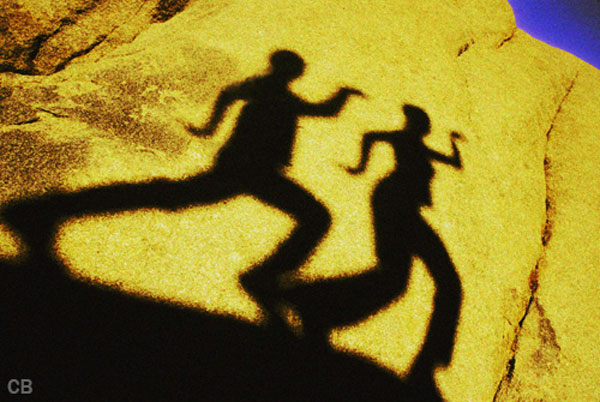
As we were hiking back to camp, I noticed the shadows on the rocks and stopped and asked them to try various poses like a high-5 and dance on the rocks.

Egyptian shadow

ISO 100, f/11, 1/125th

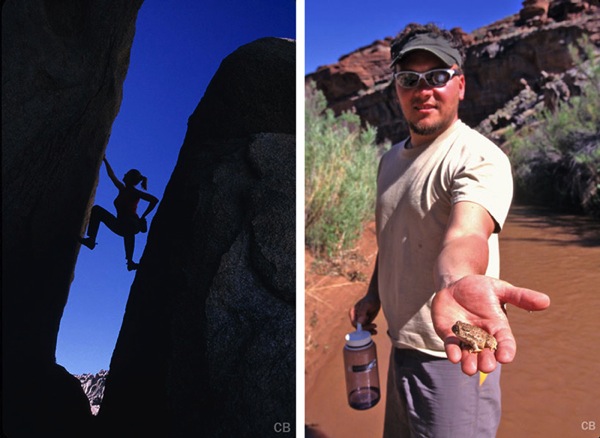
Captured later in the afternoon, I used the Isolated approach to the composition showing the climber between the rocks. This created an image that’s all about her and what she is doing. (below left)

Adventure photogrpahy buttermilks climbing

Hiking with a group in Utah, one hiker spotted a small frog near a pool or water and picked it up to show it. The wide angle, up-close angle tells the story of humans interacting with nature (above right).

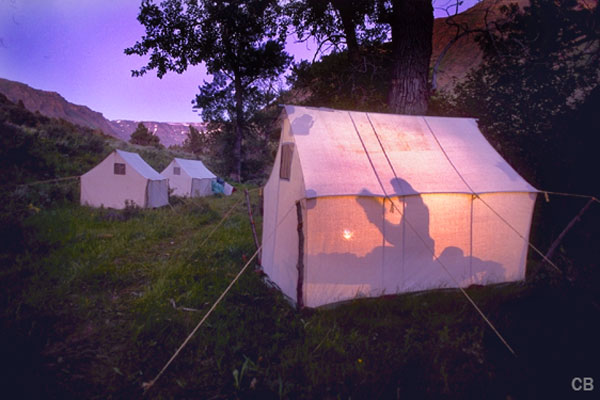
You can also create storytelling images by adding lighting to further tell that story. Here, one of my preconceived ideas was someone reading in this comfortable wilderness cabin tent. I asked them to sit on the bed and read a book, then placed my flash behind them so it placed a shadow on the tent that told the story.

Shadowed figure reading inside tent

ISO 100, f/8, 2 seconds

Finally…

There is always a story to be told from any photographic adventure and if you plan to go on an expedition of any kind, large or small, plan to photograph more than just the scenery. Here are a few steps to prepare:

  • Plan ahead of time to make sure you have the right equipment for the adventure.
  • Research the type of trip you are prepping for by looking at other images and methods photographers use to document the same trip. Use those for motivation.
  • Let the story line you thought of be a starting point to determining the images you want to capture.
  • Keep your mind open to other ideas beyond those on your shot list. Often the best images were not on your to-do list.
  • Think like you are on a magazine assignment and work hard to capture the whole story in your own unique way.

In the end you want your story in pictures to leave viewers feeling a great sense of what the trip was like, what was experienced, and how it might have felt to have been a participant.

Have you been on any adventures? Do you have any other tips to share? Please do so in the comments below.

More reading on outdoor photography:

  • Your Compete Guide to Outdoor Photography – Part Two
  • Your Complete Guide to Outdoor Photography – Part One
  • Winter Photography Tips | Bendy straws and Ziploc bags?
  • Living Landscapes a dPS ebook
  • 11 Tips For Eco-friendly Trail Photography

The post Tips for your Next Adventure Photography Trip by Charlie Borland appeared first on Digital Photography School.

Digital Photography School

 
Comments Off on Tips for your Next Adventure Photography Trip

Posted in Photography


6 August, 2013 – The Setup…preparing for our next video production

06 Aug

Here’s s short video showing taking apart my studio to set up for filming our next major training video – this time on Capture One 7. Four hours in 45 seconds.

"Having been to Antarctica with Michael and Kevin, I would say after having traveled the world and shot nearly my entire life as an exhibiting photographer,  it was one of my highlights in my life and I talk about it, all the time.  The images and experience of seeing something visionary and nearly extinct from the world, to see and experience the wildlife and scenery that does not fear humans is amazing.  The images I shot there won me two Smithsonian awards and nearly 18 other international awards". – Tim Wolcott

 Find Out More Now
These Expeditions Will Sell Out Quickly. They Always Do


The Luminous Landscape – What’s New

 
Comments Off on 6 August, 2013 – The Setup…preparing for our next video production

Posted in News


Next Version of Adobe Photoshop to Be Branded Photoshop CC, Includes Awesome New Motion Blur Sharpening Tool

07 May

Today Adobe announced a new branding of their flagship Photoshop product to be released later this year, Photoshop CC. The new version will only be available via a monthly subscription to Adobe’s Creative Cloud and will not be sold as a traditional boxed application that consumers can purchase.

Probably the most anticipated new feature in the next iteration of Photoshop is a revolutionary new image sharpening tool that focuses on fixing camera shake issues.

The new tool analyzes images that are out of focus due to the slight movement or motion that takes place while a shutter is open. There are lots of reasons why photographers may find camera shake in their images. Many images shot slower than about 125th of a second are susceptible to camera shake unless you’re on a tripod or have a very steady hand. Telephoto shots, especially can be problematic.

With the new version of Photoshop CC, Adobe uses an algorithm to try and detect which direction the camera was moving that produced the shake. They then try to account for the movement back into the direction of a steady image without camera shake. This new sharpening tool won’t help you with other types of focal blur issues, like lens position, but it does address a fairly common issue dealt with by photographers.

Adobe had previously offered a sneak peak of this new technology in a video that they posted to Youtube. Watch the video and you’ll be impressed.

What makes this interesting to me is that there are a lot of old images that I’ve taken in the past that now will suddenly become salvageable.

This new technology advancement should be yet another reminder to photographers why they should save ALL of their images, even the bad ones that they don’t think they can use. With technology advancements in image processing, I’m finding more and more images that I’d previously dismissed due to problems. Whether previous Adobe noise reduction tech or newer tech like this new sharpening tool, it pays to save all of your images no matter what. Storage is cheap and you never know when you may need that image that you never knew you needed at the time. Even years after you are dead, those images may be important to someone, somewhere for some reason.

While the camera shake feature is the sizzle of the new Photoshop upgrade, there are several other enhancements they have made to the program as well including, smart Sharpen (new technology promising more realistic sharpening without halos or noise) and new upsampling tech (this helps make your photos look better when you make them larger than you processed them).

The biggest news though is Adobe’s moving Photoshop 100% into the Cloud and 100% by subscription. You’ll still be able to purchase Photoshop CS for the time being, but it won’t have the new features available in CC.

Pricing varies by type of customer but starts at $ 49.99 a month per person for individuals. Existing Creative Suite customers, students, and teachers will get a discount to $ 29.99 a month. Creative Cloud has a lot more applications than just Photoshop and also includes Lightroom and a whole suite of other Adobe Creative applications. It also includes integration with Behance, a portfolio site for creatives that Adobe recently purchased.


Thomas Hawk Digital Connection

 
Comments Off on Next Version of Adobe Photoshop to Be Branded Photoshop CC, Includes Awesome New Motion Blur Sharpening Tool

Posted in Photography


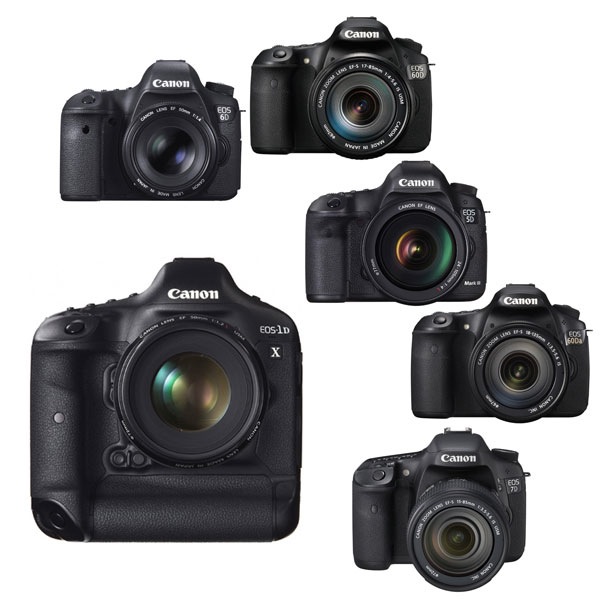
How to Choose Your Next EOS Camera: Part Two

21 Apr

01.jpg

This article is written by Andrew S. Gibson, the author of Understanding EOS, on sale now at Snap N Deals for a limited time.

Note: This article is about Canon’s semi-professional and professional EOS cameras. You can read about its entry level models in my previous article.

Semi-professional cameras

This group of EOS cameras is aimed at semi-professional photographers and serious hobbyists. Don’t let that put you off if your budget stretches to one of these models and you’re looking to buy your first EOS camera. There is nothing intrinsically more complicated about these models. In some ways they are even simpler to use as most of them don’t have the automatic exposure modes (portrait, landscape etc) that come on entry-level models.

The main differences between these cameras and entry level models are:

Size and weight. These cameras are bigger and heavier than entry-level models. Most of them have bodies constructed from magnesium alloy frames and are built to last.

Quick control dial. Entry-level models use a set of four cross keys to dial in exposure compensation and make other adjustments. Semi-professional (and professional) EOS cameras use the Quick Control dial instead. This makes it easy to dial in exposure compensation while looking through the viewfinder and simplifies the photo taking process.

Autofocus. Two of these models (the EOS 7D and 5D Mark III) have a much more advanced autofocus system than the entry level cameras and are suitable for shooting moving subjects such as sports and wildlife.

Full-frame. Both the EOS 6D and 5D Mark III have full-frame sensors. Cameras with full-frame sensors cost more but give better image quality and improved high ISO performance over cameras with APS-C sensors.

Names. These cameras have the same name no matter where they are sold.

02.jpg

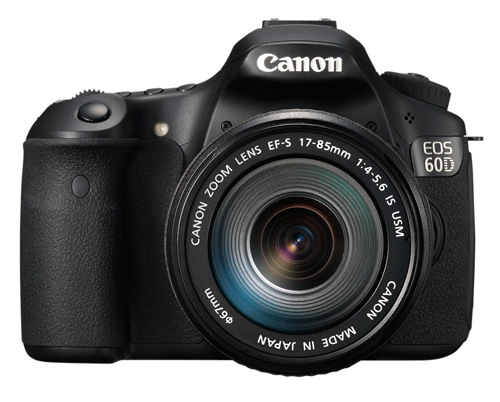
EOS 60D

September 2010

Key specs:

  • 18 megapixel APS-C sensor
  • 9 point AF with 9 cross-type sensors
  • 63 zone evaluative metering
  • Live View and movie mode
  • DIGIC 4 processor
  • Uses SD cards
  • Three inch vari-angle LCD display
  • Built-in flash with wireless flash control

The EOS 60D is bit of an oddity in that it has a smaller and lighter body than the previous models in the xxD range like the EOS 40D and 50D. In terms of size, weight and features the EOS 60D occupies the middle ground between the EOS 700D and 7D. However, the 700D, being much newer, has a few advanced features that the 60D doesn’t have such as a touchscreen menu system and hybrid AF for improved autofocus performance in Live View and movie mode.

The EOS 60D is a fine camera to learn photography with but the age of the model does suggest that Canon may replace it with an EOS 70D sometime this year. Whether the 70D will retain the body size of the 60D or return to the larger sizes of its predecessors remains to be seen. However, in the meantime the EOS 60D represents great value for money.

While lagging slightly behind the EOS 700D in terms of specification, it has a much more professional feel in the hand, and the Quick control dial is a great asset. If you’re trying to decide between the 700D and the 60D, it’s a good idea to try both out in a camera store. That’s the best way to appreciate the difference between the two.

03.jpg

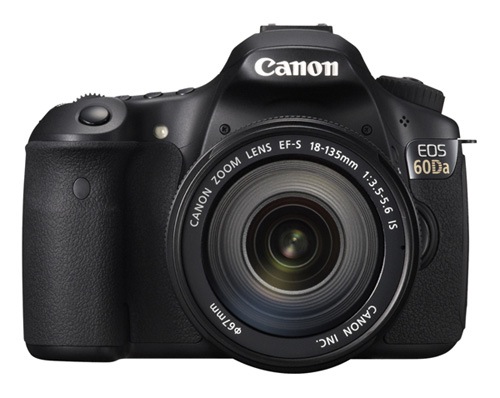
EOS 60Da

April 2012

Key specs:

  • 18 megapixel APS-C sensor
  • 9 point AF with 9 cross-type sensors
  • 63 zone evaluative metering
  • Live View and movie mode
  • DIGIC 4 processor
  • Uses SD cards
  • Three inch vari-angle LCD display
  • Built-in flash with wireless flash control

The EOS 60Da is a modified version of the EOS 60D designed specifically for astrophotography. It contains a powerful infra-red filter that increases hydrogen-alpha light sensitivity by 300%. This means that it can capture light wavelengths emitted by deep space gases normally blocked by the low-pass filters in regular digital SLRs. This camera is a specialised tool for photographing stars and nebulae in space, and not intended for ‘regular’ photography.

04.jpg

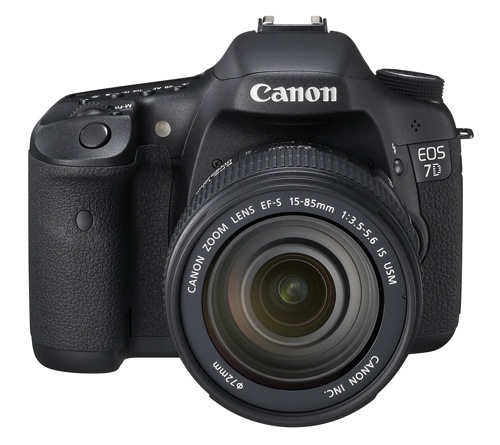
EOS 7D

October 2009

Key specs:

  • 18 megapixel APS-C sensor
  • 19 point AF with 19 cross-type sensors
  • 63 zone evaluative metering
  • Live View and movie mode
  • Dual DIGIC 4 processors
  • Uses CF cards
  • Three inch fixed LCD display
  • Built-in flash with wireless flash control

The oldest model in the current EOS lineup, the EOS 7D marked a turning point in EOS camera design when it was released in 2009. It was the first APS-C camera to feature an advanced autofocus system capable of accurately focusing on and tracking moving subjects. It has 19 cross-type autofocus points (entry level models have 9 point AF arrays) plus other innovative features such as the electronic level and built-in Speedlite transmotter that have since been included in other EOS cameras. Despite its ‘age’ it’s still a very capable camera and the least expensive EOS camera to feature advanced autofocus.

The big question is will Canon release a 7D Mark II in 2013 and if so how much will it cost and how good will the autofocus be? In the meantime, the EOS 7D is another camera that represents excellent value for money. It is ideal for photographers who photograph sports, wildlife or any other moving subject and need an AF system capable of keeping up.

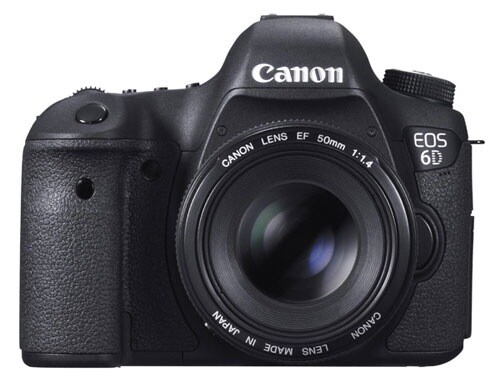
05.jpg

EOS 6D

November 2012

Key specs:

  • 20.2 megapixel full-frame sensor
  • 11 point AF with 1 cross-type sensor
  • 63 zone evaluative metering
  • Live View and movie mode
  • DIGIC 5+ processor
  • Uses SD cards
  • Three inch fixed LCD display
  • No built-in flash
  • Built in Wi-Fi and GPS connectivity

The EOS 6D is less expensive, smaller and lighter than Canon’s other two full-frame EOS cameras, the EOS 5D Mark III and 1D-X.

Unique features include an 11 point autofocus system that Canon claims is the best in low light of any EOS camera and built-in Wi-Fi and GPS transmitters (it is sold in some countries without the latter two features where forbidden to do so by laws regarding radio transmission).

The Wi-Fi lets you tether the camera wirelessly to a computer and will be appreciated by anybody who works in a studio or has bought a dedicated Wi-Fi transmitter separately (expensive!) and struggled to get it to work. The GPS transmitter, if enabled, records your location in the photo’s metadata and will be a useful feature for some.

The EOS 6D, like Canon’s other full-frame cameras, doesn’t have a built-in flash or Speedlite transmitter for controlling Speedlite flash units remotely.

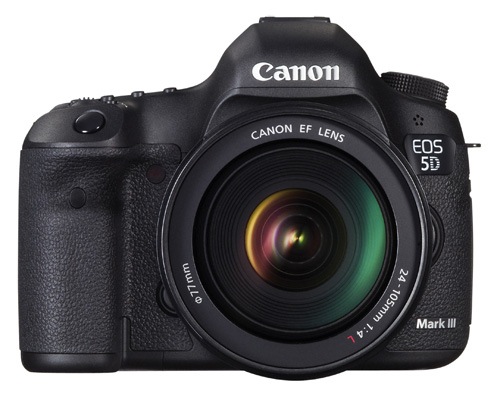
06.jpg

EOS 5D Mark III

March 2012

Key specs:

  • 22.3 megapixel full-frame sensor
  • 61 point AF with 41 cross-type sensors
  • 63 zone evaluative metering
  • Live View and movie mode
  • DIGIC 5+ processor
  • Uses CF and SD cards (dual card slots)
  • Three inch fixed LCD display
  • No built-in flash

This is the latest model in the venerable 5D range and is used by many professional photographers. While the most expensive of the models reviewed so far, it also has the best autofocus system (61 point array), high ISO performance, dual CF and SD card slots and a 22.3 megapixel sensor. If you can afford it you won’t be disappointed by any aspect of this camera. It is a tool that will serve you faithfully for many years to come.

Professional cameras

Canon’s top of the line EOS 1 series cameras are aimed at professional photographers. They are big, heavy and expensive, built to withstand just about anything the working pro can throw at them. There is just one current model:

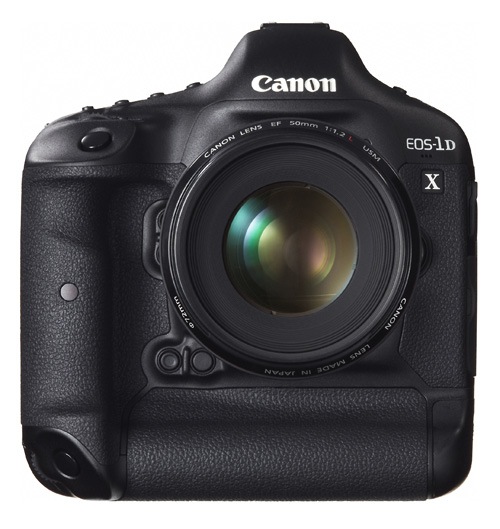
07.jpg

EOS 1D-X

April 2012

Key specs:

  • 18.1 megapixel full-frame sensor
  • 61 point AF with 41 cross-type sensors
  • 252 zone evaluative metering
  • Live View and movie mode
  • Dual DIGIC 5+ processor plus a DIGIC 4 processor dedicated to AF processing
  • Uses CF and SD cards (dual card slots)
  • Three inch fixed LCD display
  • No built-in flash

The best camera in the EOS range by far. I’ve used one and the look, feel and quality just blows the other cameras away completely. Which, considering the price, is exactly what you’d expect.

The EOS 1D-X has an 18.1 megapixel full-frame sensor, 61 point autofocus, 12 frames per second continuous shooting speed, two DIGIC 5+ processors, a weatherproofed body and a maximum ISO of 204,800. It has a built-in portrait grip and a large battery that outlasts every other Canon battery.

If you’re in the market for this camera bear in mind the extra size and weight may be a disadvantage. Take the EOS 5D Mark III into consideration when making your buying decision. The money saved on the body could be used towards some good quality glass.

Final thoughts

Recent advances in digital camera technology mean that there has never been a better time to buy a new camera body, regardless of which brand you use. The recent expansion of Canon’s line-up with the launch of the EOS 100D and 700D means that Canon users have a greater choice of camera bodies than ever before, which can only be a good thing for the consumer.

Understanding EOS

It’s wise to remember that whichever camera you have, it’s only a tool. Photographers create photos, cameras just take them. An understanding of the principles of light and composition are just as important as which model you own.

08.jpg

This is the principle behind my ebook Understanding EOS, which I wrote to help people learn to use their EOS cameras. It’s available now at Snap N Deals for a special price for a limited period. Whichever EOS camera you own, it’s the essential accessory to help you get the most out of your camera. Grab it today (at 30% off) at SnapNDeals.

Post originally from: Digital Photography Tips.

Check out our more Photography Tips at Photography Tips for Beginners, Portrait Photography Tips and Wedding Photography Tips.

How to Choose Your Next EOS Camera: Part Two


Digital Photography School

 
Comments Off on How to Choose Your Next EOS Camera: Part Two

Posted in Photography


How to Choose Your Next EOS Camera: Part One

14 Apr

01.jpg

This article is written by Andrew S. Gibson, the author of Understanding EOS, on sale now at Snap N Deals for a limited time.

In these articles I’m going to take a look at the current range of Canon EOS cameras, giving an overview of each model and the reasons that you may consider buying one.

You may be wondering why I’m writing about Canon EOS cameras – after all there are other brands such as Nikon, Sony, Pentax and Olympus to choose from. The answer is that I’m a Canon EOS user, and I write about EOS cameras for a living. If you want to know anything about other brands, I’m definitely the wrong person to ask.

Maybe other DPS authors will jump in and write similar guides about the brands they’re familiar with (hint, hint). I think it would make a fantastic series.

A note about prices: DPS has an international readership, so I haven’t included prices as they vary so much. The cameras are listed roughly in order of ascending price to give you an idea of where each model fits in the EOS range.

Entry level EOS cameras

Let’s start with ‘entry level’ EOS cameras. Canon calls these enthusiast cameras. They are designed for hobbyists rather than professional photographers. If you are buying a digital SLR for the very first time, or you’re on a tight budget, you will probably buy one of these models.

An idiosyncrasy of entry level EOS cameras is that Canon gives the same model different names depending on which territory they are sold in. Hence the same camera is a 700D in Europe, a Kiss X7i in Japan (where it is marketed to the female demographic) and a Digital Rebel T5i in North America.

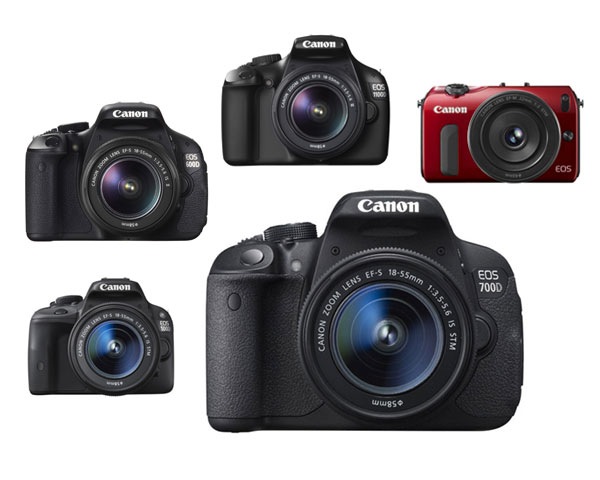
Canon currently has five enthusiast models:

02.jpg

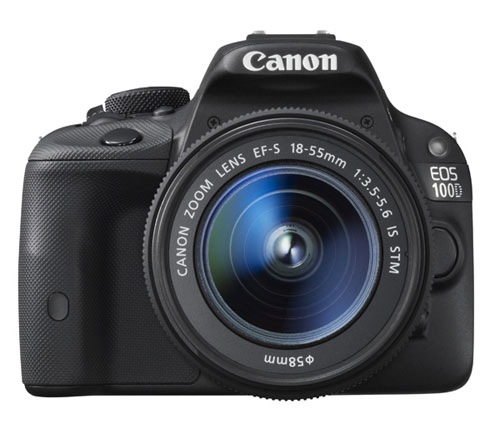
EOS 100D/Rebel SL1/Kiss X7

March 2013

Key specs:

  • 18 megapixel APS-C sensor
  • 9 point AF with 1 cross-type sensor
  • 63 zone evaluative metering
  • Live View and movie mode
  • DIGIC 5 processor
  • Uses SD cards
  • 3 inch fixed touch screen LCD display
  • Built-in flash with no wireless flash control

According to Canon the EOS 100D is the world’s smallest and lightest digital SLR. It’s aimed at photographers who are moving up from compact cameras or smart phones and don’t want to buy a larger camera.

It is ideal for photographers who want a light body to carry around all day, or who need to keep the weight down when travelling overseas. It may also appeal if you like the idea of being able to carry it around in your bag or handbag.

The small body of the EOS 100D will be more inconspicuous when you are travelling than other EOS cameras. This may suit some people, including street photographers.

The spec is similar to the EOS 700D, although it doesn’t have as many features. The main selling point of this model is the size. If size doesn’t matter, then consider a more advanced model – you’ll get more bang for your buck.

03.jpg

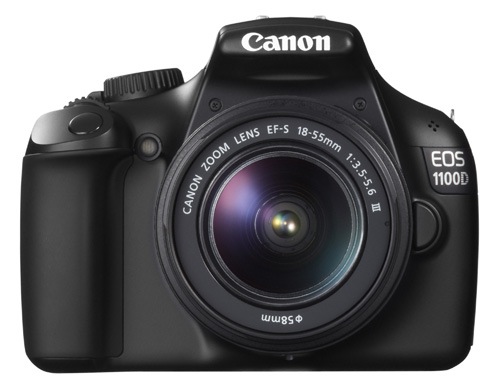
EOS 1100D/Rebel T3/Kiss X50

March 2011

Key specs:

  • 12.3 megapixel APS-C sensor
  • 9 point AF with 1 cross-type sensor
  • 63 zone evaluative metering
  • Live View and movie mode
  • DIGIC 4 processor
  • Uses SD cards
  • 2.7 inch fixed LCD display
  • Built-in flash with no wireless flash control

This is Canon’s least expensive SLR, ideal for anybody on a tight budget. However, it also has the lowest spec and lacks some of the features found on the other models in this list, such as the three inch vari-angle LCD screen and built-in master unit for controlling external Speedlites.

It also has the lowest megapixel count. To be honest, if you buy it you’re probably going to outgrow it fairly soon. It’s also possible that Canon may update this model soon as it’s two years old.

Don’t let that put you off though if you’re on a tight budget – this is a very capable camera for learning on and is by far the cheapest model in this list. Might also make a good gift for a relative or friend who has expressed an interest in photography. Budget allowing, you’ll be better off with a more advanced model.

04.jpg

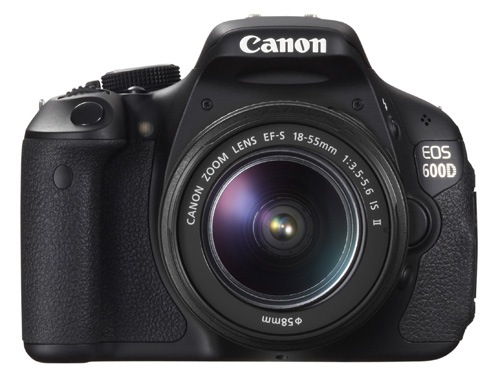
EOS 600D/Rebel T3i/Kiss X5

March 2011

Key specs:

  • 18 megapixel APS-C sensor
  • 9 point AF with 1 cross-type sensor
  • 63 zone evaluative metering
  • Live View and movie mode
  • DIGIC 4 processor
  • Uses SD cards
  • 3 inch vari-angle LCD display
  • Built-in flash with wireless flash control

The EOS 600D is a step up from the EOS 100D and 1100D models. It has a larger body and a high resolution vari-angle LCD screen that you can use with movie mode or for taking photos at awkward angles (ie with the camera at ground level).

Another benefit of the vari-angle screen is that you can turn it around so the screen faces the back of the camera, protecting the LCD surface during travel.

The built-in flash doubles as a wireless master for external Speedlite flash units, so if you want to use (or learn to use) external flash then this is a good camera to buy instead of the EOS 100D or 1100D.

You may be interested in this camera if you are upgrading from an 1100D, or an older model such as the EOS 400D camera. It’s not as advanced as the EOS 700D, but much less expensive.

05.jpg

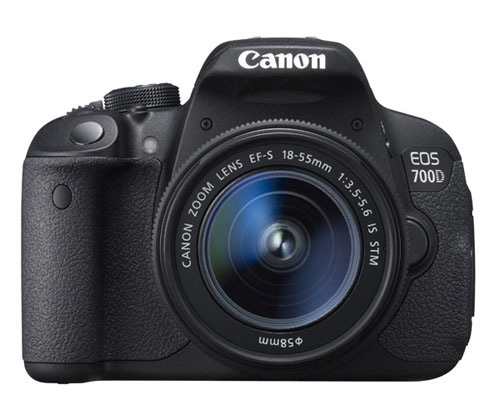
EOS 700D/Rebel T5i/Kiss X7i

March 2013

Key specs:

  • 18 megapixel APS-C sensor
  • 9 point AF with 9 cross-type sensors
  • 63 zone evaluative metering
  • Live View and movie mode
  • DIGIC 5 processor
  • Uses SD cards
  • 3 inch vari-angle touch screen LCD display
  • Built-in flash with wireless flash control

The EOS 700D was announced in March and replaces the EOS 650D (which you may still be able to buy until stock runs out). The EOS 600D remains available as a lower cost alternative to the 700D.

The key differences between this camera and the 600D is that the 700D has a more advanced processing chip, a greater ISO range and hybrid AF that gives better autofocus performance in Live View and movie mode.

You may be interested in this camera if you are upgrading from an 1100D, or an older model such as the EOS 400D camera. It’s an ideal model if you want an advanced EOS camera but don’t like the extra size and weight or need the more advanced features of models like the EOS 6D, 7D or 5D Mark III. It is also cheaper than those cameras.

06.jpg

EOS M

July 2012

Key specs:

  • 18 megapixel APS-C sensor
  • 31 point hybrid AF
  • 63 zone evaluative metering
  • Live View and movie mode
  • DIGIC 5 processor
  • Uses SD cards
  • Three inch fixed LCD display
  • Comes supplied with 90EX Speedlite flash unit in most countries when purchased in kit form

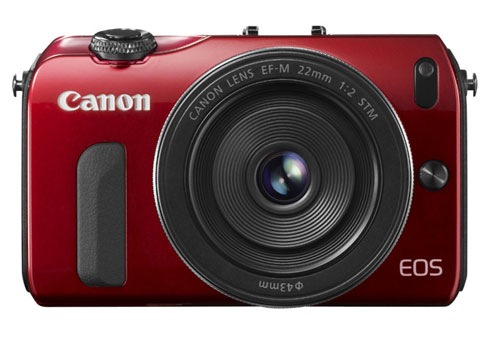
The EOS M is Canon’s first compact system camera and marks the company’s entry into the mirrorless camera market. It’s essentially a scaled down EOS 650D without a pentaprism or viewfinder.

Another important difference is that the EOS M has its own lens mount (the EF-M mount). At the moment there is a choice of two EF-M lenses, plus an adapter that lets you mount the EF-S and EF lenses that other EOS cameras use.

The appeal of this camera is the small size and beauty of the design. Coupled with the EF-M 22mm pancake lens it makes a very portable setup that will create high quality images, something that could be ideal for travel or street photography.

However, reviews about the camera’s autofocus performance aren’t encouraging. The lack of a viewfinder means you have to take photos by composing them on the LCD screen, something regular digital SLR users could find hard to get used to.

If size isn’t important, then go for an SLR camera instead. The optical viewfinder and phase detection autofocus make them a much more versatile tool.

Conclusion

That concludes the round up of entry level EOS cameras. I will take a look at the current range of semi-professional and pro cameras in the next article.

Understanding EOS

It’s wise to remember that whichever camera you have, it’s only a tool. Photographers create photos, cameras just take them. An understanding of the principles of light and composition are just as important as which model you own.

07.jpg

This is the principle behind my ebook Understanding EOS, which I wrote to help people learn to use their EOS cameras. It’s available now at Snap N Deals for a special price for a limited period. Whichever EOS camera you own, it’s the essential accessory to help you get the most out of your camera.

Post originally from: Digital Photography Tips.

Check out our more Photography Tips at Photography Tips for Beginners, Portrait Photography Tips and Wedding Photography Tips.

How to Choose Your Next EOS Camera: Part One


Digital Photography School

 
Comments Off on How to Choose Your Next EOS Camera: Part One

Posted in Photography


Polaroid Socialmatic concept camera may hit the market next year

02 Mar

Socialmatic.jpg

The Instagram Socialmatic concept camera, first announced in May 2012, could become a reality by next year following some recent agreements between Socialmatic LLC and C & A Marketing. The two companies would work together to bring the device to market under the Polaroid brand name. Intended as the Instagram app icon come to life, the stand-alone digital Polaroid Socialmatic Camera would both share images on the popular photo-sharing social network and print them using a built-in system. Read more about the proposed specs on connect.dpeview.com.

News: Digital Photography Review (dpreview.com)

 
Comments Off on Polaroid Socialmatic concept camera may hit the market next year

Posted in Uncategorized


27 December, 2012 – Our Holiday Sale Ends Next Week

27 Dec

All good things must come to an end, including our year-end sale. Want to purchase any of our tutorials or Video Journals? Want to save 25%?

If you wait till next week you just might wait too long. 

Our -25% Off Sale
ends next Tuesday night


The Luminous Landscape – What’s New

 
Comments Off on 27 December, 2012 – Our Holiday Sale Ends Next Week

Posted in News


Incipio Next Generation Polymer TPU Case For The iPhone 4

18 Dec

Help Spread The Word on Twitter,Thank’s : clicktotweet.com Hi folk’s, This is my review on the Incipio NGP case for the iPhone 4. I picked this case up to bring you another review on yet another fantastic case. Any more information about this case can be found on the Incipio Website listed in the link below: www.myincipio.com Thank’s forbeing interested in my content,Enjoy the video,Thank’s for watching,Cheer’s 🙂 Follow me on Facebook – Follow the Badge on my Channel Page. Follow me on Twitter : twitter.com Subscribe to my Channel : www.youtube.com Email Me @ : pimpyouriphone3g@gmail.com If you have any question’s ?, Then please don’t hesitate to get in touch,I will do my best to answer and help in what ever way i can,Cheer’s.
Video Rating: 4 / 5


Brittany Murphy | Nomad’s Next Top Model 2011

28 Nov

www.nomadphotography.com.au presents a Sanguineti Media production Brittany Murphy as Nomad’s (first) Next Top Model behind the scene from various photo shoots, in difference studios, in Caberra, Australia. Photography gears used on various sets: – Hasselblad H4D40 and HC lenses – Canon 7D, Canon 5D Mark II, Canon 1D Mark IV and Canon 1Ds Mark III – Canon EF L series lenses – Nikon D700, Nikon D3s and Nikon D3x – Nikon ED lenses Lighting gears: – Profoto heads and power packs – Profoto light shapers 9reflector, hard box, giant reflector) – Creative Light modifiers
Video Rating: 5 / 5

Another video of Nikon d3000 photos, this time with my new flash, these are picture from the first few days with the new flash unit, enjoy 🙂 visit my facebook page to view more of my photos 🙂 www.facebook.com www.flickr.com
Video Rating: 4 / 5

 
Comments Off on Brittany Murphy | Nomad’s Next Top Model 2011

Posted in Nikon Videos