RSS
 

Posts Tagged ‘need’

Everything You Need to Know About Lightroom and Colour Space

03 Sep
Lightroom and colour space

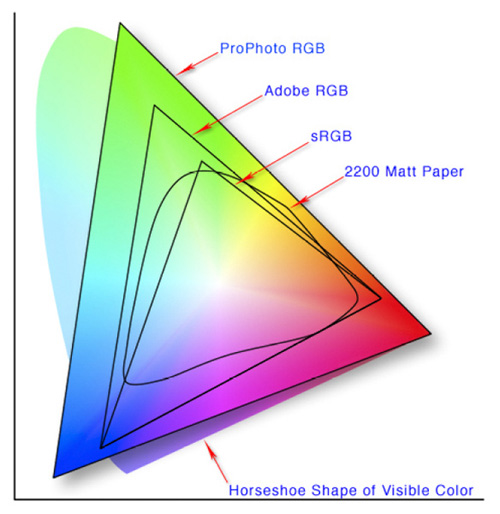
This diagram shows the three colour spaces that Lightroom works with. Photo from Wikipedia

One of the key differences between Lightroom and Photoshop is their approach to colour management. In Photoshop, once out of Adobe Camera Raw, you can go to the Colour Settings menu option and tell Photoshop in which colour space you want it to work.

How Lightroom works

Lightroom works differently. When processing Raw files, Lightroom uses the ProPhotoRGB colour space the whole time, and there’s nothing you can do to change it. The benefits of this method are:

  • Less colour information is lost during the processing stage. ProPhotoRGB is the largest colour space, so it is the optimum one to work in.
  • You can export multiple versions of the same photo, each with a different colour space, if you have need to do so.
  • If future output devices (monitors, printers etc.) support ProPhotoRGB (they don’t at the moment) then your photos will be ready for them.
  • Colour management is greatly simplified. You don’t have to make any decisions about what colour space to work in until you export your photos. This is the biggest advantage of all.

How Lightroom manages colour

When processing Raw files, Lightroom (and Adobe Camera Raw in Photoshop) uses its own colour space based on ProPhoto RGB. It provides a large colour gamut to work with the wide range of colours that digital sensors are capable of recording.

Note: Gamut is the term used to describe the range of colour values that fit in a colour space.

Exporting photos in Lightroom

When you export a photo in Lightroom it gives you the choice of three colour spaces.

ProPhotoRGB: ProPhoto RGB is the largest of the three. It roughly matches the range of colours that a digital camera sensor can capture.

Adobe RGB (1998): Adobe RGB (1998) is smaller than ProPhoto RGB, but larger than the next choice, sRGB. It roughly matches the colour gamut of CMYK printers used to print books and magazines.

sRGB: sRGB is the smallest colour space of the three. It represents the colour space that most monitors are able to display.

Comparing colour spaces

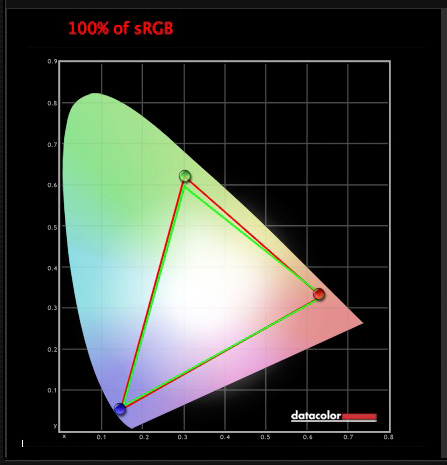
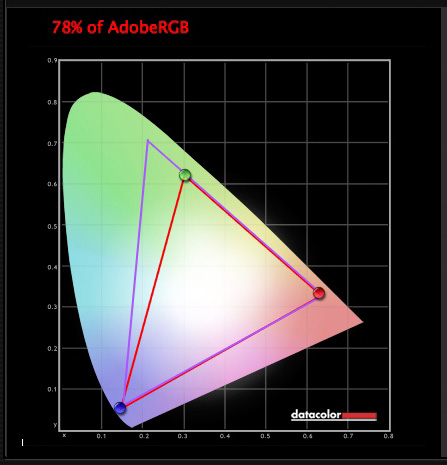
These two graphs show how the colours my monitor is capable of displaying, compared to the sRGB and Adobe RGB colour spaces.
Lightroom and colour space

The green triangle shows the sRGB colour space, the red one shows my monitor’s colour gamut. The two are nearly identical.
Lightroom and colour space

The purple triangle shows the Adobe RGB (1998) colour space, the red one shows my monitor’s colour gamut. My monitor can’t display all the colours within this colour space. Only a select few high end monitors can display all the colours within the Adobe RGB (1998) colour space.

This diagram compares the ProPhoto RGB, Adobe RGB (1998) and sRGB colour spaces. You can see that ProPhoto RGB is the largest.

Lightroom and colour space

Photo from Wikipedia 

Keeping it simple

Armed with this knowledge, here’s a guide to which colour space you should select when exporting your photos:

sRGB: Use when exporting photos to be displayed online, printed at most commercial labs, or printed with most inkjet printers. In short, if in doubt, use sRGB.

Note: Lightroom’s Web module automatically sets the colour space of exported files to sRGB.

Adobe RGB (1998): Use only if requested. If you’re not sure, ask. If you’ve been asked to submit photos to a magazine, for example, then ask them which colour space is required. It will probably be Adobe RGB (1998). Submitting photos to a stock library? Again, it will probably be Adobe RGB (1998). It’s the colour space most likely to be used for commercial purposes.

You would also use this colour space if you have an inkjet printer that utilizes the Adobe RGB (1998) colour space, or you are using a lab that accepts and prints photos with that profile.

ProPhoto RGB: Use when exporting a photo file to be edited in another program such as Photoshop or a plug-in. The file should be exported as a 16-bit TIFF or PSD file. There is little point in using the ProPhoto RGB colour space with 8 bit files, as they don’t contain enough bit depth to utilize the full colour range.

Note: If you import a JPEG or TIFF file into Lightroom, it uses the file’s embedded colour profile. If there is no colour profile attached, it assumes that it’s an sRGB file. If you choose an alternate colour space when you export the file, Lightroom converts it.

Colour spaces and compression

The reason that Lightroom uses a version of the ProPhoto RGB colour space, is that it is doesn’t compress the colours captured by your camera’s sensor.

When you export a photo, if you select either the Adobe RGB (1998) or sRGB colour space, Lightroom compresses the photo’s colours to match the chosen profile. That’s why selecting colour space is best left for as close to the end of the post-processing workflow as possible.

While Lightroom does its work within its version of the ProPhoto RGB colour space, your monitor isn’t capable of displaying all those colours. Instead, your computer’s operating system uses the monitor profile to convert the colours to ones that your monitor is capable of displaying.

Note: All monitors have a colour profile, regardless of whether they have been calibrated. But your monitor will only display colour accurately if it has been properly calibrated. You can learn more about the calibration process in my article How to Calibrate Your Monitor With the Spyder 4 Express.

Exporting photos with Lightroom

To export a photo in Lightroom, select the photo (or photos) you want to export, then go to File > Export. You can do this from any module (use the Film Strip to select multiple photos if you are not in the Library module’s Grid View).

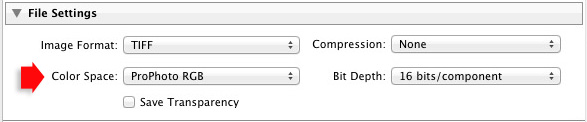
Go to the File Settings section of the Export window and set the required colour space. If you select the ProPhoto RGB colour space set Bit Depth to 16 bits/component.
Lightroom and colour space

Transferring photos to Photoshop

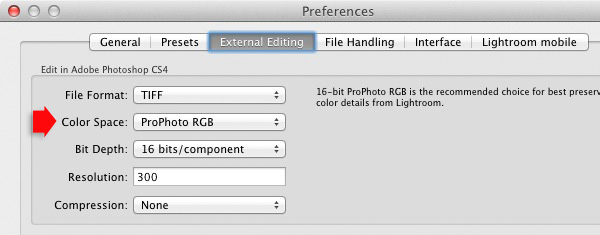
To open a photo in Photoshop, right-click on the photo and select Edit In > Edit In Adobe Photoshop. Photoshop opens the photo using the colour space indicated in Lightroom’s preferences.

To adjust this setting, go to the External Editing tab in preferences, and set Color Space to ProPhoto RGB. You can choose another colour space if you wish, but ProPhoto RGB is definitely the best one to use.
Lightroom and colour space

Opening photos in plug-ins

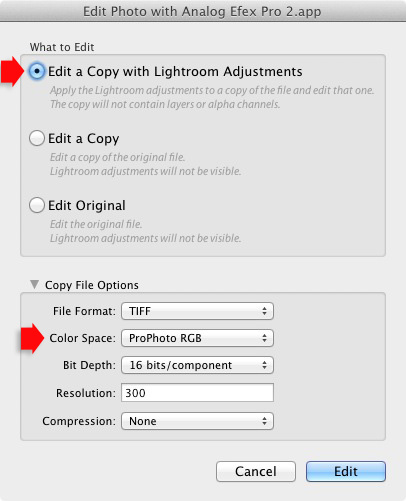
To export a photo to a plug-in, right-click on the photo, go to Edit In and select the plug-in you want to use to open the photo.

In the Edit Photo window, if you select Edit a Copy with Lightroom Adjustments (the only option available if you are exporting a Raw file) you will be able to select which colour space you want to use. Again, go with ProPhoto RGB for the best results.
Lightroom and colour space

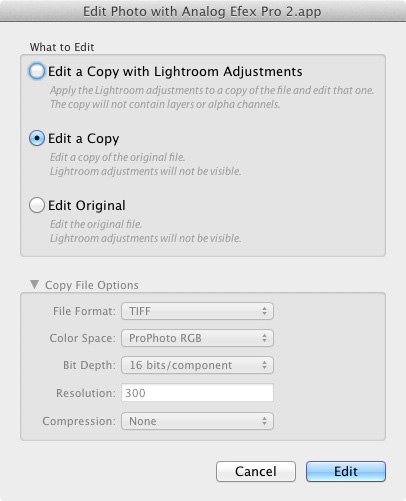
If you are exporting a JPEG or TIFF file, Lightroom gives you the option of selecting Edit a Copy or Edit Original in the Edit Photo window. If you do so, the option to select a colour space is greyed out and Lightroom opens the photo in the plug-in using the embedded colour profile.
Lightroom and colour space

But if you select Edit a Copy with Lightroom Adjustments, you can select any colour space and Lightroom will convert the photo to that colour space when it opens the photo in the plug-in.

Conclusion

Confused? I hope not, because colour management in Lightroom is really very simple. It’s essential to calibrate your monitor, but after you’ve done that Lightroom takes care of all colour related issues for you until you export your photos. Then, it’s just a matter of selecting the appropriate colour space.

If you have anything to add to the article, or any questions, please post it in the comments.

Mastering Lightroom: Book Four – The Photos ebookMastering Lightroom: Book Four – The Photos

My new ebook Mastering Lightroom: Book Four – The Photos takes you through ten beautiful examples of photography and shows you how I processed them step-by-step in Lightroom. It explores some of my favourite Develop Presets and plug-ins as well as the techniques I use in Lightroom itself. Click the link to learn more.

The post Everything You Need to Know About Lightroom and Colour Space by Andrew S. Gibson appeared first on Digital Photography School.

Digital Photography School

 
Comments Off on Everything You Need to Know About Lightroom and Colour Space

Posted in Photography


Which Three Lenses do You Need for Photography?

28 Aug
Camera lenses

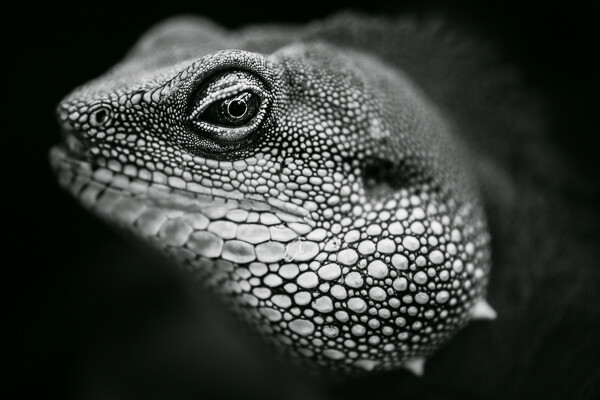
I used an 85mm lens fitted with a 500D close-up lens to create this photo of a Chinese Water Dragon.

Two things occurred to me When I read Phillip VanNostrand’s article The Only Three Lenses You Need for Travel Photography. One, is that his choice of lenses would not be my choice. Two, is that you cannot recommend three lenses for every photographer to use, as everybody’s requirements are different.

Imagine if you went to a showroom to buy a new car and the salesperson said “Sir, the only car for you is a Ford Focus”. Fine, if that’s the car you happen to want. But how annoying would it be if the salesperson insisted that you should buy a Ford Focus if it didn’t fit your needs?

A professional would establish your requirements first by asking you questions. How many miles do you drive a year? How many people does the car need to transport? Do you need lots of storage space? How important is fuel economy? Safety? What is your budget? And so on. When the answers to are known, the salesperson can make a recommendation.

It’s the same for lenses. My needs are different from yours because we are different people with different priorities and requirements.

Please don’t take this as a criticism of Phillip’s article (which is a great read, and the comments are fascinating). I learned this lesson when I wrote my article Buyers’ Guide – Prime Lenses vs Zoom Lenses in which I came down in favour of primes (my personal preference). Some readers quite correctly pointed out that the convenience of zooms makes them invaluable in certain situations. I realized that I was imposing my preferences on other people.

The three lenses I couldn’t do without

So here’s my question. If you could only own three lenses, which ones would they be? That’s right, three lenses to cover you for all the types of photography that you do. And, taking it further, if you could only own one lens, which one would you choose?

It’s a hypothetical question for most, as we are free to buy as many lenses as we like. But there is a semi-serious point behind it. Creativity works best within constraints, and limiting your lens collection to three is certainly a constraint. Also, it is possible to put together a good selection of three lenses that cover you for most situations on a limited budget – there is no need to spend many thousands of dollars on expensive glass if you can’t afford, or don’t want to.

Before you give your answer, have a think about your requirements, because they will drive your choice of lenses. These are my requirements:

  • My lenses must be light and relatively small. I don’t want to carry around a large, heavy bag full of gear.
  • My lenses must be good value for money. I don’t have a budget as such but when I buy a lens I need to know that I will use it a lot, it will last for decades and that I won’t have buyer’s remorse.
  • The autofocus must be reasonably quick and quiet.

To get the debate started, here’s my choice of three lenses, in order of preference. Bear in mind that I’m a Canon user so that naturally influences my choice of lens, and that I use a full-frame camera.

85mm f/1.8 lens

This is my favourite lens. I use the 85mm f/1.8 for portraits, close-up photos and landscapes that benefit from selective framing and compression. It’s light, relatively inexpensive and the image quality is excellent. The only weakness of this lens is that the minimum focusing distance is 85cm (2.8 feet), so it is not so good for close-up photography. I get around that by attaching a 500D close-up lens (this is technically a lens, although I think of it as a filter and I’m not including it in my choice of three) which gives me excellent quality for close-up images as long as I stop down to f/2.8 or smaller.

Camera lenses

The 85mm f/1.8 lens is ideal for portraits, especially those taken in low light, like this one.

Camera lenses

The 500D close-up lens that I use with my 85mm lens for close-up photography.

40mm f/2.8 pancake lens

While I love the quality and versatility of 50mm prime lenses, they are too middle of the road in terms of focal length for me to include one in my choice of three. Instead, I’m selecting the Canon 40mm f/2.8 pancake lens. I love this lens because it is extremely small and has high image quality. On my full-frame camera the focal length sits on the borderline between wide-angle and normal focal lengths, and turns out to be a surprisingly useful focal length. I use this lens a lot and I love it.

Camera lenses

The 40mm lens is ideal for scenic photos like this.

Camera lenses

The 40mm lens is also idea for photos where the composition demands a gentle wide-angle, in this case for the converging verticals effect created by shooting from a low viewpoint.

24mm f/2.8 IS lens

This is the newest addition to my lens collection and while I’m still getting to know it, the 24mm f/2.8 become one of my favourites. There’s something special about the 24mm focal length – it’s ideal for landscapes and scenic photos without being too wide. The maximum aperture of f/2.8 is a little limiting (I like to experiment with wide apertures for creative effect) but I can live with it as the lens is much lighter, cheaper and smaller than the Canon 24mm f/1.4L lens.

Another thing I like about it is the Image Stabilizer (IS). Theoretically with this engaged I can handhold the camera at shutter speeds down to around 1/2 second and still get sharp images. Yet anything moving within the frame will record as a blur – lots of creative potential there.

Camera lenses

The 24mm lens is great for environmental portraiture, where you want to show you subject and include a dramatic background.

If I had to chose just one of these lenses, what a difficult decision! If I could only ever have one lens, and it had to be one of these three, I think I would go for the 85mm f/1.8. Otherwise I would go for something like the Canon 24-105mm f/4L lens. It’s bigger and heavier than my primes but it covers a very useful set of focal lengths.

Your choice

Now it’s your turn. If you could only own three camera lenses, which ones would they be? If you could only own one lens, which would you choose?  Please let us know why. What are your personal requirements? It should make for an interesting discussion.


Understanding Lenses ebook bundle

Understanding Lenses ebooks

My ebooks Understanding Lenses Part I and Understanding Lenses Part II will help Canon EOS owners decide what lenses to buy for their cameras. They are both filled with lots of tips to getting the most out of your Canon lenses. Click the links to learn more.


The post Which Three Lenses do You Need for Photography? by Andrew S. Gibson appeared first on Digital Photography School.


Digital Photography School

 
Comments Off on Which Three Lenses do You Need for Photography?

Posted in Photography


Opinion: Do we really need the Fuji X30?

26 Aug

With the camera industry moved on somewhat since the birth of the Fuji X series compact, is there still room for a 12 million pixel compact in a less-than compact body? In this opinion piece, senior contributing writer Damien Demolder ponders the very existence of Fujifim’s newest X-series camera. Read more

Articles: Digital Photography Review (dpreview.com)

 
Comments Off on Opinion: Do we really need the Fuji X30?

Posted in Uncategorized


The Only Three Lenses You Need for Travel Photography

29 Jul

The only three lenses you need for travel photography anywhere in the world are a fisheye lens, a 50mm, and a 135mm (or similar telephoto).

You can agree and finish this article right here, or you can read on to see exactly why I would choose only these three lenses to take with me anywhere in the world.

Canon fisheye 15mm 2.8

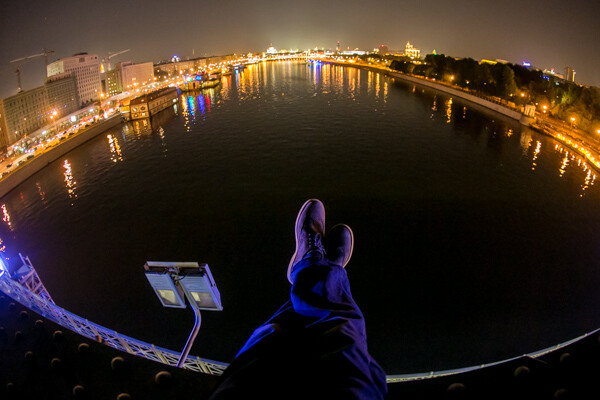
Night shot from atop a bridge in Moscow, using the Canon fisheye 15mm f/2.8

Before I say anything else, the fisheye I have in mind has an aperture of f/2.8, the 50mm has an aperture of f/1.4, and the 135 has an aperture of f/2.0. Popular, cheaper variations on these lenses would be the 24mm f/2.8, 50mm f/1.8, and the 100mm f/2.8 Macro. I’d also like to address what I imagine a popular response to this article might be: “What about the 24-105mm?” This lens is weak for a couple of reasons. The maximum aperture on this lens is f/4, which ends up being very limiting if you are trying to travel light (and going without an off camera flash).  Also, prime lenses are always superior in quality to zoom lenses. There are less moving parts and the image quality is cleaner. If you think having just one lens to cover a greater range is easier, just remember what you gain in convenience (by having one lens) you lose in quality, weight, and ability to “see” in the dark.

Each of these lenses are used for very specific reasons. Just as we wear different shoes for different purposes throughout our week, such as; sneakers for exercise, dress shoes for work, and slippers around the house – we use different lenses to convey different feelings, emotions, and to use as different tools to capture our experiences. Some lenses really are better than others for certain things. For example, portraits are best taken with lenses between 85mm and 135mm. The distortion to the face/ears is minimized and the truest proportions are found in this range.

On the other hand, you wouldn’t normally reach for a lens like this when shooting a landscape scene (there are always exceptions to every rule, and it’s fun to see what happens when you break the general guidelines). Great lenses for landscapes tend to be a bit wider, somewhere between 15mm and 50mm. I recently took only these three lenses with me on the Trans Siberian Railway from Russia through Mongolia into China. Here are MY reasons for bringing the 15mm Fisheye, 50mm f/1.4, and the Canon 135mm f/2.0 with me on this trip of a lifetime.

The Canon Fisheye 15mm f/2.8

canon fisheye 15mm

From Moscow, Russia

The Canon 15mm lens is my antidote to boring building pictures. When traveling abroad (or around your own town/city/village), interesting buildings are inevitably photographed. Oh, that old bridge with locks attached to it? Better take a picture. Oh, look at that old cathedral in the Kremlin, better take a picture. If it’s there, it must be important. Well, you can add your photo to 1.5 million other photographs right there on Flickr or Google images that look exactly like the one you just took.

What will you do to differentiate yourself? How can you take a picture that will make someone pause for more than half a second?  Ad companies are excited when someone spends 4-8 seconds looking at a photo. Can you get someone to look at one photo for that long? What would it take? For me, I decided I would never take boring, straight photos of buildings ever again. I’d either edit them in unusual ways (like creating an HDR image, or process it in very contrasted black and white), at unusual times of day, or I would attempt to photograph it differently than every other tourist before me.

canon fisheye 15mm

The subways in Moscow, Russia

Canon fisheye 15mm 2.8

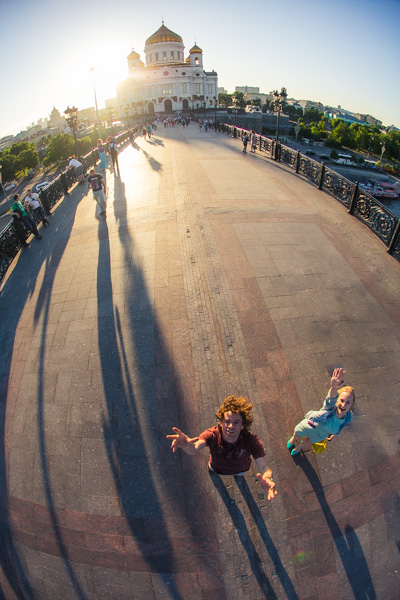
Selfies are easy with the fisheye lens. That bag on my shoulder could hold my camera, three lenses, my laptop, batteries, some magazines and a book.

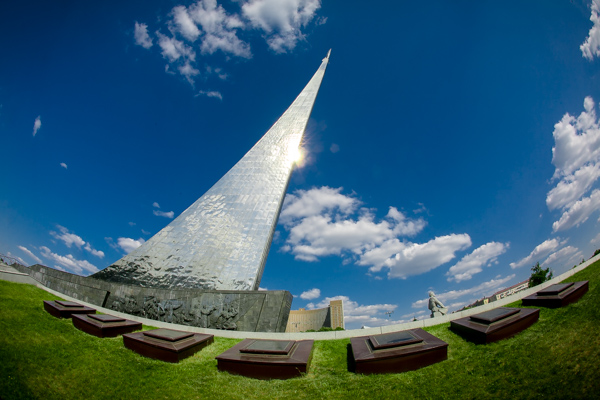
Shooting with a fisheye lens can be really fun, actually. Hold your camera up to your eye with a fisheye lens on, move the camera upwards and watch the horizon bend down sharply at the sides, creating a “globe” feel to your image. Tilt the camera down and watch the earth curve up like a big “U”. Buildings become warped and distorted in unusual ways, like a piece of Gaudi’s architecture. Stand in the middle of the street and point the camera straight upwards and watch the buildings on the side loom over you, like in a Dr. Seuss book.

canon fisheye 15mm

My bunkmates on the Trans Siberian Railway

Fisheye lenses can capture an entire room, cabin of a train, or a bathroom easily. They make selfies on your DSLR incredibly easy. You can take incredible photos of the stars at night. And best of all, they are great for doing the Camera Toss. (I suppose I should recommend NOT trying this ever, anywhere). Fisheye lenses add an element of fun and whimsy to travel photos, which I find otherwise a bit boring and predictable. It’s also an incredibly light and compact lens to travel with, which is why I always bring it along on my trips now.

canon fisheye 15mm

My camera toss, where I throw my camera with a fisheye lens high up into the air to capture a scene like this

The 50mm f/1.4

The 50mm lens is a standard, go-to, all-around lens. And while the Fisheye lens brings a lot of whimsy and fun to my travel pictures, some scenes just don’t call for that. I’ve heard it said that the 50mm is the closest representation to what we see naturally with our eyes. This lens is my best choice of the three options for Canon 50mm lenses. For only about $ 300, this lens has fantastic optics and a powerful aperture. It’s made of real glass lenses unlike the cheaper, lower quality 50mm f/1.8. And it focuses fast, unlike the much more expensive 50mm f/1.2, which happens to be twice as heavy.

Canon 50mm 1.4

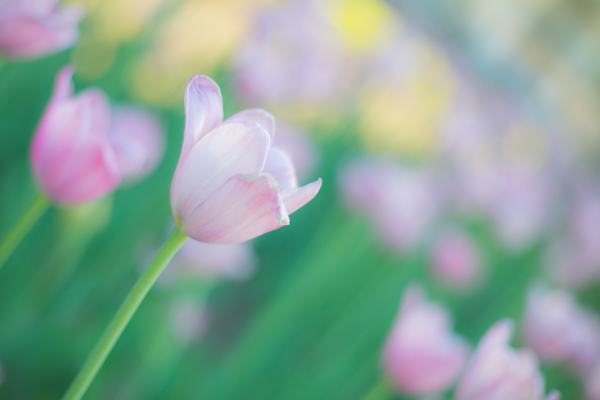
A garden scene in Moscow, Russia taken with the 50mm f/1.4. Such lovely bokeh!

This is a great, inconspicuous lens on a camera body because it doesn’t stick out too much like a 70-200mm would, and the quality is just superb, as I’ve already said. It is extremely lightweight, and you could honestly walk around the entire day with just this lens. What I associate most with the 50mm f/1.4 lens is street photography. I love to take that lens and get lost down side streets and alleyways. I like to take photos of strangers on the street with this lens. The focal length is just right, so it feels as though the viewer is standing there by him or herself. It captures just enough of a scene to convey what is there.

Canon 50mm 1.4

A retired math teacher from Texas on the Trans Siberian Railway

The 50mm f/1.4 is also a great lens for portraits (though I prefer the 135mm f/2.0). It produces lovely bokeh. It forces you to get up close to your subject, making the portrait more intimate. You can’t hide behind a telephoto like the 135mm or a 70-200mm. You are an arm’s distance away, and being that close sometimes shows up on the subject’s face in interesting ways.

low light with the Canon 50mm 1.4

My Mongolian host preparing milk tea in the yurt.

The last thing that I think the 50mm f/1.4 does best, is capture images in low light situations. Trying to capture dinner in a restaurant at night using candlelight only? Totally possible. That light reflecting across the river at night? 50mm does it best! Sleeping in yurts for four nights in a row? Getting that delicious yurt light from the top of the tent is easy with the 50mm.

Canon 50mm 1.4

Taken in the back alleys of Beijing, China with my 50mm lens, my favorite street photography lens.

Fun fact: of my top 200 images from the trip, 112 of them were taken with the 50mm.

The 135mm f/2.0

The granddaddy of all these lenses, the 135mm f/2.0 has a special POW feel to it. Because it is a telephoto, it pulls the background in for a nice compact feel to the images. It is a great portrait lens as it completely obliterates the background in a sea of dreamy bokeh. And one special fact about the Canon 135mm f/2.0: it has the ability to focus at a distance of 1 meter (3 feet), which makes it almost like a macro lens.

Canon 135mm 2.0

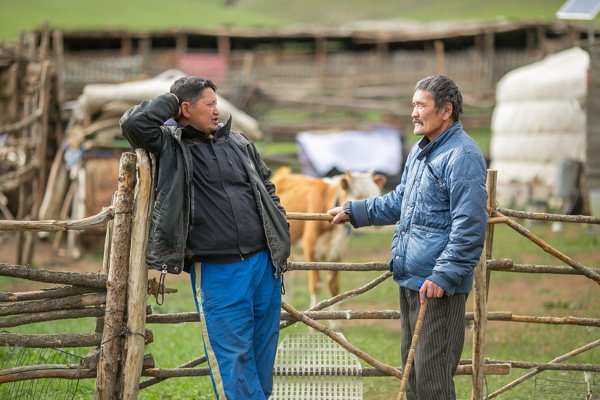
My host on the left, after we road horseback from one village to the next, in Mongolia. Taken with the 135mm f/2.0

This lens is fun for me because it has similar properties to the 70-200mm, but it weighs nearly half as much, which will save your back and shoulders after a long day of walking around. This is a fun lens to spy on people from afar, if you are afraid of the straight-on street style encounters you get with the 50mm. This is actually a really interesting lens to do landscapes with if you have enough room. Look at this side-by-side comparison of basically the two same scenes, and look what the 135mm does to the mountains and landscape in the background. It really pulls them towards you, the viewer and truly implies the scope of the scene.

Fisheye versus 135mm

The same view from the fisheye and the 135mm. Notice the mountain with the bright spot in the background of the fisheye; it’s almost non-existent. With the telephoto the mountain becomes a major player in the photo.

Canon 135mm 2.0

Taken on my way to the oldest and deepest freshwater lake in the world. Lake Baikal, in Siberia, Russia.

canon 135mm 2.0

In the Kremlin, Moscow, Russia. This is one instance where I enjoy breaking the rules and using a telephoto lens to capture an idea of a building, rather than the whole thing with a 50mm or Fisheye lens.

I hope these images and words have inspired you. It’s really fun to limit yourself to prime lenses and feel how they work (and don’t work) in various situations. Being that close to just a few lenses over a month of travel really allows you to get to know the equipment well. So now let’s see some travel photos you’ve taken with prime lenses!

The post The Only Three Lenses You Need for Travel Photography by Phillip VanNostrand appeared first on Digital Photography School.


Digital Photography School

 
Comments Off on The Only Three Lenses You Need for Travel Photography

Posted in Photography


5 Bad Photography Habits You Need To Keep Doing

10 Jul

I don’t floss every day. I still use the word “rad” as an adjective and not in the cool retro way, but in the I-don’t-have-another-word-for-it way. The driving speed limit and I have a love/hate relationship. And I have been known, on particularly hard days, to let my kids eat cookies for breakfast and ice cream for dinner. These are all terrible habits that I need to work on. My “bad” photography habits though, the ones that people say you shouldn’t do or should just get over already, those are actually helping me. They might be helping you too. Here are five habits, that most people would say are things we should move past, and why I think you shouldn’t.

lmattingly6

#1 Not pushing for the shot

By day, I’m a photographer. By night, I’m a psychotherapist. Well, sometimes it’s opposite. Point is: there are a few basic lessons that work in both of my jobs. One of them is not trying to own someone else’s reaction. If I tell you that it’s sunny out and that upsets you, there is nothing I can do about that. I could have told you different, but providing it was actually sunny, I would have been lying. Your reaction is yours. Just like if I try to have a portrait client do something the way I would do it and it doesn’t work, they are not to blame. If I tell them a joke to make them relax and smile that they don’t think it is funny, I can’t force them have to have an authentically positive reaction.

One of the most valuable lessons I’ve learned as a photographer is to know when to let something go. If you are fussing with a shot, be it portrait, landscape, food, whatever, and it’s just not working out like you want it to, let it go. Chances are if you are struggling that hard to get the shot, even if you do get it, you won’t like it. Patience is one thing, but pestering is another; by grasping so tightly to a specific concept, you are setting your expectations far beyond what is logically possible. In life and in photography.

lmattingly2

#2 Taking your time

Ask any one of my clients and they will tell you that I’m fun, but I take a while to return finished images. They will also tell you that I’m flaky about emails, never answer my phone, and happily scream and yell and laugh way more than needed on a photo shoot. There’s not a lot a I can do about being a loud talker and easily excitable, and so long as there is text I’m just not going to answer my phone unless I have to. But I make no apologizes for taking a while to edit shoots. I mean, I do apologize every single time to my clients, but I know it will never get better. I am not able to force editing.

Unlike data entry for example, I am just not able to just sit at my desk and do it nonstop until it’s done. I need to be in the mindset to do it, and once I start I’m really only good for an hour or two before I realize I’m just not producing quality work anymore. Being the extremely flakey artist that I am, this mindset sometimes comes at 10 a.m. in the morning and sometimes at three, in the morning. When my insomnia truly kicks in, and my husband isn’t all that interested in talking about our feelings and hopes and dreams. The flip side of this coin: I have never given a portrait client images that I’m not completely proud of. When I deliver images to a client (extremely later than I said I would), I feel that they are truly the best of my abilities and completely indicative of my style. I feel my photography is worth the wait and I’m proud of that. Don’t push it just to be timely. No one recommends a photographer because they turn-around images really fast – they recommend the photographer that produces the best work.

lmattingly5

#3 Chimping

“Chimping” is the fine art of checking the back of your digital camera after every shot. It’s obnoxious and time-consuming and what it will show you is the difference between a dream shoot and having to redo the whole thing. Don’t check every time, but do check – often. You can’t count on chimping to give you amazingly accurate results – a screen that small is showing you much too sharp of an image than it will actually end up being. But it will show you  is if your settings are off. It will show you if you are not in as good of a spot as you think. There is no embarrassment in it and there is nothing wrong with taking a minute to readjust.

I have to assume that when NASA puts astronauts in a space shuttle, they give them a few minutes to get everything adjusted how they want. Most photography situations are in constant motion – the sun is always going up or down, the people are always moving, the food is always – slipping? (I’m not sure. I don’t do food photography. But I would assume there are struggles.) The world moves, and as photographers we have to constantly double check to see that we are moving with it. When you are viewing the world from a lens, it’s a good idea to make sure the lens is seeing it the way your eyeballs are.

lmattingly1

#4 Being nervous

The first time I ever photographed a child (for portfolio building), I didn’t have a memory card in. I shot for 30 minutes, thinking I was getting cute stuff and I happened to try and chimp and it said “no CF card” because at that point, I hadn’t learned the setting where my camera doesn’t shoot without a card (learn this setting!). I was mortified but didn’t want the clients to think I had just wasted their time so I just wrapped it up and went home. To this day, they don’t know as I just told them I was unhappy with the shots and gave them a new session. Ten years later and I still check to make sure that I have cards, an extra battery, lollipops and my camera a solid 20 times before I leave my house. I have been known to use the opportunity of a red stoplight to check my bag a 21st time. You know, just in case. I have never forgotten anything I couldn’t shoot without. But I have also never gotten past being nervous before every shoot. It doesn’t matter if I am photographing one of my dearest clients that I have photographed ten times before or if I have been hired by a national publication to shoot a celebrity – I arrive nervous as all get out. Eventually I forget to be nervous and I start being myself and it works out. But being nervous is good. Nerves mean you want to do a good job and you are humble about your talent. Don’t ever stop being nervous.

lmattingly4

#5 Being a one trick pony

I’ve written before about my various attempts at real estate photography, product photography, and landscape photography. I’m terrible at all of them. Not only do I not have the right equipment for any of those, I don’t have the right eyeballs, the right personality, or the right style. A few years ago I decided to only photograph people, no matter what money I was offered to shoot something else, or what friend needed a favor. Earlier this year, I specified even more that I don’t do weddings, though those generally involve people, they just aren’t for me at this time in my life (I’m still holding on to the dream that a dog wedding job is in my future though). I am a portrait photographer. It’s where I shine and it’s how my clients know me. It’s my one trick.

There is nothing to be ashamed about when not being the jack of all trades. If you love shooting landscape and that is your true passion, you are a landscape photographer. You may moonlight, by taking the occasional family portrait for a friend, and that’s fine. However sticking with your passion will keep photography interesting, fun, and your spirits high. There is no worse feeling than having done a poor job and when you take on jobs that are out of your wheelhouse, you bash your own confidence. Challenge yourself, but stay true to your passion as well.

lmattingly3

A photograph is more art and intuition than process and procedure. Above all else, make the images you take your own. You can read a thousand different articles offering ideas and information, but take those only as suggestions in the hope of beginning and strengthening your own creative process. Photography is a form of expression and as such, is only interesting when you are exploring your own personal style and challenging yourself with your natural skills and ability. If your bad habits are working for you, don’t give them up.

The post 5 Bad Photography Habits You Need To Keep Doing by Lynsey Mattingly appeared first on Digital Photography School.


Digital Photography School

 
Comments Off on 5 Bad Photography Habits You Need To Keep Doing

Posted in Photography


Nikon D810: What You Need to Know

27 Jun

Nikon’s new D810 replaces two models, the D800 and D800E. It brings a number of refinements, some of which are minor, but some that are potentially very significant. The D810’s specification sheet is enormous and it’s easy to miss things – in this article we’re cutting through the PR jargon and breaking out the D810’s main selling points. Click through to read more

related news: Digital Photography Review (dpreview.com)

 
Comments Off on Nikon D810: What You Need to Know

Posted in Uncategorized


Adobe CC Announcements: What you need to know

19 Jun

shared:AdobeLogo.png

This morning Adobe announced a new photography-focused plan for Creative Cloud subscribers, new feature additions to Photoshop CC and two apps – an iPhone version of Lightroom Mobile and Photoshop Mix. We’ve written about all of these things individually, but if you’re thoroughly confused about what it all means, click through for the main takeaways.

News: Digital Photography Review (dpreview.com)

 
Comments Off on Adobe CC Announcements: What you need to know

Posted in Uncategorized


Need a Lift? Road Elevator Boosts Cyclists up Hills

27 Mar

[ By Steph in Technology & Vehicles & Mods. ]

Bicycle Elevator 1

If there’s a particularly daunting hill on your cycling or stroller-pushing route, you may have already thought to yourself, “I wish there were some kind of magical contraption that could haul me to the top.” Like… a bicycle escalator, or something. Well, that thing actually exists: it’s called the Trampe CycloCable. This motorized aid was built into the street in Tronheim, Norway to give a little help to anyone trying to get up an 18% grade hill on wheels.

Bicycle Elevator 2

The prototype was built in 1993, and the Trampe has pushed over 200,000 cyclists up the hill since then. The design was upgraded in 2013 to meet new safety regulations, and a new industrialized version will be introduced to the international market.

Bicycle Elevator 3

Using it is pretty simple: you position your bicycle 10 centimeters away from and parallel to the lift rail, with your left pedal in a lower position. While standing astride your bike, put your left foot on the left bike pedal, and your right foot in the start slot of the lift. Push the green ‘start’ button and it’ll gently haul you up the hill.

Bicycle Elevator 4

People riding scooters or pushing strollers use the lift, as well. It moves about five feet per second and can extend up to 1,640 feet. Maybe we won’t see these installed on every hill in town anytime soon, but for the steepest of the steep, it would probably be a pretty welcome addition.

Share on Facebook


[ By Steph in Technology & Vehicles & Mods. ]

[ WebUrbanist | Archives | Galleries | Privacy | TOS ]


WebUrbanist

 
Comments Off on Need a Lift? Road Elevator Boosts Cyclists up Hills

Posted in Creativity


Mastering Self-Portraiture: What You Need to Get Started

12 Mar

With the rapid increase in the immediate smartphone-picture “selfie,” it’s hard not to start taking your own. Self-portraits are, after all, the new trend . They are almost always the default profile picture, and super convenient when you have nothing else to do . For photographers, this poses another question: Should I take a professional self-portrait? Have you ever thought Continue Reading

The post Mastering Self-Portraiture: What You Need to Get Started appeared first on Photodoto.


Photodoto

 
Comments Off on Mastering Self-Portraiture: What You Need to Get Started

Posted in Photography


Do You Need to Upgrade to the Latest Camera?

21 Feb

Camera-envy is the bane of many photographers. Discussion forums are filled with conversations about the benefits of the latest and greatest camera gear, and our commercial-driven societies fill us with the deep-seated need for more, more, more! But do you really need to upgrade to the latest camera?

By Portrait / Wedding Photographer

What matters more: the camera or the photographer?

This is the question truly at the heart of most photography gear debates: what really matters? Is it the camera or the photographer?

You know what you want the answer to be. When you show someone a favourite picture, you are looking for compliments and congratulations for yourself, not your equipment. You likely don’t post an album on Facebook hoping to get a “Way to buy that new camera!” style of comment. If you compare yourself to a chef and use the analogy that no one would think to praise the frying pan for an excellent meal.

But yet. . .

You see the photographs of others and immediately start making excuses. “Oh, well, he has a 400mm zoom lens” or “Well, she has a full frame sensor,” and at the same time we overlook the years of training or the hours of planning that went into that shot or that set-up. You choose not to wake up early or to stay up late and then wonder why your sunrises or sunsets do not have the same pizzazz or punch as another’s. You choose to shoot quickly and move on, rather than staying around, observing, and find that ‘decisive moment.’

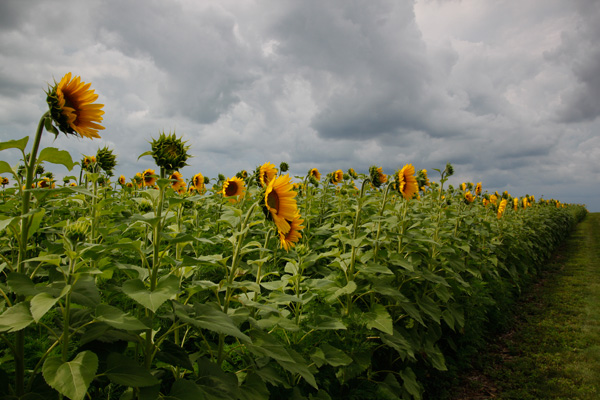
sunflowers, field, flowers, nature, clouds, storm, photography, CanonT1i

You are the variable that matters. If you want to take better pictures, there are unlimited steps you should be taking before you worry about upgrading to the latest and greatest. Think about the time and energy that you put in to your photography. Are you truly pushing your camera to its maximum potential?

Many of the latest and greatest benefits touted by newer model cameras are those that will rarely be used or exploited by the vast majority of camera owners. 61 compared to 9 possible focal points are not necessarily useful if you consistently use the center point to focus-and-recompose or if you rarely use auto-focus or servo-focusing modes for moving subjects.

water crown, splash, drip, drop, water photography

A faster frame rate of 6 compared to 3 frames per second is useful, perhaps, if you are shooting a rapidly changing subject like a bird in flight or kids jumping into a pool, but you do not need six (or even three) identical photographs of a rock formation or a bouquet of flowers. Ask yourself how often you even shoot in such a burst mode.

You should also think about the strengths and limitations of the current lenses that you own. A fast prime lens can open up a wide-range of new shots and opportunities. If you do not already have at least a 50mm f/1.8 lens, then you have not even begun to explore the potential of your current camera body. Many photographers recommend putting your purchasing power into lenses, especially ones that you can hold on to and use down the line.

What I shoot

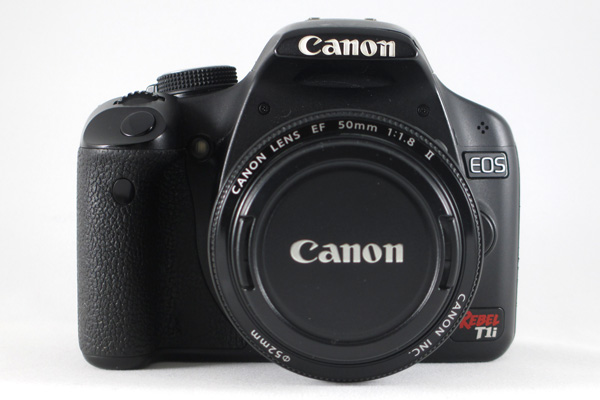
Full disclosure, I shoot with a Canon T1i (500D for the European naming system), a camera that went on the market in early 2009 and has since been upgraded four additional times. At nearly a year-old, the current Canon T5i is likely due for an upgrade in the near future: the Canon T5 was just announced February 12th. In many photography circles the T1i would be considered a nearly ‘ancient’ digital model. It is also in the entry-level line of Canon DSLRs, with multiple tiers of both cropped and full-frame sensor cameras above it. All photographs in this post (other than the shots of cameras and gear) and my other articles on dPS, were taken with this camera.

camera, canon, CanonT1i, T1i, photography, rebel, EOS, 500D

I will readily admit that there are trade-offs and limitations to my camera. I know that I cannot push the ISO very high without introducing significant noise into the final images. I know that my buffer will fill quickly and then stall if I take a series of RAW shots in rapid succession. I know that I cannot adjust my LCD screen or see myself while standing in front of the camera for a selfie. Has that ever negatively impacted a shot that I was trying to take? Not often.

I also know that I can carry a tripod and use it if shooting in low light. I know that I can switch into just JPEG if I am trying to take a hurried sequence of shots. I know that I can use cues from a test shot to figure out how to tweak a self-portrait and use a remote to set the focus when I am in position. I know that 15 MP can look great at web sizes as well as printed on canvas or aluminum and hung on my wall.

What frustrates you about your current camera? Think about whether it is something that you could change or whether it really an issue with your camera.

Milky Way, silhouette, night, star photography, astrophotography, stars

Agree or disagree: will you upgrade your camera?

Are you a frequent camera-upgrader or are you shooting with an “old” digital camera too? Share your constructive thoughts or an example photograph in the comments below.

Some other options to buying more stuff:

  • Start Feeling GOOD About YOUR Photography
  • A Year of Photographic Lessons – Journey of a Novice Photographer
  • 5 Photography Rules Moms [and Dads] Can Ignore

The post Do You Need to Upgrade to the Latest Camera? by Katie McEnaney appeared first on Digital Photography School.

Digital Photography School

 
Comments Off on Do You Need to Upgrade to the Latest Camera?

Posted in Photography