RSS
 

Posts Tagged ‘More’

Lomography raises more than $1M for production of new Petzval lenses

09 Aug

Petzval.png

Lomography’s campaign to raise funds to bring the centuries-old Petzval lens back into production via Kickstarter has now raised more than $ 1 million – ten times the original target. The ‘New Petzval’ lens looks and functions much like the originals, with a brass exterior, and the aim is to produce it in both Canon EF- and Nikon F- mounts. The lens is expected to be available next spring. 

News: Digital Photography Review (dpreview.com)

 
Comments Off on Lomography raises more than $1M for production of new Petzval lenses

Posted in Uncategorized


7 Simple Ways a Blog Can Get You More Photography Clients

04 Aug

By Ramsay Taplin

Are you a photographer who dreams of taking your photography business to the next level?

Well, one of the things that creative people (like artists, writers and, yes, photographers) forget is that you grow a business by marketing it – not necessarily by just being good at what you do. There are plenty of good photographers out there.

So what’s the problem?

Not all photography businesses have a huge budget to spend on marketing.

And that’s where a blog comes into it.

In this post I’m going to talk about how you can start a blog (or use an existing one) to get you more clients for your photography business. I don’t run a photography blog but I’ve got a bit of experience with helping small businesses grow using content marketing.

I’ll use a few examples from photographers I know as well as taking some sweet ideas from similar small businesses doing the same thing.

Not all blogs/websites are created equal

For the purposes of this article I thought it would be important to make a few distinctions.

And let’s start by highlighting the fact that a regular “brochure” website is not the same as a blog. Not by a long way.

What’s the difference between a blog and a website?
So what’s the difference? Well, a website is something that generally has static content – pages like About Us, Services, Gallery, Contact and so on. A blog is something that you update regularly with new content. The newest posts usually appear at the top. This comes with a huge set of advantages – some you might never have considered.

Can the two work together?
Absolutely. In fact, that is the ideal situation. The best way to set your photography website up is to make sure it has a blog integrated seamlessly with the rest of the website. Having a blog on a separate domain name is good but not nearly as good as building one under your main brand name. I’ll explain why later.

Where do I get started?
If you don’t have a blog (or a website) and want to learn more I’ve done a video and a full walkthrough on blog hosting that helps you understand how it all works together and how to get started the right way the first time around. You can also check out this Wiki later on for some hosting alternatives.

So how can a blog bring you more photography clients?

Now that we’ve got some of the preliminary stuff out of the way let’s jump into the meat and potatoes of the post.

1. A blog helps to build trust
The first thing to note about a blog is that it helps you build a lot of trust with your potential customers and clients. This is an extremely important part of growing a business these days because a huge amount of your customers will research you before they engage your services. In fact, some people say that one in three people look at the website before engaging the business.

Part of this means having a well designed website that showcases your work and part of it means showing your personality. This is especially important for things like wedding photography where your client will want to have a good relationship with you as it is such an important day for them.

LisaK

A few cool shots from Lisa K’s blog.

Tasmanian photographer Lisa K does this extremely well by having her blog as the homepage of her photography website. The articles she posts are about her daily life and family but always showcase some stunning photographs that would, no doubt, help to create an initial “buzz” and trust with a potential client.

2. A blog helps to increase your reach
The most important part of marketing a business is reach – you need to get in front of new people as often as possible.

This can be quite a difficult concept to understand because we are usually told that loyalty and repeat customers is the most important. Well, if you have five loyal clients who bring you the majority of your business but one drops off then you’re in trouble. A better scenario is to reach new people regularly and then convert them into loyal customers by providing a quality service. Reach is always more important than loyalty for growth.

So how does a blog help to increase your reach?

Well, it gives people something to share and a platform for you to promote all the cool intricacies of your business. People are very unlikely to share around just a portfolio site (unless it’s incredible!) but if you publish a quirky or unique blog post that’s different to your regular material you might find it makes the rounds on Pinterest or Twitter and brings you some new clients.

For example, let’s say you have some hilarious wedding photos of brides trashing their dresses. They’d look look good in a portfolio but imagine the difference it would make if you combined them into one blog post called 10 Hilarious Photos of Brides Ruining their Expensive Dresses. Much more entertaining and shareable.

3. A blog can get you more exposure locally
Google is now giving a lot of weight to local listings. What this means is that if someone types in “photographer” into a Google search they are going to get result from their local area. Here’s an example:

Screen Shot 2013 08 01 at 1 17 37 PM

As you can see, in South Australia I get a Wikipedia result and then the next few are all local South Australian photographers.

Now, a blog can help you take this to the next level in a few ways. The main one is that every blog post you publish will increase your visibility for local terms. For example, if you do a blog post called 25 Beautiful Landscape Photos from Around Sydney you are more likely to rank for terms relating to those photographs to people in Sydney.

Or, you might do a blog post about every photo shoot that you do with local businesses. When people see those photos on those businesses websites or marketing materials and then look it up on Google you’re more likely to appear. So you can piggyback off the success of your client and your quality photos to get more business.

4. A blog gives your website multiple new points of entry
This point strongly relates to the previous one but is worth mentioning on it’s own.

Every time you publish a blog post it (if set up correctly) publishes with it’s own unique web address called a permalink. For example, let’s say you do a post called 5 Interesting Photos from New York that post’s permalink would be something like www.yourwebsite.com/5-interesting-photos-from-new-york/

The great thing about this is that Google will index each post like this in the search results separately depending on what people search for, and how authoritative your website is. This is quite a complicated field we’re getting into now so if you’re interested you can read this SEO for blogs article or this list of SEO tips from Darren.

The main point, however, is that for every blog post you publish you’re creating a new set of keywords through which people can enter your blog.

A great real-world example is my mate Tim from SA TECHFLOOR who told me the other night that since he started blogging and posting photos of his flooring jobs he’s getting more and more phone calls every day. As each one has a different set of keywords (carpet, concrete, bamboo, timber, etc.) he’s got a lot of entry points he didn’t previously.

5. A blog can help your website rank higher
Now, one of the cool things about the previous few points is that if you do them all within your own website you can cause that website to rank higher on Google for important terms like “photographer in [your city]“.

Google likes to show results that are both fresh and of the highest quality. So if you have a small five page website with not much changing, Google might not think it’s all that useful.

If, on the other hand, your website has an active blog with lots of new posts, people sharing it on social media and so on, Google is likely to think it’s more useful for their customers (people searching) and thus rank it higher.

Organic ctr by search position 1 20 png

A graph of the click through rate of the top search results thanks to Search Engine Watch.

As you can see in the image above, this can lead to an immediate increase in business because the first result in Google gets over 35% of the traffic for that page. Worse still, the first page gets over 95% of clicks so if you aren’t in the first few results you’re getting overlooked.

6. A blog can help you form new collaborations
A good online friend of mine, Jamie Swanson, runs two photography blogs. One of them is embedded in her main business website and acts as a promoter of her main services. Her second blog, however, is called The Modern Tog and it’s all about running a photography business.

I wanted to mention her second site because it is a great example of someone who has set up something slightly out of the box and created a lot of new connections because of it.

For example, Jamie contacted me through Blog Tyrant about a year ago and I put her in touch with the content editor at ProBlogger. This lead to her writing a hugely successful post about Pinterest that, in many ways, has lifted her reputation online as someone who knows about photography and the marketing side of photography.

It wouldn’t have happened without the blog.

7. A blog can help reduce client friction
Client friction is what happens when they visit your site, like your stuff but for some reason don’t make contact. It could be because they don’t like your prices or it might be something a little bit more intangible like not really “feeling the vibe”.

James Field runs one of Adelaide’s best wedding photography businesses and has a great little video on his website that is a cool example of something you can do to get your clients to know you better.

Now, James’s video isn’t on a blog but it’s the perfect kind of cross-platform content that a blog is perfect for. For example, you could do a series of these types of videos showing how the wedding day pans out for your clients. These could then bring you traffic from YouTube as well as reducing client friction on your blog.

Tips for your photography blog

So now you’ve got some reasons as to why you might want to have a blog on your photography businesses website. But once you’ve got the blog what are some things you can do to make sure it succeeds?

  • Be personal
    People will love your photos (if you’re good) but they might not like you. Try to figure out who your audience is an, if possible, make sure you are personal and friendly.
  • Know your brand
    Know who you are targeting and what keyword they might be looking for on Google. This will help you craft the right content.
  • Make sure it loads fast
    People are getting less and less patient when it comes to websites. In fact, a one second delay can affect conversions by up to 7%.
  • Find a way to be different
    Don’t just publish the same stuff everyone else is. Take a leaf out of BuzzFeed’s book and use content we’ve all seen to come up with something fun, shareable and relevant.
  • Make your blog your “home base”
    In my guide to social media I talk about the fact that your blog should be your base for all your social media activities. This way, all the Tweets, Pins and Shares that you get go towards growing your blog’s traffic and rankings.

Do you run a photography blog?

I’d be interested to hear how many DPS readers have photography blogs and whether or not they’ve helped to get more customers vs just a static website. What has worked for you? Leave a comment and let us know!

Ramsay runs Blog Tyrant – a blog about trying to make a living from the couch and other internet marketing ideas. Find him on Google+ today.

Post originally from: Digital Photography Tips.

Check out our more Photography Tips at Photography Tips for Beginners, Portrait Photography Tips and Wedding Photography Tips.

7 Simple Ways a Blog Can Get You More Photography Clients


Digital Photography School

 
Comments Off on 7 Simple Ways a Blog Can Get You More Photography Clients
Posted in Photography


Posing Guide for Photographing Women: 7 More Poses to Get You 21 Different Photos [Part III]

20 Jul

A post by Kaspars Grinvalds from Posing App.

This is the third article in the series. You may want to look at the previous ones here: 7 standing poses [Part I] and 7 sitting poses [Part II].

Let’s move on with 7 lying down poses for women. And again I’ll briefly try to describe the process, how I tried to slightly adjust these poses in order to get three different photos for each pose.

Pose 1

Pose1

Very simple pose to start with. After getting the model into initial position, ask her to raise the upper body as high as she comfortably can.

7poses3 1

Photo 1: The first picture is the result of recreating this simple pose. Notice that you should shoot from very low angle, nearly from the ground level.

Photo 2: With such a basic pose as this one, you always have different options to variate – different hand placements, head tilts, eye directions and face expressions. In this shot the only difference is hand placement and slightly lowered upper body.

Photo 3: And I continued by asking the model to lower down even more. Notice that tighter crop is also a nice option to differentiate your shots.

Pose 2

Pose2

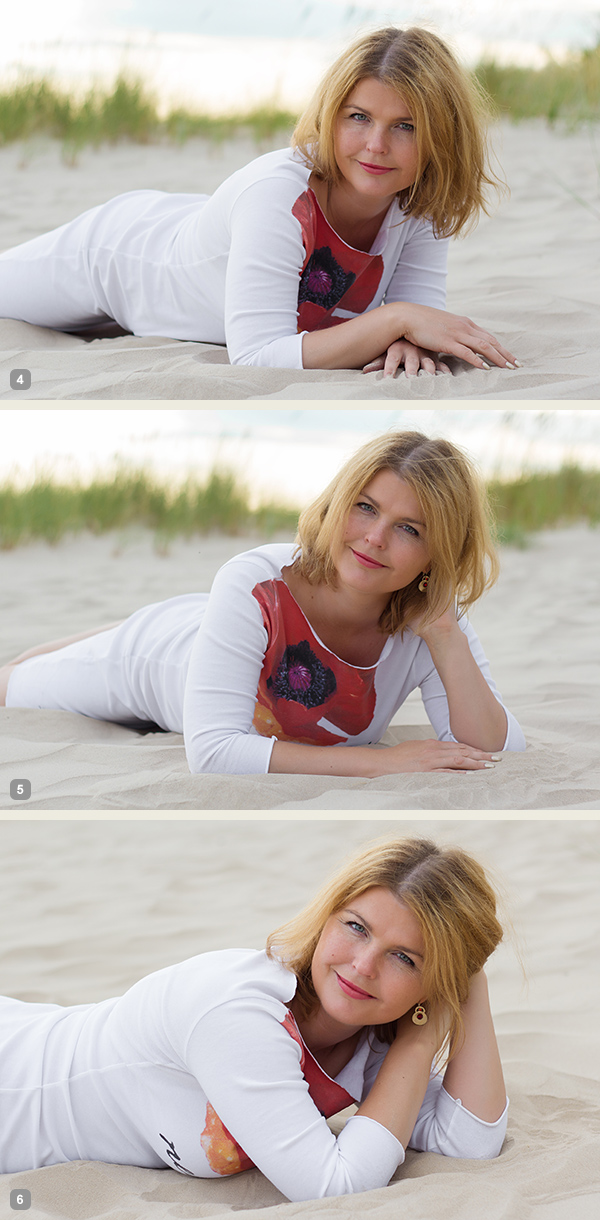
Very similar pose as the first one, but this angle is better for including longer model’s body line in the frame. And notice that one of the model’s legs is bent in the knee. This helps to raise her bum up for a better looking body shape.

7poses3 2

Photo 4: If you compare this shot with the first one, you will notice that it is nearly the same pose, but the changed angle gives different look to the image.

Photo 5: And again I continued with different hand placement. Note that hand doesn’t support the head, it actually doesn’t support anything, it’s just placed in the hair.

Photo 6: And one more hand placement variation and tighter cropping.

Pose 3

Pose3

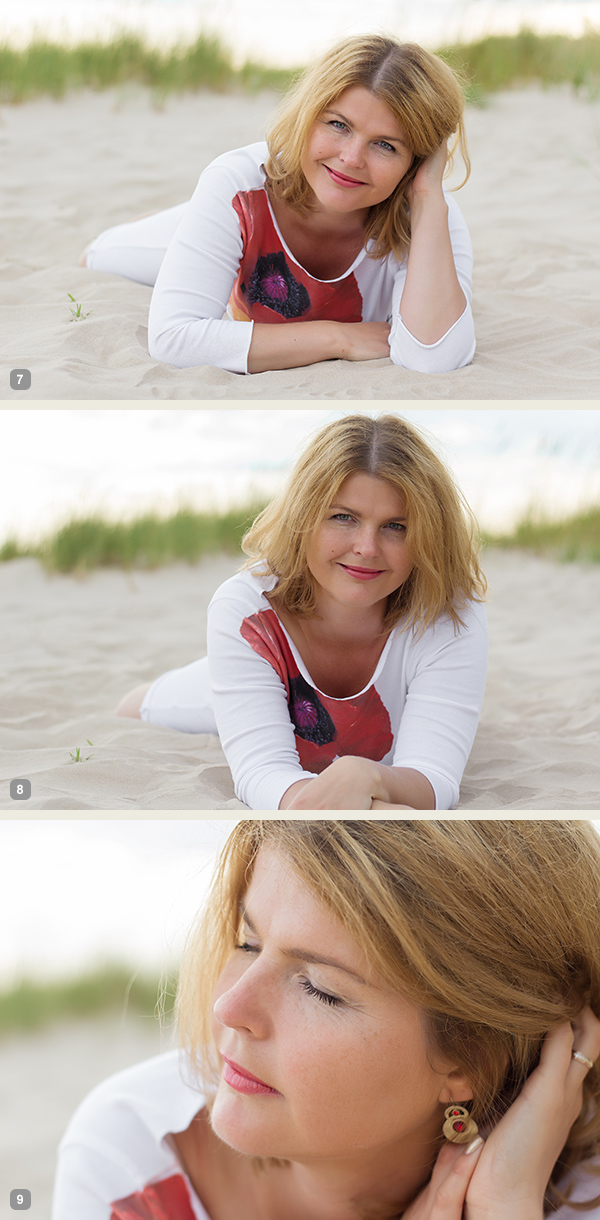
Another very similar pose to the previous ones, the main difference again is the shooting angle – right from the front. At this point the model hasn’t even moved from the initial position, it’s the photographer who moves gradually around her.

7poses3 3

Photo 7: Here the model already started to repeat the gestures from earlier shots. Don’t be afraid to take these nearly similar poses as these minor variations might be invaluable when selecting the final choice of images in post production.

Photo 8: The variations with both hands stretched in front.

Photo 9: And close-up crop again, but this time with the eyes closed.

Pose 4

Pose4

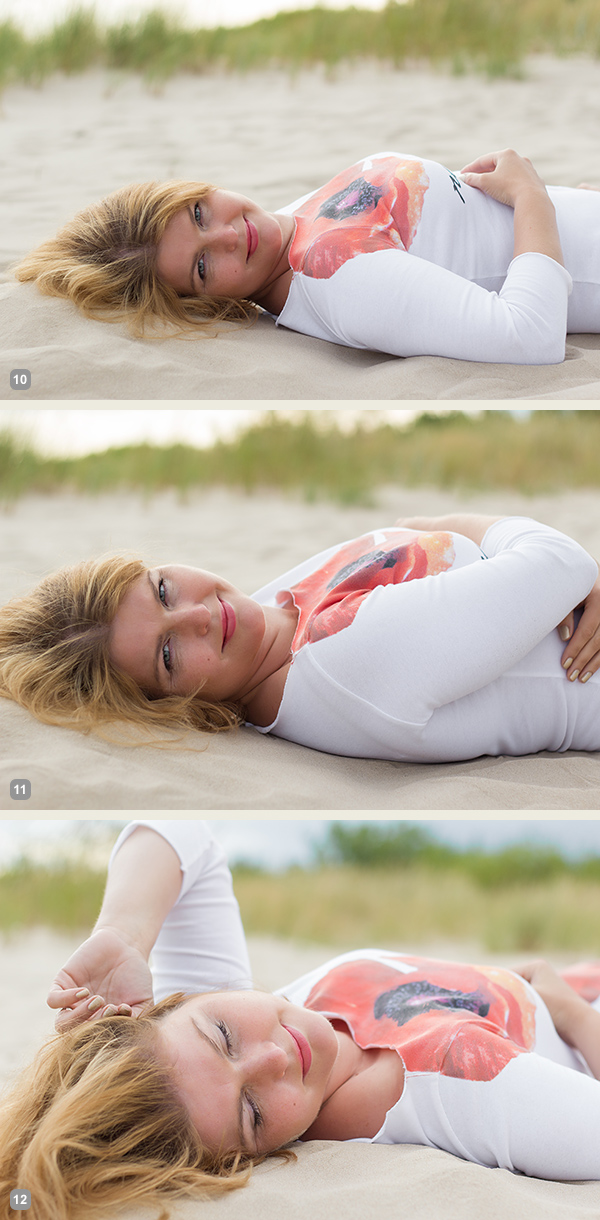
We continued with the next easy and straightforward lying down pose.

7poses3 4

Photo 10: An easy to describe and really easy to execute pose.

Photo 11: Again, only couple of options to change here. Arms could be connected under the breast line as in this example. The arms could also be stretched back behind the head for another variation.

Photo 12: And in this photo the model tried to achieve kind of dreamy look with eyes closed and hands placed asymmetrically.

Pose 5

Pose5

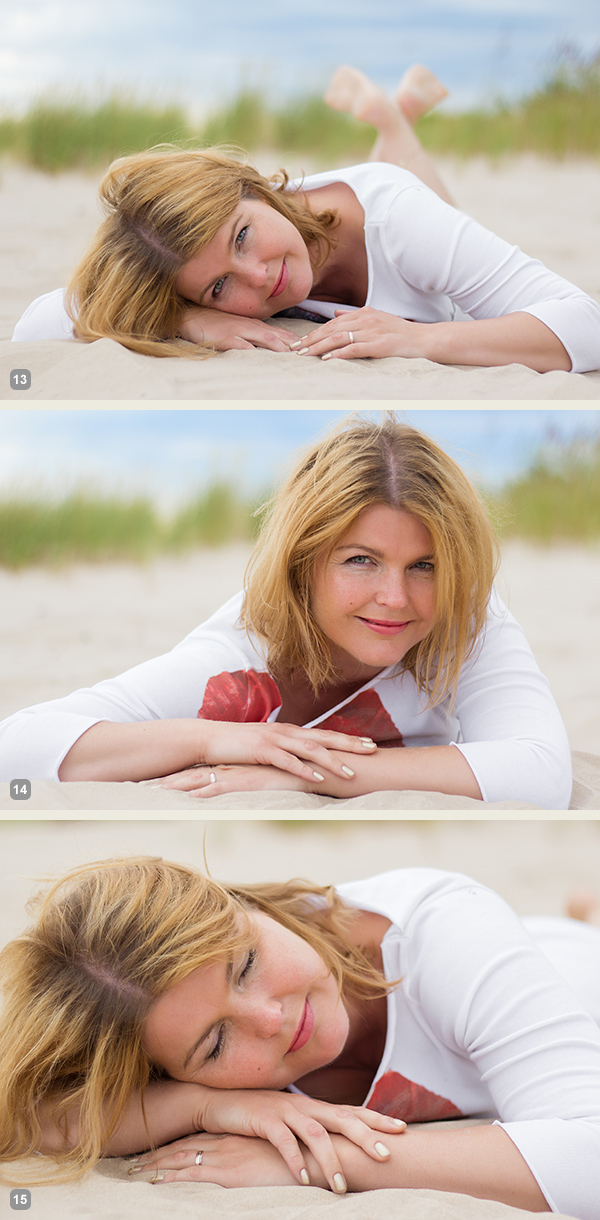
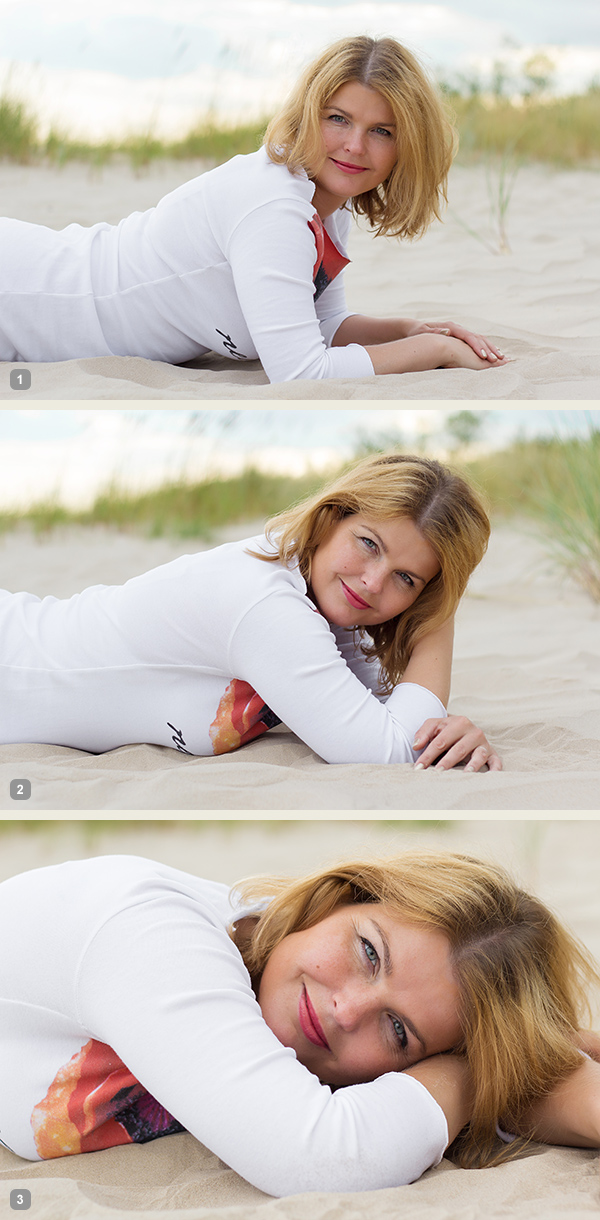
Lying down very low. Works very good as well for close-up portrait shots.

7poses3 5

Photo 13: As my model was lying on the sandy beach, I asked her to support the head on the hand, but in other settings the head might as well touch the ground.

Photo 14: Here I asked the model to raise the head higher and keep the hands placed asymmetrically.

Photo 15: And the next variation was sleeping pose with eyes closed.

Pose 6

Pose6

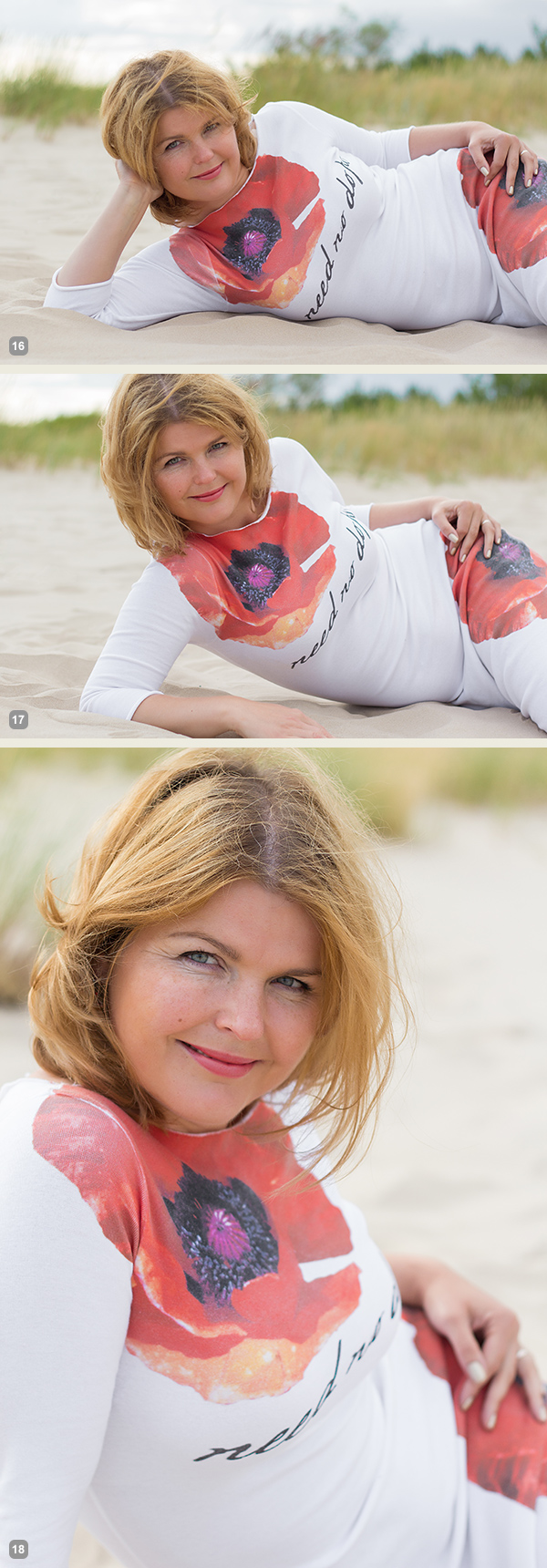
Lying down on the side. Couple of points to check. The left leg is crossed over the right. The left arm is rested on the hip and partly hidden behind the body. The right hand is placed under the head but it supports it with only the tips of the fingers. If the model’s head would be fully supported by the hand the pose would just indicate tiredness.

7poses3 6

Photo 16: Following the previously described instructions, the model easily recreated the sample pose.

Photo 17: Here basically only the right hand’s placement is different. And placing it down on the ground instantly raises her upper body higher.

Photo 18: From there she straightened the supporting hand and raised the body even more higher.

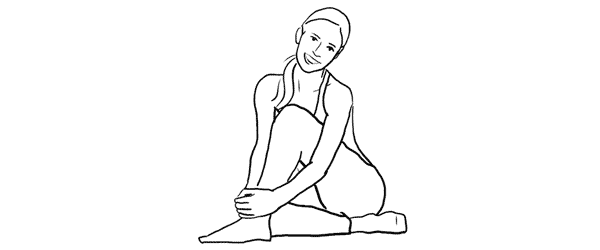
Pose 7

Pose7

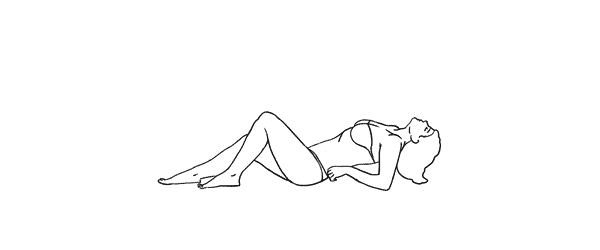
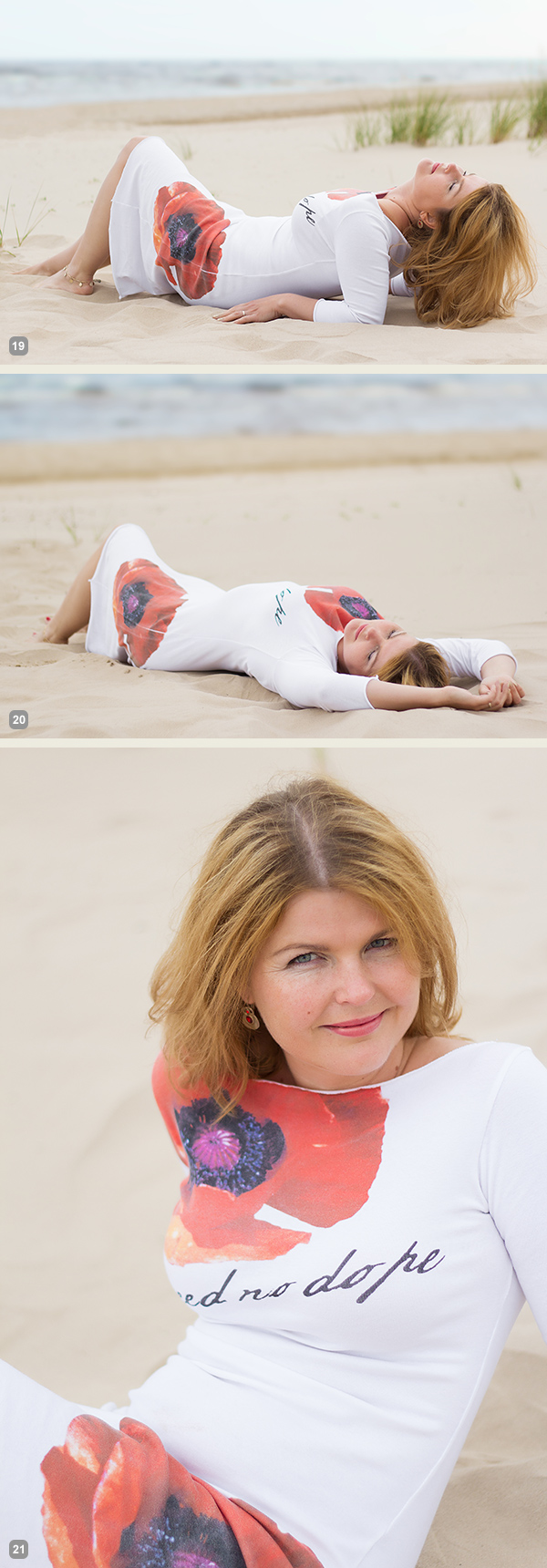
And finally a bit more demanding pose. The biggest challenge for the model is to keep an air of relaxation. Ask her to fold her head back as far as possible while slightly facing it to the camera. And this posture for sure works best with eyes closed.

7poses3 7

Photo 19: If the model can manage to look relaxed, the results will be rewarding.

Photo 20: This pose is a nice variation to the previous one as it’s far more simple for the model to recreate.

Photo 21: And here I asked the model to raise higher up and took the shot from above.

So, together with the previous articles – 7 standing poses [Part I] and 7 sitting poses [Part II] – you now have lots of poses to choose from. For more variation and a more dynamic result I would suggest to choose a few from each article and mix them in a single shoot. You will very soon discover that even a small number of starting poses is more than enough to have a great, productive session.

All of these illustrations and many more posing samples are available on Posing App for your mobile devices.

Kaspars Grinvalds is a photographer working and living in Riga, Latvia. He is the author of Posing App where more poses and tips about people photography are available.

Post originally from: Digital Photography Tips.

Check out our more Photography Tips at Photography Tips for Beginners, Portrait Photography Tips and Wedding Photography Tips.

Posing Guide for Photographing Women: 7 More Poses to Get You 21 Different Photos [Part III]


Digital Photography School

 
Comments Off on Posing Guide for Photographing Women: 7 More Poses to Get You 21 Different Photos [Part III]

Posted in Photography


9% of dPS Readers Have Owned More than 10 Digital Cameras

10 Jul

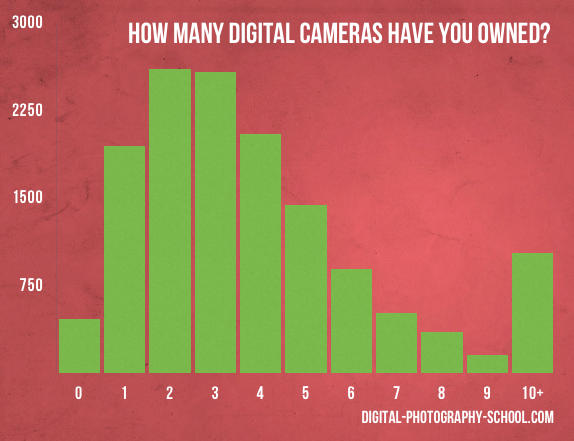
Last month 14,002 readers responded to the question in our monthly poll which asked how many digital cameras they had owned.

The results are in!

Screen Shot 2013 07 02 at 9 34 03 PM

It seems there was a fairly even spread among readers who have owned between 1-5 digital cameras – with 10-20% of respondents in each category.

The interesting category to me was the 10+ category with just under 9% of our readers having owned more than 10 cameras! The comments that accompanied the original poll post showed that many of those who voted in this category reported having had significantly more than 10 too! It looks like we’ve got some enthusiasts in our midst! :-)

Post originally from: Digital Photography Tips.

Check out our more Photography Tips at Photography Tips for Beginners, Portrait Photography Tips and Wedding Photography Tips.

9% of dPS Readers Have Owned More than 10 Digital Cameras


Digital Photography School

 
Comments Off on 9% of dPS Readers Have Owned More than 10 Digital Cameras

Posted in Photography


50 More Amazing Websites Of Professional Photographers

05 Jul

What sets amazing photography apart? What do the most famous photographers do to make their works stand out? A carefully crafted photo website can be a great way to prove how multifaceted a photographer is. You might be the best photographer ever, but if your site is not showing these skills you might have a hard time acquiring clients. The Continue Reading

The post 50 More Amazing Websites Of Professional Photographers appeared first on Photodoto.


Photodoto

 
Comments Off on 50 More Amazing Websites Of Professional Photographers

Posted in Photography


645 Pro update brings even more DSLR control to your smartphone

26 Jun

645pro.PNG

645 Pro’s latest update has given the iOS app a complete makeover. Now called 645 Pro Mk II, Jaggr’s ‘professional’ photo app now makes your smartphone’s camera interface look and perform even more like that of a modern DSLR. For a detailed look at what’s changed, head over to connect.dpreview.com.


News: Digital Photography Review (dpreview.com)

 
Comments Off on 645 Pro update brings even more DSLR control to your smartphone

Posted in Uncategorized


Posing Guide for Photographing Women: 7 More Poses to Get You 21 Different Photos [Part II]

21 Jun

A post by Kaspars Grinvalds from Posing App.

If you haven’t read the first article in this series, I would kindly recommend you to start with Posing Guide for Photographing Women: 7 Poses to Get You 21 Different Photos – Part I where we started with 7 standing poses.

Let’s continue this time with 7 sitting poses for female subjects and their possible variations in order to get at least three different shots for each pose.

Pose 1

Pose1

Nice and simple pose to start with. Ask your model to sit comfortably with knees placed together. One hand relaxed on the knees while the other hand placed near the neck. And remind her to straighten the spine.

7poses2 1

Photo 1 – This basic starting point provides you with many different choices to continue with. But in the very beginning you may want to just test different shooting angles and heights and check what works best for your model.

Photo 2 – After I got the first shot similar to the sample, I asked the model to lower both arms and rest them on the knees.

Photo 3 – And finally I returned to the initial pose and took a close-up portrait shot.

Pose 2

Pose2

Another easy pose with hands placed together between the legs. Notice that arms should not be completely straightened, rather slightly bend at the elbows. Also in the sample pose it is illustrated that toes should be straightened in order to raise the knees slightly up.

7poses2 2

Photo 4 – The model easily recreated the sample pose and we could move on with some variations.

Photo 5 – This shot is exactly the same pose just taken from a side. Minor change but already different result.

Photo 6 – And again one more close-up portrait shot but this time the model is looking down her own body.

Pose 3

Pose3

Another very simple pose with one leg crossed over the other. And I have to say here that including the legs in the frame can be challenging because it doesn’t work with all body types. If your model is curvy, consider framing closer comps (for example as in photos with the previous pose).

7poses2 3

Photo 7 – My model was with slim body type, nice legs and stylish shoes, so I chose to go for a full height frame.

Photo 8 – In exactly the same manner as with the previous sample I simply took this shot from a different angle. The model didn’t change anything, just turned her head to the camera.

Photo 9 – After that we repeated the already tested posture with one hand close to the neck. This hand movement is a very nice variation and works in many posing scenarios.

Pose 4

Pose4

This pose however is even more demanding than the previous one because it is all about the legs and thus there is no point of cropping them out. And nice shoes are a must.

7poses2 4

Photo 10 – Recreating it isn’t hard as the pose is fun and creates nice and playful mood to the photo.

Photo 11 – Here the model is looking down and kind of fixes her shoe. Very subtle changes but completely different photo.

Photo 12 – And once again the same pose but taken from a side creates one more variation.

Pose 5

Pose5

Simple and easy pose for the model sitting on the ground. And to my mind, in contrast to the previous on the chair poses, sitting on the ground works better barefoot.

7poses2 5

Photo 13 – The pose is kind of very natural and is easy to recreate. And as a result the model looks really relaxed.

Photo 14 – After recreating the initial pose, different hand placement options are available. Here for example the model raised them and connected on the knee.

Photo 15 – Only two minor adjustments to the initial pose were made here. Putting one hand up in the hair and slightly curving upper body part to the side. This also lowers the raised knee. The result is another friendly and natural looking pose.

Pose 6

Pose6

Another easy sitting on the ground pose. Very suitable for different close-up portrait shots.

7poses2 6

Photo 16 – While sitting in the initial pose try making two different versions with only the front arm and then with both arms raised on the knees. Both versions works well.

Photo 17 – A slight hand placement variation. This variation works very well for tight crops.

Photo 18 – And don’t be afraid to be spontaneous from time to time. This photo was just an improvisation on the go while sitting in the initial pose.

Pose 7

Pose7

And finally I purposely chose also one simple portrait pose for the sitting samples. Despite the fact that only face is visible in the frame, it’s more comfortable for the model to recreate it while being seated.

7poses2 7

Photo 19 – Here I tried to illustrate the previous statement and showed the sitting position. You may visualize how it would work cropped only around the face.

Photo 20 – Keeping the “portrait with hands around the face” concept in mind, try different variations by moving hands around and making different head tilts.

Photo 21 – In order to achieve the most natural postures in the image ask the model to really move hands around. In this particular example she moved her hand through her hair and I made several shots and afterwards chose the best hand position.

So, this was a process of using 7 sample poses as the starting point to create 21 different photos. I encourage you to try this approach to posing your subjects in a similar workflow and most probably you will find your own and even better ways to achieve some great results.

All of these illustrations and many more posing samples are available on Posing App for your mobile devices.

Kaspars Grinvalds is a photographer working and living in Riga, Latvia. He is the author of Posing App where more poses and tips about people photography are available.

Post originally from: Digital Photography Tips.

Check out our more Photography Tips at Photography Tips for Beginners, Portrait Photography Tips and Wedding Photography Tips.

Posing Guide for Photographing Women: 7 More Poses to Get You 21 Different Photos [Part II]


Digital Photography School

 
Comments Off on Posing Guide for Photographing Women: 7 More Poses to Get You 21 Different Photos [Part II]

Posted in Photography


The Latest in Photo App Hacks — An App That Teaches Your Cat Photography & More!

13 Jun

Late at night, we slide on our headphones and furiously type a succession of zeros and ones.

It’s by the end of the first Prodigy track that we realize we have absolutely no idea what we’re doing.

That’s why we leave the hacking to the hackers. Just a couple days ago, Photo Hack Day 2013 brought the best of them to a 24-hour hackathon in Berlin.

Last time, we told you all about Helmut, the fastest film scanner in the world, before it was even released.

In this edition, you’ll find out about all the raddest new photo apps thought up by clever young developers.

We’re talking apps that’ll teach your cat to shoot selfies and apps that turn your photos into spectacular light shows. Hackers were cool in 1995, but we think they’re even cooler in 2013!

The Best from Photo Hack Day 2013

p.s. Our pals at Inkling (they make rad photography how-to eBooks) are dropping knowledge with a free chapter on any topic you dig. Check ‘em out here.(…)
Read the rest of The Latest in Photo App Hacks — An App That Teaches Your Cat Photography & More! (672 words)


© lisbeth for Photojojo, 2013. |
Permalink |
No comment |
Add to
del.icio.us

Post tags:


Photojojo

 
Comments Off on The Latest in Photo App Hacks — An App That Teaches Your Cat Photography & More!

Posted in Equipment


Just posted: In-depth HTC One review: Do ultrapixels offer more?

05 Jun

htcone.jpg

The HTC One smartphone made headlines with its claims about ‘ultrapixel technology,’ which the company used to describe the device’s 4MP CMOS sensor. While current competitors boast 8-13MP cameras, HTC is betting on fewer, larger pixels a same-sized sensor to offer better image quality. But does the innovative approach work? We’ve put the HTC One and its ultrapixels through our rigorous real life and studio testing trials to find out. See how it fared at connect.dpreview.com.

News: Digital Photography Review (dpreview.com)

 
Comments Off on Just posted: In-depth HTC One review: Do ultrapixels offer more?

Posted in Uncategorized


ACD Systems launches ACDSee 16 with more tools and introductory price

31 May

ACDSee16.png

ACD Systems has announced the latest version of its ACDSee photo management and editing software for Windows. ACDSee16 gains a range of editing and organizational tools, including features that simulate out-of-focus regions and tilt-shift lens effects. The latest version is available at a reduced price ($ 50), for a limited time, with existing users being about to upgrade for $ 30. A 15-day free trial is available from the company’s website.

News: Digital Photography Review (dpreview.com)

 
Comments Off on ACD Systems launches ACDSee 16 with more tools and introductory price

Posted in Uncategorized