RSS
 

Posts Tagged ‘More’

20 More Photography Tips Every Travel Photographer Must Know

21 Aug

Pick up Oded’s new SnapnGuide (a dPS sister company) Snapn Travel here for only $ 7, a lifetime of travel memories in a snap. Traveling is fun and rewarding, but sharing memories of your journeys with friends, family, and the world through your own beautiful images can be even better.

Traveltips Georgia 2

Georgia (the country)

Here are 20 more tips for great travel photography:

(You can read Part One 20 Photography Tips Every Travel Photographer Must Know here)

Before you go:

1. Make the visual decisions

For most of us, deciding where and when to go is based on many decisions, not necessarily related to photography. But there are some small decisions you can make to turn an ordinary trip into a photo-worthy one. For example, let’s say you are going on a business trip. You can squeeze a few hours of photographing between meetings. But a much better option would be to take a day or two off and spend this extra time photographing on location.

Or when planning your next family vacation, add a little visual research before the trip. Is there a nice festival or a market worth visiting at your destination? Is there something unique like an interesting ethnic group or unusual landscape that’s worth documenting? These small visual decisions can make a huge difference in your photographic experience during your trip.

2. Build a shot list

A “shot list” is a term from the movie industry. It’s a list of shots that are planned for a specific day. Want to come back home with better travel photography results? Then the shot list is your tool for the job.

Traveltips thailand 2

Thailand

First, make a list of visual ideas as your “I won’t come home without” image list. Combine the iconic images with more creative ideas. For example, if you’re going to Paris, don’t skip the Eiffel tower. As a true symbol of Paris, it should be on your list. But make sure to add creative visual ideas, such as boutique wine shops, farmers markets, or anything to your liking. The shot list is there to help you, not restrict you. When you’re on the road, with so many new sights and smells competing for your attention, the shot list will keep you organized and be a continual inspiration for creating the next shot.

3. Smart gear choice

Don’t take all of your equipment with you! Match the gear to the destination. Do you really need that flash on the beaches of Thailand? Or that 50 mm prime lens for the safari trip to Tanzania? Choose wisely and you’ll worry (and carry) a lot less.

4. Photo boot camp

If you’re not making images on a daily basis, it will probably take you a few days on location just to “get in shape”. Get a jump-start by warming up at home by creating a daily photography routine at least one week before departure. This will make sure you’re at your best as soon as you step off the plane.

Traveltips thailand 1

Thailand

5. Coordinate expectations

Apart from our photographer’s “hat”, we all wear other hats, such as “father,” “spouse,” or “friend”. When traveling with others, we must wear many other “hats”. You must coordinate expectations with your travel partners to make sure the importance you’re placing on your photography during the trip won’t cause problems. Think and plan together about places you all can visit that would be great for even those who don’t take pictures: vantage points with scenic views, colorful markets, religious centers, etc.

When you get there

6. Location scouting

This is another movie industry term. It means that before even taking out your camera, it is wise to get familiar with your surroundings. Take at least a few hours to learn the area. Understand if there are any interesting places around your hotel, visit one or two places that are on your shot list and adjust it accordingly.

Traveltips Uzbekistan

Uzbekistan

7. Get up early

Yes I know, this one is a crazy ratings downgrade. But hey, travel photography is not for the lazy! The most precious thing on a trip is your time. Do not waste the hours of golden light of morning (or afternoon) on sleeping. Especially if you are traveling with non-photographers, it’s your time to do your best shots. You can save sleeping in for weekends at home.

8. Markets first!

Colors, food, local people, culture; markets are a photographer’s paradise. It’s always better to visit open markets (for the daylight) rather than covered ones. Some of the best markets I visited happen only once a week, be sure to be there.

Traveltips china

China

9. Diversify your shoots

You took a landscape photo with a wide lens? Excellent, now do it again with a telephoto lens.

You’ve got the main square in daylight? Wonderful! Come back at night with a tripod and shoot long exposures. Make the most out of your once-in-a-lifetime trip as your diversify your shoots and portfolio.

10. Get out of your comfort zone

We all have places that are less comfortable for us, but visiting a new place is an excellent opportunity to get out of your comfort zone. Do you not have the courage to approach strangers in the street in order to take their portrait? This is an excellent opportunity. You might be surprise how easy and fun it is to do this with strangers.

Traveltips thailand 3

Thaliand

11. Go iconic – but from a different point of view

We all know how Times Square, The Taj Mahal, and the Eiffel tower look. Don’t come back with the same, “we’ve seen it all before” images. You don’t have to skip those iconic places, they usually are truly worth the visit. But think of new and fresh ways to feature them. Try using a fish-eye lens, creative editing process, or reflections – the sky is the limit.

Traveltips Uzbekistan 2

Uzbekistan

12. Get inspired!

When I’m on a photography assignment, I always try to pay a short visit to a local gallery. Yeah, it sounds bit snobbish, but seeing the photography, paintings, or any other local art forms acts as a huge inspiration for my travel photography. We all want to create different and unique images. This is great way to do just that.

13. Setting a trap

I love this technique. Instead of jumping from place to place, looking for interesting subjects to photograph, I suggest to stay put and start building your frame with the background. Find an interesting vantage point on the street. You can even do this sitting at a sidewalk café. Establish your frame by determining the composition and exposure setting. Then wait for something interesting to enter your frame.

Traveltips Dominican Republic 4

Dominican Republic

14. Join forces with a local

From experience, in travel photography, there is nothing like working with a local photographer. Use a social platform (Facebook, Flickr, couchsurfing) and find a local photo enthusiast like yourself, who can show you all the best places to photograph. Of course, there are always risks when meeting strangers from the internet. Use your common sense and don’t meet them somewhere secluded at first.

Coming back home

15. Backup

I cannot stress how important this tip is. Don’t wait until it’s too late. Laptop, hard drive, cloud storage, you name it. Backup your images on more than one source.

16. Clean your gear

Before you store your stuff, you should clean it. Sea salt, sand, or even just fingerprints on the lens, can damage your gear. Keep your equipment in good shape and you will enjoy it for many years.

Traveltips Kyrgyzstan 3

Kyrgyzstan

17. Have a successes and misses notebook

In the past, I was recording a notebook of all my “almost got it” frames. Those fuzzy, overly bright, and “what the heck is this thing in the background” images.

I kept this notebook in order to learn how to not repeat my mistakes (and because we photographers like to be angry at ourselves from time to time). Then, I realized that it is just as important to understand why I failed as it is to understand why I succeeded. So, even today, after every assignment, I write ten things to keep and ten things to work on until the next trip.

18. Rest from it

I know it’s tempting, but resist the urge to filter, edit, and post-process your images the minute you get home. Give yourself at least a week before you do so. We tend to emotionally connect to our images, usually by the degree of investment and hard work we put into creating them. Give yourself time to disengage yourself from the experiences of your journey. This will help you see your images with less bias.

Traveltips laos 2

Laos

19. Get feedback

After learning from your successes and mistakes by yourself, use the help of someone else. Choose a friend, (preferably one with tact) and get his/her opinion on the images. It doesn’t matter if they’re a photographer or not. They should be honest, sincere and non-competitive with you.

20. Get it out to the world

Now, after resting from it, seeing it again with a new perspective, and hearing someone else’s advice, it’s time to get your art out to the world.

Choose up to 15 photos (not more). It is important to pay careful attention to the opening and closing images. Each image must stand on its own and together as a set. Add some text and post it to the world.

Note: the author would like to thank Nicholas Orloff for his help in writing this article.

Traveltips India

India

The post 20 More Photography Tips Every Travel Photographer Must Know by Oded Wagenstein appeared first on Digital Photography School.


Digital Photography School

 
Comments Off on 20 More Photography Tips Every Travel Photographer Must Know

Posted in Photography


Guerrilla Kindness: Add-Ons Make Cities more Convenient

21 Aug

[ By Steph in Design & Fixtures & Interiors. ]

Hacktion 1

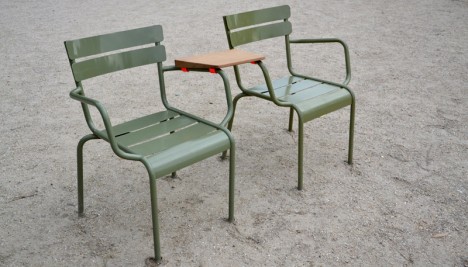
Three designers sneak around Paris, quickly installing brightly-colored machine-fabricated objects onto public chairs, phones, vending machines and other urban surfaces to make them more convenient to city residents. They call it ‘Fabrique-Hacktion,’ taking extra steps beyond what city officials are willing to fund with tax dollars to create a more comfortable and welcoming place to live.

Hacktion 2

Hacktion 3

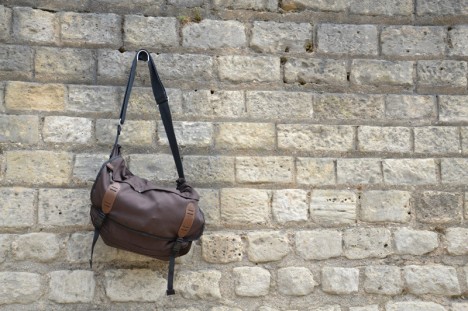
Little slides shoot coins out of the receptacles in vending machines to make them easier to retrieve. Coat hooks hang helpfully from rock walls near bus stops. Tension bands hold newspapers against the wall of the subway, offering them to each new rider in turn.

Hacktion 5 Hacktion 4

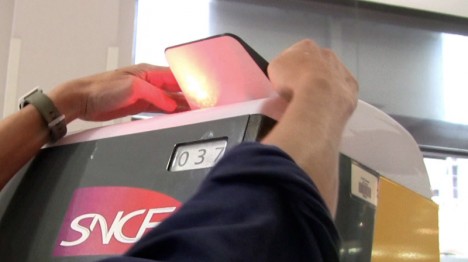
Highly recognizable in bright shades of orange, blue and green, these thoughtful conveniences even go so far as hand-crank phone chargers and reflectors on top of the red and green lights of metro ticketing machines so users can tell from far away which machines are working and which aren’t.

Hacktion 6

Hacktion 7

Beyond just installing these items themselves, the designers offer up an explanatory video, manual and all construction plans and files for download on their website so anyone can take the project to their own city.

Share on Facebook


[ By Steph in Design & Fixtures & Interiors. ]

[ WebUrbanist | Archives | Galleries | Privacy | TOS ]


WebUrbanist

 
Comments Off on Guerrilla Kindness: Add-Ons Make Cities more Convenient

Posted in Creativity


5 Actionable Tips to Get More Word-of-Mouth for Your Photography Brand

18 Aug

Finding clients for your professional photography can be a challenge. That’s why your photography business, as with any other type of business, needs some promotion. Word-of-mouth marketing techniques are as old as the world itself, and it really works! In this article, we’re going to talk about the importance of personal style, which photo portfolio format works best for your Continue Reading

The post 5 Actionable Tips to Get More Word-of-Mouth for Your Photography Brand appeared first on Photodoto.


Photodoto

 
Comments Off on 5 Actionable Tips to Get More Word-of-Mouth for Your Photography Brand

Posted in Photography


Directing your Viewer’s Eyes with Lightroom to Make a More Powerful Image

17 Aug

One key to a successful photograph is that it directs the viewer’s attention towards the subject in question. There are many ways that this can be achieved through composition and lightning in the field, but did you know, you can also direct the attention of your viewer’s eyes through post-production?

truck edit-2

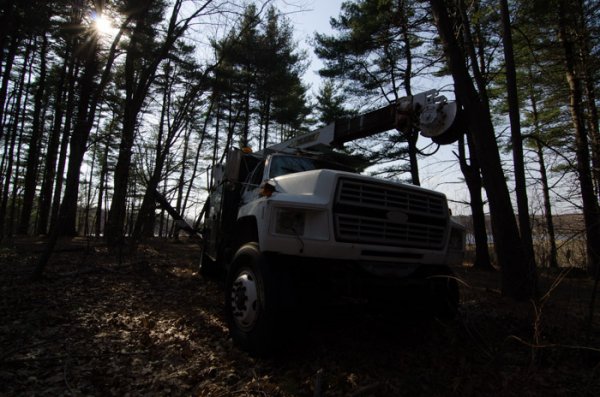
You still need an interesting subject for this to work, as directing your viewer’s eyes to a boring location within a frame is still going to result in a boring photograph. For the sake of this tutorial I’ll be using this photograph of an abandoned utility truck, but you could use anything from an interesting tree, to a model, to your pet, and achieve similar results.

First a few basic edits to bring the photo to life

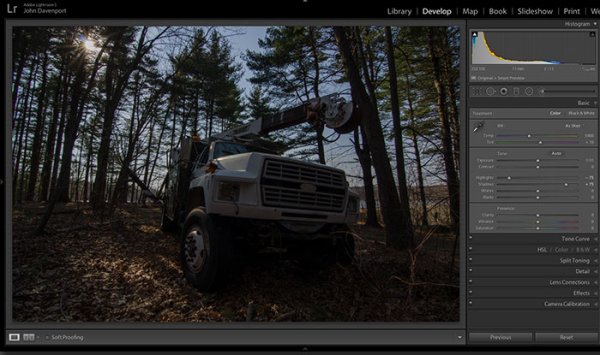
Before we can work on drawing the attention of the viewer this photograph needs a bit of life pumped back into it. Having shot this photograph into the sun, the foreground and front of the truck are going to require some basic recovery techniques. I’ll be using the Basic Tab in Lightroom 5 to recover the detail and add some interest to the shot.

Step One: Highlights and Shadows

direct-viewers-attention-11

Shooting into the sun can be tricky as it often will cause your sky to turn white. Reducing the highlights slider will help to counteract this. It does so by targeting the brightest areas of your photograph without effecting the overall white point of the image. The shadows slider has a similar effect on the darker areas of the image, allowing detail to be brought out in the grill of the truck and along some of the trees.

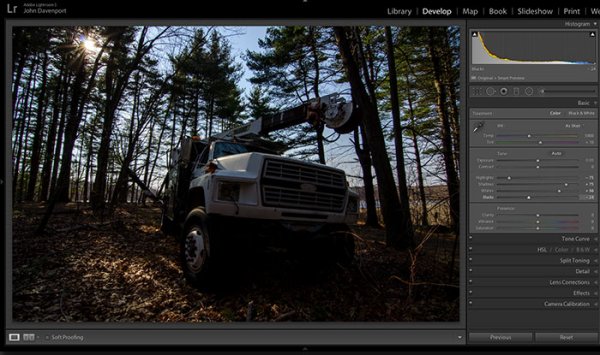
Step Two: Add contrast with the Blacks and Whites sliders

direct-viewers-attention-10

One of the problems with the highlights and shadow recovery technique above is that it often will reduce the contrast of the image and create a sort of muddled and dull look. To counteract this you can use the whites and blacks sliders to effectively set your white and black points, as well as bring a bit of contrast back into the image. This allows you to have a bit more control over the contrast of your image as opposed to the more global Contrast slider adjustment.

Do this by dragging your White slider to the right until your histogram touches the right edge of the graph. Make sure not to go too far and clip any highlights. Holding down the Alt (Option) key while you drag the slider will show any areas that are clipped – so drag to the right until you see some, then bring it back to the left just until they are no longer visible. Do the same with the Blacks slider by pulling it to the left. The Alt (Option) key works with this one too, but in the case of Blacks you actually do want a little clipping. Having a good black in your image will add that contrast you’re looking for.

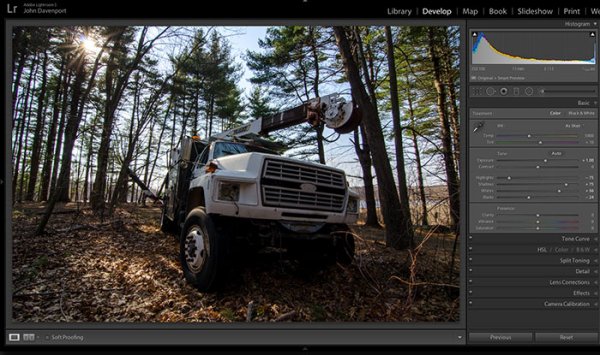
Step Three: Even out the exposure

direct-viewers-attention-9

Now that the highlights, shadows, whites and blacks are set –  a quick bump up on the exposure slider will even out the rest of the scene and get us close to something we’re ready to work on.

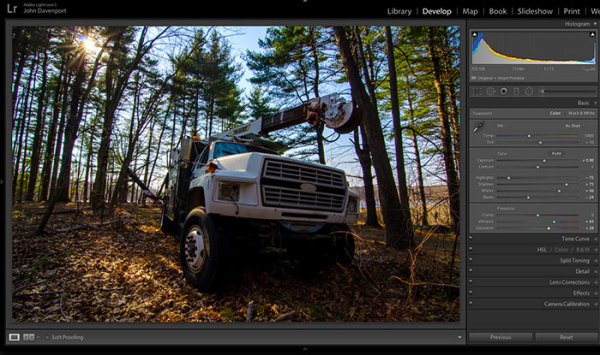
Step 4 (optional): Saturation and Vibrance

direct-viewers-attention-8

For this particular shot I wanted to add a bit more saturation to the trees and the floor of the forest. It’s going to depend on the shot that you’re working on, and the look that you are trying to achieve, as to whether this step is necessary. But it doesn’t hurt to play around with it before you move on to the next steps.

For more on Lightroom’s Basic Tab read: Master These Five Lightroom Sliders and Your Photos Will Pop

Now to draw the attention of the viewer

While the truck itself is a strong subject, and one that does capture the viewer’s attention on its own, there are a few tools that Lightroom has to offer which will allow for even more attention grabbing goodness.

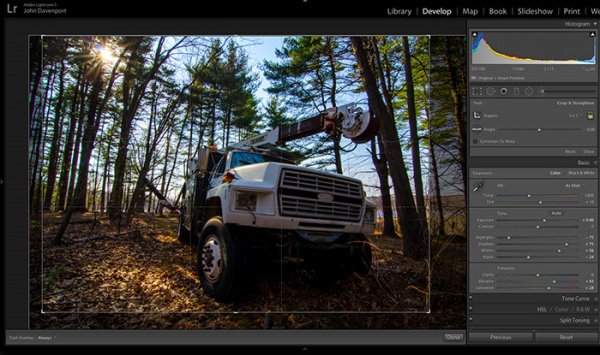
Cropping for better positioning

direct-viewers-attention-7

The crop tool allows you to have more control over the positioning of your subjects within the frame. In this shot the truck was a bit too centred and there was a little too much dead space in the forest so by cropping in a bit closer the shot becomes a bit more balanced, allowing the viewer’s eyes to stay focused on the truck.

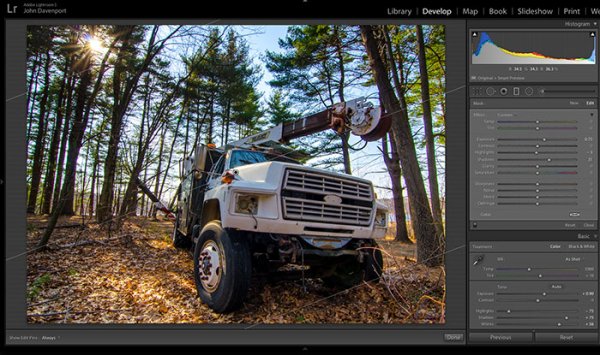
The Graduated Filter tool

direct-viewers-attention-6

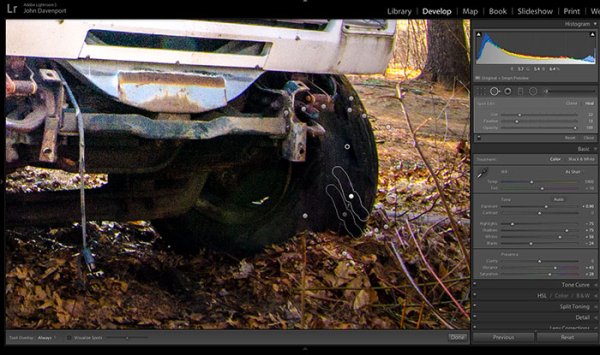
By adding a graduated filter to the bottom right of the image more detail can be recovered from the front of the truck without effecting the rest of the exposure. This allows for a more compelling focal point for the viewer to rest their eyes on. When you go about placing graduated filters in your own images be sure to think about how it’s effecting the overall light of the scene and ask yourself if it looks natural.

Getting creative with graduated filters can allow you to have some really interesting results read 4 Fun Tricks to Enhance Your Photos With Lightroom’s Graduated Filter Tool for more creative uses of the graduated filter tool.

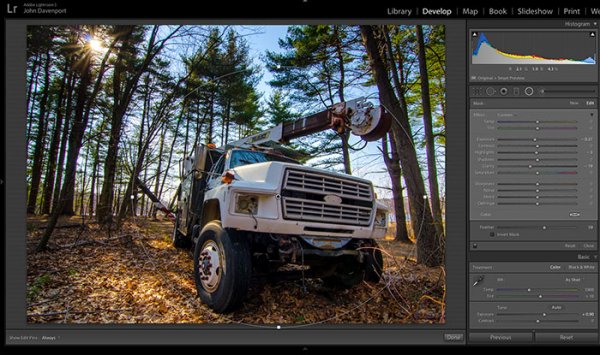
The Radial Filter tool

direct-viewers-attention-4

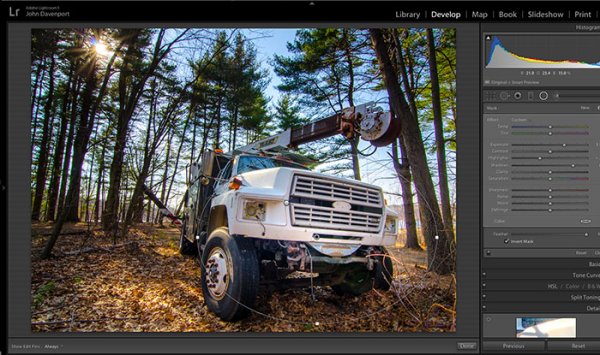
The radial filter allows for a subtle vignette to be added to the image which helps to keep the viewer’s eye within the frame. It also has the added benefit of darkening the sky, without darkening the truck, allowing for deeper blues to come through. After I was happy with this first radial filter I dropped in a second one to increase the brightness and detail of the grill of the truck. To do this the radial filter was inverted and the exposure and clarity sliders were increased.

direct-viewers-attention

Removing distractions

direct-viewers-attention-2

Once you’ve gone through all the work of drawing attention to a particular area of a photograph you’ll want to go through with Lightroom’s clone/healing tool and remove anything that competes for that attention. Adobe has greatly improved this tool in Lightroom 5 allowing you to drag paths, making it possible to remove distracting branches with ease.

The Final Edit

With a few quick adjustments in the basic tab, a simple crop, and a few of Lightroom’s filters –  this utility truck really grabs the attention and is a vast improvement over the original straight out of camera shot. Go try this workflow for yourself and share your own before and after in the comments below!

truck-edit2

Watch this Edit Click for Click

For those who prefer to sit back and watch – here’s  a quick video of the edit above.

The post Directing your Viewer’s Eyes with Lightroom to Make a More Powerful Image by John Davenport appeared first on Digital Photography School.


Digital Photography School

 
Comments Off on Directing your Viewer’s Eyes with Lightroom to Make a More Powerful Image

Posted in Photography


A Quick Video with 7 Tips to Create More Powerful Images

17 Aug

In this short tutorial photographer Josh Cripps shares with you 7 tips to help you create more powerful images right now. You don’t have to buy any more gear, or take any classes. Put these tips into practice and get out there shooting.

So are you getting close enough to your subjects? How about composition? Do you create depth in your images? Are you practiced in the art of using leading lines? All your shots from eye level – why not change up the perspective a bit? How about using the light to your advantage?

That’s a quick summary of the tips in this video. Watch the whole thing to see some great image examples for each one. If you need ideas of what to shoot you can always check out the weekly photography challenge, this week it’s Blue. To see the current challenge you can always fine it in the right hand sidebar next to this article.

The post A Quick Video with 7 Tips to Create More Powerful Images by Darlene Hildebrandt appeared first on Digital Photography School.


Digital Photography School

 
Comments Off on A Quick Video with 7 Tips to Create More Powerful Images

Posted in Photography


How to Get More Referrals Than You Can Handle

12 Aug

Referrals are an incredibly effective way to build your business and get great clients. Referred clients are often more loyal, consistent, more suited to work with you and they often send more referrals your way. How do I know this?

By Leo Reynolds

Referrals work – but have a system

My partner Nicole and I have gotten 80% of our videography work from referrals. And it didn’t happen by accident, we created a system that ensures we don’t have to go out looking for our next gig. A system that we created at the start to have referral clients reaching out to us with projects they wanted us for. Talk about turning the tables! So now, I’m going to share with you our exact system and how you can implement it right now.

What to consider before you get started building your referral system

But before we get into the nitty gritty of our system, there are a few important things you need to consider. Let’s take a look at the questions below; they will help you frame your understanding of our system. Answer these questions before we dive in and you’ll be ready to start implementing this system as soon as you finish reading this article.

By Stefano Bertolotti

1. Why would someone send a referral your way?

Before you begin to ask for referrals, create a list of the benefits your clients experience when they work with you. These are the same benefits a referral client would experience if they worked with you as well. What are the social, emotional and professional benefits that go along with being someone who refers people in need to those who can help? In this case, the referral client is in need and you are the person that can help.

2. Who would make an ideal referral for you?

Write down the types of people who make great referrals. Your customers may have no idea whom to refer to you, so make it easy for them to send the right people your way.

3. Where would a client find a potential referral to actually send your way?

Write down the places where your referrers would meet or connect with good referrals for you. Your goal here is to help your clients, and other acquaintances, understand who in their lives will benefit most from a referral, and where they cross paths with these people. This makes it easy for the referrer to start thinking of people to refer to you immediately.

4. How should someone go about sending you a referral?

Empower your clients to have a simple conversation with a potential referral who will effectively connect them to you and what you do. You absolutely cannot leave this to chance. You must be able to articulate what you do in a way that truly connects you to the people you want to serve. This is absolutely essential.

Write down how you’d like people to refer their contacts to you. What do you want them to say? Create a short script for them- they’ll thank you for it as you just made things even easier for them. How do you want them to talk about what you do? What specific words and phrases do you want them to use? Get very specific. You decide how you want people to talk about you.

Just thinking about these questions and writing down your responses is going to put you ahead of most of your completion. Your answers to these questions will play a major role in implementing our getting more referrals system; so take it seriously.

The four step referral system

All answered up? Okay, let’s get into the four steps of the referral system.

At the bottom of this post, there is a link where you can download a checklist that goes along with this system. Go ahead and download it now and I’ll meet you back here once you have it open along with this post.

Downloaded and opened? Awesome! Let’s get started. This system is broken into four major steps:

By Shereen M

Step 1: Know when to ask for a referral

We recommend asking for referrals at the time of delivery of your project, when the quality of your work, and the experience of working with you is fresh in the client’s mind. The optimal opportunity to ask for referrals during this time is when the client compliments your work or asks you questions about your business.

Step 2: Know how to ask for a referral

The actual words you use to ask for a referral is critical to getting the referral you want. This is why we are just flat-out giving you a script you can use when asking for referrals:

I really appreciate all the positive feedback about my work. I always want to exceed my client’s expectations; it’s actually how I get most of my projects. Most of my work comes from referrals from clients like you.

Can you take a few minutes today to help me help others with their photography needs? Could you introduce me to three of your contacts that you think might need my expertise? By making these connections, sharing with them how much you enjoyed working with me and how happy you are with the results, I can continue to serve people I love working with.

Thank you in advance for the introductions and creating the potential for another great experience.

A few things are being said here in this script.

  1. Your work speaks for itself and is the reason you continue to succeed in your field.
  2. The client understands that giving you referrals is what is expected since that’s how you get most your work.
  3. The client starts to feel important and plays a critical role in creating connections and providing great experiences for others.
  4. The “thanks in advance” assumes that they will actually take action which sets up an expectation. The client understands you expect them to send you some referrals.

Step 3: Your post referral strategy

Once you get a referral, follow up with them ASAP. You don’t want to wait too long. Reply the next day at the latest. Many times your client referred them to you the same day they reach out to you. You will want to capitalize on that moment of good will and excitement.

Also, make sure you circle back to the referrer, thank them and tell them how the project is going. It shows how serious you take your business and they will send you more referrals in the future.

Step 4: Giving referrals to get referrals

By Nan Palmero

Don’t just sit around and wait for clients to send you over referrals after you ask them to. One of the best ways to get referrals is to give them. Who are the other service providers that serve your target market? Make a shortlist of people you can refer to?

Are you a wedding photographer that can refer a videographer or banquet hall manager to someone? Maybe even a client of yours? The next time you see someone who would be an ideal client for someone else, go ahead and make that referral. If you are giving your colleagues in your target market referrals, chances are they will want to do the same for you in return.

Final advice

This is a tried and true system. Use it. The key is to stay consistent and go through the steps of this system every time you have a client.

Not working with a client right now? You don’t need to wait to put this into practice. Reach out to past clients you haven’t already asked for a referral and use the script above. You can change up the first paragraph of the script with: “I was reviewing some of my past work in my portfolio and was reminded how much I enjoyed working with you as a client. I’m always looking for ideal clients like you to work with.”

You got this! Don’t hesitate. Use this system and start getting more referral work today.

Download the checklist

Remember, there is a nifty checklist that goes along with this getting more referral system. You can download it here!

The post How to Get More Referrals Than You Can Handle by Omar Zenhom appeared first on Digital Photography School.


Digital Photography School

 
Comments Off on How to Get More Referrals Than You Can Handle

Posted in Photography


Seeing More Creatively with Bryan Peterson

21 Jul

creativity2

Bryan Peterson is well known for his photography books and workshops. He’s also now one of the featured photography teachers on Adorama TV. You can get his book Learning to See Creatively on Adorama.com.

In these three videos Bryan gives us a few tips on doing just that.

Seeing Creatively

This first video is a quick tip on using Selective Focus:

In this second video Bryan is leading a workshop, ironically on the Oregon coast where I was just two weeks ago. This video shows how to get creative shooting things on the beach.

Make note they are shooting a starfish but they did not harm it or pull it off the rocks which can damage his little arms (please take care to do that if you are shooting on a beach for last week’s photography challenge). 

Lastly this video shows three quick tips on how to add motion to your images in an abstract and creative way.

Hopefully these have given you some ideas to get out and shoot.

The post Seeing More Creatively with Bryan Peterson by Darlene Hildebrandt appeared first on Digital Photography School.


Digital Photography School

 
Comments Off on Seeing More Creatively with Bryan Peterson

Posted in Photography


Using Composition to Create More Powerful Portraits

18 Jul

As part of my series on portrait photography, in this article, I will discuss composition, one of the most important aspects of creating a good portrait image.

F11A6332 1

  • Are there any laws regarding framing a portrait?
  • Can I leave hands, fingers, or part of the head out of the frame?
  • Does a portrait have to include a face?

I will answer these questions that my students often ask. It is important to keep in mind that as in all aspects of art, there are no “rules” or “must dos” here, because you can do anything as long as it works for you. So, I will describe techniques that work for me and I hope that they will work for you, resulting in much stronger portrait photography portfolio.

What is a good portrait?

A good portrait is an image of a person that manages to tell a story. A good portrait evokes emotion. A good portrait tells us something about the person in the image, and composition is a key element that helps us create a storytelling portrait.

How can I create a storytelling portrait with the help of composition?

I think good composition is a combination of the scene on the ground and the scene within your head. It combines the available with the desirable.

Here are a few examples of portraits I made recently (using natural light only) with explanations of the thinking process and goals in terms of composition. As Ansel Adams said, don’t forget that every image has two people behind it. the photographer and the viewer. So you might not feel the same emotions as I do with the images I created. But that’s okay, because photography is both an art and a science.

Choosing how much background to include

F11A3496 Exposure 1

Focal length 24mm

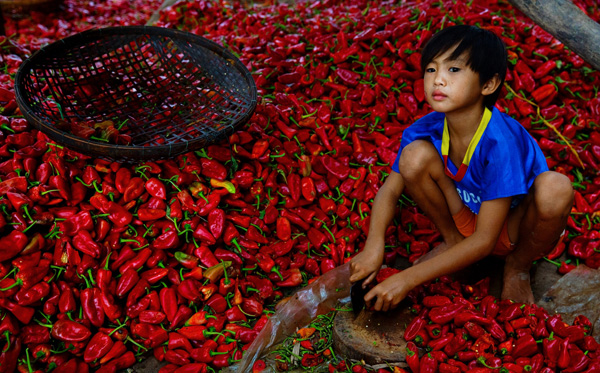
I met this boy cutting Paprika in rural Cambodia. It was summer vacation and he was there with his family and other villagers. What’s my visual narrative in one line? “Small boy, big work.”

I immediately knew two things: one, the background is a significant element and two; I wanted to capture the boy working alone. So, I started with the background and decided on a high angle in order to capture this “mountain” of Paprika. It was important for me to show the boy’s entire body with some space above his head so that the viewer could compare (remember my one line story?) the size of the boy to the size of the work.

I even included that basket in the composition to add balance to the entire frame. After I set up my composition, I waited about 20 minutes to capture the boy looking up. I knew that if he was working with his head and eyes down, the whole story would fall apart. I think the wait was worth it.

For me, this is one of the most complex decisions in photography: to identify visual storytelling potential and decide how much time you’re willing to wait until the story materializes.

Story 56 the kid 1

Focal length: 17mm

I used the same technique here in Kyrgyzstan, for this shot of six year old Aytinger, which I made for National Geographic Traveler magazine. Visual narrative in one line, “Small boy, big world”.

Here, I made the background much more dominant compared to the previous image. Here the boy is very small compared to the land. Imagine if I framed this image with only his face? I would lose the entire story, because his face alone doesn’t tell the story I want to portray. It was important for me to “include” the path and the big cloud in the horizon, to add sense of an “epic” feel to the image.

Web11 1

Focal length: 70mm

Here, you can see a different kind of portrait framing. Visual narrative in one line – “Quiet, peaceful, youth”.

I wanted to evoke peace and harmony. So I focused only on the face of this young monk, and included almost no background, in order to avoid interference from the environment. Also, note how the central composition (the subject is in the center of the frame) is balanced with the two orange frames on the sides.

I used soft natural light (coming from the right side of the frame) in order to create a sense of something religious and pure.

Cropping in tight

42 1

Focal length: 70mm

This is the type of framing that I’m asked many questions about by my students: whether it is allowed to cut off part of the head like this. Sure, as long as it helps the visual story you want to tell. Visual narrative in one line, “A sad reflection”.

Apollo’s wife died not long before I met him in the hills of northern Laos. In the image, Apollo’s face and the feeling of something tilting or shifting in his world is the only important thing. By framing his face on the right, while he was looking down and to the right, I wanted to create a feeling of an “unbalanced world”. Compare the very low key, dim lighting (with negative exposure compensation) in this image to the previous one of the monk. I was using the dark part of his house to evoke this story.

TheAccess 4photography people

Focal length: 85mm

This framing is even more radical than the previous one. Please note that this is the composition I did on the ground (no cropping) for a story I did for National Geographic Traveler magazine on Western China. Visual narrative in one line, “Strong and wise”.

Leaving space

When I saw the eyes of this man, the oldest man sitting in the back of a teahouse in remote western China, I knew I didn’t need anything else but his blue eyes. So I made it the dominant factor of my composition.

Story 35 alone 1

Focal length: 24mm

Now you might ask, is this a portrait too? Well, yes, for two reasons: one, do you see a person, and two, do you feel a sense of story?

What’s my visual narrative? It was a particularly hot afternoon. Dozens of worshipers left the mosque. I paused for a moment, trying to change lenses, as I noticed this guy. It seems that he was not affected by the hustle passing him by. He remained alone, continuing to read the prayer book. At first, my initial thought was “wow, what loneliness”. But then I thought, ”wow, what strength”.

I used the empty spaces of the place to enhance the sense of loneliness, but the balanced; “by the rules” composition (rule of thirds) should give the sense of power I was aiming for. The reason I chose to use negative exposure compensation and thus create a silhouette was to not compete with red color in the background and give it a sense of harmony.

Put it all together

You may be asking – “Okay, I understand the thought process. But honestly, do you really think about it before the creation of the frame or only afterwards?”.

Well, I do believe that good portrait photography is an outcome of a thinking process. Should I add the background or not? Should I crop the head or leave it full? Sometimes by over-thinking, the subject might lose patience. It has happened to me more than once. But for me, having the time to think, to plan, and to achieve the story I wanted is part of the fun.

Feel free to leave questions and comments below.

Note: the author would like to thank Nicholas Orloff for his help of writing this article.

The post Using Composition to Create More Powerful Portraits by Oded Wagenstein appeared first on Digital Photography School.


Digital Photography School

 
Comments Off on Using Composition to Create More Powerful Portraits

Posted in Photography


5 Ways to Create Better Images Without Buying More Gear

17 Jul

You are a photographer. You love getting out there and doing your best to create great images. Photographers also love something else. Camera equipment. Sometimes you may find that you spend more time searching for a new lens, filter or accessory than actually photographing with it. When you meet other photographers you will hear them talking about the latest piece of equipment that has just launched.

Why is this? Why are some photographers obsessed with equipment. My personal opinion is that we fall into the marketing trap. Sometimes we really do think that a new lens, or new camera body, will improve our images simply because it is a better piece of equipment. That might be true, but it’s only half true. A new lens might make your images a little sharper or have better bokeh, but the best way to get better images is to improve your ability as a photographer. Here are some thoughts that may help you create better images.

The key ingredient in any image is light

The key ingredient in any image is light

1. Become a light snob

Light is the key to every image you make. If you want a good image, shoot in good light, if you want a dramatic image, shoot in dramatic light. There really is no such thing as bad light, there is simply better light for creating images.

Light is the all important component of great photography. You may feel that shooting in the middle of the day is best because it is bright, and all the light you need is in that shot. Yes, there may be lots of light, but there is also a lot of contrast (bright highlights and dark shadows). The resulting shot may be unappealing because the light is flat or uninteresting.

How do you overcome this tendency to photograph at any time? Become a light snob. What does that mean? I mean in a good way, try this next time you go out with your camera. Make a point of shooting in the golden hours. Think about the light you are shooting in, go out in the early morning or early evening. Choose your subject carefully, compose your scene purposefully and shoot it with intention. Don’t shoot the same scene twice, work with the light, make sure you think about the exposure, try your best to get the shot and walk away from the scene. Make sure you expose for the light the results will speak for themselves.

2. Become more flexible – in more ways than one

POV2

How often do you photograph from your standing height and mostly in landscape orientation? I know I do, it is natural to do that, we shoot they way we feel comfortable. Change this up a little. Look for unusual angles and vantage points. We have all seen the photographs of children looking up at the camera. Change that, kneel down or even lie down in front of a child you are photographing. Turn your camera to portrait orientation, that changes the scene immediately. If you are photographing a street scene, maybe get to a higher vantage point on a balcony. If you are in a city, shoot straight up! The key thing here is, change your viewing angle and you will change the view of your image. You will give your viewers a unique perspective on a familiar topic and that can make for some very dramatic images.

A unique point of view can make for dramatic images

A unique point of view can make for dramatic images

3. Time it right

You have probably heard this about many things, particularly sports:  “its all about the timing”. This is true in certain genres of photography too. In street photography, timing can be crucial to making or breaking the image. The famed street photographer Henri Cartier-Bresson spoke about “The Decisive Moment”. What he was saying was this, if you take the shot a moment too soon, the scene has not yet unfolded, if you are a moment too late, the scene has passed, you have to release the shutter at the precise moment.

This is not easy to get right. It requires lots of practice and the ability to sense or anticipate what will happen next. With practice you will get better and better, and in time, you will find that you will “time” the shot better. When is the right moment? It is different for every photographer and every photograph. It might be the moment before a smile, or the moment the first tear appears, the moment of surprise or elation. Each moment is different and each photographer will shoot it differently. You will know when you get that moment captured because the image will be memorable. The moment will come, but you have to be ready and you may have to be patient.

Photographing fireworks is often about timing.

Photographing fireworks is often about timing.

4. Get your exposure right

We all know this one, it’s an old one, but exposure is all important. How do you affect exposure? You take control of your aperture and your shutter speed. This alone is a topic for another article, but what is important is that you, as the photographer, need to take control of your image exposure and not let the camera do that. If you still shoot on Auto and hope for the best, now might be a good time to start venturing into the world of shooting on manual or even aperture priority. Learning how the aperture and shutter speed affect your images will help you make stronger images in just about any light. This is what makes the difference between a good image and a spectacular image, the exposure.

Mastering exposure will make a big difference in your images

Mastering exposure will make a big difference in your images

5. Use what you have

You have a great camera, seriously, you do! If your camera is less than five years old, it is perfect for taking astounding images. A new camera body will take pictures with more megapixels or better noise reduction, but I am pretty sure, in fact I am CERTAIN, that you can get some amazing images on your current camera. One key element in getting great images is choosing the right lens for the scene. The lens is the eye to the camera. If you are going to invest in any equipment, save up and buy good lenses. Buy some prime lenses and see the results.

First though, use the current lenses you have, make sure you know how each lens affects a scene. A wide angle lens has the effect of making everything in the scene seem far away and spread out, a telephoto lens (say a 200mm) has the effect of compressing everything in the scene (bringing the elements closer together). If you were to photograph a mountain scene with a wide angle lens and switch to a long (or telephoto) lens and shoot the same scene, the elements in that scene would look really different. The perspective and viewing angle changes on each lens, so make sure that you use your lenses and understand the effect that they have on your scene.

Exposure2

Putting it all together

By using these techniques with light, composition, timing, exposure and current equipment, your images will improve. You need to practice, constantly. Keep pushing the boundaries, do the weekly challenges that dPS puts out, try different techniques. Only buy new equipment if your current setup is limiting your photography. The best way to create better images is by practicing and spending hours and hours behind the camera.

I heard a story that a professional golfer who was one of the top three golfers in the world used a very unique way of practicing. Before playing a golf course in an upcoming tournament, he would book the whole course for a week. He would then take 300 golf balls and set up on the first tee. He would tee off from there, hitting each ball from that tee. He would then play each ball from where it landed. He did this on every hole of the golf course. By the end of the week he knew every inch of that course and he knew exactly which clubs he could use from where on the course. Try this in photography. Shoot 100 shots on aperture priority or shoot 100 shots with your 50mm only. Don’t change lenses until you have 100 shots with that lens. Then move to your next lens and do the same. Try each lens with different subject, use a 500mm and shoot some sports, landscapes and macro photos. Mix it up, but learn how that lens works and learn how your camera works and pretty soon, you will be making great images with all your equipment and that shiny new camera will not seem so tempting!

Look for the light, work with the scene and practice, practice, practice.

Look for the light, work with the scene and practice, practice, practice.

I will end off with a quote from the actor Will Smith, which sums it up in a good way:  “The separation of talent and skill is one of the greatest misunderstood concepts for people who are trying to excel, who have dreams, who want to do things. Talent you have naturally. Skill is only developed by hours and hours and hours of beating on your craft.” – True enough!

Have you put in the hours? Do you have any other additional tips? Please share in the comments section below.

The post 5 Ways to Create Better Images Without Buying More Gear by Barry J Brady appeared first on Digital Photography School.


Digital Photography School

 
Comments Off on 5 Ways to Create Better Images Without Buying More Gear

Posted in Photography


How to use the Contrast Checker Technique to Give Your Images More Punch

13 Jul

I am about to reveal a technique that will have your images looking awesome in seconds every time you use it. I am even going to share the Photoshop Action with you so you can edit in lazy mode, I mean efficiency mode! Before I bare all, I need to give you some background information, and I am pretty sure you have been in the exact same position at some point in your photography hobby or career.
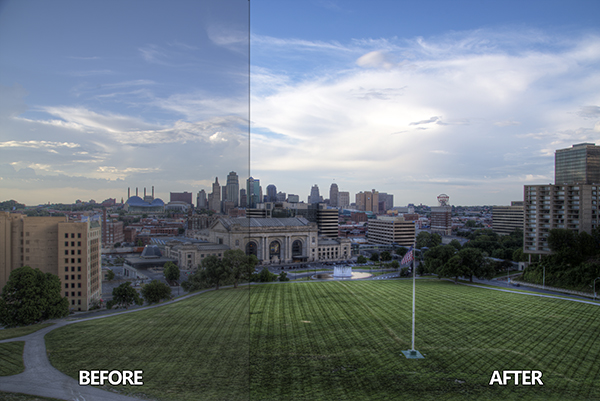
DPS Tutorial Image 9

Not long ago, early 2010, I was horrible at photo editing. I was literally tossing my camera in a box and packing it away. My problem was that I was extremely frustrated with the quality of my images. Not necessarily the composition or the subject matter, but I couldn’t get my images to look “good” like all the photographers who were crushing views on Flickr. Thank goodness 500px was not around at the time, I really would have hated my photos.

Just before I sealed the tape on my box of photo gear I discovered High Dynamic Range imaging. Wait, before you judge me, I have been doing it long enough to know the process is not everyone’s cup of tea. However, the HDR process, from the brackets to the tone mapping, forced me to embrace new techniques I never would have dreamed of prior to stumbling upon it.

I started to understand my camera on a level that was foreign to me prior to that time. I also began to accept that it was not necessarily the camera making the great photos, but the person behind it and, more importantly, their post-processing techniques. Nonetheless, I became a tone mapping fool. I tone mapped everything, my car (for the record a Scion xD does not necessarily need to be HDR’ed), candid pictures of my wife, food, candid pictures of my wife eating food, I really tone mapped everything.

You have probably been there before as well, anyone new to HDR thinks it is the greatest thing on everything from the urban landscape to the selfie in the mirror. I would really shy away from the latter of the two! Through all of this understanding and acceptance came another realization, the HDR process can wreak havoc on the contrast in a good photo.

Through the HDR process you are mapping tones from multiple images to obtain one photograph that gets the best of both worlds with a vast amount of detail. The problem with this is that shadow areas lose their depth when too much detail is revealed, and areas that were specular highlights, or inviting highlight blowouts, tend to compress in ways that make them look dark, dingy and stale. Let’s not forget about the hideous over-saturation that can occur if you take the sliders too far.

So how do you combat this? How do you analyze a photograph, HDR or not, and tell what it needs to make it better?

It’s all about contrast

The answer, while simple, holds complexities that can take years to train your eye through trial and error. We are not about to let it take you years to understand. The secret is contrast which is the key to making better photographs right now.

You may know that the Contrast slider exists in nearly every post-processing program, but what is contrast? Simply stated, contrast is the ratio between light and dark in a photograph. If there is no contrast the image appears to look predominantly gray and dismal. On the flip side, an image can be too “contrasty” or devoid of gray (mid tones), a battle between white and black. It is difficult to see this on a color photograph since contrast typically deals with tone.

I studied Fine Art in college, I was a Printmaker (Woodcut, Etching, Screen Printing, and Lithography). I had a fabulous professor. She told me a piece of information once that changed my art forever during a one-on-one critique.

She said if I ever had a question about how harmonious my color print was that I should take a picture of it and convert it to gray scale. If it did not have strong black and white points with a smooth grayscale gradation somewhere in between, then it needed work.

Like any normal college kid, I did not understand her methodology at the time and I rarely took her advice. It was not until nearly ten years later that her advice finally clicked.

The Contrast Checker Technique

You can use this technique in every aspect of your workflow: beginning, middle, and end. It keeps your contrast in check throughout the process. Rightfully so, it is named “Contrast Checker”.

The photograph below is a tone mapped photo of Kansas City, straight from Photomatix Pro. You should always try to tone map your images so that they are not too dark, too light, too saturated, or too stylized.
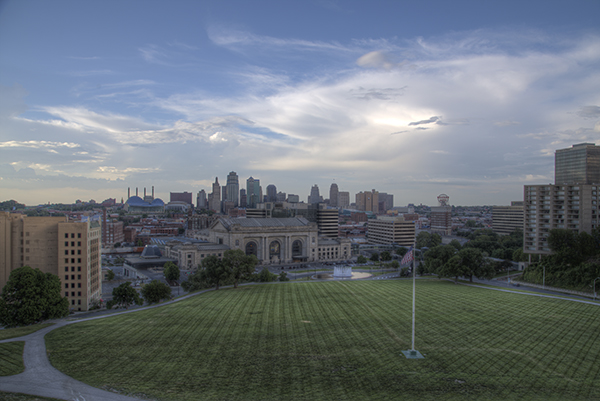
DPS Tutorial Image 1

Let’s Check the Contrast you can download the image and follow along if you would like (there is also an Action and a video at the end if you learn better from video)

Step one

Create a new Gradient Map Adjustment Layer to create a Black and White photo.

Step two

Ensure that the Gradient Map is set to Black and White. By default the Gradient Map Adjustment Layer will pull from the colors that you have set as your foreground and background in the tool bar. To ensure they are set to Black and White press the “d” key to reset them to the defaults.

Step three

Make a new Curves Adjustment Layer above the Gradient Map. Your Layers Palette should look like this and your photo should be Black and White.
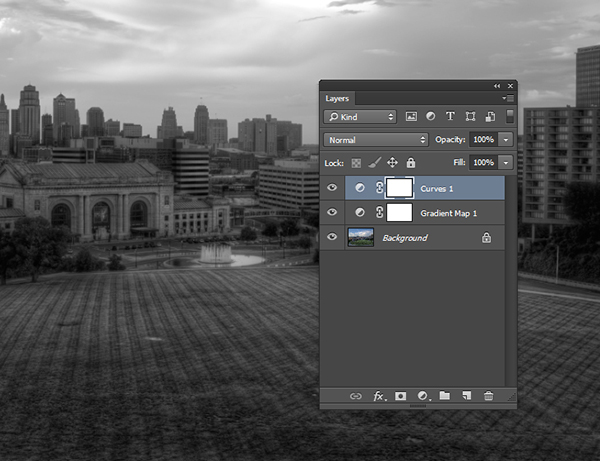
DPS Tutorial Image 2

Step four

While in the Properties of the Curves Adjustment Layer press and hold “Alt” (Option on Mac) and click the Black triangle on the bottom of the Curve.

Step five

Your photo may turn all white with a little bit of black. This is telling you where black is present in your photo. If your photo is all white with no black specks then your photo currently contains no black point. Move it slightly to the right until more black starts to appear.
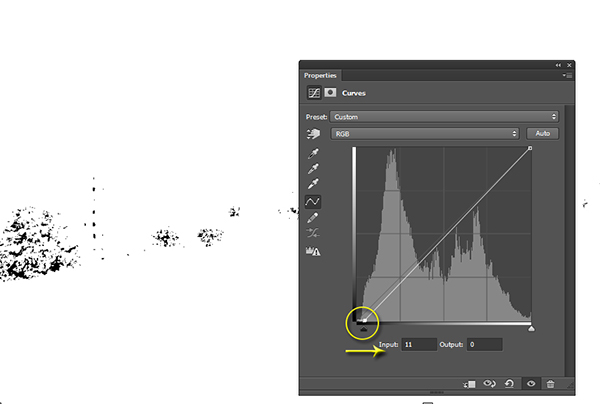
DPS Tutorial Image 3

Step six

This is called clipping (no detail). By clipping the blacks you are telling Photoshop what you want black to be in the photo. It is important that you do not take this too far, you want a solid black point in the photo, but you don’t want to destroy your shadows either.

Step seven

Now press and hold “Alt” (Option on Mac) and select the White Triangle.

Step eight

Your photo should turn all black with little specks of white. This is telling you where pure white is in your photo. If your photo is all black with no white specks then your photo currently contains no white point. Move it slightly to the left until more white starts to appear.
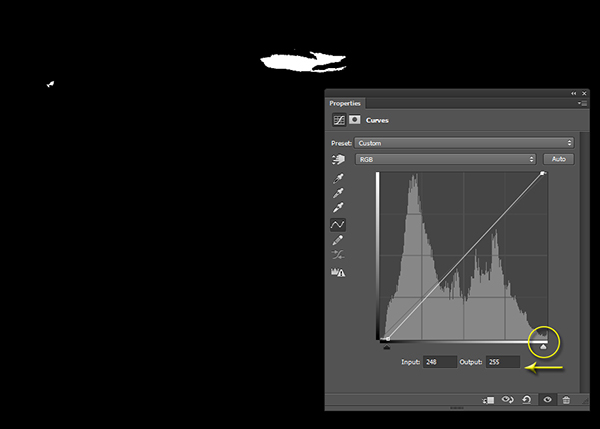
DPS Tutorial Image 4

Step nine

Just like the blacks it is important that you do not take this too far to the left as you will be clipping too much of the whites. You are going for just a bit of clipping beyond the specular highlights.

Step ten

The reason you are doing this on a grayscale photograph is to ensure that you are only seeing the clippings of the lights and darks. If you were to do the same thing on a color photograph you would see the clippings for all of the colors within their channels. This makes the process a bit more difficult.

Step eleven

At this point you should already be seeing more drama in your photograph, but you can take it a step further.

Step twelve

Click on the Targeted Adjustment Tool within the Properties of the Curves Adjustment Layer. This allows you to target specific areas of the photo and edit them independently on the tone curve.
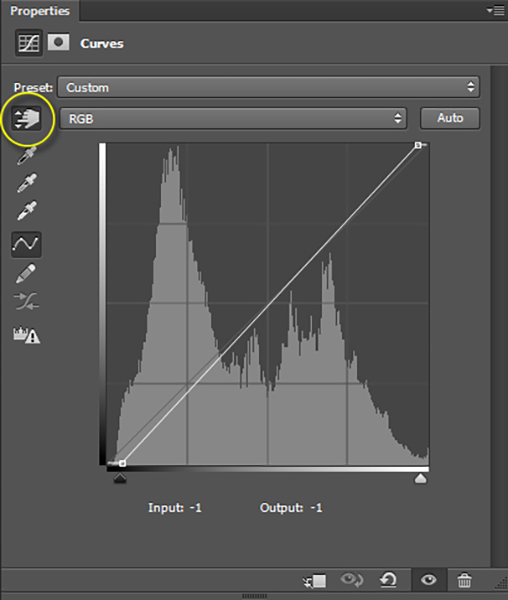
DPS Tutorial Image 5

Step thirteen

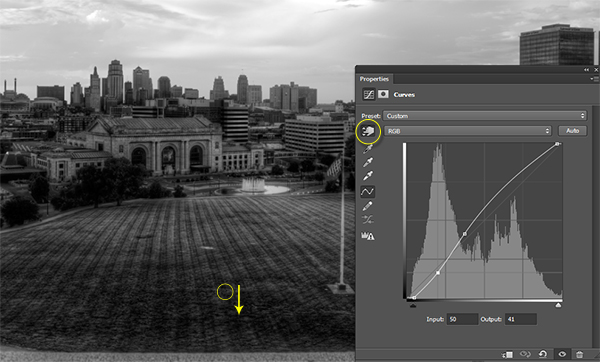
With the targeted adjustment tool selected, as you hover over the image you will see what is being effected on the tone curve. For this image I started with the lighter colored grass. I clicked on it and dragged the cursor up making it even lighter.
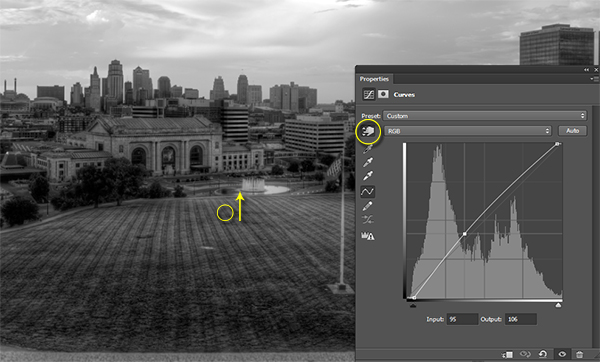
DPS Tutorial Image 6

Step fourteen

I also selected the darker colored grass and moved the cursor down to make it darker.
DPS Tutorial Image 7

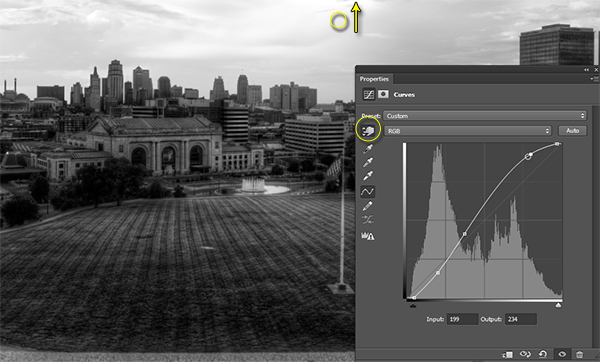
Step fifteen

I then selected an area in the sky that was close to white, but contained a little bit of detail, and dragged the cursor up to make it brighter.
DPS Tutorial Image 8

Step sixteen

At this point you should be looking at a black and white photograph with much more contrast than you started with.

Step seventeen

The magic happens when you delete the Gradient Map layer to reveal the Curves effect on the original color photograph.
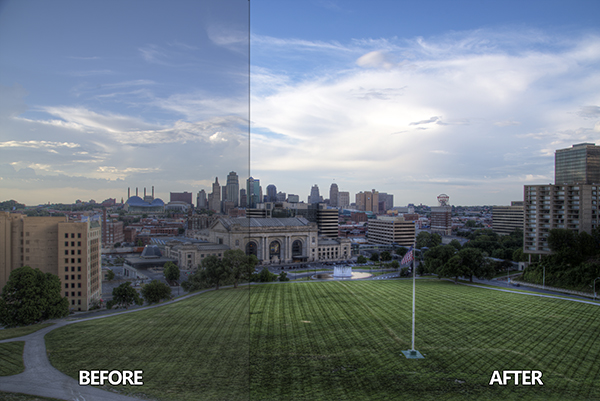
DPS Tutorial Image 9

Step eighteen

If you are not satisfied with the effect the Curve has on the colors in the photo you may change the Blending Option to Luminosity which will only allow it to effect the tones in the image, protecting the color saturation.

For more tips and tricks and to see how the downloadable action for this process works watch the video tutorial below.

The post How to use the Contrast Checker Technique to Give Your Images More Punch by Blake Rudis appeared first on Digital Photography School.


Digital Photography School
 
Comments Off on How to use the Contrast Checker Technique to Give Your Images More Punch

Posted in Photography