RSS
 

Posts Tagged ‘More’

Adobe updates Photoshop CC with new tools, 360° image editing, HEIF support and more

19 Oct

$ (document).ready(function() { SampleGalleryV2({“containerId”:”embeddedSampleGallery_2078864935″,”galleryId”:”2078864935″,”isEmbeddedWidget”:true,”standalone”:false,”selectedImageIndex”:0,”startInCommentsView”:false,”isMobile”:false}) });

The all-new Lightroom CC (and newly-renamed Lightroom Classic CC) might be hogging the spotlight at Adobe MAX 2017, but Adobe didn’t forget to throw some love Photoshop’s way. In addition to the standard performance enhancements you expect with every update, Photoshop CC has been gifted with a slew of new features, including: the new curvature pen tool, 360° spherical image editing, HEIF format support, Select and Mask improvements and more.

All of the improvements are summarized in the list below, and while none of them will blow your mind, there’s plenty there for regular Photoshop users to be happy about:

According to Adobe, the most requested improvement that ships with the new version of Photoshop CC is actually the enhanced Brush Presets and Brush Preset Management, which you can see demonstrated in the video below:

And with the explosion of 360° images into the mainstream and the release of iOS 11, the ability to open & edit spherical 360° panoramic images in Photoshop, as well as HEIF format images, is a big deal as well.

Other notable improvements include the new color and luminance range masking tools that were also added to Lightroom CC, the Curvature Pen Tool that Adobe teased us with just last month, and improved Select & Mask functionality overall. You can see these new features in action in the YouTube videos embedded below:

As with all previous updates to Photoshop CC, you won’t have to pay anything extra if you’re already a subscriber. The $ 10/month Creative Cloud Photography Plan now includes 20GB of cloud storage, Photoshop CC, Lightroom CC, and Lightroom Classic CC; or you can upgrade to 1TB of storage for $ 15/month until next year, when that price will go up to $ 20/month.

To learn more about these updates from Adobe itself, head over to the Adobe Photoshop blog by clicking here.

Articles: Digital Photography Review (dpreview.com)

 
Comments Off on Adobe updates Photoshop CC with new tools, 360° image editing, HEIF support and more

Posted in Uncategorized


Godox XPro-N wireless flash trigger for Nikon boasts TTL, HSS and more for just $70

18 Oct

Godox has launched a Nikon version of the XPro-C 2.4GHz wireless flash trigger it announced for Canon last month. The new model—aptly titled the XPro-N—is equipped to control Godox’s X1 system, and is currently listed by online retailers as available for pre-order with shipping planned to start on October 31st.

This Nikon version will be joined by models for Sony, Fujifilm, and MFT throughout the remainder of the year.

As with the Canon version, the new XPro-N model sports a large dot-matrix LCD alongside five physical buttons. The display shows five groups, one group per physical button, as well as data pertaining to each group. The trigger supports HSS (up to 1/8000), TTL, and manual (1/1 – 1/256) control. There’s also support for TTL-Convert-Manual (TCM) functionality, which allows you to meter flashes in TTL, then switching to manual mode with the settings automatically adjusting to keep an equivalent output.

The XPro-N is listed for pre-order at $ 70 on Amazon.

Articles: Digital Photography Review (dpreview.com)

 
Comments Off on Godox XPro-N wireless flash trigger for Nikon boasts TTL, HSS and more for just $70

Posted in Uncategorized


How to Make Your Photos More Creative Using Camera Angles

10 Oct

A creative use of camera angles is one of the quickest ways to add interest and variety to your photos.

Even if you don’t know how to use your camera very well, angles are easy! All you have to do is move your camera higher or lower to dramatically change the angle of your photo. It doesn’t matter what camera or what lens you’re using (even your smartphone), you can always make more creative photos by changing the camera or shooting angle.

Five Different Camera Angles

You have five main camera angles to choose from. Each one will add a different perspective, giving your photo the mood or feeling that you want it to have.

#1 – Bird’s Eye View

The highest camera angle is “bird’s eye view.” This is when you get up above the scene and look straight down. This angle is great for looking down and seeing all the details of a scene from above.

A bird’s eye view is an unusual angle because you’re not normally up high looking down on a scene. Any angle that is beyond your usual daily experience will make your photo more interesting to look at.

Bird Eye View How to Make Your Photos More Creative With Angles

I chose a bird’s eye view for this photo of our sleeping baby. By choosing this angle, I was able to look down and frame him with blueberry branches.

Bird Eye View - How to Make Your Photos More Creative With Angles

A bird’s eye view is great for food photography, allowing you to see everything on the dish.

#2 – High Angle

A “high angle” is not quite as extreme as the bird’s eye view. You just need to be a little bit higher than the person or thing that you are photographing.

Think of a high angle as a very normal view of the world for most adults. This is especially true for parents who are always looking down toward their kids.

Even though you experience this angle or perspective a lot throughout the day, it can still be perfect for some of your photos. A high angle is useful for making your subject look smaller or more vulnerable and perhaps making the viewer seem more dominant.

High Angle How to Make Your Photos More Creative With Angles

This high angle allowed me to look down at my son and also work in some interesting background elements.

How to Make Your Photos More Creative With Angles

Since this is a photo of “little sister,” a high angle gives her a smaller more vulnerable appearance.

#3 – Face-to-Face

A face-to-face angle is taken at eye level to your subject. This is a very engaging angle and helps to establish a personal connection between the person in your photo and the person viewing it.

This is a great angle for portraits, though a slightly higher than eye level angle is great for portraits too.

Face to Face How to Make Your Photos More Creative With Angles

When she came in from playtime covered in mud, I knew I had to use an engaging face to face angle.

Face to Face How to Make Your Photos More Creative With Angles

I love this captivating perspective.

#4 – Low Angle

For a low angle, you need to be below eye level. As you get down lower, you make the subject of your photo appear a larger. This may add a larger than life feeling to your photos and is great for emphasizing toughn s, or making things look scary or epic.

Low Angle How to Make Your Photos More Creative With Angles

A low angle is absolutely necessary when photographing sharks. It’s the only way to see their most frightening feature; teeth!

Low Angle 2

This moment was exploding with energy as the kids ran from the bus stop. Dropping down to a lower angle helps to emphasize the energy of the moment as well as bring the buses in the background in line with the kids.

#5 – Bug’s Eye View

Also known as “worm’s eye view,” this angle is just like it sounds. You get down as low as you can and look straight up toward your subject.

Again, this is a very unusual angle. You rarely experience this point of view, so it will add an interesting or creative perspective to your photo.

Bug Eye View How to Make Your Photos More Creative With Angles

I had to lay down on the ground and look up for this photo. It seemed like the perfect angle to capture my son’s first major climb!

Bug Eye View How to Make Your Photos More Creative With Angles

It’s easy to get a bug’s eye view at a playground. Just wait for your kids to start climbing and then look straight up at them.

One Scene – Three Angles

It’s a great idea to capture more than one angle every time you take photos of a moment. It will push your creativity, help you to explore new perspectives and provide you with more views to tell the story.

These next photos demonstrate how I captured one scene from three different angles.

How to Make Your Photos More Creative With Angles

In this first photo a higher angle was used to look down on the scene and see the puddle.

Three 2

A face to face angle is perfect for a muddy faced portrait.

Three How to Make Your Photos More Creative With Angles

This lower angle perspective makes the moment feel a little bigger and emphasizes the excitement she felt after having fun in the mud puddle.

Beyond Everyday Perspectives

Knowing these five camera angles, and practicing them will help you get unstuck anytime you’re uninspired or find that your photos are turning out boring or predictable. To spice up your photos, simply choose the most unusual angle. Once you’ve done that try at least two more angles and figure out which one has best captured the moment.

As you experiment with angles you’ll boost your creativity by breaking out of everyday perspectives. Try capturing a few different angles right now. I would love to see your photos in the comment section below.

The post How to Make Your Photos More Creative Using Camera Angles by Mat Coker appeared first on Digital Photography School.


Digital Photography School

 
Comments Off on How to Make Your Photos More Creative Using Camera Angles

Posted in Photography


On1 Photo RAW 2018 announced: Adds HDR processing, advanced masking and more

06 Oct

$ (document).ready(function() { SampleGalleryV2({“containerId”:”embeddedSampleGallery_1486583421″,”galleryId”:”1486583421″,”isEmbeddedWidget”:true,”standalone”:false,”selectedImageIndex”:0,”startInCommentsView”:false,”isMobile”:false}) });

On1 just released the newest version of its stand-alone RAW photo manager and non-destructive editor: On1 Photo RAW 2018. Put another way, there’s now yet another alternative to Lightroom out there, and with this new update the program is more capable than ever, adding features like HDR merge and panorama stitching, advanced masking capabilities, and more.

You can get a decent overview of the new features in the 2018 version in the video below:

The main additions to this version of On1 Photo RAW are On1 HDR, panorama stitching, new advanced masking options like Feather and Density that allow you to alter a mask globally, Color range masking, versioning, selective noise reduction, and an updated UI that On1 characterizes as “clean and modern.” There’s also a new “Paint with Color Brush” that allows you to either paint with a solid color or leave the luminosity of the underlying layer intact to change things like eye or hair color.

You can get a full breakdown of these and other new features on the On1 blog.

The app is being released as a free Beta on Friday, with an official release slated for the end of October. The full app—which promises ‘much more’ when it arrives after the beta period—will cost $ 120 for new users, while current On1 users will have the option to upgrade for a discounted price of just $ 80 (usually $ 100). Both the full version and upgrade package are already available for pre-order.

To learn more about the app or pre-order your copy, head over to the On1 blog by clicking here.

Articles: Digital Photography Review (dpreview.com)

 
Comments Off on On1 Photo RAW 2018 announced: Adds HDR processing, advanced masking and more

Posted in Uncategorized


Google unveils Pixel 2 phones: Adds OIS, Dual Pixel powered Portrait Mode and more

05 Oct

Ever since the iPhone 8 Plus and iPhone X were announced, we’ve been waiting for Google’s response. When the original Google Pixel came out, it quickly became one of the most raved about smartphone cameras in the world… would the Pixel 2 follow suit? The short answer, at least according to Google, is yes.

Just this morning, we sat down in the SF Jazz Center and, after an hour of other updates, Google finally unveiled the 5-inch Pixel 2 and 6-inch Pixel 2 XL.

The new phones house a 12.2MP sensor with 1.4um pixels, Dual Pixel phase detect autofocus and an F1.8 lens on the back, and an 8MP camera with 1.4um pixels, fixed focus and an F2.7 lens on the front. The newer 1/2.55″ sensor is smaller than the previous-gen’s 1/2.3″ sensor, but the brighter aperture nearly perfectly compensates.* Video specs for the rear camera max out at 4K 30fps (sorry, no 4K/60p like the new iPhones) while the front camera can do up to 1080p at 30fps. The camera units are now raised above the back glass surface, which remedies the nasty flare issues the previous Pixels had.

As we hoped, the whole phone is encased in an IP67 water and dust resistant aluminum unibody, and is powered by the latest and greatest Qualcomm Snapdragon 835 processor.

More impressive than the base specs are how Google uses its hardware in concert with software and machine learning technology to deliver a better photography and video experience.

Instead of opting for a dual camera on the back of the phone, the Google Pixel 2 and Pixel 2 XL uses just one camera, and combines this with Dual Pixel technology (split left/right pixels) and computational photography to create the now-ubiquitous fake bokeh Portrait Mode effect. And since stabilization is incredibly important, they’ve worked out how to use both optical and electronic image stabilization at the same time when you’re shooting video, which should deliver incredibly smooth footage. (more on that from San Francisco shortly…)

Unfortunately, in our brief time with the cameras so far, we discovered that Portrait mode is still not rendered live on either camera… it seems there are downsides to using a single camera instead of a dual cam setup, or in Google’s (we think correct) choice to use a more computationally intensive ‘lens’ blur as opposed to the more Gaussian (smooth) blur that Apple opts for.

Finally, no modern smartphone is complete until you look at the display your photos and videos will be viewed on.

Unfortunately, Google made no mention of color management or proper display profiles—which caused issues with the previous Pixel smartphones—but the new AMOLED (for the 5-inch model) and pOLED (for the 6-inch model) displays are wide-gamut. The Pixel 2 claims 93% DCI-P3 coverage while the Pixel 2 XL claims full 100% coverage of the same standard.

We bring this up because last year’s Pixel phones also offered a wide color gamut and high contrast ratio, thanks to their OLED display technology, but often displayed wildly inaccurate colors due to the lack of color management. It’s still possible the displays will come calibrated properly for the P3 or sRGB color spaces, but without any explicit mention of calibrated display modes that the OS automatically switches between based on the color space of the content (as Apple claims to do), we remain skeptical.

The lack of any talk of HDR display of video or photos was also a disappointment after the announcement of iPhone X’s support for HDR10 and Dolby Vision video, and HDR display of photos. The latter should make HDR photos pop on the bright contrasty OLED display of the iPhone X, rather than give them the flat tonemapped look we’re often used to. It seems Google has chosen to go the traditional method of compressing a high contrast scene into a flatter image, rather than take advantage of the HDR display capabilities of its OLED display.

We’re currently spending some time with the Google Pixel 2 and Pixel 2 XL in person today at the Jazz Center, so stay tuned for our hands-on impressions as the designated photography nerds at this event.

In the meantime, you can find out more about either of these phones on the Google Store, check out our Live Blog to see what we were thinking as the announcements were going up, or argue about your Apple vs Google allegiance in the comments.


* At least for low light performance, but perhaps not dynamic range. The discussion is complicated by the use of computational photography, of course, so it’s difficult to speculate on the overall impact of the smaller sensor / brighter aperture.

Articles: Digital Photography Review (dpreview.com)

 
Comments Off on Google unveils Pixel 2 phones: Adds OIS, Dual Pixel powered Portrait Mode and more

Posted in Uncategorized


Adobe unveils Photoshop Elements 2018: Can open closed eyes, find your best photos and more

04 Oct

A before and after of Photoshop Elements’ new Open Closed Eyes featured at work.

While the professional photography market waits with bated breath to see what Adobe has in store for us at AdobeMAX, the company behind Lightroom and Photoshop unveiled something that appeals to a bit broader of an audience today: Photoshop Elements 2018 and Premiere Elements 2018.

The new, user-friendly versions of Adobe’s photo and video editors come with some really creative and easy-to-use features that the company says are aimed at “memory keepers.” The idea was to create two programs that make finding, enhancing and sharing the precious memories hidden away inside random memory cards, hard drives and (most likely) smartphones almost totally automatic.

Photoshop Elements 2018

Photoshop Elements 2018 tackles the same problem that everyone—Google’s Photos App, Apple Photos, etc.—is trying to tackle: how do you help the typical shutterbug find their best images out of the thousands they take every week on their smartphone, and enhance those images so they look ‘professional’ and worth sharing on social media?

As with everybody else, Adobe is leaning heavily on machine learning and computer vision (different types of ‘AI’) for this trick.

It starts with an easy-to-use Organizer view and something called Auto Curation, which uses computer vision and some nifty algorithms to guess (because it can’t REALLY know, can it?) which of your images are the best. So if you have a group of 200 images, you can ask Photoshop Elements to cull those down automatically to just 15.

Once you’ve selected your shots, you can use the program’s new Guided Edits and a new feature called Automatic Selection to do things like drop in a new background, create a double exposure effect using two of your images, or add ‘artistic’ overlays.

The coolest feature, though, has to be Open Closed Eyes, which allows you to select two frames, and replace the closed eyes in one with the open eyes from another. The results are incredibly lifelike given that whole thing can be done in a matter of seconds.

Premiere Elements 2018

Like Photoshop Elements, Premiere Elements 2018 also leans heavily on AI-powered features to make video editing as automatic and pain-free as possible.

Smart Trim does for videos what Auto Curate does for photos, namely: it asks you what ‘style’ of video you want to create, tries to intelligently find the best clips that match this style, and tosses out the rest to create a coherent clip.

Another interesting addition is a feature called Candid Moments, which tries to find the best candid ‘photo’ hidden within a video clip and pull it out for you. With new smartphones like the iPhone 8 Plus shooting gorgeous 4K 60p, we could see this feature being a huge hit with those ‘memory keepers’ Adobe is all trying to target.

Admittedly, neither Photoshop Elements 2018 nor Premiere Elements 2018 are really targetted at more professional photographers out there (read: many of the people who enjoy reading DPReview). But as these beginner-focused programs get more and more powerful, amateur photographers who are allergic to the subscription model and don’t like to do much post-processing anyhow might actually enjoy using Photoshop and Premiere Elements 2018.

Of course, that’s not to say we won’t be keeping a very close eye on AdobeMAX this year.

To learn more about Photoshop Elements 2018 and Premiere Elements 2018, head over to the Adobe blog by clicking here, or visit their dedicated landing pages by clicking on the program names above. Both programs are available now for $ 100 new or $ 80 as an upgrade. You can also buy them together for $ 150 new or upgrade both programs at once for $ 120.

Articles: Digital Photography Review (dpreview.com)

 
Comments Off on Adobe unveils Photoshop Elements 2018: Can open closed eyes, find your best photos and more

Posted in Uncategorized


On1 Photo RAW 2018 announced: Adds HRD processing, advanced masking and more

04 Oct

$ (document).ready(function() { SampleGalleryV2({“containerId”:”embeddedSampleGallery_1486583421″,”galleryId”:”1486583421″,”isEmbeddedWidget”:true,”standalone”:false,”selectedImageIndex”:0,”startInCommentsView”:false,”isMobile”:false}) });

On1 just released the newest version of its stand-alone RAW photo manager and non-destructive editor: On1 Photo RAW 2018. Put another way, there’s now yet another alternative to Lightroom out there, and with this new update the program is more capable than ever, adding features like HDR merge and panorama stitching, advanced masking capabilities, and more.

You can get a decent overview of the new features in the 2018 version in the video below:

The main additions to this version of On1 Photo RAW are On1 HDR, panorama stitching, new advanced masking options like Feather and Density that allow you to alter a mask globally, Color range masking, versioning, selective noise reduction, and an updated UI that On1 characterizes as “clean and modern.” There’s also a new “Paint with Color Brush” that allows you to either paint with a solid color or leave the luminosity of the underlying layer intact to change things like eye or hair color.

You can get a full breakdown of these and other new features on the On1 blog.

The app is being released as a free Beta on Friday, with an official release slated for the end of October. The full app—which promises ‘much more’ when it arrives after the beta period—will cost $ 120 for new users, while current On1 users will have the option to upgrade for a discounted price of just $ 80 (usually $ 100). Both the full version and upgrade package are already available for pre-order.

To learn more about the app or pre-order your copy, head over to the On1 blog by clicking here.

Articles: Digital Photography Review (dpreview.com)

 
Comments Off on On1 Photo RAW 2018 announced: Adds HRD processing, advanced masking and more

Posted in Uncategorized


Apple acquires AI startup that scores your photos’ framing, composition and more

03 Oct

Apple has reportedly acquired a small computer vision startup called Regaind, according to TechCrunch, who is citing ‘multiple sources.’ The acquisition falls onto our radar because of what Regaind’s technology is designed to do, namely: score photographs based on their composition, lighting, perspective, and other aesthetic qualities.

In other words, the company’s computer vision algorithms can tell how ‘good’ your photo is, insofar as such things can be analyzed objectively.

TechCrunch reports that the acquisition happened ‘earlier this year’, and while Apple hasn’t confirmed the news, the statement it sent to TechCrunch doesn’t deny it either. In fact, it’s about as close to ‘confirmation’ as Apple ever gets in such matters:

Apple buys smaller technology companies from time to time, and we generally do not discuss our purpose or plans.

A quick look at Regaind’s website will give you a look at the kind of information the company can ‘see’ in your photographs. This more professional portrait, for example, scores high in the areas of Aesthetics, Sharpness and Exposure, with multiple positive ‘Properties’ highlighted such as ‘Subject Well Framed’ and ‘Pleasant Blur.’

This birthday snapshot, however, scores much lower and suffers from ‘Dull Colors’ and an ‘Annoying Background.’

How Apple intends to use this technology (or already is?) may never be explicitly stated, but Regaind’s technology will no doubt make it into Apple’s Photos app on both macOS and iOS, and may even help future iterations of the iPhone camera prompt you to frame your subject better, seek better lighting, or get rid of that ‘Annoying Background’.

Your guess is as good as ours, but if you want to learn more about this company Apple almost certainly acquired, head over to the Regaind website by clicking here.

Articles: Digital Photography Review (dpreview.com)

 
Comments Off on Apple acquires AI startup that scores your photos’ framing, composition and more

Posted in Uncategorized


How to Find More Creativity Through Using Less Gear

03 Oct

In this article,

A few weeks ago, I was packing for an 8-day photo workshop I was leading in the Alaska Range. It was autumn, which meant we’d be concentrating on the landscape, but there would likely be ample opportunities to photograph wildlife and create macros. That diversity meant that I would need to pack for every opportunity.

How to Find More Creativity Through Using Less Gear

A year ago, or heck, three months ago, that would have meant my bag would have included: two DSLRs, a 500mm f/4 with a 1.4x teleconverter, a 70-200mm f/2.8, a 24-105mm f/4, a 17-40mm, a fixed 14mm, a polarizer, a variable neutral density filter, a big Gitzo tripod to hold that heavy kit, and a monster camera bag to hold it all. The total weight of all my camera gear would probably come in around 50 pounds, maybe more.

So there I was, packing my camera gear for more than a week of shooting the grand landscapes and wildlife of Alaska. I loaded my small daypack, topped it off with a rain jacket and a sweater, threw it over my shoulder and walked out the door. Total camera gear weight was under 8lbs.

How to Find More Creativity Through Using Less Gear

What happened?

I realized that all my gear, lenses, filters, and the enormous DSLR bodies; none of them were actually improving my photography. Plus, I was being hindered by all that stuff. I’d be out shooting and find I was more concerned about selecting the right lens or filter than I was about the actual composition.

And that, right there, is where creative photography goes to die.

How to Find More Creativity Through Using Less Gear

Cutting back and using less gear

So I cut back. I adopted the Lumix mirrorless system and acquired three lenses for the trip: a 12-32mm, a 45-150mm, and a 300mm f/4 (the only sizeable piece of glass in the kit). Since the Lumix system is micro four-thirds, all those lengths are doubled when compared to a full-frame camera. I can cover almost anything from 24-600mm in a kit that weighs a small fraction of my DSLRs. I could, quite literally, fit it all in my pockets.

When in the field, I can switch from one lens to another quickly and without fuss. I learned to keep the most likely lens set on the camera. If wildlife was a possibility, then the 300mm lived on the camera. When we were hiking and I was looking for wide landscapes, then the 12-32mm was the go-to lens. On gray days with patchy sun, the mid-range 45-150mm zoom was always ready.

How to Find More Creativity Through Using Less Gear

Time to be more creative

When I saw a composition,  I would raise my camera and shoot, re-compose, shoot again, and so on for several minutes, while other photographers were still working out the best lens, camera body, or filter for the situation.

I also found I had more time and energy to simply sit on the tundra, look, and wait. I wasn’t fiddling with my gear so I had long moments to experience the places where I was photographing.

Come to think of it, that may actually be why I feel my photography improved so much. I had the time to be creative.

How to Find More Creativity Through Using Less Gear

As any photographer worth their salt knows, making images is not formulaic, it is creative. In order to be creative, we have to be open to the situation, not distracted. And we have to be ready when the light or action is happening. My gear, or lack of it, gave me that time and flexibility.

How to Find More Creativity Through Using Less Gear

Did I ever miss all my equipment?

I’d like to say no, but there were times, that yes, I did miss my old kit. Cutting back my camera gear meant some sacrifices. Occasionally those sacrifices involved a particular focal length or filter that I hadn’t brought along. Once or twice I wished for the clean bokeh of my 500mm f/4 to separate a bird from a tangled background and on one occasion, the 24mm equivalent wasn’t wide enough to capture the expanse of the sky I was after.

How to Find More Creativity Through Using Less Gear

Comparison rears its ugly head

But the sacrifice I remember most clearly (and I feel like an idiot for even mentioning this one) was my vanity. At one point, I was among a good size group of serious photographers not related to the workshop I was leading. There were more 500mm and 600mm f/4s hanging off sturdy carbon tripods than you could shake a stick at. Meanwhile, I stood there, an actual bonafide professional photographer, with a tiny point-and-shoot sized mirrorless camera and a couple of itty-bitty lenses in the pocket of my jacket.

I wanted to justify my compact gear, defend my decision by bragging about how good my kit actually was, even compared to their monstrous cameras – but I didn’t. Instead, I kept my silence, listened to their discussions of lenses, f-stops, and autofocus speeds, and thought instead about my next composition.

How to Find More Creativity Through Using Less Gear

I bring up this somewhat uncomfortable subject because I think that this sense of inadequacy, in the lives of photographers, is very, very real. We want to be taken seriously. And when we are in the field, (when no one can see the images we are actually creating) we are usually judged by the gear we are carrying and using. There is a hierarchy in which those with the biggest, most expensive glass and bodies rise to the top, as though their investment is somehow reflective of their skills or knowledge as photographers.

How to Find More Creativity Through Using Less Gear

Gear doesn’t make you a good photographer

There is a lot of pressure to BE one of those people with the huge camera bag and big lenses. But the reality is that your gear has nothing to do with how good you are as a photographer. Gear helps, it’s even necessary to a certain extent, but its presence or price tag is not reflective of you, the photographer. It’s the images that matter.

In the future, I’m going to try to let my photographs, not my gear, be the source of my pride (or inadequacy).

How to Find More Creativity Through Using Less Gear

Though not the Alaska Range, I continue to embrace the minimal gear mentality. I made this image the night before I wrote this article, on the beach in Homer, Alaska.

The post How to Find More Creativity Through Using Less Gear by David Shaw appeared first on Digital Photography School.


Digital Photography School

 
Comments Off on How to Find More Creativity Through Using Less Gear

Posted in Photography


Star Crossed: 10 More Abandoned Observatories

01 Oct

[ By Steve in Abandoned Places & Architecture. ]

These closed and abandoned astronomical observatories once gazed skyward into a star-spangled universe, revealing hidden wonders of time and space. Once.

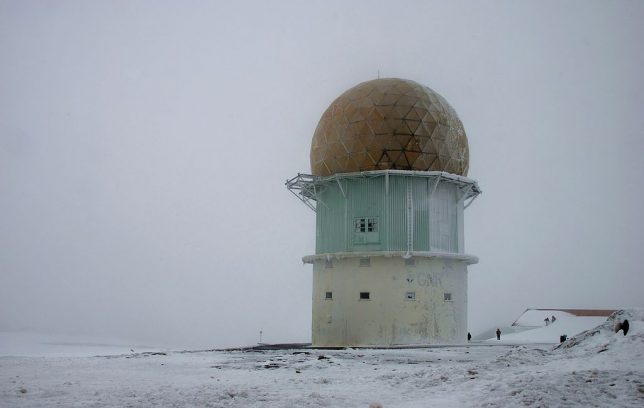
You’ll typically find observatories atop the highest mountains, mainly because there’s less air to see through up there. Smaller countries with smaller mountains do the best they can, as is the case with this abandoned observatory (or old radar station, depending on the source) slowly deteriorating high up on Portugal’s aptly named Serra da Estrela (“Star Mountain Range”).

Case Western University Observatory, Ohio

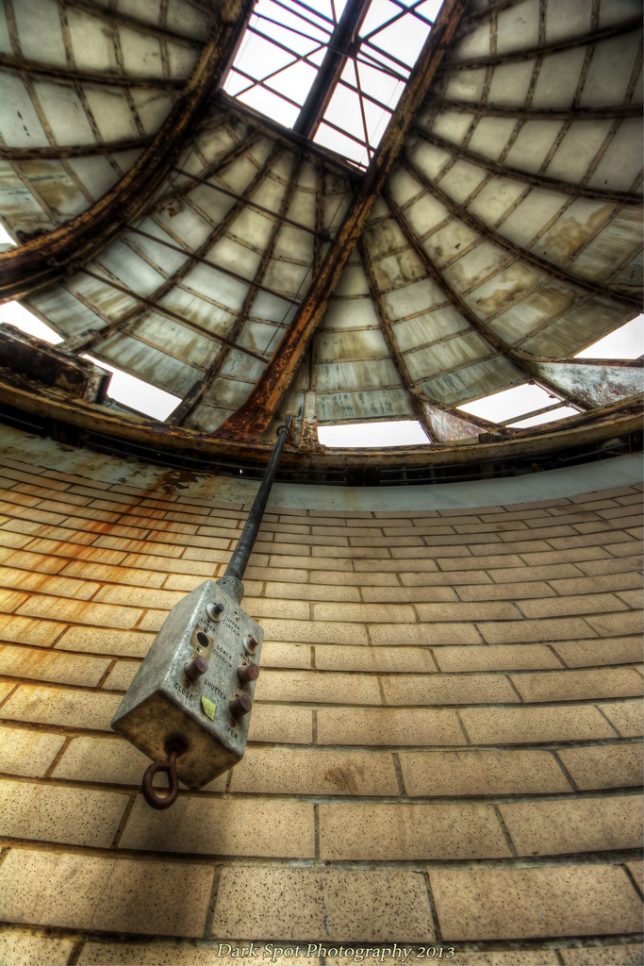
Flickr member David Barnas (Dark Spot Photography) perfectly captures the lonely majesty of abandoned observatories in the above image. This breathtaking photo dates from May of 2013 and offers a unique view of the dome of one of Case Western University’s now-disused observatories.

Lick Observatory, California

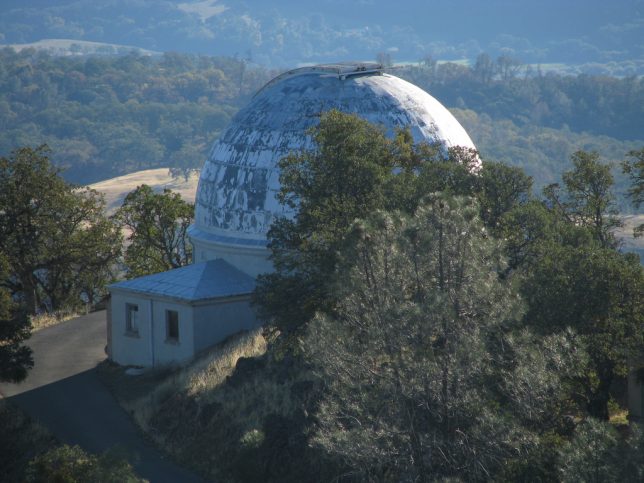
Lick Observatory encompasses a number of telescopes and other related observing tools protected by structural domes of various ages and sizes. With construction atop Mount Hamilton near San Jose, California beginning in 1876, Lick Observatory boasts individual observatories in current use, temporarily closed and outright abandoned pending demolition. Flickr members Kelly The Deluded (kjoyner666) and Panoramio user Nick Sower captured what appears to be the 20-Inch Carnegie Double Astrograph in need of a new paint job – at the very least.

City Observatory, Edinburgh, Scotland

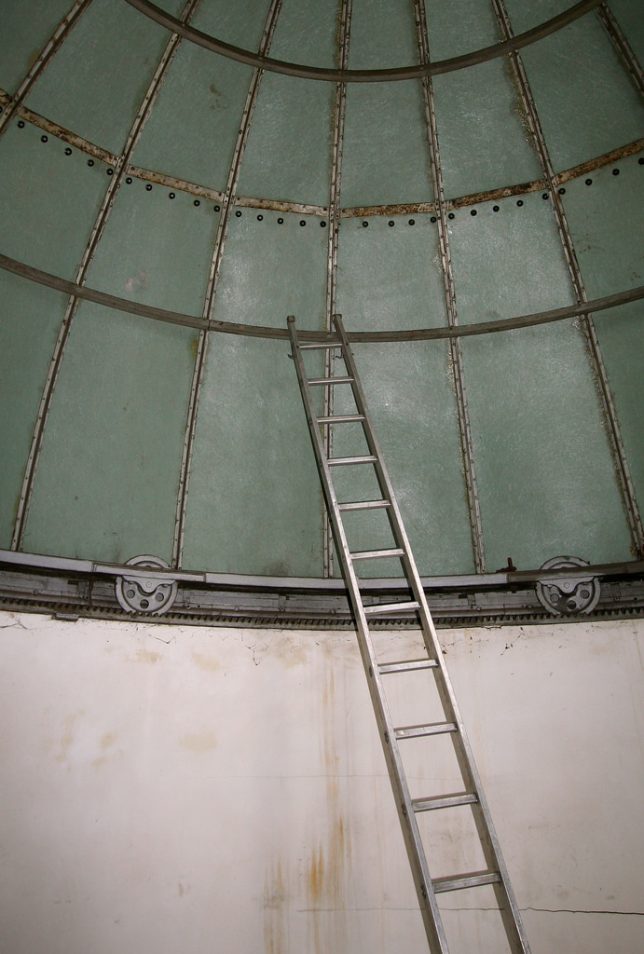
The venerable City Observatory on Calton Hill in Edinburgh, Scotland dates back to 1818 and provided stalwart scientific service for nearly two centuries – the Astronomical Society of Edinburgh moved out of the observatory in 2009. Since then, the buildings have been managed by the City of Edinburgh Council, who restored the interior decor but then rented out the rooms as holiday accommodations. Flickr member Jenni Douglas (photojenni) snapped the interior of one of the observatory’s domes in May of 2007.

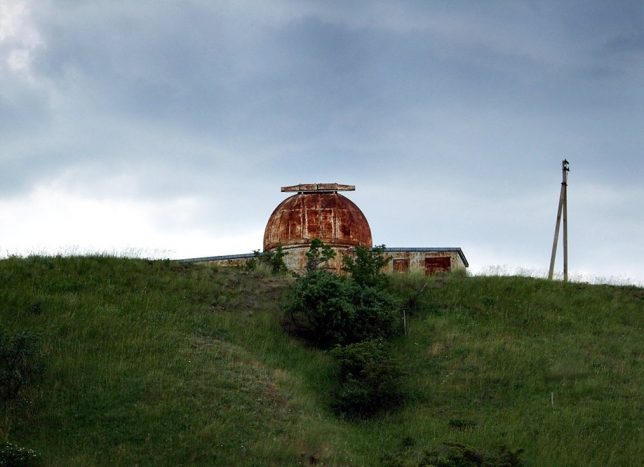
Crimea, Ukraine

Russia’s hotly-contested annexation of Crimea from the Ukraine was still six years away when Flickr member Max Bashyrov (movaxdx) snapped the above image of “some kind of abandoned observatory.” With all that visible rust, we’ll have to assume it was formerly engaged in observing Mars, the Red Planet.

Next Page – Click Below to Read More:
Star Crossed 10 More Abandoned Observatories

Share on Facebook


[ By Steve in Abandoned Places & Architecture. ]

[ WebUrbanist | Archives | Galleries | Privacy | TOS ]


WebUrbanist

 
Comments Off on Star Crossed: 10 More Abandoned Observatories

Posted in Creativity