RSS
 

Posts Tagged ‘Moon’

China shares the first photo captured on far side of the Moon

04 Jan
Photo captured and shared by the China National Space Administration (CNSA).

The China National Space Administration (CNSA) has landed its Chang’e 4 spacecraft on the far side of the moon and sent back a photo captured from the surface. This marks the first time any spacecraft has landed on the far side of the moon.

After touching down at 9:26 p.m. US eastern time, the spacecraft sent back a color photograph of its home inside the Von Kármán lunar crater, a formation on the southern pole of the moon that measures approximately 180 km in diameter.

Lunar Orbiter 5 image of the Von Kármán lunar crater.

Photographs of Von Kármán and the far side of the moon have been captured before, as seen in the above image captured bye Lunar Orbiter 5, but never from the surface of the moon.

One of the major hurdles of landing a spacecraft on the far side of the moon is communications. Normally, with the moon in the way, there’s no way for direct communication for the spacecraft. To get around this limitation, the CNSA is using the Queqiao satellite as a relay point about 65,000 km above the surface of the moon.

With the spacecraft now safely on the far side of the moon, it can begin its mission to take measurements in an effort to better determine the age and makeup of the Von Kármán lunar crater and southern pole of the moon.

Articles: Digital Photography Review (dpreview.com)

 
Comments Off on China shares the first photo captured on far side of the Moon

Posted in Uncategorized


Nikon Coolpix P1000 shoots for the moon with 3000mm equiv. zoom

10 Jul

$ (document).ready(function() { SampleGalleryV2({“containerId”:”embeddedSampleGallery_4033712040″,”galleryId”:”4033712040″,”isEmbeddedWidget”:true,”selectedImageIndex”:0,”isMobile”:false}) });

If the 24-2000mm equivalent lens on the Nikon Coolpix P900 wasn’t enough for you, then we bring good news: Nikon has announced its Coolpix P1000, which brings the telephoto end up to a once unthinkable 3000mm equiv. The lens has a maximum aperture of F2.8-8, compared to F2.8-6.5 on the P900, and has both ED and Super ED elements. This monster of a lens accepts 77mm filters and has two zoom speeds.

The P1000 has dedicated moon and bird positions on the mode dial

If you use Nikon’s ‘Dynamic Fine Zoom’ feature, the equivalent focal length rises to 6000mm (with some loss in image quality). Still not enough? If, for some reason, you need 12000mm of reach and don’t mind a substantial loss in image quality, you can use the camera’s 4X digital zoom. If you’re wondering just how large this camera is, it’s roughly 360mm / 14″ long with the lens extended and weighs in at a whopping 1.4kg / 3.1lbs.

As with its predecessor, the P1000 has a 16MP, 1/2.3″ sensor that offers an ISO range of 100-6400, along with Raw support, which wasn’t found on the P900 and represents a welcome addition. It can shoot continuously at 7 fps, but only for 7 shots. In a nod to its potential use cases, the P1000 has dedicated moon and bird positions on the mode dial. Photos and movies can be compared on a fully articulating LCD (which is not touch-enabled) or an 2.36M-dot OLED viewfinder.

The P1000 can also capture 4K/UHD video at 30p or 25p as well as 1080p from 60 fps down to 25 fps. The camera has a external mic input and offers manual exposure controls and clean HDMI output.

Wireless features include Wi-Fi and Bluetooth, and the camera can be controlled via your smartphone, the new ML-L7 Bluetooth remote or the MC-DC2 wired shutter release. Battery life is rated at 250 shots per charge.

The Nikon Coolpix P1000 will be available in September for $ 999.

Official samples

$ (document).ready(function() { SampleGalleryV2({“containerId”:”embeddedSampleGallery_7298024543″,”galleryId”:”7298024543″,”isEmbeddedWidget”:true,”selectedImageIndex”:0,”isMobile”:false}) });

Press Release

THE SUPERZOOM COOLPIX P1000 OFFERS AN ASTOUNDING 125X ZOOM TO CAPTURE YOUR WORLD AND BEYOND

With its Impressive NIKKOR 24-3000mm Equivalent Optical Zoom Lens and Advanced Shooting Controls, the New COOLPIX P1000 Brings Creative Possibilities Closer Than Ever

MELVILLE, NY (JULY 10, 2018 AT 12:01 A.M. EDT) – Today, Nikon Inc. announced the COOLPIX P1000, the new undisputed powerhouse of superzooms. With an incredible 125X optical zoom (24-3000mm equivalent) powered by high performance NIKKOR optics; the P1000 is the ideal companion camera for birding, sports, wildlife and celestial-photographers seeking superior performance from extreme distances. Beyond its incredible zoom range, the versatile 16-megapixel COOLPIX P1000 captures 4K UHD video and offers a myriad of manual controls, as well as user-friendly functions including built-in Wi-Fi1 and Bluetooth2 connectivity, letting photographers of all levels explore and share their creativity.

“The COOLPIX P1000 is the first of its kind for a compact digital camera,” said Jay Vannatter, Executive Vice President, Nikon Inc. “It raises the bar for superzoom cameras and is a testament to our commitment to delivering innovative tools that offer creative freedom to capture and allow users to share their unique visions of the world.”

Powerful Optics go the Distance

The COOLPIX P1000 incorporates state-of-the-art NIKKOR technology, designed with ED and Super ED lens elements, boasts the world’s most powerful3 125X optical zoom lens (24-3000mm f/2.8-8) and 250X Dynamic Fine Zoom4, equivalent to a staggering 6000mm from macro to extreme distances. This powerful zoom range gives the P1000 the versatility to chronicle an adventure filled vacation, capture a favorite ballplayer from the top tier of a stadium or fill the frame with celestial objects like the moon, that normally only a telescope could reach.

To handle such extreme distances, the camera is equipped with the latest Nikon EXPEED image processing system and Dual Detect Optical VR technology for 5-stops5 of camera shake compensation that help capture sharp images and reduce blur. Featuring a 16-megapixel back-side illuminated (BSI) CMOS sensor and expanded ISO range up to 6400, the P1000 affords users the versatility to capture superior image quality even under challenging lighting conditions. The COOLPIX P1000 also boasts a variety of high-speed features including a quick start-up and fast Autofocus (AF) system, making it an ideal choice for capturing action from the sidelines of your kid’s soccer game or from an adventure-packed safari. Additionally, whether capturing a ballplayer sliding into home plate or photographing a bird in flight from afar, users will feel confident finding, tracking and capturing these far-away subjects using the camera’s snap-back zoom feature which temporarily expands the field of view for super-telephoto shots.

Versatility Ignites Creativity

The COOLPIX P1000 makes it easier than ever for photographers to express their personal creativity. Through its host of manual functions and RAW (NRW) image output, the P1000 is great for advanced users seeking precise control from point of capture to post-production. The COOLPIX P1000 offers an innovative control layout complete with a function button, command dial and mode dial to bring frequently used functions to a photographer’s fingertips.

Additionally, the camera includes a focus mode selector that can be used to change the focus mode and a control ring that allows for the adjustment of settings such as the white balance and manual focus. Photographers will find the camera’s built-in 2.3-million dot OLED electronic viewfinder (EVF) helpful when composing their shot, while the Vari-Angle 3.2-inch 921K-dot TFT LCD display is ideal for capturing challenging angles like framing a performer on a concert stage.

The COOLPIX P1000 offers numerous picture controls, creative modes and filter effects to help photographers bring their creative vision to life. Whether capturing the night sky or a bird perched on a tree branch, users can take advantage of the camera’s designated scene modes, such as Moon Mode and Bird Watching Mode, to automatically adjust settings to deliver brilliant results in a variety of environments. While amazing for extreme zoom, the COOLPIX P1000 also supports versatile shooting scenarios like capturing macro images from as close as 1 cm away. Beyond mastering still photography from both near and far, the P1000 is also capable of incredible 4K UHD video with stereo audio recording and time-lapse effects to further expand artistic expression. Lastly, with built-in Wi-Fi and Bluetooth connectivity, images will transfer automatically to a photographer’s compatible mobile device so family and friends can view stunning vacation moments or epic shots of the night sky in real time.

New Accessory: Bluetooth Connected Remote

The new COOLPIX P1000 is equipped with an accessory terminal and an accessory shoe that supports a wide variety of compatible devices, including external Nikon Speedlights. To bring more capabilities and creative control to photographers, Nikon also announced the new ML-L7 Bluetooth connected remote as another optional accessory available for the COOLPIX P1000. The ML-L7 Bluetooth connected remote control expands the shooting possibilities of the P1000 by enabling users to trigger various camera functions, including video start and smooth zoom control, remotely.

Price and Availability

The COOLPIX P1000 will have a suggested retail price (SRP) of $ 999.95* and will be available in September 2018. The new ML-L7 Bluetooth connected remote control will also be available in September 2018 for a SRP of $ 49.95*. For more information on COOLPIX P1000 and other Nikon products, please visit www.nikonusa.com.

1. This camera’s built-in Wi-Fi® capability can only be used with a compatible iPhone®, iPad®, and/or iPod touch® or smart devices running on the Android™ operating system. The Nikon SnapBridge application must be installed on the device before it can be used with this camera.

2. The camera’s built-in Bluetooth® capability can only be used to connect the camera to a compatible smart device running the SnapBridge app, and to take advantage of SnapBridge features. The Nikon SnapBridge application must be installed on the device before it can be used with this camera.

Using the SnapBridge App System Requirements:

  • Android 5.0 or later or 6.0.1 or later
  • A device with Bluetooth 4.0 or later (i.e., a device that supports Bluetooth Smart Ready/Low Energy) is required.
  • The SnapBridge app is available for compatible iPhone®, iPad® and/or iPod touch®, and for smart devices running the AndroidTM operating system. The app can be downloaded free of charge from Apple’s App Store® and GooglePlayTM. Nikon SnapBridge can be used only with compatible cameras.

3. Among compact digital cameras available as of July 10, 2018. Statement based on Nikon research.

4. At the maximum image size. The maximum zoom ratio varies by image size. The zoom ratio indicated for Dynamic Fine Zoom is the combined ratio of optical zoom from the maximum wide-angle position and digital zoom.

5. Measured in accordance with CIPA standards at approx. 350mm (equivalent focal length in 35mm [135] format).

*SRP (Suggested Retail Price) listed only as a suggestion. Actual prices are set by dealers and are subject to change at any time.

**Specifications, equipment and release dates are subject to change without any notice or obligation on the part of the manufacturer.

Nikon Coolpix P1000 specifications

Price
MSRP $ 999
Body type
Body type SLR-like (bridge)
Sensor
Max resolution 4608 x 3456
Image ratio w:h 4:3
Effective pixels 16 megapixels
Sensor photo detectors 17 megapixels
Sensor size 1/2.3" (6.17 x 4.55 mm)
Sensor type BSI-CMOS
Processor Nikon Expeed
Color space sRGB
Color filter array Primary color filter
Image
ISO Auto, 100-6400
White balance presets 5
Custom white balance Yes
Image stabilization Optical
CIPA image stabilization rating 5 stop(s)
Uncompressed format RAW
File format
  • JPEG (Exif v2.31)
  • Raw (NRW)
Optics & Focus
Focal length (equiv.) 24–3000 mm
Optical zoom 125×
Maximum aperture F2.8–8
Autofocus
  • Contrast Detect (sensor)
  • Multi-area
  • Center
  • Selective single-point
  • Tracking
  • Single
  • Continuous
  • Face Detection
  • Live View
Autofocus assist lamp Yes
Digital zoom Yes (4X)
Manual focus Yes
Normal focus range 30 cm (11.81)
Macro focus range 1 cm (0.39)
Screen / viewfinder
Articulated LCD Fully articulated
Screen size 3.2
Screen dots 921,000
Touch screen No
Screen type TFT LCD
Live view Yes
Viewfinder type Electronic
Viewfinder coverage 99%
Viewfinder resolution 2,359,000
Photography features
Minimum shutter speed 60 sec
Maximum shutter speed 1/4000 sec
Exposure modes
  • Program
  • Aperture priority
  • Shutter priority
  • Manual
Scene modes
  • Backlighting
  • Beach
  • Close-up
  • Dusk/Dawn
  • Easy Panorama
  • Fireworks Show
  • Food
  • Landscape
  • Multiple Exposure Lighten
  • Night Landscape
  • Night Portrait
  • Party/Indoor
  • Pet Portrait
  • Portrait
  • Scene Auto Selector
  • Selective Color
  • Snow
  • Soft
  • Sports
  • Sunset
  • Superlapse Movie
  • Time-lapse Movie
Built-in flash Yes
Flash range 12.00 m (at Auto ISO)
External flash Yes (via hot shoe)
Drive modes
  • Single shot
  • Continuous H
  • Continuous H 60
  • Continuous H 120
  • Continuous L
  • Interval timer
  • Pre-shooting cache
  • Bulb/time
Continuous drive 7.0 fps
Self-timer Yes (2 or 10 secs)
Metering modes
  • Multi
  • Center-weighted
  • Spot
Exposure compensation ±2 (at 1/3 EV steps)
AE Bracketing ±2 (3 frames at 1/3 EV steps)
WB Bracketing No
Videography features
Format MPEG-4, H.264
Modes
  • 3840 x 2160 @ 30p, MP4, H.264, AAC
  • 3840 x 2160 @ 25p, MP4, H.264, AAC
  • 1920 x 1080 @ 60p, MP4, H.264, AAC
  • 1920 x 1080 @ 50p, MP4, H.264, AAC
  • 1920 x 1080 @ 30p, MP4, H.264, AAC
  • 1920 x 1080 @ 25p, MP4, H.264, AAC
Microphone Stereo
Speaker Mono
Storage
Storage types SD/SDHC/SDXC (UHS-I support)
Connectivity
USB USB 2.0 (480 Mbit/sec)
USB charging Yes
HDMI Yes (micro HDMI)
Microphone port Yes
Headphone port No
Wireless Built-In
Wireless notes 802.11b/g/n + Bluetooth 4.1 LE
Remote control Yes (via smartphone, Bluetooth remote, wired remote)
Physical
Battery Battery Pack
Battery description EN-EL20a lithium-ion battery and charger
Battery Life (CIPA) 250
Weight (inc. batteries) 1415 g (3.12 lb / 49.91 oz)
Dimensions 146 x 119 x 181 mm (5.75 x 4.69 x 7.13)
Other features
Orientation sensor Yes
Timelapse recording Yes
GPS None

Articles: Digital Photography Review (dpreview.com)

 
Comments Off on Nikon Coolpix P1000 shoots for the moon with 3000mm equiv. zoom

Posted in Uncategorized


3 Techniques and Tips for Photographing the Moon in the Landscape

08 Apr

It’s been almost 180 years since the first photograph of the full moon was made by an English scientist, chemist, and historian, John William Draper. Since then, the moon has been a subject that has captivated the attention of photographers around the world. Photographing the moon by itself is one thing, but when you want to include the moon in a landscape photo, you have some challenges to overcome.

Moonrise over Shack Island - 3 Techniques and Tips for Photographing the Moon in the Landscape

The first problem is that the moon is exceptionally bright in the night sky. The second problem is that you want both the landscape and the moon detailed and in sharp focus.

To make a dramatic photo of the moon in a landscape, we’ll be using two techniques in the field and one in post-processing to make the final image.

Moonrise over the ocean in Sidney, British Columbia - 3 Techniques and Tips for Photographing the Moon in the Landscape

1. Exposure bracketing

To make your job a bit easier, photograph the moon when it is close to the horizon. At this time the light from the moon goes through more atmosphere before it reaches our eyes, so it is not as bright as when the moon is high in the sky.

But, under normal circumstances, you’ll still need to bracket your exposures to capture detail in both the landscape and the moon.

Plan to make one exposure for the landscape and another exposure for the moon. You can either use spot metering in both cases, or you can use exposure compensation after your first image to darken the next shot by four or five stops until the moon is properly exposed.

Here is an example of two photos with different exposures: one exposed for the landscape and one exposed for the moon.

3 Techniques and Tips for Photographing the Moon in the Landscape - two exposures for the moon

2. Focus stacking

If you are working with a landscape composition where some elements in the frame are relatively close to the camera, you’ll find that your moon is not sharp if you’ve focussed your camera on the landscape. The only way your landscape and the moon will both be in focus at the same time is if everything in the frame is far way away from the camera.

But the solution is simple. Make your first exposure in the normal way, exposing and focussing on the landscape. Then make your second exposure to not only expose for the brightness of the moon, but also focus on the moon to make sure it’s sharp.

In the two brackets shown in the image above, I not only changed the exposure to expose properly for the moon, but I also changed the focus point so that the moon would be sharp.

Sometimes you may need to use focus stacking without changing the exposure settings. For example, when I made the image below I didn’t need to bracket my exposures because the moon was a dark red color due to the eclipse. However, I still needed to use focus stacking to make both the cactus and the moon appear sharp.

Blue, blood, super moon in Ajo, Arizona, 3 Techniques and Tips for Photographing the Moon in the Landscape

3. Exposure Blending

In post-processing, you can combine your two exposures to make an image with a properly exposed and sharp foreground landscape and moon.

But it’s not quite as simple as just doing a copy and paste if you want it to look natural.

Photo 1: Clone out the moon

In the first photo, notice how the brightness of the moon has caused a strong glow in the sky beyond the moon itself. So if you just paste your properly exposed moon on top of that, the glow will look strange. My first step in post-processing is to clone out the original moon and make the color of the sky look even.

Photo 2: Select the moon

In the second photo, use the Quick Selection Tool to make a selection of the moon. You can then improve your selection by using “Refine Edge” in Photoshop Elements or “Select and Mask” in Photoshop CC. Other post-processing programs have similar tools.

Whichever program you use, the objective is the same. You want to smooth out the edge of your selection so the moon looks natural when pasted onto the first image. If the edges are abrupt, it won’t look natural.

To do this, contract your selection by about 3 pixels and then feather it by 2 pixels. When you are done, save your selection on a new layer.

Paste the moon from Photo 2 on to Photo 1

Finally, you can copy your new layer, go to the first photo and paste it in place.

Super Moon in Ajo, Arizona by Anne McKinnell

If the moon doesn’t look natural, you may need to experiment with blend modes and opacity. Try using the overlay blend mode and reducing the opacity of the layer until you get the look you are after.

Conclusion

Using these techniques will help you create dramatic images of the moon in the landscape – images that more closely match what you are able to see with your own eyes.

To see exactly how I created my moon composite image using Photoshop Elements, watch the video below.

?

If you have any other tips for photographing the moon in the landscape, please share in the comments below.

The post 3 Techniques and Tips for Photographing the Moon in the Landscape appeared first on Digital Photography School.


Digital Photography School

 
Comments Off on 3 Techniques and Tips for Photographing the Moon in the Landscape

Posted in Photography


NASA spacecraft struck by meteoroid while photographing the Moon

03 Jun
The collision of a meteoroid with the Lunar Reconnaissance Orbiter’s Narrow Angle Camera resulted in this wavy image.

NASA/Goddard Space Flight Center/Arizona State University

A camera on NASA’s Lunar Reconnaissance Orbiter survived a direct hit from a meteoroid no larger than the pin of a head that was traveling at incredibly high speeds. Despite its small size, tiny meteoroids can inflict significant damage on space equipment, especially instruments as delicate as a camera.

According to NASA project scientist Mark Robinson, ‘In this case, (the camera) did not dodge a speeding, but rather survived a speeding bullet.’

The incident actually occurred in late 2014, but was not made public until recently. The Lunar Reconnaissance Orbiter has been mapping the moon’s poles ever since its launch in 2009. And its cameras – manufactured by a small company called Malin – are known for being particularly tough. In fact, Malin cameras are also used on the Mars Curiosity rover.

Articles: Digital Photography Review (dpreview.com)

 
Comments Off on NASA spacecraft struck by meteoroid while photographing the Moon

Posted in Uncategorized


Shooting the moon: behind the shot with Peter Alessandria

14 Jan

Shooting the moon: behind the shot with Peter Alessandria

I planned this shot out two weeks in advance. I knew I wanted the moon to encompass Lady Liberty’s crown and torch. I love the ferry passing in front. This is a single exposure.

Peter Alessandria is not only an award winning, full-time professional photographer but he also happens to be a resident DPReview community member. He recently submitted an image of the moon aligned with the Statue of Liberty, which we selected as a Top 10 image for our 2016 Reader’s Best Shots (Places), that garnered quite a bit of praise – as well as some skepticism. Many people wanted to know just how he could accomplish such a shot and if it was indeed the ‘real deal’.

With that in mind, Peter got in touch with us and we worked with him to create a ‘behind the shot’ guide to shooting the moon. As you can imagine, quite a bit of planning and dedication goes into getting any of the shots that are presented here in this how to guide.

To see more of Peter’s work check out his Instagram and the following websites:

www.greatproductshots.com
www.superstarheadshots.com
www.peteralessandriaphotography.com

What kind of equipment do you use to get those incredible moon photos?

Strawberry Moon rising above the World Trade Center. Shooting just after sunset left plenty of light in the sky for this single exposure. Taken from about five miles out.

Peter Alessandria: I currently shoot with a Canon EOS 6D and 70D. I like the 6D for its relatively low noise, high ISO files and the 70D for the swivel screen and the extra reach (at a given focal length) the APS-C sensor gives. My current lens of choice for most of my moon shots is the Sigma 150-600mm F5-6.3 | C.

You also need a sturdy tripod and cable release. Since you’re shooting at night, a head lamp or flashlight can also be helpful if there’s no ambient light. And of course depending on the time of year, weather protection for you and your camera may be necessary.

Do you have any apps or websites that you use to plan out where the moon will rise or set?

This photo (single exposure) was taken during the Super Moon we had in Nov. 2016. The moonrise came just after sunset meaning there was still a lot of light in the sky and on the Statue.

The main app I use to get my moon shots is The Photographer’s Ephemeris (TPE). The web browser version is free to use on your phone or computer while the app for Android and iOS is $ 4.99. Two additional apps that track the moon are “PhotoPills” (iOS) and “PlanIt!” (Android), these two Apps are also useful for shooting the Milky Way which I do a lot of.

TPE works by showing me where and when the moon (and sun) will rise and set based on my location. It includes moon phases and other useful information and allows me to plot the trajectory of the moon as it moves through the night sky. This is helpful since I want to identify where the moon’s path will intersect with my target. Lining the moon up with iconic landmarks such as the Empire State Building or Statue of Liberty, makes for dramatic and unusual photos.

Editor’s note: Star Walk is another excellent App that can be used to help plan shots of this nature.

Apps and gear aside, how do you go about planning to get to a prime vantage point or location to get the shot?

Moonrise Empire State Building (single exposure). This shot was taken last summer from seven miles out and required setting up in an old abandoned landfill in New Jersey.

Planning a shot with TPE is only the first half of the process. The second part is to find accessible locations on the ground that have clear lines of sight. This is where Google Map’s Street View comes in. Once I find the trajectory line I want, I use Street View to go to potential locations and see if there are any obstructions on the ground. This part can take hours since my optimal location is often to be as far away from my landmark as possible.

A couple of things to keep in mind when using Street View: images may be several years old so even though it looks good on the computer, when you arrive it may not end up being a good location. And Street View obviously only provides info on streets which Google has photographed. Sometimes when making these shots, the best location isn’t on a public street. Thus I sometimes end up in places I am not supposed to be, and as a result I was stopped by law enforcement eight times in 2016. Thankfully, the police have always been reasonable – and even helpful – once they found out what I was up to.

Once you’ve found out the time and the approximate position in which the moon will rise, what steps do you need to take to make sure that you nail the shot?

This is a photo (single exposure) of the full moon rising behind the Statue of Liberty in New York Harbor took a couple of weeks of planning.

The moon rises and sets at different times every night. Over the course of the month, rise/set times progress about 45-50 mins per day. This means you’ll need to check your charts carefully to make sure you aren’t late. You usually only have a few seconds to capture the exact moment of perfect alignment so it pays to be ready. Also, due to fluctuations in the Earth’s rotation and the Moon’s orbit, the spot on the horizon where the moon appears to rise/set also changes every night. In the long term certain locations repeat, but in the short term this means I have to make a new plan for almost every shoot.

Next, the moon doesn’t travel in a straight line (relative to the rise and set points) as it passes overhead. In the Northern Hemisphere the moon arcs to the south as it rises and then arcs back to the north as it sets. The arc is more dramatic the farther north you go and it arcs in the opposite direction in the Southern Hemisphere. This means to get my shots, I have to anticipate the path of the moon along its arc relative to the height of my landmark (TPE does give elevation and angle information but I’ve never quite figured out how to use it).

So if I want a shot of the moon atop the spire of the Empire State Building, I need to anticipate the moon’s path and how long it will take to reach that point. I often end up ‘leading’ the moon (like a skeet shooter does with a clay target) since I have very limited time to reposition if my calculations are off.

Of course none of this matters if clouds or rain are in the forecast, so make sure to check the weather ahead of time.

Since camera settings are often a topic of discussion when it comes to photos like these; what settings do you find yourself using most often?

Living in New Jersey means seeing the Statue of Liberty from behind. To see her face means traveling to Red Hook, Brooklyn and paying as much as $ 30 in tolls from NJ!

There are lots of factors that determine the proper exposure for these shots. Generally speaking, I try to keep my shutter to less than 2 seconds – and closer to 1 second or less if possible – to avoid motion blur of the moon (a sharp landmark is more important than a sharp moon but you still need to be conscious of this). My aperture is usually wide open (F5.6-6.3) on the Sigma 150-600. Even at 600mm, the lens is sharp enough to get good shots. My ISO is generally in the 160–320 (or occasionally higher) range.

One advantage of shooting the moon when it’s low on the horizon is that it is easier to get everything properly exposed in one shot. The general rule is the higher the moon gets the brighter it gets (assuming clear skies). Even though my NYC landmarks are usually pretty well lit, they are no match for the moon once it gets above 30-40 degrees on the horizon. Since the moon is reflecting sunlight, it is by far the brightest thing in the scene which exceeds the dynamic range of most cameras. Therefore, once it gets above a certain point, you will probably need to bracket your shots and combine them later in post. This is also why I prefer shooting the moon around sunrise or sunset. The ambient light in the sky makes it easier to capture everything in one exposure.”

The moon looks unusually large and colorful in your images, why is that?

Moonrise behind the World Trade Center (single exposure). This is an extreme example of how distance affects the relative size of the moon. This photo was taken from 23 miles away making the moon appear huge.

There are three factors that determine the size of the moon:

  • Most of my photos are shot when the moon is low on the horizon and the moon appears larger when it is on the horizon than when it is overhead.
  • I am often at 300-600mm FF equivalent on these shots. The telephoto compression enhances the apparent size of the moon.
  • I try to find locations as far away from my landmarks as I can. This is because the greater the distance I am from the landmark, the larger the moon appears relative to the landmark. Of course the farther away you are the more difficult it becomes to find a clear line of sight. I usually look for elevated locations for this reason.

When it is low on the horizon the moon appears red or yellow for the same reason the sun does: its light has more atmosphere to travel through than when it is directly overhead. Particles in the atmosphere (moisture, dust, pollution) tend to scatter the blue (shorter) wavelength of light while allowing the longer red wavelength light to pass through to our eyes. As the moon rises there is less atmosphere to contend with so the light we see becomes more white.

Anything else you’d like to say?

New Year’s Day 2017 Crescent Moonset – taken from Brooklyn, NY.

First I want to give a shout out to the readers and staff of DPReview. Back in 2002, when I was new to photography and had a question, it was the amazing DPReview forum members that helped me out. And for the last 15 years I’ve relied on the great, in-depth news and reviews the DPReview staff provides. I still visit here several times per week to stay up to date on the world of photography. Thank you DPReview for being such an important part of my photography career! (Editor’s note: Thanks Peter, your check is in the mail.)

I also want to thank my friend and colleague Jen Khordi. Jen founded the New Jersey Photographers Facebook group (closed – 1,600+ members) and brought myself and Jo Hendly on as co-admins. Jen introduced the TPE app to the group and was one of the first to see its potential in connection with NYC landmarks. If you live in the NJ/NY/PA area send us a Facebook request so we can add you to the group.

I’ll close by saying you don’t need to live near New York City to capture cool moon photos. Look for familiar landmarks in your own town or city and then plan your shot the next time the lunar cycle allows it. Your friends and neighbors will love it!”

To see more of Peter’s work check out be sure to check out his website and to find out just how Peter got his start as a professional photographer check out this video and give his about me section a read on his website. 

Articles: Digital Photography Review (dpreview.com)

 
Comments Off on Shooting the moon: behind the shot with Peter Alessandria

Posted in Uncategorized


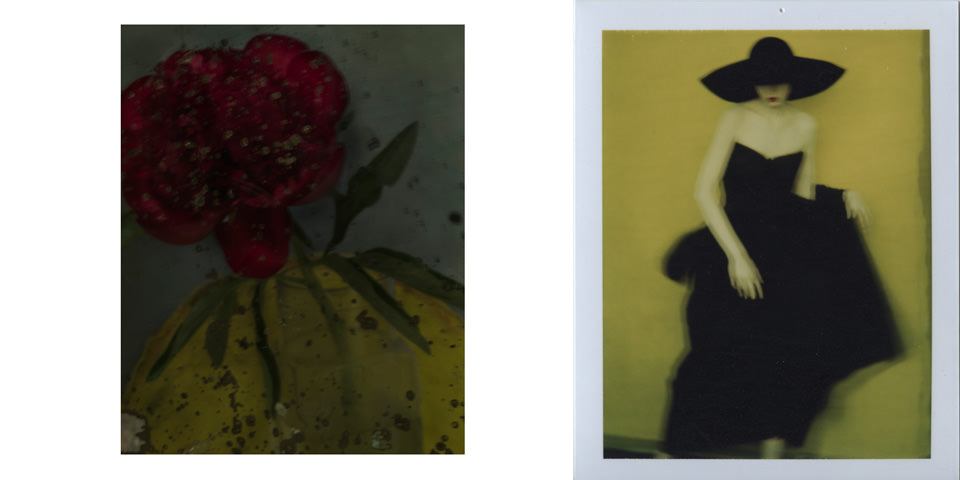
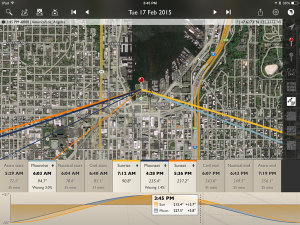
Ausstellungshinweis: Sarah Moon

23 Nov

© sarah moon

Auf das Werk von Sarah Moon verwiesen wir bereits letztes Jahr in zwei Artikeln. Nun zeigen die Deichtorhallen Hamburg von 27. November 2015 bis zum 21. Februar 2016 das Gesamtwerk der Fotografin. Gezeigt werden rund 350 Fotogafien sowie fünf Filme.
kwerfeldein – Fotografie Magazin | Fotocommunity

 
Comments Off on Ausstellungshinweis: Sarah Moon

Posted in Equipment


Moon video recorded with 83x zoom Nikon Coolpix P900 shows Earth’s rotation

30 Jun

With a 2000mm equivalent zoom range, the Nikon Coolpix P900 leads the current ultrazoom class in terms of reach. While there’s no question that the camera has an impressive zoom range, a nature photographer based in Germany has made it ever-so-obvious just how powerful this little ultrazoom is. His YouTube video of the moon shows that at 83x optical zoom the magnification is so powerful, the rotation of the Earth is easily seen as the subject drifts through the frame. Read more

Articles: Digital Photography Review (dpreview.com)

 
Comments Off on Moon video recorded with 83x zoom Nikon Coolpix P900 shows Earth’s rotation

Posted in Uncategorized


25 Photographs of the Moon with Peace and Tranquility

28 Mar

The moon and night sky is a mysterious thing. Photographs of the moon can be tricky, but done well can convey an overwhelming sense of peacefulness and calm. I love doing night photography and when you can get the stars, moon or the Milky Way it’s even better.

Enjoy these images of the moon and allow yourself to star gaze and be inspired:

Photograph Moonlight shadows by Otto Hütter on 500px

Moonlight shadows by Otto Hütter on 500px

Photograph Bats under the moonlight by Weerapong Chaipuck on 500px

Bats under the moonlight by Weerapong Chaipuck on 500px

Photograph Winter Night by Arild Heitmann on 500px

Winter Night by Arild Heitmann on 500px

Photograph Looks like a Vulcano by Gianmaria Veronese on 500px

Looks like a Vulcano by Gianmaria Veronese on 500px

Photograph Lunar Eclipse Over Mt Shasta Revisited by Sean Bagshaw on 500px

Lunar Eclipse Over Mt Shasta Revisited by Sean Bagshaw on 500px

Photograph Dying Earth by Michael  Goh on 500px

Dying Earth by Michael Goh on 500px

Photograph El Matadors View by Ted Gore on 500px

El Matadors View by Ted Gore on 500px

Photograph The Blood Moon by Timothy Green on 500px

The Blood Moon by Timothy Green on 500px

Photograph Road to Nowhere - Supermoon by Aaron J. Groen on 500px

Road to Nowhere – Supermoon by Aaron J. Groen on 500px

Photograph Golden Bay: When Night Falls by Yan Zhang on 500px

Golden Bay: When Night Falls by Yan Zhang on 500px

Photograph Winding Owens by Nagesh Mahadev on 500px

Winding Owens by Nagesh Mahadev on 500px

Photograph BY THE LIGHT OF THE MOON by Michelle Cobble on 500px

BY THE LIGHT OF THE MOON by Michelle Cobble on 500px

Photograph Storybook by Jeff Lewis on 500px

Storybook by Jeff Lewis on 500px

Photograph Pearly Gates to Nirvana by Yuga Kurita on 500px

Pearly Gates to Nirvana by Yuga Kurita on 500px

Photograph The Polarizer by Miles Morgan on 500px

The Polarizer by Miles Morgan on 500px

Photograph Moon by Uccio78 on 500px

Moon by Uccio78 on 500px

(Okay that was a sneaky one – it’s not the moon but I think the image is great so I shared it)

Photograph Ancient Memories by Raza Durrani on 500px

Ancient Memories by Raza Durrani on 500px

Photograph The Old Bridge by Mostafa Hamad on 500px

The Old Bridge by Mostafa Hamad on 500px

Photograph with filter by Kajo_Kamil_Sadlon on 500px

with filter by Kajo_Kamil_Sadlon on 500px

Photograph Paying Reverence To The Rising Moon by Jeff Deveau on 500px

Paying Reverence To The Rising Moon by Jeff Deveau on 500px

Photograph Good Night... by Ahmet Kizilhan on 500px

Good Night… by Ahmet Kizilhan on 500px

Photograph Halo by Michael Bollino on 500px

Halo by Michael Bollino on 500px

Photograph Flight from moon by Michael Priesch on 500px

Flight from moon by Michael Priesch on 500px

Photograph Illuminate my Heart by Sherry Akrami on 500px

Illuminate my Heart by Sherry Akrami on 500px

Photograph Pink Moon  by MO AOUN PHOTO on 500px

Pink Moon by MO AOUN PHOTO on 500px

googletag.cmd.push(function() {
tablet_slots.push( googletag.defineSlot( “/1005424/_dPSv4_tab-all-article-bottom_(300×250)”, [300, 250], “pb-ad-78623” ).addService( googletag.pubads() ) ); } );

googletag.cmd.push(function() {
mobile_slots.push( googletag.defineSlot( “/1005424/_dPSv4_mob-all-article-bottom_(300×250)”, [300, 250], “pb-ad-78158” ).addService( googletag.pubads() ) ); } );

The post 25 Photographs of the Moon with Peace and Tranquility by Darlene Hildebrandt appeared first on Digital Photography School.


Digital Photography School

 
Comments Off on 25 Photographs of the Moon with Peace and Tranquility

Posted in Photography


Weekly Photography Challenge – Shoot the Moon

28 Mar
Luz Adriana Villa

By Luz Adriana Villa

The image above and these other 25 images of the moon might give you a hint as to your challenge this week.

Night sky photography can be challenging and a lot of fun. Now’s the time to get out and try photographing the moon if you haven’t already.

We have several articles on the topic here on dPS if you need assistance:

  • 20 Dos and Don’ts for Shooting the Moon
  • Beyond Full Moon Photography
  • Moon Photography: 6 Tips for Better Moon Photos
  • Moon Photography Made Simple
Sam Javanrouh

By Sam Javanrouh

@lbyper

By @lbyper

Christian Ronnel

By Christian Ronnel

Dylan Toh

By Dylan Toh

Share your shoot the moon images here:

Simply upload your shot into the comment field (look for the little camera icon in the Disqus comments section) and they’ll get embedded for us all to see or if you’d prefer upload them to your favourite photo sharing site and leave the link to them. Show me your best images in this week’s challenge. Sometimes it takes a while for an image to appear so be patient and try not to post the same image twice.

googletag.cmd.push(function() {
tablet_slots.push( googletag.defineSlot( “/1005424/_dPSv4_tab-all-article-bottom_(300×250)”, [300, 250], “pb-ad-78623” ).addService( googletag.pubads() ) ); } );

googletag.cmd.push(function() {
mobile_slots.push( googletag.defineSlot( “/1005424/_dPSv4_mob-all-article-bottom_(300×250)”, [300, 250], “pb-ad-78158” ).addService( googletag.pubads() ) ); } );

The post Weekly Photography Challenge – Shoot the Moon by Darlene Hildebrandt appeared first on Digital Photography School.


Digital Photography School

 
Comments Off on Weekly Photography Challenge – Shoot the Moon

Posted in Photography


Full Moon Photography Using The Photographer’s Ephemeris 3.0

16 Mar

IMG_0450The latest release of The Photographer’s Ephemeris (TPE) releases even more tools to help us photographers get the shots we want. There is just too much for one article, so I am going to focus on a personal favorite subject – full moon photos.

Before handy apps like TPE, LightTrac and PhotoPills, figuring out where the moon might be on any given night took some educating. Pile on top of that the desire to know when the moon was behind, or next to, a specific feature, natural or man-made, and the calculations were beyond anyone lacking a degree in mathematics. But now, it’s all so much easier. Let me show you how I plan on getting a shot of the full moon behind Seattle’s Space Needle this May.

I’ll be using the iPad version of the app which allows for adding in a subject height. Nearly the same functionality is available with the Desktop and Android versions of the app, but the location of items may shift a little. With the desktop and Android version you will not be able to manually add in the subject height but can, using the Pythagorean theorem (and there are plenty apps for it), add in the angle you need.

Pre-planning

To get started, I have decided I want to get a shot of the full moon behind Seattle’s Space Needle. It’s a subject that lends itself well to moon photos. I had a shot in mind that I later confirmed possible after viewing Tim Durkan’s fine example from last year.

Laying out the steps before I open the app, my process will look like this:

  • Find a location where I can see the Space Needle, and one which faces mainly South or West (because of hills, I know shooting to the East is hard and the moon will not appear to the North of the Needle because of being in the Northern Hemisphere).
  • Plot out my location and the location of the Space Needle.
  • Account for elevation change and the height of the Needle.
  • Let the program do its magic.
  • Record my findings and make actual plans.

Finding your location

Loading the app brings up a fairly full featured screen.
IMG_0450

To center the map on your intended location, simply move the map around with your finger until the crosshairs are over your location. You can then tap on the inside of the crosshairs or tap the red observer pin that looks like this:(null)
I placed the location in a park near the shore of Lake Union, a place I know with good visibility of the Needle about 3/4 of a mile away. This will give me a good apparent size relationship of moon to Needle. Many locations can be scouted by using Google Street View.

Next, mark the location of the Space Needle. TPE has a decent search feature, you can use it to quickly find many natural and man-made features around the planet. Just click on the magnifying glass in the upper left and type Space Needle.
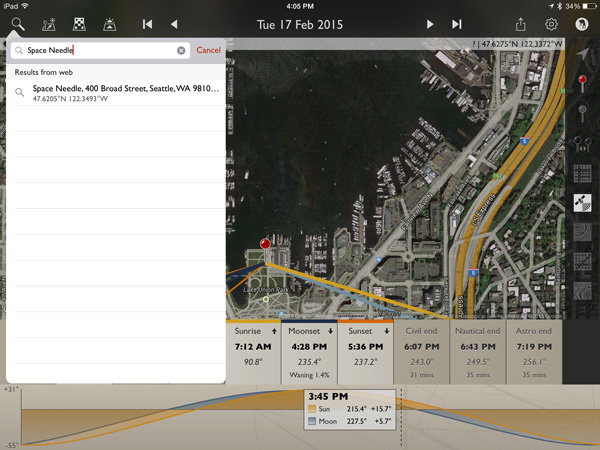
IMG_0453

Now click the Space Needle entry itself and you’ll see three options appear.
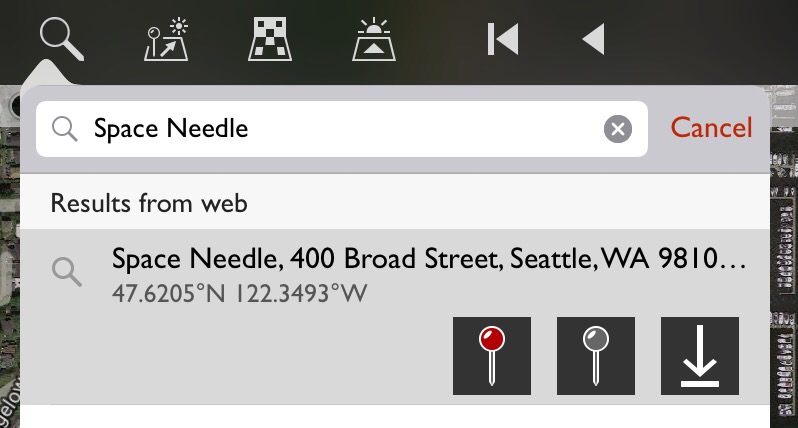
(null)

In order from left to right, these buttons allow you to: center the map on the location as your primary location, set this location as your secondary location (the item you wish to photograph), and the third is an option to save this item as a favorite, making future recall easy without searching. You will want to click on the gray map pin to set the Space Needle as the secondary location.
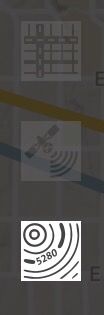
(null)Using geodetic information

To make things easier to see, click on the Google Terrain map set – an option on the right side of the screen that looks like this (image right)

Now the map is a little cleaner and after zooming out you can see the red pin where I’ll stand and the gray pin at the location of the Space Needle. Those orange and blue lines simply show location of the sun (orange) and moon (blue) when they rise, set and current location.
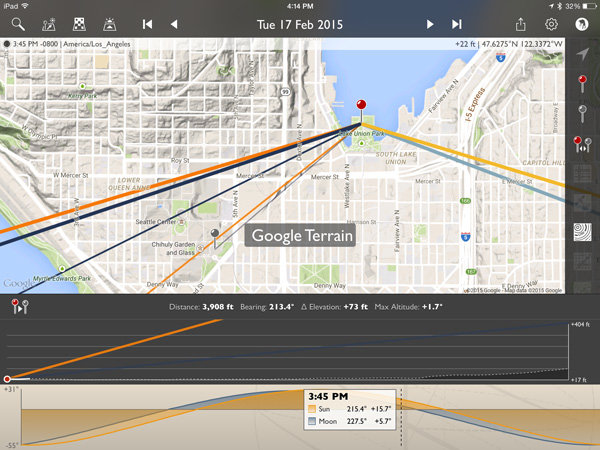
IMG_0457

Notice that the lower display also changed? It now shows the elevation different between the two points, with distance (3,908 feet – can also be set to metric), bearing (213.4 degrees), elevation change (73 feet) and the angle at which you are looking, be it up or down (+1.7 degrees). There is also a nice plot between the points showing elevation differences.

This is great! But it only gives the elevation change at ground level. I need to add in the height of the Space Needle to position the moon properly. A quick wikipedia search tells me the Needle is 605 feet tall.

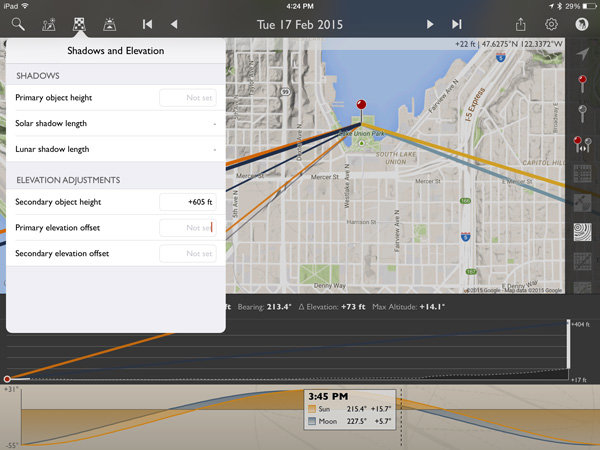
Click on the Shadow and Elevation tool at the top left of the screen, just to the right of the Search feature. Where it mentions “Secondary object height” put in 605 feet for the Space Needle.
IMG_0459

Now on the elevation plot at the bottom of the screen there is a big white bar, representing the height of the Space Needle, on the far right. Perfect!

Magic time

Now let’s have TPE do the heavy lifting and tell us when the moon will be perfectly behind the Space Needle, place the event on our calendar and go find other things to shoot!

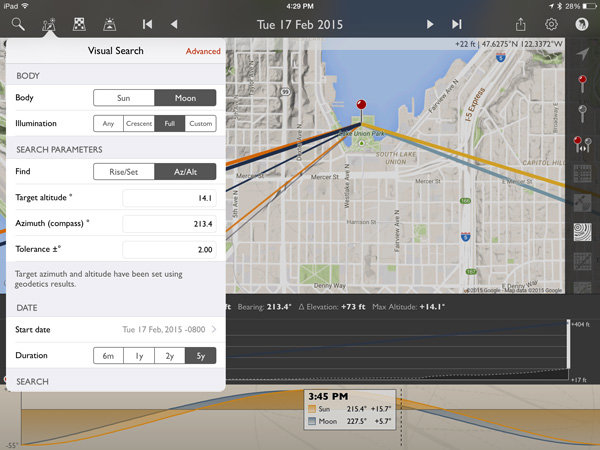
Click on the Visual Search button, it is the one immediately to the right of the Search button on the top left. You will get a drop down that with all kinds of information. Click on the word “Moon” at the top and then “Full” and your screen will look like this:
IMG_0460

The app has filled in the target altitude (14.1 degrees), compass azimuth or bearing (213.4 degrees), and tolerance (2 degrees) for us!

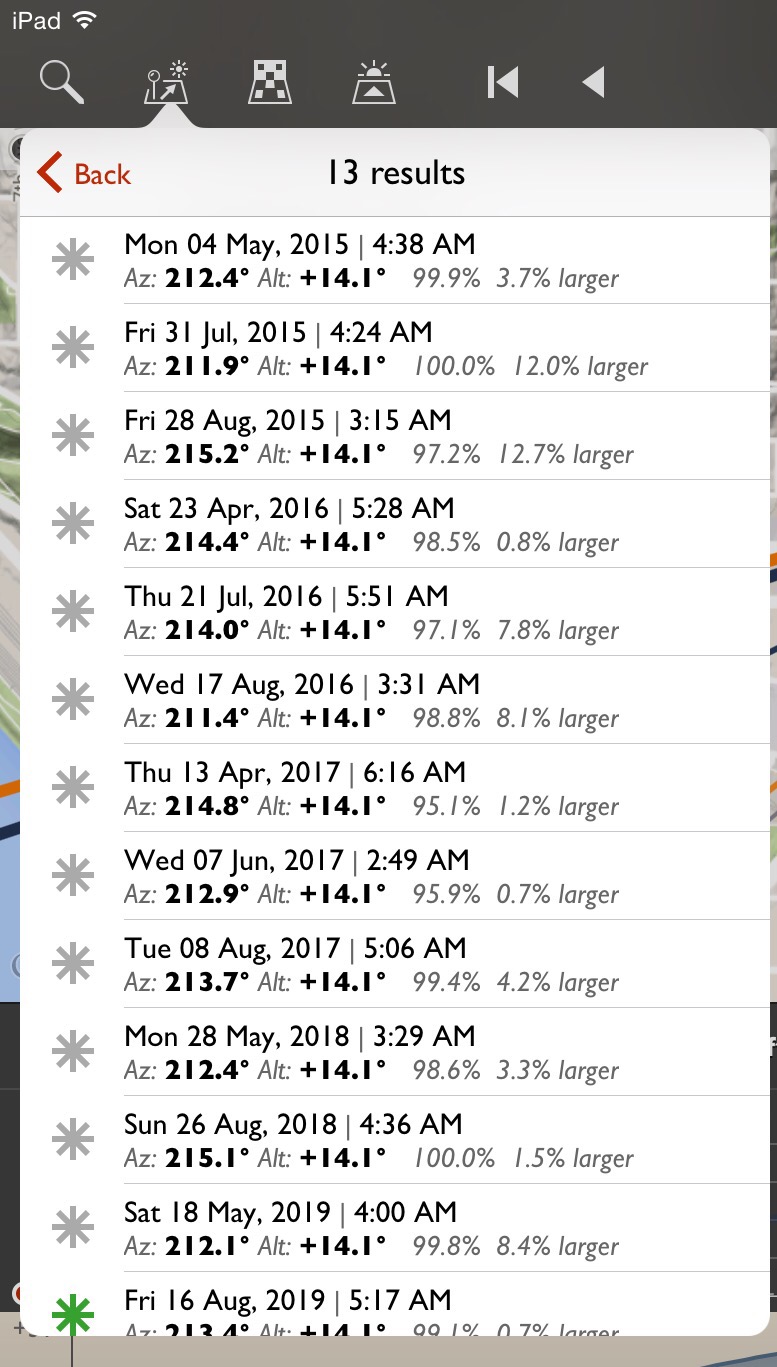
For a first run, to get a full moon centered over the top of the Space Needle, click on the Duration you would like (I picked 5 years in this example) and then Perform Search. You will see a list of results that look like this:
(null)

Saving results

What does all that mumbo-jumbo mean? Quite simply, those are all the dates and times (and exact location of the full moon and how full it will be) that fall within a two degree margin of our requested position. You will notice the one at the bottom for August 16, 2019 has a green asterisk; this simply means the moon will be within .5 degrees of the request.

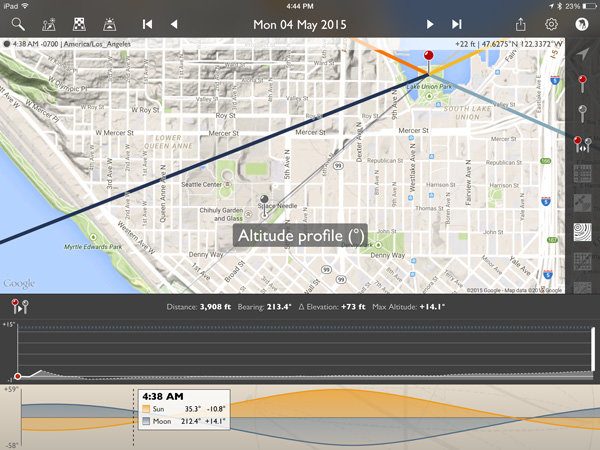
Clicking on the top item for May 4th, 2015 will make the map mimic the conditions at that exact time. Double tap the elevation profile at the bottom and it will show the Altitude Profile where you can see the full height of the Space Needle on the right (tall white bar) and the level of the moon in dotted blue.
IMG_0465

All lined up! We’re now ready to save this information on our calendar or send it to a friend if we like. Click the share button on the upper right and you will see the option for adding to calendar as well as messaging, emailing, etc.
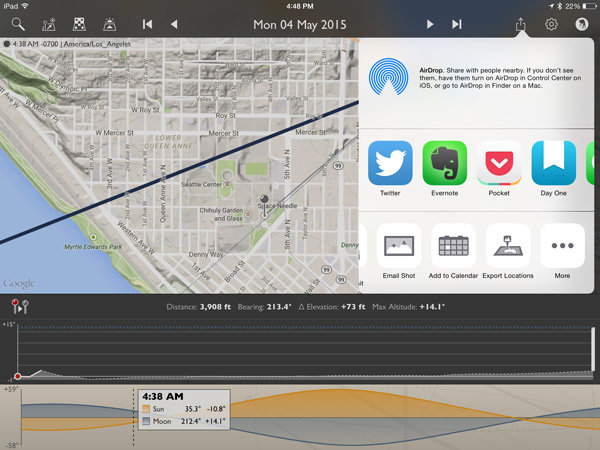
IMG_0466

IMG_0467

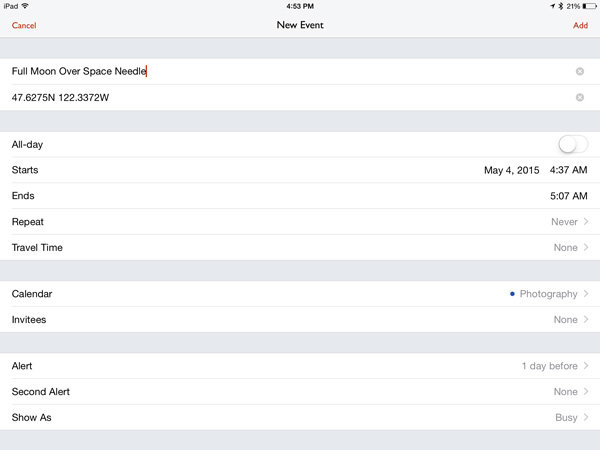
Here’s the calendar add-item screen.

The location is set to the Primary Location in the app. You may want to adjust the time so you arrive early, as it defaults to the exact moment pictured in the app.

The email option includes all the pertinent information to share the details with a friend. It will attach a map and the recipient can open the information in the TPE (if they have it) or on the web browser version.
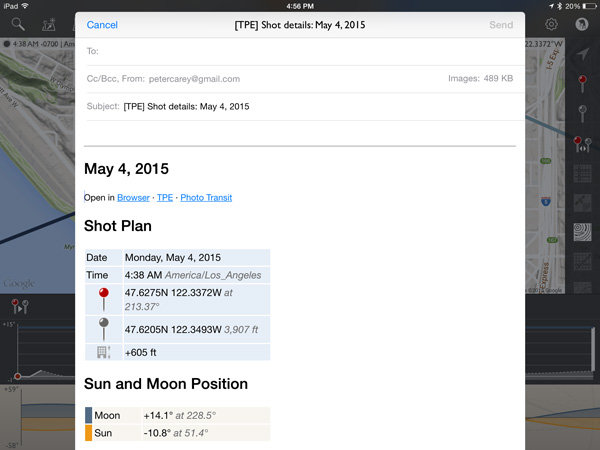
IMG_0468

Conclusion

I left a lot of information out of this article because TPE simply has too many options to describe here. At its most basic though, it is excellent for placing the moon over various subjects.
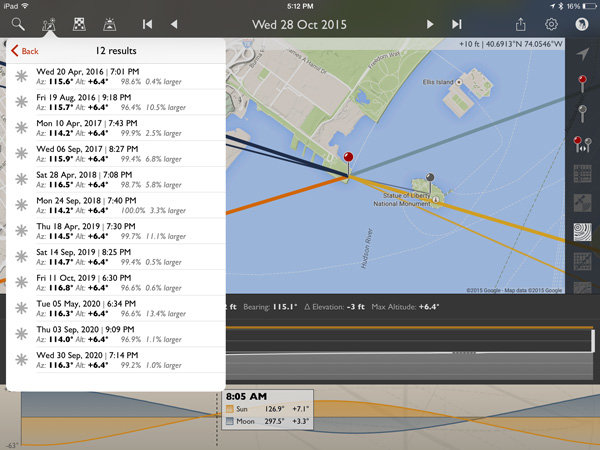
IMG_0469

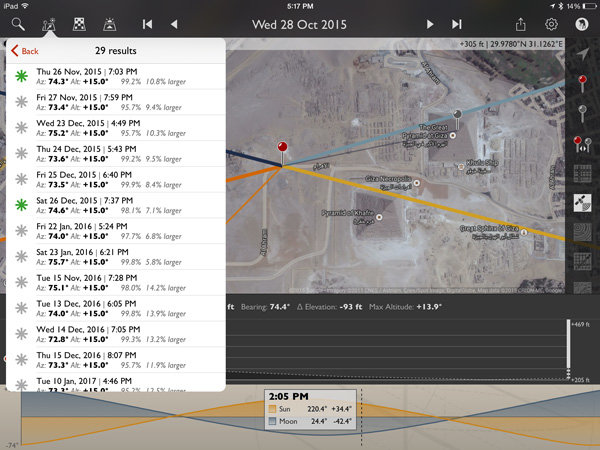
How about a full moon over the Statue of Liberty?
IMG_0470

Or the Great Pyramid of Giza?

All it takes is a quick Wikipedia search for an object’s height and about two minutes in TPE to plan that moon shot you have been dreaming of!

For those wishing to explore further, TPE’s documentation is fairly complete and worth the read to unlock a wealth of photo planning power.

How can you use this tool in your photography?

googletag.cmd.push(function() {
tablet_slots.push( googletag.defineSlot( “/1005424/_dPSv4_tab-all-article-bottom_(300×250)”, [300, 250], “pb-ad-78623” ).addService( googletag.pubads() ) ); googletag.pubads().enableSingleRequest();
googletag.pubads().disableInitialLoad();
googletag.pubads().collapseEmptyDivs( true );
googletag.enableServices();
} );

googletag.cmd.push( function() { googletag.display( ‘pb-ad-78623’ ); } );

googletag.cmd.push(function() {
mobile_slots.push( googletag.defineSlot( “/1005424/_dPSv4_mob-all-article-bottom_(300×250)”, [300, 250], “pb-ad-78158” ).addService( googletag.pubads() ) ); googletag.pubads().enableSingleRequest();
googletag.pubads().disableInitialLoad();
googletag.pubads().collapseEmptyDivs( true );
googletag.enableServices();
} );

googletag.cmd.push( function() { googletag.display( ‘pb-ad-78158’ ); } );

The post Full Moon Photography Using The Photographer’s Ephemeris 3.0 by Peter West Carey appeared first on Digital Photography School.


Digital Photography School

 
Comments Off on Full Moon Photography Using The Photographer’s Ephemeris 3.0

Posted in Photography