RSS
 

Posts Tagged ‘mode’

DJI releases offline mode to calm fears over privacy and security

16 Aug
Photo by Aaron Burden

Earlier this month, drone maker DJI took a huge PR hit when the US Army abruptly stopped using the company’s drones due to ‘cyber vulnerabilities.’ The decision was revealed in a leaked memo, and DJI was left defending its privacy and security practices to a suddenly skeptical public. Today, the company takes its privacy efforts a bit further with the release of a ‘Local Data Mode’ that allows pilots to fly their DJI drones without an internet connection.

The mode was announced yesterday, and it does exactly what it sounds like: when enabled, it stops all data transfer and connectivity between DJI’s apps and the internet. It’s like incognito mode for drones.

DJI uses that internet connection to “ensure a drone has the most relevant local maps and geofencing data, latest app versions, correct radio frequency and power requirements, and other information that enhances flight safety and functionality,” but the company understands that not all customers need or want this functionality to be on all the time.

“We are creating local data mode to address the needs of our enterprise customers, including public and private organizations that are using DJI technology to perform sensitive operations around the world,” DJI Vice President of Policy and Legal Affairs Brendan Schulman says in the press release. “DJI is committed to protecting the privacy of its customers’ photos, videos and flight logs. Local data mode will provide added assurances for customers with heightened data security needs.”

Despite the timing of the release, DJI has told the New York Times that the company has not been in touch with the US Army about its security concerns, and besides, this update seems to have been in the works since before the memo in question went public. Still, this ‘offline’ option feels like a win for privacy advocates and the military alike.

Local Data Mode will be available in DJI’s fleet of apps “starting in the next several weeks”—these include DJI GO, DJI GO 4, DJI XT Pro, DJI Pilot and Ground Station Pro. But be warned, due to some local regulations and/or requirements, it might not be available in all areas.

To find out more, read the full press release below:

Press Release

DJI Develops Option For Pilots To Fly Without Internet Data Transfer

New Local Data Mode Provides Enhanced Data Privacy Assurances

August 14, 2017 – DJI, the world’s leader in civilian drones and aerial imaging technology, is developing a new local data mode that stops internet traffic to and from its flight control apps, in order to provide enhanced data privacy assurances for sensitive government and enterprise customers.

DJI’s flight control apps routinely communicate over the internet to ensure a drone has the most relevant local maps and geofencing data, latest app versions, correct radio frequency and power requirements, and other information that enhances flight safety and functionality. When a pilot enables local data mode, DJI apps will stop sending or receiving any data over the internet, giving customers enhanced assurances about the privacy of data generated during their flights.

“We are creating local data mode to address the needs of our enterprise customers, including public and private organizations that are using DJI technology to perform sensitive operations around the world,” said Brendan Schulman, DJI Vice President of Policy and Legal Affairs. “DJI is committed to protecting the privacy of its customers’ photos, videos and flight logs. Local data mode will provide added assurances for customers with heightened data security needs.”

Because it blocks all internet data, use of local data mode means DJI apps will not update maps or geofencing information, will not notify pilots of newly-issued flight restrictions or software updates, and may result in other performance limitations. However, it will provide an enhanced level of data assurance for sensitive flights, such as those involving critical infrastructure, commercial trade secrets, governmental functions or other similar operations.

“We are pleased about how rapidly DJI’s customer base has expanded from hobbyists and personal drone pilots to include professional, commercial, government and educational users,” said Jan Gasparic, DJI head of enterprise partnership. “As more of these customers have asked for additional assurances about how their data is handled, DJI has moved to address their needs by developing local data mode to provide enhanced data management options for customers who want to use them.”

DJI recognizes the importance of data privacy to its customers. DJI does not collect or have access to user flight logs, photos or videos unless the user chooses to share those by syncing flight logs with DJI servers, uploading photos or videos to DJI’s SkyPixel website, or physically delivering the drone to DJI for service.

DJI publicly committed to protecting its customers’ data privacy in April 2016. In a March 2017 white paper, DJI became the first major drone manufacturer to advocate for protecting the privacy of drone users as the United States and European governments develop regulations to monitor drone flights. No other civilian drone manufacturer there has been as vocal as DJI in protecting the operational and data privacy interests of drone users.

“Local data mode will allow customers to get the most out of their DJI flight control apps while providing added assurance that critical data is not inadvertently transmitted over the internet,” Schulman said. “We are pleased to be able to develop local data mode as part of our drive to serve our customers’ needs as well as advocate for their interests.”

Local data mode has been in development for several months and will be included in future versions of DJI apps, starting in the next several weeks. DJI’s apps include DJI GO, DJI GO 4, DJI XT Pro, DJI Pilot and Ground Station Pro, which run on smartphones and tablets that control the drone or connect to the drone’s remote control unit. The local data mode feature may not be available in locations where an internet connection is required or highly advisable due to local regulations or requirements.

Articles: Digital Photography Review (dpreview.com)

 
Comments Off on DJI releases offline mode to calm fears over privacy and security

Posted in Uncategorized


Motorola Moto Z2 Force Edition comes with dual-cam and depth mode

26 Jul

Motorola has unveiled its 2017 flagship smartphone, the Moto Z2. Unsurprisingly the design is quite similar to the original Moto Z and comes with electronic contacts on the back, allowing for the attachment of Motorola’s Moto Mod accessory modules, such as the Hasselblad TrueZoom camera module.

At 6.1mm the device is very thin and comes with a full-metal shell that features a water-repellent nano-coating. In addition, the 2560×1440 Super AMOLED display is shatterproof, making the Z2 more rugged than most of its competitors in the premium segment of the market.

Android 7.1.1 is powered by Qualcomm’s current top-end chipset Snapdragon 835 but at 2730mAh is smaller than on many other high-end phones, which is probably owed to the thinness of the device.

The Moto Z2 is Motorola’s first smartphone to feature a dual-camera setup. Similar to the concept used in Huawei’s recent top-end phones the Moto combines a Sony IMX 1/2.9″ RGB sensor with a monochrome imager and uses image-fusion technology to optimize detail, noise levels, dynamic range and other aspects of image quality.

A depth-mode for simulating a shallow depth-of-field is on board as well and, compared to previous high-end Moto models, Motorola has significantly improved the panorama mode which can now produce much larger image output and fewer ghosting artifacts on moving subjects.

In video mode the Moto Z2 camera is capable of recording 4K footage and 720p slow-motion video at 240 fps or 1080p clips at 120 fps. The front camera offers a 5MP resolution and comes with a wide-selfie mode. A Pro mode provides manual control over shutter speed and other camera parameters and the DNG Raw format is supported with third-party camera apps.

With the dual-cam, improved panorama and slow-motion modes and new features, the Moto Z2 looks like a very promising update to the original Z2, especially in the camera department. You will be able to pre-order the Moto Z2 Force Edition from tomorrow. The device will be available from August 10 launch at a base price of $ 720.

Key specifications:

  • 12MP dual-cam with Sony IMX 386 1/2.9″ RGB and Monochrome sensors, 1.25µm pixel size
  • F2.0 apertures
  • Dual-LED flash
  • Laser and phase detection AF
  • Depth mode
  • Manual camera controls
  • Raw-support with third-party apps
  • 4K video
  • 240fps/720p and 120fps/1080p slow-motion video
  • 5MP front camera
  • 2560×1440 Super AMOLED ShatterShield display
  • Snapdragon 835 chipset
  • 4/6GB RAM (depending on region)
  • 64/128GB of storage (depending on region)
  • microSD slot up to 2TB
  • 2730mAh battery
  • Water-repellent nano-coating
  • Fingerprint reader

Articles: Digital Photography Review (dpreview.com)

 
Comments Off on Motorola Moto Z2 Force Edition comes with dual-cam and depth mode

Posted in Uncategorized


Firmware v1.1.1 for Canon 5DS and 5DSR fixes HDR mode and level display

20 Jun

Canon has released firmware version 1.1.1 for its EOS 5DS and 5DS R full-frame DSLR models. The new firmware fixes a number of user-reported bugs, including an issue in HDR mode that prevents the camera from completing a full bracket with certain settings.

Other fixes include:

  • Err70 display which with certain combinations of settings
  • Correction of level display when the camera is held in vertical orientation with the hand grip pointing downward
  • Correction of a power-up delay of approximately five seconds when using certain CF cards

You can download firmware version 1.1.1 for the Canon EOS 5DS and EOS 5DS R now on the Canon website.

Articles: Digital Photography Review (dpreview.com)

 
Comments Off on Firmware v1.1.1 for Canon 5DS and 5DSR fixes HDR mode and level display

Posted in Uncategorized


Manual Mode or Exposure Compensation – Which is Best?

01 Jun

As you may know, cameras often get exposure wrong. The question is, what do you do when you realize that the exposure settings suggested by your camera are not right?

You have two options. One is to switch to Manual mode and set the ISO, aperture, and shutter speed yourself. The other is to use exposure compensation (and Aperture or Shutter Priority mode).

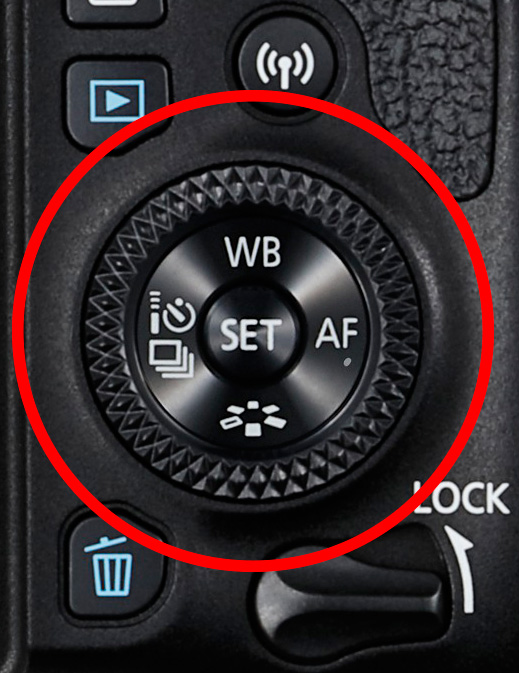
The best solution depends on the situation in which you find yourself, plus the configuration of your camera’s dials. For example, with a Canon EOS digital SLR it’s easy to apply exposure compensation by moving the Quick control dial on the back of the camera. It’s so simple you don’t need to take your eye away from the viewfinder.

Exposure compensation versus manual mode

The Quick control dial on the EOS 77D.

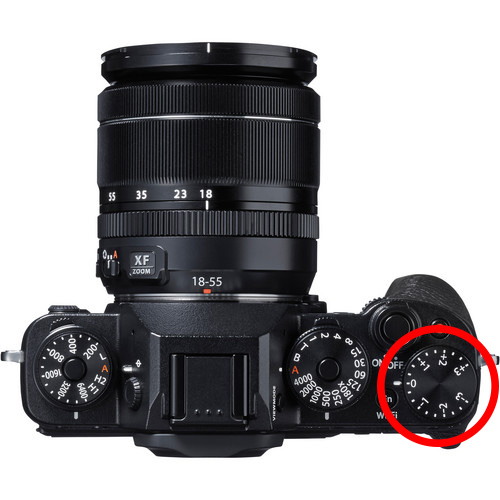
On my Fujifilm X-T1, the exposure compensation dial is on top of the camera. It’s harder to get at and nearly impossible to adjust without taking your eye away from the viewfinder. But the aperture ring on the lens makes it easy to go to Manual mode and adjust exposure by changing the aperture. An optional live histogram in the viewfinder helps you see if exposure is accurate before pressing the shutter (an advantage of some mirrorless cameras).

Exposure compensation versus manual mode

The exposure compensation dial on the Fujifilm X-T1 is much harder to reach.

These are good examples of how hardware can push you in one direction or another. My Canon SLRs pushed me towards exposure compensation, and my Fujifilm X-T1 pushes me towards using Manual mode.

Using Manual mode

Let’s look at Manual mode first. In Manual, you set the ISO, aperture, and shutter speed yourself. There are certain situations when using Manual mode (as opposed to Programmed Auto, Aperture Priority or Shutter Priority with exposure compensation) is beneficial. Let’s look at a few.

1. Shoot in Manual when the light level is constant

If the ambient light level is steady, you don’t need to change the exposure settings once you have decided which ones to use. Automatic exposure modes are influenced by the reflectivity of the subject and the exposure reading can change even if the light levels don’t.

That makes Manual mode ideal for this kind of situation. Once you’ve set the exposure you don’t need to change it. I like to use Manual mode when making portraits in natural light. Once I’ve set the exposure I’m free to concentrate on directing the model.

Exposure compensation versus manual mode

2. Shoot in Manual when you’re photographing landscapes and using a tripod

In this situation, you have plenty of time to assess exposure. Manual mode is ideal because you can set a low ISO (for image quality), a small aperture (for depth of field) and change the shutter speed to suit the light levels. It’s also easy to make adjustments to allow for any polarizing, neutral density or graduated neutral density filters you may be using.

If you’re shooting landscapes at dusk, while the light is fading, Manual mode also works well. After you take a photo, just check the histogram. As it moves to the left, which it will as the light fades, dial in a slower shutter speed to compensate.

Exposure compensation vs. manual mode

3. Use Manual Mode when you’re using manual flash

If you’re using a flash set to manual the output from the flash is the same every time. In that situation, it’s best to adjust the camera settings manually so the exposure is consistent from frame to frame.

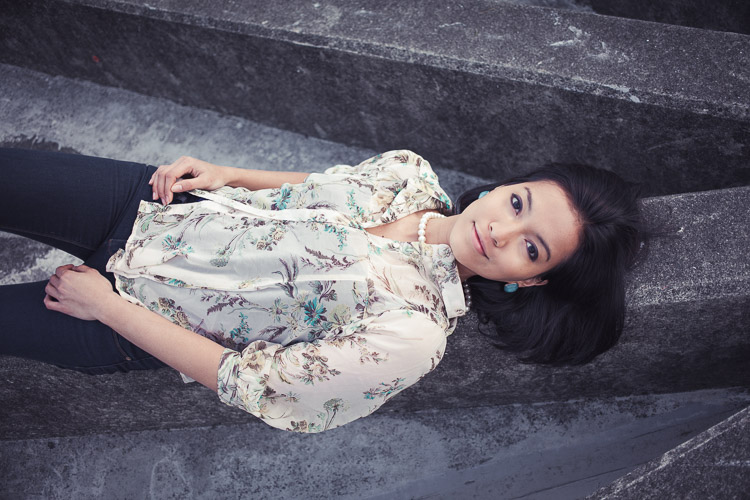
To create the portrait below, I worked with both the camera and flash set to manual. Setting your flash to manual only works when the flash to subject distance doesn’t change.

Exposure compensation vs. manual mode

4. Use Manual mode for long exposure photography

If you’re doing long exposure landscape photography and your shutter speed (exposure time) is longer than 30 seconds then you need to use Bulb mode. This is another form of Manual mode. Except that rather than telling the camera what shutter speed you want it to use, you do so by using the camera’s bulb setting and a remote release.

I used Bulb mode to make this landscape photo with a shutter speed (exposure time) of 82 seconds.

Exposure compensation vs. manual mode

Using Exposure Compensation

The alternative to Manual mode is to set your camera to an automatic exposure mode and use exposure compensation to override the camera’s settings.

The three best automatic exposure modes to use are Aperture Priority, Shutter Priority or Programmed auto. Other exposure modes, such as Landscape and Portrait, don’t give you enough control. On some cameras (such as Canon EOS) you can’t adjust exposure compensation when using one of these modes.

These are some of the situations where exposure compensation may be better than Manual mode.

1. Use Exposure Compensation for street and travel photography

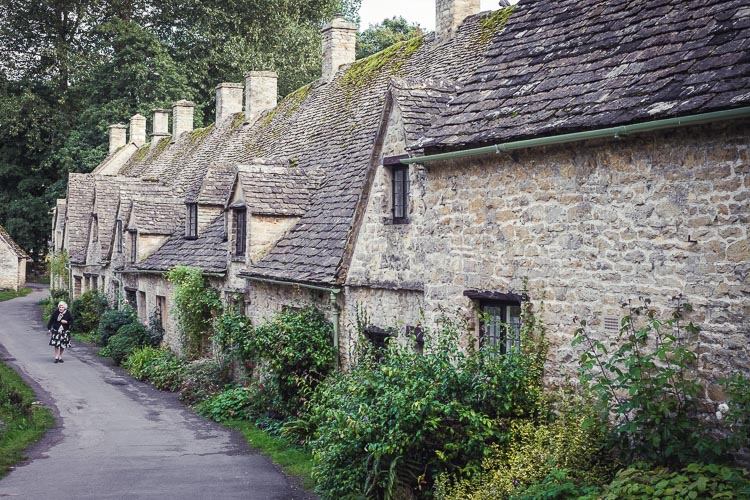
If you are taking photos of people in the street the required exposures can vary wildly. One moment you may take a photo of something in the sun, the next you may photograph something in the shade. The sun may also be going in and out between the clouds.

In this situation, you want to concentrate on finding interesting things to photograph and creating a good composition. If you have to stop and think about exposure, then you may miss the shot. Automatic exposure modes help greatly.

Exposure compensation vs. manual mode

2. Use Exposure Compensation when you are using on-camera flash in an automatic mode (TTL)

If you have the on-camera flash set to an automatic mode, then the camera needs to be set to evaluative or matrix metering, the camera’s most advanced metering mode, to take full advantage of that. The camera and flash work together to calculate the correct exposure.

Setting your flash to automatic (TTL or E-TTL) works best when the subject to flash distance is constantly changing. Using automatic means your camera can adjust the output of the flash as it needs to.

3. Use Exposure Compensation when shooting sports or wildlife

This is another situation where the light level is likely to change frequently and you need to concentrate on tracking the action and capturing important moments. You don’t want to be thinking about exposure when trying to capture the peak of the action in sports or photographing fast-moving wildlife. Let your camera do the work, and use exposure compensation if you have to.

Conclusion

Everybody works differently, so the points in this article should be taken as suggestions only. The more experienced you become as a photographer the more you will learn to judge whether you should use Manual mode or Exposure Compensation to take control of your exposure.

It may make it easier to think of it in terms of time. If you have more time to think about your camera settings, then use Manual mode. If you have less thinking time and need to be ready to react quickly to capture the action, then use an automatic exposure mode and Exposure Compensation.

Do you prefer to use Manual mode or an automatic exposure mode with exposure compensation? Please let me know in the comments below,


Want to learn how to get perfect exposure on your digital camera? Then check out my new ebook Mastering Exposure and say goodbye to all your exposure problems!

The post Manual Mode or Exposure Compensation – Which is Best? by Andrew S. Gibson appeared first on Digital Photography School.


Digital Photography School

 
Comments Off on Manual Mode or Exposure Compensation – Which is Best?

Posted in Photography


Apple ad hints that its Portrait mode is so good it will save your family business

16 May

They say a picture’s worth a thousand words. But in a tongue-in-cheek new Apple ad, a picture turns out to be worth hundreds of new customers, thanks to the iPhone 7’s Portrait mode. The minute-long spot features a quiet family barbershop that sees its business boom after posting photos of its clients and their sleek new haircuts in the window. The photos, of course, are taken with the iPhone 7’s bokeh-imitating Portrait mode. 

Photographers will likely find the premise a little tiresome, as they’ve heard for ages how easy it is to replace their experience and skill set with an incredible new camera/auto mode/photo app. But as much as we want to dislike this ad, it’s just too darn upbeat and clever to hate. See what you think.

Articles: Digital Photography Review (dpreview.com)

 
Comments Off on Apple ad hints that its Portrait mode is so good it will save your family business

Posted in Uncategorized


Sony releases short film showing off Xperia XZ Premium super-slow motion mode

12 May

Sony Mobile has released the first super-slow-motion short movie that has been completely recorded on a smartphone. All of the movie’s scenes were recorded by 120 amateur videographers from 21 countries on the Tróia peninsula near Lisbon, Portugal. The footage was shot under the direction of award-winning director Chris Cairns and using the new Motion Eye mode of the Sony Xperia XZ Premium smartphone that is capable of capturing moving images at 960 frames per second.

Articles: Digital Photography Review (dpreview.com)

 
Comments Off on Sony releases short film showing off Xperia XZ Premium super-slow motion mode

Posted in Uncategorized


Samsung Galaxy S8 expected to come with 1000 fps video mode

18 Mar

The launch of Samsung’s upcoming flagship smartphone Galaxy S8 is only a couple of weeks away and if the rumors are to be believed the new device’s 12MP camera will offer a 1000 fps video mode that would allow for a 33x super-slow-motion mode. 

That is more than four times slower than the 240 fps slow-motion mode in the current Galaxy S7. According to a report by SamMobile, Samsung is integrating an additional DRAM layer into the image sensor which acts as a buffer. This sounds like very similar technology to what Sony is using in the recently announced Xperia XZs and XZ Premium devices which offer a 960 fps slow-motion mode at 720p resolution. However, SamMobile’s sources claim Samsung is not using the Sony sensor in the S8. Unfortunately at this point there is no information about resolution or maximum recording duration of the mode. 

Other camera-related information includes an 8MP front camera with AF and 3.7MP additional image sensor that is used just for iris scanning. It appears Samsung will not follow the dual-cam trend with its upcoming models but the super-slow-motion mode, if well-executed, could definitely make up for a lack of dual-cam features.

Articles: Digital Photography Review (dpreview.com)

 
Comments Off on Samsung Galaxy S8 expected to come with 1000 fps video mode

Posted in Uncategorized


Lightroom Mobile update brings Raw HDR capture mode

07 Mar

Adobe today released an update for its Lightroom Mobile app for both iOS and Android that comes with an HDR feature that makes use of the Raw capture capability of the latest mobile devices. The new HDR mode first scans the scene to determine the correct exposure range and then captures three DNG files. After capture the files are automatically aligned, merged, de-ghosted, and tone-mapped. The end result is a 16-bit DNG that combines the benefits of the Raw file format and HDR, and can be processed in the same way as the HDR technology in Adobe Camera Raw and Lightroom.

Compared to existing smartphone HDR modes, this method offers better dynamic range, according to Adobe. Members of Adobe’s Creative Cloud service get the additional benefit of automatically syncing files and edits with their desktop.

The algorithms of new HDR mode do require powerful hardware and are therefore limited to a relatively small number of devices, though. On iOS it works with all devices that are capable of capturing DNG files, such as iPhone 6s, 6s Plus, 7, 7 Plus, iPhone SE, or the iPad Pro 9.7. On Android at this point only the Samsung Galaxy S7, Galaxy S7 Edge and the Google Pixel models are supported. However, Adobe says it is working on getting the software to run on a wider range of devices.

If you have a compatible device and would like to try Adobe’s new Raw HDR mode, there is a tutorial available on the Adobe Lightroom Youtube channel.

Articles: Digital Photography Review (dpreview.com)

 
Comments Off on Lightroom Mobile update brings Raw HDR capture mode

Posted in Uncategorized


Huawei announces P10 and P10 Plus with ‘Leica-style’ portrait mode

27 Feb

Huawei has launched its latest flagship smartphone duo at the Mobile World Congress today, the P10 and P10 Plus. The new models come with a refreshed design that features 2.5D curved Gorilla Glass 5, an all-metal backplate with a sandblasted finish and Huawei’s hyper-diamond cut on the edges. Both devices come in a range of colors including new green and blue options.

With a dual-camera that combines a 12MP color sensor with a 20MP monochrome chip the specification of the Leica-designed camera in the Huawei P10 is the same as in the Mate 9. Both lenses have an F2.2 aperture and the color variant also features optical image stabilization. As before, color and monochrome image information is combined for better image detail, higher dynamic range and lower noise levels in the Huawei P10 images. There is also a laser-assisted autofocus, two-tone LED flash and 4K video recording.

New on the camera is the ‘Leica-style’ portrait mode that uses 3D face detection and applies a combination of fake bokeh and adjustable illumination and ‘beautification’ effects to your portrait subjects. It works on both the main camera and the 8MP front camera that comes with an F1.9 aperture. The front camera can also automatically adjust the framing for individual or group selfies.

Images can be viewed and framed on a 5.1″ IPS display with 1080p resolution and the Android 7.0 operating system is powered by Huawei’s HiSilicon Kirin 960 octa-core chipset and 4GB of RAM. 64GB of internal storage can be expanded via a microSD slot. Compared to the P9 the battery size has increased from 3,000 to 3,200 mAh and fast charging is supported as well. The Huawei P10 will launch in March in Europe and many other regions at 649 Euros (approximately $ 685). Unfortunately US comsumer will have to wait a little longer for the new device.

The P10 Plus comes with a very similar design to the P10 but ups the display specification to 5.5″ and Quad-HD resolution. Like the P10 it is powered by the Kirin 960 chip, but in addition to the 4GB RAM/64GB storage version you can opt for a 6GB/128GB variant. In addition the P10 plus comes with slightly faster F1.8 apertures in the lenses of the dual-camera and a larger 3,750 mAh battery. The 64GB option will be priced at 699 Euros ($ 740), the 128GB model will set you back 799 Euros ($ 845).

Huawei P10 key specifictions:

  • Leica-branded dual-camera with 12MP color and 20MP monochrome sensors
  • F2.2 aperture
  • OIS on the color sensor
  • 27mm equivalent focal length
  • On-sensor phase detection and laser-assisted AF
  • Daal-tone LED flash
  • 4K video
  • 8MP front camera with F1.9 aperture
  • Manual camera control
  • 5.1″ IPS display with 1080p resolution
  • Android 7.0
  • HiSilicon Kirin 960 octa-core chipset
  • 4GB RAM and 64GB storage
  • microSD support up to 256GB
  • 3200 mAh battery
  • Stereo speakers
  • Fingerprint reader

Articles: Digital Photography Review (dpreview.com)

 
Comments Off on Huawei announces P10 and P10 Plus with ‘Leica-style’ portrait mode

Posted in Uncategorized


The Benefits of Shooting in Auto Mode

14 Feb

I can still hear the words I was told when I bought my first DSLR ringing in my ears just as clearly as if I heard them this morning. “You have to learn to shoot in manual mode.” When I started to get serious about photography I had no idea what aperture, shutter, or ISO meant, and thought P meant Professional. I didn’t know what I was doing at all and because everyone seemed to say so, I dove right into YouTube tutorials and online articles about how to get away from the dreaded Auto Mode setting on my camera. After all, no serious photographer would be caught dead using Automatic…right?

The Benefits of Shooting in Auto Mode

Auto Mode – don’t knock it until you try it. And even then, maybe give it a second chance.

The truth, like most things in life, isn’t so black and white. Auto mode, while often derided by online commenters and popular YouTube photographers, is not the scourge upon modern photography that some people claim. While it might not be the best way to get exactly the picture you want, and learning to shoot in manual is, of course, a rewarding and hugely beneficial way to increase your skills as a photographer, there is nothing inherently wrong with using Auto.

In fact, there are some clear benefits to using Auto. So, I’d like to explore some of its advantages and offer a few reasons why you shouldn’t feel so bad if you set your expensive DSLR camera on that familiar green Auto setting.

It just works – usually

It is certainly true that you have a much better idea of the picture you are trying to take than your camera does. However, it’s also true that you may not know how to (or care) make your camera do what you want it to do, in order to get the picture you want. Photographers sometimes talk about

use-auto-mode-gum-ball

Photographers sometimes talk about the decisive moment, which was a term used by Henri Cartier-Bresson to describe that instant in which all the elements within the frame come together to form the perfect photographic opportunity. Unfortunately, many amateur photographers will wistfully watch that moment pass by because they are fiddling with aperture controls and thinking about shutter speeds.

I’m all for learning more about how to use your camera (I write for DPS and that’s what we do!) but sometimes it’s nice to just put your camera in Auto mode and let it do all the grunt work for you.

The trade-off

Modern cameras are filled to the brim with all sorts of high-tech enhancements compared to their counterparts from days gone by, and along with this has been a string of steady improvements to their built-in Auto mode. For the most part, shooting in Auto will give you a well-exposed picture that will probably suit your needs. The downside is that your camera might make different choices than you prefer when it comes to selecting an aperture, shutter speed, or ISO value, and if there is not enough light you will likely see the pop-up flash rear its ugly head.

use-auto-mode-food

This is when you may start thinking about learning to use some of the other modes on your camera. But, if you don’t mind the creative decisions your camera makes or just don’t feel like learning the complexities of the Exposure Triangle, then, by all means, go ahead and shoot in Auto Mude. After all, it’s about the picture, and if you’re happy with the results then why not keep using it?

Auto lets you focus on other things too

When you take your camera out to record a moment, memory, or special event, there is usually a lot going on around you and that little black box in your hand. There may be people, kids, music, animals, wind, rain, or a combination of all that, plus much more.

An experienced photographer will know exactly how to set her camera to get the kind of pictures she is looking for and will know just what settings to tweak and change in order to get the right images. However, even experienced photographers can get a bit overwhelmed when there is so much going on, and for casual photographers, it is even worse. It’s times like these when Auto mode can be your best friend. You should not only not feel embarrassed about using it, but my advice is to openly embrace that comfortable little green setting.

The Benefits of Shooting in Auto Mode

Missing the shot due to not knowing the settings

One of the worst times for a photographer is that sinking feeling when you realize you just missed the shot. Even photographic veterans have been known to leave the lens cap on from time to time. If you are just getting started with photography or trying to improve your skills, then fiddling with aperture controls or trying to figure out the right metering mode for a particular scene is enough to make you want to toss your camera out the window in frustration. Many a photographer has missed the opportunity to take a picture because they were wrestling with camera settings and trying to get things just right before clicking the shutter.

By contrast, using Auto can free you up to take pictures while also taking in the rest of the experience around you. Instead of worrying about the ISO, trying to figure out what shutter speed to use, or wondering if you need to use the flash, Auto mode will just take care of these for you. The trade-off is that the results might not be exactly what you wanted (maybe you were going for a shallower depth of field, or would have preferred to not use the flash). But at least you’ll walk away with some pictures while also having the freedom to talk to other people, take in the scene, and be present in the moment. That is unless you accidentally leave your lens cap on!

The Benefits of Shooting in Auto Mode

Auto can help you understand your camera

One of the biggest barriers to entry for people who want to learn more about cameras and photography is all the technical details inherent in the art form. Understanding the basic elements of exposure is enough to make your head swim. On top of that, there are all sorts of other considerations like white balance, focal length, megapixels, etc. The list goes on and it often seems like a cruel and unforgiving proposition that is more alienating than inviting.

Fortunately shooting in Auto mode is a great way to dip your toes into the more complex aspects of photography, provided you don’t mind doing a little bit of legwork on your own.

The Benefits of Shooting in Auto Mode

Embedded in the metadata of every single picture, whether taken on an iPhone or a high-end DSLR, is a whole slew of information known as EXIF data. Most image editing programs, even basic ones like Apple Photos or online solutions like Flickr and Google Photos, let you peek inside the EXIF data to find out more about the technical underpinnings of a photo.

What Auto mode can show you

If you take pictures using Auto mode all the details such aperture, shutter speed, and ISO are saved in the EXIF data along with a slew of additional information like your camera model, whether the flash fired, what type of metering mode was used, even the location of the picture if your camera has GPS capability. Looking at the EXIF data of your photos, and other photos you see online is a fantastic way to learn about the technical aspects of photography so you can get a better sense of how the picture was taken. It’s almost like getting a movie on DVD or Blu-Ray and watching the behind-the-scenes bonus features or listening to the director’s commentary, in that you can get a good idea of what creative decisions were made in order to get the final result.

If you have ever wanted to get more serious about shooting in Manual or one of the semi-automatic modes on your camera, try shooting in Auto and then using the EXIF data to replicate that same shot in Manual mode. Then tweak the settings like aperture or shutter speed and you will start to see how changing these values affects the final image. But be careful – doing this can open you up to a much larger world of photography by helping you learn to creatively control your camera in ways you might have never thought possible!

The Benefits of Shooting in Auto Mode

Conclusion

There’s some kind of a stigma attached to Auto mode, where people sometimes think you are less of a photographer if that’s all you use. I liken this to people who get into arguments about Ford versus Chevy, Android versus iPhone, or any of the other sorts of silly things over which people tend to squabble. If you use Auto and you like it,

If you use Auto Mode and you like it, then by all means, keep using it! Certainly, it’s nice to have more control over your camera, but some people find that by giving up control and just using Auto they are free to focus on other things that matter more to them. If that sounds like you, then by golly (as my dad would say) put your camera mode dial to the green square and click away.

googletag.cmd.push(function() {
tablet_slots.push( googletag.defineSlot( “/1005424/_dPSv4_tab-all-article-bottom_(300×250)”, [300, 250], “pb-ad-78623” ).addService( googletag.pubads() ) ); } );

googletag.cmd.push(function() {
mobile_slots.push( googletag.defineSlot( “/1005424/_dPSv4_mob-all-article-bottom_(300×250)”, [300, 250], “pb-ad-78158” ).addService( googletag.pubads() ) ); } );

The post The Benefits of Shooting in Auto Mode by Simon Ringsmuth appeared first on Digital Photography School.


Digital Photography School

 
Comments Off on The Benefits of Shooting in Auto Mode

Posted in Photography