RSS
 

Posts Tagged ‘Master’

28 October, 2013 – The Master Never Stops Being The Student

28 Oct

Following Michael’s bemoaning the banality of this year’s PhotoPlus Expo in New York City, Nick Devlin writes that he attended the show, and can’t disagree that this was a slow year for new bling. But in a corridor of meeting rooms below the gear-porn, the art of photography was alive and well. 


  WIN AN ANTARCTIC EXPEDITION
WORTH USD $ 15,000 


The Luminous Landscape – What’s New

 
Comments Off on 28 October, 2013 – The Master Never Stops Being The Student

Posted in News


The Zen Guide to Photographing Stars Like the True Master You Are!

23 Aug

Our fascination with the stars has lasted for eons. So it is no surprise that so many photographers rotate their lens into a vertical postion to capture these natural wonders! But as many of you may have already found out, photographing stars can be a little tricky, as many factors come into play, and certainly the most irritating is that, Continue Reading

The post The Zen Guide to Photographing Stars Like the True Master You Are! appeared first on Photodoto.


Photodoto

 
Comments Off on The Zen Guide to Photographing Stars Like the True Master You Are!

Posted in Photography


Master These Five Lightroom Sliders and Your Photos Will Pop

19 Jun

a Guest Contribution by John Davenport from Phogropathy

Have you ever opened up Lightroom (or any other professional level editing program) and said, “Oh my – where do I start?” If so then this post is probably right up your alley.

Today I’m going to show you how to take the process out of processing photos and how you can get some great results simply by learning how a handful of sliders work. After you learn these basics you can start to dig deeper into the program and learn how to bring out even more of the hidden details in your photographs.

before&after1.jpg

The Seven Lightroom Sliders to Master First

Lightroom is filled with all sorts of options from drop down menus to sliders and all this can make get started for the first time overwhelming, especially if you’ve had no editing experience in the past, so today we are going to look at the very basics of Lightroom.

When you break it down there are five key parts of almost every photo that you’re going to want to adjust and those are as follows: mid-tones, shadows, highlights, sharpness and white balance. We will tackle all of these areas by using just a handful of sliders in the basic tab of Lightroom. To get here simply click on “Develop” and then if it isn’t opened already click on the “Basic” tab.

Now let’s get started!

Exposure

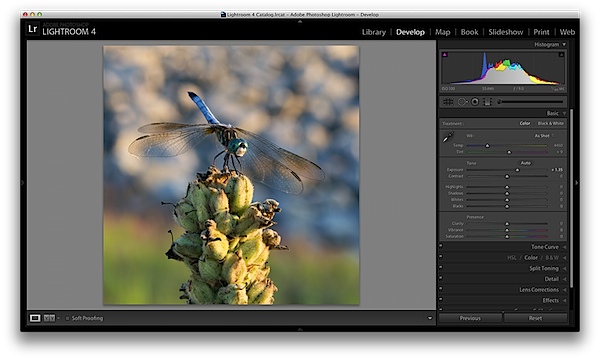
When I process photos I like to start with the exposure slider, as it’s a good overall adjustment to get started. It is designed to adjust the mid-tones of the photo and therefore will help to add or reduce to the overall brightness of the scene. To lighten an underexposed photo simply slide the exposure slider to the right – if you’d like to reduce the brightness then slide it to the left.

Watch your histogram and you’ll start to see the data shift from side to side as you make the changes. In the photo below I added just a small bit to the exposure to brighten it up slightly.
exposure.png

Contrast

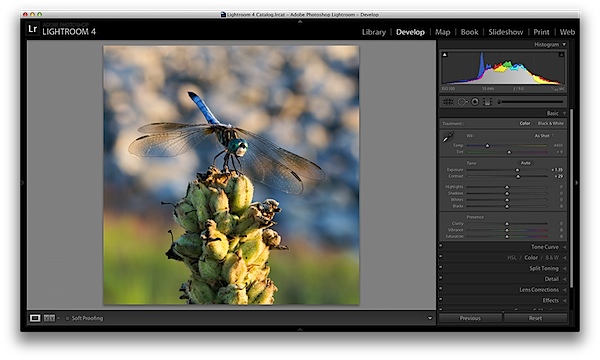
Next up is the contrast slider, which will help to define the areas of lightness and darkness. In the vast majority of my photographs I’ll end up increasing the contrast slightly as it tends to help bring out details and make the photo “pop” a bit more.

As you watch the histogram you’ll notice that the data will either get stretched out or be pushed together depending on which way you go. The more contrast you apply the more defined the difference between lights and darks will get which can be observed in the stretching of the histogram.

In my dragonfly photo I pushed the contrast up slightly which helps to get the subject separated from the background a bit more and adds a bit more crispness to the photo.
contrast.png

Shadows/Highlights

One of the best features in Lightroom 4 are the Shadows and Highlights sliders. (Note: if you’re using an older version of Lightroom you’ll do something similar with the Fill Light and Recovery sliders, but they’re not nearly as powerful).

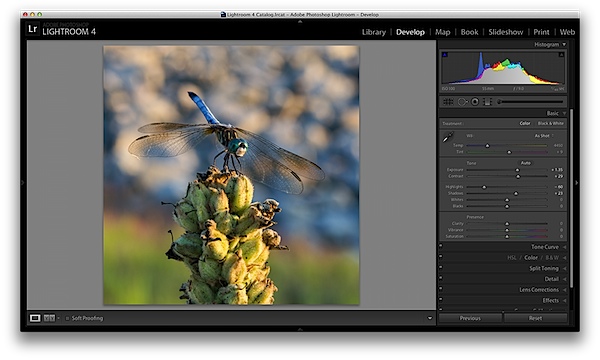
These two sliders work in opposite directions. The more detail you want in your highlights the lower you’ll drop the slider, for more detail in the shadows you’ll increase the slider. Make sure you’re aware that these do come at costs and you’re not going to be able to get detail out of blown out or completely black areas of your photo – there must be data there to recover for these to work.

Again as you watch the histogram when you make the changes you’ll notice that the shadows slider has an effect on the data towards the left side of the mid-tones and the highlights slider will work on an area to the right. The black and white sliders (which we aren’t talking about today) will have an effect on the very edges of the histogram in much the same manor.
HighlightsShadows.png

Clarity

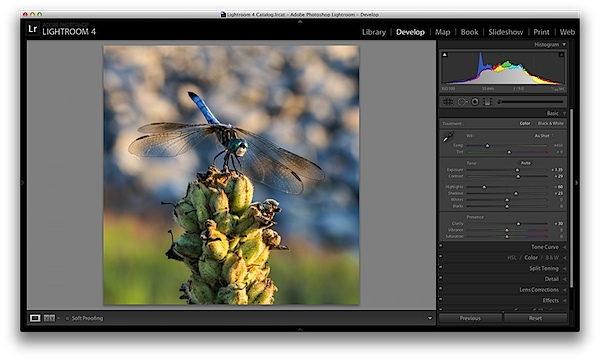
There is an entire area of Lightroom dedicated to sharpening your images, but the clarity slider is a good place to start with if you’re trying to keep things simple. You won’t have as fine of control over the process, but you will be able to help crisp up your images a bit by using one simple slider.

As you’ll notice when you start moving this slider around it works in much the same way as the contrast slider, just on a finer detailed level. Again, in the vast majority of my photos I’ll be adding a bit of clarity to give the photo the punch it needs, but often times in portraits you might end up toning down the clarity to give that soft look to your subject’s face.
clarity.png

White Balance

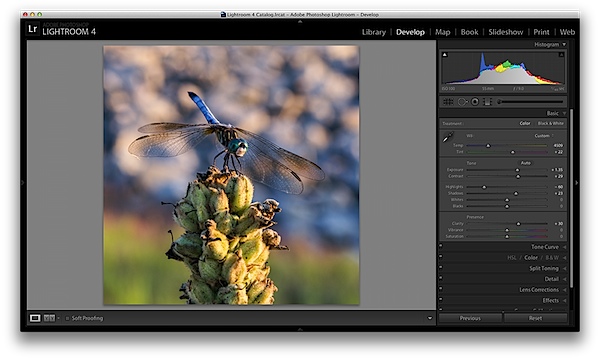
Finally the temperature and tint sliders control the white balance of your photo. For the time being I’d suggest just using the Lightroom presets as they do a decent job of getting into the ballpark and make it a lot easier to deal with than trying to figure out the right amount of warmth and tint to add or subtract.

However, if you want that little extra control in your hand then use the “Temp” slider to adjust the color temperature of your photo. Moves to the right will produce a warmer scene and to left will cool your scene off.

The “Tint” slider is used more for minor adjustments to remove or add unwanted green or magenta colors from the scene and will often be used to get skin tones correct. However, there are people who use this slider for more artistic purposes (play with it and you’ll see what I mean).
whitebalance.png

One Small Note

If you’re photographing in RAW you’ll see more options available to you and have more control over the final outcome of your image, if you’re a JPEG shooter some options I talked about today will be limited as a result of the smaller file sizes and the compression that has already taken place in your camera. You can read more about RAW photography here.

A Few More Before and Afters

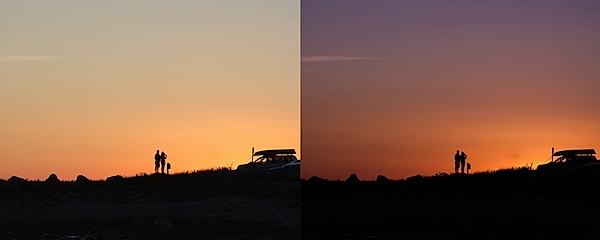
Here are a few more before and after images that I processed in a similar manner using only the techniques talked about in this post. It’s truly amazing how much just a few minor tweaks can change your photo and just imagine what can be done once you dig a bit deeper. If you’d like more tips on Lightroom editing feel free to subscribe to my YouTube channel.

before&after2.jpg

before&after3.jpg

before&after4.jpg

John Davenport is an avid photographer and blogger who shares his photography on his Facebook page and runs a weekly video series on how to edit photos in Lightroom.

Post originally from: Digital Photography Tips.

Check out our more Photography Tips at Photography Tips for Beginners, Portrait Photography Tips and Wedding Photography Tips.

Master These Five Lightroom Sliders and Your Photos Will Pop


Digital Photography School

 
Comments Off on Master These Five Lightroom Sliders and Your Photos Will Pop

Posted in Photography


How to Master Sunrise Photography in the Most Effective Way Possible

13 May

Sunrise photography is underappreciated. Heck, many people take the sunrise for granted; after all, it happens every day! If this is the way you actually feel, you are missing out on a golden opportunity to capture some of the most breathtaking pictures on Earth. People seem to be more captivated by sunsets, but that’s really regrettable when you think about Continue Reading

The post How to Master Sunrise Photography in the Most Effective Way Possible appeared first on Photodoto.


Photodoto

 
Comments Off on How to Master Sunrise Photography in the Most Effective Way Possible

Posted in Photography


8 Places For Shooting You Have To Master Before Taking Your Camera Elsewhere

03 Apr

It happens to all of us. Regardless of experience or skill level, at some point, we’ve all thought, “I have no idea where to take pictures!”. We’ve run out of new, fresh ideas and are seriously considering abandoning any photography this weekend. Of course, we know that we haven’t literally run out of locations to shoot, we just aren’t thinking Continue Reading

The post 8 Places For Shooting You Have To Master Before Taking Your Camera Elsewhere appeared first on Photodoto.


Photodoto

 
Comments Off on 8 Places For Shooting You Have To Master Before Taking Your Camera Elsewhere

Posted in Photography


How To End Exposure Problems and Master Metering Modes in 5 Minutes

27 Mar

You pull out an impressive piece of equipment. Her eyes widen. Did she lick her lips? The pressure’s on now. Yes, she definitely licked her lips. When you declare with total confidence, to a beautiful woman, that you’re a  photographer, there are potential benefits and downsides. Suddenly she wants you to take photos of her in the night sky, with Continue Reading

The post How To End Exposure Problems and Master Metering Modes in 5 Minutes appeared first on Photodoto.


Photodoto

 
Comments Off on How To End Exposure Problems and Master Metering Modes in 5 Minutes

Posted in Photography


Sarah Moon: A Master Speaks

29 Jan

Sarah Moon on Photography

“How can one live without hope and longing?”
-Sarah Moon

Sara Moon and her work have always been a big inspiration for me. Her work is soulful, it’s work that obviously comes from a very deep and emotional person because it provokes the viewer in a deep and meaningful way. Her work is pure. I’m sure she has never had her work in photoshop, ever. I love that about it. It’s grainy, soft focused, blurry at times and utterly flawless. I recently found this video and 5 seconds in, I was hooked. To hear one of the great masters of fashion photography speak her mind about the art and the craft is a gift. And so I listened and learned. I replayed one section over a few times. It was so beautiful, the way she described her process of shooting fashion. It reminded me of my own process, my own desire to capture a moment, an instant where everything makes sense to me and the line between reality and delusion is blurred. I believe magic resides on that line, and magic is what I as a photographer, try to create. I want to seduce my viewers and please my audience with visual pleasure. The section I am speaking of is where she talks about how she has the model in front of her but she’s not “seeing” the shot. So she waits. The model becomes discouraged. She take a few photographs to appease the model but still, nothing. She begins to panic, telling herself she doesn’t want to be a photographer anymore ( I can’t tell you how many times I say this to myself and others. You’d be surprised, probably). But then something changes! Maybe, she says, I’m at the right place at the right time. Or maybe it’s because she starts to believe in it. But for a split second she sees a sparkle of beauty passing by and then everything goes so quickly within that stillness and she’s carried away….at last she likes what she is seeing and she can’t stop finding it and then losing it. All day long she keeps on, because it once existed.


And that is absolutely the process for me of taking photographs. Chasing something I see that lasted a second. A moment of grace. A moment of beauty. Sometimes it can never be recaptured.Sometimes it’s gone, disappeared, never to return. But I’ll tell you what….. I’m going to die trying.


Some of Sarah’s work:


Fashion Photography Blog

 
Comments Off on Sarah Moon: A Master Speaks

Posted in Uncategorized


Master Professional HDR Photography

23 Jan

Our friends at SLRLounge have released a 3-DVD guide, teaching you how to master professional HDR photography.

  • 13 Hours of Comprehensive Workshop Instruction
  • Create 25 professional HDR images using supplied RAW files
  • Master Bracketed HDR, In-Camera HDR, Single-Shot HDR, Panoramic HDR and more
  • 3 Photomatix Presets
  • Lightroom 4 Presets & Brushes

You will also learn about using alternative software, like Aperture, Capture One, Nik HDR Efex and Photoshop

The DVDs are in high definition at 720p, with software instruction at 1080p.

As you can see, if you are looking to master HDR photography then this is the best educational resource around.

The DVD set is selling for $ 149, but visit the HDR photography DVD page and click the discounts tab to see how you can save up to $ 30.

dslrBlog

 
Comments Off on Master Professional HDR Photography

Posted in Photography


Master of Rock-n-Roll Couture! Digital Photo Pro Magazine

19 Dec

My Interview and Work Featured in the
Master’s Special of DPP this Month!

I love Digital Photo Pro Magazine. And I LOVE their title for my story. You can only imagine my happiness when they sent me an email requesting an interview with me to do a write up about myself and my fashion photography for their Master’s Issue. You can read the Full Article Here. First of all, the word “Master” sort of hit me sideways. I don’t consider myself a Master yet, but I was very moved by the compliment. It isn’t every day that a magazine like Digital Photo Pro writes me and tells me that they think I’m a master and would like to do a story about me!

At any rate, enough said. I just want to share the article with you. And if you follow my work, it would be nice to pick up a copy of the magazine. If you have not heard of Digital Photo Pro, it is a great magazine for any photographer, honestly.  They write great articles featuring photographers like Indira Cesarine and David Alan Harvey, who also are in the Master’s Special Edition. they share the latest information on gear and technology as well as monthly profiles on photographers that we all admire. Not to mention, it has great business advice and tips for both photographers starting up their new businesses to people like myself who constantly need to stay in the know on the latest business practices. You can subscribe and save if you’re interested in getting DPP sent to you in the mail.

Enjoy the article!


Fashion Photography Blog – A Resource for Fashion Photographers, Created by One.

 
Comments Off on Master of Rock-n-Roll Couture! Digital Photo Pro Magazine

Posted in Uncategorized


Cities on Rails: Mobile Master Plan Turns Trains into Towns

01 Nov

[ By WebUrbanist in Architecture & Cities & Urbanism. ]

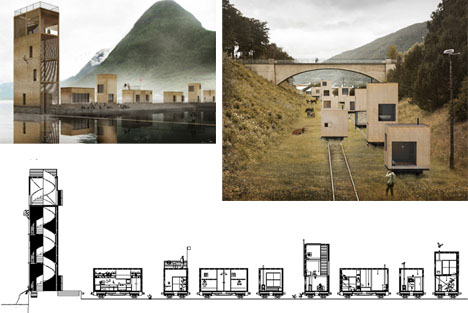
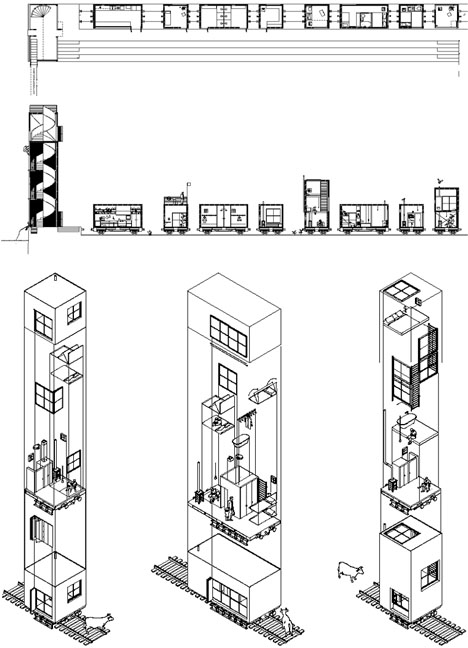
Modular thinking is brilliant and infectious, expanding and spreading from industrial-revolution technologies to three-dimensional printing and beyond. But how big can modularity get? Imagine the same concept applied to cities that move, grow and shrink on demand, gaining or shedding functions and spaces as needed.

Spoiler alert:  science-fiction writer China Mieville (of whom this author is a serious fan) first envisioned a permanent mobile life on rails in Iron Council, where residents deploy tracks in front of (then pull them up behind) an ever-moving rogue locomotive. Then in Railsea, he expanded this idea in a world where every inch of land is covered by iron rails and wooden ties. It sounds like far-fetched fantasy, but could something like this work in reality?

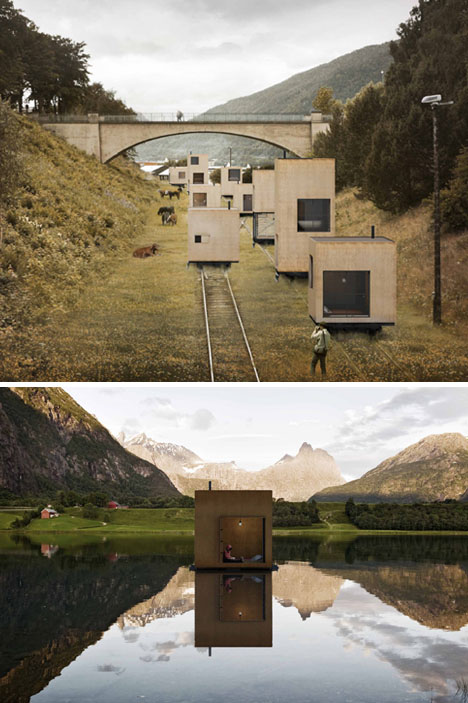
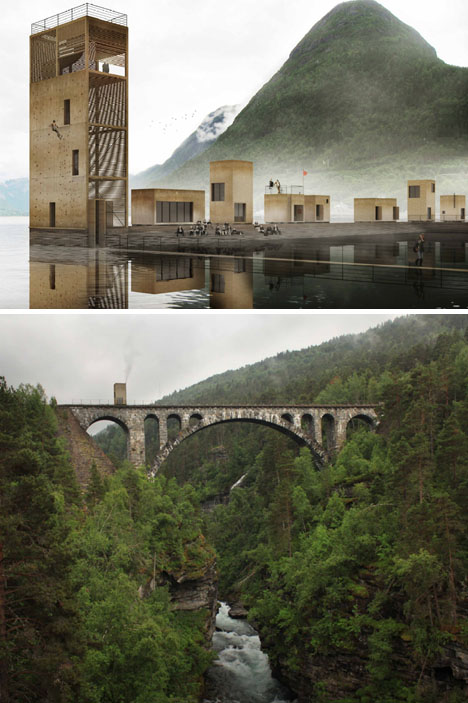
The Swedish architecture firm Jagnefalt Milton asks and answers this question in their daring and award-winning design of A Rolling Master Plan, conceived of as a way to utilize existing rail routes to shift entire towns – or even cities – worth of people and places.

Consider seasonal migrations, for instance: festivals, markets, concerts and other events that move throughout the year. What if they could take their architecture with them as they traveled? Then there are hotels, restaurants and other commercial functions that see demand change over time as well as by season. What if they could deploy rooms or eateries around a country at will? Sure, it is conceptual, but the real-life applications are astonishing once you start thinking about ways buildings could adapt if only they could move more freely.


Want More? Click for Great Related Content on WebUrbanist:

Rolling Out a Master Plan: Movable City on Rails

A concept for a Norway city that acts as a gateway to the country’s fjords puts public buildings on rails, creating a portable town that expands in the summer.
3 Comments – Click Here to Read More »»


24 Tales of Ghost Towns and Abandoned Cities

What in the world could cause entire cities to become abandoned? Here are twenty-four haunting real-life ghost villages, towns and cities from around the world.
86 Comments – Click Here to Read More »»


Share on Facebook


[ By WebUrbanist in Architecture & Cities & Urbanism. ]

[ WebUrbanist | Archives | Galleries | Privacy | TOS ]


WebUrbanist

 
Comments Off on Cities on Rails: Mobile Master Plan Turns Trains into Towns

Posted in Creativity