RSS
 

Posts Tagged ‘Magic’

Magic Cement: Hidden Concrete Patterns Appear with Water

27 Nov

[ By WebUrbanist in Design & Furniture & Decor. ]

water activated concrete decor

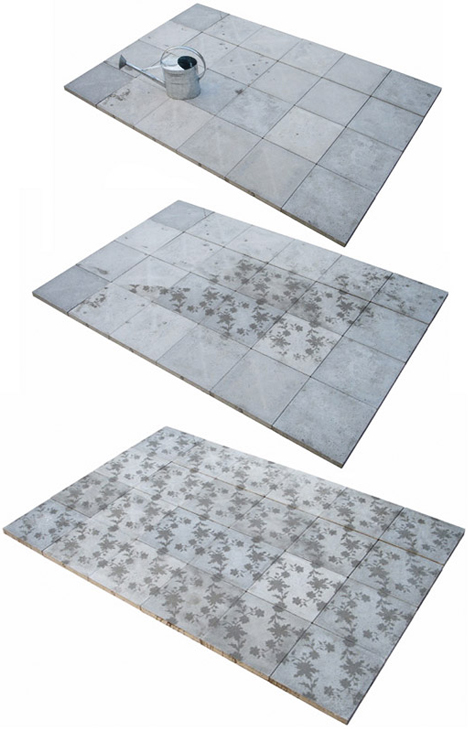
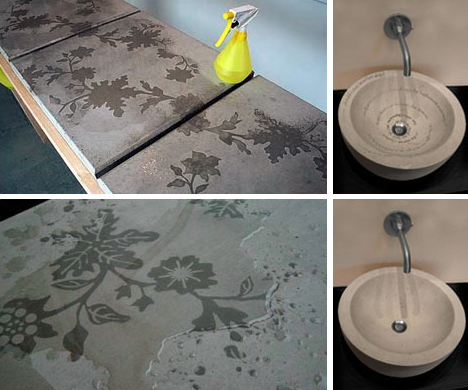
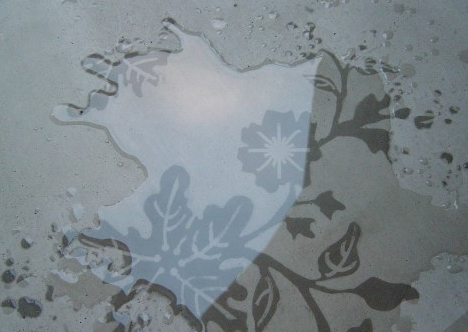
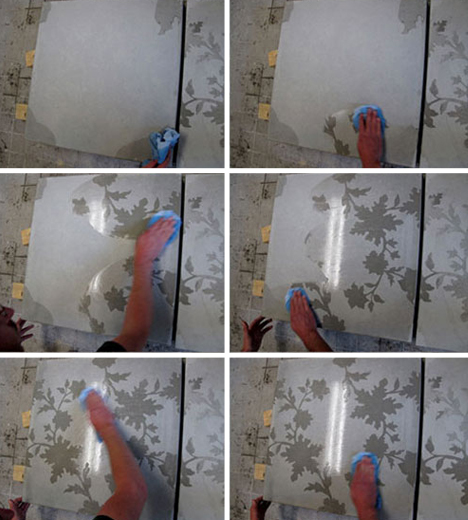
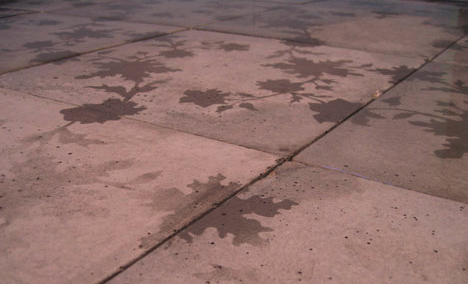
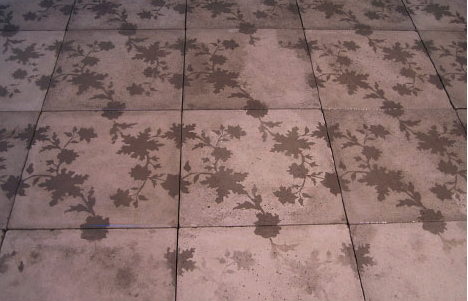
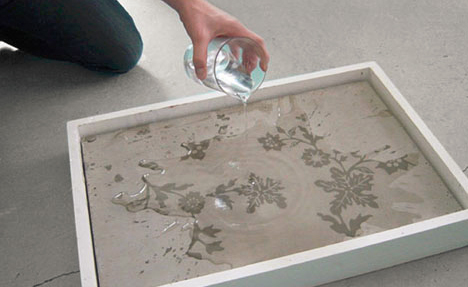
The writing is on the walls, but only when they get wet – that is when the secret messages or hidden designs appear in these seemingly innocuous concrete surfaces, like a durable and built-in version of Neverwet graffiti.

water time lapse reveal

The project is called Silent Poetry and its creators, Frederik Molenschot & Susanne Happle, have started with a high-contrast approach: organic forms hidden in strict geometric slabs, but any other patterns are equally compatible with the approach.

water applications cement design

water hidden cement pattern

The underlying magic-caliber, moisture-sparked trick works whether the material is drizzled on by the rain, doused in running water, touched by steam or impacted by condensation on a hot and humid day, making for innumerable creative possibilities both inside and outdoors.

water reveals secret patterns

Picture a public sidewalk, parking lot or city center on the one hand or a private walkway or concrete-tiled bathroom on the other. But also consider the range of applications from wayfinding in urban settings to domestic decorations on front decks or walkways that appear with the morning dew, using either modular precast tiles or larger poured-in-place slabs.

water pavement art design

water revealing floral repetitive

From the designers: “The possible applications of solid poetry are various: either at home in the bathroom, in the garden, in saunas and dance clubs, where the humidity is high or public spaces like bus stops or pavements. All forms of solid poetry have in common that they change the whole setting; they are surprising and have a life of their own.”

Share on Facebook


[ By WebUrbanist in Design & Furniture & Decor. ]

[ WebUrbanist | Archives | Galleries | Privacy | TOS ]


WebUrbanist

 
Comments Off on Magic Cement: Hidden Concrete Patterns Appear with Water

Posted in Creativity


3 October, 2013 – Black Magic Pocket Cinema Camera Review

03 Oct

Whereas the rate of change in the still camera industry seems to have reached something of a plateau, video is rife with developments. A small Australian company called Black Magic has just started shipping the Blackmagic Pocket Cinea Camera which is shaking up the video marketplace.

I have just spent the past week working in the field with it and my review is now online. Also published today is an article titled The Making of Algonquin Autumn, which describes the process of making a short film with the BMPCC over this past weekend.


"Having been to Antarctica with Michael and Kevin, I would say after having traveled the world and shot nearly my entire life as an exhibiting photographer,  it was one of my highlights in my life and I talk about it, all the time.  The images and experience of seeing something visionary and nearly extinct from the world, to see and experience the wildlife and scenery that does not fear humans is amazing.  The images I shot there won me two Smithsonian awards and nearly 18 other international awards". – Tim Wolcott

 Find Out More Now
These Expeditions Will Sell Out Quickly. They Always Do


The Luminous Landscape – What’s New

 
Comments Off on 3 October, 2013 – Black Magic Pocket Cinema Camera Review

Posted in News


Storefront Transformer: Magic Box Reprograms Empty Space

25 Sep

[ By WebUrbanist in Architecture & Offices & Commercial. ]

modular shop design concept

From urban blight to versatile site, one modular cube can convert unused storefronts of New York City into flexible destinations – community workshops one day, performance spaces or pop-up shops the next. Think: AirBNB for retail space meets coworking venue and co-op incubator all in one kit of parts.

pop-up-animation

Architecture Commons describes the “miLES [made in the Lower East Side] Storefront Transformer [as] a versatile set of furnishing and amenities to program any storefront – essentially a 6ft cube that can be easily transported and subdivided to roll through any storefront door.”

modular cube deployment options

The idea is to make any particular configuration easily obtained and changed on demand. “When unfolded, the Transformer provides functional elements such as shelving, partitions, tables, seats, stage, as well as infrastructure such as lighting, WIFI, power strips, speakers, projectors, and PA system so you have all the basic ingredients to create your own pop-up!”

modular store pieces parts

Their current Kickstarter campaign aims to fund a prototype to be built and installed later this year in one of the 200+ empty store fronts on the Lower East Side of Manhattan.

community modular space program

“Imagine a shape-shifting storefront, one space, many possibilities: from an independent arts space one week to designer fashion boutique the next; from cooking classroom on Thursday to locavore snack bar on Friday.”

modular pop up themes

The goal is to provide a boon for all parties involved, including the building owner, local community and those who could use a bit of space but can’t afford full-time rent.

storefront popup weekly events

storefront activation modular program

“We make it quick and easy to turn underutilized storefronts into anything you can imagine. We give entrepreneurs and artists an easy and affordable way to showcase their work. The neighborhood gets a variety of vibrant programmed uses in a previously vacant space. Landlords get short-term rental income and increased visibility to help them find a longer-term tenant for their space. It is a win-win proposition for multiple stakeholders. “

Share on Facebook


[ By WebUrbanist in Architecture & Offices & Commercial. ]

[ WebUrbanist | Archives | Galleries | Privacy | TOS ]


WebUrbanist

 
Comments Off on Storefront Transformer: Magic Box Reprograms Empty Space

Posted in Creativity


The Magic of Digital Nature Photography [BOOK REVIEW]

08 Sep

The Magic of Digital Nature PhotographyI like these books for more than the obvious reason that they contain a wealth of help in their pages.

For one thing they’re an easy read so, after a hard day behind the camera, you can relax at home and read it for pleasure, not only soaking up all the useful info but enjoying the largish pictures within its pages.

Author Rob Sheppard intentionally laid out all the practical info and creative suggestions you would need to take your images to a higher level: which lenses and accessories are best for the purpose; the pluses and minuses of RAW vs JPEG; how do you stalk an animal? How about landscape composition?

Satisfying it may be, but many amateurs are unaware their work is just that: amateur. Sure, it takes effort, but it is worth while to lift your game, tune up your senses and place your image making on a higher plane.

Sheppard confesses that he has enjoyed photography since he was a kid and remembers entering a B&W print of a local scenic spot in the local newspaper’s photo contest and recalling his pride in the photo — but it didn’t win!

He still enjoys being out and about with a camera, having shot images from Peru to Newfoundland, Florida to Washington and admits he wants to ‘get you excited about getting out and taking photographs of your own special subjects.’

First the spiritual: Sheppard believes that ‘nature photography definitely deepens, widens and expands our sense of life. He believes you can shoot pictures of your favourite subjects; most times you can shoot many shots of your favourite subjects and yet capture totally different images than another person may take.

A touchy feely sort of book? You betcha!

In a chapter titled ‘Connections’ Sheppard asserts that whilst we may have many connections to the natural world, these are not always recognised. He suggest you connect with the subject in the picture, then connect again with the subject when you look at the final image. The final pleasure comes in sharing the image with others, helping them also to connect with the subject.

Then down to practicalities: choice of camera is important but what may work well for one person may not be OK with another. Educate yourself about differing camera types, decide on which type of nature photography you wish to pursue and make sure you can tote your camera into the field, making sure you don’t spoil your adventures with a pile of gear that weighs you down.

In a section titled ‘Megapixels and Quality’ he comes down heavily on the hype over pixel count: after all, megapixel counts are less about image quality and more about size.

Useful chapters follow on lenses, suitable focal lengths for scenic work, suitable camera mounts. Then follow discussions on exposure; lens aperture vs shutter speed; working in auto vs Program AE vs aperture or shutter priority vs manual exposure; reading a screen histogram; ISO settings; how to determine white balance.

Without light you can’t capture too much in the way of a digital scenic! That much is obvious. But what quality of light? Hard or soft? Front lit or backlit? And its colour?

There follows some handy help on how to model and shape the light on your scenic using reflectors or diffusers, by warming it with a change to the white balance, a change to the exposure, adding another light source, adding a grad filter etc.
The general tone of the book is more in the nature of help rather than a pile of techy details, which makes it an easy and encouraging read.

If you’re into scenics, this is for you!

But, as I said, don’t expect ‘a pile of techy details!’

Author: R Sheppard.
Publisher: Pixiq.
Distributor: Capricorn Link.
Length: 192 pages.
Size: 28x22x12mm.
ISBN: 978 1 4547 0813 1.
Price: Get a Price on The Magic of Digital Nature Photography at Amazon (currently 39% off)

Post originally from: Digital Photography Tips.

Check out our more Photography Tips at Photography Tips for Beginners, Portrait Photography Tips and Wedding Photography Tips.

The Magic of Digital Nature Photography [BOOK REVIEW]


Digital Photography School

 
Comments Off on The Magic of Digital Nature Photography [BOOK REVIEW]

Posted in Photography


The Magic of Natural Light: Twilight

01 Sep

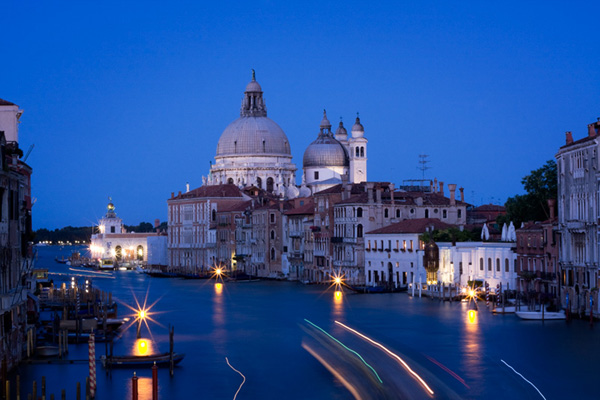
The Magic of Natural Light: Twilight photo

One of my favourite times for taking photos is at twilight. Especially during the spring and summer, the seasons when the light is at its most magical at this time of evening.

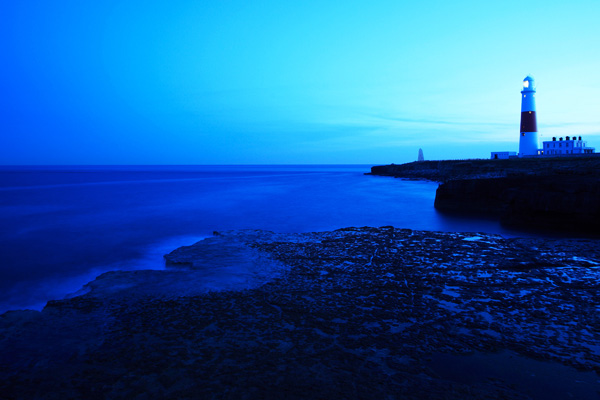
I’ve always liked the idea that great photography happens on the edges. Twilight, the transition between night and day, is an edge. While the low light levels can be technically challenging, the reward in terms of quality of light are well worth it. I think of it as the ‘magic hour’. You may also see it referred to as the blue hour, a reference to the colour of the ambient light as night falls.

What is twilight?

Twilight is the time that marks the transition between day and night. It starts after the sun has set and continues until night completely falls. The quality of light during twilight can be truly beautiful, especially after a bright sunny day. The duration depends on your distance from the equator. In the tropics night falls very fast and twilight is short. Go far enough north (or south) in the summer and it can last for over an hour.

Landscape photography during twilight

One of the more obvious subjects that benefits from the quality of light at twilight is the landscape. Now, I’m sure most photographers are aware that one of the best times to photograph the landscape is during the golden hour – the hour or so before the sun sets. The sun is low in the sky and the warm, raking light it casts can bring the best out of a beautiful location.

Whenever I’m on location and see other photographers, I’m always a little surprised how early most of them leave. For the few that wait until the sun has set the reward is often an intensely beautiful, soft golden glow that gradually fades as night falls. This type of light is especially beautiful if you are by the sea or a lake as the water reflects the light. The opening photo is a good example of that.

The Magic of Natural Light: Twilight photo

There are two approaches to taking landscape photos in low light. One is to use a high ISO setting and shoot with the camera hand-held. I took the photo above at 1600 ISO shortly after sunset.

The Magic of Natural Light: Twilight photo

To take full advantage of the beautiful light during twilight though you will need to use low ISOs (better image quality) and consequently slow shutter speeds. You’ll need a tripod to support the camera and a cable release or remote control to fire the camera without touching it (the self-timer will do in a pinch). The advantage of this approach is that you can use the slow shutter speeds to create blur. This works particularly well when there is water in the scene, as in the photo above.

Portrait photography

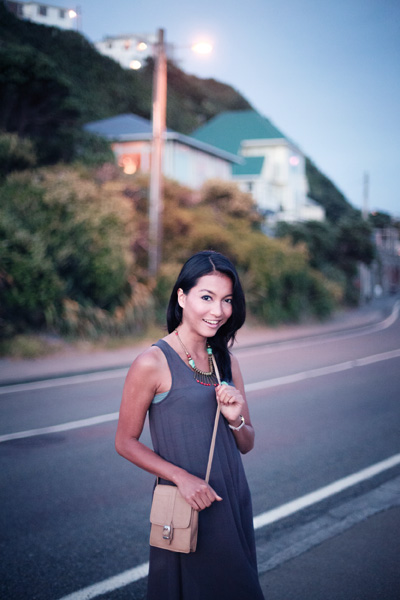
The Magic of Natural Light: Twilight photo

I also like twilight for portrait photography. It’s not without challenges, but if you can overcome those you’ll be rewarded with some beautiful portraits taken in unusual conditions where many photographers wouldn’t bother taking photos.

The best way to take advantage of the twilight for portraits is to arrive with your model before sunset to take advantage of the late afternoon light. Explain to your model that the light is best at this time of day, and they will be rewarded with some beautiful images. Then, just as in landscape photography, you can keep shooting after the sun has set until the light fades or the magic disappears. Unlike landscape photography though it’s not practical to use a tripod, so you will need to set a high ISO and use the wide aperture settings of your lenses.

When it comes to lenses, primes are best because the wide maximum apertures let you shoot for longer. For example, if you have a kit lens, the maximum aperture at the telephoto end (focal length usually around 55mm) is f5.6. If you have a 50mm prime lens, the maximum aperture will be at least f1.8. That’s a three stop difference.

You will also need to set a high ISO. It’s a good idea to test out your camera beforehand using different high ISO settings to see how high you’re willing to go before the deterioration in image quality is more than you’re happy with. On my EOS 5D Mark II, for example, I’m quite happy to shoot at 3200 and sometimes even 6400, especially if I can expose to the right to maximise image quality. If you have a newer camera, especially full-frame, you might even be able to go higher. If your camera is older your limit will probably be lower. It’s a personal decision that only you can make.

The photo above was taken using ISO 6400 and an aperture of f1.4. It was nearly dark, much darker than it looks in the image. The lights behind the model are a good indication of this.

The Magic of Natural Light: Twilight photo

Another approach is to use a tripod to support the camera and a portable flash to illuminate your model. If your model keeps still during the long exposure, there will be very little blur. This portrait was taken with a shutter speed of two seconds. This technique allows you to keep shooting during twilight when there is very little light.

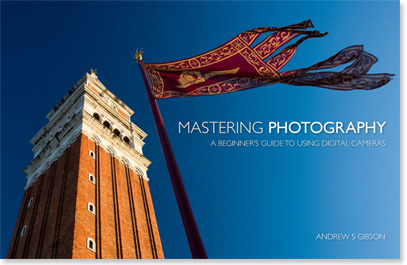
Mastering Photography

The Magic of Natural Light: Twilight photo

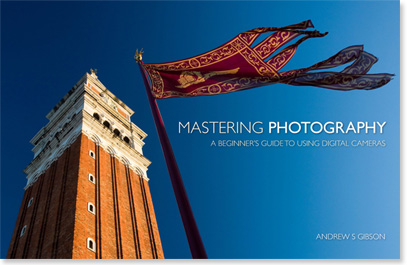
My latest ebook, Mastering Photography: A Beginner’s Guide to Using Digital Cameras introduces you to digital photography and helps you make the most out of your digital cameras. It covers concepts such as lighting and composition as well as the camera settings you need to master to take photos like the ones in this article.

Post originally from: Digital Photography Tips.

Check out our more Photography Tips at Photography Tips for Beginners, Portrait Photography Tips and Wedding Photography Tips.

The Magic of Natural Light: Twilight


Digital Photography School

 
Comments Off on The Magic of Natural Light: Twilight

Posted in Photography


The Magic of Soft Light

27 Aug

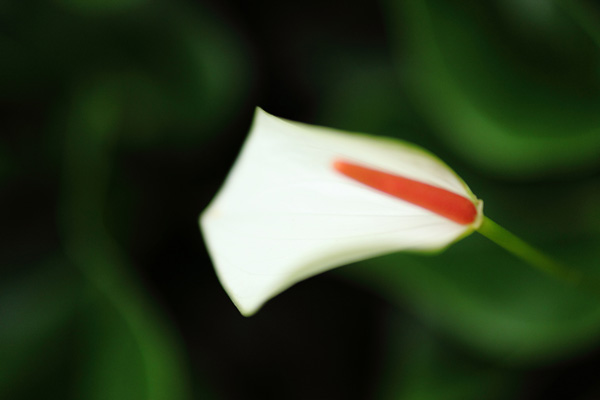
Soft light photo

Soft light is beautiful. It is a gift from nature that helps you create interesting images using high quality light. You’ll find soft light in the shade on a sunny day, during twilight after the sun has set, or all around you on a cloudy day.

Soft light photo

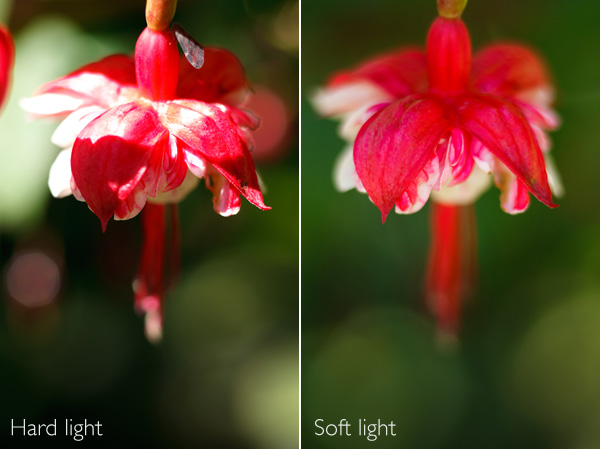
Let’s take a look at these two photos to see the difference between hard light and soft light. I took the first in direct sunlight in the afternoon. The light is hard and it’s not a good a photo. The contrast is too high – it’s not possible to get good detail in both highlights and shadows.

I resolved the problem by holding a reflector, still in its cover, between the flower and the sun. Actually, it doesn’t matter what I used, the purpose is to cast a shadow over the flower and the background. That means the flower is now lit by soft light, not hard light. Aesthetically, the photo is completely different. The even lighting means that the brightness range of the subject falls is reduced to something that my camera’s sensor can handle comfortably. There are no shadows. The flower is evenly lit, and that gives me nice deep colours. The quality of light has gone from hard and ugly to soft and beautiful.

That’s the power of soft light.

I’m not saying all hard light is bad, and that all soft light is good. What’s important is the match of subject to light. This flower needed to be photographed in soft light to bring out its beauty. Some subjects suit hard light better – I will explore those in a future article.

So, where else does soft light come in useful?

Soft light photo

If you’re shooting close-ups, soft light lets you capture colour and detail and avoids bright, distracting highlights or high contrast. Again, the quality of the light is beautiful and suits the subject.

Soft light photo

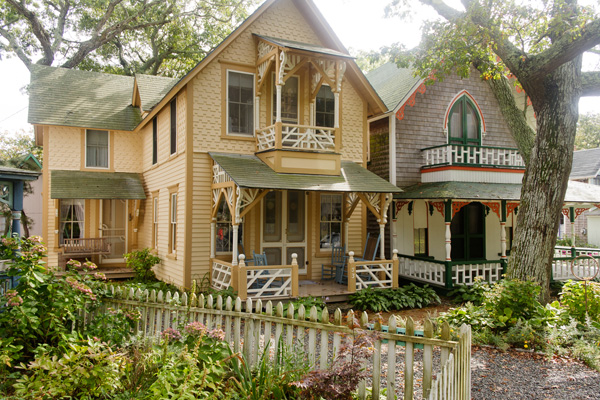
Soft light doesn’t have to be completely shadowless. Sometimes the sun is out, but the air is hazy and the light has a soft luminous quality. The light is hard enough to cast shadows, but they are not very deep. The light in this photo has that quality. See how the light is coming from behind the houses, but isn’t strong enough to create strong shadows. This kind of light seems to work well when the subject is backlit.

Soft light photo

Finally, soft light is absolutely beautiful for portraits, especially of women. I’m a little surprised by how many people, photographers and models included, think that sunny conditions are ideal for taking photos of people. Not true! Especially if the sun is the only light source – admittedly the use of a reflector can help compensate for the hard light of direct sunlight. You can also get good results in direct sunlight by using flash to fill the shadows or even overpower the sun. But that’s another article.

If you are taking photos in natural light only, then head for the shade. On a sunny day, the light bounces off any surfaces lit by the sun and into the shadows. It’s like shooting with an enormous, and completely free, reflector. The light is soft and beautiful and creates amazing catchlights in the model’s eyes. The portrait above has these qualities in abundance.

Mastering Photography

Soft light photo

My latest ebook, Mastering Photography: A Beginner’s Guide to Using Digital Cameras introduces you to digital photography and helps you make the most out of your digital cameras. It covers concepts such as lighting and composition as well as the camera settings you need to master to take photos like the ones in this article.

Post originally from: Digital Photography Tips.

Check out our more Photography Tips at Photography Tips for Beginners, Portrait Photography Tips and Wedding Photography Tips.

The Magic of Soft Light


Digital Photography School

 
Comments Off on The Magic of Soft Light

Posted in Photography


LensRentals shipping Canon EOS 5D Mark III with Magic Lantern

23 Aug

canon_eos5dmkiii.png

LensRentals.com is now shipping the Canon EOS 5D Mark III with the Magic Lantern ‘hack’ pre-installed. The most notable feature gained by using Magic Lantern on the 5D Mark III is Raw video support, which offers much better video quality than on the ‘stock’ camera. The rest of the Magic Lantern feature set is also available, including focus peaking, an intervalometer, too many movie enhancements to list, plus the DR improvement that we reported on last month.

News: Digital Photography Review (dpreview.com)

 
Comments Off on LensRentals shipping Canon EOS 5D Mark III with Magic Lantern

Posted in Uncategorized


Impressive Raw video sample from EOS-7D using Magic Lantern

06 Aug

7d_raw_video.jpg

Magic Lantern has been enhancing the features of Canon EOS digital SLRs for some time now, most recently giving the EOS 5D Mark III a significant increase in dynamic range. One feature found in the second alpha version of their EOS 7D software adds the ability to capture Raw video, albeit at a relatively low 1736 x 1156 resolution. A 7D owner named Florian has put this feature to the test, by combining a series of DNG files into a 33 second video which looks fantastic. See the video for yourself after the break.

News: Digital Photography Review (dpreview.com)

 
Comments Off on Impressive Raw video sample from EOS-7D using Magic Lantern

Posted in Uncategorized


Magic Lantern ‘Dual ISO’ firmware increases dynamic range on 5D Mk3, 7D

18 Jul

0R0A0640-fullres-soft.jpg

The folks at Magic Lantern are no stranger to adding new features to Canon DSLRs, courtesy of their EOS Camera Tool software. Their latest creation, Dual ISO, increases the dynamic range of the 5D Mark III and EOS 7D by four stops, bringing the total dynamic range to 14EV. This allows you to pull detail out of the shadows with a lot less noise than with the ‘stock’ firmware. Click through for more details.

News: Digital Photography Review (dpreview.com)

 
Comments Off on Magic Lantern ‘Dual ISO’ firmware increases dynamic range on 5D Mk3, 7D

Posted in Uncategorized


Photo Magic, 3D Photography

04 Jun

creek110319-133-hdr-3d

This will blow your mind. If you have never tried ‘free view’ 3D, then you might find it hard to imagine that you can take 3D photos with any camera and see them on any computer screen without glasses or special technology. I will show you how.

I’m Neil Creek, author of DPS’s latest ebook Photo Magic: Special Effects Photography Made Easy and the popular Photo Nuts ebook series. Photo Magic is full of techniques to create unique and impressive images, just like this one, so if you want a copy you can grab it here at the special launch price of $ 15.

We see the world with two eyes, and that tells us the depth of a scene. Most cameras can only capture a flat plane, destroying any depth the original scene had and robbing it of a great deal of its impact. This technique lets you capture photos of certain scenes that contain the depth of the original, and with a little bit of practice most people can learn to see these photos simply by crossing their eyes.

I’ve written a detailed guide on how to see 3D photos on my blog, and it has already helped thousands of people to learn how to ‘free view’ 3D photography. If you’re not familiar with the technique, go and have a read, then come back, enjoy the photo above in glorious 3D.

Now I bet you want to know how you can make these images yourself!

What I’ll Be Using For The Shot

  • Canon 5D MkIII
  • 24-70mm f2.8 lens

How The Shot Was Taken

Taking a 3D photo is actually really simple, but with some limitations. Most importantly: this technique will not work with a moving subject. You won’t be able to take good photos of moving water, leaves blowing in the wind, people you can’t direct, or anything else which does not stay still for a few seconds. Feel free to give it a go if you think your subject is still enough, but the effect may not work well.

The technique is called the “cha-cha” method because all you do is rock from one side to the other when taking a pair of photos.

Find a subject that you think will look good in 3D. My photo looks interesting because there are rocks and outcrops and overhangs and grass and all kinds of things going on in the depth of the photo which you can’t see in the 2D version. Use a relatively narrow aperture, as out of focus parts of a 3D photo can be distracting rather than attractive. A faster shutter speed also helps to reduce camera shake, since you are hand-holding.

Compose your shot and pick out a feature that’s not too far away from you to be a reference point. This will probably be in the lower third of the photo, near the centre. Now stand with your weight on your right foot and take the first photo. Then, while watching your reference point and trying to keep it in the same place in your viewfinder, put your weight onto your left foot and take the second photo. And you’re done! The magic happens in the processing.

Portrait or landscape?
For free viewing, it’s best to take all of your 3D photos in portrait orientation. This requires you to cross your eyes less and is thus more comfortable. Also, two landscape photos side by side are very wide and will thus make the whole image appear smaller on your monitor. However, if you have a 3D TV or monitor and you are taking 3D photos to display with it, then landscape is the better choice. These displays overlay the two images, so a landscape oriented photo will fill the screen.

Processing the Shot

Now that we have two images, to share and show them as a 3D pair we need to make them one. It’s not as simple however as just sticking them side by side in one file. There are a couple of issues we need to take care of which are unique to 3D photos: Alignment and the 3D window.

Both of these issues can be handled with a nifty piece of retro-looking software called Stereo Photo Maker, and the AutoPano plugin for it. Download them both at the links below, install AutoPano, run Stereo Photo Maker and in its preferences, point to AutoPano and you’re ready to go!

  • Download and install StereoPhoto Maker
  • Download and install AutoPano and link it to StereoPhoto Maker as a plugin

Alignment
Taking 3D photos with the cha-cha method can cause each photo to become slightly misaligned from the other. There is also distortion introduced from pointing the camera at the same target in each photo. Even though this is necessary for the most 3D coverage with your two photos, this keystone distortion needs to be corrected. This is achieved with the AutoPano plugin.

2013-05-28 22_33_50-Left Image(creek110319-133-hdr-3d

3D Window
The edge of the frame of your photo has an apparent position in 3D space: where your monitor is. Things look weird and uncomfortable if parts of your photo appear to be touching this frame, it’s far better to make it look like they are inside it, beyond the monitor. Stereo Photo Maker has a tool to help here as well.

Step by step process

  • Drag both photos onto the StereoPhoto Maker shortcut icon
  • Zoom out a bit with your mouse’s scroll wheel if you need to to make it easier to fuse the pair into 3D with the cross-eye technique
  • Click on the auto align button to use autopano to correct for any distortions
  • Click on the Easy Adjustment button to fix the 3D images position relative to the 3D window (see below for more information)
  • I find adding a border helps, so if you like, in the menu go to View – Border Options
  • Check “Show Border” and adjust the border settings to your liking
  • Save the image by clicking in the menu File – Save Stereo Image

Positioning the image within the 3D window is done with the “Easy Adjustment” button in the top toolbar. This opens the adjustment dialogue box, seen here, and you move the slider above the two overlaid images, increasing or decreasing their separation, thus moving them in or out of the 3D plane. It can be difficult to know exactly how to adjust this but a good rule of thumb is to look at the lower edge, and get features here to overlap. With practice and experimentation you can try different positions for the 3D window, creating cool effects with elements coming through the 3D window. It’s best to avoid anything touching the 3D window however.

2013-05-28 00_54_11-Easy Adjustment

Some More Examples

Now you’ve got your feet wet, here are some more 3D photos I’ve taken over the years to show you. And don’t forget, if you liked this post, then you’re bound to enjoy Photo Magic! The book is packed with cool stuff you can create just like this, fully explained with examples, explanations and variations you can try on the looks described. Check it out here.

Enjoy dancing with your camera! Cha cha!

creek-100717-049-hdr-3d

creek-060830-159-3d

creek-110317-035

creek-090308-295-3d

creek-081129-131-3d

creek-040506-091-3d

creek110319-061-3d

creek-110317-033

Post originally from: Digital Photography Tips.

Check out our more Photography Tips at Photography Tips for Beginners, Portrait Photography Tips and Wedding Photography Tips.

Photo Magic, 3D Photography


Digital Photography School
 
Comments Off on Photo Magic, 3D Photography

Posted in Photography