RSS
 

Posts Tagged ‘LIVE’

Gulf Photo Plus PopUP_Berlin is Live

11 Aug

Just a quick note to let you know that tickets have just gone on sale for the Gulf Photo Plus PopUP event in Berlin for the weekend of October 29-30.

If you are unfamiliar with GPP’s PopUP, it is a road version/distillation of their world-famous Photo Week in Dubai. Each year, it is held in a far-flung city somewhere in the world that is not Dubai. It is done over a weekend, so as to be able to be fit in with many peoples’ work schedules.

The faculty sometimes varies, but this year it is the core group: Greg Heisler, Joe McNally, Zack Arias and me. The weekend will feature a half-day with each person. Basically, like being in front of a fire hose.

This is the fourth PopUP GPP has held. I have been involved in three of them, and they are one of the most enjoyable photo events I can think of. If Berlin is reachable for you and you are available for a weekend this fall, I strongly encourage you to attend.

(And as an FYI, Berlin has a large and thriving photo community, so this is expected to sell out quickly.)

For more info, and/or to register, head over to the Gulf Photo Plus PopUP site.

Cheers,
David
Strobist

 
Comments Off on Gulf Photo Plus PopUP_Berlin is Live

Posted in Photography


19 tips for better live music photography

06 Aug

Tips for better live music photos

There is no one-size-fits-all approach to shooting live music. Depending on the genre of music, the size of the venue, the quality of the house lighting, the rowdiness of the crowd and any photographic regulations imposed by the band or venue, your approach to getting the shot can vary greatly.

It is for all these reasons I find live music photography irresistible; no matter how much you prep, you simply never know what the rock and roll gods will throw at you. And the combination of difficult lighting, fast moving musicians and a mass of people competing for sight lines makes getting the shot all that more sweet. Especially when your shot conveys the pure, unfiltered energy of a live performance.

I’ve been shooting live for about seven years, in both stadiums and basements, dive bars and dance halls (I currently run a site called NWSoundExchange.com, which seeks to visualize Seattle’s DIY music culture), and I’ve picked up on some general tips and principles that help me feel a little more prepared each time I walk into a new venue. Some of these tips come from advice given to me by more seasoned music photographers I’ve bumped into over the years, like Mick Rock, others come from shooting hundreds of shows and learning from my own mistakes.

Of course, these tips alone won’t guarantee you the next cover of Rolling Stone. After all, excelling at live music photography requires on-the-fly thinking and problem solving, creativity, as well a mastery of photographic principles. But hopefully these tips will at the very least inspire you to bring a camera long to the next concert you attend.

By the way, the most important tip of all for shooting rock and roll is this: showing up with your camera to the show is half the battle. If you can make it that far, well, the rest should be pretty easy.

Do your homework

The Screaming Females are a very high-energy band. The lead singer/guitarist Marissa is known for her epic guitar solos. Knowing this going in gave me the foresight to position myself directly in front of her. 

I’m not trying to sound like your mother, but seriously, do your homework before shooting a show! Fifteen minutes spent watching Youtube videos can clue you in to how a band sets up on stage and who in the band you might want to keep your camera pointed at. This way, when you arrive at the venue, you can position yourself perfectly to get the most high-energy images.

Leave the extra gear at home

This image was shot during a very crowded and rowdy show in the basement of a dive bar. Bringing only one camera rig and an extra lens (kept in my pocket) meant I did not have to worry about stashing my bag anywhere and could easily move around within the crowd to make my shots.

Roll light! Being able to move around is crucial for getting good shoots. Also no one likes the guy in the crowd wearing the massive camera backpack.

I used to shoot live music with far too much gear: two bodies, a flash and a few extra lenses. These days I keep it much more simple: a full-frame camera, 35mm F2 lens and a flash. I do occasionally bring a wider or more telephoto lens, depending on where I’m shooting. But at the end of the day, the less I’m worried about switching gear, the more I’m tuned into the music that is happening in front of me.

If you must use a flash, bounce it

Shooting a show under a highway underpass was a unique experience. This was a show where I had no choice but to use a flash. Still, I used it sparingly, waiting for the most decisive of moments to pop a frame.

No matter what, I always go into a concert planning on shooting available light only. Of course this can be wholly impractical if the venue you’re shooting in is literally beneath a highway overpass with no light of any kind. It’s in situations like these that I’ll bring out the on-camera strobe.

Flashes should always be used sparingly in a live music environment. The whole point of a concert is for the crowd to experience and enjoy the music happening in front of them, and constant pops of bright light can detract from that enjoyment. Don’t make the concert about you. Be there to document the experience, not take away from it.

I also bounce my flash off the ceiling whenever possible. This results in the light falling back down on your subjects nicely. If you shoot direct flash, not only will you blind your subjects, but the lighting will look much less natural.

Fast glass is your friend

This images was shot at ISO 12,800 1/500 sec at F2.2 using the Nikon 35mm F2 D lens.

Zooms are great, but they are often not fast enough for shooting live music without flash (which should always be your goal going into a concert). Many photographers show up to concerts with a full-frame camera and a 24-70mm F2.8 lens, which can be fine. But I prefer to use primes with faster apertures. I’m not talking expensive glass, but rather lenses like Canon and Nikon’s 50mm F1.8.

When shooting using only the venue’s lights, my ISO is usually cranked all the way to 12,800 (I shoot with a D750) and my shutter speed hovers around 1/200 – 1/320 sec, the slowest speed I feel comfortable using in such an environment. This gives me little wiggle room for a slow aperture. Thankfully, the Nikon 50mm F1.8 D is pretty sharp by F2 and even better by F2.2. The point is, given the choice, always opt to bring along your fastest glass. Also don’t forget to micro adjust your lenses!

Avoid eye level composition

This image would probably have been a total snooze-fest had it been shot at eye-level.

Shooting images at eye-level is lazy and boring. So get super low, get high up; if you have an articulating screen, put it to use! But whatever you do, avoid eye-level. Your composition will thank you.

Try to shoot in full manual

This one is not set in stone, but generally speaking, you’ll learn more and have a better understanding of light and how you camera works if you shoot in full manual mode. Shutter Priority and Aperture Priority can both be useful in some live music shooting scenarios, but if you’re serious about getting better, keep it on the big ‘M’.

Whenever I walk into a new venue, I always try to guess and dial in the exposure without looking at my camera’s meter (advice given to me by a good friend). The more I do this, the better I’ve gotten at ‘reading a room’s light.’ Try it yourself! You’ll probably find that over time your intuition about exposure will improve.

Know when to use AF-C, AF-S (and know your camera’s AF system)

Focusing and recomposing using AF-S can be a good method to achieve creative compositions, just as long as the subject doesn’t move too much from the time you acquire focus to the time you take the shot. Of course, this image was taken using a manual focus lens. 

Continuous autofocus is generally your best bet for live music photography. It goes without saying that if you’re shooting a moving subject, AF-C makes more sense than AF-S. However, there are times when switching to AF-S can be useful, especially when trying to get creative with a composition.

When shooting live music in a dark environment, even the best cameras will likely struggle with subject tracking, meaning you are left with either using AF-C and keeping your focus point over the subject (which restricts your composition) or focusing and recomposing (if the subject is not changing depth from the camera). The latter is a method best used when the subject is relatively still.

Also, many modern cameras have central AF points with increased sensitivity for low light and low contrast scenarios. Knowing whether or not this is the case with your own cameras is definitely worth investigating.

Photograph the crowd

Live music is about more than just the band on stage.

Don’t forget to turn around and snap some photos of the crowd. An image that conveys the flavor of the environment and the energy of the crowd is a great addition to any set of live music photographs.

I’ve found the best time to turn around and get this shot is toward the end of any high-energy song, but not after. This ensures those in the frame are still sucked into the music, allowing you to go largely unnoticed. The last thing you want is folks staring at the camera like a deer in the headlight. One person blatantly acknowledging the camera can ruin the overall feel of a good crowd shot.

Look for interesting light

We already talked about how you should avoid using a flash whenever possible. Assuming you’ve followed that advice, you’ll largely be at the mercy of the venue lighting, which is not necessarily a bad thing!

Look for interesting beams of light and reflections to incorporate into your image. Using the venue lighting creatively can help you to better convey the mood of the performance. Also, be sure to be patient. One of the advantages of not shooting with a flash is that you can fire as many frames as you like, without bothering anyone. This means you can experiment to your heart’s delight.

In general, the rule of thumb with gelled lighting is this: avoid shooting skin tones lit by red lights as they tend to blow out all detail (unless you’re planning to convert to b/w in post). Wait instead for the lighting to switch to any other hue before taking a shot.

Find the details

A cowboy hat at a punk show?

Most live music imagery revolves around one of two subjects: the band and/or the crowd. Obviously, making photographs of said subjects is what shooting rock and roll photography is all about, but don’t forget to look for interesting or unusual details in and around the venue.

Even the most subtle details, like a pair of bare feet on stage, or a strangely out-of-place man in a cowboy hat, can add a new layer of intrigue to a set of already interesting live music photographs.

Be ready for the action

The last thing you want to do is get caught fumbling with controls when something epic is happening. I’ve certainly been there, missing excellent shots because I was too busy staring at my camera settings. It’s a terrible feeling.

To avoid this, try your best to be very in tuned to what is happening in front of you at all times. Change settings with your eye to the finder and only look at the back of you camera in between sets. Oh, and above all, don’t chimp during a set!

Keep one eye open

Shooting with both eyes open allows you to better predict when something visually interesting might occur.

This one also goes along with the previous point. Practice keeping both eyes open at all times when shooting live music. Better yet, try to keep your non-shooting eye honed in on the drummer. I’ve found that if you’re in tune with the drummer, you can often use their body language to predict when something interesting might happen.

Try the ‘pop and drag’

It can be a bit cliche, but it can also convey a band’s energy really well if executed correctly.

The old ‘pop and drag’ goes a little something like this: Mount a flash on your camera and point it at the ceiling, drop your shutter speed down to somewhere between 1/15 and 1/50 sec, while keeping your ISO reasonably high (it’s OK to stop down a little using this method). The general idea is to ‘pop’ the light from the flash, which bounces off the ceiling and falls back down on the band that you’re photographing while ‘dragging’ your shutter. Because of your slow shutter speed, the flash won’t completely freeze your subjects, causing blurring and glow.

The most important thing to remember when trying the ‘pop and drag’ is to experiment with your settings. Depending on the height of the ceiling and color of the ceiling, your flash output may vary greatly. If you’d like to use this method, I advise getting to the venue early to dial in your settings before anyone arrives.

Back up from the band, use the crowd

This one is pretty simple: While it makes sense to try and shoot a show as close to the band as possible, its also nice to change up your perspective and pull back a little. Moving back will allow you to get more creative with your framing. It also can help to convey the energy of the room better.

It’s OK to underexpose (shoot Raw)

I often underexpose by two stops to get a faster shutter speed, then push in post.

This one is dependent on the camera you are shooting, but Raw files from most modern full-frame cameras can hold up just fine being pushed a stop or two in post (much further if you’re converting to b/w). When you’re shooting in an environment where your settings are maxed out but your images are still too dark despite being at the maximum native ISO, it van be very reassuring knowing you can still push two stops when you get home.

Just make sure you’re shooting Raw.

Use creative aides

Everyone knows star filters are played out, which is why just about no one uses them. All the more reason to pick one up and make photos that look a little different. Just don’t rely on creative aides as a crutch!

Everyone’s a photographer these days, and rock and roll photos are a dime a dozen. So if you’re serious about setting your images apart from others, what do you do? Try experimenting with creative aides, like gels, star filters, prisms etc. to give your shots a slightly different look.

Star filters have not been cool for a very long time, but used selectively, they can be really effective. Take a look through this article, how many star filter photos can you find? More than you realized now that you’re looking for them? The point is, being subtle is important when employing creative aides. Don’t be a one-trick-pony and don’t rely on them too much. But used selectively, they can give some really cool results.

Shoot with heart, edit with brain

This phrase is my religion when it comes to shooting live music.

What exactly does this mean? For me it means, go to the show, have fun, be polite, dance and take photos without overthinking. Let the music envelope you, feel the energy, interact with the crowd, chat with the band, be a part of what’s happening. Doing so will allow you to subconsciously be more connected to the whole situation. Also, don’t be afraid to shoot ‘too much, ‘ (so long as you aren’t using a flash).

I used to be upset with myself when I came home from a show with 1000 images to shuffle through. But as I’ve gotten better at editing, I’ve gotten better at quickly pin-pointing the good stuff from the bad after the fact. And at the end of the day, if you got one killer image from a show, but shot 100 or 10000 images, no one will know but you.

B/W is your friend when editing

This image looked terrible in color. A conversion to black and white saved it.

B/W is the little yellow pill of the music photography world. A quick conversion can turn a noisy, ugly image into something much more attractive. Or, in the case of the image above, in which most of the detail in Dave’s face was blown out due to bad colored lighting, a quick conversion turned an ugly duckling into a tattooed rock and roll swan.

Have fun and be nice to everyone

When shooting a show it is important to remember that you are very unimportant in the grand scheme of the event. Please, please don’t be that photographer ruining everyone’s good time by constantly popping flashes and blocking people’s view of the band.

Live music is a lot of fun. Photography is a lot of fun. When combined, well, you get the point. At the end of the day, don’t take away from that inherent fun. Be polite to everyone in the crowd, ask before you step in front of someone to take a shot and don’t stand in their way too long. Use your flash sparingly. Don’t bring a massive bag and definitely do not wear a bag while shooting in the crowd. Respect gets respect and the golden rule certainly applies to live music photography.

Add your tips below!

Got a solid tip for live music photography? Please share it in the comments below!

Articles: Digital Photography Review (dpreview.com)

 
Comments Off on 19 tips for better live music photography

Posted in Uncategorized


Polaroid Swing is a new take on Apple’s Live Photos

14 Jul

Apple didn’t invent the concept, but ever since the company launched its Live Photos feature it has been en vogue to add a touch of motion to still images – just enough to give you a better idea of the atmosphere at the time and place of capture.

The latest new app to slightly vary this theme is Polaroid Swing. The app captures 60 frames in a quick burst and combines them into an animated image. When viewing you can trigger the 1-second animation by twisting your device or swiping across the screen. This works in both directions. Below are a couple of samples for you to try, just move the mouse across the images:

As you would imagine, final results can be shared via Facebook, Twitter and other means. The effect is pretty neat but, as we’ve seen many times before, there is danger of the novelty factor wearing off pretty quickly. That said, the owners of the legendary Polaroid name seem to firmly believe in Polaroid Swing’s success. They have not only licensed the Polaroid name but also invested in the app. Polaroid Swing is available as a free download from the App Store now; an Android version is still in the works.

Articles: Digital Photography Review (dpreview.com)

 
Comments Off on Polaroid Swing is a new take on Apple’s Live Photos

Posted in Uncategorized


Frame by frame: ‘live view’ continuous shooting with the Sony a6300

13 Apr

One of the features we were excited by when the a6300 was announced was the promise of ‘live view’ while shooting continuous bursts of shots. Now we’ve used and tested it, what do we think?

What’s the big deal?

Autofocus systems on mirrorless cameras have been getting better and better with each generation of cameras, to the point that the best of them match (and in some circumstances, exceed) the performance we expect from similarly priced DSLRs.

However, many models still lag behind DSLRs in their ability to show you what’s going on while in continuous shooting mode. The common trick of showing a playback of the last captured image makes it hard to keep up with a moving subject, especially if it moves unpredictably, so that you can’t just compensate for the lag.

The a6300 isn’t the first mirrorless camera to try to offer a live view while continuous shooting (several Nikon 1 models, which use comparatively small sensors to allow fast read-out, even manage to give an uninterrupted feed), but it’s still a rare enough feature to make it worth investigating.

What did we find?

We shot the a6300 side-by-side with the Canon EOS 7D (a DSLR that offers the same 8 fps frame rate as the Sony) and found something interesting. The a6300 has a shorter blackout period than the Canon but turns out to only be showing a single updated frame between each capture. At lower, 5 fps shooting rate, we saw two or three frames on display between captures.

That sounds terrible. It sounds like cheating. but it’s not quite the end of the story. Watch the beginning of the video again – the real-time playback – it looks pretty convincing, doesn’t it?

The fact that it looks so convincing left us wondering: why does the screen ever black out? Why doesn’t the camera just continue to show the ‘live’ image until the next one is available? We think we know the answer.

Note the way that the image doesn’t just cut to black – it fades to black then abruptly cuts to the next update. We believe this is trying to achieve something like the ‘black frame insertion’ technology used in some modern TVs: inserting a black frame prompts your brain to imagine what’s happened between the two frames it’s seen, rather than being distracted by the contradiction between perceiving a sense of movement but seeing static images.

Does it work?

In real-world shooting this is pretty convincing: we only discovered the camera was just showing single images when we recorded it at 240 fps, and even then it took us a while to convince ourselves that we weren’t looking at an error stemming from a clash in display and capture frequencies (temporal aliasing).

So, while the display is only showing you eight frames per second (one between each capture), it’s doing so in a way that gives your brain a convincing sense of motion. The question we wanted to answer was: ‘if the blackout between frames is short enough, and the motion looks fairly convincing, is it as easy to follow action as with a DSLR?’

We spent some time trying to shoot rugby with the a6300 to see how easy it was to follow the game’s fast and unpredictable action. The results were mixed – the camera gave enough information for you to be able to follow the action to a reasonable degree, but not as much as you might want.

The a6300’s live view provided enough information to let us follow the action, but not as much as a high-end DSLR, which meant we reacted more slowly to anything unexpected.

Alongside the a6300 we were also shooting with the Nikon D5, not as direct comparison but because we also need to shoot sports with it. As you might expect, the $ 1000 mass-market a6300 wasn’t as good as Nikon’s $ 6500 professional sports-oriented camera, but it’s the way that it fell short that was interesting.

Although the video further up the page shows that the a6300’s live view looks a lot like real motion and its blackout is shorter than the EOS 7D’s, in use it becomes clear that your brain actually can make use of the extra information the 7D gives you about the subject’s movement.

For example, at the rugby we found that we could keep pace with the action when shooting with the Sony but it would take us longer to react if we made the mistake of believing a player’s dummy-pass and started moving in the wrong direction. With the DSLR we’d spot our mistake sooner and turn back to the real action faster. 

At set pieces, where you have a good idea of what’s going to happen next, the a6300 could shoot with confidence.

Having looked at what the camera’s doing and then put to real-world use, we’d conclude that the a6300’s continuous shooting live view more successful than its single frame update makes it sound. It’s convincing enough to let you keep up with fast action, but there’s still room for improvement as soon as anything unexpected happens.

Articles: Digital Photography Review (dpreview.com)

 
Comments Off on Frame by frame: ‘live view’ continuous shooting with the Sony a6300

Posted in Uncategorized


Oh, wow… Sony announces 24MP a6300 with incredible AF and 8 fps live view bursts

04 Feb

$ (document).ready(function() { SampleGalleryV2({“containerId”:”embeddedSampleGallery_3250592731″,”galleryId”:”3250592731″,”isEmbeddedWidget”:true,”selectedImageIndex”:0,”startInCommentsView”:false,”isMobile”:false}) });

Sony has introduced the long-awaited update to its popular a6000 mirrorless camera: the a6300. Featuring a newly developed 24 Megapixel APS-C sensor and a completely revamped ‘4D’ AF system with 425 phase-detection AF points, the a6300 sits at the top of Sony’s APS-C mirrorless lineup. It also appears poised to break down one of the last remaining strongholds of DSLR by a live feed of the action in between frames, with minimal blackout, at a respectable 8 fps shooting rate, with AF.

Key Features:

  • 24MP CMOS APS-C sensor with copper wiring
  • 425-point on-sensor phase-detection AF system
  • 11 fps continuous shooting (8fps continuous live view)
  • Silent shooting 
  • Max ISO of 51200
  • 4K video capture up to 100 Mbps
  • Phase-detect AF compatible with A-mount lenses via LA-EA3 adapter

Capable of continuous shooting at up to 11 fps with AF, the a6300’s 425-point hybrid AF system features ‘high-density’ tracking, which dynamically activated AF points around a subject and adjusts them depending on the motion of the subject itself. The 425 phase-detect points, impressively, reach all the way out to the corners of the frame.

Perhaps the biggest news is that the a6300 is capable of uninterrupted live view at up to 8 fps, potentially addressing one of the biggest shortcomings of mirrorless cameras when it comes to fast action shooting. Traditionally, mirrorless cameras tend to show only a stop-motion sequence of last-shot images at the highest shooting frame-rate, which makes it hard to follow a subject and keep an AF point over it. Live view in between short blackouts at 8 fps brings the a6300 much closer to the experience of a DSLR with optical viewfinder. At the launch event in New York this morning, Sony showed a video reminiscent of Nikon’s recent DSLR vs. mirrorless comparison for fast action shooting at CES, albeit comparing the a6300 to a <$ 1000 DSLR. Results looked impressive.

Notably, the a6300 can use all of its 425 phase-detect points to quickly focus A-mount lenses using a LA-EA3 adapter, which indicates this is now a standard feature that will be available across future E-mount cameras. We also expect phase-detect AF to work with other 3rd party lenses using adapters like the Metabones Smart Adapter.

The a6300 is capable of 4K video capture at up to 100 Mbps. The camera uses a 20MP (6K) region of the sensor to offer 2.4x oversampled 4K video with full pixel readout, and no pixel binning. Videographers should be able to expect sharp, low noise footage, even in low light since almost the entire sensor is sampled.

While the progress in technology is impressive, lack of true weather sealing, a touchscreen, or direct AF point selection with a dedicated joystick or control will continue to be problematic for some. The a6300 will be available in March for $ 1000 body only.

Press Release:

Sony Introduces New ?6300 Camera with World’s Fastest Autofocus 

New Mirrorless Camera Features World’s Fastest AF speed1 and Highest Number of AF points2 plus Newly Developed 24.2 MP APS-C Sensor, High Resolution 4K video recording and more 

NEW YORK, Feb. 3, 2016 – Sony Electronics, a worldwide leader in digital imaging and the world’s largest image sensor manufacturer, has today introduced the latest addition to their award winning lineup of mirrorless cameras, the ?6300 model. 

The camera boasts an unrivaled 4D FOCUS™ system that can lock focus on a subject in as little as 0.05 seconds, the world’s fastest AF acquisition time1.  Additionally, the ?6300 has an incredible 425 phase detection AF points that are densely positioned over the entire image area – the world’s highest number of AF points on any interchangeable lens camera2, and can shoot images at up to 11 frames per second with continuous autofocus and exposure tracking,

The impressive new mirrorless model also has the ability to  support full live-view continuous shooting on the Tru-finder or LCD screen at up to 8 frames per second, ultimately producing a real-time shooting experience that combines all the benefits of an electronic viewfinder with the immediacy of a through-the-lens optical viewfinder. 

The versatile ?6300 is equipped with a newly developed 24.2 MP (approx.. effective) APS-C sized Exmor CMOS sensor that works together with a BIONZ X image processing engine to produce outstanding image quality throughout the entire ISO sensitivity range ISO 100 – 51200 3.  It can also shoot and record high resolution 4K video with full pixel readout and no pixel binning in the popular Super 35mm format.

 “The ?6300 is yet another example of the dominant innovation that Sony continues to bring to the industry, especially from the mirrorless space,” said Neal Manowitz, Vice President of Digital Imaging at Sony Electronics.  “With this new model, we’ve combined the world’s fastest and most extensive AF system with a superb image sensor and many of our most advanced imaging and video technologies, creating a package that can far exceed the performance of any DSLR in its class.   This camera connects you with the action like never before.” 

Unrivaled AF Performance

Sony’s new ?6300 camera builds upon the acclaimed 4D FOCUS performance of the ?6000 model, utilizing a Fast Hybrid AF system that combines high-speed phase detection AF with extremely accurate contrast AF and allows it to capture and lock on to moving subjects in as little as 0.05 seconds1.  The camera’s High-density Tracking AF technology positions 425 phase detection AF points over nearly the entire field of view, allowing it  to accurately focus throughout a wide area – even on small, fast objects that other cameras would fail to recognize. 

In addition to the extensive AF coverage, the ?6300 debuts a new High-density tracking AF technology that significantly improves subject detection and tracking performance.  This new technology can quickly activate a large number of AF points surrounding a subject – approximately 7.5 times more density than the ?6000 – and intelligently adjust them in accordance with the subject’s motion.  This is a particularly powerful feature when used with high-speed 11 fps continuous shooting or the new 8 fps continuous live-view mode, which provides 100% accurate framing for fast moving subjects on the LCD screen or viewfinder.

Of note is the fact that the camera’s 425 phase detection AF points, enhanced tracking and focus accuracy are all available on the ?6300 when using A-mount lenses4 with a mount adaptor like the Sony LA-EA3.  This is a first for Sony E-mount interchangeable lens cameras with an APS-C sized sensor, as the only other cameras to feature this capability are the full-frame ?7R II and ?7 II models.

Other enhancements to the ?6300 include silent shooting functionality the ability to use AF in focus magnifier mode, expanded flexible spot AF, Eye AF in AF-C mode and more. 

Powerful 24.2 MP Exmor CMOS Sensor and BIONZ X Processor

In order to maximize efficiency and overall camera performance, the ?6300 features a new 24.2 MP sensor that is an ideal match for its BIONZ X image processing engine. 

The new image sensor employs copper wiring in its structure, which improves light collection efficiency and significantly accelerates readout speed. The BIONZ X processor features an upgraded image processing algorithm designed to maximize the sensor’s overall capabilities.  Together, the two key components work together to produce images with low noise and exceptional resolution in sensitivity settings up to ISO512003, in particular in the mid-to-high sensitivity range. 

Ultimate 4K Resolution and Other Professional Video Capabilities

In another first for non-full-frame Sony interchangeable lens camera, the new ?6300 offers internal 4K movie recording in Super 35mm format.  When shooting in 4K, the camera uses full pixel readout without pixel binning to collect 20 megapixels of information – approximately 2.4x5 (6K equivalent) as many pixels as 4K UHD and then oversamples the information to produce high quality  footage with exceptional detail and depth.   

The camera utilizes the XAVC S codec6 during video shooting, which records at a high bit rate of 100 Mbps7 during 4K recording and 50 Mbps during standard Full HD shooting, ensuring maximum detail and clarity in both video formats.  Additionally, the camera will focus approximately twice as fast as its predecessor during movie shooting thanks to its new and improved AF system.  AF speed and AF tracking sensitivity are also adjustable for expanded creativity.  

Other professional caliber video features include the ability to record Full HD at 120 fps at 100 Mbps7, another first for ? interchangeable lens cameras with APS-C sized sensors.  This mode allows footage to be reviewed and eventually edited into 4x or 5x slow motion video files in Full HD8 (24p or 30p) resolution with AF tracking.   The new ?6300 also offers S-Log gamma recording9 for wide dynamic range shooting – approximately 14-stop latitude in S-Log3 gamma setting – and supports S-Gamut for a wider color space.  Both options allow for greater creativity for processing video post-production.

Also included on the new camera is a microphone line input that accepts external microphones and also supports XLR input with Sony’s XLR adapter kit, as well as Gamma Display Assist, a new function that allows users to monitor images or check focus when recording S-Log movies. The new model has enhanced Zebra functionality for greater exposure control.  Picture profile settings are available, as well as Time Code / User Bit and much more. 

Enhanced Operability and Ergonomics

The ?6300 camera is equipped with a high contrast, high-resolution XGA OLED Tru-Finder with approximately 2.4 million dots that offers exceptional corner-to-corner visibility.  There is also a new mode available for the viewfinder that allows display of images at 120 fps, ensuring that action is displayed smoothly with very few afterimages, making subject tracking through the Tru-finder easier than ever.    

Aesthetically, the new ?6300 camera features an extremely solid feel in hand thanks to its robust, magnesium alloy design.  It can be customized to fit nearly any shooting style or preferences, with 9 customizable buttons that one of 64 different functions can be assigned to.  The camera adds a digital level gauge as well as upgraded dust and moisture resistance10, a reinforced lens mount structure and a new shutter release button and mode dial with improved operability and grip.

The new ?6300 camera is Wi-Fi® and NFC compatible and fully functional with Sony’s PlayMemories Mobile™ application available for Android™ and iOS platforms, as well as Sony’s growing range of PlayMemories Camera Apps™, which add a variety of creative capabilities to the camera.  It also supports QR code for easy connection to non-NFC smart phones.

Pricing and Availability

The Sony ?6300 interchangeable lens camera will be available in March for about $ 1,000 for the camera body or for about $ 1,150 paired with a 16-50mm F3.5 – F5.6 kit lens (model SELP1650).  Prices for the Canadian market will be about $ 1,350 CA for the body and about $ 1,500 CA for the camera kit.  It will be sold at a variety of Sony authorized dealers throughout each region.   

1.      Among interchangeable lens cameras equipped with an APS-C sized sensor as of February 2016, based on Sony research.  Measured using CIPA-compliant guidelines and internal method with an E PZ 16-50 F3.5-5.6 OSS lens mounted.  Pre-AF off and viewfinder in use.

2.      Among interchangeable lens cameras as of February 2016, based on Sony research

3.      Expandable up to ISO 51200 for stills and up to ISO 25600 for movies

4.      A-mount lenses with SSM or SAM only. Users can choose phase-detection AF or contrast-detection AF in AF System menu.

5.      1.6x in 30p setting

6.      An SDHC/SDXC memory card with a Class 10 or higher speed rating is required for XAVC S recording

7.      UHS Class 3 memory card is required for recording at 100Mbps

8.      Number of pixels required for Full HD movie recording is readout from the image sensor

9.      S-Log2 and S-Log3 are based on processing pictures.

10.   This camera is designed for optimal dust and moisture resistance, but is not waterproof or splashproof. For FE lens only

Sony Alpha a6300 specifications

Price
MSRP $ 1000 (body only), $ 1150 (w/16-50mm lens)
Body type
Body type Rangefinder-style mirrorless
Body material Magnesium-alloy
Sensor
Max resolution 6000 x 4000
Other resolutions 3:2 (4240 x 2832, 3008 x 2000), 16:9 (6000 x 3376, 4240 x 2400, 3008 x 1688)
Image ratio w:h 3:2, 16:9
Effective pixels 24 megapixels
Sensor photo detectors 25 megapixels
Sensor size APS-C (23.5 x 15.6 mm)
Sensor type CMOS
Processor BIONZ X
Color space sRGB, Adobe RGB
Color filter array Primary color filter
Image
ISO Auto, 100-25600, expandable to 51200
Boosted ISO (maximum) 51200
White balance presets 10
Custom white balance Yes
Image stabilization No
Uncompressed format RAW
JPEG quality levels Extra fine, fine, normal
File format
  • JPEG (Exif v2.3)
  • Raw (Sony ARW v2.3, 14-bit)
Optics & Focus
Autofocus
  • Contrast Detect (sensor)
  • Phase Detect
  • Multi-area
  • Center
  • Selective single-point
  • Tracking
  • Single
  • Continuous
  • Face Detection
  • Live View
Autofocus assist lamp Yes
Digital zoom Yes (2x-8x)
Manual focus Yes
Number of focus points 425
Lens mount Sony E (NEX)
Focal length multiplier 1.5×
Screen / viewfinder
Articulated LCD Tilting
Screen size 3
Screen dots 921,600
Touch screen No
Screen type TFT LCD
Live view Yes
Viewfinder type Electronic
Viewfinder coverage 100%
Viewfinder magnification 0.7×
Viewfinder resolution 2,359,296
Photography features
Minimum shutter speed 30 sec
Maximum shutter speed 1/4000 sec
Exposure modes
  • Auto
  • Program
  • Aperture Priority
  • Shutter Priority
  • Manual
Scene modes
  • Portrait
  • Landscape
  • Macro
  • Sports Action
  • Sunset
  • Night Portrait
  • Night Scene
  • Handheld Twilight
  • Anti Motion Blur
Built-in flash Yes
Flash range 6.00 m (at ISO 100)
External flash Yes
Flash modes Flash off, Autoflash, Fill-flash, Rear Sync., Slow Sync., Red-eye reduction, Hi-speed sync, Wireless
Flash X sync speed 1/160 sec
Drive modes
  • Single
  • Continuous (Hi+ / Hi / Mid / Low)
  • Self-timer
  • Bracketing
Continuous drive 11.0 fps
Self-timer Yes
Metering modes
  • Multi
  • Center-weighted
  • Spot
Exposure compensation ±5 (at 1/3 EV, 1/2 EV steps)
AE Bracketing ±5 (3, 5 frames at 1/3 EV, 1/2 EV, 2/3 EV, 1 EV, 2 EV steps)
WB Bracketing Yes
Videography features
Resolutions 4K (3840 x 2160 @ 30p/24p), 1920 x 1080 (120p, 60p, 60i, 30p, 24p), 1280 x 720 (24p)
Format MPEG-4, AVCHD, XAVC S, H.264
Videography notes Supports X-AVC S up t0 100 Mbps, ACHD to 28Mbps
Microphone Stereo
Speaker Mono
Storage
Storage types SD/SDHC/SDXC
Connectivity
USB USB 2.0 (480 Mbit/sec)
HDMI Yes (micro-HDMI)
Microphone port Yes
Headphone port No
Wireless Built-In
Wireless notes 802.11b/g/n with NFC
Remote control Yes (via smartphone)
Physical
Environmentally sealed Yes
Battery Battery Pack
Battery description NP-FW50 lithium-ion battery & charger
Battery Life (CIPA) 400
Weight (inc. batteries) 404 g (0.89 lb / 14.25 oz)
Dimensions 120 x 67 x 49 mm (4.72 x 2.64 x 1.93)
Other features
Orientation sensor Yes
Timelapse recording Yes (downloadable app)
GPS None

Articles: Digital Photography Review (dpreview.com)

 
Comments Off on Oh, wow… Sony announces 24MP a6300 with incredible AF and 8 fps live view bursts

Posted in Uncategorized


Sony releases a6300 videos showing AF tracking and 8 fps live view burst performance

04 Feb

Sony has released a video showing the AF tracking and 8 fps live view burst of the newly announced a6300, as well as a video demonstrating AF with subject tracking in 4K video.

The camera appears to have impressive AF subject tracking accuracy, following not just the dog but the dog’s face in the demo. We’ll reserve judgement until we get our hands on one, but previous Sony cameras had a tendency to wander off to other areas of the subject when using general subject tracking, so these results indeed appear impressive. The expansive 425-point array also mean the camera can track the subject to almost any point in the frame, and all of these points purportedly work with A-mount lenses mounted via a LA-EA3 adapter (we expect Canon mount lenses to work as well, with appropriate adapters).* Have a look below.


Sony a6300 ‘4D Focus’ demo


The a6300 also potentially addresses one of the largest shortcomings of mirrorless cameras for action shooting: the often stop-motion playback of last-shot images, as opposed to a live feed, when shooting continuous bursts. We recently reported on Nikon’s calling out of this particular weak point of mirrorless cameras, so Sony’s response in the a6300 today seems timely. Essentially, the a6300 offers a live feed in the EVF or on the LCD during 8 fps continuous shooting, in between what seem to be very short blackouts. This should make it much easier to both pan the camera and still keep your subject in the frame, or keep your selected AF point(s) over your subject. 

The video above, in addition to one Sony presented at the press event earlier today, demonstrate a promising live feed during 8 fps bursts, but ultimately its utility will be largely dependent on the length of those blackouts between shots. Sony claims that the length of blackouts is competitive when compared to a <$ 1000 DSLR.

While that might seem like a relatively low bar, the fact that Sony is getting a live feed off the sensor at all in between shots at 8 fps represents significant progress in the realm of mirrorless cameras. In comparison, a DSLR doesn’t have to do anything but return the mirror to get you this ‘live feed’ through the optical viewfinder between shots.


Autofocus in video


Sony has also released a video demonstrating impressive AF in 4K video recording with native mount lenses. There appears to be little hunting, with fast refocusing and even subject tracking available during movie recording. Have a look above.

This should be a boon for videographers, assuming Sony now allows one to easily specify the subject before tracking it. On the note of specifying a subject, it’s a huge shame that a touchscreen isn’t paired with this capable video AF system for focus point selection.

At least on paper, we think that these advances mark some significant progress for mirrorless (it’s too bad we can’t say the same for the a6300’s ergonomics), and we’ll be curious to see how the systems perform when we get our hands on a production a6300.


* It remains to be seen if subject tracking is available in any mode save for ‘Wide’ with 3rd party lenses though: subject tracking has been severely limited with 3rd party glass on the a7 II and a7R II due to the inability of the photographer to specify the subject, since it’s only available in Wide area mode.

Articles: Digital Photography Review (dpreview.com)

 
Comments Off on Sony releases a6300 videos showing AF tracking and 8 fps live view burst performance

Posted in Uncategorized


GoPro and Periscope partnership enables live broadcasting from Hero4 action cams

27 Jan

Live-streamed content is about to get a little more extreme as action cam maker GoPro and live-broadcasting video app Periscope have announced a partnership. Starting today, Periscope users can broadcast live from GoPro’s Hero4 Black and Silver models. With Periscope’s iOS app, users can switch between the camera on their mobile device and a GoPro, enabling a two-camera setup. An iPhone 5s, 6 or 6+ running iOS 8.2 is required. If you’ve got all the necessary equipment, download the latest version of the iOS app to start broadcasting from your GoPro.


Press release:

GOPRO GOES LIVE WITH PERISCOPE

Live story-telling just got more immersive! Beginning today, Periscope users can now broadcast live directly from their GoPro HERO4 Black or Silver camera. This innovative integration allows the 10+ million Periscope users to toggle between broadcasting from their iPhone’s camera to their GoPro directly from the phone screen with the simple touch of a button. 

Much like a production switchboard, you can use your Periscope interface to flip between the two different camera angles, so even if your broadcast is lacking that heart-pounding action only GoPro can capture, you can still set up a two-camera shot for more dynamic story telling in real time. And yes, your GoPro will still record locally on the micro SD card even while broadcasting through Periscope.

Periscope lets you see what’s happening in the world right now, unedited and unfiltered. Integrating GoPro offers Periscope broadcasters a new tool to help tell their stories more creatively, while GoPro content creators now have a new platform and audience with Periscope and Twitter to share their experiences, live!

Live broadcasts from GoPro can now be shared directly to Twitter’s home timeline, enabling GoPro users and Periscope broadcasters to expand their reach to their Twitter fan base. This helps broadcasters cultivate new fans and interact with their audience right from their broadcasts in their home timeline, even after the live broadcast is done.

Pablo Jablonski, Periscope iOS Engineer said, “As a skier myself, I’ve always loved extreme sports, and I love how GoPro can show us all of the crazy things these athletes can do. As an iOS engineer on Periscope, bringing these two technologies together has been a the fulfillment of a longtime personal wish. Starting with X Games and moving forward, Periscope and GoPro together will bring these LIVE moments to all the fans.”

*Broadcast functionality is currently only available on iOS, but users will be able to view GoPro broadcasts from any platform.

*Compatible with iPhone 5s, 6 and 6+ with iOS 8.2

*Integration for use with GoPro HERO4 Black and Silver models

Articles: Digital Photography Review (dpreview.com)

 
Comments Off on GoPro and Periscope partnership enables live broadcasting from Hero4 action cams

Posted in Uncategorized


CES 2016: Live from the Nikon press conference

07 Jan

Update: Thats a wrap! Thanks for following along. Keep an eye on our Twitter for more updates from the show this week and follow the links below for more on these launches from Nikon.


Aside from teasing its D5 professional DSLR last month, Nikon is keeping its latest products close to its vest. We’re in the audience at the company’s CES press event and you can follow along in real-time below. And don’t forget to leave your thoughts in the comments at the bottom of the page! 

Tweets by @dpreview

// Articles: Digital Photography Review (dpreview.com)

 
Comments Off on CES 2016: Live from the Nikon press conference

Posted in Uncategorized


Fast Track: New High-Speed Pedestrian Lanes Live in Liverpool

18 Nov

[ By WebUrbanist in Architecture & Cities & Urbanism. ]

pedestrian walking lane

An experimental pedestrian fast lane system deployed in England allows speedy walkers to circumvent gawking tourists and window shoppers.

Implemented by retailer Argos adjacent to a shopping complex in Liverpool, the Fast Track is a trial run (or: really fast walk) for separating dawdlers from power walkers.

PIC BY ARGOS/MERCURY PRESS (PICTURED: THE FAST LANE IN LIVERPOOL CITY CENTRE) Speedy shoppers will no longer get stuck behind people who dawdle or stop to check their phones ñ thanks to the UKís first ever pedestrian fast lane. Argos has painted new markings on the pavement outside its Liverpool store after research revealed almost half the nation found the slow pace of high streets to be their biggest shopping bugbear. The new lane, being trialled this week in the Liverpool One shopping complex, hopes to help pick up the pace for those who are hurrying by bypassing the crowds. SEE MERCURY COPY

pedestrian fast speed lane

If it seems like a marketing stunt, consider this: close to 30,000,000 Brits favor fast lanes for busy pedestrian thoroughfares. Close to a third surveyed in a recent study responded that they would approve of some consistent solution to slow-moving foot traffic.

fast lane shopping market

As in similar attempts elsewhere, like NYC’s half-joking painted pavement markings dividing New Yorkers from Tourists, the aim is to provide clear paths for different paces, segregated by speed, cellphone use or other factors, indoors or outside.

This latest variant may only be temporary, but a store spokesperson says it is there by popular demand and if successful the same idea could continue to spread to other private and public spaces.

Share on Facebook


[ By WebUrbanist in Architecture & Cities & Urbanism. ]

[ WebUrbanist | Archives | Galleries | Privacy | TOS ]


WebUrbanist

 
Comments Off on Fast Track: New High-Speed Pedestrian Lanes Live in Liverpool

Posted in Creativity


6 Ways to Use Live View to Get Sharper Images

27 Oct

The LED monitor on the back of a camera is most often used to review captured images. But here’s a tip: Live View can also be a useful tool, helping you to focus your camera before taking the shot. In fact, Live View may be the most accurate means of focusing a camera. Let’s take a look at six ways you might use Live View to focus.

1 – Focus Stacking

Use live view to focus on different depths of field to use for focus stacking

Use Live View to focus at different distances for focus stacking.

Focus Stacking is similar in principle to HDR. However, when doing Focus Stacking, images are captured with different parts of the image in focus, then combined in Photoshop to create an image with more depth of field than would be possible with a single exposure. This method is a useful tool when doing macro photography. Calm winds are a must to capture focus stacking images. Use Live View to accurately focus each image. Here is the step-by-step outline of the process:

  1. Set up your camera on a sturdy tripod (a must!)
  2. Frame or compose the image
  3. Turn on Live View
  4. Zoom the Live View in so you can adjust the focus of each image to different distances
  5. Use Photoshop to process and blend the stacked images

2 – Manual Trap Focus for Macro Photography

Use live view to manually trap focus a macro photography subject.

Use Live View to manually trap focus a macro photography subject.

Manual Trap Focus can also be useful in macro photography. Set your camera to manual focus, and using Live View move the camera until the subject is in focus. Used in conjunction with a focusing rail on a tripod, or hand held, move the camera to focus the image. Another benefit of this method is that it also gives you a Live View of the depth of field for the image you plan to capture. See steps below to give this method a try:

  1. Set camera to manual focus
  2. Turn the focus ring on your lens to the closest focus distance
  3. Turn on Live View
  4. Move your camera closer to your subject until it is in focus. (Using a focusing rail can help you master this method.)

To fine-tune the focus, use the zoom feature in Live View to get the most accurate focus point possible.

3 – Focus on any point in your scene

Live View is not restricted to the usual focusing points in your camera’s main focusing system. Most newer camera models will have 51 or more focusing points. However, these points are clustered around the center of the image. In Live View, you can move your focusing point all the way out to the edge of the image.

4 – More Accurate Focus

Use live focus to zoom in for a more accurate focus on waterfalls.

Use Live View focus to zoom-in for a more accurate focus on waterfalls.

Live View also provides a more accurate focus than a camera’s main auto focusing system. The Live View system is based on the contrast of the image actually captured by the camera’s sensor. It is slower-focusing than your camera’s regular phase detection autofocus system, but it is more accurate. This works great for focusing in on subjects within landscape, and portraiture where a slower-focusing method doesn’t affect the ability to capture the shot.

5 – Manual Focus in Low Light

When photographing in low light situations, such as astrophotography, auto focusing often fails to provide a desirable result. Using Live View, in conjunction with manual focusing, can help obtain a sharp image. While in Live View, use the zoom to enlarge the subject’s image and then use manual focus to tweak the photo’s sharpness.

Use live view to focus when capturing low light images.

Use live view to focus when capturing low light images.

6 – Focusing on the Eyes

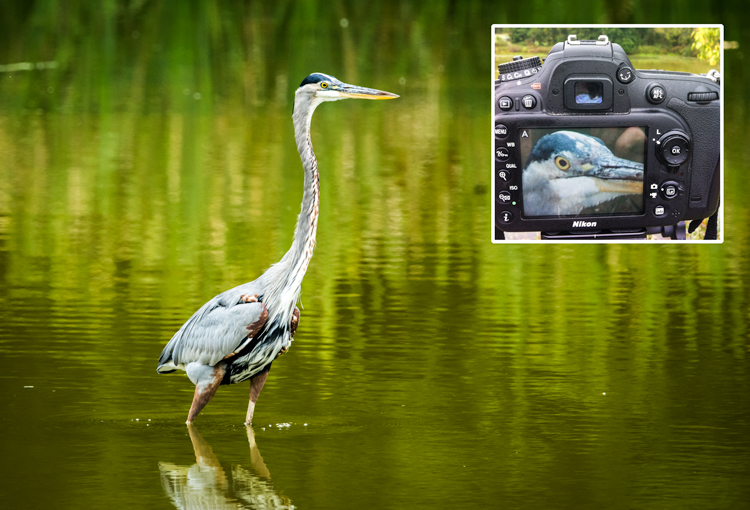
For the most compelling portraiture and wildlife photography, the most important focus is on the eye(s) of the subject. Using Live View, it is possible to isolate the eye for either auto focus or a manual focus. This method is limited to images that are posed, or with little movement.

Use live view to focus on the eye to fine-tune the focus in select wildlife images.

Use Live View to focus on the eye to fine-tune the focus in select wildlife images.

Conclusion

These are just a few ways that you can use Live View mode to focus your camera. Remember that using these methods will be much harder on your battery life. Always keep a spare, fully charged, battery with you when you are shooting. If you have any other ideas for using Live View for focusing, please leave them in the comments below.

googletag.cmd.push(function() {
tablet_slots.push( googletag.defineSlot( “/1005424/_dPSv4_tab-all-article-bottom_(300×250)”, [300, 250], “pb-ad-78623” ).addService( googletag.pubads() ) ); } );

googletag.cmd.push(function() {
mobile_slots.push( googletag.defineSlot( “/1005424/_dPSv4_mob-all-article-bottom_(300×250)”, [300, 250], “pb-ad-78158” ).addService( googletag.pubads() ) ); } );

The post 6 Ways to Use Live View to Get Sharper Images by Bruce Wunderlich appeared first on Digital Photography School.


Digital Photography School

 
Comments Off on 6 Ways to Use Live View to Get Sharper Images

Posted in Photography