RSS
 

Posts Tagged ‘Light’

Stealing Light – Using Street Lights for Portraits

07 Feb

Turn the street into your studio by using street lights for portraits Most people that I see taking photos after dark around the city have a flash mounted on the camera pointing at their subject. If shooting outdoors with nothing to bounce the flash off, the result usually is that rabbit out in front of headlights look, and flat lighting that rarely flatters your subject. As a professional wedding and portrait photographer, I will share with you my secrets of stealing available light when taking portraits around cities. No need for softboxes, beauty dishes, just put that flash away and start hunting for good light available in a city near you. It’s liberating carrying less gear and after a few light foraging trips, you will be well trained to find that tasty light!

Types of light sources

Illuminated advertisement signs

Docklandsphoto 4

f/1.8, 1/100th, ISO 1600

One of my favorite methods is to light up my subjects with illuminated advertisement signs, every city has them. Above is a portrait of the couple lit with the bus stop’s advertisement. Just find a nice one with not too much colour if possible and it’s like photographing with a giant softbox. You get a nice soft light perfect for head shots. I’ve even used this method to great effect shooting friends in a nightclub with an iPhone.

Street lights

Tungsten streetlights are common, you see them everywhere. I prefer wall lights to give a nice directional light. The second bonus with using tungsten lights is that if there is any ambient light in the picture like you see in the back, it turns into a deep shade of blue. Great effect with no photoshop needed, all you have to do is to set your white balance to tungsten or if your camera has a manual colour temperature setting you can set it to 3000K (degrees Kelvin) during the shoot and play around with it. If I am under time pressure I usually leave the WB to auto and do the colour correction in post production. There is no loss of quality that way when shooting in RAW. Below image shot in London, notice how the background ambient light turns blue.

Docklandsphoto 1

f/2.8, 1/80th, ISO 1000, Tungsten White Balance

LED lights

LED lighting can be seen all over cites these days. They are getting popular as they are more power efficient than tungsten lights. They will offer a colder colour temperature compared to tungsten lights. The main thing to remember with LED lights is that there is a rapid light falloff. You need to have your subject as close as possible to the light source, normally within three feet, for the best quality of light. The couple below were lit with the LED lights attached to bridge hand rails. In the left image you can see where the light source was coming from, and I had to get the couple quite close to it for the effect.

Docklandsphoto 2

f/4, 1/30th, ISO 3200

Learn to see the light

When I first started out as a wedding photographer I would quiz other photographers and ask how they took their images. I recall posting on a forum asking a seasoned professional how he created such stunning portraiture, half expecting a response in the form of ISO, aperture, shutter values and lighting setup. He responded to a forum post with what I thought a rather abrupt and smug response. “Learn to see the light”. I now really do “see the light”, excuse the pun. For the photography that I shoot, it really is a case of training myself to understand and recognize good quality light. Below image left was shot after sunset and lit with the flood lights used to light St Paul’s Cathedral. A fast lens such as a 50mm f/1.4 comes in handy in these situations. The right image was just shot outside a Vietnamese restaurant lit with none other than a common halogen spotlight. The key to shooting with light source from above is to pose your subject so that their heads tilt up, to avoid the dreaded panda eyes!

Docklandsphoto 3

f/1.4, 1/80th, ISO 1600 left image
f/1.4, 1/100th, ISO 1600 right image

For more wedding and lighting tips read:

  • Are you Ready to be a Wedding Photographer?
  • “Photography Business Secrets” – A Review
  • Balancing Color for Flash and Ambient Light using Gels
  • 6 Portrait Lighting Patterns Every Photographer Should Know

The post Stealing Light – Using Street Lights for Portraits by Garry Chung appeared first on Digital Photography School.


Digital Photography School

 
Comments Off on Stealing Light – Using Street Lights for Portraits

Posted in Photography


Long-Exposure Faces: Moody Light Art Painted with Sparks

07 Feb

[ By WebUrbanist in Art & Street Art & Graffiti. ]

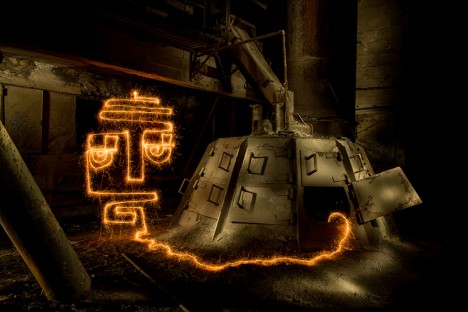
face art factory find

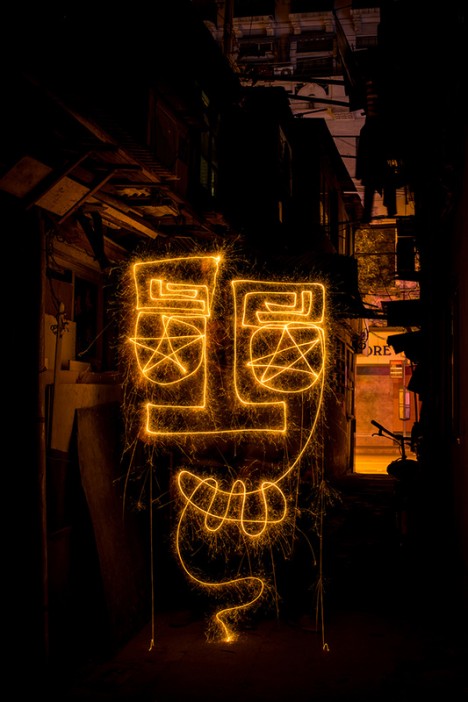
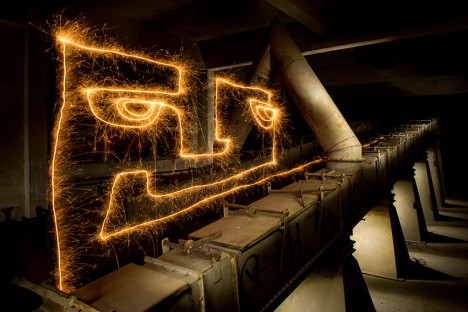
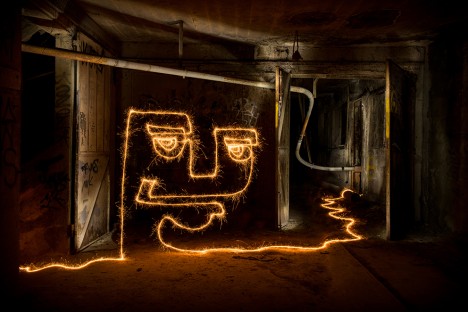
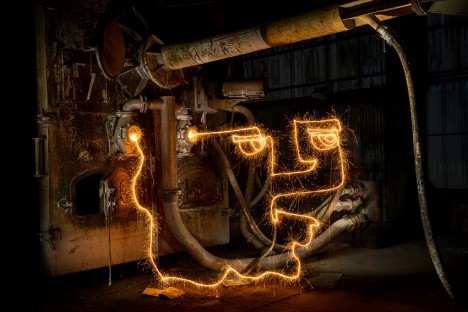
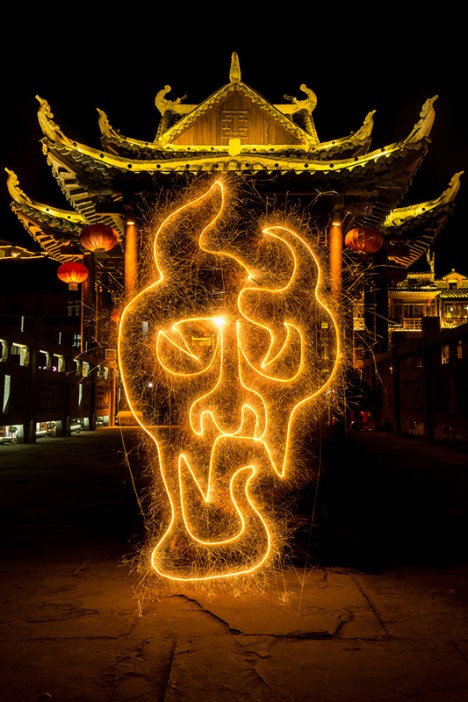
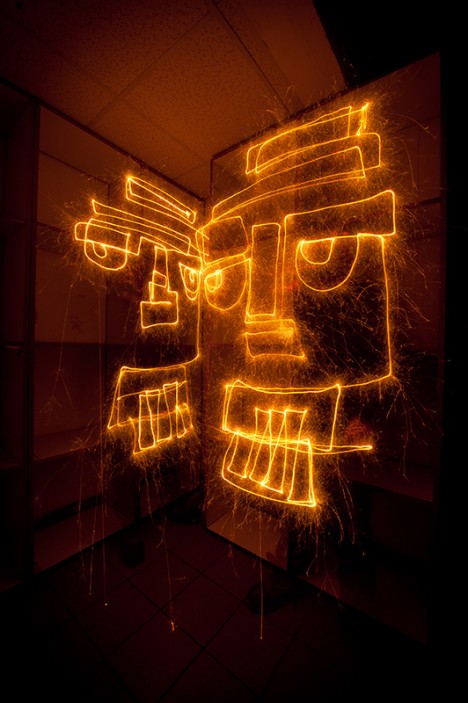
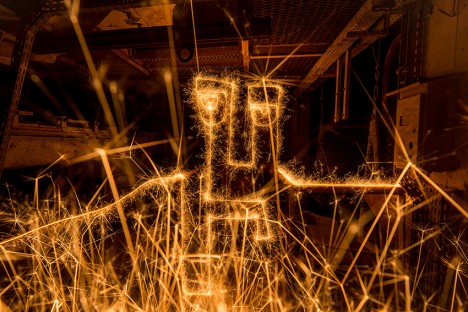
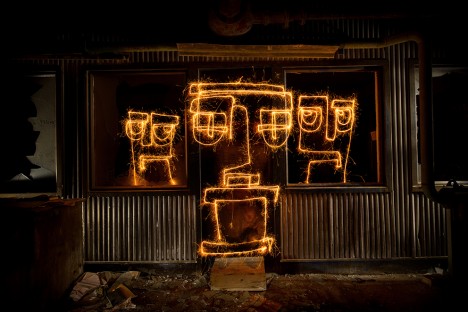
Light painter Diliz has worked for three years to twist, turn and perfect his single-line sparkler sketches in urban settings around the world. Each successive shot is related to a new time and place but also reflects a fresh attempt at capturing a mood and creating a sense of site-specific interaction.

face art drawing

face light art

face art find exit

face art factory work

Diliz (aka Vincent Delesvaux) has experimented with all kinds of photographic light art. In this particular series, dubbed 60 Seconds to Find an Exit, he set up shop at night in out-of-the-way streets and alleys, abandoned buildings and deserted basements.

face art china

face art twofold

face art sparks

face art three tryptic

His travels took him everywhere from European locations (including Verbier, Switzerland and Grenoble, Franceto) all the way to cities in China, such as Lijiang, Yangshuo Fenghuang and Shanghai.

Next Page – Click Below to Read More:
Long Exposure Faces Moody Light Art Painted With Sparks

Share on Facebook


[ By WebUrbanist in Art & Street Art & Graffiti. ]

[ WebUrbanist | Archives | Galleries | Privacy | TOS ]


WebUrbanist

 
Comments Off on Long-Exposure Faces: Moody Light Art Painted with Sparks

Posted in Creativity


Create a Cast of Light in Your Image using Photoshop or Elements

06 Feb

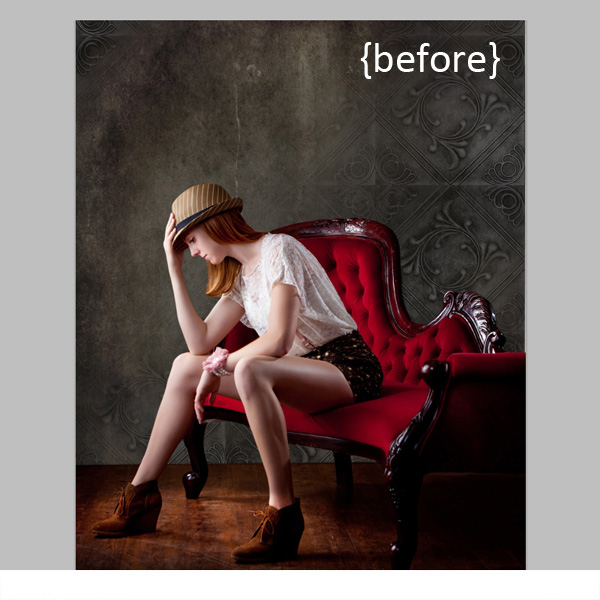
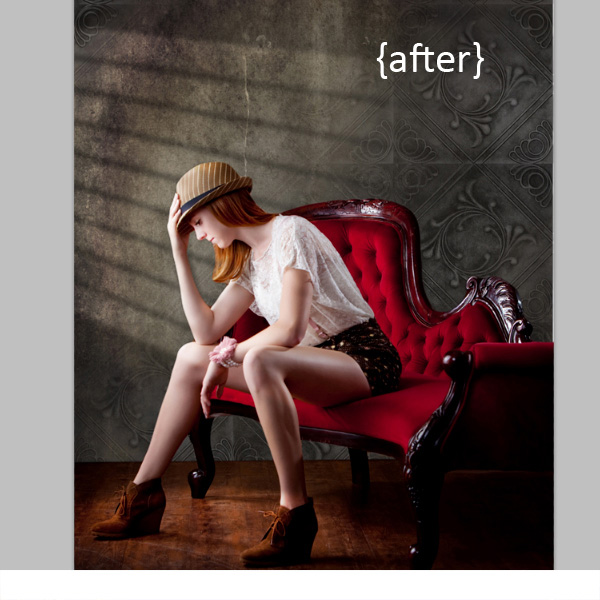
Light sources add depth and interest to your images immediately. By simply adding some window light to this image we added depth and warmth. If you have an image that you love, but it’s falling a little flat, consider adding some light! With just a few simple steps you can add beautiful light to your images.

Follow these steps to create a cast of light – works in Photoshop and Elements

Window Light Cast Before

Window Light Cast After

One thing you’ll want to pay special attention to is pre-existing lighting in your image. Make sure the light source you add works with and compliments your image. You can adjust the angles and direction of your added lights to make them work together so your image is both believable and beautiful.

Let’s get started. Follow these simple steps to make your compositions shine!

Step 1: Start with a light source

This can be an image you’ve taken, something you’ve designed or something you’ve purchased. We are using a light element from our Window Cast Light Set. Choose a light source and shape that you want to bring into your composition.

NOTE: if you want to follow along and try this on one of your images we’re happy to provide our set of Light Casts to you for free. Go here to download them – use the code: FREEBIE when you checkout to get them at no charge.

Step 2: Add the light source to your image

If you have your image and the light source both open in Photoshop, you can use your selection tool to drag the light source to your image. Alternatively, you can also copy (Control + C) the window shape layer in Photoshop (or PSE). Open your image and paste (Control + V) the window shape layer into your image.

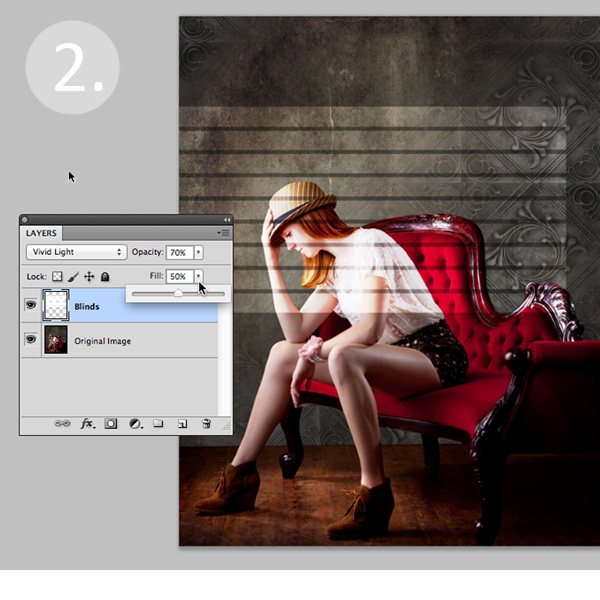
In this case, we placed the light source over our image. Next we adjusted our Layer Blending Mode by setting it to “vivid light” and then adjusted our opacity and fill on the light source until we achieved the desired look. You’ll want to play around with these settings to get the right look for your image.

Window Light Cast La ED2363

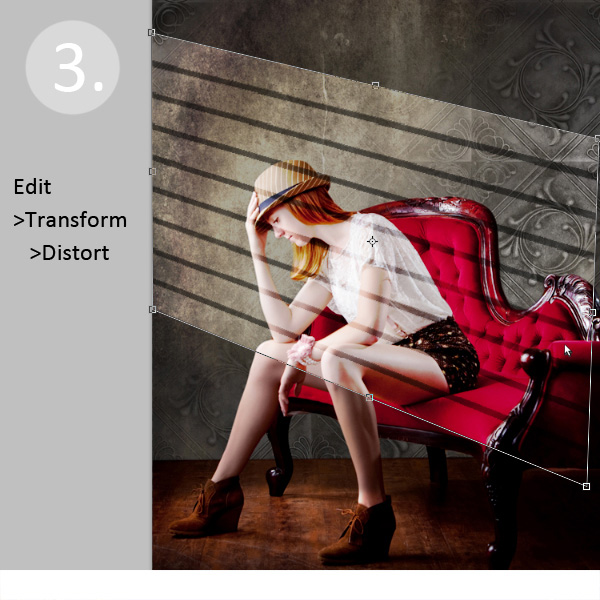
Step 3: Adjust the shape of your light

Next, you’ll transform the window shape to your liking. Go to Edit>Transform>Distort and then move the corners to create the
shape that works best with your image.

Window Light Cast Transform

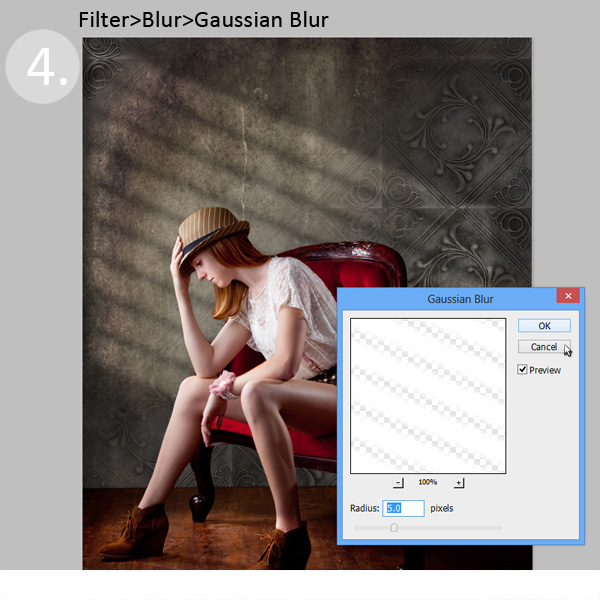
Step 4: Soften your light

Now you want to soften the edges of your light so that it is not so harsh. Use the Gaussian Blur filter (Edit>Blur>Gaussian Blur) to soften the edges to your taste. In this case, we set the blur amount to 5. Adjust the amount of blur up and down to see how it softens the light in your image.

Window Light Cast Blur

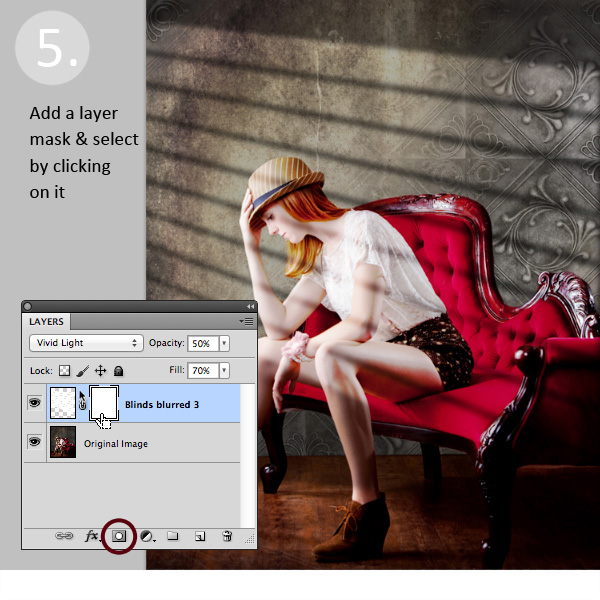
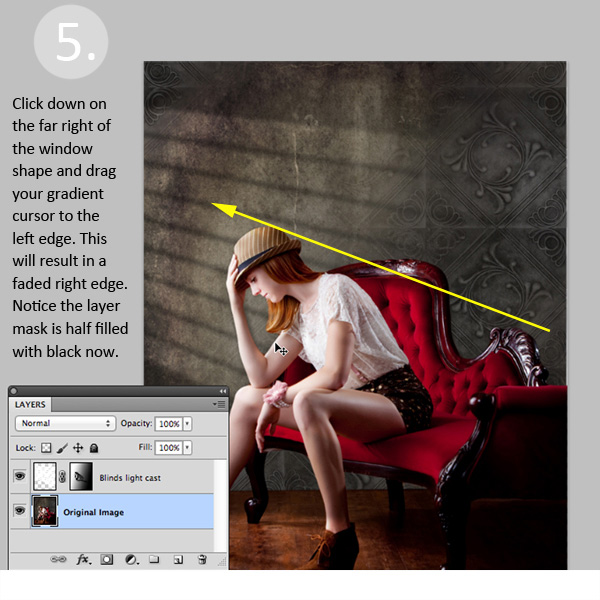
Step 5: Fade your light source for a more natural look

Now you’ll add a Layer Mask to your window shape layer. First, select your layer, and then click the Add Layer Mask Button at the bottom of your Layers Palette. Click on the new Layer Mask in the layer to make sure it’s selected. (VERY IMPORTANT STEP!)

Window Light Cast La ED283A

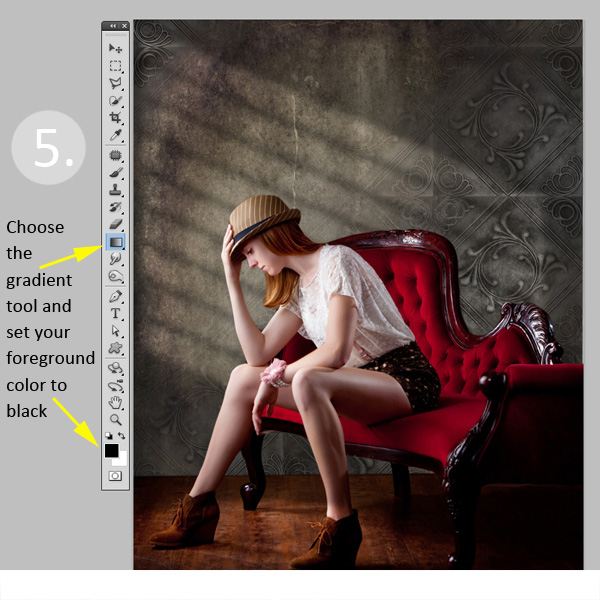
After adding a layer mask to the light cast layer, set your color palette to black and white, with black in the foreground color. Then use the gradient tool set to “foreground to transparent” to fade the light off.

Window Light Cast Gradient

Simply click into your layer mask and drag your cursor from one end (this will be 0% opacity) to where you’d like to see the light at 100% opacity. If you don’t like your results, fill the mask with white and start over.

Window Light Cast Gr ED2331

Step 6: Position the window shape to your liking.

Use your Selection Tool to adjust the position of your light layer to the desired location in your image. You can also use a soft black brush set to 30% opacity to subtly brush away the window light in the layer mask. We did this to remove extra light from her face.

Congratulations! You’ve successfully added a beautiful, warm light effect to your image to create more depth and interest in your image.

Window Light Cast Before

Window Light Cast After

Your turn!

If you’ve tried out this technique please share your images in the comments below, and please ask if you have questions!

The post Create a Cast of Light in Your Image using Photoshop or Elements by Christina Roth appeared first on Digital Photography School.


Digital Photography School

 
Comments Off on Create a Cast of Light in Your Image using Photoshop or Elements

Posted in Photography


One Light Portraits – Advanced Set Ups

02 Feb

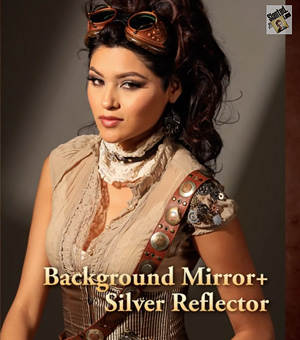
Ione-light-portraits-reflectorsn keeping with our portrait theme this week is a video that goes over some great ideas for making one light portraits, using some advanced set ups. Keep in mind this is great if you only have on light and don’t want to invest in a more. The reflectors he’s using can be purchased relatively inexpensively, as can the mirrors. Probably the thing you’ll need to do this type of technique is more light stands and some clamps.

Just ignore the plug for the light crane or light boom at the end of the video. That is more applicable if you are doing video with your DSLR.

I think there’s some really great tips in there. Watch it a couple times to catch them all. When I used to do commercial tabletop product photography many moons ago, I used a lot of small reflectors, silver cards and mirrors. You’d be amazed at what you can use to manipulate light and create some great images. You don’t have to spend a lot of money on three and four light set ups if you get a little creative with your DIY techniques.

For more reading on portrait lighting and DIY try these:

  • 6 Portrait lighting patterns every photographer should know
  • The Basics of a One Light Setup: A Lighting Tutorial
  • 4 Tips for a Perfect White Background in High Key Photography
  • Portrait Tutorial Feast – Best of dPS 2013

Links to check out some of the gear mentioned in the video:

  • Alzo Easy Frame Diffuser & Reflector Kit- 40 Inch Metal Frame with Handle Incl. 1 Diffuser, 1 Silver – 1 Gold Reflector (not exactly the one he used but you get the idea)
  • Photoflex Silverdome NXT, Medium Softbox, 24″ x 32″ x 17″.
  • Spider Pro SCS -Single camera System Camera Holster

The post One Light Portraits – Advanced Set Ups by Darlene Hildebrandt appeared first on Digital Photography School.


Digital Photography School

 
Comments Off on One Light Portraits – Advanced Set Ups

Posted in Photography


Low Light Photography: How to Shoot Without a Tripod

22 Jan

A tripod is my most valuable photo accessory. In fact, I view it as an essential item, and not an accessory. But sometimes using one is just not practical. Sometimes you get caught without it unexpectedly, and sometimes they even break. It’s good to know what to do in these situations so you don’t miss any photo opportunities.

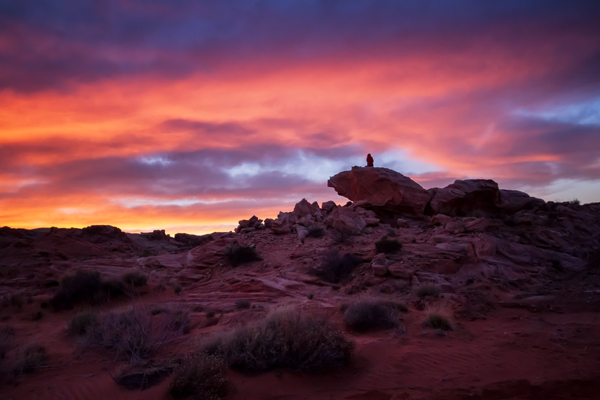
Sunset in The Valley of Fire, Nevada by Anne McKinnell

While shooting in the Valley of Fire, Nevada, I broke my tripod. Of course, there was a spectacular sunset that night. I was able to make this photo by increasing my ISO to 2000 and using a wide aperture of f/5.0 (the widest aperture for the lens I was using) when normally I would have used a much small aperture for this scene.

If you don’t have your tripod with you, or you’re trying to make do without one, you still have some options for low-light photography.

1. Use a wide aperture

If you want to handhold your camera in low light, you’ll have to work with a wide aperture, a high ISO, or both. Often landscape photographers want to use a small aperture such as f/18 to get maximum depth of field, but that isn’t practical for low light situations. Instead, use your camera’s widest aperture (the smallest f number) and focus on the most important feature in the frame.

Most standard kit lenses don’t perform very well in the dark, so if you do a lot of this type of photography, consider picking up a simple 50mm f/1.8 lens; nearly every brand has a cheap one and they’re well worth it for their sharpness and low-light capability. The maximum aperture of f/1.8 is a full 3.5 stops (lets in 12x more light!) wider than a standard 18-55mm kit lens at the same focal length.

2. Use Image Stabilization

The rule of thumb for shutter speed is that if you want a sharp image, the shutter speed should be no slower than the same fraction as your focal length – that is, if you’re using a 50mm lens, set your shutter speed to 1/50 second. However, if your lens has image stabilization, the shutter value can be two or three stops slower than this. This leeway makes a big difference in low light situations.

3. Use proper camera holding techniques

In low light photography, learning the proper stance and camera holding technique can give you even more leeway when it comes to preventing camera shake. It’s all about stability – plant your feet firmly, about shoulder width apart. With your right hand on the shutter button, hold the lens with your left hand, to steady it. Tuck your elbows tightly into your chest and control your breathing, shooting after you exhale whenever possible. All these things will contribute to your own stillness, minimizing handshake blur.

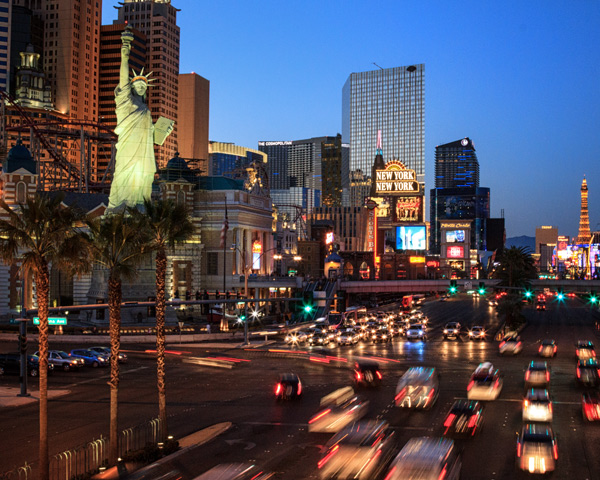
New York New York, Las Vegas by Anne McKinnell

In Las Vegas, I wanted to make an image with a fairly long shutter speed to blur the motion of the cars. However, I was standing on a bridge that had a chain link fence, and it was also a narrow pedestrian bridge with lots of pedestrians. Using a tripod was not practical. Instead using ISO 1250 and proper camera holding techniques allowed me to hold it steady for half a second.

3. Use a high ISO setting

ISO refers to the level of light sensitivity of your camera. The higher the ISO the more sensitive the sensor is to light, therefore the less light is needed to make a good exposure. The downside is that the higher the ISO, the more “noise” you will find in your image. Noise is a grainy look as opposed to a smooth look. Some noise is okay and it can often be removed in post processing.

When photographing in low light, turn your ISO up as high as you can before the image quality gets too noisy. This setting is different on every camera and an acceptable amount of noise is different for every photographer.

I recommend that you do an exercise so you know the maximum ISO for your camera, that results in a noise level you think is acceptable. Take the same shot at a number of different ISO settings and when you view the photos on your computer later (view at 100% size or 1:1), you will see at what point image quality begins to deteriorate. With today’s cameras this point is probably higher than you might think. Often with ISO 800 or 1600 you will see some noise, but not so much that you can’t fix it in post processing. It’s a good idea to try this exercise both in good light, and low light situations.

Canada Geese at Sunset by Anne McKinnell

Photographing Canada Geese flying overhead at twilight meant that I needed a relatively fast shutter speed to stop the motion. Therefore, I had to use a high ISO and a wide aperture to enable the faster shutter speed. This image was made at ISO 1600, f/4.5 1/200 second.

Noise is not necessarily a bad thing and can be used for creative purposes. If you are using a very high ISO, try shooting in black and white – it removes the colour from the noise and instead gives your photos an old-school grainy look.

Some of the most beautiful landscape photographs are made in low light, so learning these techniques will help you take advantage of low light opportunities and get that great shot even when you don’t have a tripod.

Further reading on low-light photography:

  • A guide to outdoor low-light photography
  • Better low-light photos without a flash
  • 15 tips for low light landscape photography

The post Low Light Photography: How to Shoot Without a Tripod by Anne McKinnell appeared first on Digital Photography School.


Digital Photography School

 
Comments Off on Low Light Photography: How to Shoot Without a Tripod

Posted in Photography


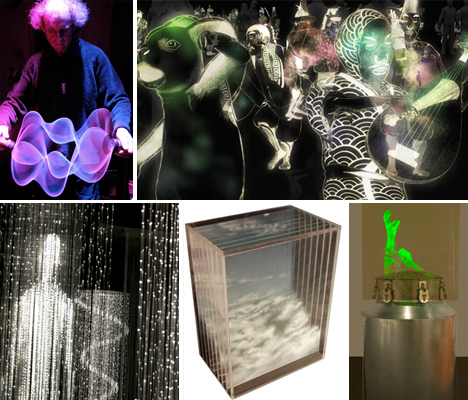
Trick of the Light: 12 Shining Works of Holographic Art

21 Jan

[ By Steph in Art & Drawing & Digital. ]

Holography Art Main
Holograms suggest a depth and dimension that isn’t really there, an illusion of matter in space that can range from a low-tech flickering image in a children’s book to ghostly computer-generated projections of people on stage. No matter how simple or complex the techniques used, it’s all a trick of the light, a way of fooling our eyes – whether they’re just images painted onto layers of glass or created with three-dimensional HDTV video.

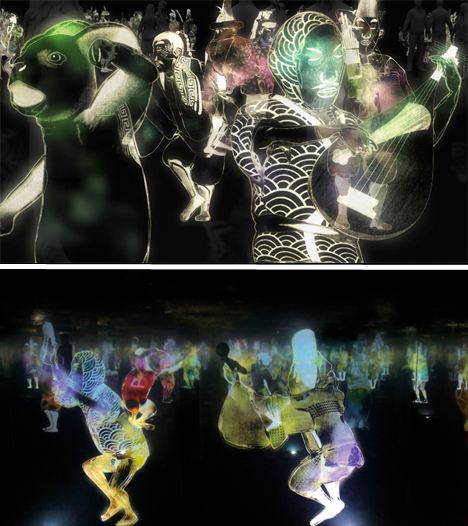
Dancing Japanese Holograms by Teamlab

Hologram Art Dancing Japanese Teamlab

Visitors to the Singapore Art Museum found themselves surrounded by ghostly dancing figures, some playing instruments, in what seemed like a book of Japanese illustrations come to vivid, kinetic life. The maze of holograms is a digital installation by Teamlab, inviting anyone entering the darkened gallery to move within and even interact with the figures. Each figure senses the presence of the viewer and responds by playing music, creating a ripple effect in other nearby holograms.

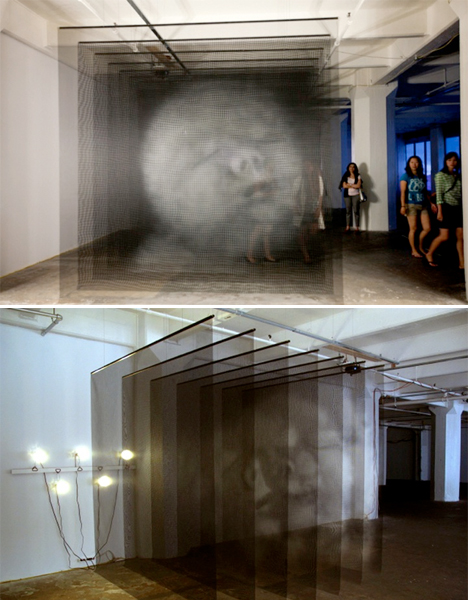
Three-Dimensional Mesh Portraits

Hologram Art Mesh Portraits

Depending on where you stand when you view these three-dimensional works by artist Seth Wulsin, you’ll see either a jumble of different facial features or a holographic image that seems to move slightly. The large-scale pieces, entitled Ánimas, consists of portraits painted on suspended mesh screens. When viewed from the front, they come together into a sort of holographic image. Moving closer or further away gives each portrait extra dimension.

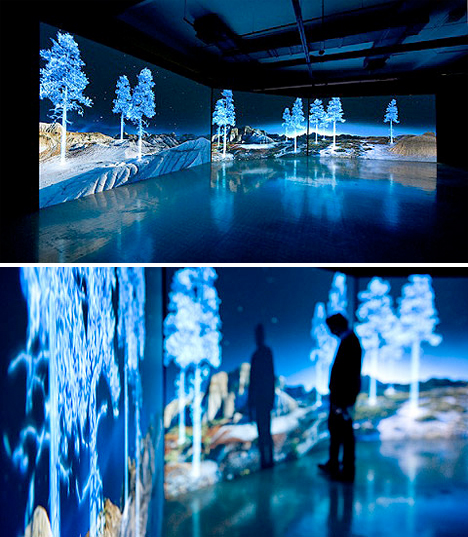
Holographic Trees in a Landscape

Hologram Art Trees Landscape

Vivid blue holograms of trees appear in unlikely places, like the desert, in this high-tech installation by Kelly Richardson. The artist uses high definition video and three-channel projection to create the illusion. Says Richardson of the work, “Mining the aesthetics of cinema and science fiction, The Erudition presents a lunar-esque looking landscape with what appears to be an unlikely monument or proposal, consisting of holographic trees blowing in fictional wind. Is this slightly malfunctioning display a forgotten site for proposed colonization? Better yet, is this some kind of alien artwork?”

Ghostly Holographic Art Drawn on Panels of Glass

Hologram Art Panes of Glass

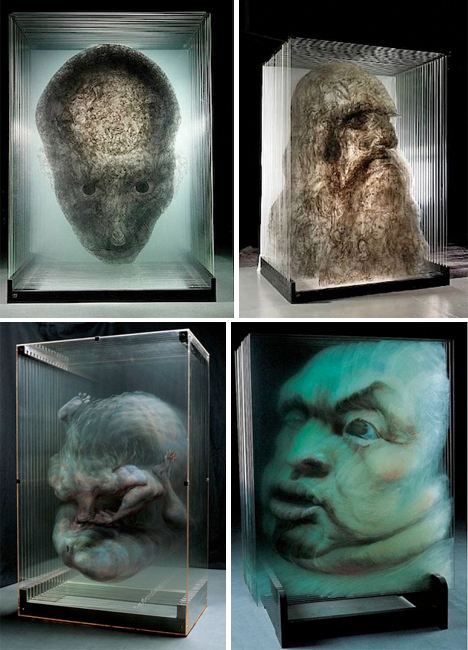
Beijing-ased artist Xia Xiaowan paints imagery onto panes of glass with special colored pencils, and then layers the glass to create a three-dimensional appearance. This sort of ‘painted hologram’ achieves the same effects as high-tech holographic art in an entirely manual, low-tech way. Each image is made up of 14 to 30 panes of glass, seeming to move and shift as you walk around it and view it from different perspectives.

Next Page – Click Below to Read More:
Trick Of The Light 12 Shining Works Of Holographic Art

Share on Facebook


[ By Steph in Art & Drawing & Digital. ]

[ WebUrbanist | Archives | Galleries | Privacy | TOS ]


WebUrbanist

 
Comments Off on Trick of the Light: 12 Shining Works of Holographic Art

Posted in Creativity


Darkened Cities: Urban Skylines Minus Light Pollution

18 Jan

[ By Steph in Art & Photography & Video. ]

Darkened Cities 1

What would your city look like if it went completely dark? Words like majestic, awe-inspiring and magical come to mind – not as descriptions for the cities themselves, but how some of their most iconic architecture would look as black silhouettes against the bright starry skies of remote places. Artist Thierry Cohen gives us an idea of just who amazing these visuals would be in his series, ‘Darkened Cities.’

Darkened Cities 2

Cohen doesn’t just superimpose random images of the night sky behind each skyline – the imagery is actually what the sky would look like in each of those precise locations. Using methods pioneered by early 19th century photographers, Cohen first takes photos of each location, isolating and darkening the cities themselves, before adding in the sky.

Darkened Cities 3

Taking note of the exact latitude, longitude and angle of each city, the artist tracks the earth’s rotation to capture the sky in a place where light pollution doesn’t affect the clarity of the stars, like the Mohave desert.

Darkened Cities 4

Pictured here, in order of appearance, are Rio de Janeiro, Shanghai, San Francisco, Paris, Tokyo, Sao Paulo and New York. See more at Thierry Cohen’s website.

Share on Facebook


[ By Steph in Art & Photography & Video. ]

[ WebUrbanist | Archives | Galleries | Privacy | TOS ]


WebUrbanist

 
Comments Off on Darkened Cities: Urban Skylines Minus Light Pollution

Posted in Creativity


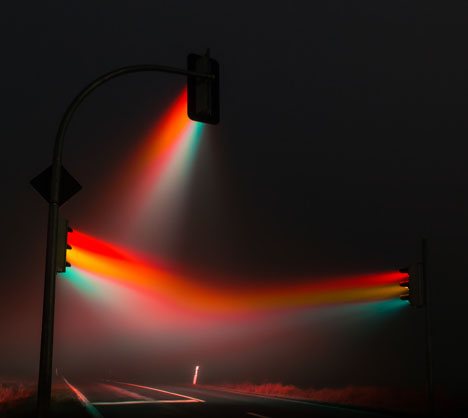
Lucky Rainbow: Time Lapse Pics of Traffic Light Piercing Fog

17 Jan

[ By WebUrbanist in Art & Photography & Video. ]

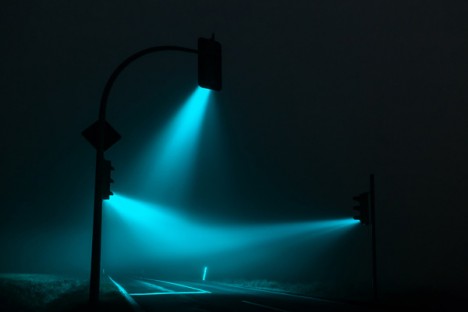
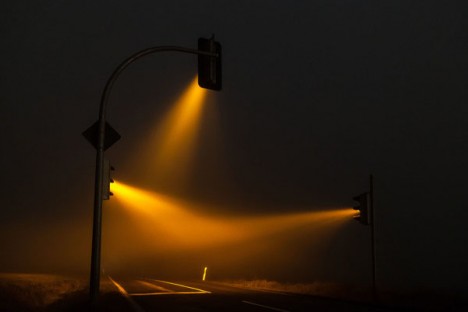
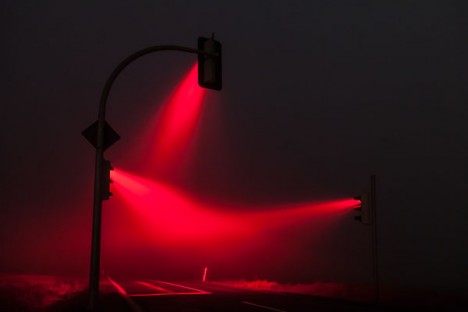
time lapse light

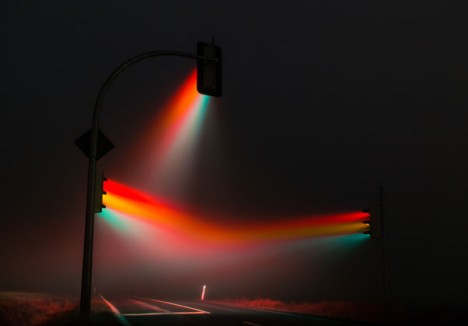
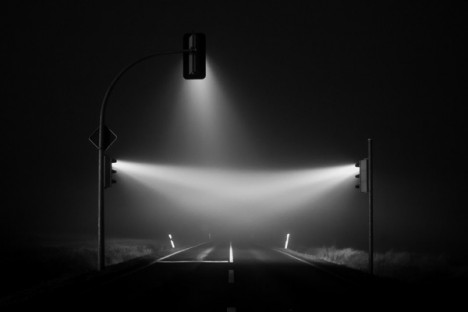
The right place, proper timing and a keen eye conspired to help a photographer capture this eerie nighttime phenomena at a crossroads outside of Weimar, Germany.

rainbow night light green

rainbow night light yellow

rainbow night light red

German photographer Lucas Zimmermann found and shot this intersection at each stage of the its cyclical change, capturing green, yellow and red.

rainbow light full spectrume

He also went a step beyond the sequential with one particularly impressive shot spanning the entire cycle, creating a rainbow in the mist.

rainbow light black white

His other work spans from the rural United States to the streets of Beijing, but usually focuses on people over places – this set, however, proved a worthy exception.

Share on Facebook


[ By WebUrbanist in Art & Photography & Video. ]

[ WebUrbanist | Archives | Galleries | Privacy | TOS ]


WebUrbanist

 
Comments Off on Lucky Rainbow: Time Lapse Pics of Traffic Light Piercing Fog

Posted in Creativity


Balancing Color for Flash and Ambient Light using Gels

13 Jan

Flash with 1 CTO plus 1/8 CTOIn the last article Balancing Flash and Ambient Light Using an Incident Light Meter I did not mention color temperature or any correction for the colorcast in the background. There were however requests for it in the comments section, so in this article we will cover three ways of balancing color for flash and ambient light (tungsten yellow/orange which is approximately 3200°K, flash which has a color temperature close to daylight or 5500°K).

Color Temperature Explained

Before you go into the process of correcting color imbalance you will need to understand color temperature. A basic description of color temperature is based on the color characteristics of visible light from warm (yellows) to cool (blues) and the ability to measure this in degrees Kelvin (°K). Degrees Kelvin is a numerical value assigned to the color emitted by a light source. Visualize a lamp filament that is heated using an electric current. It starts off as black and starts getting hot. At a particular point it will become hot enough to start glowing, typically a dark red. As it gets hotter, it will change from dark red to orange to yellow to practically white. It is important to understand that technically, red light has a lower color temperature but is described as warm, while blue light is a higher color temperature but is described as cool. So remember that the terms warm and cool describe color, not temperature. This is a fairly extensive topic but for a quick explanation this should help.

Read more on White Balance and color temperature:

  • Practical White Balance and Why You Should Learn It!
  • Introduction to White Balance

Since warm and cool are colors, we can change their characteristics by modifying color. In lighting we achieve this modification by using various colored gels of varying densities. Lets examine the first and simplest method.

Method One – Using Color Gels on the Flash

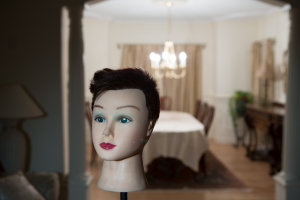
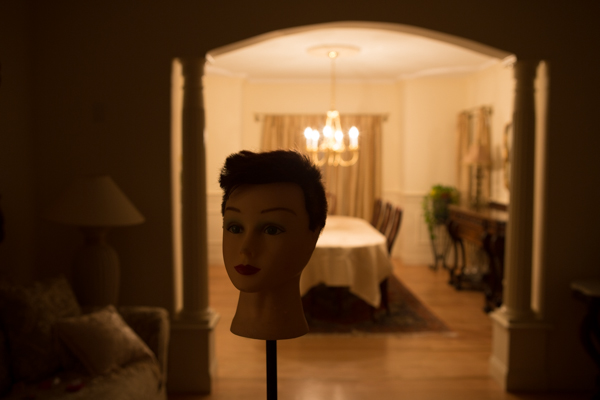
Here are two images of the same scene, one using Auto White Balance (AWB) and the next using Daylight White Balance (WB). The daylight WB is 5200°K while the AWB applied 3200°K. Clearly the Daylight WB is too yellow.
Auto WB

Image captured with camera set to Auto White Balance (AWB)
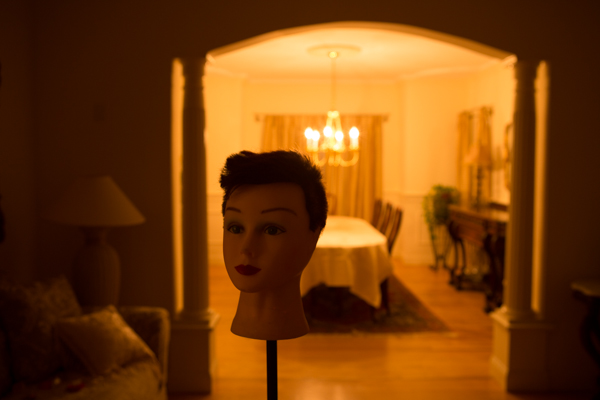
Same scene as above captured with the camera set to Daylight White Balance

Same scene as above captured with the camera set to Daylight White Balance

The Problem

The background room is lit by tungsten bulbs (typically around 3200°K). We will use a flash to light the main subject (approximately 5500°K).  This is a considerable difference that you will need to resolve. So if you can make both the light sources match in color temperature, you can then set the WB on your camera to that, and get a perfectly balanced image.

The Solution

To achieve this balance, you will use a color correction gel on your flash, to match the orange color of the tungsten bulbs. Theoretically both sources will now produce the same color. So if you set your camera’s WB to “tungsten” you will capture the background without any colorcast and it will look neutral. What about your primary subject? Since the flash output has been color modified to “tungsten”, the entire scene will look natural and devoid of any colorcast as long as the lights are close to the color temperature of tungsten.

Color correction is achieved using gels. These gels are manufactured by companies like Roscoe, Lee and ExpoImaging. Gels come in all sizes from large rolls to precut sheets. My preferences are the Rogue Gels made by ExpoImaging as they are the perfect size for flash heads and are attached using an elastic band. Each gel is marked for its strength and light loss. As a starter, for under $ 10 you can buy sample packs from most lighting supply stores.

Gels that create yellow/orange light are known as CTO gels (Color Temperature Orange). These gels are available in various strengths as follows:

  • 1/8 CTO Converts 5500°K to 4900°K
  • 1/4 CTO Converts 5500°K to 4500°K
  • 1/2 CTO Converts 5500°K to 3800°K
  • 3/4 CTO Converts 5500°K to 3200°K
  • Full CTO Converts 5500°K to 2900°K

I recommend you start with a full CTO and adjust by adding or reducing the color temperature correction by either combining gels or using gels of lesser strength. Since these gels add color they also reduce the amount of light transmitted. Based upon the gel that you are using, you will need to compensate for the loss of light. The typical light loss is mentioned in “f” stops with each gel strength. This information is typically imprinted on the gel or provided on a backing sheet of paper. You should use this information as an initial guideline for compensating your exposure.

This method will work reasonably well. However, it is not the most accurate, as it relies purely on a visual color correction. See the result in the following image:
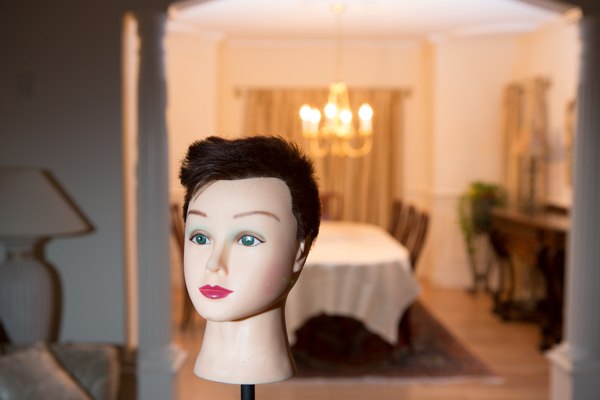
The camera White Balance is set to Tungsten and the flash is gelled using a Full CTO

The camera White Balance is set to Tungsten and the flash is gelled using a Full CTO

Notice that the color of the subject is fairly accurate but the background is still a bit yellow/orange. The color temperature of the lights in the background may not be true 3200°K.

Method Two – Gels on the Ambient Light Source

In the second method, you will use gels over the offending lights if at all feasible. In this example consider it not feasible. However, you can use additional flash heads to overcome the problem of the tungsten colorcast. You do this by applying an opposing color gel to one or more flash light sources to fill the background. Keep in mind that based upon the size or the area and the intensity of the ambient light in the background, this too may not always be feasible. Take the additional flashheads (make sure they can be fired as slaves) and put a CTB (Color Temperature Blue) gel on each. What you are attempting to do is to negate the effect of the Tungsten by adding blue light to the ambient environment. Test your exposure and set the camera to “flash” white balance. Once again, you may need to add or subtract the gel intensity.
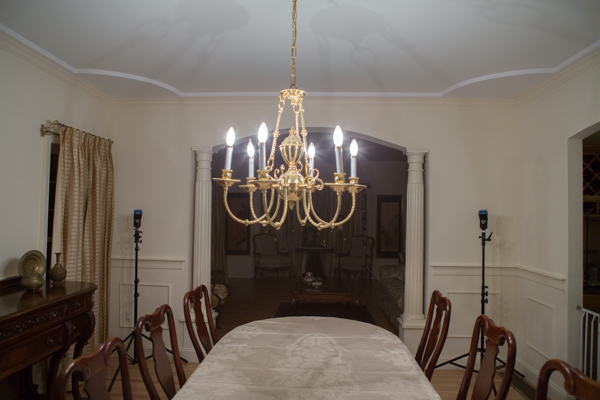
The set up. Note how the flash heads are concealed from view

The set up: note how the flash heads are concealed from view and pointed into the room that is the background

The CTB gels like CTO gels are available in multiple strengths as follows:

  • 1/8 CTB Boosts 3200°K to 3300°K
  • 1/4 CTO Boosts 3200°K to 3500°K
  • 1/2 CTO Boosts 3200°K to 3800°K
  • 3/4 CTO Boosts 3200°K to 4100°K
  • Full CTO Boosts 3200°K to near daylight

Once you are satisfied with the background color, go ahead and photograph the primary subject. Do not gel the main flash and leave the white balance on “flash”.
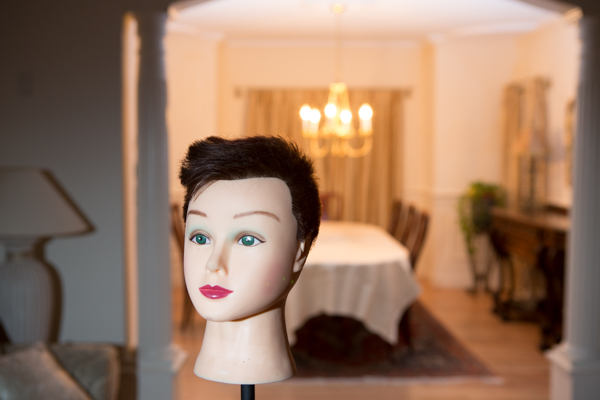
Color Bal

Color Correction using blue gels in the background

In each of the cases above there is still some color cast in the final image. This is because the lights in the background are not true 3200°K and we have been relying on tungsten color temperature for our corrections.

Method Three – Custom White Balance for Background and Matching Gels on Flash

Here you use custom white balance to establish an exact white balance setting for the ambient light. It is best to use a “white balance card” or a device like the X-Rite Color Checker Passport.

Color Checker Passport in Ambient Light

Image captured of  a Color Checker Passport in ambient light

Zoomed in for creating a Custom White Balance

Color Checker Passport – Zoomed in for creating a Custom White Balance

Image of the Color Checker Passport after Custom White Balance was established

Image of the Color Checker Passport after Custom White Balance was established

If possible, bring that image into Lightroom or Adobe Camera Raw and determine the actual color temperature. In this case, it is 2400°K, which, as you can see, is vastly different from the 3200°K tungsten. No wonder there was still a yellow colorcast in the first method. Use this measurement to establish the gel strength needed for the primary flash. If you cannot use Lightroom or any other software to obtain an accurate color temperature reading, you will need to do a bit of trial and error to determine how much CTO to use. In this case we need to get to 2400°K. A full CTO will drop 5500°K to 3200°K and a 1/8 CTO will drop an additional 600°K bringing the correction to 2600°K which is fairly close to what we need. Leave the camera set to the custom WB and gel the flash with one Full CTO gel and one 1/8 CTO gel to get a well balanced image.
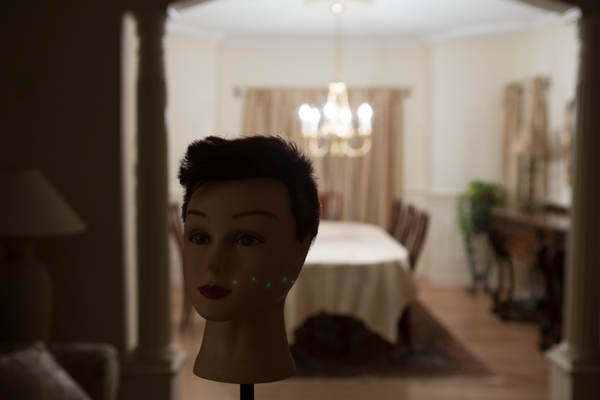
The correct White Balance for the background
The correct White Balance for the background


Using a Full CTO on flash head
Using a Full CTO on flash head

Flas with 1 CTO plus 1/8 CTO

Flash with a Full CTO plus a 1/8 CTO – a well color balanced image
One full CTO and one 1/4 CTO – the subject is a bit warm

One full CTO and one 1/4 CTO – the subject is a bit warm

In Conclusion

Always keep a set of color correction gels in your bag if you use flash on location.  Not only will you need them for indoor flash photography but the CTO gels are a ideal when using flash for portraiture at sunrise or sunset.

The post Balancing Color for Flash and Ambient Light using Gels by Shiv Verma appeared first on Digital Photography School.


Digital Photography School

 
Comments Off on Balancing Color for Flash and Ambient Light using Gels

Posted in Photography


Manipulating Natural Light in Wildlife Photography

08 Jan


back-light-wildlife-photography-1-edit

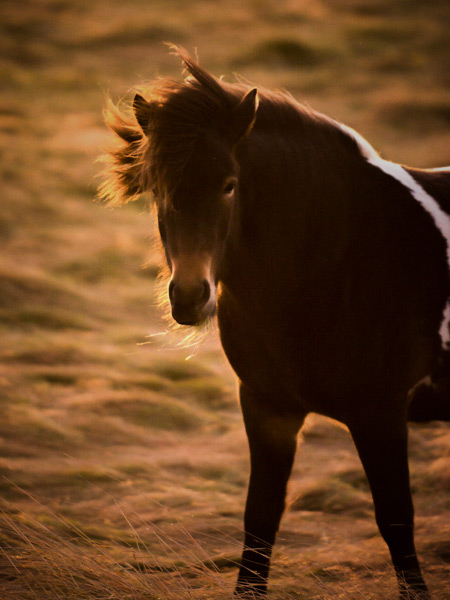
An Icelandic pony, shot against a setting sun

When photographing wildlife, the sun is one of the most useful tools that enables you to create something different or add impact to your images.  By taking control of your position relative to your subject, and to the sun, you can manipulate the available light to your advantage.

Favourable times of day for wildlife photography are at the beginning and end of the day when the sun is low in the sky.  This often coincides with periods of heightened activity of many animals, but also with a warmer directional light from the sun being lower in the sky.  When the sun is low in this way, it lends itself to a number of key natural lighting techniques.

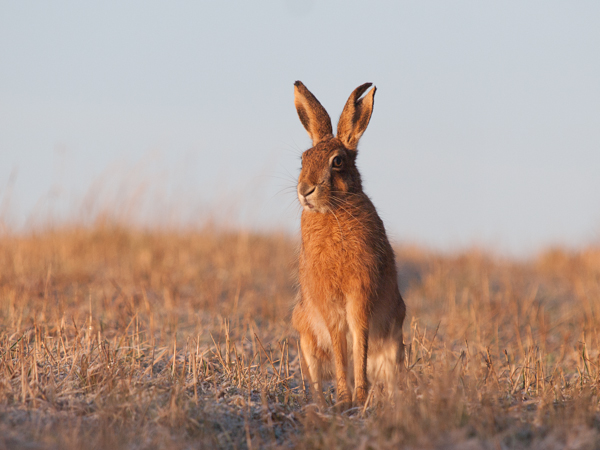
side lighting wildlife photography

A side lit brown hare (Lepus europaeus)

Side lighting

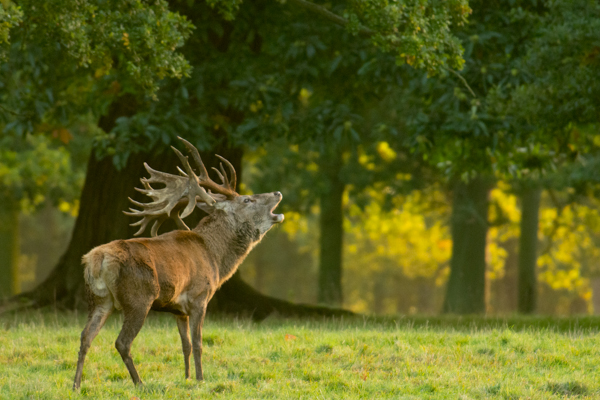
You can naturally side light your subject by keeping the sun at approximately 90 degrees to the direction that you are facing.  The sunlight will then be lighting your subject from the side which can result in a greater sense of shape, form, and texture from the contrast between the soft light and shadows across the subject.

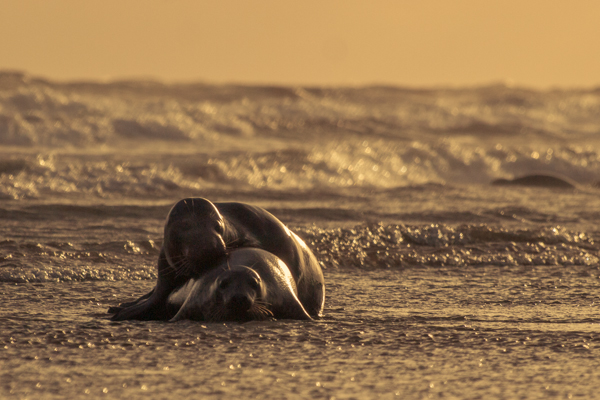
side lighting wildlife photography

Side lit grey seals (Halichoerus grypus) courting at sunrise

It can add a sense of three dimensionality that full-on front lighting cannot do, and because of the soft nature of the light, the highlights and shadows are not too intense and can be easily captured.

side lighting wildlife photography

A bellowing red deer stag (Cervus elaphus) with light from the side

Back lighting

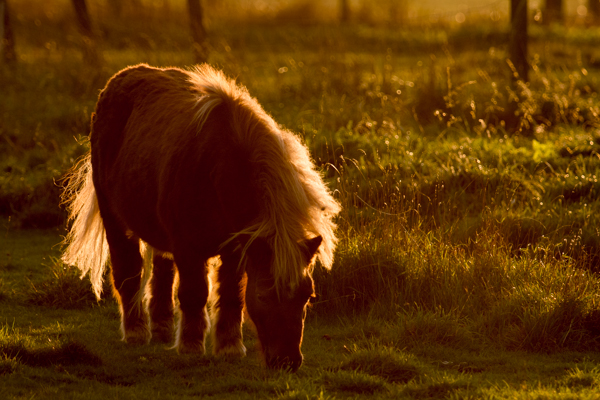
One of the first tips you often hear when starting in photography is not to shoot into the sun. However, by doing just that you can create striking images.  By positioning yourself so that your subject is directly between you and the sun, you can capture a strong backlit outline of your subject that is almost like a halo of light.  This works best when there are fur or feathers to capture the light, and it is preferable that the outline of your subject is easily recognizable.

back lighting wildlife photography

The hair of this pony create a golden outline when backlit by the low sun

Exposing for backlit subjects can be difficult, as you will be dealing with areas of extreme brightness and shadow. It is best to ensure you retain detail in the highlights (as that will be forming the main detail of the image) by manually underexposing.

Silhouettes

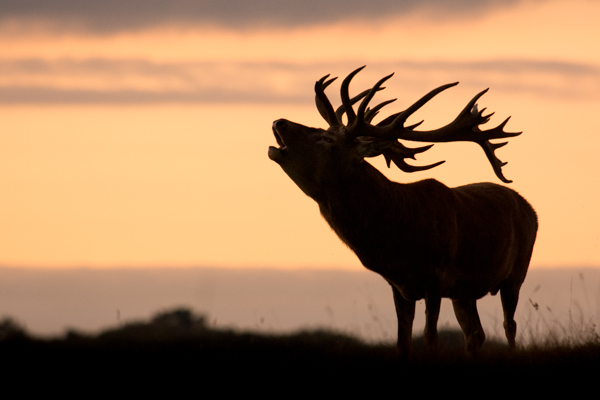
Silhouettes are another way of capturing the strong outline of your subject, but in this instance it is achieved by shooting your subject against a bright background, often the sky.  Just after the sun has gone down is a great time for this technique.  There can often be far more colour in the sky once the sun is below the horizon, and the sky will still be bright enough to easily cast your subject into silhouette.

One tip for shooting wildlife silhouettes is that sometimes it can be good to ensure you retain some detail in the shadows, for example an eye. This can help retain some interest in the large area of black, and to keep a connection between the subject and the viewer.  If you want to do this, you will need to ensure that you do not underexpose the subject too far, such that the shadow detail is lost, to give you flexibility during post-processing.

silhouette wildlife photography

A silhouette of a red deer stag (Cervus elaphus) is an instantly identifiable form against a sunset sky

To conclude

It can be difficult to motivate yourself to get up for sunrise or to be out photographing at sunset, but those times of day give you much more flexibility to use the natural light as a powerful tool in your wildlife photography.  By understanding how the position of the sun relative to you or your subject will influence the final image, you can create images that aren’t possible at other times of day.

So get out there and see how you can use natural light to make you images stand out!

Further reading on wildlife photography:

  • How Low Can you Go? An Illustration of Camera Angle for Wildlife Photography
  • Making Sharper Wildlife Photographs – [Part 1 of 2]
  • Making Sharper Wildlife Photographs – [Part 2 of 2]
  • 5  Big Tips to add Impact and Variety to your Wildlife Images

The post Manipulating Natural Light in Wildlife Photography by Elliot Hook appeared first on Digital Photography School.


Digital Photography School

 
Comments Off on Manipulating Natural Light in Wildlife Photography

Posted in Photography