RSS
 

Posts Tagged ‘Light’

Light Tent Comparison – DIY Versus Kit Tents

27 Mar

A light tent is an invaluable photography tool for shooting smaller objects and items and for achieving even, near-shadowless lighting. In our earlier post, we looked at How to Use a Light Tent for Product-Style Photography, which covered the basics for using and shooting with a light tent. In this post, we will take a look at a head-to-head comparison between buying a light tent kit versus making your own DIY version.

The light tent contenders

In this corner, we have the Square Perfect SP500 Platinum Photo Studio In A Box. This kit contains: two pop-up light tents (one 30 inch cube and one 12 inch cube – 12 inch shown below); two lights with adjustable stands; two 30W, 5400K daylight fluorescent bulbs; a tripod; a carrying case; and two sets of four colored fabric backdrops (white, black, red, and blue) sized for each light tent.
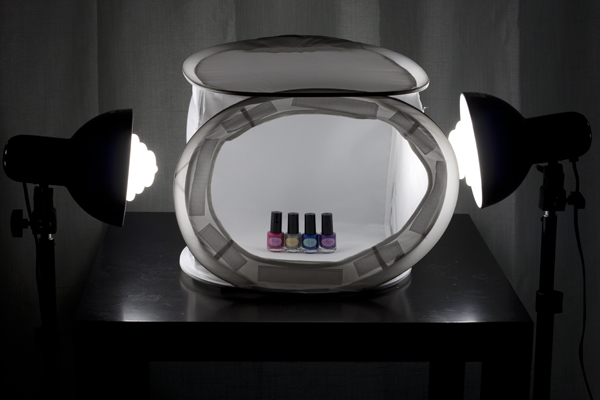
light tent kit, Square Perfect, photography, setup

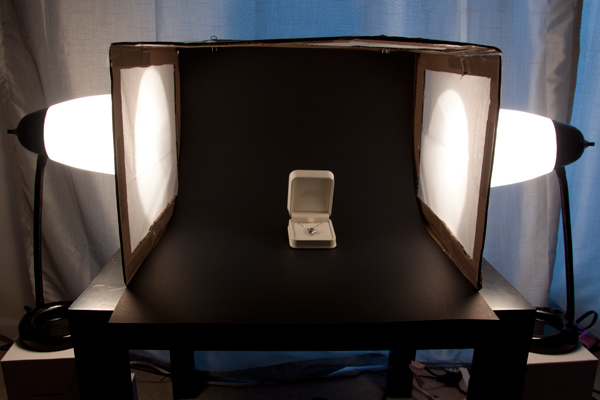
And in this corner, we have the DIY Light Tent, built using these specifications: Foldable DIY Photography Light Tent. This light tent will be lit by means of two adjustable desk lamps and 60W, 2900K halogen bulbs. The backdrops are made from standard poster board and cut to size. You can purchase daylight-rated light bulbs for your DIY kit as well, but you may need to order them online from a photography or home improvement site.
light tent, DIY, how to, photography

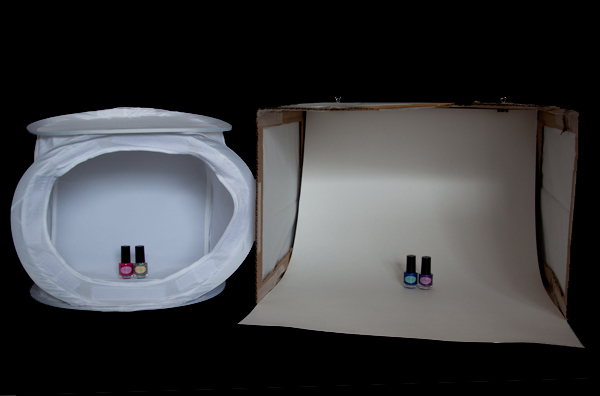
To make this an even test, we will be comparing the 12 inch kit cube against the 12 x 16 x 18 DIY tent. The first set of comparisons will feature each set as described above (the lights that come with each kit), while the second set will put the two up against each other using the same lighting set up for both kits.

Light tent comparison: using their own lights
light tent, product photography, knit bag, photography, how to, light tent

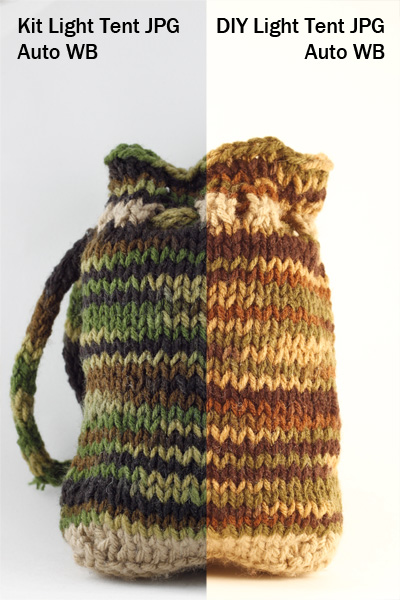
For this first photo-face-off, each light tent will be evaluated using its own lights (daylight fluorescents for the light tent kit and halogen bulbs for the DIY light tent). A major consideration when shooting with a light tent is controlling or choosing the correct white balance to match the lights being used. You want your white backdrop to look white and not have any color tint from the lights used. Read more about that issue in: How to Use a Light Tent for Product-Style Photography.

These shots show SOOC (Straight out of Camera) JPG files for the kit and DIY light tents using auto white balance.The kit’s light gives a cooler (more neutral) look to the background, and the colors of the knit bag are much truer to life, while the DIY lights impart a yellowish hue to the bag and the background. Setting your camera on “Tungsten” white balance for the DIY table lamps may give you a more neutral color, or you can also do a custom white balance using a gray card or even the white backdrop as a test shot. Consult your camera manual for how to perform a custom white balance with your camera.
compare-bag-autoWB-darker

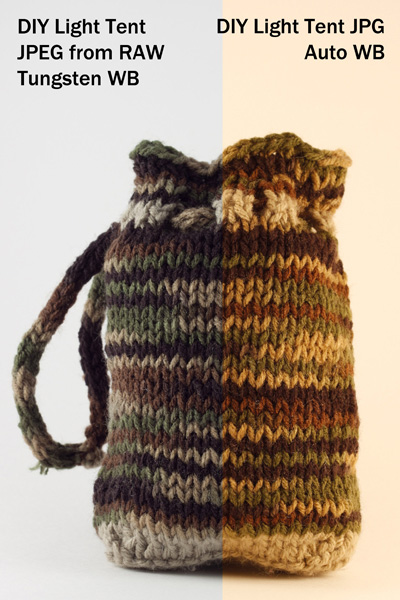
This image is a little dark on purpose so you can see the color tint of the background more easily

If you want perfectly clean whites and neutral blacks, then I would recommend shooting in RAW, which will give you greater flexibility regarding the white balance in post-processing. These images (left) show a comparison of the same image of the bag with a Tungsten white balance setting as compared to the Auto. The Tungsten white balance was selected in post-processing from the RAW image file, or it can also be selected as a white balance preset on the camera when shooting, especially if using JPG format.

Light intensity

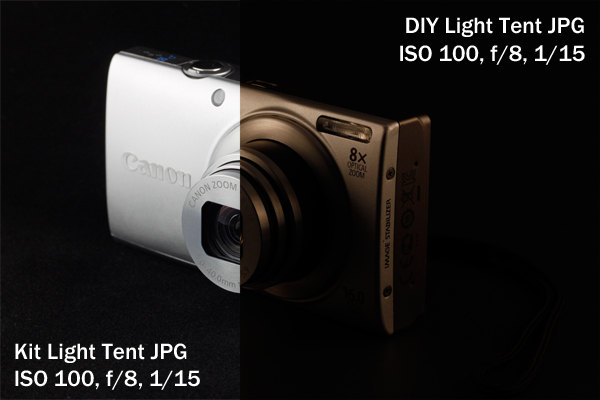
As you can see by the image below the DIY lights are considerable less intense (not as bright), which will mean you will either need to use a much longer exposure (shutter speed) to get a correct exposure, or increase your ISO. If working on a tripod (recommended for this type of set up) exposure time shouldn’t be an issue though so just stay at ISO 100 and adjust accordingly.
light tent, product photography, camera, Canon, point and shoot, Canon A4000IS

Light tent comparison: using the same lights

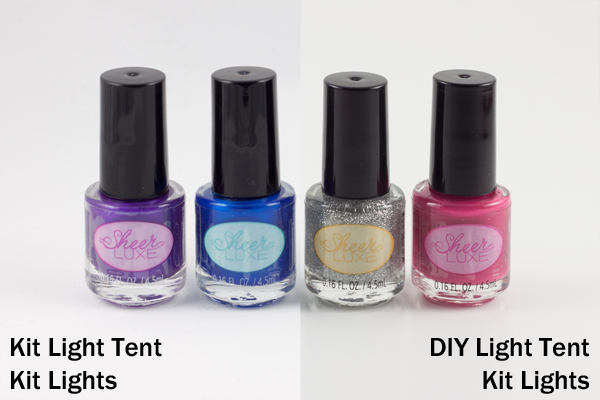
A final test was done to see whether this difference in light was due to the different light bulbs being used or to a difference in the light tents themselves.
light tent, product photography, nail polish

Left image shot at 1/25th – right image at 1/13th

These two shots were taken using the daylight lights from the light tent kit with both the kit tent and the DIY tent (again, in aperture priority, ISO 100, f/8). The kit light tent shot was taken at 1/25th of a second, and the DIY light tent shot was taken at 1/13th of a second, which is a full full stop difference. This means that even with the same lights, the DIY light tent blocked more light than the kit light tent and required longer shutter speeds to shoot the same exposure. The background also came out a little more gray than the kit light tent.

Light tent comparisons: practicalities

There are many other considerations to keep in mind when deciding which kind of light tent would be best for you. Think about how much room you have to devote to gear use and storage, as well as how much the benefits of a pricier kit outweigh the cost investment.

Use of ease
light tent, product photography, knit bag, how to

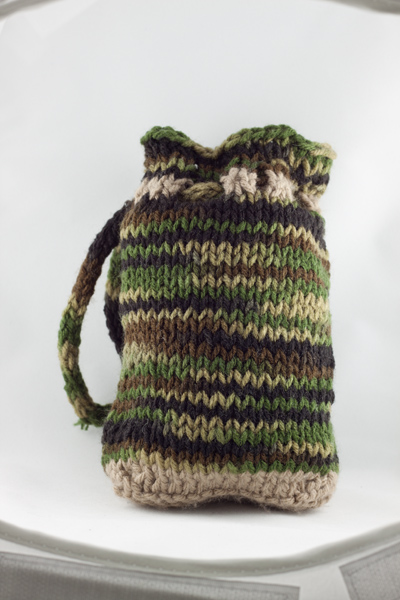
Notice edges of tent showing in places

The lighting stands that come with the light tent kit have greater range and reach than a typical desk lamp, but they cannot get down as low. This makes it difficult to use the kit lights for shooting with the 12-inch cube sitting on a table top, as the lights are too tall to sit beside it on the table and too short to reach up from the floor. A coffee table seems to be the ideal height. For the desk lamps, they work well when sitting on a table next to the light tent, but they will need to be placed on a stack of boxes or books if shooting from something like a coffee table (as shown earlier).

The 12-inch cube also has a lip around the edge, making the functional shooting space a bit smaller, as you want to avoid the edge appearing in your frame. This is far less of a problem with the 30-inch cube. One workaround is putting a book underneath the backdrop to raise the bottom up. The benefit here of the DIY box is that you can make it the size you want for the subject you have, and there is no lip to shoot around, so you can shoot straight-on at your subject.

Backdrops

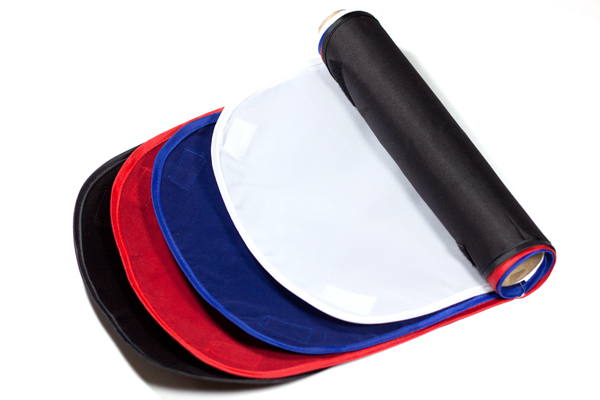
Backdrops require careful handling and attention, and the poster board DIY versions are much easier to replace than the fabric ones from the kit. If you are going to be shooting something potentially messy or greasy, consider using a poster board backdrop regardless of which light tent you use.
light tent, how to, photography, fabric, backdrops

Care for your fabric backdrops by ironing out the wrinkles before hanging. If you roll them up on a cardboard tube when you are finished shooting, you should be able to reuse them again without having to iron every time. Keep a lint roller or clear tape on hand to deal with any dust or lint, and save yourself the time of editing it all out in post-processing.

Portability

The light tent kit has the edge in portability, as it comes with its own carrying case. The case is not particularly sturdy or padded, however, so you would not want to travel with it other than carefully placing it in your car (without stacking anything on top of it).

Storage

The DIY light tent folds down flat for easy storage, and you can simply put your two desks lamps back where you borrowed them from, until the next time you are shooting. The light tent kit takes up significantly more space, and the process of folding the light tents back down into themselves is a little complicated and requires some practice, though there are plenty of “how to” videos online. There is also the risk of deformation if you leave the tents stored too long in their folded down state.

Cost

The DIY light tent is the clear winner in the cost department, particularly if you already own a desk lamp or two, which are the priciest elements. The cardboard box and tissue paper should not set you back more than about five dollars. The light tent kit is currently listed at $ 143, a very discounted price on Amazon, which makes it reasonable to consider as an investment.

Final verdict: which light tent to choose?

There are a lot of different variables to consider when making the final choice about whether a DIY light tent will serve your needs or whether you should invest in a light tent kit. If you are looking at exploring what a light tent can do and whether it would be useful, then definitely build your own to experiment with. Keep the white balance in mind and shoot in RAW. But if you are shooting JPG, remember to adjust the white balance setting when shooting by using a preset or doing a custom white balance.

If you know that you will be consistently shooting a lot of this style of shots, perhaps for selling jewelry or crafts online or for displaying directions for your own DIY projects on a blog, then you should consider investing in a light tent kit. The time savings of having bulbs that match your white balance is considerable if you are doing a lot of light tent photography. You will also have significant flexibility with a kit that offers different sizes of light tents and a better range of motion and height for the lights and light stands.

Do you shoot with a light tent? Do you prefer a light tent kit or a DIY version? Share your thoughts in the comments below.

The post Light Tent Comparison – DIY Versus Kit Tents by Katie McEnaney appeared first on Digital Photography School.
Digital Photography School

 
Comments Off on Light Tent Comparison – DIY Versus Kit Tents

Posted in Photography


Let’s Talk About Light – 3 Types of Lighting Conditions and how to Use Them

27 Mar

What‘s all this talk about light?

About light photography 04

When I started my photography journey I remember every article (or so it felt like), blog or book I read talking about light. “Find the light!”, “SEE the light!”, “It’s all about the LIGHT!”, “Follow THE LIGHT!”… AHHHH WHAT’S ALL THIS TALK ABOUT LIGHT!!!

Sound familiar?

I soon became obsessed about light. I would stare at people as they were talking to me; daydreaming, watching how the light was falling on their faces. When I was out walking I would always be looking at the direction of light and the way it behaved at certain parts of the day. It seemed however, that the harder I looked for The Light, the less I was able to see it. I honestly thought I would never be able to see the light!

Then something happened. I can’t tell you exactly when, but after months of obsessing about light, I finally saw ‘it’; its beautiful, soft, illuminating quality and its ability to change the mood and style of a scene.

Light plays a huge part in my photography style and the soft, romantic images I create. There are so many different types that I could easily write a whole book about light alone. For now however, I’m going to focus on three types of lighting conditions and how I use them to their advantage.

Open shade

Open shade is that spot between the sun and shade. The shade can be created by a building, a tree, a wall, etc. When using open shade it’s important to ensure that you still have available light reflecting into the shaded area. Choosing areas that have white, or light pastel, walls or floors will also help create additional soft, illuminating light by reflecting light off their surfaces. The reflected light will bounce all over your model giving them a lovely soft, gentle and even glow.

About light photography 01

The above image was taken in open shade. Can you see the line in the bottom left of the frame that divides the light and shade area? I’ve placed my model just with in it, so that the light is still reflecting onto her. The limestone wall also acts as a reflective surface and bounces light back onto my model.

Another thing to consider when using open shade is the direction your model is facing. If facing in the wrong direction, open shade can leave your image looking dull and flat. Make sure to look at where the light is coming from and have your model facing it. Use reflective surfaces, or a reflector, to direct the light back towards your subject. By doing this, the light is still illuminating their face and you’re still getting those beautiful catch lights in their eyes. Open shade offers the flexibility to shoot any time of day. It’s a great tool to use when shooting in midday light, when the sun is high in the sky and is creating harsh shadows on your model.

About light photography 02

Overcast days

Overcast days are my favourite sort of days to shoot. It’s like shooting in open shade, but instead the open shade is everywhere! While it’s still important to look for where the light is coming from, overcast days don’t limit you to shaded areas. The clouds act as a giant diffuser or soft box, giving you gentle, even light.

When shooting on an overcast day, I always look at where the sun is. Even if I can’t see it behind the clouds, I make sure I know where it would be if the clouds weren’t there. There are plenty of mobile phone apps available that will tell you where the sun is situated at that specific moment in time. They will also usually tell you where the sun sets and rises, which is a great tool to help you plan your shoot in advance.

The image below was taken on a wet, grey, overcast day. I still wanted to make sure that my models face was illuminated by light. For this frame I made sure that the sun was behind me. Although I couldn’t see it through the clouds, I could still see its brightness lighting up the area in the sky. Although my model was facing directly towards the sun, he wasn’t squinting and there were no harsh shadows being cast. The clouds where acting as my soft box giving me beautiful even light.

About light photography 03 About light photography 07

When starting out, many photographers are put off shooting on cloudy, overcast days. On the surface, the light appears dull; but look a bit deeper and you’ll see its wonderful illuminating quality. Some of my favourite images have been captured on days like this.

About light photography 05 About light photography 06

Backlighting

About light photography 08Backlighting, if done properly, can create some beautiful atmospheric and dramatic images. It takes a lot of practice to nail a backlit shot, but I think it’s worth the effort.

There’s different ways of positioning the sun in your frame. You can have it directly behind your model, just outside the image or in the shot completely. Each one will create a different effect and will influence how much sun flare and haze is captured in your image.

When backlighting, your metering plays a huge part in how successful the image will be. Shooting in manual mode will help ensure that perfect shot. When shooting towards the sun, I always meter for the models face, usually just under the eye closest to me. I know that this might blow out some of the highlights in the background or areas around my model, but I like the added glow that this creates.

About light photography 09

Camera’s aren’t always too keen to shoot directly towards the sun. This is where having a lens hood comes in useful. However, sometimes even this isn’t enough and you’ll hear the whirring of your lens struggling to focus on your chosen spot. When this happens, try creating a small spot of shade for the camera by holding your left hand above the lens to bloke out the light. This usually does the trick but if not, the other option is to focus manually.

Some food for thought…

One of the best pieces of advice I ever got when starting out was to always look for the light first and the background second. It’s easy to be drawn into standing you models in front of something that looks pretty or interesting, but if the lighting in that location is poor, you’ll end up with a dull lifeless image, or a model that’s squinting and has harsh shadows on her face.

I’d love to know how you get on finding the light! Please share your comments and images below.

For more articles on lighting try these:

  • 6 Portrait Lighting Patterns Every Photographer Should Know
  • Setting the Mood with Low Key Lighting
  • Lighting Ratios to Make or Break your Portrait
  • 14 Amazing Portrait Recipes – a dPS eBook

The post Let’s Talk About Light – 3 Types of Lighting Conditions and how to Use Them by Daniela Beddall appeared first on Digital Photography School.


Digital Photography School

 
Comments Off on Let’s Talk About Light – 3 Types of Lighting Conditions and how to Use Them

Posted in Photography


“The Language of Light with Joe McNally” – a Review

26 Mar

language-of-light-digital-photography-schoolOn the one hand, I could make this article one of the shortest I’ve ever written– a rousing recommendation of only three words: “It’s Joe McNally!”

Thank you. Good night. Drive safely.

Okay…I get it. Some of you may not be convinced. I respect that. That’s why we’re going to take a closer look.

For those who may not know, Joe McNally is one of the very best in the business. In a career spanning 30 years and 50 countries, his work has appeared in National Geographic, LIFE Magazine, Sports Illustrated, TIME, Newsweek, Entertainment Weekly, and a host of other magazines you’ve probably read. Even if you’ve never heard his name (where have you been hiding?), I’m pretty sure you’ve seen his work. If you are ever able to attend one of his workshops, I highly recommend it.

Joe is a master (a word I don’t use lightly) of at least two things–lighting and teaching. As a photographer, light defines or plays a part of everything you do. Regardless of whether you are talking about speedlights, studio lights, street lights, or sunlight, it’s a given that every light source has three attributes–color, quality, and direction. Since every photograph requires light, it stands to reason that having a firm understanding of how to control, manipulate, and manage light would be an important step towards raising the bar on your photography. As he puts it himself in the intro,

“Light is how we speak as photographers.” – Joe McNally

A typical Joe McNally seminar or workshop tends to be filled with sentences that begin with things like, “The photo editor at National Geographic once told me…” or “My editor at LIFE Magazine used to say…”  These are your cues to start feverishly writing down every word that follows.  The Language of Light lets you put the pen down and take it all in–a three-hour guided tour through the how and why of Joe’s “big world of small flash.”

There are a few things that really stand out, separating this DVD lighting class apart from the rest. For starters, it’s conversational. To the extent that this language of ours has words and concepts that need explaining, who better to do it than the man who’s written some of the best books on the subject? The other huge advantage to The Language of Light is the ability to watch as Joe starts each shoot with a basic premise, then explains and demonstrates each step in the process–walking you through from concept to finished image.

Remember that old line? “Those who can, do. Those who cant’ teach?” Well, here’s a guy who does both and doesn’t hold anything back. If he knows it, he wants you to know it. It’s not just about the “how.”  It’s also about the “why.” And that, my friends, is worth the price of admission.

Here is a basic breakdown of the set.

Disc 1 – the Language of Light

They say the best place to start is at the beginning, and The Language of Light takes that to heart. Disc 1 gets you going, explaining light and why it does what it does in simple terms. Prepare to be blown away by what he can do with a single speedlight. Topics include:

  • Turning one small flash into one big light
  • Controlling harsh natural light
  • Dramatic one light portraiture
  • Tour of small flash light modifiers
  • Light placement

Check out the Disc 1 preview in the video below:

Disc 2 – the Language of Light

Disc 2 moves out of the studio and goes on several location shoots, with lighting setups ranging from the basic to the complex. Topics include:

  • Location assessment
  • Basic strategies for one and two lights, as well as three or more
  • Getting the most out of a location
  • Environmental portraits
  • Conquering the sun with high speed sync
  • Mixing color temperatures
  • Athletic portraits
  • Lighting in small places
  • Group portraits
  • Engaging your subject

Take a look at the Disc 2 preview:

The three hours of photographic education contained in this set is some of the best I’ve ever seen. Knowledge, talent, energy, and passion come together in what I can only describe as a moment of enlightenment (no pun intended), where all the pieces seamlessly come together– and it all makes sense. It’s perfect for beginners just learning how to get the flash off the camera, as well as seasoned veterans looking for a refresher.

The Language of Light is available on Amazon.  Still hungry for more? Check out our very own e-book, “Portraits- Lighting the Shot” in the Digital Photography School Bookstore.

The post “The Language of Light with Joe McNally” – a Review by Jeff Guyer appeared first on Digital Photography School.


Digital Photography School

 
Comments Off on “The Language of Light with Joe McNally” – a Review

Posted in Photography


Understanding and Working With Natural Light to Get Stellar Pictures Every Time

24 Mar

Understanding the different forms of light is one of the keys to achieving good photographs, as photography is all about light. For most photographers, the most available light, the one that is free, is natural light. To learn how to get the most of natural light requires a lot of observing and practicing, but once you understand how to work Continue Reading

The post Understanding and Working With Natural Light to Get Stellar Pictures Every Time appeared first on Photodoto.


Photodoto

 
Comments Off on Understanding and Working With Natural Light to Get Stellar Pictures Every Time

Posted in Photography


“The Language of Light with Joe McNally” – a Review

24 Mar

language-of-light-digital-photography-schoolOn the one hand, I could make this article one of the shortest I’ve ever written– a rousing recommendation of only three words: “It’s Joe McNally!”

Thank you. Good night. Drive safely.

Okay…I get it. Some of you may not be convinced. I respect that. That’s why we’re going to take a closer look.

For those who may not know, Joe McNally is one of the very best in the business. In a career spanning 30 years and 50 countries, his work has appeared in National Geographic, LIFE Magazine, Sports Illustrated, TIME, Newsweek, Entertainment Weekly, and a host of other magazines you’ve probably read. Even if you’ve never heard his name (where have you been hiding?), I’m pretty sure you’ve seen his work. If you are ever able to attend one of his workshops, I highly recommend it.

Joe is a master (a word I don’t use lightly) of at least two things–lighting and teaching. As a photographer, light defines or plays a part of everything you do. Regardless of whether you are talking about speedlights, studio lights, street lights, or sunlight, it’s a given that every light source has three attributes–color, quality, and direction. Since every photograph requires light, it stands to reason that having a firm understanding of how to control, manipulate, and manage light would be an important step towards raising the bar on your photography. As he puts it himself in the intro,

“Light is how we speak as photographers.” – Joe McNally

A typical Joe McNally seminar or workshop tends to be filled with sentences that begin with things like, “The photo editor at National Geographic once told me…” or “My editor at LIFE Magazine used to say…”  These are your cues to start feverishly writing down every word that follows.  The Language of Light lets you put the pen down and take it all in–a three-hour guided tour through the how and why of Joe’s “big world of small flash.”

There are a few things that really stand out, separating this DVD lighting class apart from the rest. For starters, it’s conversational. To the extent that this language of ours has words and concepts that need explaining, who better to do it than the man who’s written some of the best books on the subject? The other huge advantage to The Language of Light is the ability to watch as Joe starts each shoot with a basic premise, then explains and demonstrates each step in the process–walking you through from concept to finished image.

Remember that old line? “Those who can, do. Those who cant’ teach?” Well, here’s a guy who does both and doesn’t hold anything back. If he knows it, he wants you to know it. It’s not just about the “how.”  It’s also about the “why.” And that, my friends, is worth the price of admission.

Here is a basic breakdown of the set.

Disc 1 – the Language of Light

They say the best place to start is at the beginning, and The Language of Light takes that to heart. Disc 1 gets you going, explaining light and why it does what it does in simple terms. Prepare to be blown away by what he can do with a single speedlight. Topics include:

  • Turning one small flash into one big light
  • Controlling harsh natural light
  • Dramatic one light portraiture
  • Tour of small flash light modifiers
  • Light placement

Check out the Disc 1 preview in the video below:

Disc 2 – the Language of Light

Disc 2 moves out of the studio and goes on several location shoots, with lighting setups ranging from the basic to the complex. Topics include:

  • Location assessment
  • Basic strategies for one and two lights, as well as three or more
  • Getting the most out of a location
  • Environmental portraits
  • Conquering the sun with high speed sync
  • Mixing color temperatures
  • Athletic portraits
  • Lighting in small places
  • Group portraits
  • Engaging your subject

Take a look at the Disc 2 preview:

The three hours of photographic education contained in this set is some of the best I’ve ever seen. Knowledge, talent, energy, and passion come together in what I can only describe as a moment of enlightenment (no pun intended), where all the pieces seamlessly come together– and it all makes sense. It’s perfect for beginners just learning how to get the flash off the camera, as well as seasoned veterans looking for a refresher.

The Language of Light is available on Amazon.  Still hungry for more? Check out our very own e-book, “Portraits- Lighting the Shot” in the Digital Photography School Bookstore.

The post “The Language of Light with Joe McNally” – a Review by Jeff Guyer appeared first on Digital Photography School.


Digital Photography School

 
Comments Off on “The Language of Light with Joe McNally” – a Review

Posted in Photography


Light Tent Comparison – DIY Versus Kit Tents

23 Mar

A light tent is an invaluable photography tool for shooting smaller objects and items and for achieving even, near-shadowless lighting. In our earlier post, we looked at How to Use a Light Tent for Product-Style Photography, which covered the basics for using and shooting with a light tent. In this post, we will take a look at a head-to-head comparison between buying a light tent kit versus making your own DIY version.

The light tent contenders

In this corner, we have the Square Perfect SP500 Platinum Photo Studio In A Box. This kit contains: two pop-up light tents (one 30 inch cube and one 12 inch cube – 12 inch shown below); two lights with adjustable stands; two 30W, 5400K daylight fluorescent bulbs; a tripod; a carrying case; and two sets of four colored fabric backdrops (white, black, red, and blue) sized for each light tent.

light tent kit, Square Perfect, photography, setup

And in this corner, we have the DIY Light Tent, built using these specifications: Foldable DIY Photography Light Tent. This light tent will be lit by means of two adjustable desk lamps and 60W, 2900K halogen bulbs. The backdrops are made from standard poster board and cut to size. You can purchase daylight-rated light bulbs for your DIY kit as well, but you may need to order them online from a photography or home improvement site.

light tent, DIY, how to, photography

To make this an even test, we will be comparing the 12 inch kit cube against the 12 x 16 x 18 DIY tent. The first set of comparisons will feature each set as described above (the lights that come with each kit), while the second set will put the two up against each other using the same lighting set up for both kits.

Light tent comparison: using their own lights

light tent, product photography, knit bag, photography, how to, light tent

For this first photo-face-off, each light tent will be evaluated using its own lights (daylight fluorescents for the light tent kit and halogen bulbs for the DIY light tent). A major consideration when shooting with a light tent is controlling or choosing the correct white balance to match the lights being used. You want your white backdrop to look white and not have any color tint from the lights used. Read more about that issue in: How to Use a Light Tent for Product-Style Photography.

These shots show SOOC (Straight out of Camera) JPG files for the kit and DIY light tents using auto white balance.The kit’s light gives a cooler (more neutral) look to the background, and the colors of the knit bag are much truer to life, while the DIY lights impart a yellowish hue to the bag and the background. Setting your camera on “Tungsten” white balance for the DIY table lamps may give you a more neutral color, or you can also do a custom white balance using a gray card or even the white backdrop as a test shot. Consult your camera manual for how to perform a custom white balance with your camera.

compare-bag-autoWB-darker

This image is a little dark on purpose so you can see the color tint of the background more easily

If you want perfectly clean whites and neutral blacks, then I would recommend shooting in RAW, which will give you greater flexibility regarding the white balance in post-processing. These images (left) show a comparison of the same image of the bag with a Tungsten white balance setting as compared to the Auto. The Tungsten white balance was selected in post-processing from the RAW image file, or it can also be selected as a white balance preset on the camera when shooting, especially if using JPG format.

Light intensity

As you can see by the image below the DIY lights are considerable less intense (not as bright), which will mean you will either need to use a much longer exposure (shutter speed) to get a correct exposure, or increase your ISO. If working on a tripod (recommended for this type of set up) exposure time shouldn’t be an issue though so just stay at ISO 100 and adjust accordingly.

light tent, product photography, camera, Canon, point and shoot, Canon A4000IS

Light tent comparison: using the same lights

A final test was done to see whether this difference in light was due to the different light bulbs being used or to a difference in the light tents themselves.

light tent, product photography, nail polish

Left image shot at 1/25th – right image at 1/13th

These two shots were taken using the daylight lights from the light tent kit with both the kit tent and the DIY tent (again, in aperture priority, ISO 100, f/8). The kit light tent shot was taken at 1/25th of a second, and the DIY light tent shot was taken at 1/13th of a second, which is a full full stop difference. This means that even with the same lights, the DIY light tent blocked more light than the kit light tent and required longer shutter speeds to shoot the same exposure. The background also came out a little more gray than the kit light tent.

Light tent comparisons: practicalities

There are many other considerations to keep in mind when deciding which kind of light tent would be best for you. Think about how much room you have to devote to gear use and storage, as well as how much the benefits of a pricier kit outweigh the cost investment.

Use of ease

light tent, product photography, knit bag, how to

Notice edges of tent showing in places

The lighting stands that come with the light tent kit have greater range and reach than a typical desk lamp, but they cannot get down as low. This makes it difficult to use the kit lights for shooting with the 12-inch cube sitting on a table top, as the lights are too tall to sit beside it on the table and too short to reach up from the floor. A coffee table seems to be the ideal height. For the desk lamps, they work well when sitting on a table next to the light tent, but they will need to be placed on a stack of boxes or books if shooting from something like a coffee table (as shown earlier).

The 12-inch cube also has a lip around the edge, making the functional shooting space a bit smaller, as you want to avoid the edge appearing in your frame. This is far less of a problem with the 30-inch cube. One workaround is putting a book underneath the backdrop to raise the bottom up. The benefit here of the DIY box is that you can make it the size you want for the subject you have, and there is no lip to shoot around, so you can shoot straight-on at your subject.

Backdrops

Backdrops require careful handling and attention, and the poster board DIY versions are much easier to replace than the fabric ones from the kit. If you are going to be shooting something potentially messy or greasy, consider using a poster board backdrop regardless of which light tent you use.

light tent, how to, photography, fabric, backdrops

Care for your fabric backdrops by ironing out the wrinkles before hanging. If you roll them up on a cardboard tube when you are finished shooting, you should be able to reuse them again without having to iron every time. Keep a lint roller or clear tape on hand to deal with any dust or lint, and save yourself the time of editing it all out in post-processing.

Portability

The light tent kit has the edge in portability, as it comes with its own carrying case. The case is not particularly sturdy or padded, however, so you would not want to travel with it other than carefully placing it in your car (without stacking anything on top of it).

Storage

The DIY light tent folds down flat for easy storage, and you can simply put your two desks lamps back where you borrowed them from, until the next time you are shooting. The light tent kit takes up significantly more space, and the process of folding the light tents back down into themselves is a little complicated and requires some practice, though there are plenty of “how to” videos online. There is also the risk of deformation if you leave the tents stored too long in their folded down state.

Cost

The DIY light tent is the clear winner in the cost department, particularly if you already own a desk lamp or two, which are the priciest elements. The cardboard box and tissue paper should not set you back more than about five dollars. The light tent kit is currently listed at $ 143, a very discounted price on Amazon, which makes it reasonable to consider as an investment.

Final verdict: which light tent to choose?

There are a lot of different variables to consider when making the final choice about whether a DIY light tent will serve your needs or whether you should invest in a light tent kit. If you are looking at exploring what a light tent can do and whether it would be useful, then definitely build your own to experiment with. Keep the white balance in mind and shoot in RAW. But if you are shooting JPG, remember to adjust the white balance setting when shooting by using a preset or doing a custom white balance.

If you know that you will be consistently shooting a lot of this style of shots, perhaps for selling jewelry or crafts online or for displaying directions for your own DIY projects on a blog, then you should consider investing in a light tent kit. The time savings of having bulbs that match your white balance is considerable if you are doing a lot of light tent photography. You will also have significant flexibility with a kit that offers different sizes of light tents and a better range of motion and height for the lights and light stands.

Do you shoot with a light tent? Do you prefer a light tent kit or a DIY version? Share your thoughts in the comments below.

The post Light Tent Comparison – DIY Versus Kit Tents by Katie McEnaney appeared first on Digital Photography School.

Digital Photography School

 
Comments Off on Light Tent Comparison – DIY Versus Kit Tents

Posted in Photography


How to Use a Light Tent for Small Product Photography

15 Mar

Many crafters, cooks, and artists want to take high quality photographs of their own creations, whether to feature them in a blog post, offer them for sale online, or just share them with friends. The trick to getting these kinds of product shots easily and reliably is to use a light tent. This article will cover the fundamentals of shooting with a light tent to help you capture bright, high quality product photographs every time.

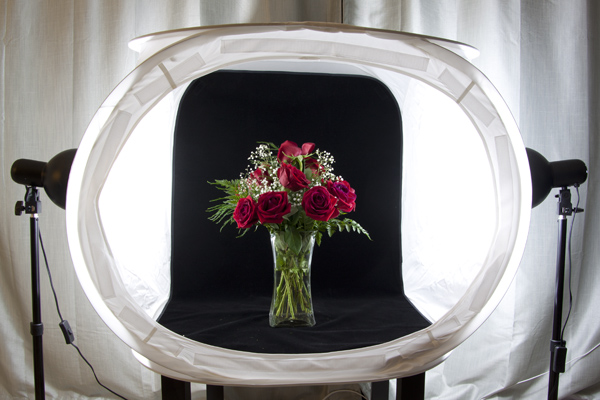
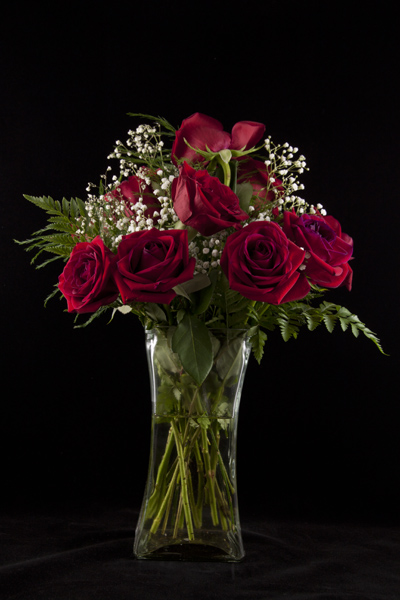
McEnaney-light-tent-roses-new-vase

What is a Light Tent?

A light tent or light box is a contraption with translucent sides that diffuses light coming from multiple sources. This allows for even, nearly shadow-less lighting against a simple, solid background.

light tent, photography, DIY, product photography

You can purchase a light tent as part of a kit or you can build your own DIY light tent. If you choose to purchase a light tent kit, it will usually come with one or more light tents, two light bulbs, two light stands, a tripod, and fabric backdrops in various colors. If you build your own light tent, you will also need to purchase two posable light sources, light bulbs, and poster board or fabric for the backdrops. Unsure of which to choose? In a future article I will offer a head-to-head comparison of a popular light tent kit and a DIY tent.

Shooting with a Light Tent

The standard set-up for light tent photography is to place the tent on some kind of table or end table, with the light sources directly opposite each other on each side and the tripod centered in front. Placing the tent up on a table makes it easier to see and maneuver, as well as easier to use your tripod for shooting.

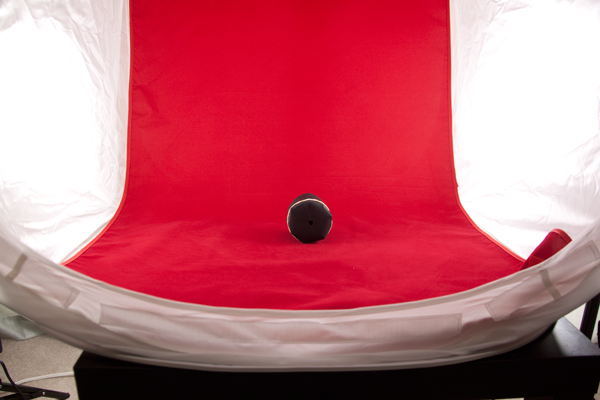
The backdrop is attached at the top inside the tent and should fall freely down into a gentle curve at the back and then across the bottom of the tent. You want to be sure that you backdrop is clean and free of debris and wrinkles. If using a fabric backdrop, be sure to iron it for a completely smooth look. (If you roll your backdrops up on a cardboard tube after shooting, you should be able to keep them wrinkle-free for next time.) Consider keeping a lint roller or small blower handy for dealing with the inevitable dust and debris.

light tent, photography, how to, product photography

Now you are ready to start photographing! Place your subject carefully inside the tent, and start with it in the exact center. Moving your subject forward or backwards relative to the light can change the lighting and shadows. Experiment to get the look you want. You can also experiment with pointing the lights slightly at an angle, rather than straight on at the tent. Be sure to leave space between your subject and the walls, so that you can zoom in or position your camera to see only the backdrop and not any edges.

Consider the ambient lighting and adjust as needed. I have found very little difference between shooting midday in diffused indoor light and shooting at night with only the lights themselves for light. You do want to avoid direct sunlight shining in or at your tent, as it will be difficult to balance such a powerful light source.

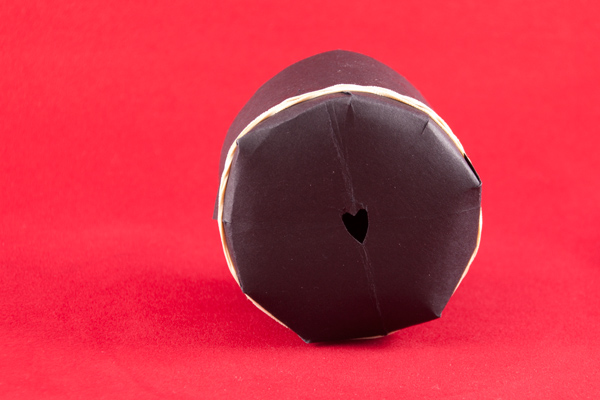
light tent photography, how to, bokeh heart

Camera Set-up

Set your camera securely on the tripod and use either the 2-second timer or a remote shutter release to ensure that you tripod remains steady. (If you are using a lens with image stabilization, vibration reduction, or vibration control, turn the switch to off.) The tripod will allow you to use longer shutter speeds with crisp results.

Begin by shooting in aperture priority mode with an ISO of 100 (or the lowest value for your camera). Choose your aperture based on the look that you want to achieve in the image (a wide aperture like f/1.8 for a narrow depth of field and a lot of blur or a narrow aperture like f/22 for a wide depth of field and crisp focus across the entire subject). Food photographs often utilize wide apertures and selective blur to make food look more appealing, while product shots of crafts and handmade goods look best with a narrow aperture to keep the entire item into focus. IF you want to avoid blur in the foreground (the bit directly in front of your object) – set your focus using the part of your subject that is closest to the camera.

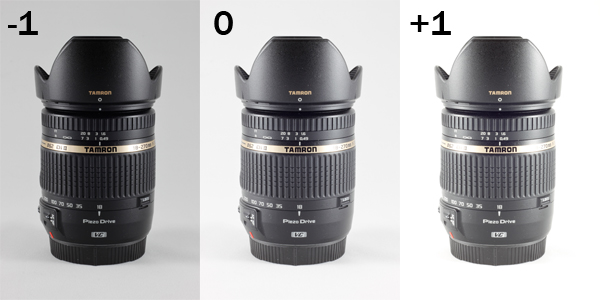
Consider also using exposure compensation to shoot a series of three shots, bracketed at -1, 0, and +1 exposure, so you can see which gives you the best results. (For white backgrounds, you may get better results around +1; while for black backgrounds, you will get better results around -1. If a full stop is too dark or too light, try a half or a third of a stop.)

light tent photography, exposure compensation, camera lens, Tamron, Tamron 18-270mm, light tent, product photography

Post-Processing Considerations

It can be difficult to get the background of your shots perfectly white or perfectly black while also keeping your subject properly exposed. In those situations, you may want to do some additional post-processing to ensure that your whites stay white and your blacks stay black. The following description relies on tools available in Adobe Photoshop, but you should be able to do many of these same procedures using other software products.

If you are shooting in RAW, adjust the white balance of your image first so that your whites look white and not yellow. Most light bulbs will list the color temperature of the light they produce, which you can use as a guide for setting the white balance. You can also set the white balance manually by shooting a white card and calibrating from that image (or if you know your background is pure white or black use the color picker in the RAW processor to neutalize any tint).

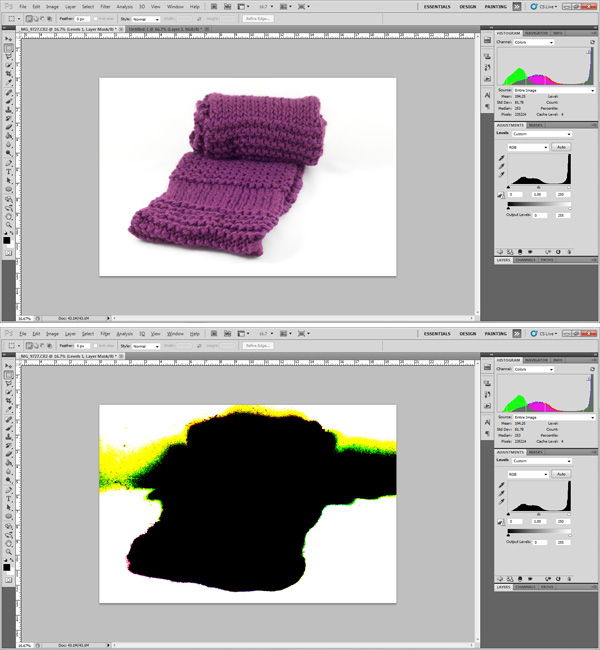
Use your histogram as a guide when processing. While standard photography advice recommends against having your histogram touch the edges of the scale (clipping), this is what you want to achieve in product shots. Clipping your background (whether on the left for black, or on the right for white) will create an entirely homogenous look to your background and focus all attention on your subject.

scarf, photography, Photoshop, post-processing, highlight clipping,

In Photoshop you can use the Levels tool to adjust either end of the histogram. Holding down the Alt (Option for Mac) key while adjusting the sliders allows you to see which areas of the photograph are being clipped, as shown in the image above. Move the slider in towards the center until the background is uniformly clipped but the subject is not. If your subject is too affected by this action, then you may need to scale back your adjustment.

If you are having trouble achieving a uniformly white background on your product shots, consider adding a thin border to your final image. While a not-quite-white background, on a shot displayed against a pure white background on a web page runs the risk of looking dingy. However, a slightly grey background with a black border can make the background shade appear intentional.

photography, bourbon, product photography, light tent, how to

Cheers! Do you use a light tent in your photography? Have a helpful tip for shooting with one? Share your thoughts and photographs in the comments below.

McEnaney-roses-closeup

Here’s a final image from the vase of flowers in the first image at the top of the article.

For more on product photography check these out:

  • DIY Seamless White Background for Product Shots
  • Tabletop Photography Walkthrough or How to Create an Eye-Catching Product Shot
  • How To Photograph Your Product to Enhance Your Online Sales in 4 Easy Steps
  • How to Create Simple Seamless Background Product Shots

The post How to Use a Light Tent for Small Product Photography by Katie McEnaney appeared first on Digital Photography School.

Digital Photography School

 
Comments Off on How to Use a Light Tent for Small Product Photography

Posted in Photography


Extreme Exposures: Light Landscapes Take Hours to Shoot

03 Mar

[ By WebUrbanist in Art & Photography & Video. ]

light art figure ground

Most light photographers focus on making a shape in the foreground in a matter of seconds, then setting it against a dark static backdrop – this artist often animates every inch of the frame.

light art flowing energy

light art room interior

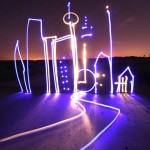
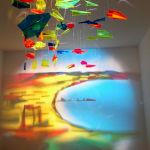
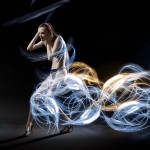
Finnish artist Janne Parviainen of Helsinki takes these all-encompassing, long-exposure shots over many minutes (even hours at times), each line representing mere seconds along the way.

light art crouching portrait

light drawing laying down

As surreal as they look, there is no post-production involved. Aside from props and plans, even their creator cannot really see what he is making them until they are completed.

light drawing water monster

Parviainen was an oil painter previously, but pivoted when an accidental long-duration photo of streetlights, clicked on a nighttime walk, triggered a fascination with lighting. Now using light as paint, he employs a new series palettes and brushes. Glowsticks, light strings, strobes and flashlights help him animate everything from human figures to abandoned cars.

light drawing figures circle

light drawing orange room

light art surreal scen

He begins tracing what is there and then adds his own haunting portraits and inventive twists to the scenes he sets. The results are so saturated with light that it is sometimes hard to tell what is really behind them and what he created from scratch along the way – what is foreground, background or sheer imagination.

Share on Facebook


[ By WebUrbanist in Art & Photography & Video. ]

[ WebUrbanist | Archives | Galleries | Privacy | TOS ]


WebUrbanist

 
Comments Off on Extreme Exposures: Light Landscapes Take Hours to Shoot

Posted in Creativity


Canon announces entry-level Rebel T5 (EOS 1200D) and macro ring light

12 Feb

HR_T5_EFS18-55_IS_II_3Q_CL.png

There’s a new entry-level camera in Canon’s DSLRs lineup, and it’s the Rebel T5 (EOS 1200D). This model replaces the Rebel T3 (EOS 1100D) and features the company’s familiar 18 megapixel CMOS sensor, DIGIC 4 processor, and 9-point AF system. The T5 also has a 3″ LCD, 3 fps continuous shooting, and 1080p video recording. Canon also announced the MR-14EX II Macro Ring Light, which can be controlled wirelessly using the radio-based ‘RT’ system. Both the camera and ring light are priced at $ 549, with the former including an 18-55mm lens.

News: Digital Photography Review (dpreview.com)

 
Comments Off on Canon announces entry-level Rebel T5 (EOS 1200D) and macro ring light

Posted in Uncategorized


Celebration of Light: 50 Sparkling Fireworks Photography Examples to Inspire You

07 Feb

Since fireworks were created, people all over the globe have used them to pray for happiness, ward off evil spirits, celebrate birth, death, weddings, the New Year and any other occasions. Festive fireworks are a breathtaking sight when vivid, magic colors of light are exploding in the air for a few quick moments. I believe every photographer comes up with Continue Reading

The post Celebration of Light: 50 Sparkling Fireworks Photography Examples to Inspire You appeared first on Photodoto.


Photodoto

 
Comments Off on Celebration of Light: 50 Sparkling Fireworks Photography Examples to Inspire You

Posted in Photography