RSS
 

Posts Tagged ‘Light’

How to Capture Fantastic Photos in Low Light

21 Jan

It is a simple, unavoidable fact that light is necessary for photography. Life, however, doesn’t restrict itself to times when the sun is bright and plentiful. Unless you only shoot in a controlled environment, chances are you’re going to want to takes photos when the lighting is less than ideal. You are not powerless, though. It is possible to make Continue Reading

The post How to Capture Fantastic Photos in Low Light appeared first on Photodoto.


Photodoto

 
Comments Off on How to Capture Fantastic Photos in Low Light

Posted in Photography


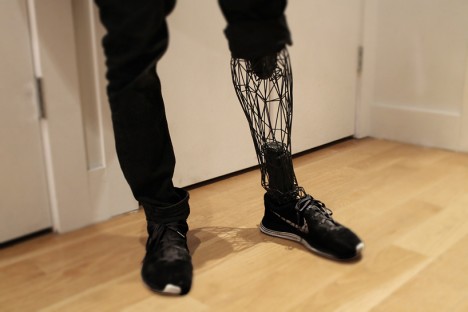
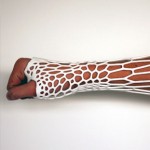
Exo-Prosthetics: Light, Cheap & Custom 3D-Printed Body Parts

09 Jan

[ By WebUrbanist in Conceptual & Futuristic & Technology. ]

3d bio printed leg

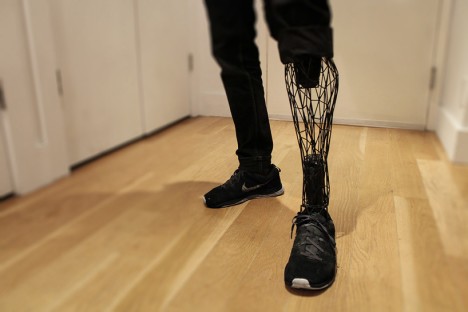
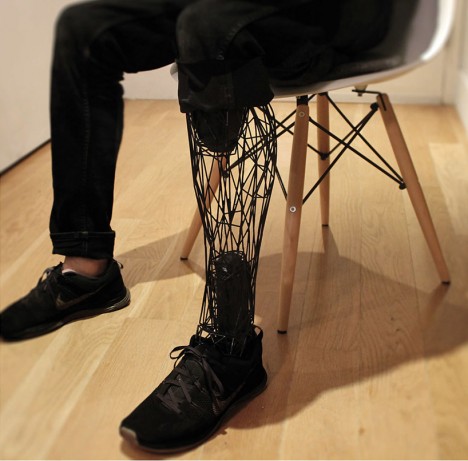
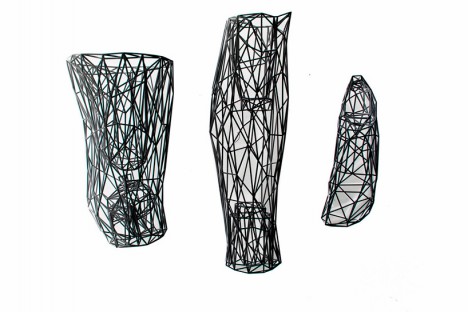
Lightweight, individualized and inexpensive, this design and manufacturing strategy bends artificial limbs in new directions and promises a more personalized product for those in need of a replacement (or upgrade).

3d custom titanium prosthesis

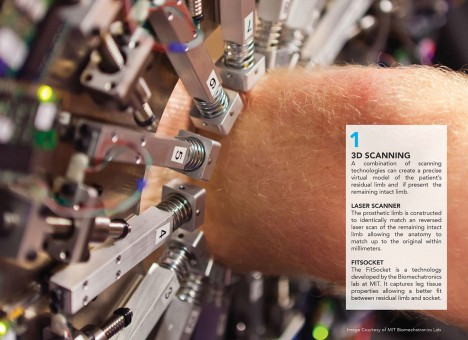
Developed by Adam Root, the process involves inverted laser scanning, 3D modeling and printing to generate form-fitting body parts that are comfortable, affordable and suited to a particular individual. The result is a “highly precise virtual model of the patient’s residual limb and matches its anatomy to within a fraction of a millimeter” which together with the “MIT biomechatronics lab-developed fitsocket captures leg tissue properties to enable a better fit.” Off-the-shelf parts round out these customized creations.

3d proesthetic pictures renderings

3d space frame mesh

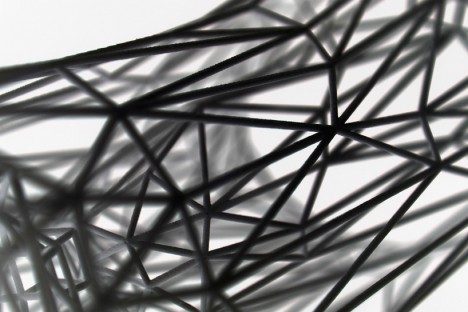
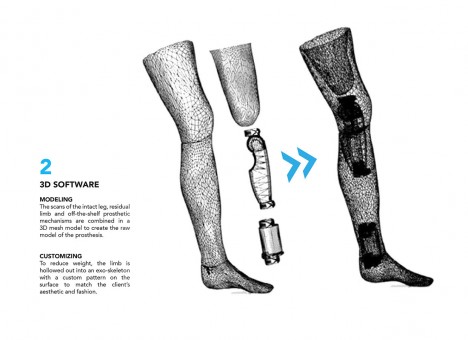
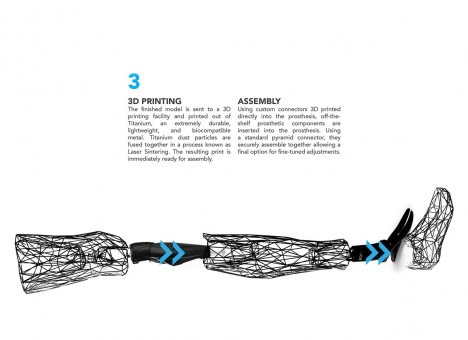
A custom-patterned mesh model forms the basis for fabricating an exo-skeletal structure, held together with titanium dust particles that are laser-sintered into place for strength and durability. This technique obviates the need for cumbersome central supports by spreading the loads in a sort of three-dimensional ‘space frame’, to borrow an architectural term. The resulting aesthetic is not only personalized but compelling – stylistically, it leaves choices up to the user and gives a unique look to each individual creation.

3d scanned bio limb
3d stage two rendering

3d printed limb connections

3d modeled exo prosthetic

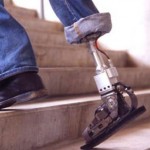
Gizmag puts these developments in context: “There are over 2 million amputees in the United States with 185,000 amputations every year. More than 90 percent of these involve amputations of the lower limbs. Traditional prostheses can be prohibitively expensive due to their complexity and the specialized labor required to customize them for each patient. They also have a very mechanical and robotic look and feel about them, which can exacerbate the sense of loss and negatively affect the psychological wellbeing of some amputees.”

Share on Facebook


[ By WebUrbanist in Conceptual & Futuristic & Technology. ]

[ WebUrbanist | Archives | Galleries | Privacy | TOS ]


WebUrbanist

 
Comments Off on Exo-Prosthetics: Light, Cheap & Custom 3D-Printed Body Parts

Posted in Creativity


Finally, a Ring Light for Your Phone!

05 Jan

Extra photos for bloggers: 1, 2, 3

You like your phone enough to put a ring on it, right? ‘Course you do.

The Smartphone Ring Light takes your relationship with your phone and your lighting game to the next level.

Use the Ring Light on the case or pop it off for handheld spot lighting. This beauty has variable brightness and temps, so you can get the exact light you need for any situation.

Your phone’s no single lady now, with a ring light to prove it!

Snag a Ring Light Today or Learn More
$ 85 at the Photojojo Shop


© laurel for Photojojo, 2015. |
Permalink |
No comment |
Add to
del.icio.us

Post tags:


Photojojo

 
Comments Off on Finally, a Ring Light for Your Phone!

Posted in Equipment


Light Art Looms Large: 10 Artists Project Illuminated Images

25 Dec

[ By Steph in Art & Installation & Sound. ]

light art projections luftwerk 3

Churches are scrawled with ephemeral graffiti, public squares transmit profound messages and trees come to life with the moving heads of Cambodian deities when artists use digital projectors to transmit imagery onto urban surfaces. These 10 artists project words, classical art, geometric shapes, mirage-like fields of color or their own photography onto everything from Capitol buildings to screens made of water.

Jenny Holzer

light art holzer 1

light art holzer 2

light art holzer 3

light art holzer 5

American artist Jenny Holzer uses words on an unprecedented scale, especially with her outdoor light projections, introducing commentary to public spaces. While the words were her own from the time she started in 1977 until roughly 2001, she has begun working with texts written by others, including the works of great literary figures and sources like declassified US Army documents from the war in Iraq.

Clement Briend
light art projection briend 1

light art projection briend 2

light art projection briend 3

Trees come to life in the sculptural images of deities and spirits from Cambodian culture in the series Cambodian Trees by French artist Clement Briend. Highlighting the nature that can be found within urban contexts, the series transformed the streets of Paris. Says brined, “Such nocturnal visions allow us to grasp the way magic profoundly influences how Cambodian people perceive the world.”

Luftwerk

light art projections luftwerk 1

light art projections luftwerk 2

light art projections luftwerk 3
Artist duo Luftwerk, made up of Petra Bachmaier and Sean Gallero, integrated Chicago’s iconic Cloud Gate into a light art installation called Luminous Field. The work used the reflective qualities of the sculpture to enhance and magnify imagery that was projected onto the ground around it.

Usman Haque

light art projection usman haque

light art projections primal source 1

light art projection primal source 2

Commissioned by the City of Santa Monica for Glow 08, ‘Primal Source’ by Usman Haque was projected onto a large-scale waterscreen/mist projection system at a beach location near the city’s pier to create a mirage-like effect. The light changes in response to the sounds emanating from the crowd. “Some modes created ‘captures’ whose colour, shape and movement followed the frequency and amplitude dynamics of individual syllables and sentences picked up; other modes responded to wider collective phenomena, e.g. distorting a grid in response to the crowd volume, or creating a rush of wind through a wheat-field landscape.”

Paolo Buroni
light art projection buroni 1

light art projection buroni 2

light art projections buroni 3

Classic art comes to the streets for all to see when Italian multimedia artist Paolo Buroni projects images onto architecture in public squares. “I like to create change – to change reality with imagination,” says the artist. His works have been commissioned for events like the Venice Biennale and has appeared in Nuremburg,, Budapest, Istanbul, Paris and Seoul.

Next Page – Click Below to Read More:
Light Art Looms Large 10 Artists Project Illuminated Images

Share on Facebook


[ By Steph in Art & Installation & Sound. ]

[ WebUrbanist | Archives | Galleries | Privacy | TOS ]


WebUrbanist

 
Comments Off on Light Art Looms Large: 10 Artists Project Illuminated Images

Posted in Creativity


How to Learn Your Camera’s Light Meter and Master Manual Mode

23 Dec

Most cameras have a few different shooting modes such as Automatic, Aperture Priority (A or Av), Shutter Priority (S or Tv), and Program. It’s not uncommon for people to take a majority of their photos in Automatic mode since it generally does a good job of getting decent results, though more advanced photographers will often use Aperture or Shutter Priority. Shooting in Manual, however, might seem intimidating and highly complex but once you understand a few basics it starts to make a lot more sense. Certainly you should have a working understanding of the three components of the exposure triangle: shutter, aperture, and ISO.

But in order to get the most out of your camera you will need to know how to use a simple, but incredibly powerful, tool that functions as the glue that binds everything together: the light meter.
purple-flowers

Nestled quietly at the bottom of your camera’s viewfinder or Live View display is a small block of lines or bullets accompanied by a few numbers. You might also have noticed a little triangle moving back and forth, or some vertical hash marks appearing and disappearing from time to time, in a fashion that seems nonsensical or completely random. If these numbers and symbols make no sense at all, don’t worry, you are not alone. It can be a bit confusing to understand the light meter at first. But once you get the fundamentals you will probably find yourself growing much more confident in understanding how photography works. Maybe you’ll even venture out of Automatic and into Manual for the sheer amount of control you are able to have over your photos.

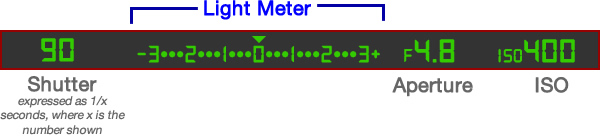
Before I get into the nitty gritty of the light meter itself, I want you to take a look at it in relation to the other data shown in your camera’s viewfinder. Note that this diagram is highly simplified and your viewfinder might look slightly different, or include other information, but all cameras (except some point-and-shoots) include the elements shown here.
light-meter-master

In this example the camera’s shutter is set at 1/90 of a second, the lens aperture is f/4.8, and the ISO is 400. The light meter is a readout that shows whether these values are going to result in a photo that is properly exposed – that is, a photo that is neither too light or too dark. The small triangle hovering over the zero in the light meter shows that the exposure is correct, and when the shutter button is pressed the picture will look fine.  But, I’ll show you a few pictures to see what happens as the camera’s exposure settings are changed. If you want to try this yourself you will need to have your camera in Manual mode, and I would recommend reading the rest of this article with your camera at your side so you can do a bit of experimenting on your own.

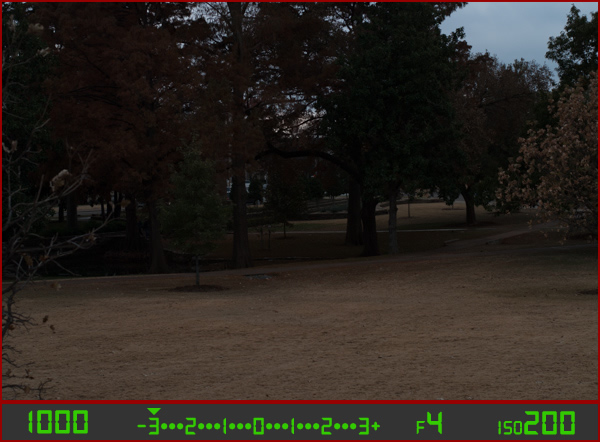
For my first shot, I’ll show you a photo that is underexposed and then illustrate how the camera settings can be adjusted to get the proper exposure. The values shown on these images are exactly what I used in my camera to get these shots, and nothing has been edited or retouched in Photoshop.
landscape-under

Here you can see that the shutter speed is 1/1000 of a second, the aperture of the lens is f/4, and the ISO is 200. The camera’s viewfinder displays this information along with the light meter, and note how the triangle has moved all the way over to -3 EV. (EV stands for Exposure Value, and technically this image is underexposed by three stops. Don’t worry about the technical jargon though! For now just follow along with the examples to see what happens when the exposure values are altered.

To get a properly exposed photo you are essentially trying to re-create what your eye already sees, but right now the light meter tells us that the photo will be way too dark. And indeed, the resulting photo turned out just how the light meter predicted: it’s so dark it looks like it was taken at night instead of mid-afternoon.

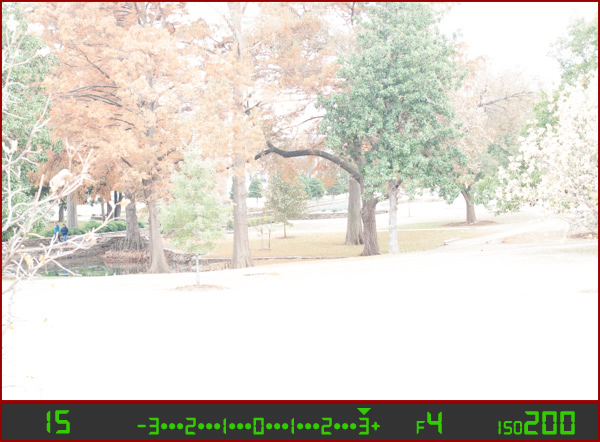
So what can be done to fix this? By adjusting the aperture, shutter, or ISO you can change the exposure settings with the goal of getting that little triangle to hover above the zero. Watch what happens when I change the shutter speed but I leave the aperture and ISO fixed at their present values:
landscape-over

By altering the shutter speed from 1/1000 of a second to 1/15 of a second, the photo is now too bright – exactly as the light meter said it would. It is overexposed by three stops, and the image is virtually unusable. Because the viewfinder itself does not change as the aperture, shutter, and ISO are adjusted, you have to rely on your light meter to tell you how bright or dark the image will be. And sure enough, the triangle is hovering above the +3, which tells us the photo will be too bright. Here is what a properly exposed photo looks like.
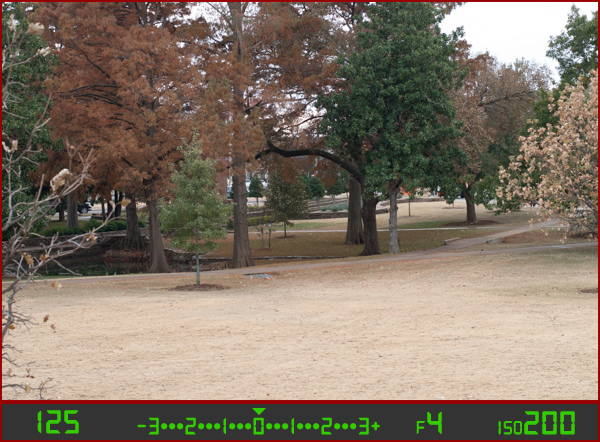
landscape-correct

Finally, a good picture! By adjusting the shutter speed to 1/125 of a second, I was able to get the triangle to hover above the zero, which means the photo would be properly exposed. Note that there is no one correct way to do this, and a proper exposure could have also been obtained by changing the aperture or ISO instead of the shutter speed, or a combination of all three. For instance, I could have left the shutter at 1/1000 and increased the ISO to get the same result.

Why bother with all this?

At this point you might be wondering why you would want to go to all this trouble when you can put your camera in Automatic mode and it will just take care of everything. The answer lies in the fact that you, not your camera, know exactly what kind of photo you want to take. Your camera does not know whether you are shooting landscapes, portraits, sports, starry nights, kids, pets, or anything else. All it sees is how much light is coming in, and it tries to adjust the shutter, aperture, and ISO to get that triangle to hover above the zero. But if you know how to control those values yourself, you can open up vast new areas of photographic creativity that Automatic mode can never do for you.

As another example, here is a picture of some berries, but again notice how it is underexposed by three stops.
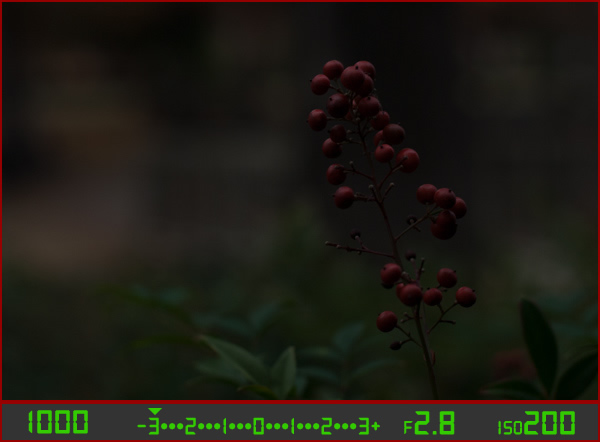
berries-underesposed

There are several settings I could adjust in order to fix this, or I could just put the camera in Automatic mode. The problem with Automatic in this case is the camera does not know that I am looking at berries. It just sees light, and would attempt to adjust the shutter, aperture, and ISO to get a proper exposure even though it might not end up with the exact type of picture I want to take.

Because I shot in manual using the light meter as my guide I was able to get precisely the shot I was looking for. I knew that I wanted a shallow depth of field, which meant I should use a large aperture of f/2.8. I knew that an aperture of f/1.8 would be too wide for my taste, and a smaller value like f/4 or f/8 would not give me the nice blurry background I was hoping for. By leaving the aperture at f/2.8 and changing the shutter speed I got a properly exposed photo with a nice smooth background as you can see here:
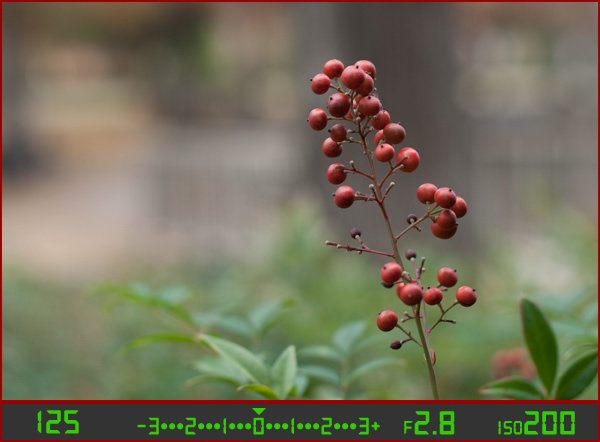
berries-correct

But what if I had changed the other values instead? Look what happened when I left the aperture and shutter at their original values from the underexposed photo (f/2.8 and 1/1000), and raised the ISO instead:
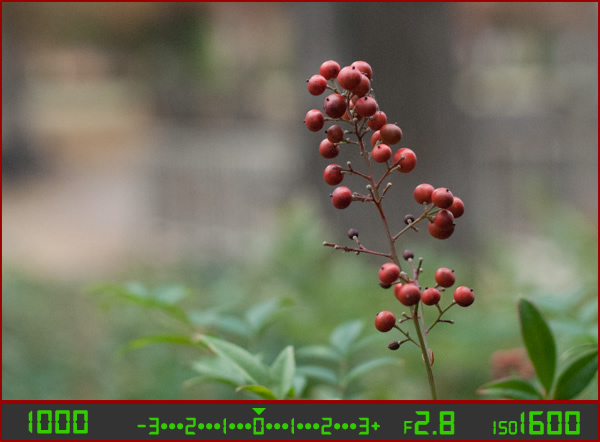
berries-correct-high-ISO

The end result is almost the same: a properly exposed photo (just like our light meter told us it would be, with the triangle hovering above the zero), but this image has much more noise and grain than the previous one. Notice how the tree in the background just behind the berries looks speckled and grainy instead of silky smooth, which is what usually happens at high ISO values. Thus, raising the ISO might not be the best way to get the image I want even though the photo itself is properly exposed.

So what about changing the aperture instead?
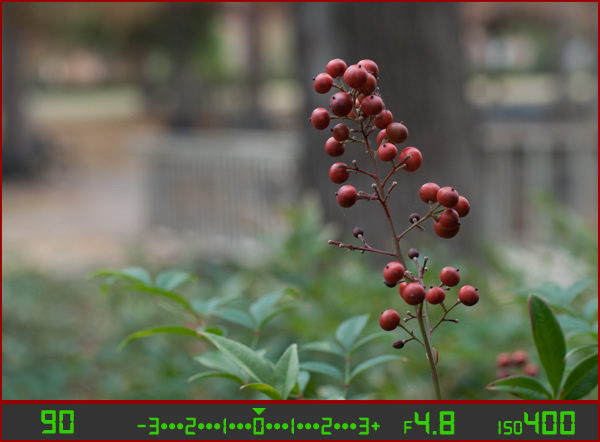
berries-correct-small-aperture

Once again the result is a photo that is properly exposed, but the depth of field is much wider – see how the background is not quite as smooth and blurry as before? Also, because the aperture was smaller I had to leave the shutter open longer at 1/90 of a second and even raise the ISO a bit in order to maintain a proper exposure.

Get the exact shot you envision

Shooting in manual and using the light meter as your guide is a good way to ensure that the image you see in your mind is exactly what you end up with when you click the shutter. If you are shooting fast-moving subjects like cars or sports, you would want to start with a fast shutter speed and adjust the other settings until you get that little triangle to hover above the zero. If you are taking portraits and want a shallow depth of field with nice blurry backgrounds, keep the aperture wide and change the shutter and ISO until the exposure is correct. It’s all about giving control back to you, the photographer, instead of letting your camera make the creative decisions for you.
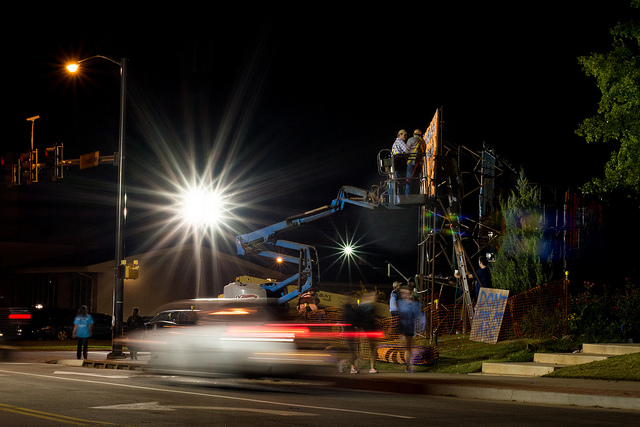
construction-lights

Shooting in manual was the only way to capture this photo. By reading the light meter while carefully adjusting my exposure settings I got precisely the shot I was aiming for. Camera settings: f/16, 1/3 second, ISO 800

Understanding the basics of the light meter is really just scratching the surface, though. Additional settings like your camera’s metering mode and the Exposure Lock function are even more tools you can use to take control over your photography and unlock your true artistic potential. Using manual mode and reading the light meter might seem like a complicated way to take photos, but remember that you know better than your camera what kind of picture you want to take. Once you know how to read your light meter and adjust your camera’s settings accordingly, you can open up a whole new world of creativity that has been right in front of you just waiting to be discovered.

Practice time

So now it’s your turn: grab your camera, put it in Manual mode, and hold the viewfinder up to your eye. Now start changing the aperture, shutter, and ISO values and watch what happens to the light meter. Is your image going to be overexposed? Lower the ISO, raise your shutter, tighten the aperture, or try a combination of all three. Is your image going to be underexposed? Do the exact opposite. The more practice you get, the easier it will be and soon you will feel much more comfortable shooting in a mode that might have seemed hopelessly confusing before.

Do you shoot in manual? If so, how did you get yourself off Automatic mode? Or do you actually prefer Automatic? Share your thoughts and experiences in the comments below.

googletag.cmd.push(function() {
tablet_slots.push( googletag.defineSlot( “/1005424/_dPSv4_tab-all-article-bottom_(300×250)”, [300, 250], “pb-ad-78623” ).addService( googletag.pubads() ) ); } );

googletag.cmd.push(function() {
mobile_slots.push( googletag.defineSlot( “/1005424/_dPSv4_mob-all-article-bottom_(300×250)”, [300, 250], “pb-ad-78158” ).addService( googletag.pubads() ) ); } );

The post How to Learn Your Camera’s Light Meter and Master Manual Mode by Simon Ringsmuth appeared first on Digital Photography School.


Digital Photography School
 
Comments Off on How to Learn Your Camera’s Light Meter and Master Manual Mode

Posted in Photography


Restaurant Menu Food Photography Using Natural Light

22 Dec

There are many ways to approach food and drink photography, from big budget shoots with food stylists and complicated lighting setups, to low budget natural lighting setups. For a formal restaurant photo shoot, which setup would you choose? I’ve had successes doing both types of photo shoots, but in this particular example, I’ll show you super low budget ways to pull off professional, tasty-looking food photos appropriate for a menu.

restaurant photography tutorial natural lighting

Client Brief

Based in Seattle, this client is an American restaurant going in a new direction with the hiring of a new chef and his decision to revamp the menu into one with distinctive Southern and Creole flavor.  This client reached out in need of 10-20 menu photos for use in their press release announcing the rebranding efforts. I had photographed their interiors previously and knew that the multi-room restaurant and bar was vintage themed with diverse backgrounds, patterns, and lighting schemes throughout the restaurant. Based on the budgeted resources for this shoot, I decided against making it a big production with a food stylist and opted for a low budget approach.

Planned Setup

Initially, I planned a simple lighting setup using a Canon 580 EX-II Speedlite, a shoot-through umbrella, Pocket Wizards, and a compact Manfrotto 5001B Nano light stand. This is my favorite relatively compact and affordable lighting setup for everything from quick portraits to food and drink photography. However, I realized when I got onsite that I was missing a crucial piece of my setup: the flash and umbrella mounting adapter, meaning I had no way of connecting my flash and umbrella to the lighting stand. Oops…time to improvise!

Actual Setup

Since I had photographed the interiors of the venue before and knew that there were two areas that had copious natural lighting: the bar area near the front entrance with huge floor to ceiling windows, and a large room with glass panels for a ceiling. Luckily, it was a typical cloudy day in Seattle, so there was nice diffused natural light flowing through the ceiling, making these two areas the perfect spot for food and drink photography without any flash or external lighting.

In terms of gear, I shot all of these photos with a Canon 6D camera and a 24-70mm f/2.8 lens. I also used the 580 EXII Speedlite on occasion when I needed some fill light.

Composing and Shooting

I photograph a lot of restaurant interiors and as a result I’ve learned that there is a lot of thought and strategy that goes into the design of the space. As a result, I like to find distinct elements of the restaurant to fuse into the food photos that I create. This does two things: 1) it highlights unique features that a designer or architect spent a lot of time working on, and 2) incorporating aspects unique to the restaurant places the dishes in different atmospheres, thus creating more diverse imagery.

Photos at the Bar

Cocktail photography

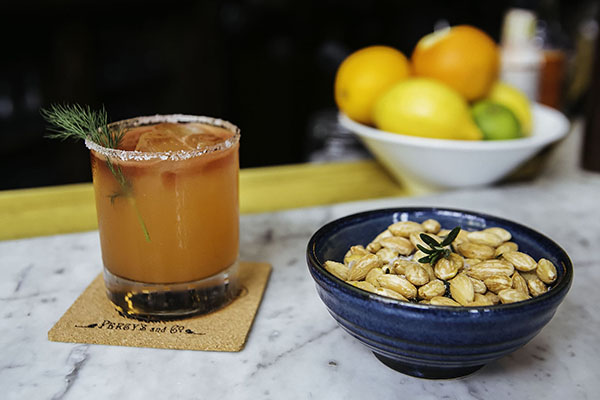
I started off with two appetizer and cocktail dishes, photographing them at the bar that was naturally lit by the huge floor to ceiling window. The white granite bar top was a nice contrast to the warm colors of the food and drinks. I shot this first image at f/4 to keep the main elements of the glass and bowl of nuts mostly in focus. The first few shots looked like they were missing some depth, so on a whim I moved the pairing in front of a bowl of citrus fruits placed at the bar. The color and placement of the fruits ended up being nice complimenting elements, contributing to the image below.

restaurant photography tutorial natural lighting

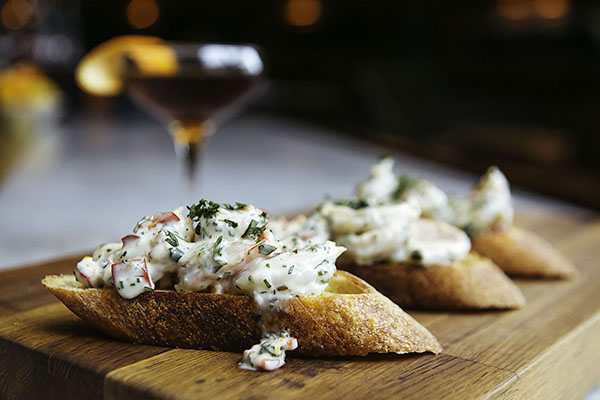
This second dish that was shot at the bar was presented on a super long wooden cutting board. It was actually too long for such a small appetizer, and I solved this problem by zooming in to the image and shooting at f/3.2 to keep the focus on the main element: the chunky shrimp remoulade topping the bread!

remoulade photography

Photos in the Dining Area

Percy's in Ballard, Seattle, WA

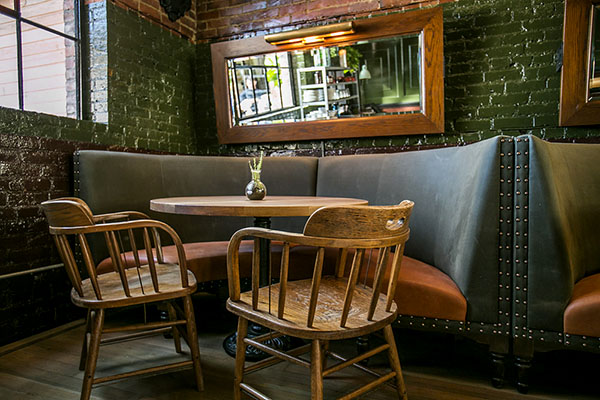
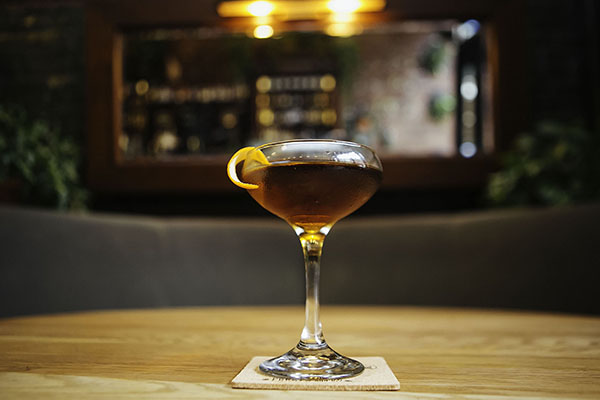
Another intriguing section of the restaurant that offered nice, albeit darker, lighting was the dining area. Featuring an illuminated mirror behind circular booth seats and a light colored wooden table, this was a great space to utilize for cocktail shots. This particular beverage was shot at f/2.8 to keep the glass and its elements in focus and give a nice blur of the mirror background.

FINAL-Cocktail

Photos on the Patio

FINAL-Percys 01

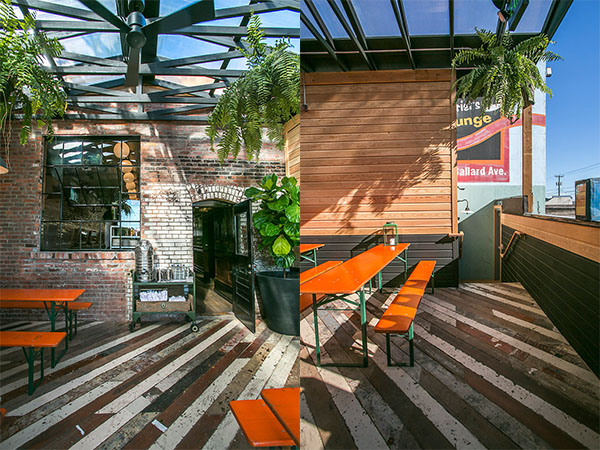
Finally, the bulk of the food and drink photos I shot were taken in the aforementioned covered patio area in the back. As you can see from the images below, the space has a huge glass ceiling, brick walls, long colored picnic tables, and a nicely textured wooden floor panels. All of these elements made for great textures and backgrounds for shooting each dish in a variety of settings.

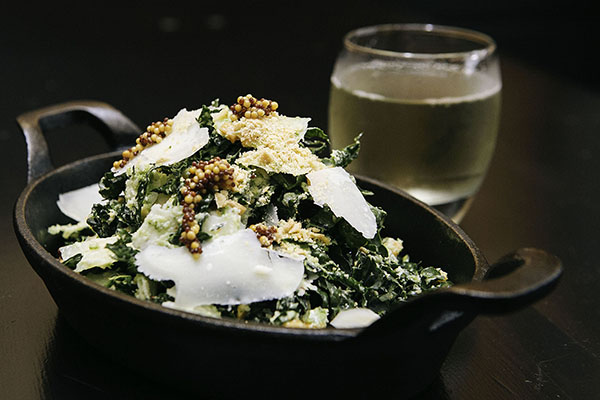
Final-Kale

Salads can be a bit tricky to shoot because there can be so many competing elements to focus on. In the case of this kale salad, I chose an aperture of f/5.6 to make sure more parts of the salad were in focus other than the shredded cheese and mustard seeds.

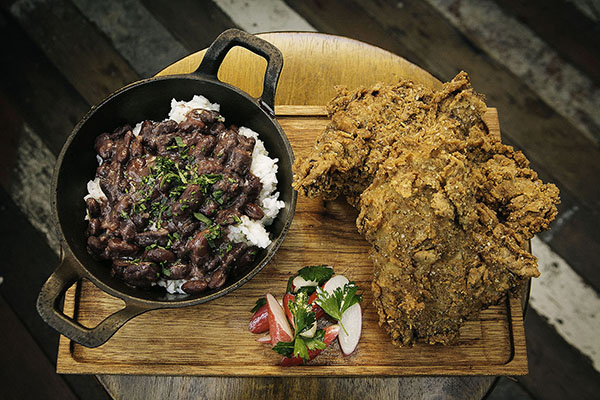
Final-Chicken

The winning dish of them all was this epic made-from-scratch fried chicken entree with rice and beans. Again, lots of different parts of this dish competing for attention, so I used an aperture of f/8 to make sure the most important parts were clearly in focus.

Wrap Up

Overall, this photo shoot of 10 dishes, each paired with cocktails took me about two hours to photograph. I had a bit of a challenge by forgetting one key piece of my lighting kit, but was able to improvise thanks to copious natural lighting and using my handy 580 EXII Speedlite. All photos received light post-processing treatment and were turned over the next day for the client.

What do you think? Is a lighting kit essential for professional food photography, or is natural lighting the way to go?

googletag.cmd.push(function() {
tablet_slots.push( googletag.defineSlot( “/1005424/_dPSv4_tab-all-article-bottom_(300×250)”, [300, 250], “pb-ad-78623” ).addService( googletag.pubads() ) ); } );

googletag.cmd.push(function() {
mobile_slots.push( googletag.defineSlot( “/1005424/_dPSv4_mob-all-article-bottom_(300×250)”, [300, 250], “pb-ad-78158” ).addService( googletag.pubads() ) ); } );

The post Restaurant Menu Food Photography Using Natural Light by Suzi Pratt appeared first on Digital Photography School.


Digital Photography School
 
Comments Off on Restaurant Menu Food Photography Using Natural Light

Posted in Photography


Deal 5: Your Guide to Natural Light Photography for $7 (65% off)

17 Dec

On the 5th day of Christmas dPS gave to me… another amazing $ 7 eBook and bundle option!

Yesterday saw our servers pushed to their limit with a $ 7 USD eBook deal so today we’ve decided to roll our best selling eBooks of all time at that sweet price of… $ 7.

That eBook is…

Natural Light: Mastering a Photographer’s Most Powerful Tool by renowned travel photographer Mitchell Kanashkevich.

NewImage

Natural Light is one of the best guides on the market written specifically with beginner to intermediate photographers in mind. Written in easy to understand language, this eBook will certainly help you improve the quality of your photographs… using nature’s free gift to photographers – sunlight!

Today it is yours for just $ 7 – 65% off!

Bundle Mitchell’s 3 Ebooks for $ 19

Want more? Mitchell has written 3 great eBooks for dPS so today if you’d like to explore his full library you can pick up them all for just $ 19 USD.

Mitchell bundle

The bundle includes:

  1. Natural Light: Mastering a Photographers Most Powerful Tool
  2. Transcending Travel: a Guide to Captivating Travel Photography
  3. Captivating Color: A Guide to Dramatic Color Photography
  4. Mitchell’s eBooks are perfect for the beginner just starting out or a more intermediate photographer looking for a refresher. They are beautifully illustrated and full of great practical advice.

    As with all of our eBooks they come with a 60 day money back satisfaction guarantee.

    These 3 eBooks have a RRP of $ 60 but today they’re available for $ 19 (68% off).

    As with all our deals – this one lasts just 24 hours. Grab this one here today.

googletag.cmd.push(function() {
tablet_slots.push( googletag.defineSlot( “/1005424/_dPSv4_tab-all-article-bottom_(300×250)”, [300, 250], “pb-ad-78623” ).addService( googletag.pubads() ) ); } );

googletag.cmd.push(function() {
mobile_slots.push( googletag.defineSlot( “/1005424/_dPSv4_mob-all-article-bottom_(300×250)”, [300, 250], “pb-ad-78158” ).addService( googletag.pubads() ) ); } );

The post Deal 5: Your Guide to Natural Light Photography for $ 7 (65% off) by Darren Rowse appeared first on Digital Photography School.


Digital Photography School
 
Comments Off on Deal 5: Your Guide to Natural Light Photography for $7 (65% off)
Posted in Photography


Relio is a powerful LED light in your pocket

11 Dec

It seems ultra-portable LED-based external light sources are the flavor of the season. Last month brought the Lume Cube, and today there is Relio. Relio is a 35mm small aluminum cube that uses a USB connection as power source for its LED light. It can be mounted on tripods and other camera supports using a 1/4-inch standard thread. Read more

Articles: Digital Photography Review (dpreview.com)

 
Comments Off on Relio is a powerful LED light in your pocket

Posted in Uncategorized


Go Au Naturel: Shooting Portrait in Natural Light

08 Dec

When I first bought my little Canon AE1 back in 1993 and started shooting, I couldn’t afford a flash. I shot everything in natural light, and I think I made every mistake known to mankind, so for those who would like to learn from my mistakes, this one’s for you!! Backlight When I was a little girl, my mother would Continue Reading

The post Go Au Naturel: Shooting Portrait in Natural Light appeared first on Photodoto.


Photodoto

 
Comments Off on Go Au Naturel: Shooting Portrait in Natural Light

Posted in Photography


Motion Exposure: Light Art Captures the Movement of Kayaks

04 Dec

[ By Steph in Art & Photography & Video. ]

motion exposure 1

Strange undulating patterns of colored lights seem to slink across the surface of water like living entities in this captivating series of images by Ontario-based photographer Stephen Orlando. In a variation on the art of light painting, Orlando attaches LED lights to the oars of kayaks and canoes, literally spotlighting their movements as they cut through rivers and lakes.

motion exposure 2

motion exposure 3

Long exposures capture nothing but the lights as the subjects move against the backdrops, erasing the kayaks and the humans piloting them. The result is surreal, as if bioluminescent alien creatures were gliding on the surface of the water.

motion exposure 4

motion exposure 7

“I’m fascinated with capturing motion through time and space into a single photograph,” says Orlando. “Using LED lights with custom color patterns and long exposure photography, I’m able to tell the story of movement.”

motion exposure 5

motion exposure 6

“This technique reveals beautiful light trails created by paths of familiar objects. These light trails have not been artificially created with Photoshop and represent the actual paths of the objects.”

spark faces

cyclones

Another project takes light painting to a more urban setting, with painter Diliz capturing faces in sparks. Cyclones of light also appear to break through the surface of the earth and bodies of water in stunning works by Martin Kimbell.

Share on Facebook


[ By Steph in Art & Photography & Video. ]

[ WebUrbanist | Archives | Galleries | Privacy | TOS ]


WebUrbanist

 
Comments Off on Motion Exposure: Light Art Captures the Movement of Kayaks

Posted in Creativity