RSS
 

Posts Tagged ‘Light’

Side-by-side Comparisons of Basic Studio Light Modifiers

26 Oct

Side-by-side Comparisons of Basic Studio Light Modifiers 1

Have you ever wondered what difference studio light modifiers make to your portraits?

Are you even convinced that they make a difference in the quality of light? I thought I’d do a little experiment to show you the effects that a few basic studio light modifiers can have on your portraits.

For some, the right modifier may make an image great, and the wrong modifier could break it.

Technical terms

Firstly, if you are new to artificial lighting, let’s look at some technical terms.

Flash – an electronic artificial light source which gives out a brief, sudden burst of light. A flash is also known as a strobe in North America.

Reflector – a panel that bounces light back towards the source and comes in silver, gold, black, white, fabric or other material.

Light modifier – an object attached to the front of the flash to change the quality and effect of light entering the camera.

Shoot – through Umbrella – an umbrella made of translucent fabric that allows light to pass through it.

Diffusion – a material that scatters light evenly as it passes through, thereby making the light softer and with less glare and harshness.

Softbox – a closed chamber usually lined in white or silver fabric, available in various shapes (such as a square, rectangle, umbrella, octagon). A softbox confines the light from the flash and releases it through a diffusion material, thereby allowing more control as to the size and spread of light that reaches your subject.

Grid – usually made from fabric strips of material that are sewn together to form a 3D grid that is attached to the light modifier. A grid restricts the focus of light, making it more directional, allowing the photographer more control. It also limits or restricts the spill of light onto other areas.

The studio light modifiers used in this article

Let’s start with the lighting diagram as shown below. My set-up consisted of 2 lights and the following:

Side-by-side Comparisons of Basic Studio Light Modifiers 2

  • a dark wall
  • a large silver panel reflector on camera left
  • a flash high up on the camera left to give a bit of hair light – I wasn’t after a vast separation from the background as I was using a light colored sofa that separates the background and the subject already. I also wanted a rather dark, moody lighting, so I covered the flash with a few layers of diffuser fabric. Doing this cut light out and limited it to the subject rather than hitting the wall
  • a flash on camera right onto which I attached various modifiers
  • studio light modifiers: flash hood, translucent umbrella, umbrella softbox, 90 x 60 softbox, diffuser fabric, grid

You can also shoot with one light, of course, see here for a beginner’s tutorial on how to create dramatic portraits with one light.

Side-by-side Comparisons of Basic Studio Light Modifiers 3

Left: #1 Shoot-through umbrella facing away. Right: #2 Shoot-through umbrella facing toward.

#1 Shoot-through umbrella facing away from subject

For the above-left image, I used an umbrella as a shoot through with the flash facing away from the subject. You can see there is still light hitting the subject’s face, but the shadows on the left side of the face and the neck are a lot more pronounced and harsh. The light was not able to reach the reflector to the left of the subject at all.

#2 Shoot-through umbrella facing toward subject

Compare this with the image on the right. I turned the flash and umbrella 180 degrees so that the flash was facing the subject and shot from behind the umbrella. The shadows are much softer, more light has reached the subject, and you can also see the light hitting the sofa on the far left which means the reflector was doing its job of bouncing some light back.

Side-by-side Comparisons of Basic Studio Light Modifiers 4

Left: #3 Bare flash with hood. Right: #4 Umbrella softbox

#3 Bare flash with hood

For the above-left image, I shot using just the electronic flash and the hood that comes with it. As it is rather small, it restricts the spread of light a little and focuses it more on the area you are lighting.

The light spills only as the light leaves the hood. Shadows on the face here are still defined, and not as smooth as I’d like it, but it is much better than on #1, where the shadows are much darker and harsher.

#4 Umbrella softbox

In the above-right image, I used a deep umbrella softbox allowing me to face both the flash and umbrella away from my subject. The umbrella is silver-lined which bounces all the light back towards the subject through a diffuser fabric. The resulting light quality is softer and more evenly spread due to bouncing and diffusion.

Compare this to image #2 that used only the shoot-through umbrella without the bounce. Notice how the light quality is gentler on the skin and more evenly spread, with softer shadows on the neck and under the nose.

Side-by-side Comparisons of Basic Studio Light Modifiers 5

Left: #5 Softbox Without the Diffusion Panel. Right: #6 Softbox with diffusion panel.

#5 Softbox without the diffusion panel

I switched to a 90 x 60 rectangular softbox for the images above. The one on the left is an example without the diffusion panel that covers the softbox. Shooting your subject without the diffusion panel is like shooting with a hood, as per example #3 (the hood also has a silver lining), only the softbox is larger.

The light is flashed away from the subject onto the silver lining of the softbox and bounced from the silver lining towards the subject without having to go through a diffusion panel.

#6 Softbox with diffusion panel

Comparing both images above, do you notice the softer quality of the light on the subject’s face on the image with the diffusion ‘on’? It is a subtle difference, but I can see it. Look even closer and you see the light without the diffusion is cooler and slightly harsher. It comes directly from the silver lining of the softbox not having gone through any diffusion.

This difference is noticeable on the sofa; the one on the left is a touch sharper and the one on the right darker and even. Compare the subject’s left eye (on camera right) – the shadow on the left image is stronger and deeper than the one on the right.

Such is the modifying effect of even just one diffuser fabric!

Side-by-side Comparisons of Basic Studio Light Modifiers 6

Left: #7 Softbox with the grid. Right: #8 Gridded softbox with the power adjusted.

#7 Softbox with grid

I attached a grid to the light set-up above so that it’s a silver-lined softbox with a diffusion panel plus a grid attached on the front of the diffusion panel. This setup is called a gridded softbox.

Notice just how much of the light has been cut out. Light gets focused on the face, and there are very few spills of light on the clothes, arms and outer areas of the space photographed.

The resulting image is a lot darker, moodier, and warmer in tone. However, I feel this is too underexposed, and details on the dress get lost, when I wanted these to show. The green wall looked too black, and the dress seemed to blend too much into it.

#8 Gridded softbox with power adjusted

On the above-right image, I kept the gridded softbox on and adjusted the flash power to my liking in order bring back the details I wanted. This new flash setting illuminated the face more and brought highlights back onto the hair and eyes. It also allowed a touch of light on the background too.

Finally, the end product I had in my mind used a textured background, so I added this texture to my dark green wall in Photoshop. For a step-by-step guide on how to add textures and creative overlays, see this post. In my opinion, the subtle texture adds more drama to the image and fits in better with the dark and moody lighting I was after.

Side-by-side Comparisons of Basic Studio Light Modifiers 7

Did you find this side-by-side comparison on light modifiers helpful? Please let me know and also share your studio lighting experiments in the comments below.

The post Side-by-side Comparisons of Basic Studio Light Modifiers appeared first on Digital Photography School.


Digital Photography School

 
Comments Off on Side-by-side Comparisons of Basic Studio Light Modifiers

Posted in Photography


Study sheds light on selfie deaths from around the world

06 Oct

A study newly published by the US National Library of Medicine NIH sheds light on deaths that occurred while taking selfies. The team behind the study found a total of 259 selfie-related fatalities had occurred between October 2011 and November 2017 from a total of 137 incidents around the globe. Risky behavior is cited as the primary cause of these tragedies.

The researchers conducted their study “to assess the epidemiology of selfie-related deaths across the globe,” according to the published research paper. Selfie-related deaths were categorized into two “causes” categories: non-risky behavior and risky behavior.

Risky behavior accounted for the majority of deaths, 72.5% of which involved male and 27.5% of which involved female victims. India was found to have the highest number of reported incidents, with Russia, the US, and Pakistan following. Falling, drowning, and transport-related incidents topped the reasons for the deaths.

As well, the study found that male victims were three times more likely to die during selfies due to risky behaviors, whereas non-risky behavior was the primary cause of female selfie-related fatalities. A recent example of such a tragedy involved 26-year-old Chinese “rooftopper” Wu Yongning who died after falling from a skyscraper.

The researchers conclude that regions with tall buildings, bodies of water, and other similar perilous places should be declared “no selfie zones” to help protect people from potential injuries or death.

Articles: Digital Photography Review (dpreview.com)

 
Comments Off on Study sheds light on selfie deaths from around the world

Posted in Uncategorized


How to Add More Interest to Your Astrophotography With Light Painting

05 Oct

Photographing the night sky is a lot of fun and can result in some stunning photographs. You don’t need to look far to find some incredible, out-of-this-world astrophotography.

As the low-light performance of cameras continues to improve, astrophotography has come within reach of more photographers.

joshua tree astrophotography light painting

You may have tried your hand at photographing the stars and the Milky Way, or you may be fantasizing about going out to play while the world sleeps. If you aren’t new to astrophotography, you’ve likely found that it isn’t as easy as you might think. Even with the right gear, it takes a lot of practice and can be incredibly frustrating at times.

Even if you’ve managed to come home with some sharp, well-exposed images of the stars, you may be wondering what’s missing. What are so many night sky photos missing? It’s easy to get so focused on photographing the sky that you can forget that it’s the earth that makes them interesting.

Adding Interest to Your Night Sky Photos

One of the best things you can do to add depth to a landscape photo is include some foreground interest. Astrophotography is no different.

This is why you’ll find that some of the most stunning astrophotos include natural or man-made elements like rock formations, lighthouses, or old barns.

beach astrophotography light painting

BEFORE: A 20-second exposure using only ambient light.

beach astrophotography light painting

AFTER: The same scene with the sand illuminated by light painting with the screen on my phone.

You may have already tried including some foreground interest into your night sky photos. The problem is that the best places for astrophotography are the darkest places. As far away from light pollution as possible, with little or no moonlight. Unfortunately, this means there is very little ambient light to illuminate the foreground that you’re trying to include.

One simple solution is called light painting. It comes in many forms and can be done using many different techniques. The basic principle is that you add light to parts of the scene to illuminate them. It can not only transform your astrophotography, it’s also a lot of fun.

The best part is that you don’t need any fancy or expensive gear. All you need is a light source. You can use anything you have lying around. A flashlight, light bar, camping lamp, your phone, or your car’s headlights. I’ve even seen people using a drone. I always take a headlamp so I can see what I’m doing so that often does the trick.

How to Paint With Light

Light painting isn’t difficult, in fact, it’s really easy. Once you have your camera set up and ready to go, take a photo of the scene with ambient light to make sure you’ve exposed for the sky and stars.

When you’re happy with your settings, either you or a buddy will use the light source to paint light onto the foreground elements that you want to illuminate. Start by painting a small amount of light into the scene, then check the image. You’ll rarely get it right the first time.

camping astrophotography light painting

BEFORE: A 25-second exposure of a camping scene with the light of the fire and an LED placed inside the tent.

camping astrophotography light painting

AFTER: The same scene with the vehicle illuminated by my headlamp to the right of the scene.

Take multiple exposures, slowly painting in more light as necessary. Try experimenting with painting from various angles to see how it changes the way the foreground looks. Don’t be afraid to walk into the frame. With exposure times of 20-30 seconds, you won’t be visible as long as you keep moving. Just be careful not to shine the light source into the lens. I find wearing black helps you stay invisible.

As you’re photographing tiny amounts of ambient light, you’ll find it’s easy to overdo it with the light painting and overexpose the foreground. Less is more with this technique. If you find the foreground is too bright, paint less light in or use a light source that isn’t as bright. I find the light from the screen on my phone works well. It also allows you to choose the color of the light.

As with any form of photography, don’t forget that off-camera light (light coming from the sides of the scene) gives a much more pleasing look and creates depth in your photos. Instead of standing behind your camera and light painting while the shutter is open, move off to the side or walk through the scene to vary the angles of the direction of the light. Just be sure to check where you’re walking first!

tree astrophotography light painting

BEFORE: A tree silhouetted against the light of the Milky Way.

tree astrophotography light painting

AFTER: I used a camping light to paint the edge of the tree with light, helping to give the scene some depth and lead the viewer’s eye into the stars.

Post-Processing Astrophotography Images

When it comes time to edit your photos, the more frames you have to work with the better. You may find that there’s one exposure where you nailed the exposure and light painting in one frame, in which case you can go ahead with post-processing it.

In the more likely scenario that you like different parts of different frames, which you can easily blend together in Photoshop to create a composite.

This is where your base exposure with no added light will come in handy. Go through and select the images that you want to create the composite with, including the base exposure, then use this digital blending technique to combine them in Photoshop. I like to do a basic edit to the images in Lightroom before exporting to Photoshop, then I add final touches after blending them into one image.

joshua tree astrophotography light painting

BEFORE: Rocks and Joshua trees are slightly illuminated by the ambient light pollution.

joshua tree astrophotography light painting

AFTER: The same rocks and trees painted with light from my flashlight as I walked through the scene.

It’s easier than you think

Light painting may seem like a complex photographic technique, but it’s actually quite simple. It can take your astrophotography from good to great, and you’ll find the process is very enjoyable, even addictive!

Next time you head out into the night with camera in hand, pack an extra flashlight and give light painting a try. You’ll be glad you did.

The post How to Add More Interest to Your Astrophotography With Light Painting appeared first on Digital Photography School.


Digital Photography School

 
Comments Off on How to Add More Interest to Your Astrophotography With Light Painting

Posted in Photography


A Guide to Using Natural Light for Macro Photography

21 Sep

Working with natural light can seem daunting. Yet as a macro photographer, I love natural light. I’ve spent years studying it, playing with it, observing it, and watching it fall.

I use it in all of my photographs. In fact, the last time I picked up a flash was over five years ago.

natural light macro rose abstract

But how do you take advantage of natural light? Are there some simple principles that can be learned and quickly applied, so that you can take stunning macro photographs in no time?

Actually, yes!

In this short tutorial, you’ll learn all about natural light for macro photography. I’ll explain the types of natural light that I like, the types that I avoid, and how you can best use natural light in your own photographs.

When you’re finished reading, you’ll have the know how to use natural light like a pro!

natural light macro birch leaf in clover

Five Types of Natural Light in Macro Photography

There are five types of natural light that all macro photographers should know:

  • Sunny light
  • Cloudy light
  • Evening frontlight
  • Evening backlight
  • And evening shade

Let’s discuss each in turn.

natural light macro poppy

Sunny Light

By sunny light, I am referring to the light that you find at noon on a clear day.

It’s very bright, very strong, and really contrasty. So, let me just get this out of the way and state it simply.

Do NOT use sunny light for macro photography!

natural light macro clematis

I couldn’t bring myself to take a photograph in direct sunlight. I just dislike it too much! So I photographed this clematis in the evening.

I know that it’s very tempting. After all, bright sunlight is very powerful, and everyone loves to get out on sunny days.

The problem, however, is that direct sunlight is extremely tough for cameras to deal with, resulting in blown out (that is, totally white) highlights and underexposed (very dark) lowlights. It also creates shadows that are unpleasant to look at.

Now, there are some genres of photography that make use of a sunny type of light. Street photography, for instance, relies heavily on the gritty, contrast-heavy look that sunny light provides.

natural light macro aster

Macro photography, however, requires softer light such as the next type of light.

Cloudy Light

Cloudy light is pretty self-explanatory. This is the kind of light when there are clouds, at any time of the day.

natural light macro fall leaves

What does this mean for your photography?

Clouds diffuse the light, causing it to become pleasant and soft. This is an ideal type of light for bringing out colors in your subject. I work a lot with flowers, and I go crazy over cloudy light.

There’s nothing better than a nice cloudy day for flower photography.

natural light macro tulip

I photographed this flower under cloudy skies.

Therefore, if you enjoy doing flower-focused macro photography, cloudy light is for you. Shooting in cloudy light will ensure evenly illuminated subjects, lovely colors, and really pleasing images.

Yet sometimes you might want to create images which are slightly less soft. You might want to work with more striking light, which brings us to . . .

Evening Frontlight

Evening frontlight is found during the golden hours of photography. The golden hours are the first two hours after sunrise, and the final two hours before sunset.

During this time, the sun casts a beautiful golden glow over the world. If you venture outside, and you make sure that the sun is behind you (point your shadow at your subjects), you’ll find that you’re looking at a beautiful landscape.

natural light macro red flower

Is this type of light good for macro photography?

In a word, yes. Such natural light tends to look lovely and soft when rendered by a camera.

I must admit, however, that I am not the biggest fan of evening frontlight. I find that it’s a bit too bright. I also prefer more dramatic lighting. Which brings me to my favorite type of light.

Evening Backlight

Evening backlight is extremely similar to evening frontlight. Except, rather than having the sun behind you, you have it directly in front of you.

I love evening backlight for macro photography. I’m drawn to its dramatic presence and warmth. I suggest that you try it, yourself.

natural light macro aster backlight

I photographed this aster in evening backlight.

To use evening backlight, you simply point your camera into the light. I recommend placing the subject between yourself and the setting sun so that the sun is obscured by the subject. Or put the actual sun slightly outside the image, so that it can be felt rather than seen.

Of course, these images aren’t for everyone. But I personally find them to be stunning!

natural light macro backlight

Yet if you’re looking for something a little less punchy, I do have one final recommendation.

Evening Shade

Evening shade is pretty self-explanatory, as well. Your subject is shaded by some object (a tree, a building, the photographer) in the evening.

What makes evening shade natural light so special? I like the evening shade for one specific reason.

If you can shade your subject while using an unshaded background, your images will really pop. The background will be rendered as liquid gold, while your subject is lit fairly evenly.

natural light macro daisy abstract

I photographed this daisy in some evening shade. The background was lit by the setting sun.

Don’t believe me? Try it!

Conclusion

Natural light may seem difficult to work with, but I hope that after reading these tips, you are feeling far more confident in your abilities.

natural light macro dahlia

Simply remember to avoid sunny light, and you’re halfway there. Use cloudy light if you want soft, evenly illuminated subjects and beautiful colors. Use evening light if you want a bit more drama.

Which type of natural light do you prefer? Share your opinions and images in the comments below.

natural light macro leaves

The post A Guide to Using Natural Light for Macro Photography appeared first on Digital Photography School.


Digital Photography School

 
Comments Off on A Guide to Using Natural Light for Macro Photography

Posted in Photography


Konseen launches Photo Studio, a portable light box tent for portraits

15 Sep

Konseen has launched Photo Studio, a new light box tent large enough to photograph people, in addition to smaller objects like clothing and jewelry. Photo Studio is offered in two sizes, one measuring 47 x 39 x 78in / 119 x 99 x 198cm with enough room for adults, the other 47 x 32 x 63in / 120 x 80 x 160cm, which is large enough for children. Both models include LED lights, a silver reflector, and multiple backgrounds.

Features include three soft cloth backgrounds, as well as three PVC backgrounds

The Konseen Photo Studio features a pipe-based frame with a tent cloth that zips over the structure. Users assemble the tent, which includes the option of attaching light panels to any of the frame pipes. The smaller Photo Studio model includes six light boards, each with 96 LEDs; the larger model includes 8 light boards, each also featuring 96 LEDs.

Each light board includes its own dimmable AC adapter. Other features include three soft cloth backgrounds, as well as three PVC backgrounds in white, black, and blue colors. The light color temperature is 5500K and each board has a dimming range from 1- to 100-percent.

The Photo Studio is priced at $ 280 USD (small model) and $ 340 USD (large model).

Via: PetaPixel

Articles: Digital Photography Review (dpreview.com)

 
Comments Off on Konseen launches Photo Studio, a portable light box tent for portraits

Posted in Uncategorized


SCL-OE-04: Cheap, Portable Outdoor Light Source

15 Sep

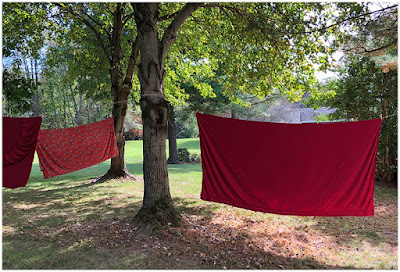
No matter how long you have been doing something, be it lighting or photography or, well, anything, you're never too old to be dumbstruck by a cool new idea.

Take the linens drying on the line above, for example. In the right frame of mind they are essentially super-portable outdoor light sources.

Read more »
Strobist

 
Comments Off on SCL-OE-04: Cheap, Portable Outdoor Light Source

Posted in Photography


Light Review: The PiXAPRO CITI600 Portable Strobe (Godox Wistro AD600BM)

12 Sep

In this review, I’ll put the PiXAPRO CITI600 portable strobe (also called the Godox Wistro AD600BM) through the paces and give you my thoughts on it.

Despite the innovations to all manner of photography equipment, studio strobes haven’t changed much in the past few decades. Sure, a handful of features get added here and there every once in a while, but for the most part, you know exactly what you’re getting: a powerful light source with a very short duration that is plugged into an electrical outlet.

But this has changed in the past few years. Manufacturers have begun to incorporate features like batteries, TTL (through the lens metering) compatibility and high-speed sync into their strobes. These features make the humble studio strobe more useful and more versatile than ever.

Light Review: The PiXAPRO CITI600 Portable Strobe (Godox Wistro AD600BM)

The PiXAPRO CITI600 is the Godox Wistro AD600BM rebranded for the UK market.

The PiXAPRO CITI600 does all of these things. The CITI600 is a battery powered strobe whose features include high-speed sync and TTL metering (through the use of a separate camera mounted trigger).

Rebranded

Pixapro is Godox rebranded for the UK market. The CITI600 is the same product as the Godox Wistro AD600BM. The only difference is that the battery can be safely charged via a 220v power outlet.

High-Speed Sync

Light Review: The PiXAPRO CITI600 Portable Strobe (Godox Wistro AD600BM) - outdoor portrait

High-speed sync allows you to better control how your ambient and strobe lighting mix together.

If you own a speedlight, you are probably already familiar with high-speed sync (HSS). In short, HSS allows you to sync your flash with your camera at significantly faster shutter speeds than normal.

Doing so provides you with the means to overpower the sun on bright days, easing the effects of harsh lighting. It also allows you to darken backgrounds and use larger apertures to obtain a shallow depth of field in situations that you would normally be relegated to small apertures such as f/11 and f/16.

Because of the small size and limited power of speedlights, HSS has always been a bit of a specialist technique. However, put that functionality into a high powered strobe with a large modifier mounted to it and those limitations disappear. This opens up a world of new possibilities for you.

Battery Powered

outdoor portrait setup - Light Review: The PiXAPRO CITI600 Portable Strobe (Godox Wistro AD600BM)

No cords and no generators make the Citi600 as portable as possible. If you’re willing to carry it, you can have a high powered strobe wherever you want.

Even without HSS, it has always been possible to use studio strobes to great effect outdoors. The limitations, however, made it impossible for most photographers. Because strobes are electrically powered, to take them on location, you need external battery packs or generators.

Both of these things were/are expensive and difficult to lug around. With the inclusion of a high capacity battery in a strobe, these concerns disappear and your strobe can now go virtually anywhere a speedlight can.

TTL

Light Review: The PiXAPRO CITI600 Portable Strobe (Godox Wistro AD600BM)

TTL metering makes mixing ambient light and artificial life much, much easier.

Through the lens metering (TTL) allows your camera to take a meter reading and relay that information to your strobe, making it much easier to mix flash with ambient lighting. It’s not perfect and won’t likely ever be, but in a pinch, TTL metering can make getting a good exposure quick and easy.

For example, if you are on location and you know that you want a dark background with a well-exposed subject, you could set your camera’s exposure to underexpose the ambient by two stops and fire the strobe at whatever the meter is reading. Fine tuning the strobe’s exposure can be as simple as dialing in a few stops of exposure compensation on your trigger.

PiXAPRO CITI600 – Godox Wistro AD600BM

Light Review: The PiXAPRO CITI600 Portable Strobe (Godox Wistro AD600BM)

Combined, these three features take the already versatile studio strobe to a whole new plane of utility and the PiXAPRO CITI600 with the ST-IV trigger does a fantastic job of it. In the months that I’ve owned mine, I can attest that the HSS functionality works perfectly without flaw.

On top of that, there are a few other things worth discussing.

Specs

As you’d expect from a modern, feature-laden strobe, the spec sheet for the CITI600 (Godox Wistro AD600BM) is rather impressive. There’s no need to bore you with the full specs, but some notable highlights include:

  • A guide number (GN) of 87m @ ISO 100
  • A color temperature of 5600k
  • HSS up to 1/8000th of a second
  • 100m range with the ST-IV trigger

ST-IV Trigger

Light Review: The PiXAPRO CITI600 Portable Strobe (Godox Wistro AD600BM) - flash trigger

The ST-IV trigger gives you complete wireless control over the Citi600 from the top of your camera.

For the trigger, I opted for the hotshoe mounted ST-IV (Xpro-C for Canon as it is called in the USA – $ 69.00). This trigger offers access to the full functionality of the CITI600 in an extremely easy to use interface with an LED display.

Controls

Light Review: The PiXAPRO CITI600 Portable Strobe (Godox Wistro AD600BM)

All of the controls on the CIti600 are clearly marked and very user-friendly.

On both the PiXAPRO CITI600 (Godox Wistro AD600BM) and the ST-IV (Xpro) trigger, the controls are intuitive, clearly labeled and easy to use. Dialing in exposure compensation is simply a matter of turning the dial on either device. Most of the functionality can be accessed by a single button push.

It is also worth pointing out that while the controls are easy to use, all of the displays are clearly labeled and easy to read.

Battery Capacity

PiXAPRO claims that a single charge of the battery will provide 500 flashes at full power. I can’t confirm these exact numbers, but I’ve had the strobe out on a number of occasions where it was in use for several hours at a time. Never once did I have to turn the strobe to full power. The battery indicator never even got to halfway.

It may be possible to drain the battery in a full day, but every indication seems to suggest that this battery is not going to run out on you.

Supposing that you do somehow burn through the battery in a single session, Pixapro does sell spares and at $ 180.00. That is more than reasonable for the amount of power that they provide.

Duration

Light Review: The PiXAPRO CITI600 Portable Strobe (Godox Wistro AD600BM) - LED display

The display on the CITI600 is large and easy to read with all relevant information clearly represented.

This one’s a bit new to me, but it may be a useful feature for you. For whatever settings you have dialed in, the display on the CITI600 tells you exactly how fast the flash duration will be, up to 1/10,000th of a second.

Do you absolutely need to freeze the movement in your frame? Just choose a setting that will give you the desired flash duration and you should be good to go.

Mount

Coming from the Bowens system, all of my modifiers are S-mount. The fact that S-mount is an option on the CITI600 just makes life so much easier. If you’re unsure about it, there are tons of affordable modifiers available for the S-mount. You will never be lacking in choice should you buy into the S-mount system.

Modeling Light

The Citi600’s modeling light is a fairly powerful LED. This has several advantages.

The LED draws less power than your traditional modeling bulb, meaning that there is less strain on your battery. LEDs also do not get anywhere near as hot as tungsten bulbs. For your subjects, this means more comfort as they’re less likely to get too warm under the heat of the lights. It also means that certain modifiers and gels pose much less of a fire risk.

It is also entirely possible to light a scene with just the modeling light. You probably won’t want to do this for a portrait session, but for table top setups and the like, you can use the CITI600 as a continuous light and put even less strain on the battery.

I will add that using the modelling light on location during daylight hours will not usually work due to light levels.

Build Quality

Light Review: The PiXAPRO CITI600 Portable Strobe (Godox Wistro AD600BM) - lighting setup outdoors

The PiXAPRO CITI600 is well built and feels solid. Although it is significantly less expensive than similarly featured strobes from companies like Elinchrom, every aspect of the CITI600 feels like it is built to last.

Price Point

If you think all of this sounds great, than there is one surprise for you. The PiXAPRO CITI600 comes with a price tag of around $ 600.00 making it significantly cheaper than similar offerings from Elinchrom, Broncolor, or Profoto.

In Use

Light Review: The PiXAPRO CITI600 Portable Strobe (Godox Wistro AD600BM)

It can be awkward to carry the CITI600 with a large modifier about on location. But if you can be bothered, it is more than worth the effort.

Honestly, the PiXAPRO CITI600 works like a dream. I’ve had it out over the past few months as often as I can because it’s just so simple and fun to use. Sure, lugging it around on location with a five foot Octabox can be tricky, but the extra effort is beyond worth it.

Here are a few examples of images achieved with the PiXAPRO CITI600 (Godox Wistro AD600BM).

Light Review: The PiXAPRO CITI600 Portable Strobe (Godox Wistro AD600BM)

Light Review: The PiXAPRO CITI600 Portable Strobe (Godox Wistro AD600BM)

Light Review: The PiXAPRO CITI600 Portable Strobe (Godox Wistro AD600BM)

All in All

Since the demise of Bowens, I have been looking for a new system to eventually buy into. Without a doubt, that is going to be Pixapro/Godox.

The PiXAPRO CITI600 (Godox Wistro AD600BM) is as close to perfect as you can get from my perspective. This portable strobe is high in functionality and easy to use. That’s before you even consider the HSS, TTL and the fact that it is battery powered. Basically, it’s everything you could possibly want with a much lower price tag than you should reasonably expect.

The post Light Review: The PiXAPRO CITI600 Portable Strobe (Godox Wistro AD600BM) appeared first on Digital Photography School.


Digital Photography School

 
Comments Off on Light Review: The PiXAPRO CITI600 Portable Strobe (Godox Wistro AD600BM)

Posted in Photography


Pixelmator Pro update adds Light Leak effect and more

08 Sep

Pixelmator has announced an update to its Pixelmator Pro image editing software. Version 1.1.4 to brings new effects, a new AI-powered Auto Selective Color adjustment tool and more.

The Auto Selective Color feature uses machine learning to automatically apply selective color adjustments, improving specific colors in an images. A new Light Leak effect adds a vintage film look to your photos and the Bokeh effect simulates the shallow depth of field of a fast lens on a DSLR, similar to what we are seeing on many current smartphone cameras.

There is also a new Spin Blur effect which creates circular motion effects. The Noise effect is something we have seen before on other editing applications and simply lets you add grain to your images. Other new effects include Threshold, Mask to Alpha, Clouds, and more Tile and Distort effects.

Auto White Balance and Auto Lightness preserve skintones better and are 30 percent faster than in previous versions of the software

Pixelmator did not only add new features, however, but also improved some of the existing tools. The company says Auto White Balance and Auto Lightness preserve skintones better and are 30 percent faster than in previous versions of the software. The Color Adjustments and Effects sub-menus now come with Copy, Paste, Reset and Flatten Adjustment options. In addition you can now use a new keyboard shortcut (O) to show the original image while editing.

You can find a full list of improvements and modifications on Pixelmator’s What’s New page. Pixelmator Pro can currently be downloaded for $ 29.99 from the Mac App Store. That’s a $ 30 discount off the regular price.

Articles: Digital Photography Review (dpreview.com)

 
Comments Off on Pixelmator Pro update adds Light Leak effect and more

Posted in Uncategorized


Why I’ve Become a Light Meter Convert

05 Sep

Light meters

sekonic light meter - Why I've Become a Light Meter Convert

Light meters can be an invaluable tool for photographers; especially those who use off-camera flash.

Mention a light meter in photography circles and you’re certain to get some fierce responses. Sure, some photographers will be indifferent and fewer will be in favor, but most will be adamant that you don’t need one. I used to be somewhere in the middle.

I could definitely see their utility, but I just never thought I needed one. Before a few months ago, I had picked up a light meter once in 14 years. It turns out that I was just making excuses to not spend the money on something that may be one of the most powerful tools you can buy if you use off-camera flash lighting.

Excuses

There are a lot of motives and reasons that you might avoid using a light meter in the digital era. For example:

  • You can just chimp the LCD screen.
  • It’s easy to fix it in raw processing.
  • They’re too expensive for what they do.
  • The histogram is enough for testing exposure.

I get it. All of these sentiments came out of my mouth over and over again.

Chimping and the Histogram

photographer checking settings - Why I've Become a Light Meter Convert

While you can chimp your exposures to get them right, this can take both time and guesswork. A light meter takes away both of those things.

Sure, you can look at the back of your camera after each test shot (chimping) while you’re setting up your lights. This works fine for one or two lights, but what happens when you need to create a precise lighting ratio?

How do you ensure that your fill light is exactly three stops below your key light? How do you ensure the rim lights are an even exposure with your fill? It’s possible, but all of that takes time and guesswork.

I remember doing a basic four light setup a few years back and it took the better part of an hour to get the ratios exactly how I had planned them.

Since starting to use a light meter, I set up an even more complicated five light setups, mixing really hard light with very soft light. It took me only 10 minutes to get right. I don’t know about you, but I could do with a lot more instances of saving nearly an hour of shooting time.

b/w portraits of a man in a suit - Why I've Become a Light Meter Convert

These images use five lights at a very precise contrast ratio. Using a light meter meant that the setup time was only 10 minutes.

Fix it in Raw Processing

raw processing in Lightroom - Why I've Become a Light Meter Convert

Fixing your exposures at the raw stage is a viable option, but it can take some time that might be better spent elsewhere.

Yes, you can fix the image later in raw processing. As long as your highlights and shadows aren’t clipped, raw processing is a viable tool here. However, wouldn’t it be much nicer to get it right in camera?

Think about it this way: with a light meter, you press the test button on your strobe, check the reading and dial it into your camera. The whole process takes about 20 seconds. Unless you move the light or your subject moves, every subsequent photo is now properly exposed.

Presume it takes about two minutes of fiddling to adjust the exposure of an image in Lightroom or ACR. If you’re working on 20 photos from a set, you’ve just lost 40 minutes of time to a task that could have been negated in twenty seconds.

Too Expensive

I get it, I really do. This was the main reason I avoided getting a light meter for so long. A couple hundred dollars for a decent light meter is a hard pill to swallow when there are so many things that you can buy for your photography at a much lower price. Why spend that kind of money on something you use so briefly when you can spend that money on lights, modifiers, trips, studio time, props, etc, etc.

It’s all a matter of how much you value your time and convenience. A light meter will save you time and it will make a good chunk of the set-up process easier. In the end, I’ve found that the price tag has been worth it.

Changing My Mind

model using a light meter - Why I've Become a Light Meter Convert

I had a shoot where I only had 10 minutes to set up. I borrowed a light meter from another photographer just to make my life easier. That one time completely changed how I felt about using light meters. In minutes, all of the potential benefits and values of having a light meter in my bag became apparent.

Time

As you may have guessed from my previous points, it comes down mostly to time. Faster set-ups mean you get more time actually shooting, which makes it more likely that you’ll get the shot that you’re after. Less time processing means you have more time to work on other things, like planning and arranging your next shoot.

Also, in terms of portraits, a light meter will help you minimize the time that your subjects are waiting on you between sets. Nobody, absolutely nobody (especially paying clients), wants to wait around for huge chunks of time while their photographer is messing with the lights.

Complexity

model with long hair - Why I've Become a Light Meter Convert

In this image, I wanted to experiment with a gridded stripbox as the key light and a giant octabox as fill. Using a light meter made getting the exact ratio between the key and fill lights that I wanted a breeze.

On top of time, the multiple light techniques that a light meter opens up makes it more than worth the value. With a light meter, you can dream up any number of lighting configurations, plan them down to the exact contrast ratio and set it up with no fuss.

You want a hard light source as a key at f/8, with two giant modifiers providing exactly two stops of fill at f/4 and two background lights at f/22? That’s a set-up that popped into my head one night shortly after buying my light meter. I went into the studio the next day and set it up.

I wouldn’t have bothered before, as trying to get the ratios right between those light sources would have been a major headache.

metering the light - Why I've Become a Light Meter Convert

Metering for each light individually and adjusting their exposure took about a minute or two. This only has to be done once.

behind the scenes lighting setup - Why I've Become a Light Meter Convert

If the exposure from the octabox was off, it would have destroyed the effect of the lighting from the much smaller striplight.


lighting diagram - Why I've Become a Light Meter Convert

Imagine that you’ve just had a week where you’ve saved several hours at both setting up and post-processing. If you used just a bit of that time to start drawing out and planning new light set-ups, how many do you think you could come up with?

Getting it right in-camera

Why I've Become a Light Meter Convert

When dealing with difficult subjects, like white shirts on dark backgrounds, a light meter can be an absolute blessing in terms of getting it right in the camera.

As I already mentioned, the ability to get your exposure perfect every single time is a huge benefit. In fact, when working with flash, I would posit that using a light meter might be the single most valuable step you can take to ensure perfect exposures and making your workload that much easier.

I’m a Total Convert

sekonic light meter - Why I've Become a Light Meter Convert

Over the time I’ve had it, my light meter has become indispensable. As it fits in my pocket, it now comes everywhere with me.

In the end, I regret that I put off and continually excused myself from buying a light meter for as long as I did. In the few months since I bought it, I have saved a ton of time in the studio not messing about with lights while people were waiting on me. My post-processing workload has lightened quite a bit as fixing contrast ratios in post-production is all too time to consume.

Both of these factors together mean that I now have more time for planning shoots and lighting set-ups than I had before. Those set-ups are also getting more and more complex as time goes on and most of them would have been next to impossible for me to put into use without a light meter to ensure the precise exposure ratios.

If you’re like me, and you’ve convinced yourself that a light meter is a superfluous bit of kit, I can only encourage you to challenge your own assertions. Could a light meter save you time as it has for me? Could it open new possibilities?

It’s possible that the answer is no. I can’t presume to know or understand your situation. All I can suggest is to at least ask yourself the question. It may very well be that light meter could be as valuable a tool to your photography as it is becoming to mine.

The post Why I’ve Become a Light Meter Convert appeared first on Digital Photography School.


Digital Photography School

 
Comments Off on Why I’ve Become a Light Meter Convert

Posted in Photography


6 Quick Tips for Low Light Smartphone Photography

18 Aug

The team over at COOPH consistently come up with some great video tips. In this one, get 6 tips doing some creative low light smartphone photography.

Low Light Smartphone Photography Tips

Summary of the tips:

  1. Backlit portraits
  2. Light painting portraits
  3. Dark object photography
  4. Side-lit portraits
  5. Ghostly exposures
  6. Nighttime cityscapes

?
We have articles here on dPS covering those topics in more detail if you want to try them out with your smartphone or your regular DSLR or mirrorless camera.

  • The dPS Ultimate Guide to Taking Portraits and Photographing People
  • How to Create a Dynamic Light Painting Portrait
  • Five Essentials of Doing Dark Food Photography
  • Why You Should Make Dark Images
  • 6 Portrait Lighting Patterns Every Photographer Should Know
  • How to Take Unique Double Exposures Without Using Photoshop
  • How to Create a Luminous Look for Your Photographs
  • How to Find the Best Possible Time to Shoot Cityscapes at Blue Hour
  • How to do Long Exposure Photography and Light Trails at Night

Want more info on smartphone photography? We got a few on that too:

  • Equipment List for Making Better Smartphone Videos
  • Tips for Better Smartphone Photography
  • 9 More Great Apps You Need for Your Smartphone
  • Review: Struman Lenses for Mobile Phones
  • How to Use a Cell Phone for Dramatic Night Photography
  • 8 Ways to Use Your Smartphone for Photography
  • How to Get Stunning Macro Photos with Your Mobile Phone

Tell us, do you haul your main camera with you everywhere you go? Or do you use what you have on you at the time, your smartphone? Do you have any additional tips for better low light smartphone photography? Let us know in the comments below.

The post 6 Quick Tips for Low Light Smartphone Photography appeared first on Digital Photography School.


Digital Photography School

 
Comments Off on 6 Quick Tips for Low Light Smartphone Photography

Posted in Photography