8 hours in front of a computer. Processing pictures and video clips, describing, keywording and submitting to stock agencies. 4pm: My computer is busy uploading videos and I am driving into the Poudre Canyon. Here I am in my field […]
paddling with a camera
Tag: Life
-
Snapshot from a Life of Paddling Photographer
-
Italian photojournalist has a Leica camera to thank for saving his life after being hit by an RPG
Editors note: Although no injury is shown, there is visible blood on a Leica camera in an embedded image below.
Italian photojournalist and co-founder of the Cesura Lab photographer collective, Gabriele Micalizzi, has a Leica camera to thank for saving his life.
On February 11, 2019, while covering conflict between the United States-backed Syrian Democratic Forces and the Islamic State (IS) militant group in Baghuz, Syria, Micalizzi was hit with shrapnel from an IS-fired rocket propelled grenade (RPG).
In the above video, shared by YouTube channel Gli Occhi della Guerra, wherein Micalizzi recounts the attack. The interview is in Italian, but closed captions can be turned on for an auto-generated English translation.
Leica camera saved the life of an Italian photojournalist in Syria:https://t.co/iTroGwMEnO pic.twitter.com/kP6YV6Poah
— Leica Rumors (@LeicaRumors) February 27, 2019
In speaking with Italian news outlet Corriere della Sera, Micalizzi recounts the incident, saying:
I can tell you the story now, in a corridor of San Raffaele hospital, [thanks to] those who did everything for me. The Kurdish military, the American doctors, the Italian embassy. My Leica camera, too. If I hadn’t been holding it in front of my face, I wouldn’t be here to talk about it: in the impact [the Leica] damaged my eyes, but it served as a shield.
Gabriel Chaim, a CNN visual journalist who was with him at the time, also spoke on Micalizzi’s brush with death with the Committee to Protect Journalists:
Micalizzi was hit by shrapnel from the RPG in his head, his left eye and ear, and different parts of his body. I was a meter and a half away from him and got hit by the blast.
The below image and accompanying caption was shared on the Cesura Instagram page.
View this post on InstagramFollowing the recent events regarding our photographer, co founder, friend and brother Gabriele Micalizzi in Syria, we would like to update you on his conditions. Gabriele is currently in Baghdad’s military hospital and is being carefully looked after by their medics for his lesion on eyes and arms. Yesterday we talked with Gabriele on the phone and he confirmed he is feeling fine, he is able to stand up and can see from both his eyes even if blurry. We are extremely happy to be able to dispute the recent news about the loss of his left eye which the media published without the necessary fact checking. Gabriele, the Micalizzi family and cesura would like to thank the people who very quickly and efficiently helped to rescue and evacuate him from the area of the accident. We would like to thank the Farnesina Crisis Unit and Italian diplomatic network for quickly jumping to action, keeping us constantly updated and for organising Gabriele’s return in italy. Furthermore, thank you to the whole medical team at the American hospital in Baghdad who took him in and with great dedication is taking care of him. We would also like to thank the journalist Fausto Biloslavo, @francesco.semprini and @gabrielchaim for the support during the evacuation operations and lawyer Alessandra Ballerini for the constant and precious help. Thank you to all the people who helped us handle this emergency situation in the best way possible. We will still have to wait a few days longer to see Gabriele in Italy again and hug him but the operations to bring him back home are already under way and the hospital ready to welcome him. We are waiting for you Never never never give up Cesura
Micalizzi’s work has been published around the world, with his credit line appearing in The New York Times, the Wall Street Journal and more. You can keep up with Micalizzi’s recovery on both his and Cesura’s Instagram profiles.
-
Blackmagic Pocket Cinema Camera 4K update adds pixel remapping, better battery life, more

Blackmagic Design has released Blackmagic Cameras 6.1, the latest firmware for its Pocket Cinema Camera 4K camera. The update includes better audio recording, improved battery performance, a new pixel remapping feature and other updates.
On the audio front, Blackmagic has implemented a new audio processor that ‘analyzes incoming audio from the dual microphones on each side of the camera to dramatically lower the noise floor, resulting in quieter recordings than possible before.’ Audio latency has also been reduced for more accurate syncing with video footage and improved real-time monitoring.

Screenshot of the menu area dedicated to the new pixel remapping feature. A new in-camera calibration tool has also been added that lets users recalibrate pixels in the camera to fix brightness variations that can occur over time. ‘The new pixel calibration feature allows the camera to realign the light output of each pixel resulting in a smooth clean image under changing environmental conditions,’ says Blackmagic.
Other features and improvements include more accurate autofocus, a new media formatting interface designed to prevent accidental formats, 2:1 monitoring frame guides, and new power savings and efficiency fixes that Blackmagic claims improves battery life 10-15%.
Blackmagic Cameras 6.1 is available as a free download for existing Blackmagic Pocket Cinema Camera 4K customers on Blackmagic Design’s website.
Blackmagic Design Announces Blackmagic Cameras 6.1 Update
Major update adds new features for Blackmagic Pocket Cinema Camera 4K including better audio recording and improved battery performance.
Fremont, California, USA – February 4, 2019 – Blackmagic Design today announced Blackmagic Cameras 6.1 which is a new update for the Blackmagic Pocket Cinema Camera 4K. This update adds quieter audio recording, a new pixel remapping feature, new 2:1 monitoring frame guides, improved battery performance and much more.
Blackmagic Camera 6.1 update is available now as a free download from the Blackmagic Design website.
The new Blackmagic Cameras 6.1 significantly improves audio recording when using the built in microphones on the Blackmagic Pocket Cinema Camera 4K. The new processing now analyzes incoming audio from the dual microphones on each side of the camera to dramatically lower the noise floor, resulting in quieter recordings than possible before. In addition, latency has been reduced for audio monitoring, audio and video synchronization has been fine tuned, and the 3.5mm audio input selection interface is now more intuitive, making it faster to use.
Blackmagic Cameras 6.1 also improves auto focus performance. Auto focus now responds quicker and more accurately so that lens hunting is greatly reduced when the camera is locking on to the focal point. There’s also a new media formatting interface that helps prevent customers from accidentally formatting media cards. Once the camera is updated, customers will need to tap and hold the media format confirmation button for 3 seconds before a card will be erased and reformatted.
This update also includes a new in-camera calibration feature which allows customers to recalibrate pixels in the camera. Over time some pixels can change in brightness and create small variations across the sensor. The new pixel calibration feature allows the camera to realign the light output of each pixel resulting in a smooth clean image under changing environmental conditions. Blackmagic Camera 6.1 update also features 2:1 monitoring frame guides, which is another creative composition tool for filmmakers to frame shots. In addition, new power savings and efficiency enhancements improve battery runtime by 10-15% and give customers a more accurate indication of remaining battery power.
“The Blackmagic Pocket Cinema Camera 4K is an incredible success and it’s been very exciting watching the adoption of digital film workflows by a much wider range of people,” said Grant Petty, CEO, Blackmagic Design. “This update is exciting because it adds even more great new features to the camera and it’s an exciting way for us to say thank you to all the people who have purchased a Blackmagic Pocket Cinema Camera 4K and who have taken the time to discuss ideas for the future with us. We can’t wait to see what customers will produce next!”
Blackmagic Cameras 6.1 Update Key Features
Adds support for pixel calibration in camera. Improves auto focus performance. Improves signal to noise ratio performance of the camera’s internal microphone. Improves power efficiency for improved battery life. Adds 2:1 monitoring frame guide. Improves media formatting user interface. Improves audio monitoring latency performance. Improves 3.5mm audio input selection interface. Improves AV sync performance.
Blackmagic Cameras 6.1 is available as a free download for all existing Blackmagic Pocket Cinema Camera 4K customers from www.blackmagicdesign.com/support.
-
Photoshop Focus Stacking for Still Life and Product Photography
The post Photoshop Focus Stacking for Still Life and Product Photography appeared first on Digital Photography School. It was authored by Darina Kopcok.

Still life and product photography often require that your entire subject be sharp.
This can be difficult to achieve in-camera because if you’re shooting up-close, you can’t always get a lot of your subject in focus.
Stopping down to a smaller aperture (higher F-stop number) will not necessarily help you get a sharper image.
Enter Photoshop and focus stacking.
Focus stacking is a post-production technique of blending several images with different focus points to create one image that is sharp and in focus throughout the entire subject.
It’s the ultimate way to get the sharpest images, and it’s a crucial technique to know for still life photography.

Why you can’t get razor sharp photos
Your aperture, focal length and the distance from your subject all impact the sharpness of your image.
Shooting at a higher F-stop number like f/22 won’t help you get sharper images in still life photography because of lens diffraction.
Lens diffraction in a phenomenon of optical physics that occurs in the lens and camera sensor.
When you shoot at f/2.8 or f/4, a lot of light hits your camera sensor directly. At apertures like f/16, the light hits the subject less precisely and causes a loss of sharpness.
It doesn’t matter how good your lens is – your images will be less sharp at apertures of f/16 and higher due to this law of physics.
The more you stop down, the finer details will blur out further.
Lens diffraction tends to be worse in zoom lenses than prime lenses because zooms have several moving parts.

The depth-of-field problem
In still life and product photography, you often need to get pretty close to your subject. This means a shallower depth-of-field.
If you’re shooting small objects like jewelry, or objects that need to fill the frame, you’re usually so close that its entire depth cannot be in focus.
Using a macro lens like a 100mm or 110mm will also give you a shallow depth-of-field.
This is great if you’re doing food photography and want that blurred out background that is sought after in that genre, but for other types of still life, it creates a problem.

Shooting for focus stacking
In order to focus stack in Photoshop, you need to shoot in a certain way with certain tools.
First of all, you need a sturdy tripod because your subject must be in exactly the same position from shot to shot in order to be successfully blended later in Photoshop.
If you accidentally bump your tripod, you’ll need to start all over again.
A shutter release is recommended to activate the shutter. Pressing the shutter by hand will introduce a small vibration that can introduce camera shake into the image and cause them to be misaligned in Photoshop.
That being said, Photoshop does a good job with aligning layers that are slightly off.
Personally, I like to tether my camera to Lightroom or Capture One and activate the shutter from within the program.
To shoot for focus stacking, start off by composing your shots and determining your exposure. You should use manual mode so that your exposure is the same from shot to shot.
- Choose a point on your subject to focus on and take a shot.
- Focus on a different point on your subject without moving the camera or adjusting any setting
- Choose the next point and take the final exposure.
Three images will often be enough to cover each area of depth-of-field but it will vary by image

Focus stacking in Photoshop
To blend the images together in Photoshop, start off by exporting PSD files into a folder or onto your desktop where you can easily find them.
- Open Photoshop.
- Go to File and choose Scripts.
- Select Load Files into Stack.
- Click Browse and select all the images from where you saved them initially.
- Check the Box for Attempt to Automatically Align Source Images.
- Click OK. Each of the images will open as a new layer in Photoshop.
- Hold down Shift and click on the top layer in the Layers panel to highlight all the layers.
- Under Edit, select Auto Blend-Layers.
- Check the box for Stack Images and also for Seamless Tones and Colors. DO NOT check ‘Content Aware.’ Click OK.
- Save the final image.
If you have uploaded a lot of images, flatten the final image by selecting Layer -> Flatten Image -> Save.

Conclusion
Focus stacking is necessary for product photography but also very useful for other types of still life photography – even food photography.
If you’re fairly new to Photoshop, don’t be intimidated.
Focus stacking is a lot easier than you might think and you will undoubtedly be pleased with your results.
Have you used photoshop focus stacking? If so, share with us your thoughts and images below.
The post Photoshop Focus Stacking for Still Life and Product Photography appeared first on Digital Photography School. It was authored by Darina Kopcok.
-
Embracing Shadows in Photography – A Lesson for Light and Life
The post Embracing Shadows in Photography – A Lesson for Light and Life appeared first on Digital Photography School. It was authored by Caz Nowaczyk.
In this fantastic video by Sean Tucker, he takes a look at the ways shadows can be used in photography to create mystery and depth.
Shadows in film
Throughout this process, he examines the work of cinematographer, Roger Deakins, and looks at stills from his films Skyfall, Bladerunner, Jarhead and Unbroken. Using these amazing film stills, he analyses how the Deakins uses color, backlight, selective lighting and loads of deep shadows to create mystery and mood in his images.
According to Sean, many photographers say that using film as a point-of-reference for this type of photography is difficult because the same type of images cannot be captured in stills. As photographers, we simply don’t have access to million-dollar lighting set-ups and set design.
Photographers who tell stories through shadows
So, as part of this perspective, Sean also looks at photographers, Constantine Manos, Ray Metzker, Saul Leiter, and Trent Parke who manage to capture shadows in creative ways. These photographers manage to do this through the use of natural light and in the genres of landscape, portraiture and street photography. Through these images, they sculpt light, create character and tell stories with an interesting narrative. These images draw the viewer in and tell richer stories.
In the video, Sean also discusses the limitations of cameras to see the full dynamic range of the eye. He shows us exactly how this theory works with our camera through a diagrammatic presentation. A helpful tool for those wanting to understand dynamic range.
You may also find the following articles helpful:
Add Impact to Your Photos by Including Shadows
5 Tips for Mastering Shadows in Your Photography
How to Use Shadow and Contrast to Create Dramatic Images
24 Dark and Mysterious Shadow Images
25 Shadow Images to Inspire You
The post Embracing Shadows in Photography – A Lesson for Light and Life appeared first on Digital Photography School. It was authored by Caz Nowaczyk.
-
How Using the SpiderPro Camera System V2 Changed My Life
As a professional wildlife and adventure photographer, I am accustomed to carting heavy camera equipment from location to location. You’ll know what I mean if you’ve ever used 500mm+ lenses and pro-bodies. Nevertheless, in most situations, these larger-than-normal set-ups are used in conjunction with super-sturdy tripods with gimbal heads and or other supports such as bean bags, which comfortably take the weight and more importantly, the strain.

When I set up my UK-based dog photography business a few years ago, I rocked up to my outdoor on-location dog photo sessions with a lot less equipment than I was used to – which was awesome!
So I thought!
Holding Heavy Equipment
On most dog photography shoots there are periods where I’m holding a pro-body, with a 70-200mm f/2.8 or 24-70mm f/2.8 lens attached. I hold this in my right hand while using my left to attract my subject’s attention with squeakers, toys, balls, treats and more. I use my thumb to control the back-button focusing while using my index and middle fingers to control a multitude of features. I am crouched, lying down while looking up, standing while looking down, in water, or snow. You name it; I do it!
Now, I’ve always been a reasonably fit individual and look after myself, so when I started to suffer from a few unusual aches and pains, alarm bells rang.
First off, I experienced chronic muscle twinges and aches in my right shoulder. Then, depending on the demands of the shoot, I frequently suffered from lower back pain. These two issues were bad enough. However, the most painful affliction was in the index and middle fingers on my right hand. I only had to knock these two digits against something and the pain, although momentary, was excruciating.
So, after a couple of x-rays the verdict was in – Repetitive Strain Injury (RSI). After I discussed my experiences with three fellow pet photographers with comparable stories, RSI was confirmation of what I suspected.
However, they are no longer sufferers, and each put their freedom of pain and increased productivity down to a couple of products from the SpiderPro range: the SpiderPro Camera Holster and the SpiderPro Hand Strap.

Their shared experiences were endorsement and encouragement enough to test-drive the SpiderPro Camera System V2 system and discover the potential benefits for myself.
SpiderPro Single Camera System v2
The Belt and Holster
The SpiderPro Pro 2 Belt features an improved design, over the original that is more optimized for comfort and flexibility and now features a heavy-duty triple-lock buckle. The whole belt and holster system is super-tough and expertly constructed with durable and wear-resistant materials.
My immediate impression, when first wearing the holster, is just how comfortable and secure everything feels. The build quality is excellent with stainless steel and hardened aluminum. The plate and pin system, that screws on to my camera’s base and engages with the Holster feels bulletproof and is not going anywhere.

The SpiderPro Camera Holster takes the weight of my pro gear away from my upper body relieving the strain on my upper back. The holster relieves strain in my shoulder areas, and distributes it at my waist, which according to Spider is “the most ergonomic place to carry heavy gear – just ask a carpenter with a full tool belt!” Moreover, I have to agree.
The SpiderPro Camera Holster features a two-position lock designed for flexibility – unlocked for quick draw action shots or auto-locking for security in any shooting situation.


The Plate
The improved Pro2 Plate attaches to any professional DSLR and has is redesigned for a more balanced and comfortable carry. The new plate also features an improved and more secure pin and anti-slip rubber grips to keep the plate in place. It can be swapped easily for carrying on the left or right and is compatible with any tripod.

If you want a camera on each hip, you can now upgrade the single system instead of purchasing the dual system. The Dual Camera Upgrade v2 requires no tools, which makes adding a second holster extremely easy.

The SpiderPro Hand Strap
Over the years I’ve experimented with various hand straps and none, and I mean none, have worked for me. They’ve all lacked one or two crucial features such as comfort, performance and or ergonomic functionality.
The SpiderPro Hand Strap, however, is different. It has all of the features that make a good hand strap and has been an absolute game changer for me.

My hand slides in effortlessly.
The ‘S’ curved leather strap is particularly snug and follows the contour of the back of my hand, ensuring the weight of the camera is evenly distributed and secure. However, more importantly, the straps’ clever design ensures the correct position for shooting while allowing my thumb, index and middle fingers to operate the camera unrestricted.
Trust me – that’s a major coup.

The Strap is compatible with extended battery packs, vertical grips, and any tripod or Spider plate. There’s also clear access to the memory card slots. It’s available in a variety of colors, which is an extra touch.

In Conclusion
I’ve been using the SpiderPro Camera Holster System, v1 and v2, in conjunction with the Hand Strap now for over a year and my strain-related pains have all but gone.
Photography, like many professions, can be physically demanding and you need to look after yourself. So, when a brand, like SpiderPro, takes on the challenge of designing and producing a product that not only enhances our lives but also increases our productivity, then I have to take my hat off to them.
Nowadays, manufacturers can tap into social media and online forums for real-time user feedback on their products. Armed with valuable, in-the-field insight, they’re able to improve each product based on what we, the consumer, would like to have.
The adage of ‘if it ain’t broke, don’t fix it’ very rarely applies to camera systems and camera accessories. SpiderPro’s products are indeed a testament to this.
All images courtesy of Spider Holster.
The post How Using the SpiderPro Camera System V2 Changed My Life appeared first on Digital Photography School.
-
How to Apply Compositional Theory to Still Life Photography
The so-called ‘rules of composition’ aren’t so much rules as guiding principles.

Why? Because not every compositional tool works for every image. Art is subjective, and what works well for one image may not work so well for another.
That being said, good photography involves not only technical skill but also choosing the right composition.
It’s especially true in still life photography, where composition can really make or break an image. So here are some tips on how you can apply these compositional ‘rules’ to your still life photography.

The Golden Ratio
If you’re new to photography, you may have not heard of the ‘Golden Ratio’ (also known as the ‘Divine Proportion,’ the ‘Golden Mean,’ and the ‘Greek Letter ?’).
Don’t worry if you haven’t heard of them. While artists and architects have been using this principle for hundreds (if not thousands) of years, I was well into my stint at photography school before I’d even heard about it.
It’s a mathematical expression that can describe a wide variety of phenomena found in nature. But when it’s used in art, the results are harmonious and aesthetically pleasant compositions.
You can find the Golden Ratio everywhere – from the works of Michelangelo to the great Egyptian pyramids to a nautilus shell. It’s also found in the human face and body, and even in our DNA.
Rule of Thirds Grid
Most photographers are familiar with the ‘Rule of Thirds.’ This compositional guideline divides an image into nine equal sections using two horizontal and two vertical lines, just like a tic-tac-toe board. The important elements in the scene should fall along these lines or at the points where they intersect.

Rule of Thirds
The rule of thirds works well for images such as landscapes but can be limiting for still life photography. The resulting images often feel awkward or unbalanced.
The Phi Grid
The ‘Phi Grid’ uses a similar concept but is much more powerful than the Rule of Thirds. Its center lines are closer together and express the Golden Ratio of 1:1:618.

Phi Grid
The Phi Grid is one expression of the Golden Ratio.
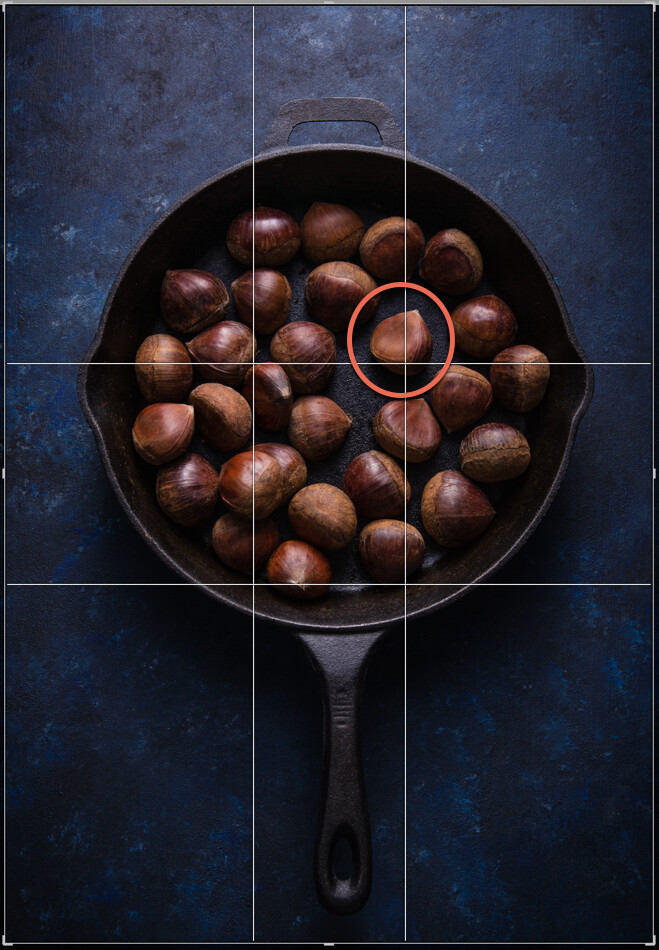
This image uses the Phi Grid. Notice how the chestnut in the focal point is placed differently to the others, drawing the eye.
Fibonacci Spiral
Another expression of the Golden Ratio is the Fibonacci Spiral, which exhibits the same numerical pattern that makes up the Golden Ratio.
You can use this numerical pattern to draw a series of squares. If you draw an arc from one corner to the opposite corner in each square starting from the smallest square, you’ll end up with the Fibonacci Spiral.
This is a guiding principle you can use in your still life photography. By setting your subjects along a curve rather than a straight line you create flow and movement, and help guide the viewer’s eye through the image. It works particularly well in overhead shots that have several elements in the frame.
You can flip or turn the spiral so long as your focal point falls in the smallest part of the spiral. Other important elements should be placed along the curve.

Fibonnaci Spiral
Golden Triangle
Using triangles is a powerful way to create tension in a still life image, and retain the attention of the eye within the frame.
Here’s an image that expresses this principle.

Notice the diagonal line going from one corner to the opposite, and the lines meeting that diagonal from the other corners? Where the lines meet are your points of interest, which you should use to place your focal point and divide your frame.
While horizontal and vertical lines suggest stability, triangles add a sense of flow and movement.
You can compose your image to imply triangles, rather than being strict about composing them exactly this way.
Other Helpful Principles
Rule of Odds
In still life photography, having an odd number of elements in a frame is more visually interesting than having an even number of elements.
Odd numbers create harmony, balance and a resting point for the eyes, whereas even numbers compete with each other and can divide our attention.
Aim to have three or five elements in your image. You can have more, but the mind has trouble registering higher numbers meaning your photograph will not have the same effect. If you do have more, put them into groups of odd numbers wherever possible.

Odd numbers create tension
Negative Space
Positive space is the area your subjects take up.
Negative space is the empty area where the eye can rest.
Negative space can provide the feeling of movement, and emphasize your subject. Without any space for the eye to rest, a picture can feel chaotic or claustrophobic.
You see negatives space a lot in magazines or product packaging, where it’s used for text placement.

Color
You may not think of color as a compositional tool. But it’s actually a very important one. It evokes emotion and creates the mood of the photograph.
Cool and dark colors such as navy blue and black recede, while light and warm colors such as yellow bring objects forward.
Color combinations can be monochromatic, or any of those found on the color wheel.
One of the most powerful combinations is complementary colors (i.e. colors that are directly opposite each other on the color wheel). Blue and yellow is one such combination, which you see a lot in food photography.
Take into account the color of the background or surface you’re shooting on. Colors that are too bright can detract from your subject. Make sure your background matches the mood you’re trying to create and works harmoniously with your chosen elements.

Complementary colors make your images pop
In Conclusion
It can take years for a photographer to learn to shoot intuitively using compositional principles. Visualizing your focal point on a Phi Grid is one thing, but visualizing the Fibonacci Spiral while you’re shooting may be more difficult.
Thankfully, with still life photography, you can tether your camera to your computer or use its Live View function to estimate where your subject and focal point should fall.
Editing software such as Lightroom and Photoshop can help you place the various elements in your frame with overlays of compositional guides. You can shoot wider than you need for the final result and crop in post-processing.
The more you implement these compositional guidelines and work with them in post the more you’ll internalize them, which can only improve your still life photography.
The post How to Apply Compositional Theory to Still Life Photography appeared first on Digital Photography School.
-
Photographing Still Life Can Teach You These 3 Things
- Composition
- Lighting
- The importance of taking your time

© Kevin Landwer-Johan
Photographing still life, more than most genres, gives you more control. You can control your subject, location, lighting, composition etc. when you make still life pictures.
Photographing just about anything else gives you have far less control, or it’s much more difficult to control the photo session. Landscape photographers must rely on external factors like the weather and vantage point. Sports photographers are restricted by how close they can get to their subjects. Wildlife photographers are often hampered by their subject’s movements. Portrait photographers have to deal with all manner of moods and emotions from their clients.
Photographing inanimate objects can happen just about anywhere. A studio space is not necessary. You can use your kitchen and set up on the table. Backyards and public parks can be great locations for outdoor still life photography.

© Kevin Landwer-Johan
Subject matter options are wide open. What do you like looking at? Find something you like – it will be more engaging. Small (but not too small) objects are easier to manage. Still life with large items like refrigerators or park benches will be more challenging to work with. You are not restricted to fruit and bunches of flowers.
Whatever and where ever you chose, you can improve upon three essential skills by photographing still life.

© Kevin Landwer-Johan
Composition
You have unlimited freedom to place and move your subject material about. This can help you gain a better understanding of composition.
Moving your objects around you will see how they relate differently to each other. You can overlap them or choose to position each one so it’s independent.

© Kevin Landwer-Johan
Camera position can view your set up from any angle you imagine. Experiment with high and low angles. Watch how this can dramatically affect your composition. Doing this in a situation where you have control and freedom to move about will help you learn to do so other times you are taking photos.
Backgrounds can be varied. You can use just the natural surroundings or add in your own backdrop. If the room ambiance is conducive to the images you want to make, use it well. However, if there are distracting elements behind your set up, insert a backdrop of your own. This can be a piece of card or cloth or something else to help enhance your composition.

© Kevin Landwer-Johan
Hopefully, photographing still life will stimulate your imagination. Having the freedom to manipulate your compositions will enhance your photography in general.
Lighting
Working with inanimate objects is a great opportunity to learn more about lighting. With people, animals and other things that move about, being consistent with lighting can be challenging. Landscapes and architectural photography can have more complex lighting demands.
Starting with a simple light set up is good if you are new to photography. The kitchen window if your objects are on the kitchen table. Start making your series of photos and then open the kitchen door to let light in from another direction. Compare your photos and see the changes adding more light makes.

© Kevin Landwer-Johan
Switching on an artificial light source allows you more control. Use a lamp or flashlight. These allow you to see the effect of the light, unlike using a camera flash. Vary the position of the lights. Lift them higher or drop them down lower. Moving them further away will lessen the amount of light on your objects.
Reflectors can be made good use of in still life photography. Even a sheet of white A4 printer paper can be an effective reflector. Try different reflective surfaces of varying sizes and study the difference they have on your scene.
Look at the direction of light and shadows. How do they interact when you have more than one light source?

© Kevin Landwer-Johan
By trying different light sources and setups you will develop a better eye to discern light in other situations where you are taking photos. It can help you to know when to add another light source or reflector.
Taking Your Time
Setting up for a still life photo session somewhere you can leave it a few days or weeks has its benefits. So often people are in too much of a rush to get a photo and move on. Take your time, and work slowly as a painter does. There’s no rush.

© Kevin Landwer-Johan
Being able to go away and come back to your arrangement of inanimate objects allows you to see it with fresh eyes the next day or next week.
Maybe you will see the relationship between elements differently. The lighting will have changed from morning till afternoon if you are using natural light. You might think of another object you want to add to the scene that will really make the photo. Ideas will come that you had not thought of initially.
Changing lens focal lengths is also good to experiment with. Compare how the objects interact with each other and the background as you view them with different lenses.

© Kevin Landwer-Johan
Setting up outdoors, you can photograph at different times of day and night to see the effects of different light. Does moonlight provide the most interesting lighting for your composition? Or is it best first thing in the morning?
Conclusion
Find yourself some space. Gather together a few of your most aesthetic things. Take your time to move them around and change the lighting. Think about how the objects relate to each other. Think about the different results you achieve when you change the lighting. If you don’t like what you photographed one day, come back another and make some more photos.
Please share with us any still life photos you may have taken in the comments below.
The post Photographing Still Life Can Teach You These 3 Things appeared first on Digital Photography School.
-
Friday Feature: Framing, timing bring juxtaposed beach scenes to life
Friday Feature: Framing, timing bring juxtaposed beach scenes to life

Three Men © Moises Levy
Framing and composition are two of the most basic tools in every photographers arsenal, but they can also be some of the most powerful.
In his recent of photographs, Mexico City photographer Moises Levy shows how simple black and white photographs on the beach can be turned into wonderfully juxtaposed images with the help of perfect timing, great composition, and clever framing.
In speaking with DPReview about the ongoing series, Levy said “Human condition is the main subject of my photography. I use several resources to express my ideas in photography like perspective and scale. My images are intimate too — I believe being close to my subject helps me to create powerful images.”
Levy says he works with only one camera and one lens at a time — either his Leica or Fujifilm with a 28mm r 35mm lens.
“I prefer to create anonymous subjects and for that I like to work with backlight to create high contrast black and white images in a more graphic sense,” Levy tells DPReview. “I also like to shoot very minimal and clean images and for that I use very low angles in places with almost no distractions, like beaches and open spaces.”
You can keep up with Levy’s work by checking out his website or following him on Instagram, Flickr, and Facebook.
Photographs by Moises Levy, used with permission.
Friday Feature: Framing, timing bring juxtaposed beach scenes to life

5 Guys © Moises Levy
Friday Feature: Framing, timing bring juxtaposed beach scenes to life

Action 5 © Moises Levy
Friday Feature: Framing, timing bring juxtaposed beach scenes to life

Action 8 © Moises Levy
Friday Feature: Framing, timing bring juxtaposed beach scenes to life

Action 11 © Moises Levy
Friday Feature: Framing, timing bring juxtaposed beach scenes to life

Arch © Moises Levy
Friday Feature: Framing, timing bring juxtaposed beach scenes to life

Ave en tres palos © Moises Levy
Friday Feature: Framing, timing bring juxtaposed beach scenes to life

Beer Man © Moises Levy
Friday Feature: Framing, timing bring juxtaposed beach scenes to life

Chapuzon © Moises Levy
Friday Feature: Framing, timing bring juxtaposed beach scenes to life

Communication © Moises Levy
Friday Feature: Framing, timing bring juxtaposed beach scenes to life

Fisherman Net © Moises Levy
Friday Feature: Framing, timing bring juxtaposed beach scenes to life

Fly © Moises Levy
Friday Feature: Framing, timing bring juxtaposed beach scenes to life

Ghost © Moises Levy
Friday Feature: Framing, timing bring juxtaposed beach scenes to life

Giraffes 1 © Moises Levy
Friday Feature: Framing, timing bring juxtaposed beach scenes to life

Horses 2 © Moises Levy
Friday Feature: Framing, timing bring juxtaposed beach scenes to life

Horses 1 © Moises Levy
Friday Feature: Framing, timing bring juxtaposed beach scenes to life

Jump 1 © Moises Levy
Friday Feature: Framing, timing bring juxtaposed beach scenes to life

Jump 2 © Moises Levy
Friday Feature: Framing, timing bring juxtaposed beach scenes to life

Kid © Moises Levy
Friday Feature: Framing, timing bring juxtaposed beach scenes to life

Kiss © Moises Levy
Friday Feature: Framing, timing bring juxtaposed beach scenes to life

Looking For Turtles © Moises Levy
Friday Feature: Framing, timing bring juxtaposed beach scenes to life

My Dog And I © Moises Levy
Friday Feature: Framing, timing bring juxtaposed beach scenes to life

On Place 1 © Moises Levy
Friday Feature: Framing, timing bring juxtaposed beach scenes to life

Perro Garza Y Hombre © Moises Levy
Friday Feature: Framing, timing bring juxtaposed beach scenes to life

Play © Moises Levy
Friday Feature: Framing, timing bring juxtaposed beach scenes to life

Resting © Moises Levy
Friday Feature: Framing, timing bring juxtaposed beach scenes to life

Running 1 © Moises Levy
Friday Feature: Framing, timing bring juxtaposed beach scenes to life

Shadow And Fisherman © Moises Levy
Friday Feature: Framing, timing bring juxtaposed beach scenes to life

Soul © Moises Levy
Friday Feature: Framing, timing bring juxtaposed beach scenes to life

Trapped 2 © Moises Levy
Friday Feature: Framing, timing bring juxtaposed beach scenes to life

Volley © Moises Levy
Friday Feature: Framing, timing bring juxtaposed beach scenes to life

Ball Head © Moises Levy
Friday Feature: Framing, timing bring juxtaposed beach scenes to life

Game 1 © Moises Levy
-
5 Adobe Lightroom Plugins That Will Make Your Life Easier

We all love Lightroom.
There’s a reason it became an essential part of a photographer’s workflow. It’s powerful, easy to use, and helps make your photos come alive.
But what if I said you could make it even easier to use while adding a new dynamic to your editing process?
Well, plugins can do just that.
Being able to extend Lightroom’s capabilities with third-party plugins is one of the things I love most about it. And it’s something most people overlook.
In this article, I’ll introduce you to five Lightroom plugins I use and couldn’t live without.
But first…
How to install Lightroom plugins
Installing Lightroom plugins is pretty straightforward. They all use the same six-step installation process.
- Unzip the ZIP file for the plugin, and move the unzipped file to a folder on your computer. Note: The unzipped files can’t be moved or deleted after installation, or the plugin will stop working.
- From Lightroom’s File menu, select ‘Plug-in Manager’.

- Click the ‘Add’ button near the bottom of the dialog box.

- Navigate to folder you chose in step 1.

- Open the folder and highlight the file with the ‘.lrplugin’ extension, then click ‘Add Plug-in’.

- Restart Lightroom to complete the installation of your new plugin.
Note: with the 7.5 release of Adobe Lightroom, some newer plugins now have the extension of .xmp rather than .lrtemplate or .lrplugin. This is so they can be used in both Lightroom and Photoshop.
In this case, go to Lightroom->Preferences and select ‘Show Lightroom Develop Presets’. This will open the Presets window. Select the ‘Settings’ folder, and simply drag and drop your unzipped file into the Settings Folder and restart Lightroom.
If you don’t have the ‘Show Lightroom Develop Presets’ link select the ‘Show Lightroom Presets Folder’. This will open the Presets window. Select the ‘Lightroom’ then ‘Develop Presets’ folder, and simply drag and drop your unzipped file into the folder and restart Lightroom.
Now that you know how to install Lightroom plugins, let me show you five that will save you time and effort during your next mammoth editing session.
The Fader
The Fader is probably the plugin I use the most. Its main advantage becomes clear when you’re using presets.
It works as a master slider that controls all the different tools within Lightroom. Moving the slider will adjust all the edits a particular preset makes at the same time and in equal measures.
If you’re working on an edit and haven’t applied a preset, but you still want to use The Fader, simply create a new preset using the image you’re working on as a template and adjust it from there.
To create a new preset, click either a filter tool (graduated or radial) or the brush tool, and from the drop-down menu select ‘Save Current Settings as New Preset’.

Whether you create your own presets or download other people’s, chances are you’ve experienced this situation: You apply a preset to one photo and it looks great, but when you apply it to another, it’s completely over the top and looks terrible.
Normally you’d have to reduce each tool individually. But with The Fader you can reduce them all at once using the slider. Just open The Fader (File -> Plug-in Extras -> The Fader), select the preset you want to apply, and then use the opacity slider to increase or decrease the preset’s overall strength.

LR Backup
LR Backup does exactly what it says it does – back up your Lightroom catalog. But it gives you a few extra features the standard backup tool doesn’t provide.
Why is it important to back up your catalog? Because it contains a record of every edit you’ve made to your images. You might have backups of your RAW files, but without a backup of your Lightroom catalog they’ll be just that: RAW images with no editing applied.
LR Backup lets you make manual backups of the Lightroom catalog without having to exit the program, which you need to do when using the built-in backup tool. But what makes this plugin really useful is its ability to schedule backups.

It also compresses the backup to almost 10% of its original size, which is particularly useful when you have a large database of edited images.
While a free version of LR Backup is available, you need to make a donation to the creator to unlock its full functionality. But the donation can be as small or as large as you like. It’s totally up to you.
LRTimelapse
If you create time-lapse videos using your camera’s intervalometer, you’ll need an easy way to batch edit the images so you don’t have to do them one by one.
LRTimelapse makes time-lapse videos easy. It comes in both free and paid-for versions as either a standalone product or a Lightroom plugin. And what I really love about it is how the plugin integrates with Lightroom.

By integrating LRTimelapse with Lightroom, you can create a few keyframes that you’ll edit in Lightroom and then export back into LRTimelapse. It then uses these edited keyframes to automatically and seamlessly edit the other time-lapse photos into a video that transitions smoothly and gradually from the first frame to the last.
It’s a great way to incorporate the power of editing in Lightroom into your next time-lapse video.
Focus Mask
The Focus Mask plugin by Capture Monkey (the same people who make The Fader) is a simple plugin. It does only one thing, but it does it very well.
The plugin works the same way focus masking or focus peaking does in your camera. It highlights the parts of the image that are in focus.

This helps you to choose the best shot between two or more similar images at a glance.
We’ve all taken a handful of photos of the same subject because we weren’t sure we nailed the focus. This plugin will help you quickly pick a winner.
Photolemur
The last plugin on the list might not be for everyone. In fact, some people might be totally against it.
Photolemur automatically edits your photos with one click. It uses artificial intelligence to create the best edit possible so you can focus your time on other aspects of photography.
Now, some of you might think letting a bunch of computer code edit your photos takes away part of the artistic process. And you’d be right.
I wouldn’t use it on every image, especially client images. But if I want to quickly upload something to Instagram without having to process the image first, I’ll use Photolemur.
Photolemur is a standalone product, but can also be set up as a Lightroom plugin. Unfortunately, there isn’t a free version you can try before you buy. It’s only available as a paid product.
Which Lightroom plugin will you try?
I’ve used all the plugins I just mentioned. But if I had to pick one, I’d choose The Fader because I love using my own presets. It makes my editing style consistent across all of my work.
But they’re all great plugins. Which one are you going to try?
Image Credit: Joseph Pearson
The post 5 Adobe Lightroom Plugins That Will Make Your Life Easier appeared first on Digital Photography School.