RSS
 

Posts Tagged ‘lets’

Getty Images now lets you hang iconic photos on your wall

28 Apr

David-Redfern-Gallery-537x368.jpg

In March, stock photography house Getty Images rocked the industry when it announced it would allow people to embed images for free on websites and other electronic uses. Clearly looking to monetize the vast collection of images currently gathering digital dust in its archives, it has launched Photos.com by Getty Images to sell prints directly to customers. Learn more

News: Digital Photography Review (dpreview.com)

 
Comments Off on Getty Images now lets you hang iconic photos on your wall

Posted in Uncategorized


Gravity: Augmented Reality Tablet Lets You Draw Ideas in 3D

11 Apr

[ By WebUrbanist in Gaming & Computing & Technology. ]

gravity-animated

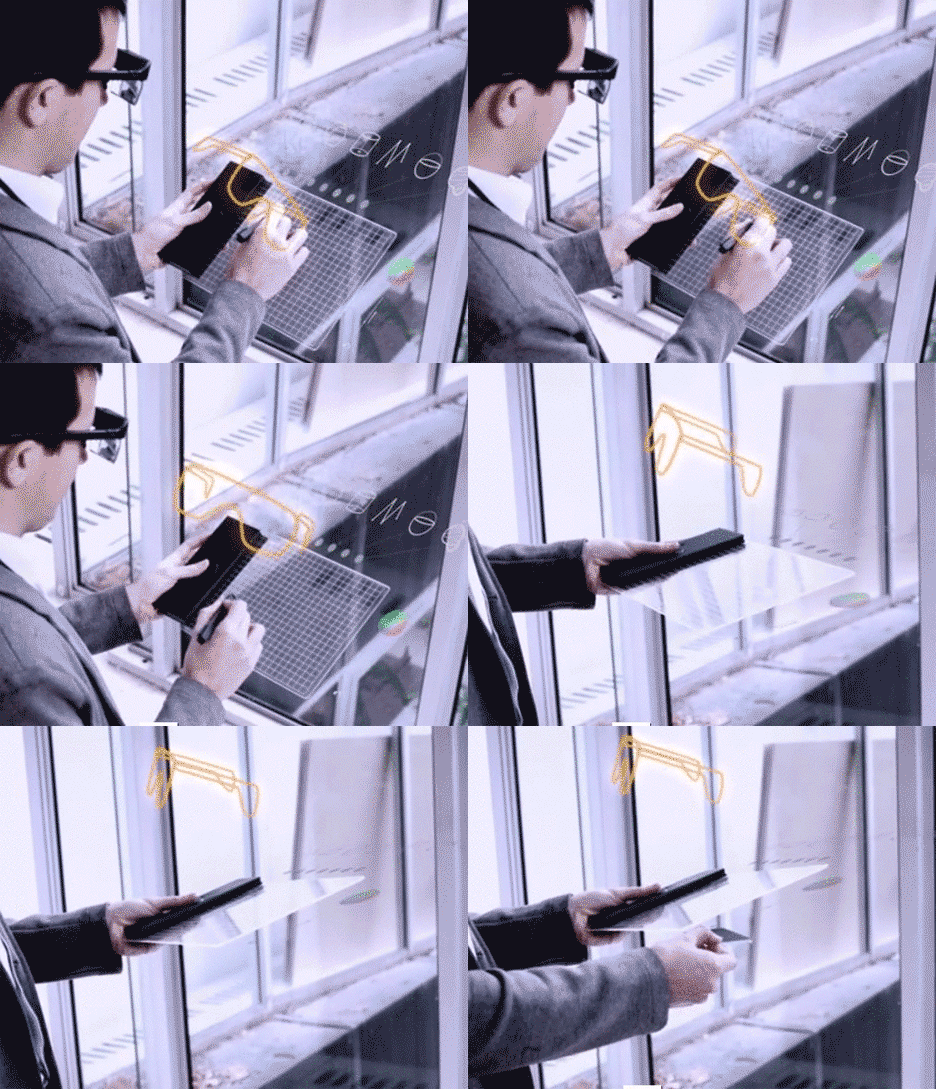
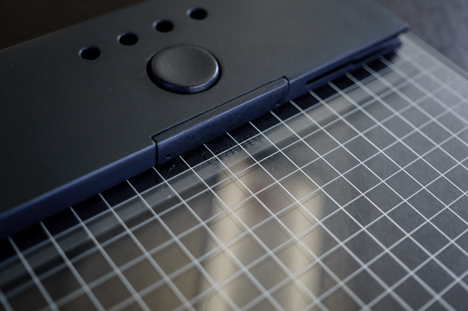
Using a handheld stylus and tablet set combined with an existing augmented reality headset, this invention allows users to sketch in three dimensions and see the results of their work unfold in realtime.

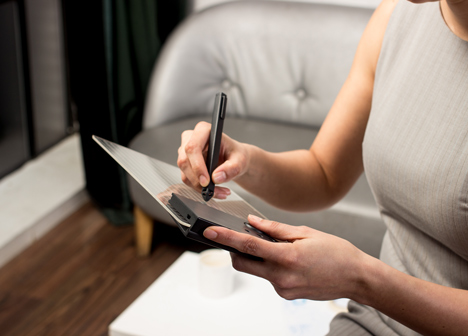
Created by a group of students from the Royal College of Art, the interface is made to be as intuitive as a sketchpad or 2D drawing tablet – anyone should be able to pick it up and simply start doodling. It can be connected to various visualization devices, including the virtual reality simulator Oculcus Rift.

gravity 3d sketch pad

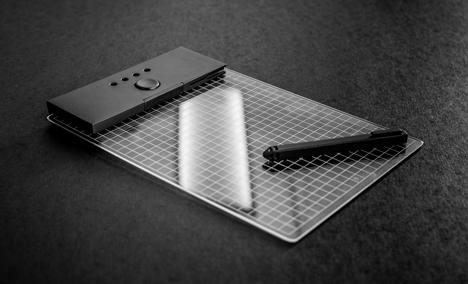
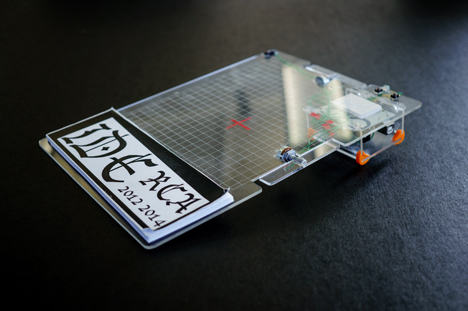
Per Dezeen, “As the user draws above the clear acrylic sketchpad, radio signals are used to track the movements of the stylus from coordinates on the pad. These are sent to an Arduino board – an open source prototyping device containing a micro controller – which is contained in a black panel that forms one edge of the pad.”

gravity pad basic set

gravity pad design detail

A combination of gestures and buttons allows users to tilt their drawings to work on them from various angles and shift the planes being worked on as well. Critically, though, the basic tool set is familiar in its function and thus user-friendly – a pad and pen, essentially, with expanded functionality.

gravity prototype device design

gravity mockup working model

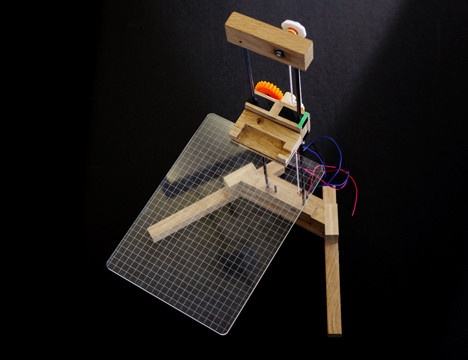
A great deal of physical modeling and prototyping went into the design of the device including physical stands that allowed Gravity’s creators to simulate the kinds of conditions they sought to replicate in digital space. In turn, the three-dimensional drawings created via the device can be input into 3D printers, completing the circuit.

Share on Facebook


[ By WebUrbanist in Gaming & Computing & Technology. ]

[ WebUrbanist | Archives | Galleries | Privacy | TOS ]


WebUrbanist

 
Comments Off on Gravity: Augmented Reality Tablet Lets You Draw Ideas in 3D

Posted in Creativity


Let’s Talk About Light – 3 Types of Lighting Conditions and how to Use Them

27 Mar

What‘s all this talk about light?

About light photography 04

When I started my photography journey I remember every article (or so it felt like), blog or book I read talking about light. “Find the light!”, “SEE the light!”, “It’s all about the LIGHT!”, “Follow THE LIGHT!”… AHHHH WHAT’S ALL THIS TALK ABOUT LIGHT!!!

Sound familiar?

I soon became obsessed about light. I would stare at people as they were talking to me; daydreaming, watching how the light was falling on their faces. When I was out walking I would always be looking at the direction of light and the way it behaved at certain parts of the day. It seemed however, that the harder I looked for The Light, the less I was able to see it. I honestly thought I would never be able to see the light!

Then something happened. I can’t tell you exactly when, but after months of obsessing about light, I finally saw ‘it’; its beautiful, soft, illuminating quality and its ability to change the mood and style of a scene.

Light plays a huge part in my photography style and the soft, romantic images I create. There are so many different types that I could easily write a whole book about light alone. For now however, I’m going to focus on three types of lighting conditions and how I use them to their advantage.

Open shade

Open shade is that spot between the sun and shade. The shade can be created by a building, a tree, a wall, etc. When using open shade it’s important to ensure that you still have available light reflecting into the shaded area. Choosing areas that have white, or light pastel, walls or floors will also help create additional soft, illuminating light by reflecting light off their surfaces. The reflected light will bounce all over your model giving them a lovely soft, gentle and even glow.

About light photography 01

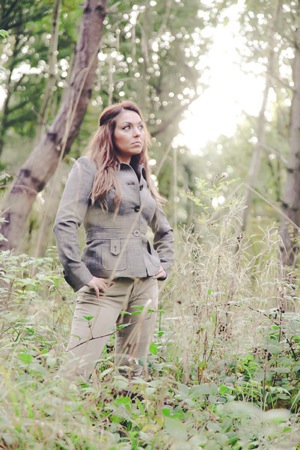
The above image was taken in open shade. Can you see the line in the bottom left of the frame that divides the light and shade area? I’ve placed my model just with in it, so that the light is still reflecting onto her. The limestone wall also acts as a reflective surface and bounces light back onto my model.

Another thing to consider when using open shade is the direction your model is facing. If facing in the wrong direction, open shade can leave your image looking dull and flat. Make sure to look at where the light is coming from and have your model facing it. Use reflective surfaces, or a reflector, to direct the light back towards your subject. By doing this, the light is still illuminating their face and you’re still getting those beautiful catch lights in their eyes. Open shade offers the flexibility to shoot any time of day. It’s a great tool to use when shooting in midday light, when the sun is high in the sky and is creating harsh shadows on your model.

About light photography 02

Overcast days

Overcast days are my favourite sort of days to shoot. It’s like shooting in open shade, but instead the open shade is everywhere! While it’s still important to look for where the light is coming from, overcast days don’t limit you to shaded areas. The clouds act as a giant diffuser or soft box, giving you gentle, even light.

When shooting on an overcast day, I always look at where the sun is. Even if I can’t see it behind the clouds, I make sure I know where it would be if the clouds weren’t there. There are plenty of mobile phone apps available that will tell you where the sun is situated at that specific moment in time. They will also usually tell you where the sun sets and rises, which is a great tool to help you plan your shoot in advance.

The image below was taken on a wet, grey, overcast day. I still wanted to make sure that my models face was illuminated by light. For this frame I made sure that the sun was behind me. Although I couldn’t see it through the clouds, I could still see its brightness lighting up the area in the sky. Although my model was facing directly towards the sun, he wasn’t squinting and there were no harsh shadows being cast. The clouds where acting as my soft box giving me beautiful even light.

About light photography 03 About light photography 07

When starting out, many photographers are put off shooting on cloudy, overcast days. On the surface, the light appears dull; but look a bit deeper and you’ll see its wonderful illuminating quality. Some of my favourite images have been captured on days like this.

About light photography 05 About light photography 06

Backlighting

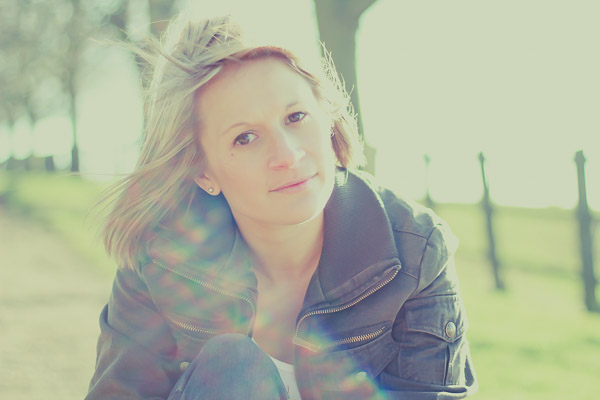
About light photography 08Backlighting, if done properly, can create some beautiful atmospheric and dramatic images. It takes a lot of practice to nail a backlit shot, but I think it’s worth the effort.

There’s different ways of positioning the sun in your frame. You can have it directly behind your model, just outside the image or in the shot completely. Each one will create a different effect and will influence how much sun flare and haze is captured in your image.

When backlighting, your metering plays a huge part in how successful the image will be. Shooting in manual mode will help ensure that perfect shot. When shooting towards the sun, I always meter for the models face, usually just under the eye closest to me. I know that this might blow out some of the highlights in the background or areas around my model, but I like the added glow that this creates.
About light photography 09

Camera’s aren’t always too keen to shoot directly towards the sun. This is where having a lens hood comes in useful. However, sometimes even this isn’t enough and you’ll hear the whirring of your lens struggling to focus on your chosen spot. When this happens, try creating a small spot of shade for the camera by holding your left hand above the lens to bloke out the light. This usually does the trick but if not, the other option is to focus manually.

Some food for thought…

One of the best pieces of advice I ever got when starting out was to always look for the light first and the background second. It’s easy to be drawn into standing you models in front of something that looks pretty or interesting, but if the lighting in that location is poor, you’ll end up with a dull lifeless image, or a model that’s squinting and has harsh shadows on her face.

I’d love to know how you get on finding the light! Please share your comments and images below.

For more articles on lighting try these:

  • 6 Portrait Lighting Patterns Every Photographer Should Know
  • Setting the Mood with Low Key Lighting
  • Lighting Ratios to Make or Break your Portrait
  • 14 Amazing Portrait Recipes – a dPS eBook

The post Let’s Talk About Light – 3 Types of Lighting Conditions and how to Use Them by Daniela Beddall appeared first on Digital Photography School.


Digital Photography School

 
Comments Off on Let’s Talk About Light – 3 Types of Lighting Conditions and how to Use Them

Posted in Photography


Younity lets smartphones access photos stored on your computer

16 Feb

2014-02-10_15.23.51.png

While other phone-to-computer services require syncing a select set of files to ‘the cloud’, a service called Younity offers mobile access to all your photos and other files via direct access. The company’s new iOS app allows users to connect to and browse the contents of computers and connected hard drives over the airwaves. Click to learn more.

News: Digital Photography Review (dpreview.com)

 
Comments Off on Younity lets smartphones access photos stored on your computer

Posted in Uncategorized


Let’s Get Ready to Rumble: APS-C vs Full Frame

04 Oct

A full-frame DSLR is perhaps the most desired bit of kit any photographer could ever dream of having. This is the 5D Mark III or the D700, each an awesome camera that pretty much deliver the goods every time. But is the full frame better than the crop? Do you need it? As they’re so much more expensive than the Continue Reading

The post Let’s Get Ready to Rumble: APS-C vs Full Frame appeared first on Photodoto.


Photodoto

 
Comments Off on Let’s Get Ready to Rumble: APS-C vs Full Frame

Posted in Photography


Nextdoor App Lets You Get to Know Your Neighbors, Virtually

20 Aug

[ By Steph in Gadgets & Geekery & Technology. ]

Nextdoor Neighbors App 1
If you long for the days when everyone in the neighborhood knew each other’s names – and business – you’ll either be delighted or horrified by Nextdoor, an app that lets you get to know your neighbors without ever actually talking to them. The app offers a private social network accessible only to those in a certain neighborhood so you can invite people to social events, find babysitters, organize a neighborhood watch or locate a lost pet.

Nextdoor Neighbors Community App 2

Nextdoor can be accessed through the mobile app or on the web, with over 17,000 neighborhoods currently in its database. The idea is to connect with your neighbors to share important local information, goods and recommendations. Participants can discuss suspicious activity, share numbers for reliable plumbers, notify each other of special local events or report found items like wallets and keys. Every neighbor has to sign in with their real name and verify their address.

Nextdoor Neighbors Community App 3

In an age when most people communicate through Facebook and Twitter, and nearly all of us have smart phones semi-permanently glued to our palms, apps like Nextdoor can re-forge the connection between neighbors that has degraded over time.

Nextdoor Neighbors Community App 4

Some may mourn the loss of real, face-to-face interactions between neighbors, and fear that apps like Nextdoor will make it worse – but how else can you get to know the recluse on the hill who’s averse to barbecues but acutely interested in the identity of a local mail thief? Online neighborhood communities could be particularly helpful in emergency situations, as well. Check it out at Nextdoor.com.

Share on Facebook


[ By Steph in Gadgets & Geekery & Technology. ]

[ WebUrbanist | Archives | Galleries | Privacy | TOS ]


WebUrbanist

 
Comments Off on Nextdoor App Lets You Get to Know Your Neighbors, Virtually

Posted in Creativity


ZIG: Modular Furniture Lets You Build to Suit Your Space

05 Jul

[ By Steph in Design & Furniture & Decor. ]

ZIG Modular Furniture 1

Assemble rectangular furniture components like building blocks to create the exact arrangement of seating, tables and storage to suit your space and lifestyle. ZIG Modular furniture by Cezign comes in four different block types – upholstered foam, solid wood, open wood and clear polycarbonate – that can be stacked and strapped together any way you like for optimal versatility and adaptability.

Zig Modular Furniture 2

Perhaps you need to make the most of a tiny studio apartment, or you need to be able to quickly and easily clear furniture away to use your living space for other purposes. Maybe you just like to change things up. Modular systems like ZIG give you control over what is typically some of our bulkiest, heaviest, most unchangeable possessions.

ZIG Modular Furniture 3

ZIG offers colorful adjustable belts that hold the foam pieces together, so you can build couches and beds of any size, or just use them as soft tables with no sharp corners to harm clumsy toddlers. Putting them together is like a creative project, challenging the user to come up with the ideal geometries for their interiors and usage requirements.

ZIG Modular Furniture 5

Available through Cezign, ZIG comes as a set of six units, and expansions are virtually limitless. “Our focus is on creating affordable spaces that have a high level of multi-functionality but that still blend aesthetically with what is unique and contemporary,” say the creators. “It is a creative force that transforms unused existing raw spaces and turns them into attractive, modern design projects at  reasonable cost.”

Share on Facebook


[ By Steph in Design & Furniture & Decor. ]

[ WebUrbanist | Archives | Galleries | Privacy | TOS ]


WebUrbanist

 
Comments Off on ZIG: Modular Furniture Lets You Build to Suit Your Space

Posted in Creativity


NeoLucida: Optical Drawing Tool Lets You Trace Real Life

17 May

[ By Steph in Art & Drawing & Digital. ]

NeoLucida Drawing Aid 1

Have you ever wondered how 19th century artists were able to produce such incredibly realistic drawings? It isn’t just because they were unusually talented, though it’s hard to argue that they were. Many of them benefitted from the use of a ‘camera lucida’, an optical device that reflects real-life images onto a drawing surface so they can be traced. A new version of the tool, called the ‘NeoLucida,’ aims to bring this drawing aid back, with a few modern updates.

NeoLucida Drawing Aid 3

Essentially a prism on a stick, the camera lucida was once a very popular drawing tool, making it easy to create realistic drawings. A portable version hasn’t been manufactured in nearly a century. Antique versions sell for hundreds of dollars, but Pablo Garcia and Golan Levin, the makers of the NeoLucida, aim to sell theirs for just $ 40.

NeoLucida Drawing Aid 2

“We want to make this remarkable device widely available to students, artists, architects, and anyone who loves to draw from life,” say the pair on their Kickstarter page, which has already raised nearly half a million dollars – far over the original goal of $ 15,000. “But to be clear: our NeoLucida is not just a product, but a provocation. In manufacturing a camera lucida for the 21st century, our aim is to stimulate interest in media archaeology—the tightly interconnected history of visual culture and imaging technologies.

NeoLucida Drawing Aid 4

The NeoLucida is made from a combination of mass-manufactured and custom-machined parts. It has a clamp to fit onto the edge of desks and tables, and a goose neck for adjustability. It’s lightweight, non-electric, and compact enough to fit in a handbag. Get more details at the project’s Kickstarter (via notcot.org.)

Share on Facebook


[ By Steph in Art & Drawing & Digital. ]

[ WebUrbanist | Archives | Galleries | Privacy | TOS ]


WebUrbanist

 
Comments Off on NeoLucida: Optical Drawing Tool Lets You Trace Real Life

Posted in Creativity


Service lets you order prints of any Facebook photo

30 Mar

mug_mjf_grandma_grandpa.png

While the privacy and permissions surrounding Facebook-shared photographs have always seemed like a bit of a gray area, a new service is pushing the envelope further. Photos At My Door lets users log in with their Facebook account and access photos of friends. You can then order prints of those photos or even print them on coffee mugs, mouse pads and iPhone cases. Read more about the service and our take on it at connect.dpreview.com.

News: Digital Photography Review (dpreview.com)

 
Comments Off on Service lets you order prints of any Facebook photo

Posted in Uncategorized


Wiki Your City: Mobile App Lets You Geo-Tag Articles

02 Mar

[ By Steph in Gadgets & Geekery & Technology. ]

Wiki GeoData App 1

Wikipedia is making it easier than ever to participate in the aggregation of user-provided knowledge and information with its GeoData extension, a mobile app for iPhones and Androids. This app enables users to geo-tag articles and images and instantly upload their own images, right there on location.

Wiki GeoData App 2

The GeoData extension will provide app developers with a new spatial database with which they can create maps and improve Wikipedia’s current app and the ‘Nearby’ add-on. The Nearby function takes you on a virtual tour of notable sights in your area, directing you there and giving you the history and other pertinent data.

Wiki GeoData App 3

The more spatial coordinates are added to Wikipedia entries, the more accurate and interactive Wikipedia’s mobile app can be. The mobile app currently offers search suggestions, full text search, saving pages for offline viewing, sharing pages via social media and reading pages in other languages.

Wiki GeoData App 4

The coolest thing about this function will be discovering all sorts of interesting locations and monuments in your neighborhood that you probably didn’t even know existed. To learn more about how it works, check out the Wikimedia Foundation blog.

Share on Facebook


[ By Steph in Gadgets & Geekery & Technology. ]

[ WebUrbanist | Archives | Galleries | Privacy | TOS ]


WebUrbanist

 
Comments Off on Wiki Your City: Mobile App Lets You Geo-Tag Articles

Posted in Creativity