RSS
 

Posts Tagged ‘Lens’

How to Correct Lens Distortion with the Adaptive Wide Angle Filter in Photoshop

11 Mar

The issue

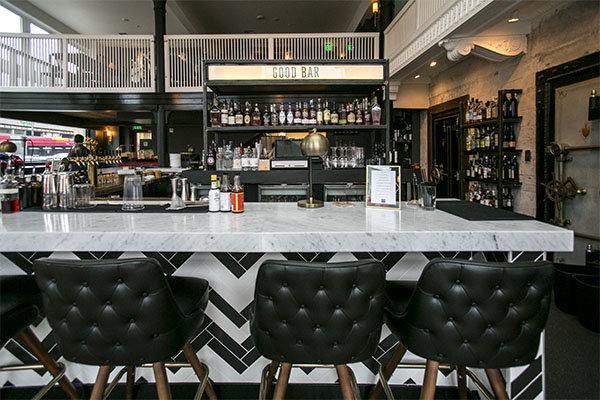
When photographing subjects with a wide-angle lens, it’s pretty common for perspective problems to present themselves in the form of lines that should be straight, but appear curved and distorted. This is commonly referred to as barrel distortion, which occurs mostly in wide-angle lenses because the magnification of the image decreases the farther the subject is from the optical axis of the lens. In plain speech, it means that when looking through a wide-angle lens, anything that is at the edge of the frame will be prone to appearing curved.
BEFORE-Adaptive Wide Angle

Some lenses such as fisheyes take full advantage of barrel distortion by purposely capturing images that are heavily curved and spherical. However, there are times when other wide-angle lenses such as the Canon 16-35mm, or even mid-range zooms like the 24-70mm, might produce unwanted barrel distortion effects.

The solution

Perhaps the two easiest ways to correct this problem are to either use a tilt-shift lens or to change your perspective and zoom magnification while photographing the subject. But tilt-shift lenses are expensive, and sometimes, such as when photographing a large building, there aren’t a ton of different perspective options. In these cases, the easiest solution to correct correct lens distortion is to do so in post-processing using a unique tool in Photoshop known as the Adaptive Wide Angle filter.

Introduced in PhotoShop CS6, the Adaptive Wide Angle filter removes lens distortions in one of two ways: it either automatically detects the camera and lens model using pre-programmed details to straighten the images, or you can manually set constraints to tell the it which areas of the photo need to be straightened. In this tutorial, I’ll walk you through the manual use of the Adaptive Wide Angle filter.

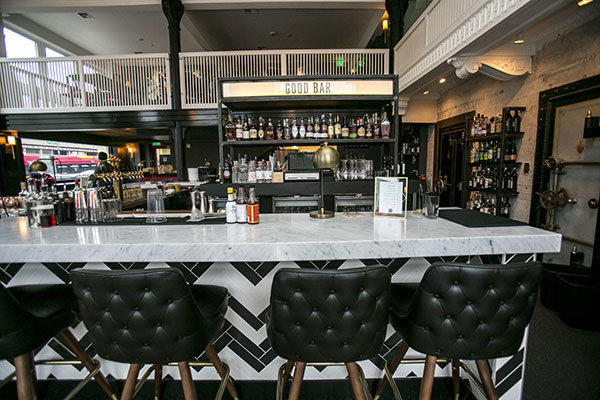
The example below was photographed in a beautiful brand new bar and restaurant using a Canon 16-35mm f/2.8 at a focal length of 16mm. It was a tight space, so there wasn’t room to back up or shoot the bar from a higher angle, so the resulting image sees quite a few horizontal lines such as the upstairs white railings and granite countertop that clearly should be straight, but aren’t.
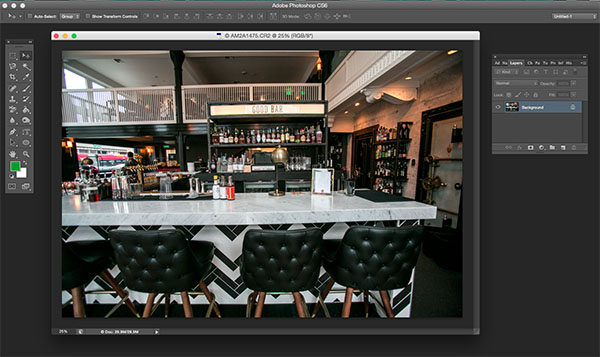
Photoshop Adaptive wide angle filter correction

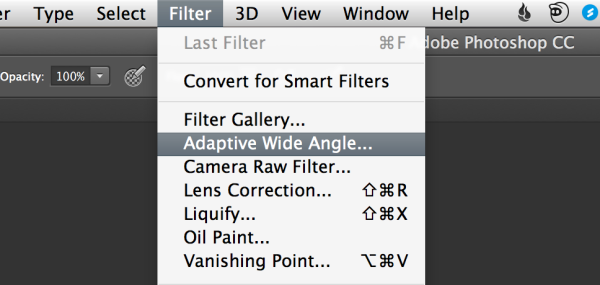
To begin correcting these distortions, click on Filter in the upper drop down menu and select Adaptive Wide Angle Filter.
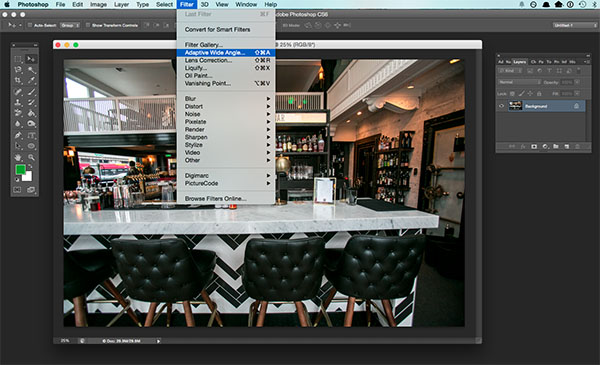
Photoshop Adaptive wide angle filter correction

Screen Shot 2015-02-25 at 5.18.00 PM

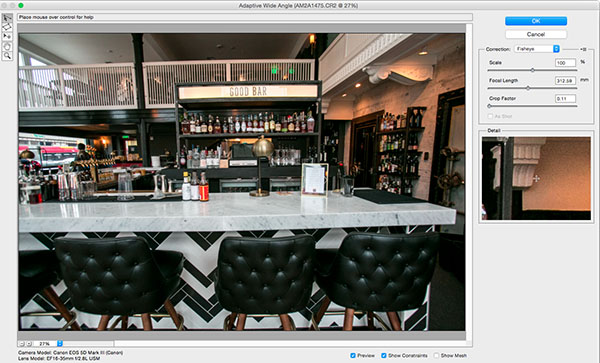
A large dialogue box will then appear with a host of options (see below).
Photoshop Adaptive wide angle filter correction

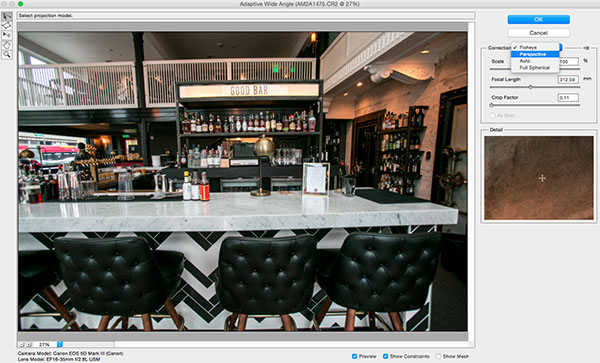
Begin with the right hand panel and choose a correction type from the drop down menu. Typically, I start with Auto, which will attempt for an automatic correction based on lens detection.
Photoshop Adaptive wide angle filter correction

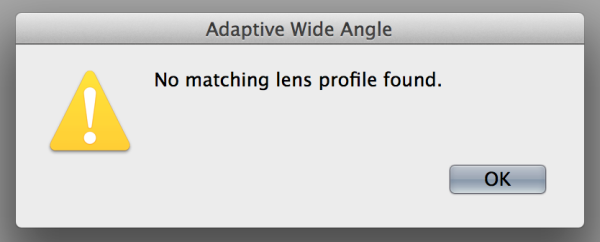
In this case, when I select Auto, another pop up window appears saying, “No matching lens profile found.” This means I need to manually adjust the image. Hit the OK button and turn your attention back to the box in the right hand corner.
Screen Shot 2015-02-25 at 5.24.27 PM

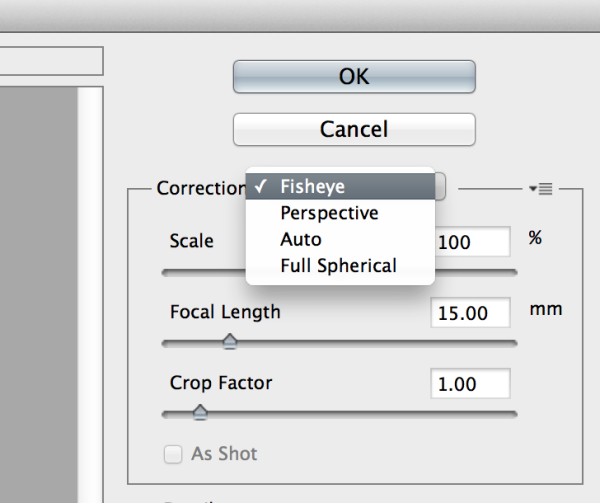
Besides Auto, the drop-down menu has three other options to choose from. If Auto doesn’t work, I’ll typically choose Perspective as my next correction type.

  • Fisheye will correct the aforementioned extreme curves that fisheye lenses purposely cause.
  • Perspective will target converging lines typically causes by the tilt and angle of the camera.
  • Panorama corrects for distortions caused by photo merging for panos.
  • Full Spherical corrects distortions in 360 panoramas shot with a 2:1 aspect ratio.
Screen Shot 2015-02-25 at 5.20.23 PM

Other options below the drop down menu include more settings that you can fiddle with to help correct distortions.

  • Scale: A value entered here will scale the image to best minimize the blank spots that may be present after the wide angle filter is applied.
  • Focal Length: Specify the focal length of the lens that created the image.
  • Crop Factor: This can be used in combination with Scale to minimize and compensate for blank areas produced by the filter.
  • As Shot: This box can be checked if your lens profile can be detected; if not, this option will be greyed out and you will need to manually specify the values of Scale, Focal Length, and Crop Factor.

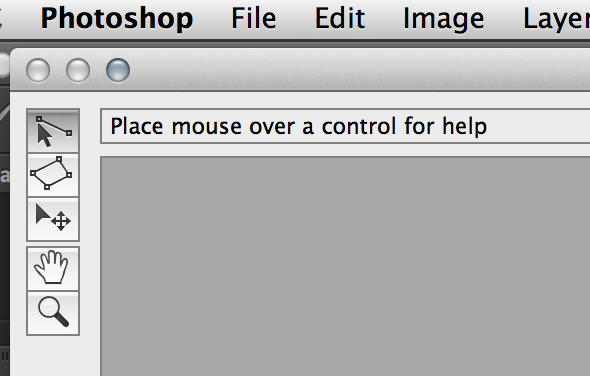
Next, turn your attention to the little vertical toolbar in the top left corner. These are the tools you’ll use to define the constraints that indicate which lines in your image ought to be straight. The primary tools to be familiar with are the first two:
Screen Shot 2015-02-25 at 5.27.14 PM

  • Constraint Tool: This tool is used to draw lines over the areas of the image that you wish to straighten. Simply click once to establish a desired starting point, and click again to close the line, holding down the shift key as well if you wish to add a constraint with a vertical or horizontal orientation.
  • Polygon Constraint Tool: This tool functions in the same way as the regular Constraint Tool except it allows you to draw a polygon instead of a single line.

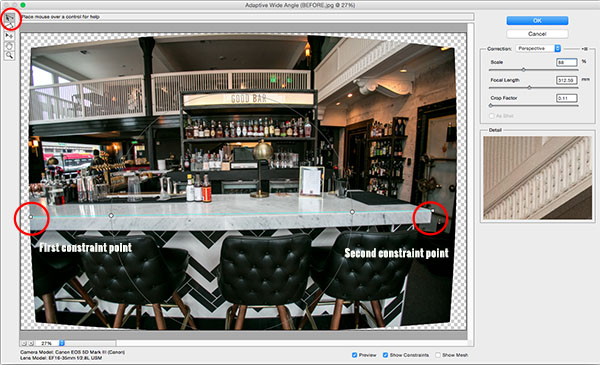
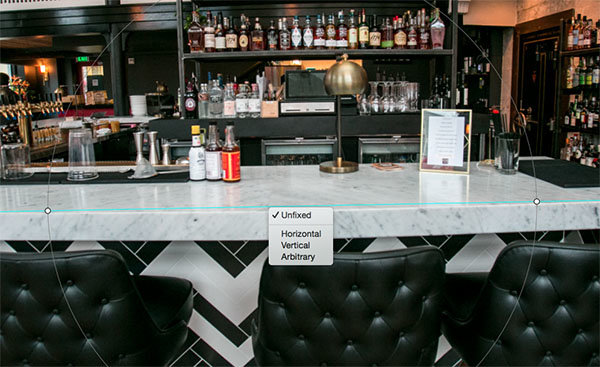
For example, let’s look at the horizontal line of the granite countertop in the image below.

Begin by clicking once on the left end of the line to set one constraint point, then click once on the right end of the countertop to close it. After you set the line, right-click on it and you’ll see a small menu appear allowing you to assign either a Horizontal, Vertical, or Arbitrary constraint to the line. The default constraint is Unfixed, but in this case we want to assign a Horizontal constraint to straighten the line width-wise. In order to automatically assign a constraint to a line, hold down the shift key while in the process of creating the line. In between the two constraint points, there will be a yellow line (if you held down the shift key) or a blue one if you didn’t, indicating where the straightening occurred.
Photoshop adaptive wide angle filter

Constraints Explanation

You can set as many constraint lines as needed until your image is corrected to your satisfaction. Constraint lines typically should be vertical and/or horizontal. Some other tools in the toolbar that can help with this are the Move, Hand, and Zoom tools that allow you move the image around to make the adjustments needed. Additionally, there is the Magnification of the preview in the lower left corner that allows you to zoom in and help you see where to plant constraints.
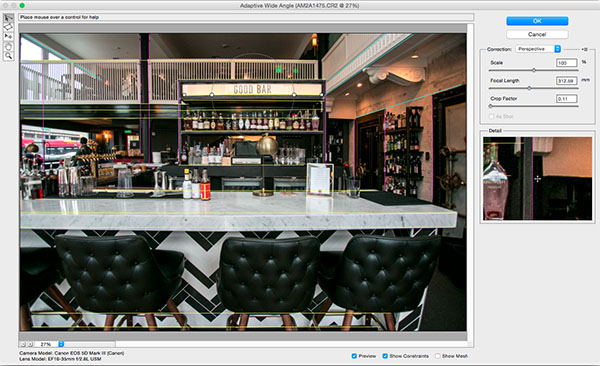
Photoshop Adaptive wide angle filter correction

After you have corrected the image to your liking, hit the blue OK button to apply the filter.

Photoshop adaptive wide angle filter

BEFORE-Adaptive Wide Angle

BEFORE

After

AFTER

How do you correct distortion for your wide-angle images? Share in the comments section below.

googletag.cmd.push(function() {
tablet_slots.push( googletag.defineSlot( “/1005424/_dPSv4_tab-all-article-bottom_(300×250)”, [300, 250], “pb-ad-78623” ).addService( googletag.pubads() ) ); } );

googletag.cmd.push(function() {
mobile_slots.push( googletag.defineSlot( “/1005424/_dPSv4_mob-all-article-bottom_(300×250)”, [300, 250], “pb-ad-78158” ).addService( googletag.pubads() ) ); } );

The post How to Correct Lens Distortion with the Adaptive Wide Angle Filter in Photoshop by Suzi Pratt appeared first on Digital Photography School.


Digital Photography School

 
Comments Off on How to Correct Lens Distortion with the Adaptive Wide Angle Filter in Photoshop

Posted in Photography


Making ‘Art’: We go inside Sigma’s lens factory

09 Mar

On our recent visit to Japan to attend the CP+ show in Yokohama we were fortunate to be invited to tour Sigma’s factory in Aizu. The Aizu factory is where almost all of Sigma’s lenses are manufactured, including the company’s impressive new ‘Art’ line of primes. Click through to take a virtual tour of the factory, in the company of Kazuto Yamaki, Sigma’s CEO. 

Articles: Digital Photography Review (dpreview.com)

 
Comments Off on Making ‘Art’: We go inside Sigma’s lens factory

Posted in Uncategorized


Firmware updates to reduce Sony FE lens startup times on the way

04 Mar

Sony is releasing a pair of firmware updates this month that will reduce startup times when FE lenses are attached to both full-frame and APS-C bodies. The first update, available now, will make your E-mount camera get ready to shoot in less time when using five currently available FE lenses. The second update, due later this month, will do the same for Sony’s a7 series, this time for the four new lenses announced today. Read more

Articles: Digital Photography Review (dpreview.com)

 
Comments Off on Firmware updates to reduce Sony FE lens startup times on the way

Posted in Uncategorized


Kowa announces pricing for three Micro Four Thirds lens

04 Mar

Japanese optical manufacturer Kowa has released pricing for the three Micro Four Thirds lenses it first announced a year ago. The trio, Kowa Prominar MFT 12mm f/1.8, Prominar MFT 8.5mm f/2.8 and Prominar MFT 25mm f/1.8 are available now and will come in a choice of black, silver or green finishes. The lenses are all manual focus, and do not feature electrical contacts for communicating aperture or focus distance data to the camera. The company had them on show at the Broadcast Video Expo in London. Read more

Articles: Digital Photography Review (dpreview.com)

 
Comments Off on Kowa announces pricing for three Micro Four Thirds lens

Posted in Uncategorized


Firmware updates to reduce Sony FE lens startup speeds on the way

04 Mar

Sony is releasing a pair of firmware updates this month that will reduce startup times when FE lenses are attached to both full-frame and APS-C bodies. The first update, available now, will make your E-mount camera get ready to shoot in less time when using five currently available FE lenses. The second update, due later this month, will do the same for Sony’s a7 series, this time for the four new lenses announced today. Read more

Articles: Digital Photography Review (dpreview.com)

 
Comments Off on Firmware updates to reduce Sony FE lens startup speeds on the way

Posted in Uncategorized


Sony brings big zoom power to FE-mount with 24-240mm F3.5-6.3 lens

04 Mar

Another full-frame lens from Sony’s roadmap that hit the market today is a consumer-friendly super zoom. This 24-240mm F3.5-6.3 FE lens features optical image stabilization, five aspherical elements and one ED element, and is sealed against dust and moisture. The lens will ship this month for around $ 1000.

Articles: Digital Photography Review (dpreview.com)

 
Comments Off on Sony brings big zoom power to FE-mount with 24-240mm F3.5-6.3 lens

Posted in Uncategorized


Writer’s Favorite Wildlife Lens – Tamron 150-600mm

24 Feb
Writer with Tamron 150-600 on his Nikon D7100 in Le Claire Iowa. Photo by: J. Todd Polling

Writer Bruce Wunderlich with Tamron 150-600mm on his Nikon D7100 in Le Claire, Iowa. Photo by: J. Todd Poling

One of my favorite subjects to photograph is wildlife. In the past, great wildlife images were very difficult for me to shoot because my close presence usually meant disturbing the wild creature I had my eye on. I began looking for a longer lens with plenty of reach that wasn’t going to break my piggy bank. So, after much patient and thorough research, I purchased the Tamron 150-600mm SP F/5-6.3 Di VC USD zoom lens for my Nikon D7100.

The reach of this lens gave me some great results right out of the box, but I will have to admit that it takes some practice to photograph moving subjects, such as birds in flight, with this lens. Tamron 150-600mm does have some limitations, but one thing you will find with any telephoto lens is that no matter how much you have, you will always want more.

Technical Specifications:

  • Focal length: 150-600mm (equivalent to 225-900mm on a cropped sensor)
  • Maximum aperture: f/5- f/6.3
  • Available mounts: Nikon, Canon and Sony
  • Minimum focus distance: 8.86′ (2.7 m)
  • Weight: 4.3 lb (1.95 kg)

Compared to Prime lens

Of course, this lens I purchased doesn’t match the quality of a prime lens like the Nikon 6oomm f/4. But besides costing around $ 8000 less then the Nikon lens, it has a few other advantages over its prime equivalent. Besides the heftier price tag, the Nikon prime weighs in at over 11 pounds compared to just over 4 pounds  (1.95 kg) for the Tamron. Unless you are a body builder, hand-holding the prime for an extended period of time is nearly impossible. The Tamron 150-600mm can easily be hand-held, though I recommend using a Gimbal head on your tripod for smoother panning. While the Nikon Prime is a fixed 600mm focal length, the Tamron zooms from 150-600mm, great for those opportunities when you unexpectly get very close to the wildlife, and you can quickly adjust and zoom back.

Be Prepared

The best way to get great wildlife images is to always be prepared. This lens is small enough that I leave it on my camera all the time in my camera bag, so if I happen onto a sudden wildlife encounter I don’t lose time switching out my original lens to the Tamron and miss the opportunity to get the image.

Eagle Shoot in Iowa

Recently, I had the opportunity to take a road trip with friends to Le Claire, Iowa, to photograph bald eagles on the Mississippi River. This was the perfect chance for me to put my Tamron 150-600mm to good use. Here are a few of my favorite images captured with the Tamron on the trip.

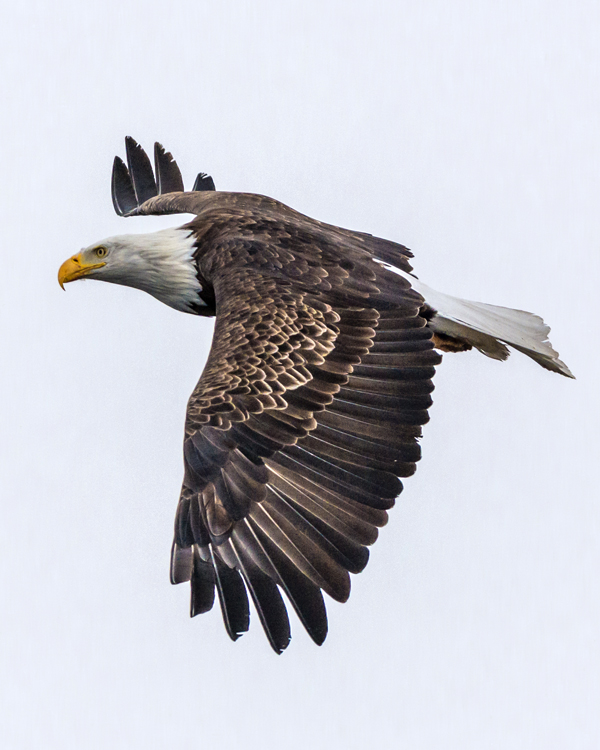
Flying into the Sunset  Focal Length: 600mm 1/1000 of second, f/6.3 with ISO 400

Flying into the Sunset
Focal length: 600mm, 1/1000th of second, f/6.3, ISO 400

Focal Length 360mm 1/2500 of a second, f/6.3, ISO 1000 im Aperture priority mode.

Focal length 360mm, 1/2500th of a second, f/6.3, ISO 1000 in aperture priority mode.

Sweet Spot

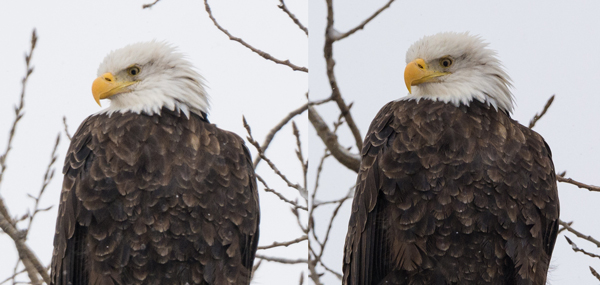
From 150-450 mm, images shot with this lens are really sharp. From 450-600 mm, the results are a little softer, but in most cases it still captures very useable images. In good light the autofocus performs quickly and accurately, while in low light it is some what slower. But for the price, this is a very nice lens.

Image of Eagle on left was captured at 600mm and image on right was captured at 450mm. Image on right has a little more detail in the feathers.

Image of the eagle on left was captured at 600mm and image on right was captured at 450mm. Image on right has a little more detail in the feathers.

Focal Length: 600mm. 1/800th of a second, f/6.3, ISO 320

Focal length: 600mm, 1/800th of a second, f/6.3, ISO 320

This juvenile Bald Eagle was captured in bright mid day light. Focal Length: 450mm, 1/1000th of a second, f/6.3, ISO 320

This juvenile bald eagle was captured in bright midday light. Focal length: 450mm, 1/1000th of a second, f/6.3, ISO 320

 Conclusion

In my opinion, if you are in the market for a versatile wildlife lens and are on a budget, the Tamron 150-600mm would be a very good choice. I’ve been pleased with the wildlife images I’ve captured with mine, and am looking forward to getting even better ones with practice. That’s why it’s my favorite wildlife lens.

What is your favorite wildlife lens?

googletag.cmd.push(function() {
tablet_slots.push( googletag.defineSlot( “/1005424/_dPSv4_tab-all-article-bottom_(300×250)”, [300, 250], “pb-ad-78623” ).addService( googletag.pubads() ) ); } );

googletag.cmd.push(function() {
mobile_slots.push( googletag.defineSlot( “/1005424/_dPSv4_mob-all-article-bottom_(300×250)”, [300, 250], “pb-ad-78158” ).addService( googletag.pubads() ) ); } );

The post Writer’s Favorite Wildlife Lens – Tamron 150-600mm by Bruce Wunderlich appeared first on Digital Photography School.

Digital Photography School

 
Comments Off on Writer’s Favorite Wildlife Lens – Tamron 150-600mm

Posted in Photography


New samples from the Sigma 24mm F1.4 DG HSM Art lens

20 Feb

We were recently lucky enough to visit Sigma’s factory in Aizu, Japan, where Sigma allowed us to shoot with a pre-production sample of the recently-announced 24mm F1.4 DG HSM Art lens. The wintry landscape of the Fukushima prefecture was a nice contrast to the CP+ convention center where we last gathered some samples with this lens, and our recent samples are more representative of lens performance on a native mount body (Canon 6D). Have a look

Articles: Digital Photography Review (dpreview.com)

 
Comments Off on New samples from the Sigma 24mm F1.4 DG HSM Art lens

Posted in Uncategorized


Ricoh’s newest lens roadmaps show four upcoming K-mount lenses

13 Feb

Ricoh has released its lens roadmaps for the new year (and potentially beyond), and in the works are seven lenses spanning a wide range of types and focal lengths. The highest number of additions will come in the Pentax K-Mount lineup, which is set to get four new lenses this year or next. Read more

Articles: Digital Photography Review (dpreview.com)

 
Comments Off on Ricoh’s newest lens roadmaps show four upcoming K-mount lenses

Posted in Uncategorized


CP+ 2015: Hands on with Sigma’s new 24mm F1.4 DG HSM Art lens

13 Feb

One of the most interesting lenses at CP+ for enthusiast photographers is Sigma’s new 24mm F1.4 DG HSM Art. We made a beeline for the Sigma stand as soon as we arrived on the show floor and got our hands on this intriguing new prime. Click through for some photos and our initial impressions of its build and image quality, based on some initial sample images. 

Articles: Digital Photography Review (dpreview.com)

 
Comments Off on CP+ 2015: Hands on with Sigma’s new 24mm F1.4 DG HSM Art lens

Posted in Uncategorized