RSS
 

Posts Tagged ‘Landscape’

Making the Best Use of HDR in Landscape Photography

22 Aug

Do you love landscape photography? It provides ample rewards for those who are drawn to the outdoors. Chasing the light can be very exciting but it also poses some significant challenges. What you see versus what the camera sees can be two very different things.

Making the Best Use of HDR in Landscape Photography - two images of a forest

What is High Dynamic Range and why it matters

Much of the best light comes with difficulties related to exposure, and all cameras have limitations when it comes to exposure. The problem is High Dynamic Range or HDR.

Your eyes have an immense dynamic range when it comes to scenes with extremes of bright and dark. Your eye adjusts so quickly you don’t notice it. But your cameras sensor, on the other hand, has a fixed dynamic range. If the scene you’re photographing exceeds that, the camera can’t capture all the details at both ends of the contrast range.

There are several methods for dealing with this limitation:

  • You can underexpose the image and allow the darker elements to become silhouettes. But that only works in a few situations.
  • You can use a graduated neutral density filter. This works best when there is a straight dividing line between the bright and dark areas of the image. Otherwise, the tops of foreground objects like trees become darker than the bottoms.
  • Or you can use a method that works in all situations and the solution is simple. If the sensor can’t capture the full dynamic range in a single shot, take several shots at different exposures that span the dynamic range. Later, in the digital darkroom, blend the images together to make a single image.

Lower Antelope Canyon - Making the Best Use of HDR in Landscape Photography

There are two parts to the HDR process – capturing the image in the field and processing it in the digital darkroom. Let’s start in the field.

Setting up an HDR shot

Here are the things you need to do to set up an HDR shot for landscape photography. The starting point is your normal landscape configuration.

  • It’s customary to use a tripod for landscape photography and this applies to HDR as well. However, with the exciting advances in alignment technology in applications like Photomatix Pro, more and more HDR photography can be done hand-held.
  • Set your camera mode to Aperture Priority. You want all your exposures to maintain the same depth of field.
  • Set your focus to manual (or use back button focus); you don’t want the focal point changing between shots.
  • Use a remote release and set your drive to continuous mode. That way, you don’t inadvertently jiggle the camera when you press the shutter button. This way, one press of the remote‘s button takes all your shots.
  • Set your exposure bracketing, you’ll typically want 2 stops difference between shots.
  • Set the number of shots, typically 3. But be aware that in extreme conditions you may need 5 or more shots to capture the full dynamic range of the scene.

Note: Your camera may have restrictions on exposure bracketing and/or the number of shots, so you will need to work with that. The important thing is to get enough shots to cover the entire dynamic range.

Now you’re ready to go. For a more detailed introduction, see this article “Setting up Your Digital Camera for HDR Shooting”

How to know you need to do HDR

Your histogram will tell you if you need to use HDR. Here is an example of what you’re looking for.

Histogram - Making the Best Use of HDR in Landscape Photography

The histogram spans the range of brightness from maximum dark on the left to maximum bright on the right. For each level of brightness, the graphs shows you how much of your scene has that tone.

The histogram above clearly shows a situation where HDR is needed. The histogram pushes up against the left side, which indicates the shadows are clipping and there is a loss of shadow detail. Similarly, the histogram pushes up against the right side where you have highlight clipping, again, with a loss of detail.

When checking your histogram for potential HDR problems, you only need to look at the left and right sides. What it looks like in the middle doesn’t matter.

For a full explanation of histograms, check out “How to Read and Use Histograms”.

Capturing the images in the field

You’ve identified a shot that requires HDR. Next, you’ve set up the shot and taken your set of bracketed exposures.

Riverside Walk - Making the Best Use of HDR in Landscape Photography

You got it. Or did you?

How do you know your shots spanned the entire dynamic range? If you’re thinking it’s the histogram, you’re right. You don’t need to check the histogram for every one of your shots, just two – the most underexposed (the darkest one) and the most overexposed (the lightest one).

Over and underexposed histograms - Making the Best Use of HDR in Landscape Photography

The histogram on the left is the most underexposed shot. It is well away from the right side. In fact, there’s very little beyond the middle. You may think this is too underexposed, but experience shows that the best practice is to underexpose by too much rather than not enough. There can be areas that are extremely bright but too small to register. It’s better to play it safe.

The histogram on the right is the overexposed shot. Because it is pulled away from the left side, you can be confident you have captured detail in the shadows. Regardless of how many shots you took, these are the only two histograms you need to check.

Making the Best Use of HDR

In landscape photography, you have no control over the light. You need to work with what nature serves up. Sooner or later you will run into HDR situations.

With experience, you begin to anticipate when you need to use HDR. Here are some of those situations, with the before and after images displayed for each. The after image, by the way, is the result of the HDR blending and nothing else. More work will be done in Lightroom and Photoshop later.

Twilight

HDR conditions occur during twilight, the hour before sunrise and just after sunset. During most of this time, the dynamic range is well within your camera’s limits. But there is a period of about 10 minutes or so when the sky becomes very bright while the land is still dark.

This moment captured in Joshua Tree National Park, California, illustrates this issue.

Twilight before and after - Making the Best Use of HDR in Landscape Photography

The image on the left is the before image; a single exposure that captures detail in the foreground. Notice how the dramatic sky is lost. With HDR you get it all – foreground, sky, everything. And besides capturing the sky, look at the enhanced detail in the foreground.

Sunrise and sunset

Often during sunrise and sunset, you want to have the sun in the composition. The bright sun can create an extreme dynamic range, however, and can also confuse your camera’s light meter. The sky may get washed out or the foreground can be darker than you’d like.

Sunrise before and after - Making the Best Use of HDR in Landscape Photography

Look at this photograph of Thor’s Hammer (above), captured at sunrise in Bryce Canyon National Park, Utah. The hoodoo to the right is an important part of the composition. Getting the starburst of the rising sun through the window adds to the interest.

But the before image without a sky misses another key element. With HDR, however, it all comes together and the moment is recreated.

Full moon at twilight

As it rises through the Venus Belt, a full moon makes an exciting image, with the band of color that sometimes appears in the eastern sky as the sun sets. The best time to capture this is one or two days before the actual full moon.

You may not think of this as an HDR shot. The dynamic range of the earth and the darkening sky is well within your camera’s capabilities. The moon, however, is in full sunlight. It is as bright as midday. So, the challenge is to capture the detail in the moon.

Full moon before and after - Making the Best Use of HDR in Landscape Photography

The before image has no detail in the moon or the shadows. But the HDR image captures the moon and can be worked with to produce a beautiful photograph. You might like to see how this turned out (below).

Bristlecone moon - Making the Best Use of HDR in Landscape Photography

Dappled sunlight

In a woodland or forest on a sunny day, the sun’s rays pierce the canopy to create enchanting bright patches. It’s beautiful, but it presents a serious exposure problem. In the days of film with a limited dynamic range, you would likely pass it by.

Dappled sunlight before and after - Making the Best Use of HDR in Landscape Photography

This before image (above) has a problem that often goes overlooked; the foliage in the background is blown out. And not just that, but the fern at the bottom is also in the sun and it too is overexposed. But the HDR image handles both areas beautifully and, as a side benefit, produces richer colors.

This is just the beginning

There are a lot more situations where HDR can save the photograph. Slot canyons come to mind or rays of light in a redwood forest, as you saw above. The trick to avoiding HDR problems is to always check your histogram.

Another good practice is to do brackets shots even when it’s not obvious that the scene requires it. It’s good insurance. If you don’t need the bracketed images, you lose nothing. But if you need them and don’t have them you lose the photograph.

Processing in the digital darkroom

There are many tools that can blend your bracketed files. Even Lightroom and Photoshop now have very rudimentary HDR options, albeit without any significant controls. You get what you get.

The premier HDR tool is HDRsoft’s Photomatix Pro. HDRsoft has been around since the dawn of HDR photo editing. All they have ever done is HDR processing, and they are very good at it. Photomatix Pro provides a robust and powerful set of adjustments that enable you to create photographs ranging from natural to surreal, and even black and white.

Suppose you were photographing in Zion National Park, Utah at sunrise, and you took these three shots bracketed by 2-stops.

3 bracketed exposures - Making the Best Use of HDR in Landscape Photography

None of these photographs are very good on their own. The middle image, the underexposed one, captures the blue of the sky that isn’t in any of the other images. And the image on the right captures all the detail in the foreground. However, this is exactly what you want for HDR.

Let’s pick up the workflow where you have already uploaded your images into Lightroom and selected the files you want to process.

1. Initial Lightroom processing

Don’t do anything to your files before you do the HDR blending other than capture sharpening. In the Develop module, make sure all your settings in the Basic, Tone Curve and HSL groups are set to zero.

2. Export the files to Photomatix Pro

When you install Photomatix Pro with the Lightroom extension, an Export preset is created automatically. With all the files selected, in Library mode, click the Export… button in the lower left-hand corner. In the Export dialog, select the Photomatix Pro preset and click Export.

3. Make setting selections in the Export dialog

There are a number of settings in the export dialog box. The two most frequently used are Align images and Automatically re-import into Lightroom Library.

  • Align images – Always click the Align source images checkbox. In the Preset pull-down menu select whether you captured the images on a tripod or hand-held. It’s a good idea to also click Crop aligned images.
  • Automatically re-import into Lightroom library – Check this box because you will want to continue your workflow in Lightroom once you have your HDR image. In Output Format: be sure to select TIFF 16-bit. Also, click Stack with selected photo.
  • Other Settings – You can explore the other settings for further control. The Show dialog with options to remove ghosts setting is like magic if any elements in your composition moved between exposures. It’s called ghosting. You have a tremendous amount of control in removing ghosting with this option. Check it out. Sooner or later you’re going to need it.
  • When everything is set the way you want, click Export.

Lightroom converts the selected files to TIFFs, launches Photomatix Pro and exports the files. Photomatix Pro will do the initial processing and display the blended image.

4. Refine the image in Photomatix Pro

The image is already looking so much better. But you can do more.

The best place to start is the presets. Try out the various presets. There are over 40 of them, not counting any that you might have created. Everything from natural to surreal is covered. Detailed seems to work best for this photograph.

Check the histogram. Check the luminance, red, green, and blue histograms. The point of using Photomatix Pro is to eliminate clipping, especially highlight clipping and the histogram tells you how you’re doing.

Here, luminance has a small amount of highlight clipping. Red is fine but green and blue have a lot of clipping. That can be fixed with the White Point adjustment in the HDR settings group (you need to scroll down to see it).

White Clip – Set this to 0 and check your histograms again. The luminance and green clipping is totally gone but there’s still blue clipping. That’s not really a problem, though, because most of the blue has no detail.

Other HDR SETTINGS

Try the other adjustments in the HDR SETTINGS group. At the bottom of the panel is an explanation of what each does, so refer to that. After a little experimenting, setting Strength to 65 and Tone Compression to -4.0 produces a very favorable result with this image.

COLOR SETTINGS

Color Settings are fairly new and a great addition. Bumping both Saturation and Temperature to 4.0 is very pleasing.
It would be nice to draw more attention to the trees in their autumn colors. To do that, select Yellow from the Image Colors drop down and adjust the Brightness slider to 5.0, Saturation to 2.0 and Hue to -2.0.

5. The Results

Here’s how the image looks now. Looking good.

Photomatix pro ending point - Making the Best Use of HDR in Landscape Photography

6. Finishing up

Click Next: Finish to continue. Photomatix Pro applies all of the adjustments you’ve made and gives you the option of a few more – Contrast, Sharpen, Crop, and Straighten. These are handy when you’re using Photomatix Pro to create the final image. But if you intend to do more processing in Lightroom or Photoshop, you might want to do your tweaks there instead.

7. Save and Reimport

Click Save & Reimport. Photomatix Pro will create a TIFF file and save it to the same drive as the original files. It will also add the new file to the Lightroom catalog so you can continue editing it there.

8. Finish your workflow

Continue your normal workflow with the file that’s just been imported. You could end up with something like this.

Final thoughts

Sometimes I’m asked if my photographs are what the camera saw. My response is, “No, because the camera doesn’t know what I’m feeling.”

Landscape photography can be so much more than just documenting experiences. It has the power to convey the emotions and states of mind that come upon us when we stand in the presence of such majestic scenery as this.

But there are times when nature challenges us. And with techniques like HDR and powerful tools like Photomatix Pro, our creative expression is unleashed, and we are able to make photographs that go beyond simply capturing the moment but hold a deeper meaning.

Do you have any questions about using HDR in landscape photography? If you do, please let me know in the comment area below and I will be happy to answer them.

Disclaimer: HDRsoft is a paid partner of dPS

The post Making the Best Use of HDR in Landscape Photography appeared first on Digital Photography School.


Digital Photography School

 
Comments Off on Making the Best Use of HDR in Landscape Photography

Posted in Photography


A Guide to Shooting Long Exposure Landscape Photos

11 Aug

Here’s a 21-minute photography guide from Gordon Laing that looks at the long exposure technique. This is where you increase the shutter speed of your camera, letting in light to the sensor over a longer duration to create unique effects.

Long exposure photography

Long exposures are often used for smoothing out moving water, or smudging clouds as they drift past in the wind. Whatever the reason, long exposures can produce dreamy and magical results, and they are a key weapon in any landscape photographer’s arsenal.

“It’s also very forgiving in bad weather,” says Laing. “It allows you to grab moody-looking images on overcast days, or even in the pouring rain.”

Laing also points out that all of the normal compositional rules of landscape photography apply to your long exposure images. A long exposure is most-often used to enhance a particular scene, rather than create something that varies so drastically that the composition is different.

There is no set duration, either. You could shoot anything from a couple of seconds to multiple minutes (such as by using the LEE Filters 15-stop Super Stopper).

A longer duration will bring out more movement in the image, but you may find that the effect is too strong or that camera shake is introduced by something as simple as the wind buffeting your tripod.

Check out the full video above for a great guide to long exposure landscape photography from Laing. If you want more check out these dPS articles on the topic:

  • How to Avoid Blurry Long Exposure Images with Proper Tripod Setup
  • Long Exposure Photography 101 – How to Create the Shot
  • Long Exposure Photography 201 – How to Edit a Long Exposure Seascape
  • How to Choose the Correct ND Filter for Your Desired Long Exposure Photography Effects
  • Recommended Gear for Doing Long Exposure Photography at Twilight and Dusk
  • How to Select a Subject for Long Exposure Photography

The post A Guide to Shooting Long Exposure Landscape Photos appeared first on Digital Photography School.


Digital Photography School

 
Comments Off on A Guide to Shooting Long Exposure Landscape Photos

Posted in Photography


A Worthy Project for Landscape Photographers: League of Landscape Photographers

27 Jul

Three cover splay

Canadian landscape photographers Samantha Chrysanthou and Darwin Wiggett have created the League of Landscape Photographers, a self-identified group of artists who photograph the world around them in accordance with high ethical and artistic standards. ‘Landscape’ in this group is defined broadly to include wilderness and human interactions with and connections to the land. There is no cost to being a League member but each member must post a personalized code of ethics on their website or social media pages to join. League members share and discuss their ideas, portfolios and projects in the League Facebook group and on the League blog. The pinnacle achievement of the group is the annual, collectable fine-art Leaguemagazine to be released in the fall of 2017. There is currently a fundraising subscription campaign on until April 4 with the goal of getting $ 30,000 CAD to fund 1000 copies of the magazine that will go to subscribers worldwide. All proceeds from the subscriptions go to the creation of the magazine with its evocative imagery and high-end local printing and design. This is a magazine funded by photographers for photographers (no ads or commercial content) and funds raised go to fairly pay ALL contributors for their creativity. League magazine strives to promote photography with a conscience and show that photography can make a positive impact through thoughtful and ethical creativity.

Act quickly as their fund raising deadline is drawing near.

The post A Worthy Project for Landscape Photographers: League of Landscape Photographers appeared first on JMG-Galleries – Landscape, Nature & Travel Photography.


JMG-Galleries – Landscape, Nature & Travel Photography

 
Comments Off on A Worthy Project for Landscape Photographers: League of Landscape Photographers

Posted in Equipment


How to Use Neutral Tones to Craft Realistic Edits for Landscape Photos

24 Jul

When you look at a white wall, how does it make you feel? Dingy? Cold? Warm and radiant? Modern? Sophisticated? Clean?

White and light gray, sometimes referred to as “neutral tones”, are some of the most powerful colors in the spectrum. We can distinguish many shades of white, and bounced light from a neutral source influences the tint of every other color nearby.

Neutral tones set the mood of an image more than any other colors. You’ve probably transferred a photo to your computer where the white balance was noticeably off: a night shot where everything was too green and cool, or an indoor photo that was orange. White balance is an easy fix in most photo editing software, but neutrals don’t end there: by tweaking them creatively, you can take your photos to the next level.

Sella towers - How to Use Neutral Tones to Craft Realistic Edits for Landscape Photos

What are the sources for neutral tones?

It’s possible to have a photo without white and grays, but most of the time scenes are full of them. These are some of the more common sources in landscape photography.

Clouds

Those water-saturated cotton balls do a great job of reflecting light. On a sunny day they tend to be slightly warm, while storm clouds are a fantastic source for chilly gray tones. However, clouds are not a good source for neutrals when shooting after golden hour or before sunrise.

Overblown sky

When shooting after sunrise and before sunset, the sky will typically be overexposed if you properly expose the rest of the image. It’s not usually desirable, but in a few instances an overblown sky is a good source of white.

Sass de putia - How to Use Neutral Tones to Craft Realistic Edits for Landscape Photos

Water

Lakes and shorelines are my favorite method to introduce strong neutral tones to landscape photos. You can use bodies of water to reflect an overcast sky, and along the coast, you can shoot a long exposure to blur the white foam from the waves.

Both tend to create pure neutrals, so you can completely change the mood of an image with tiny adjustments.

Man o war - How to Use Neutral Tones to Craft Realistic Edits for Landscape Photos

Fog

The most powerful way to introduce mystery and dreariness, fog is often the largest source of gray tones in your image.

Hohenwerfen castle - How to Use Neutral Tones to Craft Realistic Edits for Landscape Photos

Snow

Winter photography enjoys the most magical source for neutral tones. Tinting snow just a bit cooler or warmer profoundly impacts the scene’s mood.

Mount hood - How to Use Neutral Tones to Craft Realistic Edits for Landscape Photos

Moon and stars

When shooting astrophotography, the stars tend to cast a cold white light, and the moon a warmer light.

Gimmelwald - How to Use Neutral Tones to Craft Realistic Edits for Landscape Photos

Haystack rock - How to Use Neutral Tones to Craft Realistic Edits for Landscape Photos

Architecture

Man-made structures that ought to be white or gray such as; lighthouses, white-washed brick houses, winding gravel roads, and expansive castles — are often the subject of an image. Consequently, they make a compelling neutral source.

South stack lighthouse - How to Use Neutral Tones to Craft Realistic Edits for Landscape Photos

Why are neutral tones important?

Out of the camera, even after editing, your neutral tones may not really be neutral. They may be heavily tinted. Introducing off-white into your neutral sources is an important technique for crafting compelling edits.

Keep in mind that the viewer will expect those subjects to look neutral, so if you push the white balance too far or don’t balance the warms and cools, it will begin to look over-edited. A tiny change in neutrals has 10 times the power of changing your colors and blacks.

So, in general, start with subtle adjustments and revisit the photo often under different lighting conditions. Some of the most common ways to pollute neutral tones are:

  • Pushing saturation or vibrance.
  • Over-saturating an image shot at a high ISO.
  • Shifting the white balance too far from pure white to bring out colors in the sky or a dark foreground.

With those caveats in mind, here are four ways your neutral tones can support the rest of the image.

Strumble head lighthouse - How to Use Neutral Tones to Craft Realistic Edits for Landscape Photos

1. Neutral tones root an image’s color palette

With strong neutrals, viewers can believe almost any edits in an image: sunsets that pop, overly blue skies, or glassy teal water. But the moment you introduce color into an element that should obviously be white or light gray, the image’s believability disintegrates.

This is why split toning is rarely a magic pill for making a great photo. Toning the highlights and mid-tones often ends up tinting your neutral sources.

The foam in this shot of Spirit Falls (below) is pure white, but the rest of the image has been significantly warmed and tinted green to bring out the beautiful colors. The contrast between the pure white foam and warm greens creates the impression that the water is refreshingly chilly.

Spirit falls - How to Use Neutral Tones to Craft Realistic Edits for Landscape Photos

2. Neutral tones help you resurrect the colors you remember

After shooting a stunning sunset, it can be disappointing to open the RAW image in your editing software and find that the colors are missing. In most cases, the detail and colors are there, but it’s up to you to revitalize them. Neutral tones will help.

Start by identifying elements in the photo that ought to be white or gray, then adjust white balance and tint accordingly. This will give you a great starting point.

It may still be underwhelming, but now that your neutrals are about right, start selectively bumping the saturation, temperature, and tint on the colorful subjects in your composition. You might add a graduated filter to the sky portion of the image and warm or cool it to help them pop.

Roads end - How to Use Neutral Tones to Craft Realistic Edits for Landscape Photos

Sunsets create a powerful contrast between the warm sky and cool shadows. The image of Road’s End above is primarily cool since the most of the image is in shadow.

However, the sea foam reflects both the warms and cools, so in post-production, I played with the global white balance until both tones came out. Afterward, I introduced a strong magenta cast to bring out the pinks in the sky and foreground.

3. Neutral tones set the overall mood

In reality, neutral tones are rarely neutral. By slightly tinting neutrals, you can communicate aspects of the scene. Here are some examples.

Time of day

Night photography is typically cooled, while sunset or midday photos are warmed. This shot of Mount Bachelor was taken after during civil twilight, so the only source of warm light was the grass in the foreground and hints of alpenglow on the snow. Everything else was left cool.

Mount bachelor - How to Use Neutral Tones to Craft Realistic Edits for Landscape Photos

Temperature

An overly warm image can communicate a hot day, and on chilly days, the overall white balance can be left cool. This is especially powerful if your image has a small, warm light source to draw the viewer’s eye.

Morning fog over this lake in Snowdonia introduced a neutral source and warming the color raises the perceived temperature.

Snowdonia - How to Use Neutral Tones to Craft Realistic Edits for Landscape Photos

Weather

Clear days can be tinted slightly pink to warm the scene, while an incoming storm should incorporate a greener tint.

Oregon is rich with various biomes, and Smith Rock State Park feels like a desert on a clear day. The strong magenta cast brings out colors in the rocks and reinforces the cloudless sky.

Smith rock - How to Use Neutral Tones to Craft Realistic Edits for Landscape Photos

Clarity

When the fog rolls in, it tends to chill the image and evoke mystery. A hazy day adds depth and layers to an image and tends to warm the image at golden hour.

In this shot from Bavaria, the haze on the mountain range adds warmth and communicates just how distant the mountains are.

Geroldsee - How to Use Neutral Tones to Craft Realistic Edits for Landscape Photos

4. Neutral tones help to bring out or tone down a region

Neutrals don’t have to be the same color or white balance! They can help root the mood and color palette of a local section of the image.

For example, snow beneath some trees in the foreground should be cool, and snow on a mountain under sunrise should be warm.

The different white balances communicate the temperature contrast between the foreground and background. Furthermore, since cool colors recede while warm colors pop forward, the warm snow in the background entices the viewer’s eye up from the ice-covered lake in the foreground.

Lost lake -- How to Use Neutral Tones to Craft Realistic Edits for Landscape Photos

What if my image doesn’t have any neutral tones?

It’s not impossible to realistically edit images without strong neutrals. But since your viewer has no neutral reference to root the color palette, you will need a compelling balance of warms and cools to convince the viewer you didn’t artificially crank up the white balance.

This shot from the village of Brunate (below) doesn’t have any substantial neutrals. Although the fog could be considered a neutral source, it strongly reflects the colors in the sky. However, the overpowering warmth in the top left sky is balanced by cooler tones in the rest of the image, which keeps the white balance from being entirely warm and pink.

The contrast also draws the viewer’s eye from the village in the foreground to the beautiful sky in the background.

Brunate - How to Use Neutral Tones to Craft Realistic Edits for Landscape Photos

Conclusion

Crafting realistic edits in landscape photography is a subjective experience. But by carefully preserving your neutrals, you grant yourself almost unlimited creative liberties in the editing process.

So next time you want a fall photograph to feel like a shot from Rivendell, identify the sources of neutral tones in your image and apply these techniques.

The post How to Use Neutral Tones to Craft Realistic Edits for Landscape Photos appeared first on Digital Photography School.


Digital Photography School

 
Comments Off on How to Use Neutral Tones to Craft Realistic Edits for Landscape Photos

Posted in Photography


Editing Gently: 3 Tips for Processing Realistic Landscape Photos

11 Jul

A well-processed photograph should be just like a good haircut. That’s one of my favorite analogies when it comes to explaining my approach to editing my own photographs. Not only does it confuse people and make them think I’m weird but it is also incredibly accurate when it comes to processing realistic landscape photographs.

What I mean is that when an image is well-processed the viewer will know something has been changed while not being overly apparent and in the end, they like what they see. Just like a good haircut.

sand dunes - Editing Gently: 3 Tips for Processing Realistic Landscape Photos

Before we get further into this, I want to go on record and say that in my opinion there is no “correct” way to process any photograph. So the tips you’re about to learn here come from my own creative tastes and style for landscapes which lean towards an “enhanced” realism but solidly anchored in reality nonetheless.

Now, let’s talk about some ways you can give your landscapes a good haircut and push your processing right up to the boundaries of realism without tipping over the edge.

#1 – Directional Light

Photography is all about light and in landscape photography, 99% of the time the only light source in your compositions will be the sun, or in some cases the moon, which is just reflected sunlight (science).

Sunlight comes from that big ball of fire in the sky and that makes it very directional by nature. Meaning, your main light source for your photographs comes from one spot. When you process your landscape images it’s very important to pay attention to the direction from which the natural light is falling in the image.

The reason for this is because there’s nothing more telling that a photo has been blatantly over-processed than sunlight appearing to miraculously illuminate the frame from different directions. This is especially true when the sunlight is close to the horizon in the early morning or late afternoon. Have a look at the photo below.

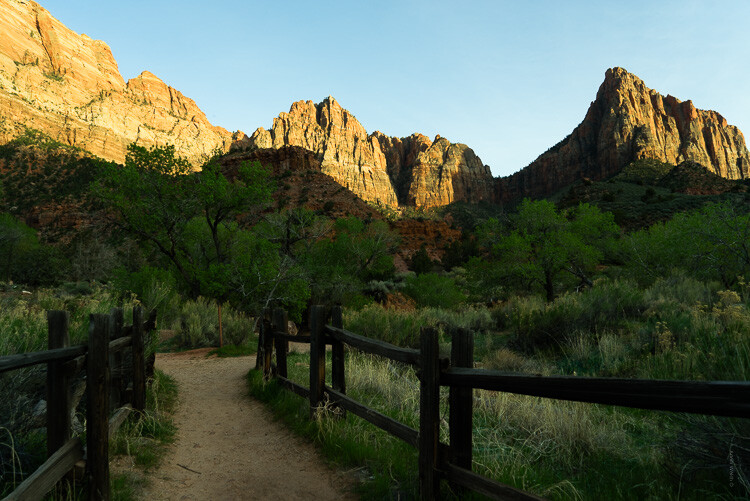
zion canyon - Editing Gently: 3 Tips for Processing Realistic Landscape Photos

Notice how the light comes in from the right of the frame and illuminates the tops of mountains? Yet the foreground is in shadow and so are the areas where the sun is blocked by the cliffs.

When processing a photo with such stark lighting as this be mindful that you don’t create overly artificial light where it shouldn’t be. Sure, bring up those dark areas but don’t go too far as I have with this example (below).

zion bad edit - Editing Gently: 3 Tips for Processing Realistic Landscape Photos

See how “off” the lighting is now? Sure, it’s not terrible but there is bright illumination in areas that should be in shadow on the right. There is no longer a natural feeling gradient to the light as it falls on the foreground.

Let’s look at a more harmonious example of the same photo that has been processed to work with the direction of the available light.

zion good edit - Editing Gently: 3 Tips for Processing Realistic Landscape Photos

In this example, the entire photo feels much more comfortable without having bright spots, uneven shadows, or that odd appearance in the first version.

Most of the editing you’ll do to selectively adjust the luminance of landscapes will be done with local adjustment tools like the gradient filters and adjustment brush. We’ll get into using local adjustments in a moment but first, let’s talk about another aspect of landscape processing that can truly ruin any great photo if you’re not careful.

#2 – Match Color Tones in Reflections

Walking hand in hand alongside working with directional light is how you manage reflections in your landscapes. More specifically, matching reflections in water is a little detail that can make or break a convincing landscape photo.

So often I see reflections in water which are either too bright or too dark or perhaps more noticeable, reflections which do not match (or reasonably approximate) the color tone of the light which it is literally reflecting. Have a look at this. I’ve warmed the sky in this image somewhat from its original blue hour cool tone.

yosemite sky - Editing Gently: 3 Tips for Processing Realistic Landscape Photos

Notice how the light reflecting from the river also carries a hint of the orange color from the sky? Not too much but just enough to add some realism. This is because I intentionally warmed the color of the water a wee bit in order to be more harmonious with the warmed sky. If I had not, we would have something of a tonal mutant on our hands…

yosemite cool water - Editing Gently: 3 Tips for Processing Realistic Landscape Photos

Notice how the color tones in the water don’t match the sky and overall scene here?

When it comes to working with your reflections the name of the game is remembering that the light reflecting in the water comes from the sky…usually. So it should also carry some of the same attributes of that light in terms of luminance and color.

Of course, the type of water plays a role in skewing this a bit but just use good judgment and keep in mind that the reflection should almost always carry a hint of whatever color the ambient light brings to the scene.

#3 – Make Realistic Local Adjustments

I’ve talked about how much I love using local adjustments in other dPS articles. I’m admittedly a radial filter junky and the majority of my photos carry some use of either the gradient or radial filter and adjustment brush edits, often times all three. When it comes to making edits using any of these tools it’s important to know how NOT to use them.

My old friend the gradient filter comes into play quite a bit when processing realistic landscape photos to even out bright skies and for illuminating dark foregrounds. What’s more, used with the radial filter and local adjustment brush, it can work wonders.

good adjustments filters yosemite - Editing Gently: 3 Tips for Processing Realistic Landscape Photos

Good adjustments using the filters in Lightroom.

Or it can look absolutely horrifying when used poorly.

Yosemite - Editing Gently: 3 Tips for Processing Realistic Landscape Photos

Bad use of a graduated filter in editing.

The same is true for its circular counterpart, the radial filter. This little gem works beautifully for applying custom vignettes and brightening (or darkening) areas or for adding in a host of other great adjustments to your photos. However, much like the gradient filter, it can be easily blundered.

saguaro cactus bad edit - Editing Gently: 3 Tips for Processing Realistic Landscape Photos

Bad edit with a radial filter in Lightroom.

The local adjustment brush also carries the same caveats. Few things make a picture look worse than the application of a “finger-paint” local adjustment brush. Actually, it gives finger-painting a bad name.

death valley - Editing Gently: 3 Tips for Processing Realistic Landscape Photos

The key to making effective and realistic local adjustments in any photograph comes down to remembering a few important guidelines:

  • Less is usually more. Local adjustments are just that, local. So when applying them remember that they will become more and more apparent when you use them to make drastic edits.
  • Feathering is your friend. Whether it’s the radial or gradient filters or event the adjustment brush, most times you will want to apply your adjustments gradually with very soft borders which blend well with the surrounding pixels. Set your feathering all the way to 100 and then if you need a harder edge for more defined work back it off from there.
  • Don’t be afraid to stack adjustments. When done judiciously, many local adjustments can be applied one over the other. For example, you might use three graduated filters each with a varying color temperature to give the sky a creamy color tone or multiple radial filters to layer out an exposure adjustment.

Final Thoughts

Landscape photography is a long-loved standby in the photography world. It is also one of the most ethereal and easily mismanaged types of photography when post-processing is done unconvincingly.

There are so many aspects of processing realistic landscape photos and most go beyond simply moving a few adjustment sliders around. In fact, I think of my landscapes as more of an exercise in digital painting than as simply editing a picture.

Whatever your persuasion may be in terms of how much you choose to make edit, having a solid basis in reality is a great jumping off point for making a dynamite landscape.

zion - Editing Gently: 3 Tips for Processing Realistic Landscape Photos

Remember, pay close attention to the direction of the light in your frame and make sure that the rest of your edits stay somewhat true to the natural lighting already present.

The same goes for reflections. Make sure the light reflecting from surfaces like water looks like it came from the ambient light source even if that light source has been changed by you. And lastly, don’t mess up the endgame but applying freakishly obvious local adjustments.

Always remember, there are no rules for processing a landscape photograph but there are ways you can make sure your photos stay true not only to your visualized outcome but also to the natural splendor from whence they were born. Yes, I used “whence” in a sentence.

Happy editing!

The post Editing Gently: 3 Tips for Processing Realistic Landscape Photos appeared first on Digital Photography School.


Digital Photography School

 
Comments Off on Editing Gently: 3 Tips for Processing Realistic Landscape Photos

Posted in Photography


Beginner’s Guide to Natural Light in Landscape Photography

06 Jul

Photography is all about light. The same scene with the same composition can look completely boring under one set of lighting conditions and very dramatic under different conditions. Good light makes the difference.

But does that imply there is also such a thing as bad light? I don’t think there is such a thing. The key is to understand what kinds of images to make under the lighting conditions you are presented with when you are photographing.

White House in Arnarstapi Harbor, Iceland - Beginner’s Guide to Natural Light in Landscape Photography

An overcast sky creates a soft landscape with no shadows.

Understanding the three characteristics of natural light will help you use the light to your advantage and make images with an impact no matter what conditions you have to work with.

The Quality of Light

By quality of light, I am referring to how hard or soft the light is.

Hard light happens during midday when the sun is high in the sky and there are no clouds to filter the light. This kind of light is harsh and bright, but it can also create interesting shadows and contrast.

Shadow on the Dunes - Beginner’s Guide to Natural Light in Landscape Photography

Harsh mid-afternoon light casts a dramatic shadow on this sand dune emphasizing its shape.

Soft light happens on a cloudy day when the clouds diffuse the light making it even with no shadows or bright spots. It also occurs in the shade.

Even on a day when there are no clouds, when the sun is lower in the sky the light passes through more atmosphere which softens the light. This is why golden light at the edges of the day is softer then midday light.

The Color of Light

The color of natural light from the sun changes during the course of the day. Before the sun rises, when the first light of the day appears in the sky, the light is a cool blue. During sunrise, the light is golden. As the sun gets higher in the sky, it is bright with little color tint at all.

Organ Pipe Cactus - Beginner’s Guide to Natural Light in Landscape Photography

During Golden Hour, the last of the day’s light casts a warm golden light on these cacti.

At the end of the day the opposite thing happens. When the sun is low on the horizon before sunset, you get the golden glow. After sunset is twilight when the light is a cool blue (blue hour).

Saguaro Cactus by Anne McKinnell - Beginner’s Guide to Natural Light in Landscape Photography

Once the sun has set, the light becomes a cool blue and the landscape is soft with no shadows.

The Direction of Light

Front light is when the light comes from behind you and hits the front of your subject directly. Front light can be unforgiving, washing out colors and minimizing textures. So if you are going to use it, it’s best to do so when the sun is low in the sky when it is warmer and softer.

Angel Peak New Mexico by Anne McKinnell - Beginner’s Guide to Natural Light in Landscape Photography

Front light hits the mountain, but it is a soft light since it is also at golden hour.

Backlight is when the sun is directly in front of you and behind your subject, lighting it from behind. I love backlight because the deep contrast between the highlights and shadows is so dramatic.

Backlighting is also perfect for making silhouettes when you have subjects with great shapes.

Organ Pipe Cactus by Anne McKinnell - Beginner’s Guide to Natural Light in Landscape Photography

The cactus is lit from behind creating an interesting silhouette during sunset.

Sidelight is when the sun is beside you, lighting your subject from the side. This kind of light is excellent for emphasizing shape and texture.

The sidelight on this saguaro cactus emphasizes it’s shape and texture.

What to do when …

So how do you use this information to your benefit? When you are out photographing consider the characteristics of the light you are presented with and use that to decide what kinds of photographs to make.

Harsh mid-afternoon light

The light is high in the sky, extremely bright and harsh with only a little color. This is a good time to look for shadows or photograph in the shade.

Shadow Patterns by Anne McKinnell - Beginner’s Guide to Natural Light in Landscape Photography

Harsh mid-afternoon light can create interesting shadows.

An overcast day with dull light

This kind of midday light has little color, but it is soft with no shadows; think soft. This kind of light is perfect for making soft flower photos, close-ups with even light, or waterfall photos where direct light would cause unwelcome bright spots.

If there is any texture to the clouds in the sky, that is good. But if the sky is pure white, eliminate it from the frame.

Skogafoss Iceland by Anne McKinnell - Beginner’s Guide to Natural Light in Landscape Photography

Waterfalls are a perfect subject for an overcast day.

Golden Hour

The sun is low in the sky casting beautiful soft warm light at golden hour, so it’s hard to go wrong in this situation. Think about the direction of light. Front light will create a warm glow on buildings and mountains, sidelight will emphasize the shape of hills, backlight will create dramatic silhouettes and you could create a sunburst by using a small aperture.

Spider Rock, Canyon de Chelly National Monument, Arizona - Beginner’s Guide to Natural Light in Landscape Photography

The day’s last light casts a golden glow on the edge of the canyon.

Blue Hour

The sun is below the horizon giving you soft, even, cool light. The direction of light does not apply here. Combine this type of light with a long exposure to emphasize the soft feeling if you have any moving elements like water or clouds. Combine twilight with city lights for more drama.

Li River and Karst Mountains in Guilin, China - Beginner’s Guide to Natural Light in Landscape Photography

There was barely any light in the sky at all during this 15-second exposure.

The best way to learn how different types of light affect your images is to photograph the same subject under various conditions. Pick something that is easily accessible to you and photograph it with front light, sidelight, and backlight. Photograph it at midday, during golden hour and at twilight. Photograph it under harsh mid-afternoon light and on a cloudy day when the light is soft.

Understanding these characteristics of natural light will ensure that you can make the most of the lighting conditions you have and create photos with impact at any time of day.

The post Beginner’s Guide to Natural Light in Landscape Photography appeared first on Digital Photography School.


Digital Photography School

 
Comments Off on Beginner’s Guide to Natural Light in Landscape Photography

Posted in Photography


Why I Always Use an L-Plate Bracket for Landscape Photography

25 Jun

There’s no secret that there’s an abundance of accessories for landscape photographers. Some of them are considered absolutely essential while others might just be unnecessary extra weight in your backpack. With so many tools to choose between it can be hard to separate the useful from the unuseful, which is probably why we end up purchasing so many unnecessary products.

When talking about accessories that are useful for landscape photographers I find that there’s a handful of products that keep coming up: a tripod, a variety of filters, a remote shutter release and a cleaning kit. There’s no doubt that these are tools that can make a huge difference in your photography.

L-Bracket Plate in use shooting on tripod.

But there’s one that I feel goes under the radar quite often, which is fascinating as it’s one that the majority of professional landscape photographers use: an L-plate bracket.

What is an L-Plate Bracket?

If this is the first time you’ve heard about an L-plate bracket I urge you to keep reading this article and to consider if this is a tool you should be adding to your equipment list.

The L-Plate bracket is a piece of metal that is fastened to your camera body as a replacement for the regular quick release tripod plate. Unlike a regular quick release plate, an L-Plate is shaped as an L, bending 90 degrees up the side of the camera. This makes it easy to quickly switch between a horizontal or vertical orientation, which is a benefit I’ll come back to in a minute.

To connect the camera to the tripod you place a clamp on the tripod’s ball head. These clamps come in a few different options, including a quick-release lock and a twist lock.

Why I Always Use an L-Plate Bracket for Landscape Photography - camera mounted on a tripod with an l-plate bracket

Why I Always Use an L-Plate Bracket

Ever since I started with landscape photography and purchased my first L-Plate, this has been an accessory that I have recommended. During the last few years, I’ve noticed that more and more beginners are understanding the value of this tool and I’m often surprised to see that the majority of my workshop participants use one.

The main benefit of using an L-Plate is that you can easily switch between a horizontal and vertical orientation. Now, you might ask “how is it easier to remove and re-attach the camera than to just loosen the ball head and readjust it?”.

That is a good question and one that might not seem that obvious but the answer is actually quite simple. When shifting from horizontal to a vertical orientation with an L-plate you keep the same composition.

L-Plate Bracket for Landscape Photography - camera mounted vertically using an l-plate

It’s easy to change the orientation of your camera when using an L-Plate

When shifting from horizontal to vertical orientation without an L-Plate you need to move the tripod as you’ve also moved the camera a few centimeters to the side, meaning you’ve lost the composition you had previously. With an L-plate attached, you maintain the composition and don’t have to worry about moving the tripod back and forth each time you change the orientation.

Another big benefit for those who shoot panoramas is that the camera perfectly pivots around the right spot, meaning you won’t have problems stitching the shots together later.

Who are L-Plates for?

Now I’m not going to lie and say that L-Plates are for everyone. If you’re a studio photographer or if you never use a tripod, it’s better not to waste your money on this tool. However, if you’re a photographer who regularly uses a tripod, I highly recommend that you get one right away.

a vertical photo of a landscape scene - L-Plate Bracket for Landscape Photography

It’s easy to quickly change to a vertical orientation when using an L-Plate

Here are a few photography genres which will greatly benefit from using an L-Plate:

  • Landscape photography
  • Astrophotography
  • Architectural photography
  • Commercial photographers
  • Macro photographers
  • Studio photographers (who use tripods)

Shot vertically using the L-Bracket.

What to look for when purchasing an L-Plate

Unlike many of the other types of accessories we find for photography, there aren’t a whole lot of options when it comes to L-plate brackets. There’s no fancy technology or must-have features. This is a simple tool, but there are still a couple of things to look for when you’re purchasing one.

  • Never purchase “universal” plates: When you’re searching for L-Plates you’ll most likely come across several models which are branded as universal plates. Do not purchase one of these! While they claim to be universal, this is rarely the case. Most likely parts of the plate will block the pockets and plugs on the side of your camera.
  • Metal plates are always best: Metal plates might be a few dollars more expensive but they are worth every cent. A sturdy metal plate is more durable and less likely to malfunction (I’ve had my RRS L-Plate for 4 years and it still works like new).

Final tips

The best option is to find a metal plate which is specifically made for your camera model. For example, I’m using a plate that perfectly fits the Nikon D800 and D810 but when using it on my backup camera, the Nikon D750, it covers the ports on the side, meaning I’m not able to use a cable release.

Lastly, you don’t need to purchase the most expensive alternatives. I know many photographers who use L-Plates that cost between $ 10 and $ 30, and these work just as well as more expensive versions. Just make sure that it’s made of metal and fits your camera. You’re likely to find good options for less than $ 50 so don’t feel like you have to get one of the premium $ 200 versions.

The post Why I Always Use an L-Plate Bracket for Landscape Photography appeared first on Digital Photography School.


Digital Photography School

 
Comments Off on Why I Always Use an L-Plate Bracket for Landscape Photography

Posted in Photography


How to Improve Your Landscape Photography By Understanding Portrait Lighting

24 Jun

The further I have gone on my photography journey, the more I have come to learn about the importance of understanding light. I believe light is the single most important element that makes a photograph. Not a great subject. Not great composition. It’s great lighting that will make a photograph amazing.

colorful landscape scene - How to Improve Your Landscape Photography By Understanding Portrait Lighting

So what is great light? There is no one type of light that makes a photograph good or bad. Hardness, brightness, color, direction. All these things and more will dictate how your image looks, and more importantly, how it feels.

One of the ways I’ve learned to see and understand light and how it affects my landscape photography is by learning about and understanding portrait lighting. Portrait photographers know that the way light falls on the human form dramatically affects the photograph.

Although you can’t control the light in landscape photography, learning to apply the principles of portrait lighting will help you create far more dramatic landscapes that make the viewer feel something.

Light and Shadow

At its most basic level, a photograph is made up of light and shadow. We have a tendency to focus a lot on light in photography, but shadows are just as important, if not even more so. Shadows reveal shape, depth, and texture.

aerial photo - How to Improve Your Landscape Photography By Understanding Portrait Lighting

Portrait photographers understand light and shadow better than anyone. They shape a portrait by moving the light source around until the light falls in just the right way so that the shadows reveal the contours of the subject. When shooting with natural light that can’t be controlled, they will move the subject instead.

The transition from light to shadow is often lost in modern landscape photography. Camera sensors with incredible dynamic range, along with the popularity of HDR techniques, have allowed us to bring back a lot of detail in the shadows of our landscapes.

This isn’t a bad thing in itself, because usually, we want some detail in the shadows, but it often goes too far. Just because we can brighten the shadows doesn’t mean we should. Leaving parts of the image in darkness add mood and mystery.

long exposure seascape - How to Improve Your Landscape Photography By Understanding Portrait Lighting

Rembrandt Lighting

I learned about Rembrandt lighting before I had ever heard of the artist it was named after. Rembrandt was a master painter who understood the principles of light and shadow better than anyone. Studying his paintings will teach you a lot about how they can create mood and drama in an image.

Rembrandt self portrait - How to Improve Your Landscape Photography By Understanding Portrait Lighting

Rembrandt self-portrait.

Rembrandt lighting has become known as a classic lighting setup in portrait photography. Using soft side-lighting, this technique creates a beautiful look that you will likely recognize.

When the light source is coming from the side of the subject, it causes the light to reveal and conceal various elements. The parts of the subject that are visible to the light source will be illuminated while the parts which aren’t visible to the light source will be in shadow.

portrait lighting for landscape photography - How to Improve Your Landscape Photography By Understanding Portrait Lighting

Understanding portrait lighting to bring out texture and dimension.

You obviously can’t control the light source when photographing landscapes, but you can still apply the same principles.

Considering how the light will fall on your landscape can guide the way you photograph it. The position you shoot from, your composition, and the time of day will all affect how the lighting affects your landscapes. Even though you can’t control the light, it never stays the same, so waiting for the angle of the sun to change or for a gap in the clouds can make a big difference to that way it illuminates the scene.

Reverse Engineering Photos

A great exercise for learning to understand light is to reverse engineer a photograph. When I was learning portrait photography I would regularly study an image and try to figure out how it had been lit. Is it natural light or flash? How far away from the subject is it? How big is the light source? Is there more than one light source?

How to Improve Your Landscape Photography By Understanding Portrait Lighting - lighthouse on a rocky shoreline

These days as a landscape and travel photographer, I still ask myself those questions when looking at a photograph. Which direction is the light coming from? What time of day was it taken? Was the sky clear or cloudy? Learn to get in the habit of analyzing photos that you admire by asking yourself more specific questions like this rather than what gear or presets the photographer used.

Dodging and Burning

Shaping light and shadow doesn’t stop when you take the photo. Dodging and burning is the process of lightening and darkening areas of a photo in post-production. It doesn’t need to be a complicated process. Often all that is necessary is burning (darkening) areas that could use more shadow or might be distracting.

portrait lighting for landscape photography

One of the best ways to think of dodging and burning is to ask yourself where you want the viewer to look. It may be a specific element of the photo, or you may want to draw the viewer’s eye through the image. You can paint more light and shadow into a photo to guide this process.

Our eyes are naturally drawn to brighter parts of an image. Portrait photographers will often dodge and burn to draw the viewer to the subject’s eyes or another important element of the subject. When editing landscapes, try to paint in light and shadow to control which parts of the image are attracting your attention.

waterfall and mountain and reflection in a pool of water - How to Improve Your Landscape Photography By Understanding Portrait Lighting

Go Practice

The next time you’re photographing a landscape, try taking another look at the light. Ask yourself some of the questions I’ve mentioned. Look for the shadows. Experiment with side-lighting. Wait until the light changes. By understanding portrait lighting you will be better equiped to apply it to your landscape photography.

You’ll find that thinking of the landscape as contours with depth and shape rather than separate elements will help you make more engaging landscapes with mood and drama.

The post How to Improve Your Landscape Photography By Understanding Portrait Lighting appeared first on Digital Photography School.


Digital Photography School

 
Comments Off on How to Improve Your Landscape Photography By Understanding Portrait Lighting

Posted in Photography


5 Framing Tricks to Help You Capture Better Landscape Photos

05 Jun

Landscape photography is one of the most popular genres of photography and for good reason. A great landscape photo has the power to wow the viewer and captures the beauty of the incredible planet that we live on. But landscape photography is also difficult to master as not only are you often at the mercy of the elements, but you are also fighting against the limitations of digital cameras versus the human eye.

As advanced as digital cameras are, they are still no match for your eyes and that sometimes means you feel let down when you look at photos you’ve taken. A big part of this could be as simple as framing your shot correctly. So here are 5 framing tricks to help you capture better landscape photos.

sunset over a valley - 5 Framing Tricks to Help You Capture Better Landscape Photos

1. Add a Sense of Scale

Think about that feeling you get when you first see an amazing landscape in front of you. It’s often the sense of feeling really small compared to those towering mountains or that deep valley. But capturing that feeling in a photo isn’t as straightforward as just taking a shot of the scene. To be able to convey that sense of scale you need to help the viewer by showing them a comparison with something they can relate to.

For example, photograph a large boulder and it will be difficult for someone looking at the photo to know how big it is in reality. But put a person next to the boulder and suddenly there is an instant sense of scale. This is a great way to really make your landscape photos jump off the page and captivate the viewer.

mountain scene - 5 Framing Tricks to Help You Capture Better Landscape Photos

2. Point of Interest

A good landscape photo should lead the viewer’s eyes around the image. Sometimes to achieve this you need to add a point of interest to your image. This is especially true if you are photographing a scene where there is a vast empty area where nothing is happening.

Without a clear point of interest, the viewer’s eyes will get lost in the photo and it won’t work. For example, the photograph below would be pretty uninteresting without the people in it. But by including people not only does it add that point of interest but it also tells a much more intriguing story.

A point of interest could be anything. It can be a rock, person, animal, a tree, or a building. So next time you are evaluating a scene, think if it will benefit from having a point of interest. If so, try to frame your photo using the rule of thirds to capture this in the composition.

2 small people on large sand dunes - 5 Framing Tricks to Help You Capture Better Landscape Photos

3. Zoom In

In landscape photography, it’s really easy to try and capture everything in front of you. After all, that amazing vista is what usually wows people. But sometimes a wide-angle shot of a scene just doesn’t work because there is too much for the viewer to process. On those occasions, you need to zoom into your scene and try to capture a small section rather than the whole thing.

Think about the small section in the same way as if it was a wide-angle shot and frame up your image with the same thought process. The key is to not be afraid to forego the “big wide-angle shot” for the smaller zoomed in section. Remember that you can always try a few different crops and then decide on the best one later in post-production.

But don’t make the mistake of just capturing wide-angle shots and relying on cropping in post-production as the more you crop an image, the more pixelated it will become if you want to print it at really large sizes. Try to actually capture some photos zoomed it with your camera instead.

green landscape scene - 5 Framing Tricks to Help You Capture Better Landscape Photos

4. Sky or Land?

One of the best ways to ensure that your landscape photos look dramatic and stunning is by focusing as much of the photo on the part that is going to give you impact. That means really considering where to put the horizon line. If you have a dramatic sky with lots of clouds, beautiful dramatic sunsets or even moody stormy weather, then place your horizon line in the lower third of the image, so you are showing more of the sky.

If on the other hand, your foreground is interesting with a good point of interest, then place your horizon in the top third of the image. Thus maximizing the area showing the foreground in the image. Just try to avoid placing your horizon line in the middle of the image where possible as it can make your photo seem uninteresting.

So always remember, sky or land? Whichever it most important to your image, show more of that part of the scene.

beach sunset - 5 Framing Tricks to Help You Capture Better Landscape Photos

5. Extreme Angles

Most people see landscapes from one particular view only – eye level view. The great thing about photography is that it allows you to capture a photo at a completely different point of view to what most people see. You don’t need to dangle yourself off a cliff to capture unique views, sometimes just being slightly lower or more elevated can have incredibly dramatic results.

For example, set your camera really low (almost on the ground) and you will capture a unique angle from a worm’s eye viewpoint. Put your camera on a tall tripod and lift it up so that it’s higher than normal eye level and again you’ll capture a unique shot.

There’s also the option of using drones these days which can give you even more stunning photos of landscapes. But make sure you always check local laws regarding drone usage. As with any type of photography, the key is to experiment.

seascape and castle on a hill - 5 Framing Tricks to Help You Capture Better Landscape Photos

Conclusion

Capturing the perfect landscape takes time, effort and usually some luck a well.

You need so many factors to be working together to capture stunning photos and even then you still need to think about how to frame all of those elements into a photograph that will do the scene justice. But once you have a great location, an interesting subject, and the perfect light, follow these framing tricks and you may well capture some stunning landscape photos.

The post 5 Framing Tricks to Help You Capture Better Landscape Photos appeared first on Digital Photography School.


Digital Photography School

 
Comments Off on 5 Framing Tricks to Help You Capture Better Landscape Photos

Posted in Photography


Working with Different Shutter Speeds for Landscape Photography

01 Jun

There are three fundamental settings in landscape photography: the ISO, Aperture and Shutter Speed (known as the Exposure Triangle). While all of these are equally important to understand in order to create technically correct images, there’s one that’s extra important when it comes to an image’s visual impact. Adjusting the shutter speed makes a big difference and is often what can make your image stand out from the crowd.

Choosing the ideal shutter speed is not an easy process though. There rarely is a single correct shutter speed but there certainly are scenarios that benefit from a specific one. In this article, we’ll look at a few different scenes and how the shutter speed affects each of them.

Working with Fast Shutter Speeds

The easiest shutter speed to work with is a fast one. Working with fast shutter speeds doesn’t require a tripod and you can easily photograph subjects that quickly pass by. This is also the most common choice for most beginning photographers as it doesn’t require much effort (and most auto functions choose a relatively fast shutter speed).

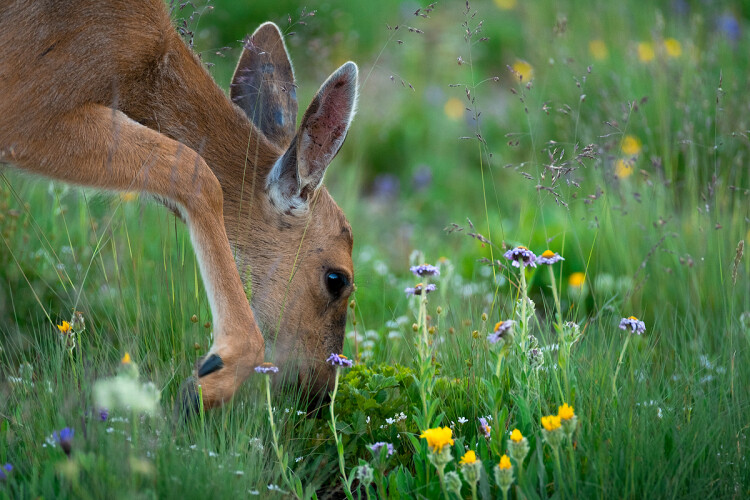
Below you have a typical example of when you need to use a fast shutter speed. In order to freeze the motion of the deer, I had to increase the shutter speed to 1/320th of a second. Had the deer been moving at a higher tempo I would have to increase the shutter speed even more to avoid any motion blur.

deer in a field - Working with Different Shutter Speeds for Landscape Photography

Photographing animals is not the only time where you should use a fast shutter speed though. In the image below, I used a shutter speed of 1/1600th.

Why did I use such a quick shutter speed for that scene? By the looks of it, the water is quite still, there are no moving subjects and there’s still enough light to use a slightly slower shutter speed, right? Yes, however, this shot was taken from a boat and even though the waters were relatively still, I needed a very quick shutter speed in order to freeze the scene without any blur from camera movement.

iceberg and water - Working with Different Shutter Speeds for Landscape Photography

Use the ideal settings not perfect ones

Had I been standing on land, I could have easily used a slower shutter speed and achieved a similar look. In fact, the overall quality could have been even better as I could have used a lower ISO and an ideal aperture. However, the purpose of photography isn’t to always have the perfect settings; it’s having the ideal settings that allows you to get the shot within the given conditions. The most important is to actually capture the image.

For too long I was too focused on always having the perfect settings. The truth is that this often leads to missing the shot as you focus too much on the technical aspect rather than working with the conditions you’re given.

For example, using a slower shutter speed when standing on a boat (such as in the image above) would have led to the icebergs being blurry due to the motion. What would you prefer? A blurry picture which is “technically” perfect, or a sharp picture that doesn’t have the technically perfect settings?

Before we move on to slower shutter speeds, let’s look at a few more scenarios where a fast shutter speed is recommended:

  • When photographing handheld.
  • Photographing quickly moving subjects.
  • When aiming to freeze motion.
  • When photographing from a vehicle.

Working with Slow Shutter Speeds

In landscape photography, the difference between slow shutter speeds is much bigger than between fast shutter speeds. While you won’t see a huge difference between 1/320th of a second and 1/640th of a second (in most cases) you may see a big difference between 10 seconds and 60 seconds. Because of this, I’ll split this section in two parts: less than 30 seconds, and more than 30 seconds (Bulb Mode).

dark image with moving water - Working with Different Shutter Speeds for Landscape Photography

The definition of a long exposure is somewhat vague but in my Ultimate Guide to Long Exposure Photography eBook, I describe is at the shutter speed where you no longer can capture a sharp handheld image. Typically, this is in the range of 1/50th of a second, depending on your camera and focal length (a longer focal length requires a quicker shutter speed to capture a sharp handheld image than a wide-angle).

Shutter speeds up to 30 seconds

While the difference between a 1 second and 30-second shutter speed is big, it’s more natural to put these together in one section to keep this easier to follow. Still, I’ll try to break it up a little to give you an idea of which shutter speeds you should experiment with in different situations. Again, there’s no correct choice and it often comes down to your preference and the tools you’ve got to work with.

When photographing beaches and seascapes where waves are crashing onto the shore or forming around rocks, I often work with a shutter speed of 0.5-1 second. I find that this creates a nice blur in the water while still keeping enough texture. A slower shutter speed such as 8 seconds blurs the water but not enough to give it the “silky” effect you often see with long exposure photography (we’ll come back to that in a bit).

waves crashing on a rocky shore - Working with Different Shutter Speeds for Landscape Photography

This also applies when photographing waterfalls and rivers. I tend to use a semi-slow shutter speed rather than an ultra-slow shutter speed when working with these scenes, as I prefer to keep some textures in the water.

As you lengthen the shutter speed you’ll see that moving elements become more and more blurry. In the image below, I used a shutter speed of 20 seconds to blur the water and give some motion to the sky. If you look at the clouds, you can see that they have been moving and it’s starting to have the “dragged sky” effect.

seascape scene - Working with Different Shutter Speeds for Landscape Photography

Keep in mind that the speed of the clouds determine how slow the shutter speed needs to be in order to pick up this motion. When clouds are moving quickly you can pick up their motion even with a shutter speed of 5-10 seconds, but to really get the “dragged sky” effect you often need to use a shutter speed (or exposure time) longer than 30 seconds.

Shutter speeds longer than 30 seconds (Bulb Mode)

In order to achieve a shutter speed longer than 30 seconds you most likely need to activate Bulb Mode.

When I first got into long exposure photography and purchased my first 10-Stop ND filters, I immediately got hooked on these ultra-slow shutter speeds. I’ll admit that I don’t do as much of it anymore (as it rarely fits with the vision I have for most locations) but it’s certainly a lot of fun to play with.

The main reason to use a shutter speed longer than 30 seconds for landscape photography is to achieve the “dragged sky” effect and to completely blur out moving elements such as water. It can also be a good way to remove people from your images (if they walk around during your 2-3 minute exposure they most likely “disappear”).

sunset on a coastal scene - Working with Different Shutter Speeds for Landscape Photography

For the image above I used a shutter speed of 180 seconds. As you can see, this has completely blurred the water and the sky is dragged across the frame.

Conclusion

Working with longer exposures can be a lot of fun but it’s not something that’s always beneficial. For example, when photographing a scene that doesn’t have any moving elements (and no clouds), there’s no need to use an ultra slow shutter speed, as it will most likely look exactly the same with a slower one.

So knowing how to select the best or most appropriate shutter speed takes practice, and comes down to what you want to achieve in your image.


For more information about this and other aspects of this type of photography, check out my Ultimate Guide to Long Exposure Photography eBook,

The post Working with Different Shutter Speeds for Landscape Photography appeared first on Digital Photography School.


Digital Photography School

 
Comments Off on Working with Different Shutter Speeds for Landscape Photography

Posted in Photography