RSS
 

Posts Tagged ‘Landscape’

Tips for Creating Landscape Photos during the Golden Hour

26 Mar

The golden hour. Even if you haven’t been involved in photography for very long, you undoubtedly have heard the term thrown around. As photographers we are in the business of capturing light, and there is no better light to have cast on our subjects, than sun light that is low on the horizon.

The golden hour is defined as periods of time; specifically, the hour after sunrise, and the hour before sunset. The length and time of these occurrences depends on your location on our planet, and time of the year.
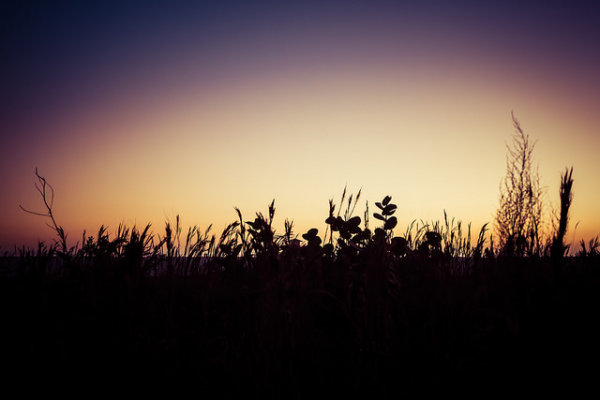
siesta_silhouette

Regardless of the type of photography you do, natural light generally falls into two categories; harsh (hard) and soft. Harsh light is what you see when the sun is high in the sky, during the middle of the day (cloudless day).

Because the light is at its most intense during that time, and shining directly down from above, shadows are sharp and well defined. They can also appear in places you don’t want them, such as on a human subject’s face. You can sometimes counter this by using fill flash and reflectors. When you’re shooting landscapes, you see the more unwelcome effects on the sky, with less warmth and higher contrast.

Your subjects are well lit, but generally only from one direction. Images shot during at midday can be rather dull and uninspiring, and it becomes more difficult to capture something spectacular.
goldenhour_article_new4

After the sun lowers in the horizon and sunset approaches however, everything changes. Simply put, taking photos during the golden hour give the images atmosphere. These times give the best light for all kinds of photography, but what advantages do you gain by shooting your landscapes during the golden hour?

Reduced Contrast

Light from the golden hour effectively reduces the contrast in your images. A black and white street shot could benefit from harsher light in the middle of the day, because the higher contrast and sharp shadows better define the subject and the environment. For landscape photos however, the world comes alive when the sun is low, and the light is soft and diffused. Shadows become longer and less defined, and the tonal range changes significantly. Clouds are illuminated differently, and their visual transitions against the sky soften.

Colors

The position of the sun during the day creattes varying temperatures of light, as you can see by the different colors as it crosses the sky. When we discuss temperature in photography, we’re discussing tthat of color, instead of heat. Neutral temperatures are what you see during the middle of the day. The main point to take away from this is that neutral temperatures are fairly uninteresting in regards to their aesthetic effect on your photography.
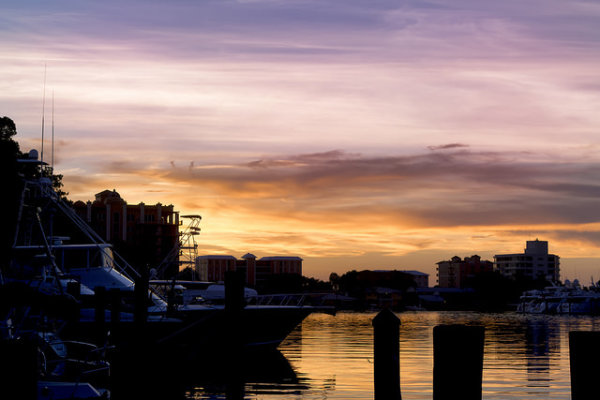
sunsetcolors

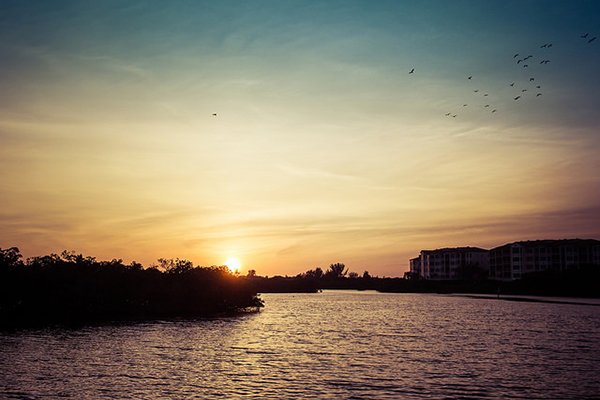
Color ranges become more vibrant and pronounced when the sun is closer to the horizon.

During the golden hour periods, colors tend to bend to the extremes, and give you much more pronounced effects on your images. During the morning golden hour, just after sunrise, the color temperatures are cooler, and give a moody, bluish hue to the shot. In the evening before sunset occurs, the spectrum shifts to warmer colors, providing you with warm oranges and reds.

A photo captured during the golden hour has a wonderful warmth and feel that’s impossible to capture at midday.

Softer Light Through Diffusion

Diffusion can be visualized with the words, scattering and softening. Light that is diffused is soft with less defined edges, and scattered across a greater area than non-diffused light. A good example of that is a diffuser attachment for your DSLR flash unit. The translucency of the diffuser attachment emulates the soft light you get from the sun being in a low position in the sky, and takes away hard shadows.
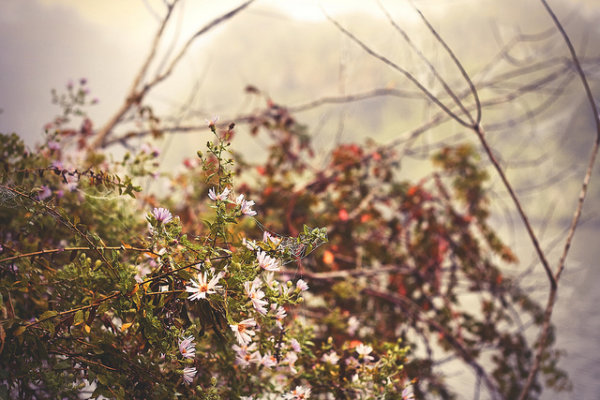
diffusion

Diffused light is more evenly and softly applied throughout a scene, and a low-hanging sun or sunlight projecting through clouds becomes a great natural diffuser.

Your landscape photos benefit from this by less pronounced shadows from objects in your shot, and in general the light that falls on your subjects within the landscape scatters in a more even, favorable manner. What does this all give you? Again, the one thing you’re ultimately striving for in landscape shots; atmosphere.

Sun Flare Effects

Another advantage of shooting during the golden hours is the opportunity to introduce sun flare effects and backlighting into your images. Because of the sun’s position in the sky (low and near the horizon), you have the ability to better introduce it as a subject, or as a compliment to the subject in your shot.
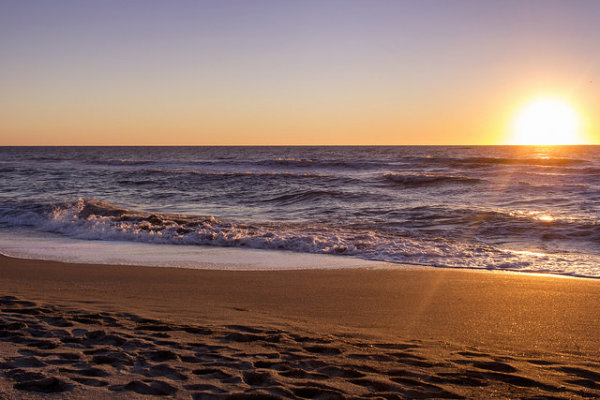
flare

Sun flares are easier to capture during the golden hours, and produces a much more dramatic effect on the final image.

Flaring occurs when the sun is either at or near the edge of the frame of your photo, and while in some situations it is unwanted (photographers typically use lens hood attachments to minimize these effects), flares can add mood and drama to a landscape shot.

So now that you’re aware of the wonderful effects of photographing during the golden hour, how do you go about shooting our landscape images during these times?

Settings

Your camera settings for shooting during the early mornings or late evenings are going to depend on your exact subject, but in general, since less light is getting to your sensor, a larger aperture is usually required.

You may also need to bump up your ISO setting to compensate for the lower amount of light. This will increase noise, but usually not to a noticeable point, and even then, there are steps in post-processing that can easily remove it.

Again, this all depends on what type of shot you are doing. If you’re looking at a long exposure capture, you would set your camera for a smaller aperture and lower ISO.
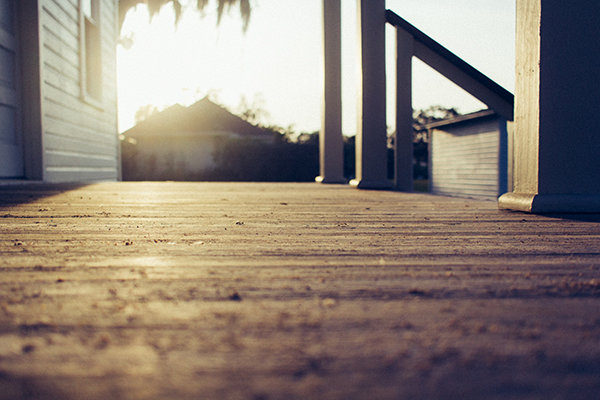
goldenhour_article_new3

Use a Tripod

As a landscape photographer you are always encouraged to use a tripod. Since generally you will be shooting in one static location for each set of shots, the tripod will allow you a wider range of apertures to work with. You always want your landscapes crisp!

Prepare

By definition, you have two hours each day to shoot for the best light, so your preparation for those times are even more critical than usual (you’re always prepared for any shoot, right?). If you’re planning on just taking your gear and spending time to set everything up on location, you run the risk of missing the shots you’re looking to get in the first place.

Either prepare before you leave, or allow extra time well before the golden hour to get everything settled. Scout the location ahead of time. Have your settings ready for the appropriate shots, and pack anything extra that you might need, including food, drinks or something warm to cover up with.

Keep Shooting!

While the scope of this article has been the golden hour, don’t forget that the magic doesn’t stop after the sun dips below the horizon. After this point, the blue hour begins, when colors and tones change even more rapidly and dramatically. Keep adjusting your settings, and shoot until there’s no light left to capture. You’ll be surprised at what you have when you finally get those images unloaded on your computer.

White Balance

While white balance is a setting on your camera, because of its overall effect on the atmosphere of your images, it warrants a little extra attention when shooting landscapes during golden hour. My recommendation is to take your camera off of AWB (automatic white balance) because the camera will attempt to neutralize the warmth of the image on this setting. Most DSLR’s have a cloudy or shade setting that will retain that color tone.

If you’re shooting RAW images, this is a step that can be adjusted in post-production.
goldenhour_article_new2Helpful Apps

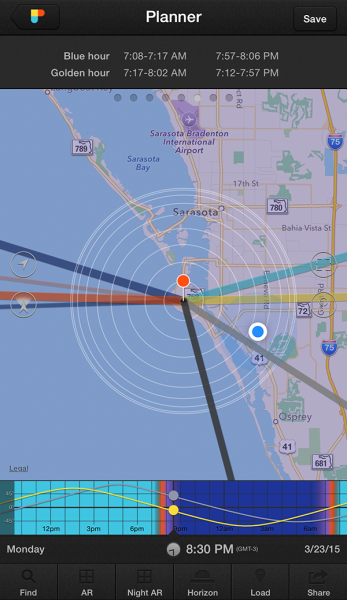
Thankfully, there are several Smartphone apps that can also help your planning process. A search on the Apple app store and Google Play shop will provide no shortage of this kind of apps, although there a few that I’ve used that seem a bit more robust, and worth the price you’ll pay. These apps provide calculators that will let you see when the golden and blue hours occur in any location in the world, and also include calculations for exposure, depth of field, time lapse, and more.

  • PhotoPills – iPhone/iPad, $ 9.99
  • Golden Hour – iPhone/iPad, £1.49
  • The Photographer’s Ephemeris – iPhone/iPad, $ 8.99, Android, $ 4.99

Enjoy the Light!

Shooting at optimal times of the day is one of the easiest things you can do to improve your photography. Nothing else adds character, atmosphere, and dimension to your work so dramatically.

What other golden hour tips do you have to share? How do you apply these guidelines to your own photography? Be sure to join in the conversation below, and keep churning out those golden shots!

googletag.cmd.push(function() {
tablet_slots.push( googletag.defineSlot( “/1005424/_dPSv4_tab-all-article-bottom_(300×250)”, [300, 250], “pb-ad-78623” ).addService( googletag.pubads() ) ); } );

googletag.cmd.push(function() {
mobile_slots.push( googletag.defineSlot( “/1005424/_dPSv4_mob-all-article-bottom_(300×250)”, [300, 250], “pb-ad-78158” ).addService( googletag.pubads() ) ); } );

The post Tips for Creating Landscape Photos during the Golden Hour by Tim Gilbreath appeared first on Digital Photography School.
Digital Photography School

 
Comments Off on Tips for Creating Landscape Photos during the Golden Hour

Posted in Photography


Using the Lightroom Adjustment Brush to add Dimension to a Landscape Photo

25 Feb

Adding layers of dimension with the Lightroom brush

Lightroom has the power to completely transform your landscape photograph into something far more powerful, something that hits home with viewers, and something that pops off the screen.

By default digital cameras create flatter image files than what you see with your eye. Your eye has the ability to see dimensions like no camera can really capture. Although many try.

What is Dimension?

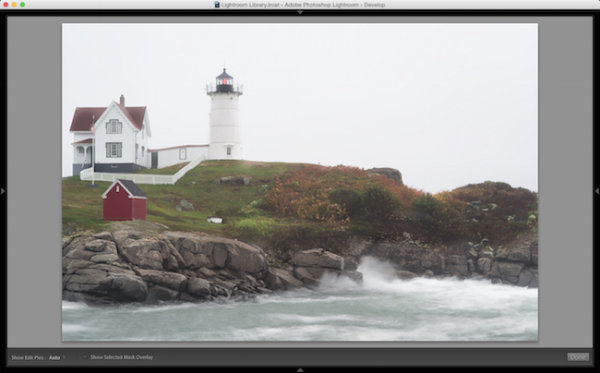
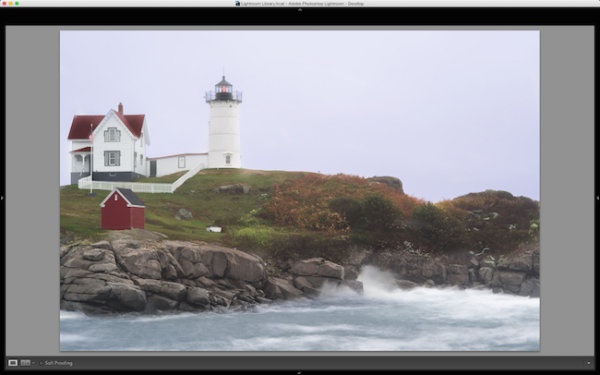
The definition of dimension is: an aspect or feature of a situation, problem, or thing. When utilizing the word dimension in your photograph, think of the features of specific locations and objects within the frame. As an example, in the photo you will see here, there are multiple layers of dimension to play with. There’s the sky, the water, the rocks, the buildings, the grass, and the shed. Each has its own uniqueness to it, and can and should be treated as such.

The Adjustment Brush Tool

Like the other local adjustment tools in Lightroom, the adjustment brush tool has the ability to fine tune specific parts of a photograph. Using the tool can create new dimensions you would never have otherwise seen from a camera rendition. Your eye, however, most likely did see the dimensions.

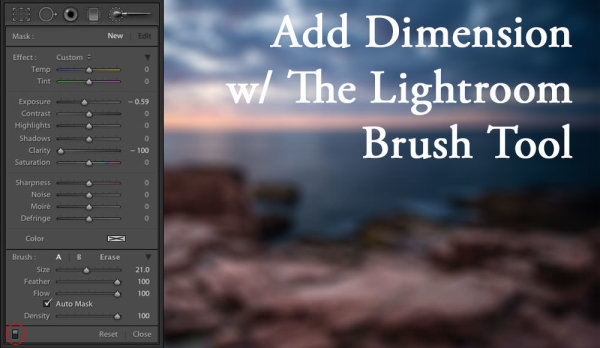
Lightroom Brush Tool

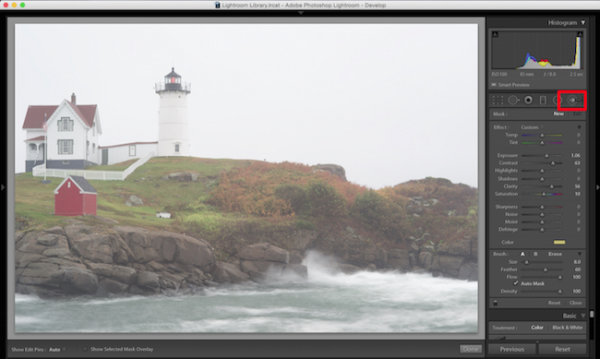
Where to find the Lightroom brush tool

You can see in the first photo that it’s a really cool lighthouse scene, but there is something drastically gone wrong. The photo is super flat. That is because it was a very rainy day with tons of fog everywhere, and mist from the water constantly hitting the camera.

To use the Lightroom Adjustment Brush, open a photo in the Develop module, then select the brush icon at the top right, just under the Histogram (the keyboard shortcut is K).

Once selected, a variety of local adjustments will appear. From there you have a wide range of options that you can make on a very specific section of your photo. For example, sharpness, exposure, or even brushing on a new color.

The first thing you should know before starting with the Adjustment Brush is that Lightroom keeps your last settings whenever adding a new brush. To zero out the settings simply double click on the word Effect.

Also, the Auto Mask feature is very smart. Think of it like a content aware brush. Simply put, it looks at the cross hairs inside of your brush and will try to stay “within the lines” and not brush on what doesn’t match up. This is fantastic for edges. However, the Auto Mask feature uses more Lightroom performance, so you may notice a slow down. My workflow is to fill in big spaces and then turn on Auto Mask when I need it.

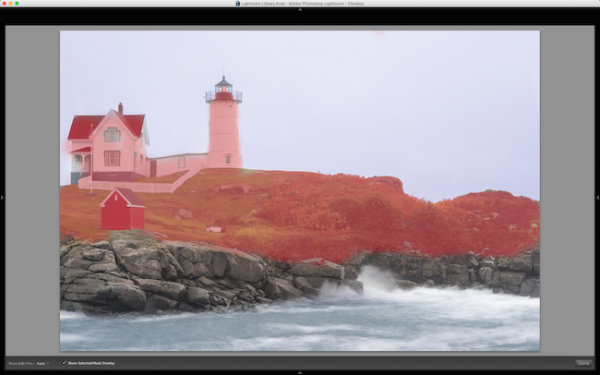
As you are brushing in areas, hit the O key on your keyword to see a red mask of where you have brushed (hit Shift+O to cycle through the available mask colors).

Lightroom masking

Hit the O key to view the current mask in a red overlay

I started brushing the middle section of the photo with more contrast, and reduced highlights and shadows. This broke through the haze and enhanced the greens enough to where I like it.

I then made another brush by clicking on New in the brush panel. This one was to bring down the extreme highlights of the house and lighthouse. I brought it down just enough so it’s still white, but doesn’t blend in with the sky, which is also very white.

Then came a third brush, which was for the rocks. I wanted to make sure they popped out more than anything else. I didn’t want them to just have contrast, so I also used the clarity slider. Clarity will enhance a lot of edge detail, which is awesome on rocks.

Lightroom brush clarity

Add clarity to select objects using the Adjustment Brush

Now that the grass, the structures and the rocks all have different dimensions of contrast, clarity and light, it is time to play with the color dimension. So I created another brush with a hint of transparent blue to the water. This adds more life to the boring gray tone it had previously.

I then did the same with the sky, but with less transparency due to the whiteness of the sky already. Adding a hint of color the white sky helps separate the house and lighthouse from the background even more.

The last brush I added to the photo was on the roof of the house. The intention there was to recover the red color subtly, so it doesn’t take away from the rest of the photo. So I increased the contrast, dropped the exposure slightly and added a hit more red to the roof.

Lightroom brush color

Add color to specific areas using the Lightroom brush

At the end of the day, the photo has multiple layers of dimension. It’s no longer flat, and notone section has the same feel as the rest. Using the brush feature in Lightroom I was able to not only recover color and contrast, but add even more texture and life to the scene.

Think of the Adjustment Brush tool like layers in Photoshop or onOne Software. There are no actual layers but rather brush points which can be adjusted individually.

Below is a video showing what I’ve done with this photograph.

There is a lot more that can be done, like sharpness, noise reduction and even changing color temperature and tinting for specific areas in a photo. But what I have shared here is a handful of what you are capable of doing within your favorite photography workflow software, Lightroom.

I’d love to see some photos you have processed using Lightroom Adjustment Brush tool. Please comment to share with the dPS community.

googletag.cmd.push(function() {
tablet_slots.push( googletag.defineSlot( “/1005424/_dPSv4_tab-all-article-bottom_(300×250)”, [300, 250], “pb-ad-78623” ).addService( googletag.pubads() ) ); } );

googletag.cmd.push(function() {
mobile_slots.push( googletag.defineSlot( “/1005424/_dPSv4_mob-all-article-bottom_(300×250)”, [300, 250], “pb-ad-78158” ).addService( googletag.pubads() ) ); } );

The post Using the Lightroom Adjustment Brush to add Dimension to a Landscape Photo by Scott Wyden Kivowitz appeared first on Digital Photography School.

Digital Photography School

 
Comments Off on Using the Lightroom Adjustment Brush to add Dimension to a Landscape Photo

Posted in Photography


The Importance of Scouting for Landscape Photographers

17 Feb
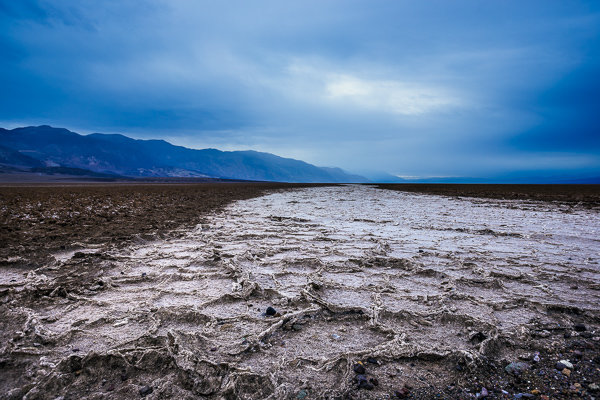
What Lies Beneath | West Side Road, Death Valley National Park

What Lies Beneath | West Side Road, Death Valley National Park

As I start writing this post, I’m sitting by my gate at Las Vegas McCarran International Airport. I loathe Vegas, but that’s beside the point. I managed to avoid the strip this time and will be home soon. I just wrapped up an incredible week leading a workshop in Death Valley National Park with my good buddy Brian Matiash and nine awesome students. This was my fifth trip to the park, and I’m starting to feel like I know the place like the back of my hand (even though there are still a several places I’d like to visit).

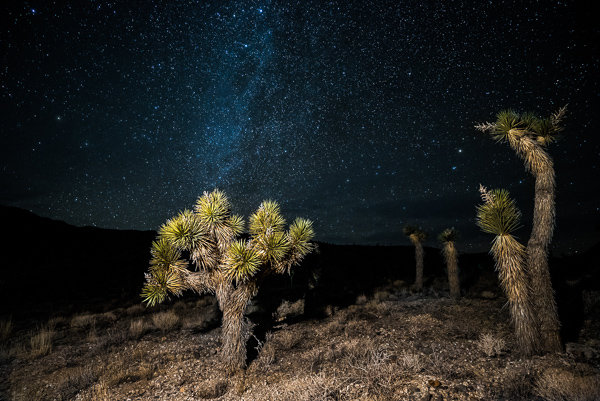
Joshua Trees in Death Valley

Joshua Trees in Death Valley

Ever since hearing about a lesser known area of the park known as Cottonball Basin (or Cottonball Marsh), I’ve been on the hunt for a certain kind of pattern found there. Cottonball Basin is hiding in plain site of virtually everyone who visits Death Valley. It’s located about five miles north of Furnace Creek off Highway 190, but there are no signs for it, and no areas for parking. You simply have to pull off into the gravel on the side of the road and start hiking out.

The trouble is that Cottonball Basin (and much of Death Valley) is always changing. Badwater Basin (which feeds into Cottonball) is an underground river, so the surface is always morphing and looks different with each visit. If you pick the wrong spot of the highway to pull over and start hiking, you could spend hours hiking around the marsh and find nothing.

During my last visit to the park (before this one), I hiked out to Cottonball twice and while I was able to come out with some decent shots, it wasn’t what I was looking for. I was never able to find the patterns I had seen in a few photos.

Even though I hadn't found what I was looking for, there is still plenty of beauty to be found all over Cottonball Basin.

Even though I hadn’t found what I was looking for, there is still plenty of beauty to be found all over Cottonball Basin.

This time around, I was bound and determined not to come up empty handed. Right before heading out, I purchased a Garmin Oregon 600 Handheld GPS. I had a cheaper Garmin before, but it was so unintuitive and difficult to use that I wasn’t willing to risk using it again. The Oregon series is a touch screen model that is responsive, quickly acquires satellites, and is very easy to use and understand.

The day before the workshop began, Brian and I hiked out to Cottonball Basin. We found essentially nothing. I felt pretty defeated. We ended up changing the workshop itinerary and nixed Cottonball Basin altogether. It wasn’t until a chance encounter at Racetrack Playa that my luck would change.

As our group began exploring The Racetrack, Brian and I noticed a group of four photographers at one of the best rocks on the playa. They were taking turns standing on the rock, sitting on it, and taking all sorts of photos with them in it (probably for Instagram or something). This made my blood boil, so before too long, we went over and laid into them pretty good. They apologized for what they were doing and promised to stop (I really don’t understand that behaviour).

Mesquite Sand Dune Crust | Death Valley National Park

Mesquite Sand Dune Crust | Death Valley National Park

After going back later that evening (they stayed at that same rock the entire evening) we began chatting with the main guy from the group taking pictures. He mentioned that he found some good patterns at Cottonball and showed us the shots he took with his iPhone. These shots were the closest I’ve seen in a long time to the patterns I was looking for and he was nice enough to let us know where to find them. Unfortunately, we only had one last day of the workshop so we’d have to try our luck alone after the students had already left.

On the last day of our trip, after the workshop had concluded, we headed out again to explore and scout the basin. Using my Oregon 600, I dropped a pin at our parking spot off the highway and began hiking out. Around half a mile in, we saw some good patterns starting to forming (this was after walking over some very unwelcoming terrain that would probably cause most tourists and/or photographers to turn back). Things were starting to look good. As we kept hiking out, the patterns began getting tighter and tighter together. Finally, around 1.5 miles into the basin we hit the mother-load. I dropped around 7 pins at different locations out on the basin because I knew these spots were going to be difficult to find again. It’s hard to describe, but Cottonball Basin is a massive expanse of completely flat terrain for the most part. You can pick the same exact parking spot, but if you hike out 20 degrees to the left of where you found the patterns, you’ll miss your mark by enough to not even see something useful.

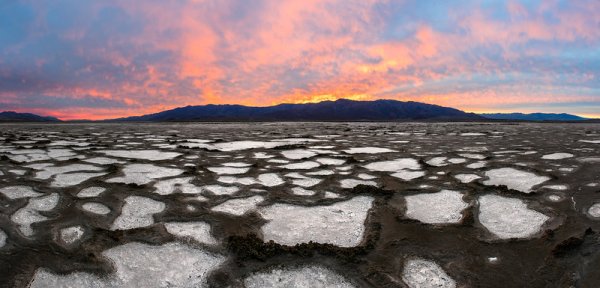
Cottonball Basin

The shot I had been waiting thee years to get was finally mine. I wanted to capture as much as possible so I created this panoramic by taking five vertical images and stitching them together in PTGui Pro.

After lunch and a good nap, we headed out again for sunset. The Oregon 600 led us directly to the exact same spots we stood in earlier that da,y with plenty of time to spare for the light to be right. Oh man, did the light get right. Sunset that evening was one of the top three sunsets I’ve ever seen in my life (and I take ranking my sunsets pretty seriously).

If we hadn’t been relentlessly scouting this location, I’m quite confident I would still be in search of those patterns today.

Start to Finish Video Tutorial

Below is a video I put together from the trip. This is an in-depth video showing the scouting process, the sunset shoot, as well as the post-processing of the image once I got back home. Let me know if you have any questions!

googletag.cmd.push(function() {
tablet_slots.push( googletag.defineSlot( “/1005424/_dPSv4_tab-all-article-bottom_(300×250)”, [300, 250], “pb-ad-78623” ).addService( googletag.pubads() ) ); } );

googletag.cmd.push(function() {
mobile_slots.push( googletag.defineSlot( “/1005424/_dPSv4_mob-all-article-bottom_(300×250)”, [300, 250], “pb-ad-78158” ).addService( googletag.pubads() ) ); } );

The post The Importance of Scouting for Landscape Photographers by James Brandon appeared first on Digital Photography School.

Digital Photography School

 
Comments Off on The Importance of Scouting for Landscape Photographers

Posted in Photography


Landscape Photography Tips & Tricks: Getting the Big Picture

04 Feb

Of all the different types of photography, capturing images of landscapes is one of the most popular.   The compulsion to capture breathtaking images of sweeping vistas, crystal shorelines and towering mountains comes on especially strong whenever people travel to new places. You’ve probably noticed this whenever some of your friends go on vacations. Their Facebook walls become flooded with Continue Reading

The post Landscape Photography Tips & Tricks: Getting the Big Picture appeared first on Photodoto.


Photodoto

 
Comments Off on Landscape Photography Tips & Tricks: Getting the Big Picture

Posted in Photography


Why I Switched From LEE Filters to Formatt-Hitech for Landscape Photography

03 Feb
A hard graduated neutral density filter worked great here to darken the sky.

A hard graduated neutral density filter worked great here to darken the sky.

There are three types of photographers in the world; those that try to get it right in camera, those that simply rely on post-processing, and those who believe that both mindsets together lead to the best possible outcome. I try to always keep the mindset of that third type. If I can get everything right in camera (and save minutes or even hours in post) I will. I also have always loved post-processing and the art of making an image come to life. When shooting landscapes, you are more often than not at the mercy of mother nature. You can certainly schedule your time wisely and shoot at the best times of day but that doesn’t always mean that you’ll be able to capture everything in camera, as it is.

I’ve been using filters in one way or another for the better part of four years now. I started off with those bloody screw in filters (my gosh were those a pain in the rear). I remember very vividly just how frustrating it was to need a separate filter for each and every lens. I also remember how long it took to get to a scene, set up my tripod, look at the scene, decide I needed a filter, realize the filter I needed doesn’t fit the lens I had on, switch lenses, get the filter out of its case, screw it on, refocus and then finally take a shot.

I used a my Formatt-Hitech 105mm circular polarizer here to remove glare from the rocks and water. The images without the filter were virtually unusable.

I used a my Formatt-Hitech 105mm circular polarizer here to remove glare from the rocks and water. The images without the filter were virtually unusable.

My brief stint with LEE Filters

After giving up on the screw-in filters, I eventually discovered the LEE Filter system. Those LEE filters are dang near impossible to get your hands on. I had to put my name on a waiting list at a camera store just to get the foundation system to attach the filters to my lenses. I then had to buy my filters on eBay and pay over retail to get them. My absolute favorite filter from LEE was (and still is) the Big Stopper. The Big Stopper is a 10 stop neutral density filter that will slow your shutter speeds down by…well…10 stops. This is a long exposure filter that is meant to slow time down drastically. You can easily get one to two minute exposures in broad daylight. The problem with the Big Stopper is that it’s a glass filter. This means that you have to be very careful with it and any time it’s on your person, you have to be extra cautious.

This 2 minute exposure caused the hundreds of tourists in the scene to disappear completely! © James Brandon

This two minute exposure caused the hundreds of tourists in the scene to disappear completely! © James Brandon

So what went wrong with LEE? Well, I’ll tell you…

Back in 2013, I was in California and was traveling up the coast from San Luis Obispo to San Francisco with my buddy Brian Matiash. We made it up to Big Sur and were trying to get down to Pfeiffer Beach for sunset. As we made our way up Highway 1, we pulled over to photograph Big Creek Bridge. I decided to put my Big Stopper to good use and started grabbing some long exposures of the bridge with the waves crashing against the shore below. I got a few shots where I was standing but soon decided to switch lenses and try something else. When I’m out in the field and need to switch lenses, I always point my camera down to the ground so that minimal dust will get into the censor during the swap. I pointed the camera down toward the ground (while still on the tripod) and then reached for my filter pouch to take off my Big Stopper before changing lenses. That’s when it happened. I felt a big thud against my shoe and then heard the terrible sound of glass hitting the gravel beneath my feet. Ugh…

It turns out the LEE filter holder can’t support the weight of a heavy Big Stopper. I’m not sure if this is a design flaw or what, but it certainly seems like oversight to me. With LEE filters (just like Formatt-Hitech) you have to screw an adaptor onto the lens you’re using (I just leave these adaptors screwed on most of the time). The filter holder then clips onto the adaptor via a pull pin on one side. This pull pin is angled away from the lens to match the shape of the ring adaptor. Because of the angle of this pull pin, you can actually just pull the filter holder off of the adaptor with surprisingly little force. Of course this will never happen if your camera is pointed out toward the horizon, but who among us never points their camera down? I got lucky that day because the filter hit my shoe first before hitting the ground. It didn’t bust the entire filter but one of the corners did however get a big chunk taken out of it.

My introduction to Formatt-Hitech

Colby Brown has been a friend of mine for a couple years now. I met him during the very, very early days of Google+ when a group of five or six of us would do hangouts almost daily. I have had the pleasure of watching his career virtually explode over this time and was really excited to see him land a signature edition filter kit with Formatt-Hitech. I’ll be the first to admit, I was pretty skeptical about trying any other type of filter besides LEE. Still to this day, I love my Big Stopper. However, that “event” in Big Sur really left me uneasy and nervous about using the LEE holder. So when Colby offered to send me his kit to review, I said what the heck, let’s see how it stacks up (see what I did there?) against LEE.

Unboxing

Don’t worry, I’m not posting one of those monotonous unboxing videos where I show you how the filters were packaged or how much paperwork is included. I’m including this section because of one thing; when I pulled the Formatt-Hitech filter holder out of the box, I knew instantly that it was better than LEE. It just feels better. It’s aluminum instead of plastic for one, but on top of that – the filter holder has a fastening screw to attach to the adapter ring instead of the little notched pull tab that’s on the LEE system. At first I wasn’t really sure this would be any better because, after all, you’re essentially just tightening the filter holder onto the adapter ring with a single screw. As it turns out though, the filter holder fits very snuggly onto the adapter ring, so when you tighten the screw the filters aren’t going anywhere. It takes a very strong push to cause it to budge at all, and no amount of filters will ever weigh that much. The LEE, on the other hand, requires surprisingly little force (see the video above).

Quality between LEE and Formatt-Hitech

The Colby Brown Signature Edition Landscape Filter Kit comes with basically everything you need to get started and stay satisfied using filters in the field for a very long time. I went all out and got the 100mm Premier Kit which comes with two graduated ND filters, a 6 Stop ND filter, the aluminum filter holder and to top it all off, a 105mm circular polarizer. Everything in the kit is extremely high quality and I use the filters on virtually every photo trip I take.

In all honesty, there isn’t a massive difference in the quality of images that come from either filter. Some will disagree with me on this of course. The LEE Big Stopper puts out a very obvious blue color cast in your images while Formatt-Hitechs new Firecrest filters put out virtually zero color cast. I’m actually quite fond of that blue/cool color cast though and have left it in several of my images to some extent. It’s also very easy to correct with a simple white balance adjustment so I’ve never considered it a huge deal.

I used my Formatt-Hitech 105mm Circular Polarizer for this shot as well to remove the glare from the rocks in the foreground.

I used my Formatt-Hitech 105mm Circular Polarizer for this shot to remove the glare from the rocks in the foreground.

Where Formatt-Hitech wins

There are three main areas where Formatt-Hitech Filters excel and where LEE falls short.

  1. The first of those areas is the one I already covered; a superior filter holding system constructed of durable aluminum and a tightening mechanism that won’t fail in the field when pointed at a downward angle.
  2. The second area where Formatt-Hitech wins is availability. The simply produce and ship enough filters so photographers like you and me don’t have to be put on waiting lists, or pay over retail to acquire their products.
  3. The third reason Formatt-Hitech takes the cake is that they continue to push to boundaries of what filters can do. They continue to innovate and advance. Their new line of Firecrest filters can stop down a scene by up to 16 stops! That means you could shoot in broad daylight at f/8, ISO 100 and a shutter speed of 1/1000th of a second and as soon as you slide that filter on, you’re shutter speed will drop all the way down to 1 minute. That’s insane!
Here I used my 10 stop neutral density filter to slow the shutter speed way down. This was a 25 second exposure taken before sunset. The clouds coming over the Sierras in the background is actually smoke from the rim fire that occurred back in 2013.

Here I used my 10 stop neutral density filter to slow the shutter speed way down. This was a 25 second exposure taken before sunset. The clouds coming over the Sierras in the background is actually smoke from the rim fire that occurred back in 2013.

Conclusion

Both LEE and Formatt-Hitech make great filters (although Formatt-Hitech has a slight edge in my opinion). However, the fact that I simply can’t trust the filter holder from LEE was enough to make me look at other options. Sure, I could have just stuck with LEE filters and got a new filter holder system, but I like to be all in with the brands I associate with in the industry. The failure of the LEE system caused me to look into Formatt-Hitechs options and when I did, I was pleasantly surprised to find a superior company making superior products. I’m not sponsored by Formatt-Hitech, I just honestly believe their products are top notch. Let me know if you have any questions below.

googletag.cmd.push(function() {
tablet_slots.push( googletag.defineSlot( “/1005424/_dPSv4_tab-all-article-bottom_(300×250)”, [300, 250], “pb-ad-78623” ).addService( googletag.pubads() ) ); } );

googletag.cmd.push(function() {
mobile_slots.push( googletag.defineSlot( “/1005424/_dPSv4_mob-all-article-bottom_(300×250)”, [300, 250], “pb-ad-78158” ).addService( googletag.pubads() ) ); } );

The post Why I Switched From LEE Filters to Formatt-Hitech for Landscape Photography by James Brandon appeared first on Digital Photography School.

Digital Photography School

 
Comments Off on Why I Switched From LEE Filters to Formatt-Hitech for Landscape Photography

Posted in Photography


5 Quick Reasons to Use the Nifty Fifty for Landscape Photography

17 Jan

The 50mm prime lens, or as it’s more commonly known, the Nifty Fifty; we all know the name, even inexperienced photographers have likely heard of it. Most of us know it for its outstanding qualities; an inexpensive, quality, prime lens that is in plenty of photographers’ bags around the world, and one of the most popular lenses of all time.

What we might NOT think of it as, however, is a lens normally used for landscape photography. The zoom is tight, and doesn’t possess a field of view wide enough to usually be considered proper for this sort of work.

But I have. For four years, the 50mm f/1.8 has been my workhorse for portfolio building (which is primarily nature and landscape), and even though I’m branching off with other lenses, I can’t stress the usefulness of the Nifty Fifty. And I’m not alone.

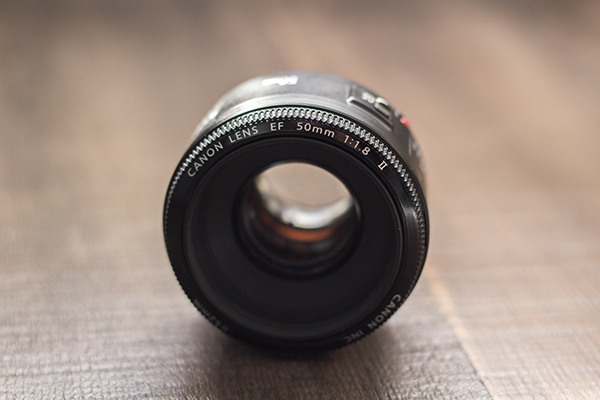
50mmLens

My primary reasoning for using the 50mm instead of going out and buying a proper wide angle lens such as a 35mm or even wider? Cost. I was delving back into photography, and was on an extremely tight budget. After buying my camera, spending $ 500 on a lens simply wasn’t an option. It didn’t take long for me to hear my fellow photographers sing the praises of this wonderful lens; cheap, fast, and sharp. Right up my alley.

There are no tricks or immaculate revelations here, and you won’t likely become famous for taking only landscape shots with 50mm lenses – but there are a few reasons why shooting landscapes with a 50mm lens can produce great results. Giving it a try can only improve your photography and make you a better observer of the world around you.

Focus on What’s Important

We think of landscapes as sprawling, wide shots, that include many elements in one frame, but does it have to be that way? Can we not capture the beauty of the area around us, in a tighter package? The rolling hills and an interesting tree in an outdoor scene are more than enough to create a photo that provokes thought.

The Nifty Fifty makes it easier to focus on whatever is most important in your photo, while still capturing enough around the subject to lend it scope.

The Nifty Fifty makes it easier to focus on whatever is most important in your photo, while still capturing enough around the subject to lend it scope.

Shooting at this focal length forces us to focus on the most important parts of what we’re seeing around us. Trimming the fat, as they would say. In doing this, we’re also training ourselves psychologically to do the same in all of our shots.

Quality

Landscapes usually require very good sharpness, and the 50mm prime lenses excel at that. No extra moving parts normally required for varied focal lengths (zooms) mean a crisper, sharper result. As with most lenses, its sweet spot isn’t wide open, but more in the f/4 to f/5.6 range. Even narrower apertures will still yield excellent results.

The 50mm prime allows you to capture very sharp images

The 50mm prime allows you to capture very sharp images.

Take Your Time

Since the 50mm is a prime lens, you’ll get an added benefit (or detriment, depending on how much you care for walking); the single focal length means you can’t just shoot from anywhere, you’ll need to move around to find the best angle and distance. This automatically forces you to think about your shot a bit more, which is always a good thing.

The 50mm allows you to think differently about the landscape or subject you're framing, and to make more creative choices.

The 50mm allows you to think differently about the landscape or subject you’re framing, and to make more creative choices.

With a zoom, you’d adjust focal length without even thinking, until the scene is framed in a way that looks good. But what if that isn’t the best angle or distance? The Nifty Fifty will give you incentive to take a chance and try something different, whether it be an angle, a distance, or even perspective.

No Wide Angle…or Can There Be?

Of course there can! The 50mm gives you a gentle push into playing around with some panoramic shots. Three, four, five, or more shots can be stitched into a flattering wide angle composite, sometimes with even more dramatic results than a single wide angle shot.

By stitching together shots, we can create a panorama that gives us the wide field of view we're looking for

By stitching together shots, we can create a panorama that gives us the wide field of view we’re looking for.

Lightweight is King

If you’re serious about landscape photography, you’re probably already lugging around a considerable amount of gear; camera bodies, other lenses (you don’t go out with just one lens, do you?), tripods – the list goes on. The last thing you need are more heavy lenses when you’re out and about, right? Do you know what the Canon 50mm f/1.8 weighs? 4.6 ounces (130 g). It’s short, sweet, and light to boot.

At the end of the day, all lenses and focal lengths have advantages and disadvantages, and the case can certainly be made for using glass with wider angles. But as a teaching tool, the 50mm prime lens is a great option for your landscape photography; it will make you think a bit differently about those types of shots and easily provide you with clear, sharp images.

What are your experiences with this lens? What images have you captured? Tell us your opinion below, and show us those Nifty Fifty shots!

googletag.cmd.push(function() {
tablet_slots.push( googletag.defineSlot( “/1005424/_dPSv4_tab-all-article-bottom_(300×250)”, [300, 250], “pb-ad-78623” ).addService( googletag.pubads() ) ); } );

googletag.cmd.push(function() {
mobile_slots.push( googletag.defineSlot( “/1005424/_dPSv4_mob-all-article-bottom_(300×250)”, [300, 250], “pb-ad-78158” ).addService( googletag.pubads() ) ); } );

The post 5 Quick Reasons to Use the Nifty Fifty for Landscape Photography by Tim Gilbreath appeared first on Digital Photography School.

Digital Photography School

 
Comments Off on 5 Quick Reasons to Use the Nifty Fifty for Landscape Photography

Posted in Photography


A Super Simple Way to Make Landscape Photos POP Using Lightroom

17 Jan

It seems like virtually all outdoor or landscape photographs suffer from the same illness when they come out of the camera. The symptoms are:

  • An overly bright sky
  • Foreground that is too dark
  • A general lack of color and contrast.

Sound familiar?

Fortunately, there is a cure for this ailment. Actually, as anyone who has worked with post-processing software for any length of time knows, there are a lot of different cures. But I want to show you a super simple way to fix pictures with these problems. I performed these fixes in Lightroom, but you can also do them on the Adobe Camera Raw screens of Photoshop or Photoshop Elements.

Colorado road photo with Lightroom adjustments

The quick-fix shown here will involve nothing more than moving six sliders, each of which is in the Basic panel of Lightroom’s Develop module. The edits will take less than 30 seconds of your time. I performed these edits – and only these edits – to the pictures you see throughout this article to show you the effects.

The Steps

Let’s not dally with a lot of explanation just yet. Here are the steps to perform a quick-fix of landscape photos. The first three steps are the most important, where you will see about 90% of the changes to your pictures. After walking you through these steps I will explain the process in a little more detail.

  1. Decrease the Highlights: Just pull the highlights slider to the left as much as is needed to add more detail to your sky.
  2. Increase the Shadows:  Pull the Shadows slider to the right to brighten the foreground. Don’t worry if it looks a bit washed-out after this step.
  3. Reduce the Blacks: Pull the Blacks slider to the left. This will add contrast back to the picture, and will fix the washed-out look that might have crept into your picture after the last step.
  4. Increase Vibrance: Pull the Vibrance slider to the right a bit to add more color to the picture.
  5. Increase Contrast: Pull the Contrast slider to the right a little bit to increase overall contrast. Don’t go too far, or it might start to undo the changes you just made above.
  6. Increase Clarity: Pull the Clarity slider to the right to add some clarity (edge contrast) to your photo and make it appear less soft.

That’s it. Just move these six sliders and you should see a vast improvement in your landscape pictures. This might seem more complicated than it actually is, because there are six steps. But after a while you will be able to do all of it in a matter of seconds.

Bass Harbor photo with Lightroom adjustments

What’s Going on Here

Now that I’ve shown you the steps and a few examples, let’s talk about this process.

What you are doing first is reducing the tones in the sky by using the Highlights slider. The sky is typically the brightest part of landscape photos. The Highlights slider will ONLY affect the brightest tones in the image, so decreasing it should tone down your sky but not touch the darker portions of your picture. Decreasing the highlights will not only keep the sky from being too bright, but will also add detail and texture to the clouds.

After the change to the sky, step 2 is to increase the brightness of the foreground. The foreground is almost always too dark in outdoor photos, and you need to brighten it up and add detail there. As you pull the Shadows slider to the right, you should see your foreground brighten up. The sky, which is not among the shadows of your photo, should remain largely unaffected. Your photo should be looking a lot better at this point.

Many times, when you make the change to the foreground in step 2, that area starts to look a little bit washed-out. Therefore, step 3 is the pull the Blacks slider to the left. Whereas the previous step brightened the shadows, we are now taking the very darkest tones in the photo and bringing them closer to black. The shadows were made brighter in the last step, and now the blacks are made even blacker. That adds more contrast to the foreground and eliminates that washed-out look. It often adds a little bit more contrast to your sky as well.

Note: For a handy tip on using sliders, read The Magic Alt Key article here. 

At this point, your photo should be looking pretty good. In fact, about 90% of the effect is applied to your photo after step 3. Now you will just clean up by making the photo a little clearer, and more colorful.

Texas field photo with Lightroom adjustments

In step 4, we will just increase the vibrance of the photo to add more color to the scene. The Vibrance slider is just below the sliders you have been working with.  Pull it to the right to add more color to the picture. You can adjust this slider however you want, but don’t overdo it.

You might wonder why you should use the Vibrance slider instead of the Saturation slider. The answer is that vibrance is designed to have a higher impact on less saturated colors. Saturation adjustments apply to all colors equally, so an increase in saturation can make certain highly saturated colors look garish. Vibrance, by focusing on colors that are less saturated, lets you increase the overall saturation of your colors without overdoing any colors.

Next, you add a little contrast. Pull the Contrast slider to the right a little bit. You have to be careful here because essentially what you did in the first three moves of this process was reduce overall contrast (making the bright sky darker and the dark foreground lighter). If you crank the contrast up now using the Contrast slider, you will be working against the moves you previously made. A small or moderate increase in contrast, however, can add more texture to the photo, so I recommend you do that.

Finally, a small to moderate increase in Clarity usually makes the photo look sharper and clearer. Don’t overdo this, as clarity is a powerful tool. Just add a little bit by pulling the Clarity slider to the right, and this final step can really make your photos pop.

After having gone through this process, there is nothing stopping you from continuing with additional editing, if you wish.  You can take your photo into Photoshop and make a lot of other changes, or you can use the plug-in of your choice. But even if you decide to do additional editing, the process I have described in this article can still be a good starting point for your landscape photos. It also works really well when you are in a hurry or you’d like to process a lot of photos at once.

Head Harbor Lighthouse photo with Lightroom adjustments

Bonus Tip

I want to keep this process as simple as possible and not confuse it with a bunch of other things, but there is just one more tip I want to pass along in this article. It is a way to add more contrast to your skies in Lightroom (or in ACR in Photoshop).

Scroll down to the HSL/Color/B&W panel in Lightroom’s Develop module, where you will see sliders for eight different colors. Go to the Blue slider and make sure the Luminance tab is selected just above the colors. Decrease the luminance of the blues in your picture by pulling the Blue slider to the left. This will make the color in your sky a deeper, richer blue.

Recall that Step 1 of the process above was to decrease the highlights in an effort to tone down and add detail to your sky. If you decrease the luminance of the blues, you might find that you don’t need to do Step 1 (or at least that you do not need to pull down the highlights as much). In fact, keeping the highlights nice and bright, while decreasing the luminance of your blues, can really add some nice contrast to your skies.

Colorado National Monument photo with Lightroom adjustments

Conclusion

This is one simple way to make super fast changes to your landscape photos. After you have done it a few times, you can make these changes in mere seconds. I know we are all sensitive to falling into ruts and doing the same thing over and over again, so you don’t want to do this process all the time. But it is great when you just want high impact in a short amount of time, or as a quick baseline for further changes.

googletag.cmd.push(function() {
tablet_slots.push( googletag.defineSlot( “/1005424/_dPSv4_tab-all-article-bottom_(300×250)”, [300, 250], “pb-ad-78623” ).addService( googletag.pubads() ) ); } );

googletag.cmd.push(function() {
mobile_slots.push( googletag.defineSlot( “/1005424/_dPSv4_mob-all-article-bottom_(300×250)”, [300, 250], “pb-ad-78158” ).addService( googletag.pubads() ) ); } );

The post A Super Simple Way to Make Landscape Photos POP Using Lightroom by Jim Hamel appeared first on Digital Photography School.

Digital Photography School

 
Comments Off on A Super Simple Way to Make Landscape Photos POP Using Lightroom

Posted in Photography


Wild Things: Marsel van Oosten’s landscape and wildlife photography

11 Jan

“Simplicity is the ultimate sophistication,” says wildlife and nature photographer Marsel van Oosten. A talented landscape and wildlife photographer, his imagery has been featured in a number of publications like National Geographic. Check out more of his work and peek inside his camera bag. See gallery

Articles: Digital Photography Review (dpreview.com)

 
Comments Off on Wild Things: Marsel van Oosten’s landscape and wildlife photography

Posted in Uncategorized


Essential Accessories for Landscape Photography

08 Jan

Have you ever hiked hours into the bush only to discover that you’ve left your tripod clip on your other camera? I confess I’ve done this and much worse. Many a choice swear word has been heard echoing in the valleys by all manner of wildlife. It’s a good thing there are no parrots where I go hiking.

Inside a Landscape Photograhers Camera Bag

Proper planning prevents disappointment

I’ll admit I’m not the tidiest person, but when it comes to my camera bags, I now pack them with a microscopic fastidiousness that you’d expect from the likes of Hannibal Lector.

I’ve learned the hard way that packing everything I need for a particular shooting environment will almost guarantee success – weather permitting of course.

What to pack for fun landscape photography

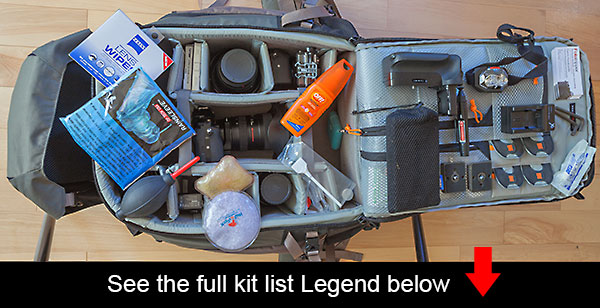
Let me share with you the essential gear that I usually pack into my camera bag. I think you’ll find it contains a few essential accessories you may not have considered before. I actually use three different bags for different occasions. I’ll use my largest bag for short hikes where I expect to be spending a lot of time shooting. I also use that large bag when I’m traveling internationally because I need to have ALL my stuff.

The big bag – Lowepro Pro Trekker 450 AW

Essential Landscape Photography Accessories

  1. Lens wipes
  2. Filters such as polarizers and neutral density filters
  3. Extra lens – in this case it’s the Samyang 14mm for shooting the stars
  4. Second camera – mine is the Sony A6000
  5. Third camera – this is the Gopro Hero 4 Black for quick and easy 4K video shooting
  6. Rain sleeve, or as I prefer to call them ‘camera condoms’
  7. Main camera – Sony A7R with a Canon 16-35mm lens
  8. Insect repellant – if I donate blood, it won’t be to those sodding mosquitoes
  9. Weather proof memory card holder
  10. Blower for lenses and sensors – this is essential if you switch lenses often
  11. Batteries for camera – as a Sony shooter I need three batteries to every Canon shooter’s one. I actually pack six
  12. Hand warmers – these handy little heat packs are a life saver. Just click the metal plate inside to trigger the chemical reaction and you have instant heat in your hand. They’ll probably be proven toxic eventually but until then I’ll remain in blissfully warm ignorance.
  13. Extra lens – in this case it’s the legendary Sigma 85mm 1.4 for those lovely bokeh shots
  14. Sensor cleaning kit for full frame and APS-C sensors. Absolutely essential
  15. (Image below) Battery grip for extended battery life. Most of the time I leave this off the camera. I use it for long duration time-lapse shooting
  16. Lens pen – for quick and easy removal of dust and water spots
  17. Headlamp (two) – avoid falling off cliffs or stepping in dung heaps during the night
  18. Battery chargers – I pack two chargers that I can plug into a wall socket or car
  19. Business cards – always be ready to promote your brand. You never know who you’ll bump into
  20. Battery pack – this device will charge/power my phone and battery chargers
  21. Spare tripod clips
  22. Extra storage for memory cards
  23. Tools – Allen wrenches for tripod maintenance
  24. Ear plugs are a life saver when you travel

Landscape Photography Essential Equipment

Not pictured

  • Laptop
  • Phone charger
  • Batteries for headlamps
  • Water bottle on the side of the bag

The medium sized bag – Case Logic

Medium Sized Camera Bag for Landscapes

My medium sized Case Logic shown next to the Full sized Lowepro bag. This is just my own approximation of the scale comparison.

If I’m planning on a large hike, I’ll actually use a medium sized bag that I strip down to the bare essentials. There’s no point dragging your entire kit list on a grueling 10 hour hike. In those cases you’ve really got to stop and think about exactly what you’re likely to need. Water is usually the most important. This bag is used for longer hikes and has a stripped down version of the big bag. I use a Case Logic bag which is about half the size of the giant camera bag show above. My medium sized bag weighs next to nothing empty and can fit most of the essentials needed for landscape photography.

  • Headlamps
  • Water
  • Camera batteries
  • Memory cards
  • Main camera with lens
  • Spare lens
  • Lens wipes
  • Blower
  • Lens pen
  • Rain sleeve
  • Filters
  • Insect repellant
  • Business cards
  • Ear plugs

The small bag – Roots Safari

Small Camera Bag

When you can get away with only the minimum of gear, this bag will save your back and shoulders. This is my standard night photography bag. To be honest it’s nothing special, not even waterfproof but I never take it out in the rain anyway.

  • Headlamps (two)
  • Camera batteries
  • Memory cards
  • Main camera with lens
  • Lens wipes
  • Blower

Safety first

Many years ago I hiked nine kilometres around Uluru (Ayers Rock) in scorching heat with only one little bottle of water. Not the smartest thing to do, but having learned that hard lesson, it’s absolutely vital that you plan according to your environment. Desert photography requires a different kit list to arctic photography. It’s not just about what you pack into your camera bag but also the smaller things that you carry in your pockets. Water, food, gloves, phones and ideally a SAT phone are all things that need to be considered if you plan on staying alive and getting amazing photographs when you’re out in the wilderness.

Whether it’s flash kits, ropes or umbrellas, I’d love to know what other essential accessories you’d bring on a landscape photography shoot.

googletag.cmd.push(function() {
tablet_slots.push( googletag.defineSlot( “/1005424/_dPSv4_tab-all-article-bottom_(300×250)”, [300, 250], “pb-ad-78623” ).addService( googletag.pubads() ) ); } );

googletag.cmd.push(function() {
mobile_slots.push( googletag.defineSlot( “/1005424/_dPSv4_mob-all-article-bottom_(300×250)”, [300, 250], “pb-ad-78158” ).addService( googletag.pubads() ) ); } );

The post Essential Accessories for Landscape Photography by Gavin Hardcastle appeared first on Digital Photography School.

Digital Photography School

 
Comments Off on Essential Accessories for Landscape Photography

Posted in Photography


The Hottest Landscape Photography Articles on dPS in 2014

27 Dec

Landscape photography is always a popular topic here on dPS and we had some really great articles on that topic over the last year. Now is your time to read up, bookmark them, refresh your knowledge, or get inspired to get out shooting some landscapes.

A final image after being processed in Photoshop

A final image after being processed in Photoshop

In no particular order, here are some of the most popular landscape photography articles from 2014:

  • How to Get Super Sharp Landscape Photography Images
  • 10 Most Common Mistakes in Landscape Photography – and How to Overcome Them
  • 3 Tips to Take Better Landscape Photos Regardless of the Weather
  • 5 Steps to Help you Take Better Landscape Photos
  • Some Punchy Black and White Landscape Photos to Oooo and Aaah Over
  • Landscape Photography and Hyperfocal Distance
  • 5 Tips for Better Long Exposure Landscape Photography
  • Better Landscape Photography Tips and Video Tutorials
  • How to Create Amazing Urban Landscape and Street Photography Images
  • How to do Dreamy Landscape Photography with a Neutral Density Filter
  • 5 Tips for Newbie Landscape Photographers
  • The Power of Post-processing for Landscape Photography
  • and a dPS ebook for good measure: A Guide to Landscape Photography Workflow and Post-Processing

googletag.cmd.push(function() {
tablet_slots.push( googletag.defineSlot( “/1005424/_dPSv4_tab-all-article-bottom_(300×250)”, [300, 250], “pb-ad-78623” ).addService( googletag.pubads() ) ); } );

googletag.cmd.push(function() {
mobile_slots.push( googletag.defineSlot( “/1005424/_dPSv4_mob-all-article-bottom_(300×250)”, [300, 250], “pb-ad-78158” ).addService( googletag.pubads() ) ); } );

The post The Hottest Landscape Photography Articles on dPS in 2014 by Darlene Hildebrandt appeared first on Digital Photography School.

Digital Photography School

 
Comments Off on The Hottest Landscape Photography Articles on dPS in 2014

Posted in Photography