While iPhone fanatics worldwide are lining up for Apple’s new iPhone 5s, the folks at iFixit are already taking the smartphone apart. The team has already torn into the latest flagship iPhone to take a closer look at a revamped iSight camera, that new A7 chip and more. Dig in with us at connect.dpreview.com.
Photography, as an art form, can be quite elastic. It can be used to capture the ‘decisive moment’ or a once-in-a-lifetime split-second shot. Or, the form expands into more studied, careful, fine art approaches. These photos fall into the second category. Their use of color and lines, artificial lighting and repetition give them a lot in common with paintings – so much so that they might just trick you at first glance.
Billed as a way to bring back the romance of the darkroom in the smartphone era, Enfojer is an indiegogo project which promises to make your smartphone into an enlarger to create real prints. Part app and part hardware, Enfojer enlarges the image displayed on a smartphone’s LCD, projecting it onto real photo paper to create genuine darkroom chemical prints. Click through to connect.dpreview.com for more on Enfojer’s efforts to bring smartphone photography into the darkroom.
[ By Steph in Architecture & Public & Institutional. ]
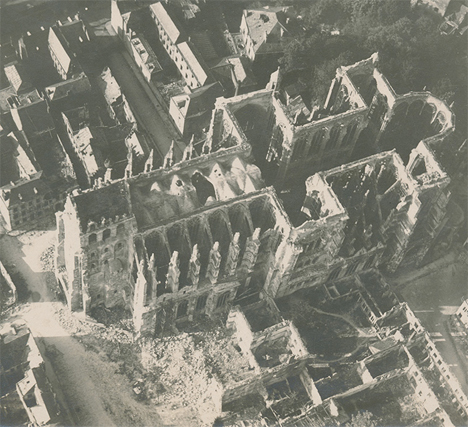
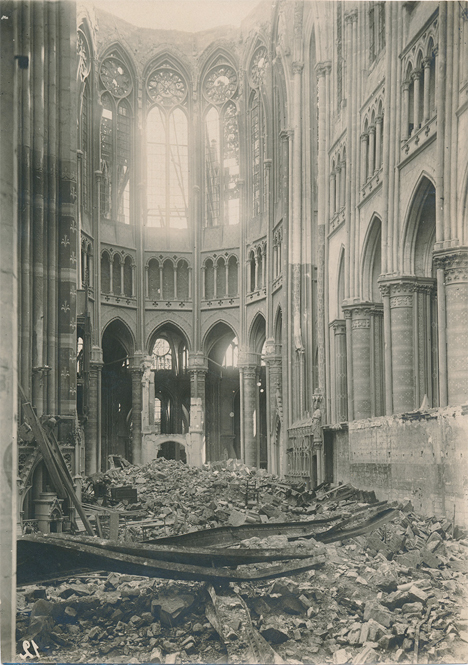
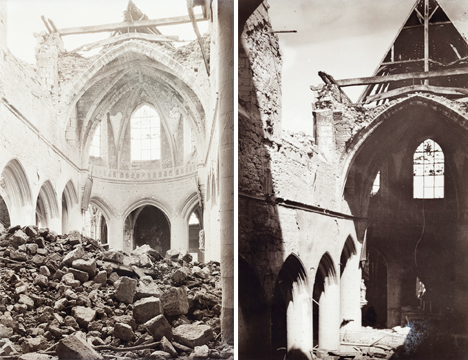
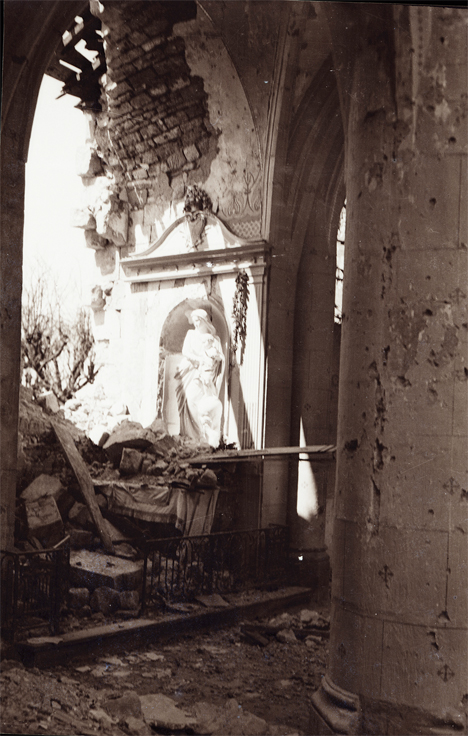
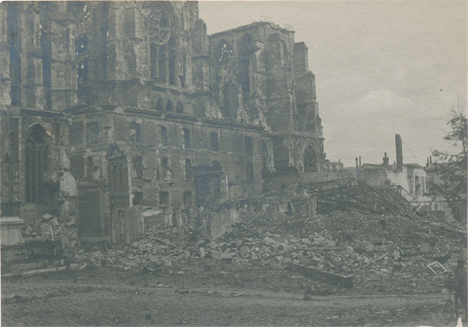
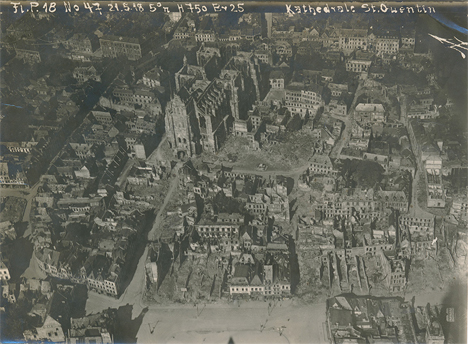
Seen from the eyes of a German officer, these dramatic photos depict the St. Quentin Cathedral in northern France, which was almost completely destroyed during World War I. They’re part of a collection of over a thousand photos, stereographs and negatives saved by Lt. Walter Koessler’s family and shared by his grandson on Tumblr and in a forthcoming Kickstarter-funded book.
“Walter’s training as an architect drew him to photograph and sketch many buildings throughout the war,” writes Dean Putney, who has taken on the task of preserving and printing the photos. “Churches were a particular favorite, and with their roofs blown off by battle these were probably rare opportunities to capture their insides on the insensitive film of the time.”
The church was constructed over a period of nearly two hundred years, starting in the 12th century, and survived damage from both fire and invaders’ artillery several times prior to World War I. In 1916, a bomb dropped nearby blew out many of its stained glass windows, and in 1917, a fire destroyed everything within its walls, causing the vaulting of the central nave to collapse, and destroying parts of the flying buttresses.
In 1918, the Germans almost succeeded in blowing the whole thing to dust. Having chased out the occupiers, French soldiers entered the cathedral to find that ninety-three holes had been drilled in the walls and pillars and filled with explosives. A German engineer captain was left behind to finish off the task, and stopped just in time. The church has since been restored.
Koessler’s photos offer a unique glimpse not only into the German side of the war (as Putney points out, most surviving photos were taken by the Allies) but the personal viewpoint of a photographer who had been trained as an architect. See the whole series at the Walter Koessler Project.
[ By Steph in Architecture & Public & Institutional. ]
If romantic comedies have taught us anything it’s that getting a beautiful bouquet of flowers is pretty darn special.
Flowers brighten up your day, but they tend to do that one pesky little thing — dying once they’re cut.
Making flowers out of photographs is a fun and cheeky way of telling that special someone you are smitten.
Plus, these flowers will go on living as mini photographic reminders of beautiful things that have happened in your life.
Learn how to make a super fun and simple bouquet of photo flowers to cheer up your living space, a loved one, or a stranger on the street. (Because we’d all like to feel like we’re in a romantic comedy once in a while.)
Learn How to Make Flowers out of Photographs
Why It’s Cool
Flowers are beautiful and the tend to make everyone pretty stinkin’ happy.
It’s awesome how placing a vase of flowers in a room makes it feel a little more put together than it did before.
These photo flowers will achieve that higher level of design sophistication all the while displaying images of things you love.
They’re simple and elegant with a touch of whimsy that’ll make all your friends ask “How did you do that?”
The best part of the photo flowers is that they will live forever. They wont go rotting away in a vase that you just keep “forgetting” to clean out.
Ingredients:
Photos you want to turn into flowers*
Scissors
Floral Wire
Floral Tape
Glue
Pen or Pencil
Circular object for tracing
*Photos printed on computer/copy paper or vellum work the best.
STEP 1: Round and Round
Use a circular object to trace a circle on your printed image.
Choose carefully where you trace, as the middle of the circle will be the middle of the flower.
STEP 2: Get to Cutting
Time to get crafty. Take up your scissors!
Cut out the circle you just traced.
Don’t worry if it’s not perfectly cut out. The imperfection will add to the charm of the flower.
STEP 3: Go Halfsies
Fold the circle in half.
STEP 4: And Again…
Fold the half-circle in half.
You’re getting so good at this.
STEP 5: One more time
Fold it in half again.
Your circle will now look like tiny little fan.
STEP 6: Shape it up
Cut the top of the circle from end to end to create a cone shape.
The finished result will look an ice cream cone.
You can play around with how you cut the top as this will be your petal shape. Try a few shapes to see what petal cut out you like best.
STEP 7: Make Your Mark
Unfold your circle and you will find 8 petals.
Mark off your least favorite petal and the top half of the petal next to it with a pen or pencil.
STEP 8: Just a Little off the Top
Cut out those one and a half petals. Buh-bye petals.
You will be left with 6 and a half petals.
The half petal will be the anchor of your flower (and it will look a little like a triangle).
STEP 9: It’s all Coming Together
Put a dab of glue on the half petal.
Glue the petal next to it (across the gap) on top of the triangular half petal.
STEP 10: Create Some Texture
Pinch each petal, making a crease down the middle to give them a little extra texture and shape.
STEP 11: A Little Loopy
Make a simple loop in the top of the floral wire with your scissors.
STEP 12: A Flower Grows
Poke the end of the floral wire that does not have a loop in it through the center of the flower.
STEP 13: The Finishing Touch
Cut a 2 inch strip of the floral tape and wrap it around the base of the flower to secure it to the top of the wire.
Yippee! You just made your first flower out of a photo! Feels good, right?!
If you aren’t super stoked on your first attempt don’t give up hope. It may take a couple of tries to get the hang of this. Don’t discard the flowers you don’t like ’cause they will look cute among the flowers you do like when they are all put together in a bouquet.
Taking It Further
Print your photos double sided so that you will have images on the top side of the flower as well as the bottom side of the flower.
Make a garland of photo flowers by twisting the wire together.
Make all types of flowers. A quick google search on how to make paper flowers will give you a plethora of tutorials on crafting different types of flowers.
Make a wreath or head piece of photo flowers.
Related posts:
DIY: Turn Digital Photos into Vintage-like Prints with Mulberry Paper Extra photos for bloggers: 1, 2, 3 What is it…
Frame Your Photos with a Paper Craft Photo Globe Extra photos for bloggers: 1, 2, 3 With the holidays…
DIY Photo Wrapping Paper — Wrap Gifts in Your Very Own Photos! Extra photos for bloggers: 1, 2, 3 Free shipping on orders over $ 100!…
If you have a digital SLR and don’t want to blow two grand on an underwater housing, check out the alternative the folks at Digital Camera World came up with. Just put your camera into a clean fish tank, attach a remote shutter release cable, lower the tank into the water, and fire away. Naturally, this only works in calm water, so don’t take it into the ocean unless you fancy buying a new camera. Details and a photo after the link.
From the air, the landscape of Texas’ vast feedlots and oil fields is by turns bleak and surreal. Photographer Mishka Henner aimed to capture the contrasts and intense colors of these landscapes in a collection of work titled ‘Feedlots.’ By stitching together hundreds of satellite images, he created large, detailed prints documenting the dynamism of these locations – earth tones clashing with the violent greens and reds of feedlot waste. Click through to see more of his stirring work.
[ By WebUrbanist in Architecture & Public & Institutional. ]
In a bold yet beautifully contextually move, this embedded mountaintop museum structure is part of a series of buildings set high in the mountains of Tyrol, Italy, and designed by Zaha Hadid Architects.
Visitors ascend the slope from below, enter a glazed above-ground space, then pass through subterranean exhibit rooms and come out onto an observation deck with stunning views down the steep sides of the mountain below.
The sixth of the set, Messner Mountain Museum is situated at the peak of Mount Kronplatz above a regional ski resort. It is designed to educate visitors on the discipline of mountaineering and celebrate the world’s greatest rock faces.
Aside from its sinuous aesthetic, the strength of this design relies on sequential experience – movement through the building provides an appreciation for both the site and the subject matter of the museum. It works, quite literally, on a number of levels.
From the architects: “A composition of fluid, interconnected volumes, the 1000 sq. m. MMM Corones design is carved within the mountain and informed by the geology and topography of its context. A sharp glass canopy, like a fragment of glacial ice, rises from the rock to mark and protect the museum’s entrance”
[ By WebUrbanist in Architecture & Public & Institutional. ]
Adobe’s announcement of their decision to switch to a subscription-only model has sparked off hot debates on whether they are justified in making this move. The Internet is flooded with concerns expressed by users of Adobe software – especially Photoshop – on whether they can now afford to continue using the software. Doing so will mean they would have already Continue Reading
The post 3 Questions to Answer Before You Fly into Adobe’s New Creative Cloud appeared first on Photodoto.
A woman who had her iPhone stolen has been keeping an eye on the thief, using Dropbox. Apparently unaware that the phone was set to automatically sync its camera roll, the phone’s new ‘owner’ has been merrily posting pictures of himself and his surroundings, which now form the basis of an amusing Tumblr account, ‘Life of a Stranger who Stole my iPhone’. Click through for some pictures and a link over at connect.dpreview.com.




 Use a circular object to trace a circle on your printed image.
 Time to get crafty. Take up your scissors!
 Fold the circle in half.
 Fold the half-circle in half.
 Fold it in half again.
 Cut the top of the circle from end to end to create a cone shape.
 Unfold your circle and you will find 8 petals.
 Cut out those one and a half petals. Buh-bye petals.
 Put a dab of glue on the half petal.
 Pinch each petal, making a crease down the middle to give them a little extra texture and shape.
 Make a simple loop in the top of the floral wire with your scissors.
 Cut a 2 inch strip of the floral tape and wrap it around the base of the flower to secure it to the top of the wire.


