RSS
 

Posts Tagged ‘impressions’

The M U want: Leica M10 First Impressions Review and Samples

19 Jan

The Leica M10 is a 24MP, full-frame, manual focus camera with an archaic coupled rangefinder focusing system, a tunnel-type optical viewfinder, no video mode and not even so much as a USB socket. And it’s absolutely lovely.

Leica M10: Key Features

  • ‘Newly developed’ 24MP full-frame CMOS sensor
  • 1.04 million-dot rear LCD (with Corning Gorilla glass)
  • 5 fps max continuous shooting for up to 30 Raw frames
  • ISO 100-6400 (extendable to 50,000)
  • Center-weighted (RF), spot and ‘multi-field’ (LV) metering modes
  • Revised menu system (including customizable ‘favorites’ menu)
  • Automatic lens corrections with 6-bit coded lenses
  • Compatible with ‘Visoflex’ 2.4m-dot EVF for eye-level live view shooting
  • ~210 shot battery life (CIPA)
  • Built-in WiFi

Leica is a refreshingly unusual company in the modern camera industry – weird, wonderful, gleefully anachronistic but never, ever, boring. As such, Leica is one of those companies that I’ve always enjoyed writing about.

This is the kind of picture that generally, I don’t take. But being handed a Leica to review spurred me to make a bit more effort to get ‘street’ shots on a recent trip to New York. I used live view to capture this waist-level image without drawing attention to myself.

35mm F1.4 Summilux ASPH. F2.8 (ish), ISO 500. (Converted from Raw)

In fact, the very first camera that I ever reviewed right at the beginning of my career was a Leica. This was more than ten years ago, around the same time that the M8 was released, but I wasn’t (yet) trusted with such a prestigious product. The camera that I was handed to review was one of those rebadged Panasonics that the German company still officially maintains in its lineup, but doesn’t really talk about anymore. I forget the exact model, but it wasn’t particularly good. I seem to remember high noise levels, lens aberrations and clumsy, detail-destroying noise reduction being the main areas of complaint, all of which were enough to take the (figurative) shine off what was physically a beautiful camera, and all of which I dutifully reported in my review.

While the camera was forgettable, more than a decade on, that review still sticks in my mind. It was shortly after filing my draft that my editor at the time pulled me over, the printout in his hand, to explain that ‘there are certain words we do not use about Leica’. Apparently, ‘disappointing’ was one of those words, indicated (ironically) with large red rings of ink, wherever I had used it.

My draft was massaged accordingly, and I didn’t review another Leica camera for a long time.

For a great many years, there really was a kind of ‘reality distortion field’ around Leica, and to some extent there still is. With some exceptions (the Q being one of them), the company specializes in high-cost nouveau-classic products with few objective advantages over their competitors. It’s all about the look. It’s all about the feel. It’s all about the magic. It’s all about Das Wesentliche1.

When on occasion Leica has tried something genuinely new, like the brushed-aluminum touch-sensitive experiment that was the Leica T2, it typically hasn’t made quite the same impact on the group psychology of photographers and photography writers as its M, R and (more recently) S-series.

‘The Leica Effect’

I’m not immune to the ‘Leica effect’ myself. I owned and used an M3 for years, and wildly impractical as it was (considering I was attempting to make a career as a 21st Century music photographer3) I’ve always regretted selling it. There’s just something about the M series, some intangible magic when compared to the average mass-produced camera, regardless of whatever new and wonderful technologies they might lack by comparison.

I still maintain that if you can accurately focus on a human subject with a fast Leica prime wide-open, you’ve earned the right to call yourself a photographer. It’s not easy – and that’s the point.

It’s been a long time since I shot live music, too. I didn’t expect much when I took the M10 to a rock concert, but apparently my focusing gets better after a couple of beers. 

35mm F1.4 Summilux ASPH. F2 (ish), ISO 3200. (Converted from Raw) 

For all that, I’ve never really enjoyed the digital M-series models. The M8’s APS-H sensor felt like a compromise, and both that camera and the full-frame M9 always felt a little bloated, their shutters a bit too loud, their images a bit too noisy. Things got better – the Typ 240 and Typ 262 are very good cameras, and the Monochroms are fun – but neither they nor their predecessors ever really truly felt like a continuation of the classic film models. Leica claims that adding a movie mode to the Typ 240 was in response to demand from its customers, but the idea of shooting video on a rangefinder always seemed a bit silly to me.

The M10 can’t shoot video – let’s just get that out of the way. If you really need video in an M-series body, the Typ 240 is still available.

Personally, as you might be able to tell, I like the M10 a lot more than the Typ 240 and 262. There’s no single major change which makes all the difference, but rather a raft of little tweaks which add up to (in my opinion) a more attractive product than the the digital Ms which came before it. 

First Look: Leica M10


1. Which roughly translates as ‘The pure / the essential / the heart / the bits that really matter’.

2. With original firmware, I should make that clear. It got better.

3. Ask me how that worked out. 

Articles: Digital Photography Review (dpreview.com)

 
Comments Off on The M U want: Leica M10 First Impressions Review and Samples

Posted in Uncategorized


Initial impressions of the Manfrotto Spectra LED Light 500S

12 Jan

I wanted a small portable LED for video work primarily to either pop on the hot shoe of my camera or use on a light stand off camera. I also really like the white light emitted from a LED source. So I purchased the Manfrotto Spectra LED 500s.

Manfrotto Spectra LED 500S

The portable Manfrotto Spectra LED 500S

Why did I purchase it?

LEDs are becoming more popular in photographers’ studios where continuous lighting is used. The main advantages of LEDs are they don’t get hot, unlike tungsten or incandescent lights. Another important factor is that LEDs use less power (watts) per unit of light generated (lumens). So they are extremely eco-friendly.

In this article, I will describe my initial impressions of using the Manfrotto Spectra 500s light for photography. I haven’t had it for long enough to give it a more comprehensive review.

Most of my work is location based, so portability is essential and plays an important role when choosing my photography gear. Nothing irks me more than going to a shoot and feeling like some poor-beast-of-burden overloaded with camera equipment!

I could have purchased a cheaper similar model off Amazon. However, I sourced online with a local company that had it in stock. I got this particular model at a discounted price and more importantly if I had any problems with the light I could easily return it with minimum fuss. Plus, I have built a trust with the brand over the years.

Disclaimer: I bought this Manfrotto Spectra light. I wasn’t sponsored to write this article. The opinions expressed in this article are mine alone.

What’s in the box?

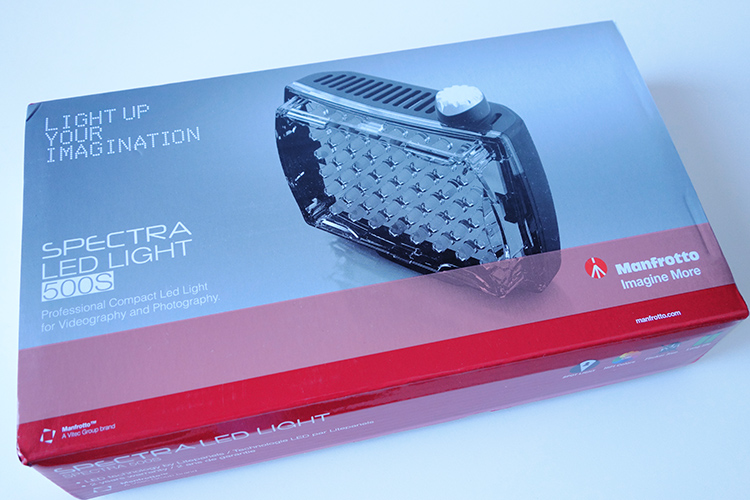
manfrotto-spectra-light-box

The Manfrotto Spectra LED 500s box

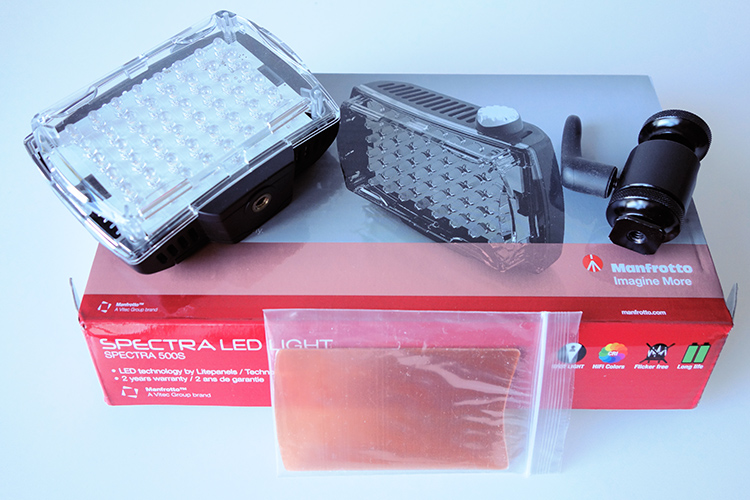
The unit itself is really compact and measures 3.7 x 4.4 x 1.7″ (including the on/off knob). It has one power switch which also acts as a variable dimmer, very cool. It is daylight balanced at 5600 Kelvin. Also included with each light is a set of filters, including one ¼ CTO, one ½ CTO, and one opal diffuser. It also comes with a ball head shoe mount.

Manfrotto Spectra LED 500s in the box

The Manfrotto Spectra LED 500s light comes with 2 CTO gels and one opal diffuser. It also comes with a ball head adapter for mounting on a hotshoe or tripod.

I did find this mini ball head adapter a bit clunky to use. I had to fiddle with the lever to release the tension to get it to move and then lock it back in place. Not ideal when you’re on a shoot, time is of the essence, and you just want your equipment to work effortlessly.

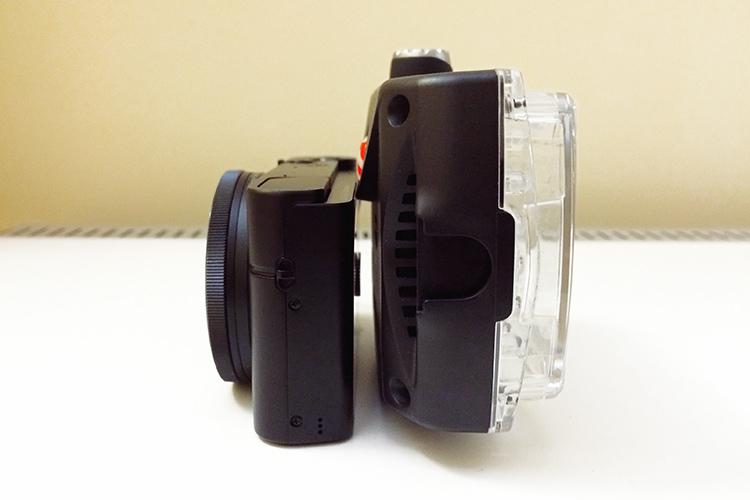
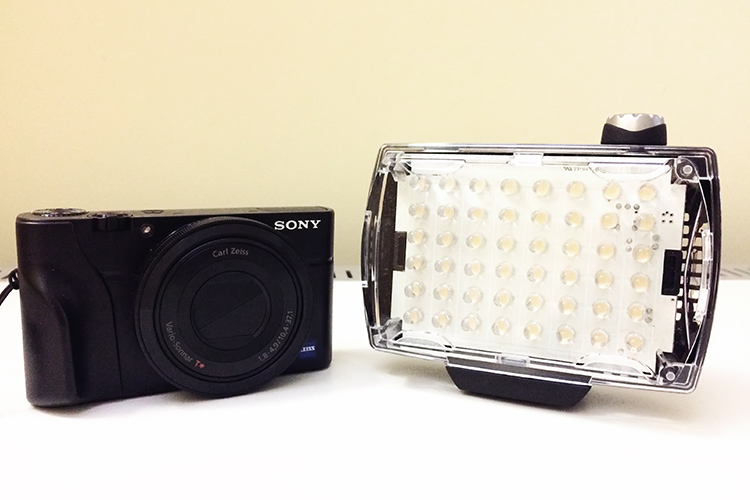
This unit is slim and very compact, as you can see in comparison to my Sony RX100 camera (below).

Manfrotto Spectra LED 500s Sony RX100

Side by side size comparison of the Manfrotto Spectra 500s LED Light with the Sony RX100.

Manfrotto Spectra LED 500s size

The Manfrotto Spectra LED 500s is quite compact and slim.

How is it powered?

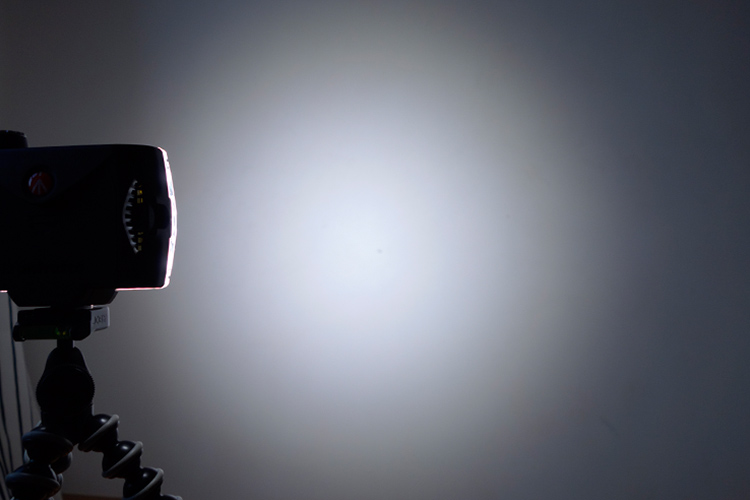
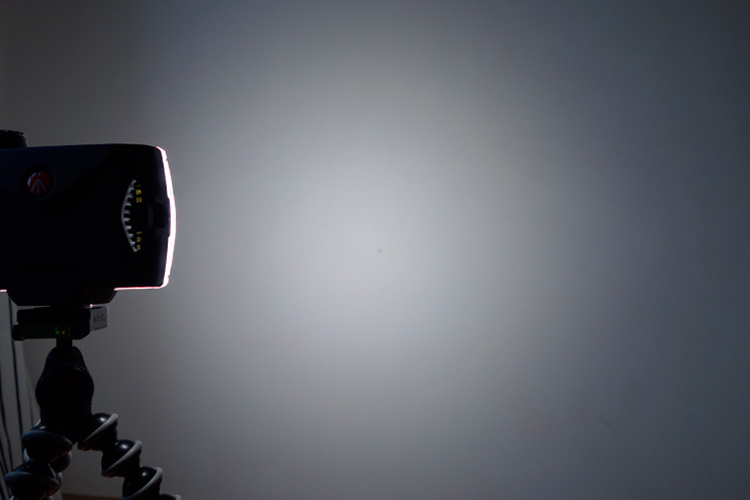
This little unit, the 500S is the smallest in the range of five models by Manfrotto. The S stands for spot, as a beam of light emits at a 30-degree angle. It produces 300 lux at one meter. The Spectra 500s takes four Alkaline AA batteries. It is simple to use, turn the knob to switch it on. It is also dimmable which makes really useful to control the amount of light being powered.

Rechargeable AA and Lithium-Ion AA batteries can be used as well. It can also be powered by an AC adaptor (ADAPTOR12V0.5A) to use through the mains. I can’t see myself bothering with this but the option is there. You can also purchase an adaptor (Manfrotto  L7.2V-Battery Adapter) which mounts at the back of the spectra unit and uses Sony L-Type batteries. Again, another alternative.

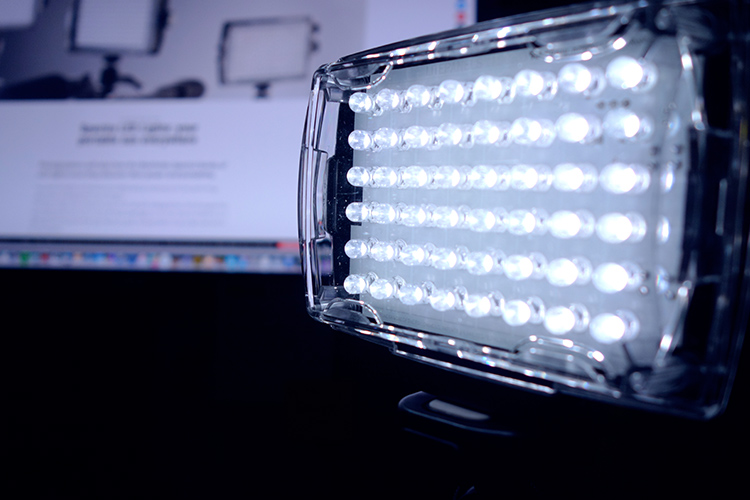
 Manfrotto Spectra LED 500s

The Manfrotto Spectra LED 500s on full power at one meter.

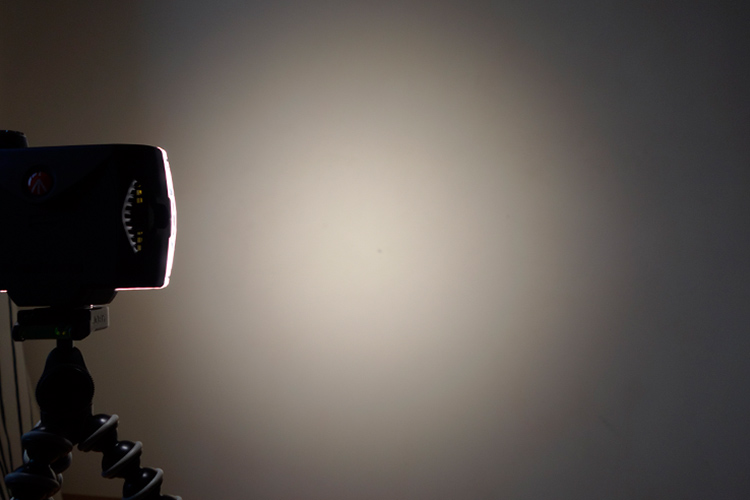
lighter-cto-gel

Here, the the 1/4 CTO gel has been applied over the light.

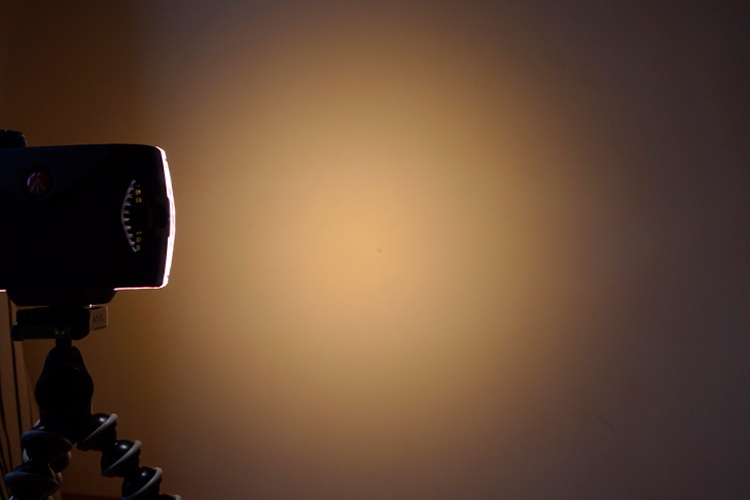
 Manfrotto Spectra 500s LED

The Manfrotto Spectra 500s LED light with a CTO gel.

 Manfrotto Spectra 500s LED opal diffuser

The Manfrotto Spectra 500s LED light with the opal diffuser.

LED versus flash lighting?

To see how using speedlights fared against this little LED I did a quick test. I didn’t set out to pitch one light source over the other, as that would be like comparing apples to oranges. I only wanted to get a comparison to see the results.

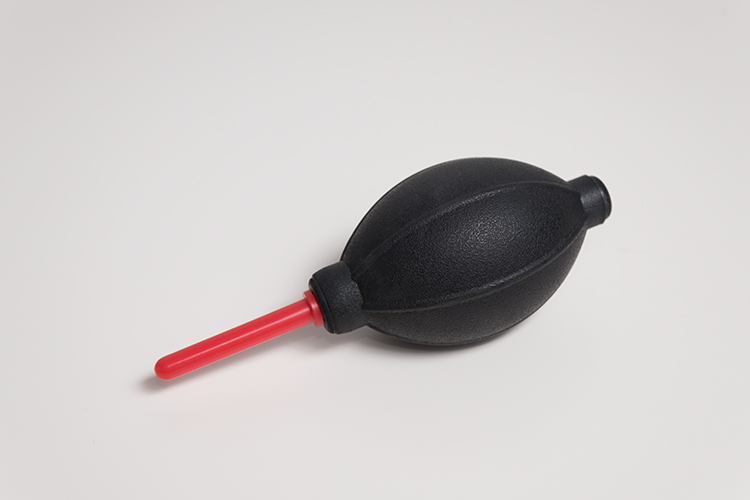
The speedlight is way more powerful, I know that. For the shot below, I used a speedlight with a shoot through umbrella, which was about two feet away from the subject at an angle of 45 degrees. The power on the flash was only at 1/8th power. I kept the ISO the same at 200 for both. Shutter speed was at 1/60 second and the aperture was f/7.1.

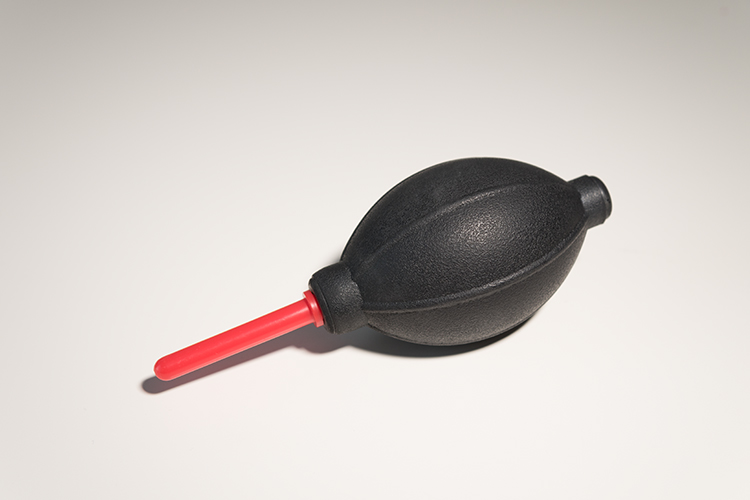
In contrast to the Spectra light, I had the light switched to full power and I had to get really close, 10-12 inches away from the object. The camera settings were 1/15th of a second at f/5.6. I didn’t put a diffuser on the Spectra light as a result, there is a harsh shadow under the air blower.

speedlight versus Manfrotto Spectra 500S LED

This was shot using flash with a speedlight.

Manfrotto Spectra 500s LED

This was shot using the Manfrotto Spectra 500s LED light.

What to look for when choosing LED lights

First, CRI (color rendering Index) is important when choosing an LED light. The closer it is to 100, the more ideal it is. Less than 90 is considered not great. The Manfrotto Spectra LEDs claim >90. What does this really mean? Natural light is classified as having a CRI of 100, the best possible.

Secondly, make sure the LED is flicker free.

Pros of LED lights

  • Extremely portable
  • Lightweight and compact, even with the batteries
  • Easy to use
  • Don’t overheat
  • Can be used for both video and photography
  • Great for small product shots
  • Handy in low light conditions
  • As it is a portable continuous light source, this makes LED lights ideal for beginners to learn about how light affects the subject/model
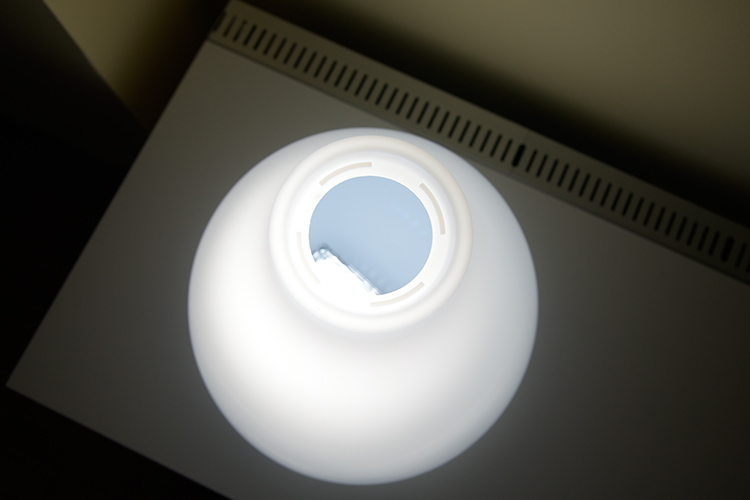
spectra-light-unde-pendant-shade

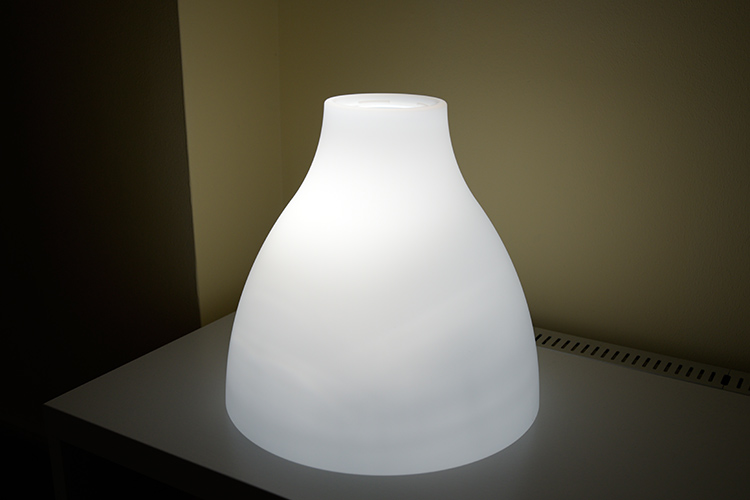
I put the Spectra light inside this pendant shade. This is where the LED light could come in handy by mimicking other light sources to create atmosphere or mood in your shot.

spectra-light-in-shade

I just placed the Spectra LED LIight under this shade to see how effective it could be to mimic another light source to add atmosphere in your shot.

Cons

  • A little pricey, unless you get a discounted price
  • The white light may not be appealing to some – but the gels included compensate for that
  • The mini ball head adaptor is clunky and fiddly to use – not a deal breaker but annoying nonetheless
  • Not powerful enough in some situations where there is a lot of ambient light to balance against.

Conclusion

As I stated at the beginning of this article I set out to describe my initial impressions so far to date. As this is a very recent purchase, I have yet to test it out fully. But so far I give it 3.5 stars out of five. This may seem a bit harsh but I took a half star away for each of the following:

  • The mini ball head adapter is quite cumbersome to use.
  • It’s fairly expensive compared to other similar less expensive models.
  • This light is not really powerful enough in certain situations and other cheaper models are more powerful.

In terms of photography use, LEDs are terrific and so easy to use. The Manfrotto Spectra 500S is the smallest but not as powerful as its siblings in the Spectra range. That said, I won’t be putting away my speedlights just yet.

So, if you are new to LEDs lights and you would like to test them out for your photography. Check out my article here on how to use an inexpensive LED flashlight to take shots.

Do you use LED lights in your photography? Please leave a comment below, and tell us more.

googletag.cmd.push(function() {
tablet_slots.push( googletag.defineSlot( “/1005424/_dPSv4_tab-all-article-bottom_(300×250)”, [300, 250], “pb-ad-78623” ).addService( googletag.pubads() ) ); } );

googletag.cmd.push(function() {
mobile_slots.push( googletag.defineSlot( “/1005424/_dPSv4_mob-all-article-bottom_(300×250)”, [300, 250], “pb-ad-78158” ).addService( googletag.pubads() ) ); } );

The post Initial impressions of the Manfrotto Spectra LED Light 500S by Sarah Hipwell appeared first on Digital Photography School.


Digital Photography School

 
Comments Off on Initial impressions of the Manfrotto Spectra LED Light 500S

Posted in Photography


Action-packed: Sony a6500 First Impressions

22 Nov

Sony a6500 First Impressions

by Dan Bracaglia

ISO 200, 1/3200 sec at F4. Shot using the 70-200mm F2.8 G Master lens. JPEG edited to taste in Adobe Lightroom.

I spent two and a half days shooting in Austin, Texas with the Sony a6500 on a Sony-sponsored press trip. This was the first time most journalists, including myself, had got a chance to put hands on the camera, let alone shoot with it. One of my favorite things about these trips is getting to talk to other writers to see how their experiences with the camera compare. While specific opinions on the a6500 varied, there was one aspect of the camera everyone seemed to agree on: the touchscreen on the a6500 is a letdown.

Of course the addition of a touchscreen is not the only thing the a6500 has going for it, the camera also receives 5-axis in-body image stabilization, new menus, a deeper buffer and front-end LSI (which stands for Large Scale Integration – basically an additional chip providing more processing power). Not to mention it retains the 425-point on-sensor PDAF system, the same viewfinder, the same video specification and the same 8 fps burst rate (with Sony’s implementation of live view) as its mid-range sibling, the a6300 (11 fps with no live view).

Usability and speed

ISO 6400, 1/1000 sec at F2.2. Shot using the 85mm F1.4 G Master lens. JPEG edited to taste in Adobe Lightroom.

We spent the first day shooting all sorts of fast action subjects, including basketball. I’ve shot a lot of college basketball games in my life (close 100) but this was the first time shooting a game using a mirrorless camera. And you know what? I really enjoyed it! I mainly stuck to the ‘wide’ AF area, though occasionally switched to the ‘Flexible Spot-M’ option. In both cases my hit rate was just as good as when using a sports-oriented DSLR: nearly all my shots were in focus! 

I found the responsiveness of the shutter, from the time I pressed it, to the time the photo was taken, near instantaneous. And following the action at 8 fps was no problem, I didn’t notice any EVF lag (I switched the EVF refresh rate from it default of 60 fps to 120 fps).

“My hit rate was just as good as when using a sports-oriented DSLR.”

In the two days with the camera, Sony managed to cram in not only an opportunity to shoot basketball, but the chance to also shoot skateboarding, tennis, rodeo, lacrosse, live music and flying disk dogs. In each scenario, I walked away impressed with the hit rate. Simply put, for action photography the a6500’s AF system, fast burst rate and a deep buffer make it a very tempting/capable choice.

This image was part of a 50+ photo burst. ISO 6400, 1/3200 sec at F4. Shot using the 85mm F1.4 G Master lens. JPEG edited to taste in Adobe Lightroom.

Furthermore, while shooting long bursts, I almost never encountered a ‘Writing to memory card, unable to operate’ error screen, which is a breath of fresh air having used the a6300. Even after shooting a burst of 50 or so Raw+JPEG files, I was able to hit the playback button and see the most recent image to clear the buffer. The a6500 also features a buffer countdown in the upper left corner so that users know how many images are left before it’s fully cleared.

New Menu

Sony makes some of the most technically capable cameras on the market but the user experience has always been a bit rough around the edges. Of course many folks, by dedicating the time to learn and work around Sony’s peculiarities, they are able to tolerate any U.I. shortcomings and get the most out of these cameras. But for the rest of us, picking up a Sony for the first time can feel confusing, frustrating and uninspiring.

Menu heads are now color-coded and there is a dedicated video menu.

The a6500, with its new menu system and faster processing is a major step in the right direction for overall usability. Menu heads are color-coded and there is now a separate video menu. But there is no ‘My Menu’ style option for customizing a menu page, something offered by most other camera makers. To some degree, we’d have just preferred a customizable menu over Sony’s reorganization, to collate most-used menu items that still remain unassignable to the camera’s Fn menu.

On a positive note, I encountered far fewer error screens than I’m used to when shooting with a Sony. Still, I did occasionally hit one. And there is nothing worse than trying to dial in a setting only to encounter an ‘Invalid operation,’ screen. Hey Sony, instead of tossing up an error, why not make a suggestion so that users know what settings to change to avoid more error messages (and include direct access to the setting that needs changing)?

The touchscreen

I had super high hopes going into this shooting experience that the a6500’s touchscreen was going to be awesome. It’s not. I owned an LG Dare cellphone in 2008 and the a6500’s touch implementation reminds me of that. It’s unresponsive when tapping and laggy when dragging one’s finger. Not only that, the touchscreen cannot be used for anything other than moving AF points and flipping through images in playback. How silly is that? Numerous times I found myself hitting the Fn.menu button and then tapping one of the icons on the screen, only for nothing to happen.

Furthermore, the a6500 is a premium camera with a premium price point, but only one top plate control dial. A touchscreen is the perfect answer to a lack of physical control points, but by limiting its use, Sony shot themselves in the foot.

“The touchscreen on the a6500 is the one feature of this camera that does not feel up to par with everything else.”

Still, its encouraging to see touch capability make its way into this line of camera. No doubt Sony knows how to make a decent touchscreen: it manufactures smartphones for crying out loud, so here’s hoping the next generation actually nails the touchscreen. Because the touchscreen on the a6500 is the one feature of this camera that does not feel up to par with everything else.

It’s not completely without merit though. I quite enjoyed using the flip-out screen at the skatepark we visited to get super low angles and the touchscreen allowed me to easily choose my point of focus. Still, the focus squares can be difficult to see in very bright or very dim light.

ISO 640, 1/1600 sec at F5.6. Shot using the Somny 10-18mm F4 lens. JPEG edited to taste in Adobe Lightroom.

Using the touchscreen as an AF touchpad was also a disappointing experience. The responsiveness is not fast enough, the points are hard to see and there is a noticeable delay when dragging one’s finger around (pretty much the same experience as just using the touchscreen).

There are three touchpad area modes: ‘Whole Screen,’ ‘Right 1/2 Area’ and ‘Right 1/4 Area.’ The ‘area’ refers to which portion of the screen will activate touchpad AF and are meant to help avoid accidentally changing one’s AF point with say, your nose. When using ‘Right 1/2 Area’ for instance, only the upper half of the right side of the screen will engage the touchpad. And when using ‘Right 1/4 area’ only the upper quarter of the right side of the screen will engage the touchpad. Honestly, I was hard put to tell the difference between ‘Whole Screen’ and ‘Right 1/2 Area.’ Also when I put the camera in ‘Right 1/4 Area’ I found it nearly impossible to get the touchscreen to work at all!

I also found it pretty difficult, though possible, to use touchpad AF when shooting through my left eye. There is an option to turn the touchpad off when shooting vertically, so as to not change one’s AF point with their nose. But seeing how unresponsive the touchscreen is, I never ran into this issue. I guess that’s one plus of the lack of responsiveness. Users can choose whether to just use the touchscreen, just the touchpad, both or neither.

Using the Touchscreen during video capture

Like all Sonys, the ‘Lock-on AF’ area modes are greyed-out when shooting video. And as such, there is no intuitive way to tap-to-track when recording video. You can track (though not tap) by assigning a button to toggle ‘Center Lock-on AF’ on and off. But shooting video this way is pretty annoying as you must wait until your subject is dead center to begin tracking. Also the ‘Center Lock-on AF’ option seems to use an older tracking algorithm.

In the ‘Wide’ AF area mode, if you tap the screen, it turns on something called ‘Spot AF,’ which just maintains focus on the chosen point. Based on this video by cinema5D, I’m convinced there is some way to use touch-to-track in video mode. I have a hunch that if you turn ‘Spot AF’ off in the menu and tap the screen, it may engage tracking. I’ll have to wait until we get the camera into the office to confirm this, but either way, engaging tap-to-track in video mode is far from intuitive and the exclusion of lock-on AF area modes in video is inexcusable at this point.

Image Stabilization

ISO 3200 1/2 sec at F4.5. Shot using the 24mm F1.8 Zeiss lens. JPEG edited to taste in Adobe Lightroom.

It’s exciting to see image stabilization make its way into Sony’s APS-C mirrorless line. Initial impressions using image stabilization to shoot stills are positive. The above image was shot at 1/2 sec using the 24mm F1.8 lens. Ordinarily I could probably hold a shot steady, with no IS, down to about 1/30, maybe on a good day, 1/25 sec. So right there we’re seeing a nearly 4-stop advantage using IS at a normal-ish equiv. focal length.

Using IS while recording video made it easier to shoot hand-held at wide to normal focal lengths, like in the clip above. However at longer focal lengths the IS system is very jumpy. You can see an example of that in the clip below.

Having just finished testing video IS on both the Panasonic FZ2500 and Panasonic G85, I’m not all the impressed with the Sony’s video IS performance. Of course both the cameras mentioned use smaller sensor, which in theory should be easier to move around. But more to the point, those cameras offer something the a6500 does not: an option to combine mechanical IS with electronic (digital) IS. Although digital IS tends to slightly crop (and then upscale) footage and therefore costs some image quality, it can lead to impressively glidecam-esque footage.

Physical Improvements over the a6300

The a6500 (left) features two top plate custom keys and toothier dials compared to the a6300. The battery door on the a6500 (left) has also been redesigned. It seems less flimsy than that on the a6300. The camera also gains a deeper grip.

The a6500 gains some very minor physical improvements over the more basic model, including an additional top plate custom function (C2) button. The C1 button has moved to the top shelf, and is now eminently more usable than the one that provided almost no haptic feedback on the a6300. A comfier grip, more similar to that offered on the a7 II models. The control and mode dial also have a nicer tooth to them and the bottom battery door has been redesigned and now feels more secure.

The Takeaway

Make no mistake, the Sony a6500 is a very good camera. It’s lightweight, fast and capable. Still, I can’t help but think Sony may have benefited holding off on the release to spend more time refining it. After all, it is the company’s top tier APS-C mirrorless offering (this despite one top plate control dial). Because some aspects of the camera operation just feel unrefined.

For instance, when shooting 4K video, the screen automatically dims. There is no way to use the ‘Sunny Weather’ option: it’s simply greyed out. This makes the a6500 nearly impossible to use in bright sunlight while shooting 4K video with the LCD. And I’m told the reason is to mitigate overheating, which seems like a thoughtless fix to a known issue, and one that creates a new issue entirely. 

I always close with a rock and roll shot: ISO 1600, 1/800 sec at F2.2. Shot using the 85mm F1.4 G Master lens. JPEG edited to taste in Adobe Lightroom.

The image stabilization is useful when shooting stills, but initial impressions in video mode have us less impressed. The new LSI processor goes a long way to making the a6500 a more usable camera than the a6300. The buffer depth, while we have yet to fully max it out, is impressive. And the camera does not lock users out of settings while the buffer clears. The new menus are also a step in the right direction. Still, there is room for improvement in terms of organization of items and adding a customizable page.

Two days shooting with it proved to me that the a6500 is the most usable Sony APS-C camera on the market and certainly a refinement over the mid-level a6300. I was impressed at how capable it is for sports and action (almost no noticeable EVF lag) and it can certainly capture some lovely-looking 4K video (just watch out for rolling shutter). But the touchscreen, one of the main things you get for the extra $ 400 over the a6300, is simply not good enough. And for that reason I didn’t love the a6500, but I did like it.

Articles: Digital Photography Review (dpreview.com)

 
Comments Off on Action-packed: Sony a6500 First Impressions

Posted in Uncategorized


Modern Mirrorless: Canon EOS M5 First Impressions Review

15 Sep

The Canon EOS M5 is the most enthusiast-friendly EOS M yet. It’s a 24MP mirrorless camera built around a Dual Pixel APS-C sensor, giving it depth-aware focus across most of the frame. On top of this it adds a built-in electronic viewfinder, a good number of external controls and a well implemented touchscreen.

This level of direct control puts it in competition with Sony’s a6000 and a6300, and Panasonic’s GX85 (GX80) and GX8 enthusiast models. All of these cameras aim to offer stills and video capabilities in relatively small bodies but with a reasonable level of direct external control.

Key Specifications

  • 24MP Dual Pixel APS-C CMOS Sensor
  • 2.36M-dot OLED electronic viewfinder
  • 1.62M-dot tilting rear touchscreen
  • Electronic video stabilization combines with in-lens IS to give 5-axis IS
  • 7 fps continuous shooting (9 fps with focus and exposure locked)
  • Wi-Fi with always-connected Bluetooth

In fact it’s the implementation of this touchscreen that we’re most impressed with. Much like the system developed by Panasonic, the M5 not only lets you use the rear touchscreen to position focus, it also allows its use as a touchpad to move the focus point, when you’re shooting through the viewfinder. This, combined with decisive autofocus, should be really significant for both stills and video shooting.

The camera has four dials in total: two main dials on the top of the camera, a dedicated exposure compensation dial and a fourth dial encircling the four-way controller on the back of the camera. This is a much higher level of direct control than offered on the simpler EOS M-series models offered previously, suggesting Canon expects the user to take more hands-on control of the shooting experience.

Three of the four control dials on the M5 are on the top plate, giving users easy access to exposure parameters.

While the lack of 4K video capability is a disappointment, the ability to use the touchscreen to re-position the focus point with a high level of confidence that the camera will smoothly glide the focus to the right point is highly desirable. We maintain that, for many applications, easily-shot, good quality 1080 is just as valuable as poorly shot 4K, so we’re not too put off by this development.

The touchscreen-plus-Dual-Pixel-AF combination is also useful for stills shooting – you can not only use the touchscreen to drag the focus point around the screen but also use it to select between available faces if shooting or recording in face detection mode.

The other significant benefit of the M5 finally receiving Canon’s Dual Pixel AF system is that it should now be able to focus adapted EF and EF-S lenses effectively but without being limited to the small central focus area offered when using comparable Rebel / EOS x-hundredD DSLR models.

Compared with its peers

The enthusiast photographer has a good number of choices, when looking for a reasonably sized mirrorless camera with a good degree of direct controls. Sony offers the a6000 and a6300, depending on how much you need 4K video and how demanding your AF needs are. Meanwhile, Panasonic offers both the GX85 and GX8, with the more expensive model offering higher resolution and a better viewfinder. All four of these models are extremely capable, with ease-of-use being the Canon’s most obvious response to their broadly higher video specifications.

  Canon EOS M5 Sony a6300 Panasonic GX8
MSRP $ 1099 with 15-45mm lens $ 1149 with 16-50mm lens $ 1199 body only
Pixel count 24MP 24MP 20MP
Focus method ‘Dual Pixel’ on-sensor PDAF On-sensor PDAF Contrast detection*
EVF 2.36M dots 2.36M dots 2.36M dots
 Dials Two on top plate
Exposure Comp
Four-way/dial
Top plate
Four-way/dial
Two on top plate
Exposure Comp
Continuous shooting 9 fps
(7 with live view and C-AF)
11 fps
(8 with live view)
8 fps
(5.5 with live view)
Video specifications 1080/60p 4K/30p
1080/120p
4K/30p
1080/60p
Peaking/Zebra Yes/No Yes/Yes  Yes/Yes
Touch focus in video Yes No  Yes
Battery life
Screen/EVF
295/295 shots
(410 in Eco mode)
400/350 shots 330/310 shots

* When using own-brand lenses the GX8 adds distance prediction based on the out-of-focus characteristics of the lens (A system Panasonic calls ‘Depth From Defocus’).

Articles: Digital Photography Review (dpreview.com)

 
Comments Off on Modern Mirrorless: Canon EOS M5 First Impressions Review

Posted in Uncategorized


Canon EOS 5D Mark IV First Impressions Review

26 Aug

The Canon EOS 5D series is arguably one of the most recognizable camera lines of the digital age and the Mark IV is designed to appeal to the same wide range of enthusiasts and professionals. Nearly identical-looking to its predecessor, it receives substantial upgrades under the hood, including: a higher-resolution sensor with Dual Pixel autofocus, 4K video capture, an upgraded AF system, a touchscreen, improved weather-sealing, built-in Wi-Fi/NFC and GPS. All this adds up to a camera that fits into Canon’s product line nicely as the all-around full-frame option.

It is built around a new 30.4MP CMOS sensor and uses the Digic 6+ processor. The AF system is from the flagship 1D X Mark II and contains 61 AF points (41 of which are cross-type) with up to 24% expanded vertical coverage compared with the system in the Mark III. The center point is sensitive to -3EV in One Shot (AF-S) mode (in Live View the sensor is sensitive to -4EV with a fast lens).

4K video capture is a welcome addition to this camera and users can record in either 24 or 30p, albeit with a 1.64x crop. All footage is captured as Motion JPEG. Additionally, the camera allows for 4K Frame Grabs, effectively giving users 30 fps stills shooting with (Dual Pixel) AF. The usefulness of this may depend on how well-controlled the camera’s rolling shutter is, and how acceptable 8.8MP, ~17:9 JPEGs are to you, but we’ve been impressed by how effective 4K/60p video capture on the 1D X II has been for capturing the decisive moment still.

While developing the IV, Canon says it sought feedback from 5D-series users and found that dynamic range, resolution, AF precision and AF speed were the four most important areas improvements were requested. On paper, the Mark IV seems to address these aspects nicely:

Canon 5D Mark IV Key Specifications

  • New 30.4MP CMOS full-frame sensor with Dual Pixel AF
  • DCI 4K 30/24p video using Motion JPEG + 4K Frame Grab
  • 61-point AF system with 41 cross-type sensors (center point sensitive to -3 EV)
  • Dual Pixel AF (sensitive to -4EV) for continuous Servo AF in stills (first for a full-frame Canon camera) and video
  • ISO 100-32000 (expandable to 102400)
  • 7 fps continuous shooting
  • Dual Pixel Raw (image microadjustment, bokeh shift, ghosting reduction)
  • 150,000-pixel RGB+IR metering sensor
  • 1.62M-dot 3.2″ full-time touchscreen
  • Wi-Fi w/ NFC + GPS
  • Built-in bulb timer interval timers
  • Improved weather-sealing

The 30.4MP chip offers a decent jump in resolution over the 22.3MP chip in 5D III. And judging from the improved dynamic range in Canon’s other recent DSLRs (the 80D and 1D X II), we expect Raw dynamic range in the IV to be much improved over its predecessor, which had some of the worst shadow noise and banding we’d seen in a modern full-frame digital camera. The improvement is thanks to the recent move to a design that uses on-chip analog to-digital-conversion, resulting in lower downstream read noise and therefore less shadow noise and better overall dynamic range at lower ISOs.

In terms of AF, the increased coverage area is definitely a big deal: after all, it’s the exact same AF system found in the company’s flagship sports camera. The 150,000-pixel RGB-IR metering sensor, which feeds scene information to the AF system, is borrowed from the original 1D X, bringing enhanced subject identification (including faces) and tracking (‘iTR’), as well as improved metering and flicker detection. Unfortunately, we’ve found iTR to be too situation dependent to be generally relied upon, and our initial impressions from our brief time with the Mark IV leave us similarly unimpressed at the camera’s ability to automatically shift AF points to stick to your specified subject.

Our impressions of Dual Pixel AF in live view are exactly the opposite though, with the Mark IV being incredibly good at sticking to the original subject (or face) you initiated focus on. What’s more, it’s incredibly easy to specify your subject: just tap on it on the touchscreen in ‘Face Detect+Tracking’ mode, and the camera will stick to it like glue, no matter where it moves to in the frame. The 5D Mark IV is Canon’s first full-framer that can continuously focus in Live View during stills capture, and because of the way Dual Pixel AF works, focus is incredibly accurate, even with fast lenses.

The 5D Mark IV also has some new tricks up its sleeve including Dual Pixel Raw, a nifty option that can prove useful in specific shooting scenarios. It works by recording two 30MP images, one from each of the ‘left-looking’ and ‘right-looking’ photodiodes at each pixel. Previous Canons have combined these two signals at each pixel, but Dual Pixel Raw gives you the option of keeping them separate. This results in a file that’s twice as large, but one that allows for ‘image micro-adjustment,’ ‘bokeh shift’ and ghosting reduction (more on this on our Features page) in Canon’s supplied Digital Photo Professional software.

Compared to its peers

Canon now offers a range of full-frame models. On the high end you have the Canon’s sports and action-oriented 1D X Mark II, with its 20.2MP sensor and 14 fps continuous shooting (with AF). The 5DS (and ‘R’ variant), with their 50.6MP sensors, are the company’s high resolution options. The 5D Mark IV splits the difference in terms of resolution and is positioned as Canon’s all-rounder. For those on a budget, the compact EOS 6D soldiers on, four years after its introduction.

So how does the 5D Mark IV stack up against its closest sibling and predecessor? Take a look for yourself:

  Canon EOS 5D IV
Canon EOS 5D III
Canon EOS 5DS
MSRP $ 3499 $ 3499 $ 3699
Sensor 30.4MP 22.3MP 50.6MP
ISO range
(expanded)
100 – 32000
(expandable 50-102400)
100 – 25600
(expandable 50-102400)
100 – 6400
(expandable 50-12800)
AF points 61 (41 cross-type)
over expanded region
61 (41 cross-type) 61 (41 cross-type)

Live view/video AF ‘Dual Pixel’ phase detection Contrast detection Contrast detection
RGB metering sensor resolution 150k pixels 63-zone dual-layer 150k pixels
LCD 3.2″ 1.62M-dot touchscreen 3.2″ 1.04M-dot 3.2″ 1.04M-dot
Burst rate 7 fps 6 fps 5 fps

Video DCI 4K/30/24p 1080/30p 1080/30p
Headphone socket Yes Yes No
Card format 1x Compact Flash
1x SD

1x Compact Flash
1x SD

1x Compact Flash
1x SD
Built-in Wi-Fi/NFC Yes No No
 GPS Yes No No

Obviously if you need the resolution, the Canon EOS 5DS is the more sensible choice. But in just about every other regard, the Canon EOS 5D Mark IV is the far more versatile camera and a worthy upgrade from the 5D Mark III.

Pricing and availability

The Canon EOS 5D Mark IV ships this September and will cost $ 3499 body only, $ 4399 with the 24-70mm F4L IS USM lens and $ 4599 with the 24-105mm F4L IS II USM lens.

Articles: Digital Photography Review (dpreview.com)

 
Comments Off on Canon EOS 5D Mark IV First Impressions Review

Posted in Uncategorized


First impressions review: Lenovo Moto Z Force shows promise

26 Jul

The Moto Z Force is Lenovo’s brand new, top-of-the-line smartphone. Currently exclusive to the Verizon network in the US as the Moto Z Force Droid Edition, we expect an international launch of the device in the near future. 

The device packs a 21MP image sensor with a 1.12 µm pixel size, an F1.8 aperture, on-sensor phase detection, laser-assisted AF and an optical image stabilization system into its camera module. The camera app offers full manual control and the Moto Z Force can save DNG Raw files with third party apps, such as Manual Camera.

The metal and glass body is just under 7mm thin and comes with a shatterproof 5.5″ Quad-HD AMOLED display and a beefy 3,500 mAh battery. The Android 6.0.1 Marshmallow OS is powered by a Qualcomm Snapdragon 820 chipset and 4GB of RAM. Mobile photographers will also appreciate the microSD-slot for easy storage expansion. 

In addition, Moto Z Force users can select from several Moto Mods accessory modules which connect to the back of the device magnetically and via 16 connection points. So far there are the InstaShare projector, a JBL Soundboost 6 Watt speaker and a 2220 mAh battery pack. The Moto team has promised more Moto Mods for the future and according to rumors, one of them could be a camera grip. For now we’ll have to make do without the latter, but that hasn’t stopped us from shooting with the brand new Moto device. Read on for our first impressions. 


Image Quality

In bright light conditions the Moto’s 21MP sensor resolves a good deal of detail. Under close inspection some smearing of fine detail and textures is noticeable, but on the other hand luminance noise is very well controlled. During our brief testing, exposure was reliable but in very bright scenes, such as the one below, the image processing’s strong contrast can results in some clipped highlights. That said, overall the Moto Z Force does well in these conditions.

 ISO 50, 1/760 sec

Color tends to be quite saturated, but neutral and without any notable casts. This includes bright red tones which many smartphone cameras struggle with, especially under strong illumination.

 ISO 50, 1/452 sec

At higher ISOs the camera finds a good compromise between noise reduction and detail retention. The ISO 320 shot below was captured in a fairly well-lit interior space and shows very good edge detail. 

 ISO 320, 1/33 sec

The ISO 500 shot below shows some more luminance noise in the mid-tone areas of the frame but the noise pattern has a fairly fine grain and is not too intrusive. Chroma noise is well under control and the image still shows a very good amount of fine textures and detail.

 ISO 500, 1/25 sec

The Moto Z Force maintains good exposure and color down to very low light levels. The challenging lighting conditions in the shot below lead to some channel clipping in the illuminated stage area, but overall the scene is captured very nicely. The slow shutter speed of 1/10sec results in some blur on moving subjects but the optical image stabilization does a very good job at counteracting camera shake. 

 ISO 1250, 1/10 sec

Special modes

The Moto Z Force comes with Motorola’s usual HDR mode which does an efficient job of protecting the highlights in high-contrast scenes, such as the one below. Using the standard auto exposure mode, some clipping occurs on the light colored elements in the frame. Using HDR mode, image clipping is noticeably reduced. Shadows are lifted very slightly but overall the image still looks pleasantly natural.

 ISO 50, 1/1468 sec, standard exposure
 HDR exposure

Night mode is not a new feature for Moto devices but the latest incarnation works in a slightly different way than before. In low light scenes the camera automatically triggers multi-frame capture which produces clean images but struggles with moving subjects, which often show pronounced motion blur. On the new device, night mode now saves a standard exposure in addition to the night mode image, allowing the user to pick the version which best suits their purposes.

The sample images below both report ISO 1000 and a shutter speed of 1/10sec in the EXIF data. However, as you can see at close-up view they look very different. The multi-frame night mode image on the left is cleaner but shows motion blur, even on slow-moving subjects. The accompanying standard exposure shows better edge definition on moving subjects but noticeably higher levels of luminance noise. 

Night mode Standard exposure
100% crop 100% crop

In video mode the Moto Z Force is capable of recording both 1080p Full HD and 4K footage. The combination of digital and optical stabilization keeps things steady and allows for smooth panning. The 1080p video below shows similar tonal characteristics to the still images and decent detail but very occasionally we found the lens refocusing for no obvious reason.

The 4K video mode offers noticeably better detail for those who need it. It also allows users to grab 8MP video stills for those occasions when the full 21MP still resolution is not needed.

First impressions 

With its solid build, large high-resolution screen and metal frame the Moto Z Force looks and feels like a premium device. The Snapdragon 820 chipset under the hood ensures the performance of the Android operating system matches the device’s high-end exterior and the 3,500 mAh battery lets you shoot, edit and share images for a long time away from a power outlet.

The camera module’s 21MP captures a good level of detail and offers plenty of scope for cropping. There are the usual signs of smearing of fine textures at base ISO, but in low light the camera finds a good balance between noise reduction and detail retention. In addition, night mode lets you pick between a clean multi-frame image that works best for static scenes, and a standard exposure that shows more noise but is capable of freezing at least some motion. 

Colors are mostly quite saturated and contrast is strong which can lead to some highlight-clipping in high-contrast scenes. However, HDR mode does a very efficient job of protecting highlight detail, and in addition the Moto Z Force allows for the capture of DNG Raw files with third party camera apps, such as Manual Camera. This allows you to apply your very own mix of contrast, saturation, noise reduction and other image parameters in post processing. Add the camera app’s full manual control into the mix, plus the potential of a camera-grip add-on module in the nearer future, and the Moto Z Force is one of the year’s most interesting mobile photography products thus far.

Articles: Digital Photography Review (dpreview.com)

 
Comments Off on First impressions review: Lenovo Moto Z Force shows promise

Posted in Uncategorized


Elevating X-Trans? Fujifilm X-T2 First Impressions Review

07 Jul

The Fujifilm X-T2 is an updated version of the company’s top-level DSLR-shaped APS-C camera. It’s built around the same 24MP X-Trans sensor as the X-Pro2 but ends up being much more than an X-T1 with more pixels. Instead, the X-T2 is a camera that does much to address the X-System’s remaining weaknesses, which can only broaden its already considerable appeal.

Fujifilm X-T2 Key Features:

  • 24MP X-Trans CMOS III sensor
  • 325 AF points (169 of which offer phase detection)
  • AF point selection joystick
  • 2.36M-dot OLED EVF with 0.005 sec refresh time (60 fps or 100 fps in boost mode)
  • 3″ 1.04M-dot articulating LCD
  • 4K UHD video at up to 30 fps for up to 10 min (30 min with booster grip)
  • F-Log flat profile and 4K out over HDMI
  • 8 fps continuous shooting with AF (11 fps with booster grip)
  • 5 fps continuous shooting with live view updates between capture
  • Dual SD card slots (UHS-II compatible)
  • USB 3.0 socket

The X-Pro2 represented a good step forward for image quality within the system and the X-T2 gains all of that improvement, but there are also some considerable changes in terms of autofocus, video and flash control, suggesting Fujifilm wants its the X-T2 to be an all-round more capable camera than its predecessor, rather than just building on its existing strengths.

The body seems broadly unchanged at first glance but there’s a clever doubly-hinged flip-out screen that seems to offer many of the flexibility advantages of a fully articulated monitor while retaining the more compact form of a tilting screen.

There’s also a Performance Boost mode that speeds up several aspects of the camera’s behavior (at the expense of some battery life), but that really comes into its own when the optional ‘Power Boost Vertical Grip’ is added. None of these additions comes for free, though: at $ 1599, body only, the X-T2’s launch price has jumped $ 300, compared to its predecessors’.

Autofocus

Part and parcel of that 24MP sensor are the 169 phase-detection points that we saw in a large central square region of the sensor on the X-Pro2. Beyond this, the X-T2 now gains an extra two columns of 13 contrast-detection AF points down each side of the frame, widening its AF area and bringing it to a total of 325 AF points in total.

Fujifilm also promises a more powerful processor and revised algorithms, along with faster sensor read-out, to improve the camera’s speed, regardless of whether it’s using a combination of phase detection and contrast detection (Hybrid AF), or simply the latter alone.

To get the best-possible performance out of the newly refined AF system, the X-T2 introduces a use case-based AF-C setup system. Much like the one we’ve seen on high-end Canon DSLRs, this lets you specify the types of movement you’re expecting from your subject, so that the camera can try to respond appropriately.

Video

The X-T2 makes a bigger leap forward into video than we were expecting. There was much chatter around the time of the X-Pro2’s launch that the camera’s hardware was, theoretically, capable of 4K capture, but that the company hadn’t pursued its development for such a stills-orientated model. Well, it has now.

The X-T2’s movie capabilities are a big step forward for the system.

But Fujifilm has done more than just do enough to be able to emblazon the phrase ‘4K capable’ on the box: the camera also gains a mic socket and on-screen audio monitoring with the ability to assign mic volume to a Fn button. There’s also an ‘F-Log’ flat profile to give flexibility while color grading.

The good news is that our first shots of our test scene suggest the camera’s 4K footage is much more impressive than the 1080p that the first X-Trans cameras could muster. Combine this with 4K output over HDMI and the X-T2 looks like the first X-Trans camera that might appeal to shooters interested in shooting both stills and video.

Flash control

One of the missing pieces of an increasingly well fleshed-out XF mount system has been the lack of advanced flash control – something that the X-T2 is looking to address. Up until now, users have had to turn to third-party makers if they wanted to communicate TTL flash information to remote flash units.

The newly introduced EF-X500 flash allows high speed flash sync and remote TTL flash control for the first time, making it significantly easier to use the X-T2 with strobes.

Optional ‘Power Booster Grip’

Along with the X-T2, Fujifilm has introduced the VPB-XT2, a vertical battery grip that holds two extra batteries. As well as significantly extending the camera’s battery life, the grip also extends the camera’s ‘Boost’ mode. With the grip attached, this is able to draw power from multiple batteries, increasing the camera’s maximum continuous shooting rate, as well as extending its video recording time to 30 minutes.

The entertainingly-named ‘Vertical Power Booster Grip’ can house two addition batteries (without displacing the camera’s internal unit), helping increase capacity to around 1000 frames between charges. It also adds a headphone socket and a ‘Boost’ switch that improves responsiveness and ups the frame rate to 11 fps.

This grip features the same level of environmental sealing as the camera body and also plays host to a headphone socket for audio monitoring while shooting video.

Review History

Review History
6 July 2016 First Impressions, Studio Scene and Beta Gallery published,
based on pre-production camera running f/w 1.34

Articles: Digital Photography Review (dpreview.com)
 
Comments Off on Elevating X-Trans? Fujifilm X-T2 First Impressions Review

Posted in Uncategorized


Nikon D500: First impressions review

18 May

The Nikon D500 is a 20MP APS-C DSLR capable of shooting at up to 10 frames per second and featuring an autofocus system derived from the one in the D5. In other words, it’s exactly the kind of high-end DX format body that appeared to have become extinct with the D300S.

The six-and-a-half years that have passed since the D300S’ launch have seen the camera market move on considerably but the D500 does much to reclaim the position as one of the pre-eminent APS-C camera on the market.

As you might expect, much of the improved capability of the camera centers around sports and high-speed shooting, with significant upgrades to the shooting rate and autofocus system, but there are also major upgrades to the viewfinder, video capabilities and connectivity options which expand its utility beyond one particular niche.

Key Features

  • 20.7 MP APS-C (DX Format) sensor
  • 153 point AF module with 99 cross-type points
  • 180,000 pixel RGB sensor for metering and subject recognition
  • AF point joystick
  • 10 fps shooting for up to 200 shots (lossless compressed 14-bit Raw to XQD card)
  • 4K (UHD) video from 1.5x crop of sensor
  • 100% coverage viewfinder with 1.0x magnification
  • 2.36m dot tilt up/down touchscreen
  • Wi-Fi and Bluetooth connectivity with NFC for setup
  • Mic and headphone sockets
  • USB 3.0 connector
  • Anti-flicker option for working under artificial lighting

A good sport

Much of the D500’s capability is built around the ability to focus and shoot very quickly. Its 153-point AF module offers near full-width coverage and is linked to a 180,000 pixel RGB metering sensor to further improve its AF tracking capabilities. Interestingly, and like the D5, the D500’s AF system now offers two parameters for fine-tuning the autofocus tracking behavior, letting the user specify the type of subject movement and the correct response to another object blocking the targeted subject. Existing Nikons only let you specify duration, suggesting Nikon is trying to expand the range of shooting situations for which the AF system can be optimized.

Only 55 of the camera’s AF points can be directly selected and the D500 gains both a joystick and a touchscreen to make it as fast as possible to select the point you want to use. Add to this the ability to shoot up to 200 Raw frames before slowing down (if you use an XQD card), and it becomes obvious that the D500 is intended as a high-speed pro/semi-pro camera in a way the D7000 series never was.

How’s that for coverage? The D500 doesn’t just boast a lot of autofocus points, it also offers them across most of the width of the frame, which is useful whether you’re manually selecting a point or letting the camera track your subject.

The D500 also gains an anti-flicker option designed to ensure the camera shoots in-sync with the brightest point in the flickering cycle of artificial lights. It’s a feature we first saw on the Canon EOS 7D Mark II and we’d expect it to be particularly valuable for shooting indoor sports such as basketball.

Another sign that this is a true high-end camera is the inclusion of a larger viewfinder. Like previous DX00 class cameras it has 100% coverage but it also offers 1.0x magnification, which is the largest optical viewfinder we can remember seeing in an APS-C camera (electronic viewfinders are a different matter, since size and brightness isn’t constrained by sensor/mirror size).

The D500 can also shoot 4K video and includes both an input for using an external mic and a headphone socket for audio monitoring. The camera also offers a flat picture profile to provide more post-processing flexibility, on-screen highlight warnings and power aperture control that allows you to select and change the aperture when in movie mode. There’s no focus peaking option, though, and you can’t zoom-in while you record to confirm or adjust focus as you record.

Connectivity

One of the other big features Nikon is touting is its Snapbridge system that uses Bluetooth LE (a low-power variant of Bluetooth also known as Bluetooth Smart), and Wi-Fi to maintain a connection between the camera and a smart device. This includes the ability to auto-transfer images from the camera, as well as initiating the Wi-Fi connection for remote shooting or manual image transfer.

Context

To show where the D500 sits in the lineup, here are the major feature differences between it and the less expensive D7200, along with a comparison back to the D300S – not because we expect anyone to be choosing between them, but to show how much of a step forward the camera represents.

   Nikon D500 Nikon D7200 Nikon D300S
Sensor Resolution 20MP 24MP 12MP
AF points 153 (99 cross type) 51 (15 cross-type) 51 (15 cross-type)
Max frame rate 10 fps
  • 6 fps
  • 7 fps in 1.3x crop mode
  • 7 fps
  • 8 fps with battery grip
Buffer depths 200 lossless compressed 14-bit Raw

~17 14-bit Raw
~28 12-bit Raw

30 lossless compressed 14-bit Raw
Shutter durability rating 200,000  150,000  150,000
Viewfinder
  • 1.0x magnification
  • 100% coverage
  • 0.94x mag
  • 100% coverage
  • 0.94x mag
  • 100% coverage
Rear screen
  • 2.36m dots 3.2″
  • Tilting
  • Touch sensitive
  • 1.23m dots 3.2″
  • Fixed
  • 920k dots 3.0″
  • Fixed
Video Resolution
  • UHD/30p
  • 1080/60p
  • 1080/60p
  •  720/24p
Mic/Headphone? Yes/Yes Yes/Yes Yes/No
Wi-Fi? Yes (and Bluetooth) Yes No
Built-in flash? No Yes Yes
AF-On Button? Yes No Yes
Body construction Magnesium Alloy + Carbon fiber composite Magnesium Alloy + Carbon fiber composite Magnesium Alloy
Battery Life (CIPA) 1240 shots/charge 1100 shots/charge 950 shots/charge
Weight (Body Only) 760g 675g

840g

Review History

Review History
26 April 2016 Studio scene and Raw dynamic range published.
16 May 2016 Introduction, Body and Handling, Operation and Controls, Wi-Fi and Connectivity and Video pages published

Articles: Digital Photography Review (dpreview.com)
 
Comments Off on Nikon D500: First impressions review

Posted in Uncategorized


Above and beyond: Lenovo Moto G Plus first impressions review

17 May

The Moto G Plus is a brand new model in Motorola’s Moto G mid-range series, but its camera specification looks pretty much top-notch. A 1/2.4-inch Omnivsion OV16860 16MP sensor with a large pixel size of 1.34um is paired with a fast F2.0 aperture. Its contrast detect autofocus is supported by on-sensor phase detection and a laser to measure subject distance. A dual-LED flash is on board for shooting in very dark conditions, and in the camera app a new Professional mode allows for manual control over the most important shooting parameters like shutter speed and ISO.

The new Professional mode allows for manual control over shutter speed and other shooting parameters via a range of virtual dials. It’s also possible to display just one dial at a time.

We have had the chance to use the Moto G Plus for a couple of days before launch and shot a good number of samples in a variety of situations. Read on for our first impressions of the new smartphone and its camera. 

Image Quality

In bright light the Moto G Plus 16MP camera module does a very good job at resolving detail. Thanks to very well balanced sharpening and noise reduction, fine textures and low contrast detail, such as the trees in the distance in the left sample below, are rendered very nicely. The lens in our test unit is sharp,  with only some minor softness toward the edges. Skin tones look natural and color is overall pleasantly neutral, without any white balance issues in natural light. 

 ISO 64, 1/1236 sec  ISO 64, 1/137 sec
 100% crop  100% crop

Some luminance noise is visible in blue skies but it is finely grained and not too intrusive. In the shadow areas some smearing of detail is noticeable, but again this is well within acceptable limits. Shadow noise is very well controlled as well.

 ISO 64, 1/2836 sec  ISO 64, 1/450 sec
 100% crop  100% crop

The well-balanced approach toward noise reduction is maintained throughout the ISO range and while noise and the effects of noise reduction inevitably become more evident in lower light the Moto G Plus performs very well in dimmer conditions. 

 ISO 160, 1/33 sec  ISO 400, 1/30 sec
 100% crop  100% crop

In lower light shutter speeds are reduced down to 1/15 sec which, without optical image stabilization, can result in the occasional shaky image. However, as long as you keep your hands steady the Moto captures very good detail, color and exposures in lower light. Both images below were shot in fairly dim conditions. In the one on the right the camera deals particularly well with the mix of artificial and very low natural light.

 ISO 640, 1/20 sec  ISO 800, 1/15 sec
 100% crop  100% crop

Like on the higher-end Moto models, the Moto G Plus offers a multi-frame Night Mode that kicks in when things get too dark. This allows for decent exposures of even very dark scenes, such as the image on the left below which was captured in a museum in very low light. We also liked the Moto G Plus flash performance which delivered well-exposed images with good color and detail during our brief test. 

 ISO 1250 1/15 sec  ISO 2000, 1/15 sec, flash on
 100% crop  100% crop

Special modes

The Moto G Plus comes with the same panorama mode as previous Moto devices and image output is very similar. Stitching is generally very good but panorama mode does not deal well with moving subjects in the scene. At under 3000 pixels the output size is very small. 

 Vertical panorama, 2472 x 704 pixels

HDR mode works in the conventional way and combines several exposures into one. On the Moto G Plus the effect is much more pronounced in shadow areas, which are noticeably lifted while highlights are only recovered minimally. 

ISO 64, 1/1196 sec,  HDR off  ISO 64, 1/1158 sec, HDR on

In video mode the Moto G Plus can capture 1080p footage at 30 frames per second that is digitally stabilized. Detail is good, the autofocus tends to be stable and the stabilization works efficiently, making for smooth panning and stable hand-held recording.

First impressions

During our testing we were impressed with the image output produced by the Moto G Plus. The large pixels in combination with very well-balanced image processing result in image quality that we would typically expect from devices in a higher price category. Images show good detail and well-controlled noise levels across the ISO range. Colors are pleasantly natural, even in difficult light situations, and thanks to its night mode the Moto is capable of capturing decent exposures even at very low light levels. On the downside, in dim conditions camera shake can lead to some image blur, though it is typically only noticeable at a 100% view.

The new Professional mode is good news for those mobile photographers who want maximum control over the capture process, and the large 1080p display is nice for viewing and composing images. The fingerprint sensor performs very swiftly and increases the security of your image and video files that are stored on the device. The plastic back is in line with a mid-ranger but overall the Moto G Plus looks like a great option for consumers who want excellent camera performance without spending money on a flagship device.

Articles: Digital Photography Review (dpreview.com)
 
Comments Off on Above and beyond: Lenovo Moto G Plus first impressions review

Posted in Uncategorized


Upwardly mobile: Sony a6300 First Impressions Review

17 Mar

The Sony a6300 is the company’s latest mid-range mirrorless camera. Like the a6000 it still offers 24MP resolution but the autofocus ability, video capability, build quality, viewfinder resolution and price have all been increased.

The most exciting change from our perspective is the a6300’s new sensor. Although the pixel count remains the same, the a6300’s sensor has a whopping 425 phase-detection AF points ranged across the sensor. The a6000 already offered one of the best AF systems in its class, when it comes to identifying and tracking subjects, so an upgrade in this area sounds extremely promising. The sensor is also built using newer fabrication processes that use copper wiring to help improve the sensor’s performance and possibly contributing to the camera’s slightly enhanced battery life.

The a6000 has been a huge success and has dominated its field to the extent that its combination of capability and price still looks impressive even as it enters the twilight of its career (Sony says it will live on, alongside the a6300*). That model represented a dip down-market for the series, with a drop in build-quality and spec relative to the NEX-6 that preceded it. The a6300 corrects that course, and sees the model regain the high-resolution viewfinder and magnesium alloy build offered by the older NEX-6.

Key features:

  • 24MP Exmor CMOS sensor
  • 425 phase detection points to give ‘4D Focus’ Hybrid AF
  • 4K (UHD) video – 25/24p from full width, 30p from smaller crop
  • 2.36m dot OLED finder with 120fps mode
  • Dust and moisture resisitant magnesium alloy body
  • Built-in Wi-Fi with NFC connection option
  • Built-in microphone socket

As with the previous 6-series E-mount cameras, the a6300 features a flip up/down 16:9 ratio screen. The shape of this screen hints at the 6300’s intended uses: video shooting as well as stills. The a6300’s movie features have been considerably uprated. It not only shoots 4K (UHD) at 24p or 25p from its full sensor width (or 30p from a tighter crop). It also gains a mic socket, the video-focused Picture Profile system (which includes the flat S-Log2 and S-Log3 gamma curves), and the ability to record time code.

This added emphasis on video makes absolute sense, since the camera’s stills performance is likely to be competitive with the best on the market but its video capabilities trounce most of its current rivals. The a6300 not only includes focus peaking and zebra stripes but, if its on-sensor phase detection works well, the ability to re-focus as you shoot with minimal risk of focus wobble and hunting, should make it easier to shoot great-looking footage.

All this makes it hard to overstate how promising the a6300 looks. A latest-generation sensor can only mean good things for the camera’s image quality and an autofocus system that moves beyond the performance of one of our benchmark cameras is an enticing prospect. Add to that excellent, well-supported video specifications, a better viewfinder and weather-sealed build, and it’s tempting to start planning for the camera’s coronation as King of the APS-C ILCs. Perhaps with only the price tag floating over proceedings, threatening just a little rain on that particular parade.

Specifications compared:

As well as comparing the a6300 with the a6000 as its predecessor/sister model, we’ll also look at what you get if you save up a bit more money and opt for full frame, rather than APS-C. We think at least some enthusiast users will find themselves making this decision, so are highlighting the differences.

  Sony a6000 Sony a6300 Sony a7 II
MSRP (Body Only) $ 650 $ 1000 $ 1700
Sensor size APS-C (23.5 x 15.6mm) APS-C (23.5 x 15.6mm) Full Frame (35.8 x 23.9 mm)
Pixel count 24MP 24MP 24MP
AF system Hybrid AF
(with 179 PDAF points)
Hybrid AF
(with 425 PDAF points)
Hybrid AF
(with 117 PDAF points)
Continuous shooting rate 11.0 fps 11.0 fps 5.0 fps
Screen 3″ tilting 921k dot LCD 3″ tilting 921k dot LCD 3″ tilting 1.23m dot LCD
Viewfinder OLED 1.44m dots OLED 2.36m dots 120fps refresh option OLED 2.36m dots
Movie Resolution 1920 x 1080 / 60p 4K 3840 x 2160 / 30p, 1920 x 1080 / 120p, 60p 1920 x 1080 / 60p
Image stabilization In-lens only In-lens only In-body 5-axis
Number of dials Two Two Three (plus Exp Comp.)
Maximum shutter speed 1/4000sec 1/4000sec 1/8000sec
Built-in flash  Yes Yes No
Hot shoe Yes Yes Yes
Flash sync speed 1/160sec 1/160sec 1/250sec
Battery life
(with EVF)
360 shots
(310 shots)
400 shots
(350 shots)
350 shots
(270 shots)
Weight (w/battery) 344 g (12.1 oz) 404 g (14.3 oz) 599 g (21.1 oz)
Dimensions 120 x 67 x 45 mm (4.7 x 2.6 x 1.8″) 120 x 67 x 49 mm (4.7 x 2.6 x 1.9″) 127 x 96 x 60 mm (5 x 3.8 x 2.4″)

A hit-for-six, slam-dunk, home-run?

If it’s successful in its attempts to step up from the performance of the a6000 then the a6300 could be sensational. However, there are three questions that we’d like to see addressed. The first relates to handling: why does a camera costing this much only have one dial that you can access without changing the position of your grip? The rear dial isn’t the worst we’ve encountered, but at this price point, we’d usually expect to find a dial under the forefinger and another under the thumb while maintaining a shooting grip.

The second relates to lenses. Sony is bundling the a6300 with the 16-50mm power zoom that’s far more notable for its convenience than its optical consistency, a move that’s likely to raise the question of what other lenses to fit. Sony offers a handful of reasonably-priced APS-C specific prime lenses as well as some more expensive FE-compatible full frame primes. However, in terms of standard zooms, you’re currently limited to the inexpensive 16-50mm or the considerably better 16-70mm F4 Zeiss that costs around the same amount as the camera again. The success of Sony’s full frame a7 cameras is only likely to improve third-party lens availability but there’s a risk that Sony’s focus will be on those full frame users for the foreseeable future.

Our final concern is the lack of joystick or touchscreen to reposition the AF point. This may be mitigated during stills shooting if the lock-on AF system works well enough (starting AF tracking and then recompose your shot in the knowledge that the AF point will stay where you want it), but it appears to be a real omission for refocusing while shooting video. We’ll see how significant all these concerns turn out to be, as the review unfolds.

Price and kit options

 The 16-50mm power zoom is far more notable for its convenience than its optical consistency.

The a6300 will sell for around $ 1000/£1000/€1,250, with a 16-50mm F3.5-5.6 power zoom kit commanding an MSRP of $ 1,150/£1,100/€1,400. This is a significant step up from the a6000’s $ 650/$ 800 launch price and even an increase compared to the similarly well-built NEX-6’s $ 750/$ 900 MSRP.

 Review History
17 March 2016 Intro, Specs, Body and Handling, Operations and Control and Studio Comparison published

*Unusually, the manufacturer’s claim that it’ll live on, alongside its apparent replacement model seems plausible. The differences in spec and price could allow them to sit fairly comfortably alongside one another, rather than the claim simply meaning ‘we’ll keep saying it’s a current model until most of the unsold stock has gone, to avoid angering retailers.’


If you're new to digital photography you may wish to read the Digital Photography Glossary before diving into this article (it may help you understand some of the terms used).

Conclusion / Recommendation / Ratings are based on the opinion of the reviewer, you should read the ENTIRE review before coming to your own conclusions.

We recommend to make the most of this review you should be able to see the difference (at least) between X, Y, and Z and ideally A, B, and C.

This article is Copyright 1998 – 2016 and may NOT in part or in whole be reproduced in any electronic or printed medium without prior permission from the author.

Articles: Digital Photography Review (dpreview.com)
 
Comments Off on Upwardly mobile: Sony a6300 First Impressions Review

Posted in Uncategorized