
RSS
 

Posts Tagged ‘impressions’

Voigtländer 65mm F2 Macro APO-Lanthar: sample gallery and user impressions

08 Aug

$ (document).ready(function() { SampleGalleryV2({“containerId”:”embeddedSampleGallery_4983670136″,”galleryId”:”4983670136″,”isEmbeddedWidget”:true,”standalone”:false,”selectedImageIndex”:0,”startInCommentsView”:false,”isMobile”:false}) });

Cosina says its new Voigtländer Macro APO-Lanthar 65mm F2 is one of the ‘finest’ lenses the brand has ever made. I haven’t used every Cosina/Voigtländer but can say for certain that from my brief user experience, this is one fine piece of glass.

If you’re just tuning in, the Voigtländer 65mm F2, which was first announced at CP+ 2017 along with two other primes, is a manual focus lens built specifically for Sony full frame E-mount cameras. As such, I tested it on Sony’s high resolution a7R II.

See our Voigtländer 65mm F2 Macro APO-Lanthar galleryEverything about how the 65mm handles screams precision and quality, from the all-metal housing to the drool-worthy matte black finish. Its electronic contacts mean the 65mm can communicate EXIF info with the camera; it also means you can use focus peaking and/or magnification.

Built specifically for Sony FE cameras, I found it paired nicely with the Sony a7R II.

The first thing I noticed while shooting is the long throw of the focus ring (common on macro and close-focus lenses). It turns about 300 degrees, allowing for quite a lot of focus precision. The ring itself is a little over 2 cm wide and well-indented, making it easy to grip. It also turns with a buttery smoothness that’s oh-so-satisfying.

‘Everything about how the 65mm handles screams precision and quality, from the all metal housing to the drool-worthy matte black finish.’

Apertures range from F2 – F22 and are well marked with click stops every third stop. The lens has a depth of field scale, with distance information listed in both feet and meters. The scale seems accurate (from my informal in-office testing), though I did not rely on it while out in the field.

This is about as close as the 65mm can get to a subject.

Though not a true 1:1 macro (despite having macro in its name), the 65mm offers a maximum reproduction ratio of 1:2 and a close-focus distance of 31 cm (so it can totally still be used for close-range photography). Note: when focusing at close distances, the front of the lens extends out about 4 cm.

Overall, I was pleased with the images I made using the a7R II and 65mm F2. When you nail focus, even with the aperture wide open, the results are very sharp. Voigtländer promised this lens would handle chromatic aberration well and all signs point to that being the case (Note: CA corrections are left off on all the images in the gallery). However you will experience some vignetting at F2 up through about F2.8, but by F4 it is gone. This is to be expected for this style of lens.

Electronic contacts on the lens allow it to communicate exif info with the camera. They also allow users to enjoy focus-peaking and/or magnification.

The 65mm focal length is not for everyone though. I personally found it to be a confusing field of view, leaving me unsure whether to shoot it like a 50mm or an 85mm (two focal lengths I’m use). Manual focus lenses also aren’t for all. Still, it is impossible to not appreciate something as beautiful and well-made as the Voigtländer 65mm F2 Macro APO-Lanthar.

What I like:

  • Excellent build-quality
  • Very sharp throughout aperture range
  • Focus ring turns with exceptional smoothness
  • Electronic contacts allow lens to communicate with camera

What I don’t like:

  • Focus ring hard stop at infinity end is beyond infinity (this may be an issue with our copy though)
  • 65mm field of view takes some getting used to

Articles: Digital Photography Review (dpreview.com)

 
Comments Off on Voigtländer 65mm F2 Macro APO-Lanthar: sample gallery and user impressions

Posted in Uncategorized


Sample gallery and impressions: Tamron 18-400 F3.5-6.3 Di II VC HLD

28 Jul

The Tamron 18-400 F3.5-6.3 wants to be the only lens you’ll ever need. In my experience, lenses of this nature tend to offer zoom versatility at the cost of sharpness, especially at the telephoto end of the zoom range. But I was pleasantly surprised by how solid this ‘ultra-telephoto’ performs at all focal lengths in bright, direct light.

More specifically, I found it produced adequately sharp images throughout the zoom range with acceptable levels of CA, distortion and vignetting. It’s also a fun lens to use, given its focal length range and reasonable size. As a bonus, it also offers a surprisingly close focus distance at the long end (see image at the bottom of this page).

See our Tamron 18-400mm F3.5-6.3 sample gallery

Available for both Canon and Nikon APS-C camera bodies (it offers an equivalent zoom range of 27-600mm on Nikon’s DX format, and 29-600mm on a Canon) I used the 18-400mm with the Canon EOS 80D, and and in terms of size and balance, it proved a good pairing. Despite having a plastic housing, the 18-400mm is reassuringly solid, and unlike some cheaper zooms the mount is made of metal. A small rubber ring around the mount is a reminder that the lens is also moisture-resistant.

Vibration Control is a useful feature given the insane zoom range – I definitely noticed it kicking in while shooting.

The wide, 27mm equivalent. And the tele, 600mm equivalent.

The lens also offers a nifty locking mechanism when zoomed to 18mm. This is a great way to avoid the dreaded ‘lens creep,’ though I found even without using the lock, the lens never crept when left at or near 18mm. The body also offers an AF/MF toggle, in addition to a VC on/off switch.

Overall, the Tamron 18-400mm F3.5-6.3 strikes me as a great and versatile lens for most daylight shooting scenarios. Travelers in particular will find it useful. And though it is heftier than your average kit lens, at 24.9oz / 705g, it shouldn’t weigh you down too much.

I was impressed by the close focus distance when shooting at the tele end.
400 mm | 1/1600 sec | F6.3 | ISO 800

Articles: Digital Photography Review (dpreview.com)

 
Comments Off on Sample gallery and impressions: Tamron 18-400 F3.5-6.3 Di II VC HLD

Posted in Uncategorized


Video: Kai Wong’s first impressions of the new DJI Spark drone

26 May
 
DJI’s latest drone is here and it is tiny, stabilized and reasonably priced. A floating selfie stick of sorts, the DJI Spark is likely to appeal to a wide array of casual users and enthusiasts. So is it any good? Kai Wong spent some time testing out a prototype of the Spark prior to its release, and seems impressed with the video quality and stablization. Have a watch for specifics and some insightful commentary, as well as a bit of humor.

Articles: Digital Photography Review (dpreview.com)

 
Comments Off on Video: Kai Wong’s first impressions of the new DJI Spark drone

Posted in Uncategorized


Facebook Live: Sony a9 impressions so far

25 May

The new Sony a9 landed in our office a few days ago, and we’ve been using it non-stop. Editors Rishi Sanyal and Carey Rose hosted a Facebook Live discussion to share their early impressions about the camera so far, as well as to answer live questions from our audience.

We apologize in advance for some audio difficulties. We’ll fix it for next time!

Articles: Digital Photography Review (dpreview.com)

 
Comments Off on Facebook Live: Sony a9 impressions so far

Posted in Uncategorized


Hasselblad X1D-50c First Impressions Review

05 Apr

The Hasselblad X1D-50c is a 50MP mirrorless medium format camera and is an important product for the storied Swedish company.

Hasselblad is a company with a long history of making high-end cameras. Its boxy 6 x 6 format cameras (latterly dubbed the ‘V’ series) were beloved of generations of photographers and perhaps reached their apogee when used to capture man’s first ventures to the moon.

The ravages of history, the decline of film and changes of both management and ownership have seen the company make sporadic attempts to expand beyond its core, high-end professional medium format market, but the X1D is the move that best fits with the brand’s strengths and history.

The first camera in the ‘XCD’ system, the X1D is built around 44 x 33mm medium format sensor (or ‘cropped’ medium format if you’re going to demand that digital directly mimics film formats). The assumption has to be that it’s a similar 50MP chip to the one included in Ricoh’s Pentax 645Z and Fujifilm’s GFX 50S. What’s interesting is how different each camera ends up being.

Key Features:

  • 50MP 44 x 33mm medium format CMOS sensor
  • 12.4MP preview JPEGs or ‘3FR’ 16-bit losslessly compressed Raws
  • 2.36M-dot electronic viewfinder
  • 920k-dot (VGA) 3.0″ touchscreen 
  • Designed to use leaf-shutter lenses
  • Tethered shooting over USB 3.0 or Wi-Fi
  • Full TTL compatibility with recent Nikon Speedlights

Whereas the 645Z is medium format DSLR, built around Pentax’s existing 645 film system, and Fujifilm’s GFX is a DSLR-shaped mirrorless camera with a focal plane shutter, Hasselblad has used the expertise it’s gained in high-end studio cameras to create the smallest camera of the three by pushing the shutter out into the lenses. This move not only keeps the camera small, it also means that the camera can sync with strobes across its entire shutter speed range.

To an extent it reminds us of the original Sony a7, which appeared to be the bare minimum amount of camera built around a full frame sensor. The Hasselblad does the same thing, but with a sensor 70% larger. However, what will be interesting to see is whether the Hasselblad is able to take full advantage of that extra sensor size if its lenses are significantly slower than those available for the smaller, ‘full-frame’ format (which, in theory at least, gives you the chance to open the aperture, let in more light and cancel out all of the larger sensor advantage, so long as you don’t run out of dynamic range).

Initially, Hasselblad has promised three lenses for the XCD system: a 30mm F3.5 (24mm equiv), a 45mm F3.5 (35mm equiv) and a 90mm F3.2 (70mm equiv). As with so many things in life, what you gain on one side (the faster sync speeds of a leaf shutter), you lose on another (it’s increasingly hard to get a leaf shutter to quickly open and close across a large distance).

Articles: Digital Photography Review (dpreview.com)

 
Comments Off on Hasselblad X1D-50c First Impressions Review

Posted in Uncategorized


Sony FE 85mm F1.8 sample gallery and first impressions

28 Feb

The Sony FE 85mm F1.8 joins Sony’s full-frame E-Mount lineup as the most affordable native lens that offers a short telephoto focal length. Other full-frame systems have had comparably low-cost 85mm lenses for quite a while, and it’s nice to see Sony filling in some of the gaps for budget conscious users.

The FE 85mm balances superbly on Sony’s a7-series bodies, and though it’s no G Master lens, it feels solid enough. Focusing is silent and fairly quick (contrary to Sony’s ‘nifty fifty’ FE 50mm F1.8), and it has excellent sharpness wide open, even well off-center. It’s even sharper by F2.5, seemingly peaking by F4. There’s an awful lot of purple and green fringing wide open though, as you’ll see in our gallery, but this is to be expected, and is indeed common, in lightweight fast primes (they’re far less distracting by F4.5). Careful software corrections might be able to take care of most of it (remember: it’s lateral CA that’s easy to remove, not axial), albeit typically at a cost to other areas of the image – download a few of the Raw files to see for yourself.

On an a7R II, this lens focuses wide open, quickly and accurately.

Of particular interest is our observation that this lens, currently, focuses wide open* on an a7R II (or, technically, opens up to F2 if you’ve selected an aperture smaller than wide open). This addresses one of our largest complaints with recent Sony lens releases that focus stopped down, often slowing focus in low light or forcing otherwise capable phase-detect AF systems to revert to contrast detect-only. It appears that, at least for now, Sony’s recent 100mm STF and 85mm F1.8 lenses address this issue, and without an image cost to boot: take a look at our aperture series with our LensAlign target here (please choose the option to ‘Open Link in New Window’), and you’ll note no focus shift as we stop down (the lens was focused once wide open, then switched to MF for the series). You can also judge problematic apertures for axial CA in this series, as well as how circular out-of-focus highlights remain as you stop down the 9-bladed aperture.

Oddly, the same doesn’t hold true on other Sony bodies: the lens focuses stopped down at the shooting aperture on an a7 II, a7S, and a6300/6500. Oddly, this sometimes leads to slight front-focus at smaller apertures on those cameras, though it’s not a huge deal as the focus shift is often masked by the increased depth-of-field. It’s interesting from an academic standpoint though – as focusing at the selected aperture should increase focus accuracy, not decrease it. We have our hypotheses, but for now, we’ve reached out to Sony for comment. 

$ (document).ready(function() { SampleGalleryStripV2({“galleryId”:”5533586786″}) })

Sample photoSample photoSample photoSample photoSample photo

See our Sony FE 85mm F1.8 sample gallery


 *Note this only holds true for AF-S and for initial focus acquisition in AF-C, after which the lens stays stopped down, presumably to avoid having to constantly open and close the aperture during continuous drive. We still wish this weren’t the case, as (1) AF-C is often useful even in Single drive mode, and (2) DSLRs are fully capable of opening and closing the aperture in between shots, even at 14 fps. There may be other nuances we’re missing that explain why Sony chooses to focus stopped down, but the inconsistencies between bodies is confusing. Rest assured, we are in constant discussion with Sony engineers about this issue.

Articles: Digital Photography Review (dpreview.com)

 
Comments Off on Sony FE 85mm F1.8 sample gallery and first impressions

Posted in Uncategorized


Lenovo Moto G5 Plus camera first impressions review

27 Feb

Lenovo has launched the latest model of its Moto sub-brand at the Mobile World Congress. The Moto G5 Plus is the successor to last year’s Moto G4 Plus and, like its predecessor, an upper mid-range device that puts a lot of emphasis on camera performance. For the new model’s camera resolution has been reduced from 16MP to 12MP and, with a 1.4µm pixel size, on-sensor phase detection and very fast F1.7 aperture, the main camera specifications look very similar to the Samsung Galaxy S7’s minus the optical image stabilization.

On the video side of things the camera is capable of recording clips with 1080p Full-HD resolution and front camera specification remains unchanged with a 5MP sensor and F2.2 aperture. Compared to the predecessor the size of the IPS display has been reduced from 5.5″ to 5.2″, making the G5 Plus a little more compact, but the 1080p Full-HD resolution remains unchanged. The metal frame is a little more sturdy and gives the entire device more of a premium touch than its predecessor.

The fingerprint sensor at the front now also serves as a touchpad, replacing the Android function buttons. Android 7.0 is powered by a Snapdragon 625 chipset and 2GB of RAM. 32 or 64GB of onboard-storage can be expanded via a microSD slot. The non-removable Li-Ion 3000 mAh battery supports fast charging and, unlike Lenovo’s high-end Moto Z models, the G5 Plus still features a 3.5mm headphone-jack.

  • 12MP CMOS sensor with 1.4µm pixel size
  • F1.7 aperture
  • On-sensor phase detection
  • 1080p video
  • 5MP / F2.2 front camera
  • Manual control over shutter speed
  • 5.2″ 1080p IPS display
  • Android 7.0
  • Qualcomm Snapdragon 625 chipset
  • 2GB RAM
  • 32/64GB storage
  • 3000 mAh battery with fast charging

We have had the chance to use the Moto 5G Plus for a few days before launch and were impressed by the speedy general operation and how solid the new model feels in the hand. We have also shot a good number of sample images with the camera in a variety of situations. 

Image Quality

In our brief test we found the Moto G5 Plus to capture good detail, especially in lower light, good exposures and pleasant colors across the ISO range. In the ISO 50 image below some slight smearing of fine detail is noticeable at a 100% view but overall fine textures are rendered nicely and luminance noise in the blue sky is very well under control. Some highlight clipping is visible in bright areas of the frame but it’s well within acceptable limits for this class of device.  

 ISO 50, 1/1622 sec

In sunlight colors are pleasant with a slightly warm touch. At close subject distance, like in the image below, the combination of a 1/2.5″ sensor with a very fast F1.7 aperture allows for some blurring of the background.  

 ISO 50, 1/2240 sec

Thanks to its fast aperture the Moto G5 Plus can keep the ISO low in indoor scenes like the one below. That said, in low light the camera is slightly more prone to camera shake than models equipped with optical image stabilization.

 ISO 160, 1/30 sec

The camera’s white balance system deals well with artificial indoor lighting. In the ISO 250 image below fine detail is starting to suffer a little bit but both luminance and chroma noise are very well under control. 

 ISO 250, 1/30 sec

The indoor portrait below shows good detail and natural skin tones. The 1/30 sec shutter speed usually still gets you shake-free images.

 ISO 400, 1/30 sec

For low-light shots like the one below, shutter speed is reduced to 1/15 sec and the camera engages a multi-frame night mode. There is now noticeably more noise in the image, especially the shadow areas, but the overall tonality is very pleasant and edge detail is still very well defined. The Moto G5 Plus is performing well in these light conditions.

 ISO 500, 1/15 sec

The night shot below shows very good exposure, color and detail, considering the low light levels. Edges are very well defined and fine textures are still visible as well. Noise is noticeable when the image is viewed at a 100% magnification but finely grained and overall very well controlled. 

 ISO 640, 1/15 sec

Special modes

Panorama mode remains a bit of a weakness in the Moto camera app. The images tend to show good exposure and color but, compared to some competitors, are pretty small. In scenes with several moving subjects ghosting artifacts are almost unavoidable.

Panorama 2704 x 920 pixels

As you can see in the samples below, HDR mode is capable of maintaining better highlight detail than standard exposures. It also slightly lifts the shadows, making for a more balanced overall exposure in high-contrast scenes.

 ISO 50, 1/3763 sec, HDR off
  ISO 50, 1/3618 sec, HDR on

First impressions

We are hoping to spend more time with the Moto G5 Plus soon, but after our first brief test the new model looks, like its predecessor, like a great option for mobile photographers who don’t want to spend iPhone or Galaxy S money. The Moto G5 Plus offers responsive operation in all situations and very decent image quality across the ISO range. We especially liked the textures and low noise levels in low light scenes. 

In terms of build quality the new model is a step up from last years G4 Plus as well and the touchpad-style fingerprint reader is an interesting touch. At its retail price point of $ 299 the Lenovo Moto G5 Plus looks like a great package for mobile photographers and general users alike. 

Articles: Digital Photography Review (dpreview.com)

 
Comments Off on Lenovo Moto G5 Plus camera first impressions review

Posted in Uncategorized


Fujinon MK18-55 T2.9 cine lens: First impressions and shooting experience

22 Feb
Setting up the Fujinon MK18-55mm T2.9 cine lens with the Sony FS7 and Zacuto rig. (I accidentally left the matte box back at the office. Shh… don’t tell anyone.)

Fujifilm is a respected name in the photography world thanks in part to its highly regarded X-series cameras and lenses. However, Fujifilm is also a major player in the professional cinema market, producing cinema lenses with prices that reach upward of $ 90,000. The company is now extending its cinema expertise into what it calls the ‘emerging production’ market: users who need capabilities and features beyond what’s available in standard DSLR or mirrorless lenses, but who don’t have a budget to spend tens of thousands of dollars on a single lens.

The Fujinon MK18-55mm T2.9 cinema lens is the first in Fujifilm’s new MK line of Super 35 lenses designed specifically for this market. It will be joined later in the year by the matching MK50-135mm T2.9 lens, giving users complete coverage of the very useful 18-135mm range of focal lengths. The MK line is based on the company’s Cabrio line of cinema lenses, which have prices starting around $ 15,000, and both lens lines share the same coatings and basic mechanical build. At $ 3,799, the MK18-55 is still a bit pricey by photography standards, but a relative bargain for a high quality cinema lens.

Sony E-mount on a Fujinon lens? Read our First Look slide show to learn why.

Despite being a Fujifilm product, this lens uses Sony E-mount. (We discuss Fujifilm’s reasons for choosing E-mount in our First Look slide show.) As a result, I tested the lens attached to a Sony FS7, a Super 35 camera that’s very popular among this segment of users.

Shooting with the MK18-55mm T2.9

We only had a couple days to do our testing, so I threw together a quick shoot highlighting one of the Pacific Northwest’s favorite sports – climbing – and met up with local climber Jay Griffin at The Mountaineers climbing wall in Seattle. This scenario was perfect for shooting with focal lengths across the range of the lens, as well as for some good follow focus opportunities.

TL;DR – I really like this lens. In fact, I won’t even make you wait to get to the video, so here it is:

Video shot using the Fujinon MK18-55mm T2.9 cine lens and Sony FS7 camera. All footage was captured in DCI 4K/24p using Sony SLog3, edited in Final Cut Pro X, and graded using LUTs from Color Grading Central.

I chose to shoot the entire video shoulder-mounted, so I set up the FS7 on a Zacuto Recoil rig with rails, a Z-Drive follow focus, and a Gratical Eye viewfinder, along with the FS7’s remote grip. This is a fairly straightforward setup, but it takes a few minutes to arrange all the pieces so that everything works correctly and is ergonomically arranged for the camera operator

Setting up the rig highlighted one of the important features of the MK lenses: they’re matched. For this shoot I only had the MK18-55mm available, but later in the year Fujifilm will be adding the MK 50-135mm to the line as well; both lenses share the same weight and dimensions. In a two-lens shoot, it would be incredibly easy to switch between the two while leaving things like matte boxes and follow focus in place. Also, since both lenses have identical T-stops it would be easy to match exposure as well.

Using the lens was a joy. As with most cinema lenses, it’s completely mechanical, and build quality is outstanding. Every movement feels well damped, and one gets the immediate sense that it’s a high quality piece of precision equipment.

One place where this mechanical build is immediately noticeable is the focus ring. Unlike most modern DSLR or mirrorless lenses, which continue to spin after reaching the end of their focus range, the MK18-55mm has hard stops.

Working with a follow focus is a breeze thanks to the mechanical lens design and geared focus ring.

It was simple to set up the Z-Drive follow focus with the standard pitch gearing on the focus ring, and thanks to the 200 degree focus rotation angle it was easy to make precise focus adjustments, using peaking in the viewfinder as a guide. The large rotation angle made it easy to adjust for small movements or to follow Jay when he moved slowly. You don’t get this level of precision with the shorter focus throw of most DSLR lenses, and you certainly don’t get it with focus-by-wire!

I didn’t notice any obvious signs of lens breathing, a phenomena that causes a lens’s field of view to change slightly as a lens is focused. Breathing is fairly common on stills camera lenses, and it rears its ugly head when you’re trying to do something like rack focus between two subjects. Cine lenses are designed to suppress lens breathing, and as far as I could tell the MK18-55 did so extremely well.

Like other cine lenses, the MK18-55mm has a parfocal design, meaning it should maintain precise focus during zooming. Still photographers often don’t care much about this since it’s simple to zoom and then refocus before taking a shot. For video work, however, you sometimes want the zoom to be part of the shot. Loosing focus mid-zoom is a big deal.

Since I was using a shoulder mount rig without an assistant, it wasn’t very practical to test the parfocal performance of the lens with Jay. However, back in the studio I lined up the lens with our studio scene and confirmed that its performance is excellent in this regard; once focused, the subject remains in focus throughout the zoom range.

 Shooting with the Fujinon MK18-55mm T2.9 lens and Sony FS7.

It should be pretty obvious by now that I really enjoyed using the MK18-55mm. In addition to finding it well designed and delightful to work with, I was very pleased with the footage I captured. Optical performance appears to be outstanding. Based on my brief experience I would have no qualms about shooting a full project with this lens. It’s exciting to see Fujifilm entering this market, and I’m really looking forward to future lenses in the MK line.

Now, bring on the MK50-135mm so I can use the set!

Articles: Digital Photography Review (dpreview.com)

 
Comments Off on Fujinon MK18-55 T2.9 cine lens: First impressions and shooting experience

Posted in Uncategorized


Overview and Impressions of the new Macphun Luminar Software

16 Feb
Macphun Luminar

An image edited using Macphun Luminar image editing software.

At some point, after you pick up your first digital camera, the question of image editing arises. For years, the leader has been Adobe with their package that includes Lightroom and Photoshop. However, lately, other software companies have been dipping their toes in the waters of image editing applications. One of the latest is MacPhun, makers of the Macphun Creative Kit.  Their entry into image editing, available for Mac OS X based computers only, is called Macphun Luminar.

Luminar is a standalone application for nondestructive RAW processing and image editing, but can also be used as a plugin for Lightroom, Photoshop, Aperture, and Apple Photos. The application window and tools available are identical whether it runs as a standalone or as a plugin.

Overview

When opening Luminar, you’ll be presented with a window that gives you two options; Load Image or Batch Processing.
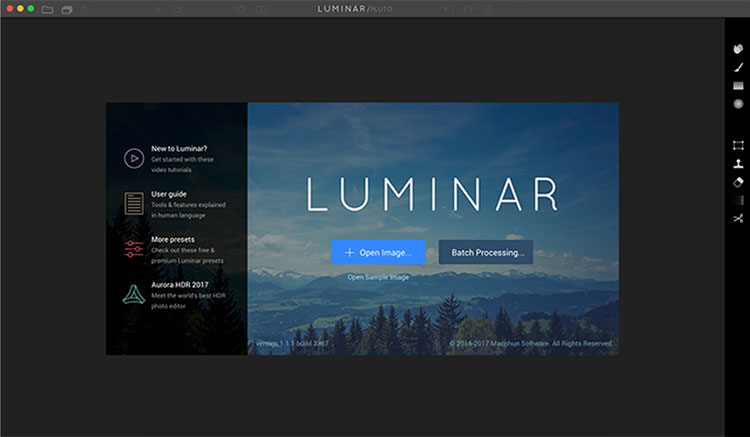
Luminar opening screen
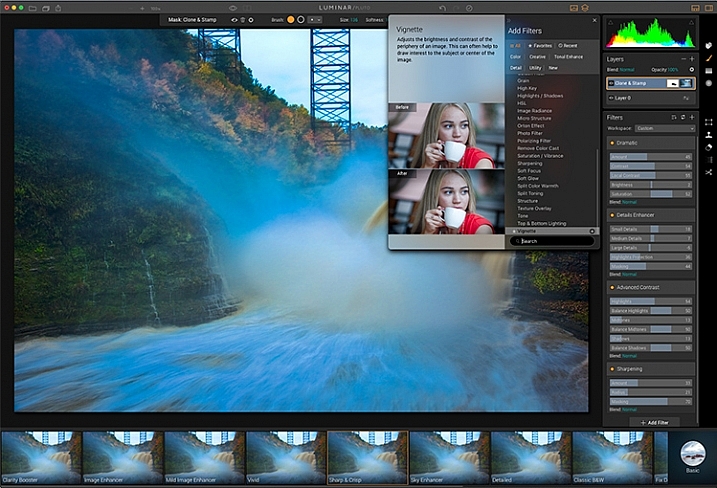
Macphun Luminar workspace

Luminar’s workspace is clean and easy to navigate.

Selecting Batch Processing allows you to drag and drop images, or load them from folders on your computer. You’ll then be prompted to choose certain settings such as a preset to apply (more on the presets later), as well as where you would like the images saved, what type of file to save as, resizing, and file naming. In addition to the opening dialog, Batch Processing is also available from the File menu within the application.

I’m a little disappointed that I can’t see a preview of the preset I’m applying to the batch, but overall, the process is easy to understand and runs pretty efficiently.  I processed a batch of 24 RAW images in just under three minutes on my late 2013 iMac.

The other option you see when starting up Luminar is “Load Image”. This allows you to open a single file and edit it to your liking, and then export it in any number of ways. I kind of wish Luminar had a file browser to allow me to view thumbnails, rather than just the “Load Image” dialog.

Workspaces
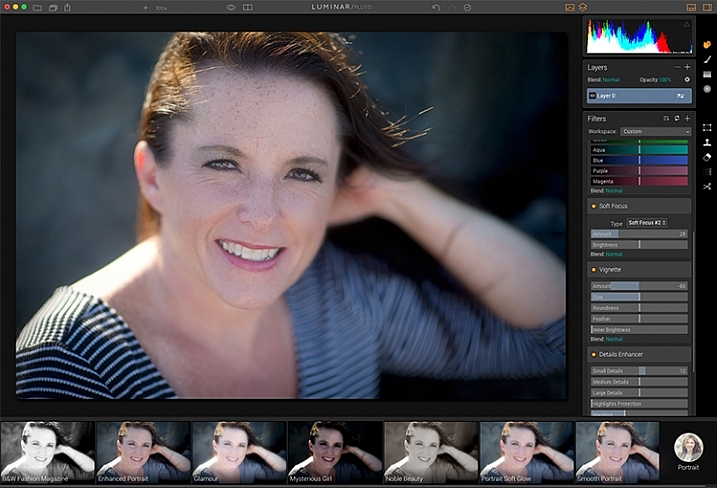
Macphun Luminar Portrait Workspace

You can change the workspace according to your subject matter. For instance, selecting Portrait brings up a different set of tools than does Landscape, or Street.

You can customize the application by using one of the workspaces available, which automatically brings up a set of filters appropriate for the subject matter.  The preset workspaces include Black and White, Landscape, Street, and Portrait. You can also create your own workspace based on the filters you find yourself using the most (see above).

Editing window
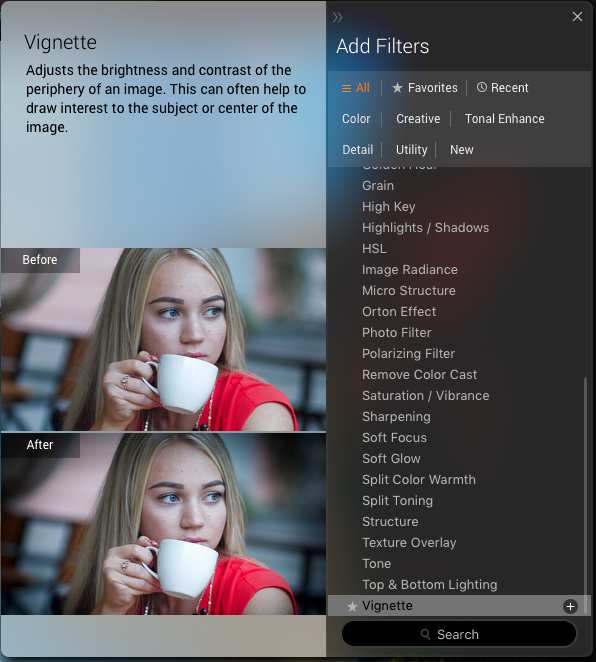
Macphun Luminar

When selecting Add Filter, this window listing available filters appears, allowing you to select from dozens of filters to apply to your image.

Once you have a file opened, you’ll be presented with the editing screen. The main window will show your image. Across the bottom, you’ll see the Preset Panel. This shows various presets that can be applied to your image. In addition to the default presets, Macphun has a selection of preset packs available for download on their website (some are free, some are for purchase). The presets are separated into various workspaces, including Outdoors, Portrait, Street, Dramatic, Basic, and Travel.
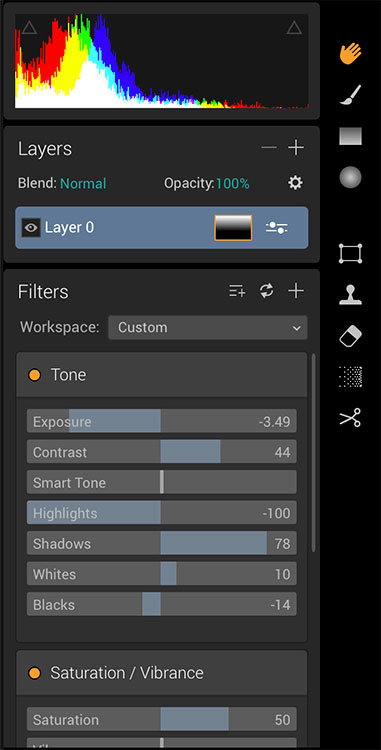
Luminar sliders

On the right side of the screen, you’re presented with the layers panel which shows the different layers you have in your current image. Similar to Photoshop, layers can use different blending modes, and the opacity of each one can be adjusted to give you exactly the look you want. A Transform tool is also available to work with the layers if needed.

Beneath the Layers palette, you’ll find the sliders to adjust the filters currently in use. Each preset uses various filters that can be adjusted using these sliders. You can also create your own look simply by adding the filter or filters of your choice from over 40 available. In addition, each filter has a separate blend mode that can be changed to adjust the look as well.

Macphun Luminar

A RAW image before processing with Luminar on the left, and after on the right.

Toolbars and palettes

On the right edge of the screen sits a toolbar, which houses various tools including Move, Masking Brush, Gradient Mask, Radial Mask, Transform, Clone Stamp, Eraser, Denoise, and Crop.

Any of the panels and palettes within Luminar can be shown or hidden with a click of the mouse, making it easy to customize the workspace to your liking.
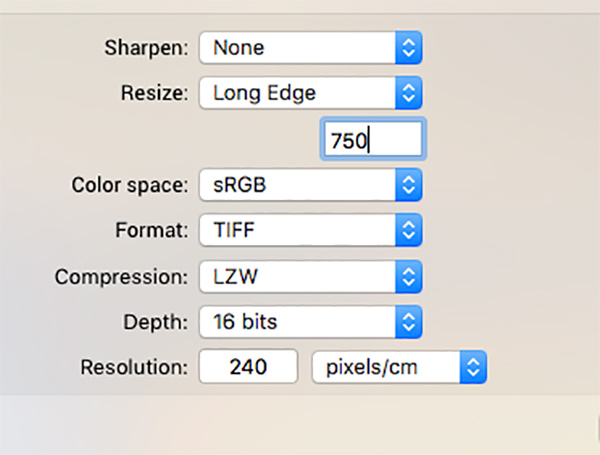
Luminar-Export-Dialog

The Luminar Export Dialog

Once you’re done making your edits, Luminar offers an easy interface to share your images to various photo sharing and social media sites, including Facebook, Twitter, 500px, Smugmug, Flickr, Messages, and Mail.
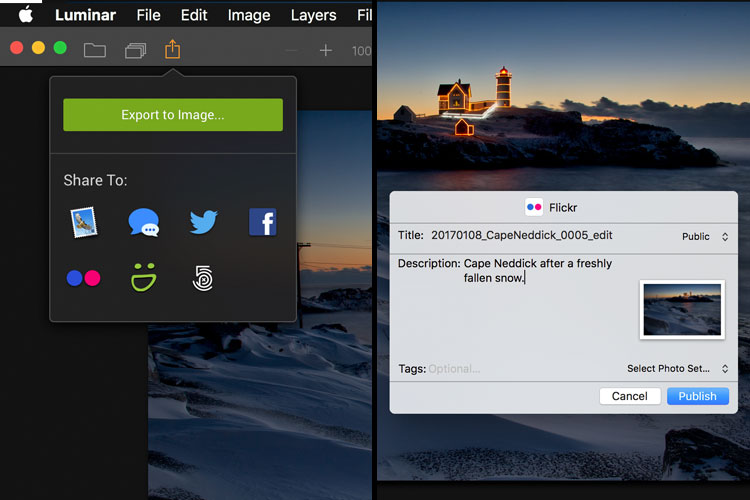
Luminar sharing options.

Macphun Luminar portrait preset

A portrait edited using the Black and White Fashion Magazine preset under the Portrait presets in Luminar.

Pros of Luminar

Macphun’s Luminar, as a standalone application, offers an excellent option for those who don’t want to get involved in a subscription service. Luminar is currently available from Macphun for $ 69, making it an easy way to get started editing RAW photos with a powerful image editor. For those already using Photoshop or Lightroom for their editing, Luminar works as a plugin that provides all of the powerful editing options of the standalone.

Luminar is easy to use, with a multitude of sliders that are pretty self-explanatory and provide for fine control over image effects. In a very short amount of time, you can be editing your RAW files and exporting finished images in a variety of formats, including TIFF, JPEG, PNG, GIF and PSD. If you’re familiar with MacPhun’s interface in the Creative Kit, Luminar will be easy to figure out.

I found the quality of the images edited in Luminar to be excellent, but as in Creative Kit, I thought some of the presets needed to be dialed back a bit for the best results. The variety of effects and options available really lets you customize the look of your images as well. I found some presets to be excellent starting points, but then by adding another filter or two, I was able to get exactly the style I wanted for my image.

Macphun Luminar

An image edited using MacPhun Luminar.
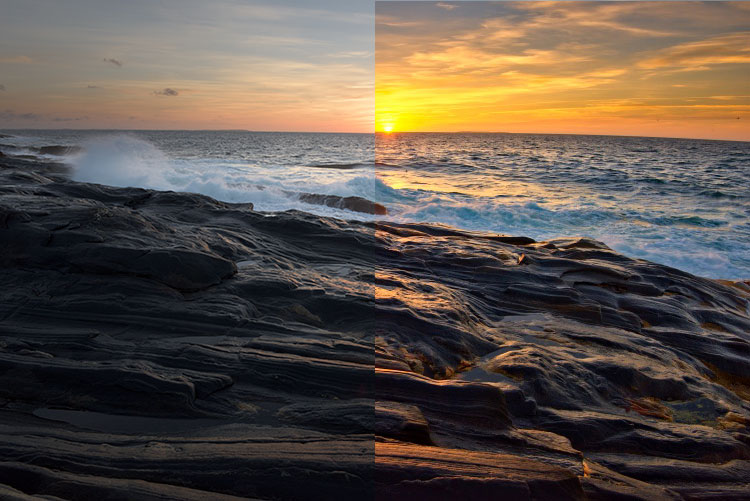
Before/after

Layered files

As of a recent update to the program, there is now the ability to save images as .lmnr files, which will save the layers and work done on an image, so you can come back to it later. A nice feature similar to saving as a layered PSD file. 

Cons of Luminar

As someone who’s used Photoshop for years, I found that some of the tools, such as the clone stamp, worked differently than I expected. This is easily overcome as familiarity with Luminar grows, but it took a little while before I got results I liked.

One other puzzling question is, why isn’t there native support for Macphun’s Creative Kit? MacPhun indicates in their product FAQ that there will be support for plugins eventually, but it would seem to make sense to have that powerful suite of plugins available from Day 1. Once support for plugins is available, Luminar becomes an even better value, in my opinion.

Macphun Luminar

Landscape image edited using Macphun Luminar.

Luminar, while an excellent photo editor and RAW processor, lacks certain tools available in Photoshop, such as the ability to output to CMYK, have multiple print layout options, or add text to an image. While many will never have a need to do any of that, it is a distinction that should be made, especially for those who like to add a watermark to their images being shared online.

Finally, Luminar lacks an asset management component like Lightroom, so for those who like to create catalogs, collections, and add keywords and descriptions to images, you’ll still need to use Lightroom while using Luminar as a plugin.

Macphun Luminar

Edited and exported using Macphun Luminar.

Final Verdict

Macphun Luminar has a simple to understand interface and a lot of great features that make it an excellent RAW processing application. Its flexibility to work as either a standalone application or a plugin for Photoshop, Lightroom, and other photo applications means that Luminar will be easy to integrate into your current workflow. My first thought, however, is that its primary market is people who want a powerful photo editor that is simpler to use than Photoshop, without paying a subscription fee every month.

Luminar offers some excellent editing tools, and with over 50 presets, it’s easy to get started towards the look you want. The interface is easy to understand, with self-explanatory sliders clearly marked to allow you to adjust the effect to your liking. If you’re just getting started with processing RAW files and photo editing in general, Luminar is a great choice.

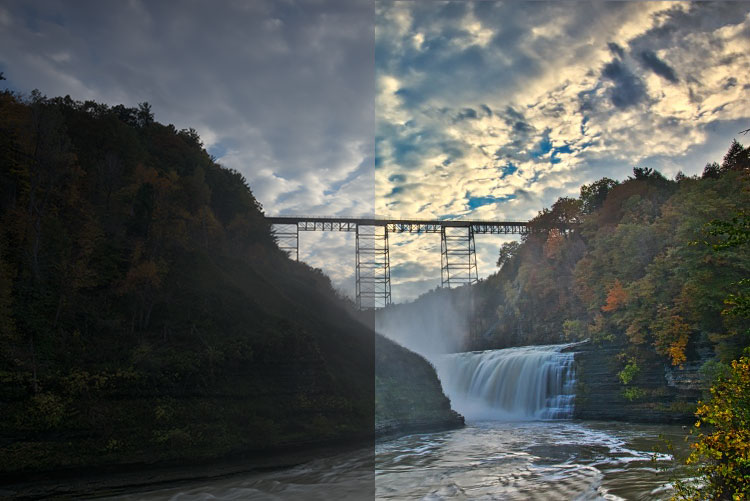
Luminar is available from Macphun’s website for $ 69, for Apple computers only (currently, supposedly a PC version is coming in the future tbd). Here are a couple more before and after images of what you can do with Luminar. Have you tried it? What are your thoughts?

googletag.cmd.push(function() {
tablet_slots.push( googletag.defineSlot( “/1005424/_dPSv4_tab-all-article-bottom_(300×250)”, [300, 250], “pb-ad-78623” ).addService( googletag.pubads() ) ); } );

googletag.cmd.push(function() {
mobile_slots.push( googletag.defineSlot( “/1005424/_dPSv4_mob-all-article-bottom_(300×250)”, [300, 250], “pb-ad-78158” ).addService( googletag.pubads() ) ); } );

The post Overview and Impressions of the new Macphun Luminar Software by Rick Berk appeared first on Digital Photography School.


Digital Photography School

 
Comments Off on Overview and Impressions of the new Macphun Luminar Software

Posted in Photography


Sony SLT a99 II first impressions review

31 Jan

Photokina 2016 proved to us, with the announcement of the a99 II, that A-mount isn’t dead: it was just waiting for the right tech to show up for its next big release, like the 42MP BSI-CMOS sensor that debuted in the a7R II. So much more than an a99 with a new chip, the a99 II’s improved specifications aim to put it in the same company as DSLRs like the Nikon D810 or Canon 5D IV, and full-frame mirrorless cameras like Sony’s own a7r II.

Key features

  • 42MP BSI CMOS Imaging sensor
  • 399 on-sensor PDAF points + dedicated PDAF sensor with 79 points
  • Dual SD card slots [UHS I]
  • 12fps continuous shooting in Raw with C-AF
  • 4K UHD 100Mbps recording, and 8-bit 4:2:2 4K output over HDMI
  • Picture Profile settings with Log gamma curves
  • 5-axis in body image stabilization
  • Wi-Fi with NFC

The weather-sealed body features a dedicated PDAF sensor separate from the imaging sensor that has light directed to it via a mirror, like a traditional DSLR. Unlike a DSLR, this mirror doesn’t ever flip out of the way. Instead, it is semi-transparent and sends only part of the light to the dedicated AF sensor, and lets the rest of the light pass through to the imaging chip. The camera can use both of these AF systems where they overlap, creating a Hybrid Cross Type AF system that should deliver both speed and accuracy that Sony hopes will match the best systems out there.

Also, the fixed mirror means AF readings can be taken with the dedicated sensor even while the shutter is firing, which should result in high ‘hit’ rates even at the maximum 12 FPS burst shooting. The downside is the loss of around 1/2 stop of light, something that the impressive 42MP sensor shouldn’t mind too much.

The a99 II also boasts some impressive video specs, which should be enhanced both by the camera’s ability to continuously autofocus in video and by its in-body image stabilization.

All of these features are controlled via a re-worked menu system that color codes sections and categorizes settings by which aspect of the camera they are adjusting, like Flash or Autofocus. Do all of these improvements transcend the inherent pitfalls of SLT technology?

Review History
31 Jan 2016 Introduction, Specifications, Body & Design,
Operation & Controls, and Image Quality pages published.

Articles: Digital Photography Review (dpreview.com)

 
Comments Off on Sony SLT a99 II first impressions review

Posted in Uncategorized