RSS
 

Posts Tagged ‘Image’

This image is why the world needs professional photographers

21 Dec

A gunman assassinated Russia’s ambassador to Turkey yesterday at the opening of a photography exhibit in Ankara. Associated Press photographer, Burhan Ozbilici was covering the event and witnessed the assassination first hand, which occurred while the ambassador was addressing the room of attendees.

In the face of an active gunman meters away, Ozbilici kept on making pictures. And because of his bravery, the world can witness and better contextualize this horrific event. But before you go on calling Ozbilici a hero for being brave, consider for a moment that he did exactly what he is trained to do. He did what any good photojournalist should have done. 

In an interview with the Los Angeles Times today, Ozbilici had this to say about the incident:

“I was, of course, fearful and knew of the danger if the gunman turned toward me. But I advanced a little and photographed the man as he hectored his desperate, captive audience,” Ozbilici tells the LA newspaper. “I was thinking: ‘I’m here. Even if I get hit and injured, or killed, I’m a journalist. I have to do my work. I could run away without making any photos… But I wouldn’t have a proper answer if people later ask me: ‘Why didn’t you take pictures?’”

It’s a stark reminder that the world needs well-trained photojournalist now more than ever. Unfortunately the trend in the newsroom, both in the United States and World-wide has been a constant cycle of slashing staff photography positions. 

There are a lot of reasons why photojournalism jobs are disappearing, the decline of print/classified ads is surely one, but the increase in smartphone image quality is another. Smartphones have come a long way and for many media companies, a multi-talented journalist who can shoot some photos and video with their iPhone is often considered good enough.

So what if instead of a proper photojournalist, the Associated Press has sent just a reporter with a smartphone to cover the event? After all, it’s just a gallery opening right? A quick snap of the ambassador behind the podium and a few shots of the gallery walls to accompany the text should do the trick. 

The point is, there really is no substitute for a professional photojournalist with years of training and field time. In an era when news is increasingly catered toward one’s specific taste, the facts can be elusive. But a good photojournalist can get us closer to the truth. It’s their job.

Articles: Digital Photography Review (dpreview.com)

 
Comments Off on This image is why the world needs professional photographers

Posted in Uncategorized


DxO ONE adds Raw image workflow for iOS

11 Nov

DxO announced that it has added a full Raw processing workflow to its iPhone-connected DxO ONE camera. Taking advantage of Raw image support in iOS 10, the update provides one-touch transfer of DxO ONE Raw files to the iOS photo library, from which images can be processed or shared.

Additionally, the company has introduced new Raw files that save an average of 30% space, improved responsiveness and boot time, faster application startup, full remote control of the camera using a direct Wi-Fi connection and a smart lighting feature to enhance dynamic range in difficult lighting situations.

A free update to the DxO ONE iOS app (v2.1) will be available in November, however the company did not provide a specific date.

Press release:

DxO ONE 2.1 update integrates full RAW processing workflow in an iPhone environment

DxO ONE update makes mobile an option for demanding photographers

PARIS—November 10, 2016—DxO, pioneer in digital imaging technologies, announces a major update to its award-winning DxO ONE miniaturized camera that lets demanding photographers take their mobile image making to the next level. Less than three months after the release of a 2.0 update that brought Wi-Fi as a new feature, DxO continues to extend the use of its pro-quality camera by introducing the world’s first seamless RAW workflow, direct from the DxO ONE to your iPhone or iPad. The version 2.1 update takes full advantage of RAW support in iOS 10, enabling a one-touch transfer of DxO ONE RAW files to the iOS Photos library where they can be processed on-the-go. Available to all DxO ONE users free of charge, the update also enables direct Wi-Fi remote control, and adds other performance boosting enhancements.

The DxO ONE camera revolutionized mobile photography by being the first to combine a large, high- resolution sensor and fast, razor-sharp lens in a miniaturized design that pairs directly with the iPhone or iPad. From the start, the DxO ONE has allowed photographers to store images in the RAW file format, which offers superior quality over JPEGs and considerable flexibility. Until now, post processing of RAW images necessitated they first be imported to a desktop computer. With this latest update, the DxO ONE camera can seamlessly transfer RAW photos direct to the iPhone where they can be further enhanced by Google Snapseed, Adobe Lightroom Mobile, and other popular iOS photo editing applications that have embraced support for mobile RAW image processing.

“I prefer to capture in RAW, because it gives me enhanced dynamic range, which is especially useful in bringing back details in blown highlights and deep shadows,” said professional photographer Camilla Ferrari. “Thanks to new developments by Apple and DxO, I’m now able to transfer RAW images from my DxO ONE camera right to my iPhone with a single tap, where I can process them in Adobe Lightroom Mobile and other iOS apps while I’m still on location. Welcome to the future!”

To further streamline the new mobile RAW workflow, DxO has introduced a lighter and faster recording speed for RAW files, which squeezes an average of 30% more storage space out of existing microSD cards. Overall responsiveness has also been improved, with a faster boot time for the camera, quicker application start-up, and improvements to the loading speed of the photo gallery.

The update also adds a number of other enhancements to the user experience, including a direct Wi- Fi connection that provides full remote control over the DxO ONE camera even when no existing Wi- Fi network is available. Version 2 also added a host of innovative features further extending the many uses for the DxO ONE, including the ability to tap into the Wi-Fi network that your iPhone is already logged into for remote control in-home or in-office, and a Mobile Smart Lighting feature designed to dramatically enhance the dynamic range of photos taken in tricky lighting situations. DxO also recently introduced a complete ecosystem of accessories, including a waterproof outdoor shell, ultra- compact stand and optical adapters, all intended to let photographers take their DxO ONE absolutely anywhere, without restrictions, to extend their creativity even further.

Pricing & Availability

The DxO ONE Miniaturized Pro Quality Connected Camera for iPhone® and iPad® is available for purchase at dxo.com, Amazon, Best Buy, B&H, Target and other respected retailers for $ 499 (US).

The DxO ONE 2.1 iOS app and companion Apple Watch® app will be made available in November as free software updates via the iTunes App Store®. Every DxO ONE user is invited to download DxO Connect for Mac/PC, or on Mac DxO OpticsPro for Photos – DxO ONE camera only, both of which harness the power of the DxO OpticsPro photo engine designed to make your best photos look even better.

Articles: Digital Photography Review (dpreview.com)

 
Comments Off on DxO ONE adds Raw image workflow for iOS

Posted in Uncategorized


Review: Neat Image 8 Noise Reduction Software

07 Nov

In the early days of digital cameras, noise was a much bigger problem than it is these days. DSLRs routinely top out at high ISO ratings that film shooters and early DSLR users could only dream of. In those early days (the early 2000s), when ISO 800 was typically the upper usable limit of high ISO, noise reduction software became a must-have for those of us who were post-processing our files and wanted them to look less like sandpaper and more like something we’d be willing to display. Neat Image was one of the first noise reduction applications I used at that time.

Neat Image 8 Review

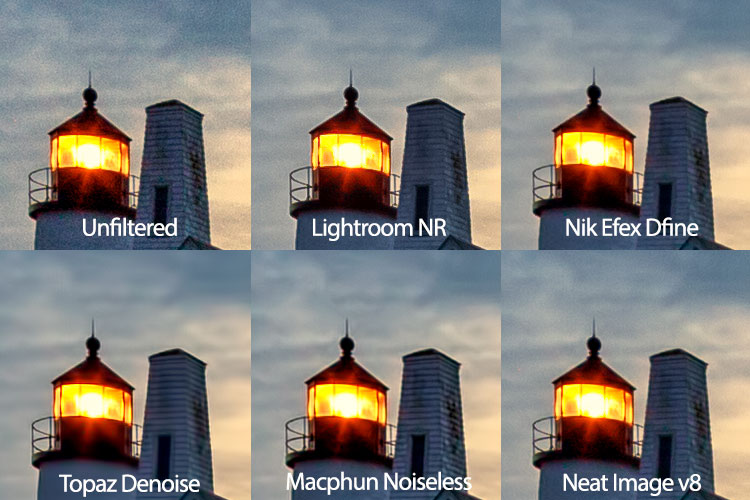
While it did a nice job, at that time, all noise reduction software was problematic in that it tended to give images an overly smooth, almost plastic or painted look that did a lot of damage in the fine details of an image. Neat Image was no exception in this regard, so I used it sparingly. Over the years, I found myself gravitating to other noise reduction plugins and applications, such as Nik DFine, Topaz DeNoise, and more recently, Macphun’s Noiseless. When I saw that Neat Image had recently been updated to version 8, I was excited to give it a try and see how it stacked up against the others. While Neat Image 8 is available as a standalone app or a Photoshop and Lightroom plugin, I will be focusing on the plugin version, as that suits my workflow better.

Overview of Neat Image 8

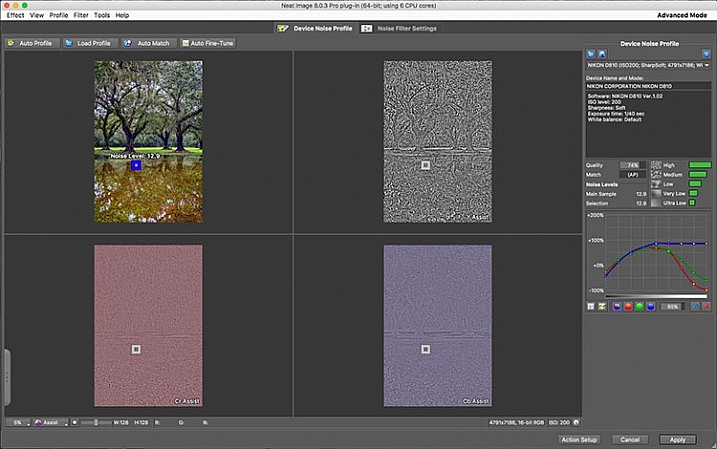
Neat Image Profile Screen

Upon opening Neat Image 8, the Device Noise Profile screen is the first thing you see.

Neat Image 8 is a fairly simple software to use, although upon first opening the plugin it can appear a bit confusing. You will be presented with multiple views of the image you are working on; a full-color preview, and the R, G, and B components of the image. There are four buttons at the top left of the screen; Auto Profile, Load Profile, Auto Match, and Auto Fine Tune. In the center are two tabs, Device Noise Profile, which is the tab the plugin starts in, and Noise Filter Settings.

Analyze image

Once the plugin is open, you’ll see the four different versions of your image. The easiest way to get started is to simply click “Auto Profile” and let Neat Image analyze the image. Once complete, a box will highlight the area that Neat Image has selected to use for noise analysis. Neat Image looks for an area with minimal detail for best results. If you select your own area to analyze, make sure it’s an area that contains minimal detail.

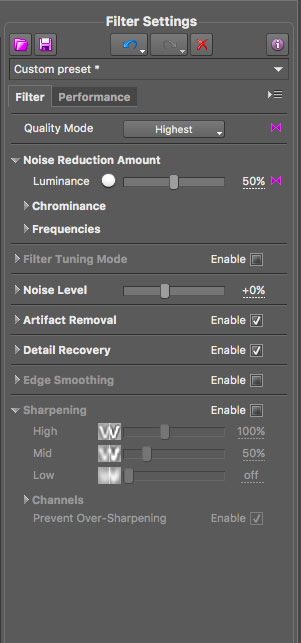
Neat Image 8 Adjustment Sliders

These sliders allow you to tweak the noise reduction to your liking after Neat Image has applied the noise profile to the image.

Filter settings in Neat Image

Now that you’ve analyzed the noise levels in the image, you’ll want to click on the Noise Filter Settings Tab. The preview will switch to the full-color image in the center and the R, G, and B channels will disappear. At the bottom left is a zoom toggle to zoom in or out of the image as desired. You’ll also have the ability to change the preview to various other options, including the RGB preview, a Luminance and Chrominance preview, as well as individual channels. Neat Image will then apply the noise filter settings based on the analysis as done above.

You can tweak the settings using the sliders at the right side of the app window. You’ll have the ability to adjust quality, the noise reduction amount, recover detail, smooth edges, sharpen, and fine tune the filter itself. In addition to the sliders, Neat Image comes with some presets, such as Recover Fine Details, Apply Less Noise Reduction, Apply More Noise Reduction, Reduce Noise and Sharpen, and more. You can also create your own presets for future use. These settings put Neat Image among the most customizable noise reduction applications I’ve used.

oaks-neat-image

Pros

For me, noise reduction has always been a love-hate relationship, always battling with a balance between preserving detail and reducing unsightly noise. One of my favorite things about Neat Image is the software’s auto profiling ability, customizing the noise reduction to each image as needed. While Nik Collection’s Dfine 2 also does its own image analysis, it doesn’t offer the customizability that Neat Image does. And Neither Topaz’s Denoise 5, nor Macphun’s Noiseless offer any kind of image profiling, with both requiring you to simply select a preset on your own and go from there.

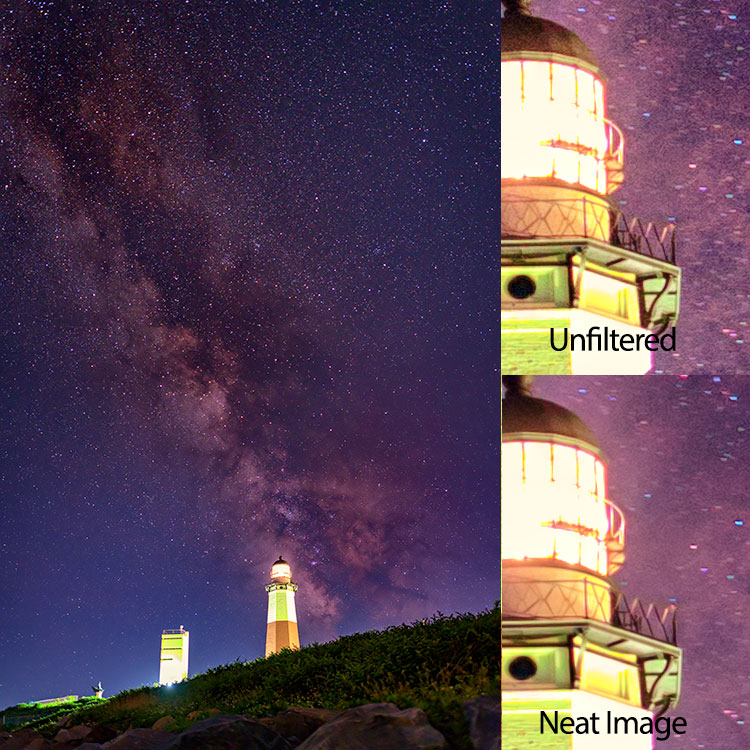
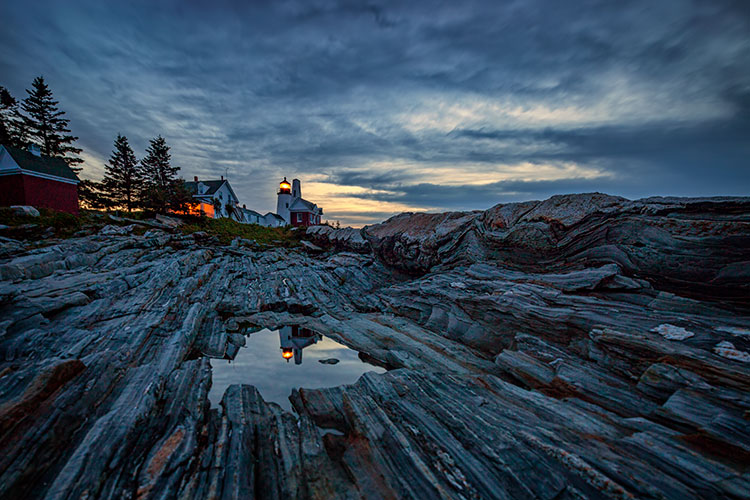
Neat Image 8 does an excellent job of maintaining detail while reducing noise in an area with little or no fine detail, such as skies.

night-sky-neat-image

Cons

With all the customizability, of course, comes a bit of a learning curve in terms of use. Neat Image does offer tutorial videos on their website to help get you started, but for those of us who are less patient and just want to dive in, it can be frustrating. I had one or two false starts when I first downloaded Neat Image 8, before finally going to their video tutorial to give me a jumpstart.

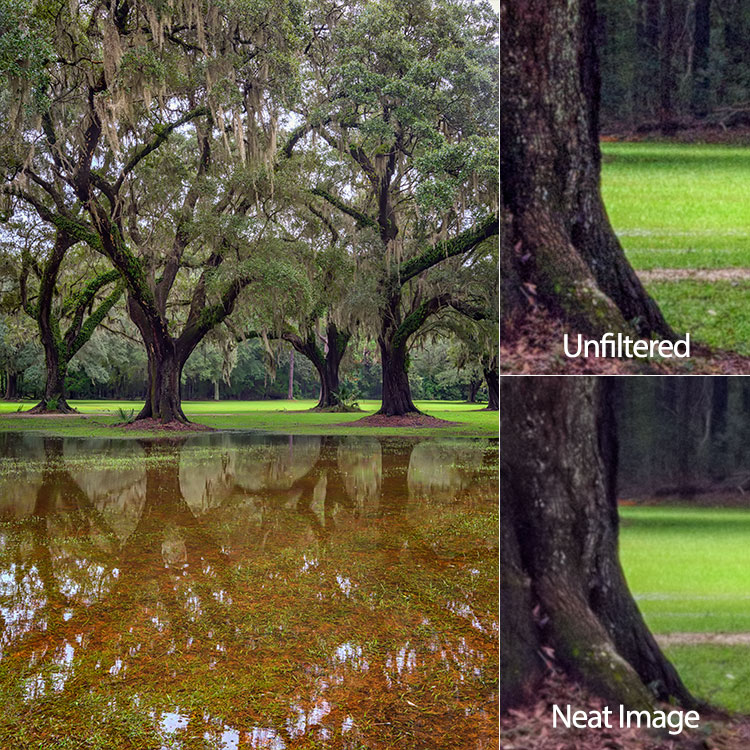
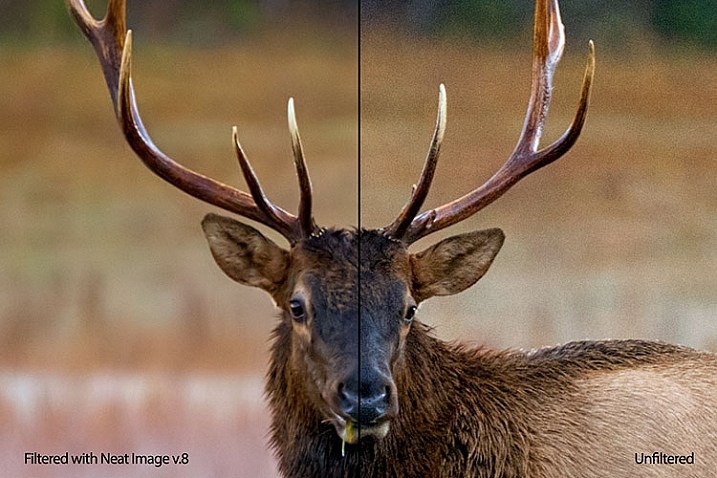
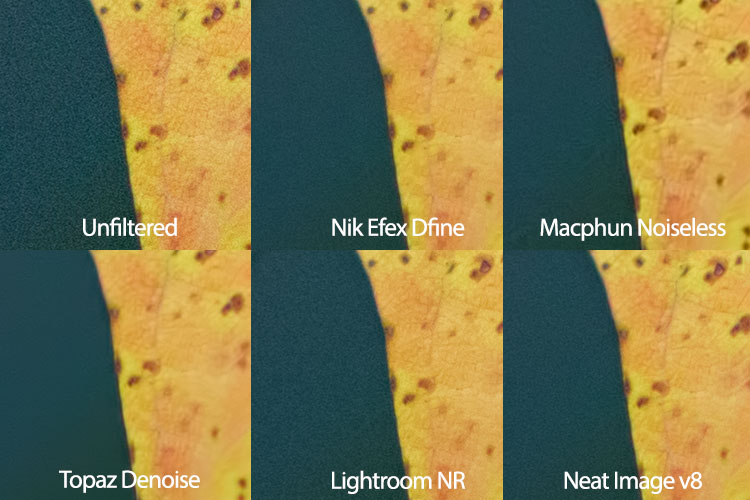
Neat Image 8 side-by-side comparison.

Side by side comparison of an image shot at ISO 2500, before and after Neat Image 8.

Conclusion

Ultimately, the ability to auto profile an image, adjust settings to personal taste, and use presets for repeatability of noise reduction, makes Neat Image an excellent choice for photographers who battle noisy images for any reason, including shooting long exposures, low light photography, or high iso photography such as indoor sports, events, or weddings. Neat Image is available starting at $ 39.90 per license.

lighthouse-neat-image-v8

neat-image-comparison

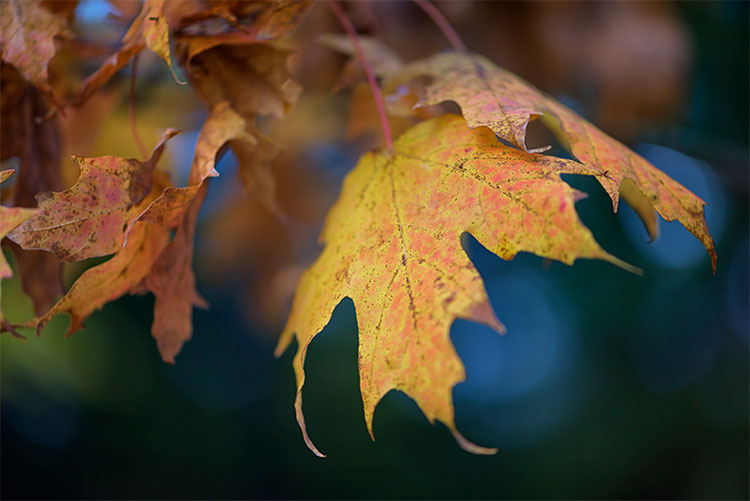
leaf-neat-image

leaf-neat-image-comparison

googletag.cmd.push(function() {
tablet_slots.push( googletag.defineSlot( “/1005424/_dPSv4_tab-all-article-bottom_(300×250)”, [300, 250], “pb-ad-78623” ).addService( googletag.pubads() ) ); } );

googletag.cmd.push(function() {
mobile_slots.push( googletag.defineSlot( “/1005424/_dPSv4_mob-all-article-bottom_(300×250)”, [300, 250], “pb-ad-78158” ).addService( googletag.pubads() ) ); } );

The post Review: Neat Image 8 Noise Reduction Software by Rick Berk appeared first on Digital Photography School.


Digital Photography School

 
Comments Off on Review: Neat Image 8 Noise Reduction Software

Posted in Photography


Top 6 Considerations to Help You Decide on Color or Black and White for Your Image

07 Nov

As soon as humans discovered that it was possible to capture black and white tones in a photographic image, a practical means of color photography was sought by those who dreamed of harnessing the full spectrum of visible light. Some of the very first photographic color experiments began in the mid-19th century with scientists trying to discover a material that could capture the color properties of the light that fell upon it.

In 1886, physicist and inventor Gabriel Lippmann created what was to be the first color photograph without the aid of any pigments or dyes. By 1906, Lippmann exhibited his process along with color images of a parrot, a bowl of oranges, a group of flags, and a stained glass window. His discovery earned him the Nobel Prize in Physics.

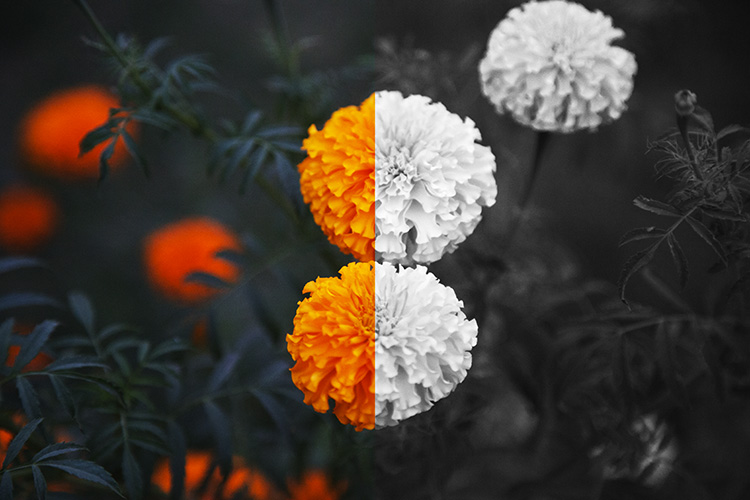
blackworcolor03

But Lippmann was onto something else in his experiments. Selecting subjects for his photographs that are not only inherently colorful but are also strongly associated with color within the human brain. Perhaps without realizing it, Lippmann was one of the first photographers to draw a line between color and black and white photography. Deliberately selecting subject matter that was exemplified by radiant colors to reproduce in a color medium.

Nowadays, digital photography grants photographers with both the blessing and the burden of being able to choose between color or black and white in post-production. It can often be a painstaking process deciding between the two. Although making a deliberate decision between a color or a black and white image is a skill that requires practice and trial-and-error, ultimately the choice is down to you, the individual.

blackworcolor07

However, there are a few points to consider if you find yourself stuck between the two. Here are the top six tips for deciding whether to go with color or black and white.

#1 Color Relationships

The first thing to consider when choosing between color or black and white is in fact, color itself! Ask yourself; what is it that draws you to the image? If you find that the relationship between distinct hues in your image are important, color is your best bet. Color doesn’t always translate to a black and white image successfully. An image with contrasting hues such as red and green often appears similar in tone in a black and white conversion, making for a less striking or muddy image.

blackworcolor04

black-white-or-color-considerations-04b

#2 Mood

Just as artists have used color in paintings to denote mood for centuries, the colors in a photograph can also create the emotional atmosphere of an image. Color is a powerful messenger. It can impact a viewer’s emotions, draw associations between ideas, and guide the eye around an image.

While black and white images generally evoke a sense of sensuality or seriousness due to its association with documentary photography, color can emphasize a feeling of joy or sadness depending on the color scheme. Just as we associate warm colors like red and orange with comfort and warmth, so do we relate to the colors in a photograph, giving the viewer clues about the image and creating a more immersive experience.

The tone or color balance of a photograph can point to a time of day or season which conveys a particular emotion or experience within the image. Black and white photographs appear to be more timeless than color images because they are free from color schemes associated with particular types of film, processes, or trends in digital processing. Black and white photojournalism is often hard to date with a cursory glance, so the subject matter remains relevant to the present day.

blackworcolor05

black-white-or-color-considerations-05b

See how the color version has a completely different mood?

#3 Attention

We see it all around us in marketing, architecture, and print. Color is used to grab a viewer’s eye and draw them in. But it is a fine balance and can often become complicated or convoluted if too much is happening with the picture. Look for a dominant color or color combination in your work. The most visual impact is often created by either isolating a particular color or having two colors from

The most visual impact is often created by either isolating a particular color or having two colors from well-separated areas of the color spectrum included in the one image. Colors such as red and green, or orange and purple (complementary colors) play off each other when they reach the human eye and create a sense of movement and action.

If your image has these combinations it might be better to stay with color and spend time emphasizing the colorful components of the image rather than converting it to black and white. A lack of color accentuates the light and shadows rather than eye-catching color combinations. Emphasis on particular colors can also be useful in forming a cohesive body of work, using color to contrast different imagery in a series, or uniting each piece with harmonious trends in color schemes.

Black&WorColor01

#4 Viewing time

Many photographers prefer black and white images for their tendency to distance the subject matter from reality. In documentary photography, the reverse is also true as humans see the world in color, and a rendition of the world in monochrome gives us pause to investigate. In both cases, removing color from a picture helps the viewer to focus on what is happening in an image. Due to the lack of cues that we naturally look for in color imagery, the viewer tends to look at a photograph more closely to ‘read’ what is happening in the image. A slower viewing time means that there is more time for the image to communicate with the viewer, impart emotion to a greater extent and perhaps stay with the viewer even after they have stopped looking at the work physically.

Due to the lack of cues that we naturally look for in color imagery, the viewer tends to look at a photograph more closely to read what is happening in the image. A slower viewing means that there is more time for the image to communicate with the viewer, impart emotion to a greater extent, and perhaps stay with the viewer even after they have stopped looking at the work physically.

blackworcolor09

#5 Content

To put it simply, black and white images create an emphasis on light, form, or texture. If the content of the photograph is more important than the color of the subject, or you feel that the color in a photo serves only as a distraction from the message you want the image to convey – then black and white is probably a good choice.

The focus shifts from colors to tones in black and white. So subjects like smoke, shadows, subtle changes in light and dust become more obvious in a black and white image. Because of our associations with these subjects and their otherworldly appearance, a sense of drama can become more apparent in a black and white image than that of a color image.

blackworcolor06

#6 Simplicity

Often a color photograph looks too busy or convoluted if it has too many colors going on at once. Sometimes converting the image to black and white is a way of separating those tones out into an image that is easier on the eye. Images with a wide range of tonal values tend to work well for black and white imagery. As well, most black and white images work best when there is a definite range from the blackest black through to the whitest white, with varying gray tones in between.

A few words of advice…

Beware the quick fix! Inexperienced photographers can sometimes fall into the trap of converting a sub-par image to black and white in order to quote, “save it”. Photographs that are out of focus, blurry, or poorly exposed may or may not be saved with a black and white conversion. But they do look suspiciously obvious when they are presented within a series of images that is mainly in color.

The problem with relying on black and white as a crutch is that you aren’t investigating what you did wrong in the first place. While a black and white conversion may or may not save a photograph, relying on converting images will not help you develop your own technical practice.

blackworcolor02

Digital photography is amazing, in that we have the option of shooting in color and switching to black and white in post-production. With film, this was at least a pain in the neck and at most, impossible. If you are unsure about an image, play around with it in Photoshop! Tools in Photoshop like the premade settings for black and white conversion are designed to give you a good set of variations to experiment with. If an image looks busy and over saturated, but you don’t want a full black and white conversion, try desaturating the image with the Vibrance adjustment layer or the Curves tool which are located in the Adjustment Layers panel.

Conclusion

Experimenting with color and black and white is fun, but no matter what option you do go with, be certain that you know why you chose that particular color scheme and make sure it adds to the sum of the image rather than detracting from it!

googletag.cmd.push(function() {
tablet_slots.push( googletag.defineSlot( “/1005424/_dPSv4_tab-all-article-bottom_(300×250)”, [300, 250], “pb-ad-78623” ).addService( googletag.pubads() ) ); } );

googletag.cmd.push(function() {
mobile_slots.push( googletag.defineSlot( “/1005424/_dPSv4_mob-all-article-bottom_(300×250)”, [300, 250], “pb-ad-78158” ).addService( googletag.pubads() ) ); } );

The post Top 6 Considerations to Help You Decide on Color or Black and White for Your Image by Megan Kennedy appeared first on Digital Photography School.


Digital Photography School

 
Comments Off on Top 6 Considerations to Help You Decide on Color or Black and White for Your Image

Posted in Photography


How to Go Beyond the Hero Image and Get Real Storytelling Photos

02 Nov

Good photography is really about telling stories, and that’s where all the lessons of composition, juxtaposition, lines, and focus fall short. Compelling images tell compelling stories, but the hard part is recognizing that story. I’ll tell you a story of how I missed the opportunity to do that, and look at some ways you can add more storytelling into your photography.

A bear story with a moral

I was camped on a low tundra bench above a swift blue river in Alaska’s western Arctic. Our green canoes lay upside down next to the kitchen tent, and the willows along the river were flecked with the first autumn yellow. It was early when I crawled from my tent, stood and stretched. While still reaching skyward I saw another form rise from the tundra a stone’s throw away, a young grizzly giving me a curious look. I dropped my arms and turned just in time to see its sibling offering me a similar stare from a bit farther back. These bears were three-year-olds, spending their first summer away from their mother, ursine-teenagers, and just as troublesome. Unlike the many adult bears we’d encountered on our journey down the river, these two didn’t yet know to give humans a wide berth.
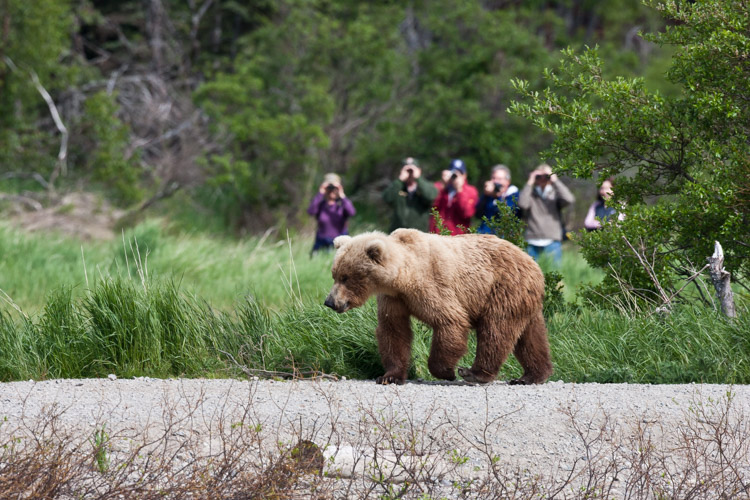
In Katmai National Park at the famous Brooks Falls tourists are inescapable. In this image, I embraced that part of the story of being there.

In Katmai National Park at the famous Brooks Falls tourists are inescapable. In this image, I embraced that part of the story.

Safety first

They backed off, after I shooed them with a wave of the arms, though not far enough. I woke my co-guide, and together we herded them away from camp and down onto the gravel bar below. One of the two young bears, rather than wandering off, decided to push my buttons and walked straight over. When off hiking or away from camp, you always give bears the right of way, but in camp, you can’t do that. Bears cannot learn that camps are places to explore.

Standing on the low bench, I knew that I could not let this mischievous youngster enter our camp. I stepped forward as he approached, right to the edge of the cut bank, and started speaking to the bear in a low steady voice. “I can’t let you up here, you have to back off. Back off. Now.” The bear paused in its approach, then stepped forward again. I raised a can of strong pepper spray, and held it up, ready to fire. The bear took another step forward, and then another until he was just eight feet away.

Hard lesson learned

And that’s when I felt a sudden moment of regret. Not for my behavior around this young, dumb bear, (in that, I knew I was doing the right thing) but for the fact that my camera lay in my tent. This beautiful (if troublesome) beast was so close I could count his whiskers. What a photo-op I was missing! But I pushed that aside, and spoke again, “One more step and you are getting it in the face. Don’t do it”, I said. “I’ll give you a count of three, then you are getting sprayed. One. Two…” before I could say three the young bear thought better of his situation, turned and ambled back to the river, swam across with his sibling, and disappeared.
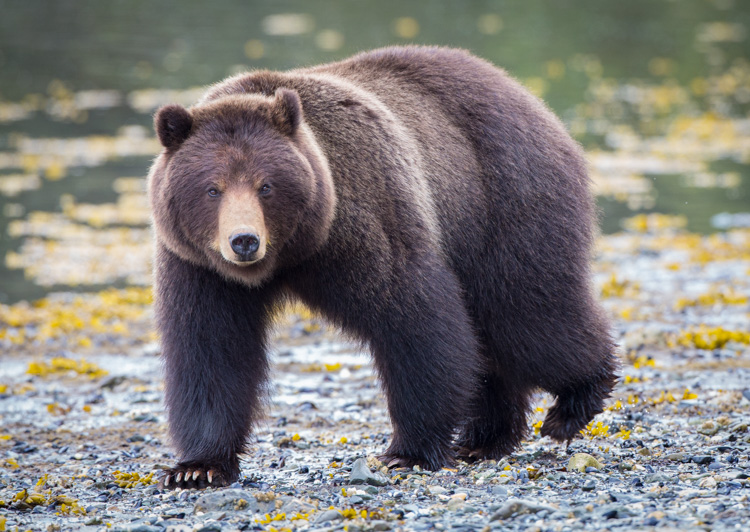
Similar to the story I related above, this bear approached a group of photographers I was a part of on Admiralty Island, Alaska. He came very close, and I regret not taking a moment to show a wider shot with the group of us in the frame.

Similar to the story I related above, this bear approached a group of photographers I was a part of on Admiralty Island, Alaska. He came very close, and I regret not taking a moment to show a wider shot with the group of us in the frame.

Think outside the frame – the moral

In retrospect, as I thought about the images I missed, I realized that it wasn’t the frame-filling portraits of the bear that would have been so spectacular about that moment. It was the story that went with it. Facing the bear down with a can of pepper spray, the bear testing us, and his eventual retreat. That’s where the compelling images were, not in the missed photos of the bear, but in the missed story that went with it.

If I had a camera in that moment with the bear, even if I’d been on the sidelines, I know I would have blown it and gone for the wildlife portraits, missing the much more interesting interaction that was taking place.
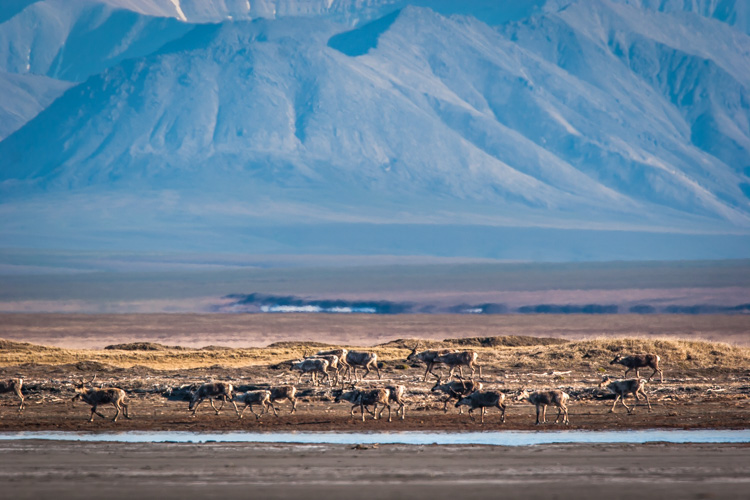
Here a herd of caribou is seen migrating across the coastal plain of the Arctic National Wildlife Refuge in Alaska. This image tells a more important story of movement, landscape, and perspective than a more typical portrait of an animal would.

Here a herd of caribou is seen migrating across the coastal plain of the Arctic National Wildlife Refuge in Alaska. This image tells a more important story of movement, landscape, and perspective than a more typical portrait of just an animal would.

Learn from the best

Take a look at any issue of National Geographic. Many, even most, of images that are selected are storytelling images, not illustrations. The compositions are atypical, often showing the interaction of people or animals within the scene. Those photographers stepped back from a typical composition and explored their surroundings in a way that most of us, myself included, usually forget to do.
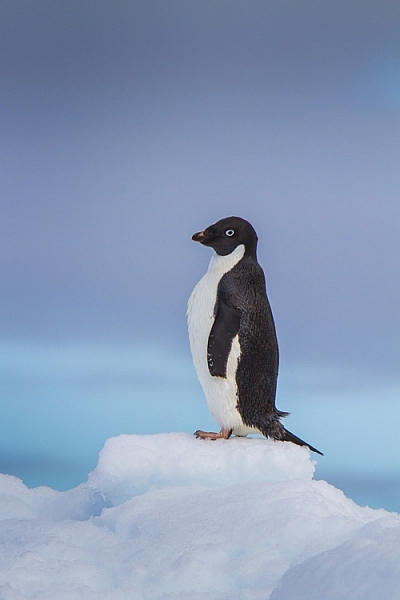
This image of an Adelie Penguin on an iceberg, I made in Antarctica. Getting close to wildlife is easy there, and the following image provides information to see just how easy.
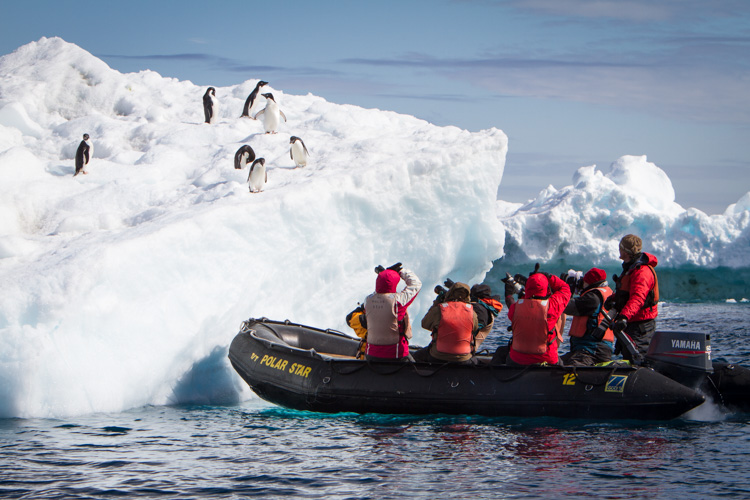
This image of an Adelie Penguin on an iceberg, I made in Antarctica. Getting close to wildlife is easy there, and the following image provides information to see just how easy.

A zodiac pull right up to an iceberg with Adelie Penguins.

A zodiac pulled right up to an iceberg with Adelie Penguins.

Look around

This is an easy lesson to say, a much harder one to perform in the field because the real story is often easy to miss.

Another example: I was photographing the start of the Yukon Quest sled dog Race in Fairbanks, Alaska, where I live, a few years ago. I’d been concentrating on the passing dogs, the smiling mushers, and been studiously avoiding the crowds of people that surrounded me. At one point a spectator raised a point and shoot in front of my shot, I was irritated, but in that moment I was forced to pause. It clicked, and I realized that the real story was the crowd of mushing fans, out on a cold morning to watch the race. I changed my composition and made an image of the spectator’s camera. That shot is much more telling of the experience than any of my previous photos.
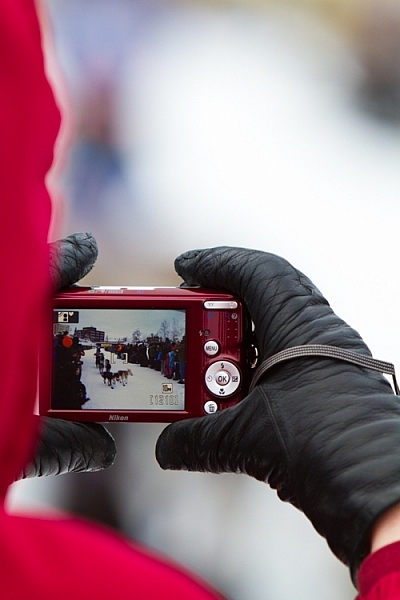
Here, the scene of the dog teams seen through a spectator's camera is more telling of the experience of the start of the Yukon Quest.

Here, the scene of the dog teams seen through a spectator’s camera is more telling of the experience of the start of the Yukon Quest.
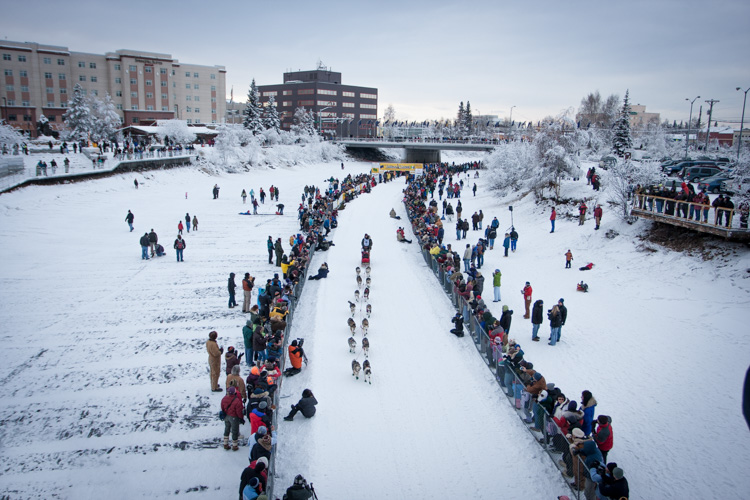
This broad perspective is also an effective way to tell the story, showing the rows of spectators and the buildings of Fairbanks in the background.

This broad perspective is also an effective way to tell the story, showing the rows of spectators and the buildings of Fairbanks in the background.

Sometimes it’s a sudden realization like mine at the mushing race, but often, you have to put some effort into the real story. You need to break away from the scene you think you should be photographing, pause, and look around. Consider not just the scene, but the experience. What are you, or those around you, feeling, seeing, and doing?

Stay open to your surroundings

While being focused on your subject is vital to creating good images, it’s important not to close yourself off too much. Take the time to look around. Literally step away from your tripod, and turn 360 degrees while paying attention. What else is out there? Have you been missing anything as you’ve been staring through your viewfinder? What happens if you back up and show the surroundings?
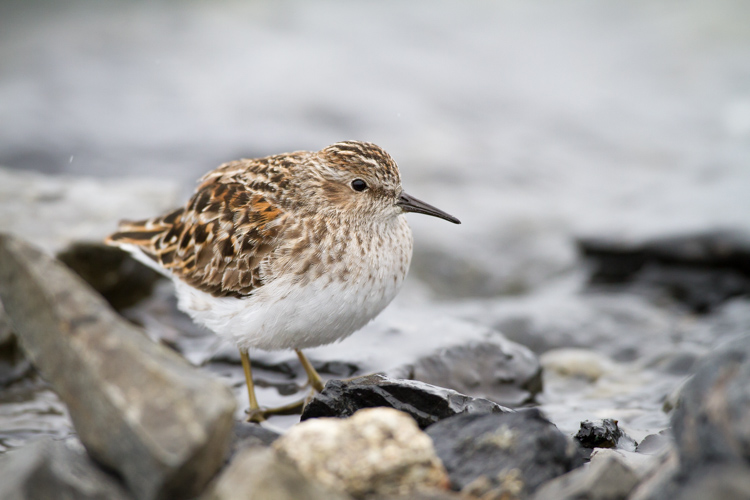
While an image of single bird, in this case a Least Sandpiper is nice portrait, it is more of an illustration than a story.

While an image of a single bird, in this case, a Least Sandpiper is a nice portrait, it is more of an illustration than a story.
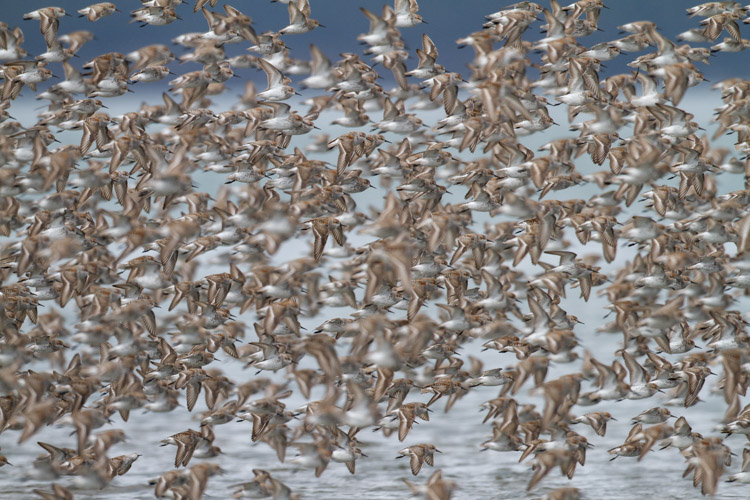
A large flock of shorebirds, when compared to the single-bird portrait, is more telling of the lives of the birds, and their epic migrations.

A large flock of shorebirds, when compared to the single-bird portrait, is more telling of the lives of the birds, and their epic migrations.

Think in terms of stories

That real story can be told within a single image, but there are also other strategies. Though an entire article is required to discuss the photo essay (5 Tips for Creating a Photo Essay with a Purpose), I do want to note that you can always think through your story using a series of images. This is also a good way to make the classic images you strive for while simultaneously capturing the storytelling ones as well.

Telling the real story is important not just for the quality of our images, but also for the quality of our experience. These storytelling images may not have the flash and glamor of a bear portrait or a sprinting sled dog, but it will help your viewers know the story, and that really is where the real excitement lies.

googletag.cmd.push(function() {
tablet_slots.push( googletag.defineSlot( “/1005424/_dPSv4_tab-all-article-bottom_(300×250)”, [300, 250], “pb-ad-78623” ).addService( googletag.pubads() ) ); } );

googletag.cmd.push(function() {
mobile_slots.push( googletag.defineSlot( “/1005424/_dPSv4_mob-all-article-bottom_(300×250)”, [300, 250], “pb-ad-78158” ).addService( googletag.pubads() ) ); } );

The post How to Go Beyond the Hero Image and Get Real Storytelling Photos by David Shaw appeared first on Digital Photography School.


Digital Photography School

 
Comments Off on How to Go Beyond the Hero Image and Get Real Storytelling Photos

Posted in Photography


Tips for Getting the Image Right In Camera

17 Oct

I suspect if asked the question “Would you rather be editing your images, or out there photographing that what you love?” only a select few of us photographers will raise our hands for the former! Photography is an incredibly creative art form and as artists, we want to be able to create beautiful imagery every time we click the shutter. For the most part, we want to spend more time creating and less time editing our images. There are several simple steps we can take to try and get the images as close to perfect (as we imagine it), right in camera a.k.a SOOC (straight out of camera).

#1 Pre-visualize the shot you want to achieve

Having an idea of what you want to shoot and planning for the shot can go a long way in helping you achieve the right results the first time around. Like anything else in life, have a plan of when you want to shoot, where you want to shoot, and what kind of image you want to create.

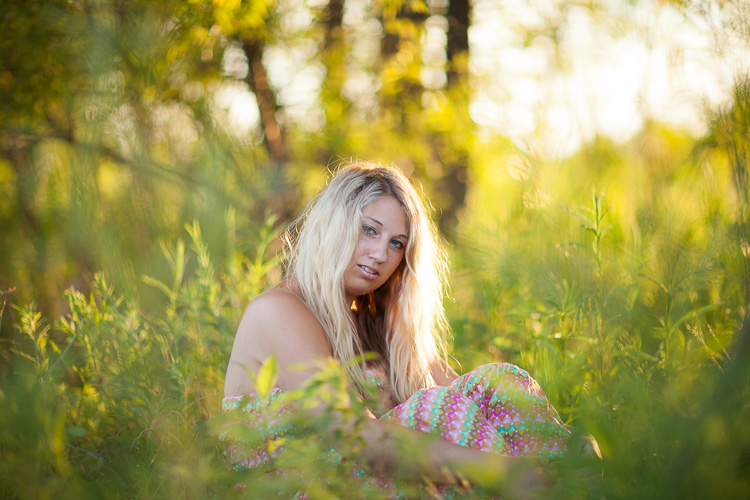
memorable-jaunts-getting-it-right-in-camera-article-for-digital-photography-school-1-sooc

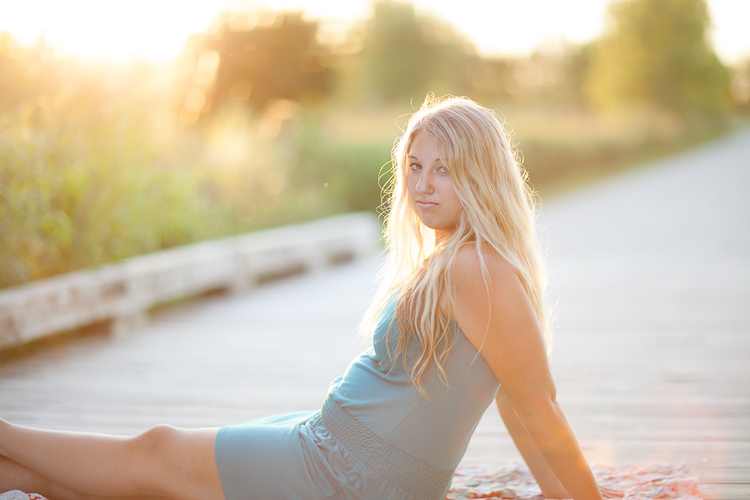
A golden hour shoot where I knew the kind of image I wanted this to be – this is SOOC and a little bit cool but I liked the halo effect on her hair and the framing with the tall grass.

memorable-jaunts-getting-it-right-in-camera-article-for-digital-photography-school-1

With a few simple edits of temperature, contrast, tint and spot removal for some rogue blades of grass, I got the image that I envisioned when I clicked the shutter.

Do you want an image that is light and bright? Then plan on shooting during the day in a wide open space with lots of sunlight. Do you want to create an image that is dark and moody? Then look for locations that are not in direct sunlight, ones that have texture and tones that are on the darker side.

Resist the temptation to arrive at a location and immediately start clicking the shutter just because you want to take a picture of something. This does take some discipline but it can save you a lot of time and effort in the long run. Not to mention the hassle of storing images that really don’t convey a story and are really random in nature.

#2 Limit yourself to a select number of frames

This is a concept that transfers over from film days and I strongly encourage you to go out and shoot a roll or two of film (even a small disposable point and shoot camera). Challenge yourself to really tell a story in a limited amount of frames (typically 24 to 36 for 35mm cameras and even less for medium format cameras). You will immediately feel restricted and limit yourself to only shooting that which is interesting. And you will find yourself paying more attention to composition, lighting ,and technique when you limit yourself to a small number of frames like 16, 24 or 36.

#3 Go into Single Shot drive mode on your camera

If your DSLR has a burst mode capability, deactivate that functionality or change it to Single Shot. When you press the shutter, only one shot will be taken. The ability to hold down the shutter and fire away 5-6 frames is deactivated. Again this will help you focus on technique, technical

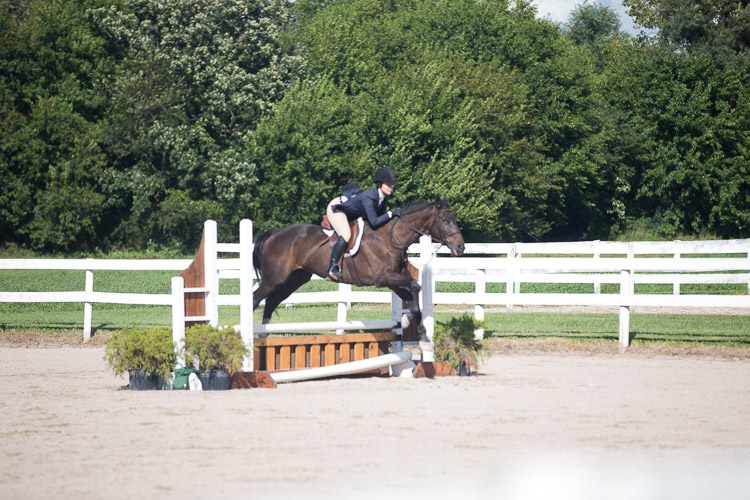
memorable-jaunts-getting-it-right-in-camera-article-for-digital-photography-school-2

The image of the horse jumping the poles is soft as I missed the focus on the moving horse.

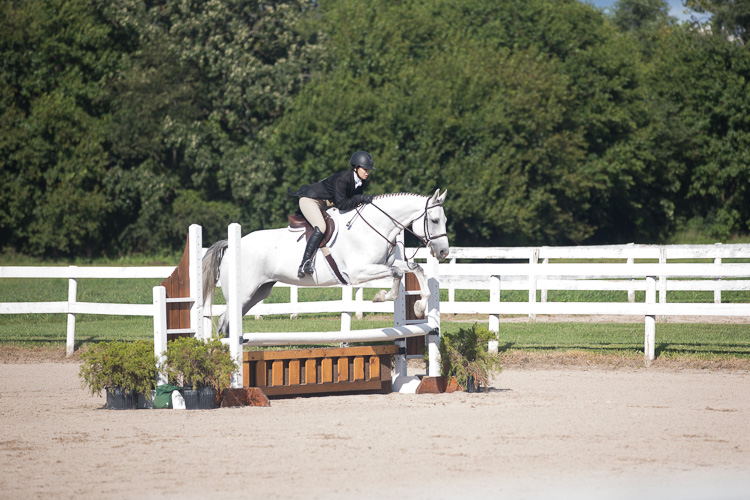
memorable-jaunts-getting-it-right-in-camera-article-for-digital-photography-school-2-2

But the next rider was caught at the right moment of the jump. And by tracking the previous rider, I knew the general path of the jump and was able to get a sharp image.

Again this will help you focus on technique, technical aspects, and composition of each shot which in turn forces you to slow down and be more intentional with what you shoot. Yes, you may run the risk go having a blurry image, especially if your subject is moving. But after a few tries, you will learn to anticipate and track your subject at exactly the right time to get a sharp image (as seen below).

#4 Utilize the full capabilities of your camera

Most DSLRs today are sophisticated pieces of equipment with advanced computing technology built-in. They are built to read, analyze the scene, and make decisions based on what they have been programmed to do. But at the end of the day, they can still make mistakes by making incorrect decisions. You can avoid these errors by taking control of your camera.

A) Learn to shoot in Manual mode

By shooting in Program or Auto mode, you are relinquishing control to the camera and allowing it to make all the decisions. Shooting in Manual mode gives you, the user, the most amount of control and forces you to think about all the aspects of a good image like light sensitivity, depth of field, and movement before you click the shutter.

memorable-jaunts-getting-it-right-in-camera-article-for-digital-photography-school-3-1

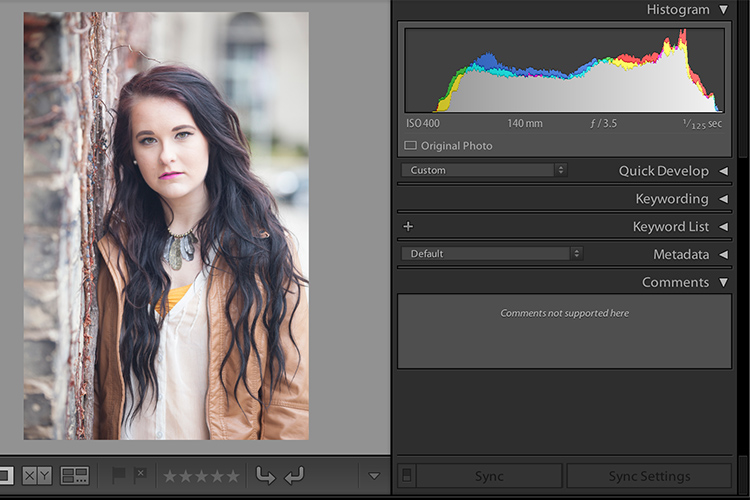
Over time, shooting in Manual mode where all the core elements like ISO, f-stop and shutter speed are adjusted by you the photographer and not the camera, will lead to images that are (almost) perfect right out of the camera. The histogram is a great way to validate if the image is structurally correct (subjective to your shooting style).

B) Use the preview function (LCD screen)

If your camera has a preview function (also known as the playback function), use that to view and analyze the image you have just taken. Is it sharp and in focus? is the properly litm, or is it too dark? If the composition is incorrect, the image is blurry, or the exposure is completely off, you can fix the problem, delete the image and retake the shot. The more you practice fixing the image right then and there, the fewer bad images you will take back with you to try and edit and salvage later in post-processing.

C) Use the histogram

You can take the review functionality up a notch by checking the histogram (if your camera has that information available) via the LCD screen. The histogram shares information like the quality of the shadows and highlights of the scene.

This image was intentionally shot this way - overexposed because I was almost shooting into the sun and I really wanted that sun flare in the bottom right of the image.

This image was intentionally shot this way – overexposed – because I was almost shooting into the sun and I really wanted that lens flare in the bottom right of the image.

I will throw out one caveat here – make sure you practice the art of reading and reviewing the histogram when you are shooting just for yourself or during test shoots, not during paid client gigs. On a client shoot, if you are messing with histograms and excessive review of the LCD, you may appear very unprofessional to your clients. They may perceive it as you don’t know what you are doing and that you lack confidence in your technical abilities. The good news is that by practicing enough on your own time, you will be confident to nail the shot right on the first go!

D) Get out of the mental mindset of, “I will fix it in post-production”

This is one of the worst dialogues you can have with yourself (I too have done this in the past). It encourages a mentality of laziness and the attitude of “spray and pray”. Firing away what appears to be hundreds of shots in the hope that at least a few will be worthwhile. Let post-processing be only for any artistic touches and not as a fix for basic things like exposure, color temperature (white balance), and tonality.

memorable-jaunts-getting-it-right-in-camera-article-for-digital-photography-school-5

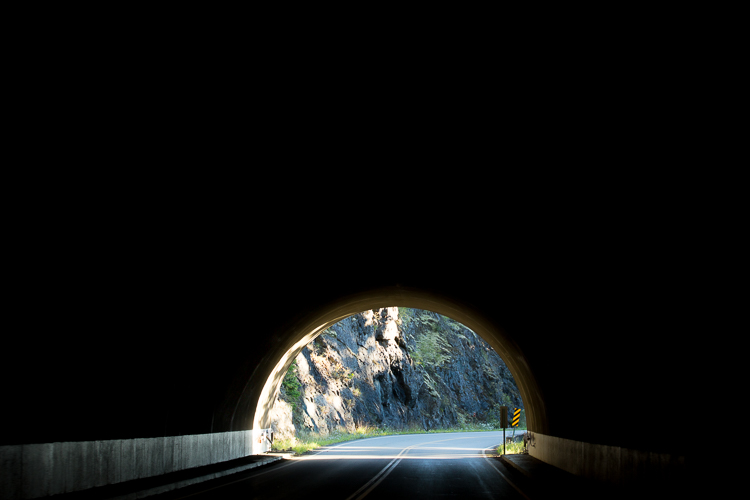
I absolutely love this image and the use of negative space. This is how I saw the scene in front of me and I had less than three seconds to take the shot. This is almost SOOC. I only cleaned out some traffic signs and brightened the highlights, an easy 2-second edit in Lightroom.

Conclusion

The basic premise of this article is actually quite simple. If you want to have a perfect or near-to-perfect image right out of the camera, learn how your camera works and behaves. And learn to use it to create images that you envision as representing your true artistic abilities.

googletag.cmd.push(function() {
tablet_slots.push( googletag.defineSlot( “/1005424/_dPSv4_tab-all-article-bottom_(300×250)”, [300, 250], “pb-ad-78623” ).addService( googletag.pubads() ) ); } );

googletag.cmd.push(function() {
mobile_slots.push( googletag.defineSlot( “/1005424/_dPSv4_mob-all-article-bottom_(300×250)”, [300, 250], “pb-ad-78158” ).addService( googletag.pubads() ) ); } );

The post Tips for Getting the Image Right In Camera by Karthika Gupta appeared first on Digital Photography School.


Digital Photography School
 
Comments Off on Tips for Getting the Image Right In Camera

Posted in Photography


Google adds auto image rotation, GIF creation to Photos app

13 Oct

Google has added four new features enhancing its Photos app for iOS and Android.

The first two features are similar in that they highlight photos related to specific people. A ‘Rediscover your memories’ feature will dig up old pictures of people who have appeared in more recent images. A ‘Recent highlights’ option will bring up a ‘card’ showing the best photos of a subject you’ve taken pictures of recently, such as a baby.

Perhaps a more useful feature is the ability to rotate images to the correct orientation, as illustrated above.

Finally, the Photos app can analyze videos you’ve taken to find ‘action’ and then turn it into an animated GIF.

Google blog via Droid Life

Articles: Digital Photography Review (dpreview.com)

 
Comments Off on Google adds auto image rotation, GIF creation to Photos app

Posted in Uncategorized


Adobe and UC Berkeley demonstrate image editing tool powered by machine learning

01 Oct

Researchers with Adobe and the University of California-Berkeley have detailed a new AI-powered photo manipulation tool that enables sophisticated photo modification using ‘target images’ and/or crude user sketches. The end result is a realistically altered photo that has been machine-modified (or, in the case of blank images, completely machine generated) to match a target image without extensive ‘natural’ user editing.

According to a newly published study detailing the technology, this tool involves a ‘generative adversarial neural network’ that works to modify images in near-real time. As one example demonstrated in the video below, drawing a general shape over a photo of a bag causes the software to automatically adjust the bag’s size to match the sketched shape without compromising its realistic nature. The software can also generate images based on crude user ‘scribbles’ – no artistic talent required.

Articles: Digital Photography Review (dpreview.com)

 
Comments Off on Adobe and UC Berkeley demonstrate image editing tool powered by machine learning

Posted in Uncategorized


Flickr Marketplace image licensing program shuttered

24 Sep

Flickr Marketplace, the property’s image licensing service, is being shuttered, with the company citing feedback about subpar service as the reason. Per the email being sent to existing Marketplace licensing program users, the full shutdown will take place over the next few months, with appropriate royalties still being paid out to contributors during that time. 

Flickr confirmed to TechCrunch that the email is legitimate. In it, the company encourages users to complete an included survey that ‘could help shape possible decisions for any licensing opportunities in the future.’ However, no future plans have been stated, and Flickr Marketplace is effectively closed.

Via: TechCrunch

Articles: Digital Photography Review (dpreview.com)

 
Comments Off on Flickr Marketplace image licensing program shuttered

Posted in Uncategorized


Teardown reveals Sony image sensors in iPhone 7

24 Sep

Patent and technology consultancy Chipworks has published its iPhone 7 teardown and reveals that front and rear image sensors on the new Apple models are supplied by market leader Sony. This is not too much of a surprise as earlier iPhone models used Sony sensors as well. In its report Chipworks doesn’t say which exact sensor model has been deployed in the rear camera but we know the 12MP chip uses the Exmor RS technology platform, a Bayer RGB color filter array and on-sensor phase detection. Its die size is 5.16 mm x 6.25 mm (32.3 mm2) as measured from the edges of the die stack. 

On the FaceTime front camera the resolution has been increased to 7MP. The Sensor is also a second generation Sony Exmor RS model and measures 5.05 mm x 3.72 mm (18.8 mm2). Chipworks has not treated the larger iPhone 7 Plus model with its dual-camera to the teardown procedure yet, but we would expect both sensors in the dual-camera to come from Sony as well. For now you can find more technical detail in the iPhone 7 teardown on the Chipworks blog.

Articles: Digital Photography Review (dpreview.com)

 
Comments Off on Teardown reveals Sony image sensors in iPhone 7

Posted in Uncategorized