RSS
 

Posts Tagged ‘Here’s’

Got Sensor Dust? Here’s How to Check.

28 Oct

We all know that dust on a DSLR sensor can range anywhere from the mildly annoying to downright problematic. You can try avoiding it, but the simple, unfortunate truth about sensor dust is that regardless of how careful you are, onto every sensor some dust will fall at some time. The closest you might come to avoiding it would be if you were to put a prime lens on your camera when it’s brand new and never change it or take it off. Ever. We all know that’s not about to happen, so dealing with dust becomes a critical part of regular camera maintenance. Part of eradicating any enemy, however, first requires some knowledge of where he’s hiding and how he got there.
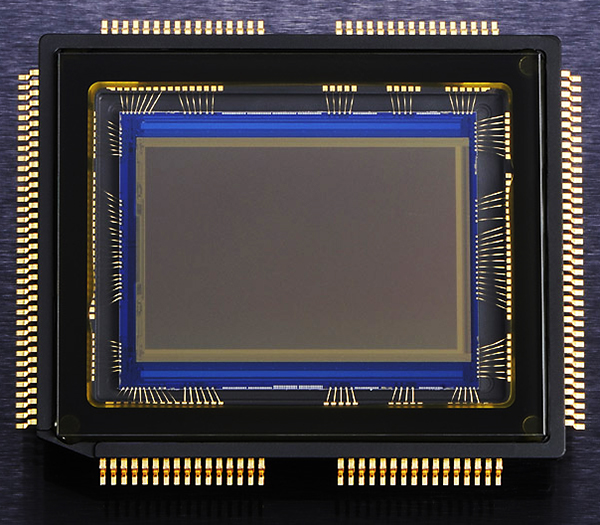
guyer-photo-sensor-dust

The fact is that our cameras spend a great deal of time in dusty environments. Regardless of how clean your studio is or how lint-free your camera bags are, those microscopic makers of mayhem are going to settle on your camera at some point. And that’s before we even think about taking our cameras outside or changing lenses. When using lower-end or budget zoom lenses, the simple act of repeatedly zooming the lens in and out can “inhale” dust particles into the lens, which can then over time work their way into your camera. Once inside, they can settle on the mirror or sensor. Once you start changing lenses, the likelihood of dust finding its way to your sensor skyrockets. There are steps you can take to minimize the dust (holding the camera with lens mount facing down while changing, not changing lenses outside, etc.), but sooner or later it’s going to find you.

Mirror or Sensor?

The first important difference between the dust that settles on your sensor and that which settles on the mirror is that only one of them will appear in your photos. While the mirror is essential to viewing the scene and taking the photo, mirror dust will have absolutely no impact at all on your images. It also differs from sensor dust in that you can often actually see mirror dust with the naked eye when you look through the viewfinder. It can be annoying, but it is also usually a pretty easy fix with an air blower. Sensor dust, on the other hand, won’t show itself until it’s left dark spots of varying sizes on your photos. If you see it in the viewfinder, it’s not on the sensor.

Spotting the Spots

For starters, you’ll be able to recognize a dust spot on your photos if it appears in the same place in multiple images, particularly in images taken at small apertures like f/8 or smaller. If you are generally a “wide open” photographer, you need to know that most dust particles will not show up at very wide apertures like f/1.8 against bright backgrounds. Dust may also be less noticeable in images with a lot of detail, but that doesn’t mean it’s gone. If a dust spot is visible with just a quick glance at the image, chances are that you’re looking at a pretty bad spot on your sensor– one that’s not going to leave just because you squeeze a little bit of air at it. You may need a thorough sensor cleaning to get rid of your worst offenders. But regardless of whether you pay to have your sensor professionally cleaned or you are comfortable enough doing it yourself, it is possible to overdo it. Sensors have a delicate coating that can be damaged by over-cleaning, not to mention the fact that you increase the odds of damaging your sensor the more often you clean it. So, how do you do a quick and easy evaluation to see if your sensor really does need a cleaning?

Test Shot

You can run this test against a clear sky, a white sheet of paper, or even your computer screen. Start by switching your camera into Aperture Priority mode, as well as matrix/evaluative metering, and the lowest possible ISO. Then turn off auto-focus and dial in the smallest aperture possible (remember– higher number = smaller aperture). Fill the frame with your blank target area, manually dial the lens completely out of focus, and click off a frame. When you open the image on your computer, look for dark spots– those are your culprits.

Making Sure

No system is perfect, and this one is no different. There is, however, a neat little trick you can run in Photoshop as an added layer of detection. By holding down Command + I (CTRL in Windows), you will invert the image, basically creating a negative.  The dark spots (if any) will now appear white against a dark background, making them easier to see. In the example below, certain spots were plainly visible in the original photo. It wasn’t until I inverted the image, however, that I was able to see several additional trouble spots on my sensor.
In the original image, some dust spots are obvious on the right side of the sky.

In the original image, some dust spots are obvious on the right side of the sky.

By inverting the photo and creating a negative, several additional problem areas are revealed.

By inverting the photo and creating a negative, several additional problem areas are revealed.

Saving Time in Post

Obviously, this is one of those things that can be fixed in Lightroom or Photoshop without too much of a hassle, but why spend extra time in front of the computer when you don’t have to? If you are a photographer who strives to get things right in the camera (and you should be), this is absolutely one of those things to keep on a semi-regular checklist. There are a lot of do-it-yourself sensor-cleaning options available. If you are comfortable doing this task on your own, great. If not– and I don’t blame you– local camera shops provide sensor-cleaning services for a nominal fee. Either way, by knowing how to quickly identify the problem, you’re in a much better position to do something about it and get back to taking clean, crisp, dust-free photos.

Post originally from: Digital Photography Tips.

Check out our more Photography Tips at Photography Tips for Beginners, Portrait Photography Tips and Wedding Photography Tips.

Got Sensor Dust? Here’s How to Check.

The post Got Sensor Dust? Here’s How to Check. by Jeff Guyer appeared first on Digital Photography School.


Digital Photography School

 
Comments Off on Got Sensor Dust? Here’s How to Check.

Posted in Photography


Terrified of Street Photography? So Am I! Here’s How I Do It

08 Oct

by Mridula Dwivedi.

I am truly terrified of street photography. It is such a daunting task to point my camera at a stranger’s face and click. I know in India (and many other places) not too many people mind, but I just completely freeze somehow. Yet I was fascinated by street photography. I would keep reading tips after tips thinking something would unlock the secret for me. In the end I had to discover my own way. I am still far from comfortable but I look forward to street photography as well on my trips. These are the things that got me started, even if tentatively.

My Street Photography Tips

Shooting Things

Street Photography

Since I was petrified of shooting people I started with shooting things. Most of the times, the street vendors are fine when you walk up close, exchange a glance towards their stuff and raise an eyebrow. They generally wave a hand to go ahead. I know this is not real street photography but I had to start somewhere. That is where I started and remained, for a very long time.

Use a Zoom Lens

Street Photography

I know, every self street respecting street photographer would advise you against it. But remember we are not dealing with a self respecting street photographer but terrified street photographer. I actually gathered courage only after I used a 75-300 to shoot people walking by at Phewa Lake in Pokhara, Nepal. I was sitting on a bench under shade as it was too hot. I saw boats coming and going as well as people walking by the lake. I decided to use the zoom. No one took any notice as I was a little away from the scene. It helped that I stationary as well. Using a zoom lens certainly got me started.

Framing Wider

Street Photography
So, when I found myself in the colorful border market at Aranyaprathet (Thai-Cambodia border) recently I wanted to do street photography. I was using a 50 mm prime lens which would not let me zoom anything. I wanted to click the man under the umbrella but my nerves failed me as usual. I then decided to frame the scene wider. What to do, you have to think of ways to click things when you are scared of offending people.

Clicking Busy People

Street Photography
While walking through the Rong Kluea Market at the Thai-Cambodian border I realized that the vendors were so busy doing their business they hardly had any time for nosy photographer. Now that is a good thing for scared novices like me.

Positioning Myself in a Corner

Street Photography
But what has worked best for me is positioning myself in a corner of a busy street. That way I could watch the world go by and occasionally get a picture too. I must have clicked at least 30 pictures standing at this particular corner of Rong Kluea Border Market. Not one person stopped and asked me what I thought I was doing! A very happy scenario if you ask me.

Mridula Dwivedi is a full time academician from India. She blogs at Travel Tales from India. Her blog has taken her places as she was invited by the tourism boards of South Africa, Malaysia and recently Thailand.

Post originally from: Digital Photography Tips.

Check out our more Photography Tips at Photography Tips for Beginners, Portrait Photography Tips and Wedding Photography Tips.

Terrified of Street Photography? So Am I! Here’s How I Do It

The post Terrified of Street Photography? So Am I! Here’s How I Do It by Guest Contributor appeared first on Digital Photography School.


Digital Photography School

 
Comments Off on Terrified of Street Photography? So Am I! Here’s How I Do It

Posted in Photography


The Google Reader Apocalypse is Upon Us. Here’s How to Migrate.

22 Jun

Despite much weeping and gnashing of teeth in the online world, Google is unceremoniously killing what many consider to be the best RSS reader on the planet. If you are one of the 300,000+ readers who access Strobist through Google Reader, here are three good choices to keep the party rolling.

Read more »
Strobist

 
Comments Off on The Google Reader Apocalypse is Upon Us. Here’s How to Migrate.

Posted in Photography


So You Want to Keep your Camera Safe? Here’s How

18 Oct

A Guest Post by Ben Evans

So we got my girlfriend her first proper camera last week. A Nikon D5100 with a 35mm f1.8 prime lens; which is my recommendation for a modest budget. She’s super excited, not least because she’s got something to do now when I’m photographing!

New Photographer!

Barcelona is great but while there’s not much violence, it rivals Naples for petty theft.

I’ve learned a lot from photographing here, so I put together this guide about keeping your camera safe. My girlfriend and students have found it really useful so I thought I’d share it with you too.

1. Insure It

Some manufacturers have long warranties that are useful, but look for additional insurance against accidental damage and theft. Camera insurance is pretty reasonable now.  
Shop around and see what you can find. You might even be covered by your home insurance; worth checking.

2. Use the Camera Strap

Some people don’t. Do! It’s often saved my Nikon from a fall. Make sure it’s securely attached, and keep it wrapped twice around your wrist when you’re shooting.

Otherwise, wear the camera either across your body with the top nearest your hip, or on one shoulder with a rucksack worn over the top.

This keeps the lens closest to you and prevents theft, which is becoming more common.

The strap that came with your camera probably has a bright logo which only attracts thieves; keep it hidden or get a new strap.

Upstrap is good because they’re ‘sticky’, but avoid getting anything with buckles because they’re not safe.

3. Adopt the ’Backward Look’

When you leave anywhere, have a good look behind you before you go.

This has saved me hundreds in lost gear already! It’s surprisingly easy to forget a new camera when you’re in a rush.

4. Sand and Water Kills Cameras

Sand acts like grit, destroying from within. I normally don’t recommend a UV filter to protect your lens, but found one essential in the Sahara desert when storms sand-blasted the glass.

Sahara Sand Storms

Closer to home, I’ve had more than one camera die at the beach. Even a quick dip will put an end to the toughest dSLR, though the photos on the memory card will probably be okay. Surfing shops sell dry-bags that will protect your camera from water and sand.

5. Your Sensor Attracts Dust

This shows up as small black spots or lines when you use small apertures like f22.

Some try and shake it off, which helps a bit, but isn’t totally effective. Prevention is much better than cure.

You need special, overpriced tools to clean your sensor, and the process is a pain in the arse! Also, every time you clean the sensor you damage it a bit; and it’s all too easy to ruin it if you slip.

So avoid having to clean it by only changing lenses when necessary, keeping the camera held downwards when you do.

Try not to change lenses in dusty or windy environments. And don’t clean it when there’re only one or two tiny specks of dust in the photos. It’s pretty easy to airbrush them out; Photoshop is your friend.

Beach & Sea Sunset

6. Never lend your Camera

Unless they are happy to replace it if it breaks; which they won’t be! Accidents happen, and it’s not worth upsetting a friendship for.

It goes without saying that asking strangers to take photos of you risks having them run away with it.

If you must, choose someone who looks trustworthy; and who you could outrun!

7. Don’t let People in your Bubble

I actually opted for a Krav-Maga training course instead of camera insurance when I was travelling around Bosnia. This idea of personal space was one I learned there.

Downtown Sarajevo, Bosnia

Essentially, if no-one comes within a meter of you, it makes it much harder to have anything stolen.

Therefore, don’t accept random offers for ‘free hugs’ from strangers, nor let them get too close at all.

Either move away or tell them not to touch you. Watch Derren Brown’s videos about pick-pocketing to see how skilled people can be.

8. Scratch your Email Address on the Bottom and on the Battery

My girlfriend flat-out refused to engrave hers, so we settled on stickers! They’ll help honest souls return your camera to you, while an engraved name ruins resale value and makes it easier to trace so might help with theft. Email your serial number to yourself today.

So that’s it! Not the normal wow-factor but really essential to be aware of. I’ve taken my main camera everywhere and while it’s had a few close calls, it’s survived intact. Lots of people aren’t so lucky; follow this advice and make sure you’re not one of them! And in case you haven’t already done so, remember to get your copy of my book Photography: The Few Things You Need To Know for less than an espresso HERE NOW to ensure you get the most value from these articles.

Ben is an English Photographer who works internationally. Ben teaches photography classes in Barcelona and keeps a photoblog of ‘fine art street’ photos of Barcelona at www.i-Barcelona.com.

Ben is working on two photography teaching projects, Better Than 90 Percent and Holistic Photography.

He shoots Nikon, Hasselblad, Apple (iPad 3) and those little throwaway waterproof film cameras with the plastic lenses.

Post originally from: Digital Photography Tips.

Check out our more Photography Tips at Photography Tips for Beginners, Portrait Photography Tips and Wedding Photography Tips.

So You Want to Keep your Camera Safe? Here’s How


Digital Photography School

 
Comments Off on So You Want to Keep your Camera Safe? Here’s How

Posted in Photography