RSS
 

Posts Tagged ‘Here’s’

Here’s why your beloved film SLR is never going digital

11 Oct

There may be pent-up demand for a device that’s going to let you dust off your beloved Nikon F-something and shoot digital with it, but that doesn’t mean a crowdfunded project is going to make it possible. Or, at least, not in a way that’s worth the hassle.

Large companies with dedicated engineering departments have worked on the task, yet no such product has yet been produced. That, along with a list of seemingly intractable technical hurdles, lead me to think that it’s not ever going to happen, no matter how desirable it might be.

The wisdom of crowds

The latest crowdfunded attempt to bring digital capability to old Nikon SLRs appears to involve the 1/2.3″-type sensor and lens from an inexpensive action camera and a Raspberry Pi project computer.

“I’m Back” is the latest attempt to bring film cameras into the digital realm and it appears to do a reasonable job of addressing some of the challenges that sank Silicon Film and subsequent crowdfunded attempts to do the same:

  • Syncing the SLR shutter and digital exposure
  • A means of changing the digital settings
  • Keeping the cost reasonable

However, it’s unclear or arguable how well it addresses other potential stumbling blocks:

  • Sensor/film plane alignment
  • Compatibility across the dwindling supply of film SLRs
  • Space for batteries and processing hardware

And, with its use of a compact camera sized sensor fitted behind what looks remarkably like the lens from an inexpensive action cam pointed at a ground glass screen, there’s every chance it fails to clear a fairly significant hurdle:

  • Sufficient image quality to make the whole ordeal worthwhile

A history of failed attempts

Companies with significant backing and extensive engineering resources have failed to solve this problem, which doesn’t make it an obvious candidate for crowd-funded projects.

Nikon itself clearly investigated the problem, since it got as far as patenting a system for adjusting the sensor, relative to the film plane. But it noticeably hasn’t ever released the fruits of this research.

We wrote at the time about why we didn’t think it would lead to a product. We’ve also covered reports of why Silicon Film never delivered.

Do it yourself

If you’re really dedicated, can handle a craft knife with some precision and don’t mind sanding down the delicate components of several hundred dollars-worth of modern ILC, then you too can mount a Sony NEX upside down in the back of your SLR. So long as you remember to fire both shutters in sequence. (Despite my sarcasm at the impracticality, it’s an impressive piece of handiwork).

But, realistically, if you really want to use your old SLR, I’d recommend going out and buying a roll of film. The recently resurrected Ektachrome, perhaps. Or, and I know this is going to sound radical, you could shoot with a camera that’s been designed from the ground up to shoot digital. A ‘D’-SLR if you will.

Articles: Digital Photography Review (dpreview.com)

 
Comments Off on Here’s why your beloved film SLR is never going digital

Posted in Uncategorized


Here’s Google’s impressive OIS + EIS video stabilization demonstrated

05 Oct

Optical image stabilization is a welcome update in the Google Pixel 2, but what’s really impressive is that it can be used in tandem with electronic stabilization in video mode. If Google’s demo at its launch event today is any indication, it’s pretty darn effective and makes for super smooth clips that look like they were shot with a steadicam. While we’ve seen this in the traditional camera space in 1″-type compacts from Sony and Canon, as well as ILCs like the Canon M5 and Olympus E-M1 II, it’s a first for smartphones.

We got a chance to see this same video in person; it was certainly impressive. We’re eager to give it a try ourselves when we get our hands on a review unit.

Articles: Digital Photography Review (dpreview.com)

 
Comments Off on Here’s Google’s impressive OIS + EIS video stabilization demonstrated

Posted in Uncategorized


7,000 Free Photography Tutorials – Here’s our Best 20!

26 Aug

This week on dPS we published our 7,000th post here on the Digital Photography School blog.

7000 photography tutorials

I started this site back in April 2006 because my friends – who had all just bought new DSLRs – kept asking me the same questions about how to use their new gear to its potential.

Instead of answering them one by one I decided to write down my answers on a blog – not really knowing that 11 years later I’d have created a resource that:

  • is read by millions of people every month!
  • employs a team of writers, editors, developers, producers, customer service reps, marketers from around the world
  • has millions of social media followers on Facebook, Twitter, Pinterest
  • has published over 20 eBooks, 6 courses and 3 Lightroom Presets Packs
  • has close to 1,000,000 newsletter subscribers.

The mind boggles a little at the crazy journey we’ve had here at dPS and we’re excited about the future.

To celebrate the milestone today I thought it’d be fun to dig into our analytics and take a look at which posts got the most traffic. As I looked over the list I realised many are deep in our archives and may not have been seen by our newer readers and so I thought it’d be useful to some of you to list them here.

Our 15 Most Popular Posts

Each of these most popular 15 posts has been read by millions of people since they were published. Some were published quite a few years ago but most have been updated and are still 100% relevant today.

  • 10 Ways to Take Stunning Portraits
  • Understanding ISO in Digital Photography
  • Long Exposure Photography – 15 Stunning Examples
  • The Rule of Thirds
  • Wedding Photography – 21 Tips for Amateur Wedding Photographers
  • An Introduction to Aperture in Photography
  • Popular Digital Cameras and Gear (regularly updated)
  • An Introduction to Shutter Speed
  • DIY: How to Make an Inexpensive Light Tent
  • Posing Guide: 21 Sample Poses to Get You Started Photographing Women (plus 7 more posing guides for photographing kids, men, couples etc)
  • 7 Photography Projects to Jumpstart your Creativity
  • How to Photograph Fireworks
  • 11 Surefire Landscape Photography Tips
  • 21 Settings, Techniques and Rules all New Camera Owners Should Know
  • The Ultimate Guide to Learning How to Use Your First DSLR

5 More Ultimate Guides

Over the last year we’ve been rolling out a new type of blog post – our ‘Ultimate Guides’. These are longer, deeper and more comprehensive tutorials that we offer both as a blog post but also as a free downloadable guide.

While these are not in our most popular of all time (because they’re new) we’re very proud of these guides and are excited to have plans for numerous more in the coming months.

Here are our first 5 Ultimate Photography Guides:

  • The Ultimate Guide to Photography for Beginners
  • The Ultimate Guide to Landscape Photography
  • The Ultimate Guide to Street Photography
  • The Ultimate Guide for Getting Started in Lightroom
  • The Ultimate Guide to Photography Terms

Thanks!

7,000 free blog based tutorials would not have been possible without an amazing team – particularly our editorial team led by Darlene and with over 100 writers over the 11 years. So thank you to our team.

Also a massive thank you to our readers, followers and customers. Your support helps us keep this site running and inspires us to keep creating the best tutorials we can.

If you’re new to dPS, there’s so much more to see than what I’ve listed above. Dig around in our archives and you’ll find some amazing free content. We also regularly share posts from our archives on our Facebook Page so follow us there to see more of our older posts.

Lastly, make sure you’re subscribed to our newsletter to get notified weekly of the 14 new articles we publish each week.

The post 7,000 Free Photography Tutorials – Here’s our Best 20! by Darren Rowse appeared first on Digital Photography School.


Digital Photography School

 
Comments Off on 7,000 Free Photography Tutorials – Here’s our Best 20!

Posted in Photography


Here’s how much it would actually cost a pro to switch from Canon to Sony

25 Apr
Read on for a non-scientific look at the cost of switching from Canon to Sony. Note: you’ll need a lot more cash than shown here.

The Sony a9 is here and with the ability to shoot 20 fps with AF-C, it’s likely to make a lot of sports photographers curious about switching to the Sony mirrorless system. We’re already impressed as heck. After all, it is meant to face off directly with the Canon 1DX II and Nikon D5. 

We’ve talked about the structural considerations that may prevent some working pros from switching systems. But let’s imagine that those logistical concerns aren’t a problem, or you’re a freelance photographer who isn’t working with an employer’s supply of lenses. What would it actually cost in dollars and cents to switch systems?

We surveyed four Seattle photojournalists and found out what equipment they consider essential on assignments. Interestingly, their kits all consisted of a lot of the same gear and all four shoot Canon. Once we got a sense of what goes into a pro’s bag, we estimated what kind of money that kit might fetch if it were to be flipped. Finally, using our grand total, we looked at how much kit they could replace if they went Sony.

Before diving in, it is worth noting that switching brands is never a cost-effective move. And someone truly considering making the move from Canon to Sony, or Nikon to Canon, or Nikon to Sony, can assume a loss going in. Also all pricing estimates are current as of publishing, but are subject to change with time.

In the bag: the ideal kit

Below we’ve listed out a sports photography kit based on our feedback from working photojournalists. All four photographers shoot with two bodies minimum, and occasionally use a third. Interestingly, none have upgraded to the Canon EOS-1D X Mark II or 5D Mark IV, though for the ‘Value if purchased new,’ column we used the price of the latest version of each camera, since that’s what they’d likely buy, if anything needed replacing.

We look to used camera retailer KEH for pricing estimates. Note: selling used gear is not an exact science – you might be able to get more or less depending where you sell – but KEH tends to be a good industry standard. And for the sake of simplicity, we assumed all gear is in well-used but working condition (KEH calls this category ‘Excellent,’ just below ‘Excellent Plus’ and ‘Like new minus’). Below we’ve broken down the payout for the whole haul of gear, plus the cost if purchased new for comparison.

  Estimated value on KEH (w/ accessories) Value if purchased new
Canon 1DX (x2)  $ 2000 x2 $ 6000* x2 (1DX II)
Canon 5D Mark III   $ 1200 $ 3500* (5D IV)
Canon 35mm F2 IS  $ 275 $ 550 
Canon 85mm F1.8  $ 200 $ 350
Canon 135mm F2  $ 500 $ 1000
Canon 16-35mm F2.8 III  $ 1030 $ 2000
Canon 24-70mm F2.8  $ 435 $ 1700* (version II)
Canon 70-200 L IS II $ 1030 $ 1900
Canon 300mm F2.8 IS II  $ 2950 $ 6100
Canon 580 EX II  $ 140 $ 480* (600EX)
Canon LP-E6N battery (3)  $ 0 $ 65 x3
Canon LP-E4N (2)  $ 30 x2 $ 165 x2
Grand total:  $ 11,820 $ 30,105

*This number reflects the price of upgrading to the latest version of each piece of gear 

Wowza that’s a lot of kit. For the most part we’re looking recouping less than half the new value for each lens sold used (ouch!). So with $ 11,820 in pocket, how much kit could be bought back in Sony gear? Read on…

Making the switch

It isn’t completely fair to price it out what previously was used equipment against brand new Sony gear. So to make things more even, we’ve included new and used prices where applicable.

“There is no exact replacement for each
piece of kit.”

Also important: the Sony FE system is nowhere near as vast as the Canon EF lens family and as such, there are not exact replacements for each piece of kit, something you can read more about in our recent article Sony a9: Why being better might not be enough.

One example of this: all four photographers mentioned using a prime tele – either a 300mm F2.8 or 400mm F2.8 (we used the former in our example). Sony does not yet have a 300mm F2.8 – the closest lens they make is the new 100-40mm F4.5-5.6, which is far from a perfect substitute. We’ve included it in our chart below, but this lack of long primes is certainly something that may keep sports shooters from switching.

 Equivalent Sony gear  Estimated price new Estimated price used if applicable
Sony a9 (x2)  $ 4500 x2  n/a
Sony a7II  $ 1550 $ 1200 (Ebay)
Sony 35mm F2.8  $ 800 $ 620 (KEH)
Sony 85mm F1.8  $ 600  n/a
Sony Zeiss Batis 135mm F2.8 $ 2000  n/a
Sony 16-35mm F4 ZA OSS $ 1350  $ 790
Sony 24-70mm F2.8 GM  $ 2200  $ 2000 (KEH)
Sony 70-200mm F2.8 GM  $ 2600 n/a
Sony 100-400mm GM  $ 2500  n/a
Sony HVL-F60M flash  $ 550  n/a
Sony a9 vertical grip  $ 350 x2  n/a
Sony NPFW50 battery (3)  $ 50 x3  n/a
Sony a9 battery (2)  $ 80 x2  n/a
Grand total:  $ 24,160  $ 22,870

Full system switch

Using our example, the cheapest one could go full-on Sony, with most of the same kit is $ 22,870. After applying the $ 11,820 discount from having sold off all the Canon equipment, a photojournalist would still have to cough up about $ 11,050 to make the switch. Or they could simply take that $ 11,820 and buy a couple of a9 bodies and maybe a lens.

“A photojournalist would still have to cough up about $ 11,050 to make the switch.”

But wait…

Although there’s a drop in performance and features when using Canon glass on a Sony a9 with adapter, for some photographers this lower performance level may still be sufficient (at least in the short term). In that case our photojournalists would only need to switch their cameras, batteries and flashguns.

Just swap the bodies

Two Sony a9 bodies with grips, and a used a7 II with batteries and flash would cost about $ 11,760 plus another $ 800 for two metabones adapters bringing the grand total to: $ 12,560. If our photojournalists were to sell their Canon bodies and accessories to KEH, it would put $ 5,400 in their pocket, meaning they’d have to shell out about $ 7,160 to make the switch. This doesn’t sound quite so bad. Another option would be to simply switch one body for the Sony a9 to get the fast burst rate, and hang onto the rest of the gear.

“Another option would be to simply switch one body for the Sony a9 to get the fast burst rate, and hang onto the rest of the gear.”

On the other hand, if or when our photojournalist upgrades to the latest versions of their camera bodies – having sold their current models and used the cash to step up – it would cost $ 10,300 to make the upgrade to two 1DX II and a 5D IV, so that cost is probably waiting for them at some point down the line.

Notably, if they were starting fresh with a new system, the cost of entry is somewhat similar: $ 30,105 for the full kit in Canon and $ 24,160 for the kit in Sony. However, these numbers are skewed by the fact that we are comparing a $ 6100 Canon tele prime to a $ 2500 Sony tele zoom. If we ignore those two, the price difference is even closer: $ 24,005 for the Canon sports kit and $ 21,660 for the Sony.

The takeaway

Switching systems is a headache and sports photography gear is crazy expensive. Like cars, cameras lose a lot of value as soon as they go from ‘new’ to ‘used’ condition – essentially, as soon as you take them home from the store. Not for nothing are most pro photographers familiar with the concept of depreciation from their tax returns.

It’s hard to say whether sports photographers or publications out there are considering making a switch to the Sony system with the introduction of the a9. The four photojournalists we spoke with all seemed intrigued by what it offers, though. Whether they’d actually considering switching is another story.

“Switching systems is a headache and sports photography gear is crazy expensive.”

One thing is for certain: Sony is pushing deep into territory previously only inhabited by Canon and Nikon and it is only a matter of time before making the switch to mirrorless doesn’t seem so crazy – even for pro sports shooters. Then again, the camera is only one part of the equation. A 20 fps bursts with continuous AF and no black out seems nice, but if you don’t have the right glass for the job, that spec won’t get you far.

Articles: Digital Photography Review (dpreview.com)

 
Comments Off on Here’s how much it would actually cost a pro to switch from Canon to Sony

Posted in Uncategorized


Sony a9 shooting experience: Here’s why I’m impressed

24 Apr

Introduction

Sony’s looking to storm the sports photography market with its new a9 mirrorless camera.

When I started shooting sports for college publications, I was stuck working with 3 fps. Then I graduated to a new camera offering 5 fps, and gravitated towards weddings and events. Now that I’ve been with DPReview for a year and a half, I’ve gotten used to 12, 14, 18 and 24 frames per second for shooting just about everything.

To be blunt, past a certain threshold, burst shooting speeds don’t net me appreciably more keepers in my usual style of photography. But that won’t be the case with everyone, and honestly, it doesn’t hinder my enthusiasm with regards to the new Sony a9, even though that’s one of its headline features. Even setting burst speeds aside, this camera is among the best I’ve ever used, bar none. Here’s why.

Background

During my time at DPReview, Sony’s always left me feeling a little conflicted.

On one hand, the technology and features crammed into the company’s cameras are always impressive; during my interview for this job, our own Rishi Sanyal showed me Eye AF on an a7R II, and I accidentally blurted out an expletive as my jaw dropped – it was something I’d never seen before. On the other hand, I’ve consistently found the usability of Sony’s cameras to be a primary concern for me. The interface and general operation were laggy enough to be irksome, I got lost in the menus all the time (movie options should never be nonsensically shuffled among stills options), and there were times that I felt I was fighting the camera to get it to just do what I wanted.

Sony’s RX100 V is an incredibly capable pocket camera, but the series hasn’t seen any ergonomic or UI improvements in two generations.
Photo by Samuel Spencer

The list of qualms I have with the a7-series in particular is full of items that, on their own, are quite insignificant; but as the list grows, they all combine to make for cameras that I almost never choose for personal work or play. But the sheer volume of improvements and refinements in the a9 are having me singing a different tune.

So, what exactly has changed with the a9?

Despite similarities to the a7-series at first glance, a lot.

The buttons and dials all come with better haptic feedback. The AF joystick replaces an eternity of clicks when moving the AF point. When you flip the screen out, the eye sensor is disabled, which resulted in fewer missed shots when working at odd angles. Boot-up time is shorter. Battery life is way better. The interface is more responsive. I don’t get lost in the menus at all anymore. All of these changes add up to a camera that is more transparent, in the sense that it just ‘gets out of the way’ more than any previous Sony camera I’ve used, and lets me get on with taking pictures.

The controls, the feel and the operation of the new a9 have all been improved relative to Sony’s a7-series of full frame mirrorless cameras.

Even if you don’t use the full 20 fps (electronic shutter) burst speed, shooting anything you could want without any intrusive shutter noise (important for delicate moments during, say a wedding reception) without any blackout whatsoever is a revelation. Sure, the RX100 V and Olympus E-M1 II both also offer fully electronic shutters and silent operation, but neither has a full-frame image sensor, neither can show you a live view during bursts (only slideshows of images being taken), and the a9 suppresses rolling shutter so ably that it’s one more thing that I almost never have to worry about.

I had a big hand in the reviews of Nikon’s D5 and Canon’s EOS-1D X Mark II, and while the optical viewfinder blackout on both of those cameras is incredibly short, I have to stress that the Sony a9 goes one step further in that it shows no blackout whatsoever. None. This camera makes it easier than ever to simply follow the action, and catch exactly the moment you want.

An additional plus – this camera has taken the preliminary crown (review units are forthcoming) for the best mirrorless autofocus system I’ve ever used. We were given the opportunity to photograph hockey, figure skating and a full-on track meet, and the a9 rarely let me down. Watch our site next week, when we’ll be able to post actual photos and videos from these events for you to examine for yourself.

What’s the catch?

Okay, there’s a few catches here.

First of all, do you need 20 fps? I don’t. There are, of course, those that will. But that feature, that incredibly fast readout speed of that new 24MP sensor, is something you’re paying for if you shell out $ 4,500 for this new camera, even if you’re only interested in the other (not insignificant) improvements outlined above.

I shot over 2,800 images during our shooting experience with Sony in New York. That caused me worries about card space (even with a 128GB card), cost me hard drive space, and cost me time during downloading and editing. I’m no pro sports shooter, so take this with a grain of salt, but I’m having a hard time convincing myself that I got an appreciably greater number of keepers because of the a9’s burst rate than I would have with a slower-shooting camera. Heck, I even switched to 10fps halfway through to save card space, and I still came away with images I was pleased with. And it’s worth noting that the absence of any blackout whatsoever is still incredibly awesome, even at 10fps.

This image is from the first occasion where I really soaked a camera in the name of a shoot; photographing the King County Search and Rescue team during a training exercise as part of my job for Puget Sound Energy. That D800 and 24-70mm F2.8 are still in good working order, though the rubber zoom ring on the lens had started to come a little loose.
ISO 1600 | F4 | 1/100 sec
Photo copyright Puget Sound Energy, image via Flickr

Also, Sony’s made claims that the a9 is weather resistant, but after handling the camera and flipping out the port doors, battery door and memory card doors, I just don’t have the same faith that it would survive a downpour that a D5, 1D X II or E-M1 II could shrug off. That said, this isn’t necessarily a common requirement, but it’s something to keep in mind. Were I to take a personal a9 into a rainstorm, I’d gaff tape the heck out of it.

And lastly, where are the XQD card slots? Yes, the a9 has an amazing buffer that I never once hit, but that buffer takes a good amount of time to clear. Incorporating XQD cards would also have meant my download times would be appreciably reduced at the end of the day, plus they’re simply more durable for demanding situations. After having used them extensively on Nikon’s D500 and D5, I’m sold: for sports cameras, faster media is the way to go.

The wrap

Looking forward – does the a9 have what it takes to steal the hearts of sports shooters around the globe? Only time will tell. Okay, time, durability and quality of professional service and support.

Professional sports and action photographers have demanding jobs, and it goes without saying that learning a new camera system is not usually something they’re looking to add to their workload. But the a9 might just be worth it.

Sony says it’s rolling out more robust professional support, with one-day turnaround for loaner units when a camera needs repair, and walk-in service centers in New York and Los Angeles (with more coming soon), and better support throughout Canada. That’s promising, for sure, but in a chicken-and-egg dilemma, do you want to be among the first to adopt the Sony system and test the validity of those claims for yourself, or wait to see what other professionals who switch have to say? 

For a professional wedding and event photographer who isn’t spending hours in inclement weather, I’d say the Sony a9 is worth a look if you’re used to Dx-series cameras from Nikon, and 1D-series models from Canon. With the a9, you’ll save a ton of weight, have a higher frame rate (again, only relevant if you need it), and likely have an easier time following the action than with even the best DSLRs. 

But it must be said, the cost of switching systems isn’t something to be sneezed at – and it’s something we’ll be looking at in detail in a forthcoming article, so stay tuned.

Articles: Digital Photography Review (dpreview.com)

 
Comments Off on Sony a9 shooting experience: Here’s why I’m impressed

Posted in Uncategorized


Sony a9 shooting experience: Here’s why I’m impressed

23 Apr

Introduction

Sony’s looking to storm the sports photography market with its new a9 mirrorless camera.

When I started shooting sports for college publications, I was stuck working with 3 fps. Then I graduated to a new camera offering 5 fps, and gravitated towards weddings and events. Now that I’ve been with DPReview for a year and a half, I’ve gotten used to 12, 14, 18 and 24 frames per second for shooting just about everything.

To be blunt, past a certain threshold, burst shooting speeds don’t net me appreciably more keepers in my usual style of photography. But that won’t be the case with everyone, and honestly, it doesn’t hinder my enthusiasm with regards to the new Sony a9, even though that’s one of its headline features. Even setting burst speeds aside, this camera is among the best I’ve ever used, bar none. Here’s why.

Background

During my time at DPReview, Sony’s always left me feeling a little conflicted.

On one hand, the technology and features crammed into the company’s cameras are always impressive; during my interview for this job, our own Rishi Sanyal showed me Eye AF on an a7R II, and I accidentally blurted out an expletive as my jaw dropped – it was something I’d never seen before. On the other hand, I’ve consistently found the usability of Sony’s cameras to be a primary concern for me. The interface and general operation were laggy enough to be irksome, I got lost in the menus all the time (movie options should never be nonsensically shuffled among stills options), and there were times that I felt I was fighting the camera to get it to just do what I wanted.

Sony’s RX100 V is an incredibly capable pocket camera, but the series hasn’t seen any ergonomic or UI improvements in two generations.
Photo by Samuel Spencer

The list of qualms I have with the a7-series in particular is full of items that, on their own, are quite insignificant; but as the list grows, they all combine to make for cameras that I almost never choose for personal work or play. But the sheer volume of improvements and refinements in the a9 are having me singing a different tune.

So, what exactly has changed with the a9?

Despite similarities to the a7-series at first glance, a lot.

The buttons and dials all come with better haptic feedback. The AF joystick replaces an eternity of clicks when moving the AF point. When you flip the screen out, the eye sensor is disabled, which resulted in fewer missed shots when working at odd angles. Boot-up time is shorter. Battery life is way better. The interface is more responsive. I don’t get lost in the menus at all anymore. All of these changes add up to a camera that is more transparent, in the sense that it just ‘gets out of the way’ more than any previous Sony camera I’ve used, and lets me get on with taking pictures.

The controls, the feel and the operation of the new a9 have all been improved relative to Sony’s a7-series of full frame mirrorless cameras.

Even if you don’t use the full 20 fps (electronic shutter) burst speed, shooting anything you could want without any intrusive shutter noise (important for delicate moments during, say a wedding reception) without any blackout whatsoever is a revelation. Sure, the RX100 V and Olympus E-M1 II both also offer fully electronic shutters and silent operation, but neither has a full-frame image sensor, neither can show you a live view during bursts (only slideshows of images being taken), and the a9 suppresses rolling shutter so ably that it’s one more thing that I almost never have to worry about.

I had a big hand in the reviews of Nikon’s D5 and Canon’s EOS-1D X Mark II, and while the optical viewfinder blackout on both of those cameras is incredibly short, I have to stress that the Sony a9 goes one step further in that it shows no blackout whatsoever. None. This camera makes it easier than ever to simply follow the action, and catch exactly the moment you want.

An additional plus – this camera has taken the preliminary crown (review units are forthcoming) for the best mirrorless autofocus system I’ve ever used. We were given the opportunity to photograph hockey, figure skating and a full-on track meet, and the a9 rarely let me down. Watch our site next week, when we’ll be able to post actual photos and videos from these events for you to examine for yourself.

What’s the catch?

Okay, there’s a few catches here.

First of all, do you need 20 fps? I don’t. There are, of course, those that will. But that feature, that incredibly fast readout speed of that new 24MP sensor, is something you’re paying for if you shell out $ 4,500 for this new camera, even if you’re only interested in the other (not insignificant) improvements outlined above.

I shot over 2,800 images during our shooting experience with Sony in New York. That caused me worries about card space (even with a 128GB card), cost me hard drive space, and cost me time during downloading and editing. I’m no pro sports shooter, so take this with a grain of salt, but I’m having a hard time convincing myself that I got an appreciably greater number of keepers because of the a9’s burst rate than I would have with a slower-shooting camera. Heck, I even switched to 10fps halfway through to save card space, and I still came away with images I was pleased with. And it’s worth noting that the absence of any blackout whatsoever is still incredibly awesome, even at 10fps.

This image is from the first occasion where I really soaked a camera in the name of a shoot; photographing the King County Search and Rescue team during a training exercise as part of my job for Puget Sound Energy. That D800 and 24-70mm F2.8 are still in good working order, though the rubber zoom ring on the lens had started to come a little loose.
ISO 1600 | F4 | 1/100 sec
Photo copyright Puget Sound Energy, image via Flickr

Also, Sony’s made claims that the a9 is weather resistant, but after handling the camera and flipping out the port doors, battery door and memory card doors, I just don’t have the same faith that it would survive a downpour that a D5, 1D X II or E-M1 II could shrug off. That said, this isn’t necessarily a common requirement, but it’s something to keep in mind. Were I to take a personal a9 into a rainstorm, I’d gaff tape the heck out of it.

And lastly, where are the XQD card slots? Yes, the a9 has an amazing buffer that I never once hit, but that buffer takes a good amount of time to clear. Incorporating XQD cards would also have meant my download times would be closer to three minutes instead of thirty at the end of the day, plus they’re simply more durable for demanding situations. After having used them extensively on Nikon’s D500 and D5, I’m sold: for sports cameras, faster media is the way to go.

The wrap

Looking forward – does the a9 have what it takes to steal the hearts of sports shooters around the globe? Only time will tell. Okay, time, durability and quality of professional service and support.

Professional sports and action photographers have demanding jobs, and it goes without saying that learning a new camera system is not usually something they’re looking to add to their workload. But the a9 might just be worth it.

Sony says it’s rolling out more robust professional support, with one-day turnaround for loaner units when a camera needs repair, and walk-in service centers in New York and Los Angeles (with more coming soon), and better support throughout Canada. That’s promising, for sure, but in a chicken-and-egg dilemma, do you want to be among the first to adopt the Sony system and test the validity of those claims for yourself, or wait to see what other professionals who switch have to say? 

For a professional wedding and event photographer who isn’t spending hours in inclement weather, I’d say the Sony a9 is worth a look if you’re used to Dx-series cameras from Nikon, and 1D-series models from Canon. With the a9, you’ll save a ton of weight, have a higher frame rate (again, only relevant if you need it), and likely have an easier time following the action than with even the best DSLRs. 

But it must be said, the cost of switching systems isn’t something to be sneezed at – and it’s something we’ll be looking at in detail in a forthcoming article, so stay tuned.

Articles: Digital Photography Review (dpreview.com)

 
Comments Off on Sony a9 shooting experience: Here’s why I’m impressed

Posted in Uncategorized


Here’s the first known photo of a US Presidential Inauguration

20 Jan

When James Buchanan was sworn into office on March 4, 1857, John Wood made history by making the first known photograph of a US Presidential inauguration. 

Wood was hired by Montgomery C. Meigs, an engineer managing the expansion of the US Capitol which added wings for the Senate and House. According to Robert O’Harrow’s The Quartermaster, Meigs was an early days photography enthusiast. As prints became easier and more affordable to produce, he saw the value in using photography to make copies of architectural plans and hired Wood.

For the inaugural photo, Meigs constructed a small stage so that Wood could capture the scene. The crowd of more than 20,000 mostly stood on a platform Meigs had built to hide construction debris. His journal mentions that Wood was able to make the inauguration exposure in 4 seconds, as he had been experimenting with a ‘photography process of great speed,’ referring to the wet collodion process that was being widely adopted at the time. The image that resulted is an albumen print, resulting from a method of making prints that used a substance found in egg whites and table salt to bind photographic chemicals to paper. 

Articles: Digital Photography Review (dpreview.com)

 
Comments Off on Here’s the first known photo of a US Presidential Inauguration

Posted in Uncategorized


So you got a brand new camera? Here’s what you need next

27 Dec

So you got a camera for Christmas?

If you’re an experienced shooter with more gear than you know what to do with, then this article isn’t for you. But if you just got your first camera, then welcome!

Getting your first camera is an exciting experience, but it can also be a bit overwhelming. This helpful starter guide will answer some of your questions and give you a pretty good idea of what accessories you should buy next to make the most of your new kit.

Cards

Most cameras don’t ship with a memory card, but even if you have one it’s a good idea to get an extra as a backup, or to store more photos. SD cards, which are about the size of a postage stamp, are the most common variety. Some higher end cameras may use CF cards, so verify what type your camera uses. How much space do you need? 16GB or 32GB cards are normally a safe bet, though 64GB might be better if you plan to shoot a lot of video.

Speaking of video…. Video recording generally requires faster cards than shooting still photos. In most cases an SD card with a UHS Class 3 rating should be sufficient, though some newer cards also include a ‘V’ rating for video, such as V30 or V60. Your camera’s manual should tell you what speed you need.

Finally, stick with a reputable company such as SanDisk, Lexar, Kingston, PNY, or Transcend. Every photographer has a had a card fail at some point, and it’s a bit scary, but you can minimize the risk by sticking with companies that have a reputation for producing excellent quality cards.

Batteries

Most cameras only come with one battery and some don’t even come with a wall charger, so we recommend investing in an extra battery or two. USB charging is handy sometimes, but the addition of a spare battery and a wall charger lets you charge two batteries at once. This is a smart purchase if one is available for your camera as an accessory. 

Tripod

You’ll definitely want a tripod if you want to create long exposures, star photography or time-lapses. They’re also great for that family self-portrait in front of the Christmas tree!

Tripods are generally constructed of composite plastic, aluminum, carbon fiber or a combination of those materials. Carbon fiber tripods are the lightest option, but they’re also the most expensive, so an aluminum tripod is an excellent option. 

Tripod legs normally collapse down in two different ways; lever locks and screw locks. Lever locks tend to stay the cleanest and are the easiest to use, so we would recommend sticking with that option. The most common tripod heads (the point where your camera connects to the tripod) are ball-heads, pistol grip and pan-and-tilt heads. Ball-heads are our go-to choice because they allow for a great deal of flexibility with respect to positioning the camera in a number of different orientations.

A tripod we like for all-around use and travel is the MeFoto Classic series. If you want to go super lightweight and flexible, check out Joby’s line of GorillaPods, or read our comparison of tabletop-sized tripods.  

Phone app

Almost every new camera now includes Wi-Fi, so make sure to download the mobile app that works with yours. Mobile apps make it easy to transfer JPEG files to your phone for easy sharing on Facebook, Instagram or your favorite social media outlet. Some apps even allow you to control your camera’s settings and to take photos remotely. Keep in mind that turning on these features could impact your camera’s battery life. Many cameras have a dedicated button to activate Wi-Fi, but if not, your manual will tell you how.

Remote control or cable release

Many modern cameras offer nearly full control wirelessly through a mobile app, but you can also purchase a remote control or cable release to take photos. A remote control gives you a wireless way to snap the shutter and take an image, something that will come in handy for those who love to take selfies, family portraits or photograph events.

A cable release is connected to your camera via a cord. It’s an excellent option if you plan to shoot landscapes or long exposures (like stars) because it gives you the freedom to take your hands off of your camera to reduce the risk of vibration during slow shutter speeds. It will also give you the option to use the camera’s ‘Bulb’ mode which will allow for exposures that are longer than 30 seconds to be taken with ease. 

Card reader

Although most cameras today offer file transfer via Bluetooth, Wi-Fi, or a USB connection to a computer, we still recommend picking up an external card reader. Technology like Wi-Fi is great when you’re just transferring a few photos to your phone, but a card reader is much faster when it comes time to transfer photos of your entire vacation to the computer. Using a card reader will also allow you to keep using your camera while you copy photos.

The majority of card readers on the market offer both CF and SD compatibility in one unit, and you can even find some readers that offer three or even four card format options in one compact unit. Another option is to get a card reader that attaches directly to your tablet or smartphone, making it easy to share pictures with your friends quickly.

Strap

This may sound like a small upgrade, but it can make your shooting experience a lot more comfortable. Most cameras include a basic neck strap, but you can buy straps made from more comfortable materials, such as neoprene or leather, as well as straps that go beyond hanging around your neck, such as shoulder or wrist straps.  

A comfortable camera strap can make all of the difference in the world when you’re carrying around your camera for long periods of time, and gives you the opportunity to customize your kit and make it your own. Peak design and Black Rapid are two companies that make quality, versatile straps, and the Cecilia strap pictured here is a great option for comfort and style.

Camera bag

Need to carry your camera around? You’ll probably want a bag. But don’t just choose any bag; you’ll want one that’s specifically designed to provide padding for cameras and lenses.

Bags come in all shapes and sizes, ranging from backpacks and messenger bags, to bags specifically designed to not look like camera bags. Figure out what type of bag will best meet your needs and go from there. Some of our favorites include, Mindshift, Crumpler, Peak Design, Kelly Moore, Lowepro and Tamrac. 

Maintenance items

The list of accessories that you can buy for your camera is a mile long, but there are a handful of items that will be really useful for maintaining your camera:

  • A blower is great for removing dust particles and for drying your lens in wet or rainy conditions
  • A lens brush can help you to remove fine particulate such as dust from the front of your lens without leaving residue 
  • Microfiber cloths can be a life-saver if you happen to leave a finger print on your lens or viewfinder while you’re out shooting
  • A small bottle of lens cleaner is a great item to have on hand if your lens should happen to get dirty
  • Q-tips can also be useful for cleaning your camera and/or lens should they get dirty

A microphone

Are you planning to use your camera for video in addition to still images? If so, you may want to pick up an accessory microphone. All cameras that shoot video have built-in microphones, but in most cases sound quality is average at best (and likely won’t measure up to the quality of your camera’s video). Models such as the Røde Video Mic GO or the Sennheiser MKE 400 fit into your camera’s flash mount for easy use while shooting.

Editing and organization software

How will you store your photos? You’ll probably want some software on your computer to do things like organize your photos, do some basic editing, or even create fun projects such as collages. The good news is that the built in Photos apps on both Windows and Mac computers can do most of this already. If you want to get a bit more adventurous, consider either Adobe Photoshop Elements or Adobe Lightroom, which provide much more advanced photo editing tools. Don’t feel like you need the full version of Adobe Photoshop, however. It has great name recognition, but you really only need it for very advanced editing.

Another option is to sign up for a cloud storage account, such as Amazon Prime Photos, Google Photos, Apple iCloud or Dropbox. Cloud storage gives you a safe way to store all your photos in one place, accessible from anywhere, and you won’t lose them if your computer crashes. Some services, like Google Photos, also make it very easy to share your photos across social media. 

Articles: Digital Photography Review (dpreview.com)

 
Comments Off on So you got a brand new camera? Here’s what you need next

Posted in Uncategorized


So, you don’t care about the iPhone 7? Here’s 10 reasons why you should

10 Sep
The iPhone 7 has a newly designed 12MP camera with a six-element, optically stabilized lens. As well as stills it can shoot 4K video at up to 30p, and the iPhone 7 Plus offers a twin-lens camera providing 28mm and 56mm focal lengths. 

Another year, another iPhone, the usual chorus of Internet commenters going to great lengths to tell the world how little they care. But we’d be foolish to ignore the world’s most popular camera – and so would you.

Here’s why.

$ (document).ready(function() { SampleGalleryV2({“containerId”:”embeddedSampleGallery_5515118563″,”galleryId”:”5515118563″,”isEmbeddedWidget”:true,”standalone”:false,”selectedImageIndex”:0,”startInCommentsView”:false,”isMobile”:false}) });

Official iPhone 7 sample photos, courtesy Apple

1: 12MP is good enough

Ok, most DSLRs and high-end compacts offer 20MP+ but if we’re being honest, 2MP is good enough for Facebook, 3MP is good enough for a magazine cover, 6-8MP is good enough for a large-ish wall print and anything more than that is a bonus, most of the time. In short, the chances are that 12MP is good enough for you. 

2: It shoots Raw

It was only a matter of time before Apple added a Raw capture option to its iPhone series, and the day has come. As such, the iPhone 7 and 7S are arguably more enthusiast-friendly than the majority of low-end zoom compact cameras, and almost all tough cameras.

Adding Raw capture to the iPhone gives photographers a lot more creative freedom, and should allow them to mitigate – if not entirely overcome – some of the limitations of shooting with a control-limited device and a small sensor format. Raw shooting is coming to older iPhones soon too, with the upcoming release of iOS 10.

3: The iPhone 7 Plus has a proper zoom. Kind of.

The iPhone 7 and 7 Plus feature 12MP imaging sensors – most likely a 4.9 x 3.7mm BSI-CMOS which gives an equivalent crop factor of around 7X. The 7 Plus has two of them, which form twin cameras shooting at 28mm and 56mm equivalent. Their F1.8 and F2.8 apertures are equivalent in depth of field terms to ~F12 and ~F22 respectively.

The iPhone 7 Plus features a twin-camera design, which comprises 28mm F1.8 and 56mm F2.8 equivalent prime lenses. A forthcoming update will enable a computationally-derived bokeh simulation effect.

A 28-56mm two-step zoom might not set your heart ‘a flutter, but for the average beginner, or keen smartphone photographer, the added versatility of a proper choice of optical focal lengths is a serious selling point of the iPhone 7 Plus over every other phone on the market. A true optical zoom would be hugely complicated, but Apple’s approach makes sense. One lens for landscapes, one for portraits.

5: The iPhone 7 Plus can do bokeh. Kind of. 

We’ve seen attempts to blur out backgrounds using software before, but they don’t tend to end well. Typically, in the devices which offer some kind of algorithmic background blur feature, the effect is inconsistent. Even when it works, it doesn’t hold up well to critical examination.

We won’t be able to properly test the iPhone 7 Plus’s bokeh simulation effect for a while, but early samples look very encouraging indeed. 

Apple seems to be doing two things a little differently. The first is that the feature only works in ‘Portrait’ mode (when the iPhone 7 Plus’s 56mm equivalent lens is employed), and the longer focal length probably gives it a bit of a head-start in terms of baseline background blur for portraits compared to a bog-standard wideangle cellphone lens.

The second is that rather than just identifying your subject, making a mask, then blurring everything which looks like it probably isn’t your subject, the iPhone 7 Plus’s software makes a very complex depth map of the scene, and selectively applies blur based on the calculated distance of the background from your intended subject. For now, we only have Apple’s sample images to go by, but it seems to work impressively well.

6: It’s optically stabilized

Here’s an exploded view of the iPhone 7’s camera, showing its six-element construction.

This is old news in the mainstream camera market, but optical stabilization still isn’t included in some fixed-lens cameras. Optical I.S. will make the iPhone 7 and 7 Plus cameras more useful in poor light, extending the potential of the products for social and environmental photography.

7: It’s quick, and powerful

Modern smartphones incorporate an incredible amount of processing power, and compared to most cameras they’re capable of churning through much more data. With the cameras activated, the iPhone 7 and 7 Plus are constantly sampling a scene in preparation for exposure. So effectively, when you tap the shutter button, they’ve already taken the picture. On-sensor phase-detection autofocus using dedicated pixels means there’s virtually no hunting for focus, either.

Apple claims that the iPhone 7/Plus’s imaging processor manages more than 100 billion operations every time a picture is taken. Think about that the next time you take a photo of your cat.

8: It shoots 4K

Maybe you think you don’t care, but trust us – even if you’re not a filmmaker, the ability to capture 8MP frames at up to 30fps can be pretty handy.

9: It’s water-resistant

You can take the iPhone 7 and 7 Plus out in the rain, or drop them in the bath without worrying. How many photographers can say the same thing about their ‘proper’ cameras?

Supposedly, the iPhone 6S was almost water-sealed, but not quite. With the removal of the headphone jack, the iPhone 7 and 7 Plus have been made fully water resistant, and are both capable – apparently – of being submersed for up to 30 minutes without damage. 

10: Good iPhone cameras lead to better ‘proper’ cameras.

Even if you’re one of those people who has an almost religiously-held indifference to cellphones (and I know you exist because I get emails from you), consider this:

The greater the public’s expectations of the cameras in their cellphones, the more they expect of ‘proper’ cameras, if and when they buy one. There is certainly an argument to be made that the only reason we have things like beautiful high-resolution touch-screens, wireless connectivity, GPS and 4K video in cameras now is the iPhone. That ten years ago, Apple kicked off a smartphone revolution with the original iPhone which lead to the inclusion of these features in cameras becoming an expectation on the part of smartphone upgraders.

Habitual iPhone photographers won’t put up with laggy low-resolution touch-screens on DSLRs, or the omission of features like 4K video and wireless connectivity that they’re used to from their phones. This drives camera manufacturers to add more features to their products, and we all benefit. Right?

10.5: It’s an iPhone camera.

This is an obvious point, but bear with me. Remember what I just wrote about this being the ‘world’s most popular camera?’ Apple has been phenomenally successful when it comes to putting its devices in people’s pockets. More people are taking photographs now than ever before, and the iPhone, in its various versions, is the most popular picture taking device (or strictly speaking, series of devices) in the world.

What that means is that like it or not, when Apple does something, even if it didn’t do it first, it tends to have a certain significance. It’s safe to assume that there are a lot of people talking about the words ‘Bokeh’ and ‘Raw’ today who had never heard the terms before Apple’s launch event this week. Maybe I’m just a misty-eyed optimist, but I think that’s kind of cool. 

Articles: Digital Photography Review (dpreview.com)

 
Comments Off on So, you don’t care about the iPhone 7? Here’s 10 reasons why you should

Posted in Uncategorized


Are You Obsessed with Shooting Wide Apertures – Here’s Why You Might Want to Hold Back

24 Mar

There’s a scene in the original Jurassic Park movie, that almost perfectly describes one lesson I have learned when documenting the world around me with my camera. In this scene Dr. Ian Malcolm, a brilliant mathematician who is visiting the prehistoric park, expresses severe reservations about the idea of resurrecting long-extinct species during a conversation with John Hammond, the director of the park. Hammond is gleefully explaining the incredible genetic breakthroughs that his scientists have achieved. “Our scientists have done things which nobody’s ever done before.” Incredulous, Malcolm responds with equal fervor and says, “Your scientists were so preoccupied with whether or not they could, they didn’t stop to think if they should.” The same holds true for camera lenses. Just because you can shoot wide open at f/1.4 or f/1.8, doesn’t mean you should.

ultra-wide-apertures-purple-flower

When I first got into serious photography work, I was amazed at the power and light-gathering ability of my 50mm f/1.8 lens. It opened up a whole new world of photographic possibilities, that I continue to explore today, and was capable of producing incredible images, even on my humble little Nikon D200. Unfortunately, like the scientists in Jurassic Park, I did not spend years in the trenches learning my trade and honing my skills in order to learn how to truly utilize the power of such wide apertures, and went through a phase where I shot everything wide open because of things like low light photos, depth of field, and of course bokeh. Always with the bokeh. Now it’s important to note that I don’t regret any of those early lessons but I do want to offer youa few simple things I’ve learned over the years, and a couple reasons why you might want to reign things in a bit and not shoot wide open with that fancy prime or ultrafast zoom lens just yet.

1. Depth of field can be way too shallow

I shoot most of my photos with three prime lenses: a 35mm f/1.8, a 50mm f/1.8, and my favorite, an 85mm f/1.8, that I call my supermodel lens. (Seriously, you could just about point that lens at a moldy old scarecrow, and get a portrait worthy of Vogue magazine.) Each of these lenses has its own set of unique advantages and limitations, but as you can probably already tell, the one thing they all have in common is a super wide maximum aperture. Certainly there are plenty of lenses available with even bigger apertures, like the Nikon 58mm f/1.4 or Canon 85mm f/1.2, but when push comes to shove an f/1.8, or even f/2.8 lens, is no slouch either. Wielding one of these ultra-wide beasts can be a bit like riding a tyrannosaurus rex, in that the sheer amount of power at your disposal is kind of insane. But, one advantage of fast primes like this, an ultra-shallow depth of field, can also be somewhat of a curse if not used properly.

I’m not going to lie, it’s a ton of fun to shoot things with your lens wide open but it took me a while to learn, that just like the scientists of Jurassic Park, maybe I should have held back a bit. This portrait of a college student is yet another time in which I had no good reason to shoot wide open, but did anyway, and the result was a photo that simply could not be used. Due to the wide f/1.8 aperture, and my proximity to the subject, it left me with a depth of field consisting of just a few centimeters. Her left eye (on the right side of the photo) is perfectly in focus while the other side of her face is blurry, and the result is a strange-looking picture that I had to discard. Thankfully, I quickly realized my mistake and got some other perfectly usable images by shooting at f/2.8 and f/4. But, this was one of those situations in which I thought it would be super cool to get the way awesome background blur of an f/1.8 aperture, but did not realize how I nearly destroyed the portrait in the process.

85mm, f/1.8, 1/750 second, ISO 400

85mm, f/1.8, 1/750 second, ISO 400

Here’s another example from when I first got my 50mm lens, and thought it was so cool to go around shooting all my pictures at f/1.8 – because my warped sense of logic told me that no depth of field could ever be too thin. As a result this picture of some crocuses contains an ugly streak across the center where one flower and a lot of dead grass is in focus while the rest of the image is a blurry mess. Shooting at a smaller aperture would have given me a smooth transition between in-focus and out-of-focus areas and a much more pleasing image overall.
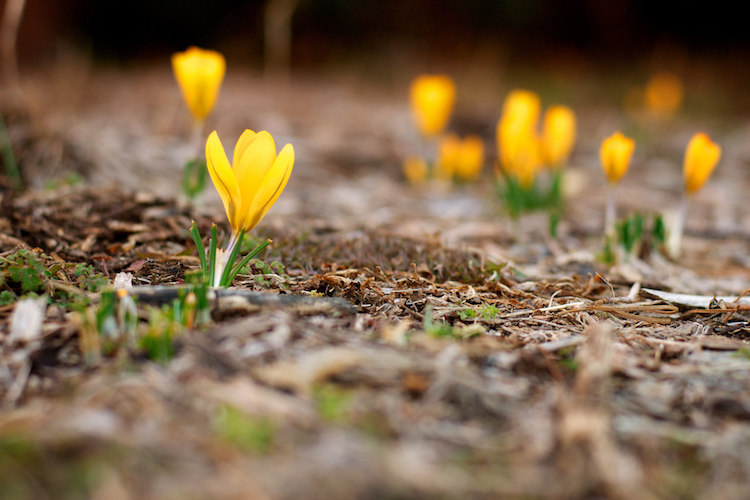
50mm, f/1.8, 1/500 second, ISO 400

50mm, f/1.8, 1/500 second, ISO 400

2. Bokeh and background blur can get out of hand

This is a bit subjective, and open to interpretation on the part of both the photographer and the viewer, but over the years I have found that shooting at the widest possible aperture in order to get the most possible bokeh, or background blur, things can go from artistic and interesting, to messy and incomprehensible very quickly. Bokeh is nice and can certainly be used to add an artistic flair to an image, but when overused, it can overpower the subject and ruin the picture. The following photo of a purple flower sticking up from a bed of grass shows this phenomenon in action.

ultra-wide-apertures-purple-flowers

The flowers are so removed from the background it’s almost like they are hovering in midair, and the effect is somewhat disconcerting, and borders on upsetting. Blowing out the background so much has removed any sense of place and context for the subject, and what’s left is a green and purple mess, that is neither artistically interesting, nor aesthetically pleasing.

3. Vignetting, chromatic aberration, and other optical oddities

Before I say too much on this subject perhaps I need to add a bit of a preface. Less expensive lenses can behave strangely when you shoot with them wide open, but more expensive glass is usually much better at this sort of thing. With that disclaimer out of the way, it’s important to understand some of the optical abnormalities such as vignetting, chromatic aberration, and softness, that often show up when your lens is opened up as far as it will go.

Vignetting is when the edges of your image look a bit darker than the rest of the picture, due to how light is manipulated inside your lens before it hits the image sensor inside your camera. It’s not too big of a problem on cameras with smaller sensors like APS-C or micro four thirds models, but it is certainly there, and even more so on full frame cameras.
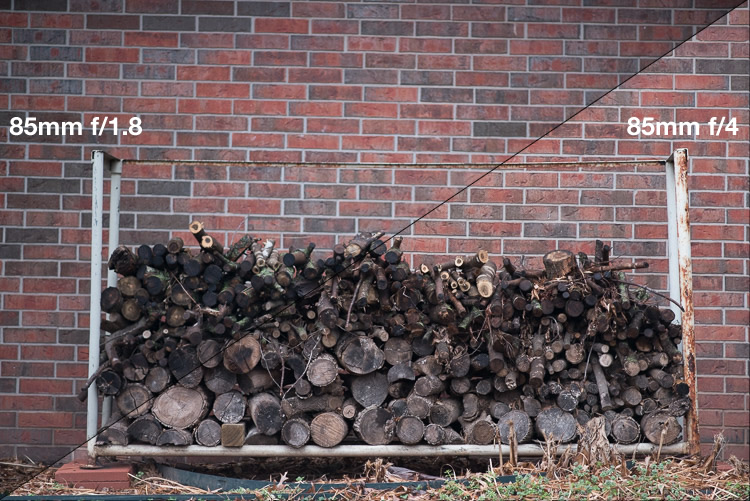
Vignetting can be a major issue when shooting wide open. Notice how the centers of both images are equally exposed but the corners are much darker at f/1.8.

Vignetting can be a major issue when shooting wide open. Notice how the centers of both images are equally exposed but the corners are much darker at f/1.8.

If you shoot in RAW, you can use Lightroom, Photoshop, or other such applications to mitigate most of the effects of vignetting if you want. Of course another solution is to use a smaller aperture, which tends to eliminate most vignetting altogether. Vignetting is not always a dealbreaker, and many photographers, myself included, actually prefer the subtle effects of a well-used vignette. You may find that you fall into this camp, in which case go right ahead and shoot at f/1.8 or f/1.4 to your heart’s content.

The other optical abnormality that often rears its ugly head at wide apertures is chromatic aberration, which might be a much bigger problem if you are not ready for it. This usually manifests itself as purple or green outlines or fringes, around places in your pictures with harsh contrast between dark and light. For example the image below was shot at f/1.8, and upon first glance, looks perfectly usable.

50mm, f/1.8, 1/3000 second, ISO 100

50mm, f/1.8, 1/3000 second, ISO 100. It looks Okay on first inspection, but all is not well up close.

Take a closer look and you will notice a big problem around the edges of most of the dry stalks of grass. Ugly green halos show up all over the place, and this is a direct result of shooting wide open, due to how the incoming light is transformed by the lens on its way to the camera. Here’s a 100% crop of the image next to the exact same picture shot at f/8.
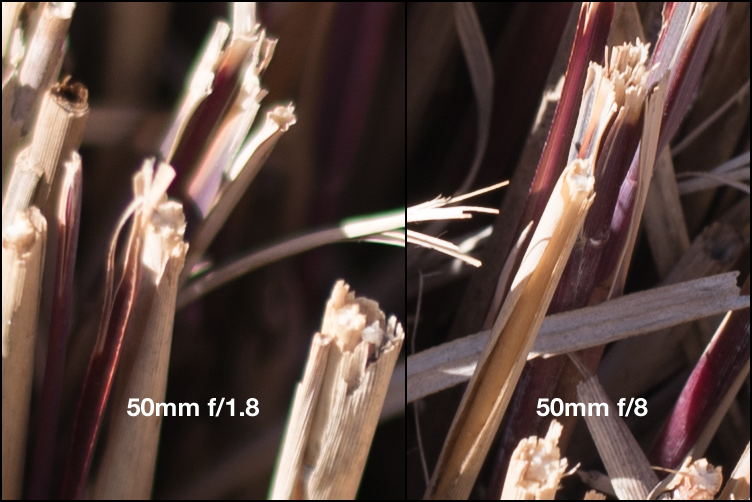
Green outlines abound on the left side while stopping down to f/8 eliminates them entirely.

Green outlines abound on the left side while stopping down to f/8 eliminates them entirely.

This optical imperfection can often be mitigated somewhat in Lightroom, by using its: Remove Chromatic Aberration option in the Develop panel. But even then the results are not ideal, and you will often be left with images that still show some green or purple artifacts, or lose a bit of color from other parts of your picture. Rather than mess around with fixing these issues in post-production, I like to just avoid it from the start and shoot at a slightly smaller aperture. It usually fixes the problem, and still leaves me with the same overall composition I would have had with a wider aperture.

The last weird characteristic of most lenses at their widest apertures might not be that big of a problem unless you are painstaking examining your pictures on a per-pixel basis, but it’s something you should know about nonetheless. Almost all lenses are a bit softer when used at their widest apertures, which can result in pictures that are not quite what you want. The picture below was shot at f/1.8 and looks decent upon first glance, but a closer inspection reveals a very different story.

50mm, f/1.8, 1/125 second, ISO 100

50mm, f/1.8, 1/125 second, ISO 100. Seems decent but once again a closer look reveals a much different story.

Zooming in on the exact center of the image, the point at which I locked focus, shows two very different pictures when this is put next to the very same picture shot at f/8.
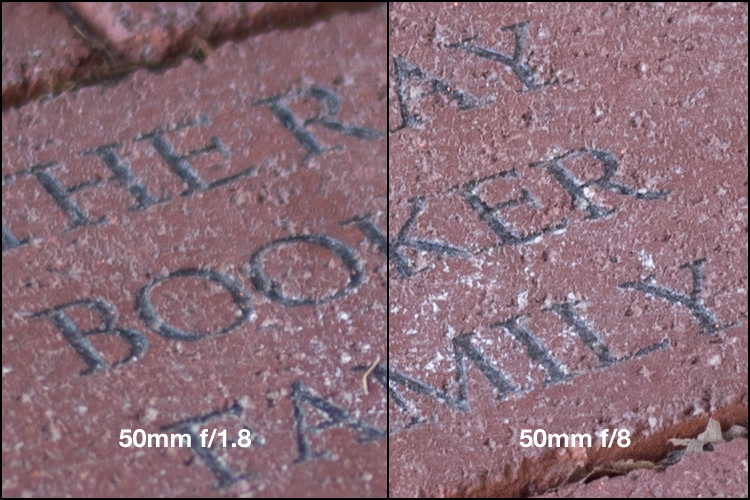
Focus was locked precisely on the letter "K" and yet the image on the left, shot at the widest aperture on my lens, is much less sharp.

Focus was locked precisely on the letter “K” and yet the image on the left, shot at the widest aperture on my lens, is much less sharp.

Once again this sharpness problem can be corrected to some degree in post-production, but my ideal solution is to avoid shooting at f/1.8 unless I specifically need the light-gathering ability, background blur, or other effects that such a wide aperture offers. Photography is all about tradeoffs, and while closing down the aperture on my lens resulted in a picture that was sharper, it also gave me an image that had much wider depth of field, which made the overall composition less pleasing.

4. Use wide apertures sparingly to maximize their impact

The Roman philosopher Marcus Tullius Cicero once said, “Never go to excess, but let moderation be your guide.” This nugget of wisdom is applicable not only to life in general, but also speaks volumes about how to approach photography. I like to treat the widest aperture on my lenses like flooring the gas pedal on my car. It’s fun, but if I went around driving full speed everywhere I went, it would quickly lose its appeal. (Though in my 1998 Toyota sedan I would probably lose a race to a skateboarder, but you get the point.)

Your lenses have wide apertures for a reason and they are meant to be used to get good images, particularly if you are aware of some of the quirks and idiosyncrasies of using them like this. If you like shooting wide open, and don’t mind some of the potential tradeoffs like a bit of vignetting and chromatic aberration, then go for it! However, my own personal rule of thumb is to only use f/1.8 when I really need it, otherwise the creamy backgrounds and bokeh balls start to lose a bit of their luster. When I’m doing a portrait session I keep f/1.8 in my back pocket for when I really need it, otherwise I shoot most pics at f/2.8, f/4, or smaller.
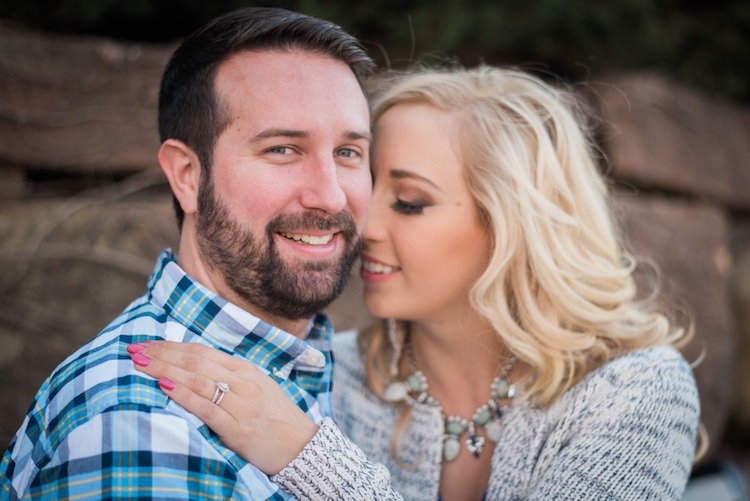
I took most photos of this couple at smaller apertures, which made this one at f/1.8 really stand out.

I took most photos of this couple at smaller apertures, which made this one at f/1.8 stand out among the rest.

After hearing this list of reasons to hold back a bit when shooting wide open, I almost feel like I should write a similar article about the benefits of taking photos at the largest aperture possible. I don’t want to give the impression that you should never use your equipment to the fullest of its capabilities, just that there are a few things to know before you go around taking all your pictures at the widest possible aperture your lenses can use. You might end up with a few problems, just like the ill-fated scientists of Jurassic Park, but hopefully yours won’t be quite as lethal, and along the way you could very well manage to take some incredible photos too.

I’d like to know what your thoughts are on all of this, and if you have any favorite shots taken at not-quite-wide apertures, please post them in the comments below!

googletag.cmd.push(function() {
tablet_slots.push( googletag.defineSlot( “/1005424/_dPSv4_tab-all-article-bottom_(300×250)”, [300, 250], “pb-ad-78623” ).addService( googletag.pubads() ) ); } );

googletag.cmd.push(function() {
mobile_slots.push( googletag.defineSlot( “/1005424/_dPSv4_mob-all-article-bottom_(300×250)”, [300, 250], “pb-ad-78158” ).addService( googletag.pubads() ) ); } );

The post Are You Obsessed with Shooting Wide Apertures – Here’s Why You Might Want to Hold Back by Simon Ringsmuth appeared first on Digital Photography School.


Digital Photography School

 
Comments Off on Are You Obsessed with Shooting Wide Apertures – Here’s Why You Might Want to Hold Back

Posted in Photography